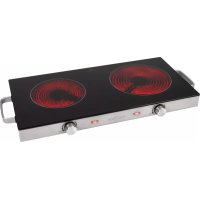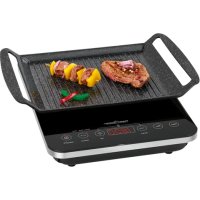
PCITG 1130 - Cooker PROFICOOK - Free user manual and instructions
Find the device manual for free PCITG 1130 PROFICOOK in PDF.



| Product type | Portable induction hob |
| Brand | ProfiCook |
| Model | PCITG 1130 |
| Power supply | 220-240 V~, 50 Hz |
| Maximum power | 2000 W |
| Net weight | Approximately 2.5 kg |
| Approximate dimensions | 36 x 29 x 6 cm (estimated) |
| Cooking surface | Ceramic glass |
| Number of cooking zones | 1 zone |
| Power settings | 10 levels (200 W - 2000 W) |
| Temperature settings | 10 levels (60 °C - 240 °C) |
| Timer | Adjustable delayed shut-off from 5 to 180 minutes |
| Safety functions | Child lock, automatic shut-off (120 min), pan detection, overheating protection |
| Control type | Touch with display and selector |
| Protection class | II |
| Care and cleaning | Clean with a damp cloth after cooling; do not immerse; do not use abrasives |
| Reparability | Contact a qualified technician; cable replacement by the manufacturer or customer service |
| Included accessories | None (power cord integrated) |
| Intended use | Domestic use, cooking food on induction hobs |
Frequently Asked Questions - PCITG 1130 PROFICOOK
User questions about PCITG 1130 PROFICOOK
0 question about this device. Answer the ones you know or ask your own.
Ask a new question about this device
Download the instructions for your Cooker in PDF format for free! Find your manual PCITG 1130 - PROFICOOK and take your electronic device back in hand. On this page are published all the documents necessary for the use of your device. PCITG 1130 by PROFICOOK.
USER MANUAL PCITG 1130 PROFICOOK
⚠ WAARSCHUWING: GEVAAR VOOR BRANDLETSELS!
Thank you for choosing our product. We hope you will enjoy using the appliance.
Symbols in these Instructions for Use
Important information for your safety is specially marked. It is essential to comply with these instructions in order to avoid accidents and prevent damage to the machine:

WARNING:
This warns you of dangers to your health and indicates possible injury risks.

CAUTION:
This refers to possible hazards to the machine or other objects.

NOTE: This highlights tips and information.
General Notes
Read the operating instructions carefully before putting the appliance into operation and keep the instructions including the warranty, the receipt and, if possible, the box with the internal packing. If you give this device to other people, please also pass on the operating instructions.
- The appliance is designed exclusively for private use and for the envisaged purpose. This appliance is not fit for commercial use.
- Do not use it outdoors. Keep it away from sources of heat, direct sunlight, humidity (never dip it into any liquid) and sharp edges. Do not use the appliance with wet hands. If the appliance is humid or wet, unplug it immediately.
- When cleaning or putting it away, switch off the appliance and always pull out the plug from the socket (pull the plug itself, not the lead) if the appliance is not being used and remove the attached accessories.
- Do not operate the machine without supervision. If you leave the room you should always turn the device off. Remove the plug from the socket.
- The device and the mains lead have to be checked regularly for signs of damage. If damage is found the device must not be used.
- Use only original spare parts.
- In order to ensure your children's safety, please keep all packaging (plastic bags, boxes, polystyrene etc.) out of their reach.

WARNING!
Don't let small children play with foils for danger of suffocation!
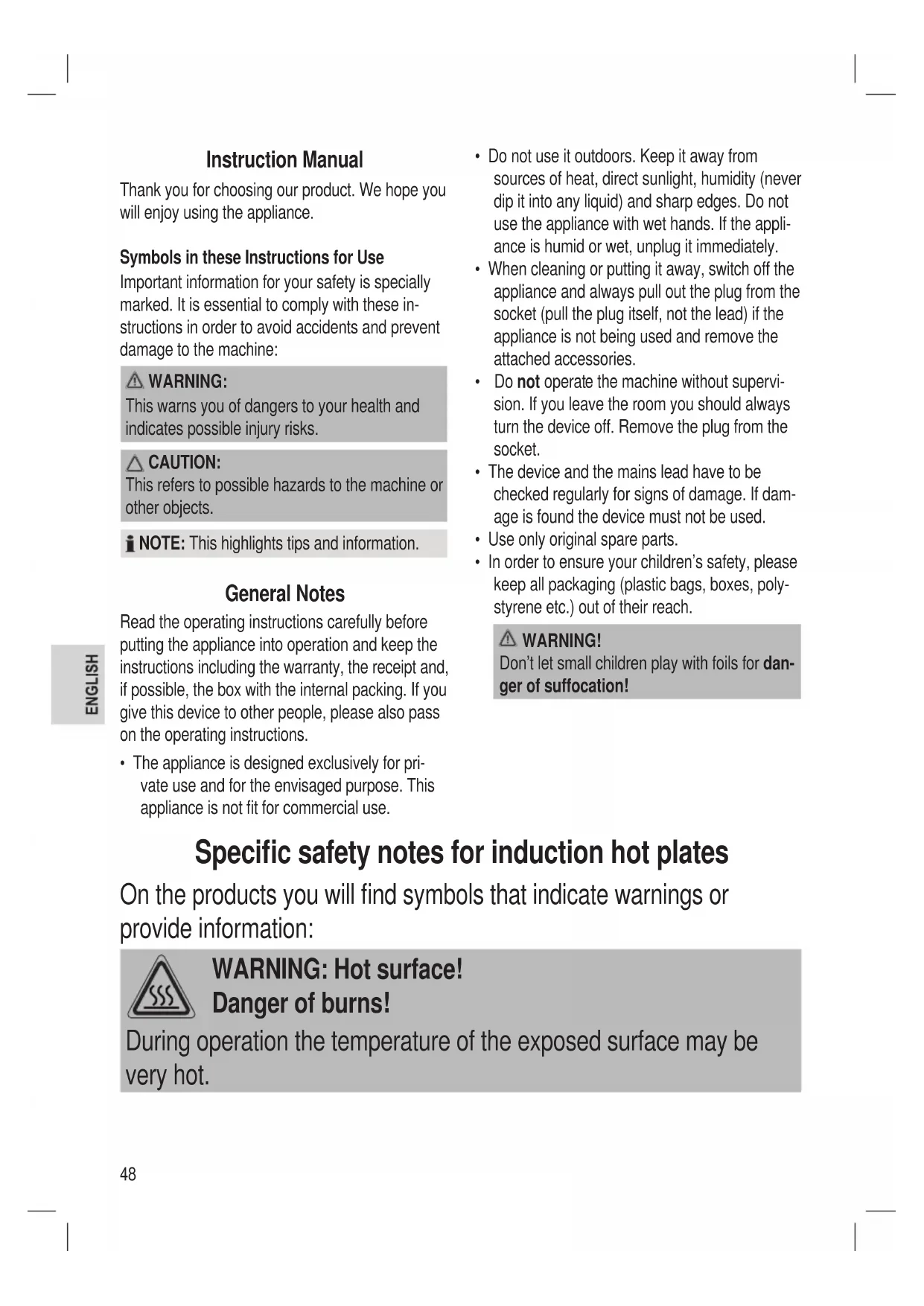
Specific safety notes for induction hot plates
On the products you will find symbols that indicate warnings or provide information:

WARNING: Hot surface!
Danger of burns!
During operation the temperature of the exposed surface may be very hot.

WARNING:
- Glass-ceramic surface! If the surface is damaged or has cracks the device must be switched off to avoid the hazard of electrical shocks.
- Induction heat! Metal objects as, e.g., knives, forks, spoons and pot lids should not be placed on the cooking zone as they may get hot.
- Hot surface! The induction cooker initially heats only the base of the cooking utensils used, not the cooking zone itself. However, because of the heat radiated during cooking, dangerously high temperatures may also occur at the cooking zone after the cooking cycle. Hazard of burns!
- Potential damage to your health! People wearing pacemakers must not use this cooker. You should keep a minimum distance of 60 cm to the appliance when it is in use.

CAUTION:
- To prevent damage, do not place any rough or uneven objects onto the glass ceramic surface.
- Avoid dropping hard or pointed utensils onto the glass ceramic surface.
- Do not place the appliance near objects which are sensitive to magnetic fields (e.g. radio, TV).
- Please do not operate the device with an external timer or a separate remote control system.
- Place the appliance on an even, moisture and heat-resistant surface.
- Use a heat resistant plate when placing on sensitive surfaces.
- Do not move the device when it is in operation.
- Due to the rising heat and vapours the device should not be operated under wall cupboards.
- Keep the unit at a safe distance from easily inflammable objects such as furniture, curtains, etc. (30 cm). Under no circumstances should the device be installed in cupboards.
- Keep a safety distance of 10 cm to the walls.
- Do not heat empty pots on the cooking zone as this may lead to dangerous overheating.
- Ventilation: Always keep the ventilation slots free from any obstructions and dirt.
- During and after use, ensure that the power cord does not come into contact with the hot surface of the appliance.
- This appliance can be used by children aged from 8 years and above and persons with reduced physical, sensory or mental capabilities or lack of experience and knowledge if they have been given supervision or instruction concerning use of the appliance in a safe way and understand the hazards involved.
• Children shall not play with the appliance. - Cleaning and user maintenance shall not be made by children unless they are older 8 years and supervised.
- Keep the appliance and its cord out of reach of children less than 8 years.
- Do not try to repair the appliance on your own. Always contact an authorized technician. To avoid the exposure to danger, always have faulty cable be replaced only by the manufacturer, by our customer service or by qualified person and with a cable of the same type.
- This appliance is not designed to be immersed in water during cleaning. Please follow the instructions provided in the chapter "Cleaning".
Intended Use
This appliance is intended for preparing foodstuffs in induction cookware.
It is intended for the use in private households and similar applications. The appliance is only to be used as described in the user manual. Do not use the appliance for any other purpose.
Any other use is not intended and can result in damages or personal injuries.
The manufacturer assumes no liability for damages caused by improper use.
Unpacking the appliance
- Remove the appliance from its packaging.
- Remove all packaging materials such as films, filler material, cable clips and carton.
- To prevent hazards, check the appliance for any transport damage.
i NOTE:
Production residue or dust may have collected on the appliance. We recommend cleaning the appliance according to chapter "Cleaning".
Location of Controls
1 Air outlet
2 Mains plug
3 Housing
4 Glass ceramic surface
5 Indicator lights POWER / TEMP. / TIME / ON/OFF
6 CN/OFF (on/standby button)
7 ← selector button
8 Setting the power / temperature / turn-off time
⊕ increase
⊖ reduce
9 Display
10 Direct selection of the highest or lowest power setting
Max highest
Min lowest
11 Air inlet
General information
Cooking with induction technology
When cooking with induction technology, heat is only generated by means of magnetic power, if a pot or pan with a magnetisable base is placed on a switched-on cooking zone. The induction cooker heats only the base of the cooking utensils used, not the cooking zone itself. Under the glass-ceramics surface, the induction coil is located. If the coil is supplied with electrical power a magnetic field develops generating whirls in the pot's base. This results in the heating of the base material. The induction process saves energy as heat is solely produced where it is needed.
What cooking utensils may I use?
For induction cooking plates cookware made from magnetisable material is needed. Today, cooking utensils appropriate for induction cooking usually bear a note saying “Suitable for induction hob” or similar.
But principally you may use any iron-based cooking utensils; to find out whether a pot or pan is suitable, i.e., magnetisable just try the following: Position the cookware. If several warning signals sound and if the message "E0" appears, the cookware is unsuitable.
i NOTE:
For safety reasons, the appliance will switch to standby mode after about 30 seconds.
Cooking utensils made of the following materials are not suitable for induction hobs:
Clay, glass or aluminium.
Do not use the following types of pots :
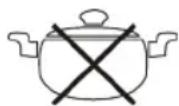
Pots with bended (convex/parabolic) bases.
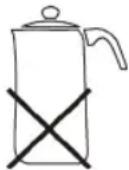
Pots with a base diameter of less than 12 cm.
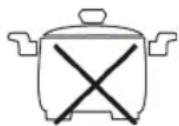
Pots standing on feet.
Electrical Connection
Connected load/wattage
The hob can take up an overall load of 2000 W. Because of this high connected load it is recommended to use a separate connection protected over a 16 A safety switch.

CAUTION: OVERLOAD!
Do not use extension cables or multiple sockets as the power consumption of this device is too high for these.
Connection
- Before inserting the mains plug into the socket check whether the voltage which you intend to use corresponds to that of the machine. Please see the label on the machine for details.
- Only connect the machine to a correctly installed safety socket.
Operation
- The appliance has a fine sensor. A light touch of the control panel with the finger is sufficient. Use the finger, not the tip of the finger.
• Each registered touch is confirmed by a beep. - In the event that the appliance does not react when you press the buttons, clean the control panel with a soft, dry cloth. Even a thin film of water can make the operation difficult.
- Ensure that the control panel is always clean and dry and that it is not covered by objects of any kind.
Standby mode
After you have connected the device's plug to the mains supply, the hub is in standby mode. A signal will sound.
- Put a suitable pot on the cooking zone.
- Press the ON/OFF button to start cooking. The indicator light above the ON/OFF button lights up. The indicator light for POWER above the SELECT button will flash.

NOTE:
You must now press the SELECT button within 60 seconds, or the hotplate will switch back to the operating mode of standby.
Selecting performance, shut-off time or temperature as the function
Press the SELECT button to select the control by power, shut-off time or temperature. The indicator lights POWER, TEMP. and TIME will show the selection.
Selecting the power or temperature of the hotplate
- Use the UP or DOWN buttons to select one of 10 power settings between 200 and 2000 W, or one of 10 temperature settings between 60°C und 240°C.
- The MAX or MIN buttons can be used to directly select the highest or the lowest power setting and temperature setting. The maximum or minimum power setting will appear on the display.

NOTE:
- The hotplate will always start at the sixth power setting with a temperature of 180^ or with 1200 W.
- The display shows the selected setting. The respective pilot lamp above the SELECT button will also light up.
- Please observe that the cooking behavior in the pots differs. It depends on the nature and the quality of the cooking vessels.
Enter Off Time
- Turn the appliance on and select any range or temperature.
- Press the SELECT button to select the control after the shut-off time. The display will show "0". The indicator light TIME above the SELECT button will flash.
- Set a turn-off time between 5 and 180 minutes by using the UP or the DOWN button.
i NOTE:
- Press the UP or DOWN buttons to set the time in increments of 5 minutes. The display will show the desired setting.
- Once you have set a time, the display will remain for a few seconds. The remaining time and the function that you have chosen beforehand are then shown alternately.
- You may change the previous turn-off time at any time. The other settings (POWER and TEMP.) will remain.
- After the set time has elapsed, the cooking time will automatically be turned off and a beep will sound. The appliance is in standby mode again.
- In order to cancel the shut-off time beforehand, set the time to "0". You may also turn the appliance off directly with the ON/OFF button.
Child safety
To safeguard against unwanted use, the appliance is equipped with a disable function.
- In order to activate the child lock, press the UP and DOWN buttons simultaneously. The display will show "L".
- Press the UP and DOWN buttons again at the same time to cancel the disable function.
i NOTE:
When the child lock is active, all the buttons except for ON/OFF are locked. The appliance can only be operated again after unlocking it.
Automatic shut-off
The hot plate turns off automatically after 120 minutes, if no input was given over the operator control panel during this time. This switching serves as security for you.
Switching off
- Press the ON/OFF button.
i NOTE:
-
The hot plate is reset from its operational state to standby mode. The fan may continue to run for a period of time.
• The indicator lights will go out. -
Pull the plug.
-
Let the device cool down, before you put it away.
Pan recognition
The device has a pot recognition function. It gives several warnings to indicate that the cookware has been removed. The message "E0" appears on the display. For safety reasons, the appliance will switch to standby mode after about 30 seconds. The fan may continue running. In this context, please pay attention to the following:
WARNING:
After use, the hot plate is to be switched off by means of its regulation and control devices ON/OFF button and not just by pan recognition.
WARNING: Hazard of burns!
Because of the heat radiated during cooking, dangerously high temperatures may occur at the cooking zone after the cooking cycle.
Cleaning

WARNING:
• Always remove the mains lead before cleaning!
- Wait until the machine has cooled down completely!
- Under no circumstances should you immerse the device in water for cleaning purposes. Otherwise this might result in an electric shock or fire.

CAUTION:
- Do not use a wire brush or any abrasive items.
- Do not use any acidic or abrasive detergents.
Glass ceramic Hob
- Clean the surface from food remains when it's still warm using a moist cloth or tissue.
- Wash the hob using a soft sponge and some water, then wipe dry with a soft cloth.
- Cleaning agent for glass-ceramics surfaces: In case of stubborn, baked-in remains, use suitable cleaning products available at special departments of department stores.
Housing
- Clean the housing after use using a slightly moist cloth.
- Make sure that no fluid matter gets into any of the openings of the housing. This might damage the device or result in an electric shock.
Storage
- Only store the appliance clean and after it has cooled down.
- During longer periods of non-use we recommend storing the appliance in its original packaging.
• Always store the appliance in a well-ventilated and dry place out of reach of children.

CAUTION: Risk of breakage!
Please note that the glass ceramic surface can be damaged by heavy or falling objects.
Troubleshooting
• Device does not function, no indication on the display.
Remedy:
Check the mains connection.
- Several warnings will sound after the appliance has been turned on and after the cooking function has been selected.
Possible cause:
No cookware or unsuitable cookware was placed onto the plate.

NOTE:
For safety reasons, the appliance will switch to standby mode after about 30 seconds.
Remedy:
Put a pot on the hob that is suitable for induction hobs.
- The hob suddenly switches off during operation.
Possible cause:
The thermal cut-off is activated.
Remedy:
Disconnect the appliance from mains power supply and let it cool down for approx. 20 minutes. Then start operating the device again.
Further cause:
The ventilation slots are obstructed.
Remedy:
Free the ventilation slots from any obstructions.
Further cause:
The hot plate was automatically switched off after 120 minutes.
Error messages
During operation the following error messages can be displayed:
| Message | |
| E0 The cookware is unsuitable. | |
| E01 | Temperature sensor IGBT has failed. |
| E02 Overheating. | |
| E03 | Problem with power supply. Check the power supply! |
Technical Data
Model: PC-ITG 1130
Power supply: 220-240 V\~, 50 Hz
Power consumption: 2000 W
Protection class:....II
Net weight: ....approx. 2,5 kg
The right to make technical and design modifications in the course of continuous product development remains reserved.
This device has been tested according to all relevant current CE guidelines, such as electromagnetic compatibility and low voltage directives, and has been constructed in accordance with the latest safety regulations.
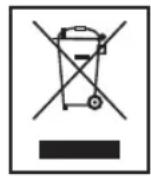
Disposal
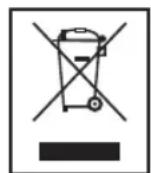
Meaning of the "Wheelie Bin" Symbol
Take care of our environment, do not dispose of electrical appliances via the household waste.
Dispose of obsolete or defective electrical appliances via municipal collection points.
Please help to avoid potential environmental and health impacts through improper waste disposal.
You contribute to recycling and other forms of utilization of old electric and electronic appliances.
Your municipality provides you with information about collecting points.
Instrukcja obsługi
CTC Clatronic Sp. z o.o
Ul. Brzeska 1
45-960 Opole
Usuwanie