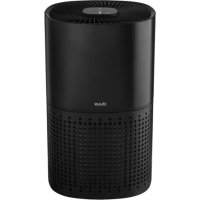
Bright - Air purifier DUUX - Free user manual and instructions
Find the device manual for free Bright DUUX in PDF.



| Product Type | Smart Air Purifier |
| Brand | Duux |
| Model | Bright |
| Weight | 3,5 kg |
| Power Supply | 220-240 V / 50 Hz |
| Power Consumption | 10-55 W |
| CADR (Clean Air Delivery Rate) | 200 m³/h |
| Recommended Room Size | Up to 27 m² |
| Noise Level | 32-54 dBA |
| Filter Type | HEPA H13 + activated carbon |
| Filter Lifespan | 4 to 6 months (depending on use) |
| Built-in Ionizer | Yes |
| PM2.5 Particle Sensor | Yes, with LED air quality indicator |
| Fan Modes | Auto, Low, Medium, High, Night |
| Timer | 2, 4, 6, 8 hours |
| Wi-Fi Connectivity | Yes, compatible with Duux app |
| Power Cord Length | 1,6 m |
| Pre-filter Maintenance | Vacuum cleaning with soft brush |
| Filter Replacement | Replacement indicator light |
| Safety | Automatic shut-off in case of overheating (detected by thermal protection) |
| Country of Manufacture | Not specified in the manual |
Frequently Asked Questions - Bright DUUX
User questions about Bright DUUX
0 question about this device. Answer the ones you know or ask your own.
Ask a new question about this device
Download the instructions for your Air purifier in PDF format for free! Find your manual Bright - DUUX and take your electronic device back in hand. On this page are published all the documents necessary for the use of your device. Bright by DUUX.
USER MANUAL Bright DUUX
Thank you for choosing Duux.
Were so glad you decided to read the instructions to your new DuPont air purifier! Many users actually dismiss instructions and seek to figure it out on their own. But studies show that people who read instructions will get up to speed more quickly and efficiently than those who poke around with trial and error.
At Dux we believe in the Importance of a comfortable and healthy living environment Enhancing your wellbeing by designing appealing, functional and effective products is the passion that drives us every day. With our range of innovative air treatment products we aim to provide you the best possible indoor air quality.
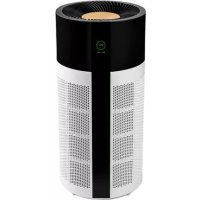
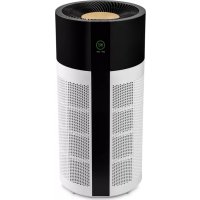
The powerful and elegant Brigant smart air purifier combines great style with high air cleaning capacity, with a CAGR (Clean Air Delivery Ratio) of 200m³/h. The Trics Duxx app allows you to control Bright with yoursmartphone or tablet, giving you peace of mind and continuous updates on your indoor air quality. Withthe convenient IFD indicator and control buttons you can also read the air quality and control the device without using a smartphone.
Read this manual carefully to get the most out of your Bright spray air purifier
Box contents
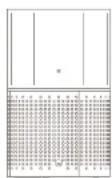
Bright
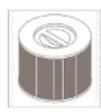
HEPA = Activated carbon filter
User guide
Table of contents
- Product overview 4
- Installation & use 5
- Functions 10
- Maintenance 13
- Technical specifications 15
- FAQ 16
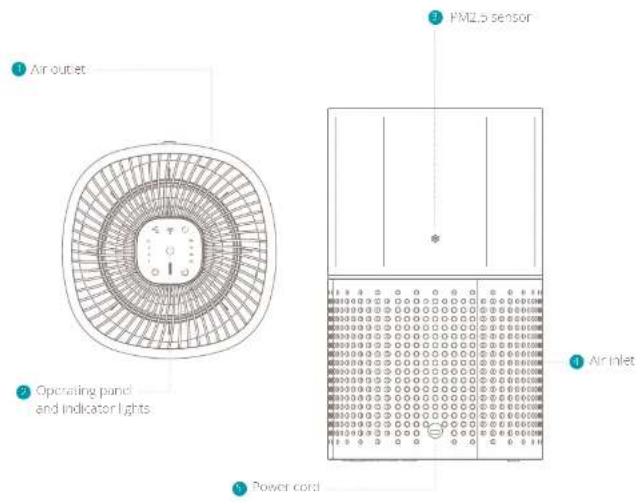
1. Product overview 2. Installation and use
A. Note: Please take notice of below instructions and the separately included warning sheet before using the product.
Attention
In order to prevent the possible damage to yourself or others, make sure to read the following safety notes:
Warning
In order to avoid accidents such as fire or electric shocks, please understand the following safety notes:
Do not pull the power cord during movement or storage. It may cause short circuit or core damage, and may further result in a fire or electric shock.
Do not damage the power cord or the socket.
Do not lift, refill, excessively distont, pull or twist the power cord. Do not place heavy objects on the power cord or extrude the power cord as it may cause electric shock or fire.
- When I is required to repol it this power cord or plug, please contact an electrical service center.
Do not use any power supply, universal socket or connection device that exceeds the rated value, only use 220V 50Hz AC power supply can
Bused: Expressing the rated value may cause overheating of the power cord or fire.
- Do not touch the power plug with wet hands, otherwise it may cause electric shocks.
- Do not place a finger or a metal object into gap such as an air intake or air curtain. Contact with the internal components may cause electric shock or injury.
Make sure the device does not get wet. Otherwise it may cause fire or electrical shock to short circuit.
Do not put in the following places.
- Unstable places. Otherwise the device may fall or tumble, which can cause injury or result in electric leakage, electric shock or fire.
Places like bathrooms which have high temperature, high humidity or which may get the device wet. This may cause electric leakage in the device and result in electronic shock or fire.
Places like kitchens where cooking fumes are exhaustified.
Places where oil or combustible gas is used and leakage may occur. A fire or smoke may occur due to a fire or the suction of hot gas by the device. - Any place where the air outlet directly faces animals or plants which may contaminate drying.
Do not use any solvent such as ethanol or diluents to clean the device and prevent contact with any aerosol insecticide. The air purifier may damage due to brevage or cause electric shock or fire due to short circuit.
Do not use the air purifier in a room with the incense type insecticide. The chemical respecu- may be accumulated in the device and endanger the health when released through the air purifier. Alice using insecticide, thoroughly ventilates the room first, before using the air purifier.
- Do not let any volatile substance or combustible object such as smoke or incense enter the device.
Do not sit on or lean against the device. This may cause personal injury or device damage.
Pay attention to children near the device.
Do not disassemble or refit the air purifier arbitrarily. An arbitrary dismantling or refitting may cause damage or fire. Please contact a qualified service center for repairs.
Attention
When one of the following situations occurs, please turn off the device, remove the power plug and contact a qualified service center to prevent electric shocks, sparks or smoke.
-
When the device stops working when moving the power card.
There is abnormal sputum or viremia during the operation. -
The product becomes abnormally hot and there is peculiar smell of burning.
- Please periodically clean the power plug. If there is dust or moist on the power plug, the Insulation part of the plug may damage, which may cause a fire. Unplug the power plug and use dry cloth to winch it clean.
If the device is not used for a long time, please unpin the power plug.
Before carrying out maintenance, always make sure to disconnect the power supply to prevent the device from suddenly rotating. - Please completely insert the plug into the socket. The device may overhear, and catch first if the plug is not completely or securely inserted. Do not use a damaged plug or socket.
- Please unplug the device by pulling the plug.
- Pulling the power cord may cause electric shocks, short circuit or fire
- When using the device near fuel gas or fire coal, please make sure to properly ventilate. Otherwise it may cause carbon monoxide poisoning. This device does not remove carbon monoxide.
When one of the following situations occurs, please turn off the device immediately:
- if one of the buttons or switches does not cooperate.
If the power card or the plug is abnormally hot
If there is a peculiar smell of burning or any
abnormal sound or vibration.
If the power cord of the device is damaged
The device is not suitable for use by disabled persons, persons with disturbance of perception, persons with dysogonia or children on their own. This is only allowed when there is supervisory to provide guidance on the spot, as assist the operation of the device.
Do not let any child operate his air purifier arbitrarily.
Attention
It is prohibited to place the device in the following places:
Places with direct sun light directly facing the device. It may cause deformation, deterioration, discoloration and fault.
Places close to communication devices such as TV and radio. This may cause distortion or noise. Always keep at least 1 meter distance to these devices and preferably use independent sockets or outlets.
For increased efficiency it is recommended to place the device in the following places:
- Place the device on a stable surface, aiming at airborne dust indoors such as nook. Because pollen and dust easily fall nearby the floor, it is
recommended to place the product onto the flat surface in the room.
In order to effectively circulate the air in the room, please position the product according to the following requirements:
To prepare including the air inits and nuclei, please place the device at least 50cm clear from walls, furniture, curtains, etc.
Use
Do not place any object on top of the device; otherwise it may cause operation error or fault. Keep away from magnets and heavy metal.
when using the device in the same place for long time, the surrounding walls and floors may become contaminated. when carrying out maintenance for the device, it is recommended to put the device in a different place.
Installation
installing the filter
1 Remove the bottom cover of the device.
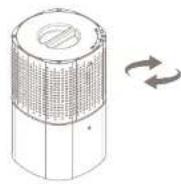
Remove the soil from the filter.
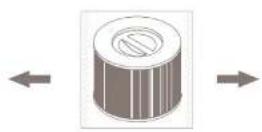
9 Take out the filter including the seal.
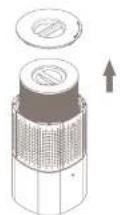
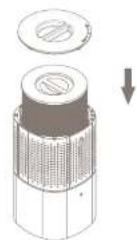
Place back the filter and re-apply the bottom cover.
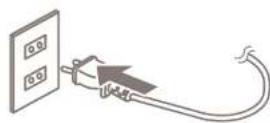
Insert the plug into a wall outlet and switch on the device with the power button.
A: Note: There should be a positive click noticeable when re-attaching the bottom cove.
Important: Only use genuine cover Dux replacement filters for optimal efficiency, proper functioning and full warranty coverage
3. Functions
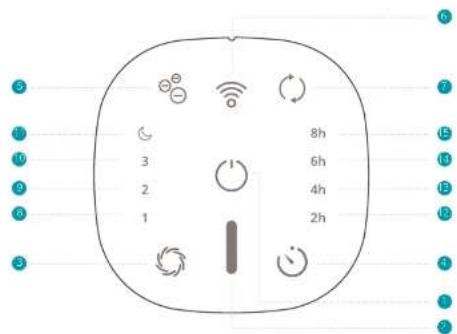
Control panel
Power
Air quality Indicator
Change speed / Auto mode
101mer.
ionizer mode
WiEmode
2.10.1.1.1
ow wind speed indicating
Green = Excellent/Good
Orange = Average
S_ OBC = 12 × CD × 3

Power
Press the button to switch on the device.

Change speed
Press the button to change the wind speed between LOW(1), MEDIUM(2), HIGH(3), NIGHT and AUTO (A). NIGHT speed is the most quiet and energy efficient mode and is recommended for areas with excellent air quality. LOW and MEDIUM speed is recommended for areas with good/average air quality while HIGH speed is recommended for areas with high partition velocity. In AUTO mode, visible when only lights up, the speed will change automatically according to the air quality measured with the PM2.5 particle sensor. The actual air quality can be derived from the color indicator on the display or app.

Timer
Press the button to activate a timer. Every press will increase the time in the following order: 1h > 2h > 4h > 8h > 0h .

Reset filter
When the Indicator starts illuminating its time to replace your filter. After you've repaired your filter, press and hold the button for 3 seconds to reset the filter lifespan and the indicator will turn off.

WIFI mode
Press and hold the button until you hear a feedback sound to enable WIH mode. The indicator will start flashing which means it's ready to pair with a smartphone or tablet. After a connection has been established, the indicator will become solid. To reset the WIH mode, press and hold the button for 10 seconds.
WIFI and APP operation
Scan be ow OR code to download the DubuX APP or search DubuX APP in the App Store or Google Play Store to start the procedure to download the APP. Once Installed, enter your email address and complete the registration.


APPSTOREPEAYSTORE
Connect to WIFI
Once registered, click "add duplicate device" on the main screen or use the "F" button in the top right corner to add a new device.
Search for "Bright" and press to continue. Connect to your preferred WiFi network and enter the corresponding password.
Follow the instructions in the app to complete the pairing process.
Filter
The HPLA filter cleans the air from smaler mridles. The activated carbon filter removes harmful gases and toxics such as smoke, chemicals, VOCs and bacteria.
PM2.5 sensor
The pollution degree of the air is sensed by the sensor, and the pollution condition is displayed by means of the indicator light of air pollution degree. In the AUTO speed mode, the device automatically selects the optimal speed according to the pollution degree. Detected pollutants: PM2.5, dust, pollen, mold, pet dander. PM2.5 is measured in microgram per cubic meter. The actual measured value can be viewed in the Duxi App.
lonizer
This device comes with a built-in lonizer. The lonizer released negative ions to capture tiny airborne particles and pull them inside the filter. The lonizer is off by default and can be switched on by pressing the lonizer icon on the device or switching it on in the Duplex App.
Night mode
Once the device is set in night mode, the FDP indicators and display will automatically turn off after 10 minutes. Press any button to retrieve the controls and display.
4. Maintenance
A. Important: the sure to remove the power plug from the outer before carrying out maintenance.
A.Important:Do not take an increase the power plug or the device in water
A. Important: We recommend weekly maintenance for optimal efficiency.
Cleaning
Please use a soft dry cloth to wipe dress off the body. If the surface is so dirty, it is better to wipe it clear with a dampened cloth mixed with neutral detergent.
- Don't use gasoline, thinner and any others chemical substances as it will easy damage the surface.
Pre-filter
To remove large dust particles on the pre filter body use a vacuum cleaner with soft brush extension to gently clean the surface.
HEPA and activated carbon filter replacement
The filter replacement indicator will let you know when its time to replace your filter. The lifespan of
the filter depends on the air quality and usage of the device (approx 4-6 months) (art.no.DXPU106).
Note: Please dispose used items as non-criminally suitable for use.
Maintenance before storage
Switch of the device and remove the plug from the wall guide.
Cover the device with a plastic bag, and keep it in dry place. Always use it properly as placement in a hot or reverse manner may cause a leak to this device.
Spare parts
Spare parts and accessories can be requested at the point of purchase or at least by a tutor
The smart air purifier that breathes clean air.
5. Technical specifications
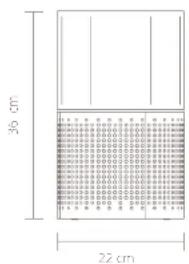
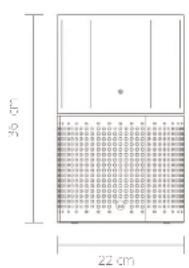
Weight: 3.5 kJ
Rated voltage/frequency: 220-240V/50Hz
Power consumption: 10-55w
Noise: 32-54 dBA
Effect area: up to 27m^2
Power cord length 1.6m
CAD 200m³/hr
H13
Main materials: ABS
Model no: DXPU06/07
The appearance and specification of the device may be changed without notice.
6. FAQ
Q. The wind speed suddenly changes. Is this normal?
A: AUTO mode is switched on and will adjust the wind speed according to the air quality. Please switch to manual mode for continuous speed operation.
Q. Am I able to wash and reuse the filter?
A: HPA filters are made out of lipids and randomly interconnected fibers that are not built to cont. up to any stress. Washing a the filter will destroy it in most cases. Even when the filter seems to still be intact to the naked eye, its structure has been rendered useless.
Q. Can I use this air purifier in a room beyond the effective area?
A: In theory this purifier can clean up to approx. 27m^2 . However, this is based on a single air change per hour (ACH) for Indoor living environments, the recommended amount of ACHs 24 times.
Q. What is the effective area per ACH?
A1ACH=80m;2ACH=40m;3ACH=27m;4 ACH=20m;5ACH=16m
Q. Does this air purifier have a built-in ionizer?
A Yes it releases negative ions into outgong filtered air ions are tiny particles that carry a positive or negative charge. These ions exist naturally around us in the air, water and ground. Both positive and negative ions are colorless, opacity and harmless. Negative ions help the air purification process by attaching themselves to very small airborne particles in the room.
Q. When should I turn on the air purifier?
A In general it is recommended that you run your air purifier when you are at home to clean the air. The unit may be run 24/7 if preferred. This air purifier will be more effective when windows and doors are closed.
Q. What does PM2.5 mean?
A: PM 2.5 is a microscopic solid particle which a diameter of less than 2.5 micrometer. Presence of these particles in large numbers is a serious concern for peoples' health. These particles are so tiny that they can directly invade into the lungs and health problems.
Disposal
Q. What does HEPA H13 stand for?
A. HEPA is an acronym of High Effluent Particulate Air. To qualify as true HEPA by government standards, an air filter must remove 99.97% of all particles greater than 0.5 micrometers from the air H15 is the highest classification of HEPA criteria.
Q. How long does the filter last?
A The lifespan of the filter depends on the air quality and usage of the device in practice. I will last between 4 and 6 months. The article number for replacement filters is DKPUJ06.
The European Directive 2012/19/CE on Waste Electronic and Electronic Equipment (WEEE), requires that pil household electrical appliances must not be disposed in the normal unsorted municipal waste. Old appliances must be collected separately in order to optimize the recovery and recycling of the materials they contain and reduce the impact on human health and the environment. This crossed out 'whichever fits' symbol on the product, remarks you of your obligation, that when you dispose of the appliance it must be separately collected. Consumers should contact their local authority or retailer for information concerning the correct disposal of their old appliance.

As can seen from the sologewy situations, zeh vormotet, zeit hat apparent an onenreillieit.
Haal de filter incluseafolding erult
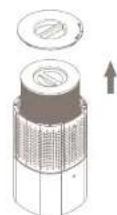
Plais de filer, crug ci pians de kap man che achseriant wee terug.
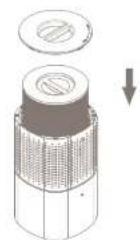
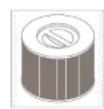
- the HPLA + filter & churbon acilic
Manuel dutilisation
Table des matières
I test interest in the place: Happen children los endroits. Solvants
CADR (cleibit dair propre)
200m³/h

Casse TLPA
H13

Matériaux principal
AB5

N° de moècle
DXPU06/07
L'apparence et les
caracteristiques
techniques de
I'appareilpeuvent
etre modifiées sans
preva
6. FAQ
Simplified EU declaration of conformity
Hereby, Duix declares that this environmental control radio equipment is in compliance with Directive 2014/53/EU. The full text of the EU Declaration on Conformity is available at the following Internet address: www.duix.com/doc
Designed in The Netherlands by Duux BV. Made in P.R.C. Duux BV, P.O. Box 145, 5400 AC Uden Netherlands, www.duux.com
© 2021 Duux. All rights reserved.
DUUX® is a trademark of Duux BV,
registered in the EU and other countries.
The brand cited belongs exclusively to the respective owners.
Specifications are subject to modification without notice.
- Thank you for choosing Duux.
- Box contents
- Table of contents
- Product overview 2. Installation and use
- Attention
- Warning
- Use
- Installation
- Functions
- Control panel
- Power
- Change speed
- Timer
- Reset filter
- WIFI mode
- WIFI and APP operation
- Connect to WIFI
- Filter
- PM2.5 sensor
- lonizer
- Night mode
- Maintenance
- Cleaning
- Pre-filter
- HEPA and activated carbon filter replacement
- Maintenance before storage
- Spare parts
- The smart air purifier that breathes clean air.
- Technical specifications
- FAQ
- The wind speed suddenly changes. Is this normal?
- Am I able to wash and reuse the filter?
- Can I use this air purifier in a room beyond the effective area?
- What is the effective area per ACH?
- Does this air purifier have a built-in ionizer?
- When should I turn on the air purifier?
- What does PM2.5 mean?
- Disposal
- What does HEPA H13 stand for?
- How long does the filter last?
- Table des matières
- Simplified EU declaration of conformity
Brand : DUUX
Model : Bright
Category : Air purifier