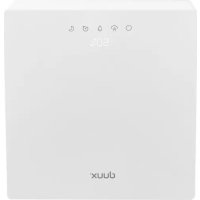
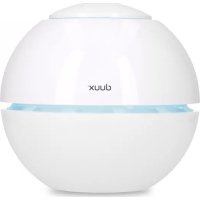
Motion DXAW03 - Air purifier DUUX - Free user manual and instructions
Find the device manual for free Motion DXAW03 DUUX in PDF.



| Product type | Air purifier with evaporative humidifier function |
| Brand | Duux |
| Model | Motion DXAW03 |
| Weight | 5.8 kg |
| Power consumption | 15 W |
| Filter type | Activated carbon filter + silver ion cartridge |
| Number of speeds | 3 (Low, Medium, High) + Night mode |
| Timer | 1 to 12 hours |
| Hygrostat range | 40% to 70% relative humidity + continuous mode |
| Humidification type | Natural evaporation (no visible mist) |
| Display | Matrix LED for ambient humidity and settings |
| Night mode | Noise reduction, dimmed display |
| Dry running protection | Yes, automatic shut-off if tank empty |
| Activated carbon filter maintenance | Monthly vacuum cleaning; replace every 3600 hours (approx. 1 year) |
| Water tank maintenance | Replace water daily; clean with a damp cloth |
| Disc maintenance | Clean with provided brush (do not put in dishwasher) |
| Silver ion cartridge replacement | Every 6 months (ref. DXAWCO) |
| Activated carbon filter replacement | Ref. DIAXW+O3 (approx. once a year) |
| Included accessories | Cleaning brush for discs |
| Power supply | Mains (AC plug) |
| Repairability | Spare parts available from point of sale |
Frequently Asked Questions - Motion DXAW03 DUUX
User questions about Motion DXAW03 DUUX
0 question about this device. Answer the ones you know or ask your own.
Ask a new question about this device
Download the instructions for your Air purifier in PDF format for free! Find your manual Motion DXAW03 - DUUX and take your electronic device back in hand. On this page are published all the documents necessary for the use of your device. Motion DXAW03 by DUUX.
USER MANUAL Motion DXAW03 DUUX
Thank you for choosing Duux.
Were so glad you decided to read the instructions to your new Dux air vehicle! Many users naturallydismiss instructions and seek to figure it out on their own. But studies show that people who read instructions will get up to speed more quickly and efficiency than those who ooke around with trials and
At Duix we believe in the importance of a comfortable and healthy living environment . Enhancing your well-being by designing appealing , functional and effective products is the passion that drives us every day. With our range of innovative air treatment products we aim to provide you the best possible indoor air quality
Breathe deeply the Dux Manen air washer ensures a healthy and pleasant indoor climate! Visually, thanks to its modern and simple design, it fits into every living and office landscape. Through its whisper-科普 operation and the right mode, you can also keep it in operation white your sleep. Allergy sufferers in particular can breathe a sigh of relief, because the air purifier removes pollen from the air all year round. The environment and this packable book are also kept in minutes only water is needed for the operation, therefore there are no consequential costs.
Read this manual carefully to get the most out of your Motor Air Washer
Table of contents
- Product overview 4
- Installation & use 5
- Functions 9
- Maintenance 13
-
Technical specifications 15
-
FAQ 16
1. Product overview 2. Installation and use
A. Note: Please take notice of below instructions and the separately included warning sheet before using the product
Installation
This appliance can be used by children aged from 8 years and above and persons with reduced physical, sensory or mental capabilities or lack of experience and knowledge. If they have been given supervision or instruction concerning use of the appliance in a safe way and understand the hazards involved, Children should not play with the appliance.
Children of less than 3 years should be kept away (unless continuously supervised).
If the power cord is damaged, it must be replaced by this manufacturer, its service agent or similarly qualified persons in order to avoid a hazard. With any indication of malfunction, contact service center remains. Please attempt to disassemble the product or replace faulty parts with unauthorized components because it will damage the unit.
- Do not touch the plug or product with wet hands. It may cause electric shocks.
Do not stick metal or any other object into the air outlets, because it will cause short circuit that may damage the device.
. Do not use pesticide or other formamide sprayaround the produces as it will stow the device
Do not face the air outlet towards infants and young children as it may affect their health.
- No problem the cord when unpinning the power plug, because it will damage the cord or cause short circuit.
- Make sure there are no non-standard items in the cord, and the plug is absolutely plugged in. Otherwise it will cause short circuit.
- When there is a manual smell or manual sound from the device, immediately stop operating the device and unplug the plug from the wall outlet.
No more! The power trim or pair any heavy object on it, because it can cause snout circuit.
Use
Water in the water tank should not exceed the max. level indicator and should not become below the lowest water level indicator when using humidifying function.
In case the product has been tipped over and there may be water inside the unit, unplag and turn on after drying in the air for 24 hours.
- Power off the device and unplugging the power core when not using it for a long time.
- Check the voltage on the equipment label before use.
- Remove the device to sockets that
correspond to the voltage of the device. If you are unsure whether your connections meet the requirements, consult an electrician or your electricity supplier.
- Do not lift this device when water, tank is full of water, or it will overflow or spill.
- Only after taking out but remaining water in the water tank you may fill in the pressure.
- Always lift the device with the handles on the side.
- Never carry with the water tank handle.
Installing the device
Unpack the device and remove the packing materials from the unit. Store the packing immediately for possible future transportation
- Fug the power cord in a wall outlet. The LED matrix display will activate for 2 seconds and you will hear a beep sound.
Press the power button on switch on the device.
Filling the water tank
Note: Always remove the plug when filling the water tank. Preferably use clean top or distilled water to prevent bacteria and scale inside the water tank.
Please add water to water tank before using this device according to the steps below:
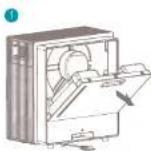
1 Remove the power plug and take out the water leak by pulling the handle on the back side.
Fill the water tank with sea water.
Place back the water tank until you hear a click feedback
You may now switch on the device.
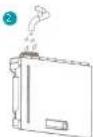
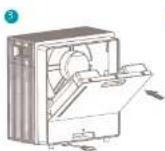
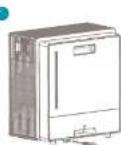
Note: When using the device for the first time, the water may have a slight smell and discoloration. This is harmful and not harmful for your teeth.
3. Functions
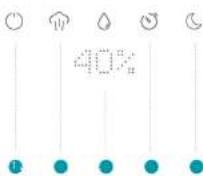
Control panel
Punee
Humidity outfall / when speed (high, medium, low, weak)
HepesatP070%)
Tirr (1-12H)
Night mode
Display notifications
HI-welcunm nceagc
OFF-goodbye message
SL - slow humidity output / gain speed
LO-low humidity output/ wind speed
MI-1000H. humidity outo/ wind speed
HI high humidity output/ wind speed
Lo/NO! - Empty water line:
1h-Timer setting(12h)
ZZNight mode on
ZZ- Night mode off
40%-70%-Hygrostat setting
48% Ambient Humidity
()Power
Touch the button to switch on the device. After turning on the device, the LLD matrix display will fight up for 1 second and shows "Hi" for 2 seconds after which it will display the current status followed by the ambient humidity. When you turn on the device for the first time, it will activate medium wind speed and turn to low wind speed after 3 seconds. The humidification setting will remain active. Touch the POWER button again to put the device in stand by followed by a confirmation step. The LLD matrix will show "OFF" and turn off the device in 2 seconds.
Humidity output/ wind speed
When you turn on the device for the first time, it will activate medium wind speed. Touch this button to switch between wind speeds. The LED matrix display will show the corresponding wind speed in SI (slown), LO (low), MI (medium) and HI (high).
Hygrostat
Touch this button to set the sacred ambient humidity. When you turn on the device for the first time, the continuous mode will be activated. You
can set the hygrosal in the range between 40% and 70%. With every touch it will increase with 10% (in the following order: 40% > 50% > 60% > 70% > CC (continuous). Using continuous mode will decrease the hygrosal and the device will run at continuous speed. When the hygrosat is set above the actual humidity, the device will operate in high speed until the measured humidity has been reached. When the hygrosat is set below the actual humidity, the device will not humidity. After setting the hygrosat, the display will show the ambient humidity.
Timer
Press the button to activate the timer setting. With every touch of the timer will increase with one hour in the following sequence: 1h > 2h > 3h > 4h >5h > 6h > 7h > 8h > 9h > 10h > 11h > 12h >60h (ref). Once this timer is activated, he dawce will automatically shut down after the set timer has been completed.
Night mode
Press the button to activate night mode. Once pressed, the LLD matrix display will show "zzZ" for 5 seconds. In night mode, all buttons are disabled except the night mode and power button. The device will operate in SL (talig) speed mode.
Press the button again in machine mode. The LED matrix display will show "222" and go back into normal operation mode according to the hygrostat setting.
Dry run protection
After turning on the switch it will cross for 1 second if there is sufficient water remaining in the water tank. In case of lack of water, the device will activate dry run protection mode and the motor will stop working. The LED matrix diolay will show "NOI" and "F0" alternating every second. In this mode, all buttons are disabled except the power button. Please turn off the device, fill the water tank and press the power button to switch on the device again.
A Note: it may spie a couple of seconds before the water from the water tank fills up the water tray. You will have a water shipping shant, which is normal. Once the device has recognized the water tray is filled, it will start operating.
4. Maintenance
A Important: Be sure to remove the power plug from the current before carrying out maintenance.
A. Important: Do not look at increase the power or the device in water.
Important: We recommend daily mentholone in prevent the growth of bacteria and scale inside the worms rack.
Water replacement
As this is cleaned in the water tray, it will become dirty over time. That's why we recommend replacing this water in the water tank every day.
Cleaning
Please use soft cloth to wipe the dust on the body. If the surface is too dirty, it is better to wipe it clear with a dampened cloth mixed with neutral detergent.
Don't use gasoline, tinner and any fuels chemical substances as it will damage the surface Never clean with boiled water or put in
Carbon filter
There is too much dust on the carbon filter, may influence the air washer efficiency. We recommend cleaning the filter every month
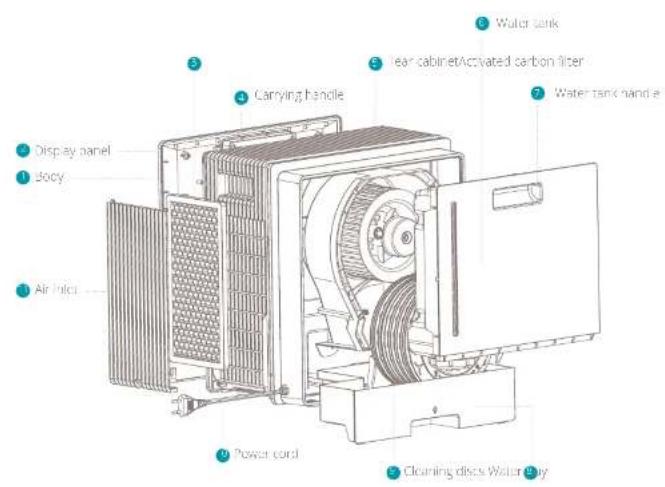
Remove the side outlet and take out the common filter.
Use a vacuum cleaner with soft brush extension to clean the cotton filter Never use liquid cleaner or water to clean
The carbon filter lifespan 3600 hours (approx. 1 year). Please check duxlux.com for replacement carton filters (fit no., DAXFW03).
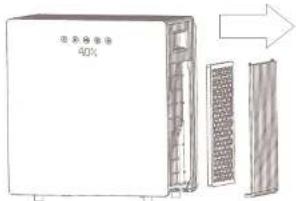
Water tank & Water tray
Pull out the grower plug and take out the water tray and water tank. Use a dry or damped cloth to wipe the dirt and rinse with water to clean.
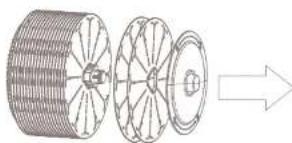
Discs
Pull out the power plug and take on water tank. Then you are able to remove the water tray.
Takou, the disc assembly and remove this disk one by one like below picture. The total amount of disks is 20 pcs.
Use this supplied hirsuP to wash clean of tins and dry in the air.
A. Note: We do not recommend cleaning the discs in a dishwasher.
Installation after maintenance
Place back the carbon filter, air filter, switch tray, discs, water tank one by one and make sure to install them correctly and in this sequence. Switch on the device to check if the device is operating normally.
Spare parts
Square profit and accessories can be requested at the point in purchase or final distribution.
The supreme 2-in-1 indoor climate controller.
5. Technical specifications
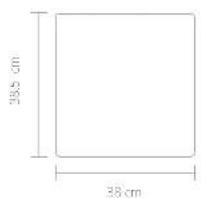
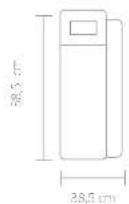

W
5.8kg

Power consumption
15W

Water tank capacity:
4L

Effective areas
40m²

Mist outpurt
250ml/h

Max. operation time:
12n

Powercoro length
1.8m

Mathematics
ABS,PP

Mode no.
DXAW03
The appearance:
and specification
the device may be
Changed without
NC
6. FAQ
Q. How often should I replace my filter? A. The actionnel carbon filter should be replaced after 2600 hours (approx. 1 year). The silicon cartridges need to be replaced after months.
Q. The device shows "Hill" and followed by Lo / NO! What's wrong?
A. Water supply is needed. Please supply water by filling one water tank.
Q. Can I clean the disk filters in the dishwasher?
A: We do not recommend cleaning the discs in a dishwasher.
Q. I don't see any mist coming out of the device, even when the power is connected.
A. This device humidifies using evaporation.
Evaporative types of humicifiers humanly without generating a mist hence there will be no visible mist.
Q. The device doesn't seem to humidify. What's wrong?
A. Please check if the hygienist setting is above the actual humidity. Otherwise the device will not humidily.
Q. The air smells strange. What can I do?
A-Have you changed the water?Please repate with fresh water every day.
Is the filter dirty? Please see chapter 4 (Maintenance).
Notes
2
hows deow maniflcng good roor enmert in the Maton haininiger to hui
Inhouds opgave
- Proiectovercht 18
- Installable engcana 19
- Functions 21
- Onceroid 24
- Technische specifications 27
6.Veigestckvogren 28
1. Productoverzicht
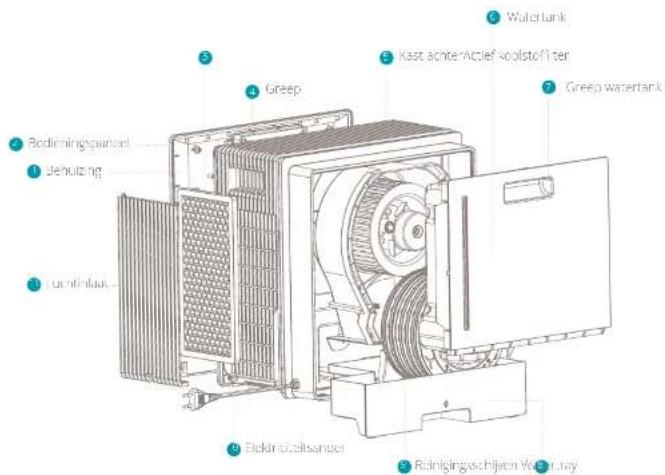
18
Inhaust water tank 4L

Lifevecr mter 40m²

Nevelitsoot 250ml/u

Macgebralksd. 12u

Lengestroomkabel 1,8m

Homemade ABS, PP

Modem: DXAW03
Hoo turlj
in de sreftionns
van het appoast
kuiimr vorder
voorvatlaande
kiennisgeving worder
gow, wied.
Capacitance-reservoir in-suit
4L

Surface eTective
40m²

Sorbie de brune:
250ml/u

Max. gebralksjd
12u

Langmuir condensation equation
ABS,PP

Materialux principalux
DXAW03
Apparatus
etles specifications
de haplojeuvent
eimmnes
préféris
6. FAQ
Consumption of energy
15W

Designed in The Netherlands bij Duux BV. Made in P.R.C. Duux BV, P.O. Box 145, 5400 AC Uden Netherlands, www.duux.com
© 2019 Duux. All rights reserved.
DUUX® is a trademark of Duux BV,
registered in the EU and other countries.
The brand cited belongs exclusively to the respective owners.
Specifications are subject to modification without notice.
- Thank you for choosing Duux.
- Table of contents
- Product overview 2. Installation and use
- Installation
- Use
- Installing the device
- Filling the water tank
- Functions
- Control panel
- Display notifications
- ()Power
- Humidity output/ wind speed
- Hygrostat
- Timer
- Night mode
- Dry run protection
- Maintenance
- Water replacement
- Cleaning
- Carbon filter
- Water tank & Water tray
- Discs
- Installation after maintenance
- Spare parts
- The supreme 2-in-1 indoor climate controller.
- Technical specifications
- FAQ
- Notes
- Inhouds opgave
- Productoverzicht
Brand : DUUX
Model : Motion DXAW03
Category : Air purifier