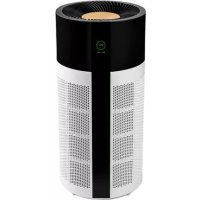
Tube Smart - Air purifier DUUX - Free user manual and instructions
Find the device manual for free Tube Smart DUUX in PDF.



| Product type | Air purifier |
| Brand | Duux |
| Model | Tube Smart |
| Weight | 8.5 kg |
| Voltage / frequency | 220-240V / 50Hz |
| Power consumption | 10-55 W |
| Noise level | 32-64 dBA |
| Maximum coverage area | Up to 75 m² |
| CADR (Clean Air Delivery Rate) | 550 m³/h |
| Filter type | HEPA H13 + activated carbon |
| Ionizer | Built-in |
| Connectivity | WiFi (Duux app) |
| Sensors | PM2.5 particles, ambient light |
| Speed modes | Low, Medium, High, Auto |
| Timer | 1h, 2h, 4h, 8h |
| Additional features | Night mode, filter replacement indicator, child lock |
| Maintenance | Clean pre-filter with vacuum, replace HEPA/activated carbon filter every 4-6 months |
| Safety | Automatic shut-off if cover is open, do not use with damaged cord |
| Spare parts | Available at duux.com |
Frequently Asked Questions - Tube Smart DUUX
User questions about Tube Smart DUUX
0 question about this device. Answer the ones you know or ask your own.
Ask a new question about this device
Download the instructions for your Air purifier in PDF format for free! Find your manual Tube Smart - DUUX and take your electronic device back in hand. On this page are published all the documents necessary for the use of your device. Tube Smart by DUUX.
USER MANUAL Tube Smart DUUX
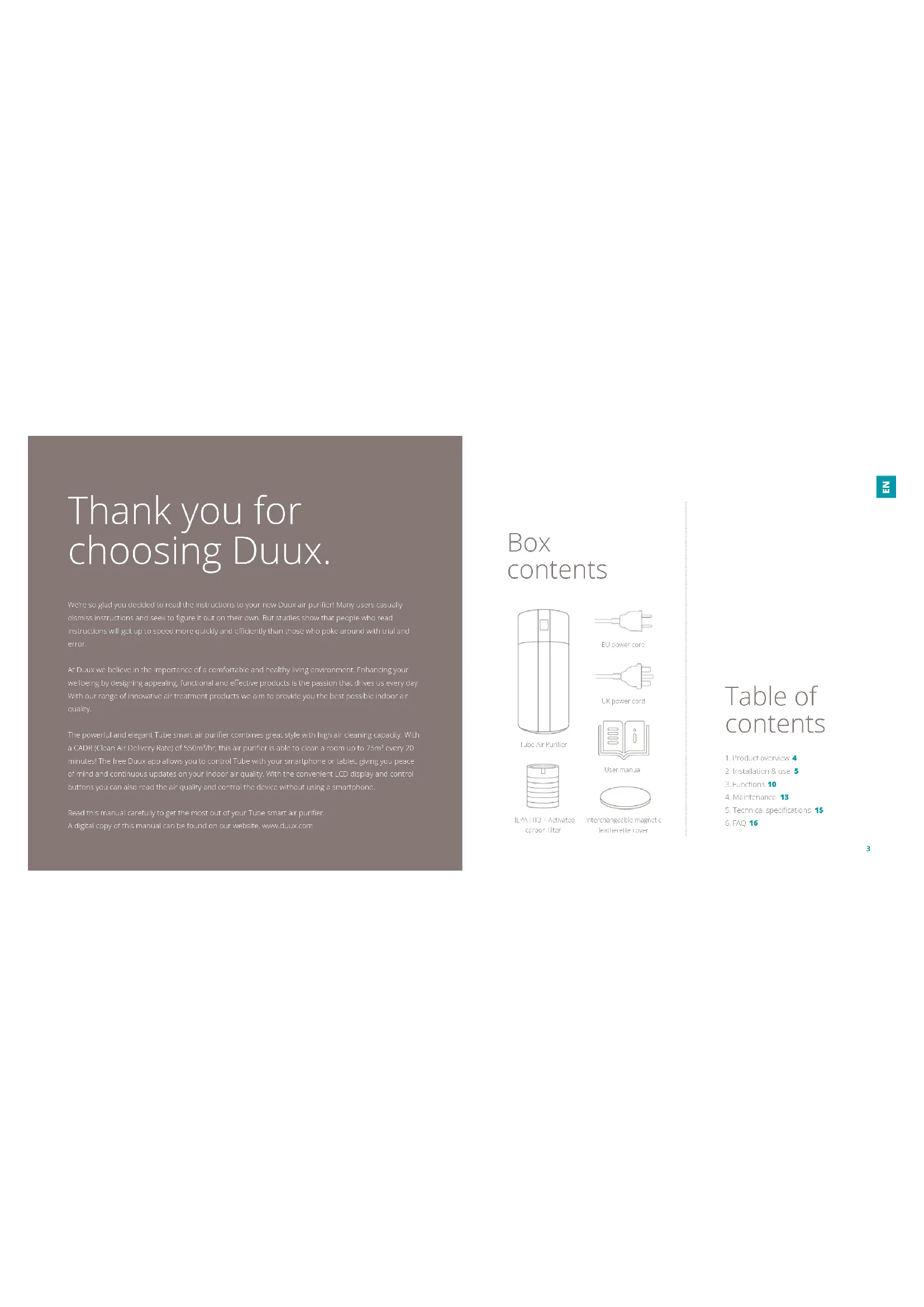
Thank you for choosing Duux.
Were so glad you decided to read the instructions to your new DuPont air purifier! Many users usually dismiss Instructions and seek to figure it out on their own. But studies show that people who read instruct ans will get up to speed more quickly and efficiently than those who poke around with trial and error.
At Dux we believe in the Importance of a comfortable and healthy living environment. Enhancing your wellbeing by designing appealing, functional and effective products is the passion that drives us every day. With our range of innovative air treatment products we aim to provide you the best possible indoor air quality.
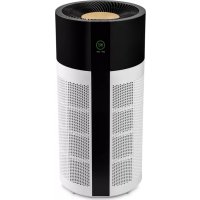
The powerful and elegant Tube smart air purifier combines great style with high air cleaning capacity With a CADR (Clean Air Delivery Rate) of 550ml/hr, this air purifier is able to clean a room up to 75㎡ every 20 minutes! The free Duxx app allows you to control Tube with your smartphone or tablet, giving you peaceof mind and continuous updates on your indoor air quality. With the convenient LCD display and controloutfits you can also read the air quality and control the device without using a smartphone.
Read this manual carefully to get the most out of your Tube smart air purifier. A digital copy of this manual can be found on our website, www.duox.com
Box contents
ube Air Purifier
LUPower cord

UK power cord

User manual

ICP/AT13 + Activated carbon filter

Interchangeable magnetic.
leatherite cover
Table of contents
1.Product overview 4
2. Installation & use 5
3. Functions 10
4. Maintenance 13
5. Technical specifications 15
6. FAQ 16
1. Product overview 2. Installation and use
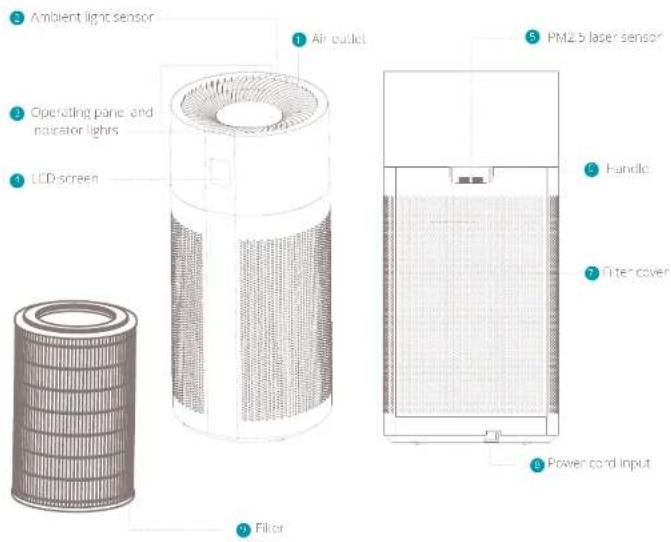
A. Note: Please take notice of below instructions and the separately included warning sheet before using the product.
A Important: Be sure to remove the power plug from the outlet before carrying out maintenance.
Attention
In order to assess the possible damage to you, tell or others, make sure to note the following safety notes:
Warning
in order to avoid accidents such as fire or electric shocks, please understand the following safety notes:
Do not pull the power cord during movement or storage. It may cause short circuit or cord damage, and may further result in a fire or electric shock.
Do not damage the power cord of the socket.
- Do not cut, refill, excessively distort, pull or twist the power cord; Do not place heavy objects on the power cord or extrude the power cord as it may cause electronic shock or fire.
- When I'm required to repair the power cord or plug, please contact an electrical service center.
Do not Use any power supply, universal-socket or connection device that exceeds the rated wind; only the 220V 50Hz AC power supply can be used. Exceeding the rated value may cause electrical risk of the power card or line.
- On not touch the power plug with wet hands,
- while there may be a loose electronic shocks.
Do not place a finger or a metal object into a gap such as air intake or air ducts. Contact with the internal components may cause electric shock or injury.
Make sure the device does not get wet. Otherwise it may cause fire or electric shock due to short circuit.
The appliance is not to be used by persons (including children) with reduced physical, sensory or mental capabilities, or lack of experience and knowledge, unless they have been given suspension or instruction.
Children being supervised not to play with the appliance
Do not put in the following places:
- Installations: Otherwise the device may fail or tumble, which can cause injury or result in electric leakage, electronic shock or fire.
- Placements like bathrooms which have hightemperature, high humidity or which may get into
device wet. This may cause electric leakage in the device and result in electric shock or fire.
Places like kitchens where cooking fumes are exhausted.
Places where oil or combustible gas is used and leakage may occur. A fire or smoke may occur due to a fire on the suction of hot gas by the device.
- Any place where the air is steered directly into, unities or plants which may cause air drying
Do not use any solvent such as mineral oil or petroleum to clean the device and prevent contact with any aerosol insecticides. The air purifier may damage due to breakage or cause electric shock or fire due to short circuit.
Do not use the air purifier in a room with the incinerate tyre insecticide. The chemical residue may be accumulated in the device and endanger the health when released through the air outlet. After using insecticide, thoroughly ventilate the room first before using the air purifier.
- Do not let any volatile substance or combustible object such as smoke or incense enter the device
- Do not sit on or run against the device. This may cause personal injury or device damage.
- Pay attention to children near the device.
- Do not dismantle or refit the air purter arbitrarily. Accurately dismantling or collecting may cause damage or noise. Please contact a qualified technician center for repairs.
Attention
When one of the following situations occurs, please turn off the device, remove the power plug and contract a qualified service center to prevent electric shocks, sparks or smoke.
- When the device stops working when moving the power cord.
There is abnormal sound or vibration during the ultrasound
The product becomes abnormally hot and there is peculiar anarmy of burning. - Please periodically clean the power plug. If there is dust or marks on the power plug, the installation part of the plug may damage, which may cause a fire. Unplug the power plug and use dry cloth to wipe it clean.
- if the device is not used for a long time, please unplug the power plug.
Before carrying out maintenance, always make sure to disconnect the power supply to prevent the device from suddenly starting. - Please completely insert the plug into the socket. The device may overheat and catch fire if the plug is not completely or securely inserted. Do not use a damaged plug or socket.
- Phase up/ plug the device by pulling the plug.
- Pulling the power cord may cause electric shocks, short circuit or fire.
- When using the device near fuel gas or fire coal, please make sure to properly ventilate. Otherwise
It may cause carbon monoxide poisoning. This device does not remove carbon monoxide.
When one of the following situations occurs, please turn off the device immediately:
- If one of the buttons or switches does not appear:
- If the power cord or the plug is abnormally hot
- If there is a peculiar smell of burning or any abnormal sound or vibration.
If the power cord of the device is damaged.
The device is not suitable for use by disabled persons, persons with disturbance of perception, persons with dysphagia or children on their own. This is only allowed when there is supervisor to provide guidance on the spot to assist the operation of the device.
Do not let any child operate the air purifier arbitrarily.
Attention
it is prohibited to place the device in the following places:
- Places with direct sun light directly facing the device. It may cause deformation, deterioration, discoloration and fault.
- Places close to communication devices such as TV and radio. This may cause distortion or noise.
Always keep at least 1 meter distance to these devices and preferably use independent sockets or outlets.
For increased efficiency it is recommended to place the video in the following picels:
Place the device on a stable surface, aiming at airborne dust indoors such as pollen. Because pollen and dust easily fall nearby the floor, it is recommended to place the product onto the flat surface in the room:
In order to effectively circulate the air in the room, please position the product according to the following requirements:
To prevent blocking the air vents and outlet, please place the device at least 50cm clear from walls, furniture, curtains, etc.
Use
Do not place any object on top of the device, otherwise it may cause operation error or fault. (Keeps away from magnets and heavy metal)
- When using the device in the same place for long time, the surrounding walls and floors may become contaminated. When carrying out maintenance for the device, it is recommended to put the device in a different place.
Installation
Installing the filter
1 Remove the back cover of the device.
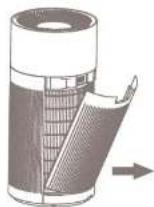
Take out the filter including the seal
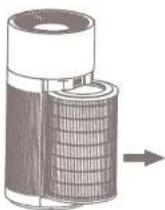
3 Remove the seal from the filter

Place back the filter and re-attach the back cover
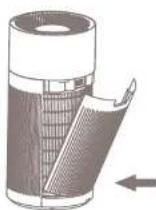
Insert the power plug into the back of the device

- insert the plug into a wall outlet and switch on the device with user power button.
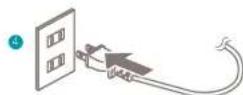
A Note: The black cover is closed with a magnetic attachment, so no need to press firmly. It will automatically attach when closing.
A. Important only use genuine phase replacement filters for optimal efficiency proper functioning and full warranty coverage.
3. Functions
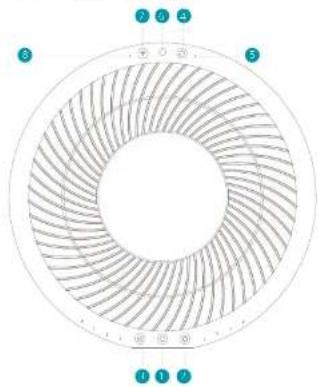
Control panel
1
Change speed
Times
Reset filter button
Filter replacement indicator
Amment light sensor
致同(深圳)
with indicatorlight
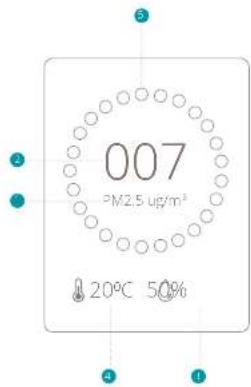
LCD display
PK25value
Air quality indication
1 Humidity
Temperature
AQL colour:
Green = Excellent/Good
O
200

Power
Press the button to switch on the device. The welcome screen will appear for 3 seconds and the monitoring screen will show.

Change speed
Press the button to change the wind speed between 1 GW (1), MEDIUM (2), HIGH (3) and AUTO (A). LOW speed is the most quiet and energy efficient mode and is recommended for areas with excellent air quality. MEDIUM speed is recommended for areas with good/average air quality while HIGH speed is recommended for areas with high pollution levels. In AUTO mode the speed will change automatically according to the air quality measured with the PM2.5 particle sensor. The actual air quality can be derived from colour indication code on display or app.

Timer
Press the button to activate a timer. Every press will increase the timer in the following order: 1h > 2h > 4h > 8h > 9h > 0h

Reset filter
When the Indicator Status Illuminating It's Time to replace your filter. After you've replaced your filter, press and Poling button for 3 seconds
to reset the filter lifespan indicator and theindicator will turn off .

WIFI mode
Press and hold the button until you hear a feedback sound to enable Wi-Fi mode. The indicator will start flashing which means its ready to pair with a smartphone or tablet. After a connection has been established, the indicator will become solid. To reset the Wi-Fi meter, press and hold the button for 10 seconds.
WiFi and APP operation
Scum below QR code to download the Dux APP or search DUX APP in the App Store or Google Play Store to start the procedure to download the APP. Once Installed, enter your email address and complete the registration.


APPSTOREPLAYSTORE
Connect to WiFi
100
Search for "Tube" and press to continue
Connect to your preferred WiFi network and enter the corresponding password.
Follow the Instructions in the app to complete the pairing process:
Ambient light sensor
The ambient light sensor will automatically adjust the brightness of the LCD screen according to the ambient light. No manual operation is required.
Filter
This HPA filter cleans the air from smalle.
bentles. The activated carbon filter removes
formal gauces and toxins such as smoke.
chemicals, VOCs and bacteria's
PM2.5 laser sensor
The pollution degree of the air is sensed by the sensor and the pollution condition is displayed by means of the indicator light of air pollution degree in the AUC-Speed mode, the device automatically selects the optimal speed according to the pollution degree. Sensed pollutants: PM2.5, dust, poller, mold, pot dander, PM2.5 is measured in microgram per cubic meter, shown on the display as μg/m3
Ionizer
This device comes with a built-in ionizer. The ionizer released negative ions to capture tiny airborne particles and pull them inside the filter. The ionizer is ON by default and can only be switched off by using a mobile device connected to the Wi-Fi mode.
Night mode
Once the device is set in auto mode, the I-FD indicators and display will automatically turn off after 10 minutes. Press any button to retrieve the controls and display.
4. Maintenance
A. Important: to sure to remove the power plug from the outer before carrying out maintenance.
A Important: Do not soak in water the power plug or the device to water.
A. Important: We recommend weekly maintenance for optimal efficiency.
Cleaning
Please use salt dry cloth to wipe dust off the body. If the surface is so dirty, it is better to wipe it clear with a dampened cloth mixed with neutral detergent.
- Don't use gasoline, thinner and any others chemical substances as it will easy damage the surface.
Pre-filter
To remove large dust particles on the pre-ster body use a vacuum cleaner with soft brush extension to gently clean the surface.
HEPA and activated carbon filter replacement
The filter replacement indicator will let you know when its time to replace your filter. The lifespan of
the filter depends on the air quality and usage of the device (approx 4-6 months (art no DXPJF08)
Note: Please dispose used items on non-terminable postage.
PM2.5 laser sensor
The PV2.5 laser sensor is situated inside the hand on the back side of the device. To remove dust from the skin, use a vacuum cleaner with soft brush extension to gently clean the sensor.
Maintenance before storage
Switch off the device and remove the plug from the wall插座:
Cover the device with a plastic bag, and keep in dry place. Always store it upright as placement in a flat or reverse manner may cause a fault to the device.
Spare parts
Spare parts and accessories are available on duixu comv spare parts or can be requested at the point of purchase or local distributor.
5. Technical specifications
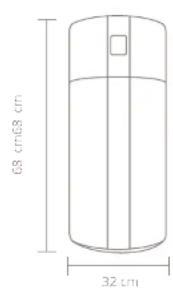
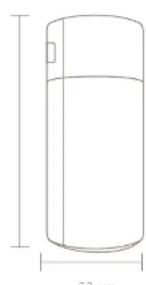

Weight
8.5 kg

Rated voltage/frequency:
220-240V/50Hz

Power consumption:
10-55w

Noise
32-64 dBA

Effect area:
up to 75m^2

Power cord length
1.8m

CAD
550m³/hr

HLFA class:
H13

Main materials:
ABS,PP

Model no:
DXPU03
The appearance
and specification of
the device may be
changed without
notice.
6. FAQ
Q. The device is plugged in but the display doesn't light up. What can I do?
A. Please check if the filter cover is closed properly. There is a safety sensor inside the cover that doesn't allow the device to run when the cover is open. Please check for a possible power failure.
Q. The wind speed suddenly changes, is this normal?
A:ALTO mode is switched on and will adjust the wind speed according to their air quality. Please switch to manual mode for continuous speed operation
Q. Am I able to wash and reuse the filter?
A. HPA filters are made out of loosely and randomly interaced fibers that are not built to stand up to any stress. Washing a the fiber will destroy it in most cases. Even when the filter seems to still be intact to the naked eye, its structure has been rendered useless.
Q. Can I use this air purifier in a room beyond the effective area?
A. In theory this purifier can clean up to approx. 220m^3 . However, this is less efficient on living air change per hour (ACH). For indoor living environments, this recommended amount of ACH's 2-4 times.
Q. What is the effective area per ACH?
A:1ACH223m²,2ACH=1.0m³;3ACH=73m²;4ACH55m²5ACH44m²
Q. Why is the WIFI indicator constantly blinking?
AOnce the WiF mode button is pressed, the device will search for a mobile device to pair with. In case pairing is failed, the indicator will remain blinking. To switch off the blinding indicator, press and hold the WiF button for 3 seconds.
Q. Does this air purifier have a built-in lonizer?
A. Yes. It releases negative ions into outgaz. filtered air ions are tiny particles that carry a positive or negative charge. These ions exist naturally around us in the air, water and ground. Both positive and negative ions are colorless, occeess and harmless. Negative ions help the air purification process by attaching themselves to very small airborne particles in the room.
Q. How long should I run the air purifier?
A. In general it is recommended that you run your air purifier when you are at home to clean the air. The unit may be run 24/7 if preferred. This air purifier will be more effective when windows
and doors are closed.
Q- What does PM2.5 mean?
A. HIV 25 is a microscopic solid particle with a diameter of less than 2.5 micrometer. Presence of these particles in large numbers is a serious concern for people's health. These particles are so tiny that they can directly invade into the lungs and cause cancer.
Q. What does HEPA H13 stand for?
A HEPA is an acronym of High Efficient Particulate Air To quality as true HEPA by government standards, an air filter must remove 99.97% of all particles greater than 0.3 micrometers from the air. H18 is the highest classification of HEPA filters.
Q. How long does the filter last?
A The lifespan of the filter depends on its air quality and usage of the device. In practice it will last between 4 and 6 months. The article number for replacement filters is DXPuF83.
Disposal
The European directive 2012/19/CE or Waste Electrical and Electronic Equipment (WEEE), requires that old household electrical appliances must not be disposed in the normal unsorbed municipal waste stream. On appliances must be collected separately in order to optimize the recovery and recycling of the materials they contain and reduce the impact on human health and the environment. The crossed out "whetted" symbol on the product reminds you of your obligation, that when you dispose of this appliance it must be separately collected. Consumers should contact their local authority or retailer for information concerning the correct disposal of their old appliance.

Notes/notities/les notes/notas/Notitzen
2
Remarka: We shall refer to these filters as analogous over the presheaf monomials.
Capteur laser PM2.5
A HEPA stein Avronym und stent for Hign Effcient Particulate Air. Lin grom&rofo quality ast true HEPA by government standards, an air filter must remove 99.97% of all particles greater than 0.3 micrometer from the air aeranmian.
Simplified EU declaration of conformity
Hereby, Duix declares that this environmental control radio equipment is in compliance with Directive 2014/53/EU. The full text of the EUI Declaration on Conformity is available at the following Internet address: www.duix.com/doc
Designed in The Netherlands bij Duux BV. Made in P.R.C. Duux BV, P.O. Box 145, 5400 AC Uden Netherlands, www.duux.com
© 2020 Duux. All rights reserved.
DUUX® is a trademark of Duux BV,
registered in the EU and other countries.
The brand cited belongs exclusively to the respective owners.
Specifications are subject to modification without notice.
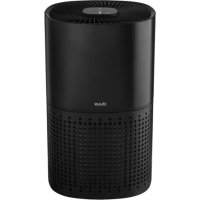
- Thank you for choosing Duux.
- Box contents
- Table of contents
- Product overview 2. Installation and use
- Attention
- Warning
- Use
- Installation
- Control panel
- LCD display
- Power
- Change speed
- Timer
- Reset filter
- WIFI mode
- WiFi and APP operation
- Connect to WiFi
- Ambient light sensor
- Filter
- PM2.5 laser sensor
- Ionizer
- Night mode
- Maintenance
- Cleaning
- Pre-filter
- HEPA and activated carbon filter replacement
- Maintenance before storage
- Spare parts
- Technical specifications
- FAQ
- Disposal
- Capteur laser PM2.5
- Simplified EU declaration of conformity
Brand : DUUX
Model : Tube Smart
Category : Air purifier