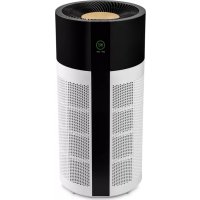
Tube - Air purifier DUUX - Free user manual and instructions
Find the device manual for free Tube DUUX in PDF.



| Product type | Smart air purifier |
| Brand | Duux |
| Model | Tube |
| Weight | 8.5 kg |
| Nominal voltage/frequency | 220-240 V / 50 Hz |
| Power consumption | 10-55 W |
| Noise | 32-64 dBA |
| Maximum effective area | 75 m² |
| Power cord length | 1.8 m |
| CADR (Clean Air Delivery Rate) | 550 m³/h |
| HEPA filter class | H13 |
| Main materials | ABS, PP |
| Model number | DXPU03 |
| Main functions | HEPA + activated carbon purification, auto mode, timer, WiFi, ionizer, night mode, PM2.5 laser sensor, air quality indicator, filter replacement indicator |
| Maintenance and cleaning | Clean the surface with a soft dry cloth; vacuum the pre-filter; replace the HEPA + activated carbon filter every 4 to 6 months (ref. DXPU03); clean the laser sensor with a vacuum cleaner |
| Safety | Safety switch on the filter cover; overheating protection; do not use with insecticides; do not immerse in water |
| Spare parts and repairability | Replacement filters available (DXPU03); other parts available from local distributor |
| General information | Compliant with directive 2014/53/EU; declaration of conformity available at www.duux.com/doc; disposal according to WEEE directive 2012/19/EU |
Frequently Asked Questions - Tube DUUX
User questions about Tube DUUX
0 question about this device. Answer the ones you know or ask your own.
Ask a new question about this device
Download the instructions for your Air purifier in PDF format for free! Find your manual Tube - DUUX and take your electronic device back in hand. On this page are published all the documents necessary for the use of your device. Tube by DUUX.
USER MANUAL Tube DUUX
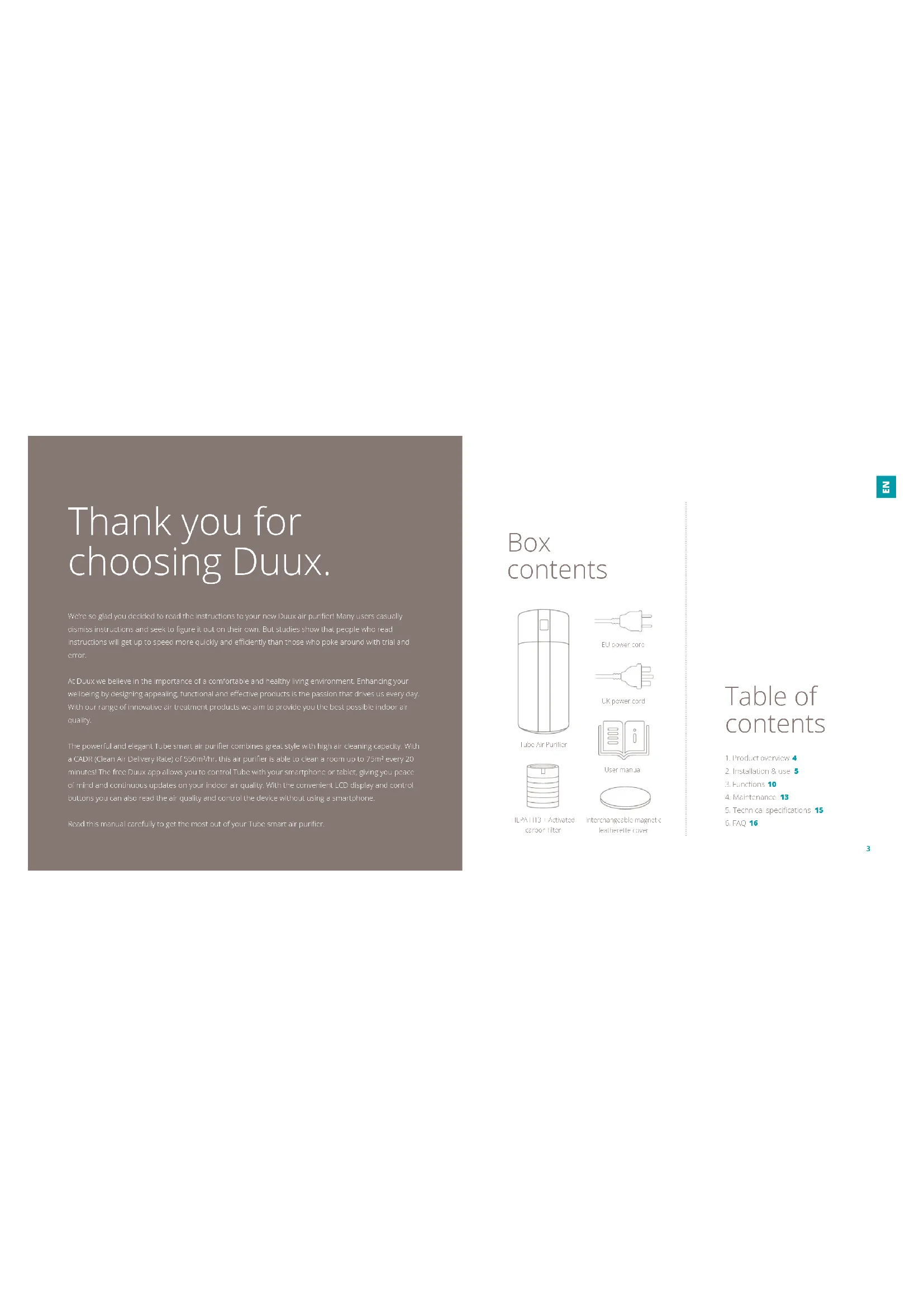
Thank you for choosing Duux.
Were so glad you decided to read the instructions to your new DuPont air purifier! Many users actually dismiss instructions and seek to figure it out on their own. But studies show that people who read instructions will get up to speed more quickly and efficiently than those who smoke around with their hand and error.
At Dux we believe in the Importance of a comfortable and healthy living environment Enhancing your wellbeing by designing appealing, functional and effective products is the passion that drives us every day. With our range of innovative air treatment products we aim to provide you the best possible indoor air quality.
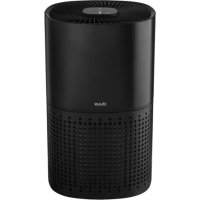
The powerful and elegant Tube smart air purifier combines great style with high air cleaning capacity. With a CADR (Clean Air Delivery Ratio) of 550mWh, this air purifier is able to clean a room up to 75m² every 20 minutes! The free Duxx app allows you to control Tube with your smartphone or tablet, giving you peaceof mind and continuous updates on your indoor air quality. With the convenient LCD display and controloutlets you can also read the air quality and control the device without using a smartphone
Read this manual carefully to get the most out of your tube smart air purifier.
Box contents
Tube Air Purifier
LUPower cord
UK power cord

User manual

ICP/AT13 + Activated carbon filter

Interchangeable magnetic.
leatherite cover
Table of contents
- Product overview 4
- Installation & use 5
- Functions 10
- Maintenance 13
- Technical specifications 15
- FAQ 16
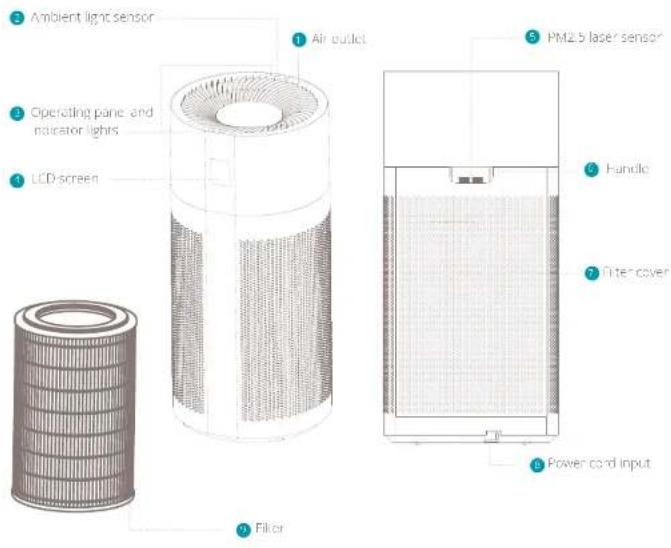
1. Product overview 2. Installation and use
A Note: Please take notice of below instructions and the separately included warning sheet before using the product.
Attention
In order to prevent the possible damage to yourself or others, make sure to read the following safety notes:
Warning
In order to avoid accidents such as fire or electric shocks, please understand the following safety notes:
Do not pull the power cord during movement or storage. It may cause short circuit or cord damage, and may further result in a fire or electric shock.
Do not damage the power cord or the socket.
- Do not cut, refill, excessively distort, pull or twist the power cord. Do not place heavy objects on the power cord or extrude the power cord as it may cause electric shock or fire.
- When I is required to repolise this power cord or plug, please contact an electrical service center.
Do not use any power supply, universal socket or connection device that exceeds the rated value; only use 220V 50Hz AC power supply can
Bi used: Exeriting the rated value may cause overeating of the power cord or fire.
Do not touch the power plug with wet hands. otherwise it may cause electric shocks.
Do not place a finger or a metal object into gap such as an air intake or air curtain. Contact with the internal components may cause electronic shock or injury.
Make sure the device does not get wet. Otherwise it may cause fire or electrical shock in short to short circuit.
Do not put in the following places:
Instable places, otherwise the device may fall or tumble, which can cause injury or result in electric leakage, electric shock or fire.
Places like bathrooms which have high temperature, high humidity or which may get the device wet. This may cause electric leakage in the device and result in electric shock of fire.
Places like kitchens where cooking fumes are exhausted.
- Places where oil or combustible gas is used and linkage may occur. A fire or smoke may occur due to a fire on the suction of hot gas by the delivery.
- Any place where the air outlet directly faces animals or plants which may be air drying.
Do not use any solvent such as ethanol or diluents to clean the device and prevent contact with any aerosol insecticide. The air purifier may damage due to breakage or cause electric shock or fire due to short circuit
Do not use the air purifier in a room with the incense type insecticide. The chemical respecu- may be accumulated in the device and endanger the health when released through the air purifier. Alien using insecticide, thoroughly ventilated the room first, before using the air purifier.
Do not let any volatil substance or combustible object such as smoke or incinerator enter the device.
- Do not sit on or lean against the device. This may cause personal injury or devices damage.
Pay attention to children near the device.
Do not disnntle or refit the air purifioarably. Arthrof y disnnting or refiting maycause damage or fire. Please contact a qualifiedservice center for reaipre.
Attention
When one of the following situations occurs, please turn off the device, remove the power plug and contact a qualified service center to prevent electric shocks, sparks or smoke.
-
When the device stops working when moving the power card.
There is abnormal sputum or vibration during the operation. -
The product becomes abnormally hot and there is peculiar smell of burning.
- Please periodically clean the power plug. If there is dust or moisture on the power plug, the Insulation part of the plug may damage, which may cause a fire. Unplug the power plug and use dry cloth to wipe it clean.
If the device is not used for long time, please untrig, the power drug.
Before carrying out maintenance, always make sure to disconnect the power supply so prevent the device from suddenly starting. - Pase completely insert the plug into the socket. The device may overhear and catch fire if the plug is not completely or securely inserted. Do not use a damaged plug or socket.
- Please unplug the device by pulling the plug.
- Pulling the power cord may cause electric shocks, short circuit or fire
- When using the device near fuel gas or fire coal, please make sure to properly ventilate. Otherwise it may cause carbon monoxide poisoning. This device does not remove carbon monoxide.
When one of the following situations occurs, please turn off the device immediately:
- If one of the buttons or switches does not respond,
If the power card or the plug is abnormally hot
If there is a peculiar smell of burning or any
abnormal sound or vibration.
If the power cord of the device is damaged
The device is not suitable for use by disabled persons, persons with disturbance of perception, persons with dysogonia or children on their own. This is only allowed when there is supervision to provide guidance on the spot, in assist the operation of the device.
Do not let any child operate his air purifier arbitrarily.
Attention
It is prohibited to place the device in the following places:
Places with direct sun light directly facing the device. It may cause deformation, deterioration, discoloration and fault.
Places close to communication devices such as TV and radio. This may cause distortion or noise. Always keep at least 1 meter distance to these devices and preferably use independent sockets or outlets.
For increased efficiency it is recommended to place the device in the following places:
- Place the device on a suitable surface, aiming at airborne dust indoors such as nook. Because pollen and dust easily fall nearby the floor, it is
recommended to place the product onto the flat surface in the room.
In order to affectively circulate the air in the room, please position the product according to the following requirements:
To report including the air inns and smokes, please place the device at least 50cm clear from walls, furniture, curtains, etc.
Use
Do not place any object on top of the device; otherwise it may cause operation error or fault. Keep away from magnets and Frayed material
- when using the device in the same place for long time, the surrounding walls and floors may become contaminated. when carrying out maintenance for the device, it is recommended to put the device in a different place.
Installation
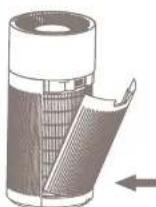
installing the filter
Remove the back cover of the device.
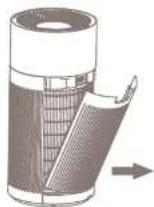
Take out the filter including the seal
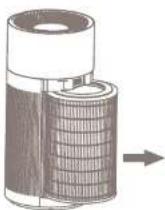
3 Remove the seal from the filter
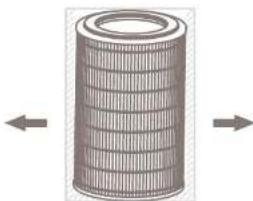
Place back the filter and re-attach the back
COVE
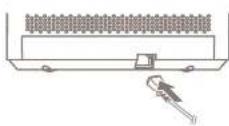
Insert the power plug into the back of the device
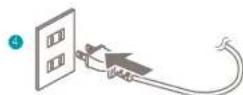
- insert the plug into a wall outlet and switch on the device with the power button.
A Note: The track cover is closed with a magnetric attachment, so no need to press firmly. It will automatically attach when closing.
A. Important: only use genuine driver replacement files for optimal efficiency, proper functioning and full warranty coverage.
3. Functions
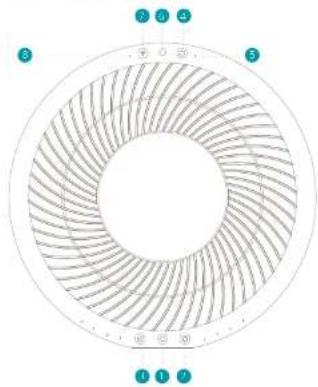
Control panel
1
Change speed
Time
Reset filter button
Filter replacement indicator
Amment light sensor
致明
Wih indicatorlight
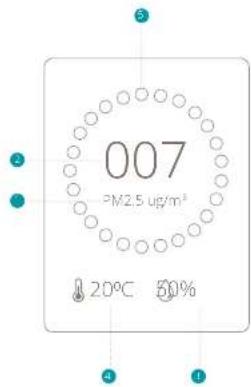
LCD display
PK25value
Air quality indication
1 Humidity
Temperature
AQL colour:
Green = Excellent/Good
Progress - average
200

Power
Press the button to switch on the device. The welcome screen will appear for 3 seconds and the monitoring screen will show.

Change speed
Press the button to change the wind speed between 1 GW (1), MEDIUM (2), HIGH (3) and AUTO (4). LOW speed is the most quiet and energy efficient mode and is recommended for areas with excellent air quality. MEDIUM speed is recommended for areas with good/average air quality while HIGH speed is recommended for areas with high pollution levels. In AUTO mode the speed will change automatically according to the air quality measured with the PM2.5 particle sensor. The actual air quality can be derived from colour indication code on display or app.

Timer
Press the button to activate a timer. Every press will increase the timer in the following order: 1h > 2h > 4h > 8h > 9h > 10h

Reset filter
When the Indicator Stares Illuminating it's time to replace your filter. After you've replaced your filter, press and Poling button for 3 seconds
to reset the filter lifespan indicator and theindicator will turn off .

WIFI mode
Press and hold the button until you hear a feedback sound to enable Wi-Fi mode. The indicator will start flashing which means its ready to pair with a smartphone or tablet. After a connection has been established, the indicator will become solid. To reset the Wi-Fi meter, press and hold the button for 10 seconds.
WiFi and APP operation
Scum below QR code to download the Dux APP or search DUXAPP in the App Store or Google Play Store to start the procedure to download the APP.Once Installed, enter your email address and complete the registration.


APPSTOREPLAYSTORE
Connect to WiFi
10.2016 registration check "add clause device" are the main server or use the "+ button in the top right corner to add a new device.
Search for "Tube" and press to continue
Connect to your preferred WiFi network and enter the corresponding password.
Follow the instructions in the app to complete the pairing process:
Ambient light sensor
The ambient light sensor will automatically adjust the brightness of the LCD screen according to the ambient light. No manual operation is required.
Filter
The HPFA filter cleans the air from smalle.
bentles. The activated carbon filter removes
formal gauces and toxins such as smoke.
chemicals, VOCs and bacteria's
PM2.5 laser sensor
The pollution degree of the air is sensed by the sensor and the pollution condition is displayed by means of the indicator light of air pollution degree in the AUC-Speed mode, the device automatically selects the optimal speed according to the pollution degree. Sensed pollutants: PM2.5, dust, pollen, mold, pot dander, PM2.5 is measured in microgram per cubic meter, shown on the display as μg/m3
Ionizer
This device comes with a built-in ionizer. The ionizer released negative ions to capture tiny airborne particles and pull them inside the filter. The ionizer is ON by default and can only be switched off by using a mobile device connected to the WiFi mode.
Night mode
Once the video is saved in Auto mode, the LFD indicators and display will automatically turn off after 10 minutes. Press any button to retrieve the controls and display.
4. Maintenance
A. Important: the sure to remove the power plug from the outlet before carrying out maintenance.
A Important: Do not soak or rinse the power plug or the device to water.
A Important We recommend weekly maintenance for optimal efficiency.
Cleaning
Please use salt dry cloth to wipe dust off the body. If the surface is so dirty, it is better to wipe it clear with a dampened cloth mixed with neutral detergent.
- Don't use gasoline, thinner and any others chemical substances as it will easy damage the surface.
Pre-filter
To remove large dust particles on the pre filter body use a vacuum cleaner with soft brush extension to gently clean the surface.
HEPA and activated carbon filter replacement
The filter replacement indicator will let you know when its time to replace your filter. The lifespan of
the filter depends on the air quality and usage of the device (approx 4-6 months (art no DXPJF08)
Note: Please dispose used items on non-cumminable postage.
PM2.5 laser sensor
The PV2.5 taxan sensor is situated inside the hand e on the back side of the device. To remove dust from the sinker, use a vacuum cleaner with soft brush extension to gently clean the sensor.
Maintenance before storage
Switch off the device and remove the plug from the wall插座.
Cover the device with a plastic bag, and keep in dry place. Always store it upright as placement in a flat or reverse manner may cause a fault to the device.
Spare parts
Spare parts and accessories are available on duux comv spare parts or can be requested at the point of purchase or local distributor.
5. Technical specifications
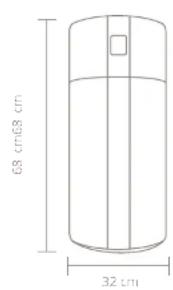
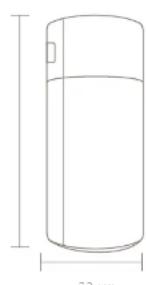

Weight
8.5 kg

Rated voltage/frequency:
220-240V/50Hz

Power consumption:
10-55w

Noise
32-64 dBA

Effect area:
up to 75m2

Power cord length
1.8m

CAD
550m³/hr

HLFA class:
H13

Main materials:
ABS,PP

Model no:
DXPU03
The appearance
and specification of
the device may be
changed without
notice.
6. FAQ
Q. The device is plugged in but the display doesn't light up. What can I do?
A. Please check if the filter cover is closed properly. There is a safety sensor inside the cover that doesn't allow the device to run when the cover is open. Please check for a possible power failure.
Q. The wind speed suddenly changes. Is this normal?
A:ALTO mode is switched on and will adjust the wind speed according to their air quality. Please switch to manual mode for continuous speed operation
Q. Am I able to wash and reuse the filter?
A. HPA filters are made out of loosely and randomly interaced fibers that are not built to stand up to any stress. Washing a the fiber will destroy it in most cases. Even when the filter seems to still be intact to the naked eye, its structure has been rendered useless.
Q. Can I use this air purifier in a room beyond the effective area?
A In theory the purifier can clean up to approx. 220m3 .Hoeyscr, this is based on a single air charge per hour (ACH).For indoor living environmental, the recommended amount of ACHs 2-4 times.
Q. What is the effective area per ACH?
A:1ACH1-220m²,2ACH1-110m²;3ACH1-750m²;4ACH55m²5ACH44m²
Q. Why is the WIFI indicator constantly blinking?
AOnce the WiF mode button is pressed, the device will search for a mobile device to pair with. In case pairing is failed, the indicator will remain blinking. To switch off the blinking indicator, press and hold the WiF button for 3 seconds.
Q. Does this air purifier have a built-in lonizer?
A. Yes, it releases negative ions into outgoing filtered air. Ions are tiny particles that carry a positive or negative charge. These ions occur naturally around us, in the air, water and ground. Both positive and negative ions are colorless, colorless and harmless. Negative ions help the air purification process by attaching themselves to very small airborne particles in the room.
Q. How long should I run the air purifier?
A. In general it is recommended that you run your air purifier when you are at home to clean the air. The unit may be run 24/7 if preferred. This air purifier will be more effective when windows
and doors are closed.
Q- What does PM2.5 mean?
A. HIV 25 is a microscopic solid particle with a diameter of less than 2.5 cm . Presence of these particles in large numbers is a serious concern for people's health. These particles are so tiny that they can directly invade into the lungs and cause cancer.
Q. What does HEPA H13 stand for?
A HEPA is an acronym of High Efectant Particulate Air To quality as true HEPA by government standards; an air filter must remove 99.97% of all particles greater than 0.3 micrometers from the air. H18 is the highest classification of HEPA filters
Q. How long does the filter last?
A The lifespan of the filter depends on the air quality and usage of the device. In practice, it will last between 4 and 6 months. The article number for replacement filters is DFXF83.
Disposal
The European directive 2012/19/CE on Waste Electrical and Electronic Equipment (WEEB), requires that old household electrical appliances must not be disposed in the normal unsorbed municipal waste stream. On appliances must be collected separately in order to optimise the recovery and recycling of the materials they contain and reduce the impact on human health and the environment. The crossed out "whetted" sign symbol on the product reminds you of your obligation, that when you dispose of this appliance it must be separately collected. Consumers should contact their local authority or retailer for information concerning the correct disposal of their old appliance.

Notes/notities/les notes/notas/Notitzen
2
18
19
A. Belangrijk's compound of sodium of tetraconta nitrate under water.

Contractionalization of RICE
Contaminations: uranylamine
Manuel d'orson

Manuscript manuscript
Iapa megnatura intercambiaria de poliglpi
Índice
1 Descriiption general
del producto 52
-
insulicity use 53
-
Funchiones 58
A. Mantenimiento 61
Orange = Dorchscholl
Rc1=Scnletf

Ein/Aus
A HEPA stein Avronym und stent for Hign Effcient Particulate Air. Lin grom 60fioTo qayily ast true HEPA by government standards, an air filter must remove 99.97% of all particles greater than O.3 micrometer from the air aeranmian.
Simplified EU declaration of conformity
Hereby, Duix declares that this environmental control radio equipment is in compliance with Directive 2014/53/FU. The full text of the EUI Declaration on Conformity is available at the following Internet address: www.duix.com/doc
Designed in The Netherlands bij Duux BV. Made in P.R.C. Duux BV, P.O. Box 145, 5400 AC Uden Netherlands, www.duux.com
© 2020 Duux. All rights reserved.
DUUX® is a trademark of Duux BV,
registered in the EU and other countries.
The brand cited belongs exclusively to the respective owners.
Specifications are subject to modification without notice.
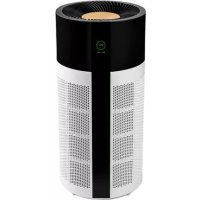
- Thank you for choosing Duux.
- Box contents
- Table of contents
- Product overview 2. Installation and use
- Attention
- Warning
- Use
- Installation
- Control panel
- LCD display
- Power
- Change speed
- Timer
- Reset filter
- WIFI mode
- WiFi and APP operation
- Connect to WiFi
- Ambient light sensor
- Filter
- PM2.5 laser sensor
- Ionizer
- Night mode
- Maintenance
- Cleaning
- Pre-filter
- HEPA and activated carbon filter replacement
- Maintenance before storage
- Spare parts
- Technical specifications
- FAQ
- Disposal
- Índice
- Ein/Aus
- Simplified EU declaration of conformity
Brand : DUUX
Model : Tube
Category : Air purifier