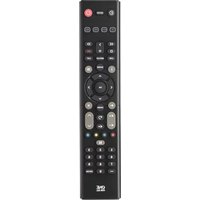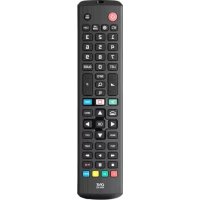
URC4911 - Remote control ONE FOR ALL - Free user manual and instructions
Find the device manual for free URC4911 ONE FOR ALL in PDF.



| Product type | Universal remote |
| Brand | One For All |
| Model | URC4911 |
| Power | 2 AAA batteries (high quality alkaline) |
| Dimensions | 20 × 5 × 2 cm |
| Weight | 100 g |
| Infrared range | Up to 10 meters |
| Protocol | Infrared (IR) |
| Main functions | TV control, audio control, function learning, macros, app shortcuts (Netflix, Amazon Prime), teletext, subtitles, audio description, navigation |
| Compatibility | Recent LG TVs (direct response), other brands via code search |
| Configuration | SimpleSet, automatic search, manual 4-digit code |
| Light indicator | LED under the Power button (confirmation flashes) |
| Learning | Up to 20 functions (recording from original remote) |
| Warranty | 2 years (against manufacturing defects) |
| Maintenance and cleaning | Clean with a soft dry cloth. Do not use abrasive products. |
| Safety | Use only alkaline batteries of the same type. Do not expose to moisture or fire. |
| Spare parts and repairability | No spare parts available. If defective, replace the device. |
| General information | Brand: One For All. Model: URC4911. Manufactured according to European Directive 2012/19/EU (WEEE). |
Frequently Asked Questions - URC4911 ONE FOR ALL
User questions about URC4911 ONE FOR ALL
0 question about this device. Answer the ones you know or ask your own.
Ask a new question about this device
Download the instructions for your Remote control in PDF format for free! Find your manual URC4911 - ONE FOR ALL and take your electronic device back in hand. On this page are published all the documents necessary for the use of your device. URC4911 by ONE FOR ALL.
USER MANUAL URC4911 ONE FOR ALL
natural_image
Diagram showing two mechanical components with curved arrows indicating motion or rotation (no text or symbols)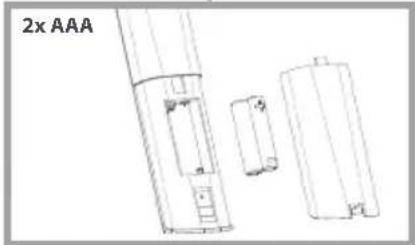
natural_image
Technical line drawing of a battery pack assembly (no text or symbols)
CAUTION: Risk of explosion if battery is replaced by an incorrect type. Use quality Alkaline batteries.
natural_image
Color palette bar with grayscale and red sections, no text or symbols present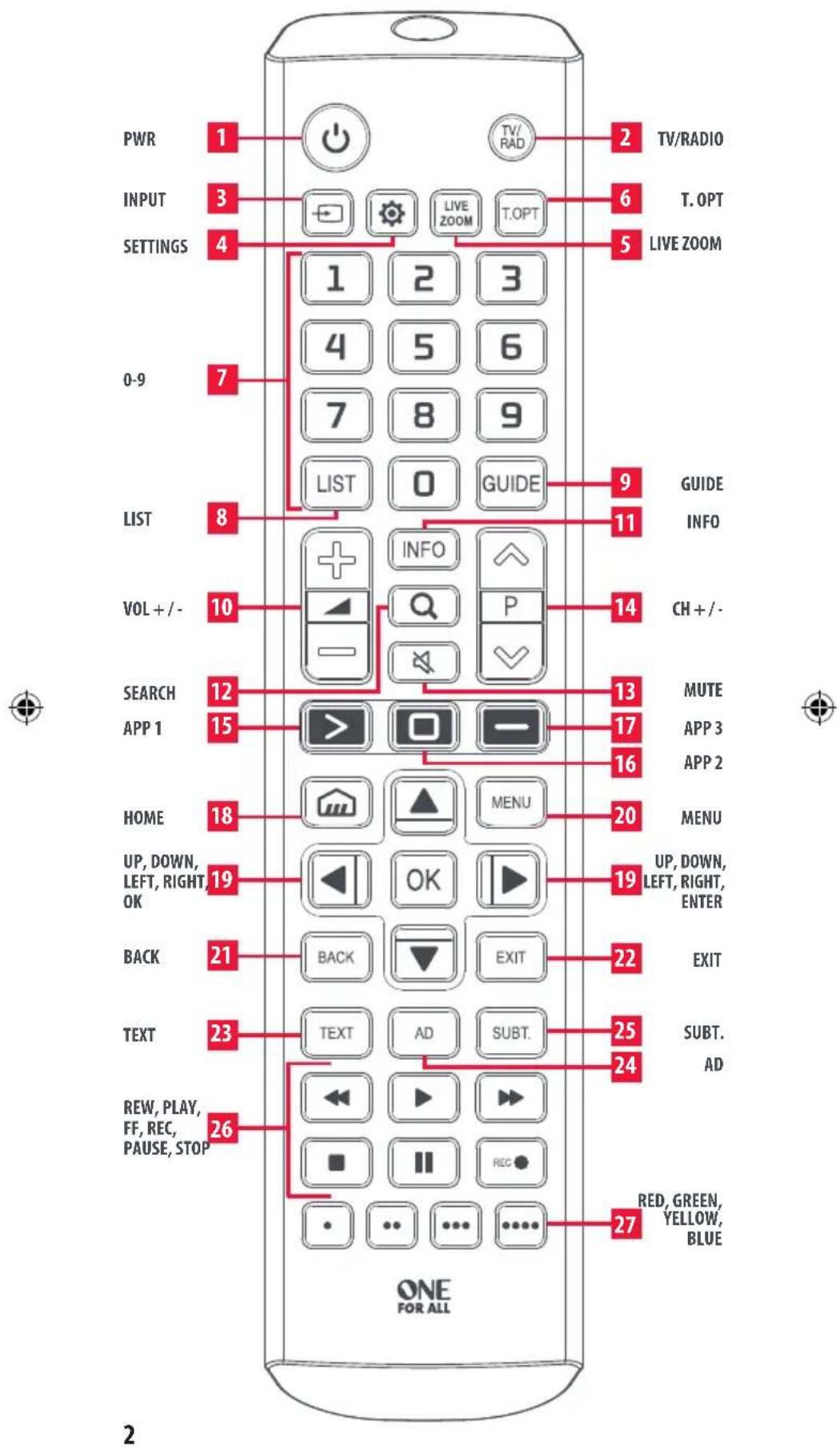
ENGLISH
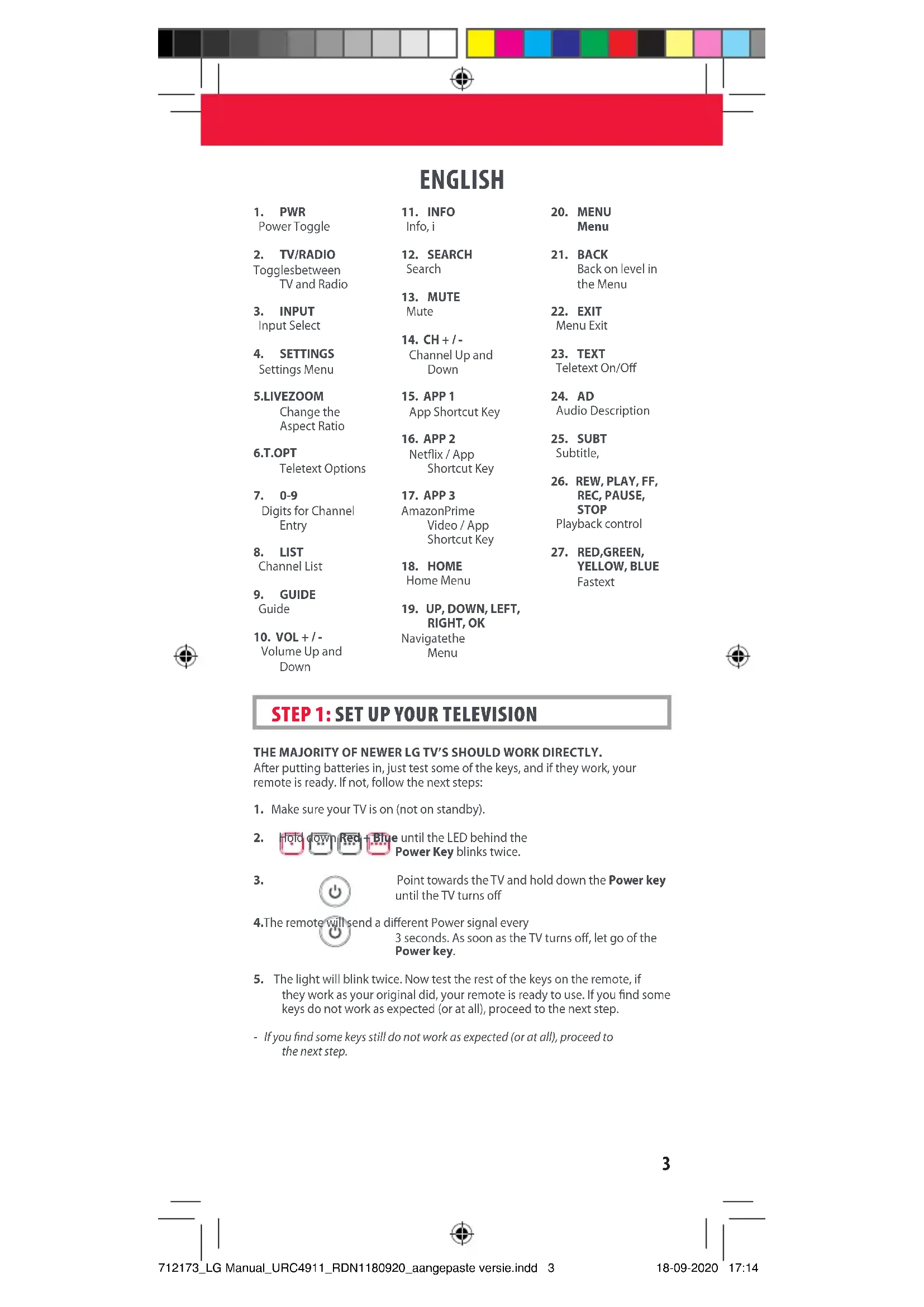
1. PWR
Power Toggle
2. TV/RADIO
Togglesbetween TV and Radio
3. INPUT
Input Select
4. SETTINGS
Settings Menu
5.LIVEZOOM
Change the Aspect Ratio
6.T.OPT
Teletext Options
7. 0-9
Digits for Channel Entry
8. LIST
Channel List
9. GUIDE
Guide
10. VOL + / -
Volume Up and Down
11. INFO
Info, i
12. SEARCH
Search
13. MUTE
Mute
14. CH + / -
Channel Up and Down
15. APP 1
App Shortcut Key
16. APP 2
Netflix / App Shortcut Key
17. APP 3
AmazonPrime Video / App Shortcut Key
18. HOME
Home Menu
19. UP, DOWN, LEFT, RIGHT, OK
Navigate the Menu
20. MENU
Menu
21. BACK
Back on level in the Menu
22. EXIT
Menu Exit
23. TEXT
Teletext On/Off
24. AD
Audio Description
25. SUBT
Subtitle,
26. REW, PLAY, FF, REC, PAUSE, STOP
Playback control
27. RED, GREEN, YELLOW, BLUE
Fastext


STEP 1: SET UP YOUR TELEVISION
THE MAJORITY OF NEWER LG TV'S SHOULD WORK DIRECTLY.
After putting batteries in, just test some of the keys, and if they work, your remote is ready. If not, follow the next steps:
-
Make sure your TV is on (not on standby).
-
Hold down Red + Blue until the LED behind the Power Key blinks twice.
3.

Point towards the TV and hold down the Power key until the TV turns off
- The remote will send a different Power signal every
3 seconds. As soon as the TV turns off, let go of the Power key.
- The light will blink twice. Now test the rest of the keys on the remote, if they work as your original did, your remote is ready to use. If you find some keys do not work as expected (or at all), proceed to the next step.
- If you find some keys still do not work as expected (or at all), proceed to the next step.
natural_image
Color palette bar with grayscale swatches and a red rectangle at the bottom (no text or symbols)ENGLISH
STEP 2: IF STEP 1 DOES NOT WORK AS EXPECTED
ARE SOME KEYS NOT WORKING AS EXPECTED?
If you find some keys do not work as expected (or at all), proceed to the next step.
- Make sure your TV is on (not on standby).
- Hold down RED + BLUE until the LED behind the Power Key blinks twice
- Point towards the TV and hold one of the keys that is not working correctly (for example Menu).
- The remote will send a signal every 3 seconds.
- When the correct function is shown on the screen (in this case the Menu), let go of the key.
- The LED will blink twice - your remote is ready to use.
LEARNING
LEARN A NEW FUNCTION TO YOUR REMOTE
Your One For All remote can learn any function from your original (working) remote.

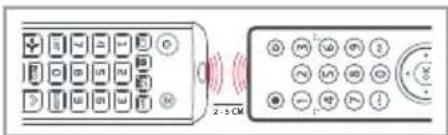

- Place the original remote facing the One For All remote on a flat surface.
- To learn: Hold down GREEN + YELLOW until the LED blinks twice.
- Press 975 The LED will blink twice.
- Press the key on the One For All remote you want to learn on, for Example: the VOL + key. The LED will blink rapidly.
- Press the key on the Original remote you want to learn, for Example: the VOL + key of your Audio Device
6.Twoblinks:ok. Repeat from step 4 for any more keys to learn. Long blink: try again from step 4. - When you have learned all the keys you need, press and hold the OK key for 3 seconds. The LED will blink twice.
HOW TO DELETE A LEARNED FUNCTION
- Hold down GREEN + YELLOW until the LED blinks twice.
- Press 976.
- Press the key to reset twice.
- The LED flashes twice and the key will revert to the original function.
4

natural_image
Color palette bar and a red rectangle with a crosshair symbol at the center (no text or labels)ENGLISH
SOUND BAR / AUDIO RECEIVER VOLUME CONTROL
SOUND BAR / AUDIO RECEIVER VOLUME CONTROL
If you have your TV connected to a Sound Bar or Audio Receiver, it's possible to set up your One For All remote to control the Volume and Mute of this device. There are two ways to do this:
AUDIO SIMPLESET
If you have a Sound Bar or Audio Device from one of the brands listed in the table below, you can use the SimpleSet method to program your remote to control it. If you do not have one of the below brands, please proceed to the next section.
| Digit | Brand |
| 1 | Bose |
| 2 | Denon |
| 3 | Samsung / Harman/Kardon / JBL |
| 4 | LG / JVC |
| 5 | Marantz / Philips |
| 6 | Onkyo |
| 7 | Panasonic / Technics |
| 8 | Pioneer |
| 9 | Sony |
| 0 | Yamaha |


Note that each of the brands has a digit associated with it, for example 4 for LG (and JVC).
To set up your remote to control your Sound Bar / Audio Device, first make sure your TV and Sound Bar / Audio Device are both powered on, and that there is something playing that you can hear (this procedure will test the Mute function). Next:
- Hold down the VOLUME UP and VOLUME DOWN buttons together until the LED under the POWER key blinks twice.
- Now point the remote towards your Sound Bar / Audio Devices and hold down the digit key for your brand (for example 4 for LG). The remote will send the Mute function to your device every 3 seconds.
- As soon as your Sound Bar / Audio Device mutes the volume, release the digit key. The LED under the Power key will blink twice, and the Volume Up, Down and Mute keys should now control your Sound Bar / Audio Device.
AUDIO CODE SETUP
If your Sound Bar / Audio Device is not one of the brands listed above, you can also set up the remote to control it by entering a 4 digit code. The codes are listed in the Audio Codelist section of this manual, and are listed by brand and then popularity. Locate the brand of your Sound Bar / Audio Device in this code list and then the procedure is:
ENGLISH
- Hold down the VOLUME UP and VOLUME DOWN keys until the LED under the Power key blinks twice.
- Enter the first 4 digit code for your Sound Bar / Audio Device. The LED should blink twice on the last digit.
- Now try the Volume Up, Down and Mute and see if they control your Sound Bar or Audio Device.
- If they work, your remote is set up. If not try again from step 1 using the next code in the list.
POWER MACRO
If you have set up your Sound Bar or Audio Device using SimpleSet or Code Setup, you can now turn your TV and Audio Device both on and off using a single key. Simply hold down the Power key for 3 seconds and the remote will send the Power function to both the TV and the Audio Device / Sound Bar. If you press and release the key, it will only control the TV.
APP SHORTCUT KEY
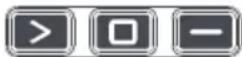
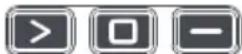
The One For All remote features three App Shortcut Keys which can be used to open apps on your TV. If your original remote control has a Netflix, or Amazon Prime Video key, these keys will perform the same function.
However if you try these keys and they do not work, but your TV still has the ability to watch a streaming service, you can use this key as a shortcut by programming a macro (a series of button presses) on it. You could also program the keys to access other apps on your TV.

To program the macro, you first need to know the sequence keys you use to access the service. For example, some TVs will start Netflix by pressing the Home key, then Menu Right twice, and finally the Enter key. Once you have determined the sequence for the app you want on your TV, follow these steps:
- Sit in front of your device with It switched on (not on standby)
- Hold down the App Shortcut key until the LED blinks twice.
- Now perform the sequence of keys exactly as would normally. The remote will operate your TV and the macro is recorded in real time - so if it normally takes a few seconds for your device to react don't worry.
- Once you have finished the sequence - and the Streaming Service has started on your device - hold down the App Shortcut key until the LED blinks twice and goes out. The macro is now stored.
Tips
• Make sure the OFA remote Is operating the TV before programming
- If you find the Macro doesn't work as expected, you can just repeat the same sequence to reprogram
- When programming, wait for your TV to respond first, the remote will remember the timing
RESET
If you would like to reset your remote back to its default settings, please do the following:
- Hold down the Green and Yellow keys until the LED blinks twice
- Press 977
- The LED will blink 4 times and the remote is now reset.

DEUTSCH

natural_image
Color palette bar with grayscale swatches and a red rectangle at the bottom (no text or symbols)DEUTSCH
LAUTSTÄRKEREGLER FÜR SOUNDBAR/AUDIOEMPFÄNGER
LAUTSTÄRKEREGLER FÜR SOUNDBAR/AUDIOEMPFÄNGERI
26. REW, PLAY, FF, REC, PAUSE, STOP
natural_image
Color palette bar with grayscale swatches and a red rectangle at the bottom (no text or symbols)FRANÇAIS
ÉTAPE 2 : DANS LE CAS OÙ L'ÉTAPE 1 NE FONCTIONNE PAS COMME PRÉVU
CERTAINES TOUCHES NE FONCTIONNENT-ELLES PAS COMME PRÉVU ?
natural_image
Color palette bar with grayscale swatches and a red rectangle at the bottom (no text or symbols)FRANÇAIS
CONTRÔLE DU VOLUME DE LA BARRE DE SON/DU RÉCEPTEUR AUDIO
CONTRÔLE DU VOLUME DE LA BARRE DE SON/DU RÉCEPTEUR AUDIO
MACRO ASSOCIÉE AU BOUTON D'ALIMENTATION
natural_image
Color palette bar with grayscale and red sections, no text or symbols presentESPAÑOL
PASO 2 : SI EL PASO 1 NO FUNCIONA COMO SE ESPERA
natural_image
Color palette bar with grayscale swatches and a red rectangle at the bottom (no text or symbols)ESPAÑOL
CONTROL DEL VOLUMEN DE BARRA DE SONIDO / RECEPTOR DE AUDIO
CONTROL DEL VOLUMEN DE BARRA DE SONIDO / RECEPTOR DE AUDIO
26. REW, PLAY, FF, REC, PAUSE, STOP
natural_image
Color palette bar with grayscale swatches and a red rectangle at the bottom (no text or symbols)PORTUGUÊS
CONTROLO DE VOLUME BARRA DE SOM/RECETOR ÁUDIO
CONTROLO DE VOLUME BARRA DE SOM/RECETOR AUDIO
natural_image
Color palette bar with grayscale and red sections, no text or symbols presentITALIANO
PASSAGGIO 2: SE IL PASSAGGIO 1 NON FUNZIONA COME PREVISTO
ALCUNI TASTI NON FUNZIONANO COME PREVISTO?
natural_image
Color palette bar with grayscale swatches and a red rectangle at the bottom (no text or symbols)NEDERLANDS
STAP 2: ALS STAP 1 NIET DE VERWACHTE RESULTATEN OPLEVERT
WERKEN BEPAALDE TOETSEN NIET ZOALS VERWACHT?
SNELTOETSEN VOOR APPS
natural_image
Color palette bar with grayscale, red, and black sections (no text or symbols)DANSK
TRIN 2: HVIS TRIN 1 IKKE FUNGERER SOM FORVENTET
FUNGERER NOGLE TASTER IKKE SOM FORVENTET?
natural_image
Color palette bar and a red horizontal bar with a crosshair symbol (no text or labels)DANSK
LYDSTYRKEREGULERING FOR SOUNDBAR/LYDMODTAGER
LYDSTYRKEREGULERING FOR SOUNDBAR/LYDMODTAGER
INDSTILLING AF LYDKODE
natural_image
Color palette bar with grayscale gradient and a red horizontal bar, no text or symbols presentNORSK
- PÅ/AV
Slå på og av
- TV/RADIO
TV/Radio
- INNGANG
Valg av inngang
- INNSTILLINGER
Innstillinger, hurtigmeny
5.LIVEZOOM
Direkte zoom
6.T.OPT
Alternativer for tekst-TV
7.0-9
TRINN 1: SETTE OPP TV-APPARATET
FLESTEPARTEN AV NYERE TV-APPARATER FRA LG VIL VIRKE DIREKTE.
natural_image
Color palette bar with grayscale gradient and a red horizontal bar, no text or symbols presentNORSK
TRINN 2: HVIS TRINN 1 IKKE VIRKER SOM FORVENTET
ER DET NOEN KNAPPER SOM IKKE VIRKER SOM FORVENTET?
natural_image
Color palette bar with grayscale swatches and a red rectangle at the bottom (no text or symbols)NORSK
VOLUMKONTROLL FOR LYDPLANKE/LYDMOTTAKER
VOLUMKONTROLL FOR LYDPLANKE/LYDMOTTAKER
natural_image
Color palette bar with grayscale, white, and red sections (no text or symbols)SVERIGE
STEG 2: INTE FUNGERAR SOM DET SKA
FUNGERAR EN DEL KNAPPAR INTE SOM DE SKA?
natural_image
Color palette bar with grayscale swatches and a red rectangle at the bottom (no text or symbols)SVERIGE
VOLYMREGLERING FÖR SOUNDBAR/LJUDMOTTAGARE
VOLYMREGLERING FÖR SOUNDBAR/LJUDMOTTAGARE
natural_image
Color palette bar with grayscale and red sections, no text or symbols presentSUOMI
VAIHE 2: JOS VAIHE 1 EI TOIMI ODOTETUSTI
TOIMIVATKO KAIKKI PAINIKKEET ODOTETUSTI?
natural_image
Color palette bar with grayscale swatches and a red rectangle at the bottom (no text or symbols)SUOMI
SOUNDBARIN/ÄÄNIVASTAANOTTIMEN ÄÄNENVOI MAKKUUDEN HALLINTA
SOUNDBARIN/ÄÄNIVASTAANOTTIMEN ÄÄNENVOIMAKKUUDEN HALLINTAI
natural_image
Color palette bar with grayscale and red sections, no text or symbols presentΕΛΛΗΝΙΚΑ

natural_image
Color palette bar with grayscale swatches and a red rectangle at the bottom (no text or symbols)ΕΛΛΗΝΙΚΑ
natural_image
Color palette bar with grayscale and red sections, no text or symbols presentРУССКИЙ
natural_image
Color palette bar with grayscale, white, and red sections (no text or symbols)TÜRKÇE
ADIM 2 : ADIM 1 BEKLENDIĞI GIBI ÇALIŞMAZSA
- REW, PLAY, FF, REC, PAUSE, STOP
natural_image
Color palette bar with grayscale and red sections, no text or symbols presentPOLSKI
KROK 2: JEŚLI REALIZACJA KROKU 1 NIE POWIODŁA SIĘ
CZY NIEKTÓRE PRZYCISKI NIE DZIAŁAJĄ PRAWIDŁOWO?

26. REW, PLAY, FF, REC, PAUSE, STOP
Tlačítka přehrávání
natural_image
Color palette bar with grayscale and red sections, no text or symbols presentMAGYAR
2. LÉPÉS: HA AZ 1. LÉPÉS NEM A VÁRT EREDMÉNYT HOZZA
NÉHÁNY GOMB NEM A VÁRT MÓDON MÜKÖDIK?

natural_image
Color palette bar with grayscale and red sections, no text or symbols presentROMÂNĂ
PASUL 2: DACĂ PASUL 1 NU FUNCȚIONEAZĂ CORECT
UNELE BUTOANE NU FUNCTIONEAZĂ CORECT?

natural_image
Color palette bar with grayscale and red sections, no text or symbols presentHRVATSKI
2. KORAK: AKO 1. KORAK NE RADI U SKLADU S OČEKIVANJIMA
NEKE TIPKE NE RADE U SKLADU S OČEKIVANJIMA?

The crossed out wheeled bin symbol on this product ensures that this product is manufactured using high quality components that can be recycled and reused according European Directive 2012/19/EU. Please do not dispose of this product with your normal household waste, refer to local regulations for the proper collection or disposal of electrical and electronic products. This will help this will help in preventing negative effects on the environment and/or human health.

BATTERY DISPOSAL (EUROPEAN DIRECTIVE 2006/66/EC)
Please do not dispose of your batteries with your normal household waste, refer to local regulations for the proper collection or disposal. This will help preventing potential negative effects on the environment and/or human health.
GUARANTEE TERMS AND CONDITIONS UNIVERSAL ELECTRONICS warrants to the original purchaser that this product will be free from defects in materials and workmanship under normal and correct use for a period of two (2) years from the date of original purchase. This product will be repaired or if necessary, replaced free of charge if it has been proven to be defective within the two(2) year warranty period. The forwarding costs are on the account of the owner; the costs of returning the product are on the account of UNIVERSAL ELECTRONICS.
This warranty does not cover damage or failures caused by products or services not supplied by UNIVERSAL ELECTRONICS, or which result from not mounting the product according to manual instructions. This also applies when the product has been modified / repaired by others than UNIVERSAL ELECTRONICS or if a fault is the result of accident, misuse, abuse, neglect, mishandling, misapplication, faulty installation, improper maintenance, alteration, modifications, fire, water, lightning, natural disasters, wrong use or carelessness.
To obtain warranty service during the warranty period contact [...], and please note that we need your original purchase receipt so that we may establish your eligibility for service. If you have bought this product for purposes which are not related to your trade, business or profession, you may have legal rights under your national legislation governing the sale of consumer goods. This guarantee does not affect those rights. www.oneforall.com
UTYLIZACJA BATERII (DYREKTYWA EUROPEJSKA 2006/66/WE)
natural_image
Color palette bar with grayscale gradient, a red rectangle at bottom, and a crosshair symbol (no text or labels)ELIMINAREA BATERIEI (DIRECTIVA EUROPEANĂ 2006/66/CE)
natural_image
Color palette bar with grayscale gradient and a red horizontal bar, no text or symbols presentAUDIO CODELIST
| Pyle | 4242 | Teac | 0609, 1199, 3253, |
| Quasar | 0039 | 4242 | |
| RCA 0300, 1459, 0082 | Technics | 0309, 0308, 0039, | |
| Restek | 0189 | 0208 | |
| Revox 0140, 0189, 0269 | TechniSat | 4134, 4486 | |
| Rotel | 0793 | Techwood | 0609 |
| Samsung 2660, 2809, 1199, | Teufel 4051, 3296, 3574, | ||
| 2137, 3822, 1304 | 4477, 2322, 4159, | ||
| Sansui 0189, 0609 | 4460, 4559 | ||
| Sanyo | 3282 | Thomson 1194, 3654 | |
| Schaub Lorenz 4242 | Thorens | 0269, 0189 | |
| Sentra | 0688 | Toshiba | 3627, 5070 |
| Sharp 3096, 5070 | Universum | 0609, 0269, 0189 | |
| Siemens | 0609 | Victor | 0074 |
| Sonos | 3919 | Wards | 0013, 0158, 0189 |
| Sony | 0158, 0159, 2522, | Yamaha | 0176, 1276, 2061, |
| 1758 | 2467, 3283, 2469, | ||
| Soundwave | 0609 | 0082, 0848, 1176, | |
| Sunfire | 0313 | 1949, 0354, 3267, | |
| Sungpo | 3096, 5070 | 3602, 2342 | |
| T+A 2302, 1270 | |||


Connect with us



712173 RDN 1180920
Universal Electronics BV – Europe & International P.O. Box 3332, 7500 DH Enschede The Netherlands
URC 4911 LG: LG ^® is a registered trademark of LG. Corp.