SmartOnline 2POSTRMKITMB - Inverter Tripp Lite - Free user manual and instructions
Find the device manual for free SmartOnline 2POSTRMKITMB Tripp Lite in PDF.


| Product Type | UPS Mounting Kit |
| Brand | Tripp Lite |
| Model | SmartOnline 2POSTRMKITMB |
| Intended Use | 2-Post Rack Mounting Kit for select SmartOnline UPS systems |
| Compatibility | SU5KRT3UHVMB, SU5KRT3UGMB, SU5KRT3UHWMB, SU5KRT3UTFMB, SU6KRT3HVMB, SU6KRT3UXMB, SU6KRT3UGMB, SU6KRT3UTFMB, SU6KRT3UHWMB |
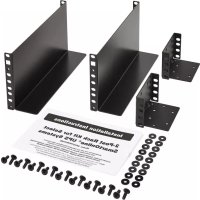
| Included Components | Power distribution module mounting brackets, 2-post brackets (large and small), UPS mounting brackets, thumb screws, screws and washers |
| Installation | Requires two people, prior removal of UPS internal batteries recommended |
| Mounting | Brackets attach to the rear and front of the 2-post rack |
| Power | Not applicable (passive mounting kit) |
| Dimensions (approx.) | Approximately 48 x 10 x 5 cm (estimated) |
| Weight (approx.) | Approximately 2 kg (estimated) |
| Material | Steel |
| Maintenance | Clean with a dry, non-abrasive cloth |
| Safety | Follow installation instructions; remove batteries before mounting; use assistance |
| Spare Parts | Not available separately; complete kit required |
| Repairability | Not user-repairable; replace kit if damaged |
| Warranty | Standard Tripp Lite manufacturer warranty (see documentation) |
| Certifications | Compliant with industry standards |
| Manual Included | Yes, in paper and PDF format |
Frequently Asked Questions - SmartOnline 2POSTRMKITMB Tripp Lite
User questions about SmartOnline 2POSTRMKITMB Tripp Lite
0 question about this device. Answer the ones you know or ask your own.
Ask a new question about this device
Download the instructions for your Inverter in PDF format for free! Find your manual SmartOnline 2POSTRMKITMB - Tripp Lite and take your electronic device back in hand. On this page are published all the documents necessary for the use of your device. SmartOnline 2POSTRMKITMB by Tripp Lite.
USER MANUAL SmartOnline 2POSTRMKITMB Tripp Lite
Installation Instructions
2-Post Rack Kit for Select SmartOnline® UPS Systems
Model: 2POSTRMKITMB
Designed for use with the following SmartOnline UPS Systems with Detachable Bypass Power Distribution Module:
SU5KRT3UHVMB, SU5KRT3UGMB, SU5KRT3UHWMB, SU5KRT3UTFMB, SU6KRT3HVMB, SU6KRT3UXMB, SU6KRT3UGMB, SU6KRT3UTFMB, SU6KRT3UHWMB
Note: The step-down transformer included in the following bundled UPS configurations requires its own 2POSTRMKITWM (sold separately) for 2-post mounting: SU5KRT3UTFMB (SU5000XFMRT2U step-down transformer) and SU6KRT3UTFMB (SU6000XFMRT2U step-down transformer).
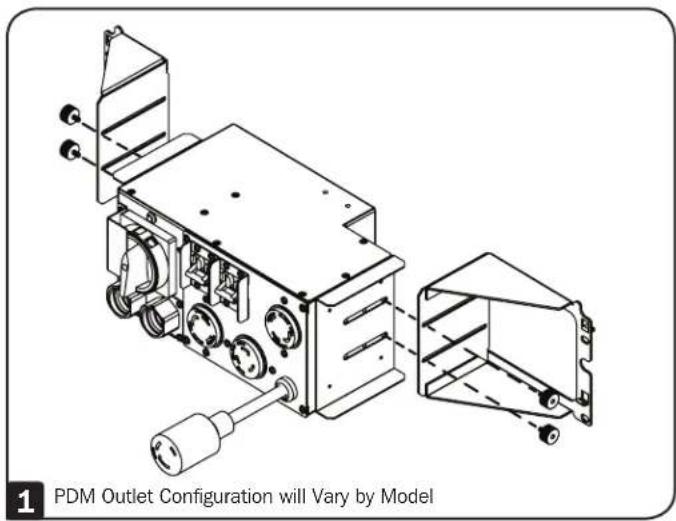
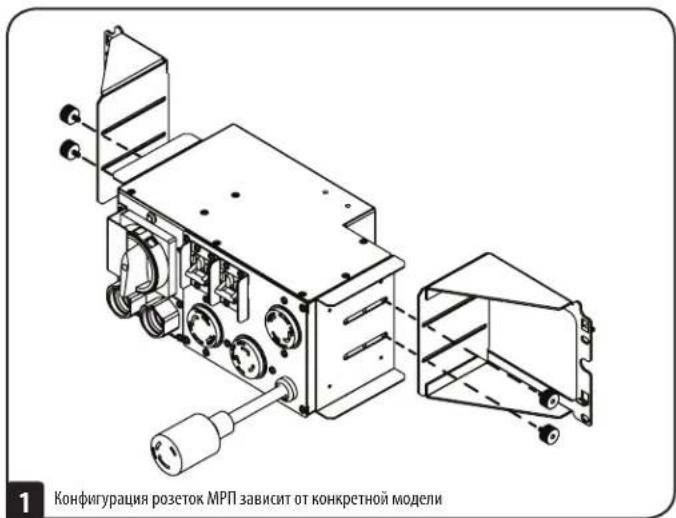
Using the included thumbscrews, attach the PDM Mounting Brackets to the PDM.
Note: Do not tighten screws at this time.
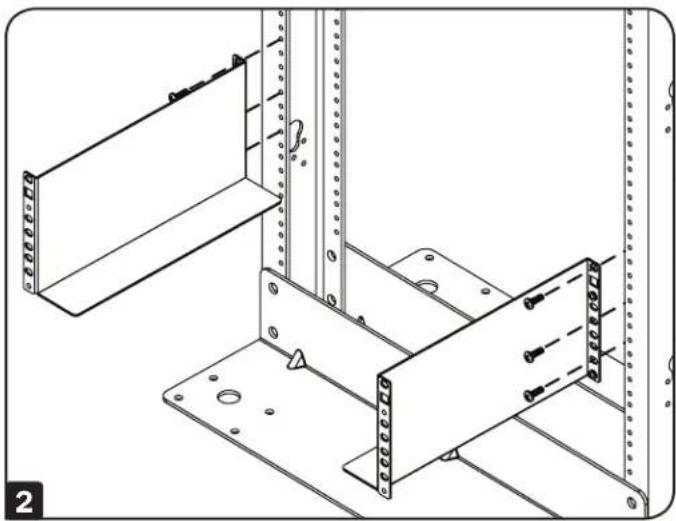
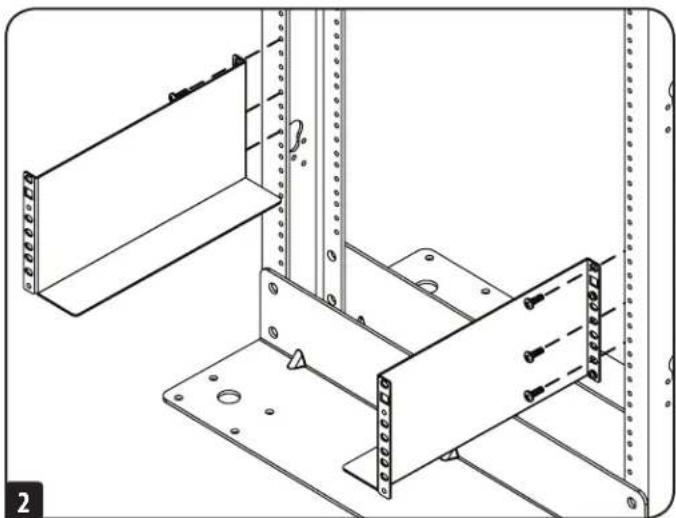
2 Attach the (two larger) 2-Post Brackets to the rear of the 2-Post Rack.
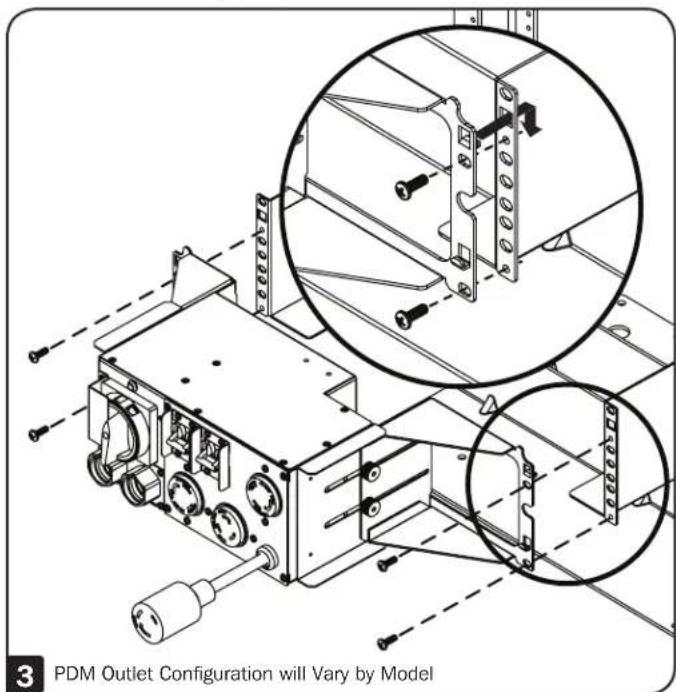
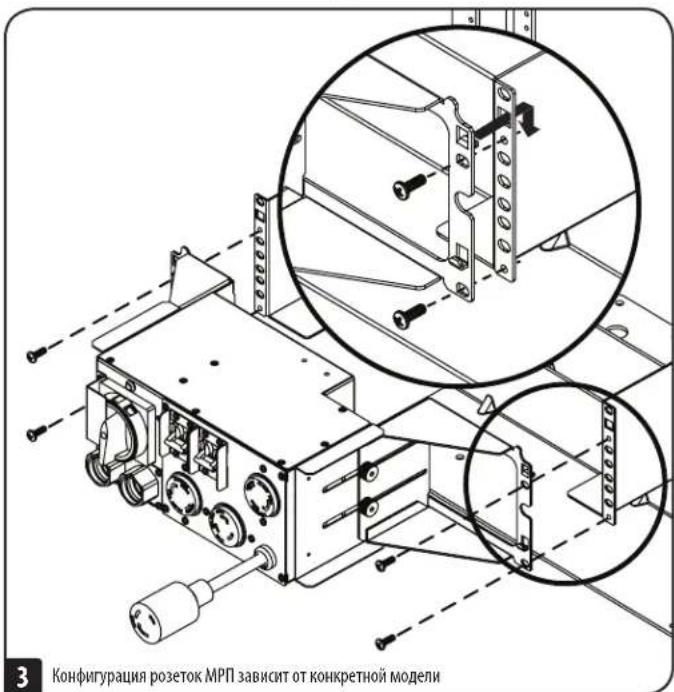
3 Attach the PDM assembly to the 2-Post Brackets. The PDM bracket's built-in hooks provide temporary support while securing the PDM to the rack with the permanent mounting hardware.
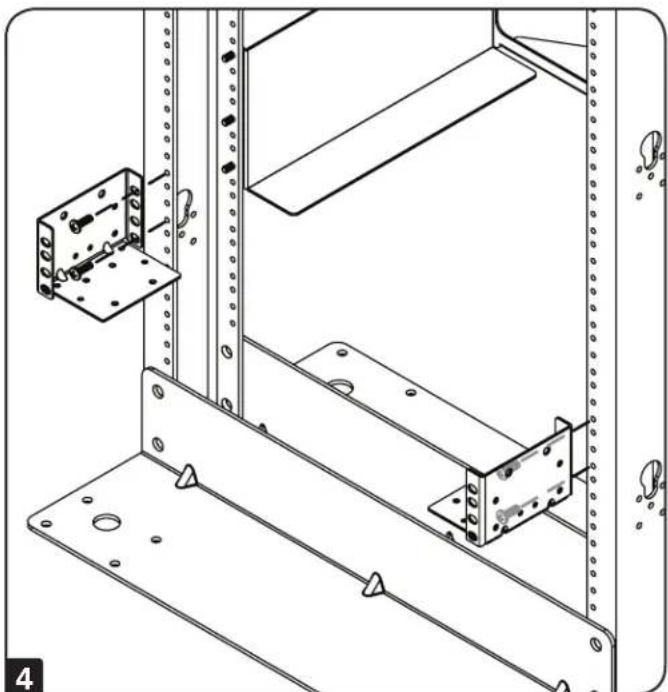
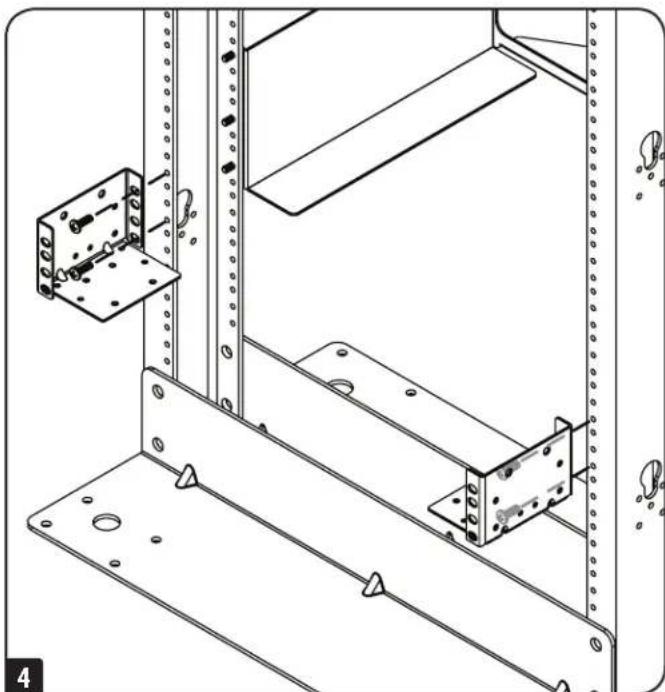
4 Attach the (two smaller) 2-Post Brackets to the front side of the 2-Post Rack.
Note: PDM Mounting Brackets can be laterally adjusted to ensure a proper connection between the UPS and PDM. To adjust the brackets, loosen the thumbscrews. Fully extend the PDM to the end of the brackets. Do not tighten screws at this time. Refer to step 6 for more information.
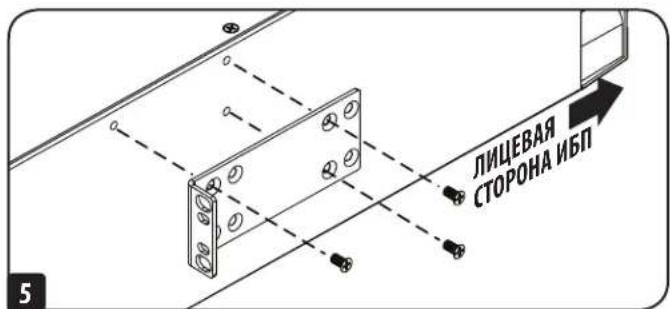
Using the included screws, attach UPS mounting brackets to the middle mounting holes on the UPS. The mounting bracket "ears" should face inward.
Note: It is recommended you remove the UPS internal batteries prior to installation. Doing so will remove excess weight and allow for safer handling. Refer to your UPS Owner's Manual for battery removal instructions.
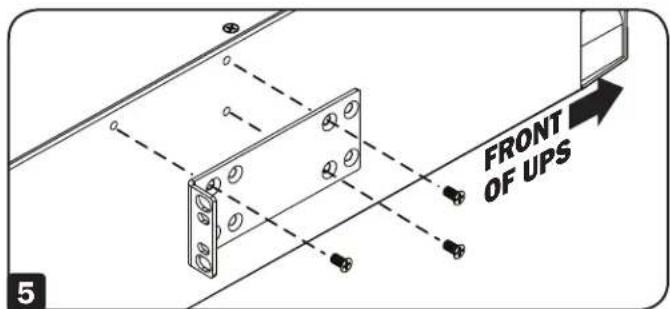
Remove the internal batteries from the UPS before proceeding with this step. For battery removal instructions, refer to your UPS Owner's Manual.
Note: If installing a WEBCARDLXMINI (sold separately), install the card prior to UPS installation.
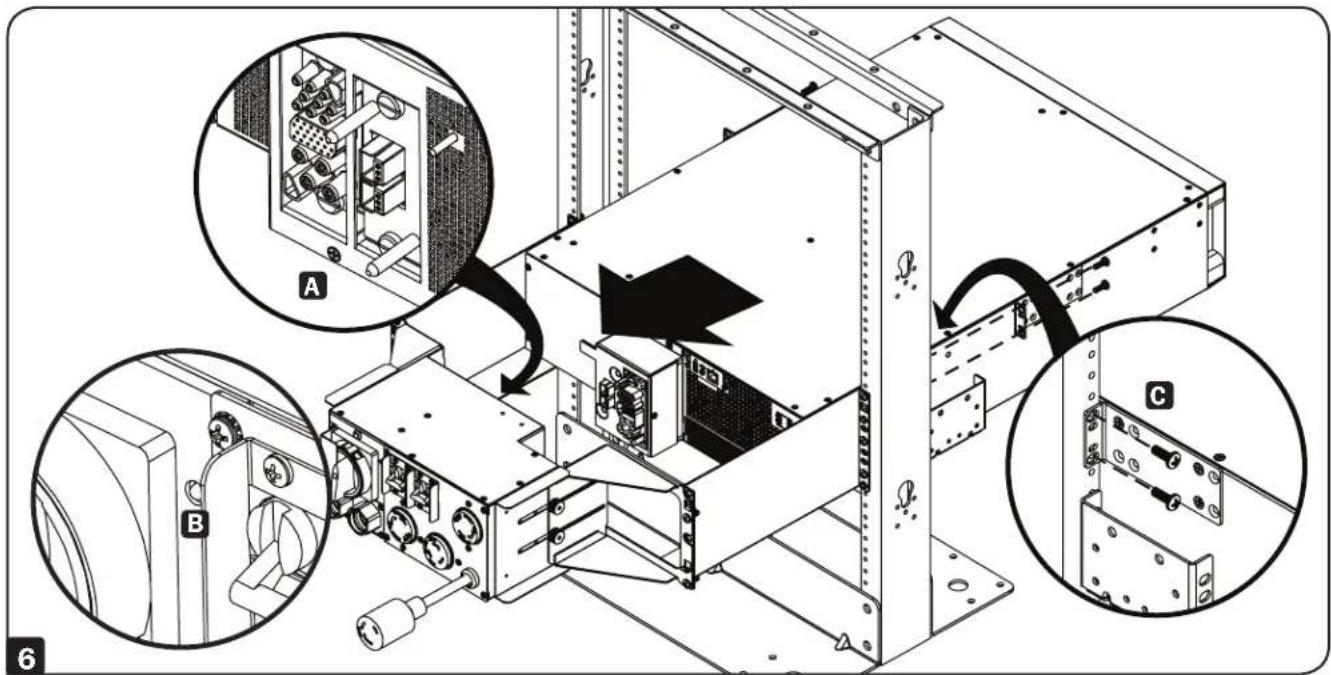
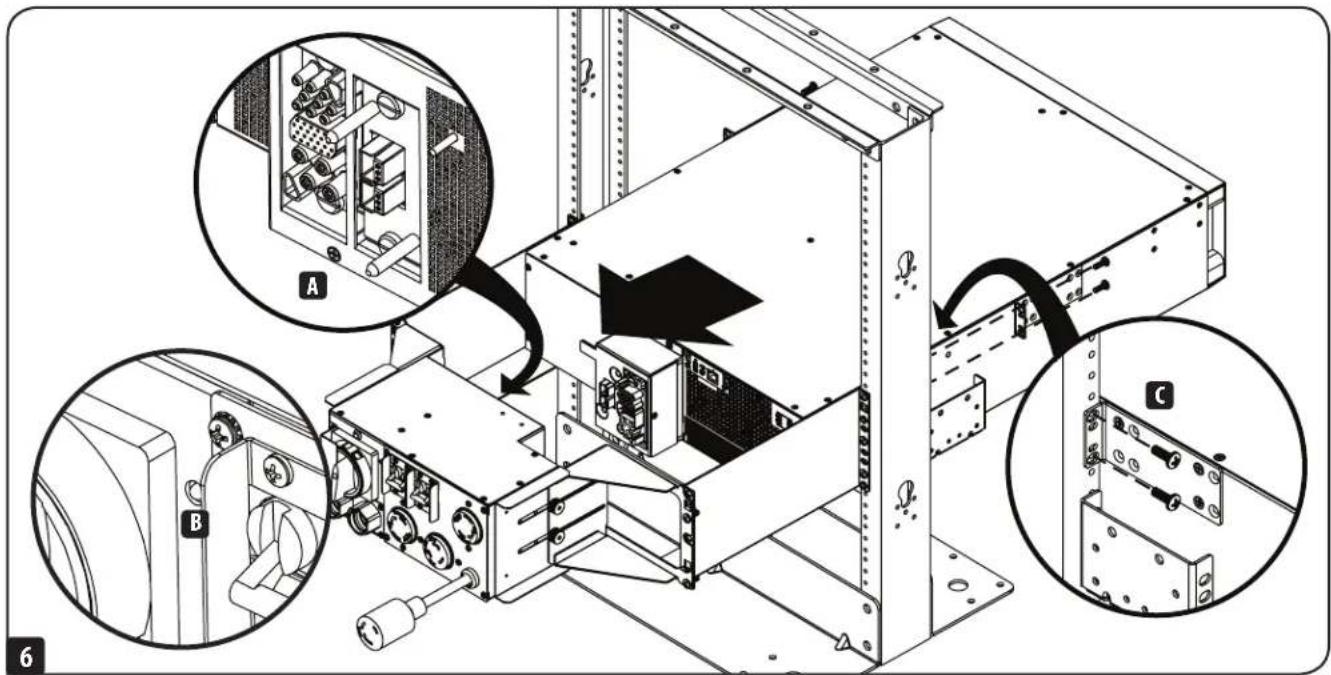
6 With the aid of an assistant, lift your UPS with its rear panel facing toward the PDM and slide it atop the 2-Post Brackets. Push the UPS toward the PDM so its blindmate connectors securely mate with the connectors on the PDM unit A. A green pin will appear on the PDM's front panel to indicate a proper connection B. Attach the UPS mounting ears to the front mounting rails with user-supplied screws and washers C. Tighten all screws securely.
Note: If internal batteries were removed, refer to your UPS Owner's Manual for battery installation instructions.
If an external battery pack is being added to the installation, refer to the instructions in your external battery pack Owner's Manual.


1111 W. 35th Street, Chicago, IL 60609 USA · tripplite.com/support
1111 W. 35th Street, Chicago, IL 60609 USA • triplite.com/support
1111 W. 35th Street, Chicago, IL 60609 USA - tripplite.com/support
OxpaHReTcA ABTOpCKMM npabOM © 2019 Tripp Lite. Nepeneyatka 3anpeetaTcR.
I PnKpeHnTE MOHTaXHbIe KPOHUsTeHbI K MPIT npH NMOOuN BINTOB C HaceUKO, NOCTaBJIReMbIX B KOMIIKeT.
Pumuehue. He 3a7a2u8aume buhmha danHom 3mane.
3aKpEnIte(Db60bnbux)KPOHHTeHa DnMa MOHTaxKa B OdHOpAMHyIO CTOky C TblbHOI CTOPHOI CTOKN.
3 PnKpeHnTe OToeDnHEmbI MPK KPOHTeHaM IJN MoHTaKa B oHnopaMHyO CTOnKy. KpOKn, BCTPoeHHbIe B KPOHtEIN JIaN KpENHeHn MPN, 06ecneuHbAOT erO BpeMeHHyIO NOdepKKy npN MoHTaeB CToNkyC nCNOJIb3OBAHmE NocTOrHHoM MOHTaXHOOCHaCTKn.
3aKpeHnTe (DbMaMbIX) KPOHHTeYHa DnMOTaKa B ODHOpAMHyIO CTOnKy CnnueBOB CTopoHBCTOnKn.
Ppumeyue. Kpohmeu hdy mohmaKa MPIM Moym pezynupoabcb 8 20pu3ohmabHou nnockcmu dny oecneueHHa noeaeauo coedunehmu Meky I5Pi u MPII. Dny pezynupoBku kponumeuho ocnaabe Mu bunmbc haceku. Ipodbunme MPI do KOHua KponumeuHO. He zamuaaime buhmha daHOM mane. Bonee noopobnau unhopmaua npedcmaenha e Pa3dene 6
5 3aKpENHTe MOHTaXHbIe KPOHHTeHbI N5B CpeDHHX MOHTaXHbIX OTBepCTnAX C NOMOHTBOH, BXOJAAHX B KOMNJIeKT. "A3bYKn" MOHTaXHbIX KPOHHTeHOB DOJIaXHbI 6bTb HAnpaBHeHb BYTpB.
PpumueHue. BhmpeHnue 6amapeu 157 peKoMeHyemcBbHUMMb neped Hauanom MOHmxa.3mo no380unm 6bne2Hmub ycmpoicmeo 4bnoe 6be3eacnoa pabomc Hm. Yka3AHn o u3aneHtu 6amapeu u3noKeHb b Pyko8Ocm8 neh3obamena 157
Ipea3TUM BbHbTe BByTpEHHne 6aTaepn 15N5.
Yka3aHnno nBbneueHHIO 6aTapei cm. B PykoBoDCTBe noIb3oBaTeN 15n.
PpueH. Ppu ymaHOke Kapmb WEBCARDLMINI (npdaemc om delloho) ee cyeym ycaHaBnabMb neep hauanom MohmaKa HII.
6 C nOmoBIO DpyrTO COTpyHnKa NODHMNTe IV5I TAKM O6p3OM, YTO6bI eO 3aJHnAneHb 6bIa O6paueHa K MPN, I 3aBmHbTe erO NOBepx KPOHHTeHOBdI MOHTaK B ODHopAMHy cTcKy. PpOTOnKHTE IV5IN B HAnpABNeHH MPTAKM O6p3OM, YTO6bI eO pANBpu-pa3bEmbI PIOTHO COUHeHHC bP4BeMaMM MPN A .PnHADNEXaIeM NODKlOHeHH HapeDHeN NaHEH MPN IOBJIaTcR 3IO6paKeHMe 6yNA8kN 3eHOro CBeta B .PnPKeHNte MOHTaXhBle npoyuHHb I5IK nepeHMMoHTaXhBM HAnpABLIooHMM C NOMObB BuHTOB W KOMPIEKT. PInTOH 3aTHHTe BCE BHTbl.
Ppumeyane. EcnBhmpenHne bamaepu 6bnu u38nehen, cM.yka3aHn no ycmaHOe bamaepu B Pykoobcmne noIb3oBamene Coo20 H5N.
7 B cnyae noKkHnE H BHeHrero 6noka aKKyMylAToPbXb 6aTaepm cm. yka3HaBn B PykoBocTBe nIb30BaTeN CBOero BHeHrero 6aTaepHoro 6noka.


1111 W. 35th Street, Chicago, IL 60609 USA - triplite.com/support
19-11-207-90-3943-RgM