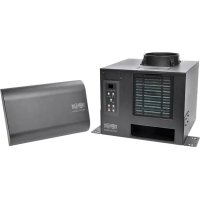
SmartRack SRCOOL2KWM - Air Conditioning Tripp Lite - Free user manual and instructions
Find the device manual for free SmartRack SRCOOL2KWM Tripp Lite in PDF.



| Product Type | Air conditioner for wall-mount enclosure |
| Brand | Tripp Lite |
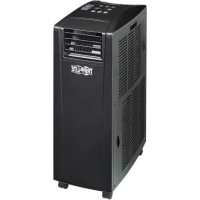
| Model | SmartRack SRCOOL2KWM |
| Cooling Capacity | 2000 BTU |
| Supply Voltage | 120 V AC, 60 Hz |
| Refrigerant | R134A |
| Operating Modes | Cooling, Dehumidification, Quiet, Timer |
| Fan Speed | HI, MED, LOW, AUTO |
| Display | Digital (temperature, error codes) |
| Drainage | Integrated evaporation (drain plug) |
| Air Filter | Washable, clean every 2 weeks |
| Warranty | 1 year |
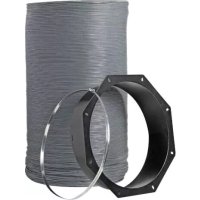
| Included Accessories | Mounting brackets, screws, directional vent, flexible exhaust hose, adjustable exhaust panel, drain plug |
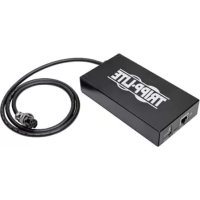
| Network Option | SRCOOLNET2 Module (remote management) |
| Power Consumption | Not specified |
| Dimensions (W x H x D) | Not specified |
| Weight | Not specified |
| Maintenance | Clean the air filter with warm water and mild detergent |
| Safety | Grounding required, do not use extension cord, unplug before maintenance |
| Spare Parts | Air filter, SRCOOLNET2 module (optional) |
Frequently Asked Questions - SmartRack SRCOOL2KWM Tripp Lite
User questions about SmartRack SRCOOL2KWM Tripp Lite
0 question about this device. Answer the ones you know or ask your own.
Ask a new question about this device
Download the instructions for your Air Conditioning in PDF format for free! Find your manual SmartRack SRCOOL2KWM - Tripp Lite and take your electronic device back in hand. On this page are published all the documents necessary for the use of your device. SmartRack SRCOOL2KWM by Tripp Lite.
USER MANUAL SmartRack SRCOOL2KWM Tripp Lite
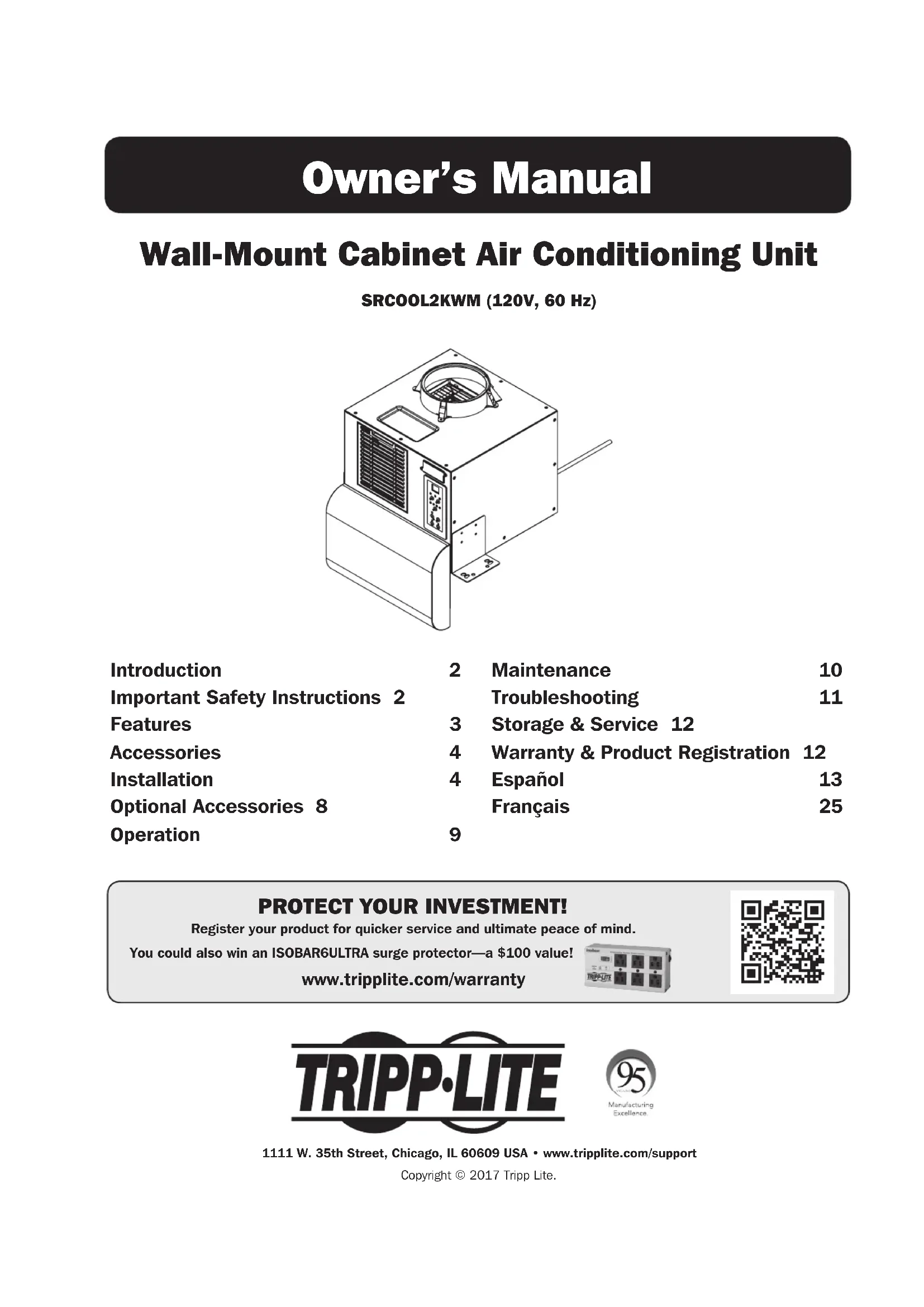
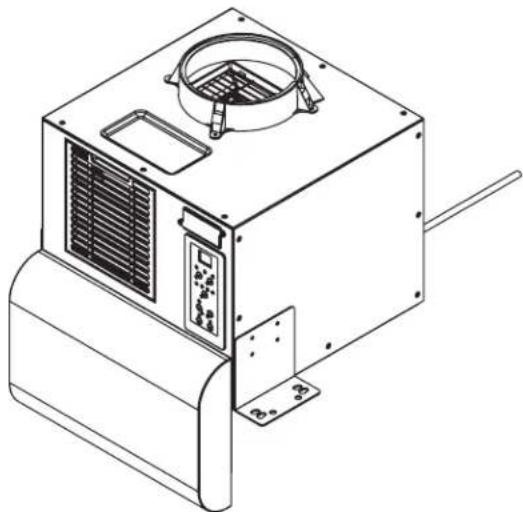
Wall-Mount Cabinet Air Conditioning Unit
SRCOOL2KWM (120V, 60 Hz)
natural_image
Technical line drawing of a mechanical device with ventilation grilles and control panel (no text or symbols)Introduction 2 Maintenance 10
Important Safety Instructions 2 Troubleshooting 11
Features 3 Storage & Service 12
Accessories 4 Warranty & Product Registration 12
Installation 4 Español 13
Optional Accessories 8 Français 25
Operation 9
PROTECT YOUR INVESTMENT!
Register your product for quicker service and ultimate peace of mind.
You could also win an ISOBAR6ULTRA surge protector—a \$100 value!
www.tripplite.com/warranty



1111 W. 35th Street, Chicago, IL 60609 USA • www.tripplite.com/support
Copyright © 2017 Tripp Lite.
Introduction
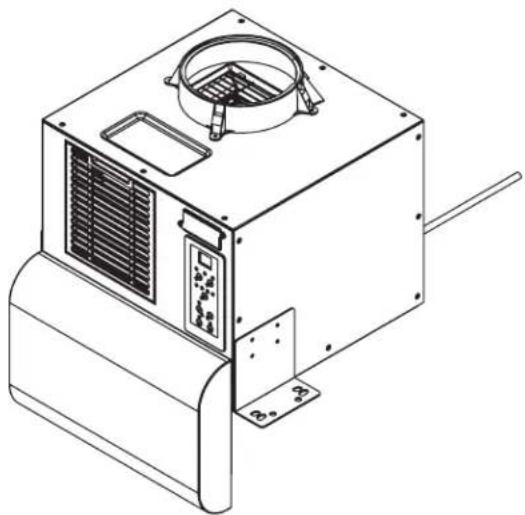
The self-contained Wall-Mount Cabinet Air Conditioning Unit provides 2,000 BTU of cooling capacity. Designed for IT environments, it's ideal for cooling overheated wall-mount rack enclosures and network closets without access to facility air conditioning. It also filters and dehumidifies air to improve operating conditions and equipment reliability. Condensate is re-evaporated for drip-free operation, so you won't waste time emptying water collection tanks. The self-contained design does not require any plumbing or special circuits, so setup is quick and easy. Eco-friendly R134A refrigerant meets environmental standards.
Recommended Applications:
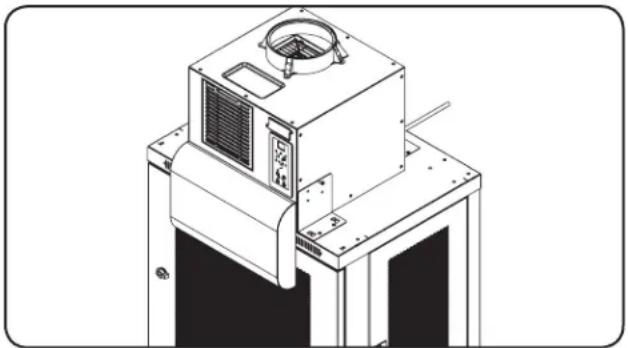
natural_image
Technical line drawing of a mechanical or industrial device with no visible text, numbers, or symbols.Cooling an overheated wall-mount rack enclosure.
Important Safety Instructions

SAVE THESE INSTRUCTIONS
This manual contains instructions and warnings that should be followed during the installation, operation and storage of this product. Failure to heed these warnings may affect your warranty.
Warnings
- The individual user should determine prior to use whether this device is suitable, adequate or safe for the use intended. Since individual applications are subject to great variation, the manufacturer makes no representation or warranty as to the suitability or fitness of this device for any specific application.
• Install the unit indoors, away from extreme temperatures or humidity, direct sunlight, dust and conductive contaminants. - Connect the unit directly to a grounded AC power outlet. Failure to do so may cause an electric shock or fire.
- The power source supplying the unit must be rated in accordance with the unit's nameplate.
- Do not modify the plug nor use an adapter that would eliminate the ground connection.
- Do not use an extension cord to connect the unit to an AC outlet. Use only the power cord that came with the unit.
- Comply with all applicable wiring and safety regulations, such as National Electrical Code (NEC) in the United States.
- Do not plug additional equipment into the outlet where the unit is plugged in. Overloading the outlet may cause an electric shock or fire.
- Do not attempt to turn the unit on or off by connecting or disconnecting the AC plug. A serious electric shock may occur. Use the ON/OFF button to turn the unit on or off.
- Turn the unit off and unplug it from the AC outlet before performing maintenance.
- Before connecting the unit to a dedicated drainage system, turn it off and unplug it. There is a risk of electric shock while the unit is plugged in.
- Maintenance should be performed by trained personnel only.
- Do not use thinners, alcohol, detergents or abrasive brushes to clean the unit's cabinet. These items may damage the cabinet.
- Do not pour water over the unit. This may cause an electric shock and damage the unit.
- Do not operate the unit without the air filter. This may cause dust accumulation that may damage the unit.
- Do not attempt to operate the unit in a room with inadequate air circulation. Failure to vent heat properly may cause the unit to malfunction.
- Use of this equipment in life support applications where failure of this equipment can reasonably be expected to cause the failure of the life support equipment or to significantly affect its safety or effectiveness is not recommended.
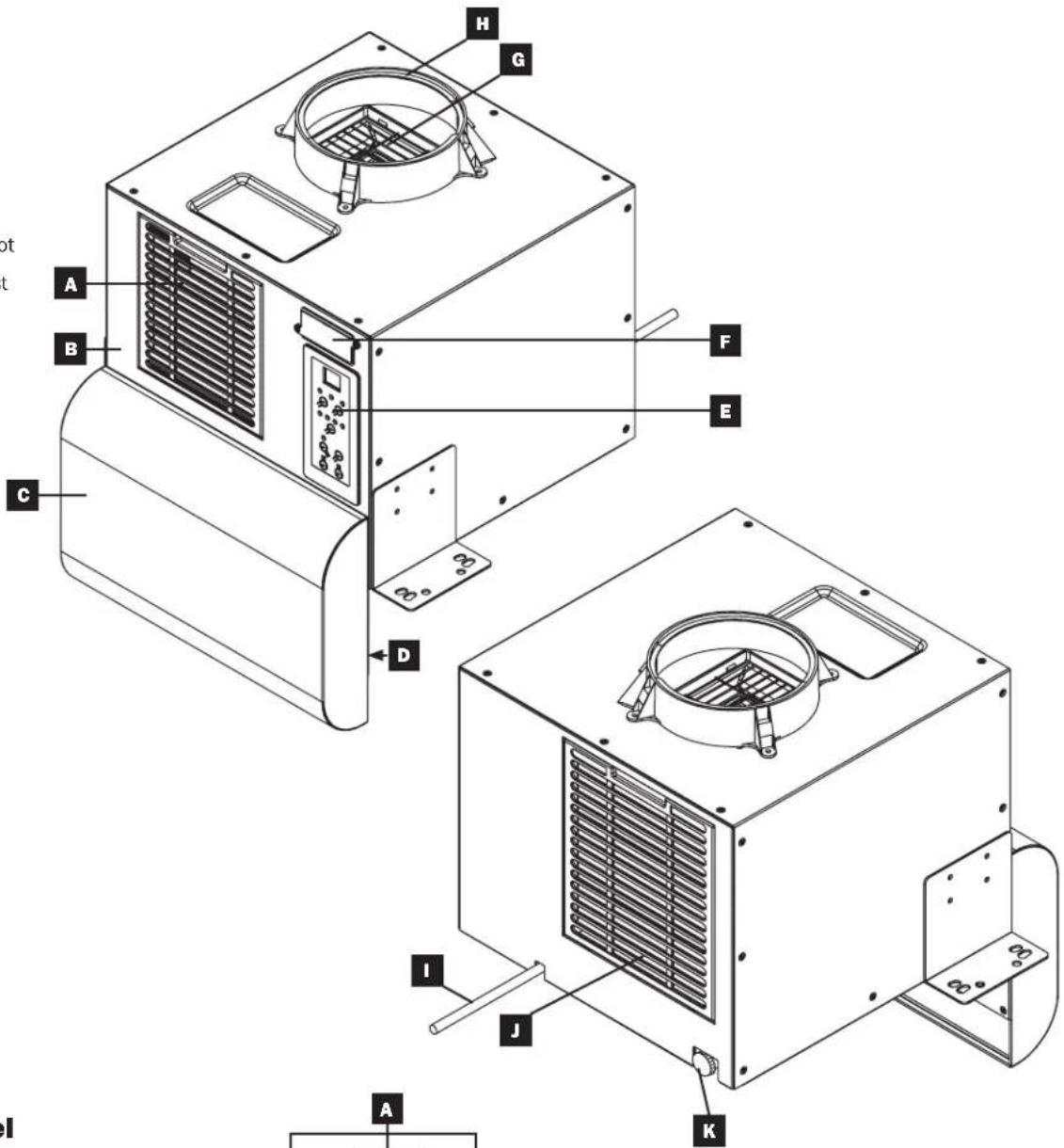
Features
Front View

Air Filter

Front Panel

Directional Vent

Cool Air Output

Control Panel

SRCOOLNET2 Slot

Warm Air Exhaust

Duct Adapter
Rear View

AC Power Cord

Air Filter

Drainage Outlet
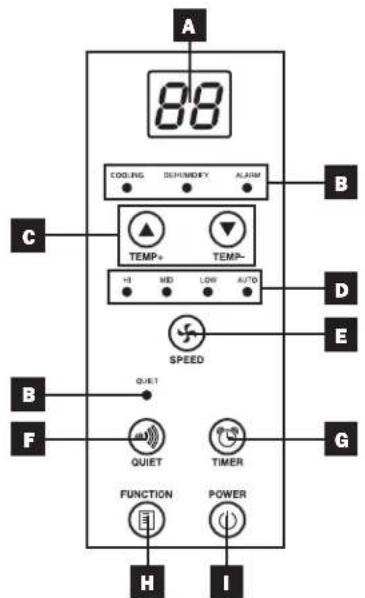
Control Panel

Numeric Display

Operating Mode LEDs

Temperature Control Buttons

Fan Speed Mode LEDs

"FAN SPEED" Button

"QUIET" Button

"TIMER" Button

"FUNCTION" Button

"POWER" Button
Accessories
Warning: After removing the unit from the shipping container, check for damage or missing parts (refer to the parts list below). If you notice a problem, visit www.tripplite.com/support for service. Do not attempt to operate a damaged unit.
Accessory Parts List:
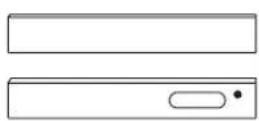
Adjustable Exhaust Panel (2 Sections)
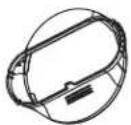
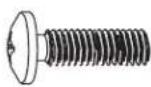
Exhaust Duct Adapter M6x16mm (4) Directional Vent
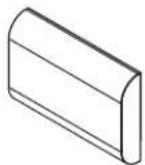
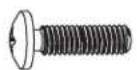
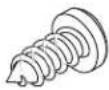
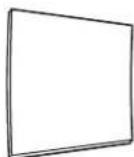
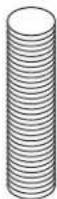
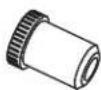
M4x10mm (8) Self-Tapping Screw (4) Magnetic Door Panel (1) Exhaust Duct Extra Drainage Plug
Installation
The procedures described in this section are for Tripp Lite wall-mount rack enclosure types and may not be appropriate for all applications. The user must determine the fitness of hardware and procedures before mounting. If hardware and procedures are not suitable for your application, contact Tripp Lite for assistance.
Installation Notes
- The SRCOOL2KWM is ideal for enclosures with perforated doors (not for use in enclosures with solid/acrylic glass/glass doors).
- If your building's cooling system has night or weekend thermostat setbacks, has periodic shutdowns, or has limited cooling capacity, you may need to consider alternatives to the standard installation. This product is meant to be used as a supplemental cooling device, and cannot make up for significant fluctuations in building temperature or humidity.
Front Door Facing Installation
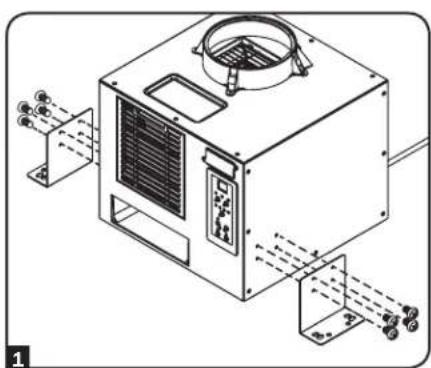
1 Attach the two brackets using the supplied M4 x 10 mm screws.
2 With the unit facing forward, place it on top of a wall-mount rack. Align the bracket holes with the mounting holes on top of the wall-mount rack.
Note: Bracket holes will align with a Tripp Lite rack. Other rack brands may require new holes to be drilled into them.
3 Secure unit to wall-mount rack with the supplied M6 x 16 mm screws.
Note: If mounting to a rack brand other than Tripp Lite, user must supply the mounting hardware.
natural_image
Technical line drawing of a mechanical device with mounting brackets and internal components (no text or symbols)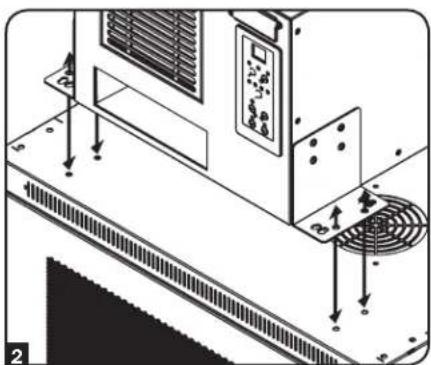
natural_image
Technical diagram of an air conditioning unit with control panel and fan (no text or symbols)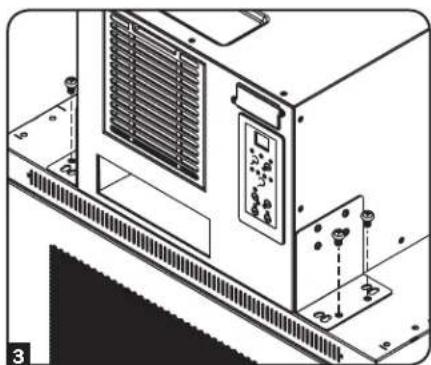
natural_image
Technical line drawing of an industrial HVAC unit with control panel and mounting bracket (no text or symbols)Installation
Side Panel Facing Installation
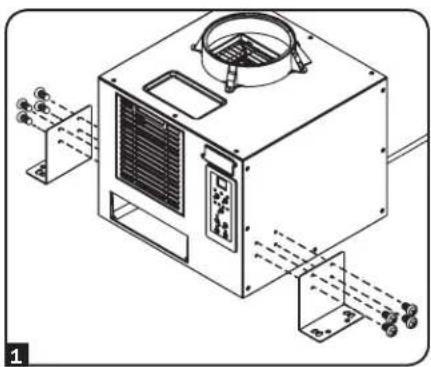
1 Attach the two brackets using the supplied M4 x 10 mm screws.
2 With the unit facing toward either side panel, place it on top of a wall-mount rack. Align the bracket holes with the mounting holes on top of the wall-mount rack.
Note: Bracket holes will align with a Tripp Lite rack. Other rack brands may require new holes to be drilled into them.
3 Secure unit to wall-mount rack with the supplied M6 x 16 mm screws.
Note: If mounting to a rack brand other than Tripp Lite, user must supply the mounting hardware.
natural_image
Technical line drawing of an air conditioning unit with cooling fans and ventilation duct (no text or symbols)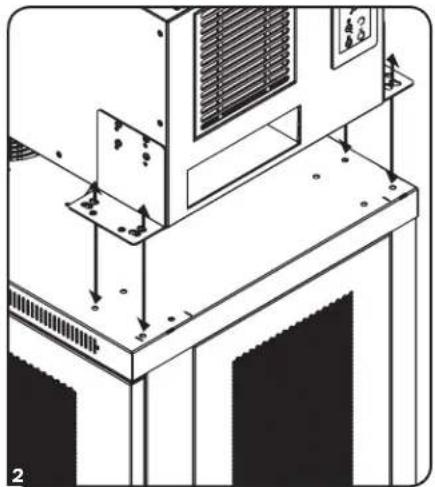
natural_image
Technical line drawing of a mechanical assembly with mounting brackets and structural supports (no text or symbols)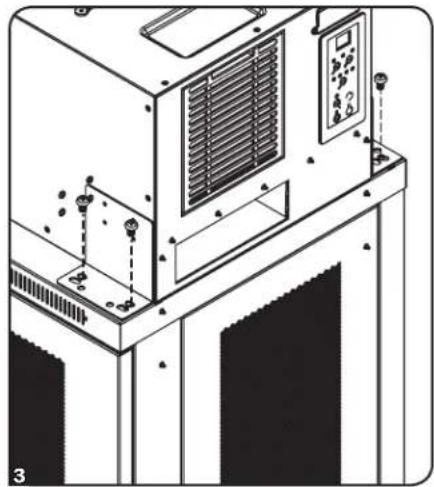
natural_image
Technical line drawing of an industrial machine with control panel and mounting bracket (no text or symbols)Directional Vent Installation
Note: The illustrations below show a front door facing installation.
1 Ensure the front door to the wall-mount rack is closed.

natural_image
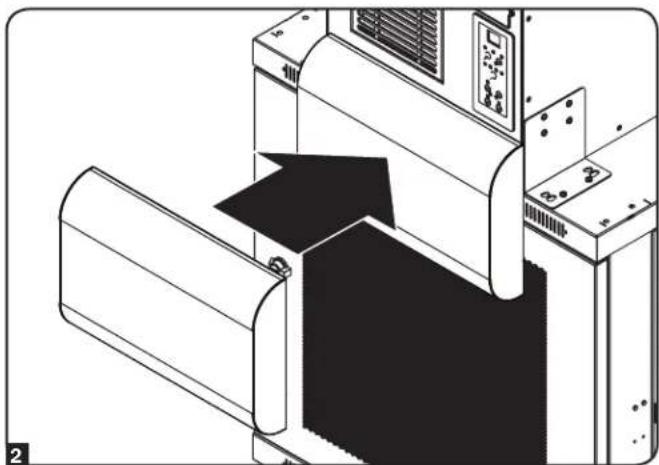
Isometric line drawing of a server rack cabinet with an arrow pointing to the front panel (no text or symbols)2 Align the rectangular opening on the directional vent with the opening on the front of the air conditioner. Push the directional vent onto the unit. Magnets on the vent surface will hold the vent onto the unit and wall-mount rack.
Note: Vent will remain attached to the wall-mount rack's front door when it's opened.
natural_image
Technical line drawing of a mechanical assembly or machine component (no visible text or symbols)Installation
Exhaust Duct Connection (Optional)
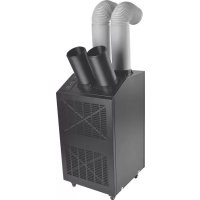
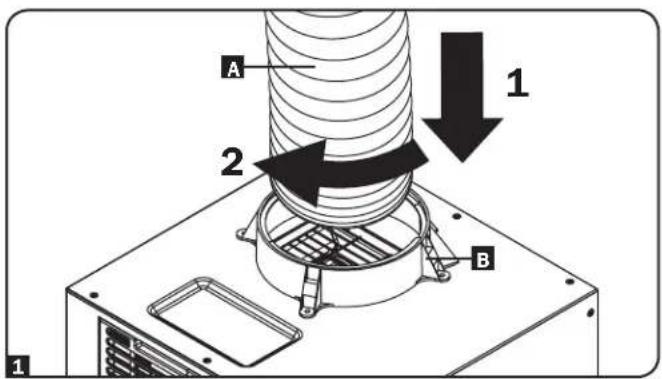
1 Connect the flexible exhaust duct A to the warm air exhaust vent on the top panel of the unit B. Align the duct with the circular vent opening, push the duct inward and turn the duct clockwise until it screws into the exhaust vent solidly.
2 Connect the other end of the exhaust duct A to the exhaust duct adapter B. Align the duct with the circular adapter opening, push the duct inward and turn the duct clockwise until it screws into the adapter solidly. If you plan to connect the exhaust duct to a drop ceiling, proceed to the Drop Ceiling Exhaust Connection section. If you plan to connect the exhaust duct to a window, proceed to the Window Exhaust Connection section.
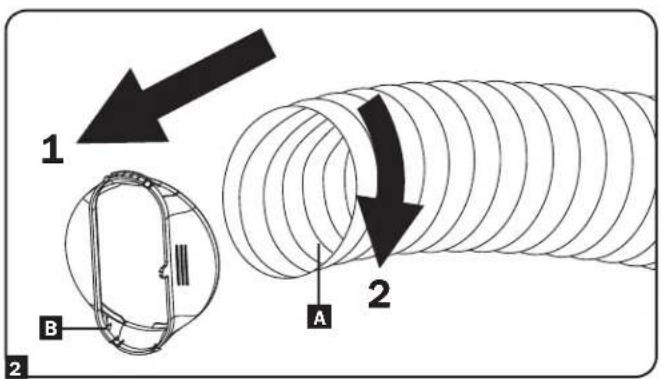
Drop Ceiling Exhaust Connection
Warning: Some ceilings may require modified installation procedures. The user must determine the fitness of hardware and procedures before installing. The procedures described in this manual may not be appropriate for all applications.
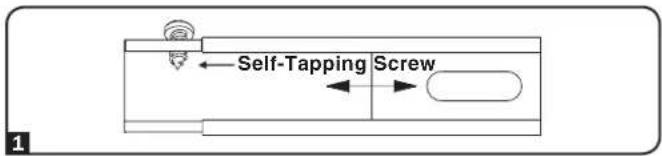
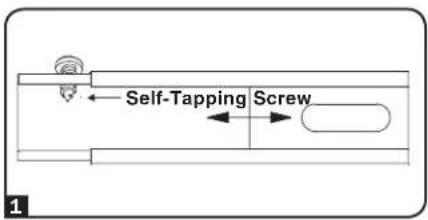
1 Choose a removable drop ceiling panel near the unit to provide the straightest, shortest path available for the flexible exhaust duct. Measure the width of the ceiling panel, including the portion that rests on the ceiling grid. Combine the two sections of the adjustable exhaust panel, then adjust the exhaust panel to match the width of the ceiling panel. After the exhaust panel is set to the correct width, use the included self-tapping screw to lock it in place.
Note: The exhaust panel can adjust from 20.5 to 49.2 inches (52.1 to 104.1 cm). Certain installations may require trimming the exhaust panel for a proper fit.
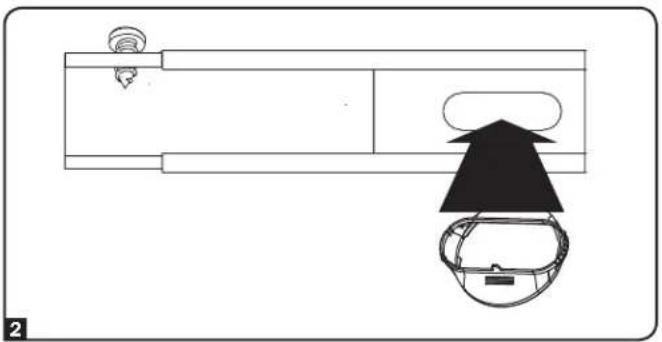
2 Insert the exhaust duct adapter into the oblong hole in the adjustable exhaust panel. The adapter will snap into place.
natural_image
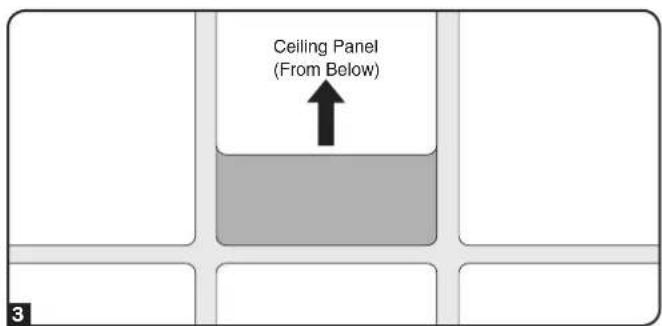
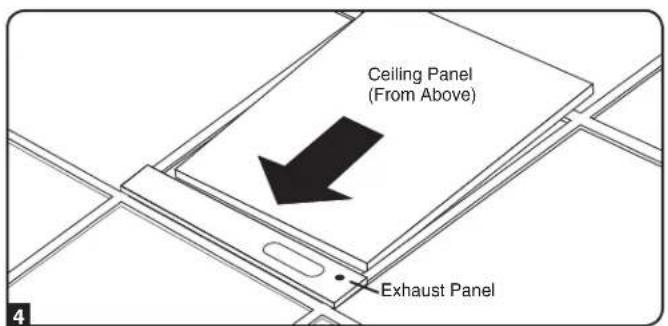
Top-down diagram of a vehicle's front view showing dashboard, steering wheel, and helmet (no text or symbols)3 Slide the ceiling panel out of the way and place the exhaust panel inside the ceiling space. Allow the exhaust panel to rest on top of the ceiling grid.
Note: There must be at least 10 inches (25.4 cm) of open space above the exhaust panel to allow adequate airflow.
4 Slide the ceiling panel back into place so that it adjoins the exhaust panel and closes any gaps in the ceiling. A tight seal will permit maximum cooling efficiency. If the installation is permanent, trim the ceiling panel so it doesn't overlap the ceiling grid.
Note: The flexible exhaust duct can extend to a maximum length of 118 inches (300 cm). Provide the straightest, shortest path available. Excessive bending or stretching of the duct will reduce cooling efficiency.
Installation
Window Exhaust Connection
Warning: Some windows may require modified installation procedures. The user must determine the fitness of hardware and procedures before installing. The procedures described in this manual may not be appropriate for all applications.
1 Measure the window opening. Combine the two sections of the adjustable exhaust panel, then adjust the exhaust panel to match the width of the window opening. After the exhaust panel is set to the correct width, use the included self-tapping screw to lock it in place.
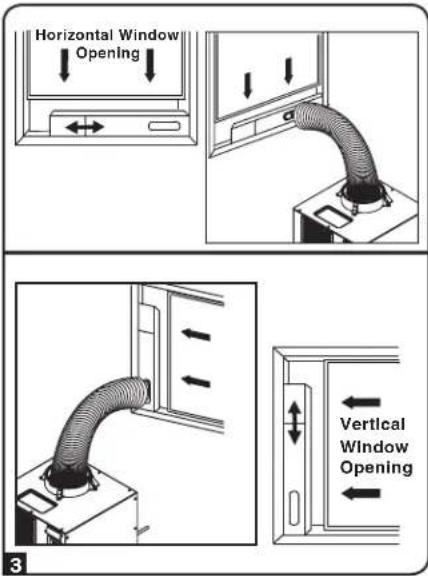
Note: The exhaust panel can adjust from 20.5 to 49.2 inches (52.1 to 104.1 cm). It is compatible with vertical and horizontal mounting.
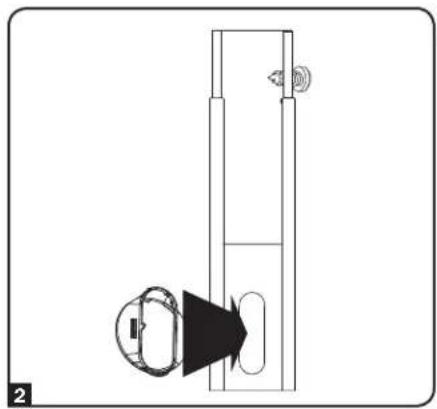
2 Insert the exhaust duct adapter into the oblong hole in the adjustable exhaust panel. The adapter will snap into place.
natural_image
Diagram of a vertical door with a circular component and directional arrow, no text or symbols present3 Insert the exhaust panel into the window opening, then close the window against the exhaust panel. A tight seal will permit maximum cooling efficiency. Note: There must be at least 10 inches (25.4 cm) of open space behind the exhaust panel to allow adequate airflow.
Note: The flexible exhaust duct can extend to a maximum length of 118 inches (300 cm). Provide the straightest, shortest path available. Excessive bending or stretching of the duct will reduce cooling efficiency.
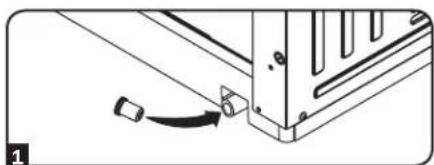
Drainage Plug
Warning: The unit's built-in re-evaporator will not function unless the drainage plug is installed in the drainage outlet.
The SRCOOL2KWM ships with the drainage plug pre-installed. When the unit cools or dehumidifies, condensation forms. The unit has a built-in re-evaporator that allows it to expel condensation through the warm air exhaust stream. This feature allows the unit to operate indefinitely without requiring you to empty a water collection tank.
1 Cooling Mode with Re-Evaporation
The drainage plug must remain installed to enable re-evaporation of condensation.
2 Cooling Mode without Re-Evaporation
To use Cooling mode without re-evaporating condensation, remove the drain plug and route a user-supplied drain line to external drainage.
3 Dehumidify Mode
When using the unit in Dehumidify mode, you must remove the drain plug and route a user-supplied drain line to external drainage. This is required because the water removed from the air would otherwise be evaporated back into the room.
Note: If the drainage system becomes clogged, a small internal reservoir will collect condensation. If the drainage system is not cleared before the internal reservoir fills, the unit will shut down automatically.
Warning: Before connecting the unit to a dedicated drainage system, turn it off and unplug it. There is a risk of electric shock while the unit is plugged in.
natural_image
Pure mechanical assembly diagram showing a bracket with a curved arrow indicating motion (no text or symbols)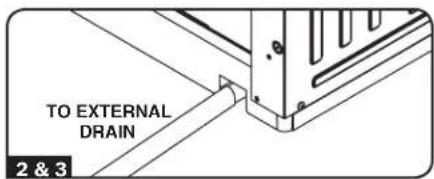
Installation
Powering the SRCOOL2KWM
Plug the unit into an appropriate power source.
Low Temperature Operation
The SRCOOL2KWM is a high performance cooler, capable of producing very cold air output. When using the unit in environments that are already cold (20°C / 68°F or less), Tripp Lite recommends using the Dehumidify Mode only. This will allow the unit to continue to provide the supplemental cooling while preventing any evaporator icing issues caused by the low room temperature.
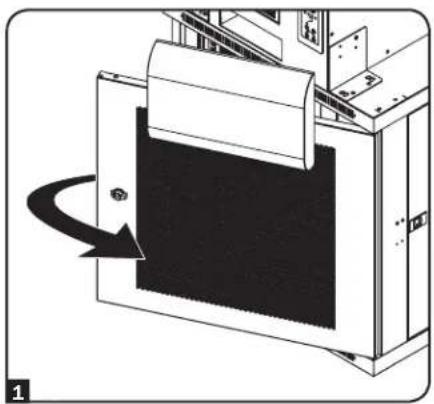
Magnetic Door Panel Installation (Optional)
1 Open the rack front door.
2 Cut the magnetic door panel to fit the shape of the directional vent when it's attached to the wall-mount rack front door.
3 Attach the magnetic door panel to the inside of the rack front door.
natural_image
Diagram of a printer or printer with a paper roll and arrow indicating rotation (no text or symbols present)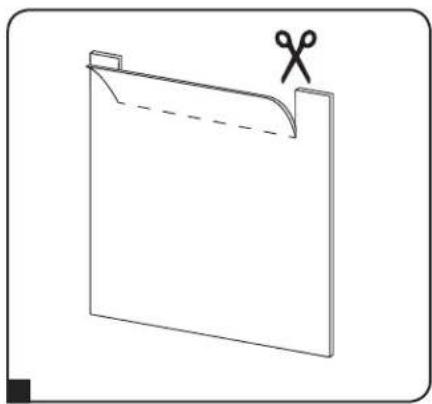
natural_image
Simple line drawing of a folded paper or document with scissors placed on top (no text or symbols)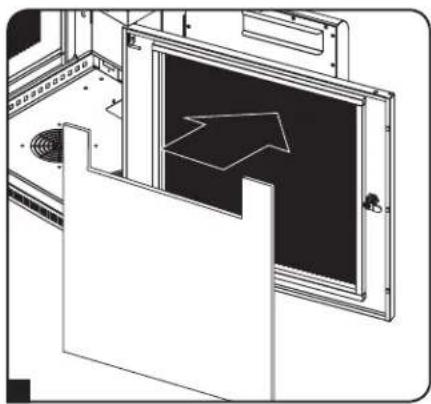
natural_image
Technical line drawing of a mechanical assembly with a black panel and directional arrow (no text or symbols)Optional Accessories
Remote Cooling Management
Add remote cooling management to your SRCOOL2KWM with the optional SRCOOLNET2 module. It allows you to communicate with and control the SRCOOL2KWM as a manageable device on your network and is accessible via Web Browser, Network Management Station or Telnet. With the SRCOOLNET2 installed, you can:
- Change settings and monitor temperature and humidity from any location
- Receive alerts via e-mail, SMS or SNMP
- Access detailed condition and event logs
Learn more about the SRCOOLNET2 at www.tripplite.com.
Operation
Warning: Install the unit according to the instructions in the "Installation" section before attempting to operate it.
Power
Turn the unit on or off by pressing the "POWER" button.
The unit has a 3.5-minute compressor delay in order to prevent potential circuit overloads at start up.
Automatic Restart Feature
The unit will turn on and resume operation automatically when power is restored after a power outage. The unit will use the same settings that it used immediately before the power outage occurred.
Note: If the power outage is brief, the unit will run the fan alone for 3.5-minutes before resuming normal operation. The delay allows the compressor to depressurize so the unit will function properly when it enters Cool mode.
POWER

Cool Mode
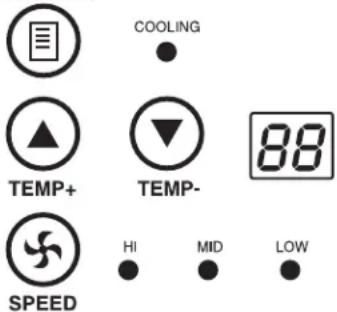
Pressing the "FUNCTION" button cycles between Cool mode and Dehumidify mode. The "COOLING" LED remains illuminated when Cool mode is active.
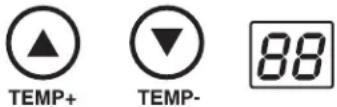
Press the TEMP+ and TEMP- buttons to set the temperature in Cool mode. The selected temperature is shown on the numeric display. Once set, the desired temperature will blink five times, after which the display will show the current room temperature.
Press the "FAN SPEED" button to cycle between high, medium and low fan speeds. An LED illuminates to indicate the selected fan speed. When speed is set on AUTO, the unit will automatically select a fan speed based on the set and ambient temperatures. If ambient temperature is lower than the set temperature, the fan will run and the "COOLING" LED will blink to indicate that the compressor is off. When cooling resumes, the "COOLING" LED will remain illuminated.
FUNCTION
AUTO
Dehumidify Mode
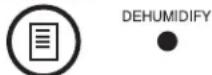
Pressing the "FUNCTION" button cycles between Cool mode and Dehumidify mode.
The “DEHUMIDIFY” LED illuminates when Dehumidify mode is active. In Dehumidify mode, the fan runs at a fixed speed and temperature controls are disabled. For optimal performance in Dehumidify mode, close windows and doors, remove the drain plug and route user-supplied drain line to external drainage.
FUNCTION
Timer
The "TIMER" button allows you to schedule the unit to turn on or off automatically.
Timer On (Note: The unit must be off to activate the Timer On function. Confirm that mode, temperature and fan speed settings are correct before activating the Timer On function.)
Activate the timer by pressing the "TIMER" button. Pressing or holding down the "TIMER" button allows you to set the "delayed on" time. The number of hours is shown on the numeric display. The number will flash on the screen five times, then display the time remaining before the unit will power on.
Timer Off (Note: The unit must be on to activate the Timer Off function.)
Activate the timer by pressing the "TIMER" button. Pressing or holding down the "TIMER" button allows you to set the "delayed off" time. The number of hours is shown on the numeric display. The number will flash on the screen five times before returning to the current temperature.

TIMER

Quiet Control Mode
The unit includes a Quiet Control Mode which regulates the cooling via the microprocessor to achieve quieter operation levels when noise is an issue.
To activate Quiet Control Mode, first set the desired temperature. After the display LED stops flashing, press the "QUIET" button. The Quiet LED will turn on. The set temperature will automatically increase by 2^ / 1^ per hour for the next two consecutive hours for a total gain of +4^ / +2^ after two hours, keeping the setting temperature constant from that point on.

QUIET
●

TEMP+

TEMP-


TIMER
Operation
Changing Degree Units
The unit can display temperatures in both Celsius and Fahrenheit. The default setting for the SRCOOL2KWM is Fahrenheit.
To toggle between temperature modes, put the unit in standby mode. The air conditioner is in standby mode when it is plugged into live AC power, but powered off. Then, press and hold the "FUNCTION" key for 10 seconds. After 10 seconds, the display will flash the temperature in the new degree units. Power the unit back on to resume operation.
FUNCTION

Alarm
If the internal water tank becomes full, the unit will display the "E4" error code on its screen. To resume normal function, turn the unit off, remove the drainage plug and drain the excess water from the unit. Replace the plug and turn the unit on to begin cooling.
One possible cause of the “E4” error is an excessively humid operating environment. If the error occurs regularly, you should check the humidity level of the operating environment. You may need to add an external drain.

ALARM

Maintenance
Periodic maintenance extends the unit's lifespan and permits maximum operating efficiency.
Cleaning the Air Filters
It is important to keep the air filters clean and free of dust. When the filters are dirty or clogged with dust, it decreases cooling efficiency and can threaten air quality. Tripp Lite recommends cleaning the filters at least once every two weeks.

Before cleaning the filters, turn the unit off and unplug it! There is a risk of electric shock while the unit is plugged in.
- Turn the unit off and unplug it.
- Remove the air filters.
- Wash the filters with warm water and a neutral detergent. Do not use harsh detergents or chemicals. Allow the filters to air dry completely after washing.
Note: Do not use water hotter than 104^ F ( 40^ C) to clean the filters.
- Replace the air filters.
- Plug the unit in and resume normal operation.
Cleaning the Cabinet

Before cleaning the cabinet, turn the unit off and unplug it! There is a risk of electric shock while the unit is plugged in.
- Turn the unit off and unplug it.
- Wipe the unit with a dry, non-abrasive cloth. Do not use gasoline, benzene, thinners or other harsh chemicals that may damage the surface. Do not pour water directly over the unit or into the working parts. This causes a risk of electrical shock and deterioration of electrical components and wiring insulation.
- In extreme cases, wipe the unit with a damp cloth to remove residue.
Moving the SRCOOL2KWM
- Turn the unit off and unplug it.
- Remove the drainage plug and drain any excess water from the unit.
- Replace the plug.
- Move the unit to the desired location.
Troubleshooting
Review the possible solutions below. If the problem persists, please visit www.tripplite.com/support for service.
| Problem Possible Cause Possible Solution | ||
| The unit does not function. The unit is turned off. | Turn the unit on. (SeeOperationsection.) | |
| The unit is not plugged in. Plug the unit into a suitable outlet. | ||
| Main power is off. Check fuses or circuit breaker. | ||
| Cooling performance is unsatisfactory. | The air exhaust or intake is blocked. | Confirm that all ducts and intakes are clear of obstructions. |
| The temperature setting is too high. Adjust the temperature setting. | ||
| The fan speed setting is too low. Adjust the fan setting. | ||
| The air filter is dirty. Clean the air filter. | ||
| The wattage of the rack enclosure, the size of the room or the ambient temperature exceeds the cooling capacity of a single unit. | Contact Tripp Lite for additional cooling solutions suitable for your application. | |
| The unit leaks water. The drainage plug | is not installed. | Insert the drainage plug in the drainage outlet. (SeeInstallationsection.) |
| The unit has ice or frost buildup. The unit is operating in an environment that is too cool or has excess humidity. | OPTION 1: Tum off the unit, and let the unit defrost. Once defrosted, ensure the unit is operating with the fan speed set on HIGH.OPTION 2: Turn off the unit, and let the unit defrost. Once defrosted, operate the unit in DEHUMIDIFY MODE, or increase the desired temperature setpoint. | |
Additional Display Codes
| Display Code | Description |
| df Unit is in Defrost Mode | |
| Lo Ambient Air Temp. Sensor Error (Too Low) | |
| Hi Ambient Air Temp. Sensor Error (Too High) | |
| E1 | Indoor Temperature Sensor Error |
| E2 | Internal Temperature Sensor Error |
| E4 | Water Full Error |
| E5 | Evaporator Fan Error |
| E6 | Condenser Fan Error |
Defrost Mode
If the "df" code appears, it means the unit detected an icing problem and has started a defrost cycle. The compressor will stop and the upper motor will continue to run at high speed for 3.5 minutes.
If the icing problem clears up, the unit will return to normal operation. If the code returns, check the humidity and temperature of the operating environment. An environment that is too cool or has excessive humidity can cause icing problems. If the operating environment is normal and you are still getting the "df" code, contact Tripp Lite for further instructions.
Error Codes
The Tripp Lite SRCOOL2KWM has the ability to continually monitor itself. Should an error occur, the display will show one of 7 error codes to the left:
Code E4 can be cleared by emptying the water tank. Consult the Alarm entry in the Operation section for details.
To clear codes Lo, Hi, E1, E2, E5 and E6, follow these steps:
- Power cycle the unit by unplugging it from the source for 5 minutes.
- Plug the unit back in.
- Restart the unit.
If the code remains clear, continue to operate the unit as normal. If the code returns, please contact Tripp Lite for further instructions.
Storage and Service
Storage
Before storing the unit, confirm that the ducts and vents are secured or removed and cared for properly. Also confirm that the unit is drained of condensation.
Service
Your Tripp Lite product is covered by the warranty described in this manual. A variety of Extended Warranty and On-Site Service Programs are also available from Tripp Lite. For more information on service, visit www.triplite.com/support. Before returning your product for service, follow these steps:
- Review the installation and operation procedures in this manual to insure that the service problem does not originate from a misreading of the instructions.
- If the problem continues, do not contact or return the product to the dealer. Instead, visit www.tripplite.com/support.
- If the problem requires service, visit www.triplite.com/support and click the Request Return (RMA) link. From here you can request a Returned Material Authorization (RMA) number, which is required for service. This simple on-line form will ask for your unit's model and serial numbers, along with other general purchaser information. The RMA number, along with shipping instructions will be emailed to you. Any damages (direct, indirect, special or consequential) to the product incurred during shipment to Tripp Lite or an authorized Tripp Lite service center is not covered under warranty. Products shipped to Tripp Lite or an authorized Tripp Lite service center must have transportation charges prepaid. Mark the RMA number on the outside of the package. If the product is within its warranty period, enclose a copy of your sales receipt. Return the product for service using an insured carrier to the address given to you when you request the RMA.
Warranty and Product Registration
1-YEAR LIMITED WARRANTY
Seller warrants this product, if used in accordance with all applicable instructions, to be free from original defects in material and workmanship for a period of 1 year from the date of initial purchase. If the product should prove defective in material or workmanship within that period, Seller will repair or replace the product, in its sole discretion. Service under this Warranty can only be obtained by your delivering or shipping the product (with all shipping or delivery charges prepaid) to: Tripp Lite, 1111 W. 35th Street, Chicago, IL 60609 USA. Seller will pay return shipping charges.
THIS WARRANTY DOES NOT APPLY TO NORMAL WEAR OR TO DAMAGE RESULTING FROM ACCIDENT, MISUSE, ABUSE OR NEGLECT. SELLER MAKES NO EXPRESS WARRANTIES OTHER THAN THE WARRANTY EXPRESSLY SET FORTH HEREIN. EXCEPT TO THE EXTENT PROHIBITED BY APPLICABLE LAW, ALL IMPLIED WARRANTIES, INCLUDING ALL WARRANTIES OF MERCHANTABILITY OR FITNESS, ARE LIMITED IN DURATION TO THE WARRANTY PERIOD SET FORTH ABOVE; AND THIS WARRANTY EXPRESSLY EXCLUDES ALL INCIDENTAL AND CONSEQUENTIAL DAMAGES. (Some states do not allow limitations on how long an implied warranty lasts, and some states do not allow the exclusion or limitation of incidental or consequential damages, so the above limitations or exclusions may not apply to you. This Warranty gives you specific legal rights, and you may have other rights which vary from jurisdiction to jurisdiction).
WARNING: The individual user should determine prior to use whether this device is suitable, adequate or safe for the use intended. Since individual applications are subject to great variation, the manufacturer makes no representation or warranty as to the suitability or fitness of this device for any specific application.
PRODUCT REGISTRATION
Visit www.triplite.com/warranty today to register your new Tripp Lite product. You'll be automatically entered into a drawing for a chance to win a FREE Tripp Lite product!*
* No purchase necessary. Void where prohibited. Some restrictions apply. Open to U.S. residents only. See www.triplite.com for details.
Regulatory Compliance Identification Numbers
For the purpose of regulatory compliance certifications and identification, your Tripp Lite product has been assigned a unique series number. The series number can be found on the product nameplate label, along with all required approval markings and information. When requesting compliance information for this product, always refer to the series number. The series number should not be confused with the marketing name or model number of the product.
WEEE Compliance Information for Tripp Lite Customers and Recyclers (European Union)
Under the Waste Electrical and Electronic Equipment (WEEE) Directive and implementing regulations, when customers buy new electrical and electronic equipment from Tripp Lite they are entitled to:
- Send old equipment for recycling on a one-for-one, like-for-like basis (this varies depending on the country)
- Send the new equipment back for recycling when this ultimately becomes waste
Tripp Lite has a policy of continuous improvement. Product specifications are subject to change without notice.


1111 W. 35th Street, Chicago, IL 60609 USA • www.tripplite.com/support
SRCOOL2KWM (120V, 60 Hz)
natural_image
Technical line drawing of a mechanical or industrial device with ventilation grilles and control panel (no text or symbols)Copyright © 2017 Tripp Lite.
Introducción
natural_image
Technical line drawing of a mechanical device with fan and housing (no text or symbols)Panel de Control
natural_image
Technical line drawing of an air conditioning unit with cooling fan and control panel (no text or symbols)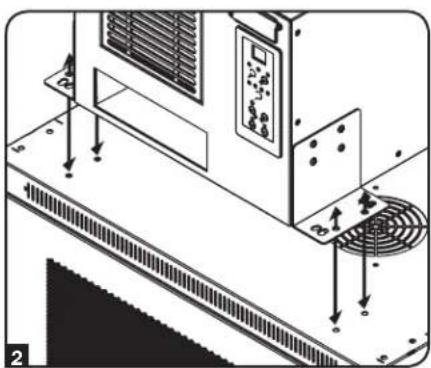
natural_image
Technical diagram of an air conditioning unit with control panel and fan (no text or symbols)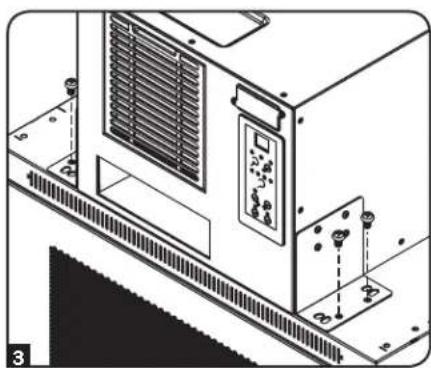
natural_image
Technical line drawing of an industrial HVAC unit with control panel and mounting base (no text or symbols)Instalación
natural_image
Technical line drawing of a mechanical or industrial device with no visible text, numbers, or symbols.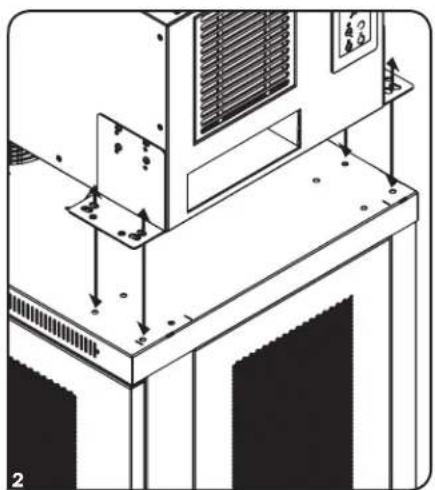
natural_image
Technical line drawing of an industrial machine with mounting base and structural components (no text or symbols)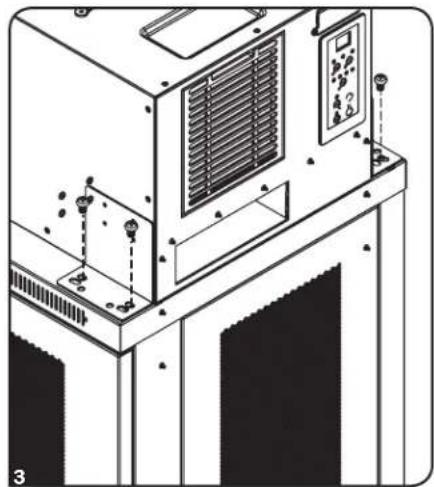
natural_image
Technical line drawing of an industrial air conditioner unit with control panel and mounting bracket (no text or symbols)natural_image
Isometric illustration of a server rack with a large black panel and directional arrow (no text or symbols)natural_image
Technical line drawing of a mechanical assembly or machine component (no visible text or symbols)Instalación
natural_image
Top-down schematic of a vehicle or helmet system with a gear and sensor, no text or symbols presentnatural_image
Diagram of a vertical mechanical or electrical component with a black arrow pointing to a circular component (no text or symbols present)natural_image
Pure mechanical assembly diagram showing a bracket with a curved arrow indicating motion (no text or symbols)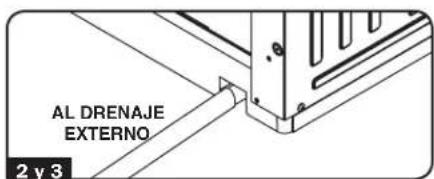
Instalación
natural_image
Diagram of a printer or printer with a paper roll and arrow indicating rotation (no text or symbols present)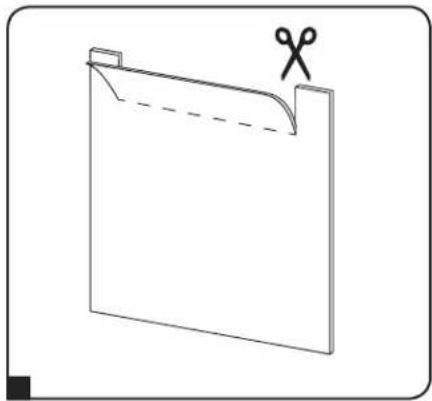
natural_image
Simple line drawing of a folded paper or document with scissors placed on top (no text or symbols)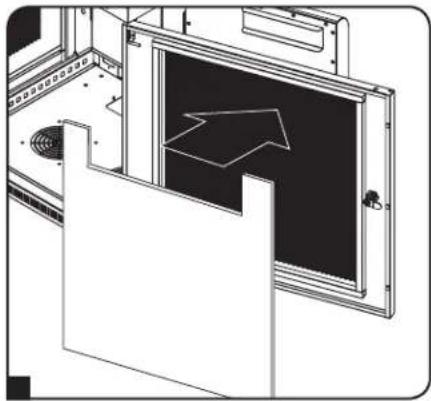
natural_image
Technical line drawing of a door frame with an arrow indicating direction (no text or symbols)natural_image
Line drawing of a mechanical device with ventilation grilles and a fan (no text or symbols)Introduction 26 Entretien 34
Installation 28 English 1
Accessoires en option 32 Español 13
Fonctionnement 33


1111 W. 35th Street, Chicago, IL 60609 USA • www.tripplite.com/support
natural_image
Technical line drawing of a mechanical or industrial device with no visible text, numbers, or symbols.natural_image
Technical line drawing of an air conditioning unit with cooling fan and mounting bracket (no text or symbols)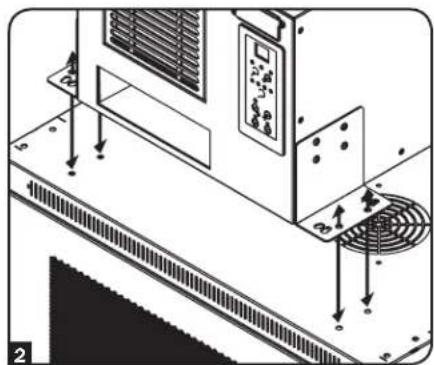
natural_image
Technical diagram of an air conditioning unit with cooling fan and ventilation system (no text or symbols)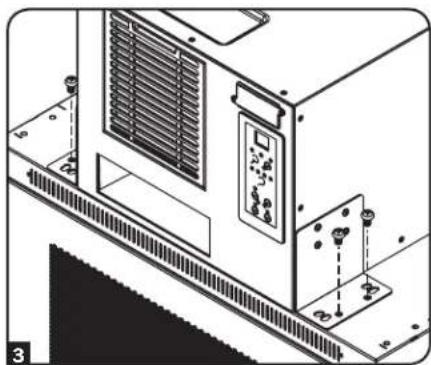
natural_image
Technical line drawing of an industrial HVAC unit with control panel and mounting base (no text or symbols)Installation
natural_image
Technical line drawing of a mechanical device with mounting brackets and ventilation slots (no text or symbols)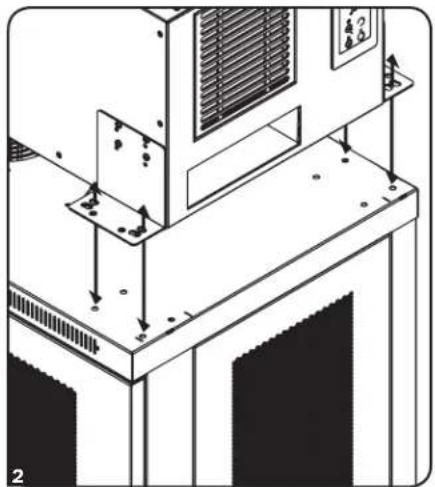
natural_image
Technical diagram of an air conditioning unit with mounting base and ventilation grilles (no text or symbols)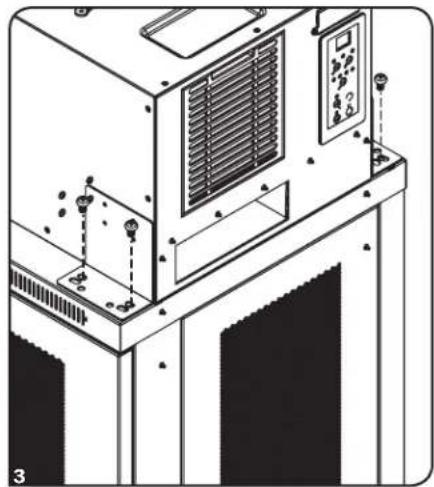
natural_image
Technical line drawing of an industrial machine with control panel and mounting bracket (no text or symbols)natural_image
Isometric line drawing of a server cabinet with an arrow pointing to the front panel (no text or symbols)natural_image
Technical line drawing of a mechanical assembly or machine component (no visible text or symbols)Installation
natural_image
Top-down schematic of a room layout with furniture and equipment (no text or symbols)natural_image
Diagram of a vertical mechanical device with a black arrow pointing to a circular component, no text or symbols presentnatural_image
Pure mechanical assembly diagram showing a bracket with a tool and a curved arrow, no text or symbols present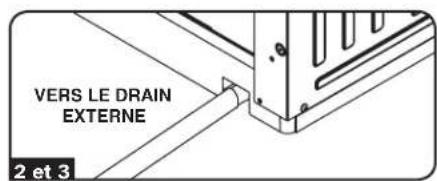
Installation
natural_image
Diagram of a printer or printer with a scroll and paper holder, showing a curved arrow indicating rotation (no text or symbols present)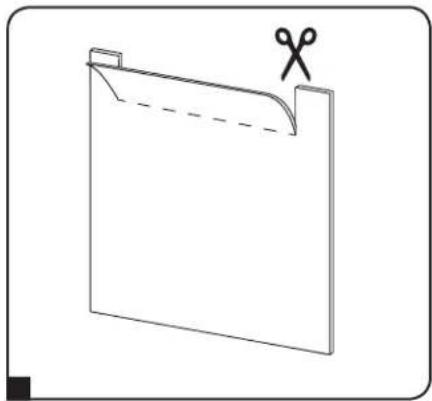
natural_image
Simple line drawing of a folded paper or folder with scissors placed on top (no text or symbols)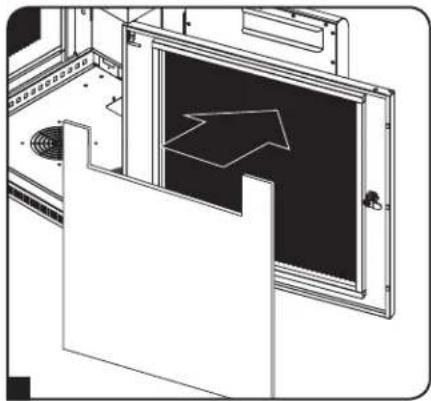
natural_image
Technical line drawing of a door frame with an arrow indicating direction (no text or symbols)Accessoires en option
natural_image
Technical line drawing of two mechanical assembly setups with no visible text or symbols1111 W. 35th Street, Chicago, IL 60609 USA • www.tripplite.com/support
17-01-090 93-3670 mA