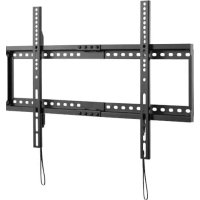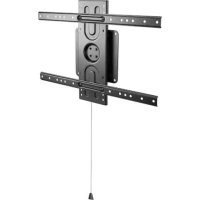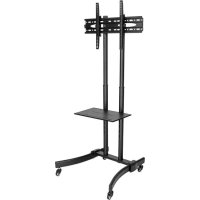
DMCS3770L - TV wall mount Tripp Lite - Free user manual and instructions
Find the device manual for free DMCS3770L Tripp Lite in PDF.


User questions about DMCS3770L Tripp Lite
0 question about this device. Answer the ones you know or ask your own.
Ask a new question about this device
Download the instructions for your TV wall mount in PDF format for free! Find your manual DMCS3770L - Tripp Lite and take your electronic device back in hand. On this page are published all the documents necessary for the use of your device. DMCS3770L by Tripp Lite.
USER MANUAL DMCS3770L Tripp Lite
Register your product for quicker service and ultimate peace of mind. You could also win an ISOBAR6ULTRA surge protector—a $100 value!
www.triplite.com/warranty

CAUTION: DO NOT EXCEED MAXIMUM LISTED WEIGHT CAPACITY. SERIOUS INJURY OR PROPERTY DAMAGE MAY OCCUR!

200 × 200 / 300 × 300 / 400 × 200 / 400 × 400 / 600 × 400





Manufacturing Excalor
1111 W. 35th Street, Chicago, IL 60609 USA • www.triplite.com/support
Copyright © 2018 Tripp Lite. All rights reserved.

WARNING
- Do not begin the installation until you have read and understood the instructions and warnings contained in this manual. If you have any questions regarding any of the instructions or warnings, please visit www.triplite.com/support
- This mounting bracket was designed to be installed and utilized ONLY as specified in this manual. Improper installation of this product may cause damage or serious injury.
- This product should only be installed by someone of good mechanical ability, with basic building experience and a full understanding of this instruction manual.
- Make sure that the mounting surface can safely support the combined load of the equipment and all attached hardware and components.
- Always use an assistant or mechanical lifting equipment to safely lift and position equipment.
- Tighten screws firmly, but do not over-tighten. Over-tightening screws can damage the items, greatly reducing their holding power.
- This product is intended for indoor use only. Using this product outdoors could lead to product failure and personal injury.
Component Checklist
IMPORTANT: Ensure that you have received all parts according to the component checklist prior to installing. If any parts are missing or faulty, visit www.triplite.com/support for service.
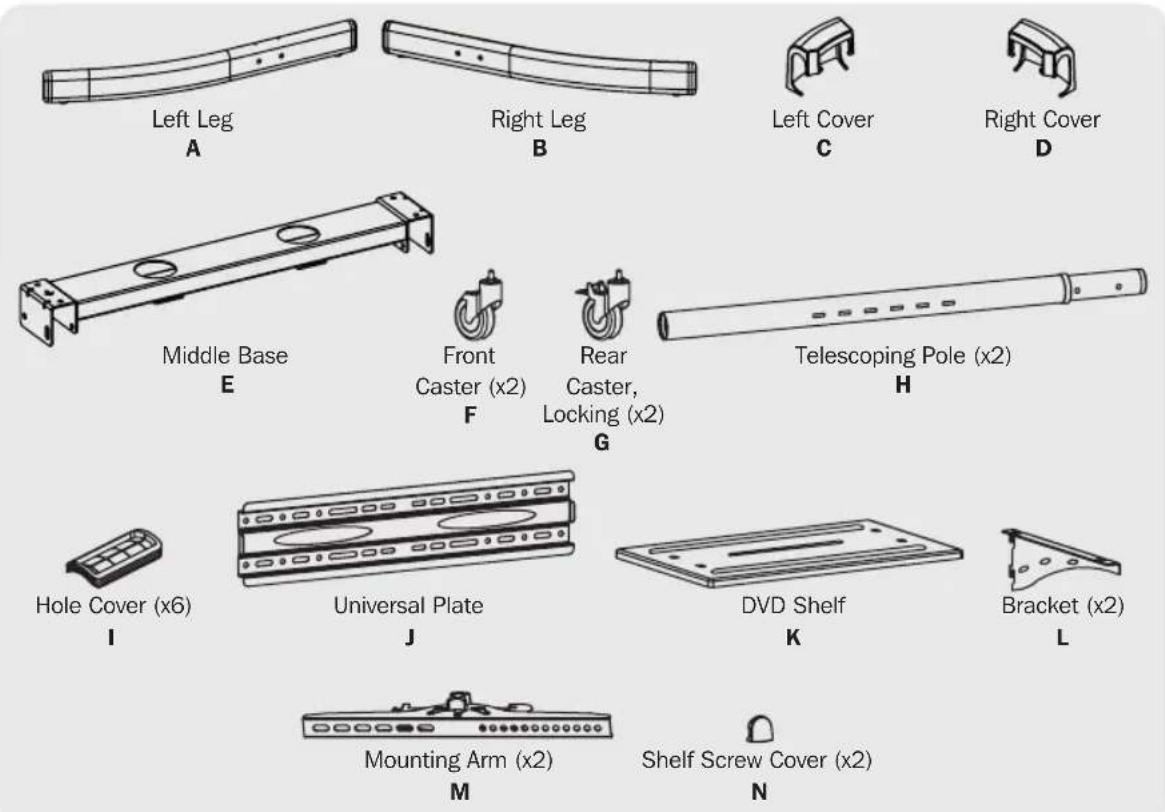
Package M
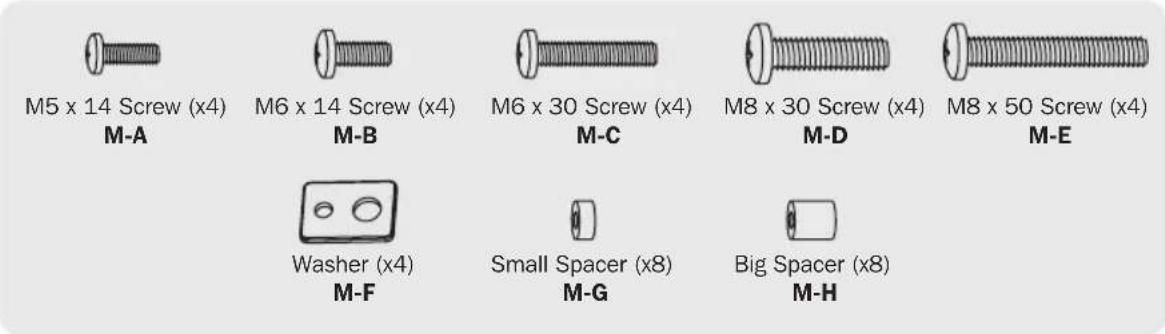
Package P
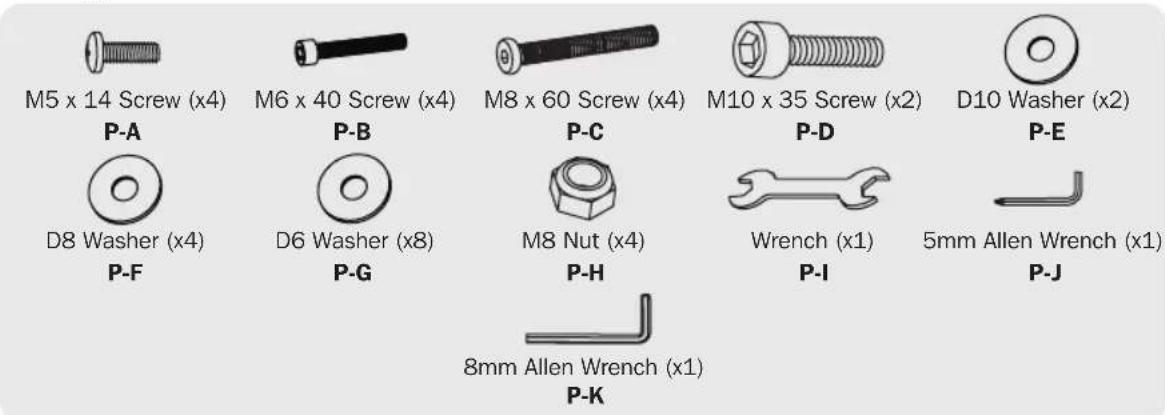
1. Assembling the Base
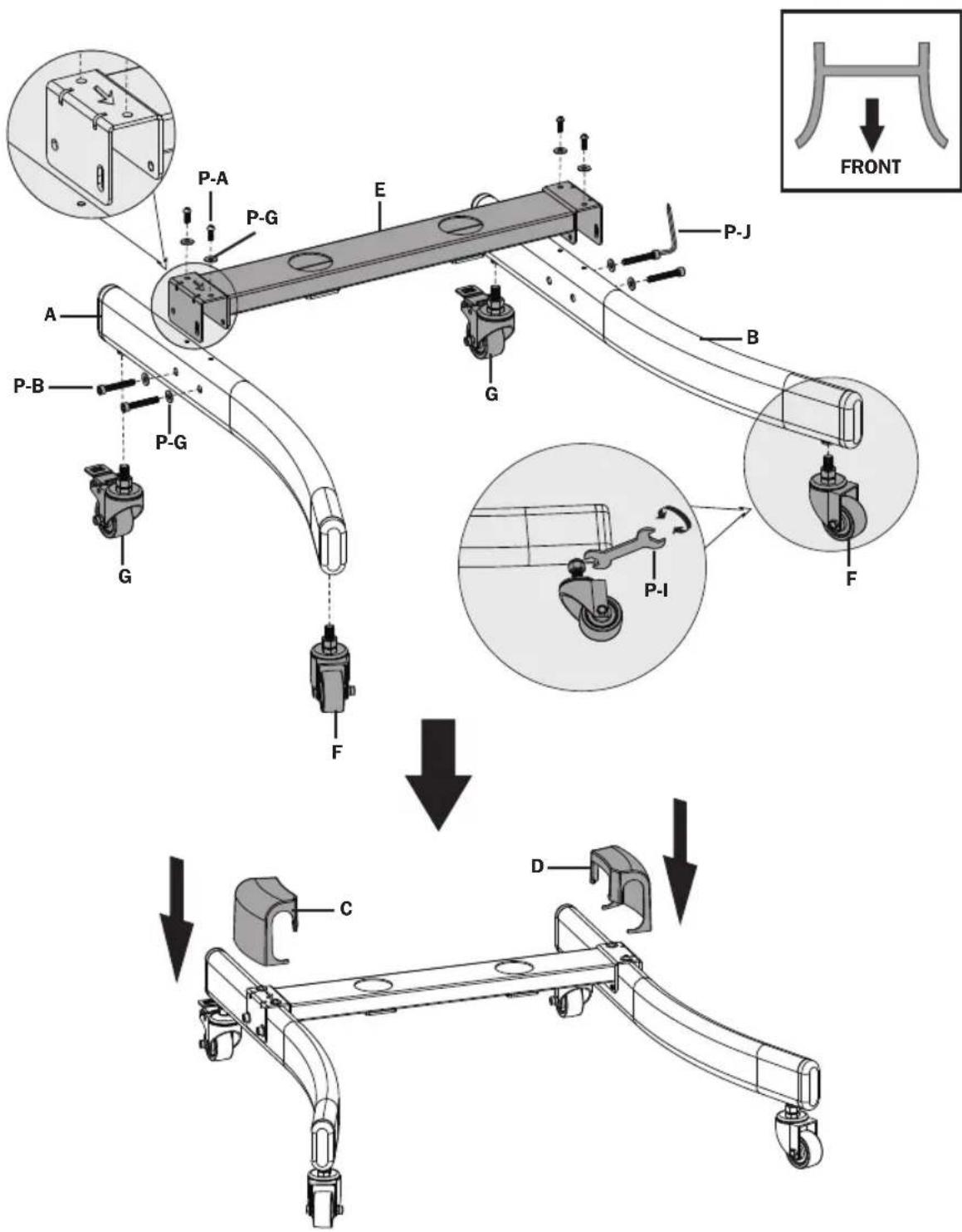
1) Attach Front Casters F and Rear Casters G to both Left Leg A and Right Leg B using Wrench P-I.
2) Attach Middle Base E to the Legs. Secure top bar with Screws P-A and Washers P-G. Secure to sides of Legs with Screws P-B and Washers P-G using Allen Wrench P-J.
3) Attach Left Cover C and Right Cover D to Legs.
2. Attaching Telescoping Sidebars
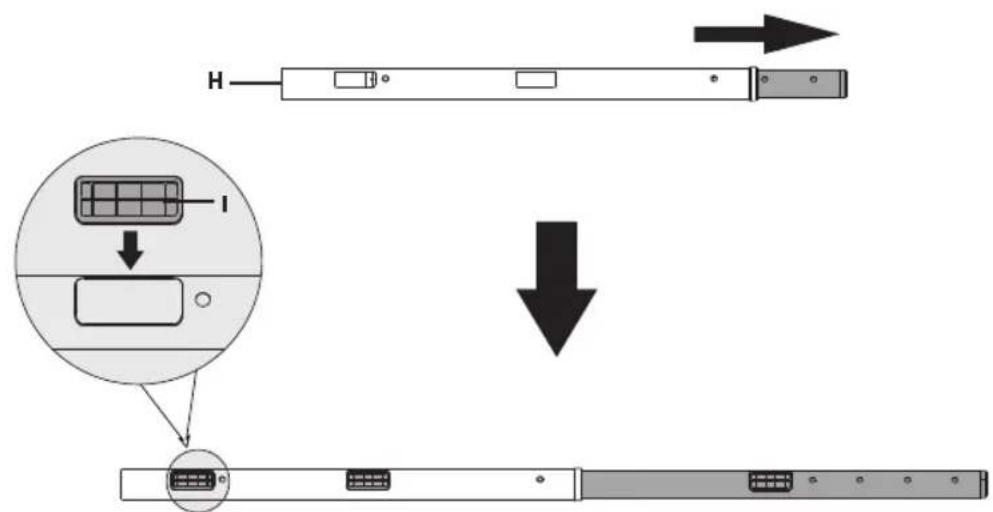
1) Adjust Telescoping Poles H to desired height using button. Cover exposed holes with Hole Covers I.
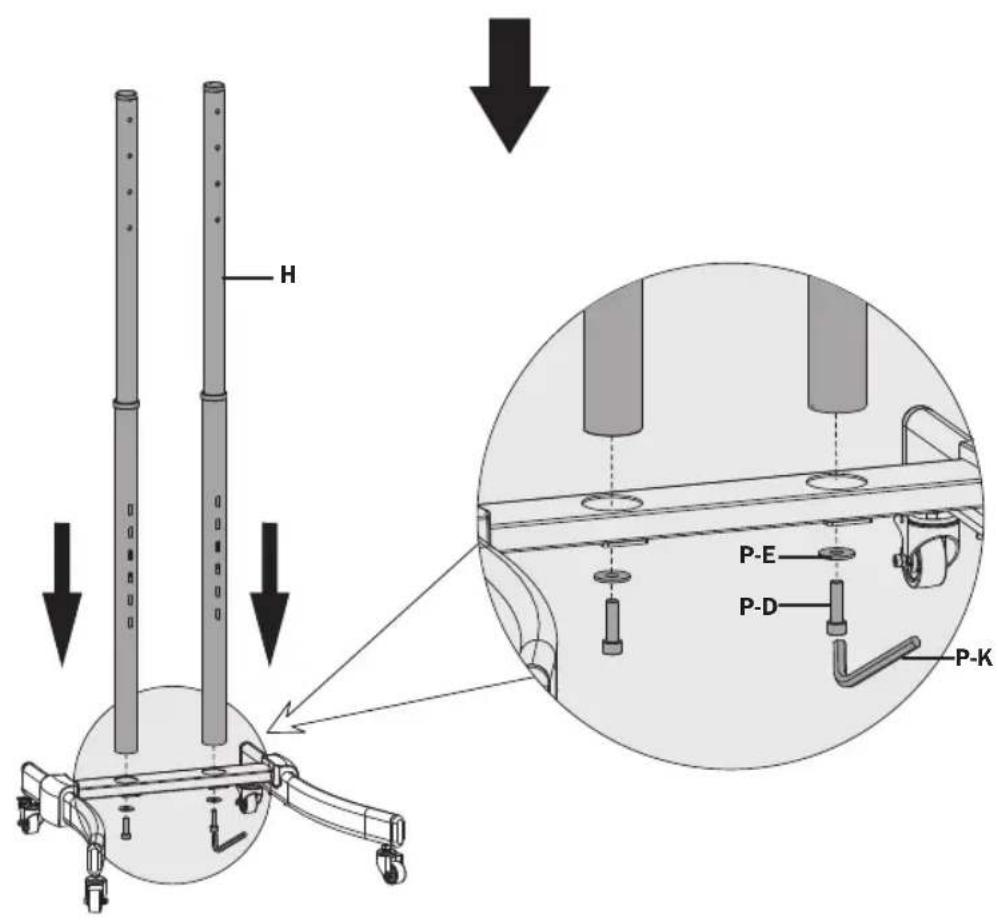
2) Insert Poles H into the holes on the Middle Base E. Secure with Screws P-D and Washers P-E using Allen Wrench P-K.
3. Attaching Universal Plate
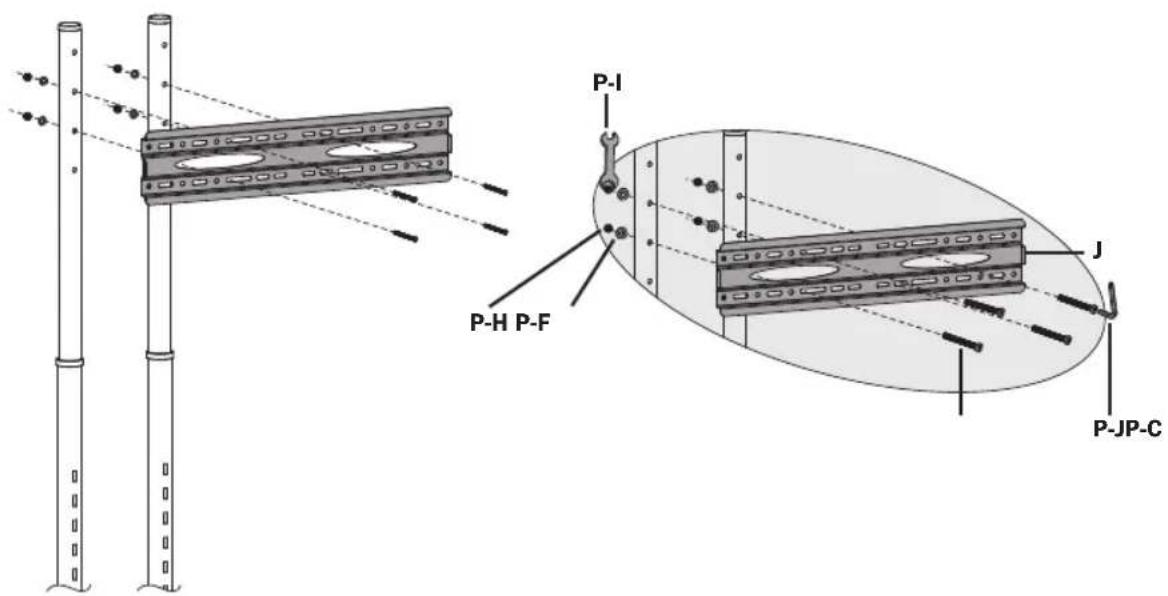
Insert Washers P-F and Nuts P-H into rear of Telescoping Poles H at desired height. Secure Universal Plate J with Screws P-C using Allen Wrench P-J.
4. Installing the DVD Shelf
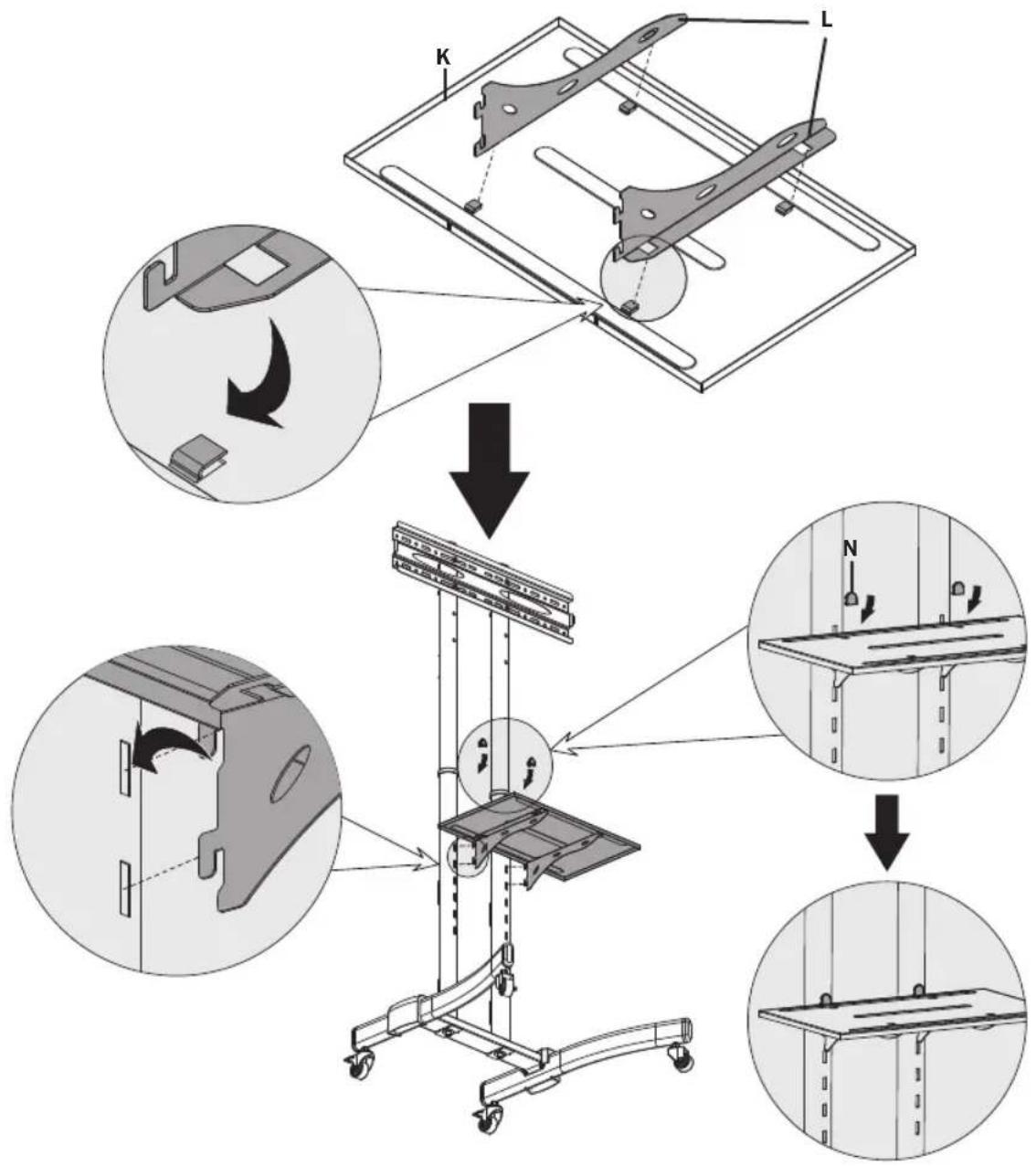
1) Slide Brackets L into DVD Shelf K.
2) Insert Bracket hooks at desired height into Telescoping Poles H. Push down to secure.
3) Cover exposed holes with Shelf Screw Covers N.
5. Installing the Mounting Arms
5.1 For Flat-Back Screens
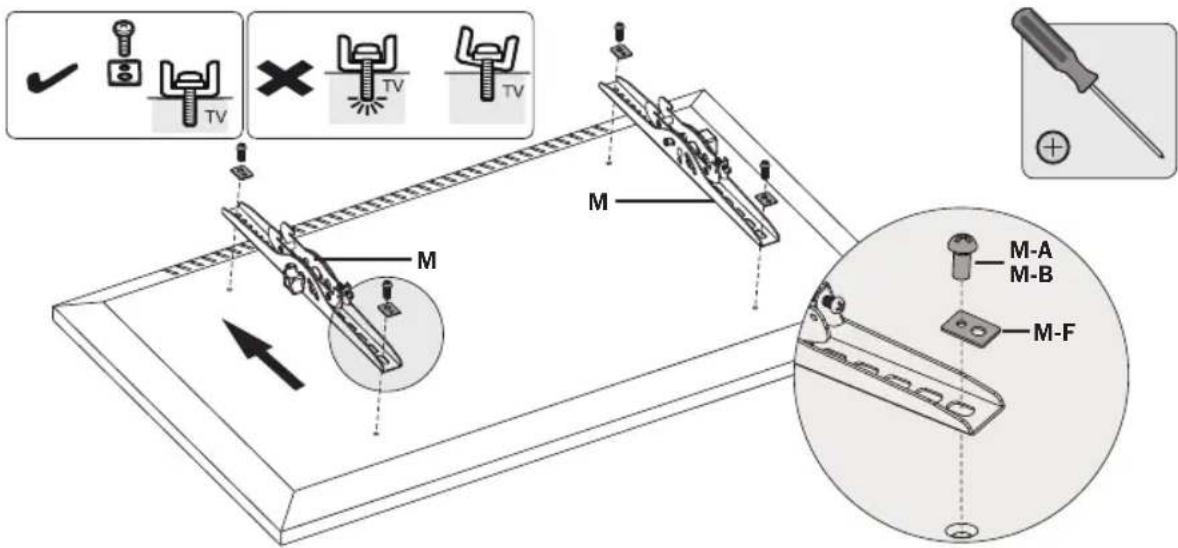
Note: Choose the appropriate Screws, Washers and Spacers (if needed) according to the type of screen. Screw the Mounting Arms onto the display.

CAUTION: Tighten all screws but do not over-tighten.
5.2 For Recessed-Back Screens or Accessing A/V Inputs
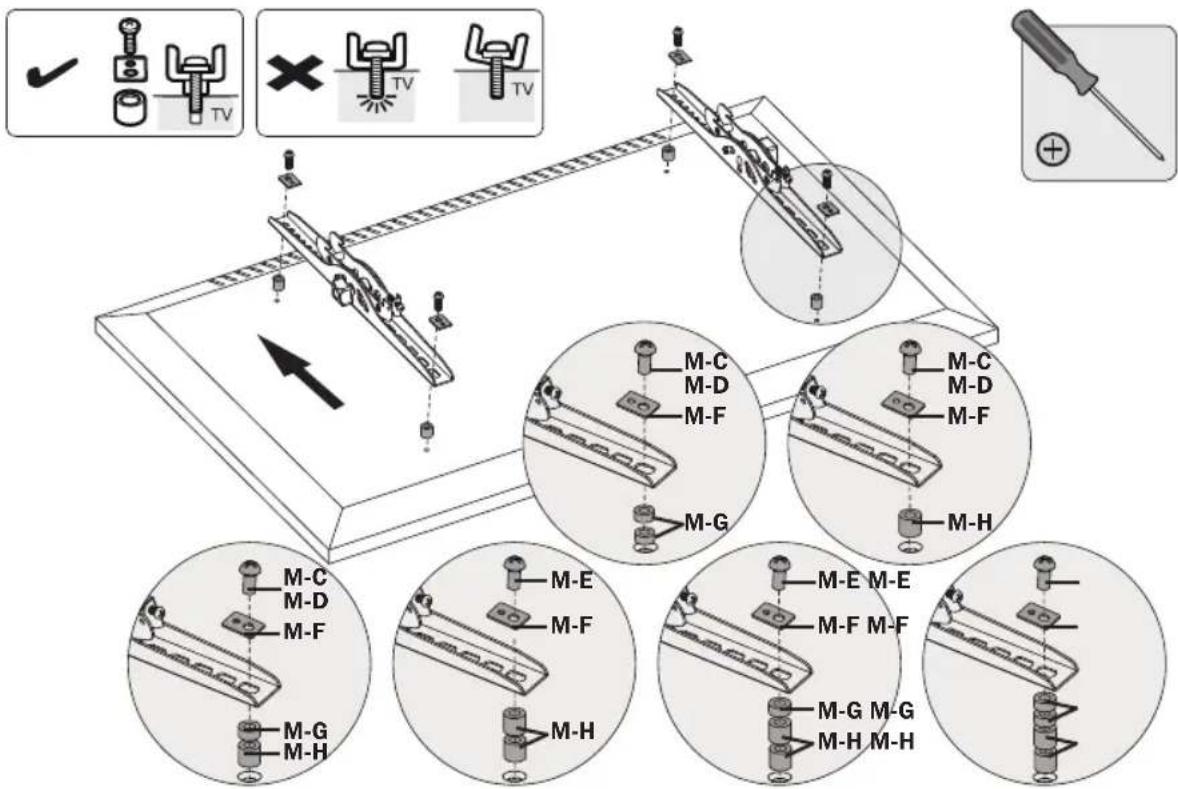
Note: Choose the appropriate Screws, Washers and Spacers (if needed) according to the type of screen. Screw the Mounting Arms onto the display.

CAUTION: Tighten all screws but do not over-tighten.
6. Hooking the Display to the Universal Plate
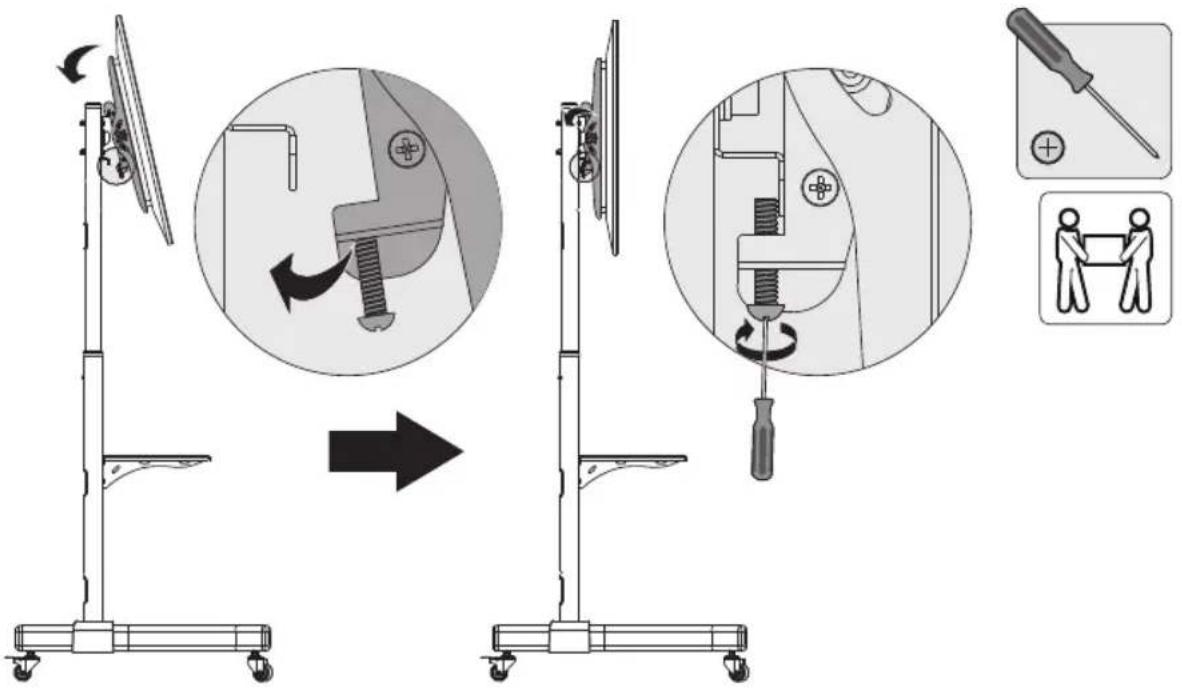
1) Hook the Mounting Arms onto the Universal Plate attached to the Telescoping Poles.
2) Secure by tightening Screws with user-supplied Phillips-head screwdriver.

CAUTION: Be sure the display is correctly mounted and that the screws are safely tightened before releasing the display.
7. Cable Management & Display Adjustment
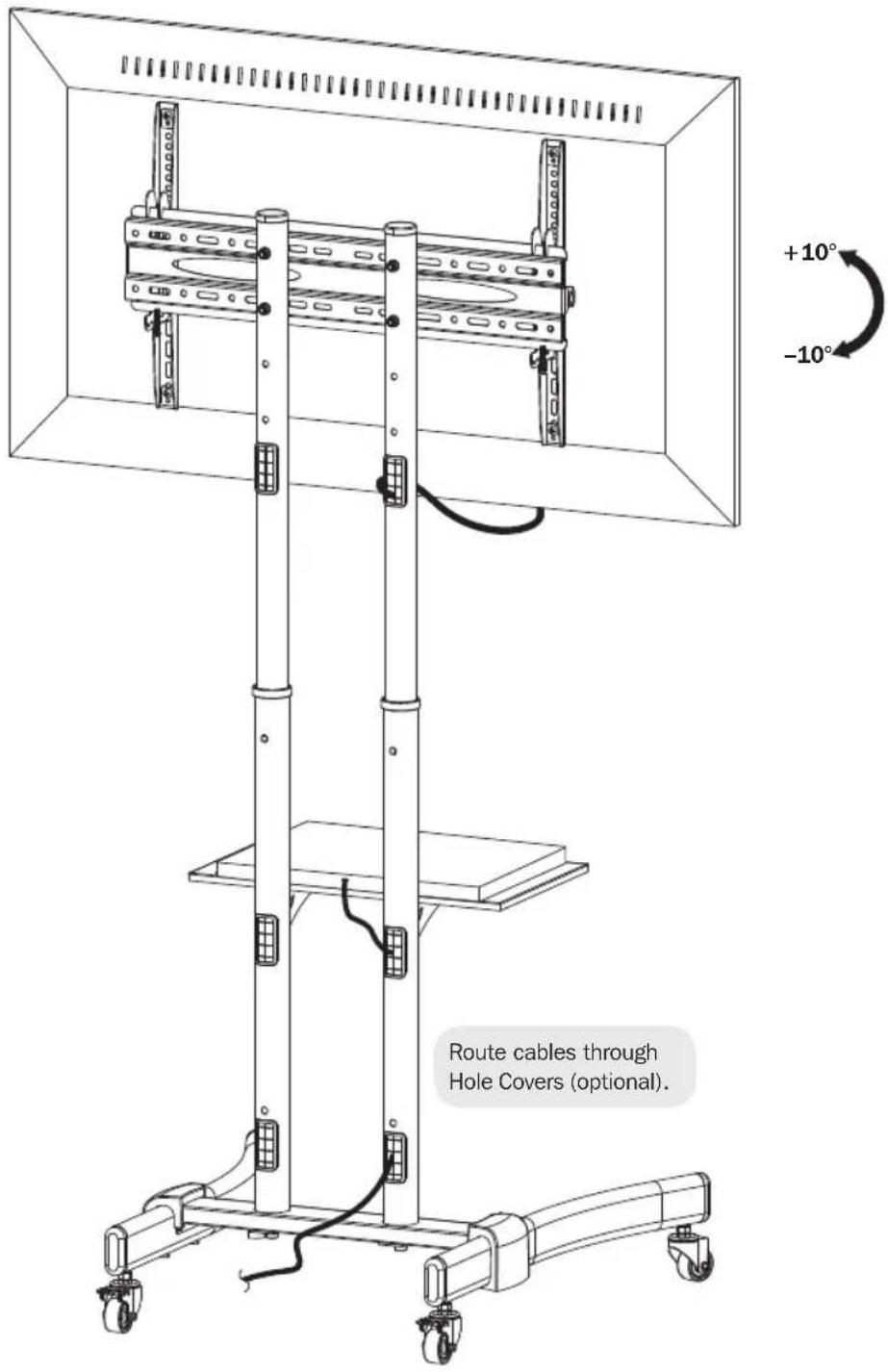
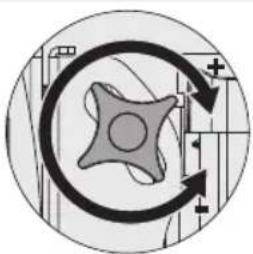
Tighten the knobs to secure.
Loosen the knobs to adjust the display to the desired angle.
Warranty & Product Registration
5-Year Limited Warranty
Seller warrants this product, if used in accordance with all applicable instructions, to be free from original defects in material and workmanship for a period of 5 years from the date of initial purchase. If the product should prove defective in material or workmanship within that period, Seller will repair or replace the product, in its sole discretion.
THIS WARRANTY DOES NOT APPLY TO NORMAL WEAR OR TO DAMAGE RESULTING FROM ACCIDENT, MISUSE, ABUSE OR NEGLECT. SELLER MAKES NO EXPRESS WARRANTY OTHER THAN THE WARRANTY EXPRESSLY SET FORTH HEREIN. EXCEPT TO THE EXTENT PROHIBITED BY APPLICABLE LAW, ALL IMPLIED WARRANTYES, INCLUDING ALL WARRANTYES OF MERCHANTABILITY OR FITNESS, ARE LIMITED IN DURATION TO THE WARRANTY PERIOD SET FORTH ABOVE; AND THIS WARRANTY EXPRESSLY EXCULES ALL INCIDENTAL AND CONSEQUENTIAL DAMAGES. (Some states do not allow limitations on how long an implied warranty lasts, and some states do not allow the exclusion or limitation of incidental or consequential damages, so the above limitations or exclusions may not apply to you. This warranty gives you specific legal rights, and you may have other rights which vary from jurisdiction to jurisdiction).
WARNING: The individual user should take care to determine prior to use whether this device is suitable, adequate or safe for the use intended. Since individual applications are subject to great variation, the manufacturer makes no representation or warranty as to the suitability or fitness of these devices for any specific application.
PRODUCT REGISTRATION
Visit www.triplite.com/warranty today to register your new Tripp Lite product. You'll be automatically entered into a drawing for a chance to win a FREE Tripp Lite product!*
- No purchase necessary. Void where prohibited. Some restrictions apply. See website for details.
Tripp Lite has a policy of continuous improvement. Specifications are subject to change without notice.
Maintenance
- Check that the bracket is secure and safe to use at regular intervals (at least every three months).
- For any additional questions, visit www.triplite.com/support.

1111 W. 35th Street, Chicago, IL 60609 USA • www.triplite.com/support
1111 W. 35th Street, Chicago, IL 60609 USA • www.triplite.com/support
1111 W. 35th Street, Chicago, IL 60609 USA • www.triplite.com/support
PykoBODCTBO N0JIb30BaTeЯ
Manufacturing Excellence
1111 W. 35th Street, Chicago, IL 60609 USA - www.triplite.com/support
OxpaHaeTcA ABTopcMn npaBOM © 2018 Tripp Lite. NepeneaTaKa 3anpeaaeTcA.

BHUMAHVE!
- He haunha Te yctahOBky do Tex nop, noka He 03HaKOMITEcB CO BCEMN yka3aHnMIM npedynpeXeHnMM, mIOKeHHbIMN B HactoIeM pykoBOdCTBe, n He noMeTe INCmIC. PnB Bo3HKHObeHN IIO6bIX BONpocOB OTHCNTelbHO IIO6bIX yka3aHn IMn npedynpeXeHn Nocetnte ctpanuY www.triplite.com/support.
- 3TOT MOHTaXHbI KPOHSeH npeHa3HaueH dna yCTaHOBKn uCNoMb3OBAHnra TObKO B cenax, yKa3aHHbIX B HAcToIeM pyKoBOcTeB. HenpaBnBHa yCTaHOBka DaHHoro m3dennma MoKeT npuBeCTN K npuHHeHIO MaTePnAIBHO rUepe6a nn cyueCTBeHHOro BpeDa 3DopOBbI HoJeI.
- YctaHObKa DaHHoro 3dEJIy DOJIxHa IPOUN3BOINTBcTOnbKO CNEUAnCTOM C DoCTaTOHOr TexHnueCKo KBaIIINKauIeN 6a3OByIMn HABbIKAMn CTpONTeNbCTBa, B NOHOr MEpe NOHMaIOUM CMBICn IHΦOpMaUIM, INIOJKeHHoB H ActOJIeM pyKOBODBe.
- Y6eIITecb B TOM, YTO MOHTaXHnA IOBepxHOCTb MoXET C 3aNaCOM BbldepKnBaTb CymMapHyIO Harpy3Ky, co3daBaemyo 06OpdyoBaHnEm IN BceMn BXOJaUIMN B KOMPNeKT DeTaJIaMn OChAcTK N DpyrIMN KOMNoHEHTAMN.
-Дябз�ас Horo noIbema n HndnxkaUero pa3MeueHnO obOpyOBaHnO ob3aTeNbO o6paauTecb 3a nOMOuBIO NIM NOB3yTEcB rpyoNObemhBm O6OpyOBaHnE.
BnhtbI cneDyET 3aTARNBaTB nIOTHo, Ho He nepetraIBaHIX. IpeTARBAHHe MOKe T npUBecTu K nobpeXdeHHKpeneXhBx DeTaleN, YTO 3HaHTeNbHO yXuDiWt npOCHb KpePHeHIA.
-Данhoeи3делпретнэзчehо ДяИСпOB3OBHЯТОьКВЗкРыТьIXnomeшен.ИспOB3OBaHne ДангOrIи3делнуHAOTKpyITOMB03dUxMeMoxetПиВecTINeroBbIXOуN3CTPOnIПиHHeHIOBpeDa 3dOpOBbIлюн.
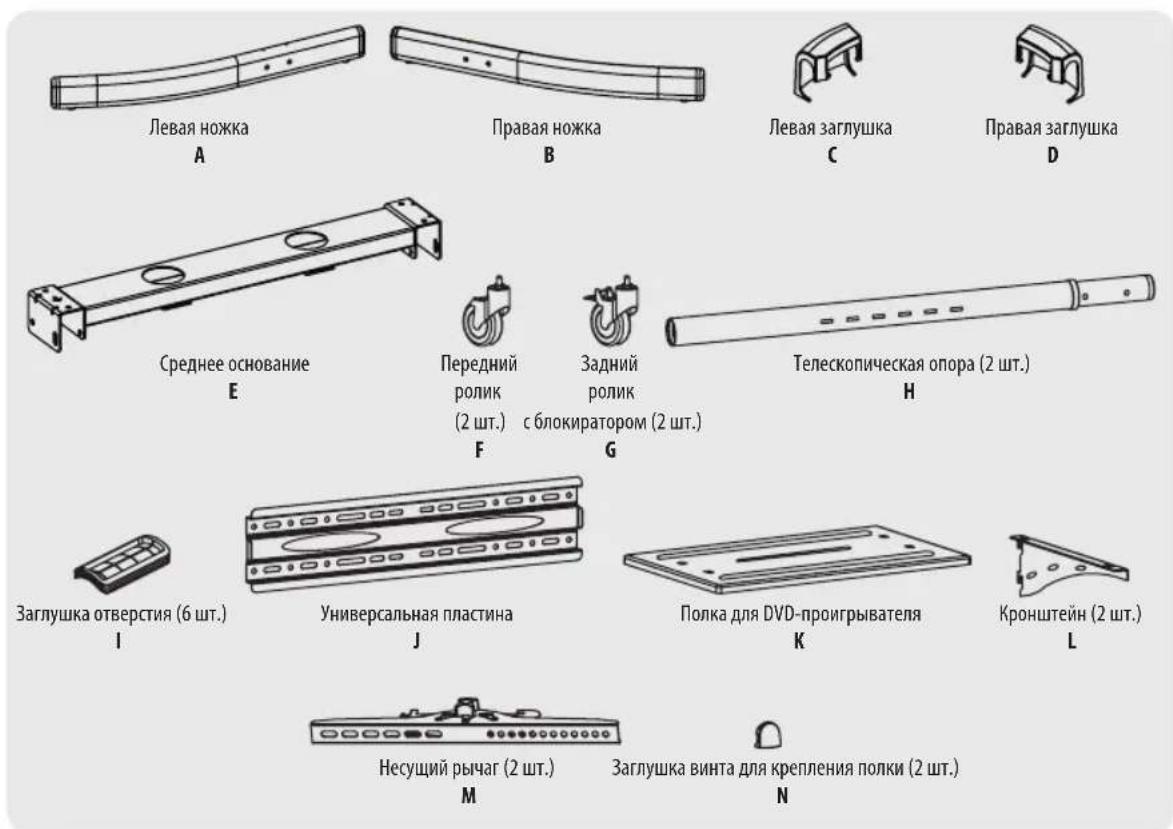
NpeueHb KOMnneKtaun
IpeHnAHaON yCTaHOBNy6eINTeB TOM, YTO BAAM NOnyHeHb BCE DeTaN CoRNACHOpeHIO KOMNNEKTAaM.
B cnyuae oTCyTCTBnI nnnoBpeKJeHnKaKnx-Im6oTeaJIeObapntteCb 3a noomouhHa CTpaHnuy www.triplite.com/support.
BHIMAHVE!
1111 W. 35th Street, Chicago, IL 60609 USA • www.triplite.com/support
1111 W. 35th Street, Chicago, IL 60609 USA • www.triplite.com/support