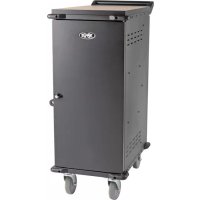
CSC21AC - Phone charger Tripp Lite - Free user manual and instructions
Find the device manual for free CSC21AC Tripp Lite in PDF.


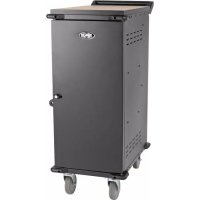
| Product Type | Mobile charging station for electronic devices |
| Model | CSC21AC |
| Dimensions (H x W x D) | 1099 x 447 x 751 mm |
| Weight | 52.9 kg |
| Load capacity | Up to 91 kg |
| Number of slots | 21 slots for devices |
| Power input | 120 V AC, 50/60 Hz, 12 A |
| Maximum power | 1800 W |
| Power outlets | 27 NEMA 5-15R outlets (distribution unit) |
| Electrical protection | 15 A input circuit breaker |
| Material | Steel |
| Key features | Secure charging and storage of devices; pre-installed casters and removable handle for mobility; lockable doors with padlock hasp |
| Security | Lockable steel doors; safety corner bumpers; power cord guide; additional padlock hasp |
| Maintenance and cleaning | Disconnect before cleaning; wipe with a non-linting damp cloth; avoid solvents and abrasives |
| Operating conditions | Temperature 0 to 40°C; humidity 5 to 95% RH non-condensing |
| Spare parts and repairability | 2-year limited warranty; support at www.tripplite.com/support |
| General information | Suitable for indoor use; includes mounting hardware, keys, handle, and bumpers |
Frequently Asked Questions - CSC21AC Tripp Lite
User questions about CSC21AC Tripp Lite
0 question about this device. Answer the ones you know or ask your own.
Ask a new question about this device
Download the instructions for your Phone charger in PDF format for free! Find your manual CSC21AC - Tripp Lite and take your electronic device back in hand. On this page are published all the documents necessary for the use of your device. CSC21AC by Tripp Lite.
USER MANUAL CSC21AC Tripp Lite
Charging Station Carts
Models: CSC21AC (21 Slots), CSC27AC (27 Slots)
Table of Contents
- Important Safety Instructions 2
- Overview 2
- Feature Identification 3
- Storage Shelf Configuration 5
- Setup 6
5.1 Power Requirements 6
5.2 Installing the Handle Bracket, 6 Corner Safety Bumpers and Power Cord Manager
5.3 Connecting Devices and 7 Powering the AC Unit
5.4 Door Locks 7
- Specifications 8
- Storage, Service and Cleaning 8
- Warranty and Product Registration 8
Espanol 9
Français 17
PROTECT YOUR INVESTMENT!
Register your product for quicker service and ultimate peace of mind.
You could also win an ISOBAR6ULTRA surge protector—a $100 value!
www.triplite.com/warranty


Manufacturing Excellence.
1. Important Safety Instructions
SAVE THESE INSTRUCTIONS
This manual contains instructions and warnings that must be followed during the installation and operation of the product described in this manual. Failure to comply may invalidate the warranty and cause property damage or personal injury.
AC Unit:
- Do not use a power adapter to connect the charging station to a power source. Use only the charging station's AC plug to connect directly to the supply mains.
- To remove the AC unit from the supply mains, the power cord serves as a disconnect device.
If any of the following situations arise, schedule an appointment to have your equipment inspected by a service technician:
The equipment has been exposed to moisture
The equipment has been dropped and damaged
- The equipment shows obvious signs of breakage
The equipment is not functioning properly or is not functioning according to the instructions described in this Owner's Manual.
- Use of this equipment in life support applications where failure of this equipment can reasonably be expected to cause the failure of the life support equipment or to significantly affect its safety or effectiveness is not recommended.
Charging Station Cabinet:
- Keep the charging station in a controlled indoor environment away from moisture, temperature extremes, flammable liquids and gasses, conductive contaminants, dust and direct sunlight.
- Leave adequate space around the charging station for proper ventilation. Do not block, cover or insert objects into the charging station's external ventilation openings.
- The charging station is extremely heavy. Use caution when handling the charging station. Do not attempt to unpack the charging station unassisted. Use a mechanical device such as a forklift or pallet jack to move the charging station in the shipping container.
- Inspect the shipping container and the charging station for shipping damage. Do not use the charging station if it is damaged.
- Use caution when cutting packing materials. The charging station could be scratched, causing damage not covered by the warranty.
- Save all packing materials for later use. Repacking and shipping the charging station cabinet or equipment without the original packing materials may cause product damage that will void the warranty.
- The charging station includes four pre-installed casters.
- Always use the included handle when moving the charging station (see section 5.2 Installing the Handle Bracket Corner Safety Bumpers and Power Cord Manager for more information).
- When moving the charging station cabinet, always push it from behind; never pull it toward you.
- A rolling charging station can cause personal injury and property damage if not properly supervised. If rolling the charging station down a ramp is required, use extreme caution. Do not attempt to use ramps that have a slope grade greater than 12% .
2. Overview
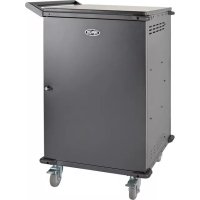
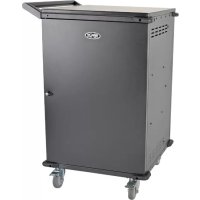
Your charging station is an all-in-one solution for storing and charging devices. With four pre-installed casters and an attachable, reversible handle accessory, your charging station is ideal for mobile applications. To prevent theft and device tampering, your charging station enclosure comes equipped with locking steel doors. A padlock has located on the front door provides an extra measure of security.
3. Feature Identification
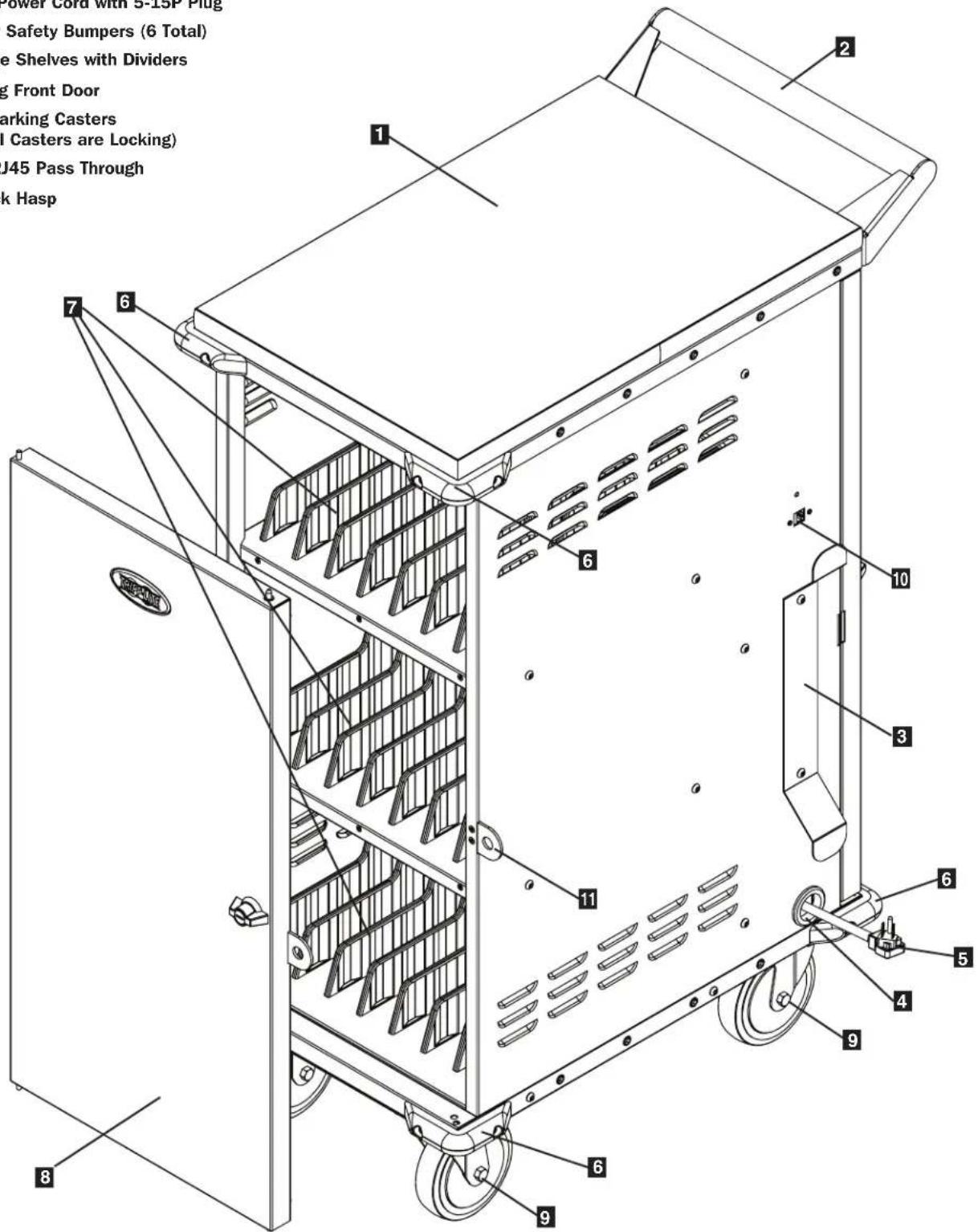
Front View
1 Laminate Desktop Surface
2 Reversible Handle
3 Power Cord Manager
4 Power Cord Access Hole
5 10 ft. Power Cord with 5-15P Plug
6 Corner Safety Bumpers (6 Total)
7 Storage Shelves with Dividers
Locking Front Door
Non-Marking Casters (Swivel Casters are Locking)
10 Cat6 RJ45 Pass Through
11 Padlock Hasp
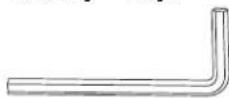
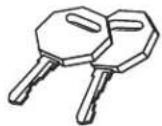
Included Accessory Hardware
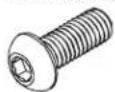
10 x Hex Screws
Hex Key Keys
Rear View
Power Brick Storage Baskets
AC Power Distribution Unit*
Locking Rear Door
4. Storage Shelf Configuration
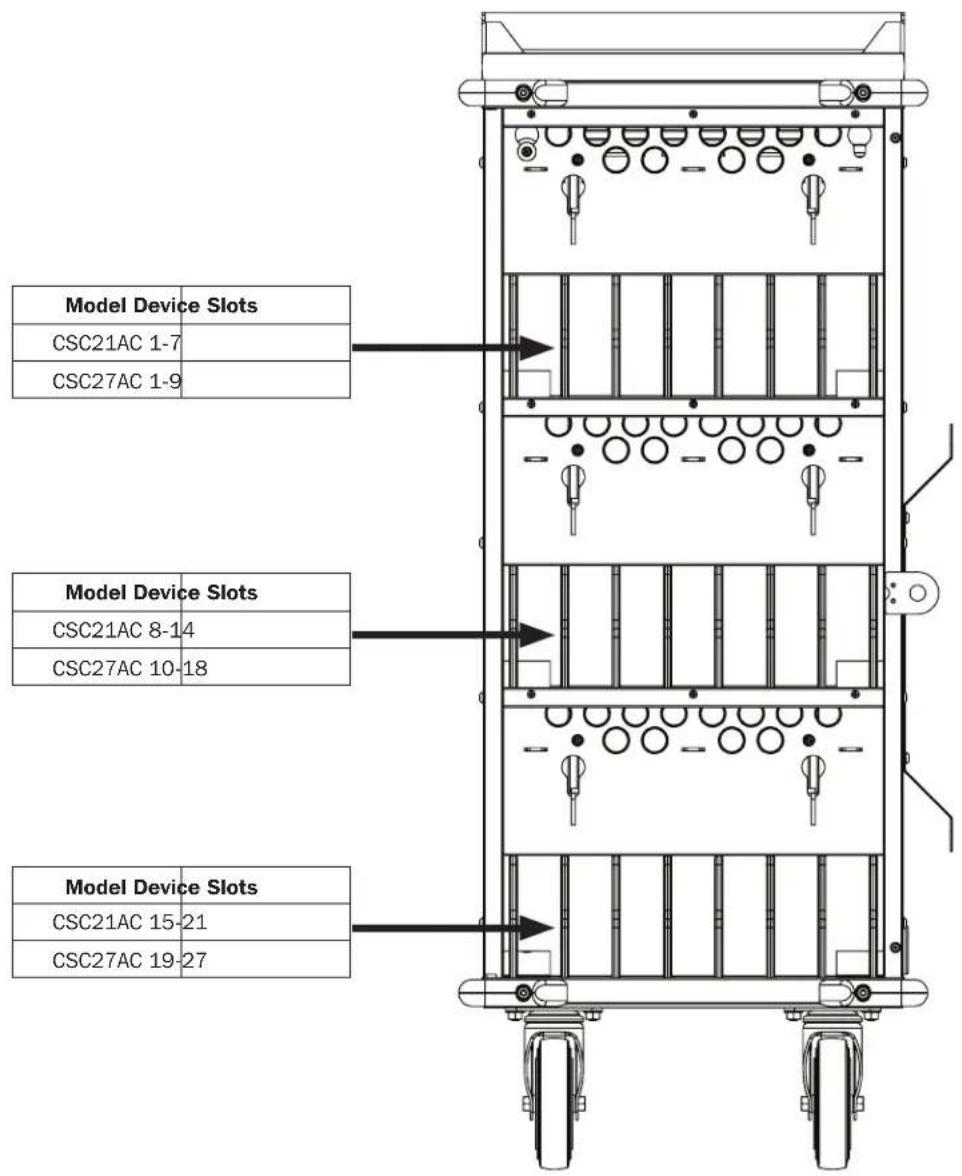
Front View
5. Setup

Caution! Read All Instructions andWarnings Before Installation!

Warning: Charging stations can be extremely heavy. Do not attempt to unpack the charging station without assistance. Follow the unpacking instructions document that shipped with this product before proceeding with setup. Use extreme caution when handling the charging station and be sure to follow all handling and installation instructions. Do not attempt to install equipment without first stabilizing the charging station.
5.1 Power Requirements
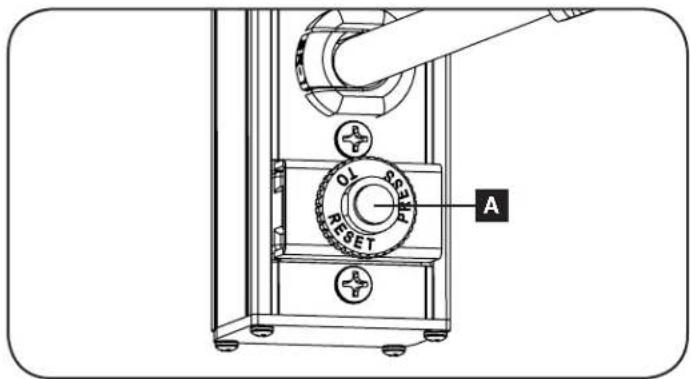
The charging station must be plugged into an AC outlet with a dedicated circuit. An AC outlet with a 20-amp (NEMA 5-20R) AC circuit is recommended for powering the charging station. The AC outlet used to power the charging station should not be shared. The total wattage of the charging station and all connected components should not exceed 1800 watts. The AC power distribution unit is protected by a 15-amp input breaker A.
5.2 Installing the Handle Bracket, Corner Safety Bumpers and Power Cord Manager
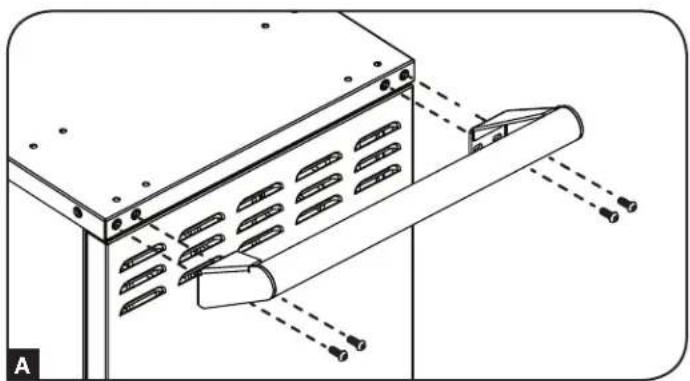
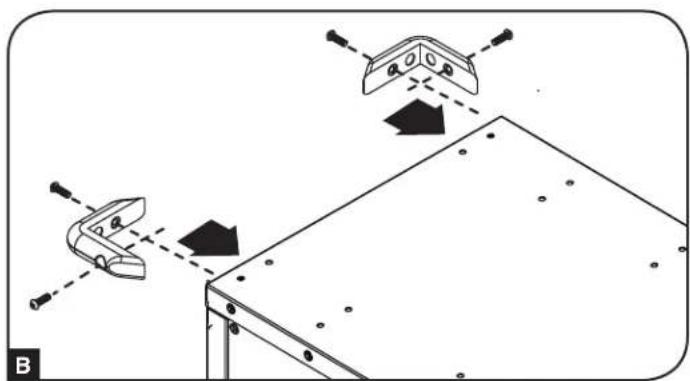
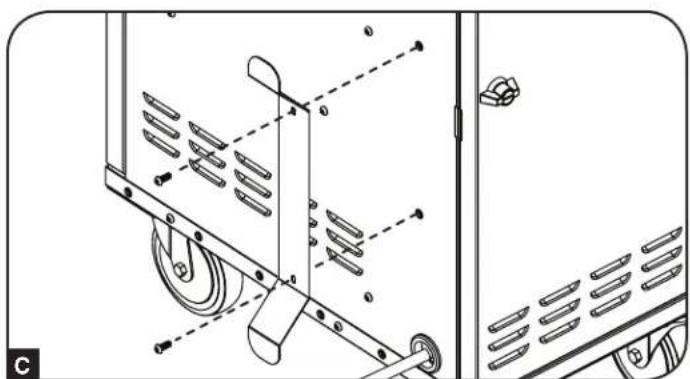
To install the handle bracket, choose a side on which to install the bracket (the same side as the cable access hole grommet and power cord manager is recommended). Using the included hex key tool and four (4) hex screws, secure the handle bracket to the charging station cabinet A. Then install the two top corner safety bumpers using four (4) hex screws (two per bumper) B. To install the cord manager, use two (2) hex screws to secure on the same side as the cable access hole grommet C.
5. Setup
5.3 Connecting Devices and Powering the AC Unit
Your charging station contains three baskets, one for each shelf. To connect the device power bricks, place the bricks in the basket. Working one basket at a time, plug the power brick into an outlet on the AC power distribution unit, then run the device cable and connector through a device slot A and into the overhead cable manager B. Repeat as needed for each slot.
Note: Baskets are removable for easier power brick installation.
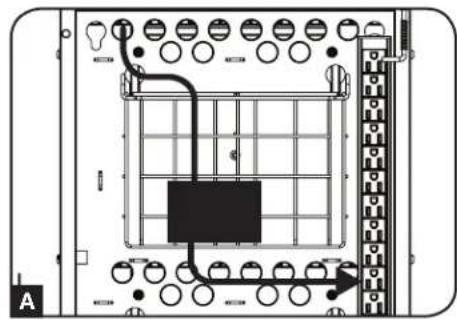
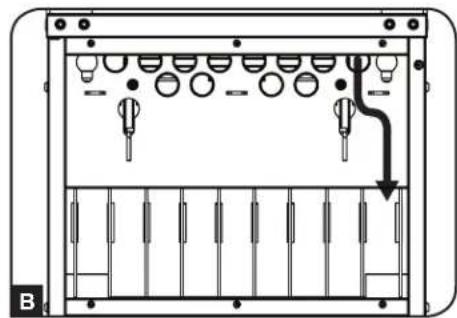
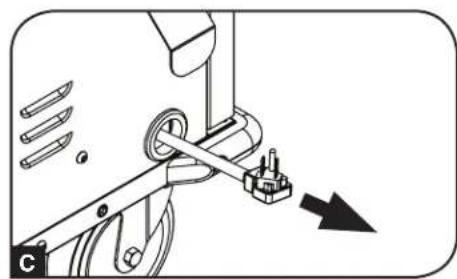
Connect all devices and place on their respective shelves. Once all devices are connected and stored, find the AC unit's input plug and cable located in the charging station's bottom compartment. The input plug extends through the cable access hole grommet located on the bottom of the charging station cabinet. Plug the power cord into the nearest 3-prong, grounded wall outlet.
5.4 Door Locks
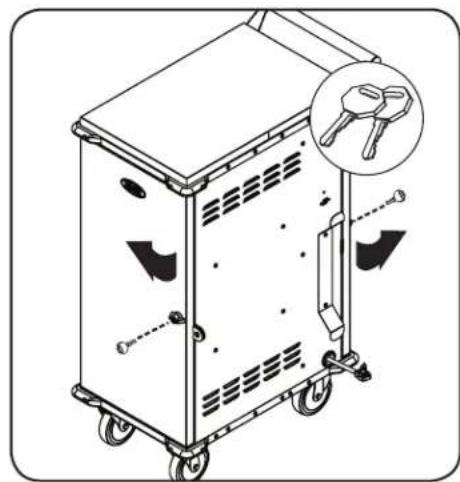
The doors contain a lock that is accessible with the included keys. The padlock has on the front door provides an extra measure of security against device theft.
6. Specifications
| Model CSC21AC CSC27AC | ||
| Cabinet Dimensions (H x W x D) 43.3 x 17.6 x 29.6 in. / 1099 x 447 x 751 mm | ||
| Unit Weight 116.63 lb. / 52.9 kg 118 lb. / 53.5 kg | ||
| Load Capacity 200 lb. / 91 kg | ||
| AC Receptacles Power Distribution Unit: 27 x 5-15R | ||
| Power Requirement Input: 120V AC, 50/60 Hz, 15 Amps | ||
| Operating Temperature 32° to 104°F / 0° to 40°C | ||
| Operating Humidity 5 to 95% RH, Non-Condensing | ||
7. Storage, Service and Cleaning
Storage
The enclosure should be stored in a controlled indoor environment away from moisture, temperature extremes, flammable liquids and gasses, conductive contaminants, dust and direct sunlight. Store the enclosure in its original shipping container if possible.
Service
The enclosure is covered by the limited warranty described in this manual. For more information, visit www.triplite.com/support.
Cleaning
Before cleaning, always power off the charging station by unplugging it from its AC source. dampen a clean, lint-free cloth with water and wipe down the unit, as necessary. Allow the surface area to dry before plugging in the unit.
Note: Avoid using abrasive cloths, solvents or aerosol sprays to clean the charging station; doing so can damage the unit.
8. Warranty and Product Registration
2-Year Limited Warranty
Seller warrants this product, if used in accordance with all applicable instructions, to be free from original defects in material and workmanship for a period of 2 years from the date of initial purchase. If the product should prove defective in material or workmanship within that period, Seller will repair or replace the product, at its sole discretion.
THIS WARRANTY DOES NOT APPLY TO NORMAL WEAR OR TO DAMAGE RESULTING FROM ACCIDENT, MISUSE, ABUSE OR NEGLECT. SELLER MAKES NO EXPRESS WARRANTY OTHER THAN THE WARRANTY EXPRESSLY SET FORTH HEREIN. EXCEPT TO THE EXTENT PROHIBITED BY APPLICABLE LAW, ALL IMPLIED WARRANTYES, INCLUDING ALL WARRANTYES OF MERCHANTABILITY OR FITNESS, ARE LIMITED IN DURATION TO THE WARRANTY PERIOD SET FORTH ABOVE; AND THIS WARRANTY EXPRESSLY EXCUSES ALL INCIDENTAL AND
CONSEQUENTIAL DAMAGES. (Some states do not allow limitations on how long an implied warranty lasts, and some states do not allow the exclusion or limitation of incidental or consequential damages, so the above limitations or exclusions may not apply to you. This warranty gives you specific legal rights, and you may have other rights which vary from jurisdiction to jurisdiction).
WARNING: The individual user should take care to determine prior to use whether this device is suitable, adequate or safe for the use intended. Since individual applications are subject to great variation, the manufacturer makes no representation or warranty as to the suitability or fitness of these devices for any specific application.
Product Registration
Visit www.triplite.com/warranty today to register your new Tripp Lite product. You'll be automatically entered into a drawing for a chance to win a FREE Tripp Lite product!*
No purchase necessary. Void where prohibited. Some restrictions apply. See website for details.
Regulatory Compliance Identification Numbers
For the purpose of regulatory compliance certifications and identification, your Tripp Lite product has been assigned a unique series number. The series number can be found on the product nameplate label, along with all required approval markings and information. When requesting compliance information for this product, always refer to the series number. The series number should not be confused with the marketing name or model number of the product.
FCC Notice, Class B
This device complies with part 15 of the FCC Rules. Operation is subject to the following two conditions: (1) This device may not cause harmful interference, and (2) this device must accept any interference received, including interference that may cause undesired operation.
Note: This equipment has been tested and found to comply with the limits for a Class B digital device, pursuant to part 15 of the FCC Rules. These limits are designed to provide reasonable protection against harmful interference in a residential installation. This equipment generates, uses and can radiate radio frequency energy and, if not installed and used in accordance with the instructions, may cause harmful interference to radio communications. However, there is no guarantee that interference will not occur in a particular installation. If this equipment does cause harmful interference to radio or television reception, which can be determined by turning the equipment off and on, the user is encouraged to try to correct the interference by one or more of the following measures:
Reorient or relocate the receiving antenna.
- Increase the separation between the equipment and receiver.
- Connect the equipment into an outlet on a circuit different from that to which the receiver is connected.
- Consult the dealer or an experienced radio/TV technician for help.
Any changes or modifications to this equipment not expressly approved by Tripp Lite could void the user's authority to operate this equipment.
WEEE Compliance Information for Tripp Lite Customers and Recyclers (European Union)

Under the Waste Electrical and Electronic Equipment (WEEE) Directive and implementing regulations, when customers buy new electrical and electronic equipment from Tripp Lite they are entitled to:
- Send old equipment for recycling on a one-for-one, like-for-like basis (this varies depending on the country)
- Send the new equipment back for recycling when this ultimately becomes waste
Tripp Lite has a policy of continuous improvement. Specifications are subject to change without notice.


Manufacturing Excellence
1111 W. 35th Street, Chicago, IL 60609 USA • www.triplite.com/support
1111 W. 35th Street, Chicago, IL 60609 USA • www.triplite.com/support
1111 W. 35th Street, Chicago, IL 60609 USA • www.triplite.com/support
1111 W. 35th Street, Chicago, IL 60609 USA • www.triplite.com/support
1111 W. 35th Street, Chicago, IL 60609 USA • www.triplite.com/support
- Charging Station Carts
- Table of Contents
- PROTECT YOUR INVESTMENT!
- Important Safety Instructions
- SAVE THESE INSTRUCTIONS
- AC Unit:
- Charging Station Cabinet:
- Overview
- Feature Identification
- Front View
- Included Accessory Hardware
- Rear View
- Storage Shelf Configuration
- Setup
- Caution! Read All Instructions andWarnings Before Installation!
- Power Requirements
- Installing the Handle Bracket, Corner Safety Bumpers and Power Cord Manager
- Connecting Devices and Powering the AC Unit
- Door Locks
- Specifications
- Storage, Service and Cleaning
- Storage
- Service
- Cleaning
- Warranty and Product Registration
- 2-Year Limited Warranty
- Product Registration
- Regulatory Compliance Identification Numbers
- FCC Notice, Class B
- WEEE Compliance Information for Tripp Lite Customers and Recyclers (European Union)
Brand : Tripp Lite
Model : CSC21AC
Category : Phone charger