PowerVerter PV150USB - Battery Tripp Lite - Free user manual and instructions
Find the device manual for free PowerVerter PV150USB Tripp Lite in PDF.


User questions about PowerVerter PV150USB Tripp Lite
0 question about this device. Answer the ones you know or ask your own.
Ask a new question about this device
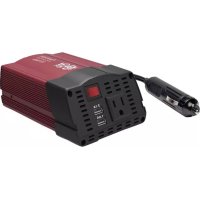
Download the instructions for your Battery in PDF format for free! Find your manual PowerVerter PV150USB - Tripp Lite and take your electronic device back in hand. On this page are published all the documents necessary for the use of your device. PowerVerter PV150USB by Tripp Lite.
USER MANUAL PowerVerter PV150USB Tripp Lite
AC Inverters with USB Charging
Models: PV100USB, PV150USB, PV200CUSB, PV200USB, PV375USB, PV400USB
Español 5 • Français 9
Introduction
Congratulations! Your new PowerVerter Portable AC Inverter with USB Charging will give you years of reliable, carefree service. Use it to convert DC (battery) power into 110V AC (household) power to run a variety of electronics: tablets, smartphones, laptop computers, game systems, small TVs/DVD players and more! The Inverter's PWM (Pulse Width Modulated) sinusoidal wave is suitable for almost all loads.
Important Safety Instructions
SAVE THESE INSTRUCTIONS!
This manual contains important instructions and warnings that should be followed during the installation, operation and storage of all Tripp Lite Inverters.
Warning!
- Use of this equipment in life support applications where failure of this equipment can reasonably be expected to cause the failure of the life support equipment or to significantly affect its safety or effectiveness is not recommended. Do not use this equipment in the presence of a flammable anesthetic mixture with air, oxygen or nitrous oxide.
- Do not operate your Inverter near flammable materials, fumes or gases.
Caution!
- Since the Inverter requires adequate ventilation during operation, do not block fan or cooling vents or cover the Inverter, and do not operate near vehicle heating vents or in direct sunlight. Keep the Inverter dry at all times and disconnect when not in use.
- Turn OFF connected equipment before starting your engine. DO NOT plug a surge protector, line conditioner or UPS system into the Inverter. If you attach AC extension cords, use the heaviest practical gauge.
- Before connecting a battery charger or adapter, check its manual to make sure that the Inverter's specifications (including output waveform) fall within its recommendations.
- For PV375USB and PV400USB models: Do not allow objects to contact the DC input terminals or battery terminals. Do not short or bridge these terminals together. Serious personal injury or property damage could result.
PROTECT YOUR INVESTMENT!
Register your product for quicker service and ultimate peace of mind. You could also win an ISOBAR6ULTRA surge protector—a \$100 value!
www.tripplite.com/warranty

text_image
TRIPP·LITE
1111 W. 35th Street, Chicago, IL 60609 USA • www.tripplite.com/support
Copyright © 2016 Tripp Lite. All rights reserved.
Operation
Step 1: Plug Inverter into vehicle lighter/accessory outlet.
For PV375USB and PV400USB models: This unit contains a pair of DC input terminals to connect a 3 ft. cigarette lighter plug cable* or optional 3 ft. battery cable with alligator connectors that directly attaches to a battery's DC terminals**.
*To avoid overheating, do not exceed 180W when using the cigarette lighter adapter. **Always connect red connectors to red battery terminals (POS, P, +) and black connectors to black battery terminals (NEG, N, -). For unmarked terminals, the positive post usually has a larger diameter than the negative post. When disconnecting the charger, reverse the order of the connecting steps.
Step 2: Turn on Inverter.
Step 3: Plug equipment into the Inverter.
Determine your equipment's total wattage.*** Do not connect more watts than your Inverter's Output Power (Maximum Continuous Watts); see Specifications. See back page for typical equipment runtimes. Also see back page for important note concerning the limitations of vehicle electrical systems.
*** Wattage ratings are usually listed in equipment manuals or on nameplates. If your equipment is rated in amps, multiply that number times AC utility voltage to determine watts. (Example: a 14 in. drill requires 212 amps. 212 amps × 120 volts = 300 watts.)
Maintenance
Your Inverter requires no maintenance and contains no user-serviceable parts (except for replaceable DC fuses, where applicable).
Troubleshooting
Please check the following before sending the Inverter in for warranty replacement:
| Symptom Possible Cause | Correction | |
| Inverter does not turn ON when power switch is turned ON. | Automatic Inverter shutdown due to low battery voltage (<10V). | Turn Inverter OFF and start engine to recharge vehicle battery. Only use Inverter with engine running. |
| Automatic Inverter shutdown due to output overload. | Turn Inverter OFF and remove overload by unplugging high-wattage devices. Load should not exceed your Inverter's maximum continuous output power (see Specifications). | |
| Blown fuse. Replace fuse with standard automotive fuse of identical amperage, where applicable (see Specifications). | ||
| Inverter is unable to power connected equipment. | Battery running low. Low battery voltage reduces Inverter power output. | Turn Inverter OFF and start engine to recharge vehicle battery. Only use Inverter with engine running. |
| Connected equipment load exceeds Inverter's maximum continuous output power.Note: Fault LED will illuminate during an overload (PV200USB & PV400USB only). | Turn Inverter OFF and remove overload by unplugging high-wattage devices. Load should not exceed your Inverter's maximum continuous output power (see Specifications). | |
| Connected equipment experiences audio/video distortion. | Loose connections. Check and secure all connections. | |
| Audio/video interference. Reposition of equipment antennas and Inverter. | ||
Specifications
| Model: PV100USB | PV150USB | PV200CUSB | PV200USB | PV375USB | PV400USB | |
| Output Power (Maximum Continuous Watts):* | 100 150 | 200 200 37 | 5 400 | |||
| Output Power (Peak Watts):** | 200 300 | 400 400 75 | 0 800 | |||
| Input Voltage (DC): | 12V nominal (10-15V) | 12V nominal (10.5-15V) | 12V nominal (10.5-15V) | 12V nominal (10-15V) | 12V nominal (10.5-15V) | 12V nominal (10-15V) |
| Output Voltage (AC)/Frequency: | 110V / 60 Hz nominal | 110V / 60 Hz nominal | 110V / 60 Hz nominal | 110V / 60 Hz nominal | 110V / 60 Hz nominal | 110V / 60 Hz nominal |
| Output Waveform: | PWM Sine Wave | PWM Sine Wave | PWM Sine Wave | PWM Sine Wave | PWM Sine Wave | PWM Sine Wave |
| Low Battery Voltage Alarm (Volts): | No Alarm < 10.5V ±0.5V | No Alarm No Alarm <10.5V ±0.5V | No Alarm | |||
| Low Battery Voltage Shutdown (Volts): | 10V 10V | 10V 10V 10V | 10V | |||
| AC Outlets: 1 1 2 | 2 2 2 | |||||
| USB Ports 1 x 2.1A, 1 x 1A | 1 x 2.1A, 1 x 1A | 1 x 2.1A, 1 x 1A | 1 x 2.1A, 1 x 1A | 1 x 2.1A, 1 x 1A | 1 x 2.1A, 1 x 1A | |
| Circuit Protection (DC Overload): | 10-amp fuse (internal) | 20-amp fuse (external) | 20-amp fuse (external) | 20-amp fuse (external) | 40-amp fuse (external) | N/A |
| Housing | Plastic | Metal | Plastic | Plastic | Metal | Plastic |
* Maximum output power (continuous or peak) only available when vehicle battery is properly charged. Run vehicle engine often to maintain proper charge. ** Peak Output Power is instantaneous. *** Replace with a fuse of equal amperage rating only. Higher-rated fuses should not be used.
Typical Runtimes Before Battery Recharge
Although you can operate your Inverter with your vehicle engine off, best results are usually achieved with the engine running. Since the Inverter converts electrical energy (and doesn't produce it), the Inverter's performance is relative to the condition of your vehicle's electrical system (battery, alternator and wiring). If other loads (air conditioner, heater, lights, etc.) are also using power, you may get less runtime.
| With Typical Compact Vehicle (4 cylinder) Battery, Alternator & Wiring | With Typical Mid-Size Vehicle (6 cylinder) Battery, Alternator & Wiring | With Typical Full-Size Vehicle (8 cylinder) Battery, Alternator & Wiring | |
| Models: PV100USB, PV150USB, PV200CUSB, PV200USB | |||
| 1/2 Load (engine on/engine off) | continuous/4-6 hrs. | continuous/6-8 hrs. | continuous/8-12 hrs. |
| Full Load (engine on/engine off) | continuous/2-3 hrs. | continuous/3-4 hrs. | continuous/4-6 hrs. |
| Models: PV375USB, PV400USB | |||
| 1/2 Load (engine on/engine off) | continuous/1-2 hrs. | continuous/2-3 hrs. | continuous/3-6 hrs. |
| Full Load* (engine on/engine off) | continuous/30 min.-1 hr. | continuous/1-2 hrs. | continuous/2-3 hrs. |
Vehicle Electrical System Limitations
Due to the limitations of certain vehicles' 12V DC lighter/accessory outlet electrical systems, you may not be able to continuously run a full load from your inverter. If you regularly blow fuses, it may indicate your vehicle is not adequately wired to support your Inverter as it is designed. In this case, consult vehicle manufacturer recommendations for rewiring from the fuse block or battery with appropriate wiring (10 - 12 gauge) and fusing (at least 40 amp). All standard vehicle accessory outlet electrical systems can support full loads for PV100USB models without any modifications.
PV100USB Connection Warning
The extra 12V DC CLA socket on the PV100USB is intended for low-voltage electronic devices only (smartphones, MP3 players, etc.). DO NOT plug another inverter into this port. DO NOT attempt to use as a cigarette lighter.
Warranty and Product Registration
1- Year Limited Warranty
Seller warrants this product, if used in accordance with all applicable instructions, to be free from original defects in material and workmanship for a period of 1 year from the date of initial purchase. If the product should prove defective in material or workmanship within that period, Seller will repair or replace the product, in its sole discretion. Service under this Warranty can only be obtained by your delivering or shipping the product (with all shipping or delivery charges prepaid) to: Tripp Lite, 1111 W. 35th Street, Chicago, IL 60609 USA. Seller will pay return shipping charges. Visit www.tripplite.com/support before sending any equipment back for repair.
THIS WARRANTY DOES NOT APPLY TO NORMAL WEAR OR TO DAMAGE RESULTING FROM ACCIDENT, MISUSE, ABUSE OR NEGLECT. SELLER MAKES NO EXPRESS WARRANTIES OTHER THAN THE WARRANTY EXPRESSLY SET FORTH HEREIN. EXCEPT TO THE EXTENT PROHIBITED BY APPLICABLE LAW, ALL IMPLIED WARRANTIES, INCLUDING ALL WARRANTIES OF MERCHANTABILITY OR FITNESS, ARE LIMITED IN DURATION TO THE WARRANTY PERIOD SET FORTH ABOVE; AND THIS WARRANTY EXPRESSLY EXCLUDES ALL INCIDENTAL AND CONSEQUENTIAL DAMAGES. (Some states do not allow limitations on how long an implied warranty lasts, and some states do not allow the exclusion or limitation of incidental or consequential damages, so the above limitations or exclusions may not apply to you. This Warranty gives you specific legal rights, and you may have other rights which vary from jurisdiction to jurisdiction).
WARNING: The individual user should take care to determine prior to use whether this device is suitable, adequate or safe for the use intended. Since individual applications are subject to great variation, the manufacturer makes no representation or warranty as to the suitability or fitness of these devices for any specific application.
Product Registration
Visit www.tripplite.com/warranty today to register your new Tripp Lite product. You'll be automatically entered into a drawing for a chance to win a FREE Tripp Lite product!*
* No purchase necessary. Void where prohibited. Some restrictions apply. See website for details.
Tripp Lite has a policy of continuous improvement. Specifications are subject to change without notice.

text_image
TRIPP·LITE
1111 W. 35th Street, Chicago, IL 60609 USA • www.tripplite.com/support
1111 W. 35th Street, Chicago, IL 60609 USA • www.tripplite.com/support
1111 W. 35th Street, Chicago, IL 60609 USA • www.tripplite.com/support
CONSERVEZ CES INSTRUCTIONS!
1111 W. 35th Street, Chicago, IL 60609 USA • www.tripplite.com/support
1111 W. 35th Street, Chicago, IL 60609 USA • www.tripplite.com/support