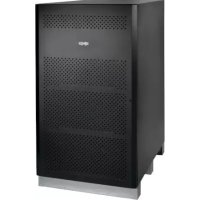
BP480V100NIB - Battery Tripp Lite - Free user manual and instructions
Find the device manual for free BP480V100NIB Tripp Lite in PDF.


| Product Type | Battery Cabinet for Extended Runtime (Batteries Not Included) |
| Brand | Tripp Lite |
| Model | BP480V100NIB |
| Nominal Voltage | 480 V DC (±240 V DC) |
| Nominal Capacity (with batteries) | 100 Ah (C20 to 1.67 VPC) |
| Number of Batteries | 40 (12 V 100 Ah each, not included) |
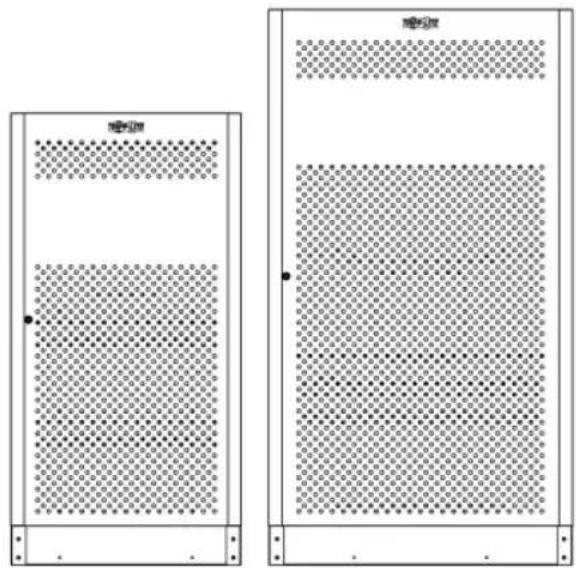
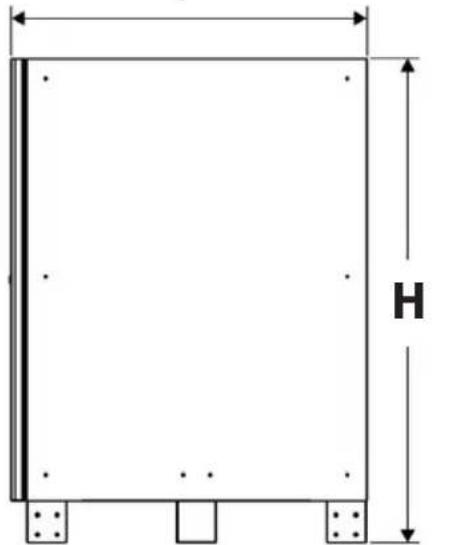
| Dimensions (H x W x D) | 1500 x 826 x 1135 mm |
| Weight (empty) | 157.6 kg |
| Maximum Weight with Batteries | 1496.3 kg |
| Material | Heavy-gauge steel with powder-coated finish |
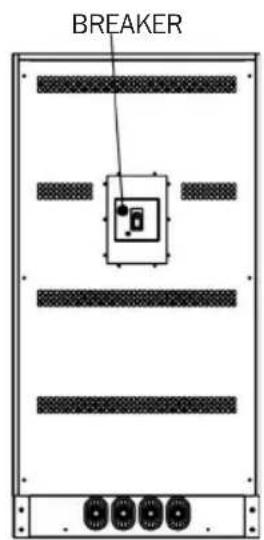
| Overcurrent Protection | 400 A / 600 V DC molded case circuit breaker |
| Ventilation | Natural convection, front and rear air vents |
| Access | Hinged lockable door |
| Cabling Provided | Jumper cables (dual 50 mm² / 4/0 AWG cable) |
| Operating Temperature | 0 to 40 °C (optimal 25 °C) |
| Compatible Battery Type | VRLA (valve-regulated lead-acid), maintenance-free |
| Maintenance | Quarterly checks: voltage, temperature, connections |
| Grounding | Grounding lug on top |
| Cable Entry | Knockout disks on top |
| Certifications | CE (circuit breaker), compliant with electrical standards |
| Warranty | 1-year limited |
Frequently Asked Questions - BP480V100NIB Tripp Lite
User questions about BP480V100NIB Tripp Lite
0 question about this device. Answer the ones you know or ask your own.
Ask a new question about this device
Download the instructions for your Battery in PDF format for free! Find your manual BP480V100NIB - Tripp Lite and take your electronic device back in hand. On this page are published all the documents necessary for the use of your device. BP480V100NIB by Tripp Lite.
USER MANUAL BP480V100NIB Tripp Lite
Models: BP480V40, BP480V40-NIB, BP480V65, BP480V65-NIB, BP480V100, BP480V100-NIB
Not suitable for mobile applications.
natural_image
Two identical rectangular panels with dot patterns, one containing a grid pattern and the other showing a grid pattern (no text or symbols)Español 36 • Français 71 • Русский 106 • Deutsch 141


1111 W. 35th Street, Chicago, IL 60609 USA • www.tripplite.com/support
Copyright © 2018 Tripp Lite. All rights reserved.
Table of Contents
1. Introduction 3
Features 3
2. Important Safety 4 Instructions
Installation and 4
Location Warnings
Connection Warnings 4
Battery Warnings 5
3. Battery Cabinet Installation 7
3.1 Preparation 7
3.2 Transportation 7
3.3 Mechanical Check 7
3.4 Internal Wiring (Typical) 8
3.5 Preliminary Electrical Check 8 (After Battery Installation)
3.6 Battery Cabinet Placement 8
3.7 Electrical Connection 9
3.8 Final Electrical Check 10
4. Operation and Charging 11
4.1 Determine Charging Voltages 11
4.2 Initial Charge 11
4.3 Operational Check 11
5. Maintenance 11
5.1 Maintenance Schedule 11
5.1.1 Quarterly Check 11
6. Mechanical Data 12
6.1 Physical Measurements 12
6.1.1 BP480V40/NIB 12
Measurements
6.1.2 BP480V65/NIB and 13
BP480V100/NIB
Measurements
6.2 Battery Requirements 14
6.2.1 BP480V40/NIB Battery 14
6.2.2 BP480V65/NIB Battery 14
6.1.3 BP480V100/NIB Battery 14
7. Installation 15
7.1 Battery Pre-Installation 15
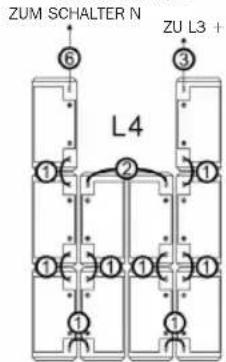
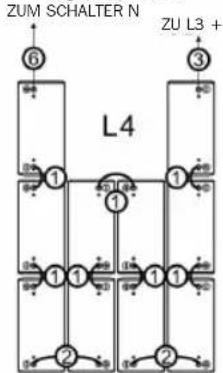
7.2 Cable Jumpers and Internal Wiring 16
7.2.1 Included Cable 16 Jumpers Specifications
7.2.2 Installing Cable Jumpers 17 to Battery Terminals
7.2.3 Battery Cabinet 18 Internal Wiring
7.3 Battery Installation 21
7.4 Installation Specifications 33
7.4.1 Installation and 33 Floor Loading Information
7.4.2 Recommended Torque 33
8. Storage and Service 34
9. Warranty 35
1. Introduction
Tripp Lite's Extended-Run Battery Cabinets connect to SmartOnline® UPS Systems to provide long-lasting battery backup for data centers, telecommunications, networks, industrial facilities, security, emergency systems and other mission-critical applications that require high capacity, high availability and extended runtime.
Features
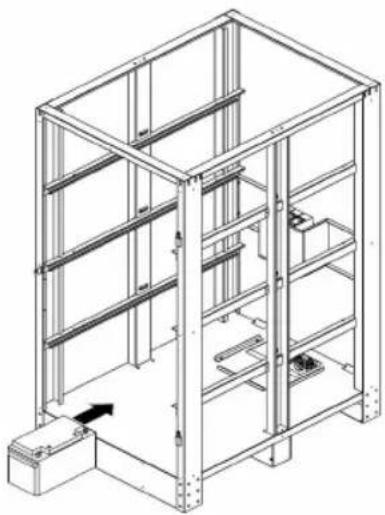
- Battery cabinets are available in six options: BP480V40, BP480V40-NIB, BP480V65, BP480V65-NIB, BP480V100 and BP480V100-NIB. The BP480V40, BP480V65 and BP480V100 models include jumpers, terminals, breaker, and 40 x CSB GP 12400, GP 12650 or GPL 121000 batteries in a separate pallet for a complete installation. The BP480V40-NIB, BP480V65-NIB and BP480V100-NIB models are a similar kit but without batteries, allowing users the flexibility to purchase batteries for the cabinet separately.
- Battery cabinets are available in voltages of 480V DC and capacities option of 40Ah, 65Ah and 100Ah@C20 to 1.67VPC
- Battery cabinets contain multiple 12V DC batteries connected in series for higher voltages.
• Each battery cabinet contains 4 shelves with 10 individual batteries (maximum) per shelf. - Hinged lockable door facilitates access to batteries for periodic maintenance.
- A minimum of 100 mm clearance is located above the individual batteries for access to terminals.
- Battery cabinet is constructed of heavy-gauge steel.
- Baked powder-coat finish provides chip and corrosion resistance.
- Battery cabinet ships bolted to pallet with a double layer of protective stretch wrap and integrated corner and top protection.
- Appropriate ventilation and convection cooling of individual batteries is provided via spacing between batteries. Front and rear vents allow the free flow of warmer air out of the battery cabinet.
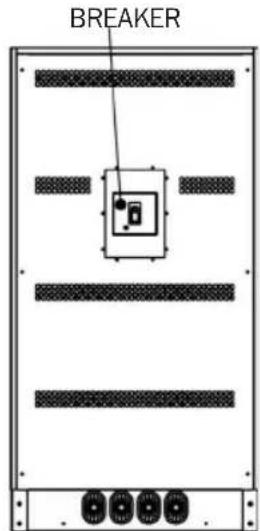
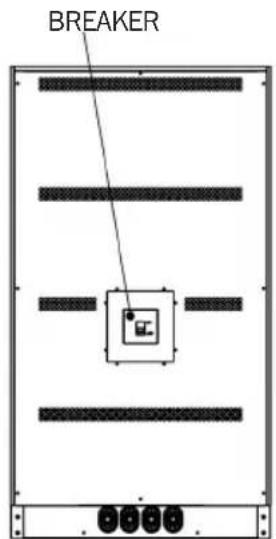
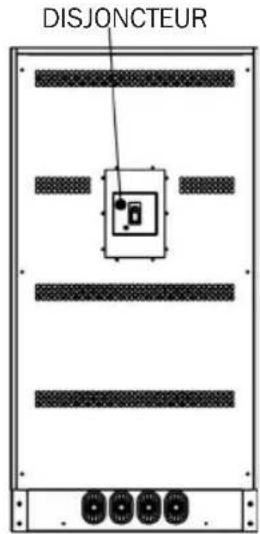
- A molded case circuit breaker is provided for overcurrent protection.
- User-supplied power output cables can be fed into the battery cabinet via built-in conduit knockouts on top of the cabinet.
- For improved safety, higher power density and minimized maintenance, the cabinet systems use Valve-Regulated Lead-Acid (VRLA) recombinant batteries. The electrolyte in these batteries is immobilized in either an absorbent mat separator or a gelling medium, eliminating the spilling hazards and maintenance requirements of free liquid electrolyte. There is no need to add water or measure specific gravity.
- Because the batteries are recombinant cells that employ an oxygen recombination cycle, minimal gasses are emitted during normal float charging. Each cell contains an individual valve, which releases the gas products from overcharge and prevents pressure build-up within the cell.
2. Important Safety Instructions
SAVE THESE INSTRUCTIONS
All sections of this manual contain instructions and warnings that must be followed during the installation and operation of the battery cabinet described in this manual. Read ALL instructions thoroughly before attempting to move, install or connect your battery cabinet.
Failure to heed these warnings may affect your warranty and cause serious property damage and/or personal injury.
DANGER! LETHAL HIGH-VOLTAGE HAZARD!
All wiring should be performed by a qualified electrician in accordance with the warnings in this manual and all applicable electrical and safety codes. Incorrect wiring may cause serious personal injury and property damage.
Installation and Location Warnings
- Install the battery cabinet in a controlled indoor environment, away from moisture, temperature extremes, flammable liquids and gasses, conductive contaminants, dust and direct sunlight.
• Install the battery cabinet in a level, structurally sound location. - The battery cabinet is extremely heavy. Exercise caution when moving or lifting the unit.
- Operate the battery cabinet at indoor temperatures between 0^ and 40^ only. For best results, maintain an ambient indoor temperature of 25^ .
- Allow adequate space around the front and rear of the battery cabinet for proper ventilation. Do not block, cover or insert objects into the battery cabinet's external ventilation openings.
- Do not place any object on the battery cabinet, especially containers of liquid.
- Do not attempt to stack the battery cabinet. Attempting to stack the battery cabinet may cause permanent damage and create a potential for serious personal injury.
- Do not attempt to unpack or move the battery cabinet without assistance. Use appropriate handling equipment rated to bear the weight and bulk of the battery cabinet, such as freight elevators, pallet jacks and forklifts. (Fully extend forks under load. Spread forks to maximum possible width under load. Lift cabinet from bottom only. Wear safety shoes.)
- For emergency use, install a fire extinguisher rated for energized electrical equipment fires (Class C rating or exact equivalent, with a non-conductive extinguishing agent) near the battery cabinet.
Connection Warnings
- The battery cabinet contains hazardous high voltages that have the potential to cause personal injury or death from electric shock.
- The battery cabinet has its own energy source. The output terminals may be live, even when the battery cabinet is not connected to a UPS system.
- The battery cabinet must be suitably grounded according to all applicable electrical wiring regulations.
2. Important Safety Instructions
- Use of this equipment in life support applications where failure of this equipment can reasonably be expected to cause the failure of the life support equipment or to significantly affect its safety or effectiveness is not recommended.
- De-energize all input and output power sources before installing cables or making electrical connections.
- Use flexible cable of sufficient length to permit battery cabinet servicing.
- Use ferrule caps to cover termination cables and prevent frayed ends from shorting on terminal blocks. Use cabling rated VW-1, FT-1 or better. Use cable sleeves and connector clamps.
- Confirm all cables are marked correctly according to their purpose, polarity and diameter.
- Observe proper polarity by following the positive and negative markings on the unit. Failure to observe proper polarity may damage the batteries and create a serious risk of personal injury and property damage.
- Wiring and assembly should be performed by trained, qualified electricians only. Refer to the UPS unit's Owner's Manual for wire sizing.
Battery Warnings
- The battery cabinet does not require routine maintenance by the user. There are no user-serviceable parts inside. Only qualified, knowledgeable service personnel familiar with all required precautions should open the access panels for any reason. Keep unauthorized personnel away from batteries.
- The battery cabinet contains valve-regulated recombinant lead-acid (VRLA) batteries. Do not attempt to add water to these batteries or sample the electrolyte specific gravity.
- VRLA batteries can contain an explosive mixture of hydrogen gas. DO NOT SMOKE when near batteries. DO NOT cause flames or sparks near batteries. Discharge static electricity from body before touching batteries. DO NOT open or mutilate batteries—released electrolyte is harmful to the skin and eyes and may be toxic. DO NOT dispose of batteries in a fire—they may explode.
- Batteries present a risk of electrical shock and burns from high short-circuit current. Battery connection or replacement should be performed only by qualified service personnel observing proper precautions. Use tools with insulated handles. Remove watches, rings or other metal objects. Wear rubber gloves and boots. Do not short or bridge the battery terminals with any object. Do not lay tools or metal parts on top of batteries.
- Replace batteries with equivalent batteries (same number and type) available from Tripp Lite.
- The batteries are recyclable. Refer to local codes for disposal requirements. Do not dispose of batteries except through approved channels in accordance with all applicable local, state and national regulations.
- Do not connect or disconnect batteries when the UPS system is operating from the battery supply or when the unit is not in bypass mode. Disconnect the charging source prior to connection or disconnecting battery terminals.
- If the charging source remains off for an extended period of time, it should be turned on periodically to allow the batteries to recharge. The charging source should be turned on and the batteries should be recharged at least one uninterrupted 24-hour period every 3 months. Failure to recharge the batteries periodically may cause permanent battery damage.
2. Important Safety Instructions
- Allow batteries to charge uninterrupted for 24 hours after installation.
- Do not attempt to service the integrated battery charger (included with "C" models only). Contact Tripp Lite if service is required.
Note on Labeling
These symbols may appear on the product label:
V\~: AC Voltage
V÷DC Voltage
①: Ground
+: Battery Positive
-: Battery Negative
Refer to the product label for model numbers, voltage ratings and other important information.
3. Battery Cabinet Installation

Read Section 2 – Important Safety Instructions Before Installation

3.1 Preparation
- At your site, prepare to off-load the battery cabinet from the delivery truck and transport it to the final installation location. Consider both the packaged weight and dimensions.
- Make sure the floor can support the load of the specific battery cabinet being installed. The battery cabinet must be installed in a structurally sound area with a level floor that is able to bear the weight of the battery cabinet and other equipment that will be installed nearby.
- Draw a wiring schematic representing the cables connected between the battery cabinet's output terminal blocks and any external disconnect device, junction box and/or load/rectifier.
- If you plan to store the battery cabinet for an extended period before or after installation, follow the instructions in Section 8. Storage and Service.
3.2 Transportation
- Inspect the shipping container(s) for visible damage (do not remove the stretch wrap around the unit until it has been transported to the final installation location). Confirm that the model name and rating match the unit you ordered. If you determine the unit has been damaged during shipping or if anything appears to be missing, contact Tripp Lite for assistance. Do not attempt to use the unit if it has been damaged or mishandled.
- Do not attempt to move or unpack the battery cabinet without assistance. Use appropriate handling equipment rated to bear the weight and bulk of the battery cabinet, such as freight elevators, pallet jacks and forklifts. (Fully extend forks under load. Spread forks to maximum possible width under load. Lift cabinet from bottom only. Wear safety shoes.) Confirm load limits for freight elevators, handling equipment and floors along the transport route are not exceeded by the combined weight of the packaged battery cabinet, handling equipment and personnel. Confirm that the packaged unit will pass through any doorways along the intended route.
- The battery cabinet is secured with stretch wrap to protect it during shipping and movement within a facility. Remove the stretch wrap from the battery cabinet when the unit is in the final installation location—not before.
3.3 Mechanical Check
While the assembled cabinet battery system is still on the shipping pallet, inspect all sides for impact or other damage.
- Open the front door of the battery cabinet.
- Confirm none of the individual batteries included on a separate pallet are damaged (applies to BP480V40, BP480V65 and BP480V100 models only).
- Confirm none of the internal parts (terminal blocks, circuit breakers and other parts) have been damaged.
- Note the individual battery model number. Refer to Section 6.2 for the battery's terminal type and recommended torque.
- Use insulated tools to tighten all battery terminal connections to the recommended torque.
- Use insulated tools to tighten the cables from the positive and negative output terminals at the end batteries to the circuit breaker.
3. Battery Cabinet Installation
3.4 Internal Wiring (Typical)
- Battery cabinets use multiple 12V DC batteries connected in series to provide nominal DC voltage of 480V DC (±240V DC).
- Internal cabling is sized for specific application load currents. Do not use any other cable size other than the one provided in the battery cabinet.
- Each battery cabinet shelf includes a specific wiring diagram. Refer to Section 7. Installation for battery installation details.
- All circuit breakers are in the middle tier of the battery cabinet.
- All load connection polarities will be labeled as “+” (battery positive), “-” (battery negative) and “N” (battery center tap) for ±240V DC strings.
- All battery cabinets are provided with a branch circuit overcurrent protection device and may be wired directly to the load or UPS.
3.5 Preliminary Electrical Check (After Battery Installation)
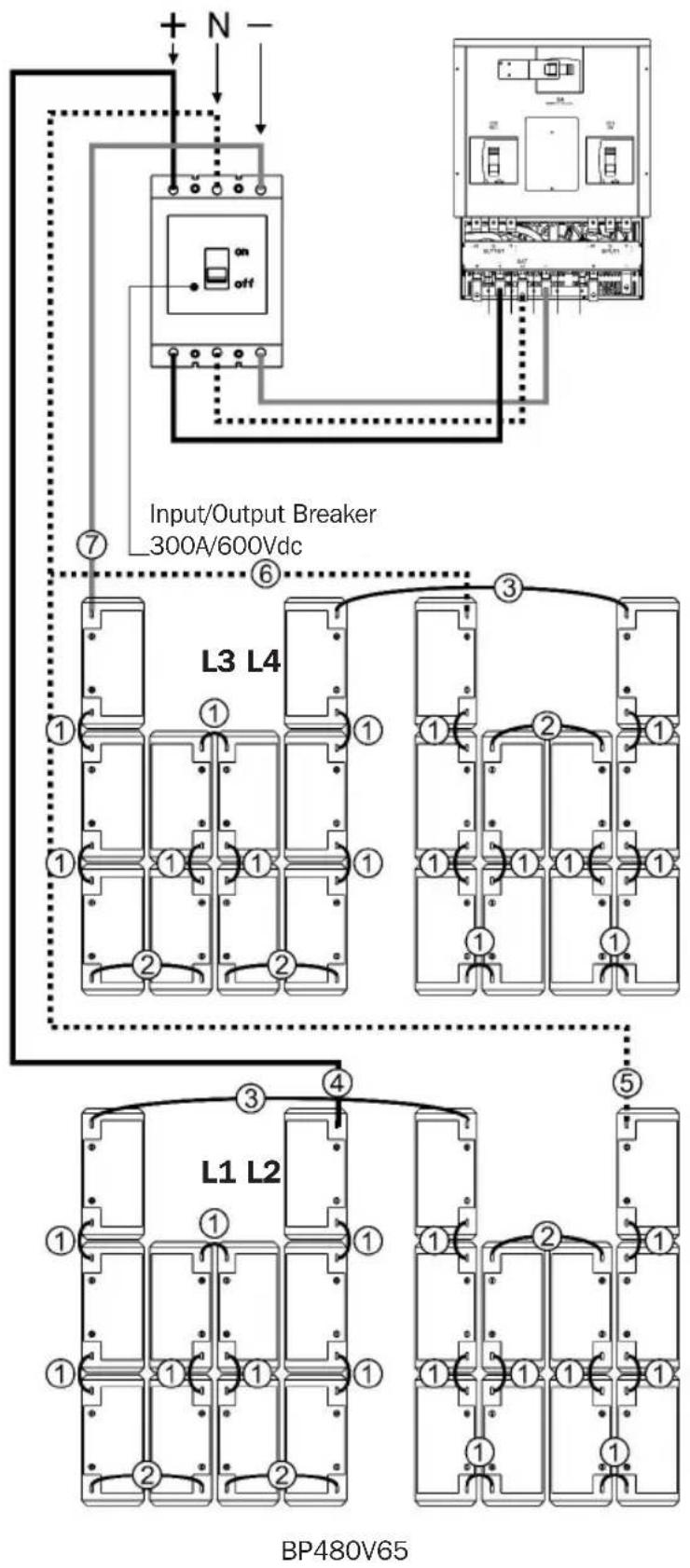
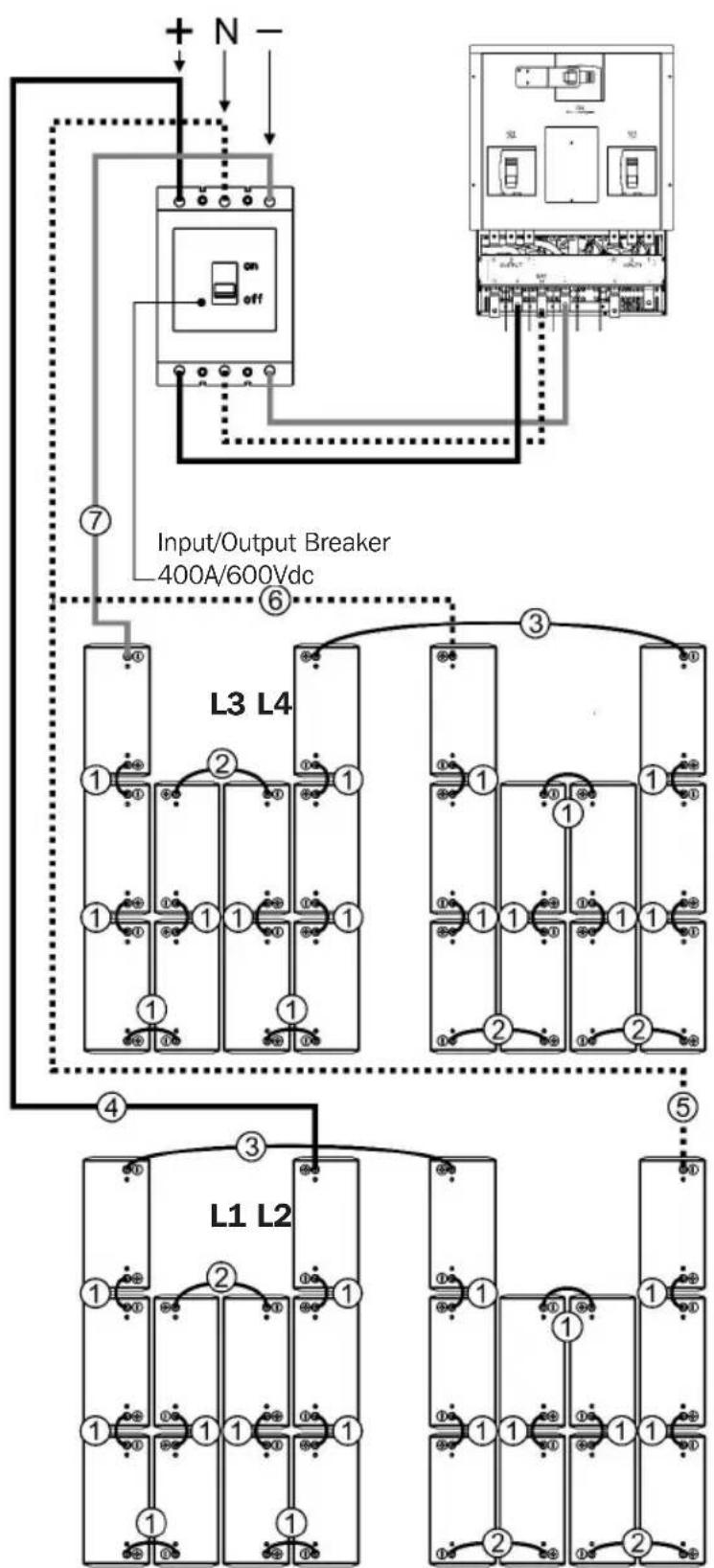
- With the circuit breaker OFF, measure the battery voltage at the line side of the circuit breaker using a digital voltmeter. Refer to the diagrams in Section 7.2.3 Battery Cabinet Internal Wiring for more information.
- Using a digital voltmeter, measure +240V between the “+” (battery positive) and “N” (battery center tap). Confirm the voltage measures a minimum of +220V DC.
- Using a digital voltmeter, measure -240V between the “-” (battery negative) and “N” (battery center tap). Confirm the voltage measures a minimum of -220V DC.
- Using a digital voltmeter, measure +480V between the “+” (battery positive) and the “-” (battery negative). Confirm the voltage measures a minimum of +440V DC.
- If the measured voltage is significantly different than anticipated, determine the cause (e.g. low charge, shorted cell, reversed battery, faulty wiring) and correct the voltage disparity before proceeding.
- Set the circuit breaker to the "off" position as a safety precaution during installation.
3.6 Battery Cabinet Placement
Place the battery cabinet in a cool location with free airflow and away from direct heat sources. The lifespan and performance of a battery may be dramatically affected by elevated temperature, decreasing 50% for each 8.25°C above 25°C.
- Prepare the surface where the cabinet will be placed. The surface must be clean, flat and able to support the battery cabinet and other equipment installed nearby. See Section 7.4 for floor loading specifications.
- Allow adequate clearance around the front and rear of the battery cabinet for ventilation and maintenance. The front door must be accessible to allow easy access to internal batteries, internal fuses and other overcurrent protection devices. See Section 6.1 for dimensions and battery cabinet measurements.
- If the cabinet will be anchored to the floor, install appropriate anchor bolts in the mounting hole located at the bottom of the cabinet. Use washers to create a level surface between the mounting areas around the anchor bolts.
- Using extreme caution, remove the bolts securing the battery cabinet to the shipping pallet.
3. Battery Cabinet Installation
- Forklift forks should be at maximum width within the cabinet clearance opening and fully inserted to prevent tipping. Lift cabinet from bottom only. Be careful not to damage the sheet metal floor of the cabinet with the forks.
- If the battery cabinet will be secured to the floor, carefully align and lower the battery cabinet down on the floor anchor bolts and secure it in place.
- If the cabinet will not be secured to the floor, lower it into the designated space and then level it using shims. Leveling does not affect performance, but does align the battery cabinet with other equipment in the facility.
3.7 Electrical Connection
DANGER! LETHAL HIGH-VOLTAGE HAZARD!
All wiring should be performed by a qualified electrician in accordance with the warnings in this manual and all applicable electrical and safety codes. Incorrect wiring may cause serious personal injury and property damage.
- The battery cabinet is connected to the load through a DC circuit breaker. This allows the battery to disconnect from the load and charger for maintenance and/or repair.
- The DC molded case circuit breakers are CE-approved for branch circuit protection. If replacement is required, CE-approved components with the same voltage and current rating must be used.
- The size of the load connection cables must consider maximum allowable voltage drop, as well as the cables' continuous ampere capacity and anticipated ampere discharge rate of the individual battery cabinet. A maximum voltage drop of 1.5V DC in the load connection cables is recommended. Refer to the UPS unit's Owner's Manual for recommended wire sizes.
• Refer to all applicable local, state and national codes for appropriate cable size and ratings. - External circuit protection devices (fuses or circuit breakers) must consider the discharge rate of the battery, the wiring to be protected and the DC short circuit current of the battery.
After performing the installation procedures in Section 7.:
- Open the front door of the battery cabinet to access internal components. Use a digital voltmeter when voltage measurements are required.
- Determine if the battery has been inadvertently grounded by resetting the circuit breaker to the "On" position and measuring the voltage between the battery cabinet grounding lug and the positive load connection point within the cabinet. This voltage should measure 0 (zero) VDC. If the measured voltage is not zero, determine the cause and correct before proceeding.
- Return the internal circuit breaker to an open "Off" position as a safety precaution while connecting the output cables. Doing so prevents damage in the event the cables are accidentally shorted.
- The top of the battery cabinet includes knockouts for load connection cable entry. Punch out the appropriate knockout and connect the conduit or cable bushing.
- The output circuit breaker accommodates cables up to 300 mm ^4 .
- Connect an appropriate equipment grounding cable to the grounding lug located on the top of the battery cabinet.
3. Battery Cabinet Installation
- Feed the positive and negative cables (and "N" center, if equipped) from the open external disconnect switch or the UPS battery field wiring terminals through the conduit/cable bushing. Connect to the respective output terminals inside the battery cabinet.
3.8 Final Electrical Check
Before closing any connecting circuit breaker or disconnect switch, complete these verification steps:
- Verify the battery cabinet output voltage is correct.
- If battery cabinets will be operated in parallel, verify that the individual system output voltages match within 2V DC.
- Verify the voltage measured between either output terminal and the battery cabinet ground is zero.
- If any of the above verification steps show an irregularity, determine and correct the cause before proceeding.
- Reset the circuit breaker to the "On" position.
4. Operation and Charging
4.1 Determine Charging Voltages
Your Tripp Lite UPS is already set up for proper float and boost voltages from the factory.
4.2 Initial Charge
Proper amp-hour rating and charge current must be manually input into the UPS setup. Refer to the Tripp Lite UPS Owner's Manual for details.
4.3 Operational Check
- Measure and record the total system float voltage. Measure at the battery terminals.
- Measure and record the system float current using a clamp-on ammeter.
- Measure and record the float voltage of individual battery units.
- Measure and record the temperature of several batteries. Measure battery temperature with a digital thermometer by placing the surface thermocouple on the flat surface of the negative terminal—not the “L” connection surface. An infrared temperature monitor may also be used.
- Optional: Perform impedance and conductance tests on individual battery units. These tests require special equipment, but the data can be useful in trending the system over time or identifying suspect units during later periodic checks. It may be necessary to disconnect the battery system from the charger/load during these checks.
5. Maintenance
The battery cabinet contains valve-regulated recombinant lead-acid (VRLA) batteries, which are maintenance-free relative to the electrolyte. You cannot add water to these batteries or sample the electrolyte-specific gravity. It is necessary, however, to periodically check the charging voltage, temperature and connections of the individual battery units.
5.1 Maintenance Schedule
5.1.1 Quarterly Check
Quarterly maintenance by qualified service personnel is recommended.
6. Mechanical Data
6.1 Physical Measurements
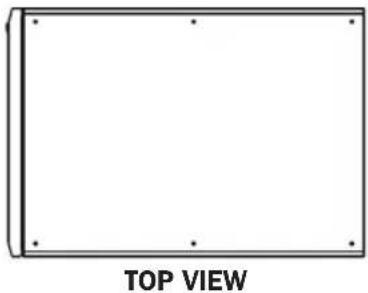
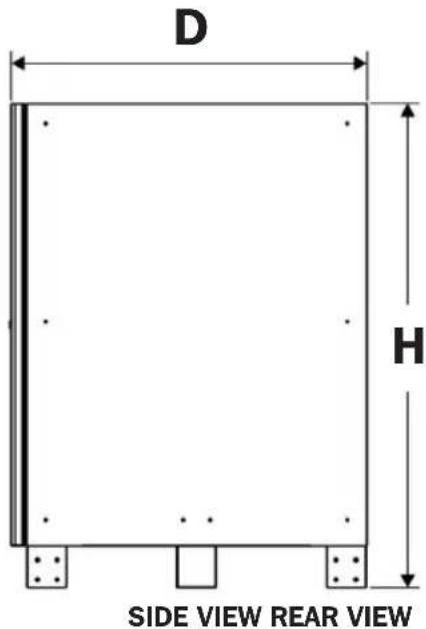
6.1.1 BP480V40/NIB Measurements
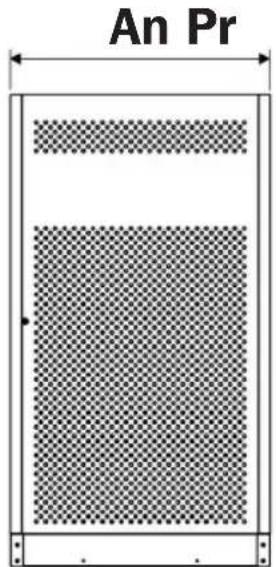
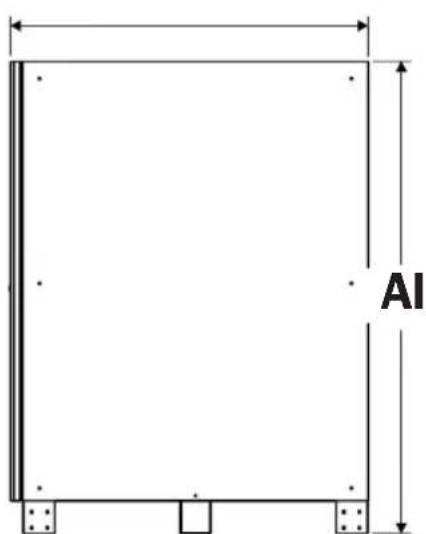
Dimensions (H x W x D): 1220 x 626 x 900 mm
Empty Cabinet Weight: 103.3 kg
natural_image
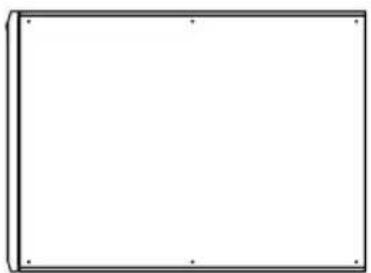
Blank rectangular frame with corner dots, labeled 'TOP VIEW' below (no other text or symbols)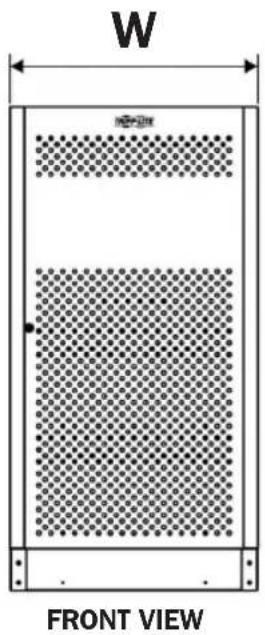
6. Mechanical Data
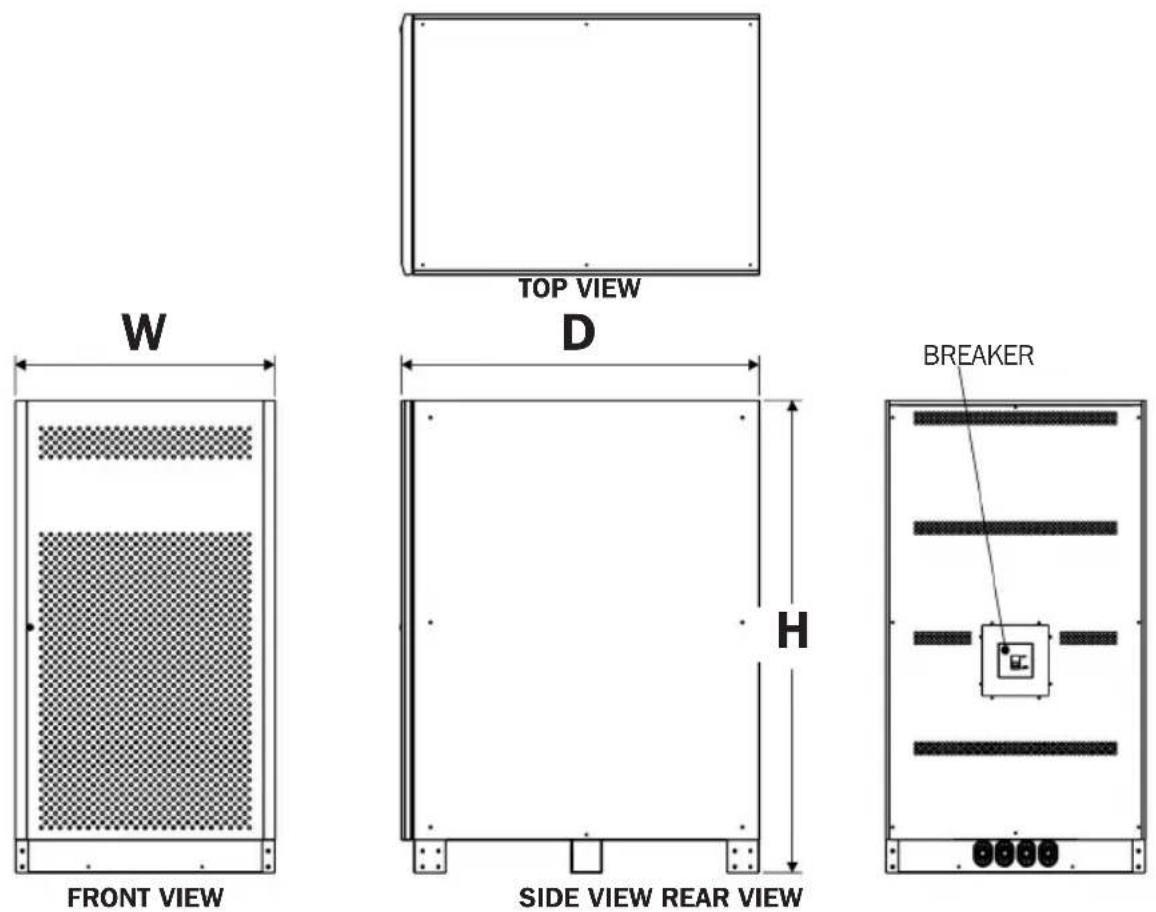
6.1.2 BP480V65/NIB and BP480V100/NIB Measurements
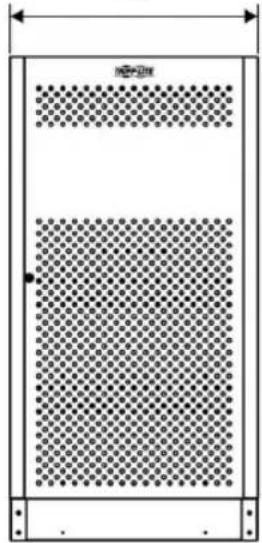
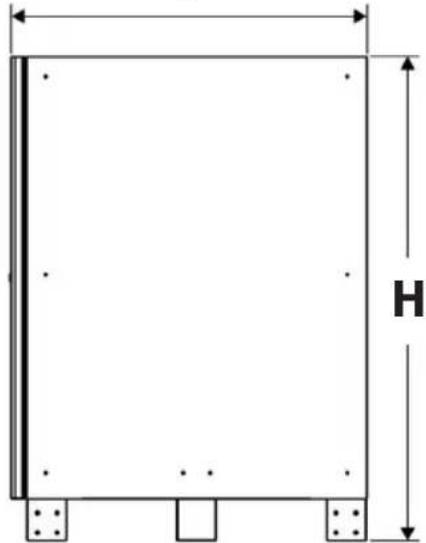
Dimensions (H x W x D): 1500 x 826 x 1135 mm
Empty Cabinet Weight: 157.6 kg (BP480V65/NIB model)
157.6 kg (BP480V100/NIB model)
6. Mechanical Data
6.2 Battery Requirements
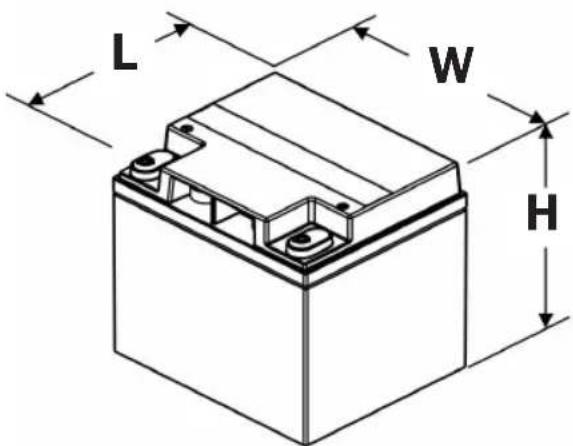
6.2.1 BP480V40/NIB Battery
Lead-Acid Cell Type and Quantity:
12V 40Ah x 40 Batteries
Lead-Acid Battery Maximum Size (H x W x L):
170 x 165 x 197 mm
Terminal Type: M6 Bolt
Terminal Torque (applies to CSB GP 12400
model): 59 kgf•cm/5.73 N•m
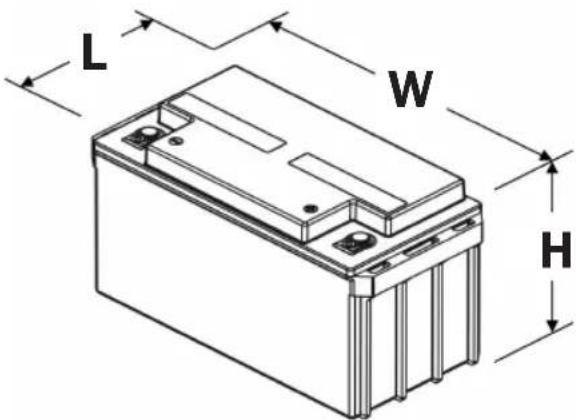
6.2.2 BP480V65/NIB Battery
Lead-Acid Cell Type and Quantity:
12V 65Ah x 40 Batteries
Lead-Acid Battery Maximum Size (H x W x L):
175 x 350 x 166 mm
Terminal Type: M6 Bolt
Terminal Torque (applies to CSB GPL 12650
model): 138.6 kgf·cm/13.58 N·m
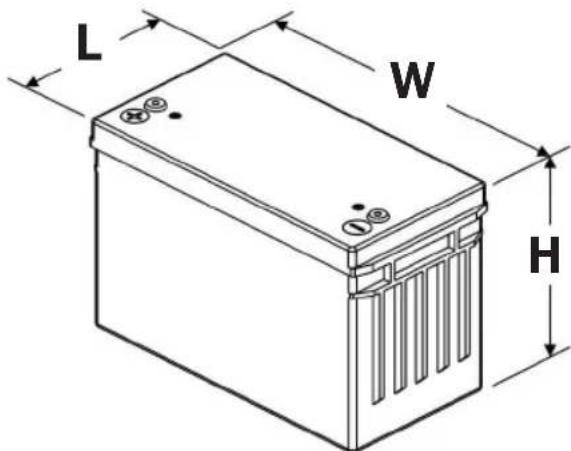
6.2.3 BP480V100/NIB Battery
Lead-Acid Cell Type and Quantity:
12V 100Ah x 40 Batteries
Lead-Acid Battery Maximum Size (H x W x L):
217×170×343mm
Terminal Type: M6 Bolt
Terminal Torque (applies to CSB GPL 121000
model): 138.6 kgf·cm/13.58 N·m
7. Installation

Battery installation should only be performed by qualified service personnel.
7.1 Battery Pre-Installation
Battery cabinet:
The "F" marks the front side of the battery cabinet; the "R" marks the rear side of battery cabinet.
Battery shelf structure:
The cabinet includes four trays total from L1 (bottom) to L4 (top).
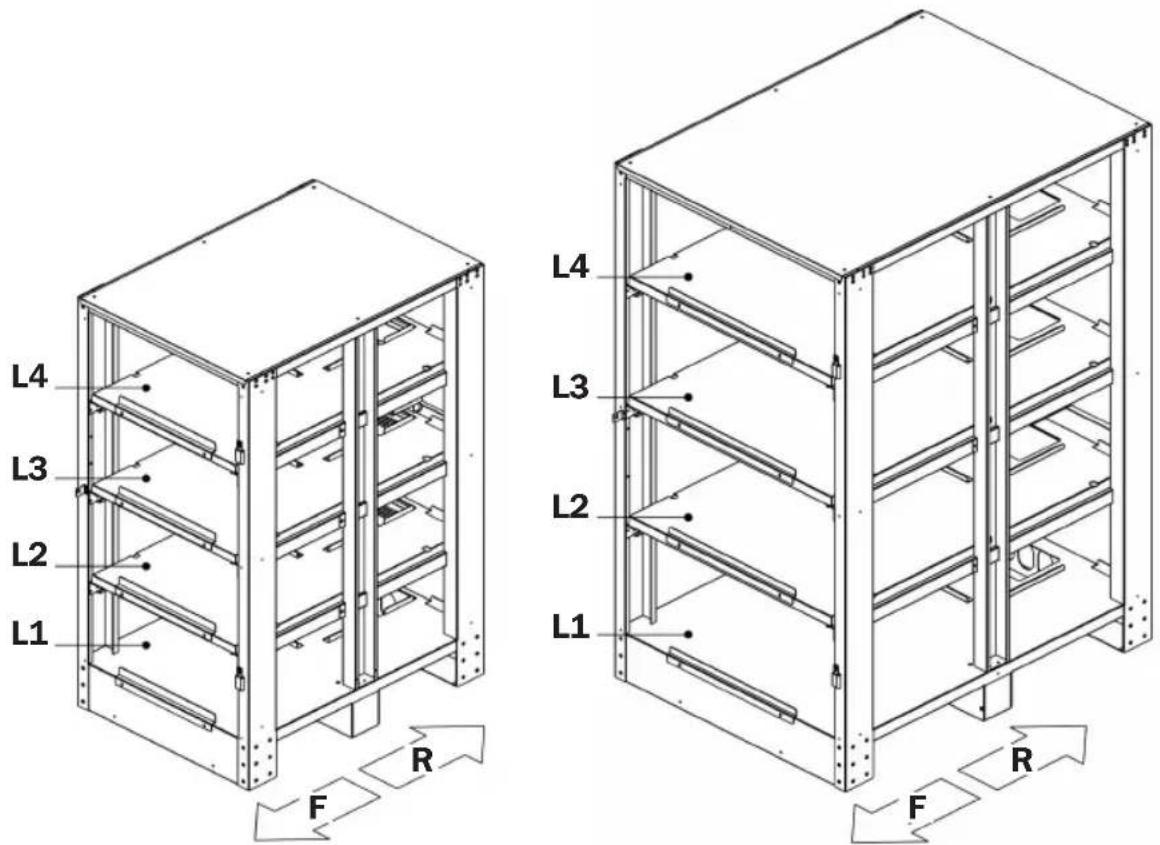
BP480V40/NIB BP480V65/NIB AND B480V100/NIB
7. Installation
7.2 Cable Jumpers and Internal Wiring
7.2.1 Included Cable Jumpers Specifications
50 mm ^2 (1/0 AWG) double wire
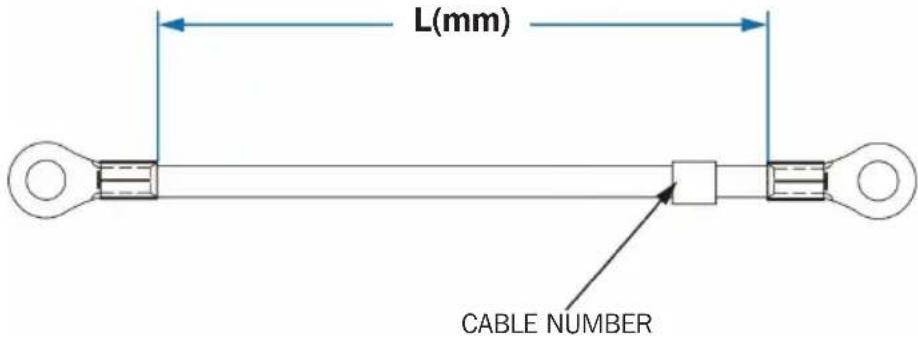
| ITEM | DESCRIPTION UNIT | CABLE LENGTH | QUANTITY | CABLE NUMBER | |
| BP480V40/BP480V40-NIB (40Ah batteries) | |||||
| 1 | #1 AWG CABLE (BLACK) mm 200 30 1 | ||||
| 2 | #1 AWG CABLE (BLACK) mm 350 2 2 | ||||
| 3 | #1 AWG CABLE (BLACK) mm 470 6 3 | ||||
| 4 | #1 AWG CABLE (BLACK) mm 900 1 BAT | + | |||
| 5 | #1 AWG CABLE (BLACK) mm 600 1 N1 | ||||
| 6 | #1 AWG CABLE (BLACK) mm 320 1 N2 | ||||
| 7 | #1 AWG CABLE (BLACK) mm 300 1 BAT | - | |||
| BP480V65/BP480V65-NIB (65Ah batteries) | |||||
| 1 | #2/0 AWG CABLE (BLACK) mm | 200 30 1 | |||
| 2 | #2/0 AWG CABLE (BLACK) mm | 300 6 2 | |||
| 3 | #2/0 AWG CABLE (BLACK) mm | 650 2 3 | |||
| 4 | #2/0 AWG CABLE (BLACK) mm | 800 1 BAT | + | ||
| 5 | #2/0 AWG CABLE (BLACK) mm | 450 1 N1 | |||
| 6 | #2/0 AWG CABLE (BLACK) mm | 800 1 N2 | |||
| 7 | #2/0 AWG CABLE (BLACK) mm | 500 1 BAT | - | ||
| BP480V100/BP480V100-NIB (100Ah batteries) | |||||
| 1 | #4/0 AWG CABLE (BLACK) mm | 200 30 1 | |||
| 2 | #4/0 AWG CABLE (BLACK) mm | 300 6 2 | |||
| 3 | #4/0 AWG CABLE (BLACK) mm | 650 2 3 | |||
| 4 | #4/0 AWG CABLE (BLACK) mm | 800 1 BAT | + | ||
| 5 | #4/0 AWG CABLE (BLACK) mm | 450 1 N1 | |||
| 6 | #4/0 AWG CABLE (BLACK) mm | 800 1 N2 | |||
| 7 | #4/0 AWG CABLE (BLACK) mm | 500 1 BAT | - | ||
7. Installation
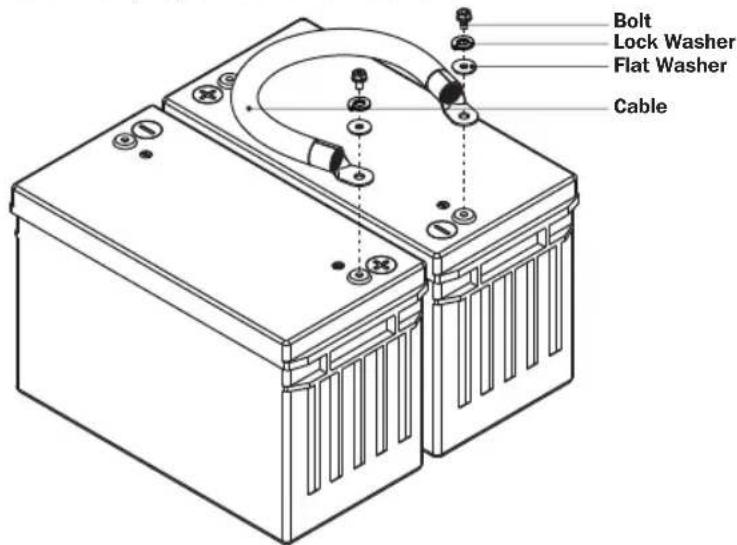
7.2.2 Installing Cable Jumpers to Battery Terminals
The BP480V40/BP480V65/BP480V100 battery cabinets and Tripp Lite batteries include hardware to attach the cable jumpers to the batteries' positive (+) and negative (-) terminals. Refer to the illustration below for proper hardware installation.
7. Installation
7.2.3 Battery Cabinet Internal Wiring
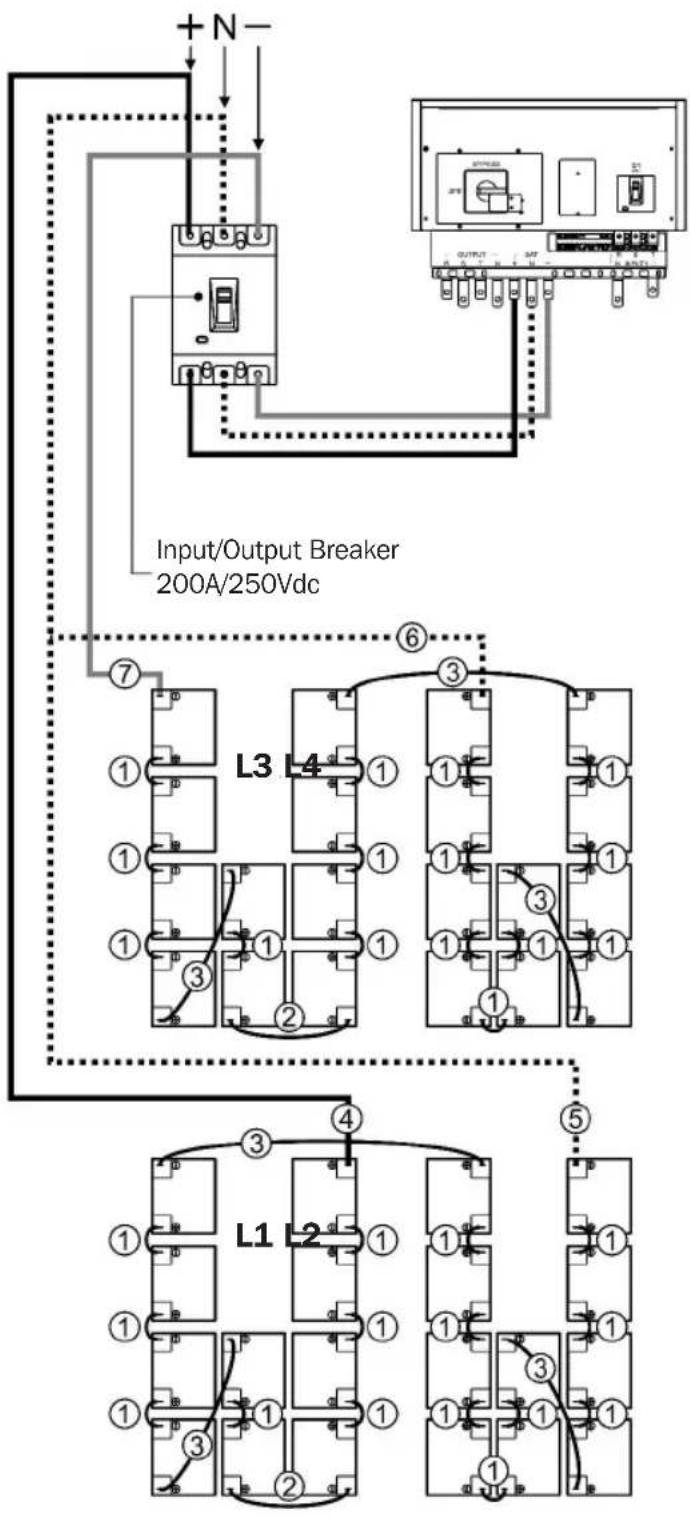
BP480V40
7. Installation
7. Installation
flowchart
graph TD
    A["+ N -"] --> B["On/OFF"]
    B --> C["Input/Output Breaker 400A/600Vdc"]
    C --> D["⑥"]
    D --> E["L3 L4"]
    E --> F["①"]
    E --> G["②"]
    E --> H["③"]
    E --> I["④"]
    E --> J["⑤"]
    E --> K["L1 L2"]
    K --> L["①"]
    K --> M["②"]
    K --> N["③"]
    K --> O["④"]
    K --> P["⑤"]
    style A fill:#f9f,stroke:#333
    style B fill:#ccf,stroke:#333
    style C fill:#cfc,stroke:#333
    style D fill:#fcc,stroke:#333
    style E fill:#cff,stroke:#333
    style F fill:#ffc,stroke:#333
    style G fill:#ffc,stroke:#333
    style H fill:#ffc,stroke:#333
    style I fill:#ffc,stroke:#333
    style J fill:#ffc,stroke:#333
    style K fill:#ffc,stroke:#333
    style L fill:#ffc,stroke:#333
    style M fill:#ffc,stroke:#333
    style N fill:#ffc,stroke:#333
    style O fill:#ffc,stroke:#333
    style P fill:#ffc,stroke:#333
BP480V100
7. Installation
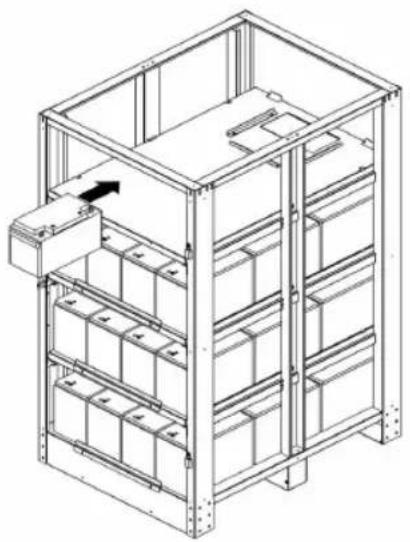
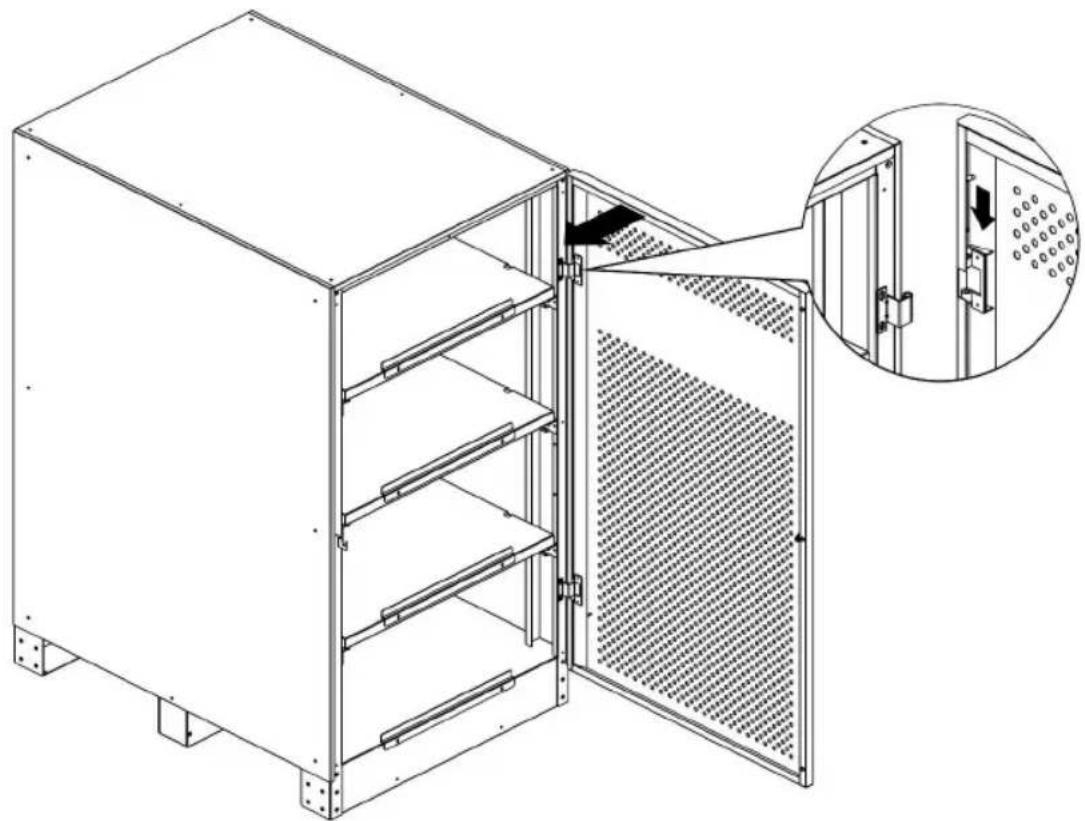
7.3 Battery Installation
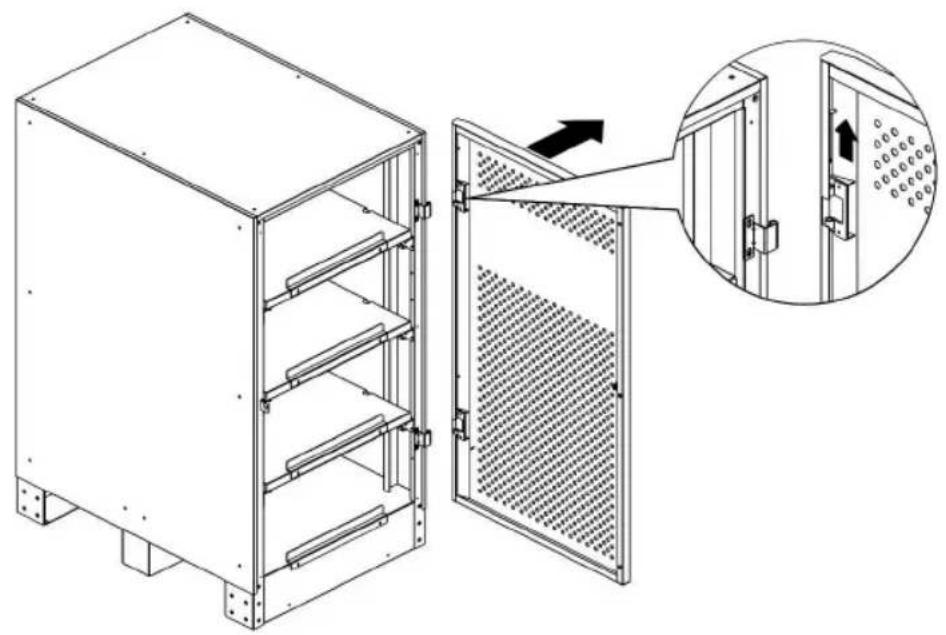
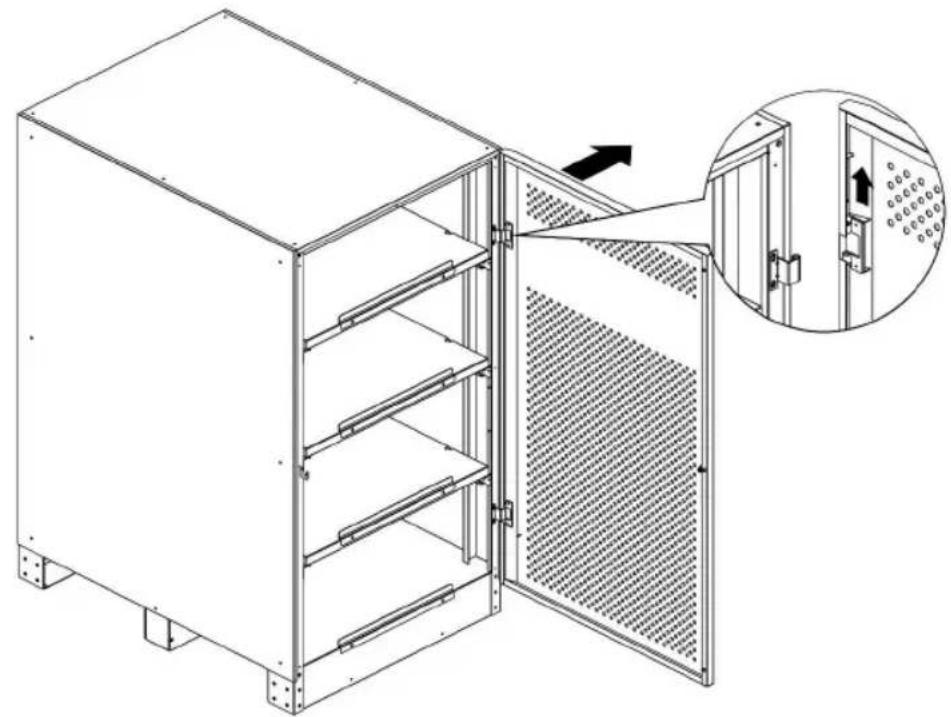
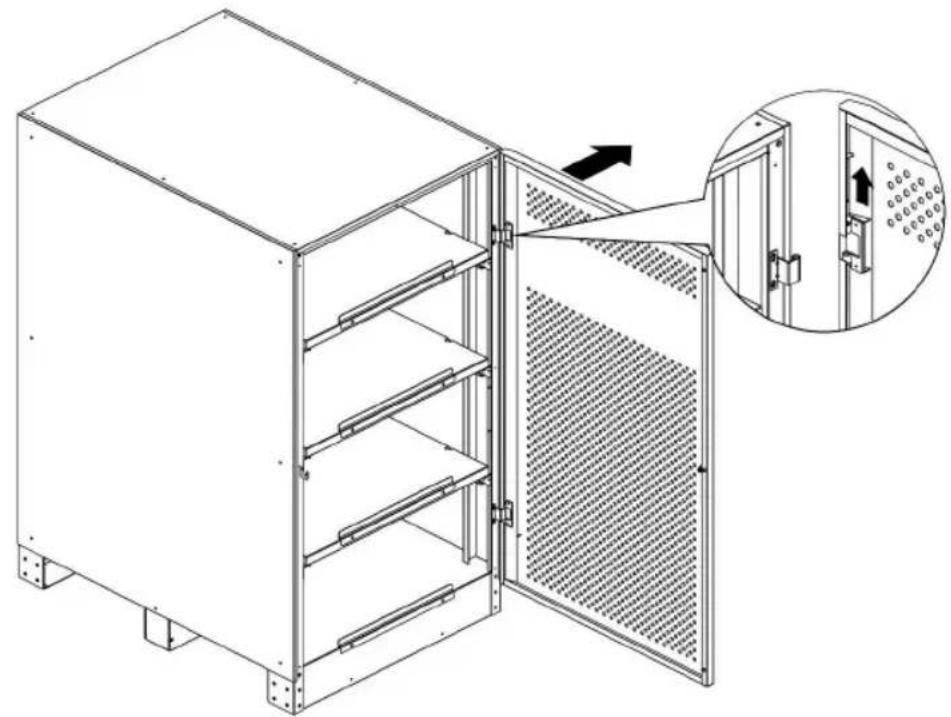
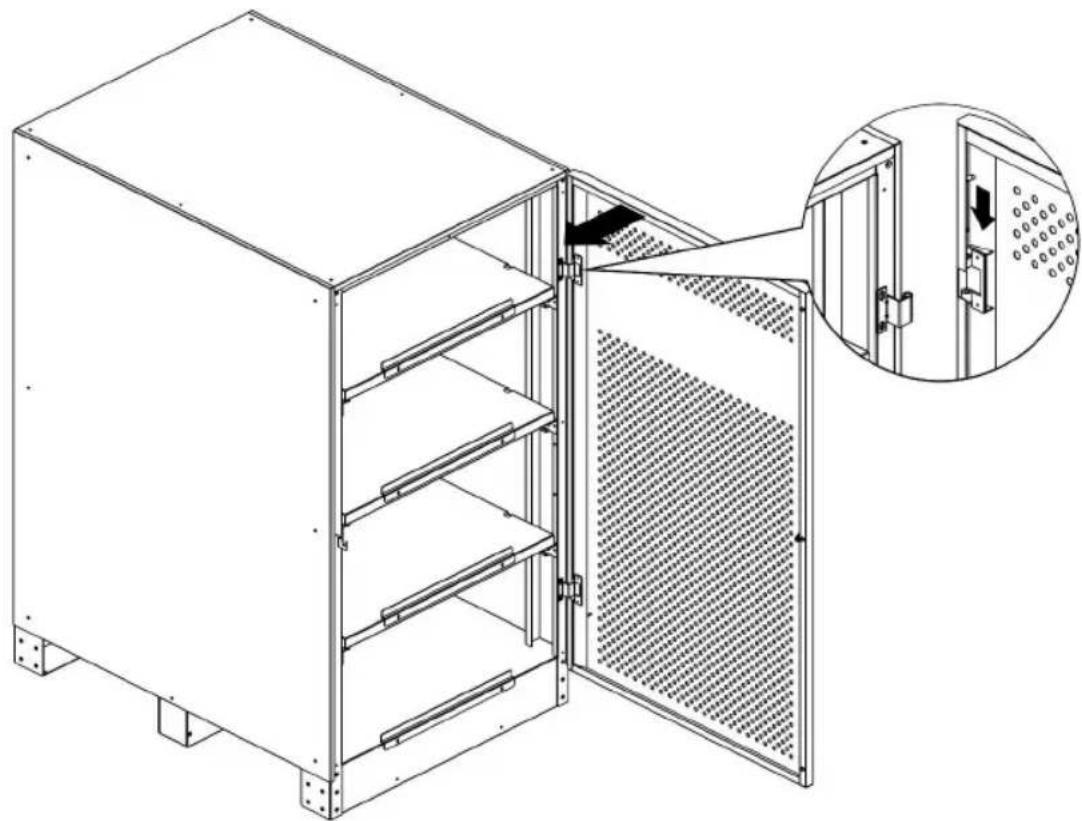
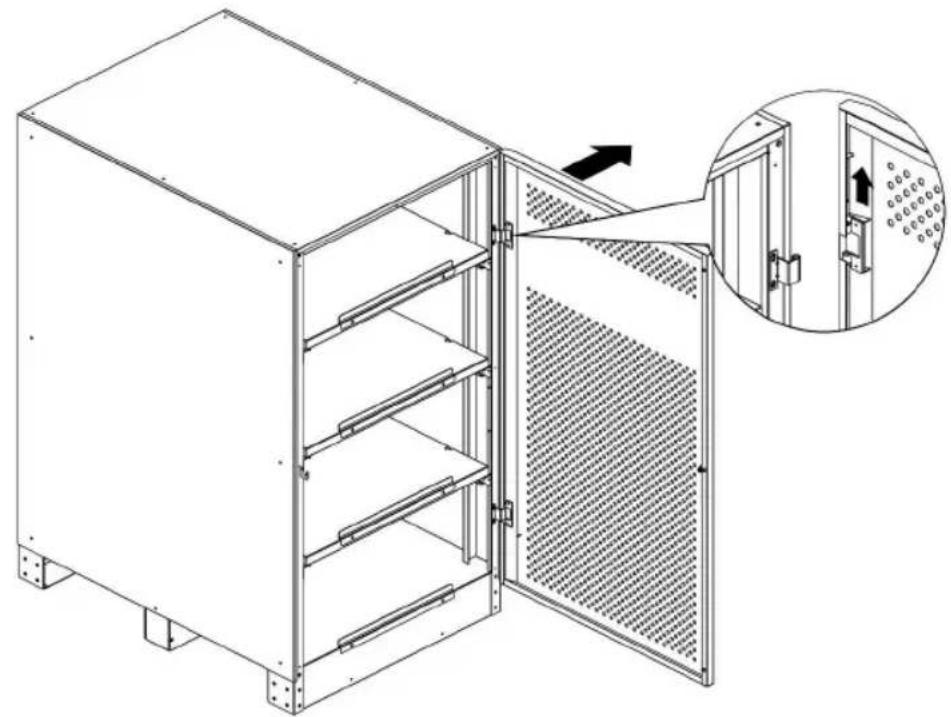
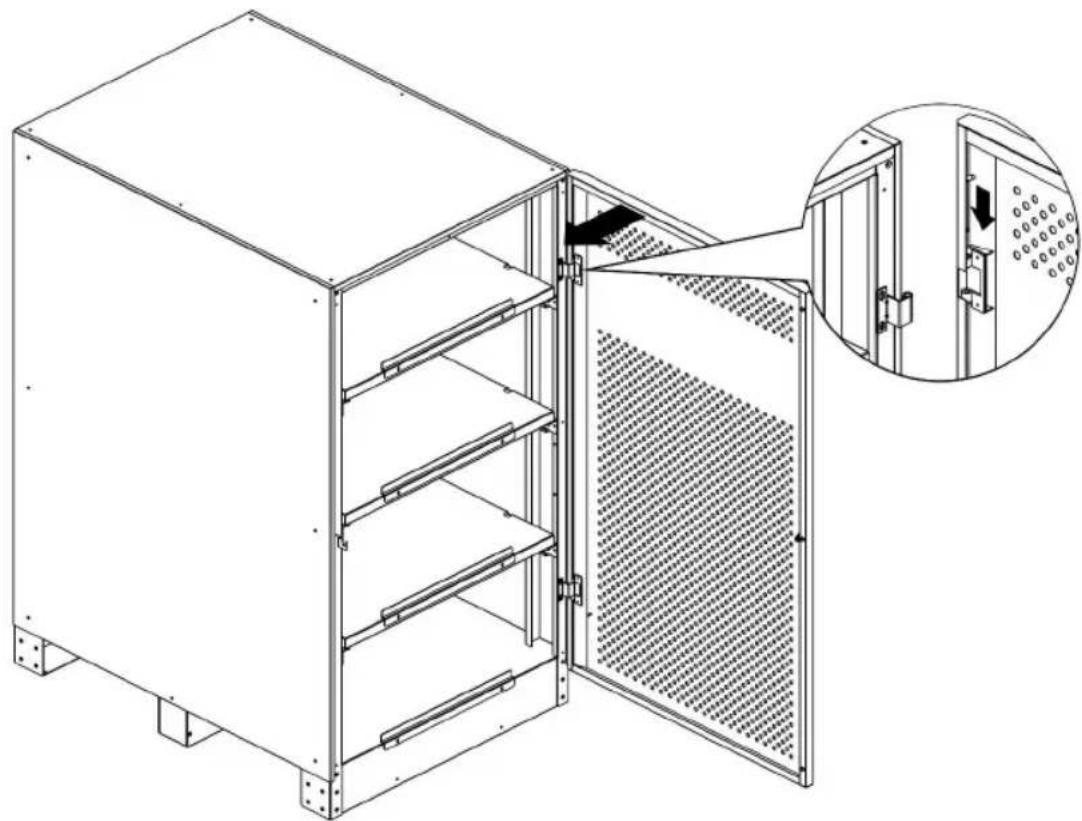
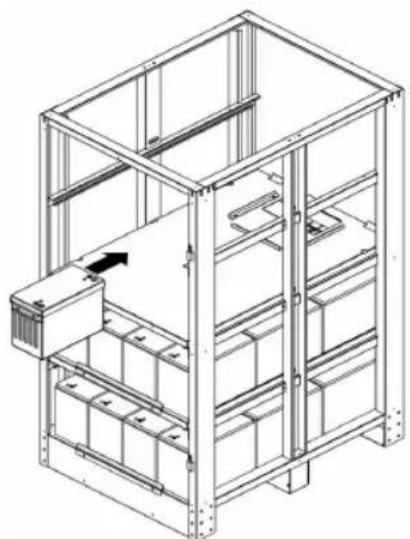
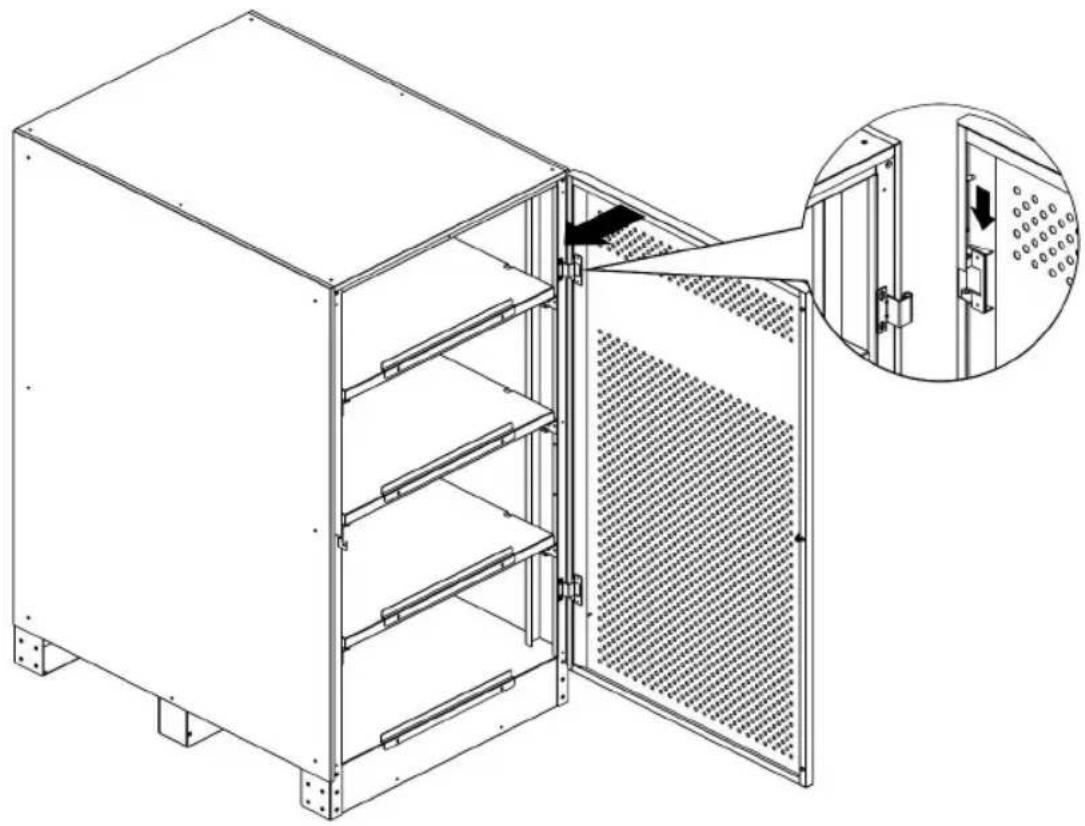
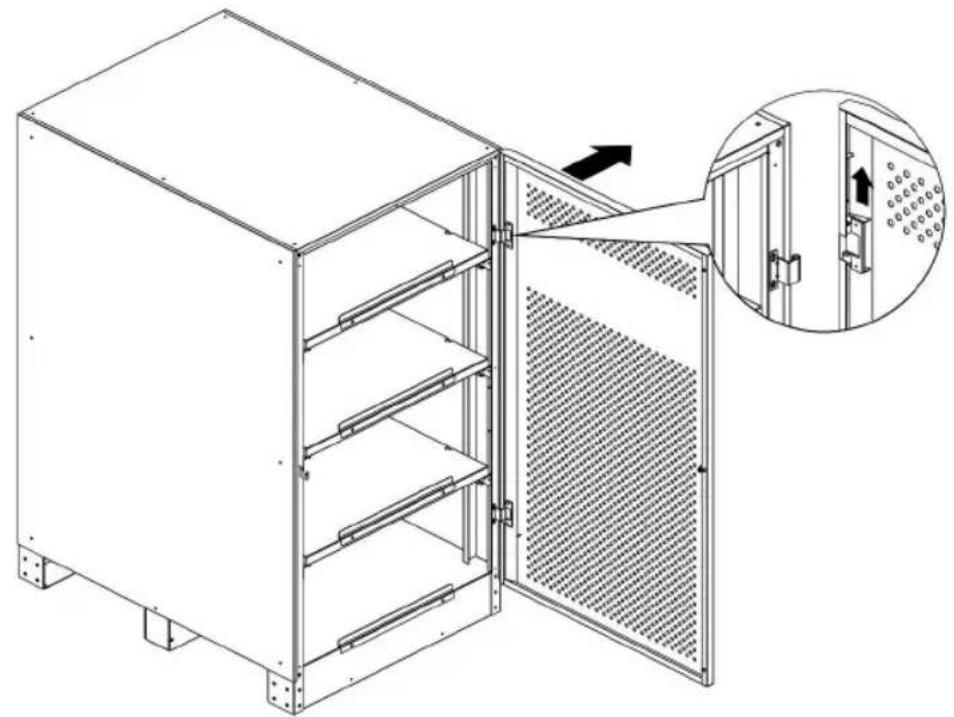
- Pull out the latch from the front door hinge. Remove door.
natural_image
Technical line drawing of a modular kitchen unit with an inset showing internal components (no text or symbols)BP480V40/NIB
natural_image
Technical line drawing of a multi-level industrial cabinet with an inset showing internal components (no text or symbols)BP480V65/NIB and BP480V100/NIB
7. Installation
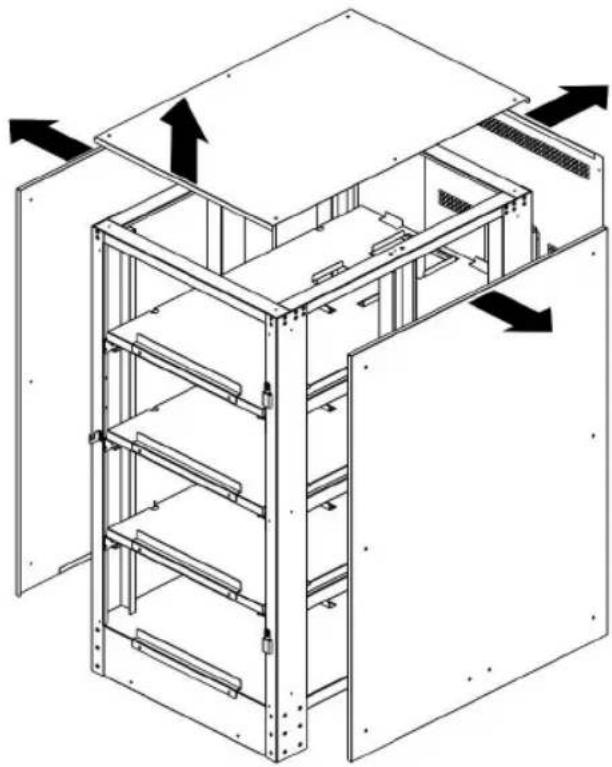
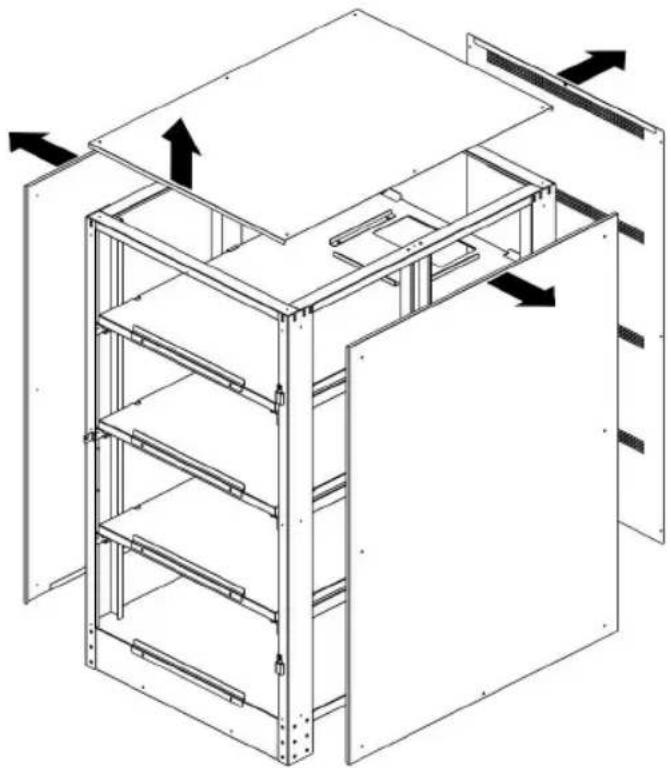
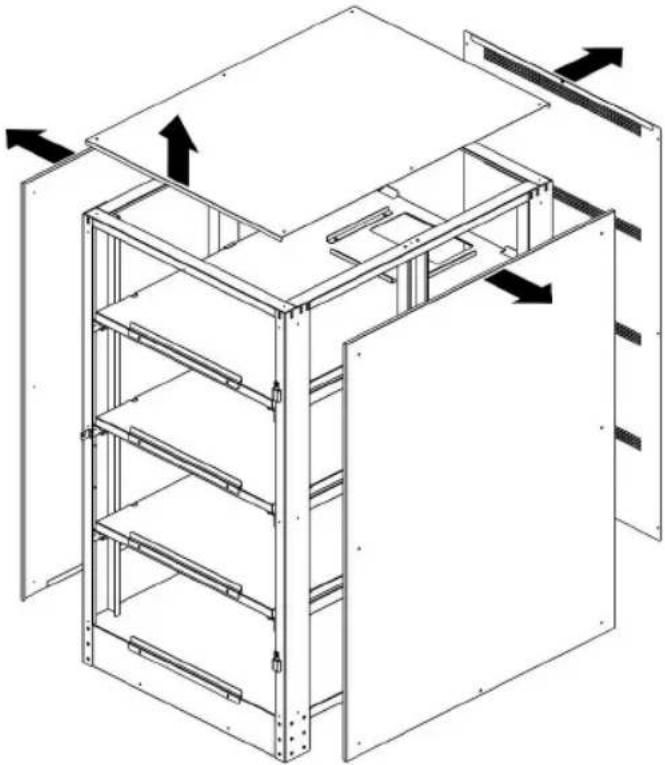
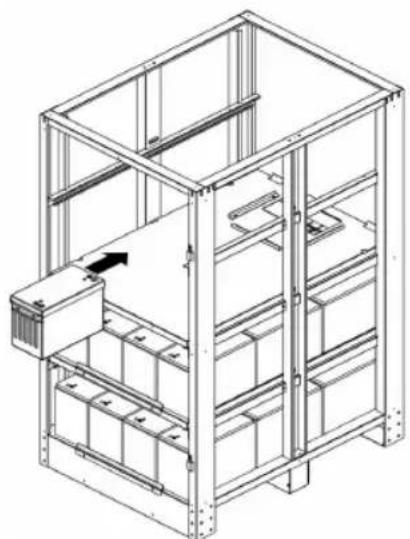
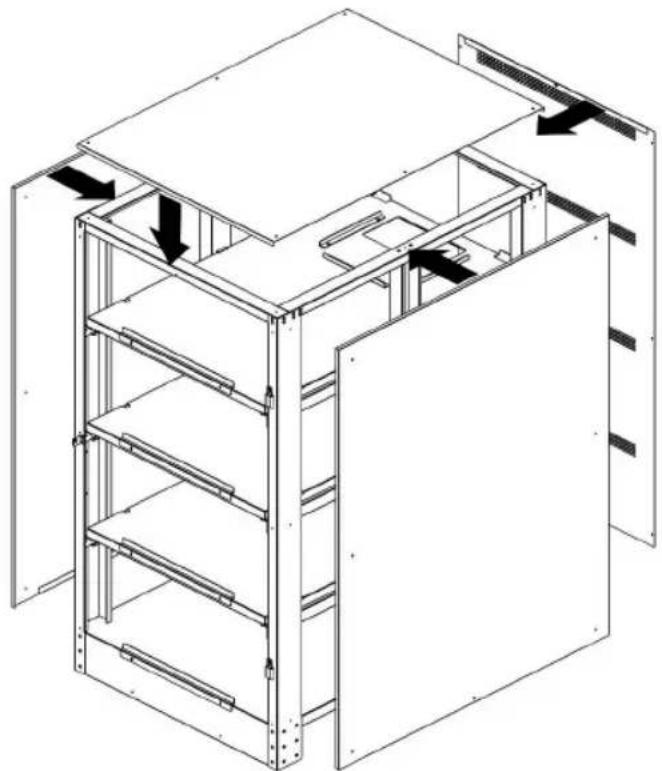
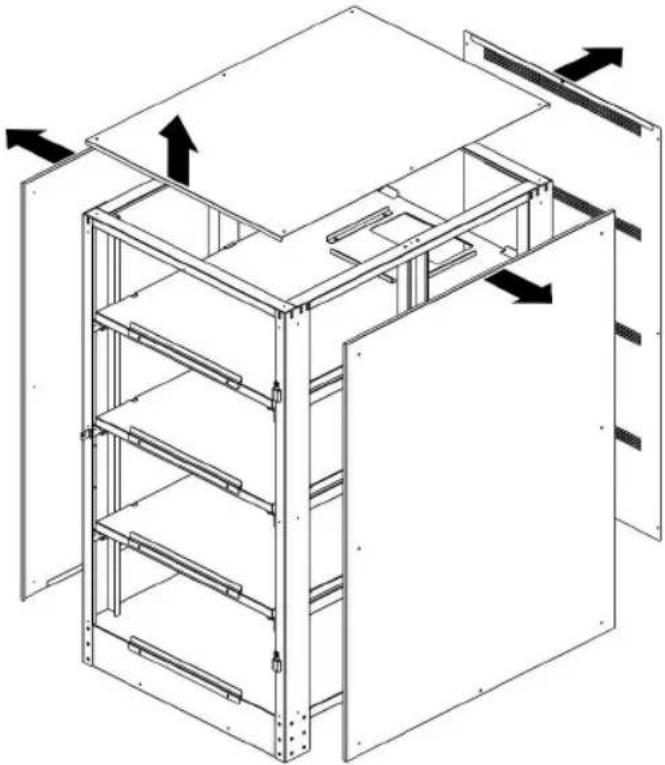
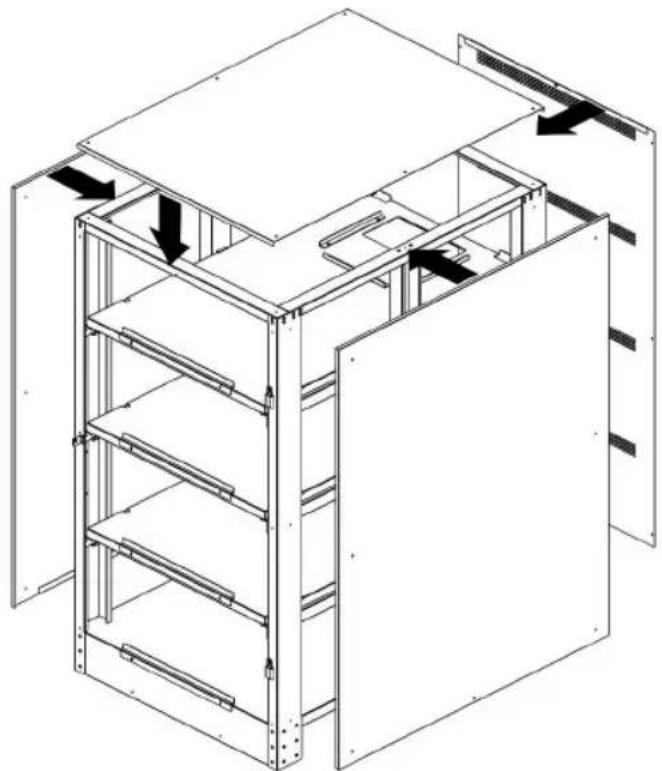
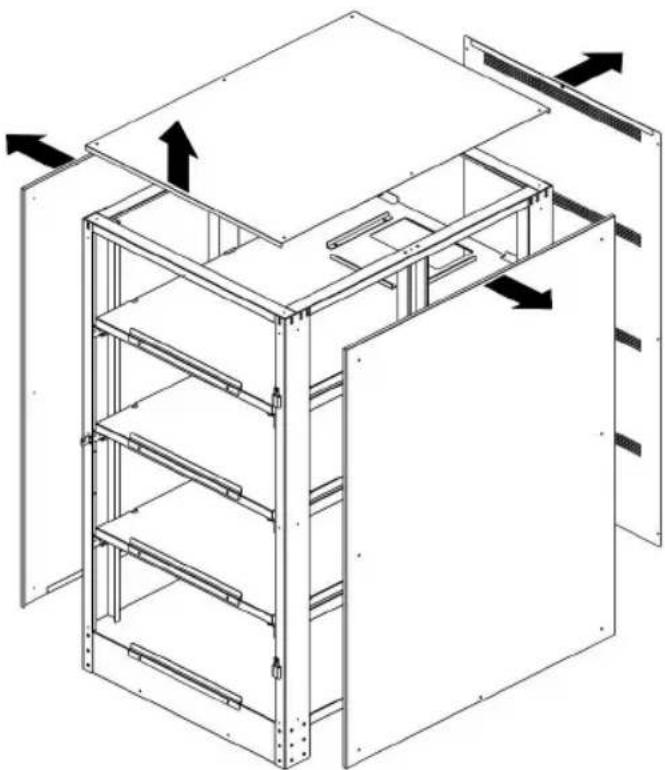
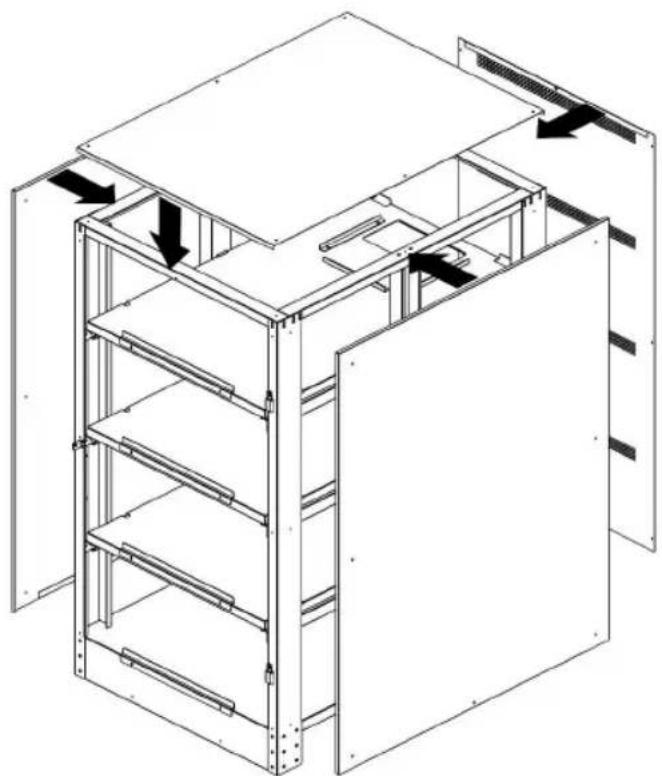
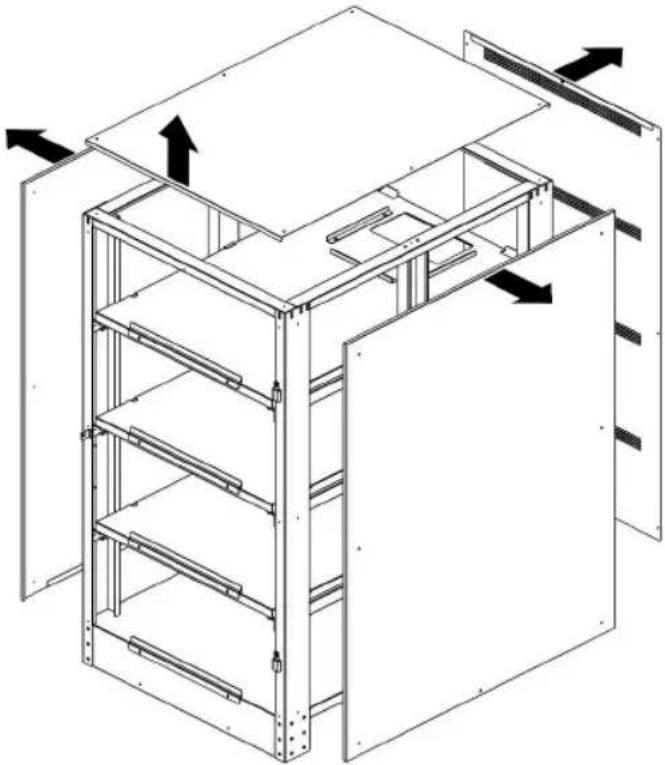
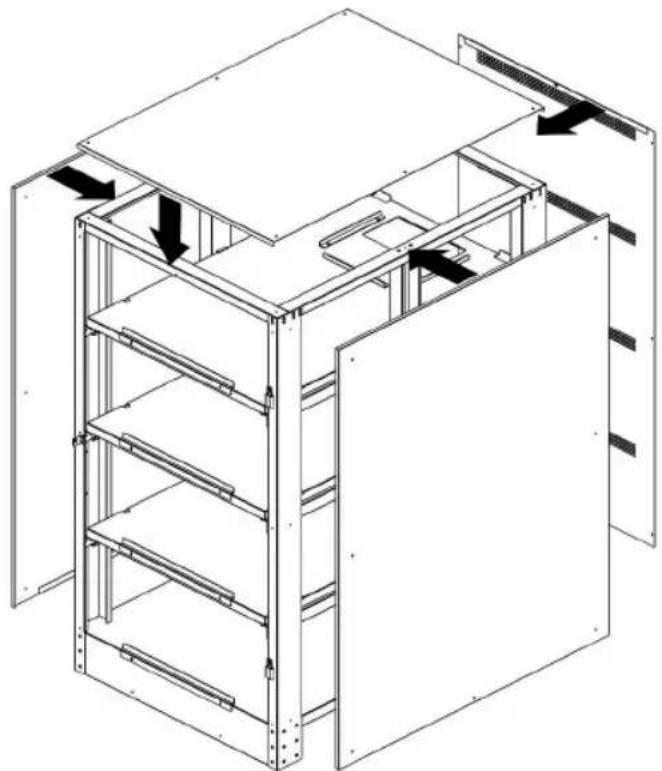
- Unscrew the M4 screws with a Phillips screwdriver and remove the side, top and rear panels.
natural_image
Isometric line drawing of a multi-level server rack or cabinet structure with directional arrows indicating flow or movement (no text or symbols present)BP480V40/NIB
natural_image
Technical line drawing of a multi-level industrial cabinet or storage unit with internal shelves and doorways (no text or symbols)BP480V65/NIB and BP480V100/NIB
7. Installation
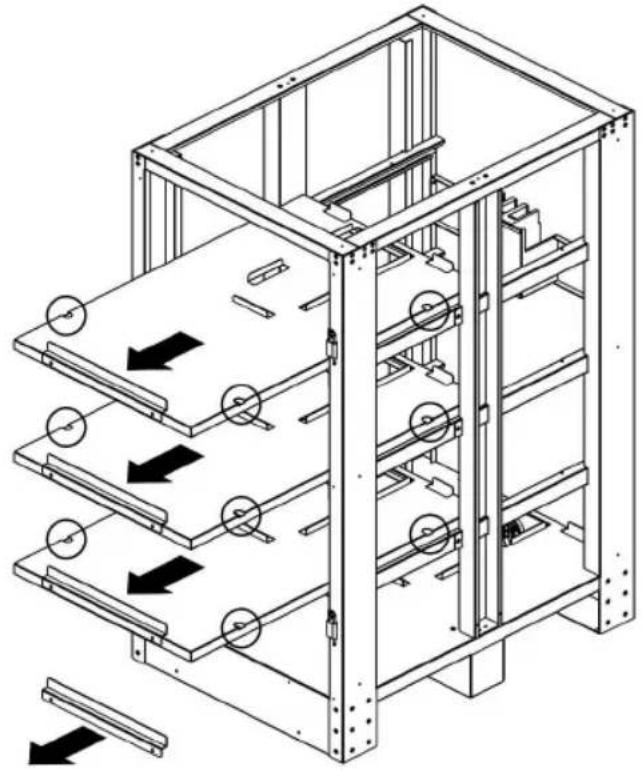
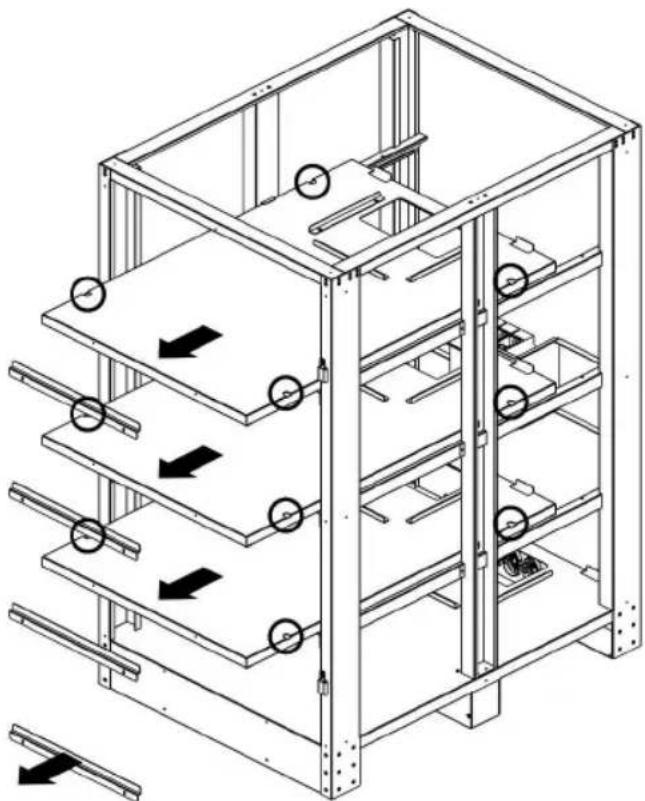
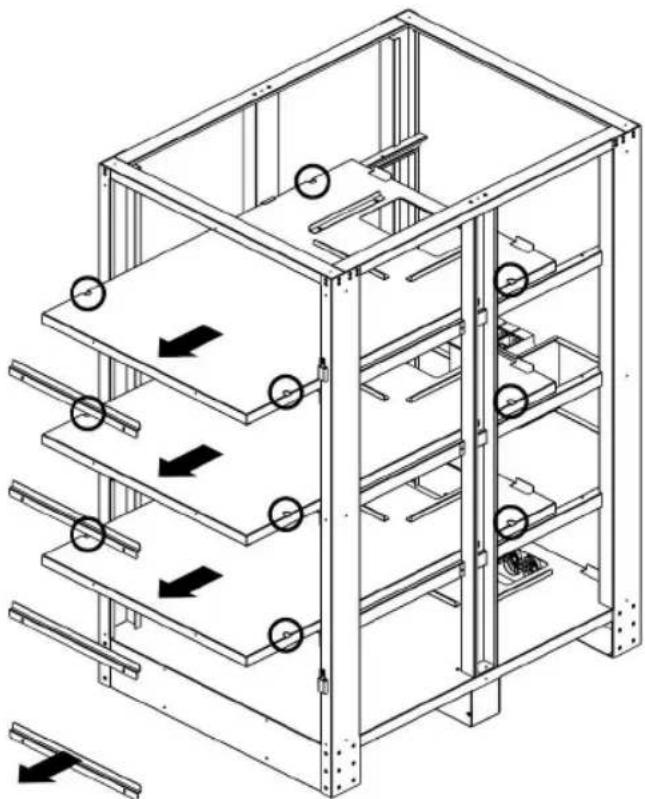
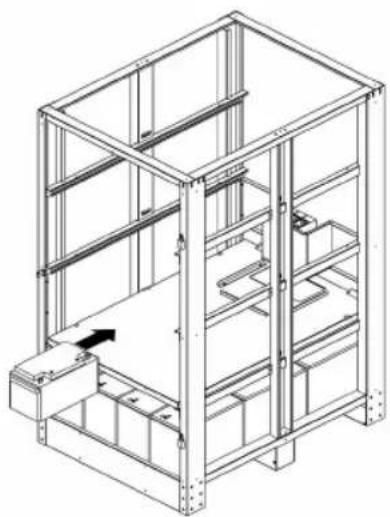
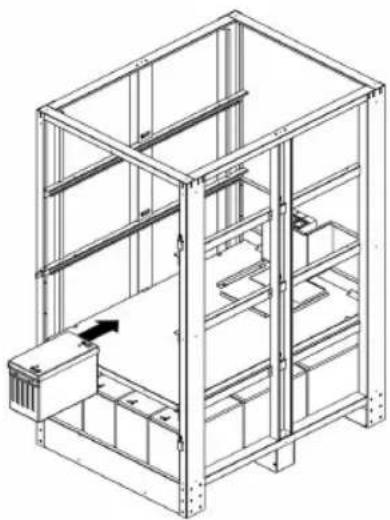
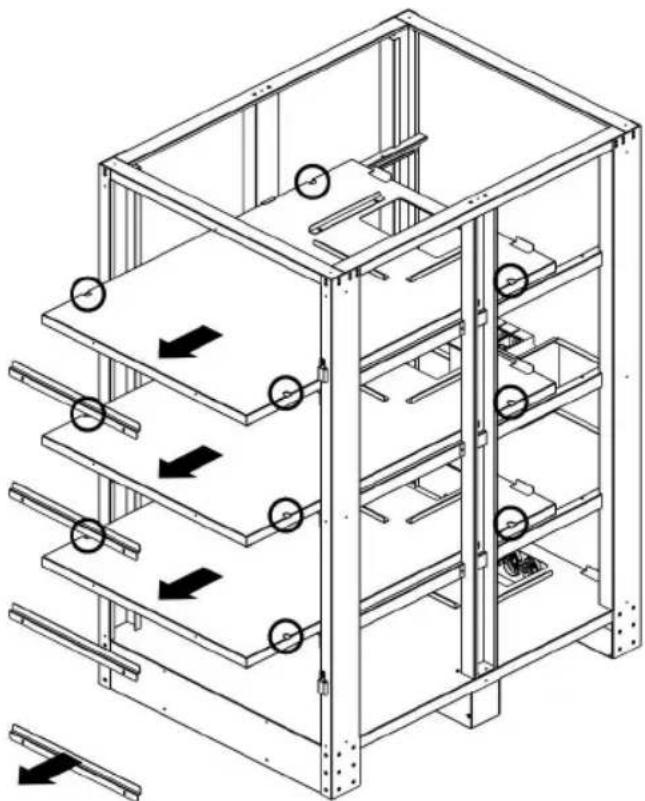
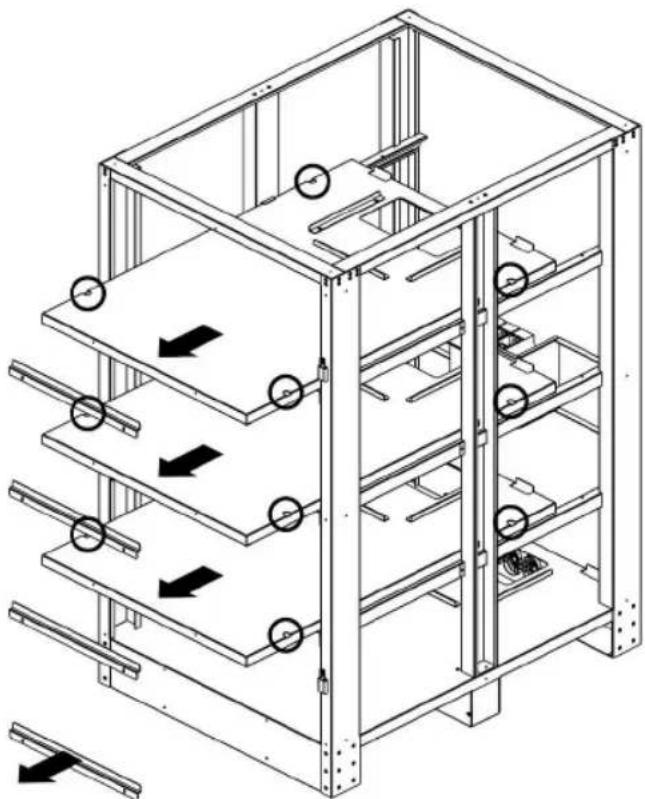
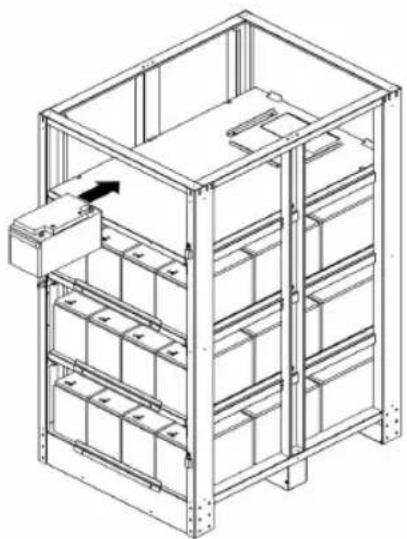
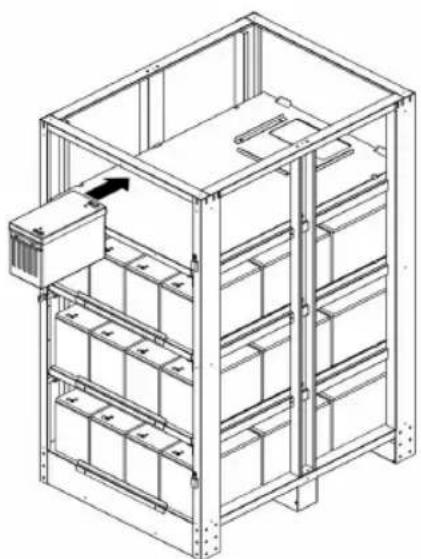
- Unscrew the M6 screws from each battery tray. Remove all the battery trays from cabinet.
natural_image
Technical line drawing of a multi-level industrial storage unit with horizontal shelves and circular components, showing flow direction arrows (no text or symbols)BP480V40/NIB
natural_image
Technical line drawing of a multi-level industrial storage unit with directional arrows indicating flow or movement (no text or symbols present)BP480V65/NIB and BP480V100/NIB
7. Installation
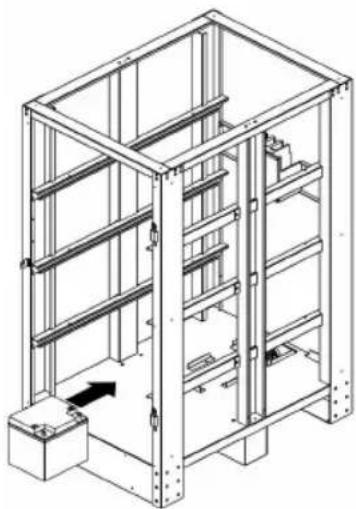
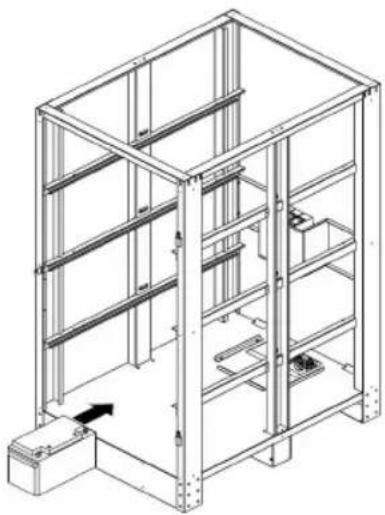
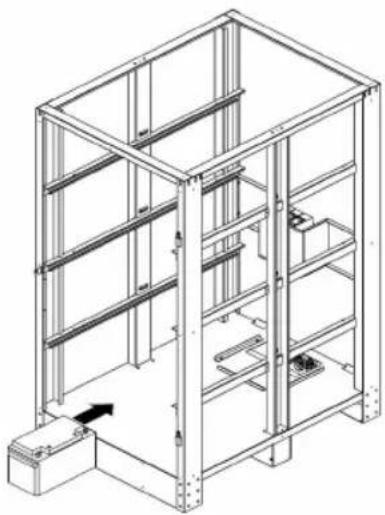
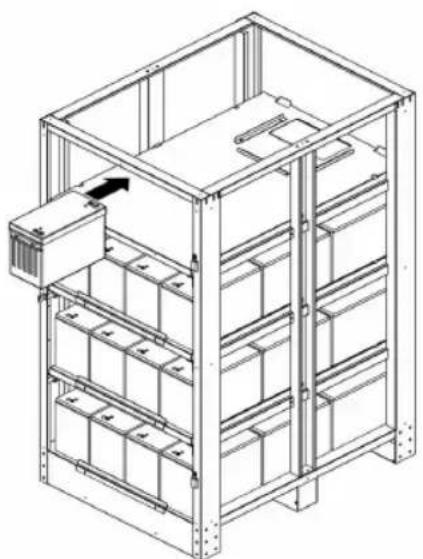
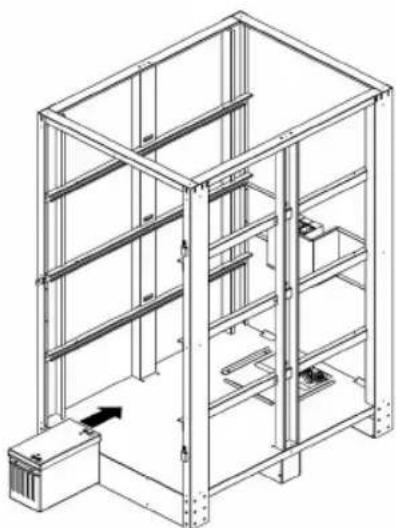
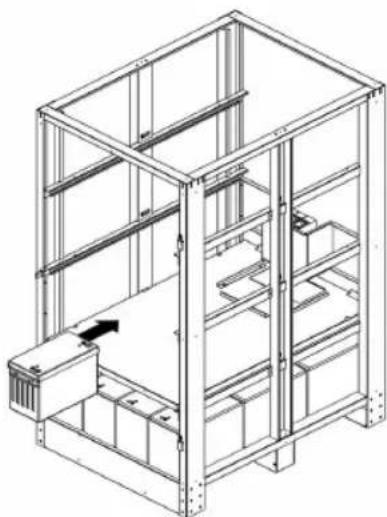
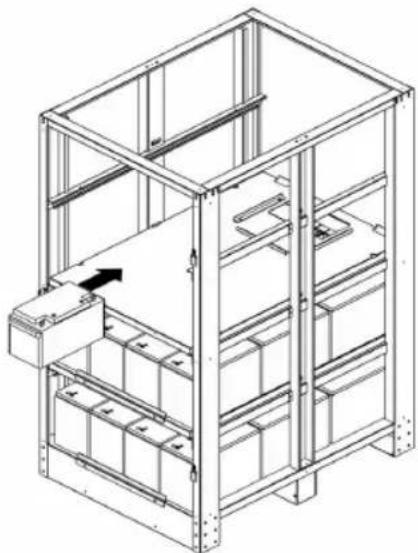
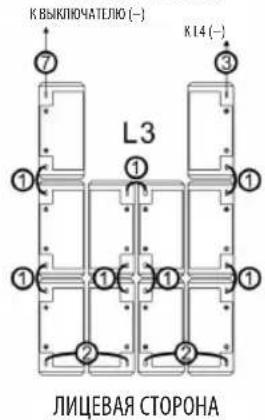
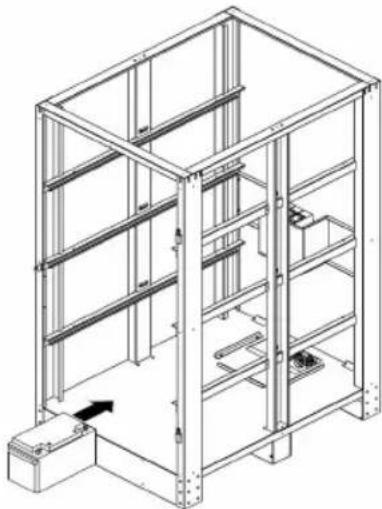
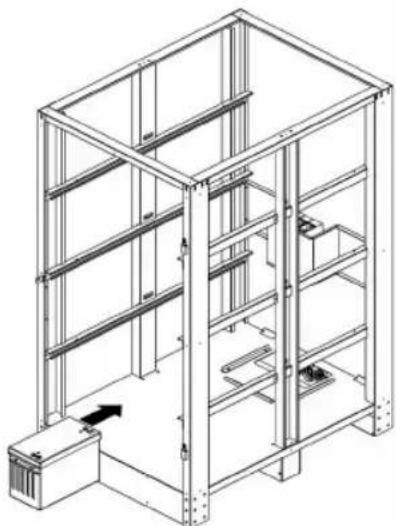
- Battery installation in the battery cabinet will start from the bottom (L1) and end at the top (L4). See below right figure for internal wiring "L1". Reference the table and diagram in section 7.2.1 for the appropriate wire jumper needed.
BP480V40/NIB
natural_image
Isometric line drawing of a multi-level metal shelving unit with no text or symbols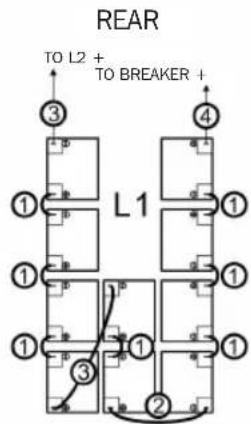
FRONT
BP480V65/NIB
natural_image
Technical line drawing of a multi-level metal shelving unit with no visible text or symbols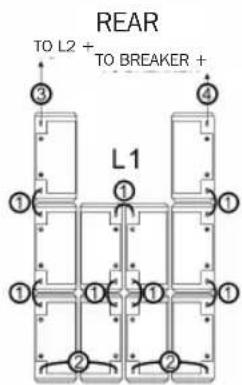
FRONT
BP480V100/NIB
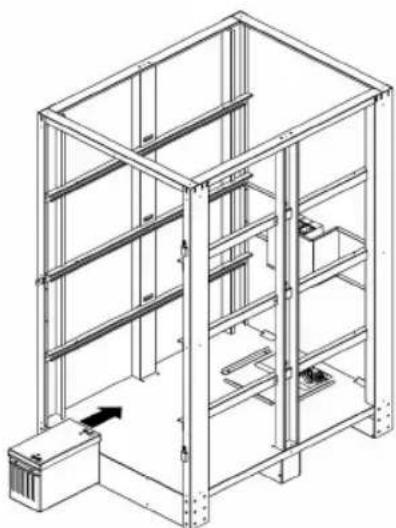
natural_image
Isometric line drawing of a multi-level metal shelving unit with no text or symbols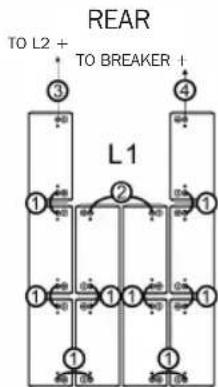
flowchart
graph TD
    A["3"] --> B["1"]
    C["4"] --> D["1"]
    E["1"] --> F["1"]
    G["1"] --> H["1"]
    I["1"] --> J["1"]
    K["1"] --> L["1"]
    M["1"] --> N["1"]
    O["1"] --> P["1"]
    Q["1"] --> R["1"]
    S["1"] --> T["1"]
    U["1"] --> V["1"]
    W["1"] --> X["1"]
    Y["1"] --> Z["1"]
    AA["1"] --> AB["1"]
    AC["1"] --> AD["1"]
    AE["1"] --> AF["1"]
    AG["1"] --> AH["1"]
    AI["1"] --> AJ["1"]
    AK["1"] --> AL["1"]
    AM["1"] --> AN["1"]
    AO["1"] --> AP["1"]
    AQ["1"] --> AR["1"]
    AS["1"] --> AT["1"]
    AU["1"] --> AV["1"]
    AW["1"] --> AX["1"]
    AY["TO L2 + TO BREAKER +"] --> AZ["L1"]
FRONT
7. Installation
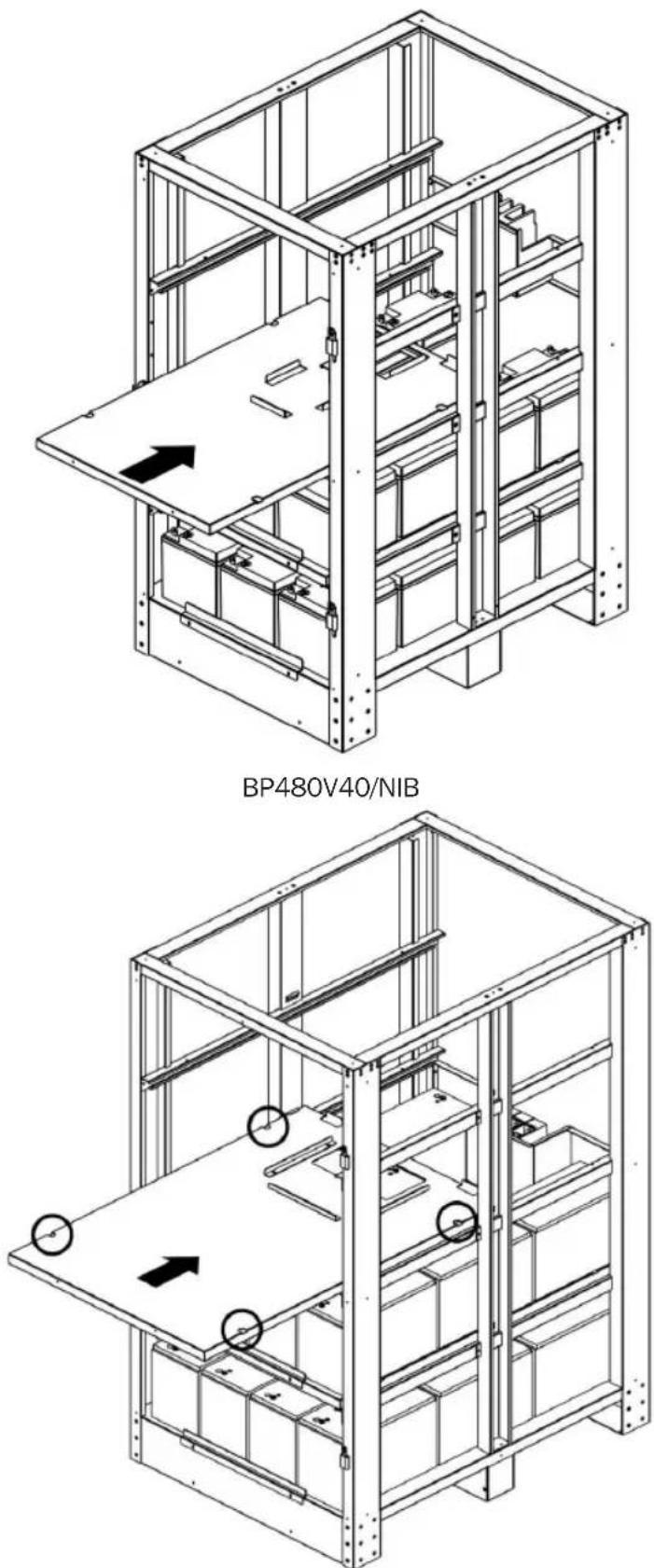
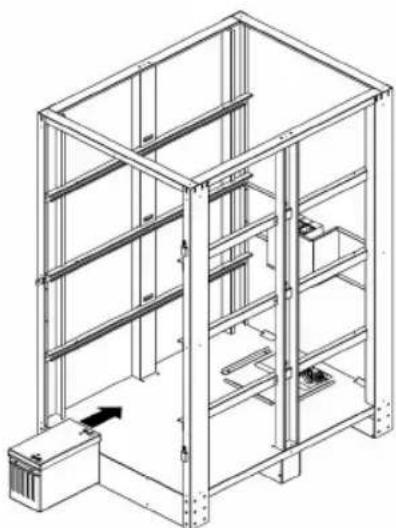
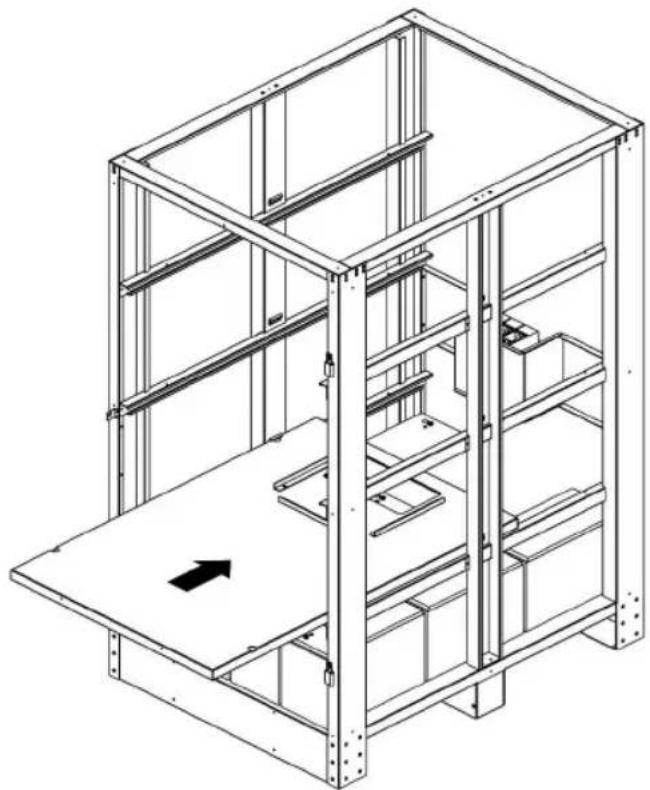
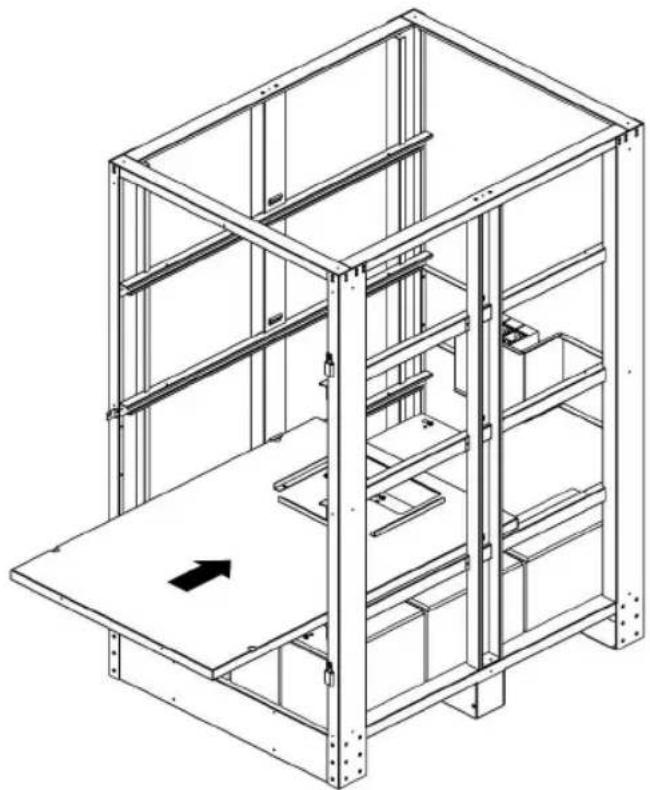
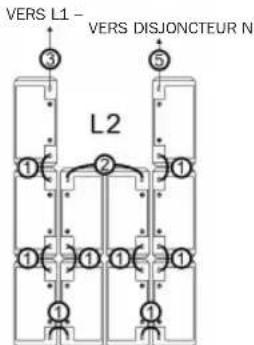
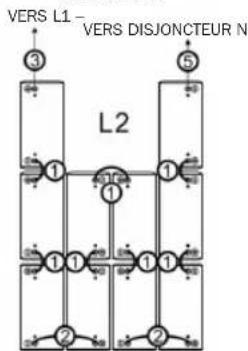
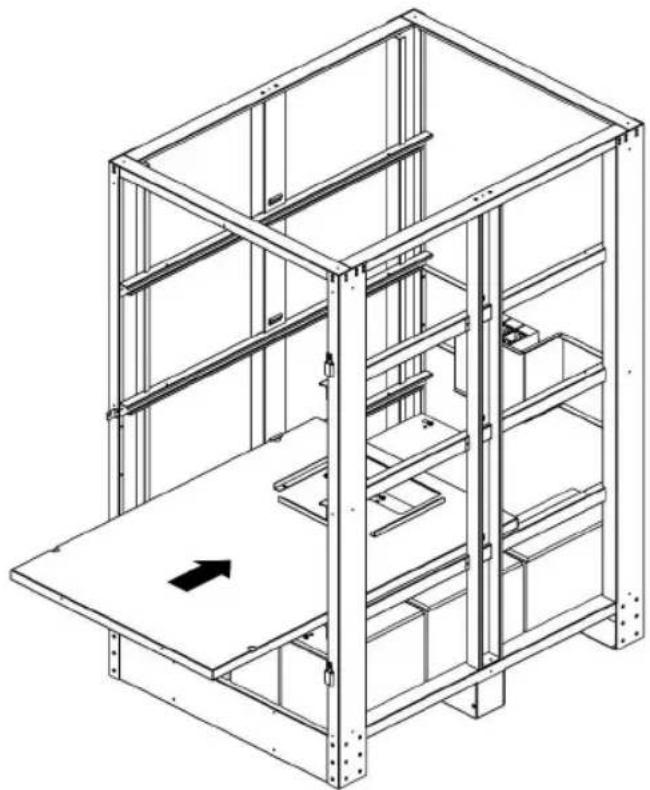
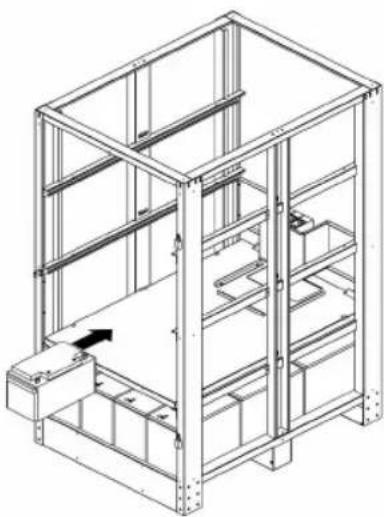
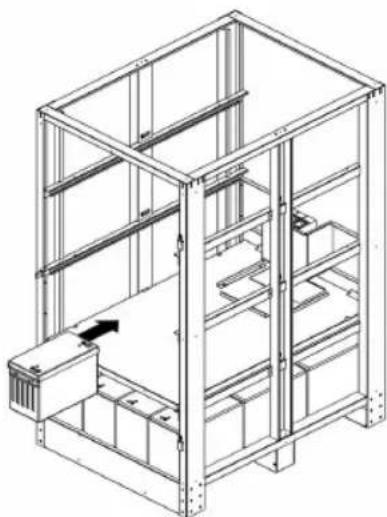
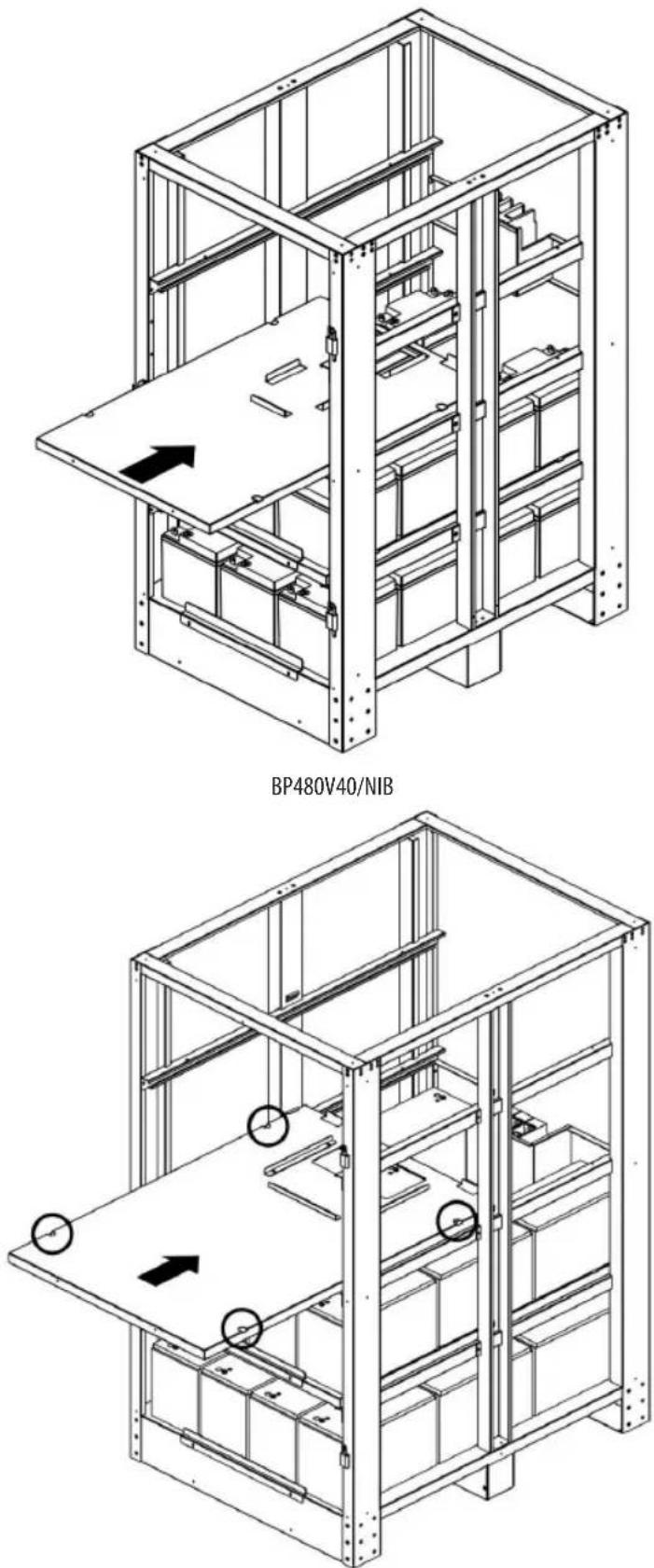
- Use the saved M6 screws to secure the battery tray for L2.
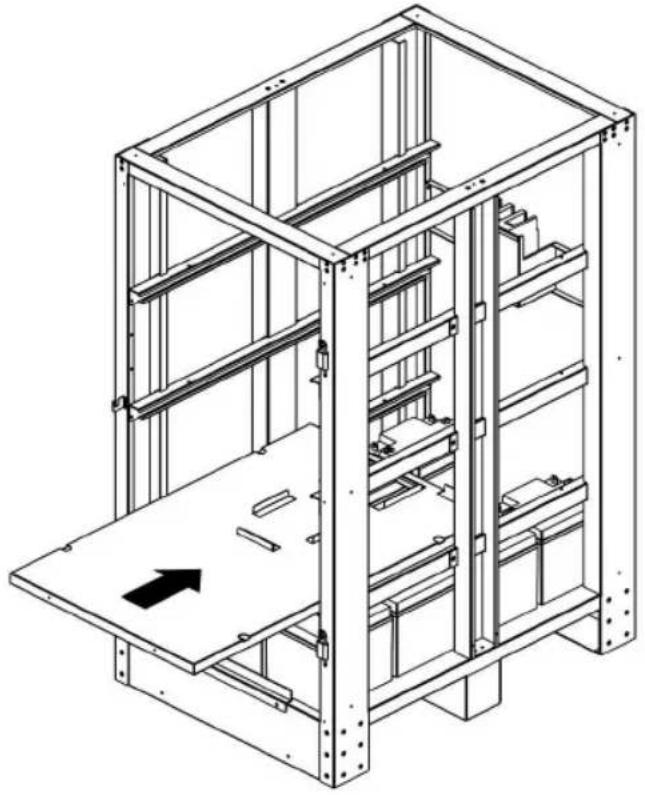
natural_image
Technical line drawing of a multi-level industrial shelving unit with no visible text or symbolsBP480V40/NIB
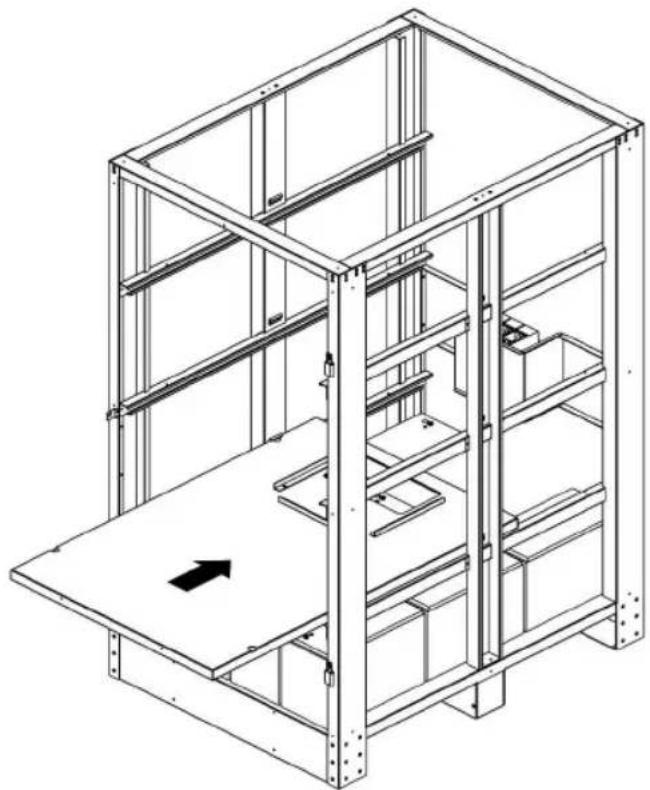
natural_image
Technical line drawing of a multi-level metal shelving unit with a central platform and directional arrow (no text or symbols)BP480V65/NIB and BP480V100/NIB
7. Installation
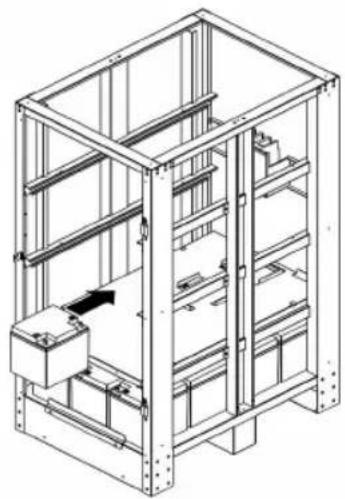
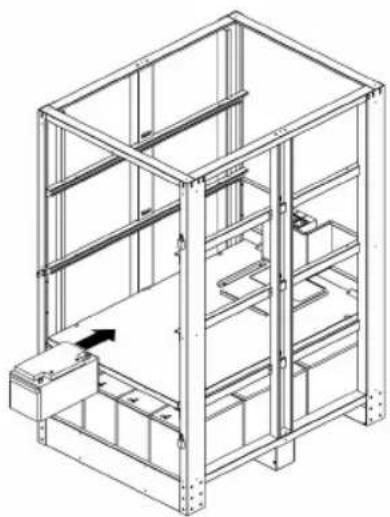
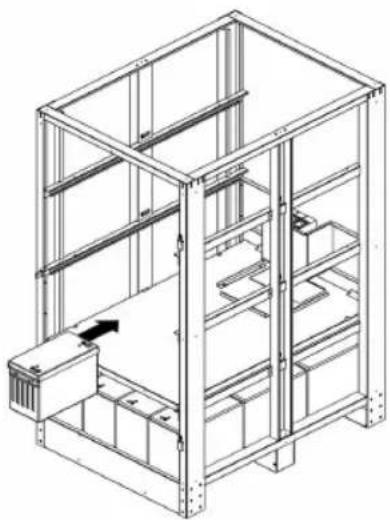
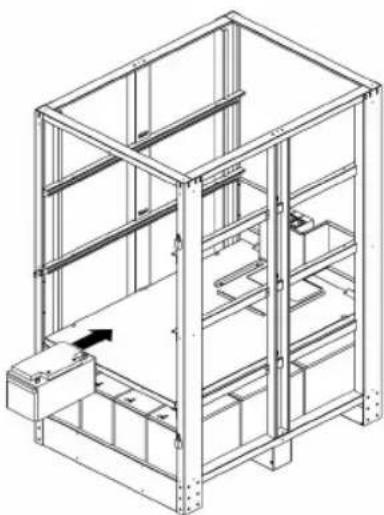
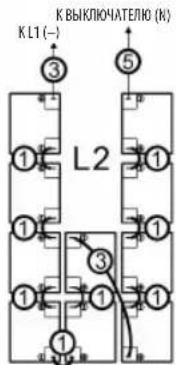
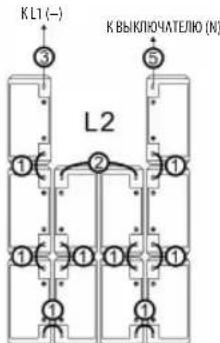
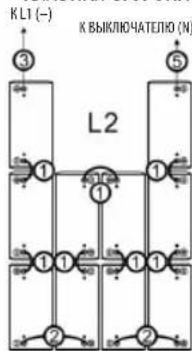
- See the below right diagram for internal wiring "L2". Reference the table and diagram in section 7.2.1 for the appropriate wire jumper needed.
BP480V40/NIB
natural_image
Technical line drawing of a multi-level industrial storage unit with metal framework and internal components (no text or symbols)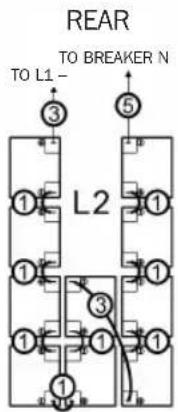
FRONT
BP480V65/NIB
natural_image
Technical line drawing of a multi-level metal shelving unit with no visible text or symbols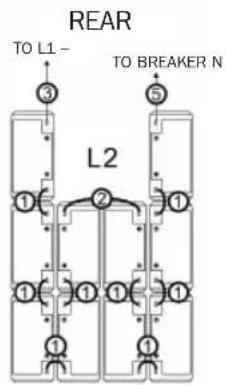
FRONT
BP480V100/NIB
natural_image
Technical line drawing of a multi-level metal shelving unit with no visible text or symbols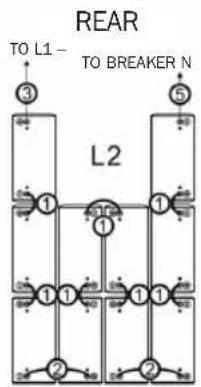
flowchart
graph TD
    A["TO L1"] --> B["3"]
    C["TO BREAKER N"] --> D["5"]
    E["L2"] --> F["1"]
    E --> G["1"]
    E --> H["1"]
    E --> I["1"]
    E --> J["2"]
    E --> K["2"]
FRONT
7. Installation
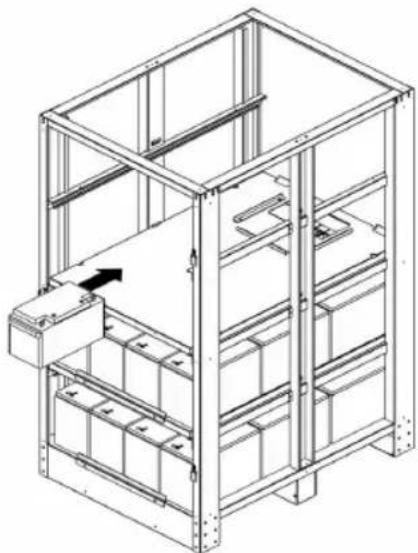
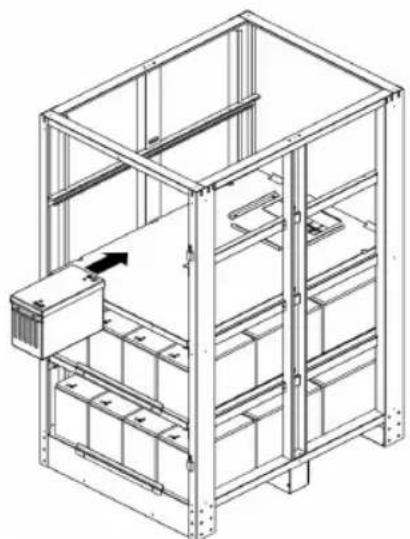
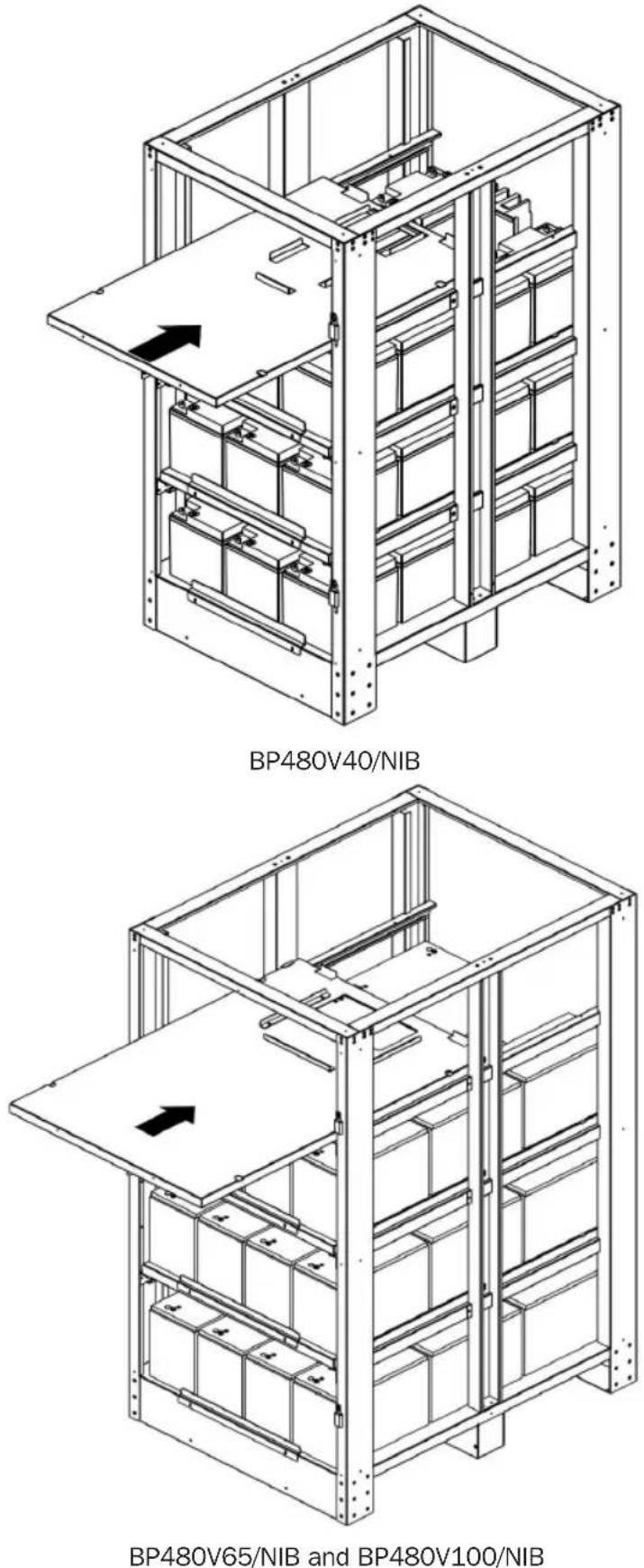
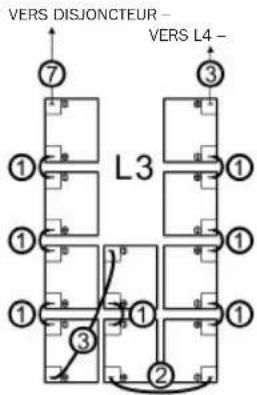
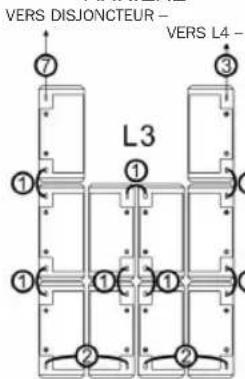
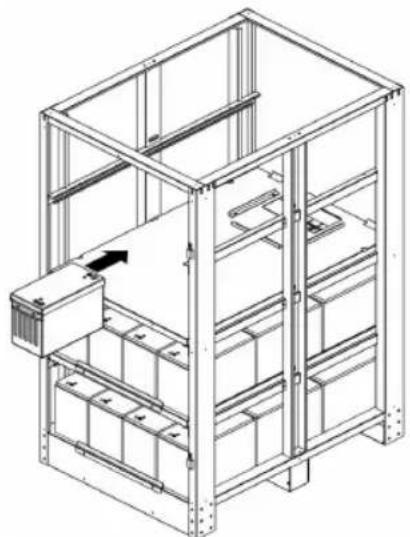
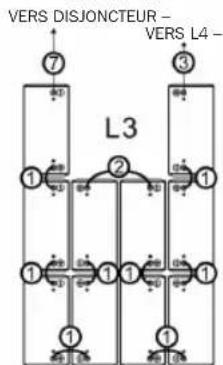
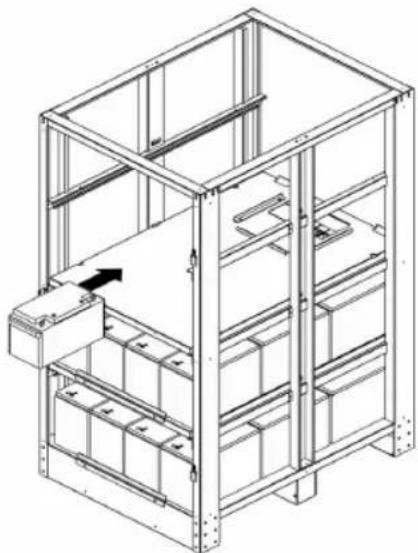
- Use the saved M6 screws to secure the next battery tray for L3.
BP480V65/NIB and BP480V100/NIB
7. Installation
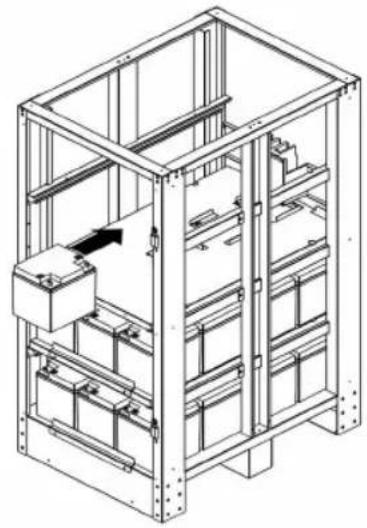
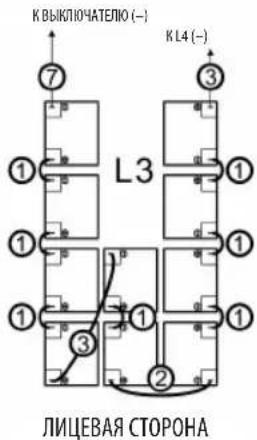
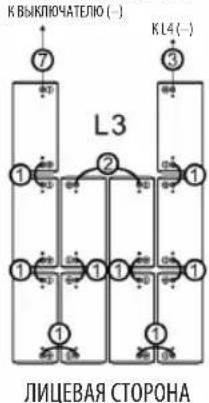
- See the below right diagram for internal wiring "L3". Reference the table and diagram in section 7.2.1 for the appropriate wire jumper needed.
BP480V40/NIB
natural_image
Technical line drawing of a modular shelving unit with shelves, bins, and a central control unit (no text or symbols)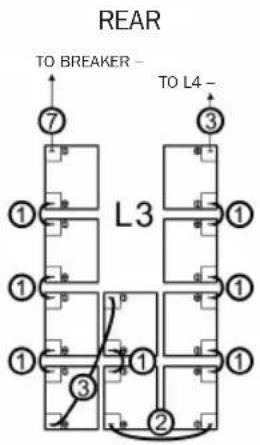
FRONT
BP480V65/NIB
natural_image
Technical line drawing of a multi-level metal shelving unit with no visible text or symbols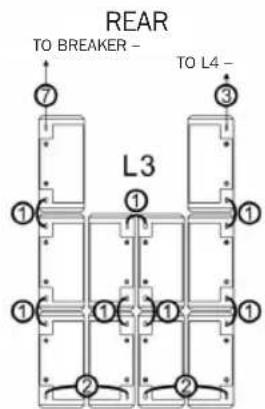
FRONT
BP480V100/NIB
natural_image
Technical line drawing of a multi-level industrial storage unit with internal compartments and a central control panel (no text or symbols)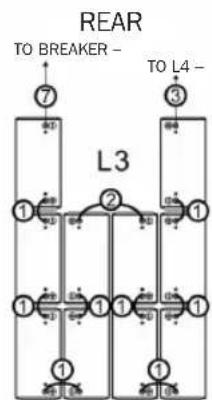
flowchart
graph TD
    A["7"] --> B["1"]
    C["3"] --> D["1"]
    E["7"] --> F["1"]
    G["3"] --> H["1"]
    I["7"] --> J["1"]
    K["3"] --> L["1"]
    M["7"] --> N["1"]
    O["3"] --> P["1"]
    Q["7"] --> R["1"]
    S["3"] --> T["1"]
    U["7"] --> V["1"]
    W["3"] --> X["1"]
    Y["7"] --> Z["1"]
    AA["7"] --> AB["1"]
    AC["7"] --> AD["1"]
    AE["7"] --> AF["1"]
    AG["7"] --> AH["1"]
    AI["7"] --> AJ["1"]
    AK["7"] --> AL["1"]
    AM["7"] --> AN["1"]
    AO["7"] --> AP["1"]
    AQ["7"] --> AR["1"]
    AS["7"] --> AT["1"]
    AU["7"] --> AV["1"]
    AW["7"] --> AX["1"]
    AY["TO BREAKER -"] --> AZ["7"]
    BA["TO L4 -"] --> BB["3"]
FRONT
7. Installation
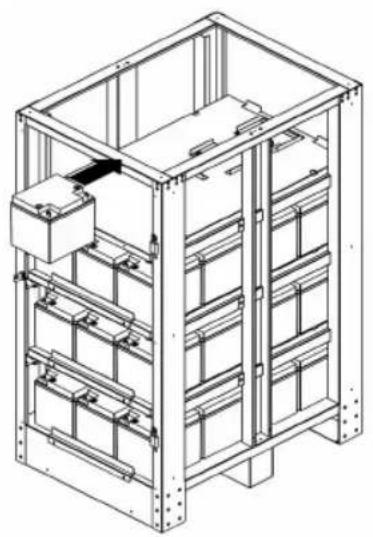
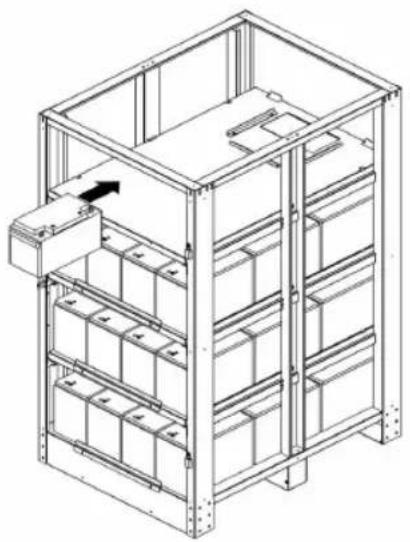
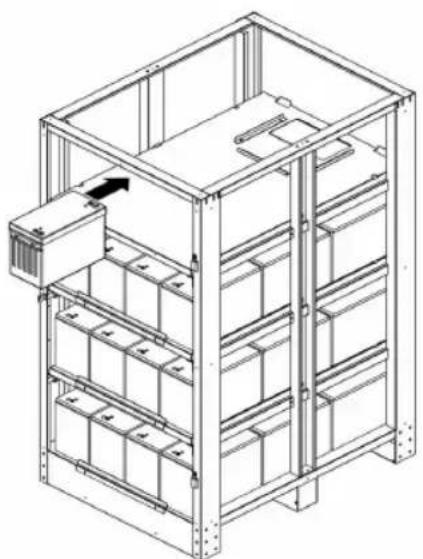
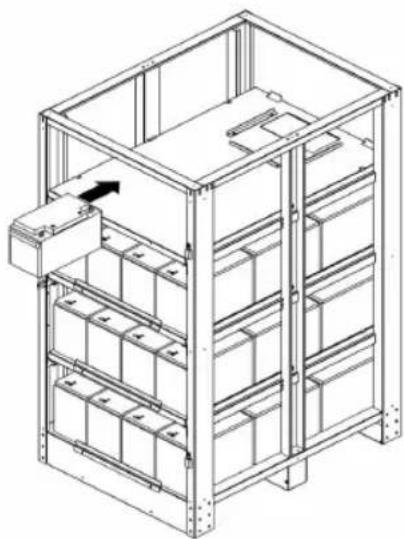
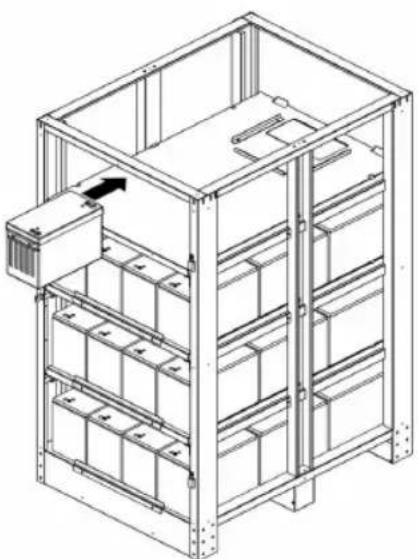
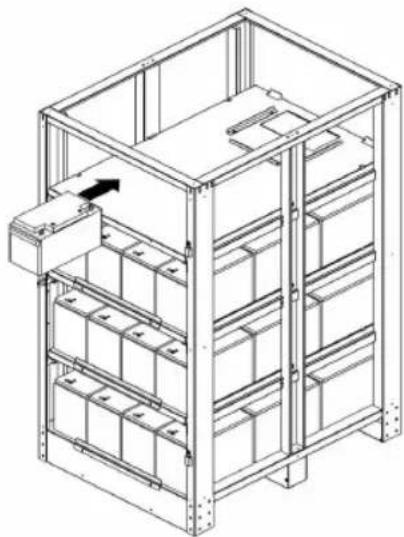
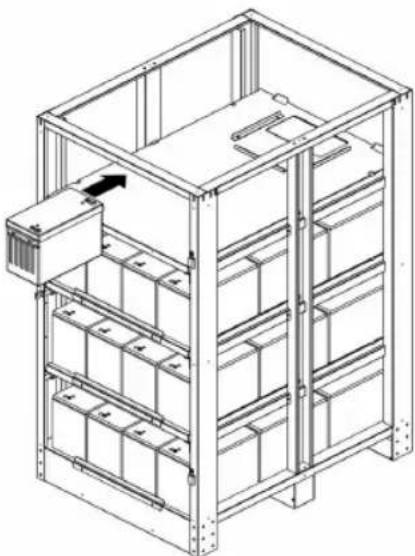
- Use the saved M6 screws to secure the next battery tray for L4.
7. Installation
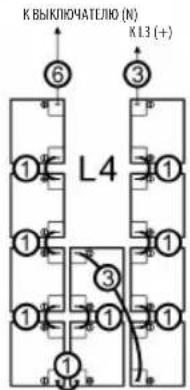
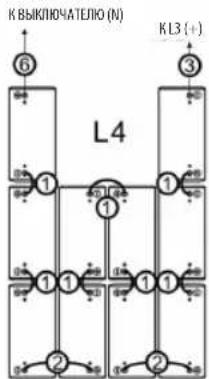
- See the below right diagram for internal wiring "L4". Reference the table and diagram in section 7.2.1 for the appropriate wire jumper needed.
BP480V40/NIB
natural_image
Technical line drawing of a multi-level industrial storage unit with internal compartments and mounting brackets (no text or symbols)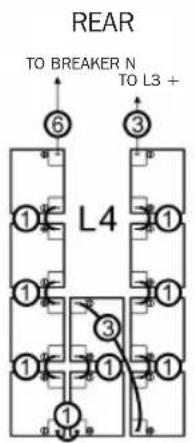
FRONT
BP480V65/NIB
natural_image
Technical line drawing of a multi-level storage unit with metal framework and internal compartments (no text or symbols)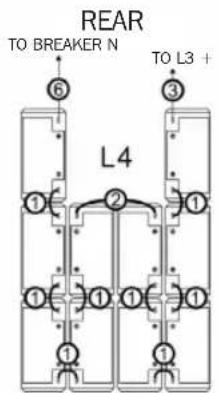
FRONT
BP480V100/NIB
natural_image
Isometric line drawing of a multi-level storage unit with shelves and a control panel (no text or symbols)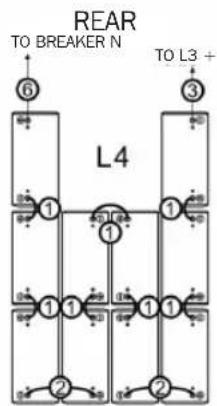
flowchart
graph TD
    A["6"] --> B["1"]
    C["3"] --> D["1"]
    E["2"] --> F["1"]
    G["2"] --> H["1"]
    I["1"] --> J["1"]
    K["1"] --> L["1"]
    M["1"] --> N["1"]
    O["1"] --> P["1"]
    Q["1"] --> R["1"]
    S["1"] --> T["1"]
    U["1"] --> V["1"]
    W["1"] --> X["1"]
    Y["1"] --> Z["1"]
    AA["1"] --> AB["1"]
    AC["1"] --> AD["1"]
    AE["1"] --> AF["1"]
    AG["1"] --> AH["1"]
    AI["1"] --> AJ["1"]
    AK["1"] --> AL["1"]
    AM["1"] --> AN["1"]
    AO["1"] --> AP["1"]
    AQ["1"] --> AR["1"]
    AS["1"] --> AT["1"]
    AU["1"] --> AV["1"]
    AW["1"] --> AX["1"]
    AY["6"] --> AZ["1"]
    BA["3"] --> BB["1"]
    BC["2"] --> BD["1"]
    BE["2"] --> BF["1"]
    BG["2"] --> BH["1"]
    BI["2"] --> BJ["1"]
    BK["2"] --> BL["1"]
    BM["2"] --> BN["1"]
    BO["2"] --> BP["1"]
    BQ["6"] --> BR["1"]
    BS["3"] --> BT["1"]
    BU["2"] --> BV["1"]
    BW["2"] --> BX["1"]
    BY["2"] --> BZ["1"]
FRONT
7. Installation
- Use the saved M4 screws to reinstall and secure the side, top and rear panels to the battery cabinet frame.
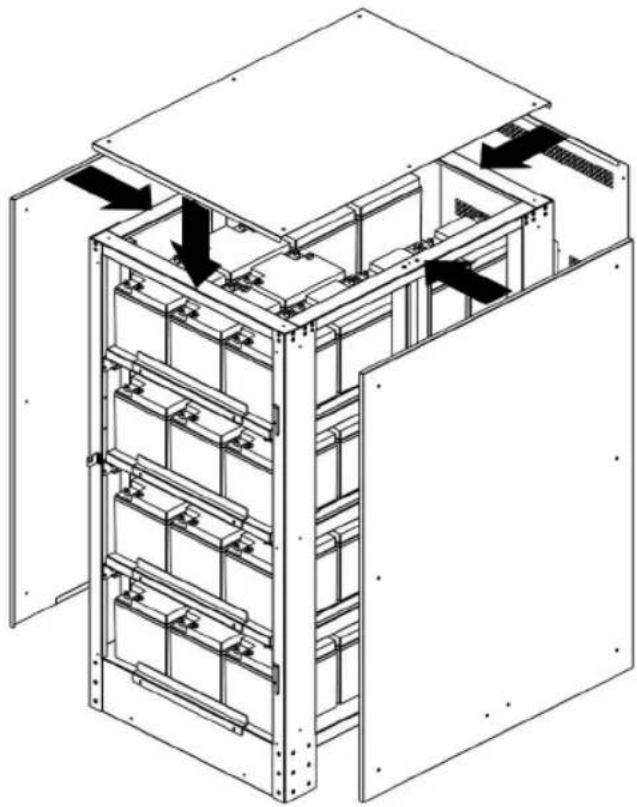
natural_image
Technical line drawing of an electrical cabinet with internal components and directional arrows indicating movement (no text or symbols)BP480V40/NIB
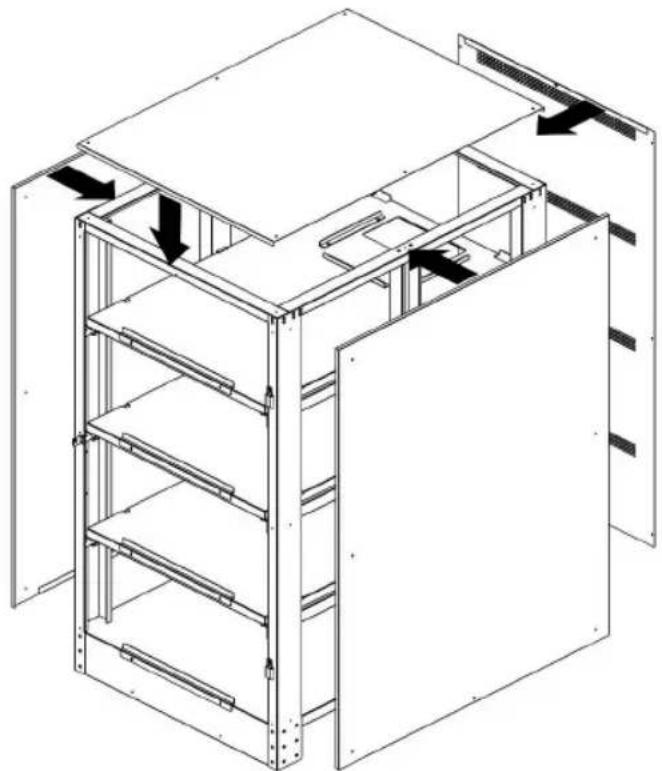
natural_image
Isometric line drawing of a multi-level industrial or storage unit cabinet with internal shelves and doorways (no text or symbols)BP480V65/NIB and BP480V100/NIB
7. Installation
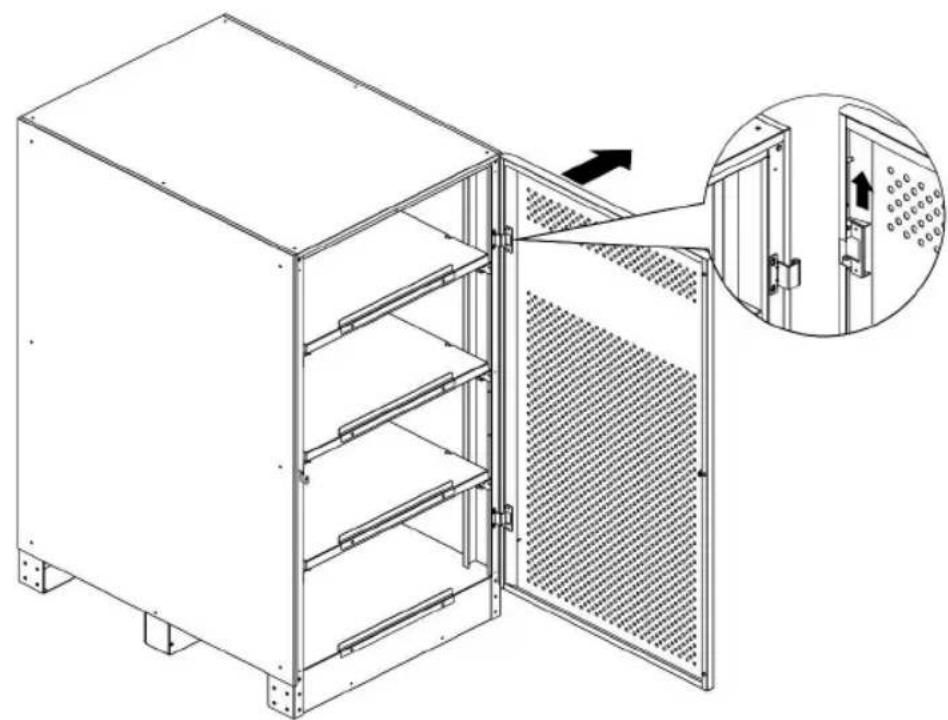
- Reinstall the front door and reinsert the latch to the door hinge.
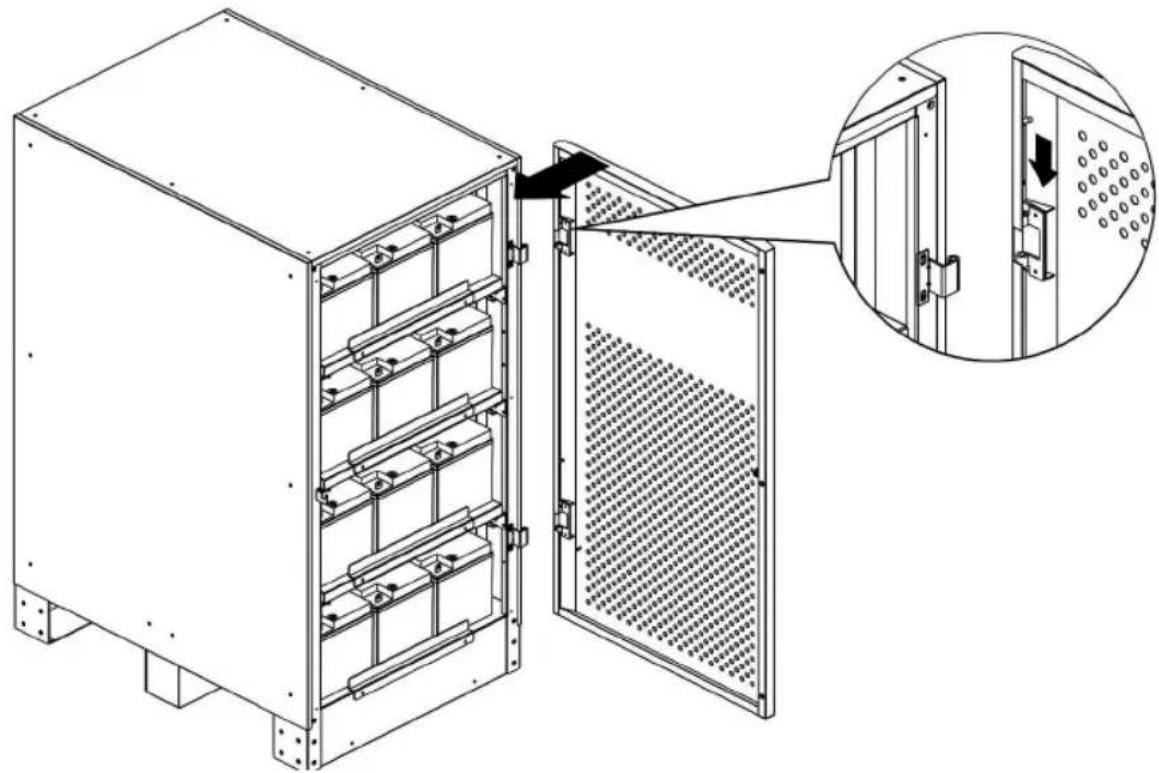
natural_image
Technical line drawing of an electrical cabinet with a close-up inset showing internal components (no text or symbols)BP480V40/NIB
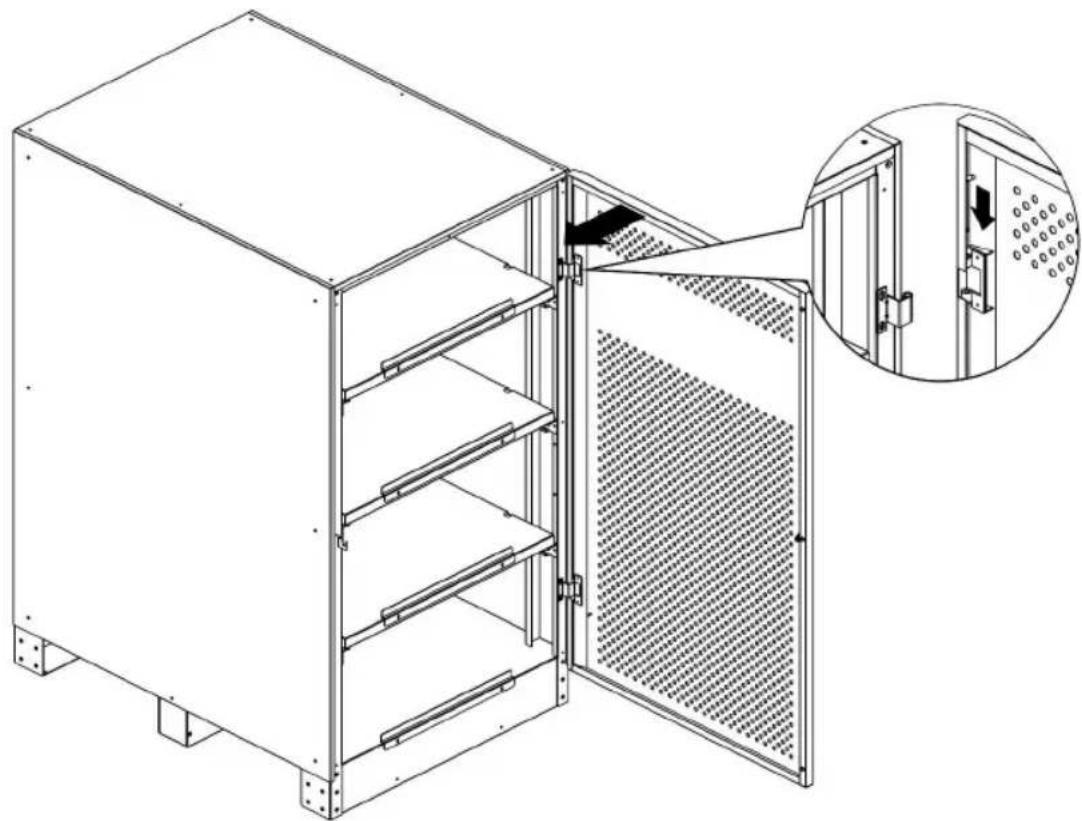
natural_image
Technical line drawing of a modular kitchen unit with an open door and internal shelving (no text or symbols)BP480V65/NIB and BP480V100/NIB
7. Installation
7.4. Installation Specifications
7.4.1 Installation and Floor Loading Information
| Battery Cabinet Model | Shelves | Dimensions (Height x Width x Depth) | Casters Weight Floor Load | |
| BP480V40 | 4 122 | 0 x 626 x 900 mm | N 607.8 kg | 1080 kg/m^2 |
| BP480V40NIB 4 | 1220 x 62 | 6 x 900 mm N 103.3 kg 1 | 84 kg/m | |
| BP480V65 4 15 | 00 x 826 x | 1135 mm N 957.4 kg 102 | 2 kg/m | |
| BP480V65NIB 4 | 1500 x 82 | 6 x 1135 mm N 157.6 kg | 169 kg/m | |
| BP480V100 4 15 | 00 x 826 | x 1135 mm N 1496.3 kg | 1598 kg/m | |
| BP480V100NIB | 4 | 1500 x 826 x 1135 mm N | 157.6 kg 169 kg/m | |
7.4.2 Recommended Torque
| Battery Cabinet Model | Individual Battery Unit Model | Terminal Type | Torque |
| BP480V40 | CSB GP 12400 | M6 Threaded Insert | 59 kgf•cm/5.73 N•m |
| BP480V40NIB | N/A | N/A | N/A |
| BP480V65 | CSB GP 12650 | M6 Threaded Insert | 138.6 kgf•cm / 13.58 N•m |
| BP480V65NIB | N/A | N/A | N/A |
| BP480V100 | CSB GPL 121000 | M6 Threaded Insert | 138.6 kgf•cm / 13.58 N•m |
| BP480V100NIB | N/A | N/A | N/A |
8. Storage and Service
Storage
The battery cabinet must be stored in a clean, secure environment with a temperature less than 40^ C and a relative humidity less than 90% (non-condensing). Store the battery cabinet in its original shipping container if possible. Charge the batteries for at least 24 hours prior to use. Do not rely on the battery cabinet to provide backup power to connected equipment until the batteries are fully charged.
Note: If the UPS system remains off for an extended period of time, it should be turned on periodically to allow the batteries to recharge. The UPS system should be turned on and the batteries should be recharged at least one uninterrupted 24-hour period every 3 months.
Failure to recharge the batteries periodically may cause irreversible battery damage.
Service
Your Tripp Lite product is covered by the warranty described in this manual. A variety of Extended Warranty and On-Site Service Programs are also available from Tripp Lite. For more information on service, visit www.tripplite.com/support. Before returning your product for service, follow these steps:
- Review the installation and operation procedures in this manual to ensure that the service problem does not originate from a misreading of the instructions.
- If the problem continues, do not contact or return the product to the dealer. Instead, visit www.tripplite.com/support.
- If the problem requires service, visit www.triplite.com/support and click the Product Returns link. From here you can request a Returned Material Authorization (RMA) number, which is required for service. This simple on-line form will ask for your unit's model and serial numbers, along with other general purchaser information. The RMA number, along with shipping instructions will be emailed to you. Any damages (direct, indirect, special or consequential) to the product incurred during shipment to Tripp Lite or an authorized Tripp Lite service center are not covered under warranty. Products shipped to Tripp Lite or an authorized Tripp Lite service center must have transportation charges prepaid. Mark the RMA number on the outside of the package. If the product is within its warranty period, enclose a copy of your sales receipt. Return the product for service using an insured carrier to the address given to you when you request the RMA.
9. Warranty
Limited Warranty
Seller warrants this product, if used in accordance with all applicable instructions, to be free from original defects in material and workmanship for a period of one (1) year from the date of initial purchase. If the product should prove defective in material or workmanship within that period, Seller will repair or replace the product, in its sole discretion. Service under this Warranty includes parts and Tripp Lite service center labor. On-site service plans are available from Tripp Lite through authorized service partners (in most areas). Visit www.tripplite.com/support for details. International customers should contact Tripp Lite support at intlservice@tripplite.com.
THIS WARRANTY DOES NOT APPLY TO NORMAL WEAR OR TO DAMAGE RESULTING FROM ACCIDENT, MISUSE, ABUSE OR NEGLECT. SELLER MAKES NO EXPRESS WARRANTIES OTHER THAN THE WARRANTY EXPRESSLY SET FORTH HEREIN. EXCEPT TO THE EXTENT PROHIBITED BY APPLICABLE LAW, ALL IMPLIED WARRANTIES, INCLUDING ALL WARRANTIES OF MERCHANTABILITY OR FITNESS, ARE LIMITED IN DURATION TO THE WARRANTY PERIOD SET FORTH ABOVE; AND THIS WARRANTY EXPRESSLY EXCLUDES ALL INCIDENTAL AND CONSEQUENTIAL DAMAGES. (Some states do not allow limitations on how long an implied warranty lasts, and some states do not allow the exclusion or limitation of incidental or consequential damages, so the above limitations or exclusions may not apply to you. This Warranty gives you specific legal rights, and you may have other rights which vary from jurisdiction to jurisdiction.)
Tripp Lite; 1111 W. 35th Street; Chicago IL 60609; USA
WARNING: The individual user should take care to determine prior to use whether this device is suitable, adequate or safe for the use intended. Since individual applications are subject to great variation, the manufacturer makes no representation or warranty as to the suitability or fitness of these devices for any specific application.
Regulatory Compliance Identification Numbers
For the purpose of regulatory compliance certifications and identification, your Tripp Lite product has been assigned a unique series number. The series number can be found on the product nameplate label, along with all required approval markings and information. When requesting compliance information for this product, always refer to the series number. The series number should not be confused with the marketing name or model number of the product.
WEEE Compliance Information for Tripp Lite Customers and Recyclers (European Union)

Under the Waste Electrical and Electronic Equipment (WEEE) Directive and implementing regulations, when customers buy new electrical and electronic equipment from Tripp Lite they are entitled to:
- Send old equipment for recycling on a one-for-one, like-for-like basis (this varies depending on the country)
- Send the new equipment back for recycling when this ultimately becomes waste
Tripp Lite has a policy of continuous improvement. Specifications are subject to change without notice.


1111 W. 35th Street, Chicago, IL 60609 USA • www.tripplite.com/support
natural_image
Two identical rectangular panels with dot patterns, each labeled with a Chinese character, placed side by side (no text or symbols on the panels themselves)English 1 • Français 71 • Русский 106 • Alemán 141


1111 W. 35th Street, Chicago, IL 60609 EE. UU. • www.tripplite.com/support
natural_image
Empty rectangular frame with corner markers (no text or symbols)VISTA SUPERIOR
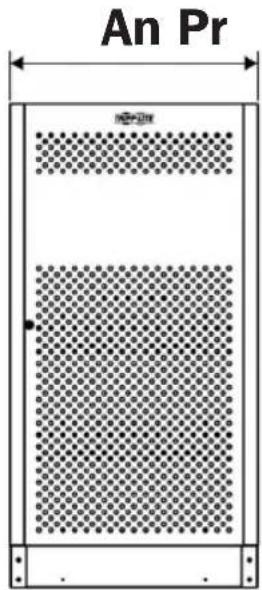
VISTA FRONTAL
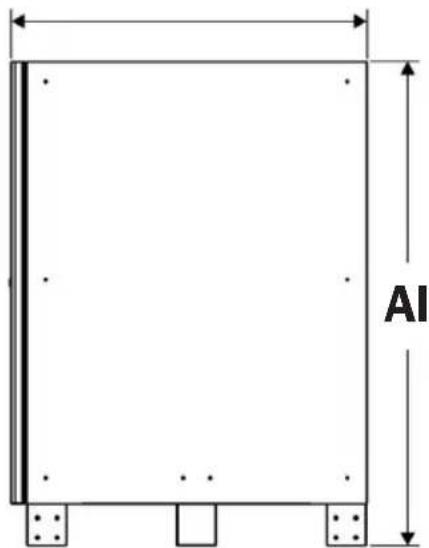
VISTA LATERAL VISTA POSTERIOR
6. Datos mecánicos
6.1.2 Medidas del BP480V65/NIB y BP480V100/NIB
Dimensiones (Al x An x Pr): 1500 x 826 x 1135 mm
Peso de Gabinete Vacío: 157.6 kg (modelo BP480V65/NIB)
157.6 kg (modelo BP480V100/NIB)
natural_image
Empty rectangular frame with corner markers (no text or symbols)VISTA SUPERIOR
VISTA FRONTAL
VISTA LATERAL VISTA POSTERIOR
6. Datos Mecánicos
BP480V40/NIB BP480V65/NIB Y B480V100/NIB
7. Instalación
natural_image
Technical line drawing of a modular kitchen unit with an inset showing internal components (no text or symbols)BP480V40/NIB
natural_image
Technical line drawing of a multi-level industrial cabinet with an inset showing internal components (no text or symbols)BP480V65/NIB y BP480V100/NIB
7. Instalación
natural_image
Isometric line drawing of a multi-level industrial or server rack system with no visible text or symbolsBP480V40/NIB
natural_image
Technical line drawing of a multi-level industrial cabinet or storage unit with internal shelves and doorways (no text or symbols)BP480V65/NIB y BP480V100/NIB
7. Instalación
natural_image
Technical line drawing of a multi-level industrial storage unit with horizontal shelves and circular components, showing directional arrows (no text or symbols)BP480V40/NIB
natural_image
Technical line drawing of a multi-level industrial storage unit with directional arrows indicating flow or movement (no text or symbols present)BP480V65/NIB y BP480V100/NIB
7. Instalación
natural_image
Isometric line drawing of a multi-level metal shelving unit with no text or symbols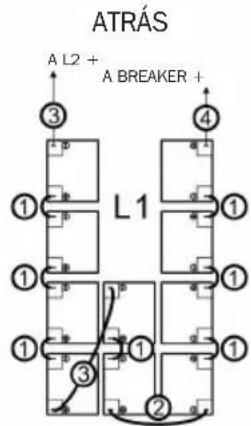
FRENTE
BP480V65/NIB
natural_image
Technical line drawing of a multi-level metal shelving unit with no visible text or symbols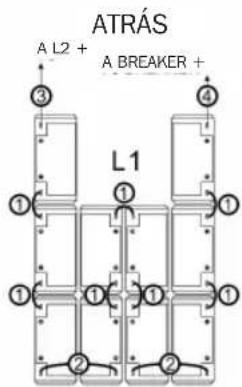
FRENTE
BP480V100/NIB
natural_image
Isometric line drawing of a multi-level metal shelving unit with no text or symbols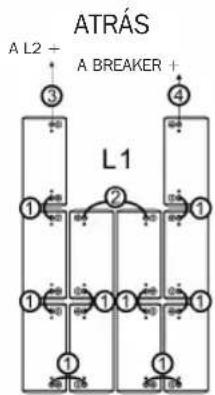
flowchart
graph TD
    A["ATRÁS"] --> B["1"]
    A --> C["2"]
    A --> D["3"]
    A --> E["4"]
    B --> F["1"]
    B --> G["2"]
    B --> H["3"]
    C --> I["1"]
    C --> J["2"]
    C --> K["3"]
    D --> L["1"]
    D --> M["2"]
    D --> N["3"]
    E --> O["1"]
    E --> P["2"]
    E --> Q["3"]
FRENTE
7. Instalación
natural_image
Technical line drawing of a multi-level industrial shelving unit with no visible text or symbolsBP480V40/NIB
natural_image
Technical line drawing of a multi-level metal shelving unit with a central platform and directional arrow (no text or symbols)BP480V65/NIB y BP480V100/NIB
7. Instalación
natural_image
Technical line drawing of a multi-level industrial storage unit with metal framework and internal components (no text or symbols)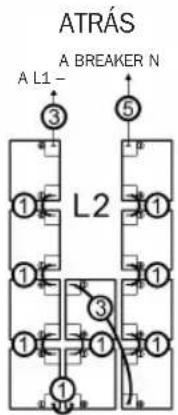
FRENTE
BP480V65/NIB
natural_image
Technical line drawing of a multi-level metal shelving unit with no visible text or symbols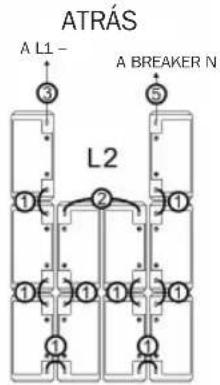
FRENTE
BP480V100/NIB
natural_image
Technical line drawing of a multi-level metal shelving unit with no visible text or symbols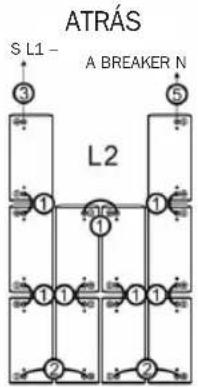
FRENTE
7. Instalación
natural_image
Technical line drawing of a modular shelving unit with metal frames and internal compartments (no text or symbols)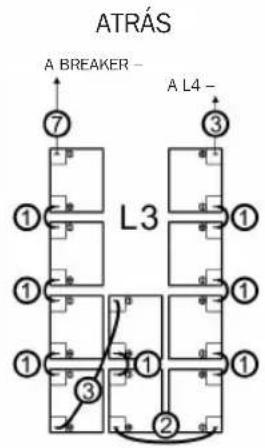
FRENTE
BP480V65/NIB

natural_image
Technical line drawing of a multi-level metal shelving unit with no visible text or symbols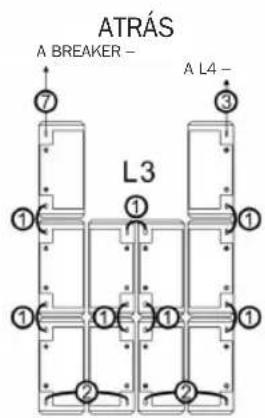
FRENTE
BP480V100/NIB
natural_image
Technical line drawing of a multi-level industrial storage unit with internal compartments and a directional arrow (no text or symbols)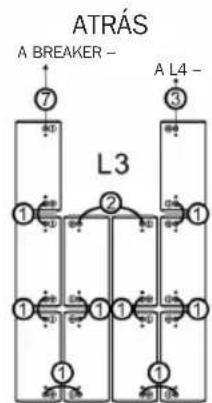
flowchart
graph TD
    A["A Breaker"] --> B["7"]
    C["L3"] --> D["1"]
    C --> E["2"]
    C --> F["3"]
    G["A L4"] --> H["1"]
    G --> I["1"]
    G --> J["1"]
    G --> K["1"]
    style A fill:#f9f,stroke:#333
    style C fill:#f9f,stroke:#333
    style G fill:#f9f,stroke:#333
FRENTE
7. Instalación
natural_image
Technical line drawing of a multi-level industrial storage unit with internal compartments and mounting brackets (no text or symbols)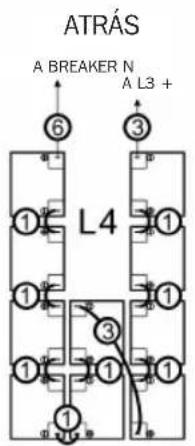
flowchart
graph TD
    A["①"] --> B["②"]
    B --> C["③"]
    C --> D["L4"]
    D --> E["④"]
    E --> F["⑤"]
    F --> G["⑥"]
    style A fill:#f9f,stroke:#333
    style B fill:#ccf,stroke:#333
    style C fill:#cfc,stroke:#333
    style D fill:#fcc,stroke:#333
    style E fill:#cff,stroke:#333
    style F fill:#ffc,stroke:#333
    style G fill:#cfc,stroke:#333
FRENTE
BP480V65/NIB
natural_image
Technical line drawing of a multi-level storage unit with metal framework and internal compartments (no text or symbols)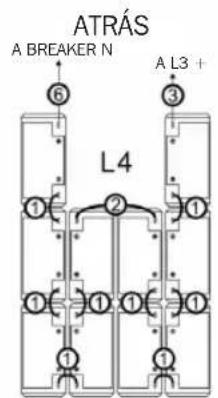
FRENTE
BP480V100/NIB
natural_image
Isometric line drawing of a multi-level storage unit with shelves and a control panel (no text or symbols)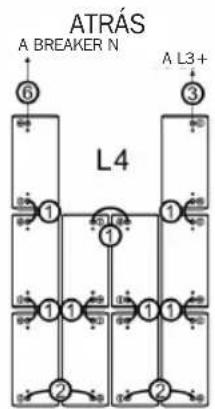
flowchart
graph TD
    A["A Breaker N"] --> B["6"]
    C["L4"] --> D["1"]
    C --> E["1"]
    C --> F["1"]
    C --> G["1"]
    C --> H["2"]
    C --> I["2"]
    C --> J["3"]
    C --> K["4"]
    style A fill:#f9f,stroke:#333
    style C fill:#f9f,stroke:#333
    style B fill:#ccf,stroke:#333
    style D fill:#ccf,stroke:#333
    style E fill:#ccf,stroke:#333
    style F fill:#ccf,stroke:#333
    style G fill:#ccf,stroke:#333
    style H fill:#ccf,stroke:#333
    style I fill:#ccf,stroke:#333
    style J fill:#ccf,stroke:#333
    style K fill:#ccf,stroke:#333
FRENTE
7. Instalación
natural_image
Technical line drawing of an internal server rack or rack cabinet with multiple shelves and mounting brackets (no text or symbols)BP480V40/NIB
natural_image
Isometric line drawing of a multi-level industrial or storage unit cabinet with internal shelves and doorways (no text or symbols)BP480V65/NIB y BP480V100/NIB
7. Instalación
natural_image
Technical line drawing of an electrical cabinet with a close-up inset showing internal components (no text or symbols)BP480V40/NIB
natural_image
Technical line drawing of a modular kitchen unit with an open door and internal shelving (no text or symbols)BP480V65/NIB y BP480V100/NIB
7. Instalación
natural_image
Two identical rectangular panels with dot patterns, each labeled with a Chinese character, placed side by side without any additional text or symbols.English 1 • Español 36 • Русский 106 • Deutsch 141


6.2 Exigences relatives aux 84 batteries
6.2.1 Batteries BP480V40/NIB 84
6.2.2 Batteries BP480V65/NIB 84
6.1.3 Batteries BP480V100/NIB 84
7. Installation 85
natural_image
Pure diagram of a rectangular panel with a grid pattern and dimension lines (no text or symbols)VUE DE FACE
P
VUE DE CÔTÉ VUE ARRIÈRE
6.2 Exigences relatives aux batteries
6.2.1 Batteries BP480V40/NIB
natural_image
Technical line drawing of a modular kitchen unit with an inset showing internal components (no text or symbols)BP480V40/NIB
natural_image
Technical line drawing of a multi-level industrial cabinet with an inset showing internal components (no text or symbols)BP480V65/NIB et BP480V100/NIB
7. Installation
natural_image
Isometric line drawing of a multi-level industrial or server rack system with no visible text or symbolsBP480V40/NIB
natural_image
Technical line drawing of a multi-level industrial cabinet or storage unit with internal shelves and doorways (no text or symbols)BP480V65/NIB et BP480V100/NIB
7. Installation
natural_image
Technical line drawing of a multi-level industrial storage unit with horizontal shelves and circular components, showing directional arrows (no text or symbols)BP480V40/NIB
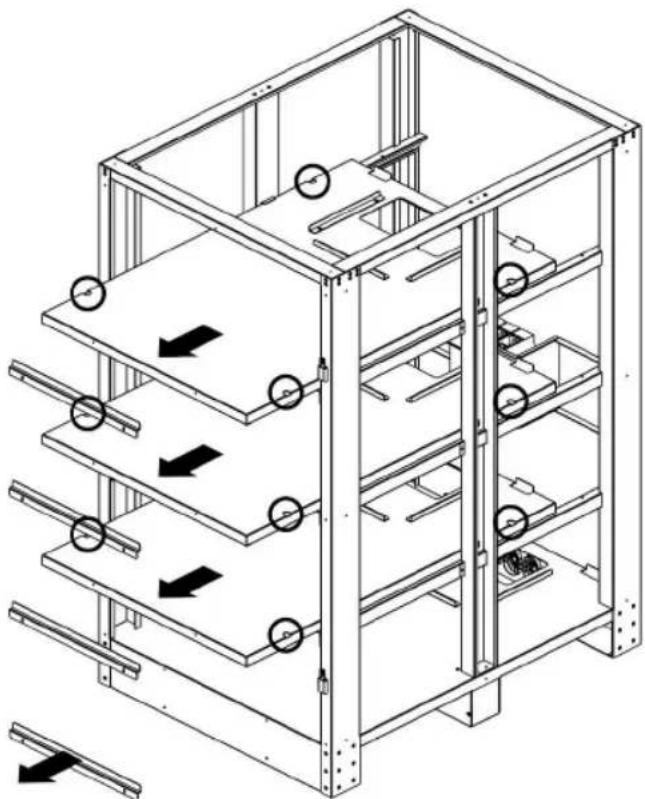
natural_image
Technical line drawing of a multi-level industrial storage unit with directional arrows indicating flow or movement (no text or symbols present)BP480V65/NIB et BP480V100/NIB
7. Installation
natural_image
Isometric line drawing of a multi-level metal shelving unit with no text or symbols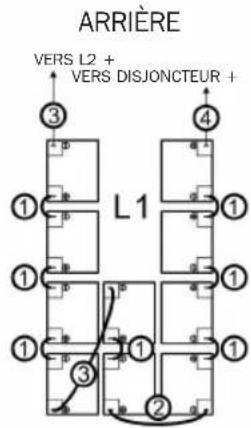
AVANT
BP480V65/NIB
natural_image
Technical line drawing of a multi-level metal shelving unit with no visible text or symbols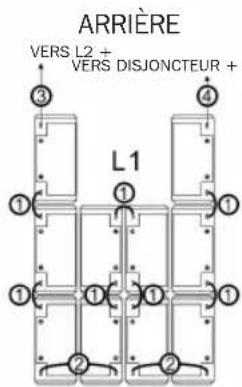
AVANT
BP480V100/NIB
natural_image
Isometric line drawing of a multi-level metal shelving unit with no text or symbols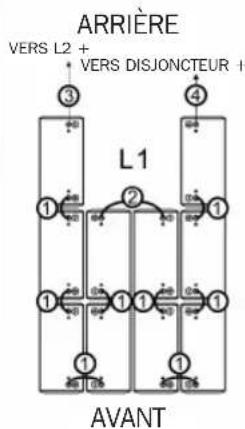
flowchart
graph TD
    A["ARRIÈRE"] --> B["3"]
    A --> C["4"]
    B --> D["1"]
    C --> E["2"]
    D --> F["1"]
    E --> G["1"]
    F --> H["1"]
    G --> I["1"]
    H --> J["1"]
    I --> K["1"]
    J --> L["1"]
    K --> M["AVANT"]
    L --> M
    M --> N["200 0%"]
    M --> O["200 0%"]
    N --> P["200 0%"]
    O --> Q["200 0%"]
7. Installation
natural_image
Technical line drawing of a multi-level industrial shelving unit with no visible text or symbolsBP480V40/NIB
natural_image
Technical line drawing of a multi-level metal shelving unit with a central platform and directional arrow (no text or symbols)BP480V65/NIB et BP480V100/NIB
7. Installation
natural_image
Isometric line drawing of a multi-level industrial storage unit with shelves and equipment (no text or symbols)ARRIÈRE

AVANT
BP480V65/NIB
natural_image
Technical line drawing of a multi-level metal shelving unit with no visible text or symbolsARRIÈRE
AVANT
BP480V100/NIB
natural_image
Isometric line drawing of a multi-level metal shelving unit with no text or symbolsARRIÈRE
AVANT
7. Installation
natural_image
Technical line drawing of a multi-level mechanical or electrical enclosure with internal components and no visible text or symbolsARRIÈRE
AVANT
BP480V65/NIB
natural_image
Technical line drawing of a multi-level metal shelving unit with no visible text or symbolsARRIÈRE
AVANT
BP480V100/NIB
natural_image
Technical line drawing of a multi-level industrial storage unit with internal compartments and a central control panel (no text or symbols)ARRIÈRE
flowchart
graph TD
    A["Terminal 1"] --> B["Terminal 2"]
    C["Terminal 3"] --> D["Terminal 4"]
    E["Terminal 7"] --> F["Terminal 8"]
    G["Terminal 9"] --> H["Terminal 10"]
    I["Terminal 11"] --> J["Terminal 12"]
    K["Terminal 13"] --> L["Terminal 14"]
    M["Terminal 15"] --> N["Terminal 16"]
    O["Terminal 17"] --> P["Terminal 18"]
    Q["Terminal 19"] --> R["Terminal 20"]
    S["Terminal 21"] --> T["Terminal 22"]
    U["Terminal 23"] --> V["Terminal 24"]
    W["Terminal 25"] --> X["Terminal 26"]
    Y["Terminal 27"] --> Z["Terminal 28"]
    AA["Terminal 29"] --> AB["Terminal 30"]
    AC["Terminal 31"] --> AD["Terminal 32"]
    AE["Terminal 33"] --> AF["Terminal 34"]
    AG["Terminal 35"] --> AH["Terminal 36"]
    AI["Terminal 37"] --> AJ["Terminal 38"]
    AK["Terminal 39"] --> AL["Terminal 40"]
    AM["Terminal 41"] --> AN["Terminal 42"]
    AO["Terminal 43"] --> AP["Terminal 44"]
    AQ["Terminal 45"] --> AR["Terminal 46"]
    AS["Terminal 47"] --> AT["Terminal 48"]
    AU["Terminal 49"] --> AV["Terminal 50"]
    AW["Terminal 51"] --> AX["Terminal 52"]
    AY["Terminal 53"] --> AZ["Terminal 54"]
    BA["Terminal 55"] --> BB["Terminal 56"]
    BC["Terminal 57"] --> BD["Terminal 58"]
    BE["Terminal 59"] --> BF["Terminal 60"]
    BG["Terminal 61"] --> BH["Terminal 62"]
    BI["Terminal 63"] --> BJ["Terminal 64"]
    BK["Terminal 65"] --> BL["Terminal 66"]
    BM["Terminal 67"] --> BN["Terminal 68"]
    BO["Terminal 69"] --> BP["Terminal 70"]
    BQ["Terminal 71"] --> BR["Terminal 72"]
    BS["Terminal 73"] --> BT["Terminal 74"]
    BU["Terminal 75"] --> BV["Terminal 76"]
    BW["Terminal 77"] --> BX["Terminal 78"]
    BY["Terminal 79"] --> BZ["Terminal 80"]
AVANT
7. Installation
natural_image
Technical line drawing of a multi-level storage unit with internal compartments and mounting brackets (no text or symbols)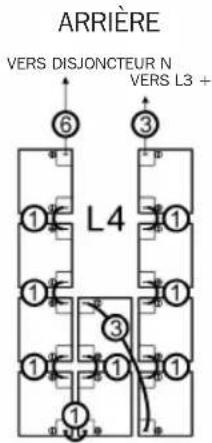
AVANT
BP480V65/NIB
natural_image
Isometric line drawing of a multi-level storage unit with shelves and bins, no text or symbols present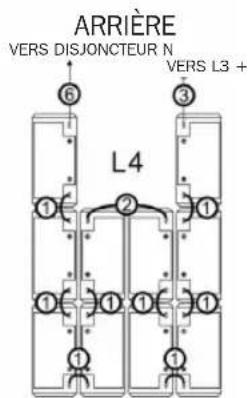
AVANT
BP480V100/NIB
natural_image
Isometric line drawing of a multi-level industrial storage unit with no text or symbols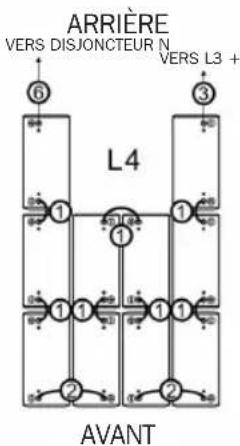
7. Installation
natural_image
Technical line drawing of an internal server rack or enclosure structure with multiple tiers and mounting holes (no text or symbols)BP480V40/NIB
natural_image
Isometric line drawing of a multi-level industrial or warehouse cabinet with internal shelves and doorways (no text or symbols)BP480V65/NIB et BP480V100/NIB
7. Installation
natural_image
Technical line drawing of an electrical enclosure with a close-up inset showing internal components (no text or symbols)BP480V40/NIB
natural_image
Technical line drawing of a modular kitchen or oven with a close-up inset showing internal components (no text or symbols)BP480V65/NIB et BP480V100/NIB
7. Installation
1111 W. 35th Street, Chicago, IL 60609 USA • www.tripplite.com/support
natural_image
Two identical rectangular panels with dot patterns, one open and one filled with a grid pattern (no text or symbols)English 1 • Español 36 • Français 71 • Deutsch 141


1111 W. 35th Street, Chicago, IL 60609 USA • www.tripplite.com/support
BP480V40/NIB BP480V65/NIB И B480V100/NIB
7.Установка
natural_image
Technical line drawing of a server rack cabinet with an inset showing internal components (no text or symbols)BP480V40/NIB
natural_image
Technical line drawing of a modular kitchen unit with an open door and side panel, showing internal structure and mounting bracket (no text or symbols)BP480V65/NIB и BP480V100/NIB
7.Установка
natural_image
Isometric line drawing of a multi-level industrial or server rack system with no visible text or symbolsBP480V40/NIB
natural_image
Technical line drawing of a multi-level industrial cabinet or storage unit with internal shelves and doorways (no text or symbols)BP480V65/NIB и BP480V100/NIB
7.Установка
natural_image
Technical line drawing of a multi-level industrial storage unit with horizontal shelves and circular components, showing flow direction arrows (no text or symbols)BP480V40/NIB
natural_image
Technical line drawing of a multi-level industrial storage unit with directional arrows indicating flow or movement (no text or symbols present)BP480V65/NIB и BP480V100/NIB
7.Установка
natural_image
Isometric line drawing of a multi-level metal shelving unit with no text or symbols
natural_image
Technical line drawing of a multi-level metal shelving unit with no visible text or symbols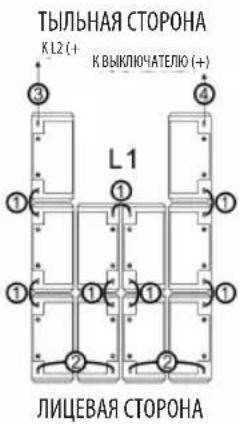
natural_image
Isometric line drawing of a multi-level metal shelving unit with no text or symbols
natural_image
Technical line drawing of a multi-level industrial shelving unit with no visible text or symbolsBP480V40/NIB
natural_image
Technical line drawing of a multi-level industrial shelving unit with no visible text or symbolsBP480V65/NIB и BP480V100/NIB
7. Установка
natural_image
Isometric line drawing of a multi-level industrial shelving unit with no text or symbolsТЫЛЬНАЯ СТОРОНА
ЛИЦЕВАЯ СТОРОНА
BP480V65/NIB
natural_image
Technical line drawing of a multi-level metal shelving unit with no visible text or symbolsТЫЛЬНАЯ СТОРОНА
ЛИЦЕВАЯ СТОРОНА
BP480V100/NIB
natural_image
Isometric line drawing of a multi-level metal shelving unit with no text or symbolsТЫЛЬНАЯ СТОРОНА
flowchart
graph TD
    A["③"] --> B["L2"]
    C["⑤"] --> B
    D["①"] --> B
    E["②"] --> B
    F["①"] --> B
    G["②"] --> B
    H["①"] --> B
    I["②"] --> B
    J["①"] --> B
    K["②"] --> B
    L["①"] --> B
    M["②"] --> B
    N["①"] --> B
    O["②"] --> B
    P["①"] --> B
    Q["②"] --> B
    R["①"] --> B
    S["②"] --> B
    T["①"] --> B
    U["②"] --> B
    V["①"] --> B
    W["②"] --> B
    X["①"] --> B
    Y["②"] --> B
    Z["①"] --> B
    AA["②"] --> B
    AB["①"] --> B
    AC["②"] --> B
    AD["①"] --> B
    AE["②"] --> B
    AF["①"] --> B
    AG["②"] --> B
    AH["①"] --> B
    AI["②"] --> B
    AJ["①"] --> B
    AK["②"] --> B
    AL["①"] --> B
    AM["②"] --> B
    AN["①"] --> B
    AO["②"] --> B
    AP["①"] --> B
    AQ["②"] --> B
    AR["①"] --> B
    AS["②"] --> B
    AT["①"] --> B
    AU["②"] --> B
    AV["①"] --> B
    AW["②"] --> B
ЛИЦЕВАЯ СТОРОНА
7.Установка
BP480V65/NIB и BP480V100/NIB
7.Установка
natural_image
Technical line drawing of a modular shelving unit with shelves, bins, and a central control box (no text or symbols)ТЫЛЬНАЯ СТОРОНА
BP480V65/NIB
natural_image
Technical line drawing of a multi-level metal shelving unit with no visible text or symbolsТЫЛЬНАЯ СТОРОНА
BP480V100/NIB
natural_image
Technical line drawing of a multi-level industrial storage unit with internal compartments and a directional arrow (no text or symbols)ТЫЛЬНАЯ СТОРОНА
BP480V65/NIB и BP480V100/NIB
7.Установка
natural_image
Technical line drawing of a multi-level industrial storage unit with internal compartments and mounting brackets (no text or symbols)ТЫЛЬНАЯ СТОРОНА
ЛИЦЕВАЯ СТОРОНА
BP480V65/NIB
natural_image
Technical line drawing of a multi-level storage unit with shelves and bins, showing internal compartments and a directional arrow (no text or symbols)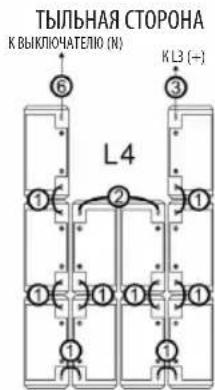
ЛИЦЕВАЯ СТОРОНА
BP480V100/NIB
natural_image
Isometric line drawing of a multi-level storage unit with shelves and a door, no text or symbols presentТЫЛЬНАЯ СТОРОНА
flowchart
graph TD
    A["6"] --> B["1"]
    B --> C["1"]
    C --> D["1"]
    D --> E["1"]
    E --> F["2"]
    F --> G["2"]
    G --> H["3"]
    I["K BYKLIJONATELIO (N)"] --> J["6"]
    K["K L3 (+)"] --> L["3"]
    style A fill:#f9f,stroke:#333
    style K fill:#f9f,stroke:#333
    style I fill:#ccf,stroke:#333
    style K fill:#ccf,stroke:#333
ЛИЦЕВАЯ СТОРОНА
7. Установка
natural_image
Technical line drawing of an internal server rack or enclosure structure with multiple tiers and mounting holes (no text or symbols)BP480V40/NIB
natural_image
Technical line drawing of a multi-level rack cabinet or enclosure with internal components and directional arrows indicating movement (no text or symbols present)BP480V65/NIB и BP480V100/NIB
7.Установка
natural_image
Technical line drawing of an industrial server rack with a close-up inset showing internal components (no text or symbols)BP480V40/NIB
natural_image
Technical line drawing of a modular kitchen unit with an inset showing internal components (no text or symbols)BP480V65/NIB и BP480V100/NIB
7.Установка
1111 W. 35th Street, Chicago, IL 60609 USA • www.tripplite.com/support
Bedienungsanleitung
natural_image
Two identical rectangular panels with dot patterns, each labeled with a Chinese character, placed side by side (no text or symbols on panels)English 1 • Español 36 • Français 71 • Русский 106


1111 W. 35th Street, Chicago, IL 60609 USA • www.tripplite.com/support
natural_image
Empty rectangular frame with corner dots, no text or symbols presentANSICHT VON OBEN
B
natural_image
Pure diagram of a rectangular panel with a grid pattern and dimension lines (no text or symbols)VORDERANSICHT
T
natural_image
Simple line drawing of a rectangular frame with dimension labels (no text or symbols)natural_image
Technical line drawing of a modular kitchen unit with an inset showing internal components (no text or symbols)BP480V40/NIB
natural_image
Technical line drawing of a multi-level industrial cabinet with an inset showing its internal structure (no text or symbols present)natural_image
Isometric line drawing of a multi-level industrial or server rack system with no visible text or symbolsBP480V40/NIB
natural_image
Technical line drawing of a multi-level industrial cabinet or storage unit with internal shelves and doorways (no text or symbols)natural_image
Technical line drawing of a multi-level industrial storage unit with horizontal shelves and circular components, showing directional arrows indicating movement (no text or symbols present)BP480V40/NIB
natural_image
Technical line drawing of a multi-level industrial storage unit with horizontal shelves and circular components, showing flow direction arrows (no text or symbols)BP480V65/NIB, BP480V100/NIB
7. Installation
natural_image
Isometric line drawing of a multi-level metal shelving unit with no text or symbols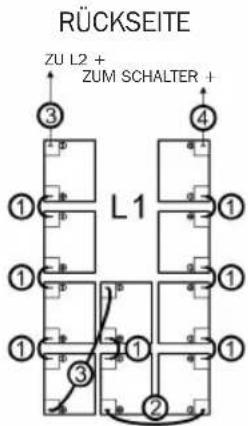
VORDERSEITE
BP480V65/NIB
natural_image
Technical line drawing of a multi-level metal shelving unit with no visible text or symbols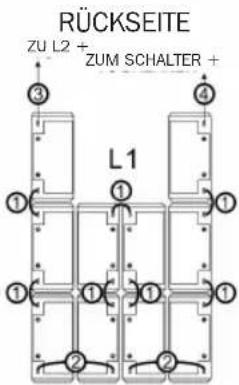
VORDERSEITE
BP480V100/NIB
natural_image
Technical line drawing of a multi-level metal shelving unit with no visible text or symbols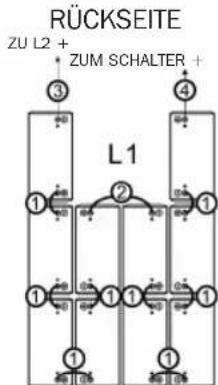
VORDERSEITE
7. Installation
natural_image
Technical line drawing of a multi-level industrial shelving unit with no visible text or symbolsBP480V40/NIB
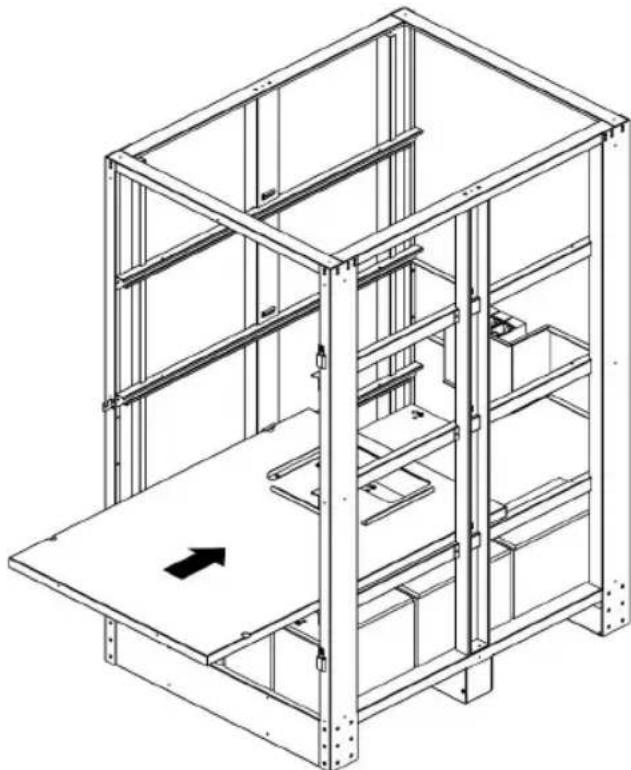
natural_image
Technical line drawing of a multi-level industrial shelving unit with no visible text or symbolsBP480V65/NIB, BP480V100/NIB
7. Installation
natural_image
Technical line drawing of a multi-level industrial storage unit with metal framework and internal components (no text or symbols)
natural_image
Isometric line drawing of a multi-level metal shelving unit with no text or symbols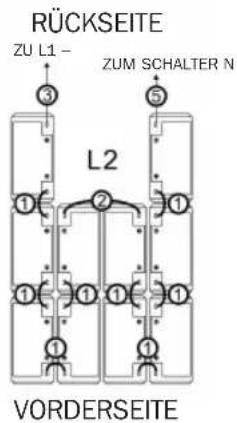
natural_image
Technical line drawing of a multi-level metal shelving unit with no visible text or symbols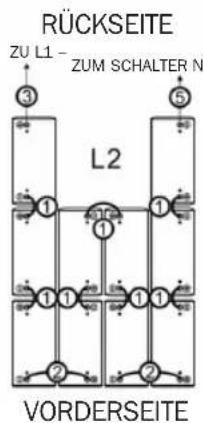
natural_image
Technical line drawing of a multi-level industrial storage unit with internal components and mounting brackets (no text or symbols)RÜCKSEITE
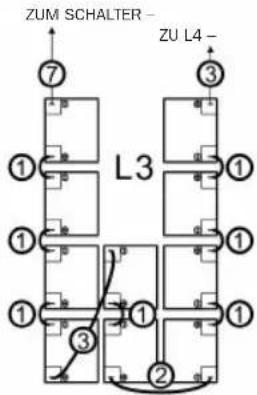
VORDERSEITE
BP480V65/NIB

natural_image
Technical line drawing of a multi-level metal shelving unit with no visible text or symbolsRÜCKSEITE
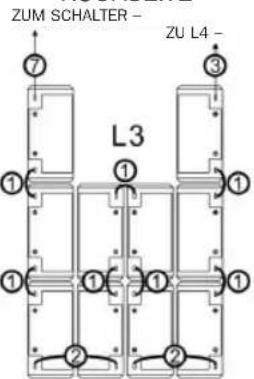
VORDERSEITE
BP480V100/NIB
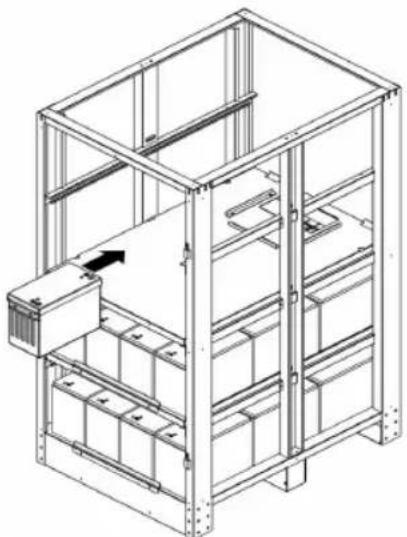
natural_image
Isometric line drawing of a multi-level industrial shelving unit with no text or symbolsRÜCKSEITE
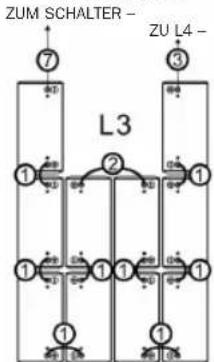
flowchart
graph TD
    A["ZUM SCHALTER"] --> B["7"]
    C["ZU L4"] --> D["3"]
    B --> E["1"]
    D --> F["1"]
    E --> G["1"]
    F --> H["1"]
    G --> I["1"]
    H --> J["1"]
    I --> K["1"]
    J --> L["1"]
    K --> M["1"]
    L --> N["1"]
    M --> O["1"]
    N --> P["1"]
    O --> Q["1"]
    P --> R["1"]
    Q --> S["1"]
    R --> T["1"]
    S --> U["1"]
    T --> V["1"]
    U --> W["1"]
    V --> X["1"]
    W --> Y["1"]
    X --> Z["1"]
    Y --> AA["1"]
    Z --> AB["1"]
VORDERSEITE
7. Installation
natural_image
Technical line drawing of a multi-level industrial storage unit with internal compartments and mounting brackets (no text or symbols)RÜCKSEITE
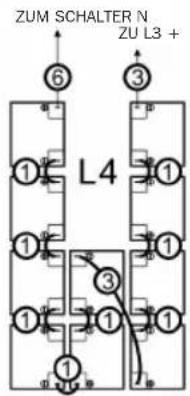
VORDERSEITE
BP480V65/NIB
natural_image
Isometric line drawing of a multi-level storage unit with shelves and mounting brackets (no text or symbols)RÜCKSEITE
VORDERSEITE
BP480V100/NIB
natural_image
Isometric line drawing of a multi-level industrial storage unit with no text or symbolsRÜCKSEITE
flowchart
graph TD
    A["ZUM SCHALTER N"] --> B["⑥"]
    C["ZU L3 +"] --> D["③"]
    B --> E["L4"]
    D --> E
    E --> F["①"]
    F --> G["②"]
    G --> H["③"]
    H --> I["④"]
    I --> J["⑤"]
    J --> K["⑥"]
    K --> L["⑦"]
    L --> M["⑧"]
    M --> N["⑨"]
    N --> O["⑩"]
    O --> P["⑪"]
    P --> Q["⑫"]
    Q --> R["⑬"]
    R --> S["⑭"]
    S --> T["⑮"]
    T --> U["⑯"]
    U --> V["⑰"]
    V --> W["⑱"]
    W --> X["⑲"]
    X --> Y["⑳"]
    Y --> Z["㉑"]
    Z --> AA["㉒"]
    AA --> AB["㉓"]
    AB --> AC["㉔"]
VORDERSEITE
7. Installation
natural_image
Technical line drawing of an electrical cabinet with internal components and directional arrows indicating movement (no text or symbols)BP480V40/NIB
natural_image
Isometric line drawing of a multi-level industrial or storage unit cabinet with internal shelves and doorways (no text or symbols)natural_image
Technical line drawing of an electrical enclosure with a close-up inset showing internal components (no text or symbols)BP480V40/NIB
natural_image
Technical line drawing of a modular kitchen unit with an open door and internal shelving (no text or symbols)Manufacturing Excellence.
1111 W. 35th Street, Chicago, IL 60609 USA • www.tripplite.com/support