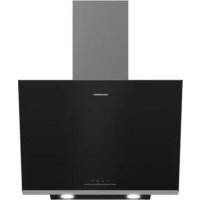
GDSP2460BC - Basket GRUNDIG - Free user manual and instructions
Find the device manual for free GDSP2460BC GRUNDIG in PDF.



| Product type | Hood |
| Brand | Grundig |
| Model | GDSP2460BC |
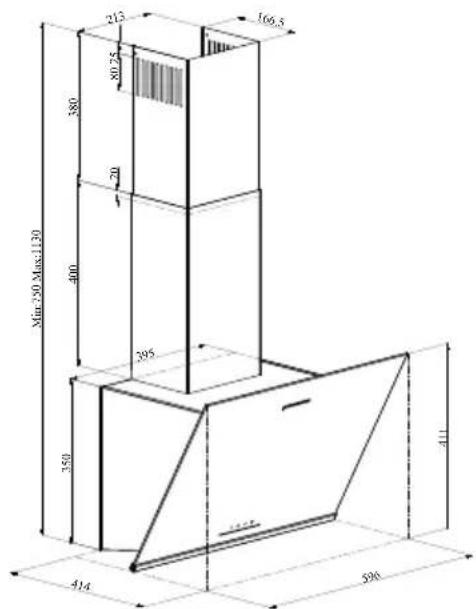
| Dimensions (W x D x H) | 590 x 414 x 411 mm (body), adjustable duct min. 790 mm |
| Net weight | 15 kg (estimate) |
| Power supply | 220-240 V ~ 50 Hz |
| Motor power | 210 W |
| Lighting | 2 x 3 W LED, 260 lm, 3000 K (energy class F) |
| Speeds | 3 |
| Maximum airflow | 631 m³/h |
| Grease filter | Aluminum, dishwasher safe |
| Charcoal filter (optional) | Active, replace every 3 months |
| Automatic shut-off function | Yes, 15 minutes |
| Minimum safety distance | 65 cm (between hood and cooktop) |
| Insulation class | Class I |
| Material | Stainless steel, glass |
| Installation | Wall-mounted, with exhaust duct or recirculation |
| Duct diameter | 120 or 150 mm |
| Warranty | 2 years (standard) |
Frequently Asked Questions - GDSP2460BC GRUNDIG
User questions about GDSP2460BC GRUNDIG
0 question about this device. Answer the ones you know or ask your own.
Ask a new question about this device
Download the instructions for your Basket in PDF format for free! Find your manual GDSP2460BC - GRUNDIG and take your electronic device back in hand. On this page are published all the documents necessary for the use of your device. GDSP2460BC by GRUNDIG.
USER MANUAL GDSP2460BC GRUNDIG
natural_image
Simple line drawing of a chimney emitting steam (no text or symbols)GDSP2460BC - GDSP5460BC
EN - DE - FR - ES - PL - RO - SR - RU
CONTENTS
| ENGLISH | 3-17 |
| DEUTSCH | 18-34 |
| FRANÇAIS | 35-50 |
| ESPAÑOL | 51-67 |
| POLSKI | 68-83 |
| ROMÂNĂ | 84-100 |
| СРПСКИ | 101-118 |
| РУССКИЙ | 119-141 |
Please read this user manual first!
Dear Valued Customer,
Thank you for preferring this Grundig appliance. We hope that you get the best results from your appliance which has been manufactured with high quality and state-of-the-art technology. For this reason, please read this entire user manual and all other accompanying documents carefully before using the appliance and keep it as a reference for future use. If you handover the appliance to someone else, give the user manual as well. Follow the instructions by paying attention to all the information and warnings in the user manual.
Remember that this user manual may also apply to other models. Differences between models are explicitly described in the manual.
Meanings of the Symbols
Following symbols are used in various sections of this user manual:

Important information and useful hints about usage.

WARNING: Warnings against dangerous situations concerning the security of life and property.

WARNING: Warning for danger of fire.

WARNING: Warning for electric shock.
1 Important safety and environmental instructions
1.1 General safety
Important Safety Instructions Read Carefully And Keep For Future Reference This section contains safety instructions that will help protect from risk of fire, electric shock, exposure to leak microwave energy, personal injury or property damage. Failure to follow these instructions shall void any warranty.
- Grundig products comply with the applicable safety standards; therefore, in case of any damage on the appliance or power cable, it should be repaired or replaced by the dealer, service center or a specialist and authorized service alike to avoid any danger. Faulty or unqualified repair work may be dangerous and cause risk to the user.
- This appliance is intended to be used in household and similar applications such as:
- Staff kitchen areas in shops, offices and other working environments;
- Farm houses
- By clients in hotels, and other residential type environments; - Bed and Breakfast type environments.
- Operate the appliance for its intended purpose only as described in this manual.
- The manufacturer cannot be held liable for damages resulting from improper installation or misuse of the product.
- This appliance can be used by children aged from 8 years and above and persons with reduced physical, sensory or mental capabilities or lack of experience and knowledge if they have been given supervision or instruction concerning use of the appliance in a safe way and understand the hazards involved.
- Children shall not be allowed play with the appliance. Cleaning and user maintenance shall not be made by children without supervision.
1 Important safety and environmental instructions
- The minimum distance between the supporting surface for the cooking vessels on the hob and the lowest part of your product must be at least 65 cm.
- If the instructions for installation for the gas hob specify a greater distance, this has to be taken into account.
- Make sure that your mains power supply complies with the information supplied on the rating plate of the appliance.
- Never use the appliance if the power cable or the appliance itself is damaged.
- Prevent damage to the power cable by not squeezing, bending, or rubbing it on sharp edges. Keep the power cable away from hot surfaces and naked flame.
- Use the appliance with a grounded outlet only.
WARNING: Do not connect the appliance to the mains until the installation is fully complete.
- Place the appliance in a way so that the plug is always accessible.
- Do not touch the lamps if they have operated for a long time. They can burn your hands since they will be hot.
- Follow the regulations set out by competent authorities on discharge of the exhaust air (this warning is not applicable for use without flue).
- Operate your appliance after putting a pot, pan etc. on the hob. Otherwise, high heat may cause deformation in some parts of your product.
- Turn off the hob before taking the pot, pan etc. from it. - Do not leave hot oil on the hob. Pans with hot oil may cause self combustion.
- Pay attention to your curtains and covers since oil may catch fire while cooking food such as fries.
- Grease filter must be cleaned at least monthly. Carbon filter must be replaced at least every 3 months.
1 Important safety and environmental instructions
- Product shall be cleaned accordance with user manual. If cleaning was not carried out in accordance with user manual, there may be fire risk.
- Do not use non-fire-resistant filtering materials instead of the current filter.
- Only use the original parts or parts recommended by the manufacturer.
- Do not operate the product without the filter and do not remove the filters while the product is running.
- In the event of be started any flame, de-energize your product and cooking appliances.
- In the event of be started any flame, cover the flame and never use water to extinguish.
- Unplug the appliance before each cleaning and when the appliance is not in use.
-
The negative pressure in the environment should not exceed 4 Pa (4x10 bar) while the hood for electric hob and appliances running on another type of energy but electricity operate simultaneously.
-
In the environment where the appliance is being used, the exhaust of devices running on fuel oil or gas, such as room heater must be absolutely isolated or device must be hermetical type.
- When connecting the flue, use pipes with a diameter of 120 or 150 ~mm . Pipe connection must be as short as possible and have as few elbows as possible.
- Danger of choking! Keep all the packaging materials away from children.
CAUTION: Accessible parts may become hot when used with cooking appliances.
- The product outlet must not be connected to air channels that include other smoke.
- The ventilation in the room may be insufficient when the hood for electric hob is used simultaneously with the devices operating on gas or other fuels (this may not apply to appliances that only discharge the air back into the room).
1 Important safety and environmental instructions
- Objects placed on the product may fall. Do not place any objects on the product.
- Do not flambe under the your product.
WARNING: Before installing the Hood, remove the protective films.
- Never leave high naked flames under the hood when it is in operation
- Deep fat fryers must be continuously monitored during use: overheated oil can burst into flames.
1.2 Compliance with the WEEE Directive and Disposing of the Waste Product:
This product complies with EU WEEE Directive (2012/19/EU). This product bears a classification symbol for waste electrical and electronic equipment (WEEE).
This symbol indicates that this product shall not be disposed with other household wastes at the end of its service life. Used device must be returned to official collection point for recycling of electrical and electronic devices. To find these collection systems please contact to your local authorities or retailer where the product was purchased. Each household performs important role in recovering and recycling of old appliance. Appropriate disposal of used appliance helps prevent potential negative consequences for the environment and human health.
1.3 Compliance with RoHS Directive
The product you have purchased complies with EU RoHS Directive (2011/65/EU). It does not contain harmful and prohibited materials specified in the Directive.
1.4 Package Information

Packaging materials of the product are manufactured from recyclable materials in accordance with our National Environment Regulations. Do not dispose of the packaging materials together with the domestic or other wastes. Take them to the packaging material collection points designated by the local authorities.
2 General appearance
2.1 Overview
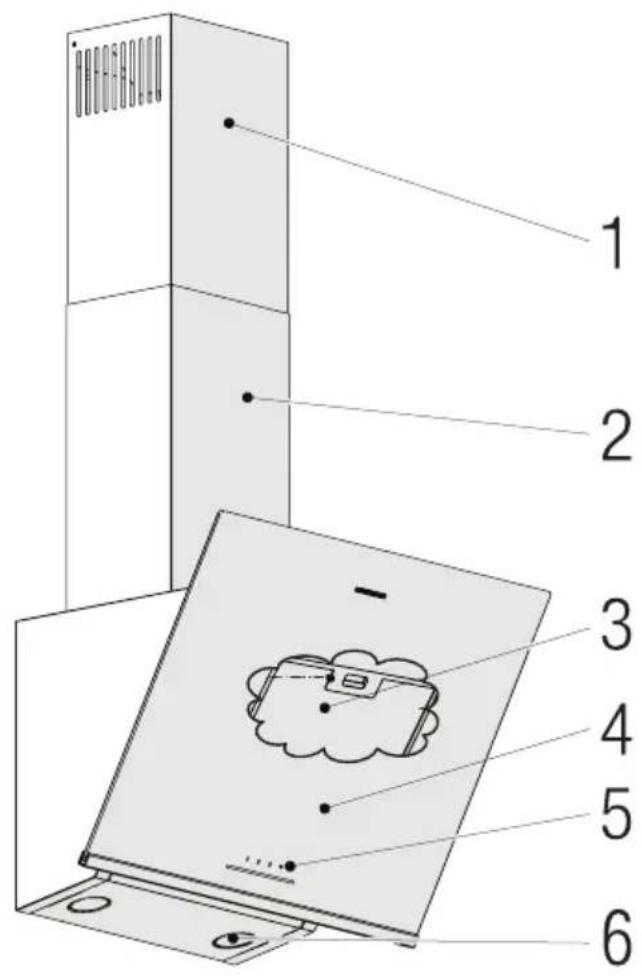
- Inner chimney
- Outer chimney
- Grease filter (Behind glass cover)
- Glass cover
- Control panel
- Lighting
2.2 Technical Data
| Model GDSP2460BC GDSP5460BC | ||
| Supply voltage & Frequency 220-240V ~ 50 Hz | ||
| Lamp Power 2 x 3 W | ||
| Motor Power 210 W | ||
| Flow rate – 3. Level 631 m3/h 623 | m3/h | |
| Insulation Class of Motor Class F | ||
| Insulation Class Class I | ||
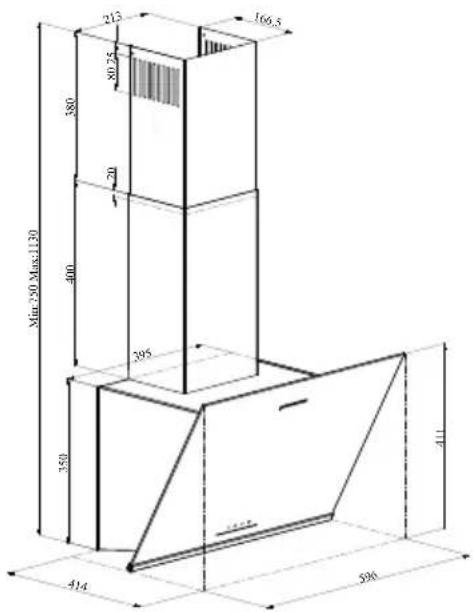
(Figure 1)
GDSP2460BC
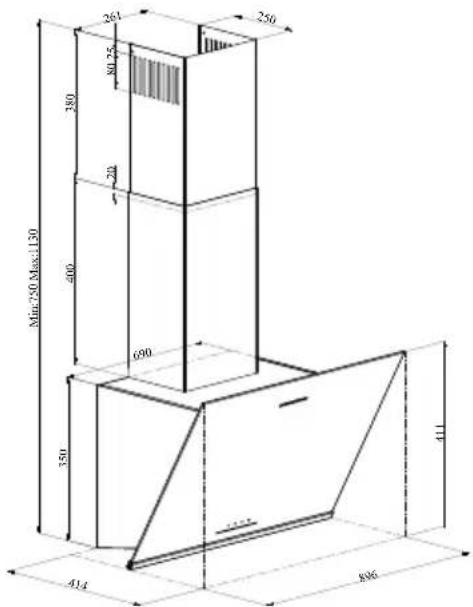
(Figure 2)
GDSP5460BC
3 Operation of the appliance
3.1 Controlling the Appliance
 |  |  |  |
| KEY FUNCTION | |||
| A:1. Stage Button | Operates the appliance on 1st speed. When you press this button again to turn off the appliance, the screen speed stage turns off. | ||
| B:2. Stage Button | Operates the appliance on 2nd speed. When you press this button again to turn off the appliance, the screen speed stage turns off. | ||
| C:3rd Stage Button | Operates the appliance on 3rd speed. When you press this button again to turn off the appliance, the screen speed stage turns off. | ||
| D:Light On / Off | You may illuminate the cooking area by pressing this button. Re-press the button to turn off the lamp. | ||
3.2 Energy efficient usage
- When using your appliance, adjust the speed settings according to vapour and odour intensity, in order to save energy.
- Use low speeds (1-2) under normal conditions, and high speed (3) for intense odour and vapour.
- The lamps on the hood are placed for illuminating the cooking area.
- Using them for environmental lighting shall cause unnecessary energy expenditure and insufficient lighting.
3.3 Operating the hood
- Your appliance contains a motor that has various speeds.
- For better performance, we recommend using low speeds under normal conditions and high
speeds in cases of strong odours and intense vapour.
- You can start your appliance by pressing on the desired speed setting button. (A, B, C).
- You may illuminate the cooking area by pressing the lamp (D).
3.4 Automatic stop
Your appliance has Automatic Stop feature, enabling it to ventilate for a bit more and remove the unwanted odours and vapour inside the environment and turn off automatically after the cooking is done. To enable Automatic Stop feature, press the any speed stage button (A, B, C) on the control panel for longer than 2 seconds; the 15-minute timer function shall be activated. When the automatic stop feature is active, pressing the same speed button shall disable the automatic stop function and the appliance's motor shall stop. This feature is disables when you switch between different speed stages. If you want the appliance to stop automatically, you need to enable the automatic stop feature again.
3.5 Replacement of Lamp
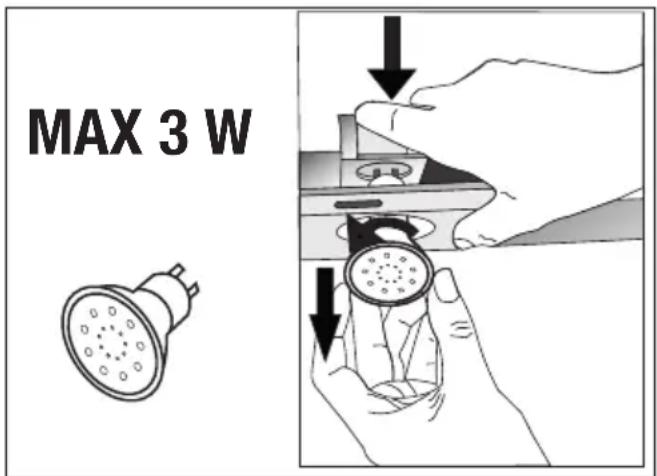
(Figure 3)
Make the electrical connections of the appliance. Your appliance uses 3W spot LED lamp. For replacing the lamps, push downwards
3 Operation of the appliance
on the holder from its behind, turn it counter-clockwise, and take it out downwards. Apply the above operation in reverse to install new lamps (Figure 3).
| Bulb |  |
| Bulb Power 3 W | |
| Holder / Socket GZ | 10 |
| Bulb Voltage 220 - | 240 V |
| Size 53 x 50 mm | |
| ILCOS Code DR/F3- | 220-240-GZ10-50-53 |
| Luminous flux 260 lm | |
| Correlated colour temperature | 3000 K |
This product contains a light source of energy efficiency class "F".
3.6 Operation with chimney connection
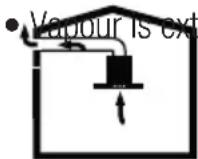
racted through the
flue duct, which is fastened to the connection head on the hood.
- The diameter of the flue duct must be the same as the connection ring. In horizontal settings, the pipe has to have a slight upward slope (around 10^ ) so that the air can exit the room easily.
3.7 Operation without chimney connection
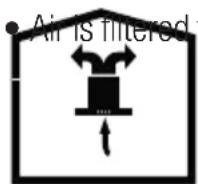
through the carbon
filter and recirculated in the room. Carbon filter is used when it is impossible to use a flue in the house.
- In flueless use, remove the flaps inside the flue adapter.
- Remove the Grease filter. To install the carbon filter, fit the filter to the tabs by centring it on the plastic piece on both sides of the fan body. tighten it by turning right or left.
- Replace Grease filter.
4 Clearing and maintenance

Before cleaning and maintenance, unplug the product or turn off the switch.
4.1 Cleaning of the grease filter
This filter retains the oil particles in the air. Grease filter may change colour as they are washed; this is normal and does not require replacing your grease filter.
natural_image
Technical line drawing of a mechanical assembly with no visible text or symbols(Figure 4)
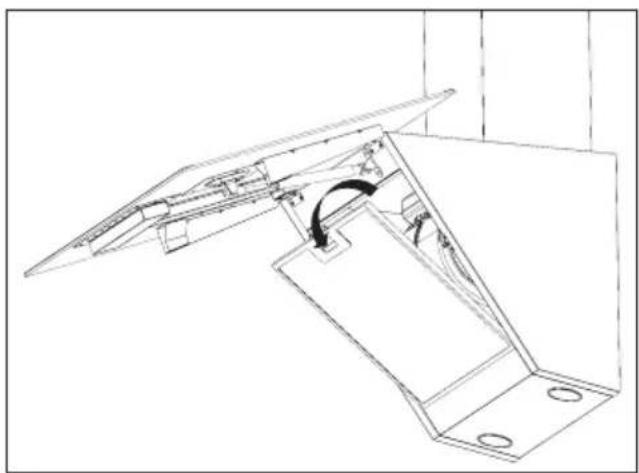
- Push the Grease filter lock forward.
- Then pull it slightly down and pull it out (Figure 4). Otherwise, you can bend the filter. Wash and rinse Grease filter with liquid detergent and replace grease filter to their sockets by by carrying out the steps specified above in reverse order. This filter retains the oil particles in the air.

You may wash your grease filter in the dishwasher.

CAUTION: In case of normal use, clean your filter once in a month.
4.2 Replacement of Carbon Filters
Odour removing filters contain charcoal (Active carbon). Grease filter must be installed in the product, regardless of whether or not carbon filters are used.
natural_image
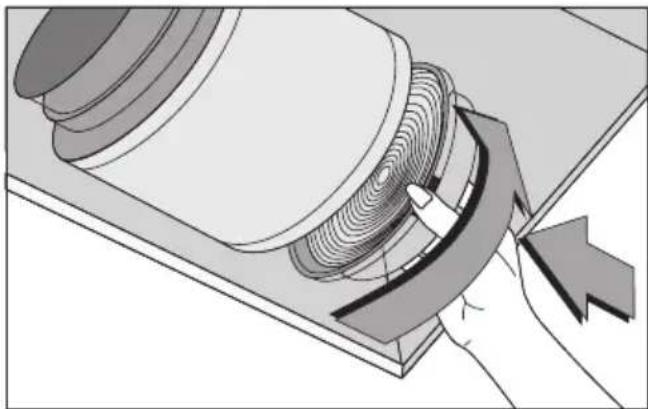
Diagram of a mechanical component with a hand operating a curved tool, showing internal layered structure (no text or symbols)(Figure 5)
- Remove the grease filter (Figure 4)
- To remove the carbon filter, remove the carbon filter from its housing by rotating it counter-clockwise from the tab (Figure 5).
• Install the new carbon filter.
• Install the grease filter.

CAUTION
- Carbon filter shall never be washed.
- Replace carbon filters once every 3 months.
- You can obtain the carbon filter from the authorized services.
5 Installation of appliance

WARNING: Before starting the installation, read the safety information on user manual.
WARNING: Failure to install with screws and stabilizers in accordance with these instructions may result in electric shock.
For the installation of the hood, please contact the nearest Authorized Service.
It is the customer's responsibility to prepare the location and electrical installation of the hood.
5.1 Position of the appliance
(Figure 6)
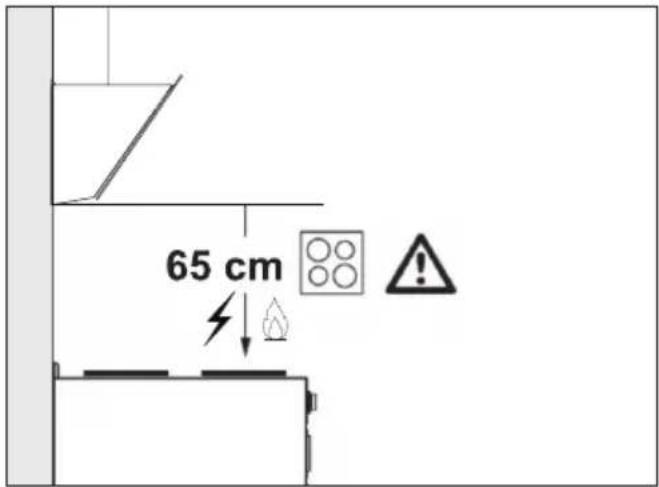
- Distance between the cooker and the cooker hood must be considered prior to assembly. This distance should be 65 cm (Figure 6).
- Distance must be measured from the surface of grate for gas cookers,
• from surface of glass for electric cookers.
5.2 Installation Accessories
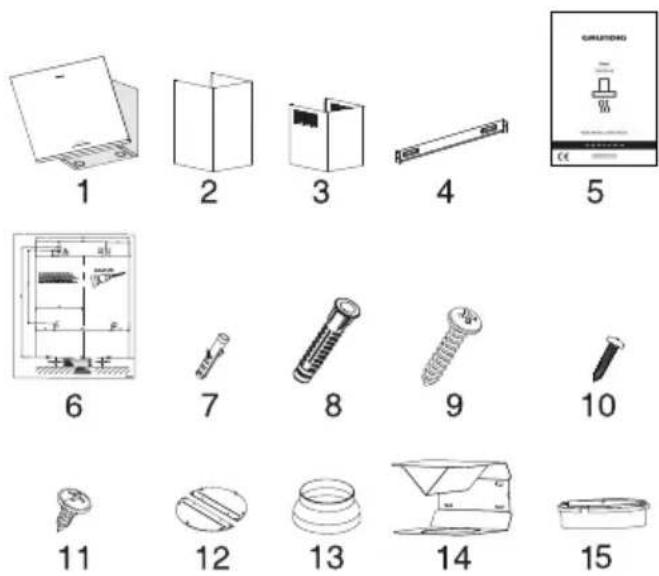
- Product
- Inner Chimney
- Outer Chimney
- Chimney Connection Plate
- User Manual
- Assembly Pattern
- 2x ∅6mm Plastic Dowel
- 4x ∅8mm Plastic Dowel
- 4x 4.8x50 Wall Mount Screw
- 2x 3.9x22 Chimney Connection Plate Screw
- 4x 3.5x9.5 Chimney Connection Screw
- Chimney Clamp
- 150/120mm Plastic Chimney Adapter
- Air Baffle
- Plastic Adapter (Air Diverter)
The information required to make the location suitable for the installation of the hood is given below.
5.3 Wall Mounting
- Wall must be flat, straight and have the sufficient bearing capacity.
- Depth of drilling holes must comply with the length of bolts.
5 Installation of appliance
- The bolts and dowels provided are suitable for brick walls. For other construction material (e.g. drywall, plate, porous concrete), suitable fixing dowels and nuts shall be used.
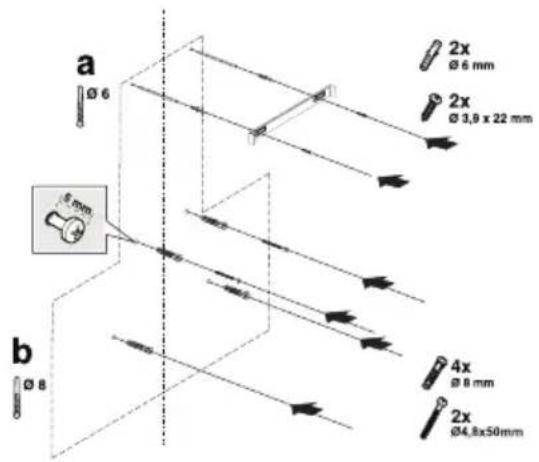
(Figure 7)

CAUTION: Before drilling, ensure that there are no power, gas or water pipes in the close proximity of the drilling locations.
Draw a mid location line from the ceiling perpendicular to the lower edge of the hood).
Paste the installing template provided within the accessories on the surface where the hood is to be mounted. In doing this operation, observe the mounting height of the hood (Figure 6).
There is a tab in the middle of the Chimney connection plate. Place the middle point of this tab on the line that is drawn perpendicular to the wall. In doing this operation, adjust the hood according to the maximum height (Page 8 / Figure 1). Mark the holes where the Chimney connection plate will be mounted with the help of a pen (Figure 7/a).
Drill the marked points with ∅6mm drill and insert 2 plastic dowels in the drilled holes (Figure 7/a). Fix the Chimney connection plate to the wall with 3,9x22 screws (Figure 7/a).
To assemble the hood body, you can use the ∅8mm drill bit to drill points A, B, C, D on the assembly template, and insert 4.8x50mm plastic dowels at these points. (Figure 7/b).
2 piece 4.8x50 suspension screw with a clearance of 5 mm between the screw head and the wall (Figure 7/b).

(Figure 8)
-
Hanger Plate
-
Hanging Plate Connection Screw
In order to install your hood to the wall, loosen the screws on the hanger plates mounted on the motor cabin and pull them up, and then fasten again (Figure 8/A).
Turn on the suction glass of the hood and remove the grease filter (Figure 4).
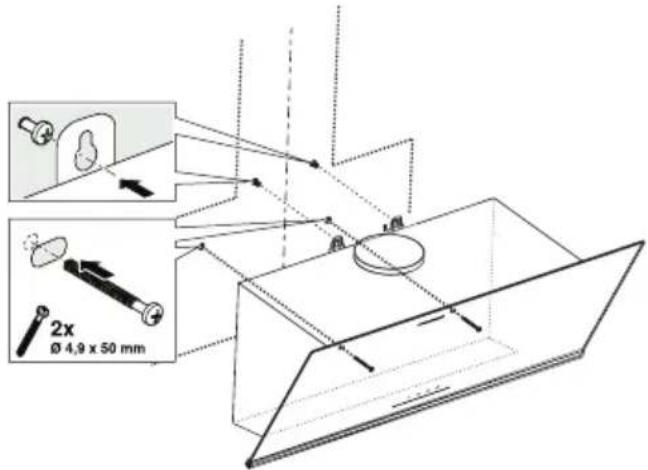
(Figure 9)
Hold the cooker hood by its body and place it on the mounting screws on the wall and tighten the screws (Figure 9).
Secure the cooker hood with two 4.8x50 screws to the wall through the mounting hole on the interior of the appliance (Figure 9).
5 Installation of appliance
5.4 Connecting to Chimney
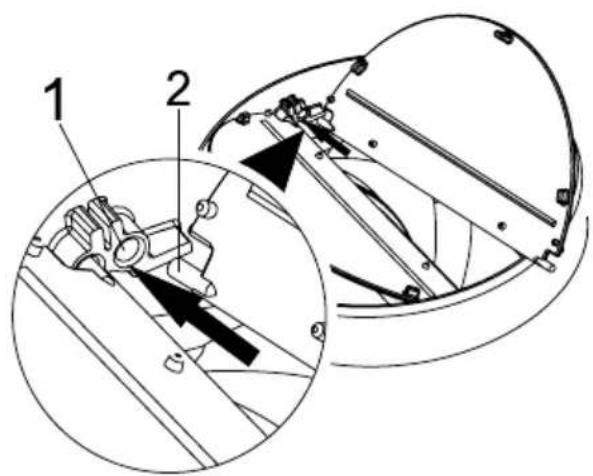
(Figure 10)
- Flap Pin Socket
- Flap Pin
Insert the plastic pin (Figure 10/area no. 2) on the pin socket on the motor exhaust (Figure 10/area no.1). Then bend the flap lightly to insert the other pin on the flap and insert the other pin to its socket (Figure 10).
If you are going to use the ∅ 120/150 mm plastic Chimney adapter, connect one end of the pipe to this adapter, if you are not going to use it, to the direct output on the product. Connect the other end of the pipe to your chimney. Check that these two connections are tight enough so they will not come out when the appliance runs on full power. Ensure that the flaps inside the Chimney work when tightened with clamp. Connect the Chimney connection duct outside the adapter (Figure 11/a). If the connection duct is fitted inside the adapter, suction of air shall not occur as the Chimney flap that prevents the return of air will remain closed (Figure 11 / b). The length of the pipe connection as well as the number of elbows must be as minimum as possible.
A : Chimney exit pipe
B : Chimney Clamps
C: Plastic Chimney
The valves are closed then the appliance is not operating and prevent possible outside odour and dust from entering inside.
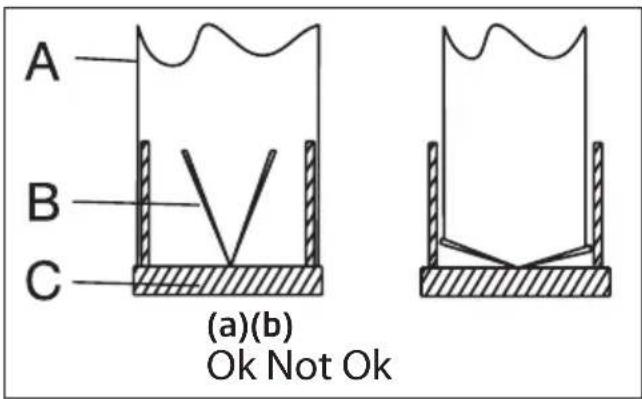
(Figure 11)
5.5 Installation of the Hood to the Chimney
Make the electrical connection of your hood before starting the installation of the chimney. Slip the Chimney plates around the body. Screw the Chimney to the Chimney fastening plates available on the motor cabin. (Figure 12).
Install the Chimney to the Chimney fastening plate that is secured to the wall from its upper outer edges (Figure 12).
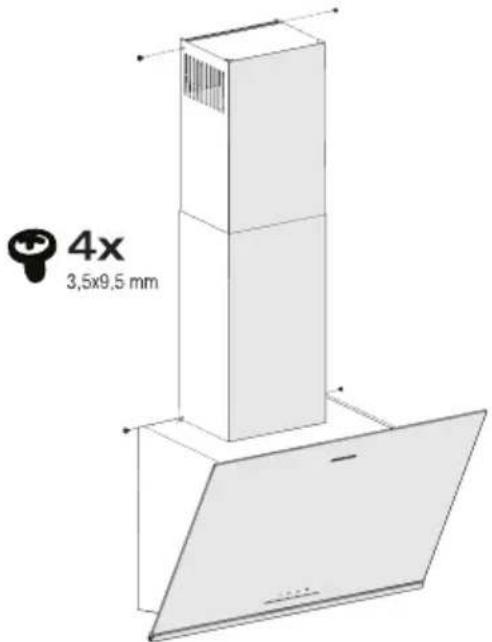
(Figure 12)
5 Installation of appliance
5.6 Installation of Air Baffle
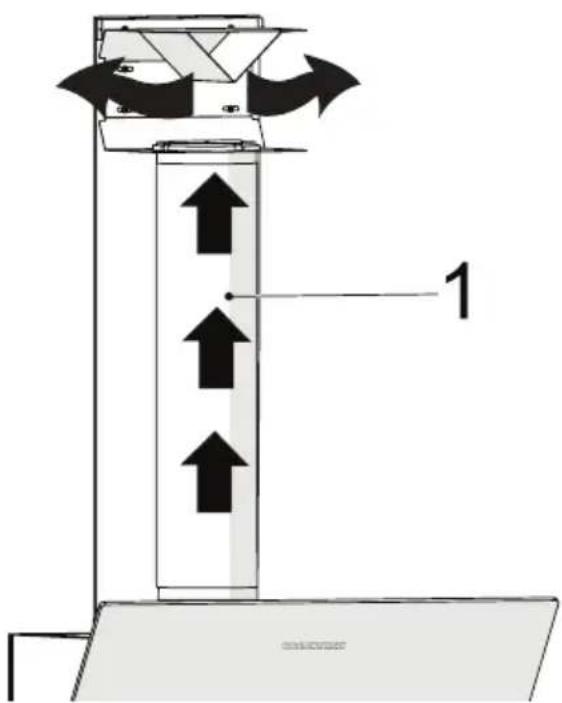
While using with the carbon filter, air baffle is provided with your appliance with the aim of re-releasing the air which is cleaned with carbon filter from the perforated located on the chimney. Assemble the air baffle as below.
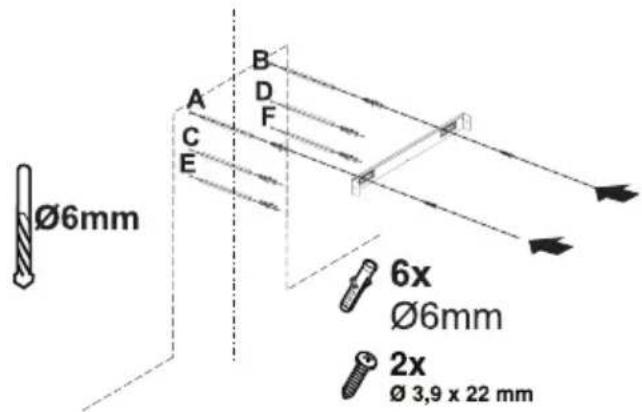
(Figure 13)
There is a tab in the middle of the chimney connection plate. Place the middle point of this tab on the line that is drawn perpendicular to the wall. Align horizontally and mark the holes where the connection plate will be mounted via a pen (Figure 13/A, B).
Drill the marked points with ∅6mm drill and insert two ∅6mm plastic dowels in the drilled holes (Figure 13/A, B).
Fix the Chimney connection plate to the wall with 3.9x22 screws (Figure 13/A, B).
For the assembly air baffle, drill points C, D, E, F with a 6mm drill bit and tap the 6mm plastic dowels (Figure 13).
Assemble cooker hood's body (Figure 9).
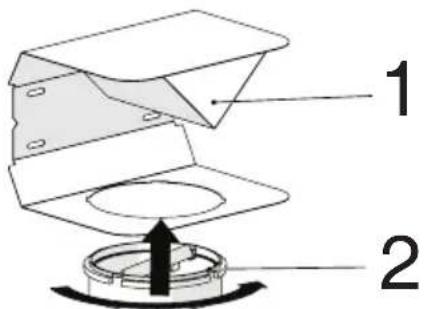
(Figure 14)
-
Air Baffle
-
Plastic Chimney
Attach the plastic Chimney adapter, which is included in the package, in the direction of the air baffle. Lock the Chimney adapter by turning it in the direction of the arrow (Figure 14).
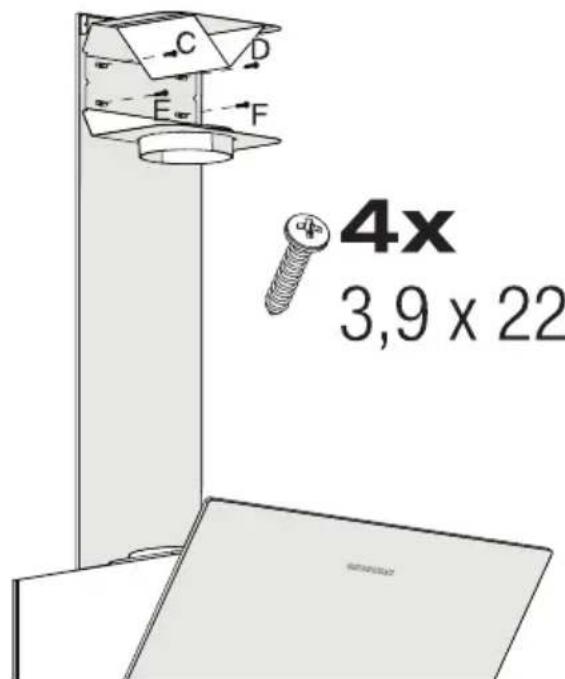
(Figure 15)
Assemble the air baffle group with 3.9 x 22 screws from point C, D, E, F that you have already prepared (Figure 15).
5 Installation of appliance
(Figure 16)
- Aluminium Air Outlet Pipe Make the air outlet pipe assembly (Figure 16).

Since twists and bends in the aluminium pipe will lead to reduction in the air suction power, avoid using twists and bends as much as possible.
Install the Chimney plates of the hood (Figure 9)
6 Troubleshooting
| Troubleshooting Root cause Help | ||
| Appliance is not working. | Check your fuses. Fuse may be blown, inspect and restore it. | |
| Appliance is not working. | Check the electrical connection. | Mains voltage shall be between 220 and 240 V. |
| Appliance is not working. | Check the electrical connection. | Check if other appliance in your kitchen operate. |
| Illumination light does not operate. | Check the electrical connection. | Mains voltage shall be between 220 and 240 V. |
| Illumination light does not operate. | Inspect the lamp switch. Lamp switch shall be at “on” position. | |
| Illumination light does not operate. | Inspect the lamps. The lamps of the appliance shall illuminate. | |
| Air inlet of the appliance is inadequate. | Inspect the aluminium filter. Under normal operating conditions, Grease filter shall be cleaned at least once in a month. | |
| Air inlet of the appliance is inadequate. | Check the air discharge chimney. | The air discharge chimney shall be at “on” position. |
| Air inlet of the appliance is inadequate. | Inspect the carbon filter. The filters of the appliances with carbon filters shall be replaced once in every 3 months under normal conditions. | |
natural_image
Illustration of hands holding a circular device with arrows indicating process (no text or symbols)(Abbildung 3)
natural_image
Technical line drawing of a mechanical assembly with no visible text or symbols(Abbildung 4)
natural_image
Illustration of a hand using a tool to interact with a mechanical component, showing concentric grooves and a curved arrow (no text or symbols)(Abbildung 5)
(Abbildung 10)
(Abbildung 16)
natural_image
Illustration of hands using a mechanical tool to adjust a circular component with arrows indicating force or motion (no text or symbols present)(Figure 3)
natural_image
Simple line drawing of a box with directional arrows inside a house shape (no text or symbols)natural_image
Technical line drawing of a mechanical assembly with no visible text or symbols(Figure 4)
natural_image
Diagram of a mechanical component with a hand operating a curved tool, showing internal layered structure (no text or symbols)(Figure 5)
(Figure 10)
(Figure 16)
natural_image
Illustration of hands holding a small electronic device with a circular component, showing mechanical components and directional arrows (no text or symbols)(Imagen 3)
natural_image
Technical line drawing of a mechanical assembly with no visible text or symbols(Imagen 4)
natural_image
Diagram of a hand operating a rotating mechanical component with a curved arrow indicating motion (no text or symbols present)(Imagen 5)
(Imagen 10)
-
Conector de clavija
-
Clavija
(Imagen 16)
natural_image
Technical line drawing of a mechanical assembly with mounting brackets and a curved component (no text or symbols)(Rys. 4)
natural_image
Illustration of a hand holding a coiled cable or wire component, with no visible text or symbols.(Rys. 5)
(Rys. 10)
(rys. 16)
natural_image
Technical line drawing of a mechanical assembly with mounting brackets and a curved component (no text or symbols)(Figura 4)
natural_image
Illustration of a hand operating a rotating mechanical component with a curved arrow indicating motion (no text or symbols present)(Figura 5)
(Figura 10)
(Figura 16)
natural_image
Technical line drawing of a mechanical assembly with mounting brackets and a curved component (no text or symbols)(Слика 4.)
natural_image
Diagram of a mechanical component with a hand operating a curved tool, showing internal layered structure (no text or symbols)(Слика 5.)
(Слика 10.)
(Слика 16.)
natural_image
Simple line drawing of a chimney emitting steam (no text or symbols)GDSP2460BC - GDSP5460BC
RU
natural_image
Illustration of hands holding a circular mechanical component with arrows indicating motion or force (no text or symbols)(Рисунок 3)
natural_image
Technical line drawing of a mechanical assembly with mounting brackets and a curved component (no text or symbols)(Рисунок 4)
natural_image
Diagram of a mechanical component with a hand operating a curved tool, showing internal layered structure (no text or symbols)(Рис. 5)
(Рисунок 10)
(Рисунок 14)
(Рисунок 16)
natural_image
Simple line icon of a chimney emitting steam (no text or symbols)- CONTENTS
- Please read this user manual first!
- Meanings of the Symbols
- Important safety and environmental instructions
- General safety
- CAUTION: Accessible parts may become hot when used with cooking appliances.
- WARNING: Before installing the Hood, remove the protective films.
- Compliance with the WEEE Directive and Disposing of the Waste Product:
- Compliance with RoHS Directive
- Package Information
- General appearance
- Operation of the appliance
- Controlling the Appliance
- Energy efficient usage
- Operating the hood
- Automatic stop
- Replacement of Lamp
- Operation with chimney connection
- Operation without chimney connection
- Clearing and maintenance
- Cleaning of the grease filter
- (Figure 4)
- Replacement of Carbon Filters
- (Figure 5)
- CAUTION
- Installation of appliance
- Position of the appliance
- (Figure 6)
- Installation Accessories
- Wall Mounting
- (Figure 8)
- (Figure 9)
- Installation of the Hood to the Chimney
- Installation of Air Baffle
- Troubleshooting
- (Abbildung 3)
- (Abbildung 4)
- (Abbildung 5)
- (Abbildung 10)
- (Figure 3)
- (Figure 10)
- (Imagen 3)
- (Imagen 4)
- (Imagen 5)
- (Imagen 10)
- (Rys. 4)
- (Rys. 5)
- (Rys. 10)
- (rys. 16)
- (Figura 4)
- (Figura 5)
- (Слика 4.)
- (Слика 5.)
- (Слика 10.)
- (Слика 16.)
- (Рисунок 3)
- (Рисунок 4)
- (Рис. 5)
- (Рисунок 14)
- (Рисунок 16)
Brand : GRUNDIG
Model : GDSP2460BC
Category : Basket