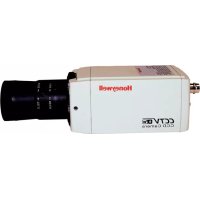
HCM384L - Surveillance Camera HONEYWELL - Free user manual and instructions
Find the device manual for free HCM384L HONEYWELL in PDF.



| Product type | Monochrome surveillance camera |
| Brand | Honeywell |
| Model | HCM384L |
| Dimensions (L x H x D) | 68 x 56 x 120 mm |
| Weight | 0.350 kg |
| Power supply | 12 VDC / 24 VAC |
| Power consumption | 2 W max |
| Sensor type | 1/3" Super HAD CCD (B&W) |
| Horizontal resolution | 380 TVL |
| Number of pixels (H x V) | 510 x 492 (EIA) / 500 x 582 (CCIR) |
| Minimum illumination | < 0.05 lux @ F1.2 (AGC ON) |
| Video output | 1 Vp-p @ 75 Ohms |
| Synchronization system | Internal / Line lock (LL) |
| Signal-to-noise ratio | > 50 dB |
| Automatic gain control (AGC) | On/Off |
| Backlight compensation (BLC) | On/Off |
| Automatic electronic shutter (AES) | 1/60 - 1/100 000 s (EIA) / 1/50 - 1/100 000 s (CCIR) |
| Lens mount | C/CS adjustable |
| Supported lens type | Manual (AES), automatic iris DC or VSD |
| Operating temperature | -10 °C to +50 °C |
| Storage temperature | -20 °C to +70 °C |
| Standards | FCC, CE (EN55013, EN50130-4), LVD |
Frequently Asked Questions - HCM384L HONEYWELL
User questions about HCM384L HONEYWELL
0 question about this device. Answer the ones you know or ask your own.
Ask a new question about this device
Download the instructions for your Surveillance Camera in PDF format for free! Find your manual HCM384L - HONEYWELL and take your electronic device back in hand. On this page are published all the documents necessary for the use of your device. HCM384L by HONEYWELL.
USER MANUAL HCM384L HONEYWELL
Issue Date Revisions
1.00 10/06 New document
1 11/06 Updated Figure 1.
2 02/07 Updated document no.; added warning to p. iii.
Installation and servicing should be performed only by qualified and experienced personnel to conform to all local codes and to maintain your warranty.
WARNING! 12 VDC/24 VAC models require the use of CSA Certified/UL Listed Class 2 power adapters to ensure compliance with electrical safety standards.
Where the MAINS plug or an appliance coupler is used as the disconnect device, the disconnect device shall remain readily operable.
WEEE (Waste Electrical and Electronic Equipment). Correct disposal of this product (applicable in the European Union and other European countries with separate collection systems). This product should be disposed of, at the end of its useful life, as per applicable local laws, regulations, and procedures.
Explanation of Graphical Symbols

CAUTION
RISK OF ELECTRIC SHOCK DO NOT OPEN


THIS SYMBOL INDICATES THAT DANGEROUS VOLTAGE CONSTITUTING A RISK OF ELECTRIC SHOCK IS PRESENT WITHIN THE UNIT.
CAUTION: TO REDUCE THE RISK OF ELECTRIC SHOCK, DO NOT REMOVE THE COVER. NO USER-SERVICEABLE PARTS INSIDE REFER SERVICING TO QUALIFIED SERVICE PERSONNEL

THIS SYMBOL INDICATES THAT IMPORTANT OPERATING AND MAINTENANCE INSTRUCTIONS ACCOMPANY THIS UNIT.
FCC Compliance Statement
Information to the User: This equipment has been tested and found to comply with the limits for a Class A digital device. Pursuant to Part 15 of the FCC Rules, these limits are designed to provide reasonable protection against harmful interference when the equipment is operated in a commercial environment. This equipment generates, uses, and can radiate radio frequency energy and, if not installed and used in accordance with the instruction manual, may cause harmful interference to radio communications. Operation of this equipment in a residential area is likely to cause harmful interference in which case the user will be required to correct the interference at his own expense.
Caution Changes or modifications not expressly approved by the party responsible for compliance could void the user's authority to operate the equipment.
Manufacturer's Declaration of Conformance
The manufacturer declares that the equipment supplied with this guide is compliant with the essential protection requirements of the EMC directive 89/336/EEC and the Low Voltage Directive LVD 73/23 EEC, conforming to the requirements of standards EN 55013 for emissions.
Contents
Introduction 1
Features 1
Before You Begin 2
Unpack Everything 2
Camera Settings 3
Camera Functions 3
Setting Up Your Camera 4
Selecting the Lens 4
Fixed Lens 4
Vari-focal Auto Iris Lens. 4
Direct Drive (DC) Lens 4
Video Drive (VSD) Lens 5
Backlight Compensation (BLC) 5
Automatic Gain Control (AGC) 5
Synchronization Selection (LL/INT) ..... 5
Line Lock Phase Adjustment Potentiometer .. 6
Lens Installation 7
Adjusting the Back Focus 7
Completing the Installation 9
Mounting the Camera 9
Connecting the Camera 10
Warranty and Service 11
Specifications 11
Introduction
The Honeywell L-Series monochrome cameras are ideally suited for use in day-to-day surveillance applications. The L-Series monochrome cameras are designed for exceptional value and performance for everyday use. Their off-the-shelf feature set is designed for high picture quality in standard applications and they require little to no adjustment after installation.
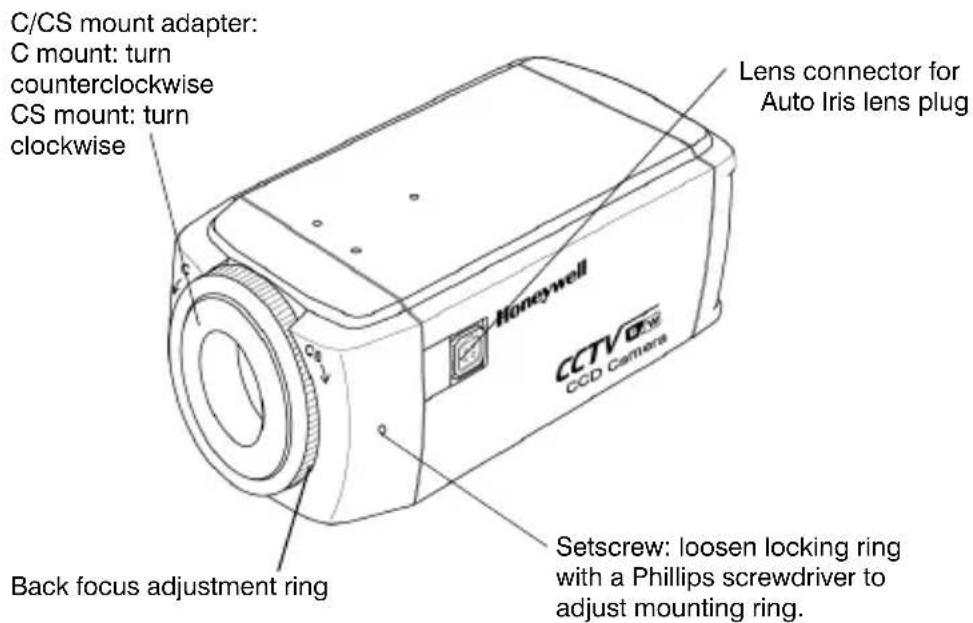
Figure 1 Camera Overview
Features
• 1/3" Monochrome CCD
• C/CS adjustable lens mount adapter
• Excellent signal-to-noise ratio of more than 50 dB
• Less than 0.1 lux low light sensitivity for excellent performance in low light conditions
- Compatible with Video Iris (VSD) or Direct Drive (DC)
Auto Iris lens
- 12 VDC/24 VAC or 230 VAC operation (model dependent)
Before You Begin
Please read this guide carefully before you install the L-Series monochrome camera. Keep this guide for future reference.
Unpack Everything
Check that the items received match those listed on the order form and packing slip. The L-Series packing box should include, in addition to this User Guide:
• One L-Series monochrome camera
• One Auto Iris lens plug
If any parts are missing or damaged, contact the dealer you purchased the camera from or call Honeywell Customer Service (see Contact Information on the back of this manual).
Note You will also require a Phillips screwdriver to complete the installation.
Camera Settings
Camera Functions
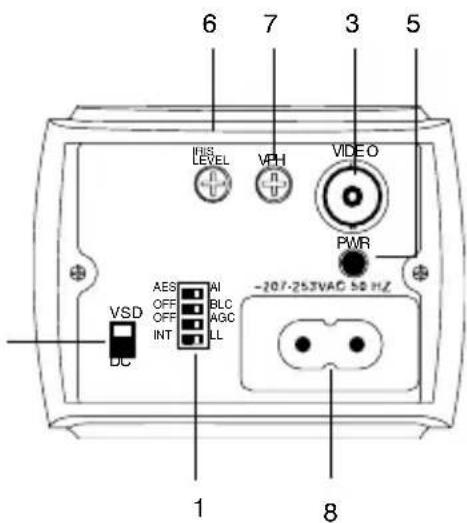
Figure 2 Camera Rear View
Low Voltage
(HCM574L, HCM384L,
HCM584LX, HCM404LX)
Mains 230V—Line Voltage
(HCM585LX, HCM405LX)
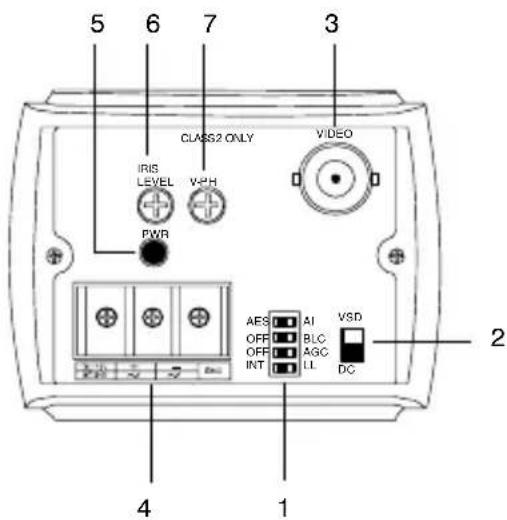
LEGEND □□□ = ON
= OFF
Shaded box indicates default switch setting.
Legend
| # | D | e | s | c | r | i | p | t | i |
| 1 | DIP switches for mode settings (see Figure 3) | ||||||||
| 2 | Auto Iris Lens select switch, VSD for Video or DC for Direct Drive | ||||||||
| 3 | Video output connector | ||||||||
| 4 | Power input connector (24 VAC: 3 terminals)—Low Voltage model only | ||||||||
| 5 | Power LED indicator | ||||||||
| 6 | DC Iris level adjustment, for use with DC Iris lens | ||||||||
| 7 | V-Phase adjustment, for use with Line lock | ||||||||
| 8 | Mains 230V Line Voltage power connector | ||||||||
Setting Up Your Camera
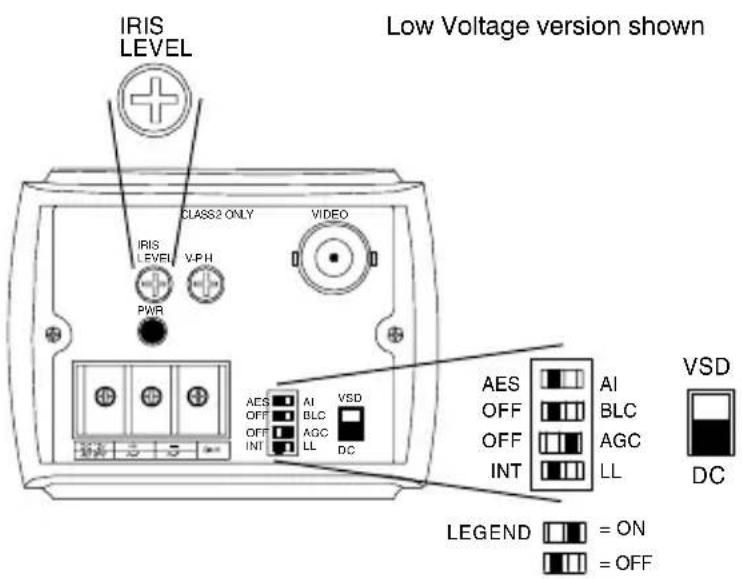
Figure 3 shows the factory set DIP switch settings. Automatic Gain Control (AGC) is set ON.
Figure 3 Factory Set DIP Switch Settings
Selecting the Lens
Fixed Lens
Set the AES/AI switch on the rear of the camera (see Figure 3) to AES.
Vari-focal Auto Iris Lens
Vari-focal Auto Iris lenses (Direct Drive [DC] or Video Drive [VSD]) are connected to the camera via a 4-pin square socket located at the side of the camera. Set the AES/AI DIP switch to AI.
To set a different exposure, see Backlight Compensation (BLC) on page 5.
Direct Drive (DC) Lens
- Set the VSD/DC switch on the rear of the camera to DC. Set the AES/AI DIP switch to AI.
- Slowly turn the IRIS LEVEL potentiometer until the picture on the monitor is as clear as possible and is not too bright.
Video Drive (VSD) Lens
Set the VSD/DC switch on the rear of the camera (see Figure 3) to VSD.
Backlight Compensation (BLC)
If there is excessive light (for example, a window exists in a scene), the camera tries to compensate by reducing the overall exposure, resulting in the areas surrounding the window becoming too dark. Turn the BLC switch ON to eliminate the silhouette effect.
Automatic Gain Control (AGC)
This feature can improve picture quality when the level of scene illumination is low. When set to OFF, the maximum gain is 11 dB. When set to ON, the maximum gain is 30 dB.
Synchronization Selection (LL/INT)
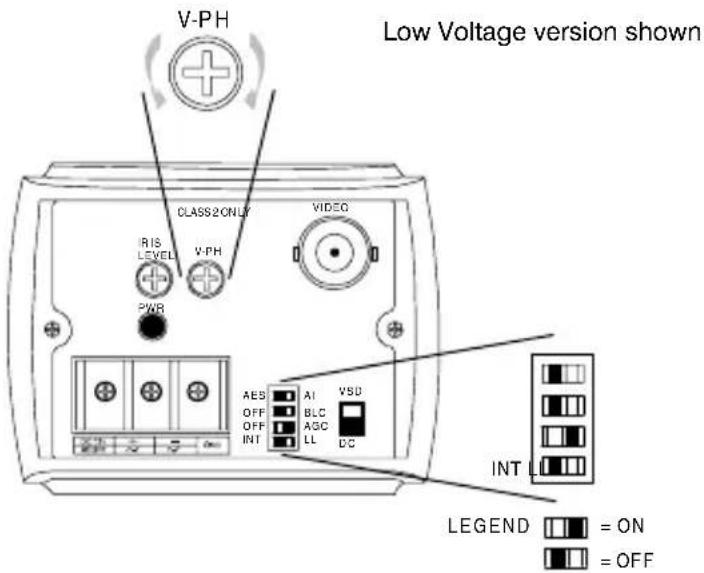
This switch selects the synchronization mode of the camera. When the camera is connected to an AC supply, the Line lock (LL) mode is used to lock the camera's frame rate to the frequency so that each camera in the system is triggered at the same point on the supply's AC cycle. The default setting is LL.
WARNING! The LL/INT switch must be set to INT when operating from 12 VDC.
Line Lock Phase Adjustment Potentiometer
When the camera is in Line lock mode, it is possible to adjust the point on the AC cycle at which the camera triggers. This feature allows for synchronization of cameras that are connected to different phases.
The V-PHASE adjustment potentiometer allows the line lock phase trigger point to be adjusted by 270^ . Rotating the potentiometer clockwise advances the trigger point and turning it counterclockwise retards the trigger point. If all cameras in a system are on the same phase then no line lock phase adjustment should be made.
Lens Installation
Adjusting the Back Focus
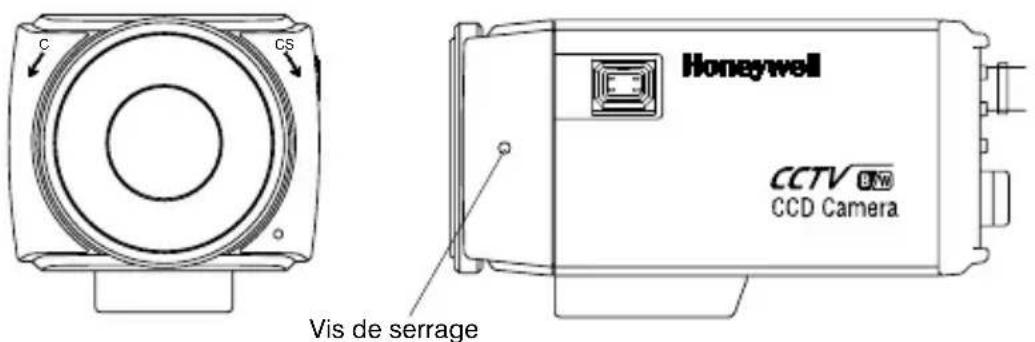
The back focus adjustment is accessible at the front end of the camera housing to adjust the back focal length or picture focus.
The range of adjustment allows both C- and CS-mount lenses to be used without the need for a spacer ring.
Figure 4 C/CS Mount
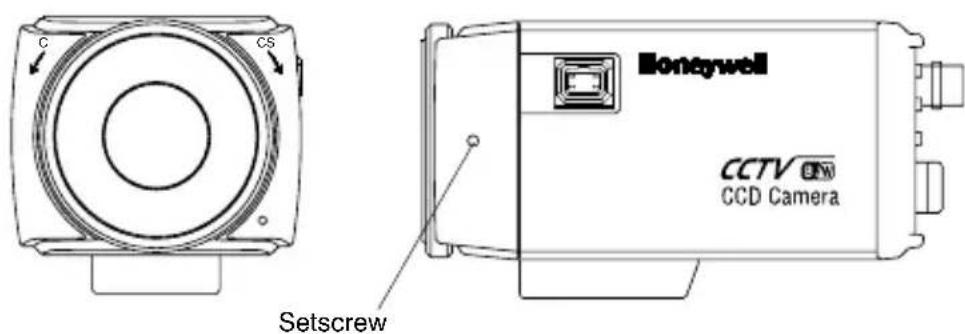
- Loosen the setscrew with a Phillips screwdriver.
- Adjust the focus ring to focus the picture.
- Retighten the setscrew.
Figure 5 DC and VSD Lens Pin Definition
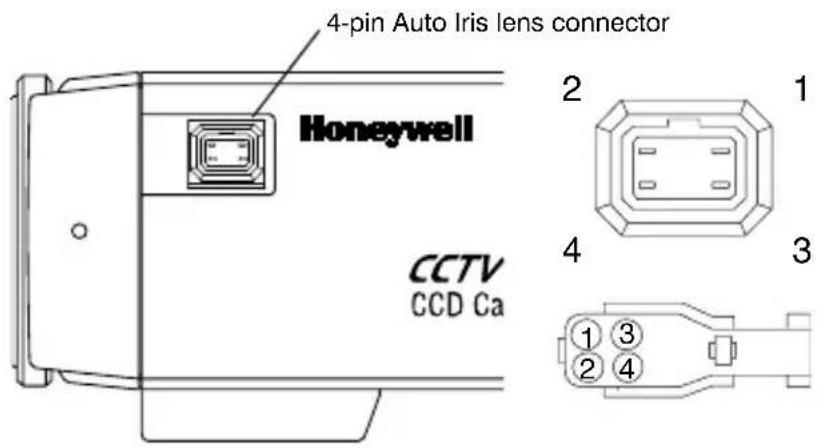
Pin DC (Direct Drive) lens Video (VSD) lens
| 1 CTRL - Power (+12V) | |||||||
| 2 | C | T | R | L | + | N | C |
| 3 DRV + Video Signal | |||||||
| 4 | D | R | V | - | G | N | D |
| Set the select switch to DC. Set the select switch to VSD. | |||||||
Completing the Installation
Mounting the Camera
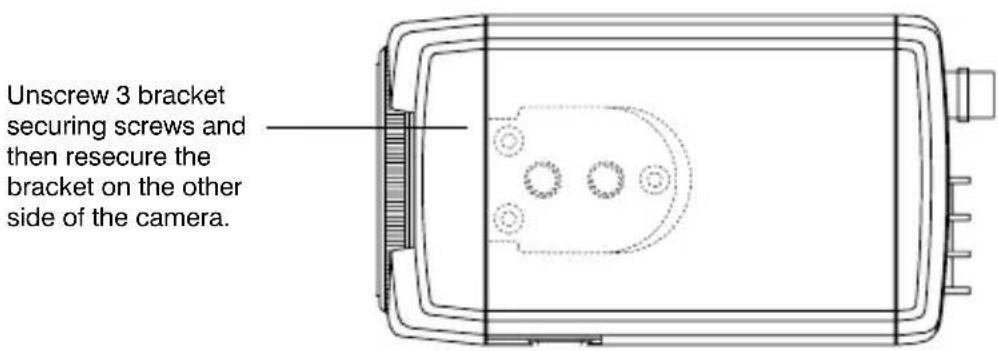
Mounting points are provided on the top of the camera for mounting the camera on a bracket or tripod. They are designed to accept standard sized 1/4 x 20 mounting screws. This bracket can be unscrewed and mounted onto the opposite side of the camera, depending on your application. The mounting bracket must be capable of supporting the weight of the camera and its lens.
Note Some installation codes dictate that the mounting bracket must be capable of supporting up to four times the combined weight of the camera and lens.
Figure 6 Camera Mount
Connecting the Camera
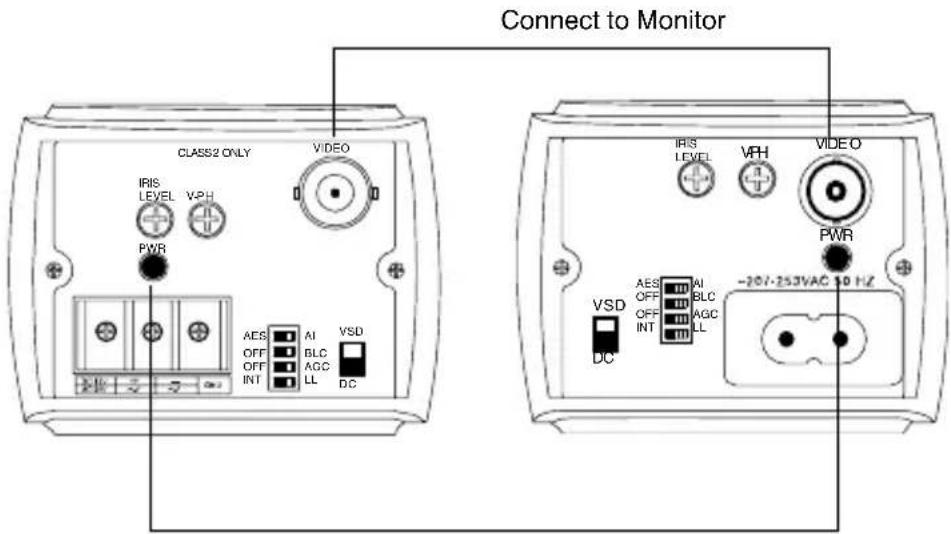
- Connect the VIDEO connector on the rear of the camera to the video-in connector on your monitor.
- Connect the camera to a power supply appropriate for your installation.
HCM574L, HCM384L, HCM584LX, HCM404LX:
12 VDC or 24 VAC power supply
HCM585LX, HCM405LX: 230V power supply
- Plug in the power supply. The power (PWR) LED illuminates to show that the camera is receiving power. If it does not illuminate, check the connections and the power source.
Figure 7 Camera Connections
Low Voltage
(HCM574L, HCM384L,
HCM584LX, HCM404LX)
Mains 230V—Line Voltage
(HCM585LX, HCM405LX)
Power LED
Warranty and Service
Subject to the terms and conditions listed on the Product warranty, during the warranty period Honeywell will repair or replace, at its sole option, free of charge, any defective product returned prepaid. In the event you have a problem with any Honeywell product, please call Customer Service at 1.800.796.CCTV (North America only) for assistance or to request a Return Merchandise
Authorization (RMA) number. For Europe and the United Kingdom, please contact your Honeywell dealer.
Be sure to have the model number, serial number, and the nature of the problem available for the technical service representative.
Prior authorization must be obtained for all returns, exchanges, or credits. Items shipped to Honeywell without a clearly identified Return Merchandise Authorization (RMA) number may be refused.
Specifications
Note These specifications refer to all models, except where otherwise noted.
HCM574L HCM584LX HCM585LX
| Operational | |||
| Image Sensor: 1/3” Super HAD CCD (B/W) | |||
| Video Standard: | EIA CCIR | ||
| Scanning System: | 525 lines, 2:1 interlace | 625 lines, 2:1 interlace | |
| Number of Pixels (H x V): | 768 x 494 752 x 582 | ||
| Minimum Illumination: | >0.07 lux @ F1.2 (50 IRE, AGC ON) | ||
| Horizontal Resolution: | 570 TVL 580 TVL | ||
| Video Output: 1 Vp-p @ 75 Ohms | |||
| Sync System: Internal/Line lock | |||
| S/N Ratio: >50 dB | |||
| Auto Gain | On/Off | ||
| Control (AGC): | |||
| ALC: EE/VSD/DC | |||
| Automatic | 1/60 - | 1/50 - 1/100,000 sec | |
| Electronic | 1/100,000 sec | ||
| Shutter (AES): | |||
| Lens Mount: C/CS mount (adjustable) | |||
| BLC: On/Off | |||
| Gamma: 0.45 | |||
| Electrical | |||
| Input Voltage: 12 VDC/24 VAC 230 VAC | |||
| Input Voltage Range: | 11 - 16 VDC, 17 - 28 VAC 230 VAC ± 10% | ||
| Power Consumption: | 2 W (max) | 2 W (max) | 3.2 W (max) |
| Mechanical | |||
| Dimension: | 2.68 x 2.2 x 4.72 in. | 2.68 x 2.2 x | |
| (W x H x D) | (68 x 56 x 120 mm) | 5.51 in. (68 x 56 x 140 mm) | |
| Weight: 0.77 lb (.350 kg) 0.84 lb | (.380 kg) | ||
| Environmental | |||
| Temperature: Operating: 14°F to 122°F (-10°C to +50°C) | |||
| Storage: -4°F to158°F (-20°C to +70°C) | |||
| Regulatory | |||
| Emissions: | FCC, CE (EN55013) | ||
| Immunity: | CE (EN50130-4) | ||
| Safety: | EU: 73/23/EEC LVD | ||
Note These specifications refer to all models, except where otherwise noted.
| HCM384L | HCM404LX | HCM405LX | |
| Operational | |||
| Image Sensor: | 1/3” Super HAD CCD (B/W) | ||
| Video | EIA | CCIR | |
| Standard: | |||
| Scanning System: | 525 lines, 2:1 interlace | 625 lines, 2:1 interlace | |
| Number of Pixels (H x V): | 510 x 492 500 x 582 | ||
| Minimum Illumination: | < 0.05 lux @ F1.2 (50 IRE, AGC ON) | ||
| Horizontal Resolution: | 380 TVL 400 TVL | ||
| Video Output: 1 Vp-p @ 75 Ohms | |||
| Sync System: Internal/Line lock | |||
| S/N Ratio: > 50 dB | |||
| Auto Gain Control (AGC): | On/Off | ||
| ALC: EE/VSD/DC | |||
| Automatic Electronic Shutter (AES): | 1/60 - 1/100,000 sec | 1/50 - 1/100,000 sec | |
| Lens Mount: C/CS mount (adjustable) | |||
| BLC: On/Off | |||
| Gamma: 0.45 | |||
Electrical
| Input Voltage: 12 VDC/24 VAC 230 VAC | |||
| Input Voltage Range: | 11 - 16 VDC, 17 - 28 VAC 230 VAC ± 10% | ||
| Power Consumption: | 2 W (max) | 2 W (max) | 3.2 W (max) |
| Mechanical | |||
| Dimension: (W x H x D) | 2.68 x 2.2 x 4.72 in. (68 x 56 x 120 mm) | 2.68 x 2.2 x 5.51 in. (68 x 56 x 140 mm) | |
| Weight: 0.77 lb (.350 kg) | 0.84 lb | (.380 kg) | |
Environmental
| Temperature: | Operating: 14°F to 122°F (-10°C to +50°C) |
| Storage: -4°F to158°F (-20°C to +70°C) | |
| Regulatory | |
| Emissions: | FCC, CE (EN55013) |
| Immunity: | CE (EN50130-4) |
| Safety: | EU: 73/23/EEC LVD |
Honeywell Video Systems (Head office)
2700 Blankenbaker Pkwy, Suite 150
Louisville, KY 40299, USA
www.honeywellvideo.com
+1.800.796.2288
Honeywell Security Australia Pty Ltd.
Unit 5, Riverside Centre
24-28 River Road West
Parramatta, NSW 2150, Australia
www.ademco.com.au
+61.2.8837.9300
Honeywell Security Asia Pacific
33/F Tower A, City Center, 100 Zun Yi Road
Shanghai 200051, China
www.security.honeywell.com/cn
+86 21.2527.4568
Honeywell Security Asia
Flat A, 16/F, CDW Building
388 Castle Peak Road
Tsuen Wan, N.T., Hong Kong
www.security.honeywell.com/hk
+852.2405.2323
Honeywell Security France
Parc Gutenberg, 8, Voie La Cardon
91120, Palaiseau, France
www.honeywell.com/security/fr
+33.01.64.53.80.40
Honeywell Security Italia SpA
Via Treviso 2 / 4
31020 San Vendemiano
Treviso, Italy
www.honeywell.com/security/it
+39.04.38.36.51
Honeywell Security España
Mijancas 1. 3ª Planta
P.Ind. Las Mercedes
28022 Madrid, Spain
www.honeywell.com/security/es
+34.902.667.800
Honeywell Video Systems
Northern Europe
Netwerk 121
1446 WV Purmerend, The Netherlands
www.SecurityHouse.nl
+31.299.410.200
Honeywell Video Systems UK Ltd.
Aston Fields Road, Whitehouse Ind Est
Runcorn, Cheshire, WA7 3DL, UK
www.honeywellvideo.com
+0844 8000 235
Honeywell Security South Africa
Unit 6 Galaxy Park, 17 Galaxy Avenue
Linbro Park, P.O. Box 59904
2100 Kengray, Johannesburg
South Africa
www.honeywell.co.za
+27.11.574.2500
D-72458 Albstadt, Germany
www.honeywell.com/security/de
+49.74 31.8 01.0
Honeywell Security Poland
Honeywell Security Czech Republic
Havránkova 33, Brno
Dolní Heršpice, 619 00
Czech Republic
www.olympo.cz
+420.543.558.111
Honeywell Security Slovakia Republic
Vajnorská 142, 83104 Bratislava
Slovakia
www.olympo.sk
+421.2.444.54.660
Honeywell
www.honeywellvideo.com
+1.800.796.CCTV (North America only)
HVSsupport@honeywell.com
Document G-113078-002 02/07 Rev 2
© 2007 Honeywell International Inc. All rights reserved. No part of this publication may be reproduced by any means without written permission from Honeywell Video Systems. The information in this publication is believed to be accurate in all respects. However, Honeywell Video Systems cannot assume responsibility for any consequences resulting from the use thereof. The information contained herein is subject to change without notice. Revisions or new editions to this publication may be issued to incorporate such changes.
Figure 4 Monture C/CS
www.honeywellvideo.com
+1.800.796.2288
Honeywell Security Australia Pty Ltd.
Unit 5, Riverside Centre
24-28 River Road West
Parramatta, NSW 2150, Australie
www.ademco.com.au
+61.2.8837.9300
Honeywell Security Asia Pacific
33/F Tower A, City Center, 100 Zun Yi Road
Shanghai 200051, Chine
www.security.honeywell.com/cn
+86 21.2527.4568
Honeywell Security Asia
Flat A, 16/F, CDW Building
388 Castle Peak Road
Tsuen Wan, N.T., Hong Kong
www.security.honeywell.com/hk
+852.2405.2323
Honeywell Security France
Parc Gutenberg, 8, Voie La Cardon
91120, Palaiseau, France
www.honeywell.com/security/fr
+33.01.64.53.80.40
Honeywell Security Italia SpA
Via Treviso 2 / 4
31020 San Vendemiano
Treviso, Italie
www.honeywell.com/security/it
+39.04.38.36.51
Honeywell Security España
Mijancas 1. 3ª Planta
P.Ind. Las Mercedes
Aston Fields Road, Whitehouse Ind Est
Runcorn, Cheshire, WA7 3DL,
Royaume-Uni
www.honeywellvideo.com
+0844 8000 235
Honeywell Security South Africa
Unit 6 Galaxy Park, 17 Galaxy Avenue
Linbro Park, P.O. Box 59904
2100 Kengray, Johannesburg
Afrique du Sud
www.honeywell.co.za
+27.11.574.2500
www.honeywell.com/security/de
+49.74 31.8 01.0
Honeywell Security Poland
Honeywell Security Czech Republic
Havránkova 33, Brno
Dolní Heršpice, 619 00
République Tchèque
www.olympo.cz
+420.543.558.111
Honeywell Security Slovakia Republic
Vajnorská 142, 83104 Bratislava
Slovaquie
www.olympo.sk
+421.2.444.54.660
Honeywell
www.honeywellvideo.com
+1.800.796.CCTV (Amérique du Nord uniquement)
HVSsupport@honeywell.com
Document G-113078-002 02/07 Rév. 2
www.honeywellvideo.com
+1.800.796.2288
Honeywell Security Australia Pty Ltd.
Unit 5, Riverside Centre
24-28 River Road West
Parramatta, NSW 2150, Australia
www.ademco.com.au
+61.2.8837.9300
Honeywell Security Asia Pacific
33/F Tower A, City Center, 100 Zun Yi
Road
Shanghai 200051, China
www.security.honeywell.com/cn
+86 21.2527.4568
Honeywell Security Asia
Flat A, 16/F, CDW Building
388 Castle Peak Road
Tsuen Wan, N.T., Hong Kong
www.security.honeywell.com/hk
+852.2405.2323
Honeywell Security France
Parc Gutenberg, 8, Voie La Cardon
91120, Palaiseau, Francia
www.honeywell.com/security/fr
+33.01.64.53.80.40
Honeywell Security Italia SpA
Via Treviso 2 / 4
31020 San Vendemiano
Treviso, Italia
www.honeywell.com/security/it
+39.04.38.36.51
Honeywell Security España
Mijancas 1.3 ^a Planta
P.Ind. Las Mercedes
28022 Madrid, España
www.honeywell.com/security/es
+34.902.667.800
Honeywell Video Systems Northern Europe
Netwerk 121
1446 WV Purmerend, Países Bajos
www.SecurityHouse.nl
+31.299.410.200
Honeywell Video Systems UK Ltd.
Aston Fields Road, Whitehouse Ind Est
Runcorn, Cheshire, WA7 3DL, UK
www.honeywellvideo.com
+0844 8000 235
Honeywell Security South Africa
Unit 6 Galaxy Park, 17 Galaxy Avenue
Linbro Park, P.O. Box 59904
2100 Kengray, Johannesburg
Sudáfrica
www.honeywell.co.za
+27.11.574.2500
www.honeywell.com/security/de
+49.74 31.8 01.0
Honeywell Security Poland
Honeywell Security Czech Republic
Havránkova 33, Brno
Dolní Heršpice, 619 00
República Checa
www.olympo.cz
+420.543.558.111
Honeywell Security Slovakia Republic
Vajnorská 142, 83104 Bratislava
Eslovaquia
www.olympo.sk
+421.2.444.54.660
Honeywell
www.honeywellvideo.com
HVSsupport@honeywell.com
Documento G-113078-002 02/07 Rev. 2
Telecamera L-Series B/W
EIA
CCIR
HCM574L HCM584LX
HCM384L HCM585LX
HCM404LX
HCM405LX
Guida per l'utente
Obiettivo DC (Direct Drive) 4
Obiettivo Video Drive (VSD) 5
(BLC, Backlight Compensation) 5
(LL/INT, Synchronization Selection) ..... 5
Obiettivo DC (Direct Drive)
natural_image
Technical line drawing of a rectangular electronic device with internal components and mounting ports (no text or symbols)www.honeywellvideo.com
+1.800.796.2288
Honeywell Security Australia Pty Ltd.
Unit 5, Riverside Centre
24-28 River Road West
Parramatta, NSW 2150, Australia
www.ademco.com.au
+61.2.8837.9300
Honeywell Security Asia Pacific
33/F Tower A, City Center, 100 Zun Yi
Road
Flat A, 16/F, CDW Building
388 Castle Peak Road
Tsuen Wan, N.T., Hong Kong
www.security.honeywell.com/hk
+852.2405.2323
Honeywell Security France
Parc Gutenberg, 8, Voie La Cardon
91120, Palaiseau, Francia
www.honeywell.com/security/fr
+33.01.64.53.80.40
Honeywell Security Italia SpA
Via Treviso 2 / 4
31020 San Vendemiano
Treviso, Italia
www.honeywell.com/security/it
+39.04.38.36.51
Honeywell Security España
Mijancas 1.3 ^a Planta
P.Ind. Las Mercedes
Honeywell Video Systems Northern Europe
Netwerk 121
1446 WV Purmerend, Paesi Bassi
www.SecurityHouse.nl
+31.299.410.200
Honeywell Video Systems UK Ltd.
Aston Fields Road, Whitehouse Ind Est
Runcorn, Cheshire, WA7 3DL, Regno
Unito
www.honeywellvideo.com
+0844 8000 235
Honeywell Security South Africa
Unit 6 Galaxy Park, 17 Galaxy Avenue
Linbro Park, P.O. Box 59904
2100 Kengray, Johannesburg
Sudafrica
www.honeywell.co.za
+27.11.574.2500
www.honeywell.com/security/de
+49.74 31.8 01.0
Honeywell Security Poland
Honeywell Security Czech Republic
Havránkova 33, Brno
Dolní Heršpice, 619 00
Repubblica Ceca
www.olympo.cz
+420.543.558.111
Honeywell Security Slovakia Republic
Vajnorská 142, 83104 Bratislava
Slovacchia
www.olympo.sk
+421.2.444.54.660
Honeywell
www.honeywellvideo.com
+1.800.796.CCTV (Solo Nord America)
HVSsupport@honeywell.com
Documento G-113078-002 02/07 Rev 2
natural_image
Technical line drawing of a rectangular electronic device with internal components and mounting points (no text or symbols)Louisville, KY 40299, USA
www.honeywellvideo.com
+1.800.796.2288
Honeywell Security Australia Pty Ltd.
Unit 5, Riverside Centre
24–28 River Road West
Parramatta, NSW 2150, Australien
www.ademco.com.au
+61.2.8837.9300
Honeywell Security Asia Pacific
33/F Tower A, City Center, 100 Zun Yi
Road
Shanghai 200051, China
www.security.honeywell.com/cn
+86 21.2527.4568
Honeywell Security Asia
Flat A, 16/F, CDW Building
388 Castle Peak Road
Tsuen Wan, N.T., Hongkong
www.security.honeywell.com/hk
+852.2405.2323
Honeywell Security France
Parc Gutenberg, 8, Voie La Cardon
www.honeywell.com/security/fr
+33.01.64.53.80.40
Honeywell Security Italia SpA
Via Treviso 2 / 4
31020 San Vendemiano
Treviso, Italien
www.honeywell.com/security/it
+39.04.38.36.51
Honeywell Security España
Mijancas 1.3 ^a Planta
P.Ind. Las Mercedes
Aston Fields Road, Whitehouse Ind Est
Runcorn, Cheshire, WA7 3DL, GB
www.honeywellvideo.com
+0844 8000 235
Honeywell Security South Africa
Unit 6 Galaxy Park, 17 Galaxy Avenue
Linbro Park, P.O. Box 59904
2100 Kengray, Johannesburg
Südafrika
www.honeywell.co.za
+27.11.574.2500
www.honeywell.com/security/de
+49.74 31.8 01.0
Honeywell Security Poland
Honeywell Security Czech Republic
Havránkova 33, Brno
Dolní Heršpice, 619 00
Honeywell Security Slovakia Republic
Vajnorská 142, 83104 Bratislava
Slowakei
www.olympo.sk
+421.2.444.54.660
Honeywell
www.honeywellvideo.com
+1.800.796.CCTV (nur Nordamerika)
HVSsupport@honeywell.com
Dokument G-113078-002 02/07 Version 2
Direct Drive (DC)-lens 5
Video Drive (VSD)-lens 5
(Backlight Compensation of BLC) ..... 5
Automatische versterkingsregeling
(Auto Gain Control, of AGC) 5
Direct Drive (DC)-lens
Pin DC (Direct Drive)-lens Video (VSD)-lens
www.honeywellvideo.com
+1.800.796.2288
Honeywell Security Australia Pty Ltd.
Unit 5, Riverside Centre
24-28 River Road West
Honeywell Security Asia Pacific
33/F Tower A, City Center, 100 Zun Yi
Shanghai 200051, China
www.security.honeywell.com/cn
+86 21.2527.4568
Honeywell Security Asia
Flat A, 16/F, CDW Building
388 Castle Peak Road
Tsuen Wan, N.T., Hongkong
www.security.honeywell.com/hk
+852.2405.2323
Honeywell Security France
Parc Gutenberg, 8, Voie La Cardon
www.honeywell.com/security/fr
+33.01.64.53.80.40
Honeywell Security Italia SpA
Via Treviso 2 / 4
31020 San Vendemiano
Treviso, Italië
www.honeywell.com/security/it
+39.04.38.36.51
Honeywell Security España
Mijancas 1. 3ª Planta
P.Ind. Las Mercedes
28022 Madrid, Spanje
www.honeywell.com/security/es
+34.902.667.800
Honeywell Video Systems Northern Europe
Netwerk 121
Aston Fields Road, Whitehouse Ind Est
Runcorn, Cheshire, WA7 3DL, Verenigd
Koninkrijk
www.honeywellvideo.com
+0844 8000 235
Honeywell Security South Africa
Unit 6 Galaxy Park, 17 Galaxy Avenue
Linbro Park, P.O. Box 59904
2100 Kengray, Johannesburg
Zuid-Afrika
www.honeywell.co.za
+27.11.574.2500
www.honeywell.com/security/de
+49.74 31.8 01.0
Honeywell Security Poland
Honeywell Security Czech Republic
Havránkova 33, Brno
Dolní Heršpice, 619 00
Tsjechië
www.olympo.cz
+420.543.558.111
Honeywell Security Slovakia Republic
Vajnorská 142, 83104 Bratislava
Slovakije
www.olympo.sk
+421.2.444.54.660
Honeywell
www.honeywellvideo.com
HVSsupport@honeywell.com
Document G-113078-002 02/07 Rev 2