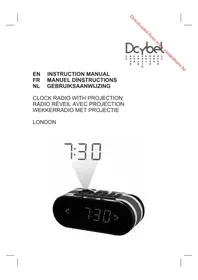
London - Alarm clock radio DCYBEL - Free user manual and instructions
Find the device manual for free London DCYBEL in PDF.



| Product type | Clock radio |
| Brand | Dcybel |
| Model | London |
| Power supply | AC 230 V ~ 50 Hz, 5 W |
| Power consumption | 5 W |
| Radio frequencies | FM 87.5 – 108 MHz |
| Number of presets | 10 |
| Alarms | Dual alarm (radio or buzzer) |
| Snooze function | Yes, 9 minutes |
| Sleep function (auto-off) | Adjustable timer from 10 to 90 minutes |
| Time projector | Yes, with focus and 180° image flip |
| Screen brightness | Adjustable (High, Medium, Low, Off) |
| Backup battery | CR2032 (not included) |
| Antenna | FM wire antenna |
| Double insulation | Yes |
| Safety | Complies with European standards |
| Maintenance | Unplug before cleaning; do not block ventilation |
| Operating temperature | Do not use in tropical climate |
| Disposal | Device and batteries must be recycled separately |
Frequently Asked Questions - London DCYBEL
User questions about London DCYBEL
0 question about this device. Answer the ones you know or ask your own.
Ask a new question about this device
Download the instructions for your Alarm clock radio in PDF format for free! Find your manual London - DCYBEL and take your electronic device back in hand. On this page are published all the documents necessary for the use of your device. London by DCYBEL.
USER MANUAL London DCYBEL
EN INSTRUCTION MANUAL
FR MANUEL DÍNSTRUCTIONS
- This appliance is intended for domestic household use only and should not be used for any other purpose or in any other application, such as for non-domestic use or in a commercial environment.
- Prior to cleaning or other maintenance, the appliance must be disconnected from the supply mains.
- The ventilation should not be impeded by covering the ventilation openings with items, such as newspapers, tablecloths, curtains, etc.
- No naked flame sources, such as lighted candles, should be placed on the apparatus.
- The apparatus shall not be exposed to dripping or splashing and that no objects filled with liquids, such as vases, shall be placed on the apparatus.
- Ventilation
- Allow at least a 10 cm gap all around the product.
- This apparatus is not suitable for use in a tropical climate.
- Batteries (battery pack or batteries installed) shall not be exposed to excessive heat such as sunshine, fire or the like.
- CAUTION
Danger of explosion if battery is incorrectly replaced. Replace only with the same or equivalent type.
- To protect the environment, use local recycling facilities for battery disposal.
- Where the MAINS plug or an appliance coupler is used as the disconnect device, the disconnect device shall remain readily operable.
IMPORTANT SAFETY INSTRUCTIONS
- This equipment is designed to operate from a 230 Volt, 50Hz AC mains supply. Other power sources may damage it.
- The marking plate is located on the bottom of the apparatus.
Symbols

This equipment is double insulated and an earth connection is not Required.

This mark is applied to show the equipment conforms to European safety and electro-magnetic compatibility standards.

CAUTION
RISK OF ELECTRIC SHOCK DO NOT OPEN

To reduce the risk of electrical shock, do not open the unit. No user serviceable parts inside. Refer servicing to qualified service personnel.
Battery handling and usage
Only adults should handle the battery (not included). Do not allow a child to use this unit unless the battery cover is securely attached to the unit.
The battery type used in the unit is one CR2032 3V Lithium battery which is accessible and can be replaced.
Remove the screw that keep the battery cover to the unit.
Remove the battery cover to remove the battery.
LOCATION OF CONTROL
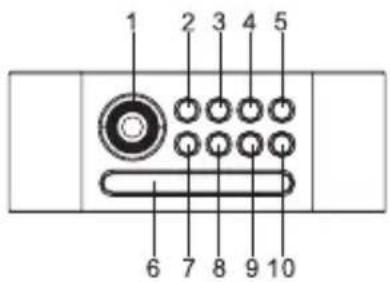
text_image
1 2 3 4 5 6 7 8 9 10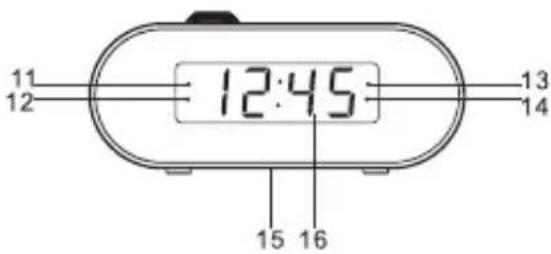
text_image
11 12 12:45 13 14 15 16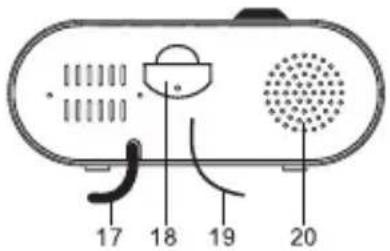
text_image
17 18 19 20- Projector
- PROJECTION 180° FLIP button
- ⏻SET/MEM/M+ Clock setting/Radio station memory setting/Memory adjusting button
- ◀Tuning down /Hour setting button
- ▶▶Tuning up / Minute setting button
- SNOOZE/SLEEP/DIMMER button
- PROJECTION ON/OFF button
- 🔗/ Volume down / Alarm 1 setting button
- Volume up / Alarm 2 setting button
- ⏻ Power / Alarm off buton
- Alarm 1 buzzer indicator
- Alarm 1 radio indicator
- Alarm 2 buzzer indicator
- Alarm 2 radio indicator
- Rating label (on the bottom)
- Display
- Power cord
- Battery cover
- FM wire aerial
- Speaker
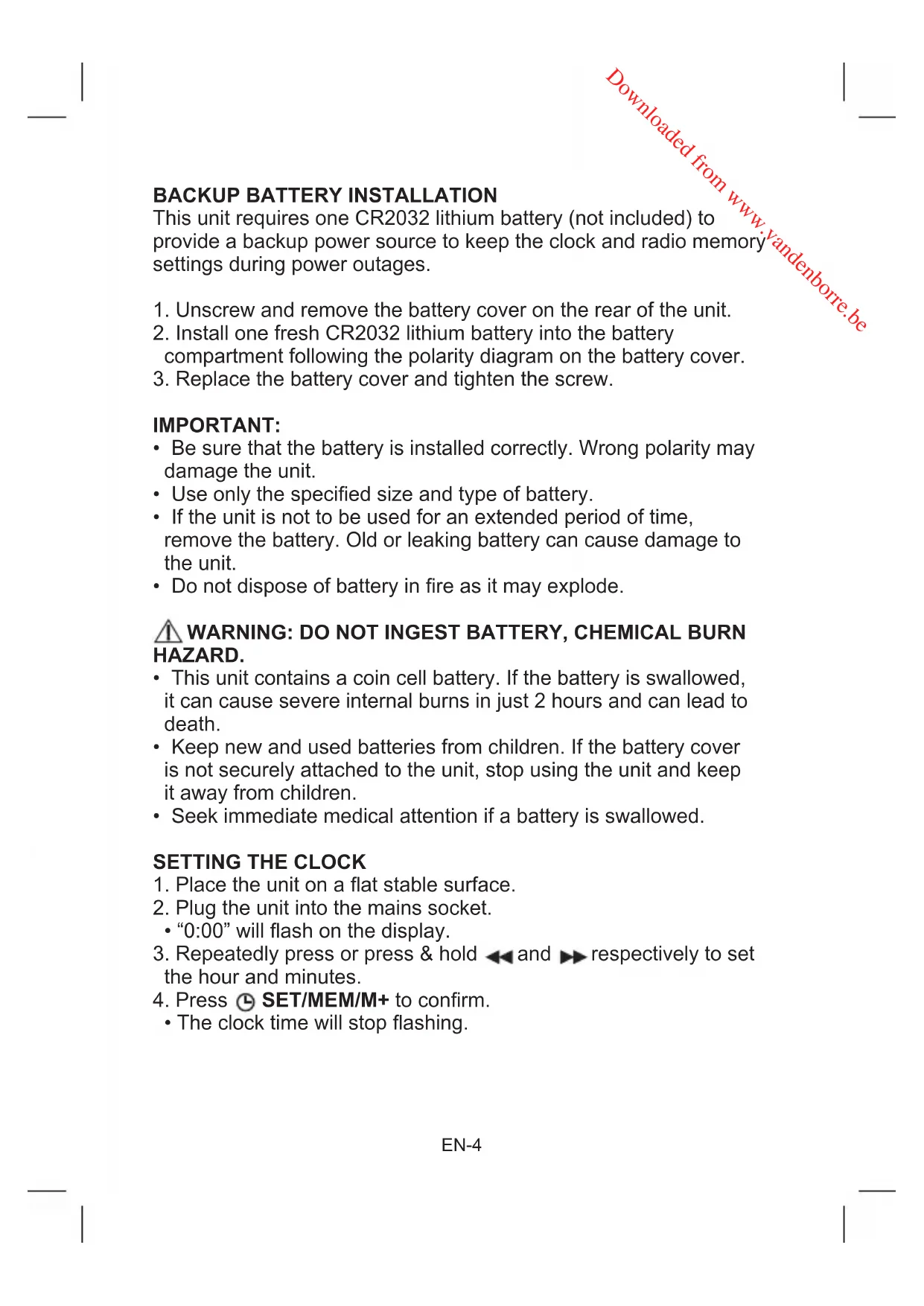
BACKUP BATTERY INSTALLATION
This unit requires one CR2032 lithium battery (not included) to provide a backup power source to keep the clock and radio memory settings during power outages.
- Unscrew and remove the battery cover on the rear of the unit.
- Install one fresh CR2032 lithium battery into the battery compartment following the polarity diagram on the battery cover.
- Replace the battery cover and tighten the screw.
IMPORTANT:
- Be sure that the battery is installed correctly. Wrong polarity may damage the unit.
- Use only the specified size and type of battery.
- If the unit is not to be used for an extended period of time, remove the battery. Old or leaking battery can cause damage to the unit.
- Do not dispose of battery in fire as it may explode.
⚠ WARNING: DO NOT INGEST BATTERY, CHEMICAL BURN HAZARD.
- This unit contains a coin cell battery. If the battery is swallowed, it can cause severe internal burns in just 2 hours and can lead to death.
- Keep new and used batteries from children. If the battery cover is not securely attached to the unit, stop using the unit and keep it away from children.
- Seek immediate medical attention if a battery is swallowed.
SETTING THE CLOCK
- Place the unit on a flat stable surface.
- Plug the unit into the mains socket.
- "0:00" will flash on the display.
- Repeatedly press or press & hold ◀ and ▶ respectively to set the hour and minutes.
- Press Ⓛ SET/MEM/M+ to confirm.
- The clock time will stop flashing.
- To turn on the radio, press ⏻.
- Tune in to the desired station by repeatedly pressing ◀◀/▶▶.
- The wire aerial located on the rear of the unit is for FM reception. The wire should be fully extended and positioned for optimum reception.
- Press and hold ◀/▶ for about 2 seconds and then release the button, the unit will scan the frequencies until a broadcasting station strong enough for good reception is found.
- To adjust the volume, press 📄/ 🔊 or 📄/ 🔊 and the volume level will appear on the display.
Repeatedly press ▲/▼ to adjust the volume from 00 (no sound) to 15 (maximum).
- To turn off the radio, press ⏻.
PRESETTING YOUR FAVOURITE RADIO STATION
Up to 10 FM radio stations can be preset.
- Follow steps in "LISTENING TO THE RADIO" and tune in to the station that you wish to preset.
- Press and hold ⏻ SET/MEM/M+ until "P01" flashes on the display.
- Repeatedly press ◀◀/▶▶ to select the desired memory slot.
- Press ⏻ SET/MEM/M+ again to store the station.
- Repeat steps above to store desired stations.
To listen to preset radio stations, repeatedly press ⏻ SET/MEM/M+ to select the desired radio station.
Before setting the alarm time, make sure the Clock has been set.
Setting Alarm 1
- In clock time state, press and hold Ⓞ/∞ for about 2 seconds.
- The clock time will flash on the display.
- While the clock time is flashing, repeatedly press or press & hold and respectively to set the alarm time.
- Press 🔒 / 🔒 to confirm.
- Repeatedly press 🔒/ 🔒 to set the alarm to wake to the radio or buzzer mode.
- The corresponding alarm mode indicator will appear on the display.
Alarm 1 buzzer indicator
Alarm 1 radio indicator
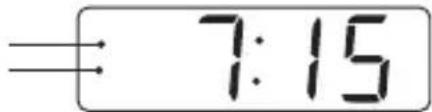
text_image
7:15Setting Alarm 2
- In clock time state, press and hold 📋/ 📋 for about 2 seconds.
• The clock time will flash on the display.
-
While the clock time is flashing, repeatedly press or press & hold and respectively to set the alarm time.
-
Press / to confirm.
-
Repeatedly press 📄/ 🔵 to set the alarm to wake to the radio or buzzer mode.
- The corresponding alarm mode indicator will appear on the display.
8:15
Alarm 2 buzzer indicator
Alarm 2 radio indicator
To Stop and Cancel Alarm
When alarm 1 or 2 is sounding, the corresponding symbol will flash on the display. Press ⏻ to stop the alarm. The alarm will sound again at the same time on the following day.
If you want to cancel the alarm 1 and/or 2, repeatedly press 📄/ 🔍 or 📄/ 🔍 until all the alarm mode indicators disappear from the display.
Snooze Function
When the alarm sounds, press SNOOZE/SLEEP/DIMMER. The alarm will be turned off and come on again after about 9 minutes.
SLEEP TIMER
- When the radio is playing, press SNOOZE/SLEEP/DIMMER.
• The display will show "90".
-
Repeatedly press SNOOZE/SLEEP/DIMMER to set the desired sleep time from 10 to 90 minutes in increments of 10 minutes.
-
The radio will be turned off after the set sleep time has elapsed.
To check remaining sleep time, press SNOOZE/SLEEP/DIMMER.
To turn off the radio before the sleep time has elapsed, press ⏻ or repeatedly press SNOOZE/SLEEP/DIMMER until the display shows "OFF".
SETTING THE BRIGHTNESS OF THE DISPLAY
In the clock time state, repeatedly press SNOOZE/SLEEP/DIMMÉR to change the brightness of the display (High, Medium, Low and Off) according to your ambient light conditions.
USING THE PROJECTOR
The projection function allows you to display the clock on a nearby wall or ceiling at a range of 0.9-2.7 metres.
- Press PROJECTION ON/OFF to turn on the projector.
- Adjust the projector by tilting it to the desired angle for best viewing.
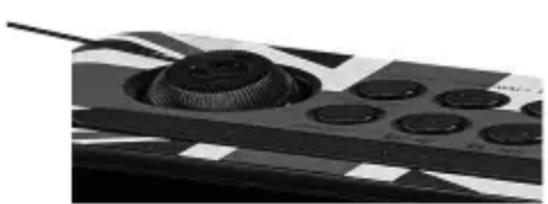
- Adjust the focus by turning the focus dial on the projector until the image is sharp.
Focus dial
natural_image
Close-up of a mechanical component with circular cutouts and a cylindrical top (no visible text or symbols)-
To flip the projected image horizontally, press PROJECTION 180° FLIP.
-
To turn off the projector, press PROJECTION ON/OFF.
RESTTING THE UNIT
If the system does not respond or exhibit erratic or intermittent operation, you may have experienced an electrostatic discharge (ESD) or a power surge that triggered the internal microcontroller to shut down automatically. If this occurs, disconnect the power cord from the mains socket and remove the backup battery from the unit. Wait for at least 3 minutes and reinsert the battery for backup, and plug the unit in the mains socket. The unit is now reset and you will need to set the clock time and alarm settings again.
SPECIFICATIONS
FM frequency: 87.5-108 MHz
Power source: AC 230V\~50Hz, 5W
Battery (for clock back up): DC 3V —— (1 x 3V CR2032 Lithium battery, not included)
DISPOSAL
As a responsible retailer we care about the environment.
As such we urge you to follow the correct disposal procedure for the product, packaging materials and if applicable, accessories and batteries. This will help conserve natural resources and ensure that the materials are recycled in a manner that protects health and the environment.
You must follow laws and regulations about disposal. Waste electrical products and batteries must be disposed of separately from household waste when the product reaches the end of its life. Contact the store where you bought the product and your local authority to learn about disposal and recycling. The batteries must be disposed of at your local recycling point.
We apologise for any inconvenience caused by minor inconsistencies in these instructions, which may occur as a result of product improvement and development.
Darty Holdings SAS © 14 route d'Aulnay 93140 Bondy, France 18 / 04 / 2016
AVERTISSEMENTS
natural_image
Close-up of a black electronic device with a circular button and control panel (no visible text or symbols)Hotline Darty France
Darty Holdings SAS © 14 route d'Aulnay 93140 Bondy, France
18 / 04 / 2016
WAARSCHUWINGEN
WERKING VAN DE DUBBELE WEKKER
natural_image
Close-up of a mechanical component with multiple circular cutouts and a central gear-like feature (no visible text or symbols)HET APPARAAT RESETTEN
Darty Holdings SAS © 14 route d'Aulnay 93140 Bondy, France
18 / 04 / 2016