LIBERTY IT - Headphones DCYBEL - Free user manual and instructions
Find the device manual for free LIBERTY IT DCYBEL in PDF.



| Product type | Bluetooth audio headset |
| Brand | DCYBEL |
| Model | LIBERTY IT |
| Weight | Approximately 210 g |
| Dimensions (approx.) | 18.5 x 16 x 7 cm |
| Power supply | Rechargeable lithium battery 3.7 V 300 mAh |
| Battery type | Built-in Li-ion, not replaceable |
| Charging time | Approximately 3 hours |
| Playback battery life | Up to 8 hours (depending on volume) |
| Charging input voltage | 5 V DC, 500 mA |
| Charging port | Mini USB |
| Connectivity | Bluetooth (max range 10 m) |
| Wired headphone jack | 3.5 mm jack |
| Microphone | Built-in |
| Main functions | Play/Pause, Volume +/-, Next/Previous track, Answer/end/reject call |
| Indicator light | Red/blue LED for charging and connection |
| Care and cleaning | Clean with a slightly damp cloth; do not immerse |
| Safety | Do not use near water, do not expose to moisture or high temperatures, do not disassemble |
| Included accessories | USB cable, 3.5 mm audio cable |
| Repairability | Battery not accessible, product not user-repairable |
| Compliance | European safety and EMC directives |
Frequently Asked Questions - LIBERTY IT DCYBEL
User questions about LIBERTY IT DCYBEL
0 question about this device. Answer the ones you know or ask your own.
Ask a new question about this device
Download the instructions for your Headphones in PDF format for free! Find your manual LIBERTY IT - DCYBEL and take your electronic device back in hand. On this page are published all the documents necessary for the use of your device. LIBERTY IT by DCYBEL.
USER MANUAL LIBERTY IT DCYBEL
This mark is applied to show the equipment conforms to European safety and electro-magnetic compatibility standards.
BATTERY HANDLING AND USAGE
The product is supplied with one rechargeable Lithium 3.7V 300mAh battery incorporated in the product which is not accessible and cannot be replaced. Therefore when the product reaches the end of its useful life it must be disposed of at a recycling centre.
IMPORTANT SAFETY INSTRUCTIONS
- Read these instructions and keep them for future reference.
- Do not use this product near water, for example, near a bath tub, wash bowl, kitchen sink or laundry tub, in a wet basement or near a swimming pool.
- Do not drop, throw or crush the headphones.
- Do not expose the headphones to humidity, dust or high temperature.
- Only use accessories specified by the manufacturer.
- Do not disassemble, modify, or attempt to repair the product.
- Check the laws and regulations on the use of mobile phones and hands-free equipment in the areas where you drive. Always give full attention to driving and pull off the road and park before making or answering a call if driving conditions require.
- Do not allow children to play with the headphones as it contains small parts that may cause a choking hazard.
- Turn off your headphones when pumping gas, handling flammable materials, or in any area with a risk of explosion.
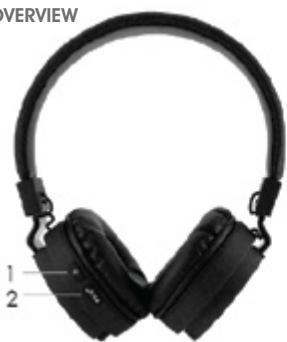
OVERVIEW
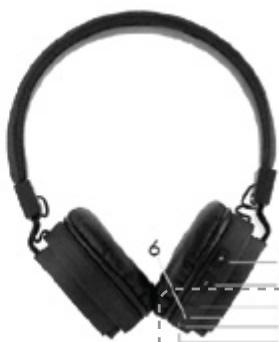
- Power button: Press and hold this button for about 2 seconds to turn on or off the headphones.
- Play/Pause, Call answer/end/reject button
-
-
Volume up / next track button
-
- < Volume down / previous track button
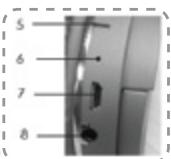
- Indicator light
- Microphone
- Micro USB charging port
- Socket for audio cable

To prevent possible hearing damage, do not listen at high volume levels for long periods.
When the USB cable is used as the disconnect device, the disconnect device shall remain reac operable.
Before you use the headset for the first time, fully charge the battery for approximately 3 hours. Charging the battery fully will help you get the longest possible playback and standby time.
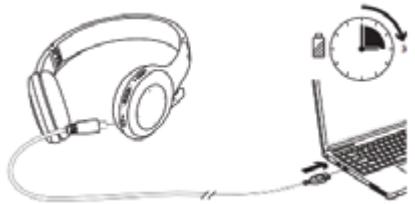
NOTE: Do not attempt to pair or use the headphones while it is charging.
- Connect the small end of the supplied micro USB cable into the charging port of the speaker. Connect the other end of the cable into the USB port on your computer.
- The charging indicator light will illuminate red.
- When the battery is fully charged, the red indicator light will go out.
- After charging, remove the micro USB cable.
Battery life
The fully-charged battery will provide about 8 hours of playback time depending on genres of music and volume.
Low battery warning: When the indicator light flashes red at regular intervals, please recharge the headphones.
PARING THE HEADPHONES TO YOUR BLUETOOTH DEVICE
- Turn on the headphones by pressing and holding for about 2 seconds until the indicator light flashes red and blue alternately.
The headphones will enter the pairing mode.
- To pair, go to Bluetooth settings on your Bluetooth-enabled device and connect to "Liberty".
- When the headphones are paired, the indicator light will flash blue.
NOTE:
- If the headphones lose the connection (e.g. if your device is out of range), it will reconnect automatically to your device if your device is back in range.
- Bluetooth devices have a maximum operating range of 10 metres and the actual range will vary depending on current conditions (obstacles, battery power, interference, etc.).
To reset the Bluetooth connection with a new device, first disconnect the paired device by pressing and holding I / s for about 2 seconds.
USING THE HEADPHONES
Adjust the headbands and wear the headphones over your ears.
Listening to music
Adjust the volume as desired by repeatedly pressing +≥ / < -
To pause, press /C. To resume play, press /C again.
To play previous/next track, press + / -
Basic call actions
| To do this... | Do this... |
| Answer an incoming call | While the call is ringing, press▶II/°. |
| End a call | Press▶II/° again. |
| Reject a call | Press and hold▶II/° for about 2 seconds. |
USING THE AUDIO CABLE
You can use the supplied audio cable to connect a wired device.
Plug the audio cable into the socket on the left ear cup and the connector on your device.
CLEANING AND MAINTENANCE
Clean the outer surface of the headphones with a slightly dampen cloth. Dry thoroughly. Never immerse it in water.
Do not use any abrasive or chemical cleaning agents.
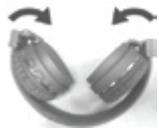
The ear cups can be folded inwards for easy convenient storage.
SPECIFICATIONS
DC Input: 5V = 500mA

DISPOSAL
As a responsible retailer we care about the environment.
As such we urge you to follow the correct disposal procedure for the product, packaging materials and if applicable, accessories and batteries. This will help conserve natural resources and ensure that the materials are recycled in a manner that protects health and the environment.
You must follow laws and regulations about disposal. Waste electrical products and batteries must be disposed of separately from household waste when the product reaches the end of its life.
Contact the store where you bought the product and your local authority to learn about disposal and recycling.
The batteries must be disposed of at your local recycling point.
We apologise for any inconvenience caused by minor inconsistencies in these instructions, which may occur as a result of product improvement and development.
AVERTISSEMENTS
ATTENTION
ILY A RISQUE D'EXPLOSION SI LA BATTERIE EST REMPLACÉ PAR UN BATTERIE DE TÉP DE INCORRECT. METTRÉ AU REBUT LES BATTERIES USAGÉES CONFORMÉNT AUX INSTRUCTIONS.
SYMBOLE

Hotline Darty France
Declaration of Conformity
Casque Bluetooth Pliable
Dcybel
Model number - Reference commerciale: LIBERTY
We declare that the above product has been evaluated and deemed to comply with the requirements of the listed European Directives and standards:
R&TTE Directive (1999/5/EC) - Directive R&TTE (1999/5/CE)
Electromagnetic Compatibility Directive (2004/108/EC) - Directive
Low Voltage Directive (2006/95/EC) - Directive Basse Tension (2006/95/CE)
RoHS 2 Directive (2011/65/EU) - Directive RoHS 2 (2011/65/EU)
EN301489-1V1.9.2(2011-09)
EN301489-17V2.2.1(2012-09)
EN 62479:2010 EN 55013:2013 EN 61000-3-2-2014
EN 300 328 V1.9.1 (2015-02) EN 61000-3-3:2013
EN 55020:2007+A11:2011
EN 60065:2014
Body - Organisme : SGS
Report numbers - Numeros de rapport: HKES150700139301,
HKES150700139302,HKES150700139303,HKES150700139304
HKES150700139201
The person responsible for this declaration is:
Position - Poste : General Manager Direct Sourcing
Signature - Signature :