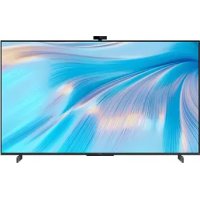
Vision S - TV HUAWEI - Free user manual and instructions
Find the device manual for free Vision S HUAWEI in PDF.

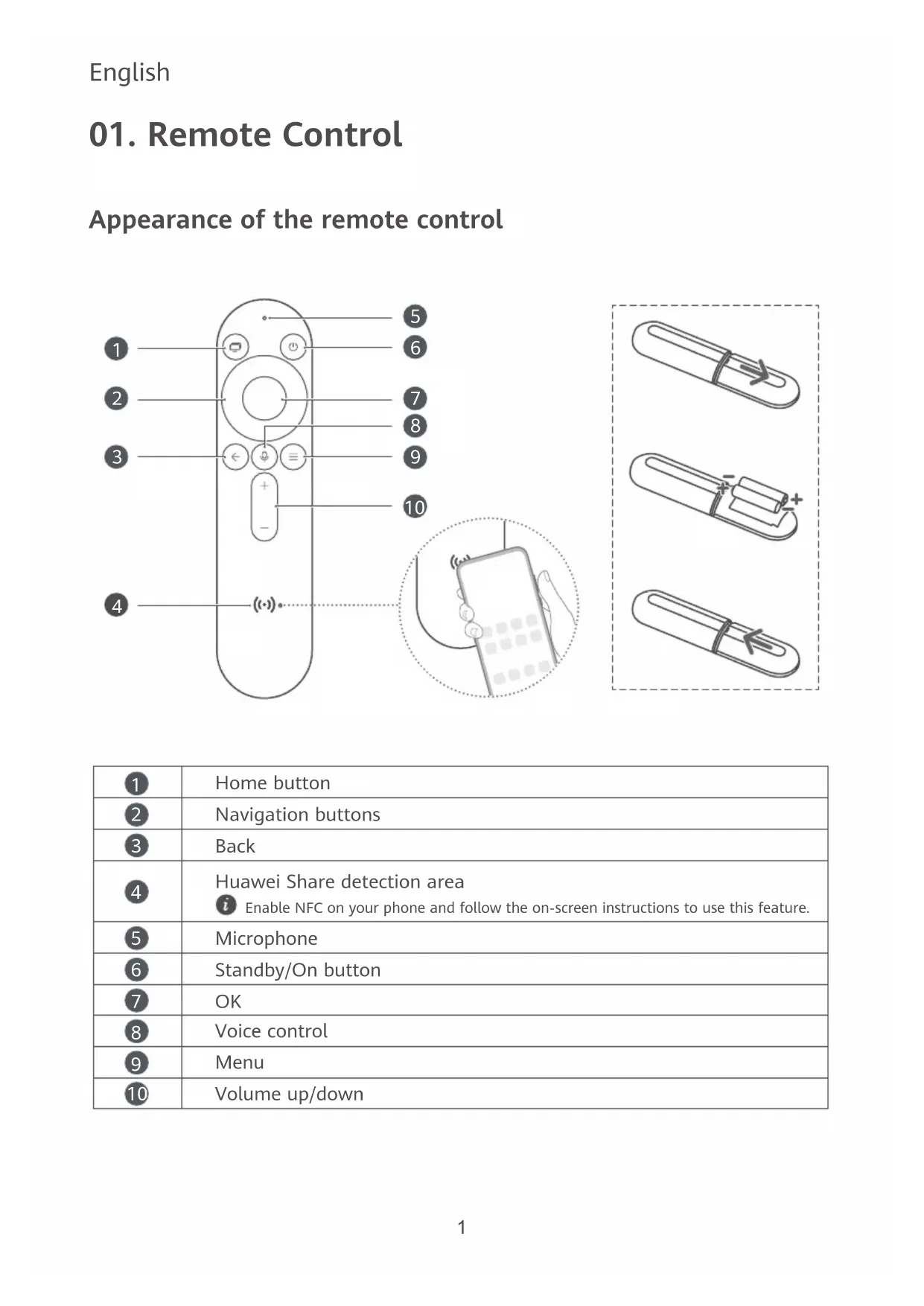


| Product type | 4K LED TV |
| Brand | Huawei |
| Model | Vision S (HD55KAN9A / HD65KAN9A) |
| Screen size | 55 inches (139.7 cm) or 65 inches (165.1 cm) |
| Resolution | 3840 x 2160 (4K Ultra HD) |
| Processor | Honghu Chipset |
| Power supply | 100–240 V, 50/60 Hz |
| Ports | 3x HDMI 2.0, 1x AV, 1x SPDIF, 1x USB 3.0, 1x Ethernet |
| Wireless connectivity | Wi-Fi 2.4/5 GHz (802.11 a/b/g/n/ac), Bluetooth 5.1 |
| Main features | Smart TV, Huawei Share (NFC), voice control, Dolby Audio, DTS-HD |
| VESA compatibility | 200 x 200 mm (55") or 400 x 200 mm (65") |
| Included accessories | Remote control, stand, batteries |
| Care and cleaning | Clean with a soft, dry cloth; avoid liquids |
| Safety | Maintain a 10 cm clearance around for ventilation; do not block openings |
| Repairability | Contact an authorized Huawei center for any repairs |
| General information | Manual available in multiple languages; manufacturer's warranty |
Frequently Asked Questions - Vision S HUAWEI
User questions about Vision S HUAWEI
0 question about this device. Answer the ones you know or ask your own.
Ask a new question about this device
Download the instructions for your TV in PDF format for free! Find your manual Vision S - HUAWEI and take your electronic device back in hand. On this page are published all the documents necessary for the use of your device. Vision S by HUAWEI.
USER MANUAL Vision S HUAWEI
Install the HUAWEI Vision by referring to the unboxing and installation instructions (including the precautions on unboxing the device and instruction on how to install the stand).
English
01. Remote Control
Appearance of the remote control
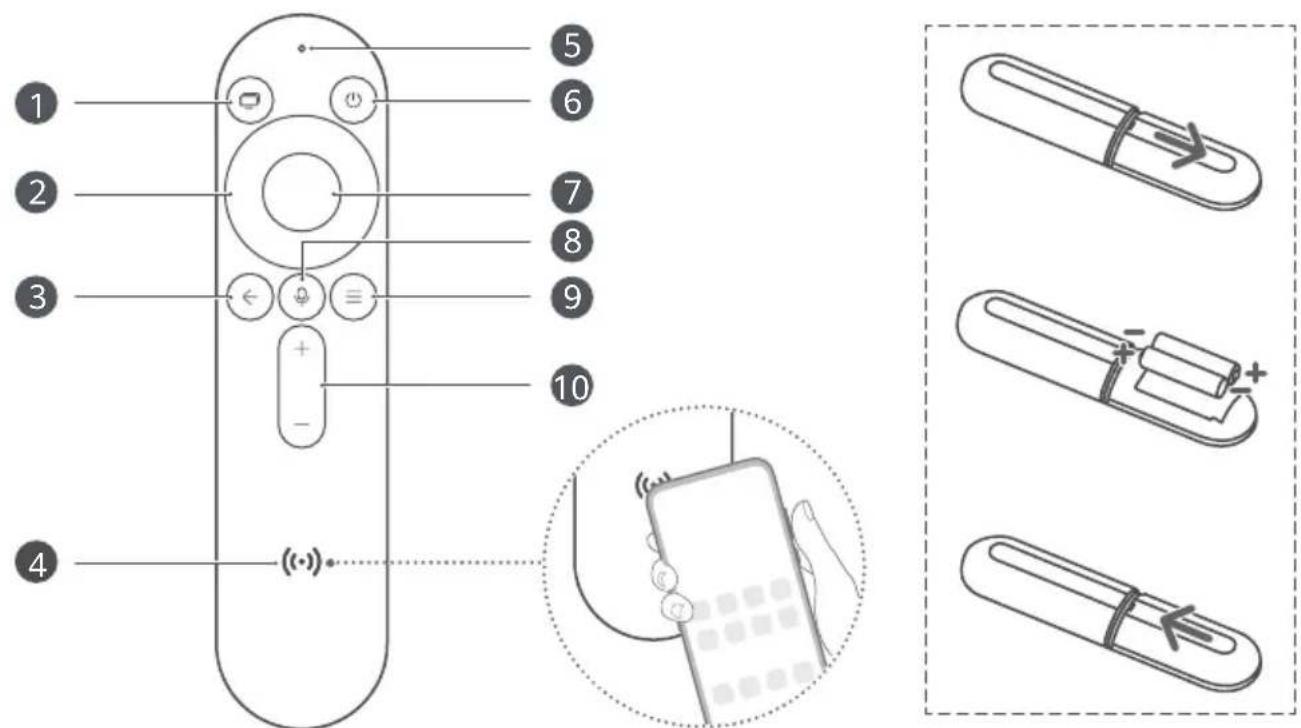
| 1 | Home button |
| 2 | Navigation buttons |
| 3 | Back |
| 4 | Huawei Share detection areai Enable NFC on your phone and follow the on-screen instructions to use this feature. |
| 5 | Microphone |
| 6 | Standby/On button |
| 7 | OK |
| 8 | Voice control |
| 9 | Menu |
| 10 | Volume up/down |
02. Device Connection
The HUAWEI Vision supports multiple ports for the connection with other applicable devices, for a diversified entertainment experience.
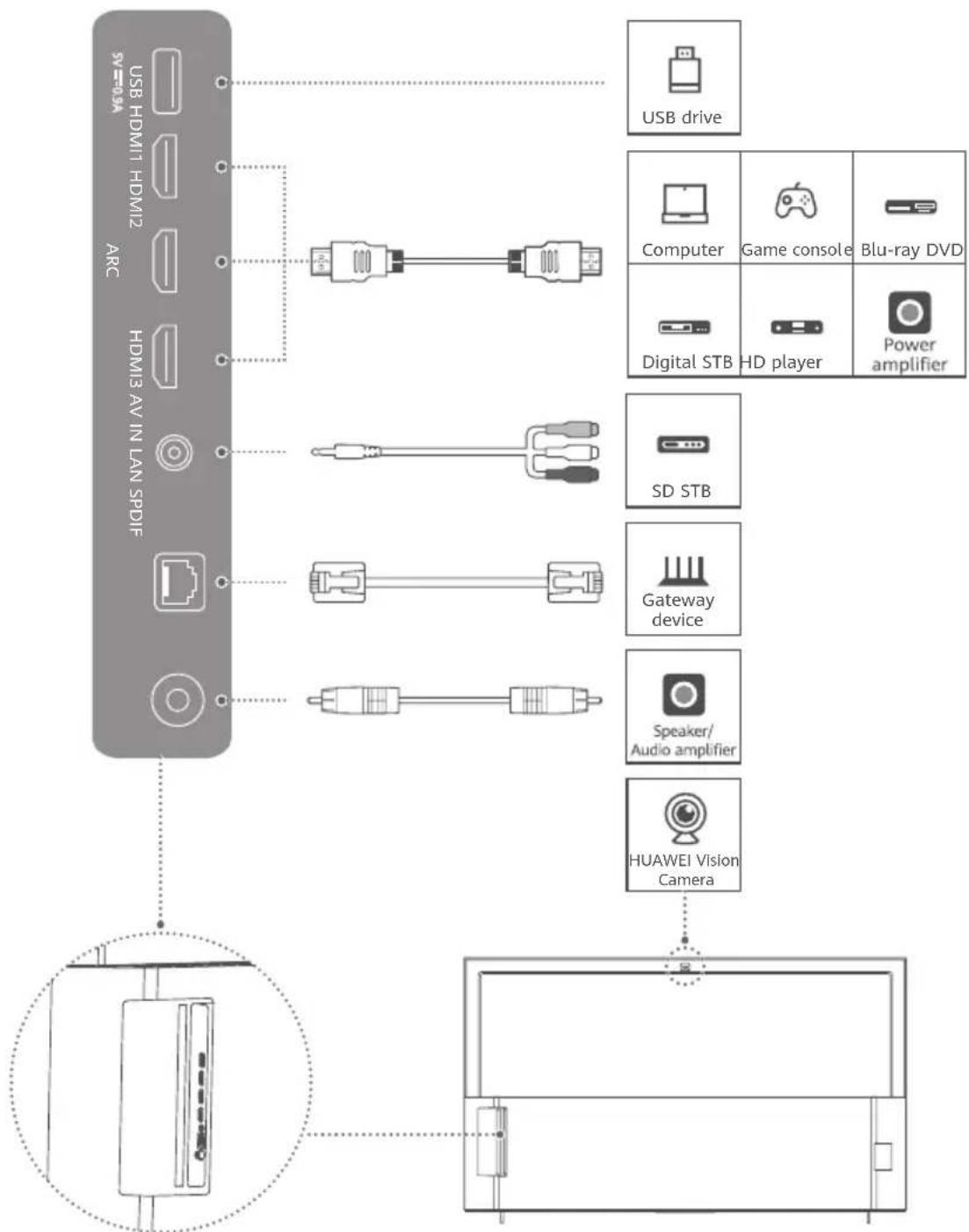
flowchart
graph TD
    A["ARC"] --> B["USB HDMI1 HDMI2"]
    A --> C["HDMI3 AV IN LAN SPDIF"]
    A --> D["Computer"]
    A --> E["Digital STB HD player"]
    A --> F["Power amplifier"]
    A --> G["SD STB"]
    A --> H["Gateway device"]
    A --> I["Speaker/Audio amplifier"]
    A --> J["HUAWEI Vision Camera"]
    K["USB drive"] --> B
    L["Computer"] --> B
    M["Game console"] --> B
    N["Blu-ray DVD"] --> B
    O["Digital STB HD player"] --> B
    P["HUAWEI Vision Camera"] --> J
03. Specifications
| Model | HD55KAN9A HD65KAN9A | ||
| Basic parameters | Screen sizeCPUPower supply | 3840 x 2160Honghu chipset100-240 V50/60 Hz | 3840 x 2160Honghu chipset200-240 V50/60 Hz |
| Operating environment | Operating temperatureOperating humidity | 0°C to 40°C5% to 95% | |
| Ports | Input portsOutput portsData ports | HDMI 2.0 x 3; AV x 1SPDIF x 1 (coaxial)HDMI - ARC x 1 (multiplexing the HDMI2 port)USB 3.0 x 1; Ethernet port x 1 | |
| Wireless connection | WLANBluetooth | 2.4 GHz/5 GHz (802.11 a/b/g/n/ac);2 x 2 (dual antennas)5.1, Bluetooth Low Energy (BLE) | |
i HD65KAN9A supports an input voltage from 200 V up to 240 V. If the voltage does not meet this requirement, the device may be damaged or other hazards may occur.
Scan the QR code below or visit HUAWEI Support and select the desired model under the HUAWEI Vision category for more product details.

04. Wall Mounting
- An optional wall mount can be used with your device. Consult with your local dealer to purchase the recommended wall mount bracket. Carefully attach the wall mount bracket at the rear of the device. Install the wall mount bracket on a solid wall perpendicular to the floor. If you are attaching the device to other building materials, please contact qualified personnel to install the wall mount. Detailed instructions will be included with the wall mount. Please use a wall mount bracket where the device is adequately secured to the wall with enough space to allow connecting to external devices.
- Prevent the holes on the device from being blocked by any objects and leave a space of more than 10 cm around the device for heat dissipation.
- Disconnect the power before moving or installing the device. Failing to do so may result in electric shocks.
- Remove the stand before installing the device on a wall mount by following the steps for stand attachment in reverse.
- If you install the device on a ceiling or slanted wall, it may fall and result in severe injury. Use an authorized wall mount and contact your local dealer or qualified personnel. Otherwise it is not covered by the warranty.
- Do not over tighten the screws as this may cause damage to the device and void your warranty.
- To prevent injury, this apparatus must be securely attached to the floor/wall in accordance with the installation instructions.
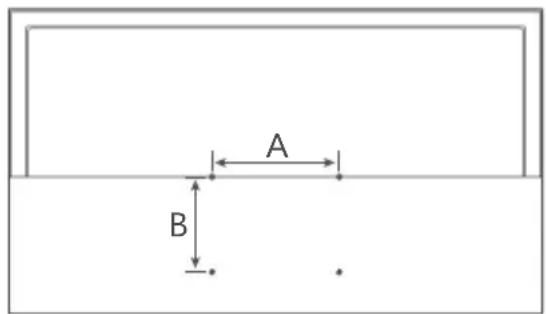
- Use screws and wall mounts that meet the following specifications. Any damages or injuries resulting from misuse or using improper accessories are not covered by the warranty.
| Model HD55KAN9A HD65KAN9A | ||||
| Screw | Diameter (mm) M6 M6 | |||
| Length (mm) | Long 45 45 | |||
| Short 30 30 | ||||
| Quantity | Long 4 4 | |||
| Short 4 4 | ||||
| Wall adapter | Diameter (mm) 15.8 15.8 | |||
| Length (mm) 25 25 | ||||
| Quantity 4 4 | ||||
| VESA screw hole specs (A x B) in millimeters 200 x 200 400 x 200 | ||||

- If the wall adapter is used, use 45 mm screws.
- If the wall adapter is not used, use 30 mm screws.
05. Safety Information
Please read all of the safety information carefully before using your device to ensure its safe and proper operation.
Interference with medical equipment
- Some wireless devices may affect the performance of implantable medical devices and other medical equipment, such as pacemakers, cochlear implants, and hearing aids. Consult your service provider for more information.
- When using this device, keep it at least 15 cm away from any implanted medical devices or equipment, such as pacemakers and cochlear implants.
Operating environment
- Use this device at temperatures between 0°C and 40°C. Extreme heat or cold may damage this device.
- Do not wrap or seal the device, or cover it with towels or other objects. Do not place the device in a closed environment, such as a box. Otherwise, the device may be damaged due to poor heat dissipation.
- Keep the device away from sources of heat and fire, such as a heater, microwave oven, stove, water heater, radiator, or candle.
- Do not place any object (such as a candle or water container) on the device. If any foreign object or liquid enters the device, stop using the device immediately, power it off, remove all the cables connected to it, and contact a Huawei authorized service center.
- Do not block the openings of the device with any object. Reserve a space of at least 10 cm around the device for heat dissipation.
- Place this device in a place where it can be kept stable at all times. Otherwise, the device may fall over and may cause serious personal injury or death.
Child safety
Comply with all precautions with regard to child's safety. Letting children play with the device or its accessories may be dangerous.
The device includes detachable parts that may present a choking hazard. Keep away from children.
Accessories
- Using an unapproved or incompatible power adapter, charger, or battery may damage your device, shorten its lifespan, or cause a fire, explosion, or other hazards.
- Choose only accessories approved for use with this model by the device manufacturer. The use of any other types of accessories may void the warranty, may violate local regulations and laws, and may be dangerous. Please contact an authorized service center to obtain approved accessories.
Power adapter safety
- The power plug is intended to serve as a disconnect device.
- Make sure the power adapter is plugged into a socket near the device and is easily accessible.
- Unplug the power adapter from the socket and the device when not in use.
This symbol is used to inform you of the presence of uninsulated "dangerous voltage" in the product housing that may be of sufficient magnitude to constitute a risk of shock.


This symbol is used to inform you of the presence of important operating and tenance (servicing) instructions for the device.
Battery safety
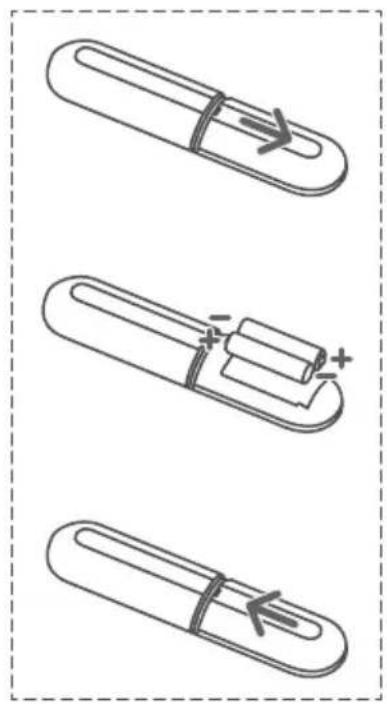
- Keep the battery away from excessive heat and direct sunlight. Do not place it on or in heating devices, such as radiators, microwave ovens, stoves, or water heaters. Do not put batteries in fire as they may explode. Do not attempt to modify or remanufacture the battery, insert
foreign objects into it, or immerse or expose it to water or other liquids. Doing so may lead to fire, explosion, or other hazards.
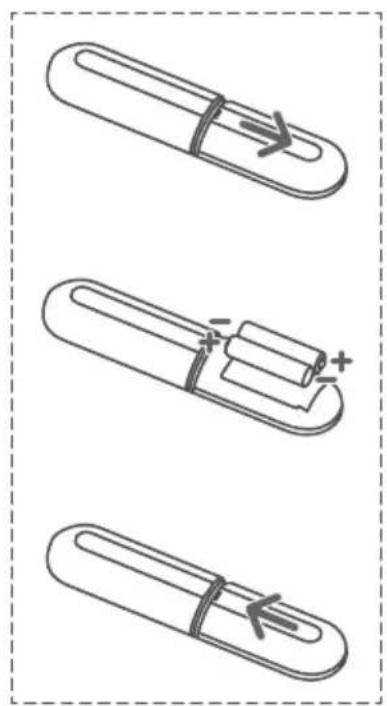
- If the battery is improperly replaced, it may explode. Replace the battery with the same or equivalent type only.
- Dispose of this device, batteries, and other accessories in accordance with local regulations. Do not dispose of the battery in normal household waste. Improper disposal may lead to battery explosion.
Disposal and recycling information
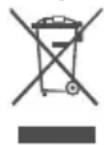
The symbol on the product, battery, literature, or packaging means that the products and batteries should be taken to separate waste collection points designated by local authorities at the end of the lifespan. This will ensure that EEE waste is recycled and treated in a manner that conserves valuable materials and protects human health and the environment.
For more information, please contact your local authorities, retailer, or household waste disposal service or visit the website https://consumer.huawei.com/en/.
Reduction of hazardous substances
This device and its electrical accessories comply with local applicable rules on the restriction of the use of certain hazardous substances in electrical and electronic equipment, such as EU REACH regulation, RoHS and Batteries (where included) directive. For declarations of conformity about REACH and RoHS, please visit the website https://consumer.huawei.com/certification.
RF Exposure Information
As recommended by international guidelines, the device is designed to comply with the limits established by the market that the device will be placed on. The device should be installed and operated with a minimum distance of 20 cm between the device and your body.
EU Regulatory Conformance
Hereby, Huawei Device Co., Ltd. declares that this device HD55KAN9A/HD65KAN9A is in compliance with the following Directive: RED 2014/53/EU, RoHS 2011/65/EU, ErP 2009/125/EC. The full text of the EU declaration of conformity, the detailed ErP information and most recent information about accessories & software are available at the following internet address: https://consumer.huawei.com/certification.
Restrictions in the 5 GHz band:
The 5150 to 5350 MHz frequency range is restricted to indoor use in: AT, BE, BG, CH, CY, CZ, DE, DK, EE, EL, ES, FI, FR, HR, HU, IE, IS, IT, LI, LT, LU, LV, MT, NL, NO, PL, PT, RO, SE, SI, SK, TR, UK(NI). In accordance with the relevant statutory requirements in the UK, the 5150 to 5350 MHz frequency range is restricted to indoor use in the United Kingdom.
Frequency Bands and Power
Wi-Fi 2.4G: 20 dBm, Wi-Fi 5G: 5150-5250 MHz: 23 dBm, 5250-5350 MHz: 23 dBm, 5470-5725 MHz: 23 dBm, Bluetooth 2.4G: 20 dBm.
06. Legal Notice
Copyright © Huawei 2021. All rights reserved.
THIS DOCUMENT IS FOR INFORMATION PURPOSE ONLY, AND DOES NOT CONSTITUTE ANY KIND OF WARRANTIES.
Trademarks and Permissions
Manufactured under license from Dolby Laboratories. Dolby, Dolby Audio, and the double-D symbol are trademarks of Dolby Laboratories.
dts-HD For DTS patents, see http://patents.dts.com. Manufactured under license from DTS Licensing Limited. DTS, the Symbol, DTS and the Symbol together, DTS- HD, and the DTS- HD logo are registered trademarks and/or trademarks of DTS, Inc. in the United States and/or other countries. © DTS, Inc. All Rights Reserved.
The Bluetooth ^® word mark and logos are registered trademarks owned by Bluetooth SIG, Inc. and any use of such marks by Huawei Technologies Co., Ltd. is under license. Huawei Device Co., Ltd. is an affiliate of Huawei Technologies Co., Ltd.
HDMI® The terms HDMI and HDMI High-Definition Multimedia Interface, and the HDMI Logo are trademarks or registered trademarks of HDMI Licensing Administrator, Inc. in the United States and other countries.
Privacy Protection
To better understand how we protect your personal information, please see the privacy policy at https://consumer.huawei.com/privacy-policy.
More Information
For the latest hotline and email address of your country or region, visit https://consumer.huawei.com/en/support/hotline.

All images and illustrations in this document are for reference only. The actual product and screen may vary.
Melayu
01. Kawalan Jauh
natural_image
Three schematic diagrams of a pen-like object with internal components and directional arrows, no text or symbols present.| 1 | Butang Utama |
| 2 | Butang navigasi |
| 3 | Kembali |
| 4 | Kawasan pengesanan Huawei Sharei Dayakan NFC pada telefon anda dan ikut arahan pada skrin untuk menggunakan ciri ini. |
| 5 | Mikrofon |
| 6 | Butang Tunggu Sedia/Hidupkan |
| 7 | OK |
| 8 | Kawalan suara |
| 9 | Menu |
| 10 | Kelantangan naik/turun |
02. Sambungan Peranti
04. Lekapan Dinding
natural_image
Three schematic diagrams of a pen-like object with internal components and directional arrows, no text or symbols present.4. การติดตั้งบนฝนัง
https://consumer.huawei.com/certification
natural_image
Three schematic diagrams of a pen-like object with internal components and directional arrows, no text or symbols present.04. Wandmontage
natural_image
Three schematic diagrams of a pen-like object with internal components and directional arrows, no text or symbols present.04. Montage mural
04. Montaż ścienny
natural_image
Three schematic diagrams of a pen-like object with internal components and directional arrows, no text or symbols present.natural_image
Pure electrical circuit lines without any symbolsHUAWEI Vision S
دليل التشفيل السريع
HD55KAN9A/HD65KAN9A

- English
- Remote Control
- Device Connection
- Specifications
- Wall Mounting
- Safety Information
- Interference with medical equipment
- Operating environment
- Child safety
- Accessories
- Power adapter safety
- Battery safety
- Disposal and recycling information
- Reduction of hazardous substances
- RF Exposure Information
- EU Regulatory Conformance
- Restrictions in the 5 GHz band:
- Frequency Bands and Power
- Legal Notice
- Trademarks and Permissions
- Privacy Protection
- More Information
- Melayu
- Kawalan Jauh
- Sambungan Peranti
- Lekapan Dinding
- การติดตั้งบนฝนัง
- Wandmontage
- Montage mural
- Montaż ścienny
- HUAWEI Vision S
Brand : HUAWEI
Model : Vision S
Category : TV