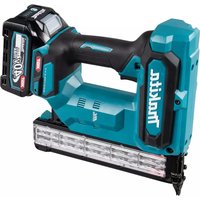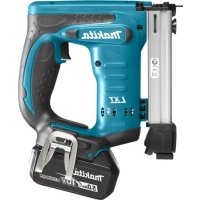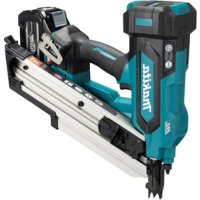
BN001G - Electric stapler MAKITA - Free user manual and instructions
Find the device manual for free BN001G MAKITA in PDF.



| Product type | Cordless framing nailer / Electric stapler |
| Brand | Makita |
| Model | BN001G |
| Dimensions (L x W x H) | 326 mm x 186 mm x 358 mm (with battery BL4025) |
| Net weight | 5.3 to 6.5 kg (depending on accessories) |
| Rated voltage | 36 V - 40 V DC max. |
| Compatible batteries | BL4020, BL4025, BL4040, BL4040F, BL4050F, BL4080F |
| Compatible chargers | DC40RA, DC40RB, DC40RC, DC40WA, BCC01, BCC02 |
| Permissible nail length | 50 mm - 90 mm |
| Permissible shank diameter | ø2.9 mm - ø3.3 mm |
| Magazine capacity | 51 - 58 nails (1 strip + 11 - 18 nails) |
| Nail collation angle | 30° - 34° |
| Sound pressure level (LpA) | 90 dB(A) |
| Sound power level (LWA) | 101 dB(A) |
| Vibration value (ah) | 3.6 m/s² (uncertainty K=1.5 m/s²) |
| Operation modes | Full sequential actuation and contact actuation (depending on country) |
| Intended use | Framing work, fixing joists, rafters, 2"x4" construction |
| Maintenance and cleaning | Regularly clean moving parts; avoid harsh solvents; entrust repairs to a Makita authorized service center |
| Safety | Overload, overheat and deep discharge protection system; automatic stop; locks |
| Spare parts and repairability | Repairs exclusively by a Makita authorized service center; use genuine Makita parts |
Frequently Asked Questions - BN001G MAKITA
User questions about BN001G MAKITA
0 question about this device. Answer the ones you know or ask your own.
Ask a new question about this device
Download the instructions for your Electric stapler in PDF format for free! Find your manual BN001G - MAKITA and take your electronic device back in hand. On this page are published all the documents necessary for the use of your device. BN001G by MAKITA.
USER MANUAL BN001G MAKITA
natural_image
Technical line drawing of two mechanical assembly components (no text or symbols)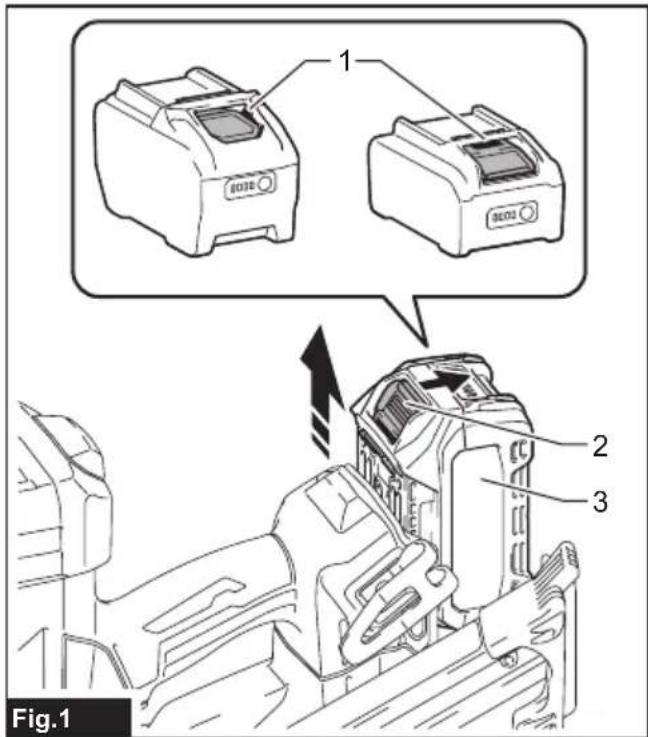

natural_image
Technical illustration of a mechanical assembly with labeled parts (no text or symbols present)
natural_image
Technical line drawing of a mechanical assembly with a circular prohibition symbol (no text or labels)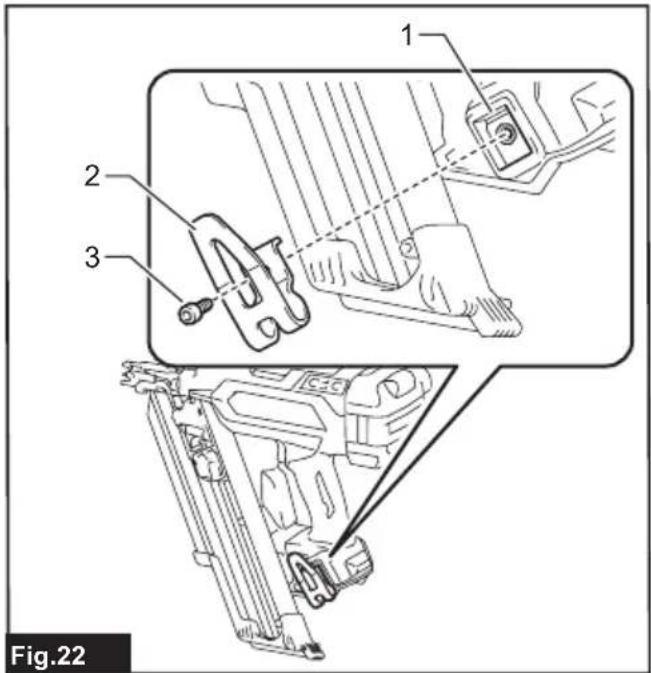
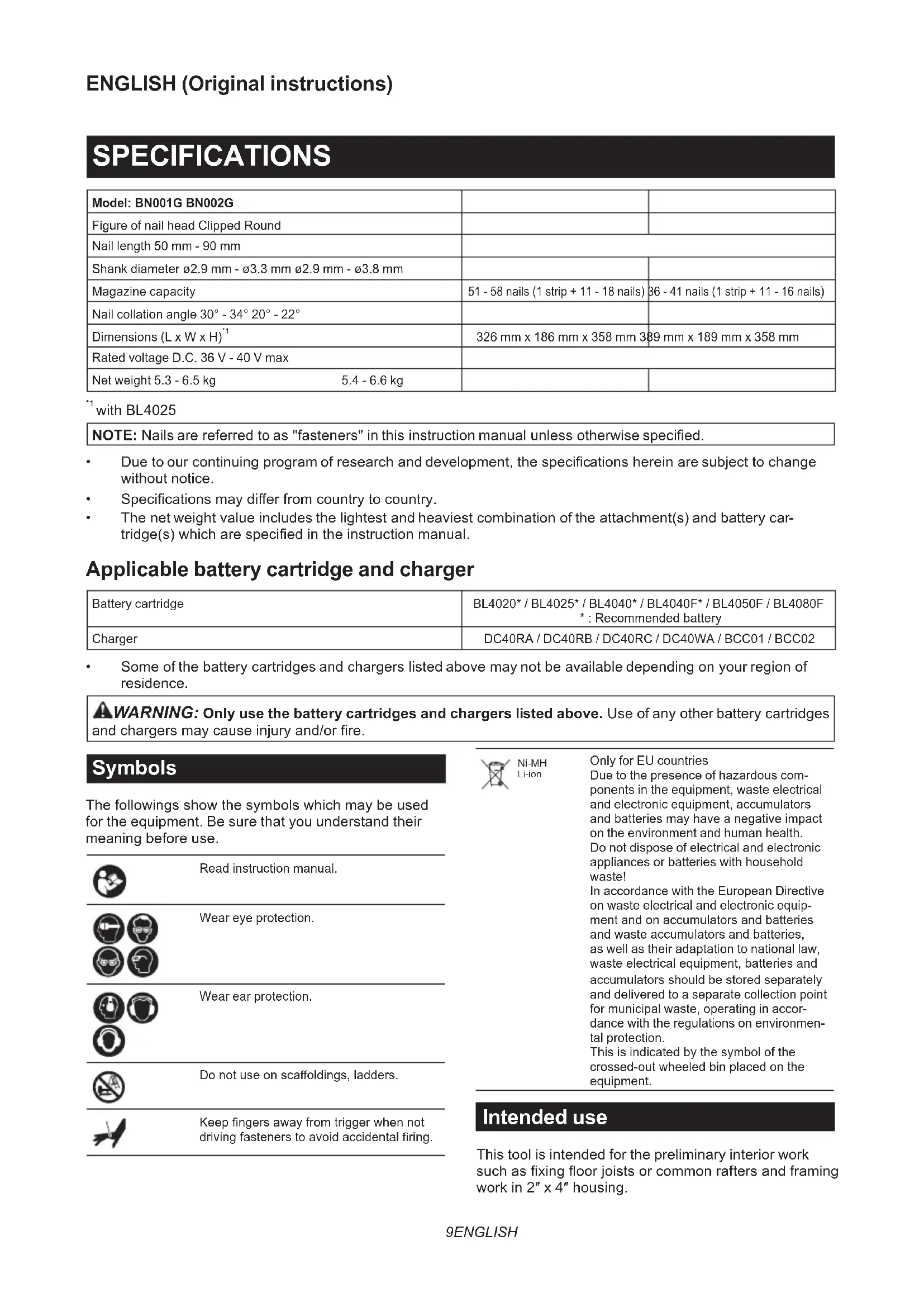
SPECIFICATIONS
| Model: BN001G BN002G | ||
| Figure of nail head Clipped Round | ||
| Nail length 50 mm - 90 mm | ||
| Shank diameter ø2.9 mm - ø3.3 mm ø2.9 mm - ø3.8 mm | ||
| Magazine capacity | 51 - 58 nails (1 strip + 11 - 18 nails) | 36 - 41 nails (1 strip + 11 - 16 nails) |
| Nail collation angle 30° - 34° 20° - 22° | ||
| Dimensions (L x W x H) ^1 | 326 mm x 186 mm x 358 mm | 389 mm x 189 mm x 358 mm |
| Rated voltage D.C. 36 V - 40 V max | ||
| Net weight 5.3 - 6.5 kg | 5.4 - 6.6 kg | |
^*1 with BL4025
NOTE: Nails are referred to as "fasteners" in this instruction manual unless otherwise specified.
• Due to our continuing program of research and development, the specifications herein are subject to change without notice.
• Specifications may differ from country to country.
- The net weight value includes the lightest and heaviest combination of the attachment(s) and battery cartridge(s) which are specified in the instruction manual.
Applicable battery cartridge and charger
| Battery cartridge | BL4020* / BL4025* / BL4040* / BL4040F* / BL4050F / BL4080F * : Recommended battery |
| Charger | DC40RA / DC40RB / DC40RC / DC40WA / BCC01 / BCC02 |
• Some of the battery cartridges and chargers listed above may not be available depending on your region of residence.
⚠ WARNING: Only use the battery cartridges and chargers listed above. Use of any other battery cartridges and chargers may cause injury and/or fire.
Symbols
The followings show the symbols which may be used for the equipment. Be sure that you understand their meaning before use.





Ni-MH Li-ion
Only for EU countries
Due to the presence of hazardous components in the equipment, waste electrical and electronic equipment, accumulators and batteries may have a negative impact on the environment and human health. Do not dispose of electrical and electronic appliances or batteries with household waste!
In accordance with the European Directive on waste electrical and electronic equipment and on accumulators and batteries and waste accumulators and batteries, as well as their adaptation to national law, waste electrical equipment, batteries and accumulators should be stored separately and delivered to a separate collection point for municipal waste, operating in accordance with the regulations on environmental protection.
This is indicated by the symbol of the crossed-out wheeled bin placed on the equipment.
Intended use
This tool is intended for the preliminary interior work such as fixing floor joists or common rafters and framing work in 2" x 4" housing.
Noise
The typical A-weighted noise level determined according to EN60745-2-16:
Model BN001G
Sound pressure level ( L_pA ): 90 dB (A)
Sound power level ( L_WA ): 101 dB (A)
Uncertainty (K) : 3 dB (A)
Model BN002G
Sound pressure level ( L_pA ): 90 dB(A)
Sound power level ( L_WA ): 101 dB (A)
Uncertainty (K): 3 dB(A)
NOTE: The declared noise emission value(s) has been measured in accordance with a standard test method and may be used for comparing one tool with another.
NOTE: The declared noise emission value(s) can also be used in a preliminary assessment of exposure.
WARNING: Wear ear protection.
⚠ WARNING: The noise emission during actual use of the power tool can differ from the declared total value(s) depending on the ways in which the tool is used.
WARNING: Be sure to identify safety measures to protect the operator that are based on an estimation of exposure in the actual conditions of use (taking account of all parts of the operating cycle such as the times when the tool is switched off and when it is running idle in addition to the trigger time).
Vibration
The vibration total value determined according to EN60745-2-16:
Model BN001G
Vibration emission (ah): 3.6 m/s ^2
Uncertainty (K) : 1.5 m/s ^2
Model BN002G
Vibration emission (ah): 3.7 m/s²
Uncertainty (K) : 1.5 m/s ^2
NOTE: The declared vibration total value(s) has been measured in accordance with a standard test method and may be used for comparing one tool with another.
NOTE: The declared vibration total value(s) can also be used in a preliminary assessment of exposure.
⚠ WARNING: The vibration emission during actual use of the power tool can differ from the declared total value(s) depending on the ways in which the tool is used.
WARNING: Be sure to identify safety measures to protect the operator that are based on an estimation of exposure in the actual conditions of use (taking account of all parts of the operating cycle such as the times when the tool is switched off and when it is running idle in addition to the trigger time).
Declarations of Conformity
For European countries only
The Declarations of conformity are included in Annex A to this instruction manual.
SAFETY WARNINGS
General power tool safety warnings
⚠ WARNING Read all safety warnings, instructions, illustrations and specifications provided with this power tool. Failure to follow all instructions listed below may result in electric shock, fire and/or serious injury.
Save all warnings and instructions for future reference.
The term "power tool" in the warnings refers to your mains-operated (corded) power tool or battery-operated (cordless) power tool.
Cordless nailer safety warnings
- Always assume that the tool contains fasteners. Careless handling of the nailer can result in unexpected firing of fasteners and personal injury.
- Do not point the tool towards yourself or anyone nearby. Unexpected triggering will discharge the fastener causing an injury.
- Do not actuate the tool unless the tool is placed firmly against the workpiece. If the tool is not in contact with the workpiece, the fastener may be deflected away from your target.
- Disconnect the tool from the power source when the fastener jams in the tool. While removing a jammed fastener, the nailer may be accidentally activated if it is plugged in.
- Use caution while removing a jammed fastener. The mechanism may be under compression and the fastener may be forcefully discharged while attempting to free a jammed condition.
- Do not use this nailer for fastening electrical cables. It is not designed for electric cable installation and may damage the insulation of electric cables thereby causing electric shock or fire hazards.
- Always wear safety glasses to protect your eyes from dust or fastener injury.
- Keep hands and feet away from the ejection port area.
- Always remove the battery cartridge before loading the fasteners, adjustment, inspection, maintenance or after operation is over.
- Make sure no one is nearby before operation. Never attempt to drive fasteners from both the inside and outside of wall at the same time. Fasteners may rip through and/or fly off, presenting a grave danger.
- Watch your footing and maintain your balance with the tool. Make sure there is no one below
when working in high locations.
-
Never use fastener driving tools marked with the symbol "Do not use on scaffoldings, ladders" for specific application for example:
-
when changing one driving location to another involves the use of scaffoldings, stairs, ladders, or ladder alike constructions, e.g. roof laths;
• closing boxes or crates; -
fitting transportation safety systems e.g. on vehicles and wagons.
-
Check walls, ceilings, floors, roofing and the like carefully to avoid possible electrical shock, gas leakage, explosions, etc. caused by stapling into live wires, conduits or gas pipes.
- Use only fasteners specified in this manual. The use of any other fasteners may cause malfunction of the tool.
- Do not tamper with the tool or attempt to use it for other than driving fasteners.
- Do not operate the tool without fasteners. It shortens the service life of the tool.
- Stop driving operations immediately if you notice something wrong or out of the ordinary with the tool.
- Never fasten into any materials which may allow the fastener to puncture and fly through as a projectile.
- Never actuate the switch trigger and contact element at the same time until you are prepared to fasten workpieces. Allow the workpiece to depress the contact element. Never defeat its purpose by securing the contact element back or by depressing it by hand.
- Never tamper with the contact element. Check the contact element frequently for proper operations.
- Always remove fasteners from the tool when not in use.
- Avoid placing magnets or similar magnetic device too close to the tool. It may affect the magnetic sensor in the tool.
SAVE THESE INSTRUCTIONS.
WARNING: DO NOT let comfort or familiarity with product (gained from repeated use) replace strict adherence to safety rules for the subject product. MISUSE or failure to follow the safety rules stated in this instruction manual may cause serious personal injury.
Important safety instructions for battery cartridge
- Before using battery cartridge, read all instructions and cautionary markings on (1) battery charger, (2) battery, and (3) product using battery.
- Do not disassemble or tamper with the battery cartridge. It may result in a fire, excessive heat, or explosion.
- If operating time has become excessively shorter, stop operating immediately. It may
result in a risk of overheating, possible burns and even an explosion.
- If electrolyte gets into your eyes, rinse them out with clear water and seek medical attention right away. It may result in loss of your eyesight.
- Do not short the battery cartridge:
(1) Do not touch the terminals with any conductive material.
(2) Avoid storing battery cartridge in a container with other metal objects such as nails, coins, etc.
(3) Do not expose battery cartridge to water or rain.
A battery short can cause a large current flow, overheating, possible burns and even a breakdown.
- Do not store and use the tool and battery cartridge in locations where the temperature may reach or exceed 50 °C (122 °F).
- Do not incinerate the battery cartridge even if it is severely damaged or is completely worn out. The battery cartridge can explode in a fire.
- Do not nail, cut, crush, throw, drop the battery cartridge, or hit against a hard object to the battery cartridge. Such conduct may result in a fire, excessive heat, or explosion.
-
Do not use a damaged battery.
-
The contained lithium-ion batteries are subject to the Dangerous Goods Legislation requirements.
For commercial transports e.g. by third parties, forwarding agents, special requirement on packaging and labeling must be observed.
For preparation of the item being shipped, consulting an expert for hazardous material is required.
Please also observe possibly more detailed national regulations.
Tape or mask off open contacts and pack up the battery in such a manner that it cannot move around in the packaging.
- When disposing the battery cartridge, remove it from the tool and dispose of it in a safe place. Follow your local regulations relating to disposal of battery.
- Use the batteries only with the products specified by Makita. Installing the batteries to non-compliant products may result in a fire, excessive heat, explosion, or leak of electrolyte.
- If the tool is not used for a long period of time, the battery must be removed from the tool.
- During and after use, the battery cartridge may take on heat which can cause burns or low temperature burns. Pay attention to the handling of hot battery cartridges.
- Do not touch the terminal of the tool immediately after use as it may get hot enough to cause burns.
-
Do not allow chips, dust, or soil stuck into the terminals, holes, and grooves of the battery cartridge. It may cause heating, catching fire, burst and malfunction of the tool or battery cartridge, resulting in burns or personal injury.
-
Unless the tool supports the use near high-voltage electrical power lines, do not use the battery cartridge near high-voltage electrical power lines. It may result in a malfunction or breakdown of the tool or battery cartridge.
- Keep the battery away from children.
SAVE THESE INSTRUCTIONS.
⚠️CAUTION: Only use genuine Makita batteries.
Use of non-genuine Makita batteries, or batteries that have been altered, may result in the battery bursting causing fires, personal injury and damage. It will also void the Makita warranty for the Makita tool and charger.
NOTICE: Makita is not responsible for any accidents resulting from the use of non-genuine Makita batteries or batteries that have been modified. Genuine Makita batteries have been rigorously evaluated for compatibility with Makita tools and chargers, in line with applicable legislation and safety standards.
Tips for maintaining maximum battery life
- Charge the battery cartridge before completely discharged. Always stop tool operation and charge the battery cartridge when you notice less tool power.
- Never recharge a fully charged battery cartridge. Overcharging shortens the battery service life.
- Charge the battery cartridge with room temperature at 10 °C - 40 °C (50 °F - 104 °F). Let a hot battery cartridge cool down before charging it.
- When not using the battery cartridge, remove it from the tool or the charger.
- Charge the battery cartridge if you do not use it for a long period (more than six months).
FUNCTIONAL DESCRIPTION
⚠️CAUTION: Always be sure that the tool is switched off and the battery cartridge is removed before adjusting or checking function on the tool.
Installing or removing battery cartridge
⚠️CAUTION: Always switch off the tool before installing or removing of the battery cartridge.
⚠️CAUTION: Hold the tool and the battery cartridge firmly when installing or removing battery cartridge. Failure to hold the tool and the battery cartridge firmly may cause them to slip off your hands and result in damage to the tool and battery cartridge and a personal injury.
To install the battery cartridge, align the tongue on the battery cartridge with the groove in the housing and slip it into place. Insert it all the way until it locks in place with a little click. If you can see the red indicator as shown in the figure, it is not locked completely.
To remove the battery cartridge, slide it from the tool while sliding the button on the front of the cartridge.
▶ Fig.1: 1. Red indicator 2. Button 3. Battery cartridge
CAUTION: Always install the battery cartridge fully until the red indicator cannot be seen. If not, it may accidentally fall out of the tool, causing injury to you or someone around you.
⚠️ CAUTION: Do not install the battery cartridge forcibly. If the cartridge does not slide in easily, it is not being inserted correctly.
Indicating the remaining battery capacity
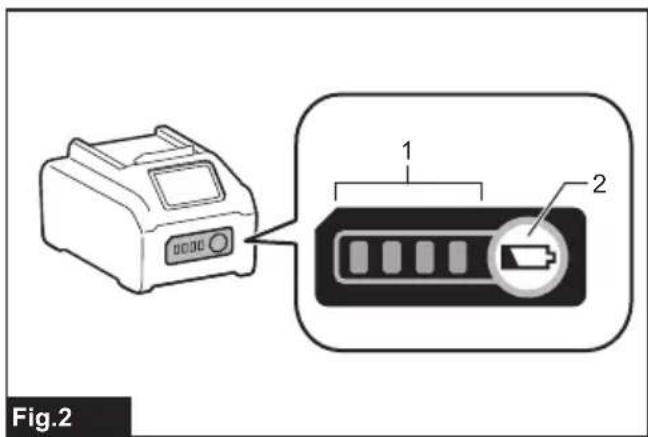
Press the check button on the battery cartridge to indicate the remaining battery capacity. The indicator lamps light up for a few seconds.
▶ Fig.2: 1. Indicator lamps 2. Check button
| Indicator lamps Remaining | capacity | ||
| Lighted Off | Blinking | ||
| 75% to 100% | |||
| 50% to 75% | |||
| 25% to 50% | |||
| 0% to 25% | |||
| Charge the battery. | |||
| The battery may have malfunctioned. | |||
NOTE: Depending on the conditions of use and the ambient temperature, the indication may differ slightly from the actual capacity.
NOTE: The first (far left) indicator lamp will blink when the battery protection system works.
Tool / battery protection system
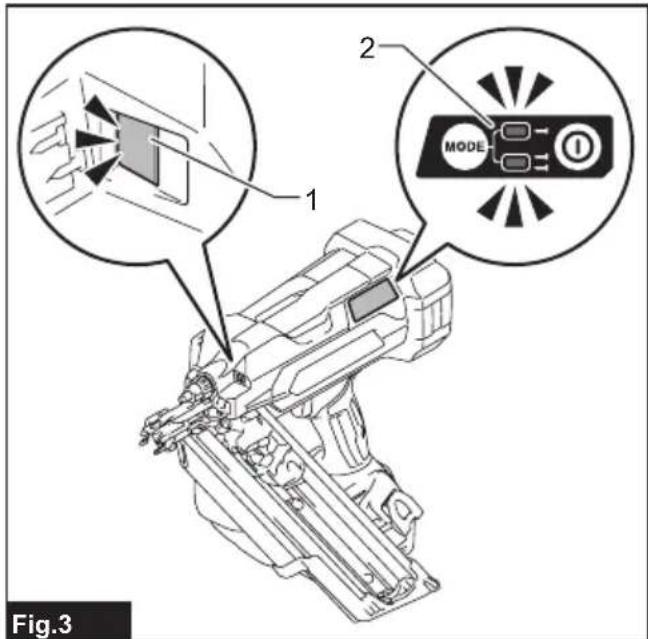
The tool is equipped with a tool/battery protection system. This system automatically cuts off power to the motor to extend tool and battery life. The tool will automatically stop during operation if the tool or battery is placed under one of the following conditions.
▶ Fig.3: 1. Lamp 2. Power/mode indicator
NOTE: The switch design varies depending on your region of residence.
Protection status indication
| Lamp | Power/mode indicator | Status | ||
 |  |  |  | |
| On Blinking On Blinking | ||||
 |  | Overload | ||
| Overheat | ||||
Overload protection
When the tool/battery is operated in a manner that causes it to draw an abnormally high current, the tool automatically stops. In this situation, turn the tool off and stop the application that caused the tool to become overloaded. Then turn the tool on to restart.
Overheat protection
When the tool/battery is overheated, the tool stops automatically. In this situation, let the tool cool down before turning the tool on again.
Overdischarge protection
When the battery capacity becomes low, the tool stops automatically. If the product does not operate even when the switches are operated, remove the battery(ies) from the tool and charge the battery(ies).
Protections against other causes
Protection system is also designed for other causes that could damage the tool and allows the tool to stop automatically. Take all the following steps to clear the causes, when the tool has been brought to a temporary halt or stop in operation.
- Make sure that all switch(es) is/are in the off position, and then turn the tool on again to restart.
- Charge the battery(ies) or replace it/them with recharged battery(ies).
- Let the tool and battery(ies) cool down.
If no improvement can be found by restoring protection system, then contact your local Makita Service Center.
Power switch action
⚠️CAUTION: Before installing the battery cartridge into the tool, always check to see that the switch trigger actuates properly and returns to the "OFF" position when released.
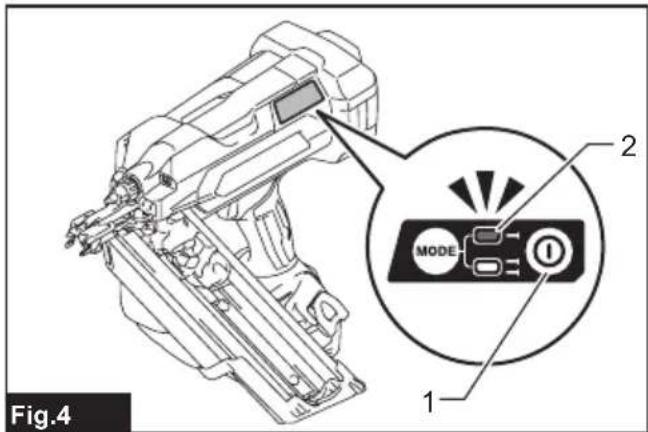
To turn on the tool, press and hold the main power button until the power indicator lights up.
To turn off the tool, press and hold the main power button until the power indicator goes off.
NOTE: The switch design varies depending on your region of residence.
▶ Fig.4: 1. Main power button 2. Power indicator
NOTE: The tool cannot be turned on while either the switch trigger or the contact element is actuated. Be sure to release the switch trigger and the contact element before turning on the tool.
NOTE: The tool cannot be turned off while driving fasteners.
NOTE: The main power switch will automatically shut down if the tool is left unattended for an extended duration.
Selecting actuation mode
Country specific
NOTE: Only a single driving mode (full sequential actuation) is available in some regions or countries. The switch design varies depending on your region of residence.
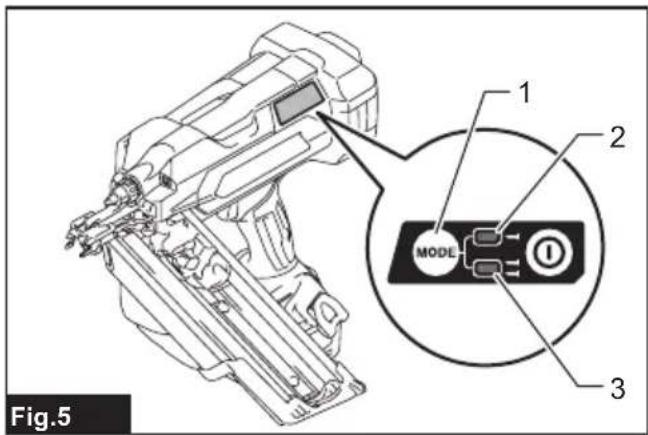
The tool employs a selective-actuation triggering. Press and shortly hold the actuation mode switch button to select the desired actuation mode.
▶ Fig.5: 1. Actuation mode switch button 2. Sequential actuation mode 3. Contact actuation mode
| Mode switch | Actuation mode | Feature |
| [XASW] | Full sequential actuation | Drive one fastener in one sequential operation. Suitable for driving a fastener carefully and accurately and helpful when you require precise fastener placement. |
| [SW8Z] | Contact actuation | Either a single driving or continuous driving is available. Preferred when you require high productive fastener placement. |
- : Unavailable in some regions and countries.
NOTE: Actuation mode cannot be switched to another while either the switch trigger or the contact element is actuated.
Adjusting the driving depth
WARNING: Always make sure that your fingers are not placed on the switch trigger or the contact element and the battery cartridge is removed before adjusting the depth of driving.
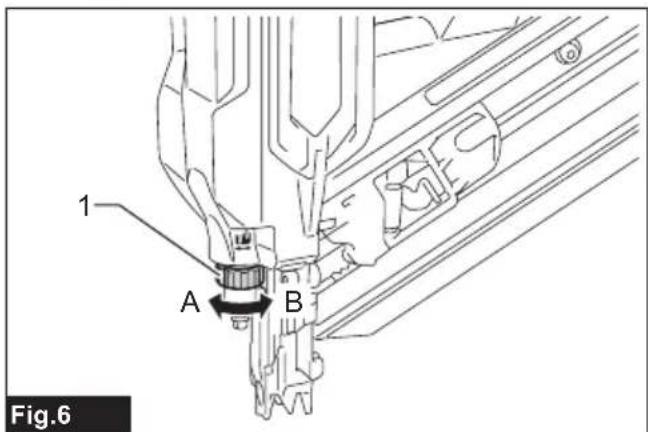
Turn the depth adjuster to adjust the driving depth. The driving depth gets deeper as you turn the depth adjuster to A direction, shallower to B direction in the figure. The range of the driving depth adjustment is 8.5 mm.
▶ Fig.6: 1. Depth adjuster
NOTICE: Do not turn the depth adjuster too much, or the depth adjuster may get stuck.
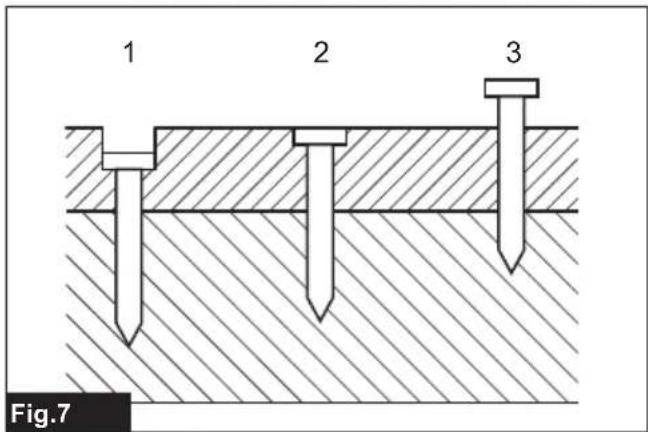
Adjust the driving depth as necessary.
▶ Fig.7: 1. Too deep 2. Flush 3. Too shallow
Lighting up the lamp
⚠CAUTION: Do not look in the light or see the source of light directly.
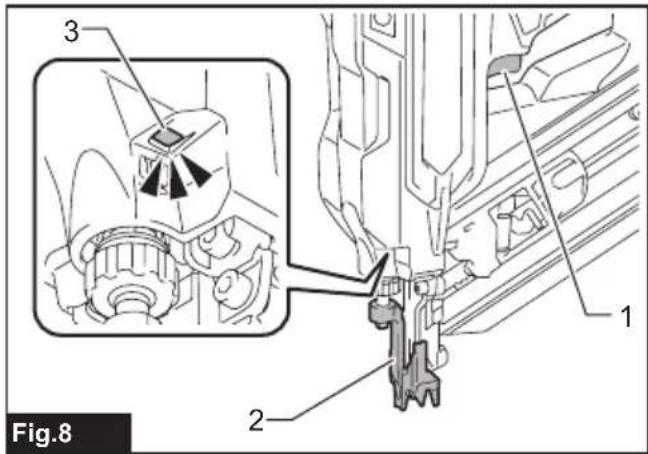
Pull the switch trigger or actuate the contact element to light up the lamp. The lamp keeps on lighting while pulling the switch trigger or actuating the contact element. The lamp goes out several seconds after releasing the switch trigger and the contact element.
▶ Fig.8: 1. Switch trigger 2. Contact element 3. Lamp
NOTICE: Use a dry cloth to wipe the dirt off the lens of the lamp. Be careful not to scratch the lens of lamp, or it may lower the illumination.
NOTICE: When the tool is overheated, the lamp flashes. In this case, release the switch trigger and contact element, and then cool down the tool/battery before operating again.
NOTE: The tool may not fire after the battery becomes low on power even while the lamp remains lit. In this case, charge the battery cartridge.
ASSEMBLY
⚠️CAUTION: Always be sure that the tool is switched off and the battery cartridge is removed before carrying out any work on the tool.
Loading/unloading the fasteners
⚠️CAUTION: Always make sure that the battery cartridge is removed before loading the fasteners. Unintentional firing may cause personal injuries and property damage.
⚠️CAUTION: Load the fasteners in the correct direction. Loading in wrong direction may cause premature wear and tear of the driver and damage of the other parts.
⚠️CAUTION: Be careful not to get your fingers caught in the magazine. The pusher tends to spring back to its original position when the pusher is unlocked.
⚠️CAUTION: Do not abruptly slide the pusher with fasteners loaded in the magazine. Accidentally dropping fasteners especially when working in high places may cause personal injuries.
NOTICE: Gently slide the pusher along the magazine. A forceful contact between the pusher and fastener strip may damage the fasteners.
- Remove the battery cartridge.
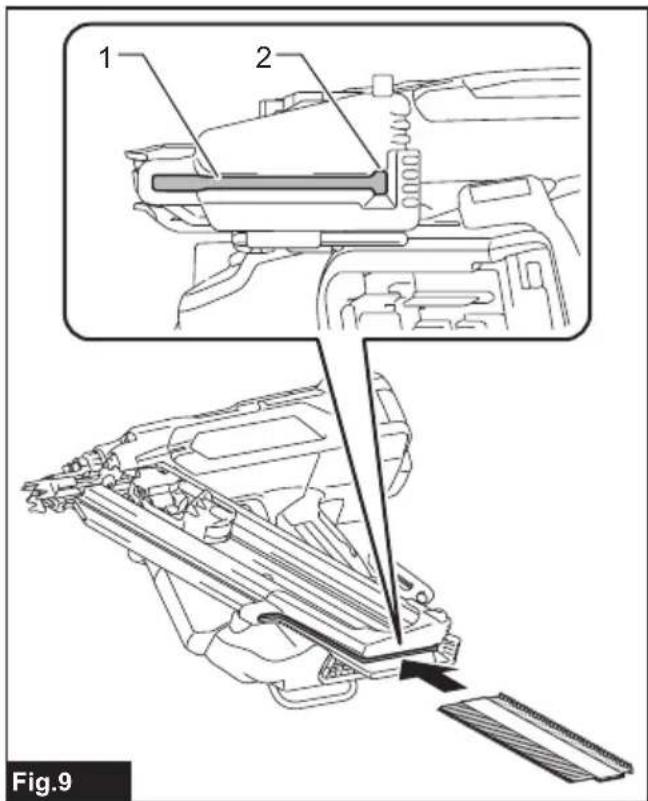
- Insert a fastener strip into the slit of the magazine. Make sure to align the outlines of the fastener heads with that of the slit.
▶ Fig.9: 1. Slit 2. Fastener head outline
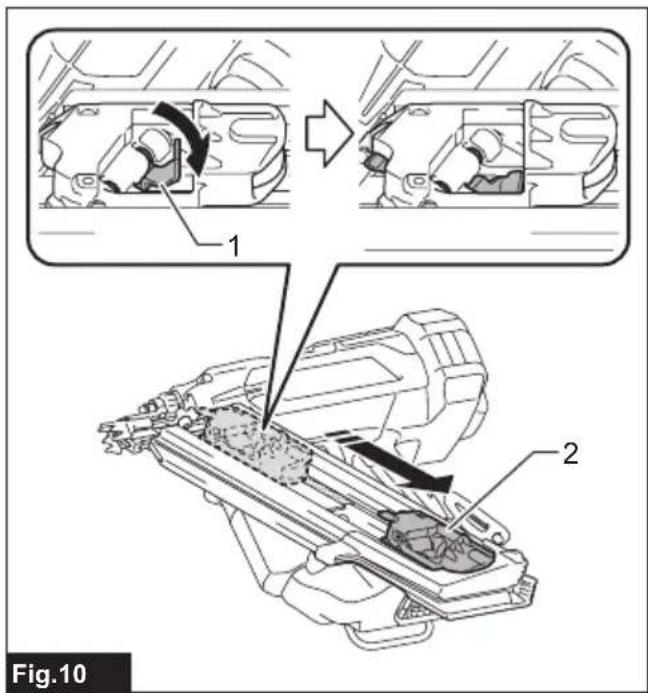
- Pinch the pusher lever to raise the pusher plate up above the fastener strip loaded. Then pull the pusher towards the slit.
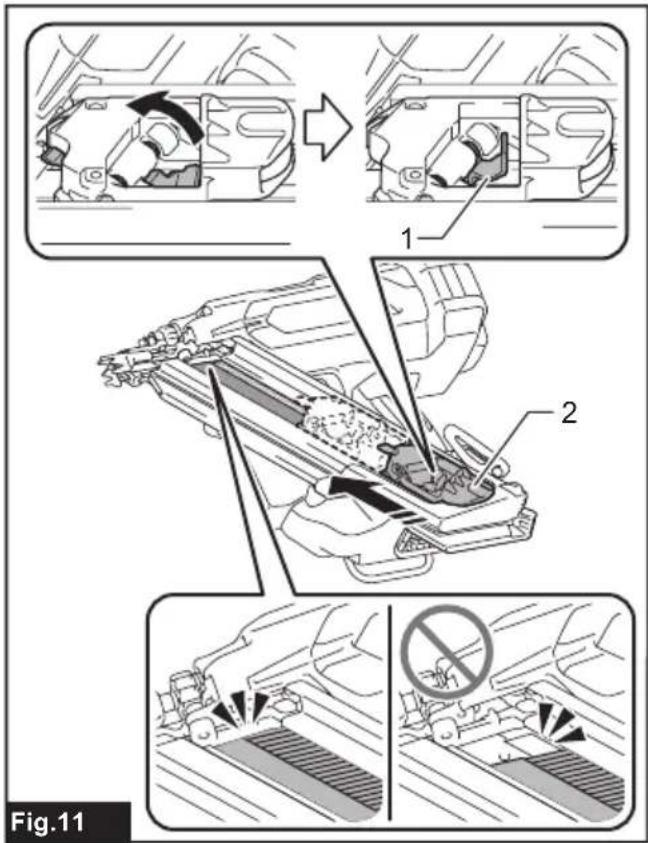
▶ Fig.10: 1. Pusher lever 2. Pusher - Set the pusher lever free and slide the pusher back by releasing the spring tension safely.
▶ Fig.11: 1. Pusher lever 2. Pusher
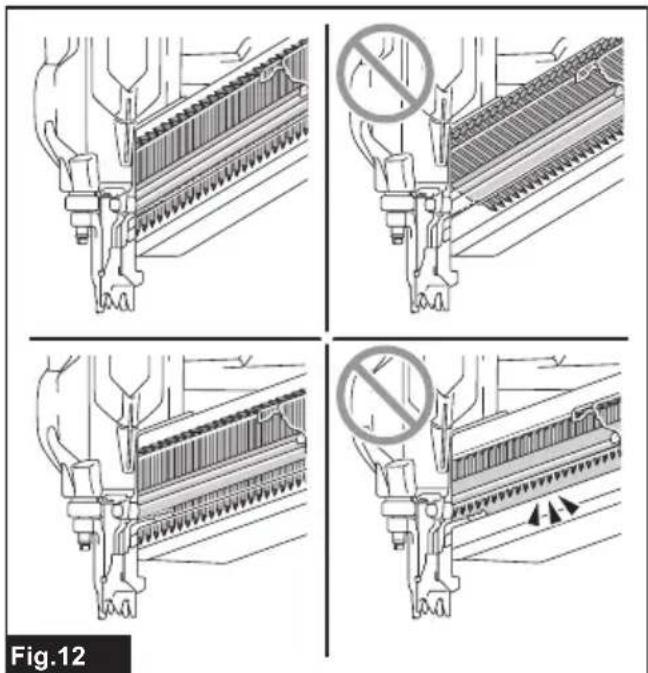
NOTICE: Make sure that the fastener strip is properly aligned in the magazine and secured with the pusher. If not, try reloading.
NOTICE: Do not use deformed fasteners and fastener strips. Use fasteners specified in this manual. Using fasteners other than those specified may cause fastener jamming and malfunction.
▶ Fig.12
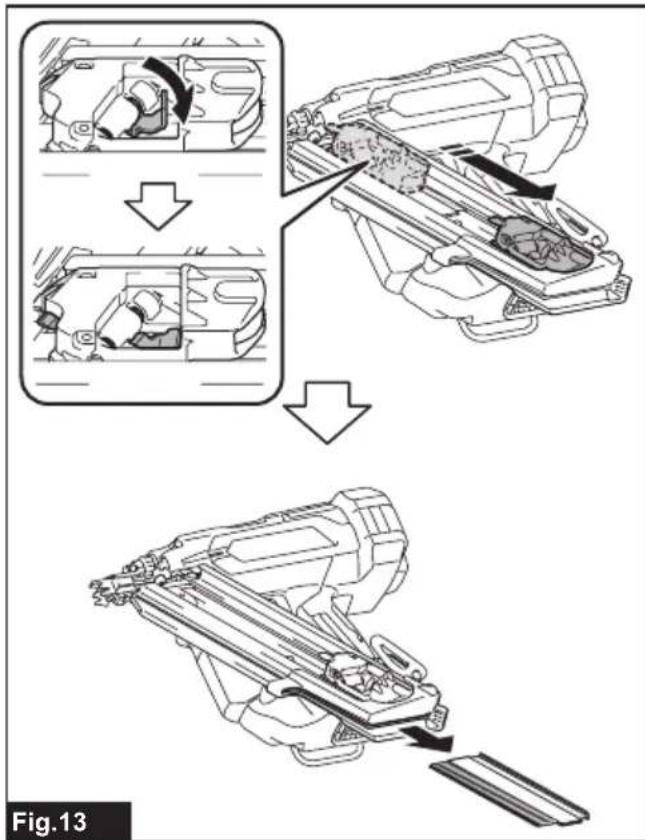
To remove fasteners, follow the installation procedures in reverse.
▶ Fig.13
Installing extended capacity magazine
Optional accessory
CAUTION: Always make sure to unload all the fasteners left in the magazine and remove the battery cartridge from the tool before installing an extended capacity magazine.
Use a large-capacity magazine attachment so the tool carries more the fasteners.
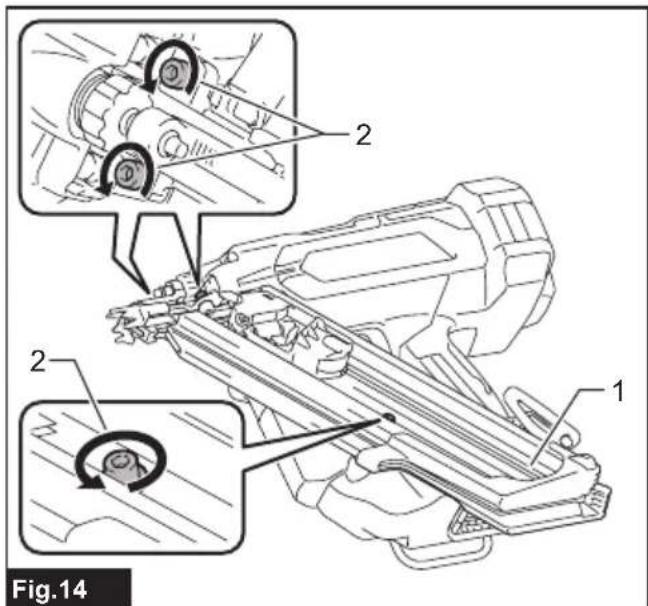
- Loosen and remove the bolts that secure the magazine using the hex wrench.
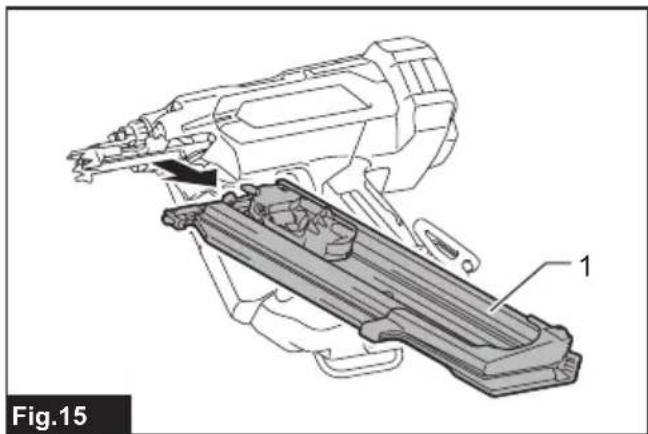
▶ Fig.14: 1. Magazine 2. Bolts - Lift the free end of the standard equipped magazine slightly and pull it straight out.
▶ Fig.15: 1. Standard equipped magazine - Insert the lock plate in the extended capacity magazine into the lock groove in the driver guide at an angle. Align the bolt holes in the magazine with those in the driver guide. Then tighten the bolts a little at a time using the hex wrench.
▶ Fig.16: 1. Extended capacity magazine 2. Lock plate 3. Lock groove 4. Driver guide 5. Bolt holes - Tighten the extended capacity magazine on the tool body with the bolt.
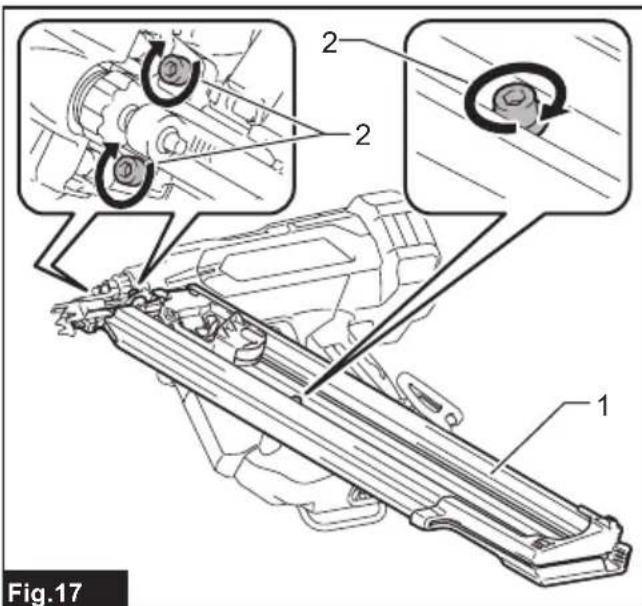
- Retighten all the bolts up to secure the extended capacity magazine.
▶ Fig.17: 1. Extended capacity magazine 2. Bolts
Nose adapter
CAUTION: Always make sure that your fingers are not placed on the switch trigger or the contact element, remove all the fasteners left in the magazine, and remove the battery cartridge before attaching or detaching the nose adapter.
When driving fasteners on the material with easily-marred surfaces, attach the nose adapter onto the contact element.
NOTE: If you want to fix the formwork by lifting the fastener head off the surface of the formwork, you can easily float the fastener head by using the fastener head lifting adapter (optional accessory).
Attaching nose adapter
- Lightly place the nose adapter over the contact element.
- Release the switch trigger.
- Place the contact element flat on the material that can be damaged.
- Push the contact element through until the nose adapter securely fits onto the contact element.
Fig.18: 1. Nose adapter 2. Contact element
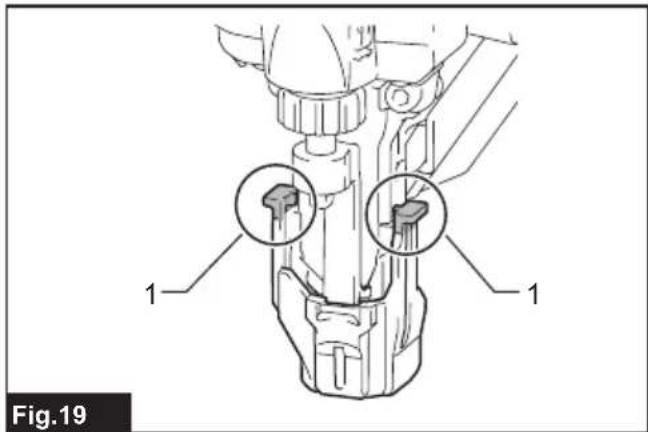
NOTE: Make sure that the hooked arm ends of the nose adapter fully engage the contact element.
▶ Fig.19: 1. Hooked arm ends
Detaching nose adapter
- Turn the tool upside down.
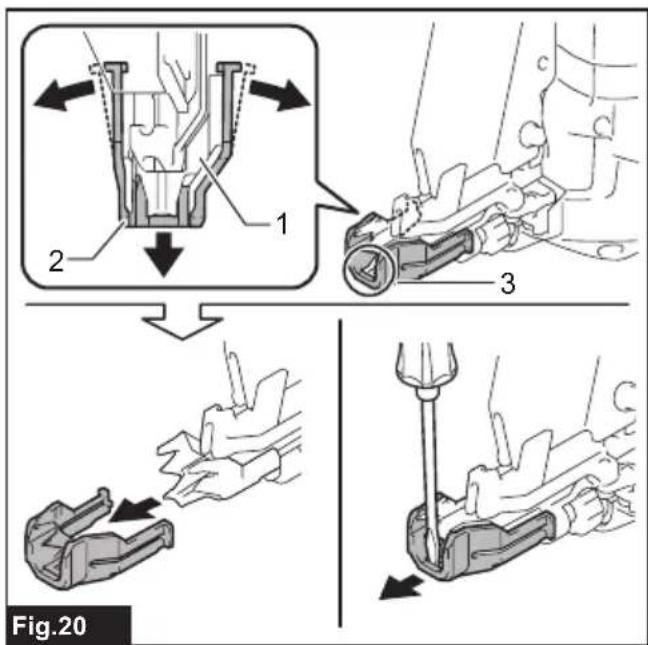
- Disengage the arms of the nose adapter from the contact element and slide the nose adapter out of the assembly.
▶ Fig.20: 1. Contact element 2. Nose adapter 3. Gap
NOTE: Use a slotted screwdriver to pry apart pieces if you find it hard to detach the nose adapter.
Hook
WARNING: Be careful not to overload the hook as too much force. Otherwise irregular overburden may cause damages to the tool resulting in personal injury.
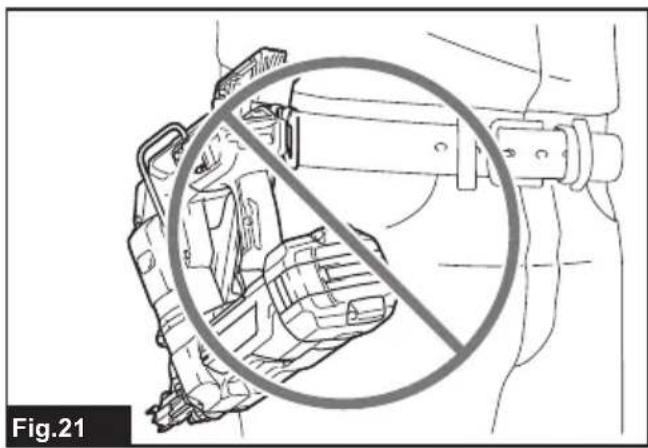
⚠️CAUTION: Do not hang the hook from the waist belt. Dropping the tool, which is caused by the hook accidentally coming out of place, may cause unintentional firing and result in personal injuries.
▶ Fig.21
⚠️CAUTION: When installing the hook, always secure it with the screw firmly. If not, the hook may come off from the tool and result in the personal injury.
⚠️CAUTION: Use the hanging/mounting parts for their intended purposes only. Using for unintended purpose may cause accident or personal injury.
⚠️CAUTION: Make sure to hang the tool securely before releasing your hold. Insufficient or unbalanced hooking may cause falling off and you may be injured.
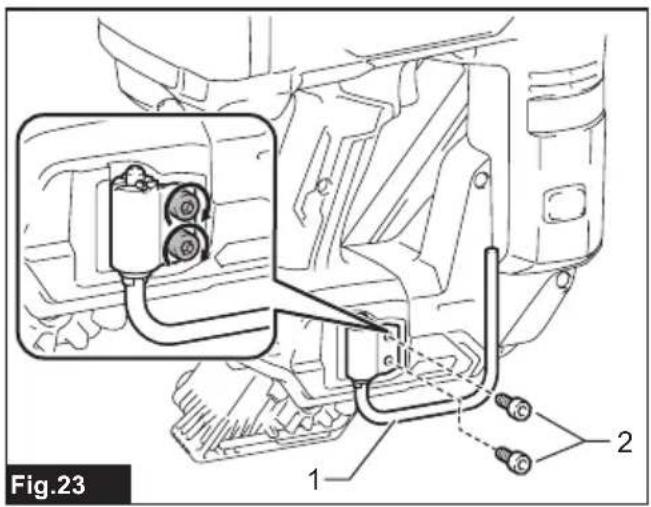
Two types of tool hooks are available according to your needs. Use either a clip-shaped hook or C-shaped hook to hang the tool on a tool rack, rail or the wall.
Clip-shaped hook
Insert the clip-shaped hook into a groove in the tool housing, and then secure it with a hex bolt.
To remove the clip-shaped hook, loosen the bolt and then take the hook out.
▶ Fig.22: 1. Groove 2. Clip-shaped hook 3. Hex bolt
C-shaped hook
Aligning the two sets of bolt holes, place the C-shaped hook on the tool housing with the opening of the C-shaped hook faces upwards. Tighten the C-shaped hook with two hex bolts.
To remove the C-shaped hook, loosen the bolts and then take the hook out.
▶ Fig.23: 1. C-shaped hook 2. Hex bolts
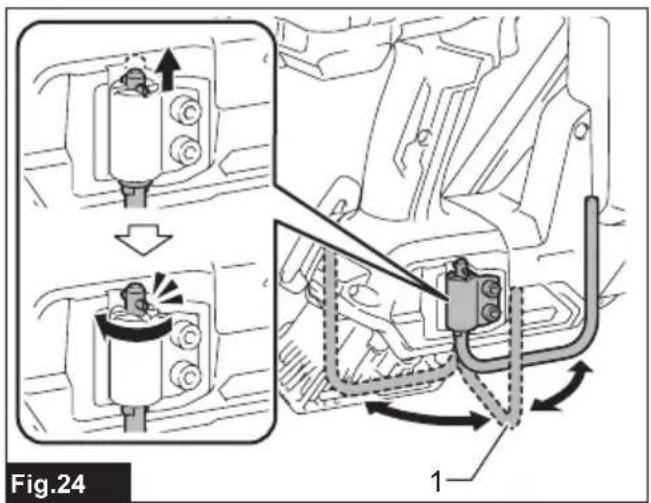
The C-shaped hook can be positioned open at 90-degree intervals.
Push and hold the hook upwards and swing it to your desired position.
▶ Fig.24: 1. C-shaped hook
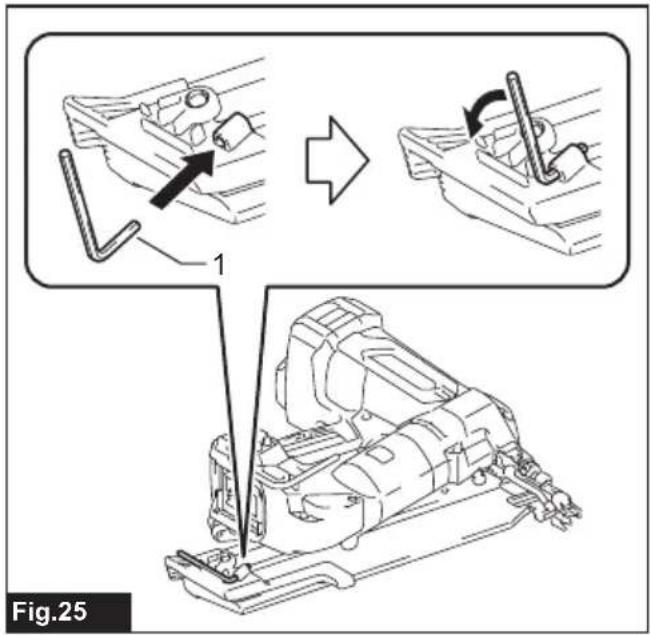
Hex wrench storage
When not in use, store the hex wrench as shown in the figure to keep it from being lost.
▶ Fig.25: 1. Hex wrench
OPERATION
Testing safety system
WARNING: Make sure all safety systems are in working order before operation. Failure to do so may cause personal injuries.
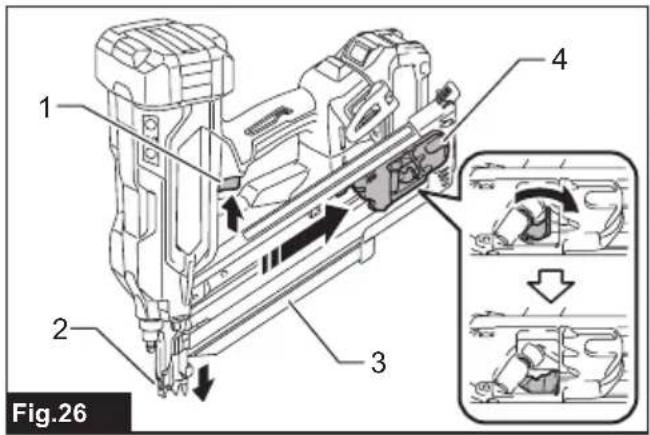
▶ Fig.26: 1. Switch trigger 2. Contact element 3. Magazine 4. Pusher
Test safety system as follows for possible fault or malfunction before operation.
- Remove the battery cartridge from the tool. Then unload all the fasteners left in the magazine.
- Install the battery cartridge in place and turn the tool on.
- Pull the switch trigger without placing the contact element against the material.
- Pull the pusher downward and hold it in place. Then place the contact element against the material without pulling the switch trigger.
If the tool works in case step 3 or 4 described above, safety system is not functioning properly. Stop using the tool immediately and ask your local Makita Service Center.
Handling of the fasteners
Nails
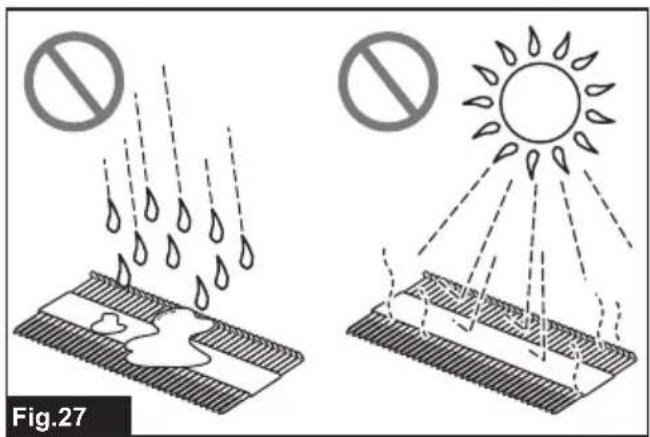
Handle nails and their box carefully. If the nails have been handled roughly, they may be out of shape or their connector breaks, causing poor nail feed.
NOTICE: Avoid storing nails in a very humid or hot place or place exposed to direct sunlight.
▶ Fig.27
Driving fasteners
WARNING: Keep your face away from the tool when operating the tool. Failure to do so may cause injury.
WARNING: Do not use this tool for fastening electrical cables. This tool is not designed for electric cable installation and may damage the insulation of electric cables thereby causing electric shock or fire hazards.
⚠ WARNING: Continue to place the contact element firmly on the material until the fastener is driven completely. Unintentional firing may cause personal injuries.
⚠️CAUTION: Hold the tool firmly during operation.
⚠️CAUTION: Do not drive fasteners on hard materials such as metal or the like. If the fastener cannot penetrate the material, the tool may be kicked back toward you and injury result.
NOTICE: The tool will not start fastening after five seconds no switch operation while either the switch trigger or the contact element is being solely actuated. Release the switch trigger or pull the contact element free from the workpiece, and then reposition the tool in place to restart fastening.
NOTE: If you drive fasteners continuously for a long time, the exhaust air will get hot due to the heat from the motor.
The tool employs two driving actions; full sequential actuation and contact actuation.
NOTE: Only a single driving mode (full sequential actuation) is available in some regions or countries. The switch design varies depending on your region of residence.
Full sequential actuation
In this mode, you can drive one fastener by one sequential operation.
A workpiece contact and then a trigger need to be activated in a specific sequence to actuate the tool. Release and re-activate the switch controls in the same sequence to continue driving fasteners.
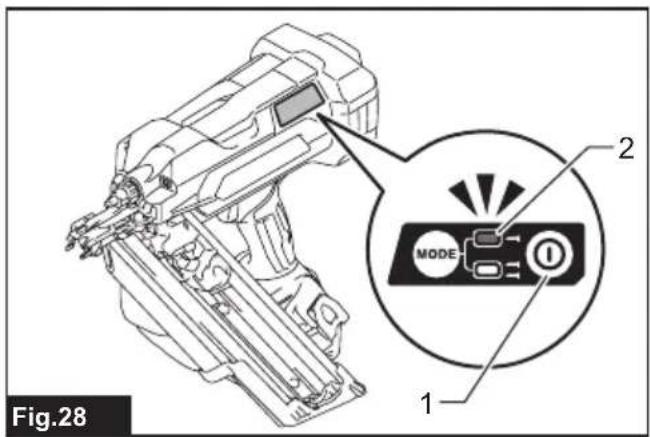
- Press and hold the main power button to turn on the tool.
- Make sure that the sequential actuation mode lamp lights up.
▶ Fig.28: 1. Main power button 2. Sequential actuation mode lamp
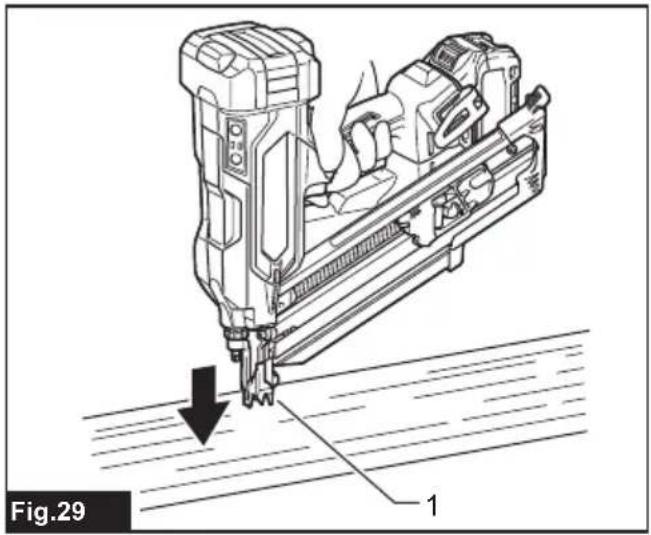
- Place the contact element flat on the material.
▶ Fig.29: 1. Contact element
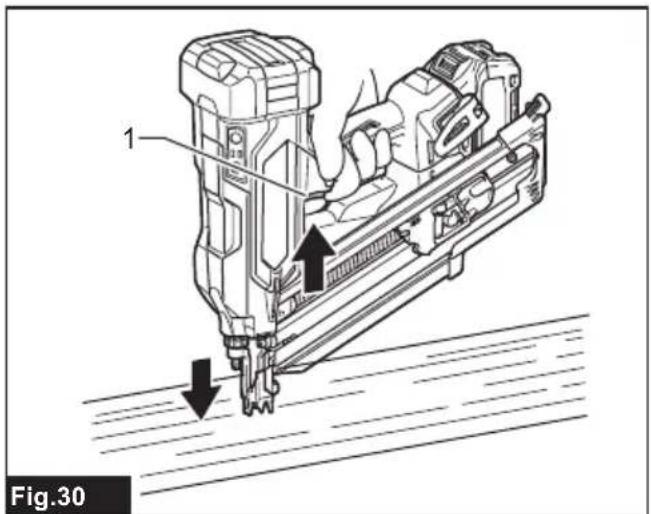
- Pull the switch trigger fully to drive a fastener.
▶ Fig.30: 1. Switch trigger - Release your finger from the switch trigger. Then lift the contact element up from the material.
To drive the next fastener, repeat the steps 3 to 5 in the same sequence.
Contact actuation
Country specific
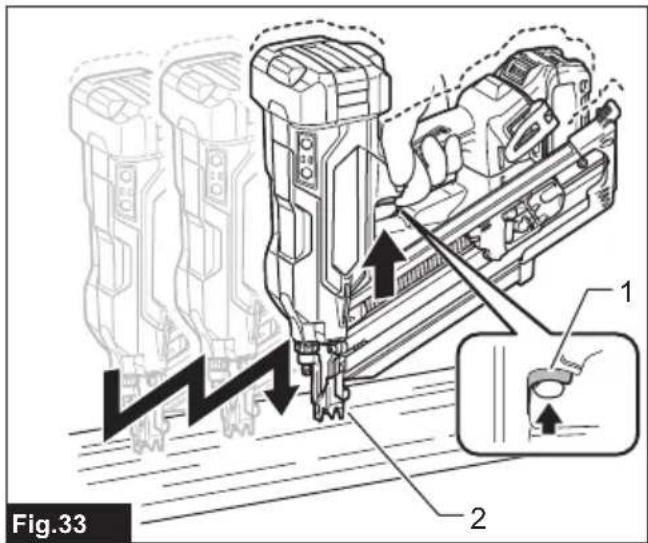
In this mode, you can choose either continuous or single driving by following any sequences of the trigger operation.
A workpiece contact and a trigger can be activated in any sequences to actuate the tool. Release and re-activate the workpiece contact to continuously drive fasteners.
For a single driving
- Press and hold the main power button to turn on the tool.
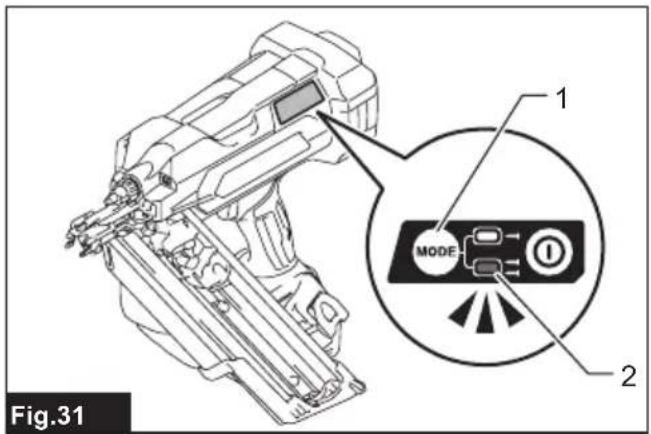
- Press and shortly hold the actuation mode switch button to select the contact actuation mode.
The contact actuation mode lamp lights up.
▶ Fig.31: 1. Actuation mode switch button 2. Contact actuation mode lamp
- Place the contact element flat on the material.
- Pull the switch trigger fully to drive a fastener.
- Release your finger from the switch trigger. Then lift the contact element up from the material.
To drive the next fastener, repeat the steps 3 to 5 in the same sequence.
For a continuous driving
- Press and hold the main power button to turn on the tool.
- Press and shortly hold the actuation mode switch button to select the contact actuation mode.
The contact actuation mode lamp lights up.
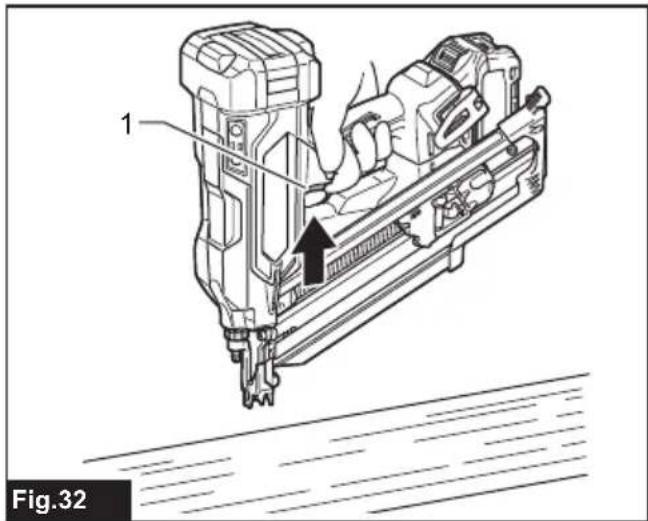
- Pull the switch trigger.
▶ Fig.32: 1. Switch trigger - Place the contact element flat on the material to drive a fastener.
- Move the tool to the next areas with the switch trigger pulled, and place the contact element flat on the material to drive following fasteners.
▶ Fig.33: 1. Switch trigger 2. Contact element
Anti dry fire mechanism
When the remaining fasteners in the magazine decrease to 7 - 9 pieces for model BN001G / 6 - 7 pieces for model BN002G, the switch can no longer be actuated and the tool stops firing. Insert a new strip of fasteners in the magazine before restarting operation.
Removing jammed fasteners
WARNING: Always make sure that the battery cartridge and fasteners are removed before removing jammed fasteners.
WARNING: Do not push on the fastener driver forcibly. Do not strike the fastener driver and fasteners with any hand tools to clear jams. Mind that the tool is charged with compressed air and the pressure is maintained inside. Failure to follow the safety precautions in the manual can result in serious injury.
WARNING: Never point the tool at yourself or other persons nearby when clearing jams. Failure to do so may cause a risk of injury by misfiring since the tool is charged with compressed air in a factory sealed chamber.
⚠CAUTION: Do not remove the jammed fasteners with bare hands. The fastener may jump out of the magazine and cause an injury.
⚠️CAUTION: To address frequent jamming or hard-to-clear jamming situations, consult your local Makita Service Center.
When a fastener jamming occurs, look over closely the fastener feeding and driving unit. Jams tend to be caused by fasteners wedged between the driver and the driver guide.
- Remove the battery cartridge from the tool.
- Take out all the fasteners left in the magazine.
- Clear a jam using pliers or the like.
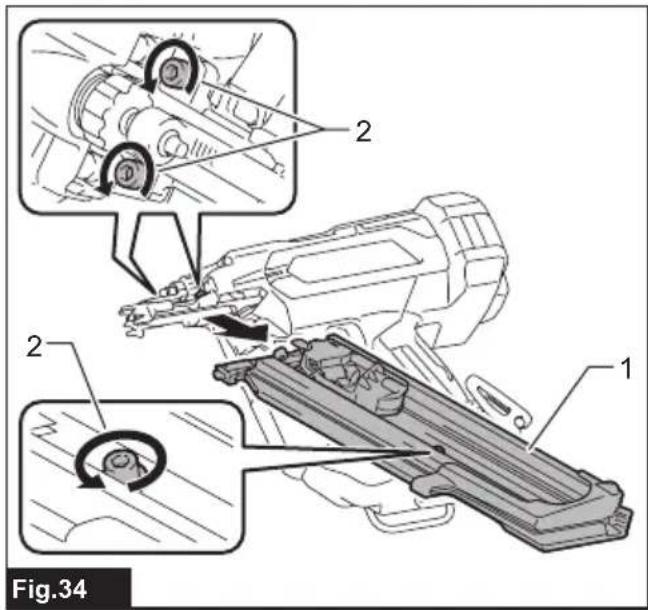
NOTE: Dismount the magazine from the tool if jamming occurs inside the fastener feeding and driving unit.
- Loosen and remove the bolts that secure the magazine using the hex wrench. Then lift the free end of the magazine slightly and pull it straight out.
▶ Fig.34: 1. Magazine 2. Bolts
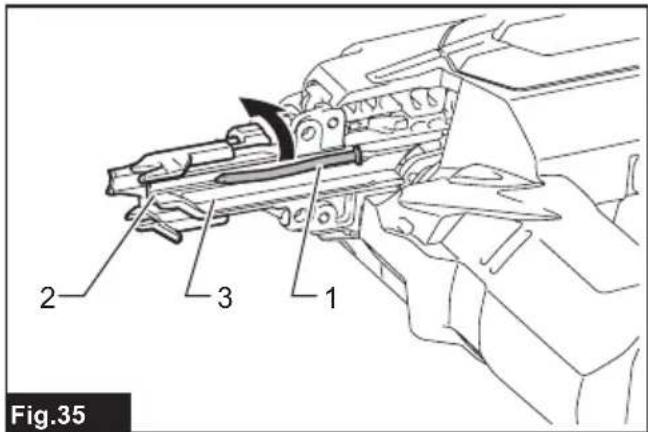
5. Clear jammed fasteners in the fastener exit opening or through the driver guide.
Use pliers to bend the jammed fastener so that the fastener head comes out of the slot in the driver guide. Then remove the jammed fastener.
▶ Fig.35: 1. Jammed fastener 2. Fastener exit opening 3. Driver guide
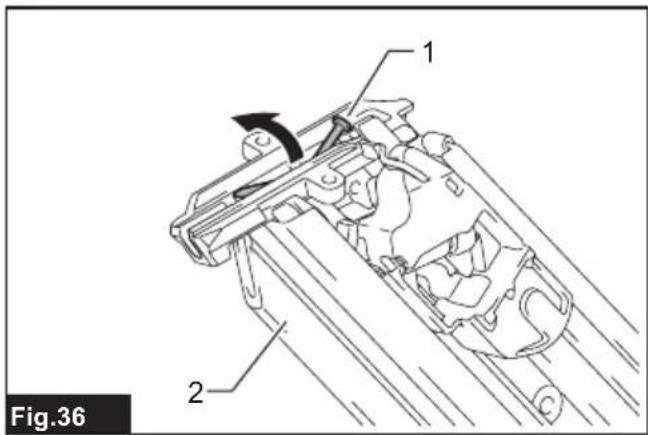
A jamming may occur at the fastener feeding slot in the magazine. Use pliers to bend the jammed fastener so that the fastener head comes out of the slot in the magazine. Then remove the jammed fastener.
▶ Fig.36: 1. Jammed fastener 2. Magazine
- Insert the lock plate in the magazine into the lock groove in the driver guide at an angle. Align the bolt holes in the magazine with those in the driver guide. Tighten the magazine on the tool body with the bolts.
MAINTENANCE
WARNING: Do not disassemble this tool. This tool is sealed with compressed air and disassembly may result in serious injury.

natural_image
Silhouette of a person with radiating lines and sparkles, symbolizing communication or innovation (no text or symbols)CAUTION: Always be sure that the tool is switched off and the battery cartridge is removed before attempting to perform inspection or maintenance.
NOTICE: Never use gasoline, benzine, thinner, alcohol or the like. Discoloration, deformation or cracks may result.
To maintain product SAFETY and RELIABILITY, repairs, any other maintenance or adjustment should be performed by Makita Authorized or Factory Service Centers, always using Makita replacement parts.
Preventive maintenance
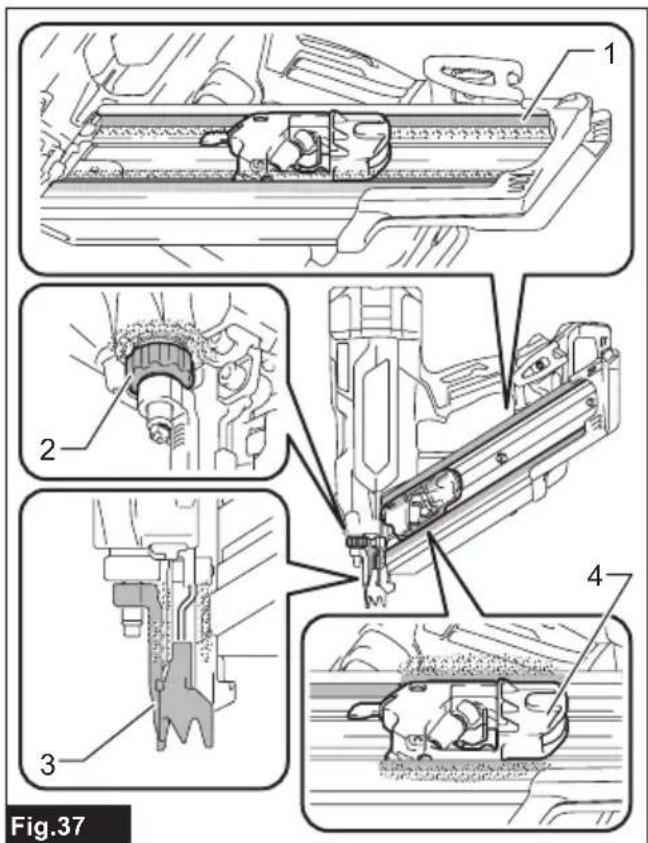
Thoroughly clean and inspect moving components (i.e., contact element, pusher, etc.) on a regular basis, keeping them free of dust and dirt that may accumulate over time.
NOTE: If the moving and sliding components, as following illustrated, seem to work poorly or inefficiently, blow any dirt and dust adhered around off and then wipe clean.
▶ Fig.37: 1. Feeding rails 2. Depth adjuster 3. Contact element 4. Pusher
Initializing driver position
The driver may not be positioned correctly behind the fastener to be driven next after a fastener jamming or under low battery condition. Always perform initialization steps before you restart operation.
- Remove the battery cartridge from the tool.
- Take out all the fasteners left in the magazine.
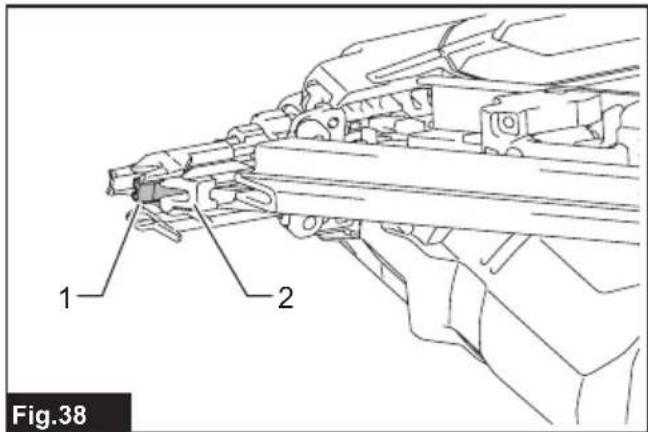
- Observe the driver position.
If you see the driver tip out of the driver guide, the contact element cannot correctly be actuated during initialization.
▶ Fig.38: 1. Driver 2. Driver guide
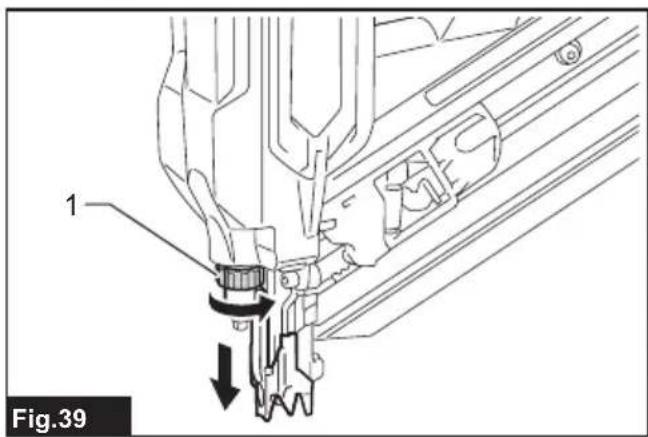
Turn the depth adjuster to set the shallowest so that the contact element functions properly.
▶ Fig.39: 1. Depth adjuster
- Install the battery cartridge in place and turn the tool on.
-
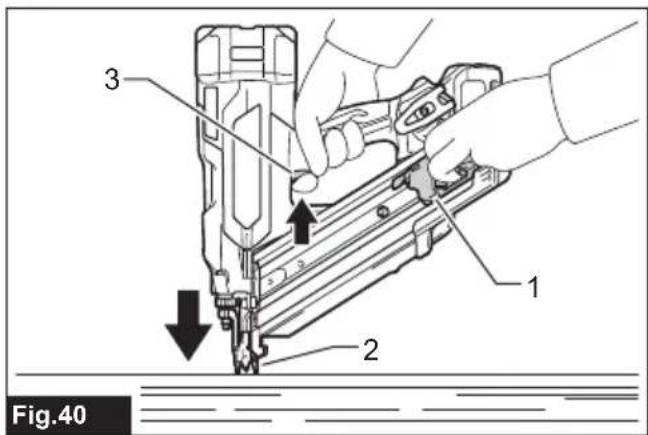
Pull the pusher downward and hold it in place. Then place the contact element against the material that can be damaged.
-
Pull the switch trigger fully, with the contact element actuated, to reset the driver position.
▶ Fig.40: 1. Pusher 2. Contact element 3. Switch trigger
The driver position will be initialized correctly.
- Remove the battery cartridge from the tool.
Reload the fasteners in the magazine. Place the battery cartridge back into the tool.
OPTIONAL ACCESSORIES
⚠️CAUTION: These accessories or attachments are recommended for use with your Makita tool specified in this manual. The use of any other accessories or attachments might present a risk of injury to persons. Only use accessory or attachment for its stated purpose.
If you need any assistance for more details regarding these accessories, ask your local Makita Service Center.
- Nails
• Extended capacity magazines - Fastener head lifting adapter
- Makita genuine battery and charger
NOTE: Some items in the list may be included in the tool package as standard accessories. They may differ from country to country.
SPÉCIFICATIONS
natural_image
Silhouette of a person with radiating lines and abstract patterns (no text or symbols)▶ Abb.25: 1. Inbusschlüssel
BETRIEB
natural_image
Silhouette of a person with sound waves radiating outward, symbolizing music or music activity (no text or symbols present)natural_image
Silhouette of a person with sound waves radiating outward, symbolizing music or music (no text or symbols present)⚠ WAARSCHUWING: Draag gehoorbescherming.
VEILIGHEIDSWAAR- SCHUWINGEN
▶ Fig.18: 1. Neusadapter 2. Contactschoen
▶ Fig.20: 1. Contactschoen 2. Neusadapter 3. Opening
natural_image
Silhouette of a person with sound waves radiating outward, symbolizing communication or music (no text or symbols present)OPTIONELE ACCESSOIRES
▶ Fig.25: 1. Llave hexagonal
OPERACIÓN
natural_image
Silhouette of a person with sound waves radiating outward, symbolizing communication or music (no text or symbols present)▶ Fig.25: 1. Chave hexagonal