SM26S - Audio Mixer Rane - Free user manual and instructions
Find the device manual for free SM26S Rane in PDF.



| Product type | Audio mixer / Line-level signal splitter-mixer |
| Brand | Rane |
| Model | SM26S |
| Format | 19-inch rack, 1U (approx. 48.3 x 4.4 x 15 cm) |
| Weight | Approx. 2.5 kg |
| Power supply | 100-230 V AC, 50/60 Hz, via IEC 60320 C6 connector |
| Inputs | 6 mono TRS 6.35 mm balanced/unbalanced inputs 2 stereo master TRS 6.35 mm balanced inputs |
| Outputs | 6 mono TRS 6.35 mm balanced/unbalanced outputs 2 stereo mix TRS 6.35 mm balanced outputs 2 Expand Out outputs (paralleled to master inputs) |
| Controls | 6 mono input level controls (Off to +12 dB) 6 Mix/Pan controls 1 master input level control (Off to +12 dB) 1 master output level control (Off to 0 dB) |
| Indicator | Yellow power LED |
| Operating modes | Mixer (6 mono inputs to 2 stereo outputs) Splitter (1 or 2 stereo inputs to 6 mono outputs) Distribution amplifier (6 inputs to 6 outputs) Configurable to 8 outputs (via internal jumpers) |
| Series expansion | Ability to daisy-chain multiple SM26S via Expand Out outputs |
| Internal configuration | Internal jumpers to disconnect each output from the mix bus (requires qualified technician) |
| Maintenance and cleaning | Clean with a soft, dry cloth. Do not use abrasive or liquid products. |
| Safety | Use only the supplied power cable. Do not remove the ground connection. Disconnect before any internal intervention. |
| Repairability | Spare parts available via Rane. Jumper configuration reserved for qualified technician. |
Frequently Asked Questions - SM26S Rane
User questions about SM26S Rane
0 question about this device. Answer the ones you know or ask your own.
Ask a new question about this device
Download the instructions for your Audio Mixer in PDF format for free! Find your manual SM26S - Rane and take your electronic device back in hand. On this page are published all the documents necessary for the use of your device. SM26S by Rane.
USER MANUAL SM26S Rane
User Guide (English)
Introduction
The Rane Model SM26S Splitter Mixer is one of the most useful, yet unusual audio products available. In its most basic configuration, it is a six-to-two line level mixer. It will accept six balanced or unbalanced line level inputs which are applied to six Level and Pan controls. An additional stereo Master Input allows a total of eight inputs. The result of the mix is sent to an overall Master Output Level control and appears at the Left and Right Outputs on the rear. In its splitter mode, the SM26S can take one or two line level inputs and split these to any of the six Mono Outputs on the rear. The Mix/Pan controls in this mode control the level from each of the two input buses to be applied to each Output. Internal header blocks allow the Mix Outputs to become an independent stereo out, allowing a total of eight outputs. The SM26S may also be used as a six input, six output buffer amplifier in which case signal applied to Input 1 is delivered to Output 1, and so on.
The SM26S may also be used in a combination of modes at once. For instance, Inputs 1 through 3 may be mixed to the left and/or right output buses while at the same time Outputs 4 and 5 are delivering signal originally applied to the Left and Right Master Inputs while at the same time Output 6 is being driven from Input 6 in the straight through mode.
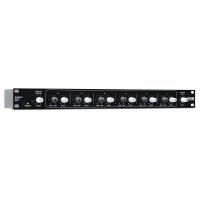
The front of the SM26S comprises a Master Input Level control, six Channel Level controls, six Mix/Pan controls and a Master Output Level control. The rear of the SM26S provides two Master Left and Right Inputs, six Mono Inputs, six Mono Outputs and two Master Left and Right Mix Outputs. All Inputs and Outputs on the SM26S are 1/4"TRS active balanced.
Features:
- -10 dBV to +4 dBu Shifter
- +4 dBu to -10 dBV Shifter
- 6 Balanced Mono Inputs, 6 Balanced Mono Outputs
- 2 Main Balanced Inputs, 2 Main Balanced Outputs
- 6 Input Level Controls and 6 Mix/Pan Controls
- Master Input and Output Level Controls
- Internal Universal Power Supply (100-230 VAC)
Applications:
- 6 Mono Inputs, Stereo Output Line Mixer
- 4 Stereo Inputs, Stereo Output Line Mixer
- Stereo Input, 6 Mono Output Line Splitter
- 1 Stereo Input, 4 Stereo Output Splitter
- 6-In, 6-Out Booster Amplifier
- Configurable to 8 Outputs
Box Contents
SM26S
Power Cable
User Guide
Safety & Warranty Manual
Support
For the latest information about this product (documentation, technical specifications, system requirements, compatibility information, etc.) and product registration, visit rane.com.
For additional product support, visit rane.com/support.
Features
Front Panel

- Master Input Level: Sets the gain of the Left & Right Master Input stages, with a range of Off to +12 dB. In the splitting mode, this controls the Level of all Mono Channel Outputs at once (i.e., those which do not have a separate input).
- Mono Input Level: Controls the Level of signal through each particular channel. When fed from the Mono Input jack, each stage has a gain range from Off to +12 dB minimum, allowing level matching of -10 dBV equipment to +4 dBu gear. When fed via the Left & Right Master In, these Level controls automatically limit to a maximum of unity gain to accommodate the +12 dB available from the Left & Right Input gain stages.
- Mix / Pan: Serves two different functions:
Mix: When used as a splitter, this controls the mix of Left and Right Master Input program to each channel's Mono Output.
Pan: When used as a mixer, this control pans the Mono Channel Input between the Left and Right Mix Outputs.
- Master Output Level: Controls the gain of the output stages and the amount of signal at the Mix Output jacks. It does not affect the level of any of the six Mono Outputs. This allows an increase in headroom to eliminate overloading due to excessive combined signal from one or more Inputs. Range of gain is from Off to 0 dB (unity) (refer to the Block Diagram in the Appendix).
- Power Indicator: When this yellow LED is lit, the SM26S is ready to go (when it's off, it's not).
Rear Panel

- Master In: These balanced Tip-Ring-Sleeve (TRS) 1/4 Master Inputs feed all six Mono Outputs when all Mono Inputs are not used. Connecting to an individual Mono Input disconnects that channel from these Inputs (refer to the Block Diagram in the Appendix).
For unbalanced operation use a standard mono 1/4" plug; for balanced operation use a TRS (stereo) 1/4" plug wired as follows:
Tip is signal + (connect to pin 2 on a 3-pin connector).
Ring is signal - (pin 3 in a 3-pin connector).
- Sleeve is chassis ground.
-
Mono Inputs: 1/4" TRS jacks which accept either balanced or unbalanced mono signals. These are switching jacks which automatically bypass the Master In jacks whenever a plug is inserted (refer to the Block Diagram in the Appendix). Follow wiring conventions as in 1 above.
-
Mono Outputs: 1/4'' TRS jacks that deliver either an unbalanced output (use TS plugs), or a balanced output (use TRS plugs). Follow wiring conventions as in 1 above.
- Expand Outs: 1/4 TRS jacks connected in parallel with the Master In jacks, allowing two or more SM26Ss to be daisy-chained for multiple splitting. Simply connect the Expand Out to the Master In of another SM26S; there is no limit to the number of expansions possible with the SM26S.
Note: These Expand Outputs are not buffered from the Master Inputs. Therefore, it is not possible to mix both balanced and unbalanced lines in the same channel between several units: once the ring and sleeve are shorted anywhere in the chain (by using a mono plug) the entire line becomes unbalanced.
- Mix Outputs: Balanced TRS 1/4'' outputs controlled by the Master Output Level control. They are fed either by the Master In or by any of the six Mono Inputs, or a combination of both. Follow wiring conventions as in 1 above.
- Universal Voltage Input: via a miniature IEC 60320 C6 appliance inlet. This mates with an IEC 60320 C5 line cord (USA domestic). Do not lift the ground connection!
Operation
Since numerous applications exist for the SM26S, no single set of operational procedures control its use. Visit rane.com/note108.html to view The SM26S Swiss Army Mixer RaneNote, which explores the many configurations of the SM26S in depth.
Internal Jumper Options
There exist within the SM26S some signal routing options, requiring removal of the top cover to move some jumpers. This must only be done with the power off by qualified service personnel.
If an SM26S needs to have an additional set of independent outputs, as in a 2x4 stereo distribution amplifier, the Left and Right Mix Outputs can be used in addition to the 6 Mono Outputs. Normally, the Left and Right Mix Outputs produce the sum mix of all 6 Level and Pan controls. To break any channel away from the Mix Output bus, internal jumpers have been provided. These are located behind the Mix/Pan controls for each channel. J3 connects Mono Out 1 to the mix bus. J6 connects Mono Out 2, J9 connects Mono Out 3, and so on—see the board layout diagram by visiting rane.com.
Technical Specifications
| Parameter | Specification | Limit | Units | Conditions/Comments |
| Inputs: Type Connectors | Active Balanced 1/4" TRS | Tip=(+/-), Sleeve=GNDRing=Ω | ||
| Impedance | 20k | 1% | ||
| Maximum Level 22 1 dBu | ||||
| Outputs: Type Connectors | Active Balanced 1/4" TRS | Ω 1 kHz | ||
| Impedance | 125 | typ | ||
| Maximum Level 26 1 dBu | 10 kΩ or greater | |||
| Overall Gain Range | Off to +12 -0/+6 dB | Any Input to Any Output | ||
| RFI Filters | Yes | 5% | ||
| Frequency Response | 10-40 kHz | +0/-3 | dB | |
| THD+Noise | 0.008 | .002 | % | +4 dBu, 20-20 kHz unity gain |
| IM Distortion (SMPTE) | 0.009 | .002 | % | 60 Hz / 7 kHz, 4:1, +4 dBu unity gain |
| Signal-to-Noise Ratio | 120 | 2 dB | Mono | re +4 dBu, 20 kHz noise bandwidth Outputs, unity gain |
| 98 2 dB Mix Outputs, unity gain | ||||
| Crosstalk | ||||
| L-R Paning | 60 (1 kHz) | 2 | dB | Any Input to Mix Outs |
| Channel-Channel | 75 (1 kHz) | 2 | dB | Any Input to Mix Outs |
| Maximum Power | 7 | W | ||
| Universal Line Voltage | 100 to 240 | 10% | VAC | 50/60 Hz |
| Dimensions | 19" x 5.3" x 1.75" / 48.3 x 13.5 x 4.4 cm | Width x Depth x Height | ||
| Weight | 5 lbs. / 2.3 kg | net | ||
Note: 0 dBu = 0.775 Vrms. Unity Gain = Master Levels Set to ~“7” position.
Specifications are subject to change without notice.
Block Diagram

Trademarks & Licenses
Rane is a trademark of inMusic Brands, Inc., registered in the U.S. and other countries.
All other product names, company names, trademarks, or trade names are those of their respective owners.