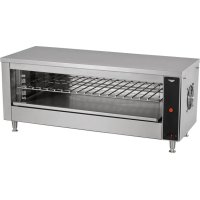
JW30PA - Oven Vollrath - Free user manual and instructions
Find the device manual for free JW30PA Vollrath in PDF.


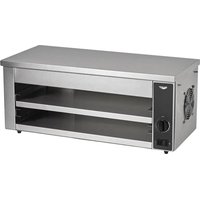
| Product Type | Commercial Salamander Broiler |
| Brand | Vollrath |
| Model | JW30PA |
| Intended Use | Melting cheese, finishing cooked dishes (nachos, fries, etc.) in high-volume restaurants and foodservice |
| Power Supply Voltage | 208 V |
| Plug Type | NEMA 6-30P |
| Dimensions (approx.) | Width 35 inches (89 cm) |
| Legs | Yes, screw-on under the unit |
| Shelf | Adjustable in height |
| Controls | On/Off switch, timer (10 min max) |
| Reset Button | Yes, for the circuit breaker |
| Fan | Yes, for cooling after use |
| Main Functions | Preheating, melting cheese, finishing dishes |
| Safety | Grounding required, minimum clearance of 20.3 cm on each side, do not use near combustible materials |
| Cleaning | Soft damp cloth with hot water; no abrasive products or liquid spraying |
| Common Troubleshooting | Check connection, timer, circuit breaker, fan blades, heating tubes |
| Warranty | 2 years parts, 1 year labor; heating tubes 1 year parts and labor |
| Customer Service Contact | 1-800-309-2250 (Vollrath technical support) |
Frequently Asked Questions - JW30PA Vollrath
User questions about JW30PA Vollrath
0 question about this device. Answer the ones you know or ask your own.
Ask a new question about this device
Download the instructions for your Oven in PDF format for free! Find your manual JW30PA - Vollrath and take your electronic device back in hand. On this page are published all the documents necessary for the use of your device. JW30PA by Vollrath.
USER MANUAL JW30PA Vollrath
35InchPlateActivatedCheeseMelters
ModelJW30PA
ThankyouforpurchasingthisVollrathequipment.Beforeoperatingthe equipment,readandfamiliarizeyourselfwiththefollowingoperating andsafetyinstructions.SAVETHESEINSTRUCTIONSFORFUTURE REFERENCE.Savetheoriginalboxandpackaging.Usethispackaging toshiptheequipmentifrepairsareneeded.
SAFETYPRECAUTIONS
Toensuresafeoperation,readthefollowingstatementsandunderstand theirmeaning.Thismanualcontainssafetyprecautionswhichare explainedbelow.Pleasereadcarefully.

WARNING
Warningisusedtoindicatethepresenceofahazardthatwillorcan causeseverepersonalinjuryordeath.

CAUTION
Cautionisusedtoindicatethepresenceofahazardthatwillorcan causeminorormajorpersonalinjuryifthecautionisignored.
NOTICE: Notice is used to note information that is important but not hazard-related.
Toreduceriskofinjuryordamagetotheequipment
- Plugonlyintogroundedelectricaloutletsmatchingthevoltageon theratingplate.
•Usethisequipmentinaflat,levelposition. - Unplugequipmentandletitcoolbeforecleaningormoving. Equipmentremainshotafteritisturnedoff.
•Unplugwhennotinuse. - Keepequipmentandpowercordawayfromopenflames,electric burnersorexcessiveheat.
•Donotoperateunattended.
• Closelysuperviseequipmentoperatinginpublicareasand/or aroundchildren. - Donotoperateifequipmenthasbeendamagedorismalfunctioning.
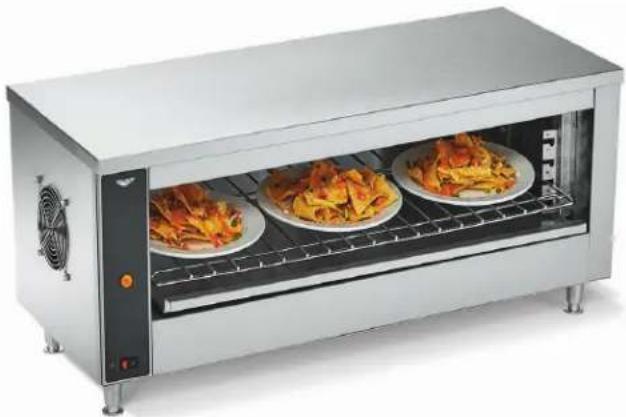
natural_image
Exterior view of a stainless steel electric cooktop oven with three plated dishes (no visible text or labels)| ItemNo.ModelVoltagePlug | |||
| CM4-20835PA | JW30PA | 208 | NEMA6-30P |
| CM4-24035PA240 | |||
| CM4-23035PA230StrippedEnds | |||
FUNCTIONANDPURPOSE
This equipment is intended to melt cheese, finish cooked foods such as nachos, cheesefries, potatoes and garlic bread in higher-volume food service operations and larger restaurants. It is not intended to bake food or cook raw food. It is intended for use in commercial food service operations only. It is not intended for household, industrial or laboratory use.
CLEARANCEANDENVIRONMENTREQUIREMENTS
Donotplaceovenonsurfacesornearwalls,partitionsorkitchen furnitureunlesstheyaremadeofnon-combustiblematerialorcladwith non-combustibleheat-insulatingmaterial.Ovensmustnotbeusednear orbelowcurtainsandothercombustiblematerials.
Donotplacetheovenadjacenttoaheatproducingappliance.
Allowaminimum of 8 inches (20.3 cm) of clearance on the left and right sides of the oven.
SETUP
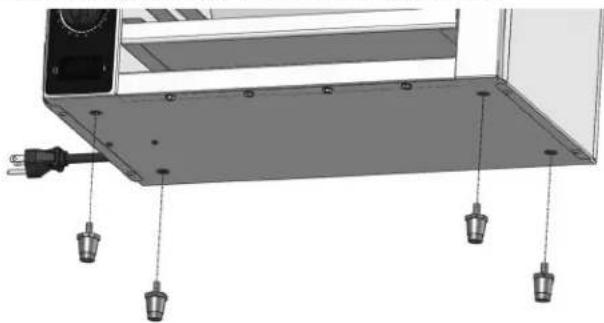
Installthelegs
NOTICE: Legsmustbeinstalled. Failuretoinstallthelegswill restrictairflowandcausetheoventooverheat.
Screwthelegsontothethreadednutsbelowthecheesemelter.
natural_image
3D diagram of a mechanical assembly with mounting holes and a power outlet (no text or symbols)InstalltheShelf
Insertthepinsontheshelfintotheslotsonthebracketsonthesidesof theoven.
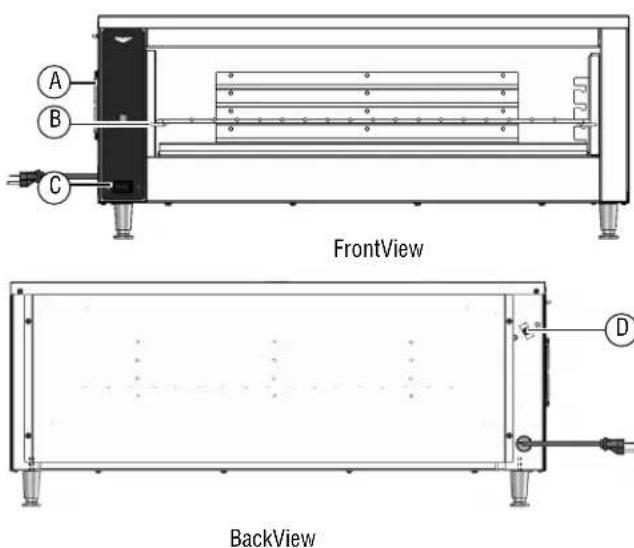
FEATURES
text_image
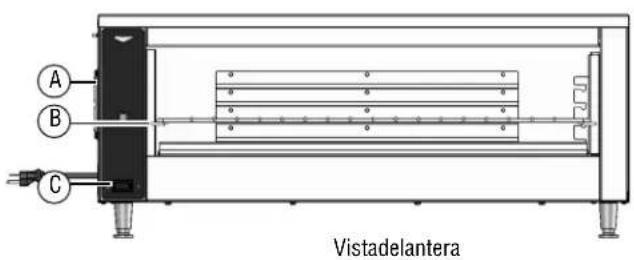
A B C FrontView BackView DAFan
BAdjustableShelf
COn/OffSwitch
DResetButton
BEFOREFIRSTUSE
Cleantheoven.See"Cleaning"onpage3.
OPERATION


CAUTION
BurnHazard
Donottouchtheequipmentwhileitisheatingoroperating. Hotsurfacescanburnskin.
Preheat
- Plugtheovenintoagroundedelectricaloutletthatmatchestheratingonthenameplatefoundontheoven.
NOTICE: Usingavoltageotherthanthenameplateratedvoltage willcausedamagetotheunit.Incorrectvoltage, modificationtothepowercordorelectricalcomponents candamageunitandwillvoidthewarranty.
- Adjust the shelf to the desired position.
- PresstheOn/OffswitchtotheONposition. Thefrontandrearheater elementswillturnonandtheovenwillbeinstandbymode.
- Thecenterelementswillturnonwhenaplateisplacedontheshelf.
MeltCheese, FinishCookedFood
- Placethefoodonanoven-proofplate and placetheplate on the shelf.
- The weight of the plate will activate the center heating element to bring the event of full power mode.
- Removetheplate. Theovenreturnstostandbymode.
- When finished using the oven, press the On/Off switch to the OFF position.
CLEANING


WARNING
ElectricalShockHazard
Donotspraywaterorcleaningproducts.Liquidcouldcontact theelectricalcomponentsandcauseashortcircuitoran electricalshock.


CAUTION
BurnHazard
Allowequipmenttocoolbeforemovingorcleaning.
NOTICE: Donotuseabrasivematerials, scratchingcleansersor scouringpadstocleantheequipment. Thesecandamage thefinish.
- PresstheOn/OffswitchtotheOFFposition.
- Unplugtheoven.
- Lettheovencoolcompletely.
4.Slightly dampenasoftcloth with awarmwater. - Usethedampenedclothocleantheinteriorandexteriorofthe oven.andtheairintakeonthesideoftheoven
- Removetheshelfandcleanwithwarmsoapywater.
TROUBLESHOOTING
| ProblemMightbeCausedByCourseofAction | ||
| Ovendoesnotheat.Ovenisnotpluggedin.Plugintheoven. | ||
| Thereisnotaplateontheshelf.Theovenisplateactivated.Placeaplateontheshelf. | ||
| Thewallbreakermaybetripped.Resetthebreaker. | ||
Theresetmaybetripped.Lookonthesideoftheoventoseeifanobjectispreventingthefan bladesfromturning.1.PresstheOn/OffswitchtotheOFF(O)position.2.Unplugtheoven.3.Wait30minutesfortheovencool.4.Removetheobject.5.Plugintheoven.6.PresstheOn/OffswitchtotheON(())position.7.Presstheresetbutton.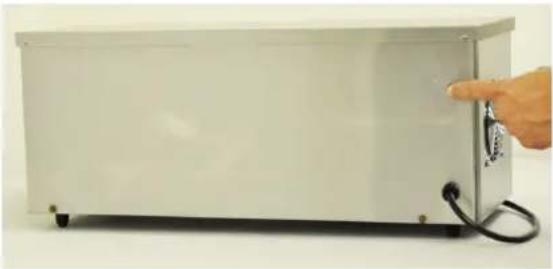 8.IftheproblempersistscallVollrathTechnicalServices. 8.IftheproblempersistscallVollrathTechnicalServices. | ||
| Inspectthefanbladestoseeiftheyaredirty.1.PresstheOn/OffswitchtotheOFF(O)position.2.Unplugtheoven.3.Wait30minutesfortheovencool.4.Cleanthefanblades.5.Plugintheoven.6.PresstheOn/OffswitchtotheON(())position.7.Presstheresetbutton.8.IftheproblempersistscallVollrathTechnicalServices. | ||
| Oneormoreheatertubesmayhave burnedout. | ||
| Theremaybeaproblemwiththe pressureswitch. | ||
| Ovenrepeatedlyoverheats.Thefanmaybedirty.Verifythefanbladesareclean. | ||
| Theremaybeaproblemwiththefan.Runtheovenfor10minutes.Ifthefandoesnotrun,contact VollrathTechnicalServices. | ||
| Thefanisnotrunning.Theremaybeaprod | blemwiththefanorfanswitch. | Runtheovenfor10minutes.Ifthefandoesnotrun,contact VollrathTechnicalServices. |
| Theovenisturnedoffandthefanis running. | Normaloperation.Thefanturnsonas neededtocooltheoven. | - |
SERVICEANDREPAIR
Whenunderwarranty,repairisavailableforthisproduct.Tobegintheprocess:
- Contact Vollrath Technical Services at 1-800-309-2250. Please be ready with the item number, model number and serial number. You can find this information on the nameplate located on the side or back of the equipment. Also please provide a proof of purchase indicating the date the equipment was purchased.
- A technical services representativewill helpyoutroubleshoottheproblemoverthephone.
- If the representative determines the issue requires professional service, he or she will help you locate an authorized service center.
- Contact the authorized service center to make arrangements for the repair. Vollrath will cover the cost to repair and/or replace defective parts withintheequipmentwarrantyperiod.
WARRANTYSTATEMENTFORTHEVOLLRATHCO.L.L.C.
The Vollrath Company LLC warrants the products it manufactures or distributes against defects in materials and workmanship as specifically described in our full warranty statement. In all cases, the warranty runs from the date of the end user's original purchase date found on the receipt. Any damages from improper use, abuse, modification or damage resulting from improper packaging during return shipment for warranty repair will not be recovered under warranty.
The warranty does not apply to products purchased for personal, family or household use, and The Vollrath Company LLC does not offer a written warranty top purchasers for such uses.
WarrantiedParts: The warranty period is 2 years parts, 1 year labor.
HeaterTubes: The warranty period is 1 year, including labor. Heatertubeglass damage is not covered by this warranty.
Forcompletewarrantyinformation,productregistrationandnewproductannouncements,visitwww.vollrath.com.
| TheVollrathCompany,L.L.C.Headquarters1236North18thStreetSheboygan,Wisconsin53081-3201USAMainTel:800-624-2051or920-457-4851MainFax:800-752-5620or920-459-6573CanadaCustomerService:800-695-8560TechServices:techservicereps@vollrathco.comwww.vollrath.com | PujadasCtra.deCastanyet,132P.O.Box12117430SantaColomadeFarners(Girona)-SpainTel.+34972843201info@pujadas.es | VollrathofChinaVollrathShanghaiTradingLimitedRoom201,BuildingAXinYiPlaza1618YiShanRoadShanghai,201103China,P.R.C.Tel:+86-21-5058-9580 | VollrathdeMexicoS.deR.L.deC.V.PerifericoSurNo.7980Edificio4-ECol.SantaMariaTequepexpan45600Tlaquepaque.Jalisco|MexicoTel:(52)333-133-6767Tel:(52)333-133-6769Fax:(52)333-133-6768 |
natural_image
Exterior view of a stainless steel electric cooktop oven with three plated dishes (no visible text or labels)natural_image
3D diagram of a mechanical assembly with mounting holes and a power outlet (no text or symbols)Installationdel'étagère
TheVollrathCompany,L.L.C.Headquarters
1236North18thStreet
Sheboygan.Wisconsin
53081-3201USA
MainTel:800-624-2051or920-457-4851
MainFax:800-752-5620or920-459-6573
CanadaCustomerService:800-695-8560
TechServices:techservicereps@vollrathco.com
www.vollrath.com
Pujadas
Ctra.deCastanyet,
132P.O.Box121
17430SantaColomadeFarners
(Girona)—Spain
Tel.+34972843201
info@pujadas.es
VollrathofChina
VollrathShanghaiTradingLimited
Room201,BuildingA
XinYiPlaza
1618YiShanRoad
Shanghai,201103
China.P.R.C.
Tel:+86-21-5058-9580
natural_image
Exterior view of a stainless steel electric cooktop oven with three plated dishes (no visible text or labels)| Núm.art. | ModeloVol | ItajeEnchufe | |
| CM4-20835PA | JW30PA | 208 | NEMA6-30P |
| CM4-24035PA240 | |||
| CM4-23035PA | 230 | Extremosdescubiertos |
FUNCIÓNYPROPÓSITO
Esteequipoestádisenadoparaderretirqueso,acabaralimentos cocidos,talescomonachos,papasfritasconqueso,cáscarasdepapay pandeajoenoperacionesdeserviciodealimentosdegranvolumeny enrestaurantesgrandes.Noestádestinadonitieneelpropósítode coceralimentoscrudos.Estádisenadoparausarseúnicamenteen operacionescomercialesdeserviciodecomidas.Noestádisenadopara usodoméstico,industrialnidelaboratorio.
natural_image
Hand pointing at a metallic door panel with a black cable, no visible text or symbolsInstalelarepisa
Insertelospasadoresenlarepisadentrodelasranurasenlossoportes situadosaloscostadosdelhorno.
CARACTERÍSTICAS
text_image
A B C Vistadelantera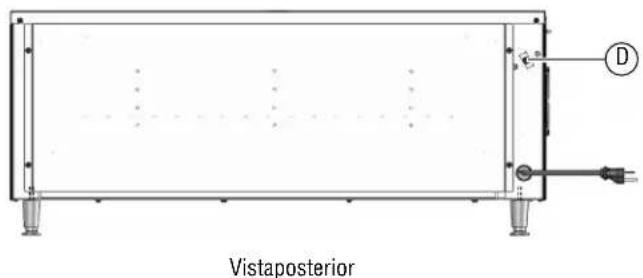
text_image
VistaposteriorAVentilador
BRepisaajustable