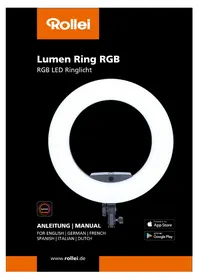
Lumen Ring RGB - Lighting ROLLEI - Free user manual and instructions
Find the device manual for free Lumen Ring RGB ROLLEI in PDF.



| Product Type | RGB Ring LED Light |
| Brand | Rollei |
| Model | Lumen Ring RGB |
| Dimensions | 45 x 50 x 9 cm |
| Weight | Approximately 1470 g |
| Power | 90 W |
| Number of LEDs | 336 (112 white, 112 warm, 112 RGB) |
| Color Shades | 360 |
| Color Temperature | 3200 – 9999 K |
| Color Rendering Index (CRI) | 95+ |
| TLCI Index | 95+ |
| Bluetooth | Version 4.0, BLE |
| Power Supply | DC 15 V / 6 A (power adapter) or 2x Li-Ion batteries NP-F750/770 |
| Power Adapter | Input 100–240 V~ 2.5 A, 50/60 Hz; Output 15.5 V = 6.0 A |
| Protection Class | II |
| Tilt Angle | Adjustable via included ball head |
| Connectivity | Bluetooth 4.0 (Rollei Lumen app) |
| Package Contents | Lumen Ring RGB, power adapter, 2 NP-F750/770 batteries, charger, smartphone holder, ball head, carrying case, user manual |
| Intended Use | Photo and video lighting only (not for household lighting) |
| Care and Cleaning | Wipe with a dry, soft cloth. Do not use harsh chemicals. Protect from moisture. |
| Safety | Do not open the housing, do not expose to water, do not shine directly into eyes, use only indoors. |
| Spare Parts and Repairability | Repairs only by the manufacturer or an authorized professional. No user-serviceable parts. |
Frequently Asked Questions - Lumen Ring RGB ROLLEI
User questions about Lumen Ring RGB ROLLEI
0 question about this device. Answer the ones you know or ask your own.
Ask a new question about this device
Download the instructions for your Lighting in PDF format for free! Find your manual Lumen Ring RGB - ROLLEI and take your electronic device back in hand. On this page are published all the documents necessary for the use of your device. Lumen Ring RGB by ROLLEI.
USER MANUAL Lumen Ring RGB ROLLEI
natural_image
Circular ring light setup with a mounted device and a small screen, against a black background (no text or symbols visible)ANLEITUNG | MANUAL
FOR ENGLISH | GERMAN | FRENCH
SPANISH | ITALIAN | DUTCH

Erhältlich im
App Store

JETZT BEI
Google Play
natural_image
Close-up of a ring-shaped ring light fixture with a digital display and control mount (no visible text or symbols)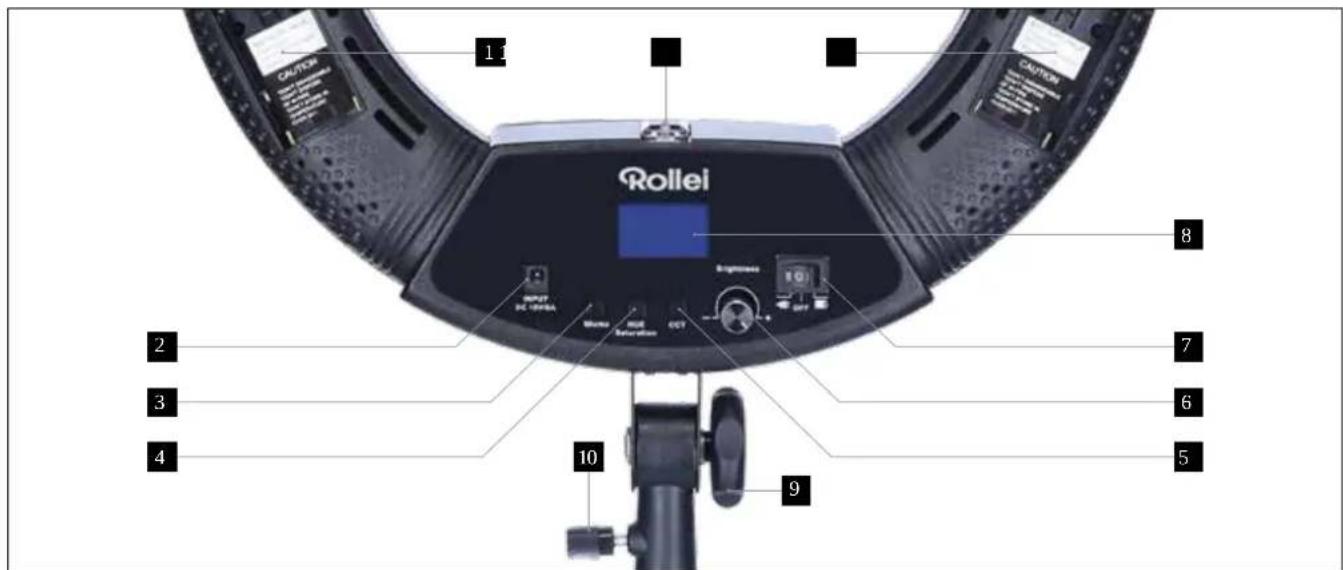
Stromversorgung
Consistency Index (TLCI) 95+
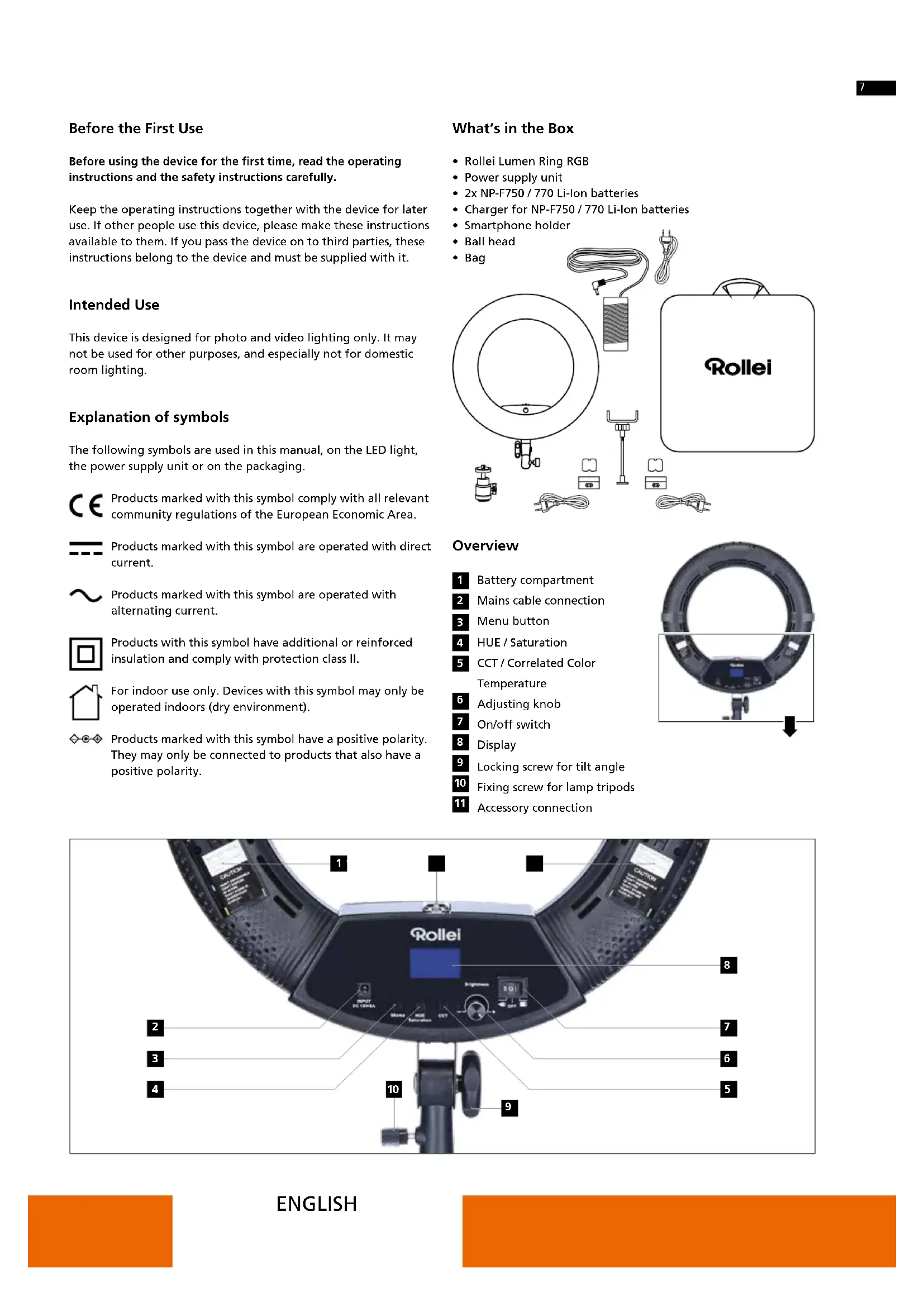
Before the First Use
Before using the device for the first time, read the operating instructions and the safety instructions carefully.
Keep the operating instructions together with the device for later use. If other people use this device, please make these instructions available to them. If you pass the device on to third parties, these instructions belong to the device and must be supplied with it.
Intended Use
This device is designed for photo and video lighting only. It may not be used for other purposes, and especially not for domestic room lighting.
Explanation of symbols
The following symbols are used in this manual, on the LED light, the power supply unit or on the packaging.

Products marked with this symbol comply with all relevant community regulations of the European Economic Area.

Products marked with this symbol are operated with direct current.

Products marked with this symbol are operated with alternating current.

Products with this symbol have additional or reinforced insulation and comply with protection class II.

For indoor use only. Devices with this symbol may only be operated indoors (dry environment).

Products marked with this symbol have a positive polarity. They may only be connected to products that also have a positive polarity.
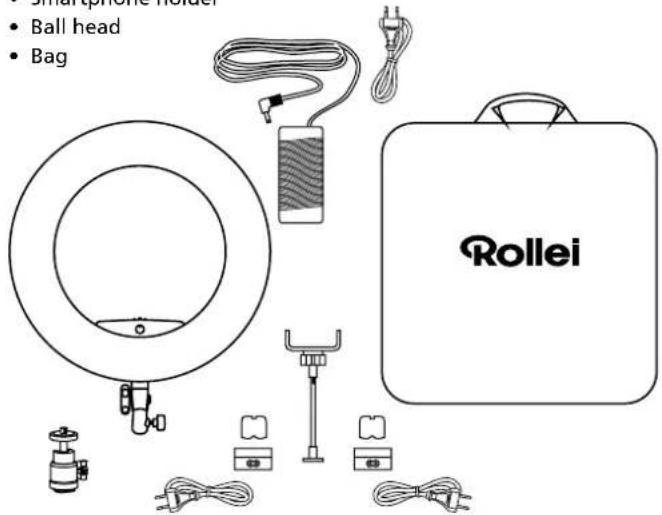
What's in the Box
- Rollei Lumen Ring RGB
• Power supply unit
• 2x NP-F750 / 770 Li-Ion batteries
• Charger for NP-F750 / 770 Li-Ion batteries - Smartphone holder
- Ball head
- Bag
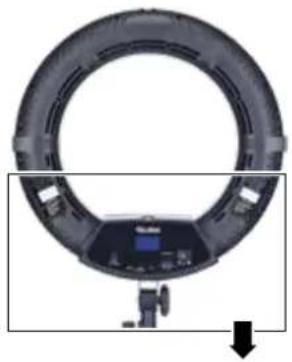
Overview
1 Battery compartment
2 Mains cable connection
3 Menu button
4 HUE / Saturation
5 CCT / Correlated Color Temperature
6 Adjusting knob
7 On/off switch
8 Display
9 Locking screw for tilt angle
10 Fixing screw for lamp tripods
11 Accessory connection
natural_image
Circular ring light fixture with a digital display and camera mount, shown in studio lighting (no text or symbols visible)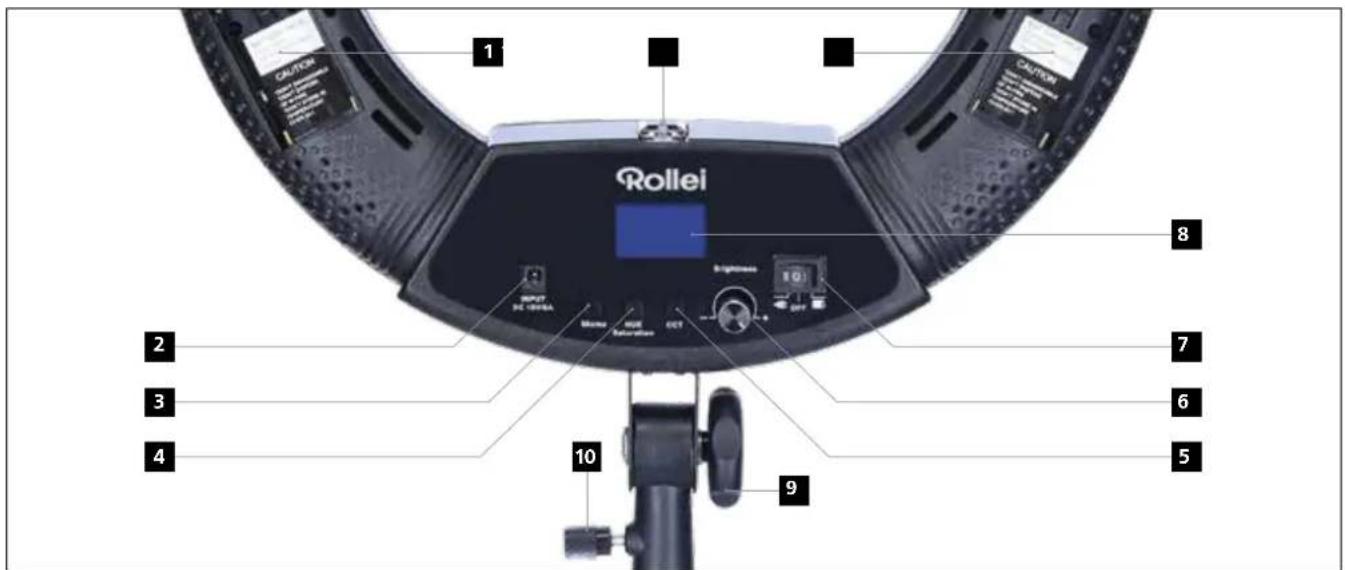
Power supply
- Use with power supply unit: Please plug the supplied power supply unit into the mains socket. Slide the power switch to the "-● symbol to turn on the LED light.
- Use with rechargeable batteries: Please insert the supplied rechargeable batteries into the battery compartment and slide the power switch to the "■" symbol to turn on the LED light.
- Note: Please fully charge the batteries before first use. Always use the original charger to charge the batteries.
Rollei Lumen App
Download the "Rollei Lumen" app directly from the App Store or the Google Play Store (iOS 9.0 or higher, Android 5.0 or higher)
Connection with the smartphone
- Activate Bluetooth®* on your smartphone
- Switch on the Rollei Lumen Ring RGB
- Open the "Rollei Lumen" app, the connection to your phone will be established automatically.
Note:
- The connection is established using "Bluetooth®* Low Energy" (BLE). For this, a location release of the app is required. The connection to the LED light is established directly in the app.


CCT - Color Temperature Mode
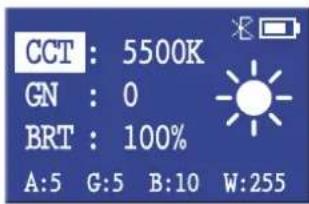
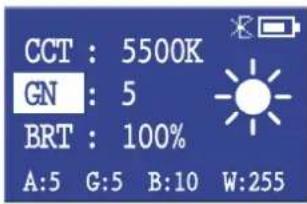
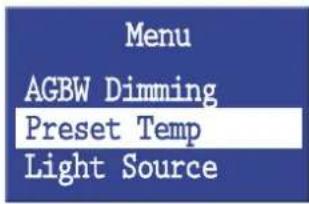
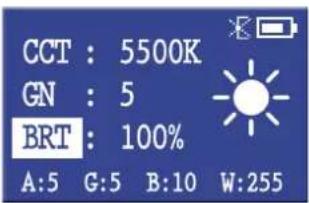
Adjust color temperature and brightness:
- Press the "CCT / Color Temperature" button after switching on. Turn the adjustment knob to the right or left to increase or decrease the Kelvin value.
The menu item "CCT" is highlighted in the display. - The color temperature can be set between 3200K and 9999K in steps of hundred Kelvin.
- Press the "CCT / Color Temperature" button again to increase the green portion of the selected color temperature. On display, the menu item "GN" is highlighted and the green component can be adjusted to the lighting situation by turning the control knob.
- The brightness can be adjusted between 0% and 100% by pressing and then turning the adjustment knob (steps: 20%, 21%, 22%, 23%, 24%, 25%, ...).
The menu item "BRT" is highlighted in the display:
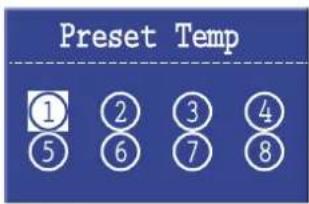
Save color temperatures and brightness:
You have the possibility to save up to 8 different color profiles.
- Select your desired color temperature and brightness.
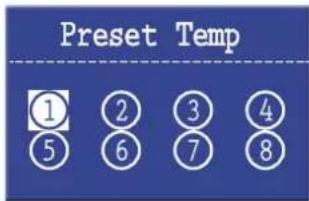
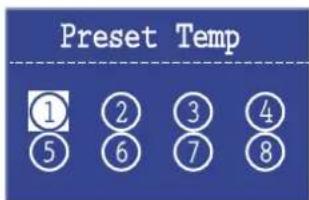
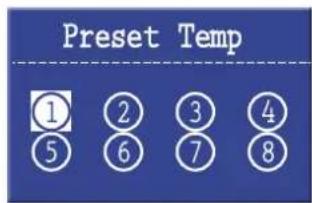
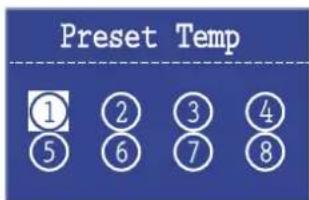
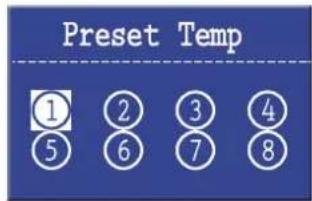
- Then press the Menu button and select the "Preset Temp" menu by turning the adjusting knob. Press the adjustment knob again to select the function.
- Now turn the adjustment knob to select the different memory locations.
- To save the preset color temperature and brightness, press the adjustment knob once.
- To recall the stored settings, press the Menu button and select the "Preset Temp" menu and choose the memory location with the adjustment knob.
- To exit the "Preset Temp" menu, press the Menu button.
Scene Mode HUE - RGB mode

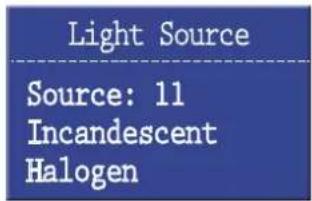
Instead of adjusting the color temperature of the LED light manually, you can also use different motif programmes. These are preset light situations.
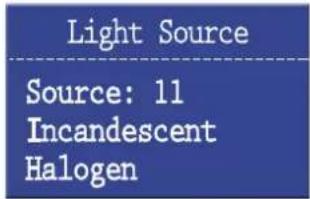
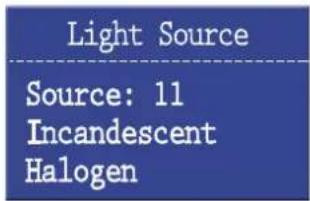
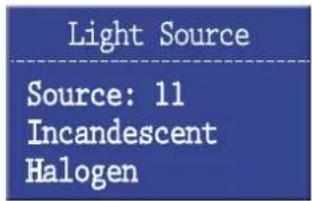
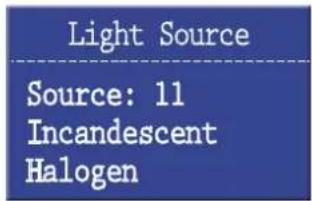
Press the menu button and select the "Light Source" menu by turning the adjustment knob. Press the adjustment knob to select the function.
Now select a motif program by turning the adjustment knob.
11: Halogen bulb 3300K
12: Fluorescent soft white 3300K
13: Fluorescent warm white 3600K
14: Fluorescent white 4300K
15: Fluorescent daylight (morning/evening) 5000K
16: Camera flash 5500K
17: Fluorescent daylight (midday) 6500K
18: Daylight cloudy 6800K
19: Daylight shadow 7300K
20: Daylight snow 8500K
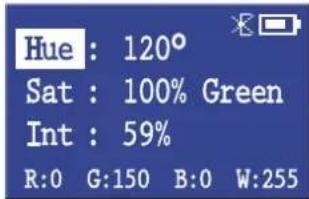
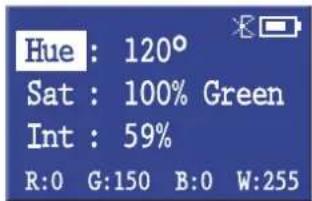
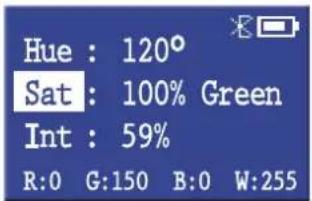
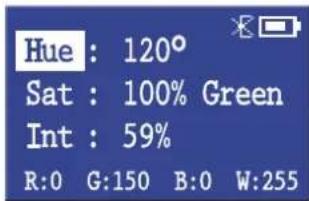
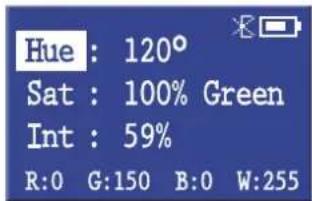
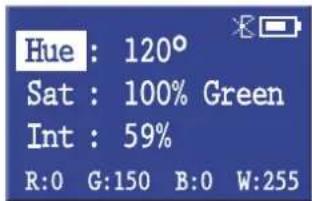
• After switching on, press the "HUE / Saturation" button.
Turn the setting knob to the left or right to switch between the 360 colors.
The menu item "Hue" is highlighted in the display.
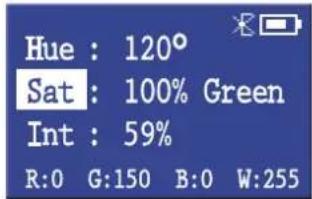
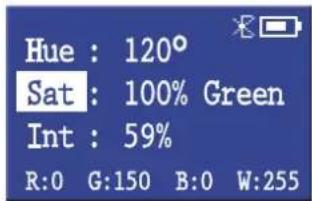
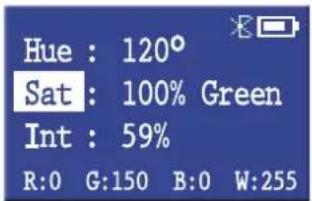
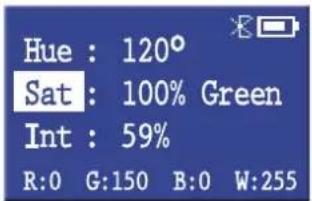
- Press the "HUE / Saturation" button to adjust the saturation of the color with the adjustment knob.
The menu item "Sat" is highlighted in the display.
Turn the adjustment knob clockwise to increase the saturation and counterclockwise to decrease the saturation.
- Press and turn the adjustment knob clockwise to increase the intensity and counterclockwise to decrease the intensity.
The menu item "Int" is highlighted in the display.
Color, Saturation and Intensity Color effects and styles
Save color, saturation and intensity:
You have the possibility to save up to 8 different color profiles.
- Select your desired color, saturation and intensity.
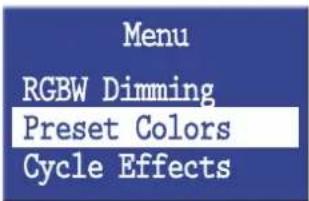
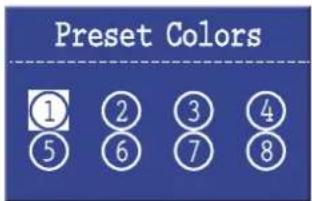
- Then press the menu button and select the "Preset Colors" menu by turning the adjustment knob. Press the adjustment knob to select the "Preset Colors" menu.
- Turn the adjustment knob to select the different preset colors.
- To save the preset color, saturation and intensity, press the adjustment knob once.
- To recall the saved presets, press the Menu button and select the Preset Colors menu and choose the preset location with the adjustment knob. To exit the "Preset Colors" menu, press the Menu button.
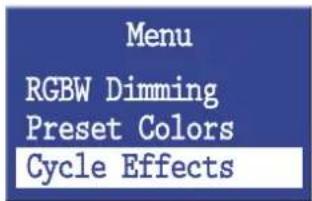
You can use the Lumen Ring RGB to call up various preset styles and color effects.
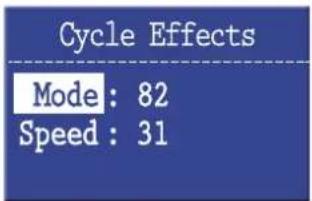
- Press the Menu button and select the "Cycle Effects" menu by turning the adjustment knob. Press the adjustment knob to select the function.
- Now select a color effect or style by turning the adjustment knob. The menu item "Mode" is highlighted in the display.
- Transitions: 37–47, 83
- Strobe: 48-55, 84-86
- Pulse: 56–59, 81–82, 87
- Party lights: 103
- Police car: 104
- TV light: 105
- Lightning: 106
To increase or decrease the speed of the effect, press the adjustment knob until „Speed“ is highlighted.
Turn the adjustment knob to adjust the speed - 1 is the slowest speed and 32 is the fastest.
Technical data
| Number of LEDs | 336 (112 white light/112 warm light/112 RGB) |
| Color shades | 360 |
| Output 90 W |
| Illuminance | 5500K: 2900 lx / 0,5 m |
| 3200K: 2652 lx / 0,5 m |
| Color Rendering Index (CRI) 95+ |
| Television Lighting |
| Consistency Index (TLCI) 95+ |
| Color temperature | 3200 – 9999K |
| Bluetooth®* | Version 4.0 |
| Radio frequencies | 2.400 GHz – 2.480 GHz |
| Max. Transmission power 8 dBm |
| Battery port | 2x Lithium-Ion batteries |
| Sony NP-F750/F970 |
| Connections DC Input 15V / 6A |
| Power supply unit | Input: 100–240 V~2.5 A | 50/60 HzOutput: 15.5 Volt = 6.0 A ◇◎◇Power: 93 W | Protective class: II |
| Dimensions | 45 x 50 x 9 cm |
| Weight | Approx. 1470 g |
| Box Content | Rollei Lumen Ring RGB, power supply unit, 2x NP-F750/770 Li-Ion batteries, charger for NP-F750/770 Li-Ion batteries, smartphone holder, ball head, bag, user manual |
*The Bluetooth® word mark and logos are registered trademarks of the Bluetooth SIG, Inc. and any use of such marks by Rollei is under license. Other trademarks and trade names are the property of their respective owners.
Safety Instructions
Electric current hazard!
Faulty electrical installations or excessive line voltage can cause electric shock.
- Only connect the product if the mains voltage of the socket corresponds to the information on the type plate.
- Connect the product to an easily accessible socket so that you can quickly disconnect it from the mains in the event of problems.
- Only use the power cord supplied.
- Do not use the product if it is visibly damaged or if the cable is defective.
- If the product or the accessories are damaged, they must be replaced or repaired by the manufacturer, its customer service or a similarly qualified person in order to avoid hazards.
- The housing may not be opened and repairs may only be carried out by a specialist. To do this, contact a specialist workshop. In the event of repairs by the user, improper connection or incorrect operation, any liability and warranty claims are excluded.
- Do not use the product with an external timer.
- If you are not going to use the device for a long period of time, always disconnect it from the power source.
- Protect the product from moisture. Do not touch it with wet / damp hands and do not immerse it in water.
- This product is not waterproof! Do not use this product in the rain or in wet areas. Never touch the product during a thunderstorm.
Safety Instructions
- Before disconnecting the power or battery connection, switch off the device at the main switch.
- Provide adequate ventilation during operation. Never cover the device.
- Only use the device with suitable, high-quality Li-Ion batteries of the type Sony NP-F750/770/970.
- Do not use or store the device at high temperatures or in closed rooms with direct sunlight and do not charge the batteries during this time. The product should no longer be used at ambient temperatures of more than 40irc C.
- To charge the batteries, disconnect them from the device. Only use the charger included in the scope of delivery to charge the batteries. For the charging process, first connect the charger to the batteries to be charged and then to the mains.
- Do not open or damage the batteries, do not short-circuit them, do not bridge them or use them for any other purpose.
- Keep the batteries away from children and animals, open flames and liquids and do not expose them to temperatures higher than 50irc C.
- Immediately remove the battery and, if necessary, the charging cable from the housing if there are unusual noises, smells or smoke.
Danger!
- Never use the power cord as a handle.
- Keep product and accessories away from open flames, hot surfaces and easily inflammable materials.
- Lay the power cord so that it does not pose a tripping hazard.
- Do not kink the power cord or lay it over sharp edges.
Danger!
Danger for children and people with limited physical, sensory or mental abilities (e.g. partially handicapped people, older people with limited physical and mental abilities) or lack of experience and know-how (e.g. older children).
- This product can be used by persons with limited physical, sensory or mental capabilities or lack of experience and know-how, provided that they are supervised or have received instructions for the safe use of the product and understand the possible dangers arising from its use. Children are not allowed to play with the product. The product must not be cleaned or maintained by children. Keep children under the age of eight away from the product and its accessories.
- Do not insert any objects into the product.
- Do not leave the product unattended during operation and charging.
- The device is not a toy. Keep the device, accessories and packaging materials away from children and animals to prevent accidents and suffocation.
- Do not film drivers of cars, buses, bicycles, motorcyclists or train drivers while driving with this product. The driver can be blinded and cause an accident. This also applies to persons or groups not listed if an accident could be caused by possible glare.
- Do not shine directly into the eyes of people or animals, as this can damage the retina, impair vision and even lead to blindness.
Note: For lighting for photographic purposes only. Not suitable for permanent room lighting.
Disposal

Dispose of the packaging according to its type. Use the local possibilities for collecting paper, cardboard and other materials. (Applicable in the European Union and other European countries with systems for the separate collection of recyclable materials)

Devices that are marked with this symbol must not be disposed of with household waste! You are legally obliged to dispose of old devices separately from to dispose of household waste. Information on collection points that accept old appliances free of charge can be obtained from your local authority or town council.

Batteries and rechargeable accumulators must not be disposed of in household waste! As a consumer you are legally obliged to dispose of all batteries and accumulators, whether they contain harmful substances* or not, to be disposed of in an environmentally sound manner. Accumulators and batteries are therefore marked with the symbol shown opposite. For more information, contact your dealer or contact return and collection points in your community.
*marked with: Cd = Cadmium, Hg = Mercury, Pb = Lead
Battery warning
- Never dismantle, crush or pierce the battery, or allow the battery to short-circuit. Do not expose battery being placed in high temperature environment, if battery leaks or bulges, stop continue to use.
- Always charge using the charger. Risk of explosion if battery is replaced by an incorrect type.
- Keep the battery out of reach of children.
- Batteries may explode if exposed to naked fire. Never dispose of batteries in a fire.
- Disposed of used batteries observing local regulations.
- Before disposing the device, please remove the battery.
Conformity
Herewith Rollei GmbH & Co. KG declares that the radio system type "Rollei Lumen Ring RGB" complies with Directive 2014/53/EU.
The complete text of the EU Declaration of Conformity can be downloaded at the following Internet address: www.rollei.com/egk/lumenringrgb

natural_image
Circular ring light fixture with a digital display and camera mount, shown in studio lighting (no text or symbols visible)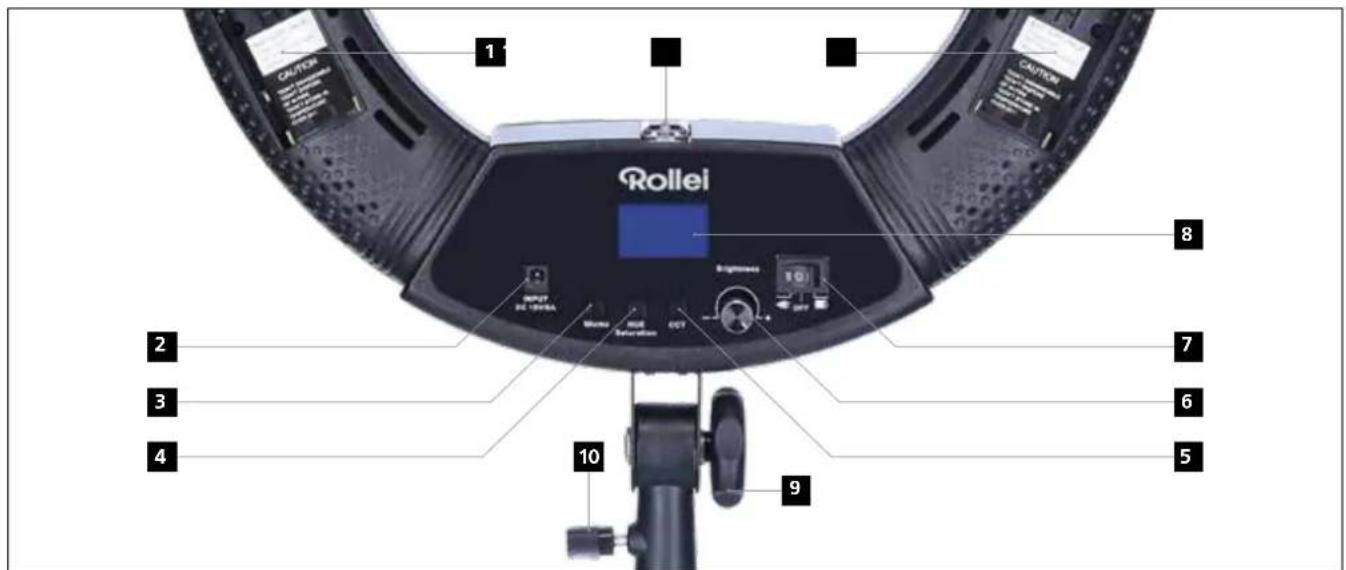
natural_image
Close-up of a ring-shaped ring light fixture with a digital display and camera mount (no text or symbols visible)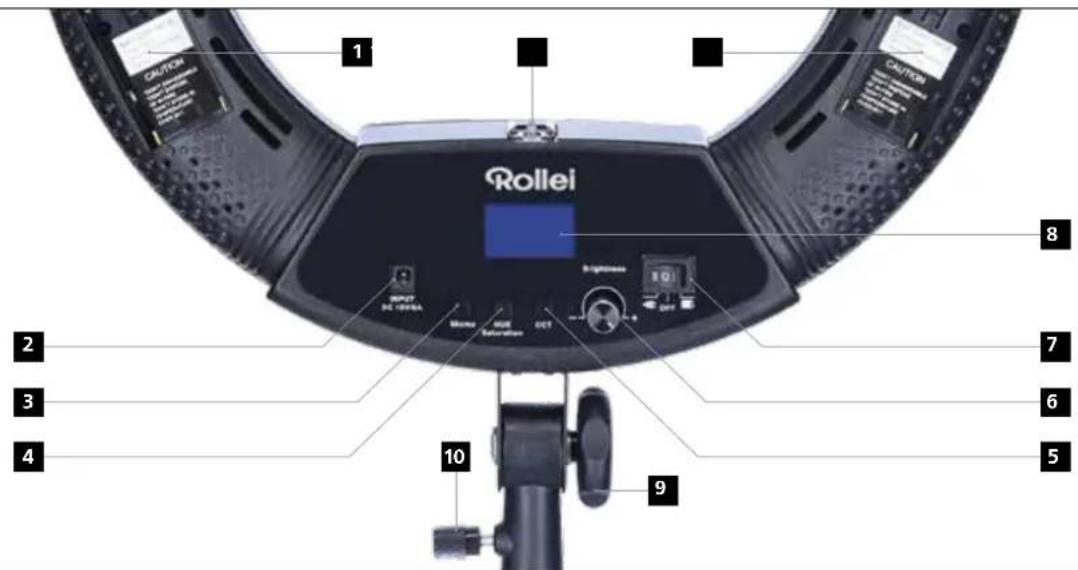

Download on the App Store

GET IT ON Google Play
natural_image
Close-up of a ring-shaped camera lens with a digital display and control knob, shown in studio lighting (no text or symbols visible)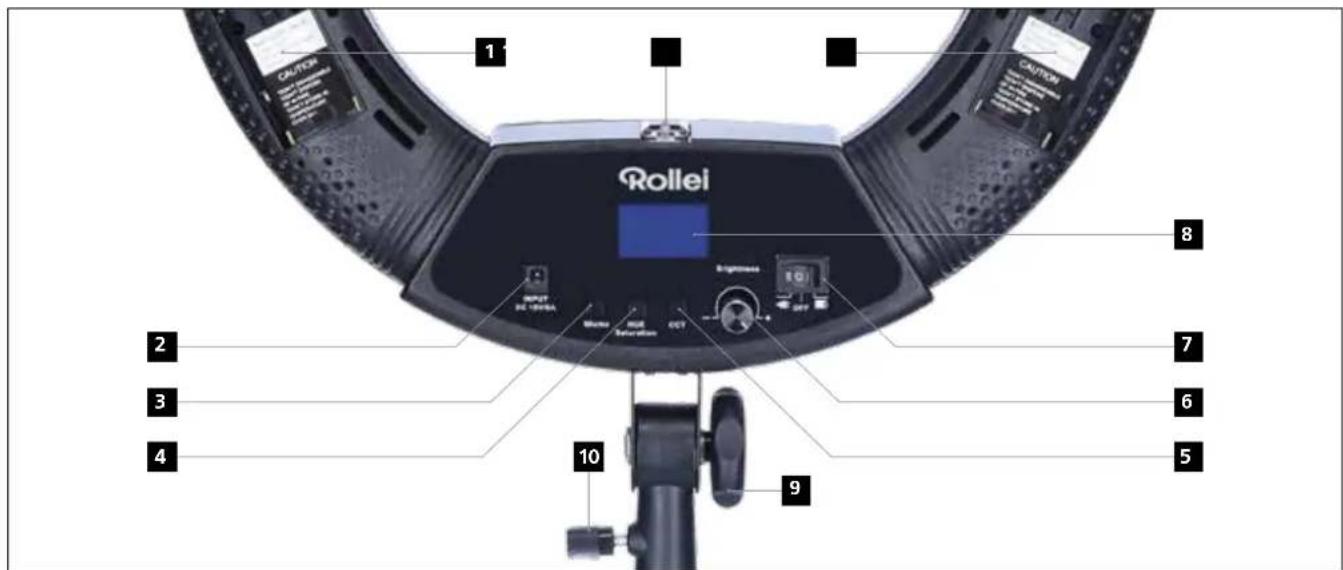
natural_image
Circular ring light fixture with mounted device and control knob, shown in studio lighting (no text or symbols visible)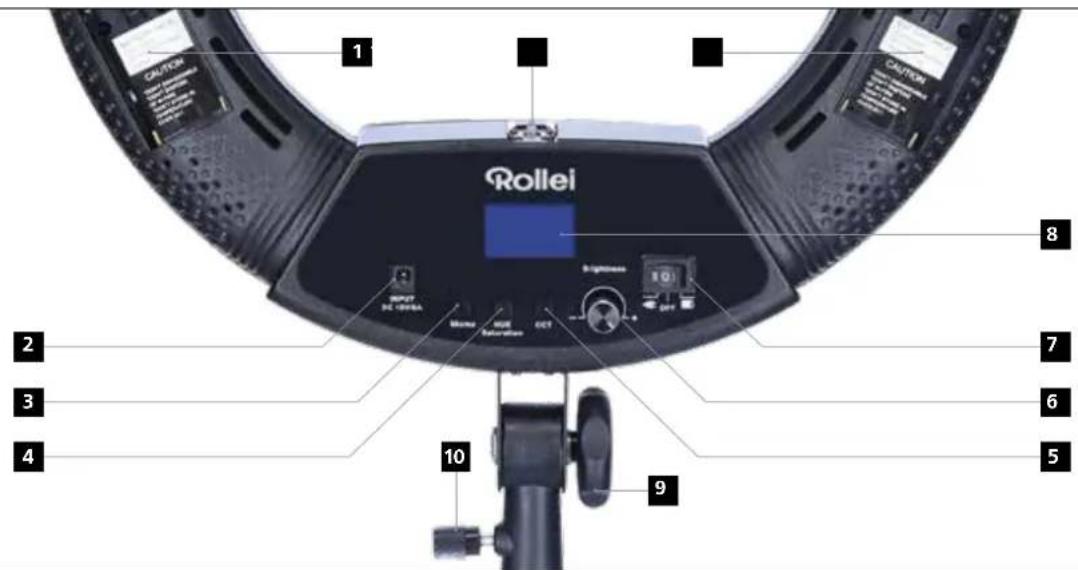
Stroomvoorziening
*markering met: Cd = Cadmium, Hg = Kwik, Pb = Lood.

- ANLEITUNG | MANUAL
- Stromversorgung
- Before the First Use
- Intended Use
- Explanation of symbols
- What's in the Box
- Overview
- Power supply
- Rollei Lumen App
- Connection with the smartphone
- Note:
- Adjust color temperature and brightness:
- Save color temperatures and brightness:
- Scene Mode HUE - RGB mode
- Color, Saturation and Intensity Color effects and styles
- Save color, saturation and intensity:
- Technical data
- Safety Instructions
- Electric current hazard!
- Danger!
- Disposal
- Battery warning
- Conformity
- Stroomvoorziening
Brand : ROLLEI
Model : Lumen Ring RGB
Category : Lighting