LUX 60 Bi-Color - Lighting ROLLEI - Free user manual and instructions
Find the device manual for free LUX 60 Bi-Color ROLLEI in PDF.


| Product Type | LED Video Light |
| Brand | Rollei |
| Model | LUX 60 Bi-Color |
| Color Temperature Range | 3200K – 5600K |
| Maximum Power Output | 60W (LED equivalent) |
| Dimmable | Yes, 0–100% stepless |
| Number of LEDs | 60 |
| Power Supply | AC adapter (100–240V) or 2x NP-F series batteries |
| Battery Type | NP-F (not included) |
| Mounting | 1/4" thread for stand or bracket |
| Control Method | Integrated knob or optional remote |
| Dimensions (approx) | 30 x 20 x 5 cm (11.8 x 7.9 x 2.0 in) |
| Weight (approx) | 1.2 kg (2.6 lb) |
| Material | Plastic housing with metal stand mount |
| CRI (Color Rendering Index) | >95 |
| Light Spread | Adjustable via included diffuser or barn doors |
| Flicker-Free | Yes, suitable for video |
| Included Accessories | Light, AC adapter, carrying case, user manual |
| Warranty | 2 years |
| Maintenance | Wipe with dry cloth; avoid solvents |
| Repairability | LED panel replaceable by service center |
Frequently Asked Questions - LUX 60 Bi-Color ROLLEI
User questions about LUX 60 Bi-Color ROLLEI
0 question about this device. Answer the ones you know or ask your own.
Ask a new question about this device
Download the instructions for your Lighting in PDF format for free! Find your manual LUX 60 Bi-Color - ROLLEI and take your electronic device back in hand. On this page are published all the documents necessary for the use of your device. LUX 60 Bi-Color by ROLLEI.
USER MANUAL LUX 60 Bi-Color ROLLEI
LUX 60 RGB | Bi-Color LUX 100 RGB | Bi-Color | Kit
Ultra-kompaktes COB-Dauerlicht Ultra-Compact COB Continuous Light
Before the First Use. 42
Intended Use 42
Explanation of Symbols. 43
Safety Instructions 44
BatteryWarnings 50
What's in the Box 52
Overview....54
Structure and Possible Combinations
Additional Equipment 55
Operation 57
Connect with the App 64
Connecting via NFC 67
Technical Data for
RGB Lights 68
LUX 100 W RGB Kit 70
Bi-Color Lights 72
LUX 100 W Bi-Color Kit. 74
LUX Battery Grip 71 Wh 76
Accessory Set for LUX. 77
Disposal 78
Conformity 79

Kit:


LUX LED-Licht


Erhältlich im
App Store

erhältlich bei
amazon appstore
Verbinden per NFC
Verbinden per NFC
Read the operating instructions and the safety instructions carefully before using the device for the first time.
Keep the operating instructions together with the device for future use. If you pass on the device to a third party, this manual is part of the device and must be supplied with the device.

Remove the protective film: Before using the COB permanent light for the first time, remove the protective film from the device and the display.

Remove the protective cap: Remove the protective cap from the COB permanent light before each use, before switching on the device.
Follow these steps to ensure proper and safe use of the COB permanent light.
Intended Use
This product is designed for use as photo and video lighting only. It must not be used for any other purpose, and in particular not for domestic room lighting.
The following symbols are used in these operating instructions, on the COB continuous light, its accessories or on the packaging.

Products marked with this symbol comply with all relevant community regulations of the European Economic Area.

Products marked with this symbol are operated with direct current.

Products marked with this symbol are operated with alternating current.

Products with this symbol have additional or reinforced insulation and comply with protection class II.

For indoor use only. Devices with this symbol may only be operated indoors (dry environment).
Danger due to electric current!
Faulty electrical installations or excessive mains voltage can cause electric shock.
- Only connect the product if the mains voltage of the socket corresponds to the information on the rating plate.
- Connect the product to an easily accessible socket so that you can disconnect it from the mains quickly in case of problems.
- Only use the mains cable supplied.
- Do not use the product if it is visibly damaged or if the cable is defective.
- If the product or accessories are damaged, they must be replaced or repaired by the manufacturer, its after-sales service or a similarly qualified person in order to avoid hazards.
- The housing must not be opened and repairs must only be carried out by a specialist. Contact a specialist workshop for this purpose. Any liability and all warranty claims are excluded in the event of repairs by the user, improper connection or incorrect operation.
- Do not use the product with an external timer.
- If you are not going to use the unit for a long time, always disconnect it from the power source.
- Protect the product from moisture. Do not touch it with wet / damp hands and do not immerse it in water.
- This product is not waterproof! Do not use this product in the rain or in wet environments. Never touch the product during a thunderstorm.
Safety Instructions
- Before disconnecting the power or battery, switch off the product at the main switch.
- Ensure adequate ventilation during operation. Never cover the unit.
- Only use the unit with suitable, high-quality Li-Ion batteries of the type NP-F as well as V-mount batteries with max. 14.8 V.
- Do not use or store the unit at high temperatures or in closed rooms with direct sunlight and do not charge the batteries during this time. The product should not be used at ambient temperatures above 40° C.
- To charge the batteries, disconnect them from the unit. Only use the charger supplied with the product to charge the batteries. To charge the batteries, first connect the charger to the batteries to be charged and then to the mains.
- Do not open or damage the batteries, short-circuit them, bypass them or use them for any other purpose.
- Keep the batteries away from children and animals, open flames and liquids and do not expose them to temperatures higher than 40° C (122°F).
- Immediately remove the battery and, if necessary, the charging cable from the housing in the event of unusual noises or smells or smoke.
Caution! Failure to observe this warning can result in serious injury 1) or death
- Never use the power cord as a carrying handle.
- Arrange the power cord so that it does not pose a tripping hazard.
- Do not bend the power cord or place it over sharp edges.
- Do not disassemble, repair or modify the device or battery.
- Do not place the device near a fire or in a fire and do not expose it to heat. The device should also be protected from direct sunlight.
- Do not charge, use or store the device in a bathroom or in an area exposed to rain or moisture.
- Never touch the device with wet hands.
- Do not rub your eyes if liquid leaking from the device comes into contact with your hands.
- Do not dispose of the device with household waste.
- Do not operate any devices whose input voltage is above the specified value.
- Do not use the device if it is not working properly.
- Do not move the device when it is charging or in use.
- Do not use damaged or modified batteries or devices. Damaged or modified batteries may behave unpredictably. This will result in fire, explosion or risk of injury.
Caution! Failure to observe this warning may result in serious injury 2) or death
- Use and store the device only in a clean and dry environment. Do not use or store in dusty or damp environments.
- Inspect the device before each use. Do not use the device if it is damaged or broken.
- Keep the device out of reach of children. Keep this product out of reach of pets.
- Do not use or store the device in a high-temperature area or environment.
- Should liquid from inside the device get on your skin or clothing, wash the affected parts with tap water.
Caution!
Danger for children and persons with reduced physical, sensory or mental capabilities (e.g. partially disabled persons, elderly persons with reduced physical and mental capabilities) or lack of experience and know-how (e.g. older children).
- This product can be used by persons with reduced physical, sensory or mental capabilities or lack of experience and know-how if they have been given supervision or instruction concerning use of the product in a safe way and understand the potential hazards arising from its use. Children must not play with the product. The product must not be cleaned or cared for by children. Keep children under the age of eight away from the product and accessories.
Safety Instructions
- Do not insert objects into the product.
- Do not leave the product unattended during operation and charging.
- The appliance is not a toy. Keep the product, accessories and packaging materials away from children and animals to prevent accidents and suffocation.
- Do not film car, bus, bicycle, motorbike drivers or train drivers while driving with this product. The driver may be blinded and cause an accident. This also applies to persons or groups not listed if an accident could be caused by possible glare.
- Do not shine directly into the eyes of people or animals as this can cause retinal damage, impaired vision and even blindness.
Warning! Risk of explosive gases
- Follow these instructions and those published by the battery manufacturer and manufacturer of all equipment you intend to use near the battery to reduce the risk of battery explosion.
- Check the warnings on these products.
Personal Safety Precautions
- Never allow smoking, sparks, or flames in the vicinity of the battery.
- Use extra care to reduce the risk of dropping a metal tool onto the battery, which can cause a spark or short circuit to the battery or other electrical part that can cause an explosion.
Safety Instructions
1) Serious injuries include blindness, burns, electric shock, fractures, poisoning, etc., which may lead to complications, hospitalisation or permanent treatment.
2) Injuries include burns, electric shock, etc., which do not lead to hospitalisation or permanent treatment.
3) Property damage includes buildings, belongings, pets, etc.
Note: Only for lighting for photographic purposes. Not suitable for permanent room lighting.
Observe!

Do not charge and use the battery handle at the same time, as this can lead to a technical defect.

The LED lights must not be supplied with two power sources at the same time, as this can lead to a technical defect.

To prolong the battery life, use the battery regularly.

Recharge the battery regularly (at least every three months) if it has been stored for a long time.
Only use the supplied USB-C cable for charging.
Only use certified PD power adapters for charging.

Do not expose to extreme temperatures.

Do not drop.

Do not disassemble or dismantle.
This product is not waterproof, do not expose to liquids and do not use in rain or humid environments.
Dispose of batteries and electronic goods in accordance with local regulations.
- Only use suitable USB-C ports for charging.
- Generally, do not use defective USB-C ports and do not attempt to repair them.
- Do not overcharge or deep-discharge the product.
- Avoid storage, charging and use at extreme temperatures and extremely low air pressure (such as at high altitudes).
- To prolong battery life, use the battery regularly.
- For long-term storage, recharge regularly (at least quarterly).
- The LED lights must not be supplied from two power sources at the same time, as this can cause a technical defect.
What's in the Box
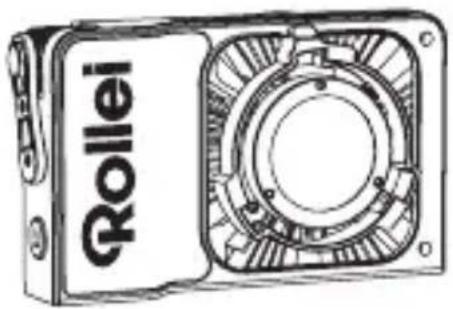
- LUX LED light
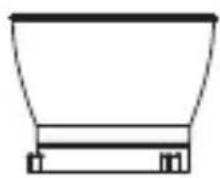
- Reflector
- Power supply unit
- Cable (1.80 m)
- Protective cap
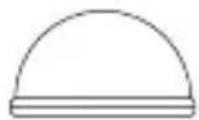
- Diffusor ball
- User manual



Kit:
- LUX LED light
- Reflector
- Power supply
- Cable (1.80 m)
- Protective cap
- Diffuser ball
- LUX Battery Grip (71 Wh)
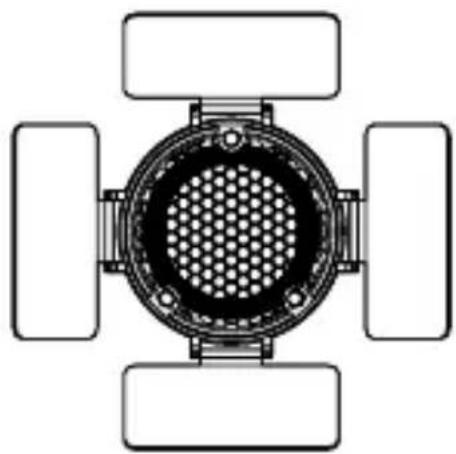
- Barndoors
- Honeycomb grid
- USB-C cable
- User manual
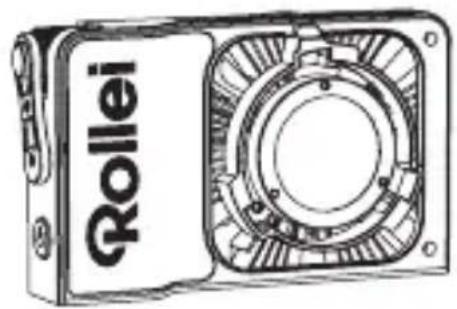




LUX LED Light
1 On/off switch
2 Setting button for wireless connection
3 LUX mount release button
4 COB LED
5 LUX-Mount
6 NFC detection area
7 1/4" connection
8 Adjustment wheel
9 OLED screen
10 Air inlet
11 Adjustment wheel
12 USB-C port
13 DC connector

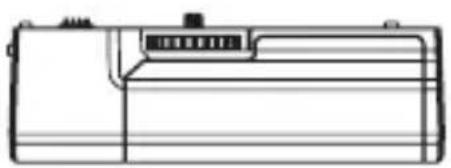
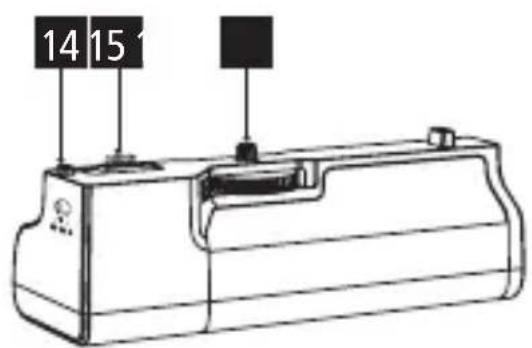
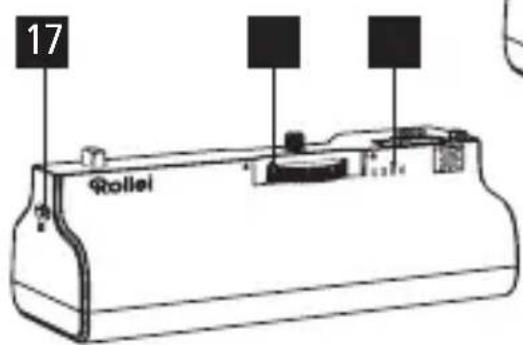
LUX Battery Grip 71 Wh
14 On/off switch
15 Pogo-Pin
16 1/4' connection
17 USB-C connection
18 Locking wheel
19 Battery status display
Structure and Possible Combinations Additional Equipment
Removing the protective cap
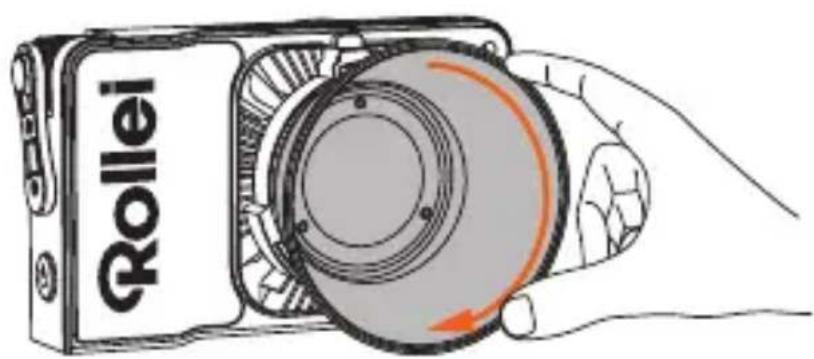
- Press the LUX mount release button [3] and turn the protective cap anti-clockwise to remove it.
Note: Make sure to remove the protective cover and the protective film before use.
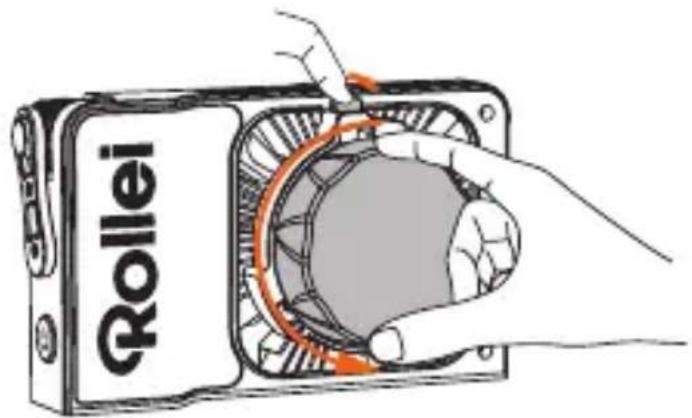
Fitting and removing the reflector
- Mounting the reflector: Align the reflector with the LUX mount [5] and turn the reflector clockwise until you hear a click and the reflector snaps into place.
- Removing the reflector: Press the LUX mount release button [3] and turn the reflector anti-clockwise to remove it.
Structure and Possible Combinations Additional Equipment
Connecting the mains adapter or USB-C cable
- Connect the mains adapter to the DC connection [13].
Take care not to leave the mains adapter hanging in the air. Use the wire ring to attach the mains adapter to the lamp tripod.
- Connect a USB-C cable to the USB-C port [12] on the COB permanent light.
Note: Only use a USB power adapter with at least 65 W output power.

Connecting the battery handle 71 Wh
- The LUX battery handle 71 Wh is only compatible with the LUX 60 W and LUX 100 W lamp series.
- Make sure that the LUX battery handle is switched off before installing it. Only switch it on after it has been attached to the lamp.
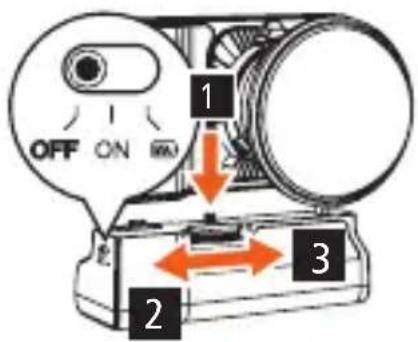
- Align the battery connector and 1/4' screw on the top of the LUX battery handle with the battery connector and 1/4' connector [7] on the lamp. Then turn the locking wheel [18] to lock it in place. Make sure the locking wheel [18] is securely in place before turning on the battery handle.
- To remove the battery grip, turn the locking wheel [18] in the opposite direction.
1 Align
2 Unlock
3 Lock
Switching on/off
Note: The LUX battery handle 71 Wh is used exclusively to power the LUX 60W Bi-Colour, LUX 60W RGB, LUX 100W Bi-Colour and LUX 100W RGB.
Switching on
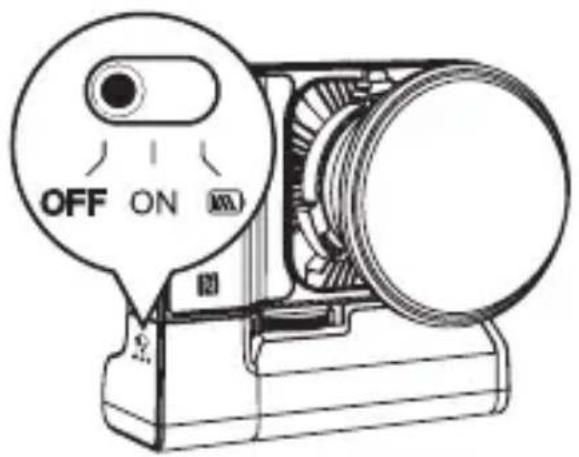
- Slide the on/off switch [1] to the middle position.

Switching off
- Slide the on/off switch [1] to the left.
- For safety reasons, switch off the LUX battery handle and remove it from the lamp when storing or not in use.
Checking the battery level
- Slide the on/off switch [1] to the right to display the remaining battery level.
- The switch automatically returns to its original position.

Battery level indicator
Four LED indicators show the current battery level:
- Less than 20%: one LED is lit and flashes quickly, indicating a nearly empty battery.
- 20% - 40%: one LED is lit.
- 40% - 70%: two LEDs are lit.
- 70% - 100%: all four LEDs are lit.

Note: When the battery level is at 20%, the LUX Battery Grip 71 Wh can no longer provide full power for the LUX 100 W RGB and LUX 100 W Bi-Colour lamps. The power output is reduced to 50%.
Charging during use
- When operating the LUX lamps with the LUX battery handle 71 Wh and charging the battery at the same time, the output power of the lamps is reduced to 50% .
- An input current of about 30 W for the LUX 60 W and 50 W for the LUX 100 W is required.
- When charging and using the lamp at the same time, the energy is first directed to the lamp and then to charging the battery.
- A charger with insufficient power can result in the lamps not turning on or the battery not charging.
Recommended charger power 60 W series:
- Requires approx. 30.0 W input power. Use a charger with more than 35.0 W to operate and charge the lamp and battery at the same time.
| Charger power | 60.0 W light on | Batterygrip chargeable |
| < 35.0 W | ✗ | ✗ |
| = 35.0 W | √ | ✗ |
| > 35.0 W | √ | √ |
100 W series:
- Requires approximately 50.0 W of input power. Use a charger with more than 55.0 W to operate and charge the lamp and battery at the same time.
| Charger power | 100.0 W light on | Batterygrip chargeable |
| < 55.0 W | ✗ | ✗ |
| = 55.0 W | √ | ✗ |
| > 55.0 W | √ | √ |
Connection LUX 99 Wh Battery Grip (optional)
- Attach the battery grip to the COB continuous light using the 1/4" connection [7].
- If you are supplying the light with power via the LUX 99Wh Battery Grip, use the D-Tap DC cable to connect the D-Tap connection of the battery and the DC connection [13] of the light.
- Do not use the USB-C connection [12] of the battery for the power supply.

Note: Do not supply the lights with two power sources at the same time and do not charge and use the battery handle at the same time. Both can lead to a technical defect.

Remove the protective film: Before using the COB permanent light for the first time, remove the protective film from the device and the display.

Remove the protective cap: Remove the protective cap from the COB permanent light before each use, before switching on the device.
Follow these steps to ensure proper and safe use of the COB permanent light.
1. Switch on/off
- Switch on: Connect the device to the power source and then press and hold the on/off switch [1].
- Switch off: Long press the on/off switch [1] to switch off the device.
2. Wireless connection
- Briefly press the wireless connection setting button [2] to switch between 2.4GHz (remote control for Candela/Lux) and app.
- Press the button button for a long time to start the pairing to start pairing.
3. HSI mode (only for RGB lights)
- Switch to HSI mode
- Briefly press the adjusting dial [11] to select the HUE/SAT options.
- Turn the adjusting dial [11] to adjust the colour tone [HUE] and saturation (SAT) according to your wishes.
- Hue (HUE): 0 – 359° Saturation (SAT): 0 – 100 %
- These steps allow you to easily adjust the colour and the intensity of the lighting in HSI mode to achieve the desired effect.
4. Adjusting the brightness
- Turn the adjustment dial [8] to set the brightness between 0 and 100% .
- Briefly press the adjustment dial [8] to select a preset brightness (0%, 25%, 50%, 75%, 100%).
5. Setting the colour temperature
- Turn the adjustment dial [8] to set the colour temperature between 2,700 and 6,500 K.
- Briefly press the adjustment dial [8] to select the preset colour temperature (2,700 K, 3,200 K, 4,300 K, 5,600 K, 6,500 K).
6. Switching between CCT and HSI mode (only for RGB lights)
- Press and hold the adjusting dial [11] to call up the menu for the modes.
- Turn the adjusting dial [11] to switch between CCT and HSI modes. The selected mode is highlighted or displayed in the menu.
- Press the adjusting dial [11] to confirm and activate the selected mode.
7. Effect control/fan control
- Connect to the app to adjust the fan and effect settings.
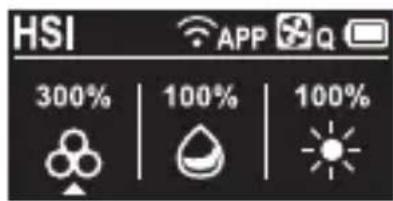
8. Description of the symbols


HSI: Only for RGB lights.
App connection status symbol

2.4 GHz control mode: Available for control via the remote control for Candela/Lux.

App control mode: Available for control via the Candela/Lux LED app.
Fan symbol

Intelligent mode (SMART): The COB continuous light adjusts the speed of the fan to an optimum working temperature according to the temperature measured inside the COB continuous light.

Full power (PERFORMANCE): The fan runs at maximum speed to ensure optimum performance (only available in the DC connection).

Quiet mode (QUIET): The fan runs at minimum speed to minimise the noise level. If the temperature inside the COB permanent light is too high, the COB permanent light switches off.
Error symbol
NTC!
NTC error (COB temperature sensor error): If this symbol lights up, it indicates a problem with the temperature sensor of the COB continuous light. In this case, it is recommended that you contact customer service immediately.

Fan error: If this symbol appears, there is a problem with the fan. In this case, it is recommended that you contact customer service immediately.

HSI: Only for RGB lights.

Connect with the App
- Download the Candela/Lux LED app directly from the App Store.
- Activate Bluetooth ®* on your smartphone.
- Switch on the LUX LED light.
- Press and hold the setting button for wireless connection [2] to activate Bluetooth®* and start pairing mode
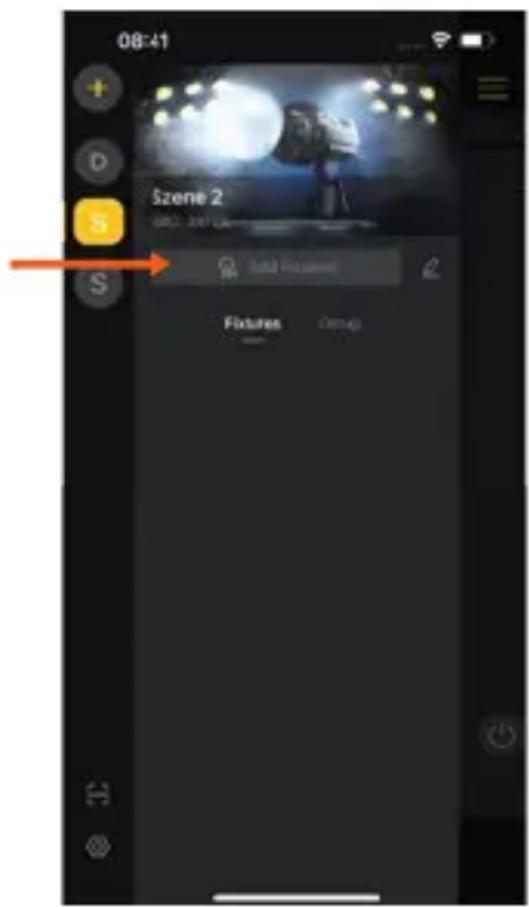
- Open the Candela/Lux LED app and create a new scene using the "+".
- Click "Add Device", then click "New Device".


Connect with the App
- Select the desired light and click on "Add to scene".
- If a connection is not established immediately, select the device again as described in steps 6 and 7 and press the setting button for wireless connection [2] on the device at the same time. Repeat this step until the devices are connected.


Connect with the App
You can download the App here:


Download on the
App Store
available at
amazon appstore
Connecting via NFC
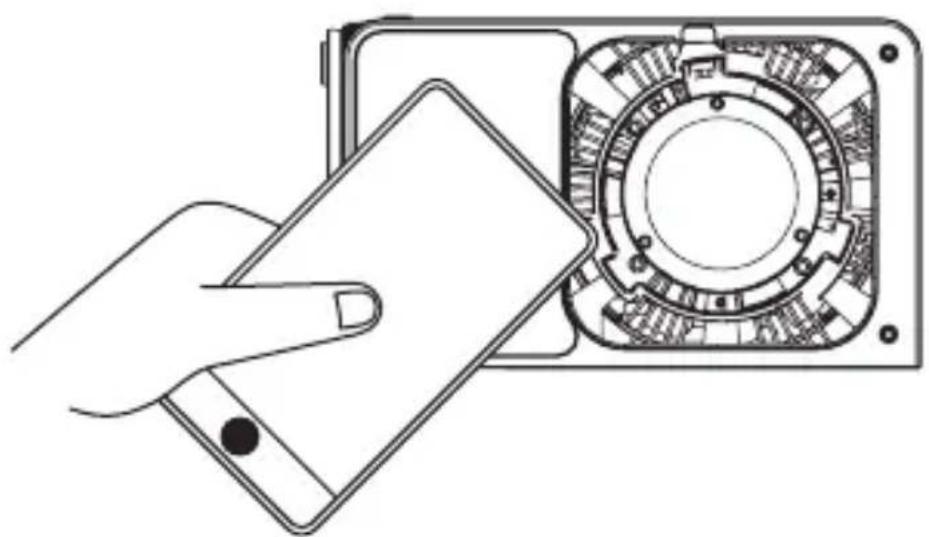
- Hold the NFC sensor area of your smartphone to the Rollei logo on the front of the light.
Connecting via NFC
- Aprompt will automatically appear on your smartphone to open the App. Click on this.
- If the App is not yet installed, a prompt to install it will appear. Click on the prompt to open the app download page. Devices prior to IOS13 are not available for this function.
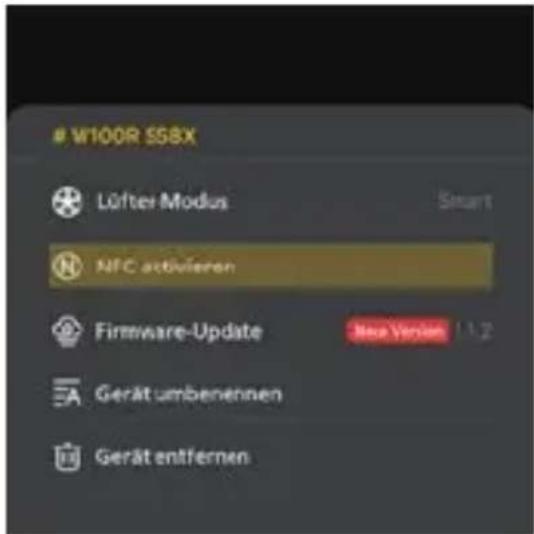
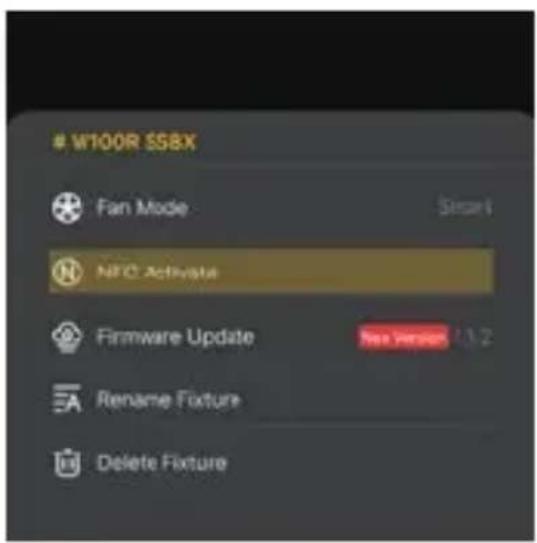
- If the light has never connected to a device via NFC, enable the Bluetooth connection option and activate the NFC function of the light first:
- Connect the light via the app connection method (described on the previous pages).
- Click on the „edit icon“ of the light and then on „activate NFC“
- Hold your smartphone again to scan the Rollei logo on the front of the light to activate NFC and connect the light to the app via NFC.

| LUX | 60 RGB 100 RGB | |
| Number of LEDs | 1 (COB LED) | |
| LED output | 60.0 W 100.0 W | |
| EU energy efficiency class (EU 2017/1369) | G | G |
| EU energy efficiency class spectrum (EU 2017/1369) | A – G | |
| Colour temperature | 2,700 – 6,500 K | |
| Colour rende-ring index (CRI) | 95 97 | |
| Television Lighting Consistency Index (TLCI) | 98 | |
| TN-30-18 | Rf 95 / Rg 104 Rf 95 / Rg 102 | |
| Power control | 0 – 100 %, in 1 % or 10 % steps | |
| Illuminance Without reflector: | Without reflector: | |
| 3,200 K, 0.5 m, 6,040 lx | 3,200 K, 0.5 m, 11,800 lx | |
| 4,500 K, 0.5 m, 6,960 lx | 4,500 K, 0.5 m, 13,100 lx | |
| 5,500 K, 0.5 m, 7,470 lx | 5,500 K, 0.5 m, 13,700 lx | |
| 3,200 K, 1.0 m, 1,570 lx | 3,200 K, 1.0 m, 3,060 lx | |
| 4,500 K, 1.0 m, 1,760 lx | 4,500 K, 1.0 m, 3,400 lx | |
| 5,500 K, 1.0 m, 1,880 lx | 5,500 K, 1.0 m, 3,570 lx | |
| 3,200 K, 1.5 m, 694 lx | 3,200 K, 1.5 m, 1,430 lx | |
| 4,500 K, 1.5 m, 802 lx | 4,500 K, 1.5 m, 1,590 lx | |
| 5,500 K, 1.5 m, 863 lx | 5,500 K, 1.5 m, 1,670 lx | |
| Lighting effects | 13 | |
| Lighting angle | 120 ° | |
| Flicker-free | Up to 240 fps | |
| Fan volume | 28 dBA (100 % brightness, 1 m) | |
| Frequency band | 2.402 GHz – 2.480 GHz | |
| Max. radiated transmitted power | 10 dBm | |
| Connections DC connection, USB-C connection, 1/4" tripod connection | ||
| Power supply Rollei AC/DC adapter for LUX 60 RGB | Power supply unit: Input 100 – 240 V ~ 1.5 A | 50 / 60 Hz | Output: 20.0 V = 3.25 A | LUX 99Wh Battery Grip (not included) | Output USB-C: 65.0 W min. | Rollei AC/DC adapter for LUX 100 RGB | Power supply unit: Input 100 – 240 V ~ 2.5 A | 50 / 60 Hz | Output: 20.0 V = 5.0 A | LUX 99Wh Battery Grip (not included) | Output USB-C: 100.0 W min. | |
| Input power | 20.0 V = 3.0 A 20.0 V | = 5.0 A |
| Nominal input power | 60.0 W 100.0 W | |
| Dimensions | 15.7 x 4.3 x 9.3 cm | |
| Weight | 345 g | |
| What's in the box | COB permanent light, reflector, protective cap, mains adapter with cable (1.80 m), diffuser ball, user manual | |
We reserve the right to make changes to technical data and do not require prior notice.
*The Bluetooth® word mark and logos are registered trademarks of the Bluetooth SIG, Inc. and any use of such marks by Rollei is under licence. Other trademarks and trade names are the property of their respective owners.
| Number of LEDs 1 | |
| Power 100.0 W | |
| EU energy efficiency class (EU 2017/1369) | G |
| EU energy efficien-A-G cy class spectrum (EU 2017/1369) | |
| Colour tempe-rature | 2,700 - 6,500 K (± 200) |
| Colour rendering index (CRI) | 97+ |
| Television Lighting Consistency Index (TLCI) | 98+ |
| TN-30-18 Rf 94 / Rg 101 | |
| Power control 0 - 100 %, in 1 % steps | |
| Illuminance (without reflector) | 3,200 K: 11,800 lux (0.5 m), 3,010 lux (1 m), 1,400 lux (1.5 m) |
| 4,500 K: 13,000 lux (0.5 m), 3,340 lux (1 m), 1,550 lux (1.5 m) | |
| 5,500 K: 13,500 lux (0.5 m), 3,450 lux (1 m), 1,620 lux (1.5 m) | |
| Illuminance (with reflector) | 3,200 K: 41,300 Lux (0.5 m), 10,535 Lux (1 m), 4,900 Lux (1.5 m) |
| 4,500 K: 45,500 Lux (0.5 m), 11,690 Lux (1 m), 5,425 Lux (1.5 m) | |
| 5,500 K: 48,600 Lux (0.5 m), 12,420 Lux (1 m), 5,832 Lux (1.5 m) | |
Technical Data for LUX 100 W RGB Kit
| Illuminance (with reflector and diffuser ball) | 3,200 K: 17,500 Lux (0.5 m), 4,150 Lux (1 m), 2,070 Lux (1.5 m) |
| 4,500 K: 19,300 Lux (0.5 m), 4,550 Lux (1 m), 2,260 Lux (1.5 m) | |
| 5,500 K: 20,300 Lux (0.5 m), 4,770 Lux (1 m), 2,380 Lux (1.5 m) | |
| Illumination angle COB continuous light | 120° |
| Flicker-free >240 fps | |
| Effects 10 | |
| Bowens S-type | No |
| bayonet | |
| Remote control | Remote control (sold separately) or app |
| Frequency band | 2.402–2.480 GHz |
| Max. radiated transmission power | 10 dBm |
| Power supply Input: AC 100–240 V / 2.5 A, 50/60 Hz | |
| Output: DC 20.0 V / 5.0 A | |
| LUX Battery Grip 71 Wh | |
| Volume ventilation | 28 dB (100% brightness, 1 m) |
| Connections Power connection, tripod mount, LUX mount | |
| Material ABS plastic | |
| Dimensions 15.7 x 4.3 x 9.3 cm (L x W x H) | |
| Weight (COB continuous light) | 345 g |
| What's in the box | LUX LED light, reflector, power supply, cable (1.80 m), protective cap, diffuser ball, LUX Battery Grip (71 Wh), barndoors, honeycomb grid, USB-C cable, user manual |
Design and specifications are subject to change without notice.
| LUX | 60 Bi-Color 100 Bi-Color | |
| Number of LEDs | 1 (COB LED) | |
| LED output | 60.0 W 100.0 W | |
| EU energy efficiency class (EU 2017/1369) | G | G |
| EU energy efficiency class spectrum (EU 2017/1369) | A – G | |
| Colour temperature | 2,700 – 6,500 K | |
| Colour rendering index (CRI) | 97 | |
| Television | ||
| Lighting Consistency Index (TLCI) | 98 | |
| TN-30-18 | Rf 92 / Rg 96 Rf 94 / Rg 101 | |
| Power control | 0 – 100 %, in 1 % or 10 % steps | |
| Illuminance Without reflector: | Without reflector: | |
| 3,200 K, 0.5 m, 9,610 lx | 3,200 K, 0.5 m, 11,800 lx | |
| 4,500 K, 0.5 m, 10,500 lx | 4,500 K, 0.5 m, 13,000 lx | |
| 5,500 K, 0.5 m, 11,200 lx | 5,500 K, 0.5 m, 13,500 lx | |
| 3,200 K, 1.0 m, 2,490 lx | 3,200 K, 1.0 m, 3,010 lx | |
| 4,500 K, 1.0 m, 2,730 lx | 4,500 K, 1.0 m, 3,340 lx | |
| 5,500 K, 1.0 m, 2,890 lx | 5,500 K, 1.0 m, 3,450 lx | |
| 3,200 K, 1.5 m, 1,160 lx | 3,200 K, 1.5 m, 1,400 lx | |
| 4,500 K, 1.5 m, 1,270 lx | 4,500 K, 1.5 m, 1,550 lx | |
| 5,500 K, 1.5 m, 1,350 lx | 5,500 K, 1.5 m, 1,620 lx | |
| Lighting effects | 10 | |
| Lighting angle | 120 ° | |
| Flicker-free | Up to 240 fps | |
| Fan volume | 28 dBA (100 % brightness, 1 m) | |
| Frequency band | 2.402 GHz – 2.480 GHz | |
| Max. radiated transmitted power | 10 dBm | |
| Connections DC connection, USB-C connection, 1/4" tripod connection | ||
| Power supply | Rollei AC/DC adapter for LUX 60 Bi-Color | Power supply unit: Input 100 – 240 V ~ 1.5 A | 50 / 60 Hz | Output: 20.0 V = 3.25 A | LUX 99Wh Battery Grip (not included) | Output USB-C: 65.0 W min. | Rollei AC/DC adapter for LUX 100 Bi-Color | Power supply unit: Input 100 – 240V ~ 2.5 A | 50 / 60 Hz | Output: 20.0 V = 5.0 A | LUX 99Wh Battery Grip (not included) | Output USB-C: 100.0 W min. |
| Input power | 20.0 V = 3.0 A | 20.0 V = 5.0 A |
| Nominal input power | 60.0 W 100.0 W | |
| Dimensions | 15.7 x 4.3 x 9.3 cm | |
| Weight | 345 g | |
| What's in the box | COB permanent light, reflector, protective cap, mains adapter with cable (1.80 m), diffuser ball, operating instructions | |
We reserve the right to make changes to technical data and do not require prior notice.
*The Bluetooth® word mark and logos are registered trademarks of the Bluetooth SIG, Inc. and any use of such marks by Rollei is under licence. Other trademarks and trade names are the property of their respective owners.
| Number of LEDs 1 | |
| Power 100.0 W | |
| EU energy efficiency class (EU 2017/1369) | G |
| EU energy efficien- A – Gcy class spectrum (EU 2017/1369) | |
| Colour tempe-rature | 2,700 – 6,500 K (± 200) |
| Colour rendering index (CRI) | 97+ |
| Television Lighting Consistency Index (TLCI) | 98+ |
| TN-30-18 Rf 94 / Rg 101 | |
| Power control 0 – 100 %, in 1 % steps | |
| Illuminance (without reflector) | 3,200 K: 11,800 lux (0.5 m), 3,010 lux (1 m), 1,400 lux (1.5 m)4,500 K: 13,000 lux (0.5 m), 3,340 lux (1 m), 1,550 lux (1.5 m) 5,500 K: 13,500 lux (0.5 m), 3,450 lux (1 m), 1,620 lux (1.5 m) |
| Illuminance (with reflector) | 3,200 K: 41,300 Lux (0.5 m), 10,535 Lux (1 m), 4,900 Lux (1.5 m)4,500 K: 45,500 Lux (0.5 m), 11,690 Lux (1 m), 5,425 Lux (1.5 m)5,500 K: 48,600 Lux (0.5 m), 12,420 Lux (1 m), 5,832 Lux (1.5 m) |
Design and specifications are subject to change without notice.
| Illuminance (with reflector and diffuser ball) | 3,200 K: 17,500 Lux (0.5 m), 4,150 Lux (1 m), 2,070 Lux (1.5 m) |
| 4,500 K: 19,300 lux (0.5 m), 4,550 lux (1 m), 2,260 lux (1.5 m) | |
| 5,500 K: 20,300 lux (0.5 m), 4,770 lux (1 m), 2,380 lux (1.5 m) | |
| Illumination angle COB continuous light flicker-free >240 fpseffects 10 | |
| Bowens S-type bayonet Remote control Remote control (sold separately) or app Frequency band 2.402 – 2.480 GHz | |
| Max. radiated transmission power | 10 dBm |
| Power supply Input: AC 100 – 240 V / 2.5 A, 50 / 60 HzOutput: DC 20.0 V / 5.0 ALUX Battery Grip 71 Wh | |
| Volume ventilation | 28 dB (100% brightness, 1 m) |
| Connections Power connection, tripod mount, LUX mount | |
| Material ABS plastic | |
| Dimensions 15.7 x 4.3 x 9.3 cm | |
| Weight (COB continuous light) | 345 g |
| What's in the box | LUX LED light, reflector, power supply, cable (1.80 m), protective cap, diffuser ball, LUX Battery Grip (71 Wh), barndoors, honeycomb grid, USB-C cable, user manual |
Type Lithium-ion battery
Capacity 14.8 V / 4,800 mAh / 3.7 V /
19,200 mAh / 71.0 Wh
Input USB-C: PD 3.0
20.0 V = 3.0 A (max. 60.0 W)
Output USB-C: PD 3.0 5.0 V / 9.0 V / 12.0 V /
15.0 V / 20.0 V = 3.0 A (60.0 W max.)
Pogo-Pin: 20.0 V = 5.0 A
(100.0 W max.)
Connections USB-C, spring contact probe
Additional features Battery level indicator
Material ABS plastic
Dimensions (L x W x H) 15.3 x 5.3 x 3.5 cm
Weight 412 g
Design and specifications are subject to change without notice.
Technical Data for Accessory Set for LUX
| Functions Boosts light 4-fold and provides directional, harder light | |
| Material Plastic | |
| Dimensions (L x W x H) | Weight 430 g | 25 x 15 x 10 cm |
Design and specifications are subject to change without notice.

Dispose of the packaging according to its type.
Use the local possibilities for collecting paper, cardboard and other materials (applicable in the European Union and other European countries with systems for the separate collection of recyclable materials).
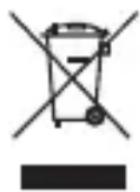
Devices that are marked with this symbol must not be disposed of with household waste! You are
legally obliged to dispose of old devices separately from to dispose of household waste. Information on collection points that accept old appliances free of charge can be obtained from your local authority or town council.

Batteries and rechargeable accumulators must not be dis posed of in household waste! As a consumer you are legally obliged to dispose of all batteries and accumulators, whether they contain harmful substances* or not, to be disposed of in an environmentally sound manner. Accumulators and batteries are therefore marked with the symbol shown opposite. For more information, contact your dealer or contact return and collection points in your community.
*marked with: Cd = Cadmium, Hg = Mercury, Pb = Lead.
Conformity
Rollei GmbH & Co. KG hereby declares that the radio equipment types "Rollei LUX 60 RGB", "Rollei LUX 100 RGB", "Rollei LUX 60 Bi-Color" and "Rollei LUX 100 Bi-Color" are in compliance with Directive 2014/53/EU.
The full text of the EU declaration of conformity is available at the following internet address:
www.rollei.com/egk/lux60rgb
www.rollei.com/egk/lux60bi-color
www.rollei.com/egk/lux100rgb
www.rollei.com/egk/lux100bi-color

- LUX 60 RGB | BI-COLOR LUX 100 RGB | BI-COLOR | KIT
- KIT
- LUX LED-LICHT
- VERBINDEN PER NFC
- INTENDED USE
- DANGER DUE TO ELECTRIC CURRENT
- SAFETY INSTRUCTIONS
- CAUTION! FAILURE TO OBSERVE THIS WARNING CAN RESULT IN SERIOUS INJURY 1) OR DEATH
- CAUTION! FAILURE TO OBSERVE THIS WARNING MAY RESULT IN SERIOUS INJURY 2) OR DEATH
- CAUTION
- WARNING! RISK OF EXPLOSIVE GASES
- PERSONAL SAFETY PRECAUTIONS
- OBSERVE
- WHAT'S IN THE BOX
- LUX LED LIGHT
- LUX BATTERY GRIP 71 WH
- STRUCTURE AND POSSIBLE COMBINATIONS ADDITIONAL EQUIPMENT
- REMOVING THE PROTECTIVE CAP
- FITTING AND REMOVING THE REFLECTOR
- CONNECTING THE MAINS ADAPTER OR USB-C CABLE
- CONNECTING THE BATTERY HANDLE 71 WH
- SWITCHING ON/OFF
- SWITCHING ON
- SWITCHING OFF
- CHECKING THE BATTERY LEVEL
- BATTERY LEVEL INDICATOR
- CHARGING DURING USE
- RECOMMENDED CHARGER POWER 60 W SERIES
- 100 W SERIES
- CONNECTION LUX 99 WH BATTERY GRIP (OPTIONAL)
- SWITCH ON/OFF
- WIRELESS CONNECTION
- HSI MODE (ONLY FOR RGB LIGHTS)
- ADJUSTING THE BRIGHTNESS
- SETTING THE COLOUR TEMPERATURE
- SWITCHING BETWEEN CCT AND HSI MODE (ONLY FOR RGB LIGHTS)
- EFFECT CONTROL/FAN CONTROL
- DESCRIPTION OF THE SYMBOLS
- APP CONNECTION STATUS SYMBOL
- FAN SYMBOL
- ERROR SYMBOL
- CONNECT WITH THE APP
- CONNECTING VIA NFC
- W100R $S8X
- TECHNICAL DATA FOR LUX 100 W RGB KIT
- TECHNICAL DATA FOR ACCESSORY SET FOR LUX
- DISPOSE OF THE PACKAGING ACCORDING TO ITS TYPE
- DEVICES THAT ARE MARKED WITH THIS SYMBOL MUST NOT BE DISPOSED OF WITH HOUSEHOLD WASTE! YOU ARE
- CONFORMITY
Brand : ROLLEI
Model : LUX 60 Bi-Color
Category : Lighting