TREDANSEN 905.124.64 - Roller blind IKEA - Free user manual and instructions
Find the device manual for free TREDANSEN 905.124.64 IKEA in PDF.



| Product type | Connected roller blind |
| Model | TREDANSEN 905.124.64 |
| Brand | IKEA |
| Power supply | Rechargeable battery 2600 mAh / 18.72 Wh + power adapter 5V/1A (USB) or 8.4V/2A (4-pin connector) |
| Remote control | Yes, with CR2032 battery (lifespan ~2 years) |
| Signal amplifier | Yes, model E1746 |
| Range | 10 m in open field |
| Main functions | Motorized lifting/lowering, minimum height adjustment, pairing up to 10 blinds, control via remote control or buttons on the blind |
| Usage | Indoor only, temperature 0°C to 40°C |
| Safety | Unplug before cleaning, keep out of reach of children, do not repair yourself, risk of electric shock |
| Maintenance and cleaning | Unplug before cleaning, use a dry cloth |
| Included parts | Connected blind, remote control, signal amplifier, power adapter, battery, USB cable |
| Repairability | Do not attempt to repair; consult a professional |
| Operating frequency | 2400-2483.5 MHz |
| Output power | 9.6 dBm (EIRP) for amplifier and remote control, 7.3 dBm for blind |
| Remote control battery type | CR2032 |
| Blind battery capacity | 2600 mAh / 18.72 Wh |
| Battery life | Approximately 6 months under normal use |
| Battery charging | Via amplifier with supplied USB cable |
| Max number of blinds per remote control | 10 |
Frequently Asked Questions - TREDANSEN 905.124.64 IKEA
User questions about TREDANSEN 905.124.64 IKEA
0 question about this device. Answer the ones you know or ask your own.
Ask a new question about this device
Download the instructions for your Roller blind in PDF format for free! Find your manual TREDANSEN 905.124.64 - IKEA and take your electronic device back in hand. On this page are published all the documents necessary for the use of your device. TREDANSEN 905.124.64 by IKEA.
USER MANUAL TREDANSEN 905.124.64 IKEA

Design and Quality IKA of Sweden
English 4
Français 11
Espanol 19
IMPORTANT SAFETY INSTRUCTIONS
Read all instructions before using the product.
DANGER
To reduce the risk of electric shock: Always unplug this product from the electrical outlet before cleaning.
Do not allow children to play with fixed controls. Keep remote controls away from children.
Follow all instructions, since incorrect installation can lead to severe injury.
This appliance can be used by children aged from 8 years and above and persons with reduced physical, sensory or mental capabilities or lack of experience and knowledge if they have been given supervision or instruction concerning use of the appliance in a safe way and understand the hazards involved by a person responsible for their safety. Children shall not play with the appliance.
Cleaning and user maintenance shall not be made by children without supervision.
SAVE THESE INSTRUCTIONS.
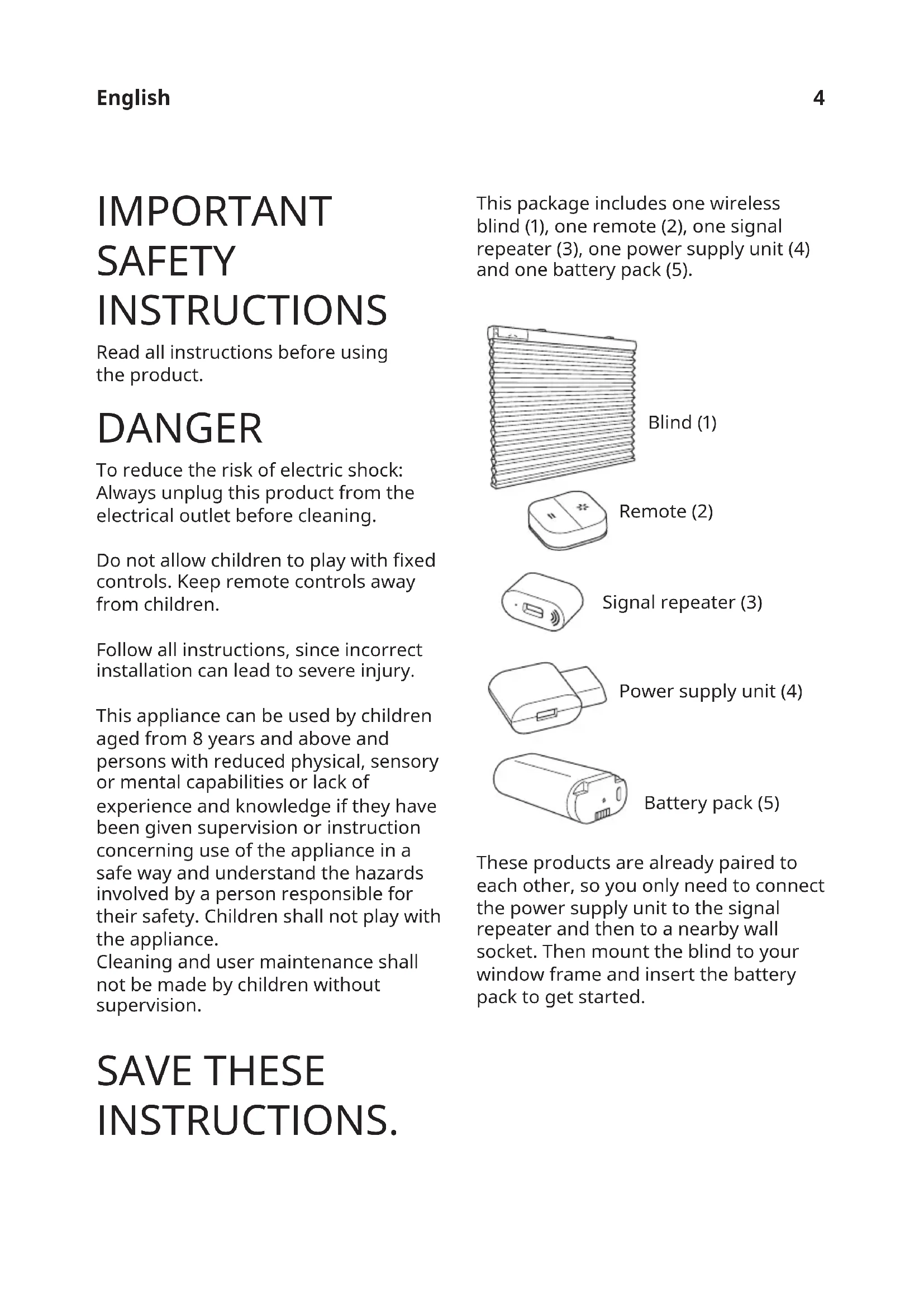
This package includes one wireless blind (1), one remote (2), one signal repeater (3), one power supply unit (4) and one battery pack (5).
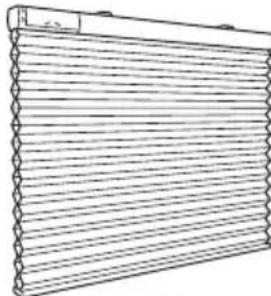
Blind (1)
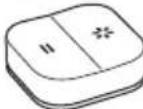
Remote (2)
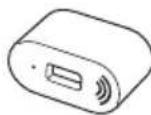
Signal repeater (3)
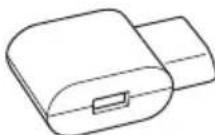
Power supply unit (4)
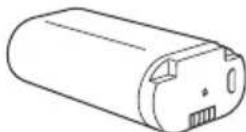
Battery pack (5)
These products are already paired to each other, so you only need to connect the power supply unit to the signal repeater and then to a nearby wall socket. Then mount the blind to your window frame and insert the battery pack to get started.
Instructions for use
Connect the power supply unit into the wall socket, insert the signal repeater into the free slot.
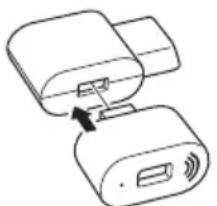
When charging, only use recommended USB cables for your device and replace faulty cables immediately.
Remote functions

Up:
Press to raise your wireless blind.

Down:
Press to lower your wireless blind.

Pairing:Used to add IKEA Home smart products to your system.
IMPORTANT: The signal repeater needs to be plugged in and powered to be able to control your blind with the remote!
Signal repeater function
With TRÄDFRI signal repeater you can expand the signal reach of your IKEA Home smart products.
Using your wireless blind
To raise blind to top position:
Press the up button once (short press) on the remote or on the blind.
To lower blind to bottom position:
Press the down button once (short press) on the remote or on the blind.
To raise the blind:
Press and hold the up button on the remote or on the blind.
While pressing the button, the blind will rise. Release the button once the desired height or maximum height is reached.
To lower the blind:
Press and hold the down button on the remote or on the blind.
While pressing the button, the blind will lower. Release the button once the desired height or the maximum extension is reached.
Setting desired minimum height:
Only the buttons on the blind can be used to set this level.
Move the blind to the desired height. Afterwards, short press either the up or down button on the blind twice to save this position as the new minimum height.
The blind will move slightly up and down to confirm the setting.
Resetting minimum height:
To change the minimum height or revert to the default minimum height setting, first move the blind to the top
position. Afterwards, press either the up or down button on the blind twice.
The blind will move slightly up and down to confirm the setting.
Repeat the above steps to set a new desired minimum height.
Correcting unbalanced blind
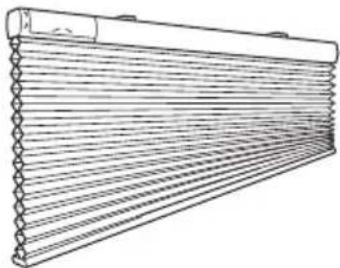
If the blind gets stuck when lowering, it might become unbalanced.
Raise the blind completely to level it again.
Adding devices to your remote
Pairing: Used to add IKEA Home smart products to your system.
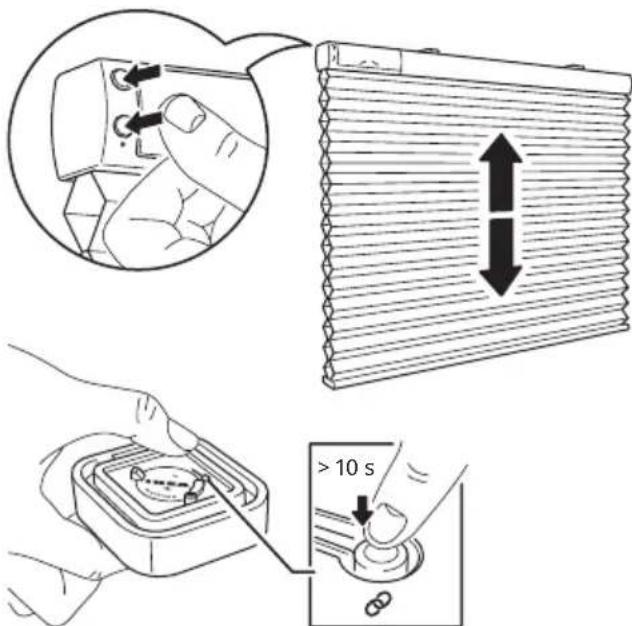
Follow these steps to add more wireless blinds to your system. Make sure that your wireless blind is turned on.
-
Open the back cover of the remote and find the pairing button.
-
Short press both buttons on the blind. This will wake up the device and it is ready for pairing for 2 minutes.
-
Hold the remote close to the wireless blind you want to add: no more than 5 cm away from (1).
-
Press and hold the pairing button on the remote for at least 10 seconds.
-
A red LED light will illuminate on the remote. On your wireless blind, a white LED light will begin to dim and flash until the devices have been successfully paired.
Up to 10 wireless blinds can be paired with 1 remote.
Make sure to pair one blind at a time. If you have difficulties pairing multiple blinds, temporarily disconnect those that have already been paired by disconnecting the battery pack inside the blind. This will help with the pairing process.
Changing the remote's battery
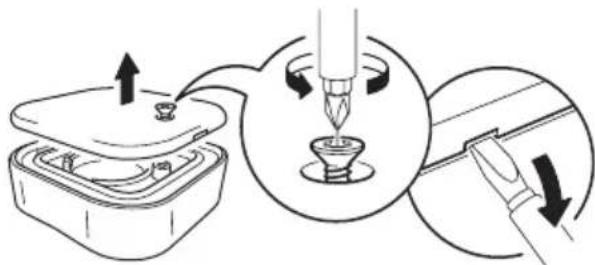
When the remote is used regularly and as intended, the battery will last for approximately 2 years.
When it's time to replace the battery,
a red LED light will flash when you use the remote.
Open the rear cover and replace the battery with a new CR2032 battery.
WARNING!
Risk of explosion if battery is replaced by an incorrect battery type. Dispose of used batteries according to the instructions.
Charging the battery pack
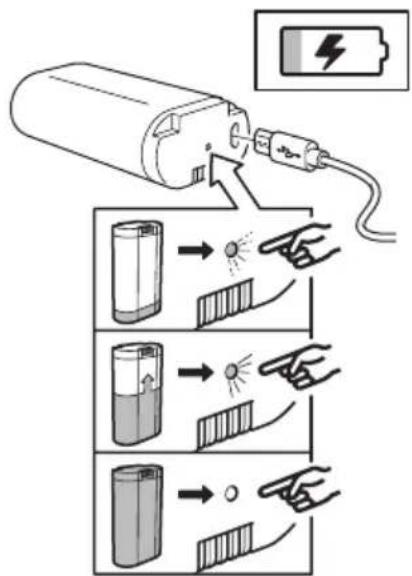
The included battery pack for wireless blind can be charged through the signal repeater unit.
Use the included USB cable for charging.
Upon normal use, the battery pack should be charged every 6 months. A LED indicator on the battery pack will display the status.
LED indicator status: Charging in progress: LED on. Charging complete: LED off. Error: LED flashes.
Factory reset your devices
After resetting the signal repeater, you must pair the remote to the signal repeater and then pair the remote to the wireless blind again.
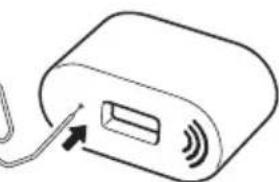
Signal repeater:
Push a pin into the pinhole on bottom of the signal repeater for at least 5 seconds.
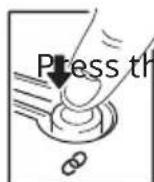
Remote: e pairing button 4 times within 5 seconds. A red LED light will flash, indicating that it has been reset.
Wireless blind:
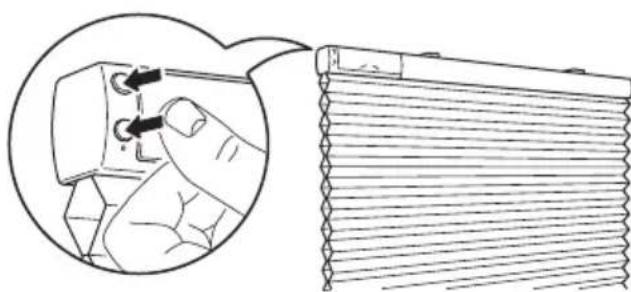
Press and hold both buttons for 5 seconds.
A white LED light will flash 4 times, indicating the blind has been reset.
Good to know
-
The power supply unit can be used to charge the wireless blind's battery pack.
-
USB cable length and quality influences the charging speed and performance.
Devices may become warm during charging. This is completely normal and they will gradually cool down again after they are fully charged.
- Unplug the power supply unit from the wall socket before cleaning and when it is not in use.
- The battery pack should not be left discharged for a longer period of time.
- The battery pack should not be charged while in contact with flammable materials like textiles.
- This battery pack can only be used with IKEA products.
IMPORTANT!
Wireless blind package:
- The included devices are for indoor use only and can be used in temperatures ranging from 0^ to 40^ (32°F to 104°F).
- Storage temperature: -20^ to 25^ ( 4^ to 77^ ).
- Do not leave any device in direct sunlight or near any heat source, since it may overheat.
The range between the transmitter and the receiver is measured in open air. - Different building materials and placement of the units can affect the wireless connectivity range.
WARNING:
Power supply unit:
-
The wall socket must be located near the equipment and must be easily accessible.
If any device is damaged, it should not be used and should immediately be disposed of. -
Do not subject the units to wet, moist or excessively dusty environments since this can cause damage to the units.
- Never use a damaged or faulty USB cable for charging, since this can damage the product and harm your device.
- Recommended precautionary measures and technical data, see the back of the power supply unit.
WARNING
Battery pack:
- Do not modify, disassemble, open, drop, crush, puncture, or shred the battery.
- Do not expose the battery to rain or water.
- Risk of fires and burns. Do not subject the battery to a temperature over 60^ (140^) and do not incinerate the battery.
- Keep the battery away from open flames or sunlight to prevent heat build-up.
- Keep the battery away from high voltage devices.
- This product is not a toy, keep away from children. Ensure that all persons who use this product read and follow these warnings and instructions.
- Do not short-circuit the battery or its cells.
- In the event of a battery cell leaking, do not allow the liquid to come in contact with the skin or eyes.
Product servicing
Do not attempt to repair these products yourself, since opening or removing covers may expose you to dangerous voltage points or other risks.
RF EXPOSURE INFORMATION
According to RF exposure regulations, under normal operations the end user shall refrain from being closer than 20 cm from the device.
Technical data
| Type: E2103 | TREDANSEN | E1746 wireless signal repeater | E1766 Open/Close remote |
| Input: | 7.2V DC, 2.0A 5.0V DC, 1.0A | 3.0V, CR2032 battery | |
| Range: 10 m in open air | |||
| For indoor use only | |||
| Operating frequency: | 2400-2483.5 MHz | ||
| Output power: 9.6 dBm (EIRP) 9.6 dBm (EIRP) 7.3 dBm (EIRP) | |||
Power supply unit
Type: ICPSW5-5NA-1
Input: 100-240 VAC, 50 / 60Hz 0.2A
Output: 5.0V DC
Max total load: 1.0A, 5.0W
Battery pack
Model: BRAUNIT battery pack
Type:ICBL7.2-18-USB-A1
Capacity: 2600mAh/18.72Wh
Input:
5.0V DC, 1.0A (Micro USB)
8.4V DC, 2.0A (4 pin connector)
Output: 7.2V DC, 2.0A
Rechargeable Li-1on battery cell inside.
Indoor use only
Manufacturer: IKEA of Sweden AB
Address:
Box 702, SE-343 81 Almhult, SWEDEN
License rights and limitations
NO RIGHTS OR LICENSES, EXPRESS NO RIGHTS OR LICENSES, EXPRESS OR IMPLIED, ARE GRANTED TO USE THIRD-PARTY DEVICES IN COMBINATION WITH THESE PRODUCTS IN A WIRELESS MESH NETWORK, OR TO USE THIRD-PARTY SERVICES TO ACCESS, MONITOR OR CONTROL THESE PRODUCTS IN A WIRELESS MESH NETWORK VIA THE INTERNET OR ANOTHER EXTERNAL WIDE AREA NETWORK.
For use pursuant to U.S. Patent Nos.:
US 6,914,893
US 7,697,492
US 8,964,708
This device complies with Part 15 of the FCC Rules.
This device contains licence-exempt transmitter(s)/receiver(s) that comply with Innovation Science and Economic Development Canada's licence-exempt RSS standard(s).
Operation is subject to the following two conditions:
(1) this device may not cause harmful interference, and
(2) this device must accept any interference received, including interference that may cause undesired operation of the device.
WARNING:
Any changes or modifications to this unit not expressly approved by the party responsible for compliance could void the user's authority to operate the equipment.
NOTE:
This equipment has been tested and found to comply with the limits for a Class B digital device, pursuant to part 15 of the FCC Rules. These limits are designed to provide reasonable protection against harmful interference in a residential installation.
This equipment generates, uses and can radiate radio frequency energy and, if not installed and used in accordance with the instructions, may cause harmful interference to radio communications. However, there is no guarantee that interference will not occur in a particular installation.
If this equipment does cause harmful interference to radio or television reception, which can be determined by turning the quipment off and on, the user is encouraged to try to correct the interference by one or more of the following measures:
- Reorient or relocate the receiving antenna.
- Increase the separation between the equipment and receiver.
- Connect the equipment into an outlet on a circuit different from that to which the receiver is connected.
- Consult the dealer or an experienced radio/TV technician for help.
The crossed-out wheeled bin symbol indicates that the item should be disposed of separately from household waste. The item should be handed in for recycling in accordance with local environmental regulations for waste disposal. By separating a marked item from household waste, you will help reduce the volume of waste sent to incinerators or land-fill and minimize any potential negative impact on human health and the environment. For more information, please contact your IKEA store.
IMPORTANT CONSIGNES DE SECURITÉ
Entree:100-240VAC,50/60Hz,0.2A
Sortie:5.0V DC
Charge max. totale: 1,0A, 5,0W
Fabricant : IKEA of Sweden AB
Adresse:
Box 702, SE-343 81 Almhult, SUÉDE
Batterie
Type:ICBL7,2-18-USB-A1
Batterie rechargeable Li-ion incluse.
Tip:ICBL7.2-18-USB-A1
Capacidad: 2600 mAh/18.72 Wh
Entrada:
5.0V CC, 1 A (Micro USB)
8.4 V CC, 2 A (conector con 4 clavijas)
Salida: 7.2V CC, 2.0 A