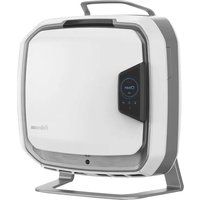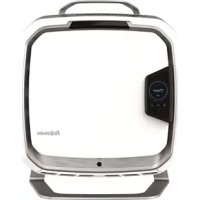
Array Stand AS1 - Air purifier FELLOWES - Free user manual and instructions
Find the device manual for free Array Stand AS1 FELLOWES in PDF.



| Product Type | Floor-standing Air Purifier |
| Brand | Fellowes |
| Model | Array Stand AS1 |
| Dimensions (L x W x H) | 508 x 533 x 229 mm (20 x 21 x 9 in) |
| Weight | 9.16 kg (20.2 lb) |
| Power Supply | 120 V AC, 60 Hz, 1.8 A |
| Maximum Consumption | 120 W |
| Fan Speeds | 5 speeds (manual mode) |
| Filter Type | 3-in-1 hybrid filter (pre-filter, charcoal, True HEPA) |
| Sensors | Air quality (PM2.5, TVOC, CO2, AQI index) |
| Connectivity | Wireless (Wi-Fi) with online dashboard |
| Operating Modes | Silent, Automatic, Manual |
| Air Quality Indicator | Blue (ideal), Amber (acceptable), Red (poor) |
| Display | Screen with AQI, PM2.5, TVOC, CO2, filter life indicators |
| Maintenance | Unplug before cleaning; use a feather duster for the exterior; do not clean the fan blades |
| Filter Replacement | Fellowes original filters: FEL-6416502 (charcoal) and FEL-6416602 (True HEPA) |
| Safety | Do not obstruct air inlets/outlets; do not use an extension cord; indoor use only |
| Warranty | 3 years for sensors/IoT/screen, 5 years for other parts (excluding filters) |
| Included Accessories | Purifier, 3-in-1 hybrid filter, pre-filter, 2 locking keys, quick start guide, manual |
| Intended Use | Indoor only, air purification |
Frequently Asked Questions - Array Stand AS1 FELLOWES
User questions about Array Stand AS1 FELLOWES
0 question about this device. Answer the ones you know or ask your own.
Ask a new question about this device
Download the instructions for your Air purifier in PDF format for free! Find your manual Array Stand AS1 - FELLOWES and take your electronic device back in hand. On this page are published all the documents necessary for the use of your device. Array Stand AS1 by FELLOWES.
USER MANUAL Array Stand AS1 FELLOWES
PLEASE READ THESE INSTRUCTIONS BEFORE USE. DO NOT DISCARD: KEEP FOR FUTURE REFERENCE.
VEUILLEZ LIRE CES INSTRUCTIONS AVANT D'UTILISER L'APPAREIL. NE PAS JETER : CONSERVER AFIN DE CONSULTER LES DIRECTIVES ULTÉRIÉUREMENT, EN CAS DE BESOIN.
WARNING: IMPORTANT SAFETY INSTRUCTIONS - Read Before Using!
PLEASE READ AND SAVE THESE INSTRUCTIONS. Read carefully before attempting to assemble, install, operate or maintain this product. Protect yourself and others by observing all safety information. Failure to comply with instructions could result in personal injury and/or property damage. Retain instructions for future reference.
IMPORTANT CAUTIONS AND INSTRUCTIONS FOR USING AIR PURIFIER:
WARNING - TO REDUCE THE RISK OF FIRE, ELECTRIC SHOCK, OR INJURY TO PERSONS, OBSERVE THE FOLLOWING:
a) Use this unit only in the manner intended by the manufacturer. If you have questions, contact the manufacturer.
b) Before servicing or cleaning unit, switch power off at service panel and lock the service disconnecting means to prevent power from being switched on accidentally. When the service disconnecting means cannot be locked, securely fasten a prominent warning device, such as a tag, to the service panel.
- Do not use this air purifier as sole protection against harmful pollutants.
- Do not repair or modify the unit unless specifically recommended in this manual. Only an authorized repair technician should disassemble, repair, or modify this product.
- This product has a polarized plug (one blade is wider than the other). To reduce the risk of electrical shock, this plug is intended to fit in a polarized outlet only one way. If the plug does not fit fully in the outlet, reverse the plug. If it still does not fit, contact a qualified electrician. Do not attempt to defeat this safety feature.
- Do not use if the power cord or plug is damaged. If the power cord is damaged, it must be replaced by the manufacturer or a qualified technician.
- Do not bend the power cable excessively or place heavy object on top of it.
Periodically remove dust from the power plug. This will reduce the chance that humidity will accumulate, which increases the risk of electric shock. - When removing the power plug, grasp by holding the plug itself, never hold by the cord.
- Unplug this product during thunder or lighting storms. Unplug the product if it will not be used for a long period of time.
- Do not touch the power cord with wet hands. It may result in electrical shock.
- Do not run power cord under rugs, carpeting or mats.
- Use only the electrical power (voltage and frequency) specified for the model air purifier being installed.
- Do not obstruct the air inlet or air outlet of the air purifier.
- Ensure filter bags are removed and filters are correctly installed before turning on. Do not operate this product without filters.
- Do not wash and reuse any of the filters.
- Do not use attachments or filters other than brand, as unit will not function.
- Do not spray aerosols on, or into the unit.
- Do not use detergent to clean the unit.
-
Do not insert fingers, liquids, or foreign objects into the air intake or outlet.
-
Do not use the unit for anything other than air purification.
- Do not place this product on uneven or inclined surfaces.
- Do not place this product near heat-generating equipment.
- This product will not remove carbon monoxide emitted from heating appliances or other sources.
- Do not use the product near flammable substances or a gas leak.
- Do not use the unit where it is humid or where the unit may get wet.
- Do not attempt to pull this product by the cord.
- Do not attempt to carry this product by the cord.
- Do not connect this product to any electrical outlet that is damaged.
- Do not alter the length of the power cord.
- Not suitable for use with solid state speed controls.
- Do not use extension cords, adaptors, or power strips with this product.
- Make sure that the power cord cannot be pulled out or damaged during operation.
This product is for indoor use only. - Change your filters at the recommended intervals to avoid particle and dust buildup.
- This appliance can be used by children aged from 8 years and above and persons with reduced physical, sensory, or metal capabilities or lack of experience and knowledge if they have been given supervision or instruction concerning use of the appliance in a safe way and understand the hazards involved.
-
This device contains licence-exempt transmitter(s)/receiver(s) that comply with Innovation, Science and Economic Development Canada's licence-exempt RSS(s). Operation is subject to the following two conditions:
-
This device may not cause interference.
- This device must accept any interference, including interference that may cause undesired operation of the device
- Warning: To reduce the risk of fire, electric shock, or injury to persons, do not use replacement parts that have not been recommended by the manufacturer (e.g. parts made at home using a 3D printer).
PRODUCT SPECIFICATIONS
| Dimensions 20 X 21 X 9 in 50 | X 533 X 229 mm | |
| Weight of System 20.2 lbs 9.1 | kg | |
| Power Requirements AC 120V | 60Hz 1.8A | |
| Watts (5 fan speeds) 120W | ||
PACKAGING CONTENTS
Air Purifier (1)
- 3-in-1 Hybrid Filter (1)
Pre-Filter (1)
- Keys for Locking Front Panel (2)
- Registration information
Quick Start Guide - User Manual
DISPLAY PANEL
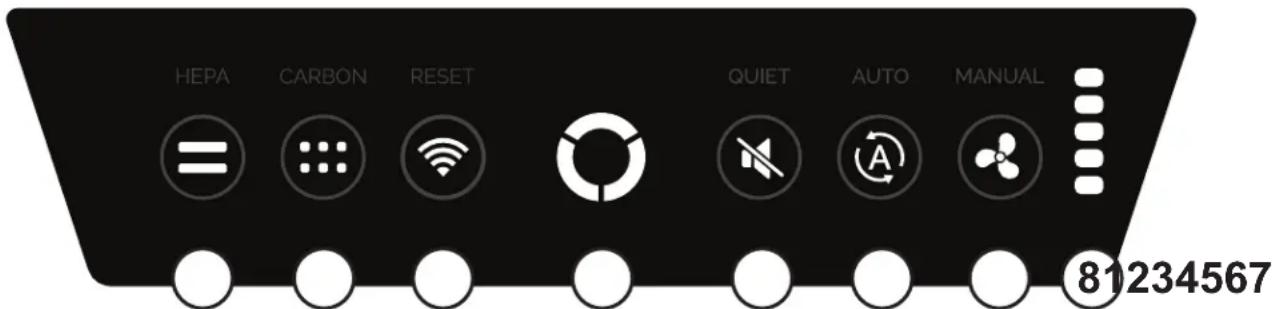
NOTE: after the unit is turned on the "AQ" light will flash for a few minutes while the system self-calibrates.
1 HEPA FILTER - Press for 2s: reset the life counter of the HEPA filter. Light (red): indicates filter life has reached 100% .
2 CARBON FILTER - Press for 2s: reset the life counter of the carbon filter. Light (red): indicates filter life has reached 100% .
3 WIRELESS STATUS/RESET - Press for 10s: connection reset.
GREEN = Fully Connected & Paired
YELLOW = Connection Available
RED = Not Connected
RED(Blink) = Connection Error
BLUE = Reset Initialized
BLUE (Blink) = Reset Confirmed
OFF = Connection Disabled
AIR QUALITY INDICATOR -
GREEN: sensors calibrating
BLUE: air quality Good
AMBER: air quality Fair
RED: air quality Poor
WHITE: door open
PURPLE: unit ping from cloud
5 QUIET - Press: sets the unit to Quiet Mode.
Light: indicates unit is running in Quiet mode, where air quality sensor set fan speed automatically depending on environment with a max of fan speed 3.
6 AUTO - Press: sets the unit to Auto mode.
Light: indicates unit is running in Auto mode where air quality sensors set fan speed automatically depending on environment.
7 MANUAL - Press: cycle through fan speeds, a beep will be heard. If coming from Auto mode, will start at lowest fan speed.
Light: indicates fan speed is being controlled manually.
8 MANUAL INDICATORS - Light: indicates which fan speed is currently selected in manual mode (1-5).
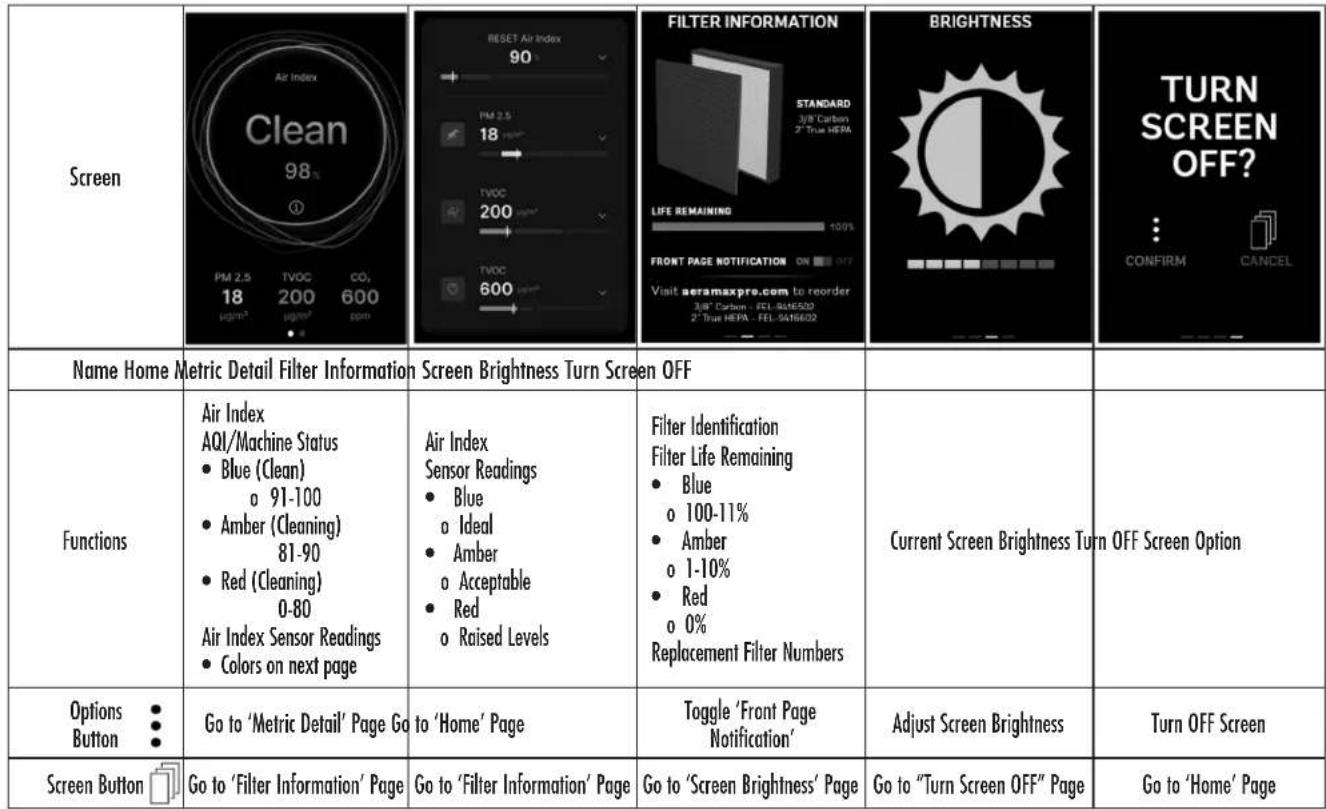
SCREEN CONTROLS
FILTER CHANGE PROCEDURE
Unit will notify you when filter needs to be changed with a red light visible on the control panel. Always wear a mask and gloves when performing a filter change. For replacement filters, please visit www.fellowes.com
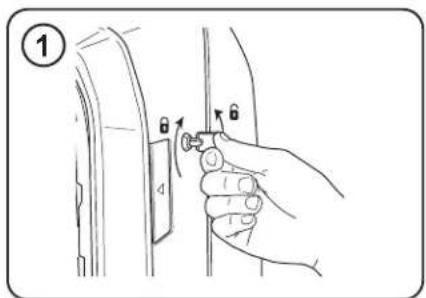
Unlock access panel: to unlock, insert the key provided and rotate counter-clockwise 14 turn.
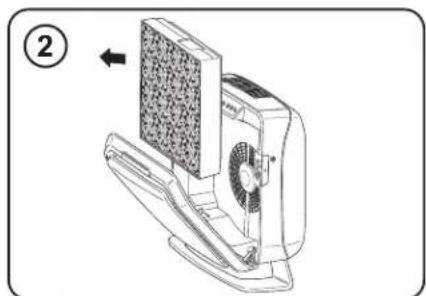
Open front access panel by pressing latches on both sides of unit. Allow panel to open fully. Remove filter(s) to be replaced.
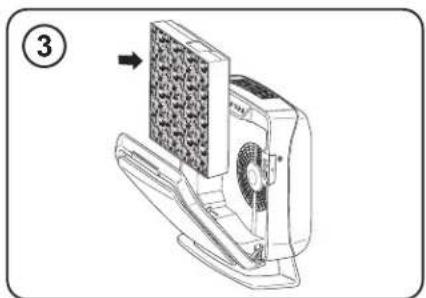
Remove any packaging wrap from the new filters(s) and re-install the fillers.
FILTER RESET
When installing a new filter, the unit will automatically detect the filter type but the user will have to manually reset the filter replacement indicators with the following procedure:
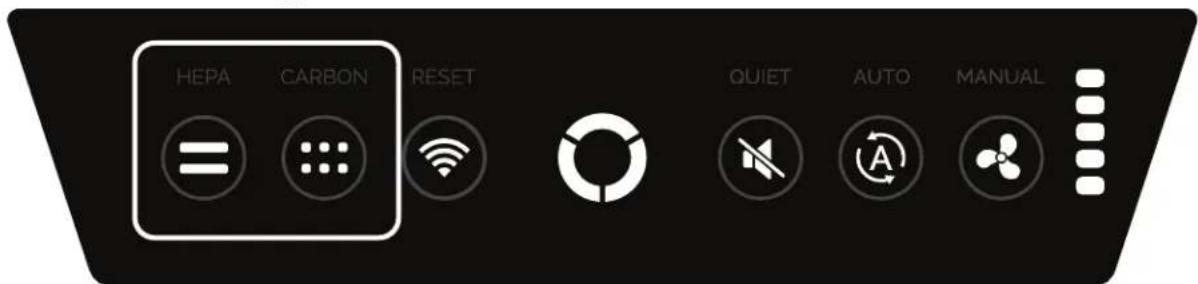
Touch and hold the illuminated indicator for two seconds until a beep is heard and the indicator turns OFF.
WIRELESS CONNECTION - GETTING STARTED
This product has additional features that are only available when using the online dashboard.
To get started, please visit www.arrayviewpoint.fellowes.com
If you have questions or need help along the way, please contact us at 1-800-955-0959
MAINTENANCE AND CLEANING
Power down machine and remove filters before starting maintenance (See Filter Installation/Removal Guide).
Use dust cloth to remove dust and debris that may have built up around the unit internals.
Note: Do not attempt to clean inside fan blade area. Damage may occur to blades.
Note: Do not use the dust cloth to clean the filters.
If there is dust and debris near the exhaust areas of the unit, gently use a dust cloth to loosen the dust.
Once complete, reinstall the filters, turn the unit on, and close the door.
TROUBLESHOOTING
| PROBLEM: POSSIBLE SOLUTION: | |
| The air quality control system fails to start. | ·Check to assure unit is connected to power supply. ·Make sure filters are genuine filters, as unit will not function with other brands. IMPORTANT: Make sure filter detection area on genuine AeroMax ® PRO replacement filter aligns with window in filter frame. ·Review “Re-Installing Filters” section for further detail. ·Make sure front access panel is closed completely. ·Make sure power switch is on. |
| The Filter replacement indicator light remain lit after replacing the filter(s). | ·Repeat filter light reset instruction. |
LIMITED WARRANTY
Limited Warranty: Fellowes, Inc. ("Fellowes") warrants the Array AS1 Commercial Grade Air Purifier ("Product") to be free from defects in material and workmanship for the time periods as set forth below.
The particle counters, IOT, sensors and display screen for a period of three (3) years from the date of original purchase of the Product.
All other parts for a period of five (5) years from the date of original purchase of the Product.
In the event that the Product is installed into new construction, the warranty period shall commence on the date of the occupancy permit or one year after the date of purchase, whichever is earlier. If any part is found to be defective during the warranty period, Fellowes will (at its sole option) either repair or replace the defective product with no charge for service or parts.
This warranty does not cover damage caused by use of non-Fellows approved filters or failure to follow the recommended replacement schedule. This warranty does not apply in the cases of abuse, mishandling, failure to comply with product usage standards, operation using an improper power supply (other than listed on the label), installation error, or unauthorized repair. This warranty does not cover replaceable filters.
Fellows reserves the right to charge the consumer for any additional cost occurred by Fellows to provide parts or service outside of the country where the Product was initially sold by an authorized reseller. In the event that the Product is not readily accessible to Fellows designated service personnel, Fellows reserves the right to supply the customer with replacement parts or product in full satisfaction of its obligations under this warranty and any service obligations. ANY IMPLIED WARRANTY, INCLUDING THAT OF MERCHANTABILITY OR FITNESS FOR A PARTICULAR PURPOSE, IS HEREBY LIMITED IN DURATION TO THE APPROPRIATE WARRANTY PERIOD SET FORTH ABOVE. In no event shall Fellows be liable for any consequential, incidental, indirect or special damages. This warranty gives you specific legal rights. The duration, terms, and conditions of this warranty are valid worldwide, except where different limitations, restrictions, or conditions may be required by local laws. For more details or to obtain service under this warranty, please contact us or your dealer.
INFORMATION TO THE USER
This equipment has been tested and found to comply with the limits for Class B digital device, pursuant to part 15 of the FCC Rules. These limits are designed to provide reasonable protection against harmful interference in an installation. This equipment generates, uses and can radiate radio frequency energy and, if not installed and used in accordance with the instructions, may cause harmful interference to radio communications. However, there is no guarantee that interference will not occur in a particular installation. If this equipment does cause harmful interference to radio or television reception, which can be determined by turning the equipment off and on, the user is encouraged to try to correct the interference by one or more of the following measures:
- Reorient or relocate the receiving antenna.
- Increase the separation between the equipment and receiver.
- Connect the equipment on a circuit different from that to which the receiver is connected.
- Consult the dealer or experienced radio/TV technician for help.