Array Signal - Air purifier FELLOWES - Free user manual and instructions
Find the device manual for free Array Signal FELLOWES in PDF.


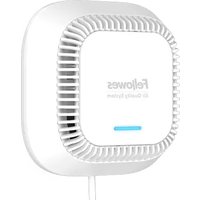
| Product Type | Air Purifier |
| Dimensions | 43 x 107 x 107 mm (1.7 x 4.2 x 4.2 in) |
| Weight | 0.2 kg (0.4 lb) |
| Power Supply | AC Input 100-240 V, 50/60 Hz, 1.00 A; DC Output 5 V, 4.00 A; Power 20 W |
| Main Functions | Network signal sensor, air quality indicator (green LED for startup, blue for good, orange for average, red for poor), wireless connection to online dashboard (arrayviewpoint.fellowes.com) |
| Mounting | Wall-mounted (screws and anchors provided) or desktop |
| Included Accessories | AC adapter, inverter, 2 #8 screws, 2 drywall anchors |
| Required Tools (not included) | Power drill, 1/4 in. drill bit, #2 Phillips screwdriver, level |
| Maintenance and Cleaning | Vacuum visible dust with a brush; do not use compressed air |
| Safety | Indoor use only; do not open, repair, or modify; do not block air inlet; do not use detergent; do not expose to moisture |
| Warranty | 3 years against defects in material and workmanship |
| Regulatory Information | Complies with FCC Part 15 (Class B) |
Frequently Asked Questions - Array Signal FELLOWES
User questions about Array Signal FELLOWES
0 question about this device. Answer the ones you know or ask your own.
Ask a new question about this device
Download the instructions for your Air purifier in PDF format for free! Find your manual Array Signal - FELLOWES and take your electronic device back in hand. On this page are published all the documents necessary for the use of your device. Array Signal by FELLOWES.
USER MANUAL Array Signal FELLOWES
INSTALLATION GUIDE AND OWNER'S MANUAL GUIDE D'INSTALLATION ET MANUEL DU PROPRIÉTAIRE GUÍA DE INSTALACIÓN Y MANUAL DEL PROPIETARIO
Please read instructions carefully before installing
*For a copy of the manual please visit fellowes.com
WARNING: IMPORTANT SAFETY INSTRUCTIONS — Read Before Using!
Please read and save these instructions. Read carefully before attempting to assemble, install, operate, or maintain this product. Protect yourself and others by observing all safety information. Failure to comply with instructions could result in personal injury and/or property damage. Retain instructions for future use.
IMPORTANT CAUTIONS AND INSTRUCTIONS FOR USING PRODUCT:
WARNING: Follow the instructions in this manual to reduce the risk of electric shock, short circuit, and/or fire:
- Use this unit only in the manner intended by the manufacturer. If you have questions, contact the manufacturer.
- This product is not serviceable. DO NOT attempt to open, repair, or modify this product. Doing so could present the risk of electrical shock or other hazard.
- Only use the power cord that was supplied with the product. Use of unauthorized power cords could result in electrical shock or product damage.
- Do not use if the power cord is damaged.
- Do not bend the power cable excessively or place heavy object on top of it.
- When drilling into mounting surface, do not damage electrical wiring or other hidden utilities.
-
Use only the electrical power (voltage and frequency), specified for this product.
-
Do not obstruct the air inlet of the product.
- Do not spray aerosols on, or into the unit.
- Do not use detergent to clean the unit.
- Do not insert liquids or foreign objects into the air intake.
- Do not install this product near heat-generating equipment.
- Do not use the product near flammable substances or a gas leak.
- Do not use the unit where it is humid or where the unit may get wet.
- Do not alter the length of the power cord.
- This product is for indoor use only.
TOOLS REQUIRED FOR INSTALLATION (NOT INCLUDED)
- Electric drill, 14'' drill bit
-
2 Phillips screw driver
- Level
- Measuring tape
PARTS PROVIDED FOR INSTALLATION
-
8 screws (2X)
- Drywall anchors (2X)
- AC Adapter (1X)
PRODUCT SPECIFICATIONS
| Dimensions 1.7 x 4.2 x 4.2 in 43 x 107 x 107 mm | |
| Weight of System 0.4 lbs 0.2 kg | |
| AC Input 100-240V 50/60Hz 1.00A | |
| DC Input 5V 4.00A | |
| Power 20W | |
OPTIMAL PLACEMENT
To ensure the best signal strength, we strongly recommend that you avoid installing the sensor puck on or near the following:
• Large metal objects
• Electrical equipment
- Sources of extreme moisture
• Metal stud framing
• Corners
WALL MOUNTING INSTRUCTIONS
Ensure that there is a working outlet with the correct electrical specifications within reach of the installation location. Otherwise have a qualified electrician install one. Remove Sensor from packaging and record "Web ID" from back for later onboarding.
natural_image
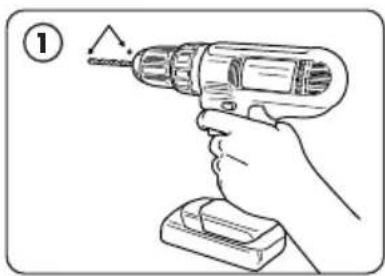
Hand holding a drill bit with a screwdriver, no text or symbols visibleDetermine location for installation. Mark 2 holes 2" apart horizontally, ensuring they are level. Drill holes.
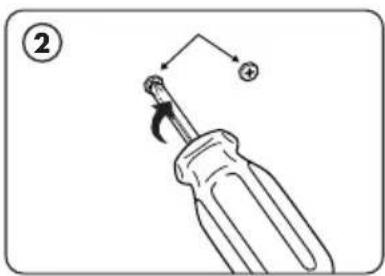
Fasten mounting screws into stud or drywall anchor holes with screwdriver.
natural_image
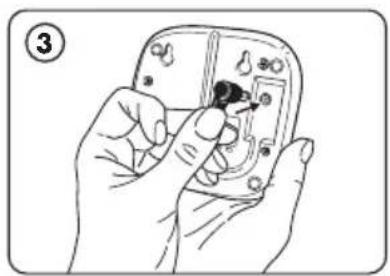
Hand holding a small electronic device with a black plug inserted, no visible text or symbolsConnect power cord to sensor puck and route cord along guide.
natural_image
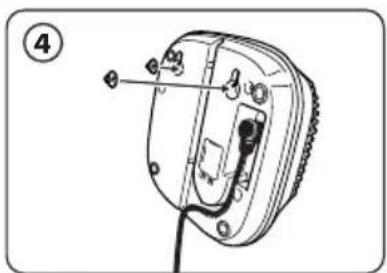
Diagram of a device with labeled parts and wiring, no readable text or symbols presentAlign mounting slots with screws. Maneuver screws into mounting slots and gently press unit until flat against wall.
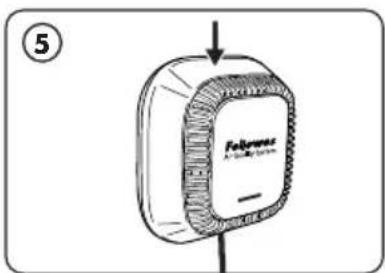
Ensure screws are fully seated in mounting slots by gently moving the product downward until the slot contacts the screws.

natural_image
Simple line drawing of a wall socket connected to a black electrical outlet (no text or symbols)Secure wall plug into outlet. Product will turn on. After approximately 40 to 60 seconds, the LED will breathe green. After 30s, the LED will show blue for good air quality, amber for fair air quality, and red for poor air quality.
Note: for desktop installation, only steps 3 and 6 are required.
WIRELESS CONNECTION - GETTING STARTED
This product has additional features that are only available when using the online dashboard.
Please allow 15 to 20 minutes after powering on for unit to connect to the dashboard.
To get started, please visit arrayviewpoint.fellowes.com
If you have questions or need help along the way, please contact us at 1-800-955-0959
MAINTENANCE AND CLEANING
If noticeable dust buildup then use brush attachment to vacuum away any dust.
Do not use canned air as it may damage the internals of the device.
TROUBLESHOOTING
| PROBLEM: POSSIBLE SOLUTION: | |
| Unit won’t turn on. | Make sure the power cord is fully inserted into the unit and into the wall. |
| What does the colored light mean? | Green indicates the startup sequence, blue, amber and red indicates air quality. |
| I can’t find my sensor when onboarding online | Contact Customer Service at 1-800-955-0959 |
WARRANTY
Limited Warranty:
Fellowes, Inc. ("Fellowes") warrants the Signal ("Product") to be free from defects in material and workmanship appearing within three (3) years from the date of original purchase of the product.
In the event that the Product is installed into new construction, the warranty period shall commence on the date of the occupancy permit or one year after the date of purchase, whichever is earlier. If any part is found to be defective during the warranty period, Fellowes will (at its sole option) either repair or replace the defective product with no charge for service or parts.
This warranty does not apply in the cases of abuse, mishandling, failure to comply with product usage standards, operation using an improper power supply (other than listed on the label), installation error, or unauthorized repair.
Fellowes reserves the right to charge the consumer for any additional cost occurred by Fellowes to provide parts or service outside of the country where the Product was initially sold by an authorized reseller. In the event that the Product is not readily accessible to Fellowes designated service personnel, Fellowes reserves the right to supply the customer with replacement parts or product in full satisfaction of its obligations under this warranty and any service obligations. ANY IMPLIED WARRANTY, INCLUDING THAT OF MERCHANTABILITY OR FITNESS FOR A PARTICULAR PURPOSE, IS HEREBY DISCLAIMED IN ITS ENTIRETY IN LIEU OF THE EXPRESS WARRANTY SET FORTH ABOVE. In no event shall Fellowes be liable for any consequential, incidental, indirect or special damages. This warranty gives you specific legal rights. The duration, terms, and conditions of this warranty are valid worldwide, except where different limitations, restrictions, or conditions may be required by local laws. For more details or to obtain service under this warranty, please contact us or your dealer.
INFORMATION TO THE USER
This device complies with part 15 of the FCC Rules. Operation is subject to the following two conditions: (1) This device may not cause harmful interference, and (2) this device must accept any interference received, including interference that may cause undesired operation.
"This equipment has been tested and found to comply with the limits for Class B digital device, pursuant to part 15 of the FCC Rules. These limits are designed to provide reasonable protection against harmful interference in an installation. This equipment generates, uses and can radiate radio frequency energy and, if not installed and used in accordance with the instructions, may cause harmful interference to radio communications. However, there is no guarantee that interference will not occur in a particular installation. If this equipment does cause harmful interference to radio or television reception, which can be determined by turning the equipment off and on, the user is encouraged to try to correct the interference by one or more of the following measures:
- Reorient or relocate the receiving antenna
- Increase the separation between the equipment and receiver
- Connect the equipment on a circuit different from that to which the receiver is connected.
- Consult the dealer or experienced radio/TV technician for help.