
AeraMax 90 - Air purifier FELLOWES - Free user manual and instructions
Find the device manual for free AeraMax 90 FELLOWES in PDF.


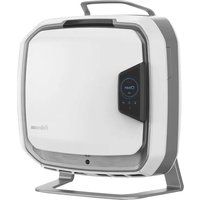
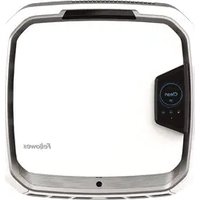
| Type | Air purifier |
| Model | AeraMax 90 |
| Brand | Fellowes |
| Filtration System | True HEPA filter + AeraSafe antimicrobial treatment + carbon pre-filter |
| Coverage Area | Up to 150 sq ft (14 m²) |
| Clean Air Delivery Rate (CADR) | Smoke: 90, Dust: 95, Pollen: 100 (CFM) |
| Fan Speeds | 3 speeds (Low, Medium, High) plus Auto mode |
| Noise Level | 35 – 55 dB |
| Power Consumption | 30 W (max) |
| Dimensions (H x W x D) | 18.5 x 9.5 x 15.5 inches (47 x 24 x 39 cm) |
| Weight | 12 lbs (5.4 kg) |
| Voltage | 120 V, 60 Hz |
| Timer | 2, 4, 8 hours |
| Sensors | AeraSmart sensor (detects airborne particles) |
| Display | LED indicators for power, fan speed, filter replacement, air quality |
| Filter Replacement Indicator | Yes; resets after filter change |
| Auto Mode | Adjusts fan speed based on air quality |
| Energy Star Certified | Yes |
| Warranty | Limited 1-year warranty |
| Maintenance | Vacuum pre-filter monthly; replace HEPA filter every 12 months |
| Safety Features | Auto shut-off when front grill is removed |
| Included Accessories | Main unit, pre-filter (installed), HEPA filter (installed), user manual |
| Recommended Room Size | Small to medium rooms (bedroom, office) |
Frequently Asked Questions - AeraMax 90 FELLOWES
User questions about AeraMax 90 FELLOWES
0 question about this device. Answer the ones you know or ask your own.
Ask a new question about this device
Download the instructions for your Air purifier in PDF format for free! Find your manual AeraMax 90 - FELLOWES and take your electronic device back in hand. On this page are published all the documents necessary for the use of your device. AeraMax 90 by FELLOWES.
USER MANUAL AeraMax 90 FELLOWES
natural_image
Black Fourier device with control panel and ventilation buttons (no visible text or symbols on body)Please read these instructions before use. Do not discard: keep for future reference.
Warranty....2
Package Contents 2
Safety Instructions....3
Product Specifications....4
Air Purifier Features.... 5
Air Purifier Set-Up....6
Display Panel 7
Operation....8
Care and Maintenance....9-10
Troubleshooting ....11
LIMITED PRODUCT WARRANTY
Limited Warranty: Fellowes, Inc. ("Fellowes") warrants the parts of the machine to be free of defects in material and workmanship and provides service and support for 3 years from the date of purchase by the original consumer. If any part is found to be defective during the warranty period, your sole and exclusive remedy will be repair or replacement, at Fellowes' option and expense, of the defective part. This warranty does not cover damage caused by use of non-Fellowes approved filters or failure to follow the recommended replacement schedule. This warranty does not apply in cases of abuse, mishandling, failure to comply with product usage standards, operation using an improper power supply (other than listed on the label), or unauthorized repair. Fellowes reserves the right to charge the consumers for any additional costs incurred by Fellowes to provide parts or services outside of the country where the air purifier is initially sold by an authorized reseller. This warranty does not include the air cleaner's replaceable filters, this is an expendable part that can wear out from normal use before three years expire. ANY IMPLIED WARRANTY, INCLUDING THAT OF MERCHANTABILITY OR FITNESS FOR A PARTICULAR PURPOSE, IS HEREBY LIMITED IN DURATION TO THE APPROPRIATE WARRANTY PERIOD SET FORTH ABOVE. In no event shall Fellowes be liable for any consequential or incidental damages attributable to this product. This warranty gives you specific legal rights. The duration, terms, and conditions of this warranty are valid worldwide, except where different limitations, restrictions, or conditions may be required by local law. For more details or to obtain service under this warranty, please contact us or your dealer.
PACKAGE CONTENTS
- Fellowes® AeraMax™ Air Purifier
- True HEPA Filter with AeraSafe™ Antimicrobial Treatment (1 filter)
• Carbon Filter (1 filter)
- Instruction Sheet
- Survey Card
SAFETY INSTRUCTIONS
Thank you for purchasing a Fellowes® Air Purifier. Please read this manual carefully before using. This product is for indoor use only.
IMPORTANT CAUTIONS AND INSTRUCTIONS FOR USING YOUR AIR PURIFIER
WARNING: Follow the instructions in this manual to reduce the risk of electric shock, short circuit, and/or fire:
- Do not repair or modify the unit unless specifically recommended in this manual. All repairs should be completed by a qualified technician.
- The plug for this unit is polarized with one blade wider than the other. Do not force the plug into an electrical outlet.
- Do not alter the plug in any way. If the plug does not fit into the outlet, reverse the plug. If it still does not fit, contact a qualified technician to install a proper outlet.
- Do not use if the power cord or plug is damaged or the connection to the wall outlet is loose.
- Use AC 120V only.
- Do not damage, break, forcefully bend, pull, twist, bundle, coat, pinch, or place heavy objects on the power cord.
- Periodically remove dust from the power plug. This will reduce the chance that humidity will accumulate, which increases the risk of electric shock.
- If the power plug is damaged, it must be replaced by the manufacturer or a qualified technician.
-
Remove the power plug from the outlet before cleaning the unit. When removing the power plug, grasp by holding the plug itself, never hold by the cord.
-
Remove the power plug from the outlet when the unit is not in use.
- Do not handle the power plug with wet hands.
- Do not operate the unit when using indoor smoke-generating insecticides.
- Do not clean unit with benzene or paint thinner. Do not spray insecticides on the unit.
- Do not use the unit where it is humid or where the unit may get wet, such as in a bathroom.
- Do not insert fingers or foreign objects into the air intake or outlet.
- Do not use the unit near flammable gases. Do not use near cigarettes, incense, or other spark-creating items.
- Unit will not remove carbon monoxide emitted from heating appliances or other sources.
- Do not block the intake or outlet vents.
- Do not use near hot objects, such as a stove. Do not use where the unit may come into contact with steam.
- Do not use the unit on its side.
- Keep away from products that generate oily residue, such as a deep fryer.
- Do not use detergent to clean the unit.
- Do not operate without a filter.
- Do not wash and reuse the True HEPA Filter.
- Do not run power cord under carpets or cover with throw rugs.
- When moving machine, always lift using handle.
| PRODUCT SPECIFICATIONS | |
| AeraMaxTM 90 Air Purifier | |
| Room Area Served | 90 sq. ft./8 sq. m. |
| Power Supply AC 120V/60Hz | |
| Power Rate Low 37W, High 51W | |
| Fan Speed 3 Speeds | |
| Display Touch Screen | |
| Control Type Auto/Manual/Aera+TM | |
| Air Quality Sensor Yes | |
| Filters | 1 True HEPA Filter with AeraSafeTM Antimicrobial Treatment1 Carbon Filter |
| Cleaning System | Carbon FilterTrue HEPA Filter with AeraSafeTM Antimicrobial TreatmentPlasmaTRUETM |
| CADR 68 Smoke/ 65 Dust/ 75 Pollen | |
| Color Black | |
| FILTER SPECIFICATIONS | |
| True HEPA Filter Replacement with AeraSafeTM Antimicrobial Treatment | 9287001 |
| Carbon Filter Replacement | 9324001 |
For replacement filters please visit: www.fellowes.com
Warning
Any changes or modifications not expressly approved by the manufacturer could void the user's authority to operate the equipment.
AIR PURIFIER FEATURES
- Ultra-Quiet Operation
This Fellowes AeraMax™ Air Purifier has a three-speed fan with ultra-quiet operation that is ideal for 24 hour use.
- Easy Maintenance
For optimum performance, replace the True HEPA Filter when the HEPA Filter indicator has changed to red, or approximately every 12 months under normal usage conditions. Change the Carbon Filter when the Carbon Filter indicator has changed to red or approximately every 3 months under normal usage conditions.
- AeraSmart™ Sensor
This air purifier is equipped with an air quality sensor that automatically adjusts the fan speed to keep your air purified. Blue, amber and red lights indicate the purity of your air.
- Three-Speed Setting
From LOW for quiet, energy-efficient operation to HIGH for the most effective cleaning.
- Aera+TM Mode
Designed for peak allergy season conditions. Increases air turnover rate by 35% versus low fan setting mode to remove even more allergens from your air.
- Replacement Filter Indicator Lights Indicate when to replace the True HEPA Filter and Carbon Filter, depending on usage.
FOUR-STAGE PURIFICATION SYSTEM
- Carbon Filter
- True HEPA Filter
- AeraSafe™ Antimicrobial Treatment
- PlasmaTRUE™ Technology

AIR PURIFIER SET-UP
NOTE: Follow these instructions for best results.
- Place unit at least 2 feet ( 12 meter) from the wall.
- Keep unit away from drafty areas.
- Keep curtains away from unit, as they may interfere with air intake/outlet.
-
Place unit on a stable surface with plenty of air circulation.
-
Remove protective film from the control panel.
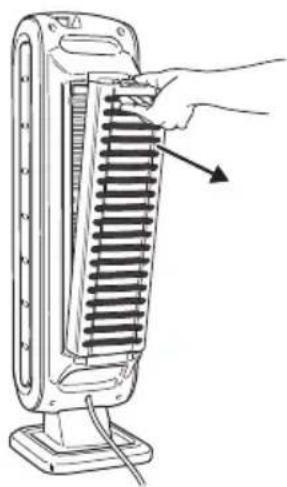
- Compress tab and pull out back panel.
natural_image
Illustration of a hand inserting a heat sink into a vertical stack of tubes (no text or symbols)- Remove bag from filters. Place filters back in unit.

natural_image
Simple 3D illustration of a rectangular block with corner markers (no text or symbols)-
Insert True HEPA Filter first and then Carbon Filter.
-
Fully insert filter panel bottom tabs first, then insert top tab until click is heard.

natural_image
Line drawing of a hand inserting a grid into a vertical stack of heat sinks (no text or symbols)-
Plug in the power cord to a wall outlet.
-
Turn unit on. Unit will beep.

natural_image
Hand pressing a button on a computer mouse (no text or symbols visible)For approximately the first 4 minutes after turning the unit on, the auto icon will flash while the unit measures air quality.
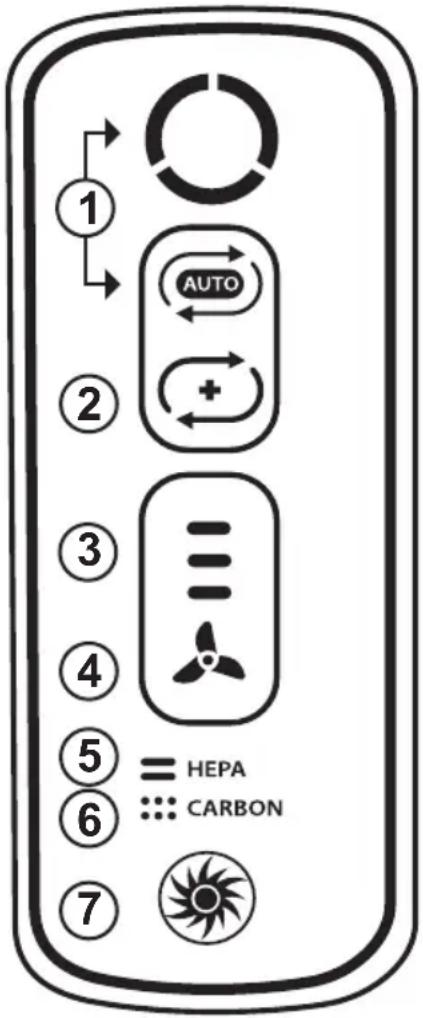
- AeraSmart™ SENSOR - Monitors the air quality and automatically adjusts the fan speed to keep your air purified. Blue, amber and red lights indicate the purity of your air. The unit is set to default to automatic operation when it is first turned on. If in manual operation, go back to auto at any time by pressing the auto icon.
- Aera+™ MODE - Designed for peak allergy season conditions. Increases air turnover rate by 35% versus low fan setting mode to remove even more allergens from your air. Switch to Aera+™ mode by pressing the 📊 icon. To return to auto operation, press the 📊 on once more to turn off.
- FAN SPEED INDICATOR - Shows current fan speed setting: low, medium or high speed.
- MANUAL FAN SPEED ADJUSTMENT - Tap fan icon to manually select fan speed.
- TRUE HEPA FILTER CHANGE INDICATOR - Amber and red lights indicate when to replace filter. The red indicator light will signal when to replace filter. (Recommended to replace filter every twelve months under normal usage conditions.) For replacement filters, see page 4.
- CARBON FILTER CHANGE INDICATOR - Amber and red lights indicate when to replace filter. The red indicator light will signal when to replace filter. (Recommended to replace filter every three months under normal usage conditions.) For replacement filters, see page 4.
- PlasmaTRUE™ TECHNOLOGY - Creates an ionized field to help safely remove airborne pollutants.
OPERATION
AUTOMATIC OPERATION
The unit is set to default to automatic operation when it is first turned on. The air purifier will automatically sense the amount of impurities in the air, and adjust the fan speed to keep your air purified.

natural_image
Hand pressing a button on a black square (no text or symbols visible)MANUAL OPERATION
After you turn on the unit, you can switch to manual operation by tapping the fan icon to manually select the fan speed.
- LOW, MEDIUM, OR HIGH SETTINGS

LOW

MEDIUM HIGH

AeraSmart™ SENSOR
Air quality indicator shows levels of air quality.

Blue level indicates air is clean.
Amber level indicates air quality is poor.
Red level indicates high level of pollutants in the air.
Aera+TM MODE
After you turn on the unit, you can switch to Aera+TM mode by pressing the Aera+TM mode icon (☐). To go back to auto operation, press Aera+TM mode icon (☐) to turn off.

natural_image
Line drawing of a hand pressing a button on a vertical device, with an inset showing the close-up of the button (no text or symbols present)CARE AND MAINTENANCE
CLEANING
- Clean unit as necessary by wiping with a dry, soft cloth; for stubborn stains, use a warm, damp cloth.
- Do not use volatile fluids such as benzene, paint thinner, or scouring powder, as they may damage the unit surface.
- Keep the unit dry.

natural_image
Line drawing of a hand cleaning a cylindrical device with a scroll wheel (no text or symbols)Filter Replacement
The replacement filter indicators will signal when to replace the True HEPA Filter and/or Carbon Filter. The replacement period will vary depending on the hours of use and air quality. However, under normal usage, most True HEPA Filters need to be replaced annually, and Carbon Filters every three months.
Do not wash and reuse the True HEPA or Carbon Filters—they will not work effectively. Only use Fellowes brand AeraMax™ replacement filters.
WARNING: Before replacing any filters, make sure to remove the power plug from the wall outlet.
Replacement Procedure
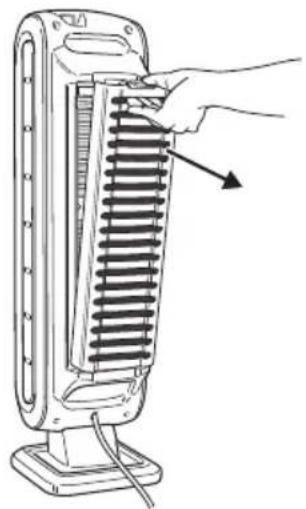
- Compress tab and pull out back panel.
natural_image
Line drawing of a hand inserting a grid into a vertical stacker into a flat base (no text or symbols)- Pull out the filters that need to be changed.

natural_image
Illustration of three spiral-bound office chairs (no text or symbols)- Remove any packaging wrap from the new filter(s).
For replacement filter part numbers, see page 4.
- Place the new filters in the main unit. (True HEPA Filter should always be inserted first, then the Carbon Filter)
natural_image
Line drawing of a hand inserting a spring into a heat exchanger (no text or symbols)- To reset the filter light once a new True HEPA and/or Carbon Filter is installed:
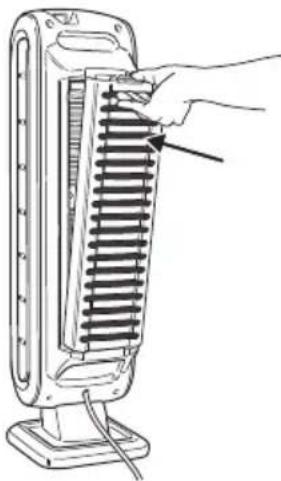
a. Be sure that back panel is snapped in place.
b. Turn on the unit.
c. Locate the filter replacement icon on the display panel.
d. Press and hold the filter replacement icon for 3 seconds until unit beeps. HEPA Filter icon will flash amber. Press filter icon area to alternate between HEPA and Carbon.
e. Once desired filter is illuminated, press and hold for 3-5 seconds. A short beep will be heard and the light should turn off. Repeat process for each filter as needed.

TROUBLESHOOTING
Before you call
Solutions to Common Problems
Review this list before you call for service. This list covers problems that are not the result of defective materials or workmanship.
PROBLEM POSSIBLE SOLUTION
| The unit leaves smoke and odors in the air. | Make sure the sensor is not blocked or clogged.Move the unit closer to the offending odors.Replace the filters as needed. |
| The unit seems to produce odors. | Replace the filters as needed. |
| The unit makes a faint ticking sound. | This indicates that the PlasmaTRUETM function is working. |
| The unit interferes with radio or television reception. | Because this unit radiates radio frequency energy, we suggest you try one or more of the following:- For better reception, adjust the television/radio antenna.- Move the unit away from the affected television/radio.- Plug the unit power cord into an outlet different from the television/radio power cord. |
| The True HEPA and Carbon Filter indicators remain lit after replacing the True HEPA and/or Carbon Filter. | Repeat filter light reset instructions from page 10. |
| The PlasmaTRUETM icon is not illuminated. | Touch and hold PlasmaTRUETM icon for five seconds until unit beeps. |
| The wrong filter replacement light was reset. | In the case of unintended filter reset, repeat the filter reset procedure on page 10 within 5 minutes of unintended reset.The filter counter and indicator will return to the status previous to the reset. |
TABLE DES MATIÈRES
GARANTIE LIMITÉE DU PRODUIT
natural_image
Illustration of a hand inserting a spring into a vertical stacker into a thermocouple (no text or symbols)natural_image
Simple 3D illustration of a rectangular block with corner markings (no text or symbols)natural_image
Line drawing of a hand inserting a grid into a vertical stack of heat sinks (no text or symbols)natural_image
Hand holding a button with an 'O' icon, no text or symbols presentnatural_image
Hand pressing a button on a black square (no text or symbols visible)MODE DE FONCTIONNEMENT MANUEL
natural_image
Line drawing of a hand pressing a button on a vertical device, with an inset showing the close-up of the button (no text or symbols present)ENTRETIEN
NETTOYAGE
natural_image
Line drawing of a hand cleaning a cylindrical device with a control panel (no text or symbols)natural_image
Line drawing of a hand inserting a spring into a heat exchanger (no text or symbols)natural_image
Illustration of three different storage compartments: one with a rectangular block, one with a black panel, and one with a coiled spring (no text or symbols)natural_image
Line drawing of a hand inserting a spring into a portable heater (no text or symbols)natural_image
Illustration of a hand inserting a button into a device panel, showing the next step (no text or symbols present)DÉPANNAGE
PROBLÈME SOLUTION POSSIBLE
natural_image
Illustration of a hand inserting a spring into a vertical stacker into a thermocouple (no text or symbols)natural_image
Simple 3D illustration of a rectangular block with corner markers (no text or symbols)natural_image
Line drawing of a hand inserting a grid into a vertical stack of heat sinks (no text or symbols)natural_image
Hand holding a black control panel with an 'O' button (no text or symbols on the panel itself)natural_image
Hand pressing a button on a wall (no text or symbols visible)natural_image
Three identical icons of a propeller with three blades, no text or symbols presentBAJO MEDIO ALTO
SENSOR AeraSmart™
natural_image
Line drawing of a hand inserting a button into a device panel, with an inset showing the same button (no text or symbols present)natural_image
Line drawing of a hand cleaning a cylindrical device with a scroll wheel (no text or symbols)natural_image
Line drawing of a hand inserting a spring into a cylindrical device (no text or symbols)natural_image
Illustration of three stacked office folders with coiled glass panels (no text or symbols)natural_image
Line drawing of a hand inserting a spring into a flat-screen tower (no text or symbols)
- LIMITED PRODUCT WARRANTY
- PACKAGE CONTENTS
- SAFETY INSTRUCTIONS
- IMPORTANT CAUTIONS AND INSTRUCTIONS FOR USING YOUR AIR PURIFIER
- Warning
- AIR PURIFIER FEATURES
- - Ultra-Quiet Operation
- - Easy Maintenance
- - AeraSmart™ Sensor
- - Three-Speed Setting
- - Aera+TM Mode
- FOUR-STAGE PURIFICATION SYSTEM
- AIR PURIFIER SET-UP
- OPERATION
- AUTOMATIC OPERATION
- MANUAL OPERATION
- AeraSmart™ SENSOR
- Aera+TM MODE
- CARE AND MAINTENANCE
- CLEANING
- Filter Replacement
- Replacement Procedure
- TROUBLESHOOTING
- Before you call
- Solutions to Common Problems
- TABLE DES MATIÈRES
- GARANTIE LIMITÉE DU PRODUIT
- MODE DE FONCTIONNEMENT MANUEL
- ENTRETIEN
- NETTOYAGE
- DÉPANNAGE
- SENSOR AeraSmart™
Brand : FELLOWES
Model : AeraMax 90
Category : Air purifier