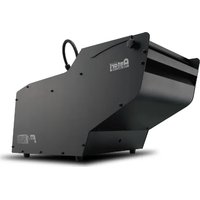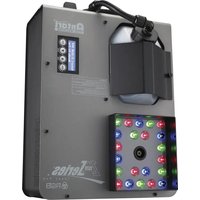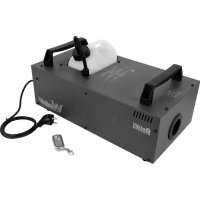
W510 - Effect machine Antari - Free user manual and instructions
Find the device manual for free W510 Antari in PDF.


User questions about W510 Antari
0 question about this device. Answer the ones you know or ask your own.
Ask a new question about this device
Download the instructions for your Effect machine in PDF format for free! Find your manual W510 - Antari and take your electronic device back in hand. On this page are published all the documents necessary for the use of your device. W510 by Antari.
USER MANUAL W510 Antari
Congratulations on the purchase of your new
ANTARI W-Series FOG MACHINE.
Introduction
Thank you for choosing an Antari W-Series Fog Machine. You now own a rugged and powerful state-of-the-art machine. Prior to use, we suggest that you carefully read all of the instructions. By following the suggestions found in this user manual, you can look forward to the reliable and satisfactory performance of your Antari Fog Machine for years to come.
Please follow these operation, safety and maintenance instructions to ensure a long and safe life for your fog machine.

CA UTION
Risk of Electric Shock. Disconnect the appliance from the electric supply before refilling liquid, cleaning or performing maintenance on the machine.
Danger of Electric Shock
o Keep this device dry.
For inside use only. Not designed for outside use.
- For all models, use a 3-prong grounded electrical outlet only. Prior to use take care to determine that the unit is installed at the rated voltage.
Always unplug your Antari W-Series Fog Machine before filling its tank.
- Always keep the fog machine in upright position.
Turn off or unplug the machine when not in use.
- This machine is not water-proof. If moisture, water, or fog fluid gets inside the housing, immediately unplug the unit and contact a service technician or your Antari dealer before using it again.
- No user serviceable parts inside. Refer to your Antari dealer or other qualified service personnel.

Danger of Burns
- This device is for adult use only and must be installed out of the reach of children. Never leave the unit running unattended.
- Never aim the output nozzle directly at people.
- Fog machine output is very hot. Avoid coming within 50~cm of the output nozzle during operation.
- Locate the fog machine in a well-ventilated area. Never cover the unit's vents. In order to guarantee adequate ventilation, allow a free air space of at least 20cm around the sides and top of the unit.
- Never aim the output nozzle at open flames.
- If the power cord is damaged, it must be replaced by the manufacturer or its service agent or similarly qualified personnel in order to avoid a hazard.
The output nozzle becomes very hot during operation (200^) . Keep flammable materials at least 50~cm away from the nozzle.
Always allow your Antari Fog Machine to cool down before attempting to clean or service it.

Danger of Explosion
- Never add flammable liquids of any kind (such as oil, gas, perfume) to the fog liquid.
- Use only high-quality, water-based fog liquid that your dealer recommends. Other fog liquids may cause clogging or "spitting".
- Always make sure there is sufficient liquid in the tank. Operating this unit without liquid will cause damage to the pump as well as over-heating of the heater.
- If your Antari W-508 or W-510 Fog Machine fails to work properly, discontinue use immediately. Drain all fog liquid from the tank, pack the unit securely (preferably in the original packing material), and return it to your Antari dealer for service.
Always drain the tank before shipping or transporting this unit. - Never drink fog liquid. If it is ingested, call a doctor immediately. If fog liquid comes in contact with skin or eyes, rinse thoroughly with water.
Note: Pay attention to all warning labels and instructions printed on the exterior of your Antari Fog Machine.
Unpacking & Inspection
Open the shipping carton and verify that all equipment necessary to operate the system has arrived intact.
The shipping carton should contain the following items:
- One unit of W-508 or W-510 Fog Machine
- Power cord
-
One set of W-1 Transmitter
-
User manual
- Mounting bracket with washers/screws (optional for W-510)
If any equipment is missing contact your ANTARI dealer immediately.
Before beginning your initial setup on the Antari W-508 or W-510 Fog Machine, make sure that there is no evident damage caused by transportation. In the event that the unit's housing or cable is damaged, do not plug it in and do not attempt to use it until after contacting your Antari dealer for assistance.
Setup
- Remove all packing materials from the shipping box. Check that all foam and plastic padding is removed, especially in the nozzle area.
- Place the fog machine on a flat surface and remove the fog liquid tank cap.
- Place the liquid tube into a properly filled liquid tank.
- Fill with high-quality, water-based fog liquid recommended by your Antari dealer. The W-508 & W-510 only work with uncontaminated Antari FLR or FLG Fog Liquid. Any other types of liquid can damage the unit and result in spitting and serious clogging problems. When filled, place the cap back on liquid the tank. Be careful not to exceed the maximum fluid level. DO NOT OVERFILL.
Operation
Add fluid carefully to the liquid tank. Do not overfill the tank.
Plug the power cord into a grounded electrical outlet. Turn the power switch to "ON" on the back of the machine. The warm-up process is started. While
the unit is warming up, fog output will not be possible yet. When the warm-up process is completed, the red LED on the handle of the W-508 or the green LED on the rear of the W-510 will be flashing and stay on.
Now please refer to chapter "Wireless Remote W-1" for setting the remote controller.
Important:
Always monitor tank fluid level as you are fogging.
- Never drink fog liquid. If it is ingested, call a doctor immediately. If fog liquid comes in contact with skin or eyes, rinse thoroughly with water.
- Always replace the cap on the fog liquid container immediately after filling to avoid contamination.
W-510: If your model includes a mounting bracket it can be suspended overhead. It is important that the fog does not shoot directly at anyone's face. Do not allow the unit to have more than a 25 degree angle of inclination.
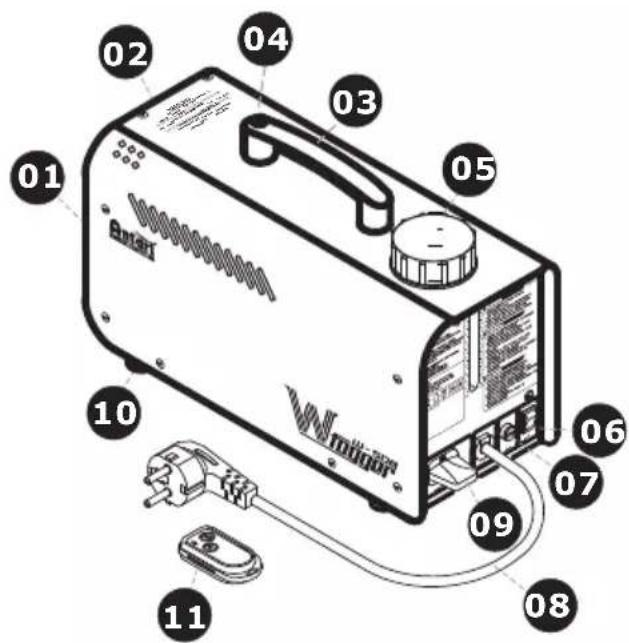
W-508 External View
01-Nozzle
02-Body
03-Handle
04-Handle push button
05-Tank cap & tank
06-Rocker switch / Power
07-Fuse holder
08-Power cord
09-Wireless receiver
10-Foot
11-W-1 wireless controller
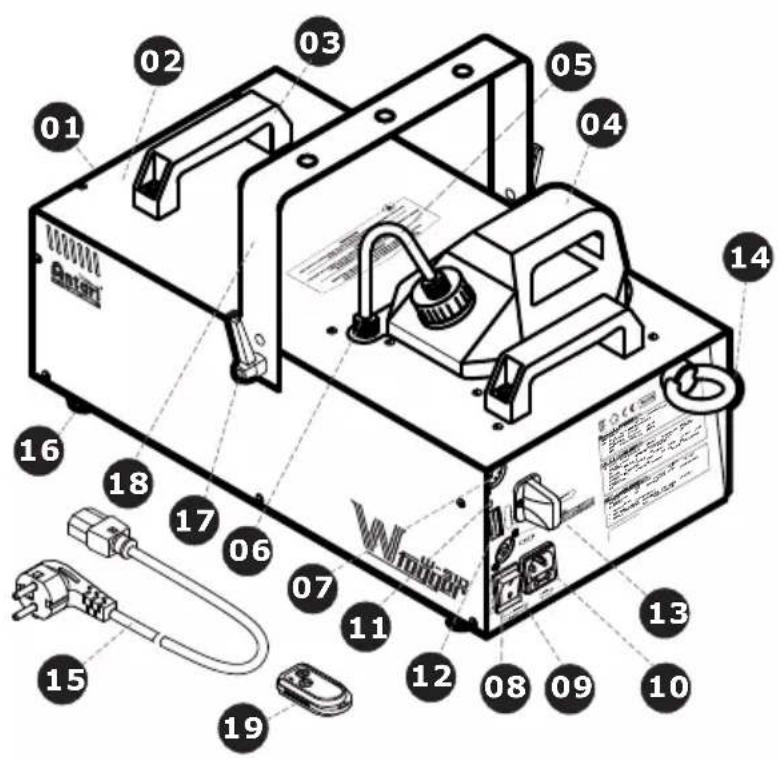
W-510 External View
01-Nozzle
02-Body
03-Handle
04-Tank & tank's cap
05-PU tube & filter
06-Tube adaptor
07-Control outlet socket (3 Pin XLR for DMX)
08-Control inlet socket (3 Pin XLR for DMX)
09-Rocker switch / Power
10-Power inlet socker & fuseholder (120VAC 250V/T10A) (230VAC 250V/T5A)
11-Power lamp
12-DIP switch
13-Wireless receiver
14-Safety ring
15-Power cord
16-Foot
17-Tightening screw
18-Hanging bracket
19-W-1Wireless controller
Note: An optoelectronic (OPTO) liquid sensor is installed in the W-508 & W-510 Fog Machine. The pump will automatically stop working and the LED indicator on the rear of the machine will start to flash when there is insufficient liquid. Please refill liquid to the empty tank and restart (turn off then turn on) to disengage the LED indicator. Then the machine is ready to operate again.
If you experience low output, pump noise or no output at all, unplug immediately. Check the fluid level, the external fuse, and power from the wall. If all of the above appears to be O.K., plug the unit again. If fog does not come out after holding the remote button down for 30 seconds, check the hose attached to the tank to make sure there is fluid going through the hose. If you are unable to determine the cause of the problem, do not simply continue pushing the remote button, as this may damage the unit. Return the machine to your Antari dealer.
W-1 Wireless Remote
The wireless remote control system W-1 consists of a transmitter equipped with two buttons for fog on and off, and a receiver pre-attached to the rear panel of each W-series model.
* Transmitter:
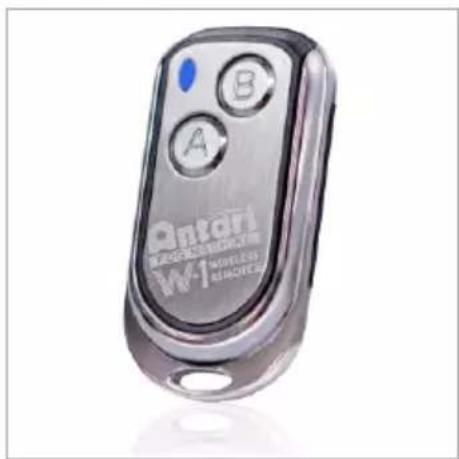
With the transmitter it is possible to emit fog via radio over a distance of up to 50 meters. The transmitter is compatible to any receiver of the W-series and can control an unlimited number of machines in parallel.
Press the button "A", to emit fog. As control, the blue LED lights. To stop the fog output, press the button "B".
* Receiver:
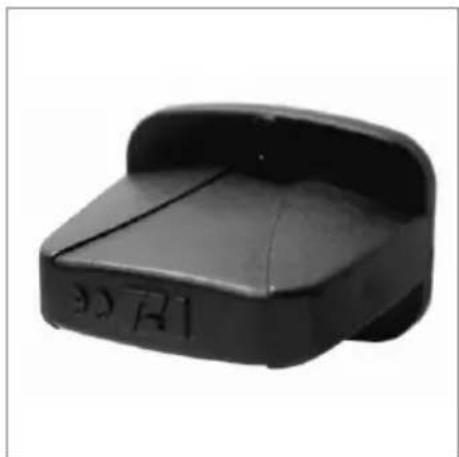
The receiver is tested and pre-attached to the rear panel of each W-series model. Please do not try to remove it. The receiver responds to up to 5 different transmitters that are registered with the machine. The included transmitter has been registered with the machine before shipment. It can be directly operated without any start-up setting.
Registering transmitters
To operate the machine with a different transmitter than the included one, or to operate it with up to 5 different transmitters, each transmitter must be registered first. There is an LED indicator on each machine. On the W-508 it is green and on the W-510 it is orange. When the machine is turned on, the LED will be flashing for 15 seconds. During the 15-second interval, users can register signals for one or more transmitters. For this purpose, press the button "A" on each transmitter. If the registering signals of the transmitters are well received by the receiver, the LED will stop flashing and light permanently. The previous transmitters are cleared from the memory of the receiver. If no transmitter is registered when the machine is switched on, the memory of the receiver will keep the record of the previous operation.
Setting Example 1:
In order to register several transmitters with a machine, turn on the machine. While the LED is flashing, press the button "A" on each transmitter to establish the signal transmission.
Setting Example 2:
In order to use 1 transmitter to control 2 or more machines, turn on the machines at the same time. While the LEDs are flashing, press the button "A" on the transmitter to establish the signal transmission.
Battery change on the transmitter
If the range of the transmitter decreases, the battery is probably exhausted
and must be replaced. For this purpose, take off the housing cover and remove the used battery. Insert a fresh 12 V battery, type 23A as indicated in the battery compartment and refit the housing cover.
DMX Connector Pin Assignment
W-510 provide 5 pin XLR connector for DMX connection. Diagram below indicate pin assignment information
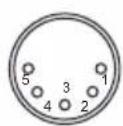
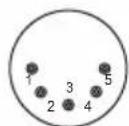
5 pin XLR
| Pin | Function |
| 1 | Ground |
| 2 | Data - |
| 3 | Data + |
W-510 DMX512 Fog Machine Settings
Channel A

$$ \begin{array}{l} 0 - 5 = \text {o f f} (\text {n o o u t p u t}) \ 6 - 255 = \text {maximum volume} (100 \% \text {output}) \ \end{array} $$
Model W-510 has on-board DMX control, model W-508 does not. Addressing is via DIP switches. W-510 uses 1 channel to control on/off operation. The channel has a value range of 0 to 255. The on/off function can also be programmed with a DMX controller or a DMX control software used by the lighting and effects operator.
If channel A has a value from 0 to 5, the unit is off.
Between the values 6 to 255 the machine has a maximum output volume of 100% .
Note: If, for example, the machine is assigned to the DMX address 130, channel A corresponds to DMX address 130.
Addressing
Each machine occupies 1 channel. To ensure that the control signals are properly directed to the machine, it requires addressing. If several machines are used, each machine must be addressed by changing the DIP switches as set out in the table below.
The starting address is defined as the first channel from which the machine will respond to the controller.
Please make sure that you do not have any overlapping channels in order to control each machine correctly and independently from any other fixture on the DMX data link. If two, three or more devices are addressed similarly, they will work similarly.
Occupation of the DIP switches:
| Setting the DMX-starting address: | DIP-switch no. | 1 | 2 | 3 | 4 | 5 | 6 | 7 | 8 | 9 | |
| Device number & channels | Starting address | 1 | 2 | 4 | 8 | 16 | 32 | 64 | 128 | 256 | |
| Device 1 - Channel 1 | ON | ▲ | |||||||||
| OFF | ◇ | ◇ | ◇ | ◇ | ◇ | ◇ | ◇ | ◇ | |||
| Device 2 - Channel 2 | ON | ▲ | |||||||||
| OFF | ◇ | ◇ | ◇ | ◇ | ◇ | ◇ | ◇ | ◇ | |||
| Device 3 - Channel 3 | ON | ▲ | ▲ | ||||||||
| OFF | ◇ | ◇ | ◇ | ◇ | ◇ | ◇ | ◇ | ||||
| Device 4 - Channel 4 | ON | ▲ | |||||||||
| OFF | ◇ | ◇ | ◇ | ◇ | ◇ | ◇ | ◇ | ◇ | |||
| Device 5 - Channel 5 | ON | ▲ | ▲ | ||||||||
| OFF | ◇ | ◇ | ◇ | ◇ | ◇ | ◇ | ◇ | ||||
Performance Note
All fog machines develop condensation around the output nozzle. Because this may result in some moisture accumulation on the surface below the output nozzle, consider this condensation when installing your unit.
All fog machines may sputter small amounts of fog occasionally during operation and for a minute or so after being turned off.
All fog machines have a recycling period after long bursts when the machine will shut itself down for a short period in order to heat up again. During this time no fog can be produced.
Cleaning and Storage
Do not allow the fog liquid to become contaminated. Always replace the cap on the fog liquid container and the fog machine liquid tank immediately after filling. Cleaning your fog machine regularly can help you to reduce the frequency of parts replacement and maintenance costs. After every 40 hours of continuous operation, it is recommended to use distilled water to clean the heater according to the steps below.
The recommended cleaning regimen is as follows:
- Fill properly distilled water into a clean tank and connect the fluid tube of the fog machine to the tank.
- Run the unit in a well-ventilated area until the tank is almost empty.
- Use dry cloth to wipe the fog machine. Cleaning is now complete. Refill with fog liquid. Run the machine briefly to clear any remaining liquid from the pump and heater.
Note: All fog machines are prone to clogging due to the thick consistency of fog liquid and the high temperature at which it vaporizes. However, a properly maintained fog machine should provide years of reliable use.
Clean with a dry cloth only. Store dry.
If the fog machine is not in use, please clean it before storage. Store the fog machine in a dry and cool place. Operate the fog machine at least once a month. A test-run consists of warming-up the machine followed by a few minutes of fog emission.
Technical Specifications
| W-508 | W-510 | |
| - Input voltage | US model : AC 100-120V, 50/60Hz 6.7US model : AC100-120V, 50/60Hz 8.5A EU model : AC 220-240V, 50/60Hz 3.5AU model : AC 220-240V, 50/60Hz 4.25A | |
| - Rated power | 800W | 1000W |
| - Warm-up time | 2 minutes (approx.) | 13 minutes (approx.) |
| - Fluid consumption | 13 ml/min | 90 ml/min |
| - Fluid tank capacity | 0.8l (0.21gal) | 2.8l (0.74gal) |
| - Compatible fluid | Antari FLG Heavy Fog Fluid | Antari FLG Heavy Fog Fluid |
| Antari FLR Light Fog Fluid | Antari FLR Light Fog Fluid | |
| - Operating time | 60 mins at max. output | |
| - Ambient temp. range | °C - 40 °C (32 °F-104 °F) | 0 °C - 40 °C (32 °F-104 °F) |
| - Output | 3,000 ft3/min (85 m3/min) | 15,000 ft3/min (425 m3/min) |
| - Control | Manual, Wireless | DMX512, Wireless |
| - DMX channels | -- | 1 channel |
| - Connection | -- | XLR 3-pin (DMX) |
| - Optional accessories | -- | W-510-HB Hanging Bracket |
| - Dimension | L315 W128 H218 mm | L487 W250 H223 mm |
| (L12.40 W5.04 H8.58 inch) | (L19.17 W9.84 H8.78 inch) | |
| - Weight | 3.8 kg (8.38 lbs) | 11.4 kg (25.13 lbs) |
Approval
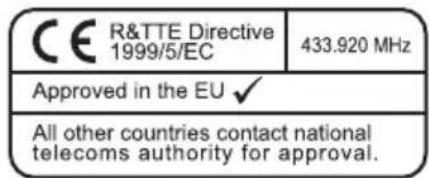
This product is in accordance with the R&TTE directive (Radio and Telecommunication Technical Equipment) of the European Union and falls into equipment Class 1. In all EU member countries, the operation of this wireless system is generally approved by the national telecom regulatory authority. The system is license-free. In some countries outside the EU, the operation of this wireless system may needs to be approved by the national telecoms regulatory authority.
Warranty
Warranty shall be valid only if the product is purchased from Antari's authorized distributors or dealers. For warranty service, send the product only to an authorized distributor or dealer.
All warranties are void if the product has been modified in any manner; if the product has been repaired or serviced by unauthorized personnel; or the product is damaged due to improper use or maintenance as set forth in the instruction manual.
This is not a service contract and does not include standard maintenance or cleaning. All expendables are not covered by this warranty.
Additional warranties provided at the discretion of the distributor dealers shall remain the sole obligation of the distributor or dealer.
Always quote the unit's serial number and model name when contacting your distributor for information or assistance.

Bedienungsanleitung
For current product information visit Antari at:www.antari.com For information requests please contact us at:sales@antari.com