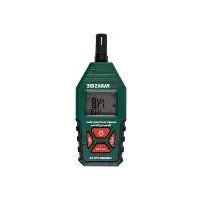
HG08328A - Thermometer Hygrometer PARKSIDE - Free user manual and instructions
Find the device manual for free HG08328A PARKSIDE in PDF.


| Product type | Digital thermo-hygrometer |
| Brand | Parkside |
| Model | HG08328A |
| Dimensions | 146 × 57 × 32 mm |
| Weight | 18 g |
| Power supply | 3 LR03/AAA batteries (1.5 V) |
| Temperature range | -30 °C to +100 °C |
| Temperature resolution | 0.1 °C |
| Temperature accuracy | ±1 °C |
| Humidity range | 0 % to 100 % RH |
| Humidity resolution | 0.1 % RH |
| Humidity accuracy | ±2 % RH (20-80 %), ±3 % RH (0-20 % and 80-100 %) |
| Dew point range | -62 °C to +60 °C |
| Wet bulb temperature range | 0 °C to +80 °C |
| Display | LCD with backlight |
| Functions | MAX/MIN display, HOLD function, toggle air temperature/dew point/wet bulb |
| Auto power off | Approximately 10 minutes (adjustable) |
| Response time | Approximately 10 s (humidity), 5-40 s (temperature) |
| Sampling | 2.5 times per second |
| Operating temperature | -20 °C to +60 °C |
| Warranty | 3 years |
| Package contents | 1 thermo-hygrometer, 3 LR03/AAA batteries, 1 instruction manual |
| Maintenance and cleaning | Clean with a dry, lint-free cloth. Do not use abrasive cleaners or solvents. |
| Safety | Do not immerse the sensor head. Protect from extreme temperatures, shocks, and humidity. |
| Repairability | No user-serviceable components. Contact after-sales service. |
Frequently Asked Questions - HG08328A PARKSIDE
User questions about HG08328A PARKSIDE
0 question about this device. Answer the ones you know or ask your own.
Ask a new question about this device
Download the instructions for your Thermometer Hygrometer in PDF format for free! Find your manual HG08328A - PARKSIDE and take your electronic device back in hand. On this page are published all the documents necessary for the use of your device. HG08328A by PARKSIDE.
USER MANUAL HG08328A PARKSIDE
FEUCHTIGKEITS- UND TEMPERATURMESSAGERÄT / HUMIDITY AND TEMPERATURE METER / THERMOMÉTURE HYGROMÉTURE PKM A1
DE AT CH
FEUCHTIGKEITS-UND TEMPERATUREMESSGERÄT
Operation and safety notes
FR BE
THERMOMÉTURE HYGROMÉTURE
Warnings and symbols used
Introduction. Page 21
Intended use. Page 21
Scope of delivery. Page 21
Description of parts . 22
Technical data 22
Safety instructions. Page 24
Safety instructions for batteries / rechargeable batteries . 25
Before first use 26
Operation. 26
Switching on/off. 26
Toggling between air temperature, dew point and wet-bulb temperature readings.. Page 26
Measuring air temperature, dew point, wet-bulb temperature and humidity.. 27
Displaying maximum or minimum readings. Page 27
Erasing all maximum or minimum readings from memory and display . 27
Setting the temperature unit and automatic power-off function 28
Using the data hold function (freeze). Page 28
Turning the backlight on or off. Page 28
Adjusting the humidity offset. 28
Automatic power-off function 29
Troubleshooting 29
Cleaning and care 30
Storage Page 30
Disposal. Page 30
Warranty
Warranty claim procedure. Page 31
Service
| Warnings and symbols used The following warnings are used in this user manual and on the packaging: | |||
| i | Read the instruction manual. | i | NOTE: This symbol in combination with "Note" provides additional useful information. |
| ! | DANGER! This symbol in combination with the signal word "Danger" marks a high-risk hazard that if not prevented could result in death or serious injury. | --- | Direct current/voltage |
| ! | WARNING! This symbol in combination with the signal word "Warning" marks a medium-risk hazard that if not prevented could result in death or serious injury. | + - | Batteries included |
| ! | CAUTION! This symbol in combination with the signal word "Caution" marks a low-risk hazard that if not prevented could result in minor or moderate injury. | CE | CE mark indicates conformity with relevant EU directives applicable for this product. |
| ! | ATTENTION! This symbol with the signal word "Attention" indicates a possible property damage. | ||
HUMIDITY AND TEMPERATURE METER
Introduction
We congratulate you on the purchase of your new product. You have chosen a high quality product. The instructions for use are part of the product. They contain important information concerning safety, use and disposal. Before using the product, please familiarise yourself with all of the safety information and instructions for use. Only use the product as described and for the specified applications. If you pass the product on to anyone else, please ensure that you also pass on all the documentation with it.
Intended use
This product is suitable for measuring temperatures from -30 to +100^ and relative humidity from 0 to 100% . The readings are displayed on an LCD screen.
The product features the following functions:
Display of air temperature, dew point and wet-bulb temperature
MAX/MIN display
Hold function (freeze values on the display)
LCD screen with backlight, which can be switched on and off
The product can only be used in a dry and dust-free environment. The product is only intended for use in private households, and not intended for commercial use.
The manufacturer accepts no liability for damages caused by improper use.
Scope of delivery
After unpacking the product, check if the delivery is complete and if all parts are in good condition. Remove all packaging materials before use.
Please contact customer service if parts are missing or damaged.
1x Humidity and temperature meter
3x Batteries (LRO3/AAA)
1x Instruction manual
Description of parts
Before reading, unfold the page containing the illustrations and familiarise yourself with all functions of the product.
(Fig. A, B, F, G)
Sensor head
2 Display
3 Button: (on/off)
4 Button: DP WBT (dew point/wet-bulb temperature)
SET (settings)
(10)
5 Button: (backlight)
HOLD (freeze value)
(UP)
6 Button: MAX/MIN (highest/lowest reading)
( right)
7 Indicator: (automatic power-off)
8 Indicator: (low battery level)
9 Indicator: WBT (wet-bulb temperature)
DP
(dew point)
Indicator: (freeze value active)
Humidity display
12 Indicator: SET (settings)
13 Indicator: MAX (max. values)
MIN (min.values)
Indicator: ℃/°F (temperature)
15 Temperature display
Indicator: % (relative humidity)
Indicator: (very low battery level)
18 Battery compartment
Technical data
Display: LCD
Sampling rate: 2.5 times per second
Response time: approx. 10 s (humidity
measurement)
approx. 5 to 40 s (temperature)
measurement)
Out of range < 0^ C (+32^ F) OLL
indication
(wet-bulb): > + 80^ C (+176^ F) OLH
Operating/storage
temperature: -20 to +60 °C (-4 to +140 °F)
Automatic
power-off: approx. 10 minutes
Battery type: 3 × 1.5 ~V (LRO3/AAA)
Dimensions: 146 × 57 × 32 ~mm
Weight: 18 gram
NOTE: Accuracy is specified for a period of 1 year after calibration.
Temperature measurement
Range Resolution Accuracy
-30 to +100 °C 0.1 °C ± 1 °C
-22to+212°F0.2°F±1.8°F
WARNING! While measuring temperatures above +60^ (+140^) and below -20^ (-4^) , heed following instructions:
-Do not take measurements for more than 5 minutes at a time. Allow the product to rest for 30 minutes between measurements.
-Only the sensor head can withstand these temperatures. Keep other parts of the product away from these temperatures.
Humidity measurement
Range Resolution Accuracy
0 to 20% RH 0.1% RH ± 3% RH
20 to 80% RH 0.1% RH ± 2% RH
80 to 100% RH
0.1% RH ± 3% RH
NOTE: The accuracy is based on a temperature of +25^(+77^)
Dew point measurement
Range Resolution Accuracy
-62to+60°C 0.1^± 1^
-79.6 to +140 °F 0.2 °F ± 1.8 °F
Wet-bulb temperature measurement
Range Resolution Accuracy
0to +80^ 0.1^± 1^
+32to +176°F0.2°F±1.8°F

Safety instructions
Before using the product, please familiarise yourself with all the operating and safety instructions.
Please include all documentation when passing this product on to others.
Check the product for damage before use. If the product is damaged do not use it.
Protect the product from exposure to extreme temperatures, prolonged direct sunlight, strong vibrations and combustible gases, vapour and solvents. Otherwise the product could be damaged.
This product can be used by children aged from 8 years and above and persons with reduced physical, sensory or mental capabilities or lack of experience and knowledge if they have been given supervision or instruction concerning use of the appliance in a safe way and understand the hazards involved. Children should not be allowed to play with the product. Cleaning and user maintenance should not be performed by children without supervision.
Do not carelessly cast aside the packaging material. It may become a dangerous plaything for children.
- Handle the product carefully. It can be damaged by impact, blows, or by being dropped, even from a low height.
If safe operation is no longer possible, take the product out of service and secure it against unintended use. - Safe operation is no longer possible, if the product
- no longer functions properly,
- has been stored under adverse ambient conditions for an extended period of time,
- has been exposed to considerable strain during transport.
Consult a specialist if you have any doubts regarding the use or safety of the product.
Safety precautions
Observe the permissible ambient temperatures (see "Technical data") in order to avoid incorrect measurements.
- Do not power the product on after it has been taken from a cold into a warm environment. The condensation that forms might destroy your product. Allow the product to reach room temperature before powering it on.

Safety instructions for batteries / rechargeable batteries

DANGER TO LIFE! Keep batteries / rechargeable batteries out of reach of children. If accidentally swallowed seek immediate medical attention.
- Swallowing may lead to burns, perforation of soft tissue, and death. Severe burns can occur within 2 hours of ingestion.

DANGER OF EXPLOSION! Never recharge non-rechargeable batteries. Do not short-circuit batteries / rechargeable batteries and / or open them. Overheating, fire or bursting can be the result.
Never throw batteries / rechargeable batteries into fire or water.
Do not exert mechanical loads to batteries / rechargeable batteries.
Risk of leakage of batteries / rechargeable batteries
Avoid extreme environmental conditions and temperatures, which could affect batteries / rechargeable batteries, e.g. radiators / direct sunlight.
If batteries / rechargeable batteries have leaked, avoid contact with skin, eyes and mucous membranes with the chemicals! Flush immediately the affected areas with fresh water and seek medical attention!

Wear PROTECTIVE GLOVES! Leaked or damaged batteries / rechargeable batteries can cause burns on contact with the skin. Wear suitable protective gloves at all times if such an event occurs.
In the event of a leakage of batteries / rechargeable batteries, immediately remove them from the product to prevent damage.
Only use the same type of batteries / rechargeable batteries. Do not mix used and new batteries / rechargeable batteries.
Remove batteries / rechargeable batteries if the product will not be used for a longer period.
Risk of damage of the product
Only use the specified type of battery / rechargeable battery!
Insert batteries / rechargeable batteries according to polarity marks (+) and (-) on the battery / rechargeable battery and the product.
Use a dry lint-free cloth or cotton swab to clean the contacts on the battery / rechargeable battery and in the battery compartment before inserting!
Remove exhausted batteries / rechargeable batteries from the product immediately.
Before first use
Remove the protective film from the display 2. Insert the enclosed batteries.
Inserting/changing the batteries
Empty batteries can falsify the measured result.
When 8 appears on the display 2, the inserted batteries are almost drained. Replace the batteries immediately, otherwise readings may not correct.
When b_ATLO appears on the display 2 , the accuracy cannot be guaranteed anymore. Replace the batteries immediately:
-Open the battery compartment 18.
-Remove the used batteries.
-Insert 3 batteries (LRO3/AAA) into the battery
compartment 18. Observe the correct polarity.
- Close the battery compartment 18.
NOTE: Do not press any button while changing the batteries.
Operation
ATTENTION! Do not insert any objects into the openings on the sensor head. Otherwise the sensors inside the sensor head may be damaged. Never dip the sensor head into any liquid.
- Switching on/off
Switching on: Press 3. The display 2 shows all segments for approx. 1 second before entering measurement mode. In measurement mode, the display shows the current temperature and humidity (fig. C).
Switching off: Press 3 again.
- Toggling between air temperature, dew point and wet-bulb temperature readings
In measurement mode, briefly press DP WBT/SET 4 to toggle between the air temperature, dew point and wet-bulb temperature readings on the temperature display 15.
When measuring the dew point, DP 9 is shown on the left side of the display 2.
When measuring the wet-bulb temperature, WBT 9 is shown on the left side of the display 2.
When measuring the air temperature, none of these indicators is shown on the left side of the display 2.
Measuring air temperature, dew point, wet-bulb temperature and humidity
In measurement mode, move the product so that the sensor head 1 is positioned in the area, where you want to take the measurement.
Wait until the readings on the display 2 are stable.
NOTE: In measurement mode, following indicators are not shown on the display 2: SET 12, MAX 13, MIN 13, and H 10.
Displaying maximum or minimum readings
In measurement mode, press MAX/MIN 6 once. MAX 13 is shown on the display 2. The maximum temperature 15 and the maximum humidity 11 which have been measured since the product was turned on are shown on the display (fig. D).
Press MAX/MIN 6 again. MIN 13 is shown on the display 2. The minimum temperature 15 and the minimum humidity 11 which have been measured since the product was turned on are shown on the display (fig. E).
Press MAX/MIN 6 again. MIN 13 goes off in the display 2. The product returns to measurement mode. The display shows the current temperature and humidity.
NOTE: The product takes measurements only in the measurement mode.
Erasing all maximum or minimum readings from memory and display
While the maximum readings are shown on the display 2, press and hold DP WBT/SET 4, until the display shows - - - - - . The maximum readings for temperature and humidity have been erased. Press MAX/MIN 6 twice to return to measurement mode.
While the minimum readings are shown on the display 2, press and hold DP WBT/SET 4, until the display shows - - - - - . The minimum readings for temperature and humidity have been erased. Press MAX/MIN 6 once to return to measurement mode.
- Setting the temperature unit and automatic power-off function
In measurement mode, press and hold DP WBT/ SET 4, until the display 2 shows SET 12 and UNIT. The product is in setting mode.
Press 5 to select ^ C or ^ F .
Press DP WBT/SET 4 once to confirm the setting.
The display 2 switches to the setting mode for the automatic power-off function. SET 12, 7 and AUPO (automatic power-off) is shown on the display.
Press 5 to turn the automatic power-off function on or off. The display 2 shows ON if this function is turned on. The display 2 shows OFF if this function is turned off.
Press DP WBT/SET 4 to return to measurement mode.
Using the data hold function (freeze)
In measurement mode, briefly press HOLD 5 to freeze the current readings on the display 2. The display shows H 10.
Press HOLD 5 again to return to measurement mode. H 10 disappears from the display 2.
- Turning the backlight on or off
Press and hold 5 for more than 1 second to turn the backlight on or off.
NOTE: The backlight cannot be turned on or off while the product is in setting mode.
Adjusting the humidity offset
Although the product had been calibrated before leaving the factory, you can still adjust the humidity offset so as to correct humidity readings when necessary. Proceed as follows:
Switch off the product.
Press and hold MAX/MIN 6. While holding down MAX/MIN, briefly press 3.
- Release MAX/MIN 6 after 5 seconds. The product enters humidity offset setting mode.
- The temperature display 15 shows the current humidity offset in % (% is not shown on the display 2).
- The humidity display 11 shows the humidity reading which is calculated according to following formula:
humidity reading = actual humidity measurement result ^+ humidity offset
- Proceed as follows to adjust the humidity offset: Press 6 to select the desired digit. The selected digit flashes. Press 5 or 4 to increment or decrement the selected digit.
NOTE: The humidity offset can be set from -10 to +10%.
After you have adjusted the humidity offset, press to switch off the product and exit the humidity offset setting mode.
Automatic power-off function
In measurement mode, 7 is shown on the display 2, if the automatic power-off function has been turned on. In this case, the product switches off automatically, if no button has been pressed for approx. 10 minutes.
Troubleshooting
Error Possible causes/solutions
The measurement is obviously too high or low.
Is bAt 17 shown on the display 2? If yes: Replace with new batteries.
The value on the display 2 is not reacting.
Is H 10 shown on the display 2? If yes: Briefly press HOLD 5.
You can barely see the values on the display 2.
The batteries are very low (see "Inserting/changing the batteries").
Electrostatic discharges can lead to malfunctions. In the event of such malfunctions, remove the batteries briefly and reinsert them.
- Cleaning and care
Do not allow liquids to enter the product. Otherwise the product may be damaged.
- Do not use abrasive cleaning agents, cleaning alcohol or other chemical solutions since these could damage the housing or even impair operation.
Use a dry, lint-free cloth for cleaning.
The product is maintenance-free. No components need to be maintained inside the product.
Before every use: Check the product for visible external damage.
Storage
Always store the product in a dust free environment.
Always remove the batteries if the product will not be used for extended periods.
Store the product in a dry location.
Disposal
The packaging is made entirely of recyclable materials, which you may dispose of at local recycling facilities.
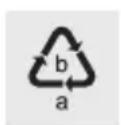
Observe the marking of the packaging materials for waste separation, which are marked with abbreviations (a) and numbers (b) with following meaning: 1-7: plastics / 20-22: paper and fibreboard / 80-98: composite materials.

The product and packaging materials are recyclable, dispose of it separately for better waste treatment.
The Triman logo is valid in France only.

Contact your local refuse disposal authority for more details of how to dispose of your worn-out product.

To help protect the environment, please dispose of the product properly when it has reached the end of its useful life and not in the household waste. Information on collection points and their opening hours can be obtained from your local authority.
Faulty or used batteries / rechargeable batteries must be recycled in accordance with Directive 2006/66/EC and its amendments. Please return the batteries / rechargeable batteries and / or the product to the available collection points.
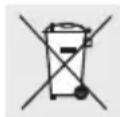
Environmental damage through incorrect disposal of the batteries / rechargeable batteries!
Batteries / rechargeable batteries may not be disposed of with the usual domestic waste. They may contain toxic heavy metals and are subject to hazardous waste treatment rules and regulations. The chemical symbols for heavy metals are as follows: Cd = cadmium, Hg = mercury, Pb = lead. That is why you should dispose of used batteries / rechargeable batteries at a local collection point.
Warranty
The product has been manufactured to strict quality guidelines and meticulously examined before delivery. In the event of product defects you have legal rights against the retailer of this product. Your legal rights are not limited in any way by our warranty detailed below.
The warranty for this product is 3 years from the date of purchase. The warranty period begins on the date of purchase. Please keep the original sales receipt in a safe location. This document is required as your proof of purchase.
Should this product show any fault in materials or manufacture within 3 years from the date of purchase, we will repair or replace it - at our choice - free of charge to you. This warranty becomes void if the product has been damaged, or used or maintained improperly.
The warranty applies to defects in material or manufacture. This warranty does not cover product parts subject to normal wear, thus possibly considered consumables (e.g. batteries) or for damage to fragile parts, e.g. switches, rechargeable batteries or glass parts.
Warranty claim procedure
To ensure quick processing of your case, please observe the following instructions:
Please have the till receipt and the item number (IAN 375710_2104) available as proof of purchase.
You will find the item number on the rating plate, an engraving, on the front page of the instructions for use (bottom left), or as a sticker on the rear or bottom of the product.
If functional or other defects occur, please contact the service department listed either by telephone or by e-mail.
You can return a defective product to us free of charge to the service address that will be provided to you. Ensure that you enclose the proof of purchase (till receipt) and information about what the defect is and when it occurred.

Service
GB
Service Great Britain
Tel.: 08000569216
E-Mail: owim@lidl.co.uk

Service Ireland
Tel.: 1800200736
E-Mail: owim@lidl.ie
C
32 GB/IE
- FEUCHTIGKEITS- UND TEMPERATURMESSAGERÄT / HUMIDITY AND TEMPERATURE METER / THERMOMÉTURE HYGROMÉTURE PKM A1
- FEUCHTIGKEITS-UND TEMPERATUREMESSGERÄT
- THERMOMÉTURE HYGROMÉTURE
- Warnings and symbols used
- Introduction. Page 21
- Safety instructions. Page 24
- Before first use 26
- Operation. 26
- Troubleshooting 29
- Cleaning and care 30
- Storage Page 30
- Disposal. Page 30
- Warranty
- Service
- HUMIDITY AND TEMPERATURE METER
- Introduction
- Intended use
- Scope of delivery
- Description of parts
- Technical data
- Temperature measurement
- Range Resolution Accuracy
- Humidity measurement
- Dew point measurement
- Wet-bulb temperature measurement
- Safety instructions
- Safety precautions
- Safety instructions for batteries / rechargeable batteries
- Risk of leakage of batteries / rechargeable batteries
- Risk of damage of the product
- Before first use
- Inserting/changing the batteries
- Operation
- - Switching on/off
- - Toggling between air temperature, dew point and wet-bulb temperature readings
- humidity reading = actual humidity measurement result + humidity offset
- Automatic power-off function
- Troubleshooting
- Error Possible causes/solutions
- - Cleaning and care
- Storage
- Disposal
- Environmental damage through incorrect disposal of the batteries / rechargeable batteries!
- Warranty claim procedure
- Service Great Britain
- Service Ireland
Brand : PARKSIDE
Model : HG08328A
Category : Thermometer Hygrometer