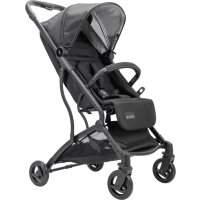
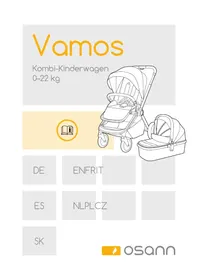
Vegas - Stroller Osann - Free user manual and instructions
Find the device manual for free Vegas Osann in PDF.



| Type | Stroller (buggy) |
| Brand | Osann |
| Model | Vegas |
| Maximum child weight | 22 kg |
| Maximum basket load | 4.5 kg |
| Safety standards | EN 1888-1:2018 and EN 1888-2:2018 |
| Usage | From birth up to 22 kg |
| Safety harness | 5-point (waist belt, crotch straps, shoulder straps) |
| Brake | Rear brake pedal with lock |
| Backrest adjustment | Reclining from seated to lying position |
| Leg rest adjustment | Adjustable by pulling the bars forward |
| Canopy | Extendable with zipper |
| Folding | Compact by pressing buttons on the handle |
| Wheels | Swivel front, fixed rear |
| Car seat adapter | Compatible (not included) |
| Frame materials | Metal and plastic |
| Covering | Non-removable fabric |
| Care and cleaning | Clean fabric with a damp sponge and mild soap; frame with warm water and soap |
| Spare parts | Available through Osann customer service |
| Customer service | +49(0)7731/970077 |
Frequently Asked Questions - Vegas Osann
User questions about Vegas Osann
0 question about this device. Answer the ones you know or ask your own.
Ask a new question about this device
Download the instructions for your Stroller in PDF format for free! Find your manual Vegas - Osann and take your electronic device back in hand. On this page are published all the documents necessary for the use of your device. Vegas by Osann.
USER MANUAL Vegas Osann
natural_image
Line drawing of a baby stroller with red wheels and black seat (no text or symbols)DE
natural_image
Line drawing of a person bending over a small device with wheels, no text or symbols present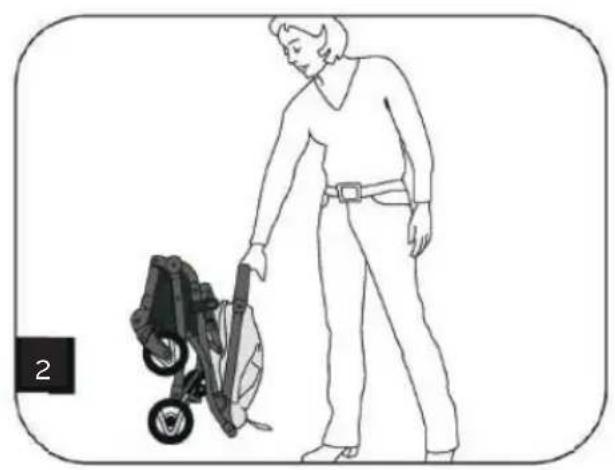
natural_image
Line drawing of a person cleaning a small outdoor machine (no text or symbols)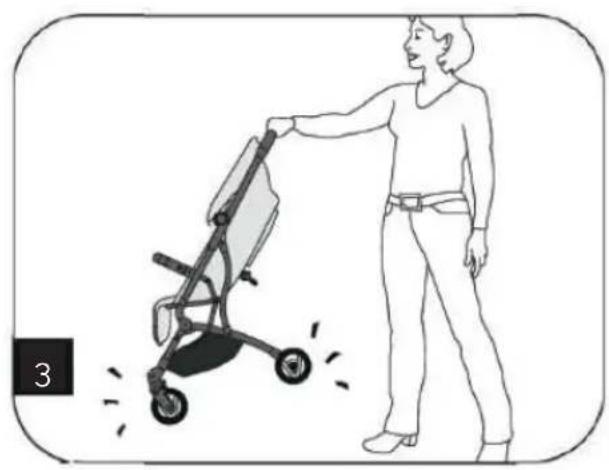
natural_image
Illustration of a person pushing a stroller with motion lines indicating speed (no text or symbols)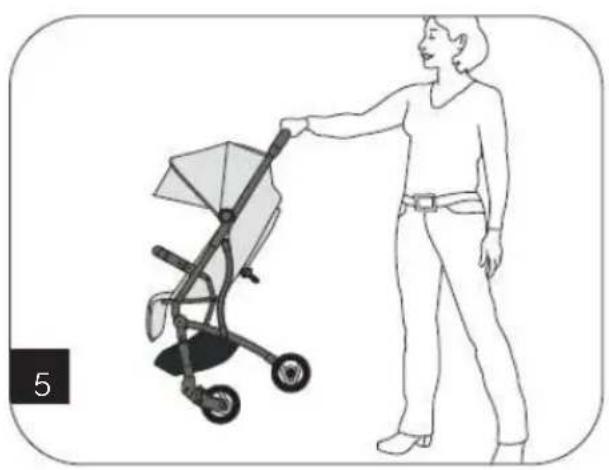
natural_image
Illustration of a woman pushing a baby stroller (no text or symbols present)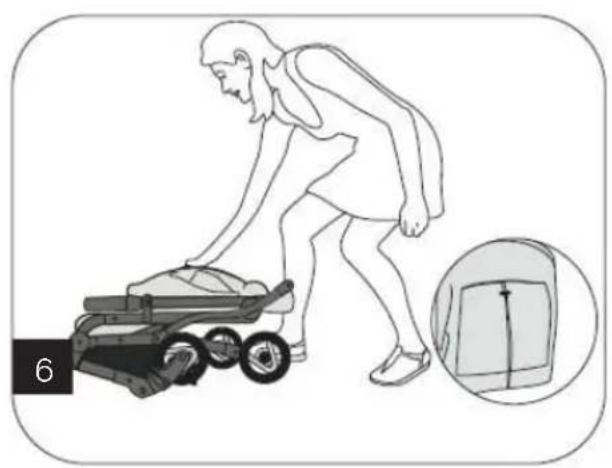
natural_image
Illustration of a person pushing a small cart with an inset showing a close-up of the device (no text or symbols)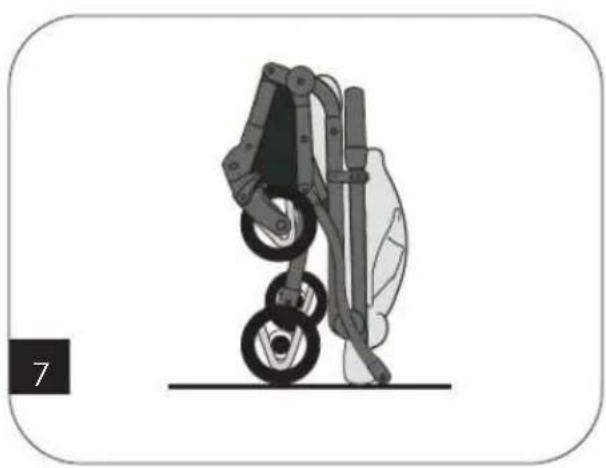
natural_image
Illustration of a robotic arm with two wheels and a vertical shaft, no text or symbols presentnatural_image
Diagram of a vehicle chassis with a blue sensor and pedestrian symbol (no text or labels)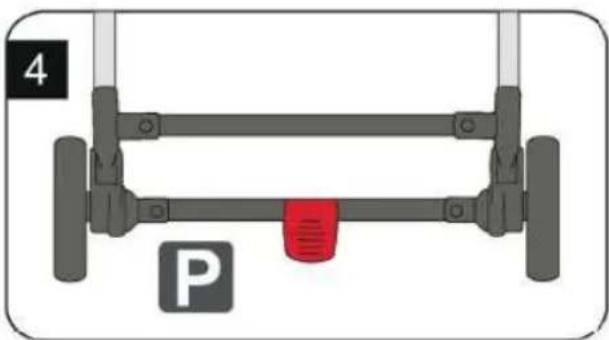
natural_image
Diagram of a vehicle parking frame with wheels and a red vent, labeled 'P' (no text or symbols on the diagram itself)natural_image
Illustration of a baby stroller with wheels and a canopy cover (no text or symbols)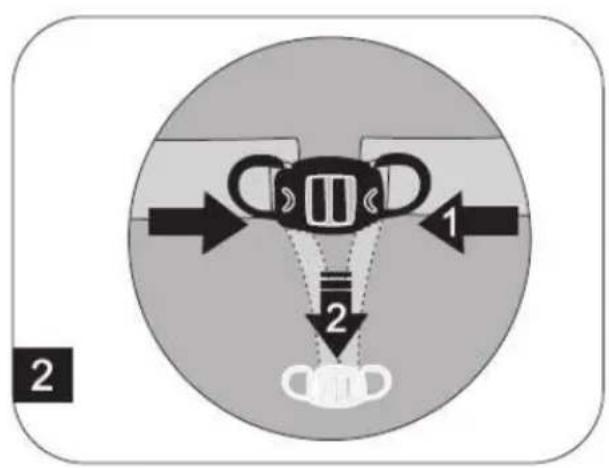
natural_image
Illustration of a baby stroller with a magnified inset showing seat width and motion arrows (no text or symbols)natural_image
Cross-sectional diagram of a dome-shaped structure with layered shading (no text or symbols)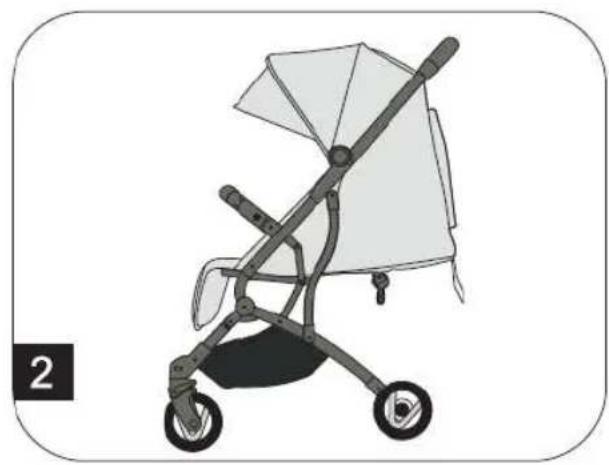
natural_image
Illustration of a baby stroller with a canopy and wheels (no text or symbols)natural_image
Three line drawings of a baby stroller with a red arrow indicating the motion or change (no text or symbols present)Many thanks for choosing our Vegas. If you require assistance with this product, please contact our customer service team.
WARNING
- WARNING Always use the crotch belt in combination with the waist belt. We also recommend using the shoulder belt too.
- WARNING Before use, please ensure that all locking parts are locked.
- WARNING Do not let your child play with this product.
- WARNING Before use, please ensure that the pushchair and the seat-holding devices are correctly locked in place.
• The product must be assembled by an adult. - Use the pushchair only for children who weigh under 22 kg. Otherwise, the pushchair may be damaged.
- Never place more than 4.5 kg in the storage basket, to ensure that the pushchair is not destabilised.
- Do not leave your child unsupervised at any time. Always keep your child in sight.
- Use the pushchair with only one child. Never place bags, shopping bags, packages or accessory parts on the handle or on the cover.
• Overloading, incorrect folding or the use of parts produced by other manufacturers may have a negative effect on the safety of the pushchair or damage it. Read the user manual carefully. - Never use the pushchair with accessory parts produced by other manufacturers.
- Read all the information in this manual before using this product. Retain the manual so you can refer to it at a later date. Failure to observe these warnings and instructions may lead to serious injuries or to death.
- The safety belts and the restraining device must be used correctly.
• Always use the seat belts to prevent serious injuries caused by falling or sliding out. - Ensure that your child does not come into contact with moving parts when you set up the pushchair.
- If the belt system is not used, the child may slip into the leg openings and be strangled.
- Do not use the pushchair on stairs or escalators.
- Stay away from hot objects, liquids and electronic devices.
- Do not allow your child to climb onto the pushchair or to sit in the pushchair with their head facing forwards.
- Do not place the pushchair on roads or in steep or dangerous areas.
- Ensure that all mechanical parts are locked before using the pushchair.
- To avoid strangulation, do NOT place any objects with a band around your child's neck. Remove the bands from such objects or secure them in another way.
- Do NOT place anything on the handle to prevent the pushchair from tipping over.
- Do NOT lift the pushchair whilst your child is sitting in it.
- Do NOT place your child in the storage basket.
- Do not allow your child to climb onto the pushchair, as this may cause it to tip over. Always lift your child into or out of the pushchair.
• Always be careful when folding up or unfolding the pushchair to ensure that nothing gets stuck in it.
• Always ensure that the pushchair is fully folded up or unfolded before letting your child come close to it. - To ensure your child's safety, check that all parts have been assembled and secured before using the pushchair.
- Keep your child away from the cover so that your child does not get tangled in it.
• Always activate the brakes when parking the pushchair. - Do not use the pushchair if it is damaged.
- The pushchair may be used only at walking pace. This product may not be used for jogging.
• To avoid choking hazards, remove plastic bags and the packaging materials before using this product. Plastic bags and packaging materials should be kept away from babies and children.
• This product is not suitable for jogging or skating.
• The buggy is suitable for newborn babies and children up to a maximum body weight of 22 kg. - Use the parking brake when placing the child in or taking the child out of the pushchair.
- For car seats in connection with the buggy: this transport solution does not replace the need for a cot
EN
and/or baby bed. If you child is tired, you should place your child in a suitable pushchair, cot or baby bed.
- Never let other children play unsupervised near the buggy.
- Tested in accordance with EN 1888-1:2018 & EN 1888-2:2018.
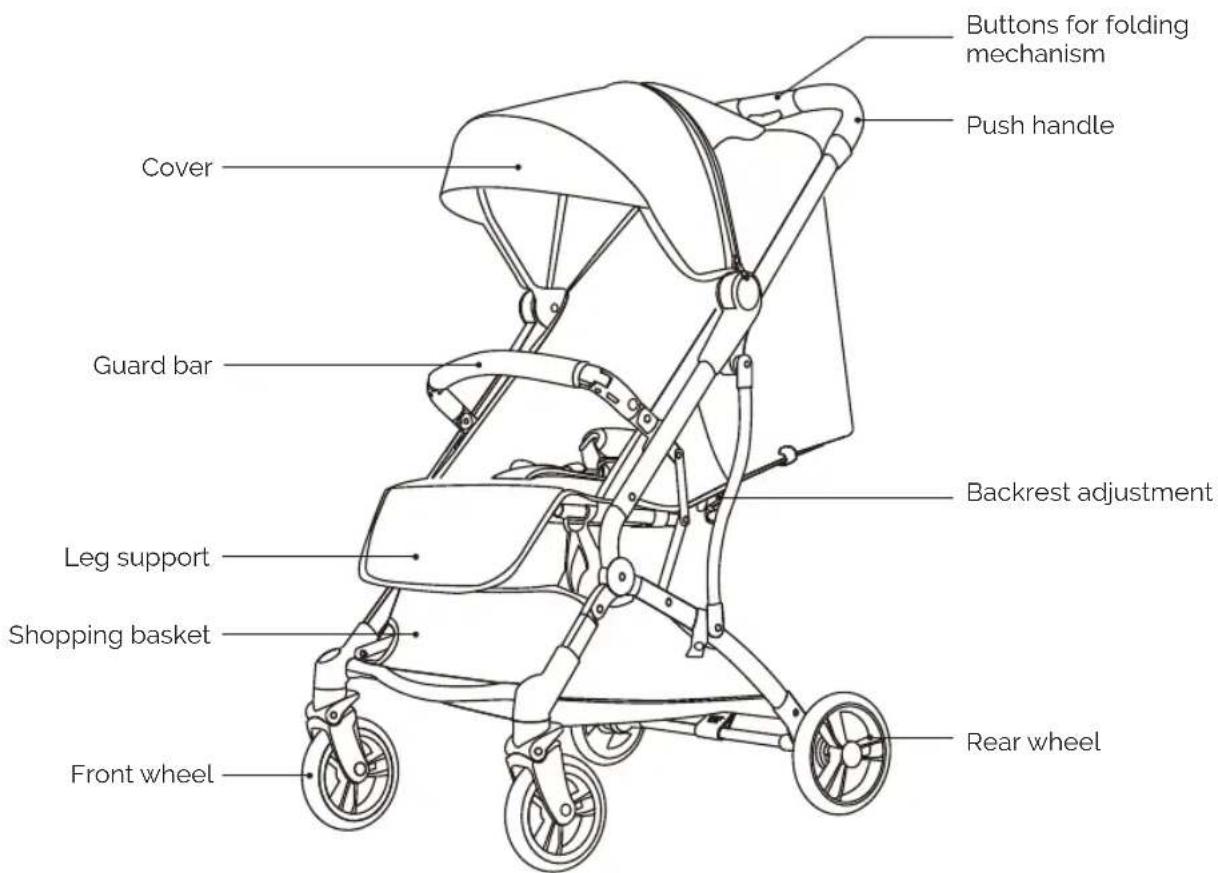
Parts
EN
UNFOLDING THE PUSHCHAIR
natural_image
Line drawing of a person bending over a small cart with wheels, no text or symbols present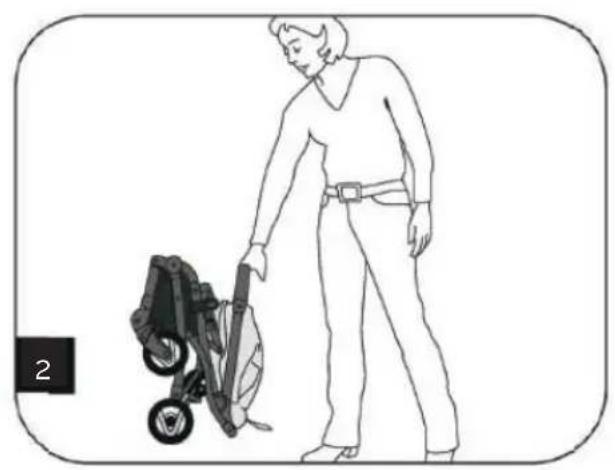
natural_image
Line drawing of a person cleaning a small outdoor machine (no text or symbols)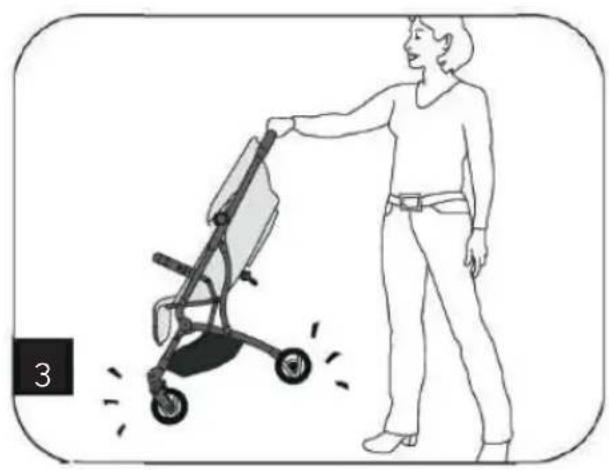
natural_image
Illustration of a person pushing a stroller with motion lines indicating speed (no text or symbols)- The buggy is delivered to you fully assembled and ready to use in the box.
- First, remove the buggy from the packaging.
- Lift up the push handle and the buggy unfolds (Fig. 2+3).
EN
FOLDING UP THE PUSHCHAIR
natural_image
Illustration of a woman pushing a baby stroller (no text or symbols present)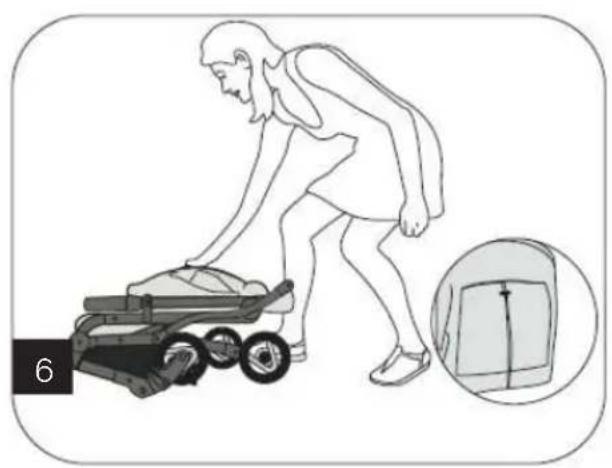
natural_image
Illustration of a person pushing a small cart with an inset showing a close-up of the device (no text or symbols)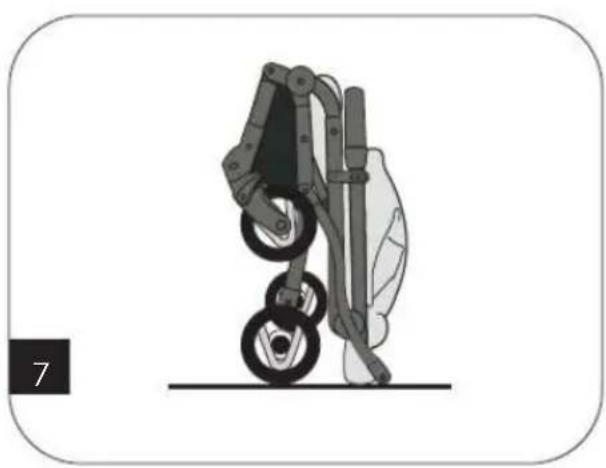
natural_image
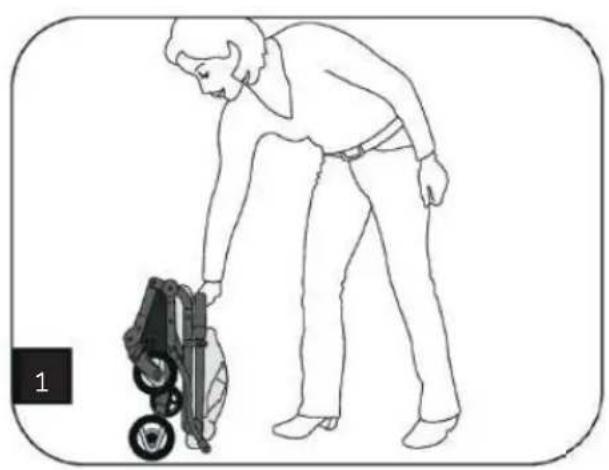
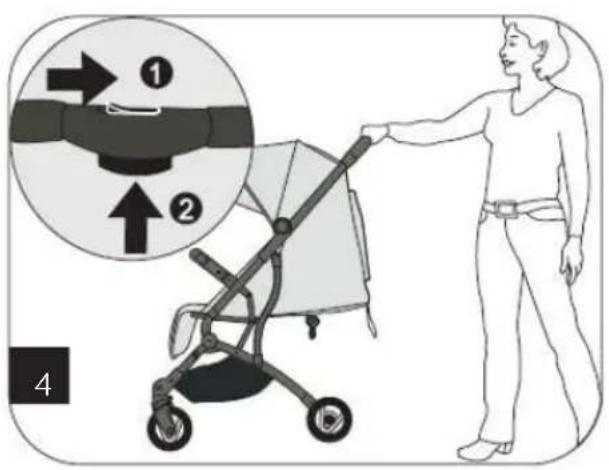
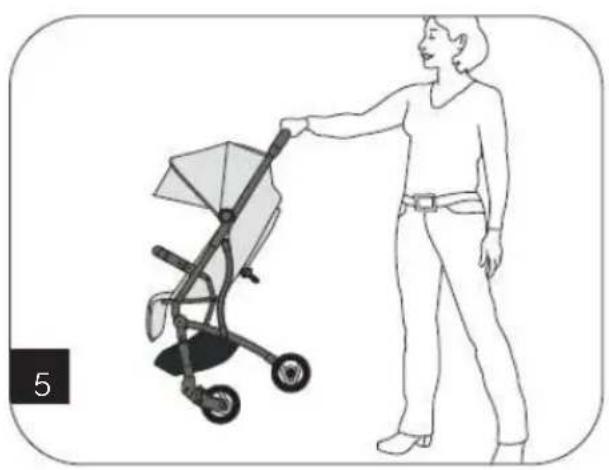
Illustration of a robotic arm with two wheels and a vertical post, no text or symbols present• To fold up the buggy, press both buttons on the push handle at the same time (Fig. 4+5).
• Now push the buggy downwards (Fig. 6+7)
EN
USING THE SAFETY BELT
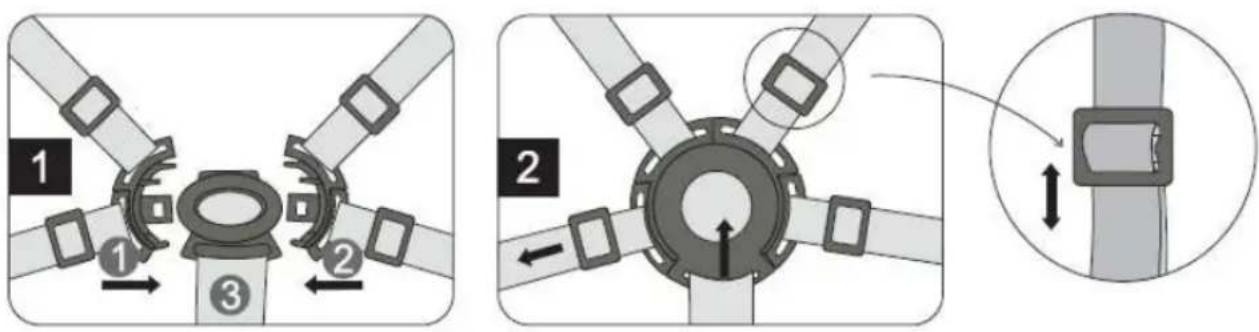
• To close the safety belt, secure belts 1 and 2 in belt buckle 3 (Fig. 1).
• To release the safety belt, press the button in the middle of the buckle and pull the belts apart (Fig. 2)
- You can adjust the belt length using the buckles. Push these up or down to adjust the belt length.
ACTIVATING AND RELEASING THE BRAKE
natural_image
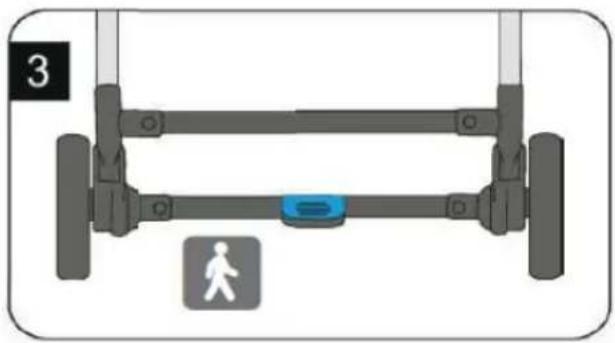
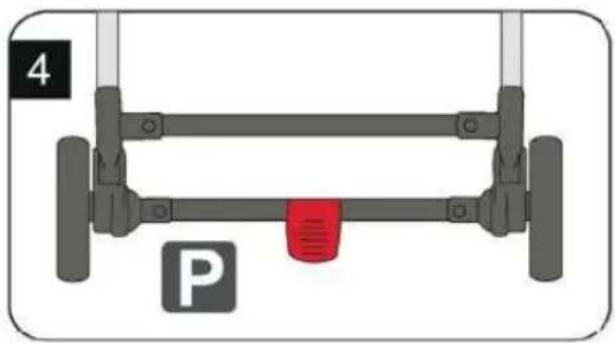
Mechanical support frame with a red component and label 'P' (no text or symbols on the diagram itself)• To release the brake, move the pedal on the rear axle upwards (Fig. 3).
• To activate the brake on the buggy, press the pedal downwards (Fig. 4).
EN
natural_image
Illustration of a baby stroller with wheels and a canopy cover (no text or symbols)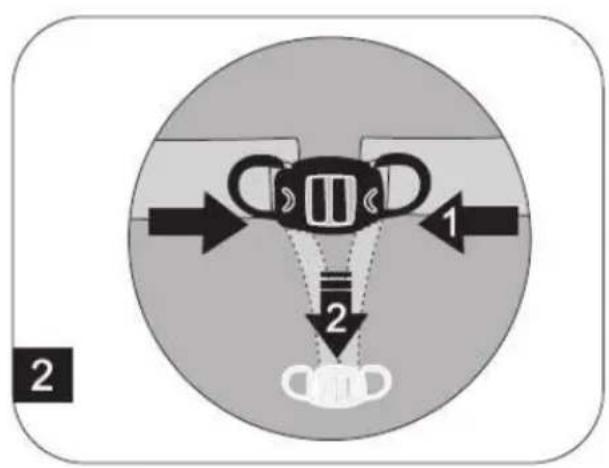
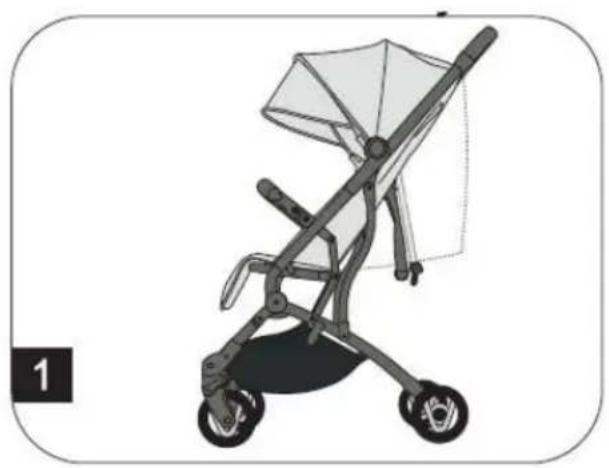
• The backrest can be adjusted individually from a vertical sitting position to a lying position. (Fig. 1)
- The backrest is adjusted using the strap on the backrest (Fig. 2).
- Press the middle button on the strap together with two fingers and move this button up or down (Fig. 2).
ADJUSTING THE LEG SUPPORT
natural_image
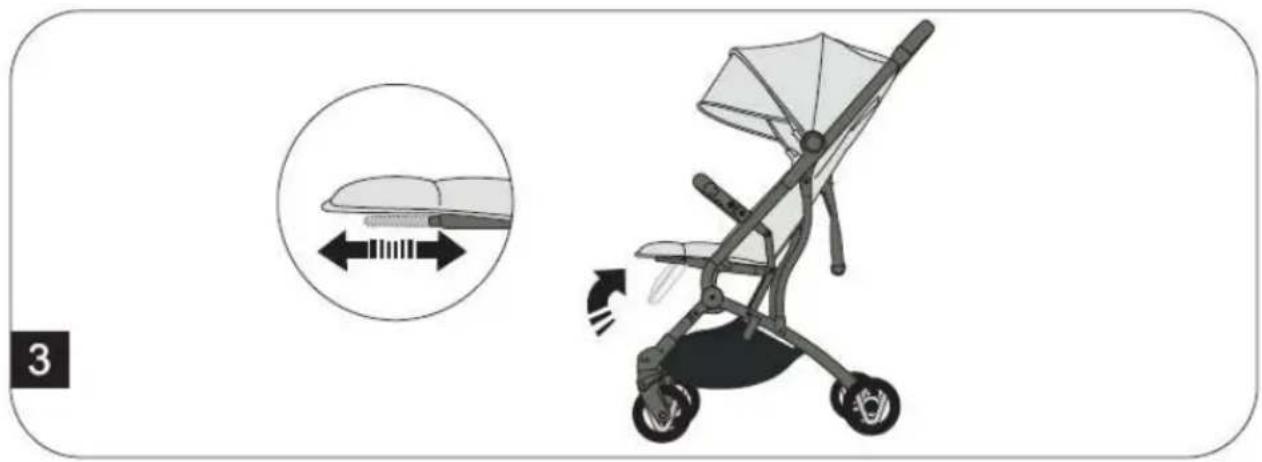
Illustration of a baby stroller with a magnified inset showing seat width and seat alignment (no text or symbols)• To adjust the leg support, pull the bars underneath the seat forwards (Fig. 3).
EN
ADJUSTING THE COVER
natural_image
Cross-sectional diagram of a dome-shaped structure with layered internal layers (no text or symbols)
natural_image
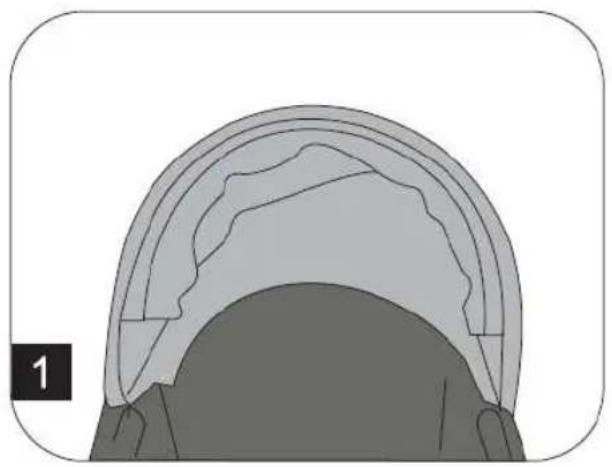
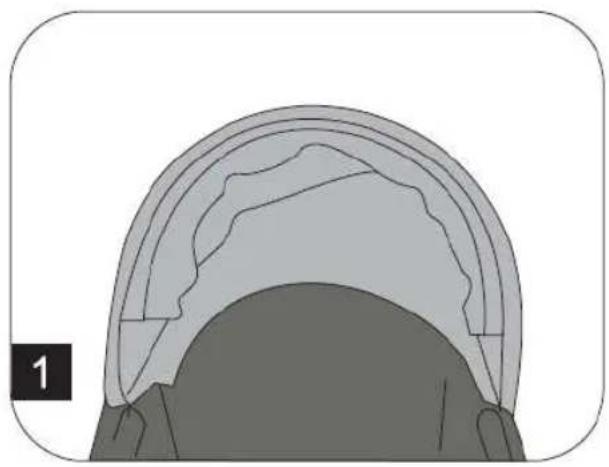
Illustration of a baby stroller with a canopy and wheels (no text or symbols)- Pull the cover forwards or push the cover backwards to adjust it.
• The cover can be extended using the zip on the upper side.
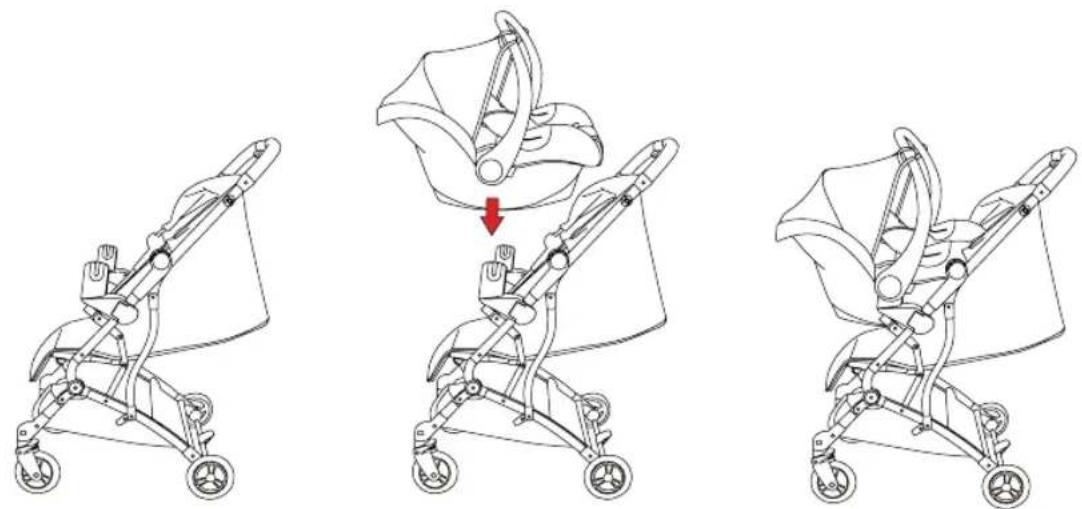
Travel system with adapter\* and baby seat\*
natural_image
Three line drawings of a baby stroller with a red arrow indicating the seatbelt (no text or symbols present)- First, remove the guard bar.
- Now secure the adapters to the frame of the buggy and check whether this is locked in place correctly for safety purposes. Depending on the construction of your baby seat, the adapter must be mounted below or above the guard bar mount.
- Now mount your baby seat on the adapters and check whether these are locked in place correctly too for safety purposes. Depending on the model of baby seat, a separate locking mechanism must be activated. Where applicable, check this in the user manual for your baby seat. For other models, you can hear a "click" even when you lock the baby seat in place on the adapters.
- To remove the adapters from the frame, please push the adapters away from the inside to the outside and not at the locking device.
* Baby seat & adaptor not included
CARE INSTRUCTIONS
- Cleaning and maintenance of the buggy must be carried out only by adults.
- The covering is not removable. Clean fabric parts with a damp sponge and a neutral cleaning product. Please take note of the information on the care label.
- Clean the frame of the pushchair only with standard soap and warm water. Do not bleach or clean with any other cleaning products.
- Inspect your pushchair from time to time for any loose screws, worn parts, worn materials or ripped seams. Replace or repair the parts if necessary.
- In the event of excessive exposure to sun or heat, parts may fade or become deformed.
- If the pushchair gets wet, open the cover and leave it to dry fully before storing.
- If the wheels squeak, apply a light oil (e.g. silicone spray, anti-rust oil, or sewing machine oil). It is important that the oil penetrates into the axle and the wheel connection.
- If you go for a walk on the beach with your pushchair, you must clean it thoroughly afterwards to remove sand and salt from the mechanism and the wheel connections.
MAINTENANCE
Regularly check the condition of the product for any damage. In the event of damage, do not use the product and keep it out of the reach of children.
If you have any problems, please contact the Osann customer service team on +49 (0)7731/970077.
natural_image
Line drawing of a person bending over a small device with wheels, no text or symbols present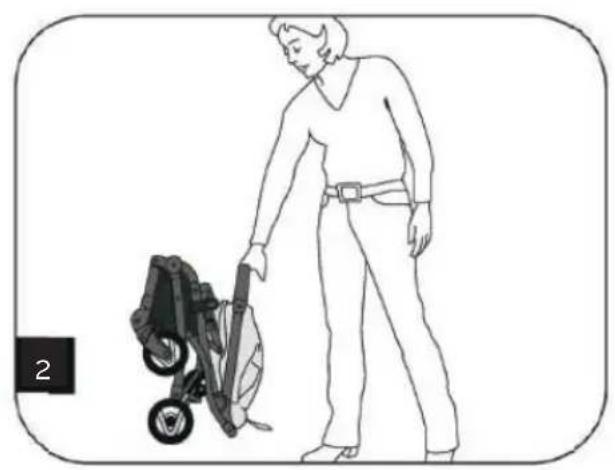
natural_image
Line drawing of a person cleaning a small outdoor machine (no text or symbols)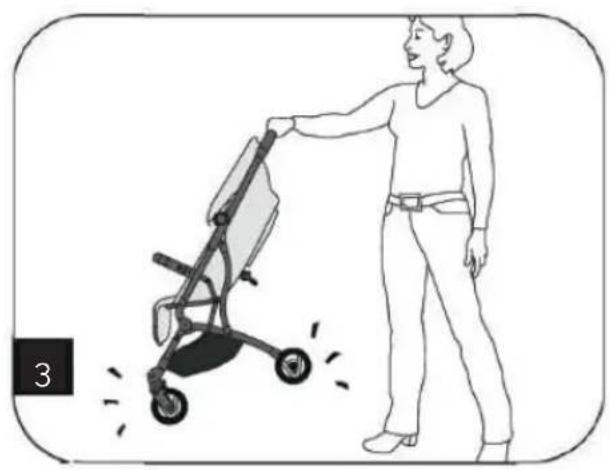
natural_image
Illustration of a person pushing a stroller with motion lines indicating speed (no text or symbols)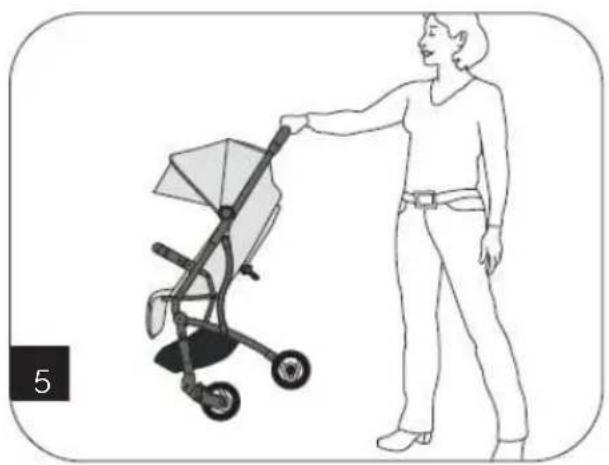
natural_image
Illustration of a woman pushing a baby stroller (no text or symbols present)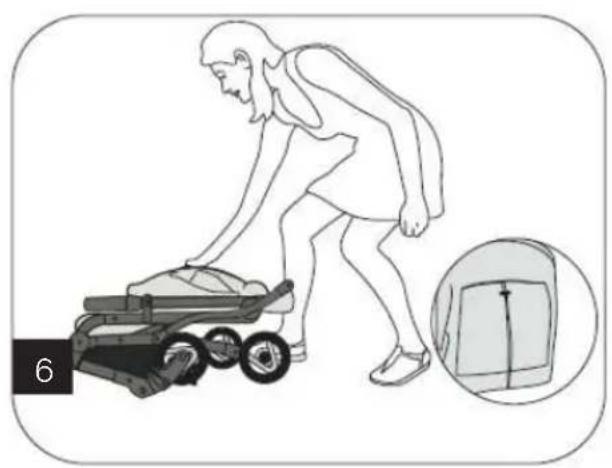
natural_image
Illustration of a person pushing a small cart with an inset showing a close-up of the device (no text or symbols)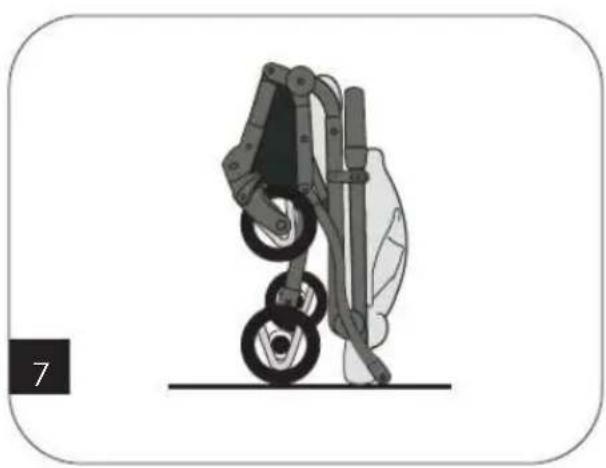
natural_image
Illustration of a robotic arm with two wheels and a vertical shaft, no text or symbols presentnatural_image
Diagram of a vehicle chassis with a blue sensor and pedestrian symbol (no text or labels)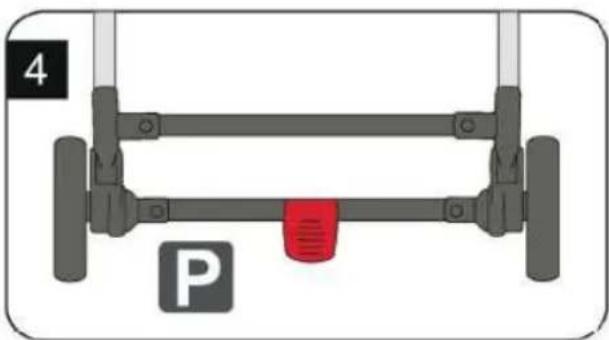
natural_image
Diagram of a vehicle suspension system with labeled components (no text or symbols beyond labels)natural_image
Illustration of a baby stroller with wheels and a canopy cover (no text or symbols)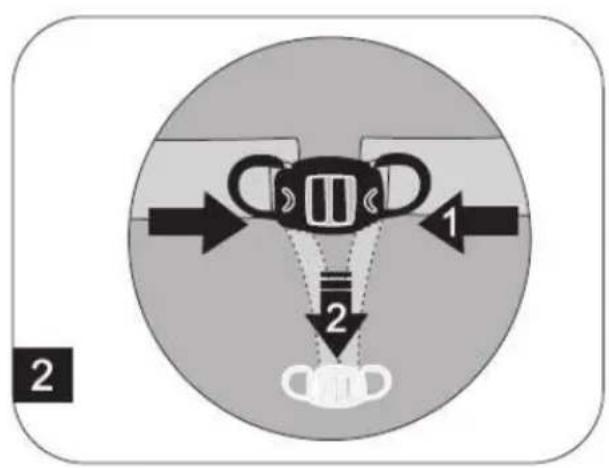
natural_image
Illustration of a baby stroller with a magnified inset showing seat width and seat alignment (no text or symbols)natural_image
Cross-sectional diagram of a dome-shaped structure with layered shading (no text or symbols)
natural_image
Illustration of a baby stroller with a canopy and wheels (no text or symbols)natural_image
Three line drawings of a baby stroller with a red arrow indicating the seatbelt adjustment (no text or symbols present)natural_image
Line drawing of a person bending over a small device with wheels, no text or symbols present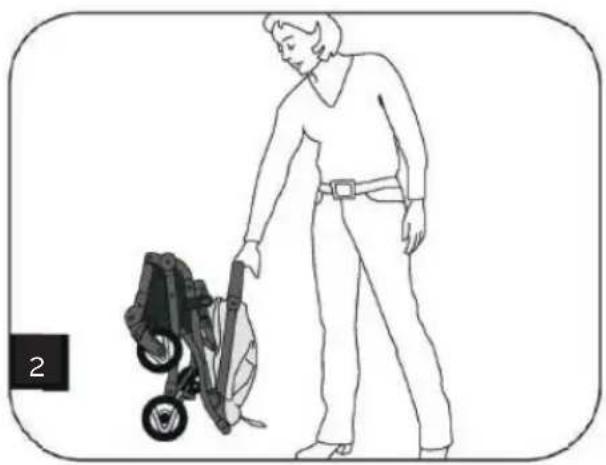
natural_image
Line drawing of a person cleaning a lawn mower with a tool (no text or symbols)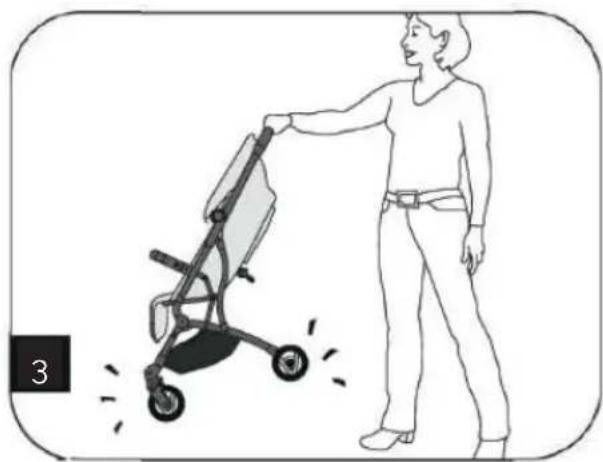
natural_image
Illustration of a person pushing a stroller with motion lines indicating movement (no text or symbols)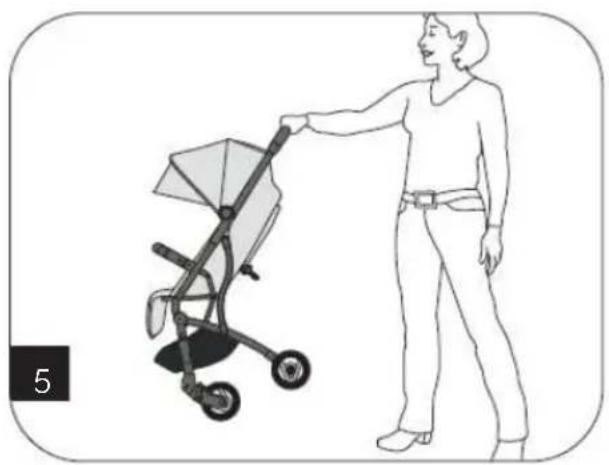
natural_image
Illustration of a woman pushing a baby stroller (no text or symbols present)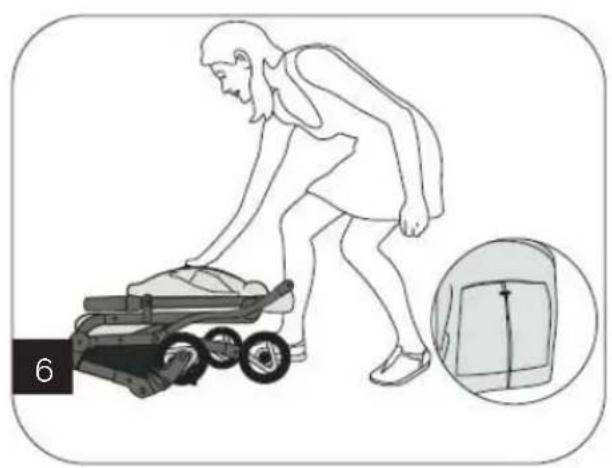
natural_image
Illustration of a person pushing a small cart with an inset showing a close-up of the device (no text or symbols)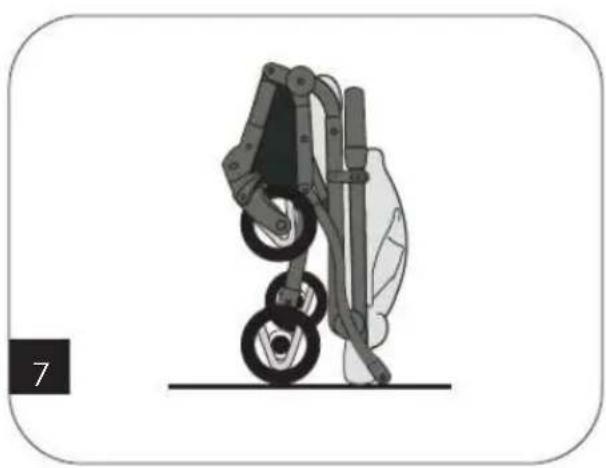
natural_image
Illustration of a robotic arm with two wheels and a vertical post, no text or symbols presentnatural_image
Diagram of a vehicle chassis with a blue sensor and pedestrian symbol (no text or labels)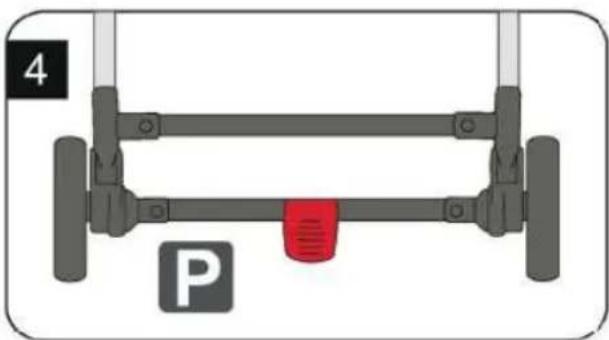
natural_image
Diagram of a vehicle parking frame with wheels and a red vent, labeled 'P' (no text or symbols on the diagram itself)natural_image
Illustration of a baby stroller with wheels and a canopy cover (no text or symbols)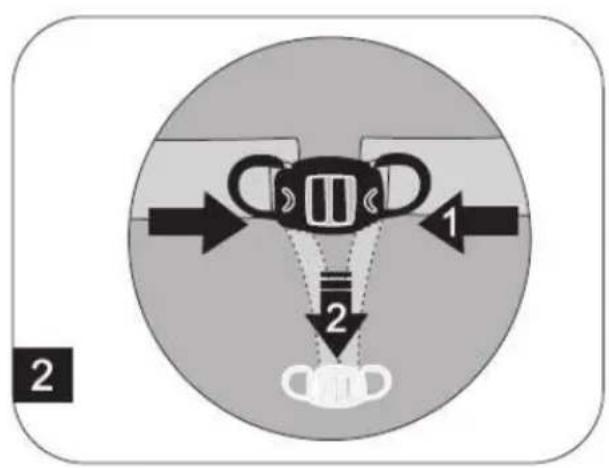
natural_image
Illustration of a baby stroller with a magnified inset showing seat width and seat alignment (no text or symbols)natural_image
Cross-sectional diagram of a dome-shaped structure with layered shading (no text or symbols)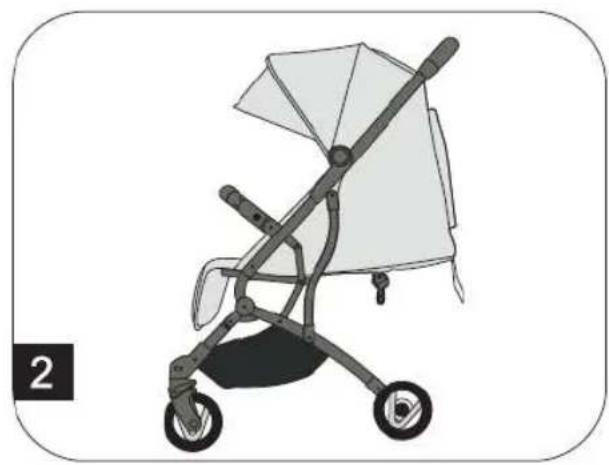
natural_image
Illustration of a baby stroller with a canopy and wheels (no text or symbols)natural_image
Three line drawings of a baby stroller with a red arrow indicating the fold change (no text or symbols present)natural_image
Line drawing of a person bending over a small device with wheels, no text or symbols present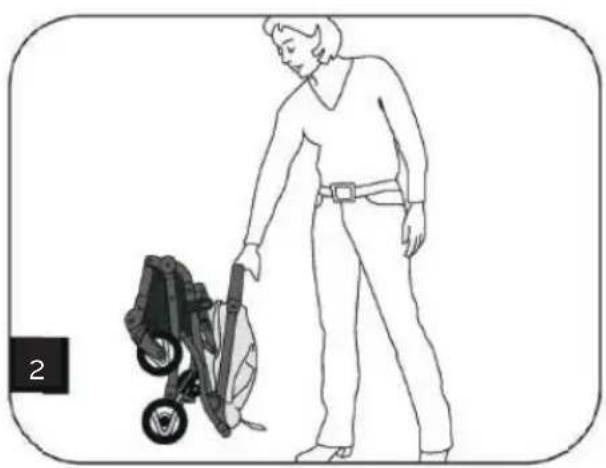
natural_image
Line drawing of a person cleaning a lawn mower with a tool (no text or symbols)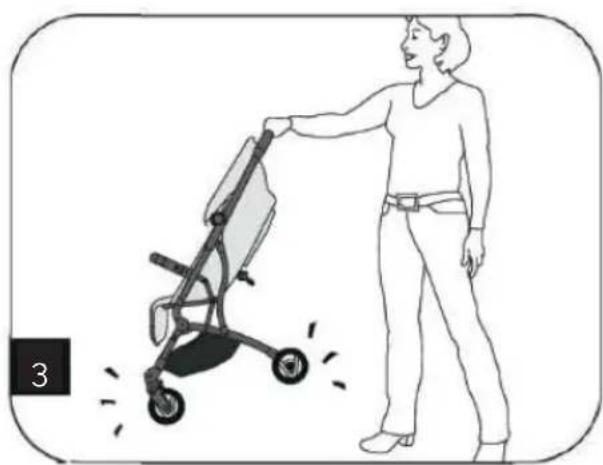
natural_image
Illustration of a person pushing a stroller with motion lines indicating speed (no text or symbols)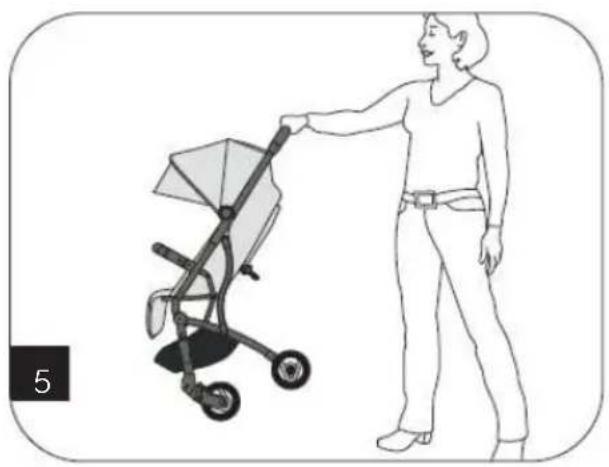
natural_image
Line drawing of a woman pushing a baby stroller (no text or symbols)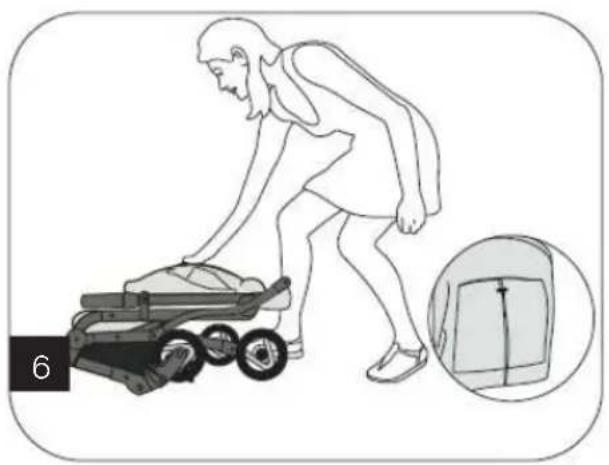
natural_image
Illustration of a person pushing a stroller with an inset showing a bag (no text or symbols)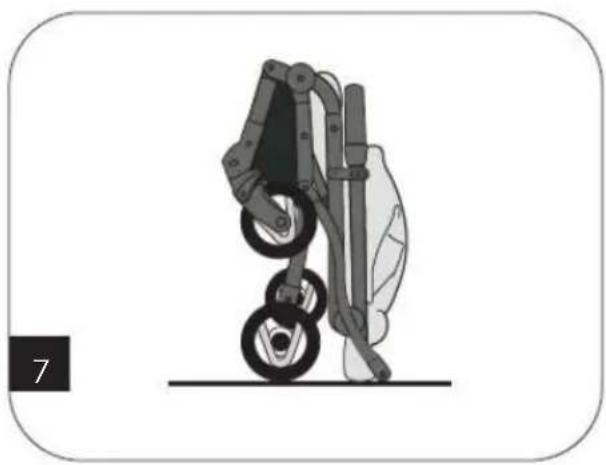
natural_image
Illustration of a robotic arm with wheels and a vertical post, no text or symbols presentnatural_image
Diagram of a vehicle suspension system with a blue sensor and pedestrian symbol (no text labels)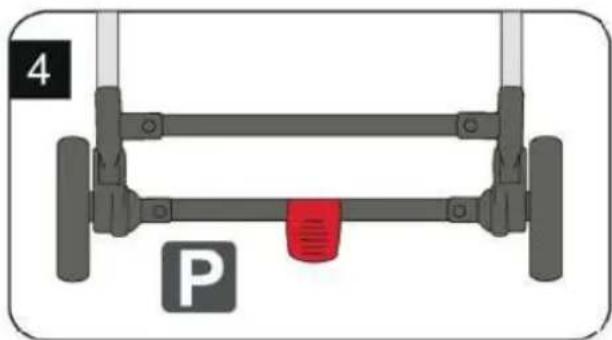
natural_image
Diagram of a vehicle suspension system with labeled components (no text or symbols beyond labels)natural_image
Illustration of a baby stroller with wheels and a canopy cover (no text or symbols)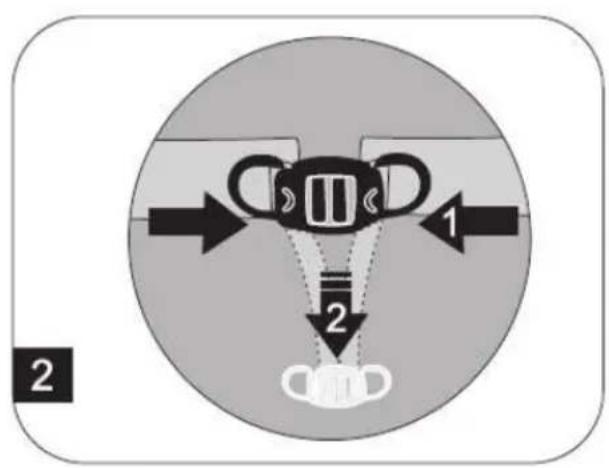
natural_image
Illustration of a baby stroller with a magnified inset showing seat width and motion arrows (no text or symbols)natural_image
Cross-sectional diagram of a dome-shaped structure with layered shading (no text or symbols)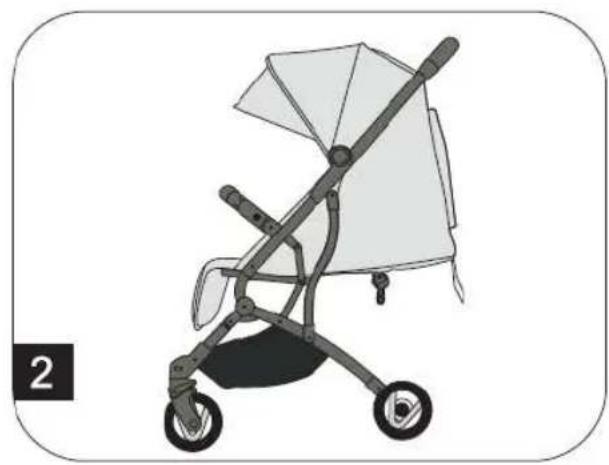
natural_image
Illustration of a baby stroller with a canopy and wheels (no text or symbols)natural_image
Three line drawings of a baby stroller with a red arrow indicating the motion or change (no text or symbols present)natural_image
Line drawing of a person bending over a small device with wheels, no text or symbols present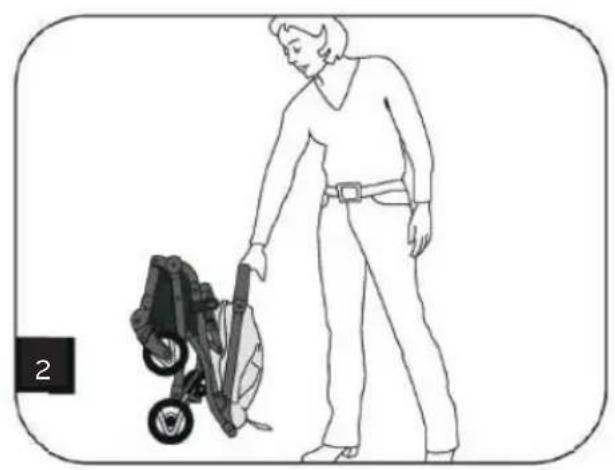
natural_image
Line drawing of a person cleaning a small outdoor machine (no text or symbols)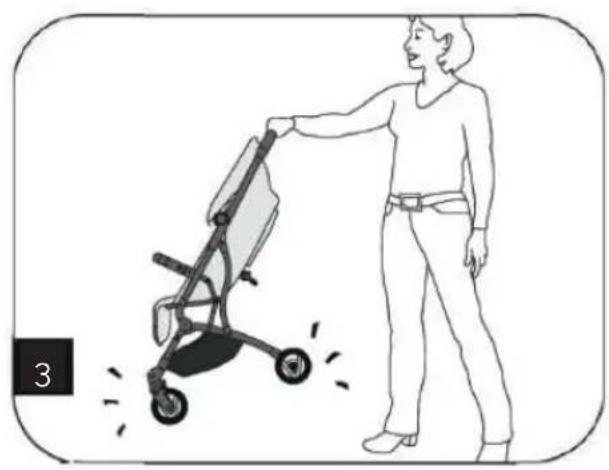
natural_image
Illustration of a person pushing a stroller with motion lines indicating speed (no text or symbols)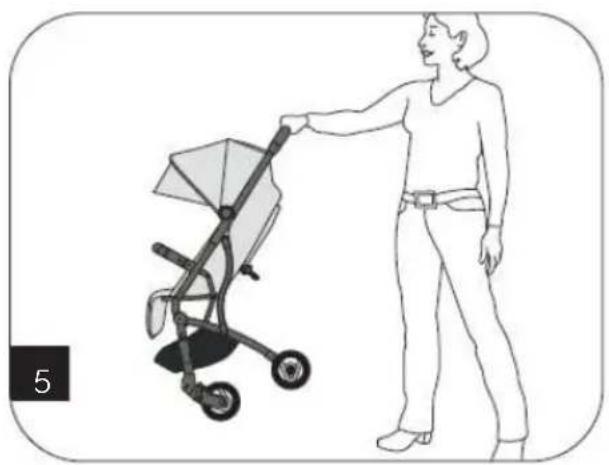
natural_image
Illustration of a woman pushing a baby stroller (no text or symbols present)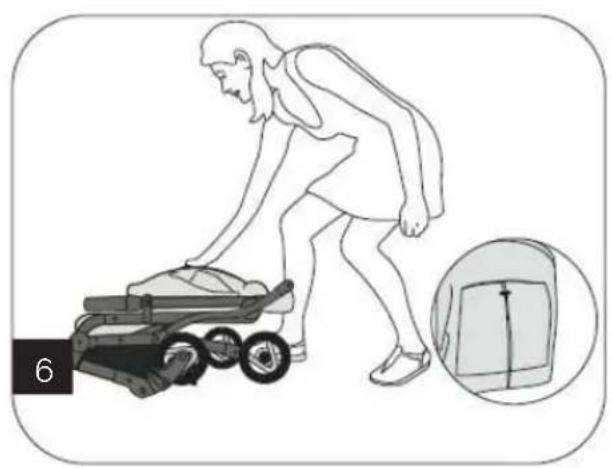
natural_image
Illustration of a person pushing a small cart with an inset showing a close-up of the device (no text or symbols)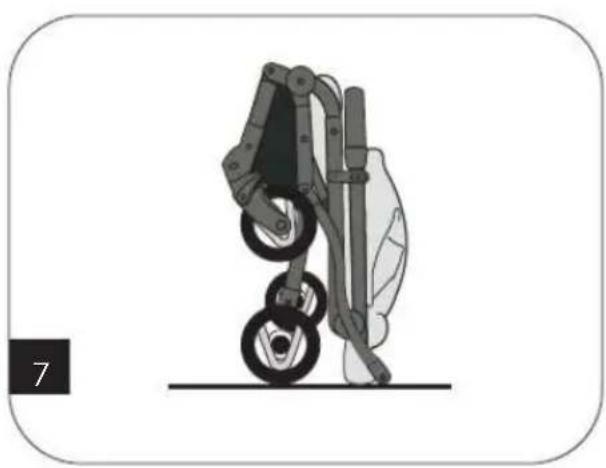
natural_image
Illustration of a robotic arm with two wheels and a vertical post, no text or symbols presentnatural_image
Illustration of a baby stroller with wheels and a canopy cover (no text or symbols)
natural_image
Illustration of a baby stroller with a magnified inset showing seat width and seat alignment (no text or symbols)natural_image
Cross-sectional diagram of a dome-shaped structure with layered shading (no text or symbols)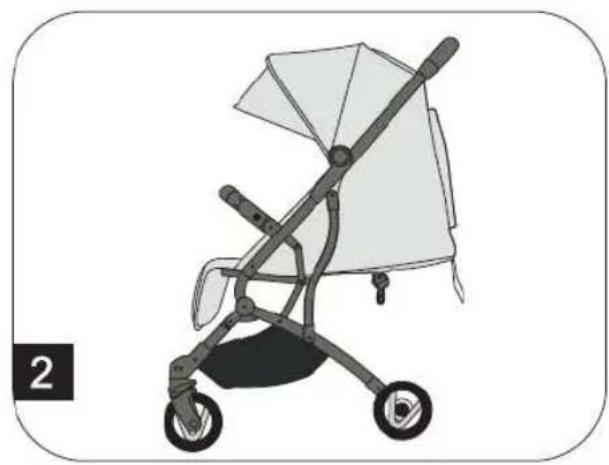
natural_image
Illustration of a baby stroller with a canopy and wheels (no text or symbols)natural_image
Three line drawings of a baby stroller with a red arrow indicating the fold change (no text or symbols present)natural_image
Line drawing of a person bending over a small device with wheels, no text or symbols present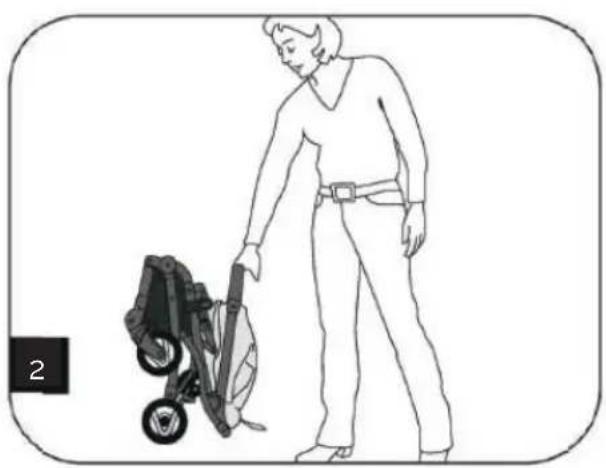
natural_image
Line drawing of a person cleaning a lawn mower with a tool (no text or symbols)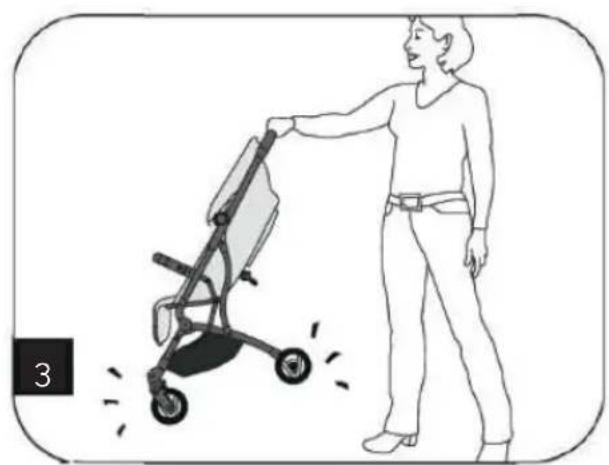
natural_image
Illustration of a person pushing a stroller with motion lines indicating speed (no text or symbols)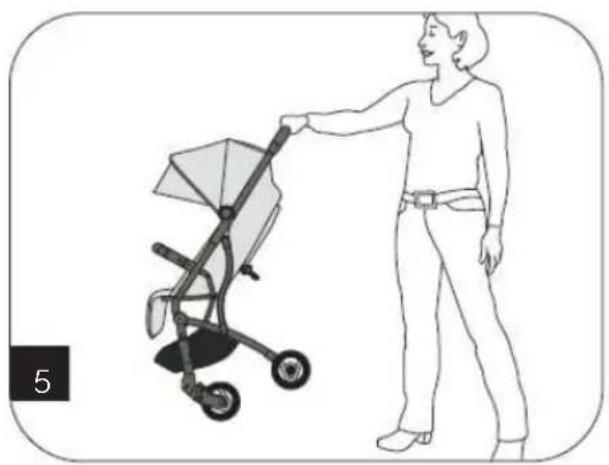
natural_image
Illustration of a woman pushing a baby stroller (no text or symbols present)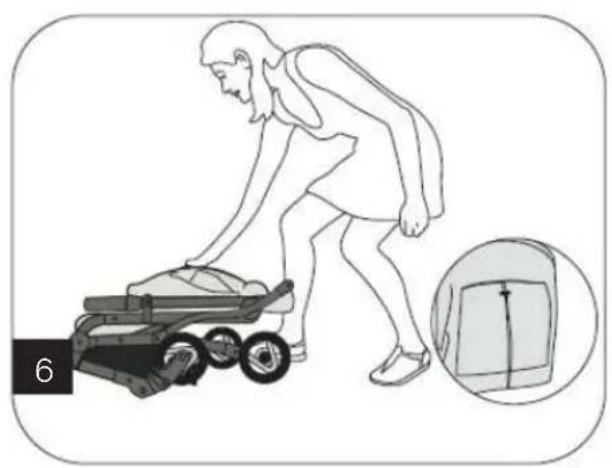
natural_image
Illustration of a person pushing a small cart with an inset showing a close-up of the device (no text or symbols)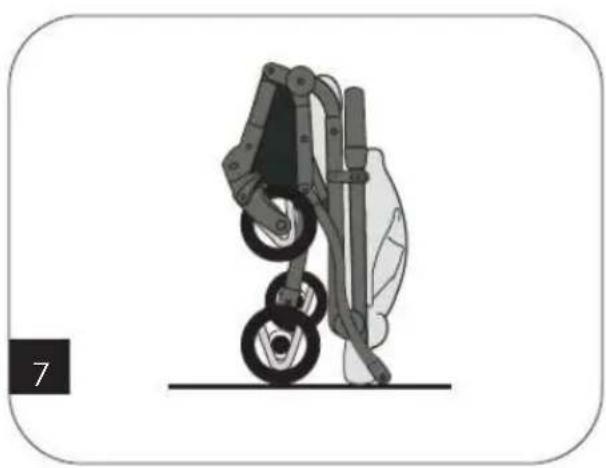
natural_image
Illustration of a robotic arm with two wheels and a vertical post, no text or symbols presentnatural_image
Diagram of a vehicle chassis with a blue sensor and pedestrian symbol (no text or labels)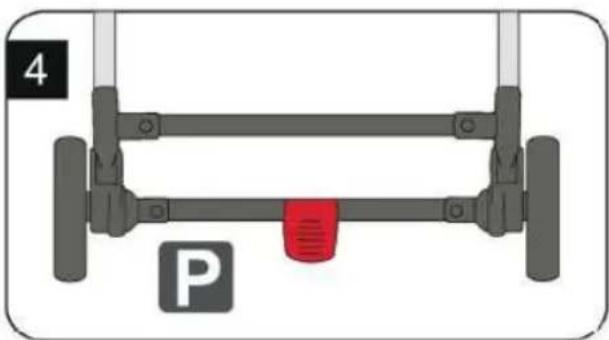
natural_image
Diagram of a vehicle parking frame with wheels and a red vent, labeled 'P' (no text or symbols on the diagram itself)natural_image
Illustration of a baby stroller with wheels and a canopy cover (no text or symbols)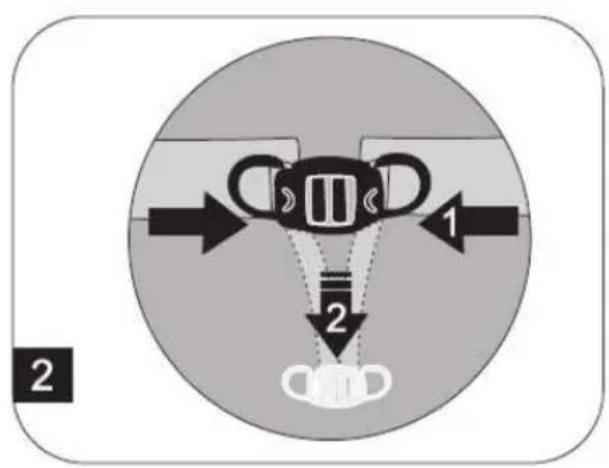
natural_image
Illustration of a baby stroller with a magnified inset showing seat width and seat alignment (no text or symbols)natural_image
Cross-sectional diagram of a dome-shaped structure with layered shading (no text or symbols)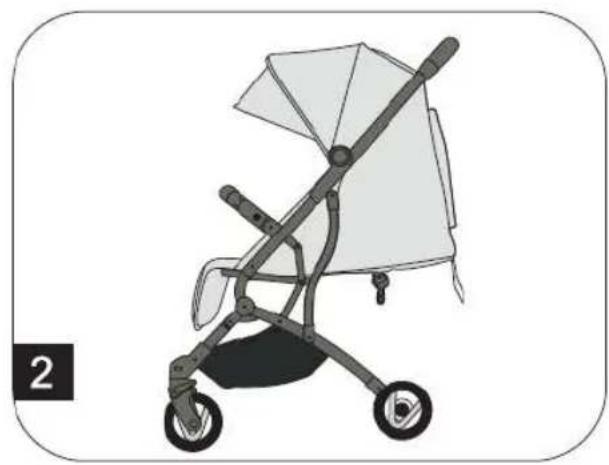
natural_image
Illustration of a baby stroller with a canopy and wheels (no text or symbols)natural_image
Three line drawings of a baby stroller with a red arrow indicating the seatbelt (no text or symbols present)natural_image
Line drawing of a person bending over a small device with wheels, no text or symbols present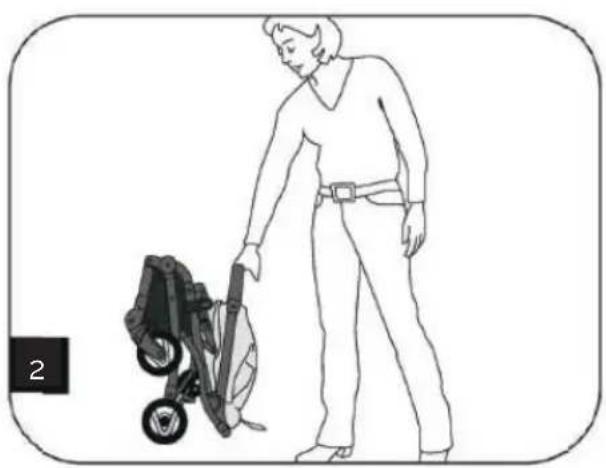
natural_image
Line drawing of a person cleaning a lawn mower with a tool (no text or symbols)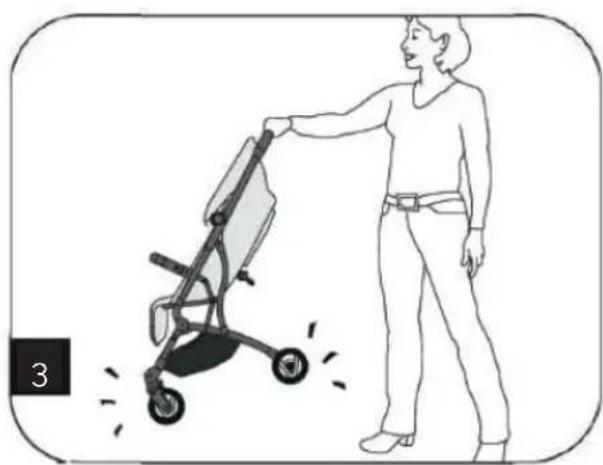
natural_image
Illustration of a person pushing a stroller with motion lines indicating speed (no text or symbols)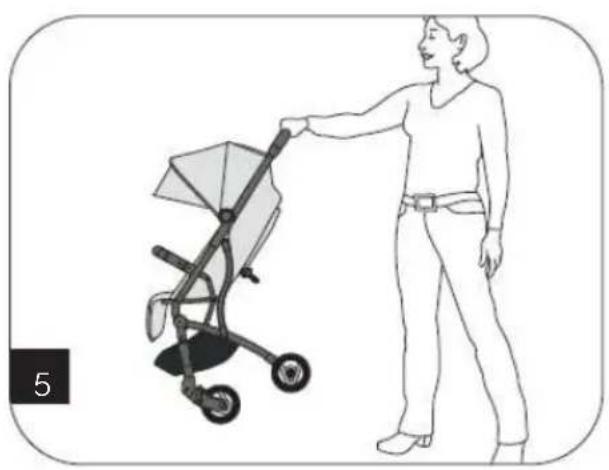
natural_image
Illustration of a woman pushing a baby stroller (no text or symbols present)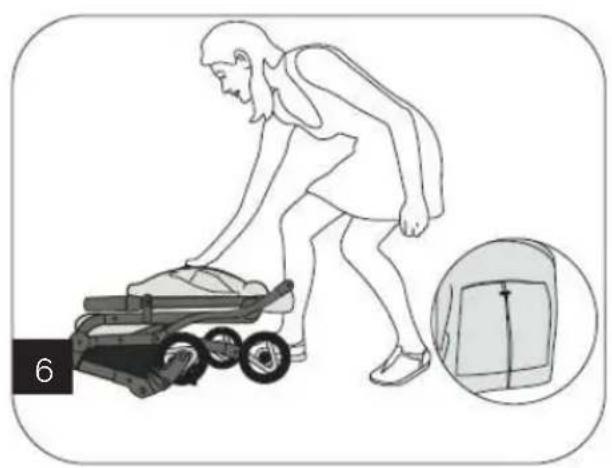
natural_image
Illustration of a person pushing a small cart with an inset showing a close-up of the device (no text or symbols)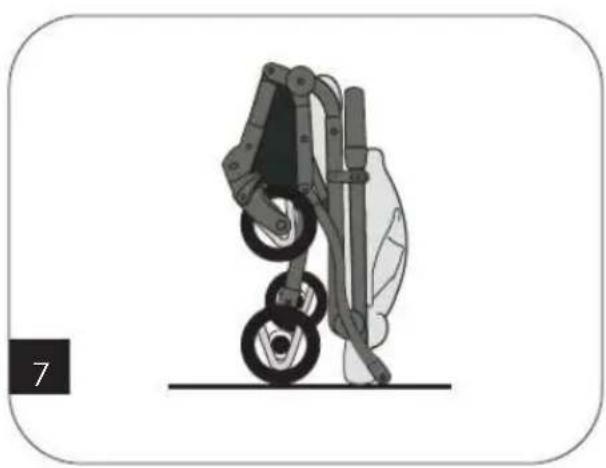
natural_image
Illustration of a robotic arm with two wheels and a vertical post, no text or symbols presentnatural_image
Diagram of a vehicle chassis with a blue sensor and pedestrian symbol (no text or labels)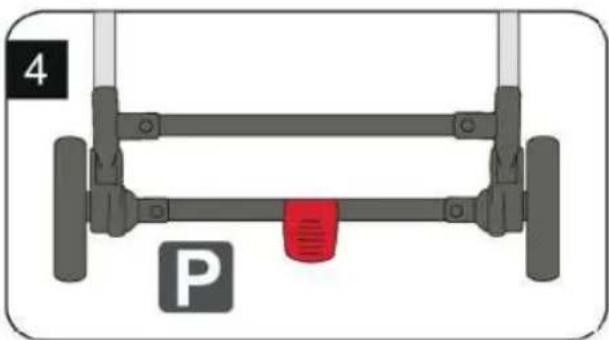
natural_image
Diagram of a vehicle parking frame with wheels and a red vent, labeled 'P' (no text or symbols on the diagram itself)natural_image
Illustration of a baby stroller with wheels and a canopy cover (no text or symbols)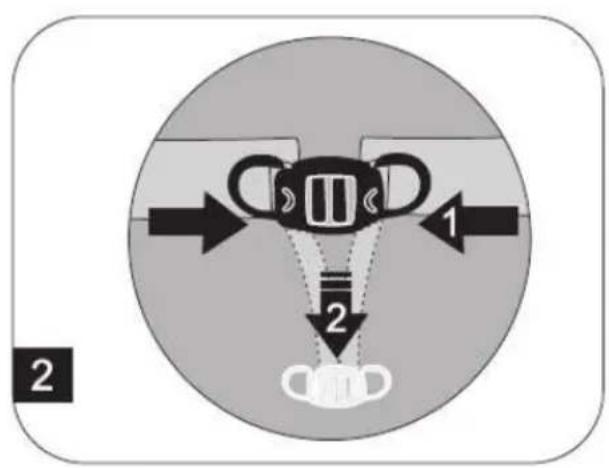
natural_image
Illustration of a baby stroller with a magnified inset showing seat width and seat alignment (no text or symbols)natural_image
Cross-sectional diagram of a dome-shaped structure with layered shading (no text or symbols)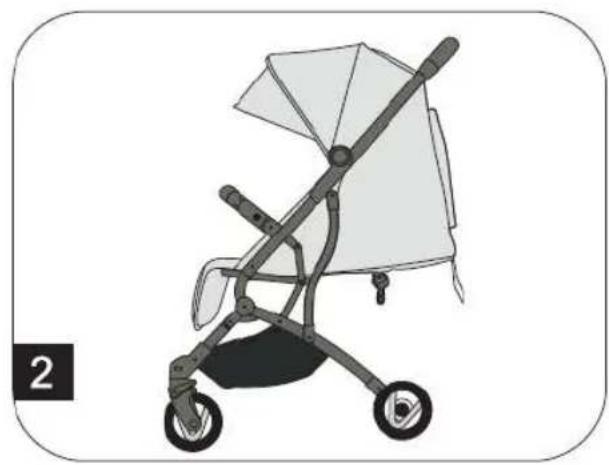
natural_image
Illustration of a baby stroller with a canopy and wheels (no text or symbols)natural_image
Three line drawings of a baby stroller with a red arrow indicating the seatbelt (no text or symbols present)natural_image
Line drawing of a person bending over a small device with wheels, no text or symbols present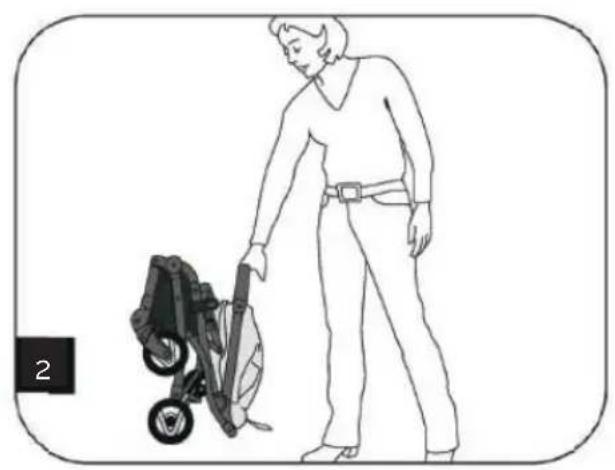
natural_image
Line drawing of a person cleaning a small outdoor machine (no text or symbols)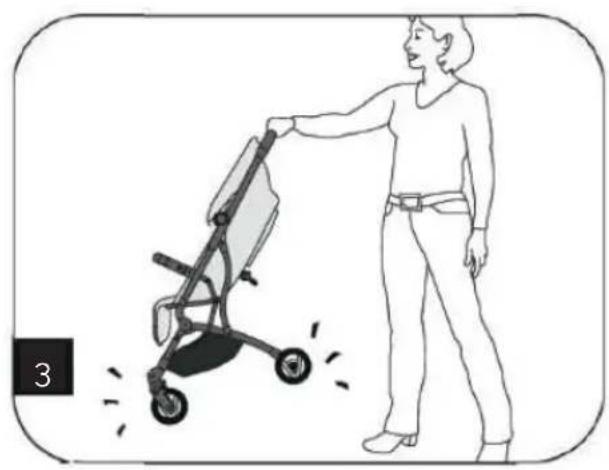
natural_image
Illustration of a person pushing a stroller with motion lines indicating speed (no text or symbols)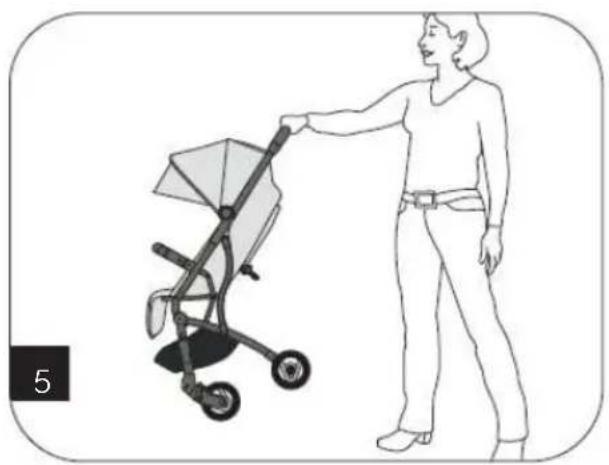
natural_image
Illustration of a woman pushing a baby stroller (no text or symbols present)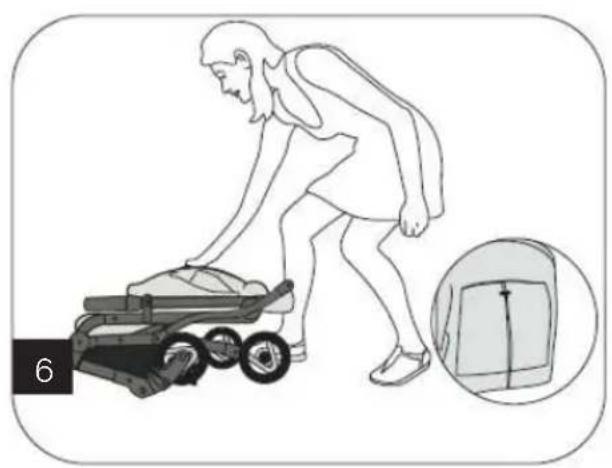
natural_image
Illustration of a person pushing a small cart with an inset showing a close-up of the device (no text or symbols)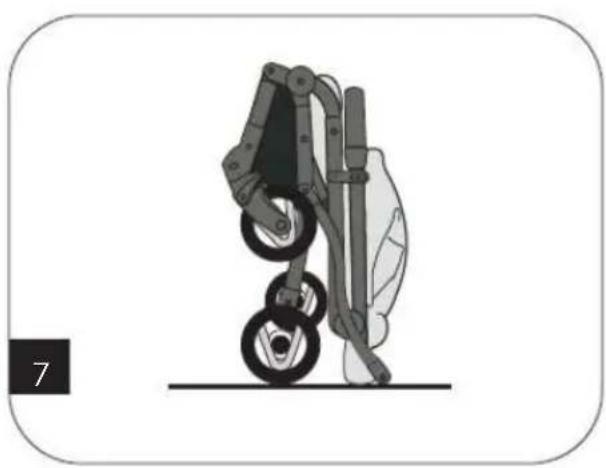
natural_image
Illustration of a robotic arm with two wheels and a vertical post, no text or symbols presentnatural_image
Diagram of a vehicle chassis with a blue sensor and pedestrian symbol (no text or labels)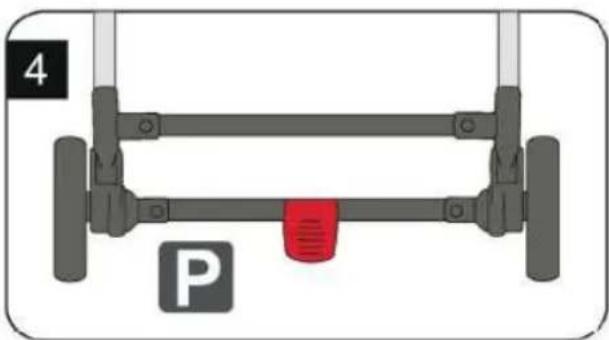
natural_image
Diagram of a vehicle parking frame with wheels and a red vent, labeled 'P' (no text or symbols on the diagram itself)- Aby ste uvoľnili brzdu, posúvajte pedál na zadnej osi nahor (obr. 3).
- Na zabrzdenie skladacieho kočíka zatlačte pedál nadol (obr. 4).
SK
PRESTAVENIE OPIERKY CHRBTA
natural_image
Illustration of a baby stroller with wheels and a canopy cover (no text or symbols)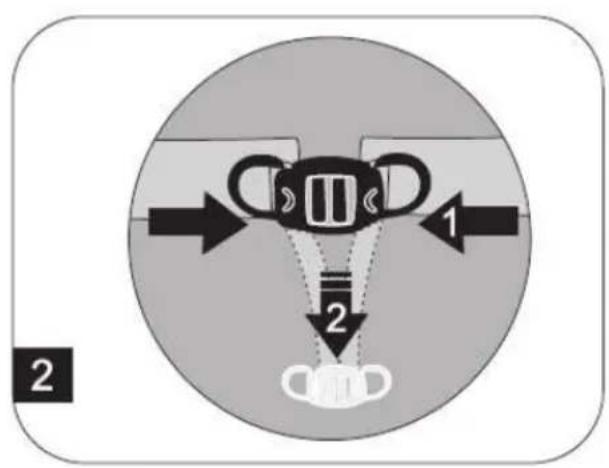
natural_image
Illustration of a baby stroller with a magnified inset showing seat width and seat alignment (no text or symbols)- Aby ste prestavili opierku na nohy, potiahnite tyče na spodnej strane sedadla dopredu (obr. 3).
PRESTAVENIE SKLÁPACEJ STRIEŠKY
natural_image
Cross-sectional diagram of a dome-shaped structure with layered shading (no text or symbols)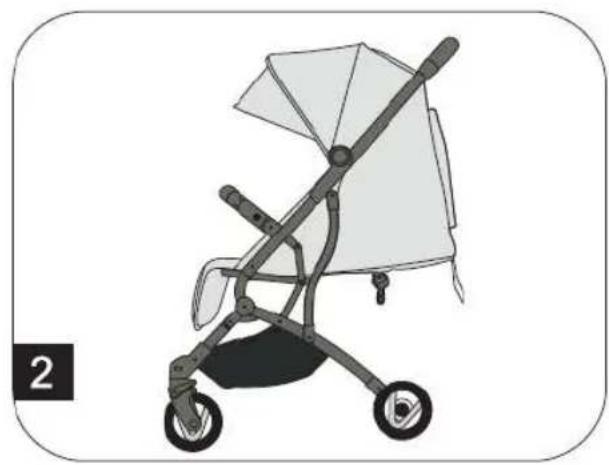
natural_image
Illustration of a baby stroller with a canopy and wheels (no text or symbols)- Aby ste prestavili sklápaciu striešku, potiahnite ju dopredu, resp. zatlačte dozadu.
- Sklápaciu striešku môžete rozšířit pomocou zipsu na hornej strane.
natural_image
Three line drawings of a baby stroller with a red arrow indicating the seatbelt (no text or symbols present)Find us on Facebook and Instagram

www.facebook.com/Osann.de

www.instagram.com/osann_kids
- DE
- WARNING
- Parts
- EN
- UNFOLDING THE PUSHCHAIR
- FOLDING UP THE PUSHCHAIR
- USING THE SAFETY BELT
- ACTIVATING AND RELEASING THE BRAKE
- ADJUSTING THE LEG SUPPORT
- ADJUSTING THE COVER
- Travel system with adapter\* and baby seat\*
- CARE INSTRUCTIONS
- MAINTENANCE
- PRESTAVENIE OPIERKY CHRBTA
- PRESTAVENIE SKLÁPACEJ STRIEŠKY
Brand : Osann
Model : Vegas
Category : Stroller