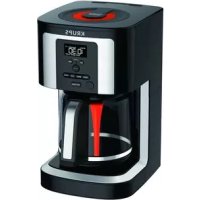
KRUPS EC322 - Coffee machine

EC322 - Coffee machine KRUPS - Free user manual and instructions

Find the device manual for free EC322 KRUPS in PDF.

English EN Download 💬 AI Question 10 questions ⚙️ Specs
📄

Document temporarily unavailable

The manual is currently being transferred to our new server. It will be accessible again in a few hours. Thank you for your patience.

View the manual : Français FR English EN Español ES
Pick your language and provide your email: we'll send you a specifically translated version.
Product type Programmable drip coffee maker
Brand Krups
Model EC322
Power supply voltage 120 V
Maximum capacity 14 cups
Clock programming Yes, with HR/MIN buttons
Delayed start Yes, AUTO button
Brew strength setting Regular / Bold
1-4 cup function Yes, for optimal extraction
Keep warm Yes, adjustable up to 4 hours
Automatic descaling Yes, with CLEAN indicator
Filter type Permanent filter included, compatible with paper filters
Water filter Optional, DuoFilter cartridge
Carafe Glass with handle, 14-cup capacity
Hot plate Yes, keeps warm
Cleaning Carafe dishwasher safe; other parts hand wash
Safety Auto shut-off, short cord, overheat protection
Manufacturer warranty 2 years
Body material Plastic and stainless steel

Frequently Asked Questions - EC322 KRUPS

How do I set the clock on my Krups EC322 coffee maker?
Plug in the appliance, the display shows '1:00 pm' blinking. Press the CLOCK (I) button, then use HR (r) for hours and MIN (s) for minutes. The time is automatically confirmed after 5 seconds or by pressing BREW (k).
How do I use the delayed start function?
Ensure the clock is set correctly. Fill the water reservoir and add coffee. Press AUTO (p): the AUTO icon appears. Set the start time using HR and MIN. The time is confirmed after 5 seconds. To cancel, press AUTO again.
What is the difference between Regular and Bold modes?
Bold mode increases the brewing time for a stronger cup. Press the BOLD (m) button to toggle between REG and BOLD. The setting is remembered for subsequent cycles.
When and how do I use the 1-4 cup function?
To brew 2 to 4 cups, press the 1-4 (n) button before starting the cycle. The 1-4 icon appears. This function optimizes flavor extraction for small quantities.
How do I adjust the keep-warm duration?
By default, keep warm lasts 4 hours. To change it, press KEEP WARM (v) to activate, then use HR and MIN to set the duration (confirmed after 3 seconds). To cancel, press KEEP WARM again.
How do I descale my Krups EC322 coffee maker?
When the CLEAN icon appears or the cycle takes longer, remove the water filter cartridge. Pour 150 ml of white vinegar or a Krups descaling solution into the water reservoir. Press CLEAN (o) then BREW (k). The cycle lasts 30 minutes. Then rinse with 2 cycles of fresh water.
What should I do if the coffee doesn't brew?
Check that the appliance is plugged in and the reservoir has water. Ensure the carafe is properly placed on the hot plate. In case of a power outage, reset the clock. If the problem persists, descale the machine.
Can I use paper filters with the permanent filter?
Yes, you can use a paper filter instead of the permanent filter. Make sure it is fully opened and centered in the filter basket. Do not use both at the same time.
How do I install the DuoFilter water filter cartridge?
Remove the used cartridge from the reservoir. Open the new one by unlocking the lower part. Place it in the holder, then set the change indicator to the current month. Rinse it with cold water before use.
What is the warranty on this product?
Krups offers an international 2-year warranty against manufacturing defects. It covers repair or replacement of the product. The warranty does not cover limescale buildup, normal wear and tear, or misuse.

User questions about EC322 KRUPS

0 question about this device. Answer the ones you know or ask your own.

Ask a new question about this device

The email remains private: it is only used to notify you if someone responds to your question.

No questions yet. Be the first to ask one.

Download the instructions for your Coffee machine in PDF format for free! Find your manual EC322 - KRUPS and take your electronic device back in hand. On this page are published all the documents necessary for the use of your device. EC322 by KRUPS.

USER MANUAL EC322 KRUPS

Manual assistant
Powered by Anthropic
Waiting for your message
Product information

Brand : KRUPS

Model : EC322

Category : Coffee machine