Genius GB30 - Battery starter NOCO - Free user manual and instructions
Find the device manual for free Genius GB30 NOCO in PDF.



| Product Type | Lithium-ion Battery Jump Starter |
| Brand | NOCO |
| Model | Genius GB30 |
| Peak Current | 400 A |
| Starting Current | 200 A |
| Internal Battery Type | Lithium-ion |
| Input Power | Micro USB 5V, 2.1 A |
| USB Output Port | 5V, 2.1 A |
| Charge Time (with 2A charger) | 3 hours |
| Operating Temperature | -30°C to +50°C |
| Charge Temperature | 0°C to +40°C |
| Storage Temperature | -20°C to +50°C |
| Protection Rating | IP65 (ports closed) |
| Cooling | Natural Convection |
| Dimensions (L x W x H) | 17.0 x 8.1 x 4.3 cm |
| Weight | 0.95 kg |
| LED Flashlight | 7 modes (100%, 50%, 10%, SOS, flash, strobe, off) |
| Safety Functions | Spark-proof protection, reverse polarity protection, low voltage battery detection |
| Auto Shutoff | After 7 hours of inactivity |
| Box Contents | GB30 jump starter, micro-USB cable 1m, X Connect HD connectors, 12V USB charger, user manual |
| Compatible Battery Types | 12V lead-acid batteries (up to 2V) |
| Number of Starts per Charge | Up to 20 |
Frequently Asked Questions - Genius GB30 NOCO
User questions about Genius GB30 NOCO
0 question about this device. Answer the ones you know or ask your own.
Ask a new question about this device
Download the instructions for your Battery starter in PDF format for free! Find your manual Genius GB30 - NOCO and take your electronic device back in hand. On this page are published all the documents necessary for the use of your device. Genius GB30 by NOCO.
USER MANUAL Genius GB30 NOCO
Failure to follow the instructions may result in ELECTRICAL SHOCK, EXPLOSION, or FIRE, which may result in SERIOUS
INJURY, DEATH, DAMAGE TO DEVICE or PROPERTY. Do not discard this information.
Welcome. Thank you for buying the NOCO Genius® Boost™ GB30. Read and understand the User Guide before operating the product. For questions regarding our jump starter, view our comprehensive support information at www.no.co/support. To contact NOCO for personalized support (not available in all areas), visit www.no.co/connect.
What's In The Box.
- GB30 Lithium Jump Starter
- 40-Inch Micro USB Cable
12V USB Charger
X Connect HD Battery Clamps - User Guide & Information Guide and Warranty
Contacting NOCO.
Phone: 1.800.456.6626
Email: support@no.co
Mailing Address: 30339 Diamond Parkway, #102
Glenwillow, OH 44139
United States of America
About GB30. The NOCO Genius® Boost™ GB30 is an ultra-compact and portable lithium-ion jump starter for cars, boats, motorcycles, ATVs, lawn mowers, RVs, tractors, trucks and more. It's extremely safe for anyone to use. It features spark proof technology and reverse polarity protection. The GB30 can instantly jump start most single-battery applications, up to 20 times on a single charge. The GB30 is also equipped with a USB battery pack and LED flashlight, making it the ultimate emergency tool.
Getting Started. The GB30 comes partially charged out of the box and needs to be fully charged prior to use. Carefully read and understand the vehicle owner's manual on specific precautions and recommended methods for jump starting the vehicle. Make sure to determine the voltage and chemistry of the battery by referring to your battery owner's manual prior to using this product. The GB30 is for jump starting 12-volt lead-acid batteries only.
Connecting to the Battery.
Before connecting to the battery, verify that you have a 12-volt lead-acid battery. The GB30 is not suitable for any other type of battery. Identify the correct polarity of the battery terminals on the battery. The positive battery terminal is typically marked by these letters or symbol (POS,P,+). The negative battery terminal is typically marked by these letters or symbol (NEG,N,-). Do not make any connections to the carburetor, fuel lines, or thin, sheet metal parts. The below instructions are for a negative ground system (most common). If your vehicle is a positive ground system (very uncommon), follow the below instructions in reverse order.
1.) Connect the positive (red) HD battery clamp to the positive (POS,P, + ) battery terminal.
2.) Connect the negative (black) HD battery clamp to the
negative (NEG,N,-) battery terminal or vehicle chassis.
3.) When disconnecting, disconnect in the reverse sequence, removing the negative first (or positive first for positive ground systems).
Jump Starting.
1.) Verify the voltage and chemistry of the battery.
2.) Confirm the HD battery clamps are connected to the correct polarity battery terminals.
3.) Connect the HD X Connector to the GB30.
4.) Make sure all of the vehicle's power loads (headlights, radio, air conditioning, etc.) are turned off before attempting to jump start the vehicle.
5.) Press the Power Button to begin jump starting. All LEDs will flash, indicating that all LEDs are properly functioning. If you are properly connected to the battery, the White Boost LED will illuminate. If the battery clamps are connected in reverse, the Red Error LED will illuminate. Reverse the connections to clear this error and then the White Boost LED will illuminate. The White Boost LED is illuminated, when the GB30 is ready to jump start your vehicle.
6.) Try starting the vehicle. Most vehicles will immediately start. Some vehicles may require the GB30 to be connected for up to 30 seconds before starting. If the vehicle does not start right away, wait 20-30 seconds and try again. Do not attempt more than five (5) consecutive jump starts within a fifteen (15) minute period. Allow the GB30 to rest for fifteen (15) minutes before attempting to jump start the vehicle again.
7.) Once you have started your vehicle, disconnect the battery clamps, and remove the GB30.

Low Voltage Batteries & Manual Override
The GB30 is designed to jump start 12-volt lead-acid batteries down to 2-volts. If your battery is below 2-volts, the Boost LED will be "Off". This is an indication that the GB30 can not detect a battery.
If you need to jump start a battery below 2-volts there is a Manual Override feature, which allows you to force "On" the jump start function.
CAUTION. USE THIS MODE WITH EXTREME CARE. THIS MODE IS FOR 12-VOLT LEAD-ACID BATTERIES ONLY. BOTH THE SPARK PROOF AND REVERSE POLARITY PROTECTION FEATURES ARE DISABLED. PAY VERY CLOSE ATTENTION TO THE POLARITY OF THE BATTERY BEFORE USING THIS MODE. DO NOT ALLOW THE POSITIVE AND NEGATIVE BATTERY CLAMPS TO TOUCH OR CONNECT TO EACH OTHER AS THE PRODUCT WILL GENERATE SPARKS. THIS MODE USES VERY HIGH CURRENT (UP TO 400 AMPS) THAT CAN CAUSE SPARKS AND HIGH HEAT IF NOT USED PROPERLY. IF YOU ARE UNSURE ABOUT USING THIS MODE, DO NOT ATTEMPT AND SEEK PROFESSIONAL HELP.
Before using the Manual Override feature, make sure the HD battery clamps are connected to the correct polarity battery terminals and the HD X Connect is connected to the GB30. To use the Manual Override feature, press and hold the Manual Override Button (a red exclamation point icon inside a red circle) for three (3) seconds. The White Boost LED will flash "On" and "Off" indicating you have successfully entered into Manual Override and it is ready to jump start your vehicle. If connected in reverse polarity, the Red Error LED will illuminate and the unit will not operate.
CAUTION: POWER THE GB30 "OFF" BEFORE DISCONNECTING THE BATTERY CLAMPS. THIS WILL ENSURE YOUR SAFETY. REMEMBER BOTH THE SPARK PROOF AND REVERSE POLARITY PROTECTION FEATURES ARE DISABLED.
Most vehicles will immediately start. Some vehicles may require the GB30 to be connected for up to 30 seconds
before starting. If the vehicle does not start right away, wait 20-30 seconds and try again. Do not attempt more than five (5) consecutive jump starts within a fifteen (15) minute period. Allow the GB30 to rest for fifteen (15) minutes before attempting to jump start the vehicle again.
Understanding Charge LEDs.
The GB30 has four (4) Charge LEDs - 25% 50% 75% and 100% . These Charge LEDs indicate the internal battery's state-of-charge (SOC). See below:
| LED Explanation | |
| 25% Red LED 25% 50% 75% 100% | The 25% Charge LED will be solid Red when the internal battery is less than 25% charged. |
| 50% Red LED 25% 50% 75% 100% | The 50% Charge LED will be solid Red when the internal battery is less than 50% charged. |
| 75% Yellow LED 25% 50% 75% 100% | The 75% Charge LED will be solid Yellow when the internal battery is less than 75% charged. |
| 100% Green LED 25% 50% 75% 100% | The 100% Charge LED will be solid Green when the internal battery is fully charged. No other LEDs will be illuminated. |

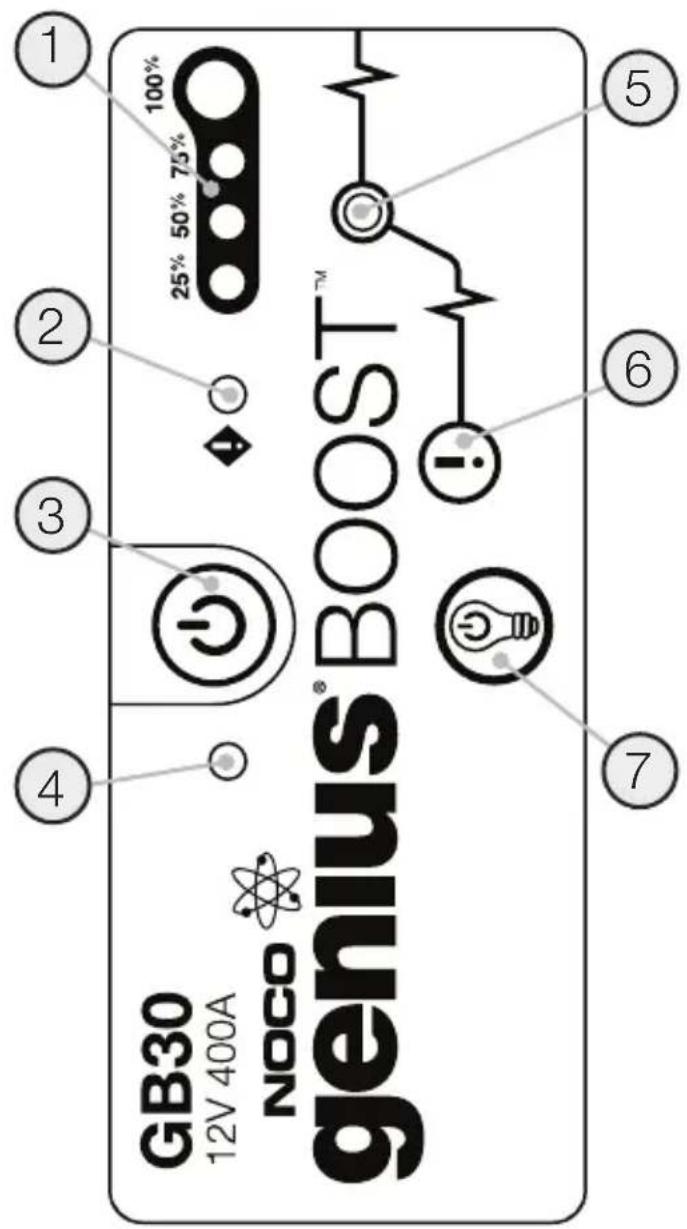
User Interface.
1. Internal Battery Level
Indicates the charge level of the internal battery.
2. Error LED
Illuminates Red if reverse polarity is detected, or blinks "On" and "Off" when the internal battery temperature is too high.
3. Power Button
Push to turn unit "On" & "Off".
4. Power LED
Illuminates White when unit is "On".
5. Boost LED
Illuminates White when Boost is active. If the unit is connected properly to a battery, the GB30 will automatically detect a battery and go into Boost mode (LED flashes White when Manual Override feature is active).
6. Manual Override Button
To enable, push and hold for three (3) seconds.
WARNING: Disables safety protection and manually forces Boost "On". Only for use when a battery is too low to be detected.
7.Light Mode Button
Toggles the ultra-bright LED light through 7 light modes:
100% > 50% > 10% > SOS > Blink > Strobe > Off

When Recharging the GB30.
| LED Exp | ation |
| 25% Red LED 25% 50% 75% 100% ●○○○ | The 25% Charge LED will slowly pulse "On" and "Off", when the battery is less than 25% charged. When the battery is 25% charged, the Red Charge LED will be solid. |
| 50% Red LED 25% 50% 75% 100% ●○○○ | The 50% Charge LED will slowly pulse "On" and "Off", when the battery is less than 50% charged. When the battery is 50% charged, the Red Charge LED will be solid. |
| 75% Yellow LED 25% 50% 75% 100% ●○○○ | The 75% Charge LED will slowly pulse "On" and "Off", when the battery is less than 75% charged. When the battery is 75% charged, the Yellow Charge LED will be solid. |
| 100% Green LED 25% 50% 75% 100% ○○○○ | The 100% Charge LED will slowly pulse "On" and "Off", when the battery is less than 100% charged. When the battery is fully charged, the Green LED will be solid, and the 25%, 50% and 75% Charge LEDs will turn "Off". |
Understanding Error Conditions.
The GB30 shall display an Error Condition when a reverse polarity condition is present a battery below two (2) volts, or the internal battery overheating. When one of these Error Conditions are present, the following will happen:
| Error Reason/Solution | |
| Error LED | Reverse polarity/ Reverse the battery connections. |
| Solid Red | |
| Error Reason | Solution |
| Error LED Blinking Red w/Cables Connected Properly | The internal battery is too hot/ Allow the unit to cool. Bring the unit into cooler environment. |
| Boost Light Does Not Come On w/Cables Connected Properly | Connected battery is below 2-volts/ Remove all loads, and try again, or use Manual Override Mode. |
Charging the GB30.
Connect the GB30 using the included USB Charge Cable to the USB IN port and the USB car charger. It can also be recharged from any USB powered port, like an AC adapter, car charger, laptop and more. The USB IN port is rated at 2.1 Amps to ensure safe and efficient charging of the internal lithium battery. Due to FCC regulations, we recommend not to charge and discharge the unit at the same time.
Charging Times.
The time to recharge a GB30 will differ based on the discharge level and the power source used. Actual results may vary due to battery conditions.
| USB Charger Rating .5A 1A 2A | |||
| Time | 12hr | 6hr | 3hr |
Charging Your USB Devices.
You can recharge virtually any USB device, like a smartphone. Connect the included USB Charge Cable to the USB OUT port and connect to your USB device.

The number of times you can recharge a USB device will vary between devices. For recharge times, contact your device manufacturer.
LED Flashlight.
The GB30 has an integrated ultra-bright LED flashlight. It has seven (7) light modes that effect its performance and longevity: 100% , 50% , 10% , SOS, Blink, Strobe, and Off.
To turn the flashlight "On" and "Off", use the Power button with the light bulb icon. Press once to turn the flashlight "On" at 100% luminosity, again for 50% luminosity (within 3 seconds), again for 10% luminosity (within 3 seconds), again for SOS (within 3 seconds), again for Blink (within 3 seconds), again for Strobe (within 3 seconds) and again for "Off". If a light mode is not selected within 3 seconds, it will remain "On" in the current light mode, and the next selection will turn the flashlight "Off".
Depending on the mode selection, the GB30 will have various levels of output and runtime. Selecting a lower power level when using the GB30 for extended periods of time will prolong battery life.
Modes:
$$ 100 \% > 50 \% > 10 \% > \text {SOS} > \text {Blink} > \text {Strobe} > \text {Off} $$
Energy Saving Auto Shut Off.
The GB30 has a built in energy saving feature that will automatically turn the unit off after seven (7) hours. To continue using, simply power on the unit again.

Technical Specifications.
| Internal Battery: | Lithium Ion |
| Peak Current Rating: | 400A |
| Starting Current Rating: | 200A |
| Operating Temperature: | -30°C to +50°C |
| Charging Temperature: | 0°C to +40°C |
| Storage Temperature: | -20°C to +50°C (Avg Temp.) |
| Micro USB (Input): | 5V, 2.1A |
| USB (Output): | 5V, 2.1A |
| Housing Protection: | IP65 (w/Ports Closed) |
| Cooling: | Natural Convection |
| Dimensions (L x W x H): | 6.7 x 3.2 x 1.7 Inches |
| Weight: | 2.1 Pounds |
NOCO INT genius BOOST GB30
United States of America
Specifications techniques.
United States of America
United States of America
United States of America
United States of America
Sobre GB30. O NOCO Genius® Boost™ GB30
住所:30339 Diamond Parkway, #102
Glenwillow, OH 44139
United States of America
Mailing Address: 30339 Diamond Parkway, #102
Glenwillow, OH 44139
United States of America
Postaddress: 30339 Diamond Parkway, #102
Glenwillow, OH 44139
United States of America
United States of America
O GB30. NOCO Genius® Boost™ GB30 - 3TO cynep kOMnakTHoe IN NopTaNBHOe NcCKOBoe yCTPOINCTBO nIa ABTomO6NJe, NODOK, MOTOKNIOB, KBaDpaCNIKNOB, rA3OHOKOCNIOK, ABTOΦyPROHOB, TPAKTOPOB, rpy3OBbIX aBTOMO6NJe IN dP. PnpOyKT OTNIuHaTc8 Be3ONACHOCTBIO pni NCNoJIb3OBAHN. IpeDyCMATPNBAOT TEXHOJOrHIO NcKpO3aUIIeHHOCTN IN 3aUNTY OHT HENpABINbHOJ NOnApHocTb. The GB30 MoXET MRHOBEHNO 3aNyCTNTb 6oJIbWHCTBO OdHOaKKymJrTOPbIX cpeCDTB, Do 20 pa3 3a ODNH 3apRd. GB30 TaKxE OCHaIeH AKKymJrTOPHOJ 6aTapee C USB IN CBTeOJNOhBIM fOHApE, YTO DeJaET erO NOTPcAIOUIM Ha6OpOM DnA abAPInHOH CNtuaUN.
Haayano pa60tbl. GB30 npednaeraetcaacTNUHO 3apjxehhbIM nOJxhen 6bItb nonHocTbIO 3apjxeh nepei NCnOlb3OBaHHeM. BHImateNbHO npouHTaIte N yAChnte pyKOBoDCTBNO O KcnpyaTaun, KOHKpeTHbIe MEPbl npedocTOPOXHOCTN n peKomeHdyeMbIe MeToDbI 3anycka ABTomO6nJIy. O63aTeNbHO onpeDeNITe HAnpJxHeH e XmUneckn COCTab AKKymyTATopa, N3yUnB neped NCnOlb3OBaHHeM 3TOTO npOdykTA INCHcpyKuIO NO 3KcPnyataun. GB30 npedHa3HaueH ToIbKO IIN12-BONbTOBbIX CBNHOCBO-KNCNOTbIX AKKymyTATopOB.
PpncoeunHeHne KaKKymyTopy.
Ipeep noKnueHnem K AkKymyTOpTy y6eHTecb, YTO 12-BoTobBmCBnUcOBO-KNCIOThbAkkymyTApOp.GB30 He NOxODNT K dpYrM BnDAM AKKymyTApOpB. IpaBnJbHO onpeDenTe NoparHocTb NIOCHbIX WtbpEi. NIOXKeTbnHbN IOIOChbI Wtbp6 ObuHNo O6o3Haey H TImN 6yKBaMn NIN CMBOLAMN (POS,P,+).OTpuCaTeMbHbN NOIOChbI Wtbp6 ObuHNo O6o3Haey E TImN 6yKBaMn NIN CMBOLAMN (NEG,N,-). He coeHNHne T c Kap6OpaTopOM, TOnNNBONpOBdAmn NN ToKNIMu qactmN 3 NCTOBORo MetaIIa. Hxke daHbI HHCTpyKznn DnA CNTEmbC 3a3EmHeHmE OTpuCaTeNbHO OIOHcA (HaN6OJIee qACTO BCTpeauOuaJcA. EcIn BaW ABTOMO6NJb IMeET CNCTeMy C 3a3EmHeHmE NOLOXHTeNbHO OIOHcA (OueHb peKO), INCNOB3yIte pPBeDEHHyU Hxke HHCTpyKzIO HaO6OpOT.
1.)ПОДКЛIOUHTe NOLOKINTeJbHbI(KpaCHbI)HD3aXIM aKKMyJIaTopa K N03NTNBHOmy 3aXIMy aKKMyJIaTopa (POS,P,+).
2.) NpKnHouNte HeRaTnBHyI (YePbI) 3aKIM K HeratNBHomy 3aKmMy aKKymyJtopa (NEG,N,-) nnn abTomo6nJbHomy waccn.
3.)Пи OTKIIOUeHnO,OTKIIIOuAte B O6paTHOM noprIKe, CHaYaNA CHIMAR 3JIeMeHTbI C HeraTINBHyIM NOJIOCOM (NIN C N03NTNBbIM PpN pa6Ote C CNTeMoN 3a3EmJIeHnR NOJIOXkTeJbHOro NOJIIOca).
3anyck.
1.)ПоверпьтЕнарржкенEихимческnc coctabakkymylTopa.
2.)Y6eIuTeCb,yTO HD 3axKmbi aKKymJrTopa npabunbHO NOkJIIOUeHbBI COOTBecTBn C NOJpHOCTbIO KJEMM.
3.)PnncoeHnHTe pa3bEM HDXKGB30.
4.) 86eintecb, yTO BCE cINOBbIe Harpy3Kn ABTomO6nIIA (apbl, paIIO, KOHNIOHep n T. n.) BblIOUeHbI nepeDNONbIKoN 3aNyCTNTb DBNrAteJIb.
5.) Haxmnte KhoNky nItaHna, YTo6bI Haayt b3anyck DnraTeJEA. Bce CBeTOnIOJb 3AmraIoT, O6O3Haayc CBOIO uCnpabHOCTb. EcnB bI npabInbHO NOkKnUoynnbc c aKKymyIaTOpy, 3arOpNTc 6eblcCBToND. Ecn 3aKmbI aKKymyIaTOpa nepenyTaHbI, 3arOpNTc KpaChbI CBToNDo OW6Kn. PomeHnIte CoeINHeHne, YTo6bI MnpabTb OW6Ky, Nocne 3TORo 3arOpNTc 6ebln CBToNDoD. Korda 3arOpNTc 6ebln CBToNDoD, GB30 rOtob 3aNyCTNb DnraTeJIb BaWero TpaHCnOpTHoro cpeCTBa.
6.) Nonpo6yIte 3aBecTn TpaHnOpTHoe cpeCTBO.
5oJbunHCTBO TpaHCnopTHbIX cpeCTB 3aBeTeTc
HeMeJeHHo. HeKOTOpBle TpaHCnopTHbe cpeCTBa Moryt
Tpe6ObaTb noKJIoueHn GB30 Do 30 cekyHn nepeD tem,
kak 3aBeCTncb. Ecnn TpaHCnopTHoe cpeCTBO He 3aBeNoCb
HeMeJeHHo, noIOxJnte 20-30 cekyHn n NOBTopuTe
nonbTKy. He nbTaIteCb npEepnHnTB 6Oonee nTn (5)
3aNyCKOB noopd B TeueHne nTHaDaTu (15) MNHT.
OctabTe GB30 B coCToHn NOKo Ha nTHaDaTu (15)
MNHT nepeD noBTOpHO nnbTKo 3aNycka DBrIraTeNa
TpaHCnopTHoro cpeCTBa.
7.) KaK ToIbko Bbl 3aNyctnIn TpaHcnpTHe cpeCTBO, OToCoeINHInTe 3aJIMMbI aKKyMnyTopa NOTKnIOHTe GB30.
AkkymyIaTOpbl Hn3KOro HanpXeHn pyuHoe ynpaBHeHne
GB30 npedha3auehen 3ayncKa cBnHcOBO-KncNtBbIX aKymyIaTOPOB HAnpJxKeHnEMOT 12Vdo 2V.Ipn HApJxKeHm MeHee 2V cbTeODnOd Boost 6ydt "Off".3To 3HaHT, yTo GB30 He MoXeT o6hApYkNTb aKymyIaTOp.
EcHn Bam Hyxho 3aNyctntb akkymyIaTOp HnprjKeHneM MeHee 2-x BoIbT,ДЯ 3TOrO cyuecTBye TfHyKUma Manual Override (pyHoe ynpabLeHne),no3BOJIAUaŋ npHuDInTeBHO BKIOUHTb "On"ДЯФHKIN 3aynCka.
BHIMAHNE. INCNOJIb3yUITE 3TOT PEXKIM C NIOBbIUEHHOINPEDOCTOPOXHOCTbIO. 3TOT PEXKIM INPEDAHA3HAYEHTOJbKO IJIa 12-BOJbTOBbIX CBNHLOBO-KNCJOTHBIXAKKYMJIYATOPOB. B 3TOM PEXKIME OTKIIQUEHbI ΦYNKcIMNCKPO3AUIISEHHOCTN I 3AUITBI OT OBPATHOHIONLPARPHOCTNI. OBPATNTE CAMOE INPUCTALbHOE BHIMAHINEHA INOLPAHOCTb AKKUMJIYTOPA INPEED INCNOJIb3OBAHEM3TOFOPEKIMA. HE IONYCKAITE COINPKOCHOBEHINJINIPNICOEINHEHINIO3HTNBbIX I HERATINBbIX3AXKIMOB, TAK KAK INPOdYKT HAYHET BbIPACsbIBATbNCKPbI. 3TOT PEXKIM INCNOJIb3yET OUYHb BbICOKNI TOK(ДО 400 AMIIPEOB), YTO MOXET BblBATb BblPACsbIBAHINECKP INOBblSeHHoe HarpeBaHne PNI HEONJHOMINCNOJIb3OBAHIN. ECJIIN Bbl HE YBEPEHbI INPIMMEHENIN3TOFOPEKIMA, HE INPEdINHMAITE NOBbITOK EFOINCNOJIb3OBAHIN IN OPBATNTECb 3A INPODECCNOHAJIbHOINOMOUIIO.
Ipeep npimmeHemf yHKnnpyHoro ynpabHeHHy 6eHtecb, YTO 3axkmbi HD npncoeHneHb K akkymnyTopy B npabInbHOJ noJrphocTn, n HD X Connect npncoeHN H GB300.ДЯ nCpOJIb3OBAHnA fHKnnpyHoro ynpabHeHHaHXMTE KhoNky Manual Override (KpacBb BOcknuaTeNbHbI 3NaK B KpaCHOM KpyKke) uYdepXnbAte Tpu (3) cekHydbI. BeblcBcToNDoD 3amiraet "On" n "Off", coo6aay, YTO bbl ycNeWBO BKIOUHnP pEXIM puHoro ynpabHeHHu rOTOBbl 3anyCTntb TpaHCnopTHoe cpeDCTBO. Ppi NODKIOUeHHN B 6paTHOH NOJrphocTn, 3arOpNTcKpaCHbI CBeToNDoD, n UcTpoINCTBO He 6yedT pa6oTaTb.
BHIMAHNE: BbIKJIOHTE GB30 "OFF" IPEEDOTCOEDINHEHEM AKKUMYJATOPHBIX 3AXMMOB.3TOOBECNEHT BAUy BE3OJNACHOCTb. NOMHITE, YTO B 3TOMPEKIME OTKIOUCHEBI ΦYNKLIIN NCKPO3AUIIUJEHHOCTNI 3AUHTBI OT OBPATHOH IONPAHOCTN.
BolbUnHCTBO TpaHCnOpTHbIX CpeCTB 3aBeTeTc HemeJeHHo. HeKOTOpBte TpaHCnOpTHbe CpeCTBa MoryT Tpe6oBaTb NOkJIouHeNg GB30 Do 30 cekyHnepeTeM, KaK 3aBeCTncb. Ecn TpaHCnOpTHoe CpeCTBO He 3aBeNoCb HemeJeHHo, noOxJnte 20-30 cekyHn NOBTOPTe nonItky. He nbTaIaTeCb npeDpInHraTb 6OJee nTt (5) 3aYsCKOB NOprd B TeueHne PAnHaDaTu (15) MNHT. OctabbTe GB30 B CoCToHm NOKoHa (15) MNHT nepeN NOBTOPHON NObTKo3aYsKa DBrGaTeLa TpaHCnOpTHoro CpeCTBa.
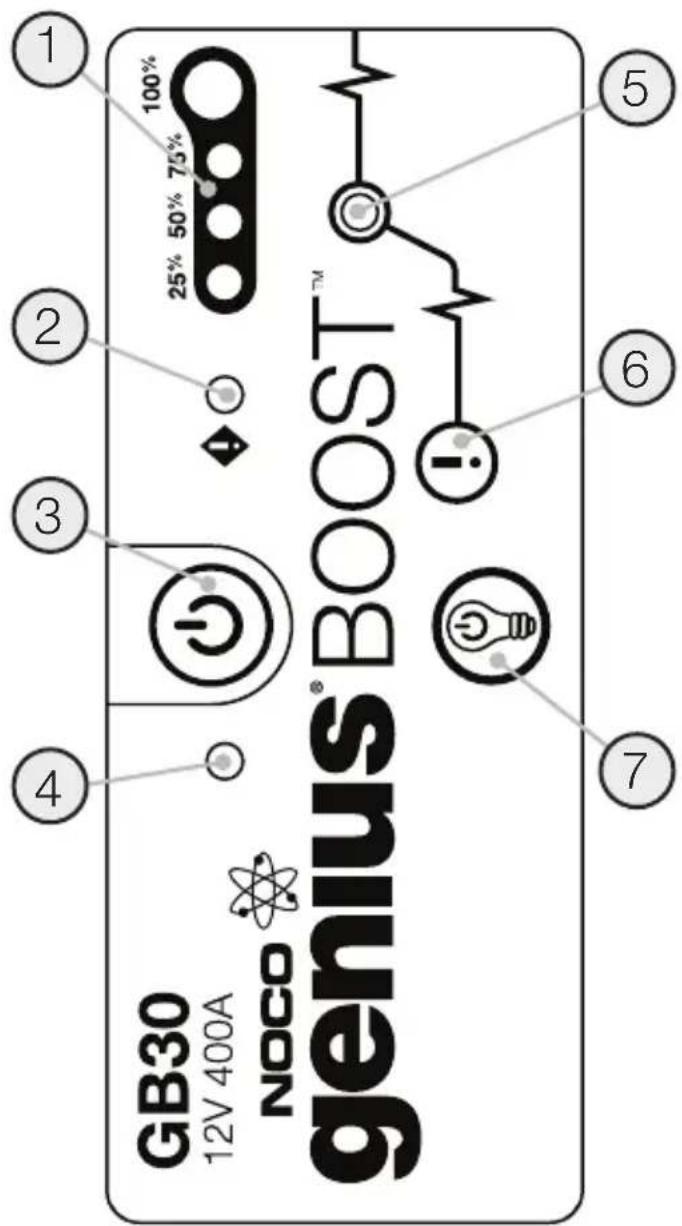
POnHMaHHe 3apAaHbIX CBeToaNoOBo.
GB30 nmeet yteIpe (4) nHnKaTopa 3apra: 25% 50% 75% n 100% .Tn nHnKaTopbOTMeuAOT COCTOHNe 3aprKn (SOC) BcTpoEHHO6aTapeu.Cm. HNKe:
3aropaeTcKpaChbIM,ecnO6HapyKeHa 6paTHaI NOJIaRHOCTb,NIN MInraet "On" u "Off" npu qpe3MePHOM IOBbIeHN BCTPoeHHoro AkkMyJrToPA.
3. Khonka nHTaHnA
HaKaTb,TO6bI BKNIOHTbBbIKIOHTb.
4.Инд nntaHnA
Topnt 6enbIM, KOrJa npOdyKT BkIIOueH.
无锡:30339 Diamond Parkway, #102
Glenwillow, OH 44139
United States of America
主的。I.12VnBtRlTnJi.12VnBtRlTnJi.12VnBtRlTnJi.12VnBtRlTnJi.12VnBtRlTnJi.12VnBtRlTnJi.12VnBtRlTnJi.12VnBtRlTnJi.12VnBtR1TnJi.12VnBtRlTnJi.12VnBtRlTnJi.12VnBtRlTnJi.12VnBtRlTnJi.12VnBtRlTnJi.12VnBtRlTnJi.12VnBtRlTnJi.12VtRlTnJi.12VtRlTnJi.12VtRlTnJi.12VtRlTnJi.12VtRlTnJi.12VtRlTnJi.12VtRlTnJi.12VtRlTnJi.12VtRlTnJi.12VvTtRlTnJi.12VvTtRlTnJi.12VvTtRlTnJi.12VvTtRlTnJi.12VvTtRlTnJi.12VvTtRlTnJi.12VvTtRlTnJi.12VvTtRlTnJi.
SudongjustakgngunuugahigcKnHdBbTtRlglcRbHaBbTtRl
taJiJxJ10000000000000000000000000000000000000000000000000000000000000000000000000000000000000000000000000000
< < < > 10% > 50% > 100%
JLLLED
jLLED4GB30g25% LED.100%g.75%g.50%g.25% (SOC) jLJIJIJIJIJIJIJIJIJIJIJIJIJIJIJIJIJIJIJIJIJIJIJIJIJIJIJIJIJIJIJIJIJIJIJIJIJIJIJIJIJIJIJIJIJIJIJIJIJIJIJIJIJIJIJIJIJIJIJIJIJIJIJIJIJIJIJIJIJIJIJIJIJIJIJIJIJIJIJIJIJIJIJIJ
J 150g. Jg30 20 150g 150g 150g 150g 150g 150g 150g 150g 150g 150g 150g 150g 150g 150g 150g 150g 150g 150g 150g 150g 150
30339 Diamond Parkway, #102
Glenwillow, OH 44139
United States of America
30339 Diamond Parkway, #102
Glenwillow, OH 44139
United States of America
no.co
NPD06122014E
- What's In The Box.
- Contacting NOCO.
- Connecting to the Battery.
- Jump Starting.
- Low Voltage Batteries & Manual Override
- Understanding Charge LEDs.
- User Interface.
- Internal Battery Level
- Error LED
- Power Button
- Power LED
- Boost LED
- Manual Override Button
- 7.Light Mode Button
- When Recharging the GB30.
- Understanding Error Conditions.
- Charging the GB30.
- Charging Times.
- Charging Your USB Devices.
- LED Flashlight.
- Energy Saving Auto Shut Off.
- NOCO INT genius BOOST GB30
- Sobre GB30. O NOCO Genius® Boost™ GB30
- PpncoeunHeHne KaKKymyTopy.
- 3anyck.
- AkkymyIaTOpbl Hn3KOro HanpXeHn pyuHoe ynpaBHeHne
- POnHMaHHe 3apAaHbIX CBeToaNoOBo.
- Khonka nHTaHnA
- 4.Инд nntaHnA
Brand : NOCO
Model : Genius GB30
Category : Battery starter