
Mi Bedside Lamp 2 - Lamp Xiaomi - Free user manual and instructions
Find the device manual for free Mi Bedside Lamp 2 Xiaomi in PDF.
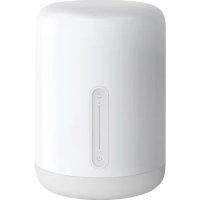



| Product type | Connected bedside lamp |
| Brand | Xiaomi |
| Model | MJCTD02YL |
| Power supply | Power adapter 100-240V, 12V ⎓ 0.8A |
| Power consumption | 9 W (nominal) |
| Wireless connectivity | Wi-Fi IEEE 802.11 b/g/n (2.4 GHz), Bluetooth |
| Compatibility | Android 4.4 or later, iOS 9.0 or later |
| Settings | Color, color temperature, brightness |
| Functions | Night light, sleep timer, touch control, control via Mi Home/Xiaomi Home app and Apple HomeKit |
| Color rendering index (CRI) | 80 |
| Power factor | 0.8 |
| Operating temperature | -10°C to 35°C |
| Operating humidity | 0% to 85% RH |
| Dimensions (estimated) | Height approx. 15 cm, diameter approx. 10 cm |
| Weight (estimated) | 300 g |
| Body material | Plastic, polycarbonate |
| Light source | Integrated LED (not user-replaceable) |
| Maintenance | Clean with a soft, dry cloth. Do not use abrasive products. |
| Safety | Use only the supplied adapter. Do not expose to moisture. Minimum distance of 20 cm for the antenna. |
| Repairability | Bulb not replaceable. Repair by the manufacturer or a qualified professional. |
Frequently Asked Questions - Mi Bedside Lamp 2 Xiaomi
User questions about Mi Bedside Lamp 2 Xiaomi
0 question about this device. Answer the ones you know or ask your own.
Ask a new question about this device
Download the instructions for your Lamp in PDF format for free! Find your manual Mi Bedside Lamp 2 - Xiaomi and take your electronic device back in hand. On this page are published all the documents necessary for the use of your device. Mi Bedside Lamp 2 by Xiaomi.
USER MANUAL Mi Bedside Lamp 2 Xiaomi
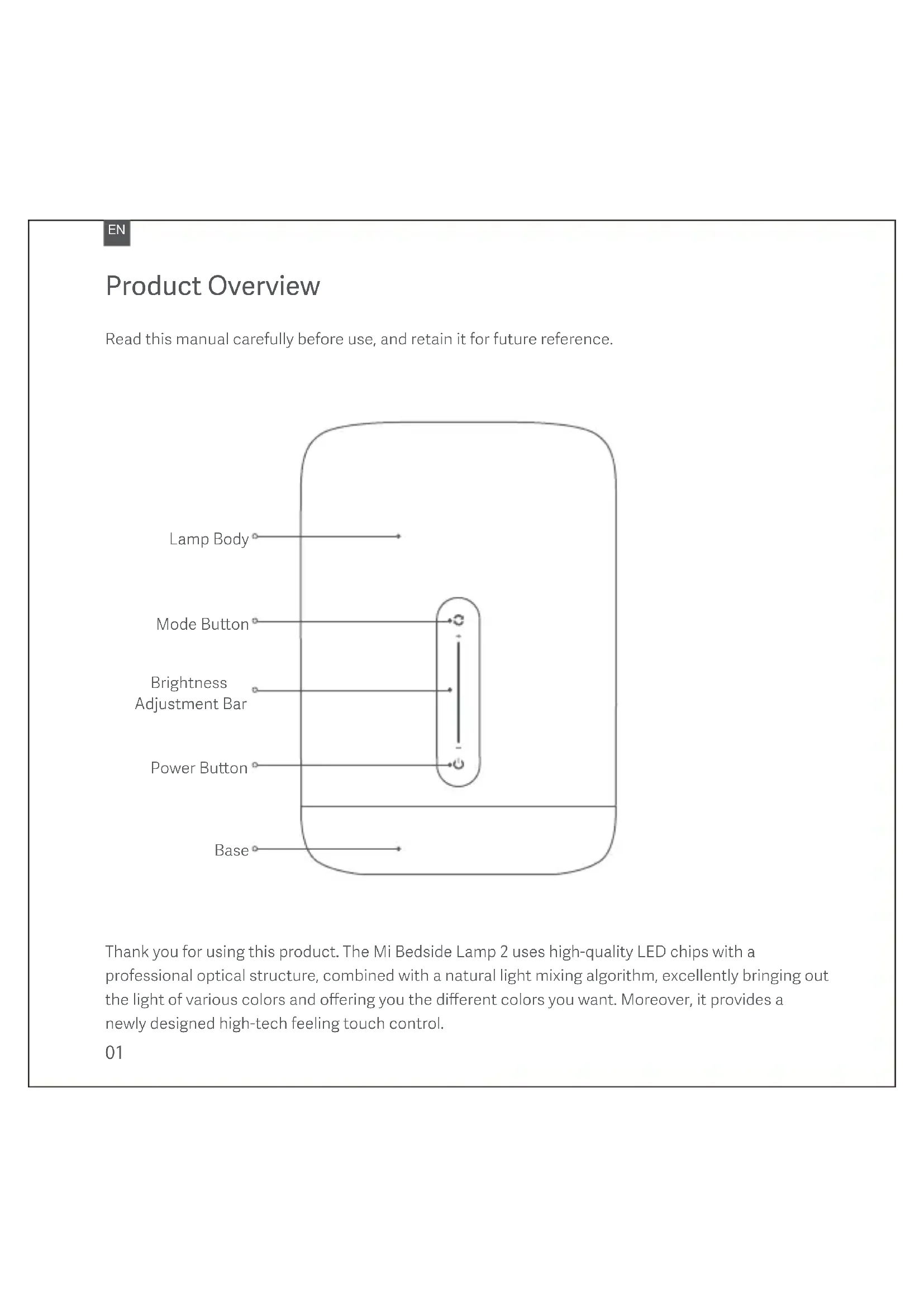
Read this manual carefully before use, and retain it for future reference.
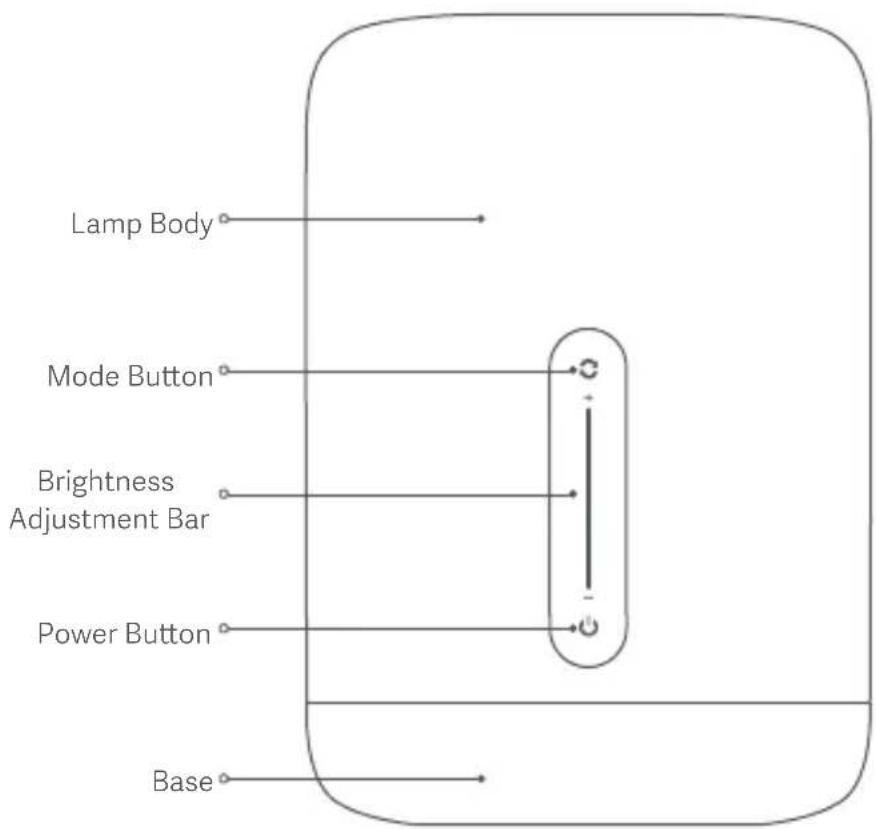
Thank you for using this product. The Mi Bedside Lamp 2 uses high-quality LED chips with a professional optical structure, combined with a natural light mixing algorithm, excellently bringing out the light of various colors and offering you the different colors you want. Moreover, it provides a newly designed high-tech feeling touch control.
Using the Lamp
Installation
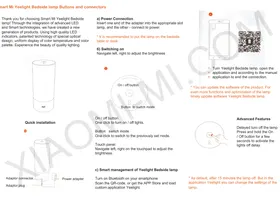
Plug the power cable into the charging port at the base and connect the adapter to a power supply.
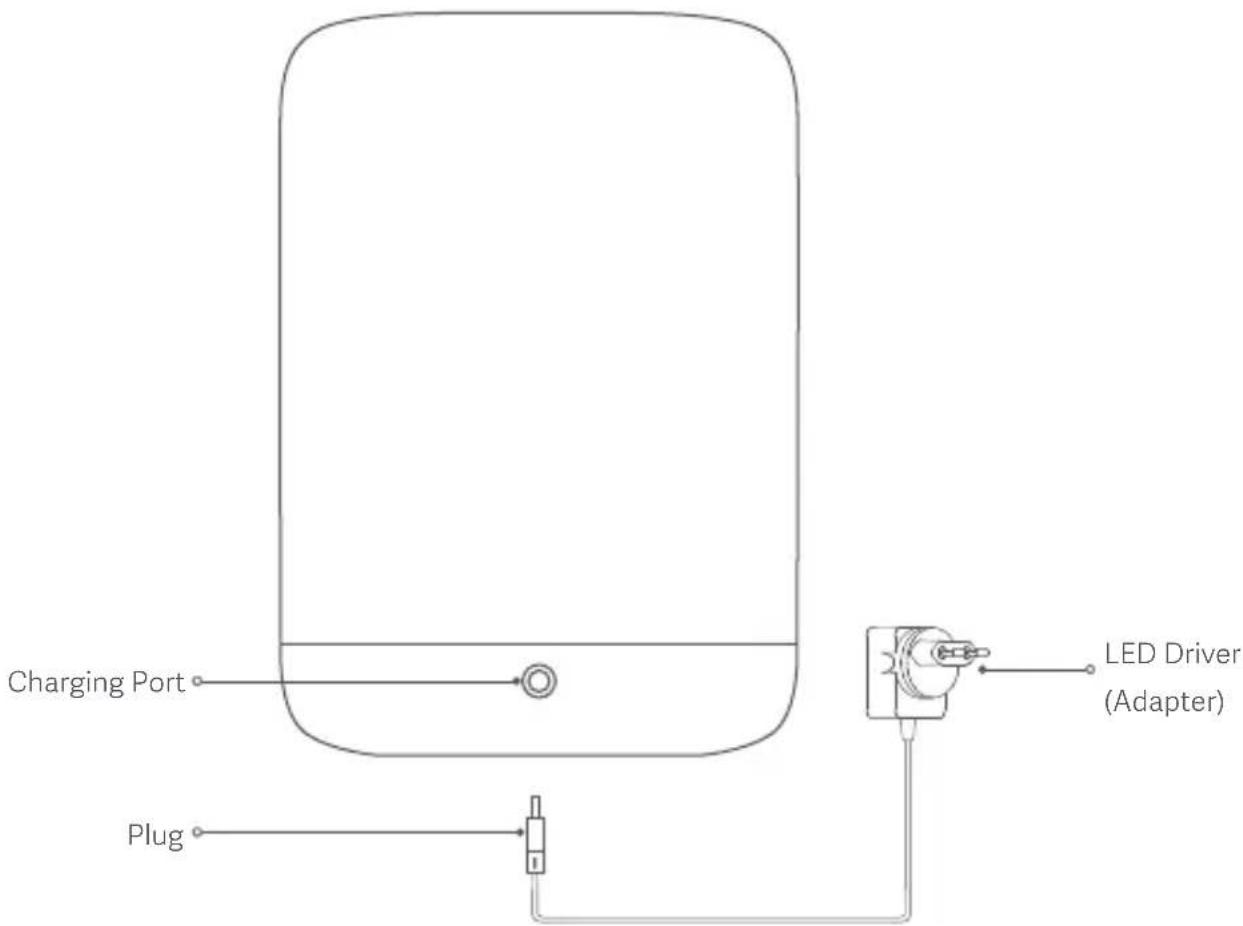
* It is recommended that you place it on a nightstand or a desk.
EN
Instructions
01 Function Buttons
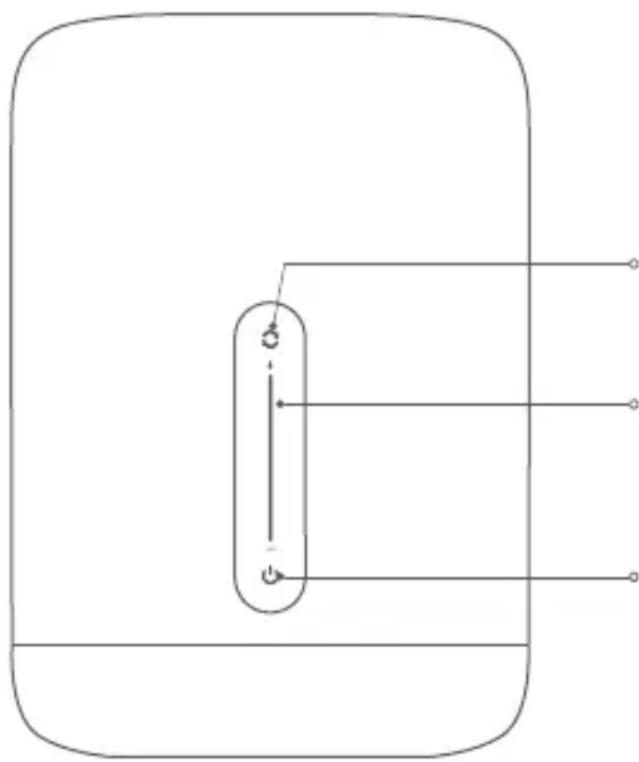
Mode Button
- Press: switch the default light color for the current mode.
- Press and hold for 2 seconds: switch between color or color temperature mode.
Brightness Adjustment Bar
- Swipe up/down to adjust the brightness.
- When the light is off, touch the brightness bar to turn on the light, and the brightness level will correspond to the touched position.
Power Button
- Press: on/off.
- When the lamp is on, press and hold the power button for 2 seconds to enable the turn-off delay feature (the default delay is 15 minutes, which can be set in the app).
02 Advanced Features
Night Light Function
You can set the time period via the mobile app to enable the night light mode. When turning on the lamp with the night light mode enabled, the lamp will automatically enter into night light mode to avoid excessive brightness to the eyes. When turning on the lamp during non-night light periods, the lamp will automatically return to the state saved in normal mode.
03 Connect with Mi Home / Xiaomi Home App
This product works with Mi Home / Xiaomi Home app *. Control your device, and interact it and other smart home devices with Mi Home / Xiaomi Home app.
Scan the QR code to download and install the app. You will be directed to the connection setup page if the app is installed already. Or search "Mi Home / Xiaomi Home" in the app Store to download and install it.
Open Mi Home / Xiaomi Home app, tap "+" on the upper right, and then follow prompts to add your device.
* The app is referred to as Xiaomi Home app in Europe (except for Russia). The name of the app displayed on your device should be taken as the default.

Note: The version of the app might have been updated, please follow the instructions based on the current app version.
04 Apple HomeKit Smart Control
- Open the Home app on your iPhone or iPad.
- Tap "Add Accessories" and follow the instructions in the app to scan the QR code on the product base, or enter the 8-digit setup code above the QR code to grant the Apple Home app access. * Make sure a Wi-Fi network with Internet access is available (this product does not support 5G networks). To control this HomeKit-compatible accessory, it is recommended that you use iOS 9.0 or above. The HomeKit setup code is listed on the product base, do not lose it. After restoring factory settings, you will need the HomeKit setup code again to add the accessory. iPad and iPhone are the trademarks of Apple Inc., and they are registered in the United States and other countries.
05 Link a Lamp with Google Assistant
Add the Mi Home / Xiaomi Home service to the Google Assistant app, to control devices connected to Mi Home / Xiaomi Home from Google Assistant.
- Tap 📋 in the Google Assistant app, search for "Mi Home / Xiaomi Home", tap "Link", and sign in with your Xiaomi account.
- Tap + in Settings > Home control to add a device, and follow the on-screen instructions. Once the accounts are linked, you can control the Lamp from Google Assistant.
06 Link a Lamp with Amazon Alexa
Add the Mi Home / Xiaomi Home skill to the Amazon Alexa app, to control devices connected to Mi Home / Xiaomi Home from Amazon Alexa.
- Tap ■ in the Amazon Alexa app, then tap "Skills & Games", search for "Mi Home / Xiaomi Home", select the correct skill and tap "Enable". Then sign in with your Xiaomi account.
- After successfully linking the accounts, tap DISCOVER DEVICES to add the device, and follow the on-screen instructions. Once the accounts are linked, you can control the Lamp from Amazon Alexa. Note: The name (Mi Home or Xiaomi Home) varies by selected language or regions.
Specifications
Name: Mi Bedside Lamp 2
Model: MJCTD02YL
Operating Temperature: -10 to 35°C
Operating Humidity: 0%–85% RH
Compatible with: Android 4.4 or iOS 9.0 and above
Wireless Connectivity: Wi-Fi IEEE 802.11 b/g/n 2.4 GHz
Operating Frequency: 2412–2472 MHz (Wi-Fi)
2402–2480 MHz (BT)
Adjustable Color: WRGB
Color Rendering Index: 80
Power Factor: 0.8
Bedside Lamp Input: 12 V ---0.8 A
Rated Input: 100–240 V\~50/60 Hz 0.5 A
Rated Power: 9 W (Lamp + LED Driver)
Maximum Output Power: 17.91 dBm (Wi-Fi)
5.76 dBm (BT)
This product contains a light source of energy efficiency class .
Replaceable (LED only) light source by a professional. Replaceable control gear by an end-user.
Product Features
Adjustable Color
Adjustable Color Temperature
Adjustable Brightness
Night Light
Flowing Light
Touch Interaction

Turn-off Delay Scheduled
Pick Color
Mi Home App Control
Smart Control
EN
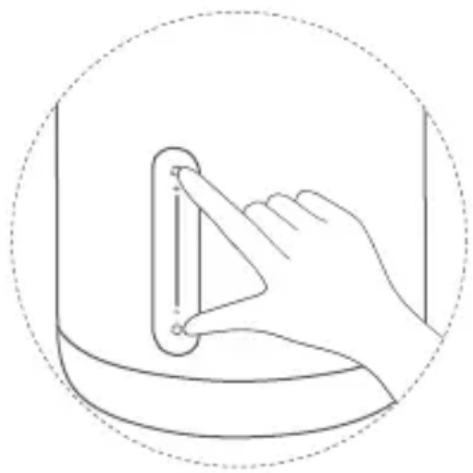
Simultaneously press and hold the power button and mode button for 5 seconds, until the lamp starts circulating through the colors red, green and blue, then release the buttons. After the circulating colors end, the lamp will automatically restart, and restoring factory settings will be completed.
* When using the bedside lamp in a new network environment, you need to restore factory settings and connect to the network again.
Precautions
• Make sure the voltage is consistent with the product's working voltage before use. Using the incorrect voltage may damage the product and cause a potential safety hazard. - The light source contained in this luminaire shall only be replaced by the manufacturer or his service agent or a similar qualified person. - The lamp will produce heat during operation, please use it in a well-ventilated area so that heat can dissipate. - Do not use non-standard adapters to avoid product damage or safety hazards. - Place the lamp steadily and do not tip it over during use. - Under normal use of condition, this equipment should be kept a separation distance of at least 20cm between the antenna and the body of the user.
CE EU Declaration of Conformity
Hereby, Qingdao Yeelink Information Technology Co., Ltd. declares that the radio equipment type MJCTD02YL is in compliance with Directive 2014/53/EU. The full text of the EU declaration of conformity is available at the following internet address: https://www.mi.com/en/service/support/declaration.html.
WEEE Disposal and Recycling
All products bearing this symbol are waste electrical and electronic equipment (WEEE as in directive 2012/19/EU) which should not be mixed with unsorted household waste. Instead, you should protect human health and the environment by handing over your waste equipment to a designated collection point for the recycling of waste electrical and electronic equipment, appointed by the
government or local authorities. Correct disposal and recycling will help prevent potential negative consequences to the environment and human health. Please contact the installer or local authorities for more information about the location as well as terms and conditions of such collection points.

ES
Mode button
Precautions
http://www.mi.com/global/service/support/declaration.html
Mode button
http://www.mi.com/global/service/support/declaration.html
Mode button
Precautions
http://www.mi.com/global/service/support/declaration.html
Mode button
Precautions
http://www.mi.com/global/service/support/declaration.html
Mode button
2.402–2.480 MHz (BT)
Precautions
Liquid precautions
Mode button
Note:
Precautions
Xiaomi Technology Netherlands B.V.
Prinses Beatrixlaan 582, 2595BM, The Hague, The Netherlands
contact@support.mi.com
UK REP.
Xiaomi Technology UK Limited
Davidson House, Forbury Square, Reading, Berkshire RG1 3EU
contact@support.mi.com
Manufactured for: Xiaomi Communications Co., Ltd.
Manufactured by: Qingdao Yeelink Information Technology Co., Ltd.
(a Mi Ecosystem company)
Address: 10F-B4, Building B, Qingdao International Innovation Park, No.1 Keyuan Weiyi Road,
Laoshan District, Qingdao City, Shandong Province, P.R.China
For further information, please go to www.mi.com
Manufactured for: Xiaomi Communications Co., Ltd.
Manufactured by: Qingdao Yeelink Information Technology Co., Ltd.
Laoshan District, Qingdao City, Shandong Province, P.R.China
Address: 10F-B4, Building B, Qingdao International Innovation Park, No.1 Keyuan Weiyi Road,
Address: 10F-B4, Building B, Qingdao International Innovation Park, No.1 Keyuan Weiyi Road,
Laoshan District, Qingdao City, Shandong Province, P.R.China
- USING THE LAMP
- INSTALLATION
- INSTRUCTIONS
- FUNCTION BUTTONS
- MODE BUTTON
- BRIGHTNESS ADJUSTMENT BAR
- POWER BUTTON
- ADVANCED FEATURES
- NIGHT LIGHT FUNCTION
- CONNECT WITH MI HOME / XIAOMI HOME APP
- APPLE HOMEKIT SMART CONTROL
- LINK A LAMP WITH GOOGLE ASSISTANT
- LINK A LAMP WITH AMAZON ALEXA
- SPECIFICATIONS
- PRODUCT FEATURES
- EN
- PRECAUTIONS
- CE EU DECLARATION OF CONFORMITY
- WEEE DISPOSAL AND RECYCLING
Brand : Xiaomi
Model : Mi Bedside Lamp 2
Category : Lamp