
Mi Yeelight Bedside Lamp - Lamp Xiaomi - Free user manual and instructions
Find the device manual for free Mi Yeelight Bedside Lamp Xiaomi in PDF.


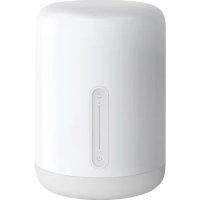
| Product Type | LED Bedside Lamp |
| Brand | Xiaomi |
| Model | Mi Yeelight Bedside Lamp |
| Dimensions (W x H x D) | 150 x 220 x 150 mm |
| Weight | 0.5 kg |
| Power Supply | DC 12V, 1A (adapter included) |
| Light Source Type | LED (non-replaceable) |
| Brightness Levels | Adjustable, 1-100% (via app or touch) |
| Color Temperature Range | 2700K - 6500K |
| Color Options | 16 million colors (RGB) |
| Smart Control | Wi-Fi, Bluetooth, Yeelight / Mi Home app |
| Voice Control | Compatible with Google Assistant, Amazon Alexa, Apple HomeKit |
| Special Modes | Sunrise simulation, Night light, Reading mode |
| Material | ABS plastic (base), PC diffuser (shade) |
| Cleaning Instructions | Wipe with soft dry cloth; do not use liquid cleaners |
| Safety Warnings | Do not immerse in water; use only supplied adapter; keep away from heat sources |
| Spare Parts | Not available; lamp is not user-serviceable |
| Repairability | Low; professional repair required for any issues |
| General Information | Smart bedside lamp with mood lighting and circadian rhythm support |
| Warranty | 1 year (limited) |
Frequently Asked Questions - Mi Yeelight Bedside Lamp Xiaomi
User questions about Mi Yeelight Bedside Lamp Xiaomi
0 question about this device. Answer the ones you know or ask your own.
Ask a new question about this device
Download the instructions for your Lamp in PDF format for free! Find your manual Mi Yeelight Bedside Lamp - Xiaomi and take your electronic device back in hand. On this page are published all the documents necessary for the use of your device. Mi Yeelight Bedside Lamp by Xiaomi.
USER MANUAL Mi Yeelight Bedside Lamp Xiaomi
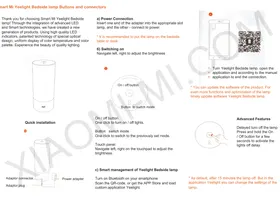
Mi Yeelight Bedside Lamp Buttons and Connectors
Thank you for choosing the Smart Mi Yeelight Bedside Lamp! Through the integration of advanced LED and Smart technologies, we have created a new generation of products. Using high-quality LED indicators and patented technology of special optical design, we ensure uniform display of color temperature and color palette. Experience the beauty of quality lighting.

Quick Installation
a) Power Connection
Insert one end of the adapter into the appropriate slot on the lamp, and connect the other end to power.
* It is recommended to place the lamp on a bedside table or desk.
b) Switching On
Navigate left or right to adjust the brightness.

On/Off Button
One click to turn the lights on or off.
Button Switch Mode
One click to switch to the previously set mode.
Touch Panel
Navigate left or right on the touchpad to adjust the brightness.
c) Smart Management of Yeelight Bedside Lamp
Turn on Bluetooth on your smartphone
Scan the QR code, or go to the App Store and download the custom application Yeelight.

• Turn on the Yeelight Bedside Lamp, open the application, and follow the manual to complete the connection.
* You can update the software of the product. For even more functions and optimization of the lamp, timely update the Yeelight Bedside Lamp software.

Advanced Features
Delayed turn off the lamp: Press and hold the On/Off button for a few seconds to activate the delayed turn off.
* By default, the lamp turns off after 15 minutes. But in the Yeelight application, you can change the lamp settings.
Manual Color Management

To manually control the color of the lamp, press the mode button and the touchpad at the same time.
* You cannot change the predetermined set of lamp colors.
Restoring the Factory Settings

Press and hold the On/Off button while plugging the adapter into a power outlet. The lamp lights up, and you will successfully restore the factory settings of the lamp.
Characteristics
- Brightness Control
- 16 million colors
- Adjusting the color temperature
- Shine
- Touch panel
- Change modes
- Night light
- Mode for the safety of the eye
- Setting the time on / off
- Delay turn off the lamp
- Lamp Control via smartphone
- Updates
Model Basic parameters:
The range of color temperature: 1700K-6500K
Color: 16 million colors
Lifecycle: 20,000 hours
Lumen: 300lm
Height: 221 mm
Diameter: 100 mm
Weight: 680g
Platform Support: Android & iOS
How to connect: Bluetooth 4.0
Adjusting the brightness: touch brightness adjustment
Rated expendable: 100-240V-50-60Hz, 0.5A
Expendable lamp: 12V --- 1A
Rated power: 10W (14h0.7W LED Module)
Operating temperature: -20-45C
Warranty
Warranty service is carried out in accordance with the law on «the rights of consumers of China» and «Law of the PRC on the quality of products.» The warranty service includes:
During the warranty period you have the right to repair, exchange or return an item. For repair, replacement or return of goods you need to present a receipt.
- Within 7 days from the date of purchase, in case of a problem of «fault list» service center Xiaomi determines the cause of the problem, then you can choose a free replacement product, return or repair.
- Within 8-15 days from the date of purchase, in case of a problem on the "fault list", the Xiaomi service center identifies the issue, and then you can choose a free replacement or repair of the goods.
- Within 12 months from the date of purchase, in case of a problem on the "fault list", the Xiaomi service center
identifies the issue, and then you are provided with free repair.
Warranty terms
The list of circumstances (including, but not limited to) under which compensation is not possible:
- No warranty card, receipt, or expired warranty;
- Damage caused by improper use, maintenance, or storage of the device;
- Damage caused by force majeure, such as lightning, fire, or flood;
- Non-compliance of this model or the code on the device and in the warranty card;
- Discoloration or deterioration of the device as a result of its use.
List of faults
Yeelight Bedside lamp:
- Improper operation of the sensor;
- Problems with the on/off button;
- Problems with the mode change button;
- Cracks / breakage due to design or material of the device;
Power adapter:
- Problem with power.
The presence of toxic and hazardous substances
| Name | Toxic and harmful substances or elements | |||||
| Pb | Hg | Cd | Crfl+ | PBB | PBDE | |
| Lamp | 0 | 0 | 0 | 0 | 0 | 0 |
| power adapter | 0 | 0 | 0 | 0 | 0 | 0 |
| Additional components | 0 | 0 | 0 | 0 | 0 | 0 |
| Explanation | A. toxic and harmful substances in all components of the device contained in an amount below the limit value according to S.J / T11363-2006 "requirements limiting the presence of toxic and hazardous substances in products." X: indicates the presence of toxic and hazardous substances at least one of the components in this product in excess of the limit value, according to S.J / T11363-2006 "requirements limiting the presence of toxic and hazardous substances in products." | |||||
Safety rules
- Do not use a power adapter that is not included in the standard lamp.
- To prevent damage to the device, do not disassemble or repair it yourself.
- Install the lamp away from water to prevent its penetration into the device.
- Install the lamp away from fire and high temperatures.
- Do not cover it with clothing, bedding, or other similar items, as this affects heat dissipation.
XIAOMI-MI.COM
- MI YEELIGHT BEDSIDE LAMP BUTTONS AND CONNECTORS
- POWER CONNECTION
- SWITCHING ON
- SMART MANAGEMENT OF YEELIGHT BEDSIDE LAMP
- ADVANCED FEATURES
- MANUAL COLOR MANAGEMENT
- RESTORING THE FACTORY SETTINGS
- CHARACTERISTICS
- MODEL BASIC PARAMETERS
- WARRANTY
- WARRANTY TERMS
- LIST OF FAULTS
- YEELIGHT BEDSIDE LAMP
- POWER ADAPTER
- SAFETY RULES
Brand : Xiaomi
Model : Mi Yeelight Bedside Lamp
Category : Lamp