
Yeelight Smart LED Ceiling Lamp - Lamp Xiaomi - Free user manual and instructions
Find the device manual for free Yeelight Smart LED Ceiling Lamp Xiaomi in PDF.


| Product Type | Smart LED Ceiling Lamp |
| Model Number | YLXD01YL |
| Power Supply | 220V-240V AC, 50/60 Hz |
| Rated Power | 28 W |
| Power Factor | 0.9 |
| Color Temperature Range | 2700K – 6500K (adjustable) |
| Brightness Control | Adjustable via app or remote |
| Night Light Mode | Moonlight mode available |
| Color Rendering Index | High CRI (typical >80) |
| Wireless Connectivity | Wi-Fi 802.11 b/g/n 2.4 GHz, Bluetooth 4.2 BLE |
| Smart Control | Compatible with Yeelight app, Mijia app, MIUI, voice assistants |
| Operating Temperature | -10°C to +40°C |
| Operating Humidity | 0% – 85% RH |
| Lifespan | Approximately 25,000 hours |
| Dimensions (Approx.) | 400 mm diameter x 80 mm height |
| Weight (Approx.) | 1.2 kg |
| Material | Aluminum alloy + PC diffuser |
| Installation | Ceiling mount, requires disconnection of power during installation |
| Maintenance | Clean with dry cloth; do not use water or solvents |
| Safety Warnings | Disconnect power before installation; do not disassemble LED modules; ensure ventilation |
| Compatibility | Android 4.4+, iOS 8.0+ |
| Factory Reset | Power on/off 5 times (2 sec each) to reset |
| Spare Parts | Remote control (sold separately) |
| Repairability | LED modules are non-replaceable; do not attempt repair |
Frequently Asked Questions - Yeelight Smart LED Ceiling Lamp Xiaomi
User questions about Yeelight Smart LED Ceiling Lamp Xiaomi
0 question about this device. Answer the ones you know or ask your own.
Ask a new question about this device
Download the instructions for your Lamp in PDF format for free! Find your manual Yeelight Smart LED Ceiling Lamp - Xiaomi and take your electronic device back in hand. On this page are published all the documents necessary for the use of your device. Yeelight Smart LED Ceiling Lamp by Xiaomi.
USER MANUAL Yeelight Smart LED Ceiling Lamp Xiaomi
Yeelight Smart LED Ceiling Light

Installation Instructions
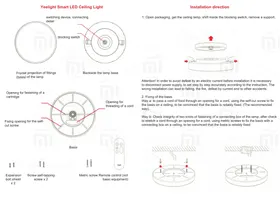
- Open the packaging, take out the ceiling lamp, shift the internal blocking switch, and remove the support.

Attention! To avoid electric shock, disconnect the power supply before installation and follow the instructions step by step accurately. Incorrect installation can lead to falling, fire, electric shock, and other accidents.
- Fixing the Base
Method A: Pass the power cord through the cord opening, use self-tapping screws to fix the base to the ceiling, and ensure that the base is securely fixed. (Recommended method).
Method B: Check the integrity of the two mounting knots of the lamp's junction box. After checking, stretch the cord through the cord opening, use metric screws to fix the base with the junction box to the ceiling, and ensure that the base is securely fixed.


- Connecting the Power Cord
According to the requirements of the following diagram, strip 8-9 mm of insulation from the wire.

Insert the power cord into the terminal block opening (before pulling out a cord, press the red button on the terminal block, and then pull it out).
Connect the power cord as shown in the picture, and check the reliability of the connection.
- With both hands, hold the lamp from both sides without pressing the luminous surface, align it with the base, and gently push both sides of the lamp into the base. After a click, the installation is complete. Before releasing your hands, ensure that the latches on both sides of the lamp are fully engaged.

Remote Control
(The remote control is not included in the basic package; it must be purchased separately.)
To pair the remote control with the Yeelight LED ceiling lamp for use in the same room, turn on the ceiling lamp, and within 60 seconds, press the OFF+M keys on the remote control simultaneously and release immediately. The blinking indicator light on the panel indicates that the connection is being established. Wait until the lamp starts blinking, which means the connection is complete.
Description of functions
To turn on the light
To turn off the light
Control of color temperature
Night lamp
Intellectual management


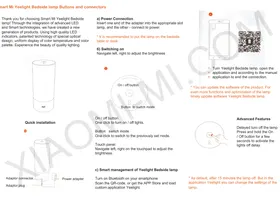
- Scan a QR code or load the Yeelight mobile application;
- The ceiling lamp has to be in the included state, perform operations being guided by application operation manuals.
Make sure that there is an access to WI-FI network and continuous connection to the Internet.
These goods are compatible to the intellectual Mijia platform, it can be managed through the Mijia application, support the MIUI system, can have access and to be interconnected also with other products of the intellectual Mijia platform.
Restoration of factory settings
Using the food switch, to continuously switch on and off light of 5 times (to switch on and off every time for 2 seconds), in 5 seconds the lamp will automatically reboot and factory settings will be restored.
* if the ceiling lamp is used in the new network environment, it is necessary to restore factory settings, and after that anew to adjust network connection.
Parameters
Product model: YLXD01YL;
Color temperature range: 2700K - 6500K;
Operating temperature: -10 to +40 °C;
Operating humidity range: 0% - 85% RH;
Service life: approximately 25,000 hours;
Power factor: 0.9;
Rated power: 28 W;
Rated power consumption: 220V - 50/60 Hz, 0.127 A;
Supported systems: Android 4.4 & iOS 8.0 and later;
Wireless connectivity: Wi-Fi IEEE 802.11 b/g/n 2.4 GHz, Bluetooth 4.2 BLE.
Product features
Color temperature adjustment
Brightness control
Night light - moonlight
Color rendition coefficient
Protection against dust
Intellectual location
Management via the mobile phone
Software update
Special indications for safety measures
- Before use, make sure that the voltage corresponds to the working voltage of this product; using an incorrect voltage can lead to damage to the product or a potentially dangerous situation;
- It is impossible to change LED modules, and it is impossible to disassemble the product independently;
- During operation, the lamp can generate heat; it is necessary to maintain air convection for heat dissipation.
Hazardous substances
This table is made on the basis of regulations of SJ/T 11364
O: designation means that the content of harmful substance in this detail is below the restrictions specified in regulations of GB/T 26572
X: designation means that the content of harmful substance in this detail exceeds the restrictions specified in regulations of GB/T 26572
XIAOMI-MI.COM
Brand : Xiaomi
Model : Yeelight Smart LED Ceiling Lamp
Category : Lamp