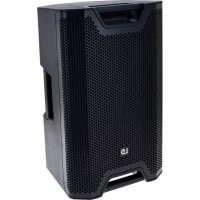
ICOA 12 - Speaker LD Systems - Free user manual and instructions
Find the device manual for free ICOA 12 LD Systems in PDF.



| Product type | Passive coaxial sound reinforcement speaker |
| Brand | LD Systems |
| Model | ICOA 12 |
| Woofer size | 12" (304.8 mm) |
| Woofer magnet | Custom ferrite |
| Tweeter | 1" (25.4 mm) rotatable BEM-optimized |
| Tweeter magnet | Custom ferrite |
| Dispersion angle (H x V) | 90° x 50° |
| Power handling (RMS) | 250 W |
| Power handling (peak) | 1000 W |
| Sensitivity | 93 dB SPL (1 W/1 m) |
| Frequency response | 55 Hz – 20 kHz |
| Crossover frequency | 2 kHz |
| Max. SPL (peak) | 123 dB |
| Impedance | 8 ohms |
| Speaker inputs/outputs | 1 input + 1 output compatible Speakon (1+ / 1-) |
| Enclosure material | Polypropylene |
| Color | Black (LDICOA12) or white (LDICOA12W) |
| Enclosure type | Bass-reflex |
| Mounting | 36 mm pole mount (0° and 5°), 6 M10 suspension points |
| Monitor angle | 55° |
| Dimensions (W x H x D) | 375 x 635 x 396 mm |
| Weight | 19.8 kg |
| Tweeter protection | Auto-resetting (PTC) fuse |
| Handles | 4 aluminum handles with rubberized surface |
Frequently Asked Questions - ICOA 12 LD Systems
User questions about ICOA 12 LD Systems
0 question about this device. Answer the ones you know or ask your own.
Ask a new question about this device
Download the instructions for your Speaker in PDF format for free! Find your manual ICOA 12 - LD Systems and take your electronic device back in hand. On this page are published all the documents necessary for the use of your device. ICOA 12 by LD Systems.
USER MANUAL ICOA 12 LD Systems
natural_image
Black outdoor audio amplifier with perforated grille and 'LD' logo on front (no text or symbols on body)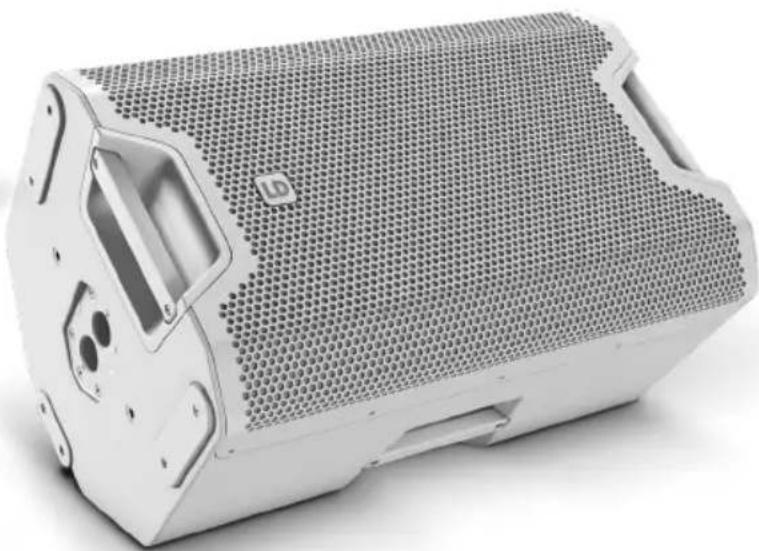
natural_image
Exterior view of a white plastic speaker grille with hexagonal mesh pattern (no text or symbols visible)ICOA SERIES
12" / 15" PASSIVE COAXIAL PA SPEAKER
LDICOA12(W) / LDICOA15(W)
CONTENTS / INHALTSVERZEICHNIS / CONTENU / CONTENIDO / TREŚĆ / CONTENUTO / 目录 / 目錄
ENGLISH
SAFETY INFORMATION 3
FEATURES 4
CONNECTIONS 5
STAND FLANGE 5
USE AS A STAGE MONITOR 6
ROTATE THE TWEETER BY 90° 6
OPTIONAL ACCESSORIES 7
TECHNICAL DATA 7
MANUFACTURER'S DECLARATIONS 8
DEUTSCH
We have designed this product to operate reliably over many years. LD Systems stands for this with its name and many years of experience as a manufacturer of high-quality audio products. Please read this User's Manual carefully, so that you can begin making optimum use of your LD Systems product quickly.
You can find more information about LD-SYSTEMS at our Internet site WWW.LD-SYSTEMS.COM
SAFETY INFORMATION
- Please read these instructions carefully.
- Keep all information and instructions in a safe place.
- Follow the instructions.
- Observe all safety warnings. Never remove safety warnings or other information from the equipment.
- Use the equipment only in the intended manner and for the intended purpose.
- Use only sufficiently stable and compatible stands and/or mounts (for fixed installations). Make certain that wall mounts are properly installed and secured. Make certain that the equipment is installed securely and cannot fall down.
- During installation, observ e the applicable safety regulations for your country.
- Never install and operate the equipment near radiators, heat registers, ovens or other sources of heat. Make certain that the equipment
is always installed so that is cooled sufficiently and cannot overheat. - Never place sources of ignition, e.g., burning candles, on the equipment.
- Ventilation slits must not be blocked.
- Keep a minimum distance of 20 cm around and above the device.
- Do not use this equipment in the immediate vicinity of water (does not apply to special outdoor equipment - in this case, observe the special instructions noted below. Do not expose this equipment to flammable materials, fluids or gases. Avoid direct sunlight!
- Make certain that dripping or splashed water cannot enter the equipment. Do not place containers filled with liquids, such as vases or drinking vessels, on the equipment.
- Make certain that objects cannot fall into the device.
- Use this equipment only with the accessories recommended and intended by the manufacturer.
- Do not open or modify this equipment.
- After connecting the equipment, check all cables in order to prevent damage or accidents, e.g., due to tripping hazards.
- During transport, make certain that the equipment cannot fall down and possibly cause property damage and personal injuries.
- If your equipment is no longer functioning properly, if fluids or objects have gotten inside the equipment or if it has been damaged in another way, switch it off immediately and unplug it from the mains outlet (if it is a powered device). This equipment may only be repaired by authorized, qualified personnel.
- Clean the equipment using a dry cloth.
- Comply with all applicable disposal laws in your country. During disposal of packaging, please separate plastic and paper/cardboard.
- Plastic bags must be kept out of reach of children.
- Please note that changes or modifications not expressly approved by the party responsible for compliance could void the user's authority to operate the equipment.
FOR EQUIPMENT THAT CONNECTS TO THE POWER MAINS
- CAUTION: If the power cord of the device is equipped with an earthing contact, then it must be connected to an outlet with a protective ground. Never deactivate the protective ground of a power cord.
- If the equipment has been exposed to strong fluctuations in temperature (for example, after transport), do not switch it on immediately. Moisture and condensation could damage the equipment. Do not switch on the equipment until it has reached room temperature.
- Before connecting the equipment to the power outlet, first verify that the mains voltage and frequency match the values specified on the equipment. If the equipment has a voltage selection switch, connect the equipment to the power outlet only if the equipment values and the mains power values match. If the included power cord or power adapter does not fit in your wall outlet, contact your electrician.
- Do not step on the power cord. Make certain that the power cable does not become kinked, especially at the mains outlet and/or power adapter and the equipment connector.
- When connecting the equipment, make certain that the power cord or power adapter is always freely accessible. Always disconnect the equipment from the power supply if the equipment is not in use or if you want to clean the equipment. Always unplug the power cord and power adapter from the power outlet at the plug or adapter and not by pulling on the cord. Never touch the power cord and power adapter with wet hands.
- Whenever possible, avoid switching the equipment on and off in quick succession because otherwise this can shorten the useful life of the equipment.
- IMPORTANT INFORMATION: Replace fuses only with fuses of the same type and rating. If a fuse blows repeatedly, please contact an authorised service centre.
- To disconnect the equipment from the power mains completely, unplug the power cord or power adapter from the power outlet.
- If your device is equipped with a Volex power connector, the mating Volex equipment connector must be unlocked before it can be removed. However, this also means that the equipment can slide and fall down if the power cable is pulled, which can lead to personal injuries and/or other damage. For this reason, always be careful when laying cables.
- Unplug the power cord and power adapter from the power outlet if there is a risk of a lightning strike or before extended periods of disuse.
-
The appliance is not to be used by persons (including children) with reduced physical, sensory or mental capabilities, or lack of experience and knowledge.
-
Children must be instructed not to play with the device.
-
If the power cord of the device is damaged, do not use the device. The power cord must be replaced by an adequate cable or assembly from an authorized service center.

CAUTION:
To reduce the risk of electric shock, do not remove cover (or back). There are no user serviceable parts inside. Maintenance and repairs should be exclusively carried out by qualified service personnel.

The warning triangle with exclamation mark indicates important operating and maintenance instructions.

Warning! This device is designed for use below 2000 metres in altitude.

Warning! This product is not intended for use in tropical climates.
CAUTION! HIGH VOLUMES IN AUDIO PRODUCTS!
This device is meant for professional use. Therefore, commercial use of this equipment is subject to the respectively applicable national accident prevention rules and regulations. As a manufacturer, Adam Hall is obligated to notify you formally about the existence of potential health risks.
Hearing damage due to high volume and prolonged exposure: When in use, this product is capable of producing high sound-pressure levels (SPL) that can lead to irreversible hearing damage in performers, employees, and audience members. For this reason, avoid prolonged exposure to volumes in excess of 90 dB.
NOTE: This equipment has been tested and found to comply with the limits for a Class B digital device, pursuant to Part 15 of the FCC Rules. These limits are designed to provide reasonable protection against harmful interference in a residential installation.
This equipment generates, uses and can radiate radio frequency energy and, if not installed and used in accordance with the instructions, may cause harmful interference to radio communications. However, there is no guarantee that interference will not occur in a particular installation. If this equipment does cause harmful interference to radio or television reception, which can be determined by turning the equipment off and on, the user is encouraged to try to correct the interference by one or more of the following measures:
- Reorient or relocate the receiving antenna.
- Increase the separation between the equipment and receiver.
- Connect the equipment into an outlet on a circuit different from that to which the receiver is connected.
- Consult the dealer or an experienced radio/TV technician for help.
FEATURES
LDICOA12(W) & LDICOA15(W)
- A genuine all-rounder for full-range, satellite and monitor applications as well as fixed installations
• Passive loudspeaker with up to 125 dB max. SPL and 1000 W peak capacity - Vertical and horizontal use thanks to coaxial design with rotating, BEM-optimised CD horn
- Horn-loaded woofer
- 36 mm dual tilt stand attachment with 0^ und 5^ tilt angle, 55^ monitor angle with sturdy stand
- 6x M10 flying points
- Shock-resistant front grille for optimal protection of the speaker
- 4 aluminum grips with ergonomic, rubber surface
- Extensive, optionally available accessories for installation and transport
CONNECTIONS
text_image
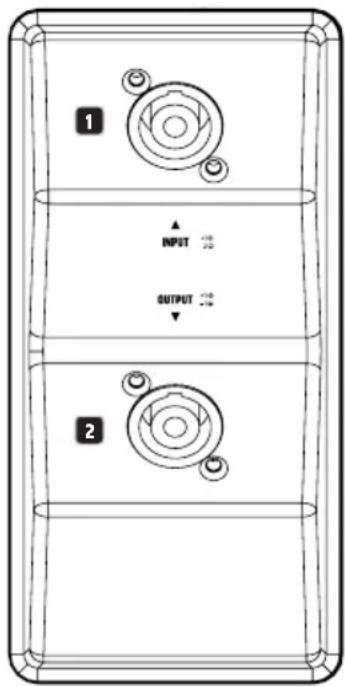
1 ▲ INPUT OUTPUT 21 INPUT
Input with speakON-compatible speaker socket (assignment 1+, 1-). The INPUT and OUTPUT sockets are wired in parallel (2+, 2- are not used). The speaker has an impedance of 8 ohms.
2 OUTPUT
Output with speakON-compatible speaker socket (assignment 1+, 1-). When sending the speaker signal, please note the total impedance of the system, in order to prevent damage to the connected amplifier.
STAND FLANGE
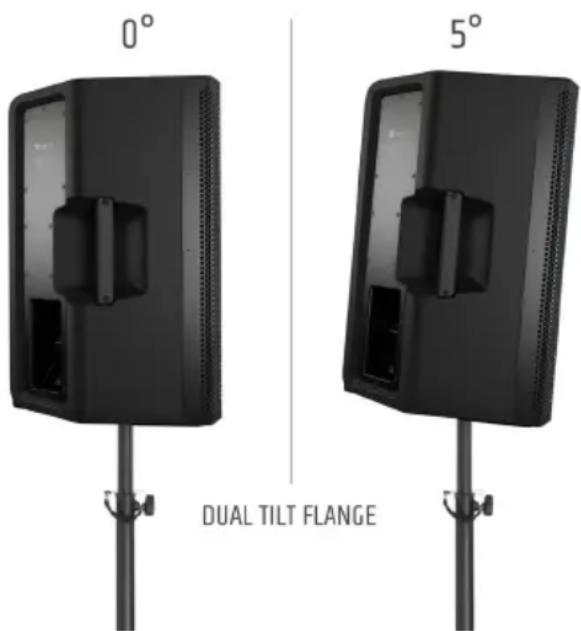
The speakers feature a stand flange with a stand insert for 0^ (rear position) and 5^ tilt angles (front position). Application examples: Use the stand insert with 0^ tilt angle for a standing audience and the 5^ tilt angle for a seated audience.
text_image
0° 5° DUAL TILT FLANGEUSE AS A STAGE MONITOR
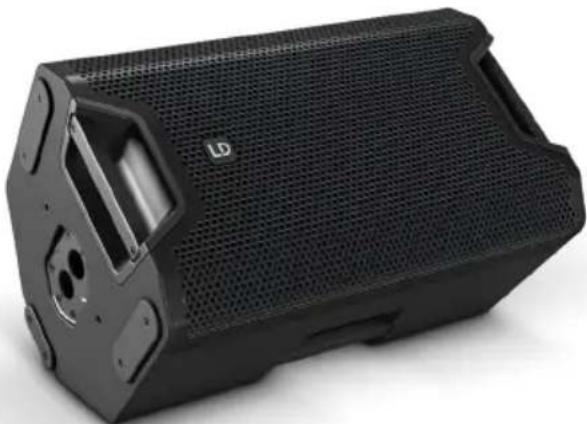
Thanks to the rotating high-frequency horn and the universal housing, the speakers can be used as fully-fledged floor monitors. Non-slip rubber skids ensure stability. The monitor angle is 55^ .
natural_image
Black industrial speaker box with mesh grille and ventilation slots (no visible text or symbols)ROTATE THE TWEETER BY 90°
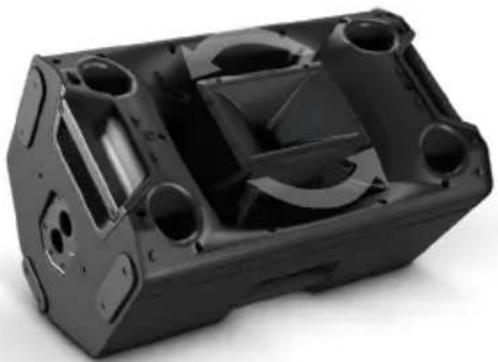
The high-frequency horn can be rotated through 90° for applications where the speaker is mounted horizontally or used as a floor monitor.
Take care when opening the speaker and rotating the high-frequency horn, in order to avoid damage to the speaker and injury to persons. Follow each step of the instructions exactly. The manufacturer shall not be liable for any damage to devices or injury to persons resulting from improper handling!
- Disconnect all cables from the speaker.
- Place the speaker in its slanted monitoring position, remove the front grille from the housing (5 x 2.5-mm internal hex screws on left and right of the housing).
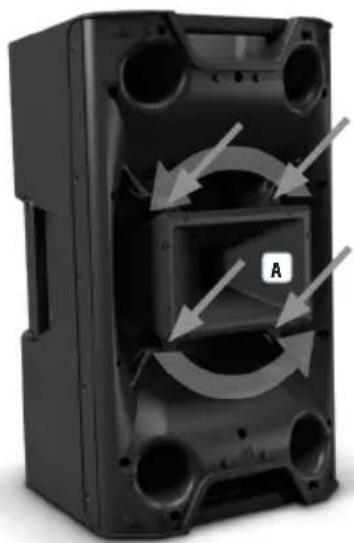
- Loosen the 4 screws that secure the high-frequency horn (see figure A).
- Carefully lift the horn and rotate it through 90°, taking care not to damage the tweeter driver cable.
- Feed the tweeter driver cable into the retainer nut next to the securing lug and replace the horn in the retainers. Ensure that the cable is not pinched.
- Carefully secure the horn with the screws and re-install the front grille on the housing.
natural_image
Interior view of a black plastic enclosure with circular openings and directional arrows indicating flow or movement (no text or symbols)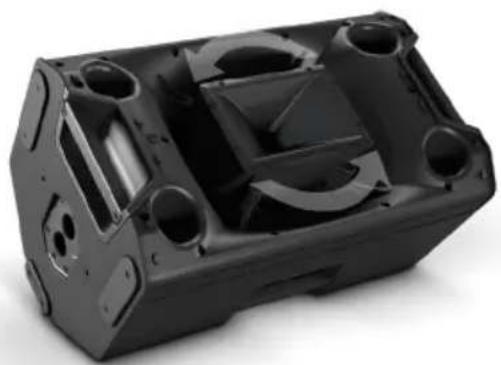
natural_image
Black plastic mechanical housing component with cutouts and mounting holes (no text or symbols visible)OPTIONAL ACCESSORIES
LDICOA12UB - universal bracket for ICOA® 12 (black)
LDICOA15UB - universal bracket for ICOA® 15 (black)
LDICOA12UBW - universal bracket for ICOA® 12 (white)
LDICOA15UBW - universal bracket for ICOA® 15 (white)
LDICOA12PC - padded protective cover for ICOA® 12
LDICOA15PC - padded protective cover for ICOA® 15
TECHNICAL DATA
| Product number: LDICOA12(W) LDICOA15(W) | ||
| Product type: Coaxial PA loudspeaker | ||
| Type: Passive | ||
| Woofer size: 12" 15" | ||
| Woofer size: 304.8 mm 381 mm | ||
| Woofer magnet: Ferrite | ||
| Woofer brand: Custom-manufactured | ||
| High-frequency horn: BEM-optimised CD horn | ||
| HF driver size: 1" | ||
| HF driver size: 25.4 mm | ||
| Magnet HF driver: | Ferrite | |
| Brand HF driver: | Custom-manufactured | |
| Voice coil HF driver: | 1" | |
| Voice coil HF driver: | 25.4 mm | |
| Protective circuitry: | Auto-reset tweeter protection (PTC) | |
| Dispersion angle (H x V): | 90° x 50° | |
| Output (RMS): | 250 W | |
| Output (peak): 1000 W | ||
| Sensitivity: | 93 dB SPL 1 W/1 m | 95 dB SPL 1 W/1 m |
| Frequency response: | 55 Hz - 20 kHz | 48 Hz - 20 kHz |
| Crossover frequency: | 2 kHz | |
| Max. SPL (Peak): | 123 dB | 125 dB |
| Speaker inputs: | 1 | |
| Speaker input connections: | speakON-compatible | |
| Speaker outputs: | 1 | |
| Speaker output connections: | speakON-compatible | |
| Housing material: Polypropylene | ||
| Housing colour: | Black (LDICOA12)White (LDICOA12W) | Black (LDICOA15)White (LDICOA15W) |
| Housing type: | Bass reflex | |
| Mounting: | 36 mm flange (0°, 5°), 6 x M10 flying points | |
| Monitor angle: | 55° | |
| Dimensions (W x H x D): | 375 x 635 x 396 mm | 416 x 695 x 415 mm |
| Weight: | 19.8 kg | 24.7 kg |
MANUFACTURER'S DECLARATIONS
MANUFACTURER'S WARRANTY & LIMITATIONS OF LIABILITY
You can find our current warranty conditions and limitations of liability at: https://cdn-shop.adamhall.com/media/pdf/MANUFACTURERS-DECLARATIONS_LD_SYSTEMS.pdf To request warranty service for a product, please contact Adam Hall GmbH, Adam-Hall-Str. 1, 61267 Neu Anspach / Email: Info@adamhall.com / +49 (0)6081 / 9419-0.

CORRECT DISPOSAL OF THIS PRODUCT
(valid in the European Union and other European countries with a differentiated waste collection system)
This symbol on the product, or on its documents indicates that the device may not be treated as household waste. This is to avoid environmental damage or personal injury due to uncontrolled waste disposal. Please dispose of this product separately from other waste and have it recycled to promote sustainable economic activity. Household users should contact either the retailer where they purchased this product, or their local government office, for details on where and how they can recycle this item in an environmentally friendly manner. Business users should contact their supplier and check the terms and conditions of the purchase contract. This product should not be mixed with other commercial waste for disposal.
FCC STATEMENT
This device complies with Part 15 of the FCC Rules. Operation is subject to the following two conditions:
(1) This device may not cause harmful interference, and
(2) This device must accept any interference received, including interference that may cause undesired operation
CE Compliance
Adam Hall GmbH states that this product meets the following guidelines (where applicable):
R&TTE (1999/5/EC) or RED (2014/53/EU) from June 2017
Low voltage directive (2014/35/EU)
EMV directive (2014/30/EU)
RoHS (2011/65/EU)
The complete declaration of conformity can be found at www.adamhall.com.
Furthermore, you may also direct your enquiry to info@adamhall.com.
EU DECLARATION OF CONFORMITY
Hereby, Adam Hall GmbH declares that this radio equipment type is in compliance with Directive 2014/53/EU.
The full text of the EU declaration of conformity is available at the following
internet address: www.adamhall.com/compliance/
DEUTSCH
natural_image
Black rectangular electronic device with mesh grille and ventilation slots (no visible text or symbols)HOCHTONHORN UM 90° DREHEN
natural_image
Interior view of a black plastic enclosure with circular openings and directional arrows indicating flow or movement (no text or symbols)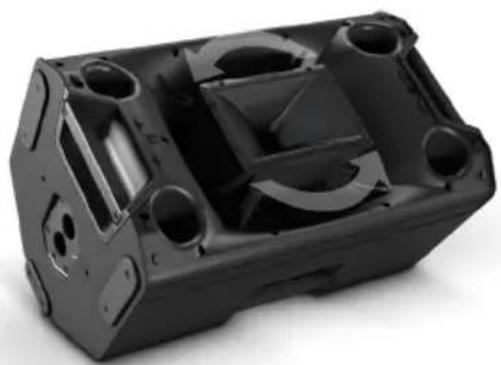
natural_image
Black plastic mechanical housing component with cutouts and mounting holes (no text or symbols visible)OPTIONALES ZUBEHÖR
APPAREILS RELIÉS AU SECTEUR
natural_image
Black rectangular electronic speaker with mesh grille and ventilation slots (no visible text or symbols)FAIRE PIVOTER LE PAVILLON D'AIGUS DE 90°
natural_image
Interior view of a black plastic enclosure with circular openings and curved arrows indicating flow or movement (no text or symbols)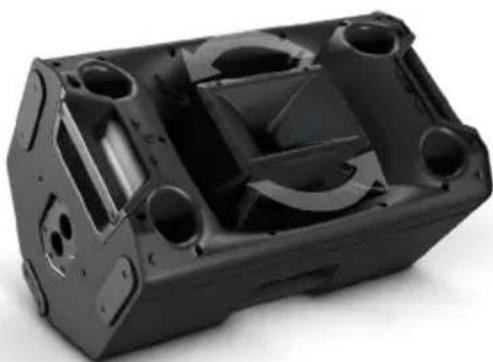
natural_image
Black plastic mechanical housing component with multiple circular cavities and mounting holes (no text or symbols visible)ACCESSOIRES DISPONIBLES EN OPTION
(Valid in the European Union and other European countries with waste separation)
DÉCLARATION DE CONFORMITÉ CE
natural_image
Black rectangular electronic speaker with mesh grille and ventilation slots (no visible text or symbols)natural_image
Interior view of a black plastic enclosure with circular openings and directional arrows indicating flow or movement (no text or symbols)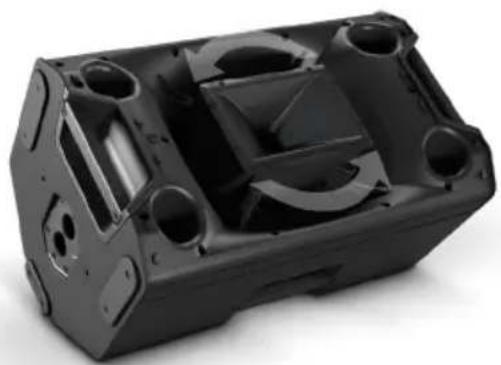
natural_image
Black plastic mechanical housing component with multiple circular cavities and mounting holes (no text or symbols visible)natural_image
Black rectangular electronic speaker with mesh grille and ventilation slots (no visible text or symbols)GŁOŚNIK WYSOKOTONOWY OBRACANY O 90°
natural_image
Interior view of a black plastic enclosure with circular openings and directional arrows indicating flow or movement (no text or symbols)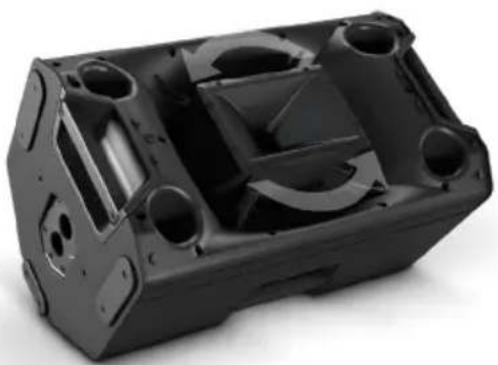
natural_image
Black plastic mechanical housing component with cutouts and mounting holes (no text or symbols visible)AKCESORIA OPCJONALNE
DEKLARACJA ZGODNOŚCI WE
natural_image
Black rectangular electronic speaker with mesh grille and ventilation slots (no visible text or symbols)RUOTARE IL TWEETER A TROMBA DI 90°
natural_image
Interior view of a black plastic enclosure with circular openings and directional arrows indicating flow or movement (no text or symbols)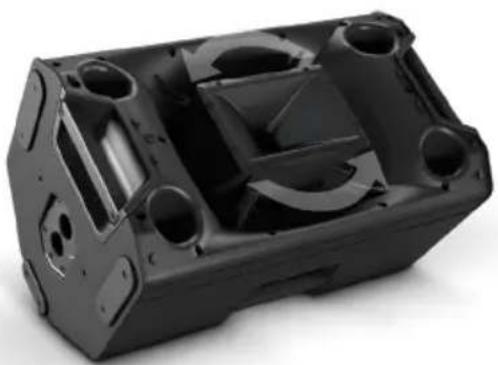
natural_image
Black plastic mechanical housing component with multiple holes and internal cavities (no text or symbols visible)ACCESSORI OPZIONALI
LDICOA12UB - Supporto universale per ICOA® 12 (nero)
natural_image
Black rectangular electronic speaker with mesh grille and ventilation slots (no visible text or symbols)将高音喇叭转动90°
natural_image
Interior view of a black plastic enclosure with circular openings and directional arrows indicating flow or movement (no text or symbols)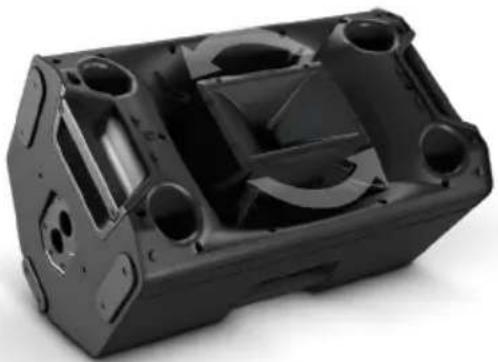
natural_image
Black plastic mechanical housing component with multiple holes and internal cavities (no text or symbols visible)可选配件
natural_image
Black rectangular electronic speaker with mesh grille and ventilation slots (no visible text or symbols)將高音喇叭旋轉 90°
natural_image
Interior view of a black plastic enclosure with circular openings and directional arrows indicating flow or movement (no text or symbols)