
MAUI 11 MIX - Loudspeaker LD Systems - Free user manual and instructions
Find the device manual for free MAUI 11 MIX LD Systems in PDF.


| Product type | Active column speaker with built-in mixer |
| Brand | LD Systems |
| Model | MAUI 11 MIX |
| Category | Loudspeaker |
| Power | 800 W RMS (Class D amplification) |
| Max SPL | 130 dB |
| Frequency response | 40 Hz to 20 kHz |
| Number of ways | 2 (treble and bass) |
| Mixing channels | 4 (2x combo XLR/Jack, 2x stereo Jack) |
| Bluetooth | Yes, version 5.0 with TWS |
| Connectivity | XLR/Jack inputs, XLR mix output, USB audio |
| Dimensions (H x W x D) | 200 x 35 x 40 cm |
| Weight | 20 kg |
| Power supply | 100-240 V AC, 50/60 Hz |
| Power consumption | 600 W max |
| Main features | Built-in mixer, Bluetooth, EQ, presets, pole mount |
| Maintenance and cleaning | Clean with a soft, dry cloth. Do not use abrasive products or solvents. |
| Safety | Use a correct mains socket. Do not expose to moisture or heat sources. |
| Spare parts and repairability | Contact LD Systems after-sales service or an authorized repairer. |
| General information | Active column speaker for portable sound. Manual available in multiple languages at notice-facile.com. |
Frequently Asked Questions - MAUI 11 MIX LD Systems
User questions about MAUI 11 MIX LD Systems
0 question about this device. Answer the ones you know or ask your own.
Ask a new question about this device
Download the instructions for your Loudspeaker in PDF format for free! Find your manual MAUI 11 MIX - LD Systems and take your electronic device back in hand. On this page are published all the documents necessary for the use of your device. MAUI 11 MIX by LD Systems.
USER MANUAL MAUI 11 MIX LD Systems
natural_image
Exterior view of a black speaker tower with mesh grille and external connector (no visible text or symbols)ALL IN ONE ARRAY SYSTEM
WITH 3-CHANNEL MIXER
LDMAUI11MIX(W)
You've made the right choice!
We have designed this product to operate reliably over many years. LD Systems stands for this with its name and many years of experience as a manufacturer of high-quality audio products.
Please read this User's Manual carefully, so that you can begin making optimum use of your LD Systems product quickly.
You can find more information about LD SYSTEMS at our Internet site WWW.LD-SYSTEMS.COM
Introduction
The LD Systems MAUI11MIX Column PA System has been designed for professional use. The PA system offers high-quality components, a DSP-controlled amplifier with 3-way crossover and a balanced sound across the entire frequency range.
The digital signal processing of the LD LECC DSP includes features such as crossover, equalizer, compressor and limiter, and is specifically designed to support the Maui11MIX PA system, in order to provide an optimal audio performance at any time. Designed as a "plug and play" system, it requires no additional cables or stands and can therefore be quickly and easily assembled and disassembled.
LD MAUI11MIX(W)
COMPACT COLUMN ACTIVE PA SYSTEM WITH INTEGRATED 3 CHANNEL MIXER

natural_image
Two electronic speaker units, one with a perforated cover and the other a cylindrical device with a labeled 'LD' logo (no text or symbols on the devices themselves)PREVENTIVE MEASURES:
- Please read these instructions carefully.
- Keep all information and instructions in a safe place.
- Follow the instructions.
- Observe all safety warnings. Never remove safety warnings or other information from the equipment.
- Use the equipment only in the intended manner and for the intended purpose.
- Use only sufficiently stable and compatible stands and/or mounts (for fixed installations). Make certain that wall mounts are properly installed and secured. Make certain that the equipment is installed securely and cannot fall down.
- During installation, observ e the applicable safety regulations for your country.
- Never install and operate the equipment near radiators, heat registers, ovens or other sources of heat. Make certain that the equipment is always installed so that is cooled sufficiently and cannot overheat. Avoid direct sunlight!
- Never place sources of ignition, e.g., burning candles, on the equipment.
- Ventilation slits must not be blocked.
- Do not use this equipment in the immediate vicinity of water (does not apply to special outdoor equipment - in this case, observe the special instructions noted below. Do not expose this equipment to flammable materials, fluids or gases.
- Make certain that dripping or splashed water cannot enter the equipment. Do not place containers filled with liquids, such as vases or drinking vessels, on the equipment.
- Make certain that objects cannot fall into the device.
- Use this equipment only with the accessories recommended and intended by the manufacturer.
- Do not open or modify this equipment.
- After connecting the equipment, check all cables in order to prevent damage or accidents, e.g., due to tripping hazards.
- During transport, make certain that the equipment cannot fall down and possibly cause property damage and personal injuries.
- If your equipment is no longer functioning properly, if fluids or objects have gotten inside the equipment or if it has been damaged in anot her way, switch it off immediately and unplug it from the mains outlet (if it is a powered device). This equipment may only be repaired by authorized, qualified personnel.
- Clean the equipment using a dry cloth.
- Comply with all applicable disposal laws in your country. During disposal of packaging, please separate plastic and paper/cardboard.
- Plastic bags must be kept out of reach of children.
FOR EQUIPMENT THAT CONNECTS TO THE POWER MAINS:
-
CAUTION: If the power cord of the device is equipped with an earthing contact, then it must be connected to an outlet with a protective ground. Never deactivate the protective ground of a power cord.
-
If the equipment has been exposed to strong fluctuations in temperature (for example, after transport), do not switch it on immediately. Moisture and condensation could damage the equipment. Do not switch on the equipment until it has reached room temperature.
-
Before connecting the equipment to the power outlet, first verify that the mains voltage and frequency match the values specified on the equipment. If the equipment has a voltage selection switch, connect the equipment to the power outlet only if the equipment values and the mains power values match. If the included power cord or power adapter does not fit in your wall outlet, contact your electrician.
-
Do not step on the power cord. Make certain that the power cable does not become kinked, especially at the mains outlet and/or power adapter and the equipment connector.
-
When connecting the equipment, make certain that the power cord or power adapter is always freely accessible. Always disconnect the equipment from the power supply if the equipment is not in use or if you want
SAFETY:
to clean the equipment. Always unplug the power cord and power adapter from the power outlet at the plug or adapter and not by pulling on the cord. Never touch the power cord and power adapter with wet hands.
-
Whenever possible, avoid switching the equipment on and off in quick succession because otherwise this can shorten the useful life of the equipment.
-
IMPORTANT INFORMATION: Replace fuses only with fuses of the same type and rating. If a fuse blows repeatedly, please contact an authorised service centre.
-
To disconnect the equipment from the power mains completely, unplug the power cord or power adapter from the power outlet.
-
If your device is equipped with a Volex power connector, the mating Volex equipment connector must be unlocked before it can be removed. However, this also means that the equipment can slide and fall down if the power cable is pulled, which can lead to personal injuries and/or other damage. For this reason, always be careful when laying cables.
-
Unplug the power cord and power adapter from the power outlet if there is a risk of a lightning strike or before extended periods of disuse.

CAUTION:
Never remove the cover, because otherwise there may be a risk of electric shock. There are no user serviceable parts inside. Have repairs carried out only by qualified service personnel.

The lightning flash with arrowhead symbol within an equilateral triangle is intended to alert the user to the presence of uninsulated “dangerous voltage” within the product’s enclosure that may be of sufficient magnitude to constitute a risk of electrical shock.

The exclamation mark within an equilateral triangle is intended to alert the user to the presence of important operating and maintenance instructions.
CAUTION – HIGH VOLUME LEVELS WITH AUDIO PRODUCTS!
This equipment is intended for professional use. Therefore, commercial use of this equipment is subject to the respectively applicable national accident prevention rules and regulations. As a manufacturer, Adam Hall is obligated to notify you formally about the existence of potential health risks.
Hearing damage due to high volume and prolonged exposure: When in use, this product is capable of producing high sound-pressure levels (SPL) that can lead to irreversible hearing damage in performers, employees, and audience members. For this reason, avoid prolonged exposure to volumes in excess of 90 dB.

To prevent possible hearing damage, avoid listening at high volume levels over long periods of time. Even exposure to short bursts of loud noise can result in hearing loss. Please keep the volume constantly at a comfortable level.
SETUP, CONNECTION AND STARTUP:
GENERAL INSTRUCTIONS
Before startup, the subwoofer of the LD Systems MAUI11MIX PA system must be placed upright on its rubber feet, on a flat surface. Never operate your system on a trolley, as there is a risk that the entire system might be unstable. Accidents and damage may result. The cooling of the power amplifier is via the vents in the connector panel on the back of the subwoofer. To ensure adequate cooling, during operation a minimum distance of 50 cm must be maintained between the back of the subwoofer and other objects such as walls for example.
Please ensure the correct connection of audio and power connections for the system and all connected devices such as mixers, CD players, etc. Use only undamaged cables of suitable diameter and always unwind cable reels completely. If necessary, use cable bridges to avoid tripping over loose cables. Never place the device directly on an edge. Do not place the subwoofer on a table. To avoid unwanted background noise when turning on connected devices, always turn on the system last and turn it off first.
SETUP
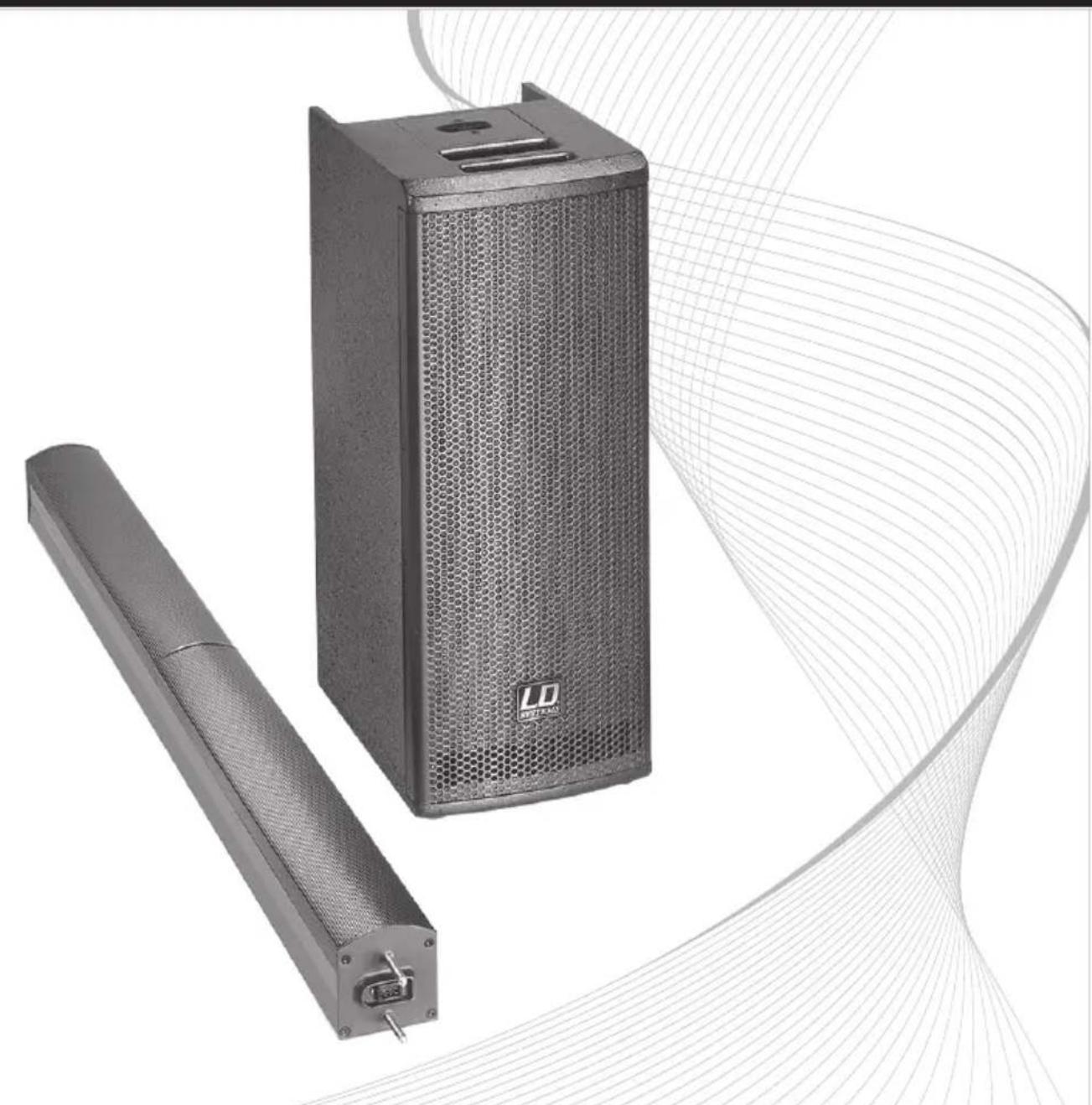
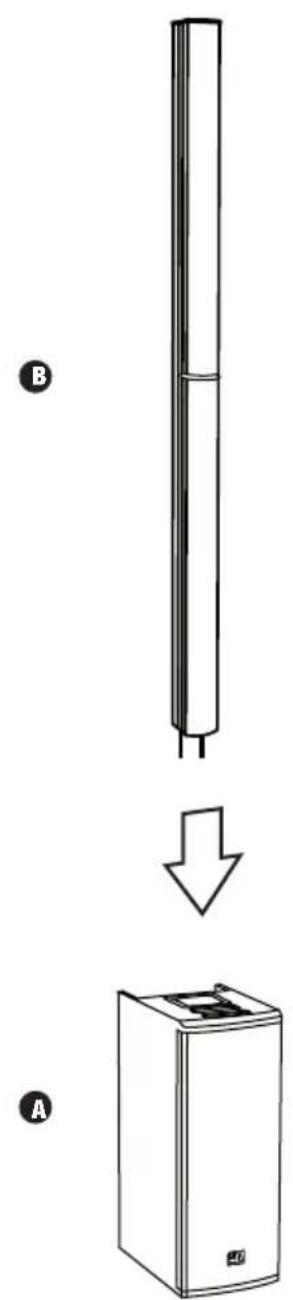
The LD Systems MAUI11MIX PA system consists of two components:
A. a subwoofer with integrated electronics for both system components.
B. an array column with eight 3" speakers, a tweeter and multi-pole connections in the column foot.
After the subwoofer is placed in the desired position, the array column is attached to the subwoofer. Two sturdy steel pins provide for optimal alignment of the multi-pin connectors on the two components.
The device allows both the volume of the entire system and the volume of the subwoofer in relation to the total volume to be adjusted separately. Source devices can be connected using both balanced and unbalanced cables (XLR / 6.3 mm jack / RCA). The integrated 3-channel mixer offers a microphone input, a high-impedance instrument input for an electric guitar for example, and inputs for source devices with line level.
SETUP, CONNECTION AND STARTUP:
CONNECTIONS, CONTROLS, AND INDICATORS:

CONNECTIONS, CONTROLS, AND INDICATORS:

① MIC INPUT
Balanced microphone input (XLR/ 6.3 mm jack combo) It is also possible to use an unbalanced microphone cable (mono jack). The microphone input has a built-in 100 Hz subsonic filter to suppress low-frequency noise. NOTE: There is no phantom power on the microphone input.
② HI-Z INPUT
Mono input with 6.3 mm jack socket for acoustic or electric guitar. Both inputs HI-Z and MP3 can be used simultaneously; the volume ratio must be set on the instrument, or on the player.
③ MP3 INPUT
Stereo line input with 3.5 mm jack socket for an MP3 player or other playback device. The audio signal is fed from the MIX OUTPUT LEFT / RIGHT in stereo, and is mono summed internally. Both inputs HI-Z and MP3 can be used simultaneously; the volume ratio must be set on the instrument, or on the player.
4 LINE INPUT LEFT / RIGHT (RCA)
Unbalanced line input with RCA socket (left / right) for connecting an external audio source (e.g., laptop, CD player). The audio signal is fed from the MIX OUTPUT LEFT / RIGHT in stereo, and is mono summed internally.
5 LINE INPUT LEFT / RIGHT (XLR)
Balanced line input (XLR / 6.3 mm TRS combo, left / right) for connecting an external audio source (e.g., mixer, keyboard). The audio signal is fed from the MIX OUTPUT LEFT / RIGHT in stereo, and is mono summed internally.
This balanced stereo XLR output is independent of the main level and provides the mix signal from the microphone, HI-Z / MP3, and line input signals.
7 POWER
Illuminated On / Off switch for the power supply of the device. Before switching the active speaker on or off, always adjust the volume to zero (MAIN LEVEL all the way to the left).
CONNECTIONS, CONTROLS, AND INDICATORS:
8 POWER SOCKET
IEC power socket (Volex) with built-in fuse holder. An appropriate power cord is included in the delivery. To unlock the device plug, press down on the yellow button on the plug.
IMPORTANT INFORMATION: Replace the fuse only with a fuse of the same type and rating. If the fuse blows repeatedly, please contact an authorised service centre.
9 MP3 / HI-Z LEVEL
Volume control for the MP3 / HI-Z channel. Both inputs HI-Z INPUT and MP3 INPUT can be used simultaneously. The volume ratio is set on the playback devices.
10 MIC LEVEL
Volume control for the microphone channel.
11 LINE LEVEL
Volume control for the line channel.
12 SUB LEVEL
Adjusting the volume ratio of the subwoofer to the column loudspeaker.
13 MAIN LEVEL
Overall volume adjustment. The subwoofer volume is also adjusted in accordance with the preset level on the SUB LEVEL controller.
14 INDICATOR LEDS
ON: Lights up once the system is properly connected to the power mains and switched on.
SIGNAL: Lights up as soon as an audio signal is present. The signal acquisition is performed before the MAIN LEVEL controller.
LIMIT: Lights up if the loudspeaker system is operating in the clipping range. A short flash of the LED is not critical. To protect the system, an excessive signal level is gently turned down by the built-in limiter. If the Limiter LED lights up permanently or for longer periods, reduce the volume level. Failure to do so may result in a distorted sound and damage to the speaker system.
PROTECT: Lights up if the system is overloaded/overheated. The amplifiers are muted automatically. After reaching normal operating conditions, the device reverts to normal operating mode, after a few minutes.
FREQUENCY ALLOCATION:

TWEETERS
7000 Hz - 20,000 Hz
Passive crossover
UPPER MIDS
180 Hz - 7000 Hz
MIDS
180 Hz - 1500 Hz
SUBWOOFER
50 Hz - 180 Hz
The 3-way DSP-based amplification of the LD MAUI11MIX speaker system ensures a clear, dynamic and balanced sound across the entire frequency range. The array configuration ensures improved sound field coverage and an especially balanced dispersion pattern throughout the venue.
DSP BLOCKDIAGRAM:

flowchart
graph TD
    A["SIGNAL OUT SUB"] --> B["SUB-WOFFER limiter"]
    B --> C["SUB-WOFFER compressor/lowpass"]
    C --> D["SUB-WOFFER lowpass"]
    D --> E["SUB-WOFFER dynamic frequency equalizing"]
    E --> F["SUB-WOFFER highpass"]
    F --> G["SUB-WOFFER GALN"]
    G --> H["SUB-LEVEL"]
    I["SIGNAL OUT MID"] --> J["COLUMN MID/ multiple limiter"]
    J --> K["COLUMN MID/ multiband limiter"]
    K --> L["COLUMN MID/ equalizing"]
    L --> M["COLUMN equalizing"]
    M --> N["COLUMN highpass"]
    N --> O["COLUMN highpass"]
    O --> P["INPUT / GALN processing"]
    P --> Q["D/ INPUT"]
    Q --> R["A/ SIGNAL IN"]
    S["SIGNAL OUT MID-HIGH"] --> T["COLUMN MID-HIGH/ multiple limiter"]
    T --> U["COLUMN MID-HIGH/ equalizing"]
    U --> V["COLUMN equalizing"]
    V --> W["COLUMN equalizing"]
    W --> X["COLUMN equalizing"]
    X --> Y["COLUMN equalizing"]
    Y --> Z["COLUMN equalizing"]
    Z --> AA["COLUMN equalizing"]
    AA --> AB["COLUMN equalizing"]
    AB --> AC["COLUMN equalizing"]
    AC --> AD["COLUMN equalizing"]
    AD --> AE["COLUMN equalizing"]
    AE --> AF["COLUMN equalizing"]
    AF --> AG["COLUMN equalizing"]
    AG --> AH["COLUMN equalizing"]
    AH --> AI["COLUMN equalizing"]
    AI --> AJ["COLUMN equalizing"]
    AJ --> AK["COLUMN equalizing"]
    AK --> AL["COLUMN equalizing"]
    AL --> AM["COLUMN equalizing"]
    AM --> AN["COLUMN equalizing"]
    AN --> AO["COLUMN equalizing"]
    AO --> AP["COLUMN equalizing"]
    AP --> AQ["COLUMN equalizing"]
    AQ --> AR["COLUMN equalizing"]
    AR --> AS["COLUMN equalizing"]
    AS --> AT["COLUMN equalizing"]
    AT --> AU["COLUMN equalizing"]
    AU --> AV["COLUMN equalizing"]
    AV --> AW["COLUMN equalizing"]
    AW --> AX["COLUMN equalizing"]
    AX --> AY["COLUMN equalizing"]
    AY --> AZ["COLUMN equalizing"]
    AZ --> BA["COLUMN equalizing"]
    BA --> BB["COLUMN equalizing"]
    BB --> BC["COLUMN equalizing"]
    BC --> BD["COLUMN equalizing"]
    BD --> BE["COLUMN equalizing"]
    BE --> BF["COLUMN equalizing"]
    BF --> BG["COLUMN equalizing"]
    BG --> BH["COLUMN equalizing"]
    BH --> BI["COLUMN equalizing"]
    BI --> BJ["COLUMN equalizing"]
    BJ --> BK["COLUMN equalizing"]
    BK --> BL["COLUMN equalizing"]
    BL --> BM["COLUMN equalizing"]
    BM --> BN["COLUMN equalizing"]
    BN --> BO["COLUMN equalizing"]
    BO --> BP["COLUMN equalizing"]
    BP --> BQ["COLUMN equalizing"]
    BQ --> BR["COLUMN equalizing"]
    BR --> BS["COLUMN equalizing"]
    BS --> BT["COLUMN equalizing"]
    BT --> BU["COLUMN equalizing"]
    BU --> BV["COLUMN equalizing"]
    BV --> BW["COLUMN equalizing"]
LD SYSTEMS LECC DSP:
WHAT DOES LD SYSTEMS LECC DSP STAND FOR?
DSP stands for Digital Signal Processing (Digital Signal Processing), LECC for limiter, EQ, Compressor and Crossover. The digital signal processing ensures maximum audio performance with maximum clarity and protects the PA system from overload.
WHAT EXACTLY DOES THE LECC DSP DO?
The Limiter function protects the speakers and prevents distortions caused by overload. Separate limiters for the bass, midrange and high range attenuate the signal when the level exceeds a value which could have a negative effect. Each limiter is optimised for one of the three seamlessly contiguous frequency ranges (multi-band limiter). The system can be operated in this manner with a higher overall sound pressure as extreme peaks are automatically lowered, so that the total volume does not need to be reduced.
The Multiband EQ works over the entire frequency range and optimises the overall sound of the system.
The Compressor is switched on automatically to raise the bass response and create a punchier sound. When the volume is increased, the bass boost is automatically reduced. The automatically controlled bass blends perfectly into the overall sound.
The Crossovers divide the audio signal according to the frequency range of the respective speakers, namely the subwoofer or the mids and tweeters of the array column. The amplitude and running-time optimisation of the crossover ensures that all frequencies are output evenly and reach the listener at the same time.
SPECIFICATIONS:
| Model Name: LDMAUI11MIX(W) | |
| Product Type: Complete PA System | |
| Type: active | |
| Colour: black (LDMAUI11MIX) | white (LDMAUI11MIXW) |
| Max. SPL (continuous): 114 dB | |
| Max. SPL (peak): 122 dB | |
| Frequency Response: 50 Hz - 20,000 Hz | |
| Dispersion Angle (H x V): 120° (average, horizontal) | |
| Total Height: 1950 mm | |
| Total Weight: 23.6 kg | |
| Features: LECC DSP, stable steel pins for a reliable connection between the subwoofer and the column elements | |
| Subwoofer | |
| Woofer Size: 2 x 6.5" | |
| Woofer Size: 2 x 165.1 mm | |
| Woofer Magnet: ferrite | |
| Woofer Brand: custom made | |
| Cabinet Type: | bass-reflex, V-design |
| Housing Material: | 15 mm plywood |
| Cabinet Surface: | PA-paint |
| Subwoofer dimensions (W x H x D): | 256 x 650 x 355 mm |
| Subwoofer weight: | 17 kg |
| Subwoofer features: | ergonomic milled handles, custom made multi-pin connector for vertical array |
SPECIFICATIONS:
| Mid/Hi System | |
| Midrange Size: 8 x 3" | |
| Midrange Size: 8 x 76 mm | |
| Midrange Magnet: neodymium | |
| Midrange Brand: custom made | |
| Tweeter Size: 1" | |
| Tweeter Size: 25 mm | |
| Tweeter Magnet: neodymium | |
| Tweeter Brand: custom made | |
| Speaker Inputs: 1 | |
| Speaker Input Connections: custom made multi-pin connectors | |
| Mid/Hi System Cabinet Type: closed | |
| Mid/Hi System Cabinet Material: aluminium | |
| Mid/Hi System Cabinet Surface: powder coated | |
| Mid/Hi System Dimensions (W x H x D): 94 x 1300 x 95 mm | |
| Mid/Hi System Weight: | 6.6 kg |
| Mid/Hi System Features: | Vertical array with 2-way amping and extremely broad dispersion characteristic |
SPECIFICATIONS:
| Amplifier module | |
| Amplifier: 3-way class D | |
| Amplifier Power System (RMS) 300 W | |
| Amplifier Power System (peak): 1200 W | |
| Protection: multiband limiter, over voltage, short circuit, overcurrent | |
| Cooling System: passive | |
| Controls: Main Level, Sub Level, Mic Level, Line Level, MP3 / Hi-Z Level, ON / OFF | |
| Indicators: LEDs for: On, Signal, Limit, Protect | |
| Power Socket: IEC power socket | |
| Power Supply: switching power supply | |
| Operating Voltage: 100 V AC - 120 V AC, 50 - 60 Hz | 200 V AC - 240 V AC, 50 - 60 Hz(Automatic switchover) |
| Power Consumption (max.): 600 VA | |
| Stereo Line Inputs: 2 | |
| Line Input Connectors: XLR/ 6.3 mm jack combo, RCA | |
| Microphone Inputs: | 1 |
| Microphone Input Connectors: | XLR/ 6.3 mm jack combo |
| HI-Z Inputs: | 1 |
| HI-Z Input Connectors: 6.3 mm jack | |
| MP3 Player Inputs: 1 | |
| MP3 Player Input Connectors: | 3.5 mm stereo jack |
| Stereo Line Outputs: | 1 |
| Line Output Connectors: | 2 x XLR male |
| Speaker Outputs: | 1 |
| Speaker Output Connections: | custom made multi-pin |
SPECIFICATIONS:
| Amplifier module | |
| DSP Functions: Limiter, EQ, Compressor, Crossover | |
| Resolution A/D - D/A: 24 bit - 24 bit | |
| Sampling Rate: 48 kHz | |
| Noise Ratio: 100 dB | |
MANUFACTURER'S DECLARATIONS:
MANUFACTURER'S WARRANTY
This warranty extends to the LD SYSTEMS branded product you purchased from Adam Hall. The statutory warranty rights against the vendor shall not be affected by this warranty. Rather, this warranty gives you additional independent claims against Adam Hall.
With this warranty, Adam Hall ensures that products you have purchased from Adam Hall or Adam Hall partners, under normal use, are free of defects in material or workmanship for a period of 2 years from the date of purchase. The warranty period begins on the date of purchase. In order to assert a claim for warranty service, the proof of date of purchase is provided by the receipt bearing the date of purchase or the date of purchase on the delivery note. You are entitled to warranty service under the conditions and provisions set out in this document, if a repair within the warranty period is required.
This warranty applies only to the original purchaser of the products supplied by Adam Hall and is not transferable to any person to whom the property is transferred by the original purchaser.
Within the warranty period, the defective parts or the product from Adam Hall will be repaired or replaced. Under the terms of this warranty, all the replaced or removed components become the property of Adam Hall.
In the unlikely event that a product acquired from Adam Hall, repeatedly exhibits a defect, Adam Hall may decide, at its discretion, to replace this product with a comparable product of at least the same performance.
Adam Hall does not guarantee that the operation of this product will be uninterrupted or error-free. Adam Hall accepts no responsibility for any damage due to incorrect compliance with the instructions received in the delivery.
This warranty does not extend to:
- wearing parts (eg battery, tubes).
- devices that have had their serial number removed or damaged, or failed as a result of an accident
- inappropriate or abusive use or other external causes
- devices that were not used in accordance with the operating parameters defined in the user documentation shipped with the product
- devices that have been repaired using parts not made or distributed by Adam Hall
- devices that have been serviced, modified or repaired by someone other than Adam Hall or an authorised service partner. These terms and conditions constitute the complete and exclusive warranty agreement between you and Adam Hall regarding the Adam Hall branded product you have purchased.
This warranty is valid only within Europe. Outside of Europe please contact our official distributors.
MANUFACTURER'S DECLARATIONS:
LIMITATION OF LIABILITY
If your Adam Hall branded hardware product fails to work as warranted above, your sole and exclusive remedy shall be repair or replacement. Adam Halls' maximum liability under this limited warranty is expressly limited to the lesser of the price you have paid for the product or the cost of repair or replacement of any components that malfunction under conditions of normal use.
Adam Hall is not liable for any damages caused by the product or the failure of the product, including any lost profits or savings or special, incidental, or consequential damages. Adam Hall is not liable for any claim made by a third party or made by you for a third party.
This limitation of liability applies whether damages are sought, or claims are made, under this Limited Warranty or as a tort claim (including negligence and strict product liability), a contract claim, or any other claim, and cannot be rescinded or changed by anyone. This limitation of liability will be effective even if you have advised Adam Hall or an authorized representative of Adam Hall of the possibility of any such damages, but not, however, in the event of claims for damages in connection with personal injuries.
This manufacturer's warranty grants you specific rights; depending on jurisdiction (nation or state), you may be entitled to additional claims. You are advised to consult applicable state or national laws for a full determination of your rights.
REQUESTING WARRANTY SERVICE
To request warranty service for the product, contact Adam Hall or the Adam Hall authorized reseller from which you purchased the product.
EC DECLARATION OF CONFORMITY
The equipment marketed by Adam Hall complies (where applicable) with the essential requirements and other relevant specifications of Directives 1999/5/EC (R&TTE), 2004/108/EC (EMC) und 2006/95/EC (LVD). Additional information can be found at www.adamhall.com.
MANUFACTURER'S DECLARATIONS:
PROPER DISPOSAL OF THIS PRODUCT
(Valid in the European Union and other European countries with waste separation)

This symbol on the product, or the documents accompanying the product, indicates that this appliance may not be treated as household waste. This is to avoid environmental damage or personal injury due to uncontrolled waste disposal. Please dispose of this product separately from other waste and have it recycled to promote sustainable economic activity.
Household users should contact either the retailer where they purchased this product, or their local government office, for details on where and how they can recycle this item in an environmentally friendly manner. Business users should contact their supplier and check the terms and conditions of the purchase contract. This product should not be mixed with other commercial wastes for disposal.
ENVIRONMENTAL PROTECTION AND ENERGY CONSERVATION
Energy conservation is an active contribution to environmental protection. Please turn off all unneeded electrical devices. To prevent unneeded devices from consuming power in standby mode, disconnect the mains plug.
Adam Hall GmbH, all rights reserved. The technical data and the functional product characteristics can be subject to modifications. The photocopying, the translation, and all other forms of copying of fragments or of the integrity of this user's manual is prohibited.
natural_image
Exterior view of a black speaker tower and its cylindrical base (no text or symbols visible)flowchart
graph TD
    A["SIGNAL OUT SUB"] --> B["D/A"]
    B --> C["SUB-WOFFR compressor/lowpass"]
    C --> D["SUB-WOFFR lowpass"]
    D --> E["SUB-WOFFR dynamic frequency equalizing"]
    E --> F["SUB-WOFFR highpass"]
    F --> G["SUB-WOFFR GALN"]
    G --> H["SUB-LEVEL"]
    I["SIGNAL OUT MID"] --> J["D/A"]
    J --> K["COLUMN MID multipland limiter"]
    K --> L["COLUMN MID lowpass"]
    L --> M["COLUMN MID equalizing"]
    M --> N["COLUMN equalizing"]
    N --> O["COLUMN highpass"]
    O --> P["COLUMN highpass"]
    P --> Q["INPUT / GALN processing"]
    Q --> R["D/0"]
    R --> S["SIGNAL IN"]
    T["MAIN LEVEL"] --> U["SUB-LEVEL"]
    U --> V["SUB-LEVEL"]
    W["SIGNAL OUT MID-HIGH"] --> X["D/A"]
    X --> Y["COLUMN MID-high multipland limiter"]
    Y --> Z["COLUMN MID-HIGH equalizing"]
    Z --> AA["COLUMN equalizing"]
    AA --> AB["COLUMN equalizing"]
LD SYSTEMS LECC DSP:
natural_image
Two electronic speakers: a black speaker tower and a cylindrical device with a connector (no visible text or symbols)flowchart
graph TD
    A["SIGNAL OUT SUB"] --> B["SUB-WOFFER limiter"]
    B --> C["SUB-WOFFER compressor/lowpass"]
    C --> D["SUB-WOFFER lowpass"]
    D --> E["SUB-WOFFER dynamic frequency equalizing"]
    E --> F["SUB-WOFFER highpass"]
    F --> G["SUB-WOFFER GALN"]
    G --> H["SUB-LEVEL"]
    I["SIGNAL OUT MID"] --> J["COLUMN MID/ multiple limiter"]
    J --> K["COLUMN MID/ multiband limiter"]
    K --> L["COLUMN MID/ equalizing"]
    L --> M["COLUMN equalizing"]
    M --> N["COLUMN highpass"]
    N --> O["COLUMN highpass"]
    O --> P["INPUT / GALN processing"]
    P --> Q["D/ INPUT"]
    Q --> R["A/ SIGNAL IN"]
    S["SIGNAL OUT MID-HIGH"] --> T["COLUMN MID-HIGH/ multiple limiter"]
    T --> U["COLUMN MID-HIGH/ equalizing"]
    U --> V["COLUMN equalizing"]
    V --> W["COLUMN equalizing"]
    W --> X["COLUMN equalizing"]
    X --> Y["COLUMN equalizing"]
    Y --> Z["COLUMN equalizing"]
    Z --> AA["COLUMN equalizing"]
    AA --> AB["COLUMN equalizing"]
    AB --> AC["COLUMN equalizing"]
    AC --> AD["COLUMN equalizing"]
    AD --> AE["COLUMN equalizing"]
    AE --> AF["COLUMN equalizing"]
    AF --> AG["COLUMN equalizing"]
    AG --> AH["COLUMN equalizing"]
    AH --> AI["COLUMN equalizing"]
    AI --> AJ["COLUMN equalizing"]
    AJ --> AK["COLUMN equalizing"]
    AK --> AL["COLUMN equalizing"]
    AL --> AM["COLUMN equalizing"]
    AM --> AN["COLUMN equalizing"]
    AN --> AO["COLUMN equalizing"]
    AO --> AP["COLUMN equalizing"]
    AP --> AQ["COLUMN equalizing"]
    AQ --> AR["COLUMN equalizing"]
    AR --> AS["COLUMN equalizing"]
    AS --> AT["COLUMN equalizing"]
    AT --> AU["COLUMN equalizing"]
    AU --> AV["COLUMN equalizing"]
    AV --> AW["COLUMN equalizing"]
    AW --> AX["COLUMN equalizing"]
    AX --> AY["COLUMN equalizing"]
    AY --> AZ["COLUMN equalizing"]
    AZ --> BA["COLUMN equalizing"]
    BA --> BB["COLUMN equalizing"]
    BB --> BC["COLUMN equalizing"]
    BC --> BD["COLUMN equalizing"]
    BD --> BE["COLUMN equalizing"]
    BE --> BF["COLUMN equalizing"]
    BF --> BG["COLUMN equalizing"]
    BG --> BH["COLUMN equalizing"]
    BH --> BI["COLUMN equalizing"]
    BI --> BJ["COLUMN equalizing"]
    BJ --> BK["COLUMN equalizing"]
    BK --> BL["COLUMN equalizing"]
    BL --> BM["COLUMN equalizing"]
    BM --> BN["COLUMN equalizing"]
    BN --> BO["COLUMN equalizing"]
    BO --> BP["COLUMN equalizing"]
    BP --> BQ["COLUMN equalizing"]
    BQ --> BR["COLUMN equalizing"]
    BR --> BS["COLUMN equalizing"]
    BS --> BT["COLUMN equalizing"]
    BT --> BU["COLUMN equalizing"]
    BU --> BV["COLUMN equalizing"]
    BV --> BW["COLUMN equalizing"]
LD SYSTEMS LECC DSP:
QUE SIGNIFIE LE SIGLE "DSP LECC" LD SYSTEMS ?
DÉCLARATION DE CONFORMITÉ CE
MISE AU REBUT DE CE PRODUIT
natural_image
Two electronic speaker units: a black rectangular speaker and a cylindrical device with a connector (no visible text or symbols)flowchart
graph TD
    A["SIGNAL OUT SUB"] --> B["SUB-WOFFER limiter"]
    B --> C["SUB-WOFFER compressor/lowpass"]
    C --> D["SUB-WOFFER lowpass"]
    D --> E["SUB-WOFFER dynamic frequency equalizing"]
    E --> F["SUB-WOFFER highpass"]
    F --> G["SUB-WOFFER GALN"]
    G --> H["SUB-LEVEL"]
    I["SIGNAL OUT MID"] --> J["COLUMN MID/ multiple limiter"]
    J --> K["COLUMN MID/ multiband limiter"]
    K --> L["COLUMN MID/ equalizing"]
    L --> M["COLUMN equalizing"]
    M --> N["COLUMN highpass"]
    N --> O["COLUMN highpass"]
    O --> P["INPUT / GALN processing"]
    P --> Q["D/ INPUT"]
    Q --> R["A/ SIGNAL IN"]
    S["SIGNAL OUT MID-HIGH"] --> T["COLUMN MID-HIGH/ multiple limiter"]
    T --> U["COLUMN MID-HIGH/ equalizing"]
    U --> V["COLUMN equalizing"]
    V --> W["COLUMN equalizing"]
    W --> X["COLUMN equalizing"]
    X --> Y["COLUMN equalizing"]
    Y --> Z["COLUMN equalizing"]
    Z --> AA["COLUMN equalizing"]
    AA --> AB["COLUMN equalizing"]
    AB --> AC["COLUMN equalizing"]
    AC --> AD["COLUMN equalizing"]
    AD --> AE["COLUMN equalizing"]
    AE --> AF["COLUMN equalizing"]
    AF --> AG["COLUMN equalizing"]
    AG --> AH["COLUMN equalizing"]
    AH --> AI["COLUMN equalizing"]
    AI --> AJ["COLUMN equalizing"]
    AJ --> AK["COLUMN equalizing"]
    AK --> AL["COLUMN equalizing"]
    AL --> AM["COLUMN equalizing"]
    AM --> AN["COLUMN equalizing"]
    AN --> AO["COLUMN equalizing"]
    AO --> AP["COLUMN equalizing"]
    AP --> AQ["COLUMN equalizing"]
    AQ --> AR["COLUMN equalizing"]
    AR --> AS["COLUMN equalizing"]
    AS --> AT["COLUMN equalizing"]
    AT --> AU["COLUMN equalizing"]
    AU --> AV["COLUMN equalizing"]
    AV --> AW["COLUMN equalizing"]
    AW --> AX["COLUMN equalizing"]
    AX --> AY["COLUMN equalizing"]
    AY --> AZ["COLUMN equalizing"]
    AZ --> BA["COLUMN equalizing"]
    BA --> BB["COLUMN equalizing"]
    BB --> BC["COLUMN equalizing"]
    BC --> BD["COLUMN equalizing"]
    BD --> BE["COLUMN equalizing"]
    BE --> BF["COLUMN equalizing"]
    BF --> BG["COLUMN equalizing"]
    BG --> BH["COLUMN equalizing"]
    BH --> BI["COLUMN equalizing"]
    BI --> BJ["COLUMN equalizing"]
    BJ --> BK["COLUMN equalizing"]
    BK --> BL["COLUMN equalizing"]
    BL --> BM["COLUMN equalizing"]
    BM --> BN["COLUMN equalizing"]
    BN --> BO["COLUMN equalizing"]
    BO --> BP["COLUMN equalizing"]
    BP --> BQ["COLUMN equalizing"]
    BQ --> BR["COLUMN equalizing"]
    BR --> BS["COLUMN equalizing"]
    BS --> BT["COLUMN equalizing"]
    BT --> BU["COLUMN equalizing"]
    BU --> BV["COLUMN equalizing"]
    BV --> BW["COLUMN equalizing"]
natural_image
Two electronic speaker units: a black speaker tower and a cylindrical device with a connector (no visible text or symbols)ŚRODKI OSTROŻNOŚCI:
flowchart
graph TD
    A["Signal Out SUB"] --> B["D/A"]
    B --> C["SUB-WOFER limiter"]
    C --> D["SUB-WOFER Iowpass"]
    D --> E["SUB-WOFER dynamic frequency equatizing"]
    E --> F["SUB-WOFER highpass"]
    F --> G["SUB-WOFER GALN"]
    G --> H["SUB-LEVEL"]
    I["Signal Out MID"] --> J["D/A"]
    J --> K["COLUMN MID multipland limiter"]
    K --> L["COLUMN MID Iowpass"]
    L --> M["COLUMN MID equalizing"]
    M --> N["COLUMN equalizing"]
    N --> O["COLUMN highpass"]
    O --> P["COLUMN highpass"]
    P --> Q["INPUT / GALN processing"]
    Q --> R["D/0"]
    R --> S["MAIN LEVEL"]
    T["Signal Out MID-HIGH"] --> U["D/A"]
    U --> V["COLUMN MID-HIGH multipland limiter"]
    V --> W["COLUMN MID-HIGH equalizing"]
    W --> X["COLUMN MID-HIGH"]
    X --> Y["COLUMN equalizing"]
    Y --> Z["COLUMN equalizing"]
    Z --> AA["SUB-LEVEL"]
LD SYSTEMS LECC DSP
CO OZNACZA NAZWA LD SYSTEMS LECC DSP?
GWARANCJA PRODUCENTA
DEKLARACJA ZGODNOŚCI WE
natural_image
Two electronic speakers: a black speaker tower and a cylindrical device with a connector (no visible text or symbols)MISURE PRECAUZIONALI:
CONNESSIONE E ACCENSIONE
flowchart
graph TD
    A["SIGNAL OUT SUB"] --> B["SUB-WOFFER limiter"]
    B --> C["SUB-WOFFER compressor/lowpass"]
    C --> D["SUB-WOFFER lowpass"]
    D --> E["SUB-WOFFER dynamic frequency equalizing"]
    E --> F["SUB-WOFFER highpass"]
    F --> G["SUB-WOFFER GALN"]
    G --> H["SUB-LEVEL"]
    I["SIGNAL OUT MID"] --> J["COLUMN MID/ multiple limiter"]
    J --> K["COLUMN MID/ multiband limiter"]
    K --> L["COLUMN MID/ equalizing"]
    L --> M["COLUMN equalizing"]
    M --> N["COLUMN highpass"]
    N --> O["COLUMN highpass"]
    O --> P["INPUT / GALN processing"]
    P --> Q["D/ INPUT"]
    Q --> R["A/ SIGNAL IN"]
    S["SIGNAL OUT"] --> T["COLUMN MID-HIGH"]
    T --> U["COLUMN MID-HIGH/ multiple limiter"]
    U --> V["COLUMN MID-HIGH/ equalizing"]
    V --> W["COLUMN equalizing"]
    W --> X["COLUMN equalizing"]
    X --> Y["COLUMN equalizing"]
    Y --> Z["COLUMN equalizing"]
    Z --> AA["COLUMN equalizing"]
    AA --> AB["COLUMN equalizing"]
    AB --> AC["COLUMN equalizing"]
    AC --> AD["COLUMN equalizing"]
    AD --> AE["COLUMN equalizing"]
    AE --> AF["COLUMN equalizing"]
    AF --> AG["COLUMN equalizing"]
    AG --> AH["COLUMN equalizing"]
    AH --> AI["COLUMN equalizing"]
    AI --> AJ["COLUMN equalizing"]
    AJ --> AK["COLUMN equalizing"]
    AK --> AL["COLUMN equalizing"]
    AL --> AM["COLUMN equalizing"]
    AM --> AN["COLUMN equalizing"]
    AN --> AO["COLUMN equalizing"]
    AO --> AP["COLUMN equalizing"]
    AP --> AQ["COLUMN equalizing"]
    AQ --> AR["COLUMN equalizing"]
    AR --> AS["COLUMN equalizing"]
    AS --> AT["COLUMN equalizing"]
    AT --> AU["COLUMN equalizing"]
    AU --> AV["COLUMN equalizing"]
    AV --> AW["COLUMN equalizing"]
    AW --> AX["COLUMN equalizing"]
    AX --> AY["COLUMN equalizing"]
    AY --> AZ["COLUMN equalizing"]
    AZ --> BA["COLUMN equalizing"]
    BA --> BB["COLUMN equalizing"]
    BB --> BC["COLUMN equalizing"]
    BC --> BD["COLUMN equalizing"]
    BD --> BE["COLUMN equalizing"]
    BE --> BF["COLUMN equalizing"]
    BF --> BG["COLUMN equalizing"]
    BG --> BH["COLUMN equalizing"]
    BH --> BI["COLUMN equalizing"]
    BI --> BJ["COLUMN equalizing"]
    BJ --> BK["COLUMN equalizing"]
    BK --> BL["COLUMN equalizing"]
    BL --> BM["COLUMN equalizing"]
    BM --> BN["COLUMN equalizing"]
    BN --> BO["COLUMN equalizing"]
    BO --> BP["COLUMN equalizing"]
    BP --> BQ["COLUMN equalizing"]
    BQ --> BR["COLUMN equalizing"]
    BR --> BS["COLUMN equalizing"]
    BS --> BT["COLUMN equalizing"]
    BT --> BU["COLUMN equalizing"]
    BU --> BV["COLUMN equalizing"]
    BV --> BW["COLUMN equalizing"]
LD SYSTEMS LECC DSP:
COSA SIGNIFICA IL NOME LECC DSP DI LD SYSTEMS?


- ALL IN ONE ARRAY SYSTEM
- You've made the right choice!
- Introduction
- LD MAUI11MIX(W)
- PREVENTIVE MEASURES:
- FOR EQUIPMENT THAT CONNECTS TO THE POWER MAINS:
- SAFETY:
- CAUTION:
- CAUTION – HIGH VOLUME LEVELS WITH AUDIO PRODUCTS!
- SETUP, CONNECTION AND STARTUP:
- GENERAL INSTRUCTIONS
- SETUP
- CONNECTIONS, CONTROLS, AND INDICATORS:
- ① MIC INPUT
- ② HI-Z INPUT
- ③ MP3 INPUT
- LINE INPUT LEFT / RIGHT (RCA)
- LINE INPUT LEFT / RIGHT (XLR)
- POWER
- POWER SOCKET
- MP3 / HI-Z LEVEL
- MIC LEVEL
- LINE LEVEL
- SUB LEVEL
- MAIN LEVEL
- INDICATOR LEDS
- FREQUENCY ALLOCATION:
- TWEETERS
- UPPER MIDS
- MIDS
- SUBWOOFER
- DSP BLOCKDIAGRAM:
- LD SYSTEMS LECC DSP:
- WHAT DOES LD SYSTEMS LECC DSP STAND FOR?
- WHAT EXACTLY DOES THE LECC DSP DO?
- SPECIFICATIONS:
- MANUFACTURER'S DECLARATIONS:
- MANUFACTURER'S WARRANTY
- LIMITATION OF LIABILITY
- REQUESTING WARRANTY SERVICE
- EC DECLARATION OF CONFORMITY
- PROPER DISPOSAL OF THIS PRODUCT
- ENVIRONMENTAL PROTECTION AND ENERGY CONSERVATION
- QUE SIGNIFIE LE SIGLE "DSP LECC" LD SYSTEMS ?
- DÉCLARATION DE CONFORMITÉ CE
- MISE AU REBUT DE CE PRODUIT
- ŚRODKI OSTROŻNOŚCI:
- LD SYSTEMS LECC DSP
- CO OZNACZA NAZWA LD SYSTEMS LECC DSP?
- GWARANCJA PRODUCENTA
- DEKLARACJA ZGODNOŚCI WE
- MISURE PRECAUZIONALI:
- CONNESSIONE E ACCENSIONE
- COSA SIGNIFICA IL NOME LECC DSP DI LD SYSTEMS?
Brand : LD Systems
Model : MAUI 11 MIX
Category : Loudspeaker