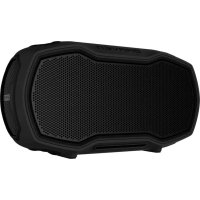
Ready Solo - Loudspeaker BRAVEN - Free user manual and instructions
Find the device manual for free Ready Solo BRAVEN in PDF.



| Product type | Portable Bluetooth speaker |
| Brand | Braven |
| Model | Ready Solo |
| Waterproof rating | IP68 (immersion proof) |
| Battery life | 14 hours at medium volume |
| Battery type | Integrated rechargeable lithium-ion |
| Charging port | Micro-USB |
| External charging port | Standard USB (output 0.3-1 A) |
| Audio input | 3.5mm jack |
| Bluetooth connectivity | Bluetooth A2DP, remembers 8 devices |
| TrueWireless stereo pairing | Yes (two speakers) |
| Hands-free | Yes (built-in microphone) |
| Voice command | Siri and Google Assistant |
| Action Mount support | Yes (GoPro compatible) |
| Carrying strap | Included (adjustable) |
| Radio frequency band | 2402-2480 MHz |
| Max RF power | 6 dBm (EIRP) |
| Operating temperature range | -5 °C to 40 °C |
| Maintenance | Wipe with a dry cloth; keep the I/O cover closed for waterproofing |
| Safety | Do not expose to rain while charging; do not modify the product |
Frequently Asked Questions - Ready Solo BRAVEN
User questions about Ready Solo BRAVEN
0 question about this device. Answer the ones you know or ask your own.
Ask a new question about this device
Download the instructions for your Loudspeaker in PDF format for free! Find your manual Ready Solo - BRAVEN and take your electronic device back in hand. On this page are published all the documents necessary for the use of your device. Ready Solo by BRAVEN.
USER MANUAL Ready Solo BRAVEN
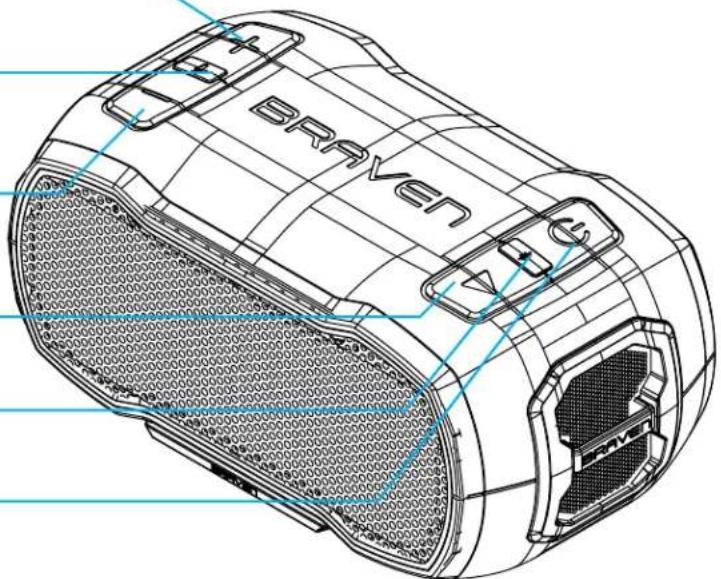
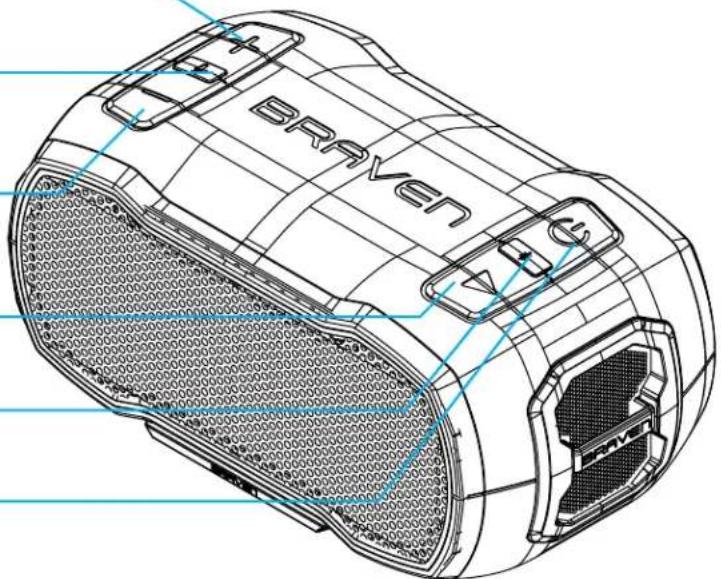
VOLUME DOWN,
SKIP BACK (press and hold)
PLAY/PAUSE
BLUETOOTH PAIRING
POWER ON/OFF
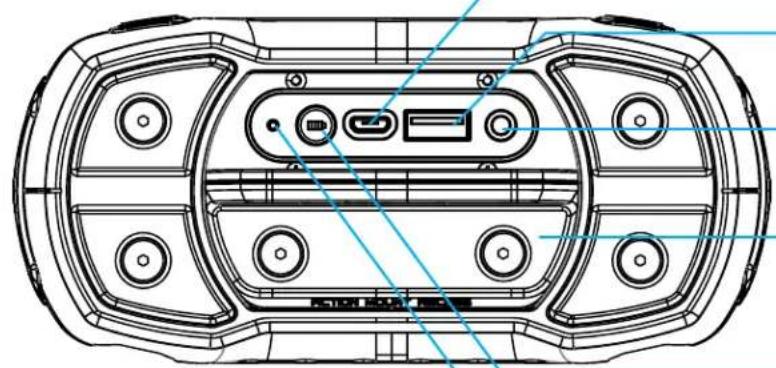
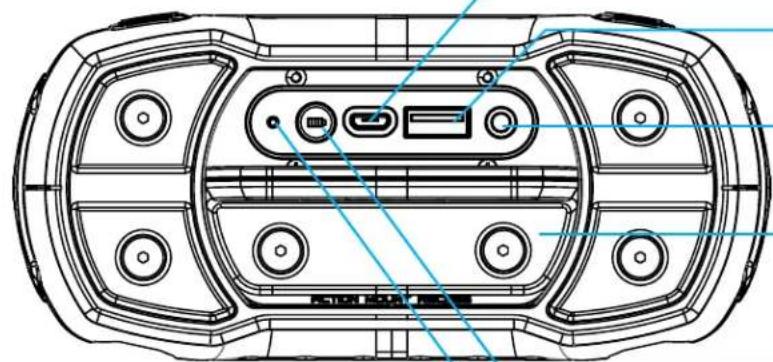
MICRO-USB CHARGING PORT
- EXTERNAL USB CHARGING PORT
3.5MM AUDIO-IN JACK
I/O PORT COVER (Seal tightly for waterproofing)
BATTERY CHECK BUTTON / TRUEWIRELESS PAIRING
RESET BUTTON
POWER & BLUETOOTH PAIRING
- Press the power button for 2-3 seconds to turn your BRAVEN READY SOLO™ on or off.
- Toggle Bluetooth® on in your device settings. For further instruction on how to do so, please refer to the user manual included with your mobile device.
- Your speaker will automatically enter pairing mode when powered on. Go to your device's Bluetooth® settings and select "BRAVEN READY SOLO" to connect. Pair another mobile device to your BRAVEN by holding the Bluetooth button for 2-3 seconds, until you hear the audio cue. Navigate to the Bluetooth settings of the second device and select "BRAVEN READY SOLO" to complete pairing.
Your BRAVEN will remember the last 8 devices it has paired with.
NOTE: If your BRAVEN is left on with an inactive Bluetooth connection for 30 minutes, it will automatically power off. Power your BRAVEN on again by pressing and holding the power button for 2-3 seconds.
VOLUME AND PLAYBACK CONTROL
Increase volume by short pressing the "+" button or decrease volume by short pressing the "-" button. An audio cue will indicate when you've reached max volume.
Skip to the next track by long pressing the "+" button or play the previous track by long pressing the "-" button.
- Before using your BRAVEN for the first time, charge the unit until the battery indicator light turns off.
- To charge your BRAVEN, plug the included Micro-USB cable into a wall power adapter (not included) or into a powered USB port. Plug the Micro-USB connector end of the cable into the BRAVEN charging port.
- Once fully charged, your BRAVEN READY SOLO has 12 hours of playtime at medium volume.
CHARGING EXTERNAL DEVICES
Your BRAVEN is designed to charge USB devices that draw from 0.3A - 1A using the full-sized USB port located behind the I/O port cover. To use external charging:
- Turn your BRAVEN on.
- Plug the USB end of your device's power cable into the USB port on your BRAVEN.
- Plug the other end of the cable into your mobile device to initiate charging.
SPEAKERPHONE
Press the mic button on your BRAVEN to answer calls over the speaker. Press the mic button again to end the call.
WATERPROOF FEATURES
The BRAVEN READY SOLO™ is IP68 waterproof, and designed to withstand rainfall, waterjets, water splashing, or a dunk underwater.
IMPORTANT: To ensure your BRAVEN READY SOLO M speaker is prepared for use in a wet environment, remove all cable connections and tightly close the I/O port cover on the back of the speaker. If this cover is not securely fastened to the speaker, BRAVEN READY SOLO M will not be waterproof.
USING BRAVEN VOICE CONTROL
To activate Siri or Google Commands with your BRAVEN, short press the mic button. You can now say commands through your BRAVEN, with your phone at a distance.
USING TRUEWIRELESS STEREOPAIRING
TrueWireless allows you to wirelessly pair two BRAVEN READY SOLO™ speakers in right & left channel audio.
- Connect your device via Bluetooth to one of the READY SOLO speakers. Press and hold the battery check button on this speaker until the voice prompt says "TrueWireless primary pairing."
- Power the second "READY SOLO" on, then double press the battery button on the back of your speaker. The voice prompt will say "TrueWireless secondary pairing."
- The voice prompt will say "TrueWireless Connected" when successfully paired.
RESETTING YOUR BRAVEN
Reset your BRAVEN READY SOLO™ to its original factory settings by pressing the reset button on the back of your speaker while it is powered on.
USING THE ACTION MOUNT
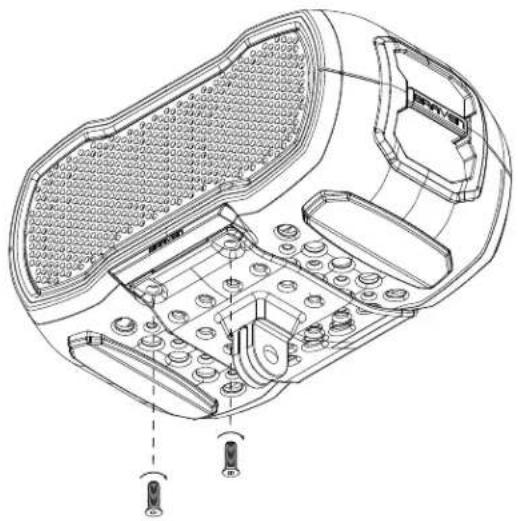
The included Action Mount allows you to attach your BRAVEN READY SOLO™ to most GoPro™ mounting systems. Attach the Action Mount to the READY SOLO™ by aligning the mount with the holes on the bottom of your BRAVEN. Secure the mount using the included screws and Allen wrench.
CARRY STRAP INSTRUCTIONS
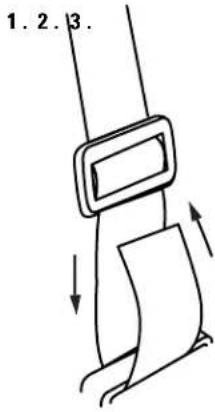
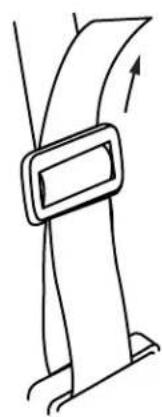
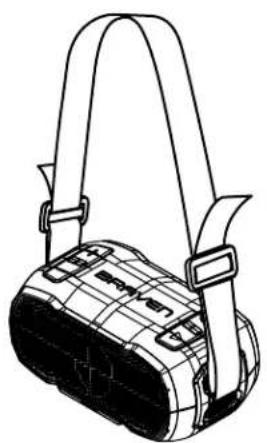
- Loop each end of strap through your speaker's tie down bars.
- Weave strap back through the buckle attached to the strap.
- Slide buckle to adjust.
WARNING, CAUTION & LEGAL INFORMATION
To reduce the risk of fire or electric shock, do not expose the BRAVEN to rain or moisture while charging. The BRAVEN should not be exposed to dripping or splashing, and objects filled with liquids, such as vases, should not be placed on or near it while being charged or charging other devices. As with any electronic products, use care not to spill liquids into any part of the product. Liquids can cause a failure and/or a fire hazard. The power supply must be used indoors only. Make no modifications to the product or accessories. Unauthorized alterations may compromise safety, regulatory compliance, and system performance, and will void the warranty. Do not place any flame sources, such as lighted candles, on or near the BRAVEN. The BRAVEN contains small parts that may be a choking hazard and is not suitable for children under age 3. Do not continue charging the battery if it does not reach full charge within the specified charging time. Overcharging may cause the battery to become hot, rupture, or ignite. If you see any heat deformation or leakage, properly dispose of the battery. Do not attempt to charge the battery in temperatures outside the range of 32° - 104°F (0° - 40°C) . If the battery begins to leak, do not allow the liquid to come in contact with your skin or eyes. If contact has been made, wash the affected area with plenty of water and seek medical attention immediately. Do not expose the product or battery to excessive heat, including direct sunlight or fire and storage or use inside cars in hot weather, where it can be exposed to temperatures in excess of 115°F (60°C) . Doing so may cause the battery and power supply to generate heat, rupture, or ignite. Using the product in this manner also may result in a loss of performance and a shortened life expectancy. Extended exposure to direct sunlight may damage the external appearance and material qualities. Do not step on, throw, or drop batteries or the power supply or device, or expose them to a strong shock. Do not pierce, crush, dent, or deform the batteries or power supply in any way. If either becomes deformed, properly dispose of it. Do not short-circuit batteries. Do not attempt to service the BRAVEN yourself. Opening or removing covers may expose you to dangerous voltages or other hazards and will void the manufacturer's warranty. To prevent risk of fire or electric shock, avoid overloading wall outlets, extension cords, or integral convenience receptacles. Your Bluetooth device (mobile phone, music player, tablet, laptop, etc.) must support the A2DP Bluetooth profile in order to work wirelessly with your new BRAVEN speaker. The A2DP profile is supported by most recent mobile products with built-in Bluetooth capability. Please refer to your device's user manual for details and instruction regarding the Bluetooth profiles it supports. This device complies with part 15 of the FCC Rules. Operation is subject to the following two conditions: (1) This device may not cause harmful interference, and (2) this device must accept any interference received, including interference that may cause undesired operation.
NOTE: This equipment has been tested and found to comply with the limits for a Class B digital device, pursuant to part 15 of the FCF Rules. These limits are designed to provide reasonable protection against
harmful interference in a residential installation. This equipment generates, uses and can radiate radio frequency energy and, if not installed and used in accordance with the instructions, may cause harmful interference to radio communications. However, there is no guarantee that interference will not occur in a particular installation. If this equipment does cause harmful interference to radio or television reception, which can be determined by turning the equipment off and on, the user is encouraged to try to correct the interference by one or more of the following measures:Reorient or relocate the receiving antenna. Increase the separation between the equipment and receiver. Connect the equipment into an outlet on a circuit different from that to which the receiver is connected. Consult the dealer or an experienced radio/TV technician for help. CAUTION: Any changes or modifications not expressly approved by the party responsible for compliance could void the user's authority to operate the equipment. FCC RADIATION EXPOSURE STATEMENT: This device complies with FCC radiation exposure limits set forth for an uncontrolled environment. The device has been evaluated to meet the general RF exposure requirement. The device can be used in portable exposure conditions without restriction. This device complies with Industry Canada license-exempt RSS standard(s). Operation is subject to the following two conditions: (1) this device may not cause interference, and (2) this device must accept any interference, including interference that may cause undesired operation of the device. Under Industry Canada regulations, this radio transmitter may only operate using an antenna of a type and maximum (or lesser) gain approved for the transmitter by Industry Canada. To reduce potential radio interference to other users, the antenna type and its gain should be so chosen that the equivalent isotropically radiated power (e.i.r.p.) is not more than that necessary for successful communication. The device has been evaluated to meet general RF exposure requirement. The device can be used in portable exposure condition without restriction. This Class B digital apparatus complies with Canadian ICES-003.Lithium Battery installed is not intended to be replaced by the USER. CAUTION: Danger of explosion if battery is incorrectly replaced. Replace only with the same or equivalent type. Where the MAINS plug is used as the disconnect device, the disconnect device shall remain readily operable. The device meets the exemption from the routine evaluation limits in section 2.5 of RSS 102 and compliance with RSS-102 RF exposure, users can obtain Canadian information on RF exposure and compliance.
Correct Disposal of this product. This marking indicates that this product should not be disposed with other household wastes throughout the EU. To prevent possible harm to the environment or human health from uncontrolled waste disposal, recycle it responsibly to promote the sustainable reuse of material resources. To return your used device, please use the return and collection systems or contact the retailer where the product was purchased.
This product complies with California Energy Commission efficiency standards for consumer battery chargers.
Braven hereby declares that this device is in compliance with Radio Equipment Directive 2014/53/EU. The full text of the EU DoC is available at the following: https://www.braven.com/eu-declaration-of-conformity.
Braven follows Safety Instruction for CE-LV. Do not operate products in temperatures outside the range of -5 - 40°C. Operating Frequency Band: 2402 MHz to 2480 MHz Maximum RF power: 6dBm EIRP. Do not install this equipment in a confined or building-in space such as a book case or similar unit, and remain a well ventilation conditions. The ventilation should not be impeded by covering the ventilation openings with items such as newspaper, table-cloths, curtains etc.
WARNING To reduce the risk of fire or electric shock, do not expose this apparatus to rain or moisture. The apparatus shall not be exposed to dripping or splashing and that objects filled with liquids, such as vases, shall not be placed on apparatus.
WARNING: The power adapter is used as disconnect device, the disconnect device shall remain readily operable. WARNING Please refer the information on exterior bottom enclosure for electrical and safety information before installing or operating the apparatus. CAUTION: Danger of explosion if battery is incorrectly replaced. Replace only with the same or equivalent type. The battery (battery or batteries of battery pack) shall not be exposed to excessive heat such as sunshine, fire or the like.
Article 10
-
Manufacturers shall ensure that radio equipment shall be so constructed that it can be operated in at least one Member State without infringing applicable requirements on the use of radio spectrum.
-
In cases of restrictions on putting into service or of requirements for authorisation of use, information available on the packaging shall allow the identification of the Member States or the geographical area within a Member State where restrictions on putting into service or requirements for authorization of use exist. The Commission may adopt implementing acts specifying how to present that information. Those implementing acts shall be adopted in accordance with the advisory procedure referred to in Article 45(2).
Manufacturer:Braven LC.
CONOCETUBRAVEN
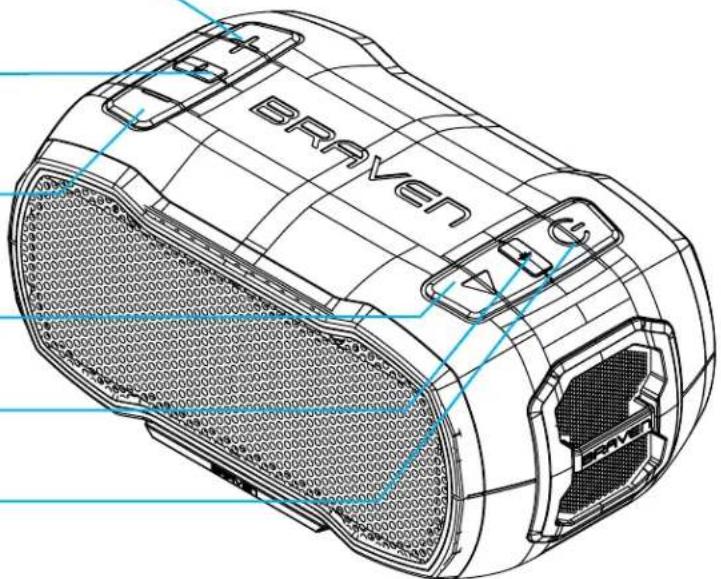
SUBIREL VOLUMEN, SALTAR UNAPISTA (PRESIONARY SOSTENER)
RESPONDER/FINALIZAR LlamADA /CONTROL DE VOZ
BAJAR VOLUMEN, VOLVER ATRÁS (PRESIONARY SOSTENER)
REPRODUcIR / PAUSAR
SINCRONIZACION BLUETOOTH
ENCENDIDO/APAGADO DEL DISPOSITIVO, ENCENDIDO/APAGADO DE LA LINTERNA (PRESIONAR DOS VECES RAPIDAMENTE)
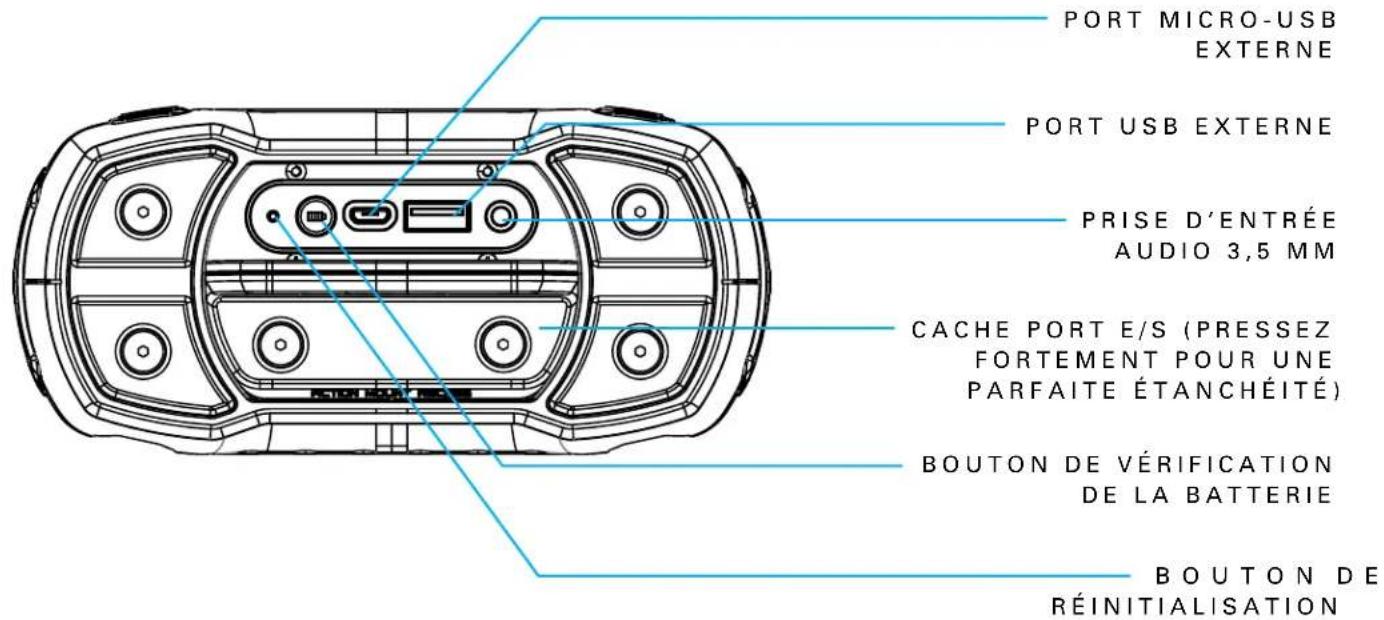
PUERTO DE CARGA MICRO-USB
PUERTO EXTERNO DE CARGA USB
3.5MM AUDIO-IN JACK
MISE SOUS TENSION / HORS TENSION
ALIMENTATION ET APPARIEMENT BLUETOOTH
ACCENSIONE ACCOPIAMENTO BLUETOOTH
Your BRAVEN is designed to charge USB devices that draw from 0.3A - 1A using the full-sized USB port located behind the I/O port cover. To use external charging:

- POWER & BLUETOOTH PAIRING
- VOLUME AND PLAYBACK CONTROL
- CHARGING EXTERNAL DEVICES
- SPEAKERPHONE
- WATERPROOF FEATURES
- USING BRAVEN VOICE CONTROL
- USING TRUEWIRELESS STEREOPAIRING
- RESETTING YOUR BRAVEN
- USING THE ACTION MOUNT
- CARRY STRAP INSTRUCTIONS
- WARNING, CAUTION & LEGAL INFORMATION
- ARTICLE 10
- CONOCETUBRAVEN
- ALIMENTATION ET APPARIEMENT BLUETOOTH
- ACCENSIONE ACCOPIAMENTO BLUETOOTH
Brand : BRAVEN
Model : Ready Solo
Category : Loudspeaker