
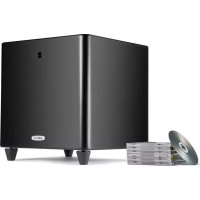
DSW 4000 - Subwoofer POLK - Free user manual and instructions
Find the device manual for free DSW 4000 POLK in PDF.



| Brand | Polk |
| Model | DSW 4000 |
| Product type | Active subwoofer with acoustic correction |
| Dimensions (W x D x H) | 39 x 43 x 42 cm (15 1/2 x 17 x 16 1/2 inches) |
| Weight | 28.1 kg (61.9 lb) |
| Rated power | 1200 W |
| Power supply | Dual-voltage switch (110-120 V / 220-240 V) |
| Power-on mode | Auto (audio sense), 12V trigger, manual |
| Audio inputs | LFE (RCA), speaker level inputs (speaker in), line level inputs (line in) |
| Audio outputs | Line out (for additional subwoofer) |
| Low-pass filter | Adjustable (defeated in LFE mode) |
| Phase | 4 positions (0°, 90°, 180°, 270°) |
| Acoustic correction | Polk Room Optimizer (PRO) and AutoPro (measurement with microphone) |
| Remote control | Infrared (IR) with functions: volume, phase, PRO, mute, night, reset, LED |
| External IR connector | Yes (1/8 inch jack) |
| LED indicator | Blue (on/off, flashing indicators) |
| Adjustable feet | Yes (screw-type for leveling) |
| Maintenance | Wipe with a dry cloth |
| Safety | Do not expose to water, do not block ventilation grilles |
| Box contents | Subwoofer, microphone, remote control, power cord, manual, registration card |
| Warranty | 5 years speaker, 3 years amplifier (see manual) |
Frequently Asked Questions - DSW 4000 POLK
User questions about DSW 4000 POLK
0 question about this device. Answer the ones you know or ask your own.
Ask a new question about this device
Download the instructions for your Subwoofer in PDF format for free! Find your manual DSW 4000 - POLK and take your electronic device back in hand. On this page are published all the documents necessary for the use of your device. DSW 4000 by POLK.
USER MANUAL DSW 4000 POLK
- Read these instructions.
- Keep these instructions.
- Heed all warnings.
- Follow all instructions
- Do not use this apparatus near water.
- Clean only with dry cloth.
- Do not block any ventilation openings. Install in accordance with the manufacturer's instructions.
- Do not install near any heat sources such as radiators, heat registers, stoves, or other apparatus (including amplifiers) that produce heat.
- Do not defeat the safety purpose of the polarized or grounding-type plug. A polarized plug has two blades with one wider than the other. A grounding type plug has two blades and a third grounding prong. The wide blade or the third prong are provided for your safety. If the provided plug does not fit into your outlet, consult an electrician for replacement of the obsolete outlet.
- Protect the power cord from being walked on or pinched particularly at plugs, convenience receptacles, and the point where they exit from the apparatus.
- Only use attachments/accessories specified by the manufacturer.
- Use only with the cart, stand, tripod, bracket, or table specified by the manufacturer, or sold with the apparatus. When a cart is used, use caution when moving the cart/apparatus combination to avoid injury from tip-over.
- Unplug this apparatus during lightning storms or when unused for long periods of time.
- Refer all servicing to qualified service personnel. Servicing is required when the apparatus has been damaged in any way, such as power-supply cord or plug is damaged, liquid has been spilled or objects have fallen into the apparatus, the apparatus has been exposed to rain or moisture, does not operate normally, or has been dropped.
- WARNING: To reduce the risk of fire or electric shock, this apparatus should not be exposed to rain or moisture and objects filled with liquids, such as vases, should not be placed on this apparatus.
- To completely disconnect this equipment from the mains, disconnect the power supply cord plug from the receptacle.
- The main plug of the power supply cord shall remain readily operable.

CONSIGNES DE SECURITE IMPORTANTES A LIRE AVANT D'UTILISATION L'ÉQUIPMENT
Polk Audio loudspeakers and subwooers are capable of playing at extremely high volume levels, which could cause serious or permanent hearing damage. Polk Audio, Inc. accepts no liability for hearing loss, bodily injury or property damage resulting from the misuse of its products.
Keep these guidelines in mind and always use your own good judgment when controlling volume:
- You should limit prolonged exposure to volumes that exceed 85 decibels(dB).
- You are responsible for knowing the local laws governing acceptable volume levels. For more about safe volume levels, go to: www.polkaudio.com/education/article/SPL/. Or refer to the Occupational Health and Safety Administration (OSHA) guidelines at: www.osha.gov/dts/osfa/otm/noisz/standards_moro.html.
AVERTISSEMENT: ÉCOUTEZ BIEN
Caution: Subwoofer are heavy. Exercise caution when unpacking your subwoofer.
Take Inventory
1 Subwoofer
1 Microphone (DSWmicroPro2000,3000,4000 models)
1 Remote Control
1 Owner's Manual
1 Power Cord
1 Registration Card
Please inspect your subwoofer carefully. Notify your Polk Audio dealer if you notice any damage or missing items. Keep the carton and packing material. It will do the best job of protecting your subwoofer if it needs to be transported. The cloth bag protecting your subwoofer during shipment should be kept for cleaning the cabinet surface.
Your system includes a detachable power cord that's packaged separately from the subwoofer. Insert the female end into the receptacle on the amplifier plate and insert the AC plug into a wall outlet (or power strip) as per the safety instructions found on the inside cover of this manual. We do not recommend connecting the subwoofer's AC power cord to your receiver's switched outlet.
PLACING YOUR SUBWOOFER IN A ROOM
Your DSWmicroPro Series subwoofer must be located a safe distance from tube-type video monitors to prevent video distortion from magnetic interference. (LCD, DLP and Plasma televisions are not affected by magnetism.) Allow at least 24 (61cm) between your subwoofer and any tube television. If you do notice video distortion or discoloration, immediately move the subwoofer further away from the TV.
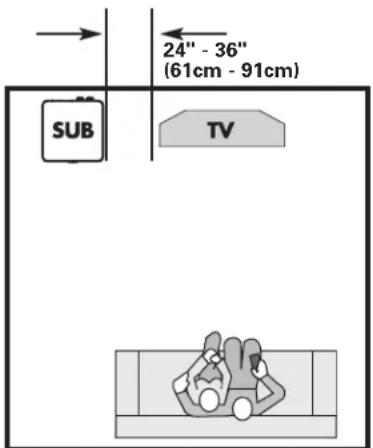

When placing your subwoofer in the room, always place your subwoofer on its base, feet side down. If you can avoid it, do not place your subwoofer next to an open door.
Polk Room Optimizer (PROTM)
The Polk Room Optimizer (PRO) feature (see page 7) lets you place your subwoofer anywhere in the room without compromising performance.
The PRO feature will tailor your subwoofer's performance to its location in your room. Select one of the four buttons on your subwoofer's remote control that indicates where you've placed your subwoofer in the room. For more on this feature, see "Polk Room Optimizer." on page 7 of this manual.
AUTOPRO™
AUTOPRO mitigates room resonance effects that would otherwise impart a "boomy" quality to in-room performance. Simply connect the provided microphone (DSWmicroPRO 2000/3000/4000 models) into the "MIC IN" jack on the rear plate, place the microphone near ear level within your preferred listening area and press the "room" button on the remote control. See "AUTOPRO" on page 7 of this manual for more information.
Adjustable Feet
DSWmicroPro Series subwoofoers have adjustable leveling feet. Each foot's shaft is threaded, enabling you to compensate for an uneven floor.

Approximate Dimensions
height with rubber feet attached)
DSWmicroPRO1000: 11° (28cm) W x 13° (33cm) D x 12 1/2° (32cm) H
DSWmicroPRO2000: 11" (28cm) W x 13" (33cm) D x 12 1/2" (32cm) H
DSWmicropRO3000: 12 1/2° (32cm) W x 14° (36cm) D x 14° (36cm) H
DSWmicroPRO4000: 151/2*39cmWx17*43cmDx161/2*42cmH
For more information on subwoofer placement, go to www.polkaudio.com/education/article.php?id=20.
NOTE: DSWmicro series subwooers are low-frequency audio output devices. Avoid placing objects on the subwoofer, as the cabinet vibration could cause objects to fall and possibly break.
AC POWER CONNECTIONS AND SWITCHES
Dual Voltage Switch
DSWmicroPro Series subwoofer are equipped with a dual voltage switch. Be sure to confirm the voltage setting required in your country.
WARNING: The correct voltage for your country has been set at the factory. Only use the voltage setting specified for your country. Using an improper setting may damage your subwoofer. If you must switch voltage, take care to check the fuse value; replace with correct fuse value for the voltage setting that you've selected.
AC Main Power Switch
Turn power on/off via the AC MAIN switch.
3 Position Power Switch
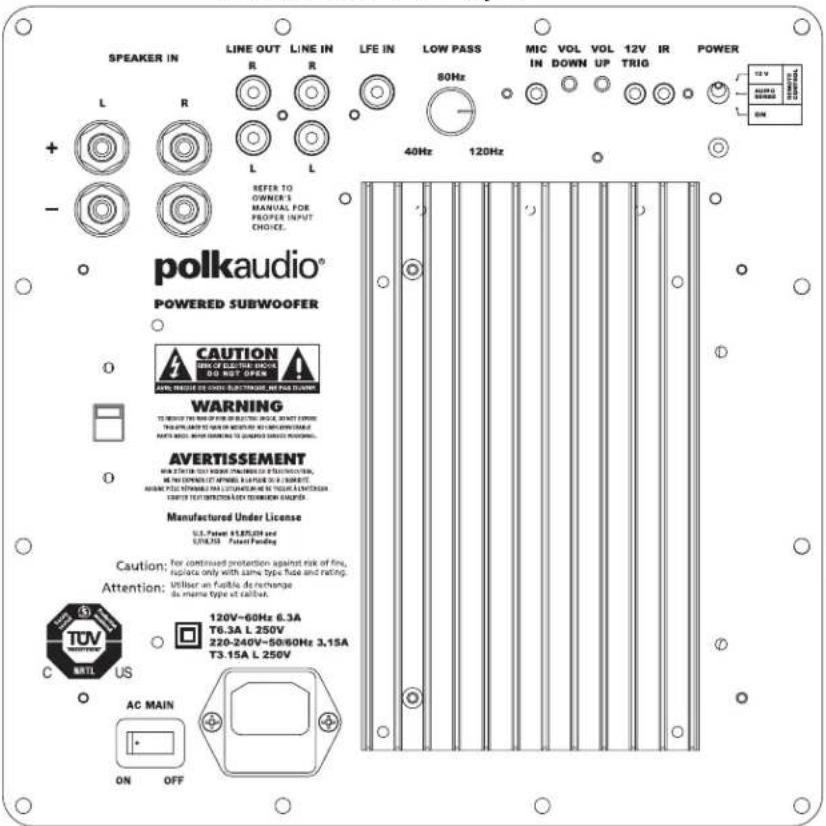
Your DSWmicroPro Series subwoofer uses a 3 position power switch, which allows you to select your subwoofer's operational mode:
12V (DSW2000/DSW3000/DSW4000)
With the switch in this position, your subwoofer will only turn on (become active) when a 12V signal is applied to the 12V input on the back of the amplifier or when the user presses the power button on the remote control. Once active the subwoofer will remain on regardless of whether an audio signal is present.
Note: For the DSW1000, the remote control is used to turn the subwoofer ON/OFF with the switch in the "REMOTE" position. The DSW1000 does not have a 12V trigger option.
Audio Sense
With the switch in this position, your subwoofer automatically turns on when it senses an audio signal. The LED located on the back of the subwoofer will turn green. The subwoofer can also be turned on or off via the remote control.
We recommend this mode if your subwoofer is always receiving power (i.e., if it's plugged into a wall outlet). When no signal is present, the subwoofer will enter a "waiting" state after 15 minutes and the LED will turn yellow.
On
With the switch in this position, your subwoofer is always on and fully active. The LED on the back of the subwoofer will be green. This mode is best if the subwoofer is plugged into a switched power outlet. The remote control cannot be used to turn off the subwoofer.
Note: You may want to leave your subwoofer unplugged or the AC MAIN switch turned off during extended periods of non use, such as during a vacation.
Power Mode LED Colors and Their Meaning:
Green: Fully active
Yellow: Standby
Red: Protection

DSWmicroPRO1000 Amplifier
DSWmicroPRO2000,3000,4000Amplifier
CONNECTING THE SUBWOOFER TO THE SYSTEM-HOOKUP OPTIONS
IMPORTANT NOTE: USE ONLY ONE OF THESE OPTIONS.
NEVER Combine Hookup Options.

OPTION #1 Receivers that include a "SUB OUT" feature the most common hookup method with Dolby Digital and DTS receivers.
- Connect a single RCA cable from the "SUB OUT" of your receiver to the LFE input of the subwoofer. This connection method bypasses the subwoofer's internal filter and relies on the low-pass filter built into your receiver. Make no other signal connections. Do not use speaker wire to make the connection to the subwoofer.
- Connect all other speakers directly to the receiver. Adjust your receiver's speaker configurations as follows:
Front Speakers = SMALL
Center and Surrounds = SMALL
Subwoofer = ON, YES, or PRESENT
- Depending on your front speakers' bass output capabilities, set the crossover frequency on the receiver to 80Hz for tower and bookshelf speakers (speakers with a woofer 51/4" in diameter or larger) and 100 - 120Hz for satellite speakers. Consult your receiver's owner's manual for instructions.
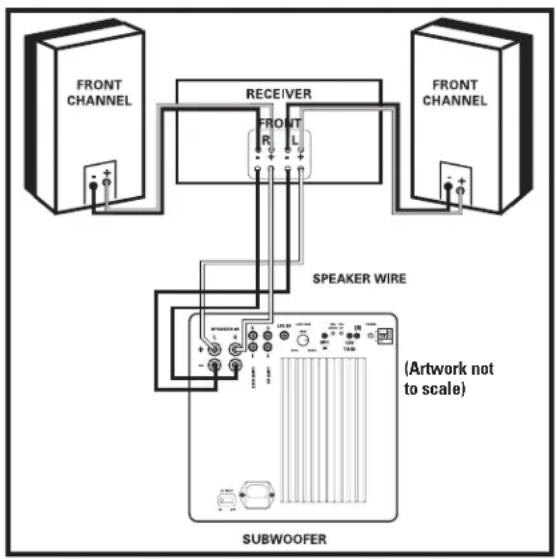
OPTION #2 Two channel or Dolby Pro Logic receiver with no "SUB OUT." Use two-conductor 16 gauge or thicker speaker wires. See your Polk Audio dealer for wire recommendations.
Note: Do not use the line or LFE input in this configuration.
- Connect the left and right front speaker outputs of your receiver to the speaker level inputs of the subwoofer using speaker wire (see "Making Binding Post/Speaker Wire Connections" for detailed instructions).
- Connect the left and right front speaker outputs of your receiver directly to the speaker inputs of your front speakers.
- Connect the center channel speaker directly to the center channel output from your receiver. (Not Shown)
- Connect the rear surround satellites directly to the rear or surround channel outputs from your receiver. (Not Shown)
- Adjust your receiver's speaker configurations as follows:
Front Speakers = LARGE
Center and Surrounds = SMALL
Subwoofer = OFF or NO
Making Binding Post/Speaker Wire Connections
There are two pair of speaker input terminals on the rear of the subwoofer. Each pair has one terminal marked red (+) and the other black (-) . Make certain that you connect the wire from the red (+) terminal of your receiver to the red (+) terminal on your subwoofer and the wire from the black (-) terminal of the receiver to the black (-) terminal on your subwoofer. Speaker wire has some indication (such as color coding, ribbing, or writing) on one of the two conductors to help maintain consistency.
Strip 1 / 2n (12mm) of insulation from each of the two conductors on both ends to expose the bare wire. Twist the exposed wire of each conductor to form two un-frayed strands (one on each end).
Unscrew the binding post hex nuts several turns. Insert the exposed wire, ensuring that none of the bare wire ends touch each other, because contact could result in an electrical short and cause your receiver to turn off or malfunction.


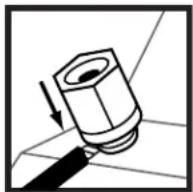
With the speaker wire inserted into the binding post, turn the hex nut clockwise until it's snug.
Note: If your subwoofer doesn't seem to produce much bass, it is most likely that one of the speaker wires is connected backwards. Double check all connections for correct polarity.
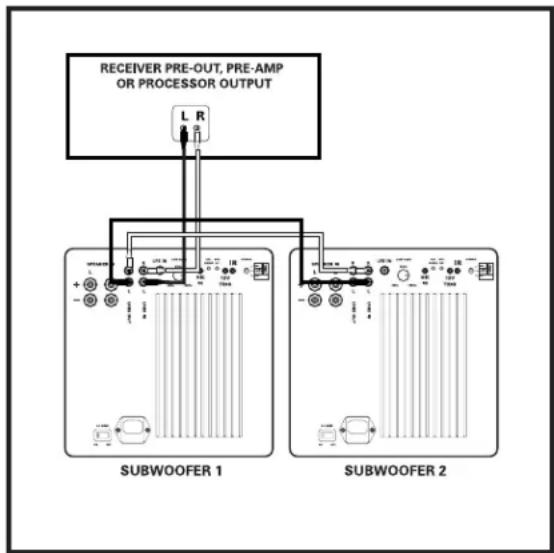
OPTION #3 Connecting multiple subwoofer.
- Connect the left and right preamp outputs to the left and right LINE LEVEL inputs of Subwoofer 1. Do not make any connections to the SPEAKER LEVEL inputs.
- Connect the left and right LINE LEVEL outputs of the subwoofer 1 to the left and right LINE LEVEL inputs of Subwoofer 2. Do not make any connections to the SPEAKER LEVEL inputs.
- Run the Auto Pro Room Correction setup for each subwoofer you have placed in your listening area.
Fine tune each subwoofer as described on page 8.
ADJUSTING YOUR SUBWOOFER
Note: When you set up your subwoofer for the first time, you will probably have to make adjustments several times before you hear what you personally like.
Don't forget to turn the AC MAIN power switch on.
POLK ROOM OPTIMIZER (PRO)
Where you place your subwoofer in your room affects its response. DSWmicroPRO Series subwoofer incorporate the Polk Room Optimizer (PRO) feature—four push button room equalization presets that optimize your subwoofer's performance for typical room placements: "cabinet," "corner," "mid-wall" and "mid-room."
A traditional subwoofer's response is affected by its location in a room. The Polk Room Optimizer (PRO) feature allows you to place your DSWmicroPro Series subwoofer where you want it in your listening room. Based upon the four most common room placements for subwoofer, PRO optimizes sound quality for you, smoothing out the bass response that a particular room placement creates.
You simply choose the location your subwoofer is in and select the corresponding button on your subwoofer's remote control.
AUTOPRO ROOM RESONANCE CORRECTION
(DSW2000/3000/4000 only)
While Pro addresses boundary effects on subwoofer performance, AUTOpro employs a novel, dynamic technique for correcting room resonant effects. Excessive room resonance imparts a "boomy" quality that inhibits the delivery of accurate, tight bass to listeners. AUTOpro corrects for these particular room modes that negatively affect performance within those areas of your room where you sit most often.

The following setup procedure applies to the DSWmicroPro2000/3000/4000 models. You must repeat the same procedure for each subwoofer you set up.
- Plug the microphone into the subwoofer "MIC IN" connection.
- Place the microphone as close to ear level as possible in your preferred listening area.
- Press the button on the remote control marked "room" until you hear a series of test tones. The tones will last for approximately 30 seconds to two minutes. CAUTION: These test tones are loud!
- If for some reason you need to stop AUTO after you've initiated the test tones, (for example: the microphone moves from its intended location) simply press the "room" button on the remote control again.
- Setup is complete; remove microphone.
Note: Whenever you choose to relocate your subwoofer or your listening area in the room, you must run the setup procedure again for optimal performance.
INITIAL SETTINGS
Your powered subwoofer offers a range of settings. The unit's initial settings are as follows:
Phase:0
Volume: 50% (20, on a scale from 0-40)
PRO setting: mid-room
The settings that are best for you depend upon your subwoofer placement, electronics and personal taste. After you've become familiar with what the settings do, experiment with alternate options to find the ones that work best for your system setup. You'll find an informative article on "Subwoofer Positioning and Adjustment" in the set up section at: www.polkaudio.com/education/article.php?id=19.
FINE TUNING YOUR SUBWOOFER
Volume: Adjust by ear using a wide variety of CDs and video sources. Adjust for deep, powerful bass without "boominess."
- Low Pass Filter Control: This control, which is located on the back of the amplifier, adjusts the frequency range over which the subwoofer operates. When using smaller main speakers the upper range of the control will probably yield the best results. With larger speakers the lower end of the control range will probably sound best, but always let your ear be the final judge. If male vocals sound "thin," turn this control up until the voice sounds rich but not "boomy." If male vocals sound too "thick" or "chesty," turn this control down until the voice sounds natural.
NOTE: The low pass filter control has no effect on subwoofer response when the subwoofer is connected with option #1 (LFE input).
- 4 Button Phase Control (0°, 90°, 180° and 270° settings): This control enables the subwoofer to blend more seamlessly with your main speakers. Sit in your favorite listening position. Using the subwoofer's remote control, play music (not a movie) with a walking bass line. We recommend playing jazz or country music. Now listen carefully for the point at which the subwoofer transitions to your main speakers. This is the crossover point, and it should occur below the frequency range of a male human voice. Whichever phase setting sounds louder or fuller at the subwoofer's crossover (transition) point is the optimum setting. If after trying all four possible phase settings you cannot hear any difference, leave the phase setting at "0."
DSWmicroPRO REMOTE CONTROL
DSWmicroPro Series subwoofoers come with a credit card sized remote control. All commands are sent to the subwoofer via IR control. The IR receiver is located on the front face of the subwoofer.
The remote control has the following features:
Power
Volume
- 4 Button Phase Control (0, 90, 180 and 270 degree settings)
- 4 Button Polk Room Optimizer (PRO) preset
- Mute function
- Night function allows you to hear low-level bass detail at lower volumes. If you have the volume at 30 and press "night," the volume is reduced by 50% , in this example to 15. Pressing "night" a second time restores the volume to its original setting. Pressing Volume+ (or Volume-) incrementally increases (or decreases) the volume in the normal manner and takes the subwoofer out of "night" mode. Also, the LED shines at a reduced intensity when the subwoofer is in "night" mode.
- Reset button restores the woofer's settings to factory presets. Hold down for two (2) seconds.
LED turns LED On/Off. The amplifier remains active.
- Room initiates AutoPRO. Press button until the test tones begin. To cancel AutoPRO, press button again until test tones stop.
Important: To activate the remote control for the first time, remove the plastic tab.
IR Connection (DSW2000/DSW3000/DSW4000)
The IR connection on the back of your subwoofer (1/8" connector) enables you to place your subwoofer where there is no direct access of the remote control's signal to the subwoofer's Infrared Receiver. Connecting an IR repeater target (available from a custom installation specialist) allows you to control your subwoofer from more locations.


WHAT IS THAT BLINKING BLUE LIGHT?
Behind the logo badge on the front of your subwoofer there is a blue LED. The blue light blinks whenever you press a button on the subwoofer's remote control. The light lets you know that the subwoofer has received the command and is performing the function you've selected. The following table describes each button's function and how the LED communicates to you:
Power LED is on when power is active and is off when power is not active. Pressing the LED button on the remote will also turn the LED off.
Volume LED will blink a 2-digit code indicating volume setting from 0 to 40 (e.g., if the volume is turned up to 28, the LED will flash two long blinks followed by eight short blinks). Refer to Chart.
Mute LED blinks slowly when "mute" is selected.
Phase 0° 1 blink; 90° 2 blinks; 180° 3 blinks; 270° 4 blinks.
Night LED is on at a lower intensity; volume is reduced by 50% .
PROCabinet-1 blink; Corner-2 blinks; Mid-wall-3 blinks
Presets Mid-room—4 blinks.
Reset LED will blink 5 times.
LED Turns LED on/off. The amplifier remains active.
Room LED blinks continuously while the AUTOpro measurment is occurring.
VOLUME SETTINGS
Blue LED Indicator
| Volume Level Long Blinks Short Blinks | ||
| 40 40 | ||
| 39 39 | ||
| 38 38 | ||
| 37 37 | ||
| 36 36 | ||
| 35 35 | ||
| 34 34 | ||
| 33 33 | ||
| 32 32 | ||
| 31 31 | ||
| 30 30 | ||
| 29 29 | ||
| 28 28 | ||
| 27 27 | ||
| 26 26 | ||
| 25 25 | ||
| 24 24 | ||
| 23 23 | ||
| 22 22 | ||
| 21 21 | ||
| 20 20 | ||
| 19 19 | ||
| 18 18 | ||
| 17 17 | ||
| 16 16 | ||
| 15 15 | ||
| 14 14 | ||
| 13 13 | ||
| 12 12 | ||
| 11 11 | ||
| 10 10 | ||
| 9 | 0 | 9 |
| 8 | 0 | 8 |
| 7 | 0 | 7 |
| 6 | 0 | 6 |
| 5 | 0 | 5 |
| 4 | 0 | 4 |
| 3 | 0 | 3 |
| 2 | 0 | 2 |
| 1 | 0 | 1 |
| 0 (Muted) Blinks Slowly N/A | ||
TROUBLESHOOTING
| No sound coming from subwoofer. If hookup is "SUB OUT" to LFE, check and make sure your receiver is set to Subwoofer=YES. If hookup is via speaker wire, check that the polarity of the wires is correct. | |
| Subwoofer doesn't sound right. Adjust volume, low pass filter, phase and Pro settings. Retry AUTOPro ("Room") or press "Reset." | |
| The subwoofer is humming. There could be interference from a cable TV line. Disconnect the cable TV line from the cable box to see if the hum stops. A low-level hum is normal. | |
| Subwoofer has no power. Is the AC MAIN switch on? Check outlet; check fuse after unplugging the subwoofer. The fuse is located under the power cord receptacle. Fuse type and rating is found near the fuse holder. | |
| Remote control doesn't work. Remove the plastic tab to activate the remote control's battery or try replacing the battery. Ensure the IR sensor is not blocked. | |
| Power LED is red. Switch AC MAIN to "Off," and unplug subwoofer for 2 minutes, then plug back in. Turn AC MAIN "ON" | |
| Subwoofer won't respond properly to remote control; The subwoofer seems "locked up" then plug back in. Turn AC MAIN "ON" |
TECHNICAL ASSISTANCE AND SERVICE
If, after following these hook up directions, you experience difficulty, please double-check all wire connections. Should you isolate the problem to the subwoofer, contact the authorized Polk Audio dealer where you made your purchase, or call Polk Audio's friendly Customer Service Department at 1-800-377-7655 (calls from US or CAN only), 410-358-3600 9am to 6pm EST, Monday through Friday.
You may also contact us via email: polkcs@polkaudio.com. For more detailed hook up information and manual updates, visit: www.polkaudio.com.
Specifications and the white paper can be found on the DSWmicroPRO webpages. Go to www.polkaudio.com.
POWER RATINGS
| Model | Shipping Weight | Power Rating |
| DSWmicroPRO1000 | 38.2 lbs | 1200 W |
| 17.327 kg | ||
| DSWmicroPRO2000 | 38.2 lbs | 1200 W |
| 17.327 kg | ||
| DSWmicroPRO3000 | 48.2 lbs | 1200 W |
| 21.863 kg | ||
| DSWmicroPRO4000 | 61.9 lbs | 1200 W |
| 28.077 kg |
FRENCH
AVANT TOUT
OU PLACER VOTRE SUBWOOFER
Polk Room Optimizer (PROMC)
Dimensions Approximatives
Polk Room Optimizer (PROTM)
Central y surrounds = Pequeño (SMALL)
Subwoofer = Encendido (ON), si (YES) o presente (PRESENT)
DEUTSCH FIRST THINGS FIRST
Polk Room Optimizer (PROTM)
Subwoofer = ON, YES o PRESENT
Polk Room Optimizer (PROTM)
Chave Liga/Desliga Principal De C/A
Ligue e deslue a unidade com a chave liga/deslga principal de C/A.
Polk Audio, Inc., warrants to the original retail purchaser only. This warranty will terminate automatically prior to its stated expiration if the original retail purchaser sells or transfers the Product to any other party.
Polk Audio, Inc., warrants, to the original retail purchaser only, that the LOUDSPEAKER(S), PASSIVE CROSSOVER COMPONENT(S) and ENCLOSURE on this Polk Audio Loudspeaker Product will be free from defects in material and workmanship for a period of five (5) years from the date of original retail purchase from a Polk Audio Authorized Dealer.
Furthermore, Polk Audio, Inc., warrants to the original retail purchaser only, that any AMPLIFIER OR OTHER ELECTRONIC COMPONENT that may be included in this Polk Audio Loudspeaker Product will be free from defects in material and workmanship for a period of three (3) years from the date of original retail purchase from a Polk Audio Authorized Dealer.
To allow Polk Audio to offer the best possible warranty service, please register your new product online at: www.polkaudio.com/registration or call Polk customer service 800-377-7655 in the USA and Canada (outside the USA: 410-358-3600) within ten (10) days of the date of original purchase. Be sure to keep your original purchase receipt.
Defective Products must be shipped, together with proof of purchase, prepaid insured to the Polk Audio Authorized Dealer from whom you purchased the Product, or to the Factory at 2550 Britannia Boulevard, Suite A, San Diego, California 92154. Products must be shipped in the original shipping container or its equivalent; in any case the risk of loss or damage in transit is to be borne by you. If upon examination at the Factory or Polk Audio Authorized Dealer it is determined that the unit was defective in materials or workmanship at any time during this Warranty period, Polk Audio or the Polk Audio Authorized Dealer will, at its option, repair or replace this Product at no additional charge, except as set forth below. All replaced parts and Products become the property of Polk Audio. Products replaced or repaired under this warranty will be returned to you, within a reasonable time, freight prepaid.
This warranty does not include service or parts to repair damage caused by accident, disaster, misuse, abuse, negligence, inadequate packing or shipping procedures, commercial use, voltage inputs in excess of the rated maximum of the unit, cosmetic appearance of cabinetry not directly attributable to defect in materials or workmanship, or service, repair, or modification of the Product which has not been authorized or approved by Polk Audio. This warranty shall terminate if the Serial number on the Product has been removed, tampered with or defaced.
This warranty is in lieu of all other expressed warranties. All implied warranties on this Product are limited to the duration of this expressed Warranty. Some states do not allow limitation on how long an implied Warranty lasts, so the above limitations may not apply to you. This Warranty gives you specific legal rights, and you also may have other rights which vary from state to state.
If this Product is defective in materials or workmanship as warranted above, your sole remedy shall be repair or replacement as provided above. This warranty does not cover service, parts, or supplies to repair damage to property other than the Product. In no event will Polk Audio, Inc. be liable to you for any incidental or consequential damages arising out of the use or inability to use the Product, even if Polk Audio, Inc. or a Polk Audio Authorized Dealer has been advised of the possibility of such damages, or for any claim by any other party. Some states do not allow the exclusion or limitation of incidental or consequential damages, so the above limitation and exclusion may not apply to you.
This Warranty applies only to Products purchased in Canada, the United States of America, its possessions, and U.S. and NATO armed forces exchanges and audio clubs. The Warranty terms and conditions applicable to Products purchased in other countries are available from the Polk Audio Authorized Distributors in such countries.
GARANTIE LIMITEE DE 5 ANS
- CONSIGNES DE SECURITE IMPORTANTES A LIRE AVANT D'UTILISATION L'ÉQUIPMENT
- POLK AUDIO LOUDSPEAKERS AND SUBWOOERS ARE CAPABLE OF PLAYING AT EXTREMELY HIGH VOLUME LEVELS, WHICH COULD CAUSE SERIOUS OR PERMANENT HEARING DAMAGE. POLK AUDIO, INC. ACCEPTS NO LIABILITY FOR HEARING LOSS, BODILY INJURY OR PROPERTY DAMAGE RESULTING FROM THE MISUSE OF ITS PRODUCTS
- AVERTISSEMENT: ÉCOUTEZ BIEN
- TAKE INVENTORY
- PLACING YOUR SUBWOOFER IN A ROOM
- POLK ROOM OPTIMIZER (PROTM)
- AUTOPRO™
- ADJUSTABLE FEET
- APPROXIMATE DIMENSIONS
- HEIGHT WITH RUBBER FEET ATTACHED)
- AC POWER CONNECTIONS AND SWITCHES
- DUAL VOLTAGE SWITCH
- AC MAIN POWER SWITCH
- 3 POSITION POWER SWITCH
- 12V (DSW2000/DSW3000/DSW4000)
- AUDIO SENSE
- ON
- POWER MODE LED COLORS AND THEIR MEANING
- CONNECTING THE SUBWOOFER TO THE SYSTEM-HOOKUP OPTIONS
- NOTE: DO NOT USE THE LINE OR LFE INPUT IN THIS CONFIGURATION
- MAKING BINDING POST/SPEAKER WIRE CONNECTIONS
- OPTION #3 CONNECTING MULTIPLE SUBWOOFER
- ADJUSTING YOUR SUBWOOFER
- POLK ROOM OPTIMIZER (PRO)
- AUTOPRO ROOM RESONANCE CORRECTION
- (DSW2000/3000/4000 ONLY)
- INITIAL SETTINGS
- FINE TUNING YOUR SUBWOOFER
- DSWMICROPRO REMOTE CONTROL
- IR CONNECTION (DSW2000/DSW3000/DSW4000)
- WHAT IS THAT BLINKING BLUE LIGHT
- TECHNICAL ASSISTANCE AND SERVICE
- FRENCH
- AVANT TOUT
- OU PLACER VOTRE SUBWOOFER
- POLK ROOM OPTIMIZER (PROMC)
- DIMENSIONS APPROXIMATIVES
- DEUTSCH FIRST THINGS FIRST
- CHAVE LIGA/DESLIGA PRINCIPAL DE C/A
- GARANTIE LIMITEE DE 5 ANS
Brand : POLK
Model : DSW 4000
Category : Subwoofer