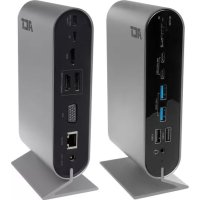
AC7045 - Docking station ACT - Free user manual and instructions
Find the device manual for free AC7045 ACT in PDF.



| Product Type | USB-C Docking Station |
| Brand | ACT |
| Model | AC7045 |
| Connectivity | USB-C (DP Alt mode or Thunderbolt 3 required) |
| Front Ports | 1x SD/microSD reader, 2x USB-C 3.2 Gen1, 2x USB-A 3.2 Gen1, 2x USB-A 2.0, 1x 3.5 mm jack (headphone+mic) |
| Rear Ports | 1x USB-C PD (charging input), 1x USB-C (host), 2x HDMI 2.0, 1x DisplayPort, 1x VGA, 1x Gigabit LAN RJ45, 1x DC power input |
| Max. Single Monitor Resolution | 4K at 30 Hz via HDMI or DP; 1080p at 60 Hz via VGA |
| Max. Dual Monitor Resolution | 4K at 30 Hz on HDMI/DP + 1080p at 60 Hz on VGA |
| Max. Triple Monitor Resolution | 1080p at 60 Hz on each output |
| Power Delivery (charging) | Up to 100W (20V/5A) via USB-C PD |
| Power Supply | Included AC adapter (DC input) |
| Box Contents | Docking station, power adapter, USB-C to C cable, manual |
| System Compatibility | Windows (MST supported), macOS (SST only, no MST) |
| Care and Cleaning | Wipe with a soft, dry cloth |
| Safety | Unplug before cleaning, do not expose to water/humidity, use in a ventilated area |
| Warranty | Manufacturer warranty, terms at www.act-connectivity.com |
| Repairability | Repair by ACT authorized technician only |
| General Information | Manual available in PDF at notice-facile.com |
Frequently Asked Questions - AC7045 ACT
User questions about AC7045 ACT
0 question about this device. Answer the ones you know or ask your own.
Ask a new question about this device
Download the instructions for your Docking station in PDF format for free! Find your manual AC7045 - ACT and take your electronic device back in hand. On this page are published all the documents necessary for the use of your device. AC7045 by ACT.
USER MANUAL AC7045 ACT
USB-C Multiport Docking Station MST and Power Delivery
Multilingual
User Manual
4.0 Power Delivery....6
text_image
USB-C PD charger USB-C to PC/Notebook HDMI (1st Display) HDMI (2nd Display) DP (2nd Display) VGA (3rd Display) Ethernet (LAN) DC Power Jack3.4 SST (Single Stream Transport)
3.5 MST (Multi Stream Transport)
Trademarks: all brand names are trademarks and/or registered of their respective holders.
The information contained in this document has been created with the utmost care. No legal rights can be derived from these contents. ACT cannot be held responsible, nor liable for the information contained in this document.

AC7045-NL | 09-2020
AC7045 USB-C 4K Multiport Docking Station MST and Power Delivery
en
Manual
www.act-connectivity.com
AC7045 Product Title from CMS
Table of contents
1.0 Introduction 2
1.1 Packing contents 2
2.0 Connections 3
2.1 Front .... 3
2.2 Rear 4
3.0 Monitor setup 5
3.1 Single Monitor....5
3.2 Dual Monitor (SST/MST) 5
3.3 Triple Monitor (SST/MST)....5
3.4 SST (Single Stream Transport) 5
3.5 MST (Multi Stream Transport) 5
4.0 Power Delivery....6
5.0 Frequently Asked Questions and other related information....7
6.0 Service and support....7
7.0 Warning and points of attention .... 7
8.0 Warranty conditions 8
1.0 Introduction
Congratulations with the purchase of this high-quality ACT product! This product has undergone extensive testing by ACT's technical experts. Should you experience any problems with this product, you are covered by ACT warranty. Please keep this manual and the receipt in a safe place.
Register your product now on www.act-connectivity.com and receive product updates!
1.1 Packing contents
The following parts need to be present in the packing:
- AC7045
- Power adapter
- USB-C to C cable
- Manual
2.0 Connections
2.1 Front
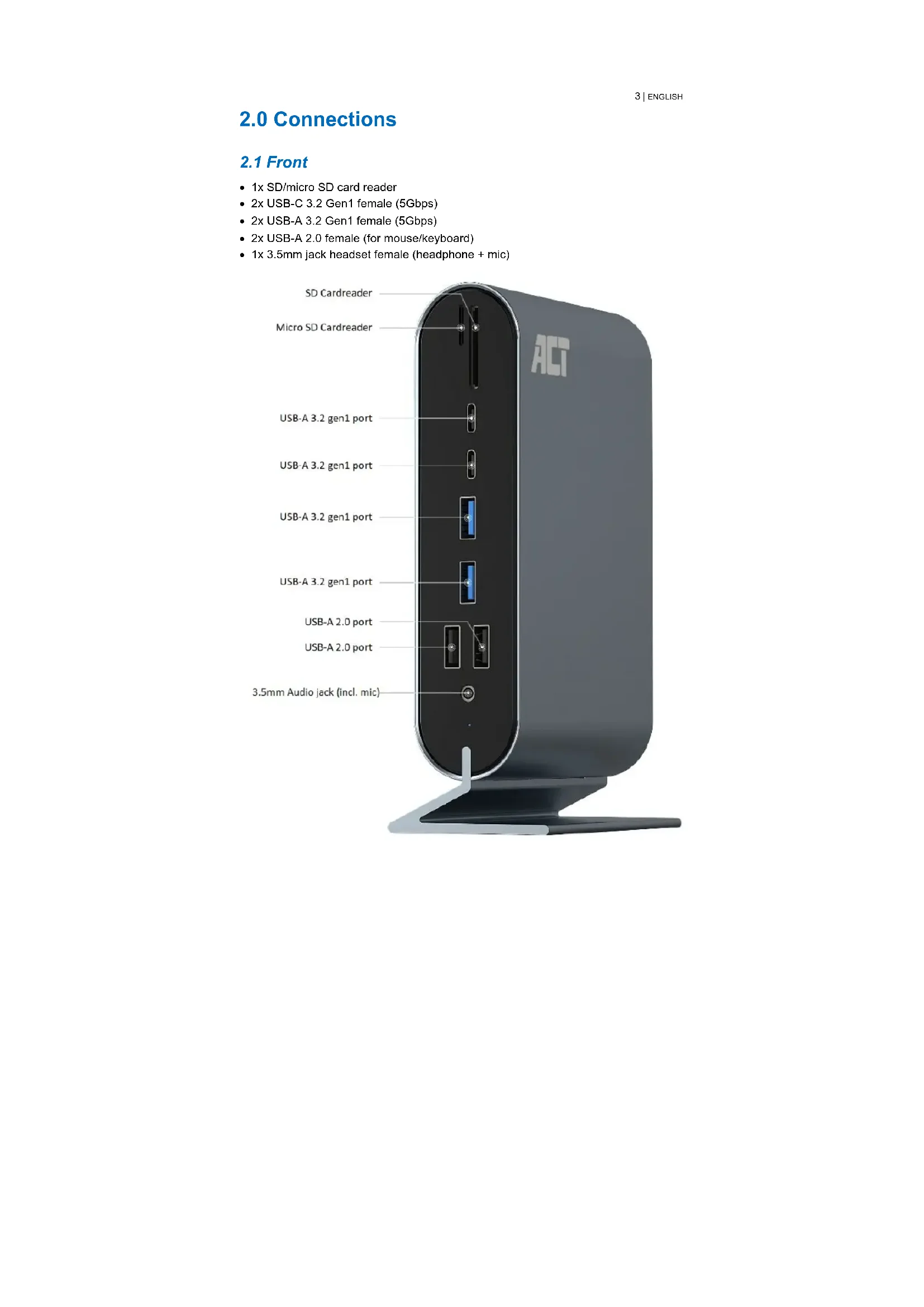
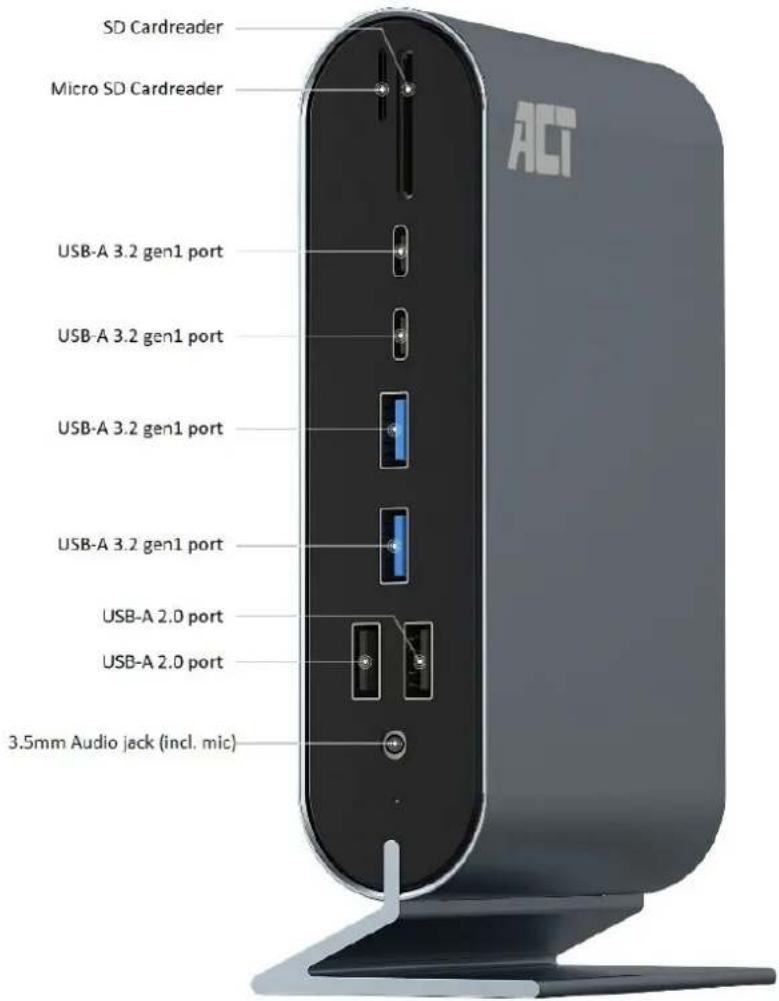
• 1x SD/micro SD card reader
• 2x USB-C 3.2 Gen1 female (5Gbps)
• 2x USB-A 3.2 Gen1 female (5Gbps)
• 2x USB-A 2.0 female (for mouse/keyboard)
- 1x 3.5mm jack headset female (headphone + mic)
text_image
SD Cardreader Micro SD Cardreader USB-A 3.2 gen1 port USB-A 3.2 gen1 port USB-A 3.2 gen1 port USB-A 3.2 gen1 port USB-A 2.0 port USB-A 2.0 port 3.5mm Audio jack (incl. mic)2.2 Rear
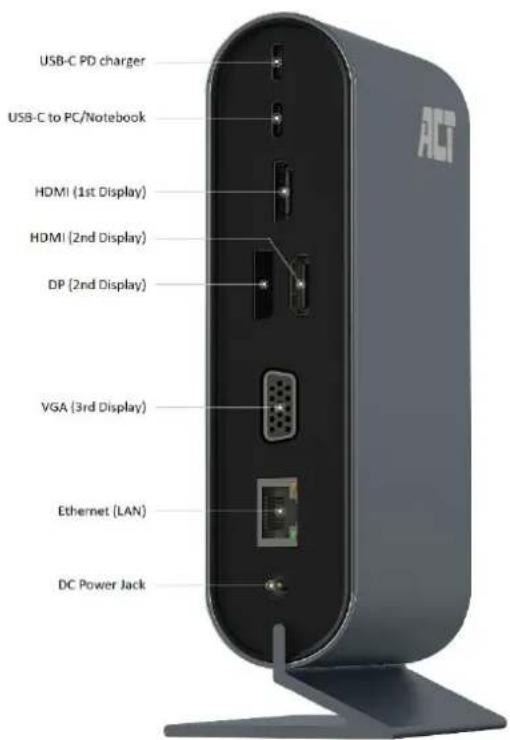
- 1x USB-C female PD Pass-through port (connect your USB-C charger to charge your notebook)
- 1x USB-C female notebook connection (connect this port to the USB-C connector of your notebook
- 2x HDMI 2.0 female port (connect your HDMI monitor(s) to these HDMI ports
• 1x DisplayPort female port - 1x VGA female port
• 1x Gigabit LAN RJ45 female port - 1x DC power supply
text_image
USB-C PD charger USB-C to PC/Notebook HDMI (1st Display) HDMI (2nd Display) DP (2nd Display) VGA (3rd Display) Ethernet (LAN) DC Power JackPlease Note!!! The 2nd HDMI port is shared with the DisplayPort port so it cannot be used simultaneously. You will need to choose which port you wish to use: HDMI or DisplayPort.
3.0 Monitor setup
Your USB-C device needs to support DP-Alternate mode or Thunderbolt™3 on its USB-C port in order to display your video output to 1 or more displays. Check the technical specifications of your USB-C device if it supports DP-Alternate mode or Thunderbolt™3. If the device does not support DP-Alternate mode or Thunderbolt™3, the AC7045 will not be able to display video onto your Display(s).
3.1 Single Monitor
For the single monitor setup, the AC7045 Docking station supports a max. resolution of 4K @ 30Hz via HDMI or DisplayPort (DP) or when using VGA a max. resolution of 1080p @ 60Hz.
3.2 Dual Monitor (SST/MST)
For the dual monitor setup, the AC7045 Docking station supports a max. resolution of 4K @ 30Hz on HDMI or DisplayPort (DP), or when using VGA a max. resolution of 1080p @ 60Hz.
3.3 Triple Monitor (SST/MST)
For the triple monitor setup, the AC7045 Docking station supports a max. resolution of 1080p @ 60Hz on HDMI or DisplayPort (DP) and VGA.
3.4 SST (Single Stream Transport)
With SST (Single Stream Transport) the connected screens will only show a clone (copy) of your main screen on the connected screens.
3.5 MST (Multi Stream Transport)
MST is part of the DisplayPort 1.2 standard, with which monitors and computers can support "daisy-chaining". You usually recognize daisy-chaining when the monitor has both a DisplayPort input and output. You can connect the first monitor to the computer and the second monitor to the first monitor. If both the monitor and the computer support MST daisy-chaining, the two screens work as separate screens. Exactly as if they were connected directly to the computer.
If your notebook supports DP alt mode (DisplayPort alternate mode) it also supports MST. In this case the AC7045 will work as a USB-C to MST adapter. You will be able
to use the multiple video outputs. The connected screens will be recognized as separate screens on your laptop / PC and can be used as an extended desktop.
Windows 10 has a short key to switch between the different display modes:
Use: "Windows key + P" an overview of display modes is displayed on your screen.
Please Note!!! MacOS does not support MST Daisy chaining. MacOS only supports Daisy chaining with the Thunderbolt™3 standard. So the AC7045 will not provide the desired result for macOS devices. In this case the connected screens only show a clone (copy) of your main screen on the connected screens also called SST (Single Stream Transport).
| Option HDMI 1 DP/HDMI 2 VGA 3 | ||
| 1 4K/30Hz X X | ||
| 2 X 4K/30Hz X | ||
| 3 X X 1080P/60Hz | ||
| 4 1080P/60Hz 1080P/60Hz X | ||
| 5 1080P/60Hz X 1080P/60Hz | ||
| 6 X 1080P/60Hz 1080P/60Hz | ||
| 7 1080P/60Hz 1080P/60Hz 800x600/60Hz |
4.0 Power Delivery
The AC7045 supports Power Delivery (PD) on the USB-C port. This protocol enables your notebook to be charged safely over one single USB-C cable. One footnote: all devices within the power chain must support Power Delivery. Including the USB-C cables. The devices and cables have built-in chips that communicate with each other to decide the best PD profile to ensure a safe power delivery.
For example, if you connect a 45.0W USB-C charger to the AC7045 (supports PD profiles up to 100.0W) and your notebook supports a USB-C PD profile of max. 65.0W. The max. power that will be provided to your notebook is 45.0W.
If for some reason in the example above, the USB-C cable is exchanged by a USB-C cable which does not support PD (no built-in chip), your notebook will not be charged.
Besides this all, USB-C with PD enables charging in two directions. For example, you can charge your smartphone with your tablet, but also your tablet with your smartphone.
Which Power Delivery profiles are available? 5.0V, 9.0V, 12.0V, 15.0V and 20.0V.
What max. Power Delivery profiles are supported by the AC7045:
| 5.0V 3.0A 15.0W | ||
| 9.0V 2.22A 20.0W | ||
| 12.0V 3.0A 36.0W | ||
| 15.0V 2.5A 37.5W | ||
| 20.0V 5.0A 100.0W |
5.0 Frequently Asked Questions and other related information
The latest Frequently asked questions for your product can be found on the support page of your product. ACT will update these pages frequently to assure you have the most recent information. Visit www.act-connectivity.com for more information about your product.
6.0 Service and support
This user manual has been carefully written by ACT's technical experts. If you have problems installing or using the product, please check the support link at the website www.act-connectivity.com.
7.0 Warning and points of attention

Due to laws, directives and regulations set out by the European parliament, some (wireless) devices could be subject to limitations concerning its use in certain European member states. In certain European member states the use of such devices could be prohibited. Contact your (local) government for more information about this limitations.
Always follow up the instructions in the manual*, especially where it concerns devices which need to be assembled.
Warning: In most cases this concerns an electronic device. Wrong/improper use may lead to (severe) injuries!
When you connect the device to the mains, make sure it will not be damaged or subject to (high) pressure.
A power socket is needed which should be close and easy accessible from the device.
Repairing of the device should be done by qualified ACT staff. Never try to repair the device yourself. The warranty immediately voids when products have undergone self-
repair and/or by misuse. For extended warranty conditions, please visit our website at www.act-connectivity.com
Dispose of the device appropriately. Please follow your countries regulation for the disposal of electronic goods.
Please check below safety points carefully:
- Do not apply external force on the cables
- Do not unplug the device by pulling the power cable
- Do not place the device near heating elements
- Do not let the device come in contact with water of other liquids
- If there is any strange sound, smoke or odor, remove the device immediately from the power outlet.
- Do not put any sharp objects into the venting hole of a product
- Do not use any damaged cables (risk of electric shock)
- Keep the product out of reach of children
- Wipe off the product with soft fabric, not water mop.
- Keep the power plug and outlet clean
- Do not unplug the device form the power outlet with wet hands
- Unplug the device when you don't use it for a long time
- Use the device at a well ventilated place
*Tip: ACT manuals are written with great care. However, due to new technological developments it can happen that a printed manual does not longer contain the most recent information. If you are experiencing any problems with the printed manual or you cannot find what you are looking for, please always check our website www.act-connectivity.com first for the newest updated manual.
Frequently asked questions (FAQ). Consult support on our website www.act-connectivity.com and see if you can find the right information about your product here. It is highly advisable to consult the FAQ section first, the answer is often here.
8.0 Warranty conditions
The ACT warranty applies to all ACT products. After buying a second-hand ACT product the remaining period of warranty is measured from the moment of purchase by the product's initial owner. ACT warranty applies to all ACT products and parts, indissolubly connected or mounted to the product it concerns. Power supply adapters, batteries, antennas and all other products not directly integrated in or connected to the main product or products of which, without reasonable doubt, can be assumed that wear and tear during use will show a different pattern than the main product, are not covered by the ACT warranty. Products are not covered by the ACT warranty when exposed to incorrect/improper use, external influences or when opening the service parts of the product by parties other than ACT. ACT may use refurbished materials for
repair or replacement of your defective product. ACT cannot be held responsible for changes in network settings by internet providers. We cannot guarantee that the ACT networking product will keep working when settings are changed by the internet providers. ACT cannot guarantee the working of web services, apps and other third party content that is available through ACT products
When my product gets defective
Should you encounter a product rendered defective for reasons other than described above: Please contact your point of purchase for taking care of your defective product.

www.act-connectivity.com
Trademarks: all brand names are trademarks and/or registered of their respective holders.
The information contained in this document has been created with the utmost care. No legal rights can be derived from these contents. ACT cannot be held responsible, nor liable for the information contained in this document.
AC7045-EN | 08-2020
Station d'accueil multiport USB-C 4K AC7045 MST et Power Delivery

Mode d'Emploi
www.act-connectivity.com
Station d'accueil multiport USB-C 4K AC7045 MST et Power Delivery
Table des matières
1.0 Introduction ...... 2
4.0 Power Delivery....6
text_image
USB-C PD charger USB-C to PC/Notebook HDMI (1st Display) HDMI (2nd Display) DP (2nd Display) VGA (3rd Display) Ethernet (LAN) DC Power Jack3.5 MST (Multi Stream Transport : Transport multi-flux)
Trademarks: all brand names are trademarks and/or registered of their respective holders. The information contained in this document has been created with the utmost care. No legal rights can be derived from these contents. ACT cannot be held responsible, nor liable for the information contained in this document.

AC7045-FR | 08-2020
ACT
4.0 Power Delivery....6
text_image
USB-C PD charger USB-C to PC/Notebook HDMI (1st Display) HDMI (2nd Display) DP (2nd Display) VGA (3rd Display) Ethernet (LAN) DC Power Jack3.4 SST (Single Stream Transport)
3.5 MST (Multi Stream Transport)
Trademarks: all brand names are trademarks and/or registered of their respective holders.
The information contained in this document has been created with the utmost care. No legal rights can be derived from these contents. ACT cannot be held responsible, nor liable for the information contained in this document.

AC7045-ES | 08-2020
text_image
USB-C PD charger USB-C to PC/Notebook HDMI (1st Display) HDMI (2nd Display) DP (2nd Display) VGA (3rd Display) Ethernet (LAN) DC Power Jack3.4 SST (Single Stream Transport)
3.5 MST (Multi Stream Transport)
Trademarks: all brand names are trademarks and/or registered of their respective holders.
The information contained in this document has been created with the utmost care. No legal rights can be derived from these contents. ACT cannot be held responsible, nor liable for the information contained in this document.

AC7045-EN | 08-2020
MST e Power Delivery docking station multiporta USB-C 4K AC7045

Manuale
www.act-connectivity.com
MST e Power Delivery docking station multiporta USB-C 4K AC7045
Contenuti
4.0 Power Delivery....6
text_image
USB-C PD charger USB-C to PC/Notebook HDMI (1st Display) HDMI (2nd Display) DP (2nd Display) VGA (3rd Display) Ethernet (LAN) DC Power Jack3.4 SST (Single Stream Transport)
3.5 MST (Multi Stream Transport)
Trademarks: all brand names are trademarks and/or registered of their respective holders.
The information contained in this document has been created with the utmost care. No legal rights can be derived from these contents. ACT cannot be held responsible, nor liable for the information contained in this document.

AC7045-IT | 08-2020
AC7045 – USB-C-4K-Multiport-Dockingstation, MST und Power Delivery
de
Benutzerhandbuch
www.act-connectivity.com
AC7045 – USB-C-4K-Multiport-Dockingstation, MST und Power Delivery
Inhalt
1.0 Einleitung 2
1.1 Lieferumfang 2
2.0 Anschlüsse....3
4.0 Power Delivery....6
text_image
USB-C PD charger USB-C to PC/Notebook HDMI (1st Display) HDMI (2nd Display) DP (2nd Display) VGA (3rd Display) Ethernet (LAN) DC Power Jack3.4 SST (Single Stream Transport)
3.5 MST (Multi Stream Transport)
Trademarks: all brand names are trademarks and/or registered of their respective holders.
The information contained in this document has been created with the utmost care. No legal rights can be derived from these contents. ACT cannot be held responsible, nor liable for the information contained in this document.

AC7045-DE | 08-2020
text_image
USB-C PD charger USB-C to PC/Notebook HDMI (1st Display) HDMI (2nd Display) DP (2nd Display) VGA (3rd Display) Ethernet (LAN) DC Power Jack3.4 SST (Single Stream Transport)
3.5 MST (Multi Stream Transport)
Trademarks: all brand names are trademarks and/or registered of their respective holders.
The information contained in this document has been created with the utmost care. No legal rights can be derived from these contents. ACT cannot be held responsible, nor liable for the information contained in this document.

AC7045-HU | 08-2020