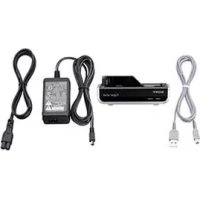
CSSPC1 - Other camera accessories SONY - Free user manual and instructions
Find the device manual for free CSSPC1 SONY in PDF.


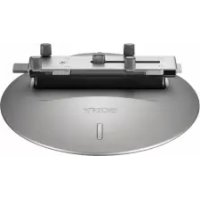
| Product Type | Docking Station for Cyber-shot Digital Camera |
| Brand | Sony |
| Model | CSS-PC1 |
| Camera Compatibility | DSC-T100, DSC-T25, DSC-T20, DSC-W200, DSC-W90, DSC-W85, DSC-W80 |
| Dimensions (W x D x H) | 124 x 45 x 65 mm |
| Weight | 85 g |
| Power Supply | AC Adapter (AC-LS5): Input 100-240 V AC, 50/60 Hz, Output 4.2 V DC |
| Power Consumption | 11 W |
| Connectors | Mini-B USB jack, DC IN jack, Multi-connector |
| Main Functions | Battery charging, image transfer to computer via USB |
| Full Charge Time | Approx. 230 minutes (fully discharged battery at 25°C) |
| Operating Temperature | 0 °C to 40 °C |
| Storage Temperature | -20 °C to +60 °C |
| Care and Cleaning | Clean with a slightly damp soft cloth; do not use solvents |
| Safety | Do not expose to rain or moisture; unplug if problems occur; do not use in confined spaces |
| Spare Parts and Repairability | Rechargeable battery (replace if battery life decreases); contact Sony dealer for any issues |
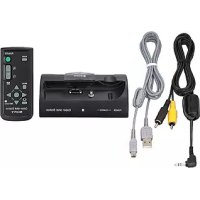
| Items Included | Cyber-shot Station (CSS-PC1), USB cable, AC adapter (AC-LS5), power cord, set of printed documents |
| General Information | The station charges the battery and transfers photos to a computer. Compatible only with listed models. |
Frequently Asked Questions - CSSPC1 SONY
User questions about CSSPC1 SONY
0 question about this device. Answer the ones you know or ask your own.
Ask a new question about this device
Download the instructions for your Other camera accessories in PDF format for free! Find your manual CSSPC1 - SONY and take your electronic device back in hand. On this page are published all the documents necessary for the use of your device. CSSPC1 by SONY.
USER MANUAL CSSPC1 SONY
Operating Instructions GB
Mode d'emploi FR
English
Before operating the product, please read this manual thoroughly and retain it for future reference.
WARNING
To reduce fire or shock hazard, do not expose the unit to rain or moisture.
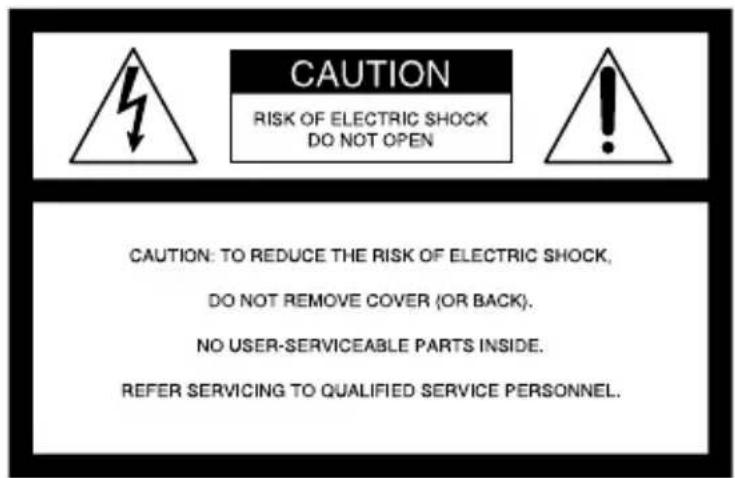
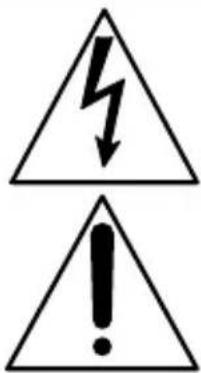
This symbol is intended to alert the user to the presence of uninsulated "dangerous voltage" within the product's enclosure that may be of sufficient magnitude to constitute a risk of electric shock to persons.
This symbol is intended to alert the user to the presence of important operating and maintenance (servicing) instructions in the literature accompanying the appliance.
IMPORTANT SAFEGUARDS
For your protection, please read these safety instructions completely before operating the appliance, and keep this manual for future reference. Carefully observe all warnings, precautions and instructions on the appliance, or the one described in the operating instructions and adhere to them.
Use
Power Sources
This set should be operated only from the type of power source indicated on the marking label. If you are not sure of the type of electrical power supplied to your home, consult your dealer or local power company. For those sets designed to operate from battery power, or other sources, refer to the operating instructions.
Polarization
This set may be equipped with a polarized ac power cord plug (a plug having one blade wider than the other). This plug will fit into the power outlet only one way. This is a safety feature. If you are unable to insert the plug fully into the outlet, try reversing the plug. If the plug should still fail to fit, contact your electrician to have a suitable outlet installed.
Do not defeat the safety purpose of the polarized plug by forcing it in.
Overloading
Do not overload wall outlets, extension cords or convenience receptacles beyond their capacity, since this can result in fire or electric shock.
Object and Liquid Entry
Never push objects of any kind into the set through openings as they may touch dangerous voltage points or short out parts that could result in a fire or electric shock. Never spill liquid of any kind on the set.
Attachments
Do not use attachments not recommended by the manufacturer, as they may cause hazards.
Cleaning
Unplug the set from the wall outlet before cleaning or polishing it. Do not use liquid cleaners or aerosol cleaners. Use a cloth lightly dampened with water for cleaning the exterior of the set.
Installation
Water and Moisture
Do not use power-line operated sets near water - for example, near a bathtub, washbowl, kitchen sink, or laundry tub, in a wet basement, or near a swimming pool, etc.
Power-Cord Protection
Route the power cord so that it is not likely to be walked on or pinched by items placed upon or against them, paying particular attention to the plugs, receptacles, and the point where the cord exits from the appliance.
Accessories
Do not place the set on an unstable cart, stand, tripod, bracket, or table. The set may fall, causing serious injury to a child or an adult, and serious damage to the set. Use only a cart, stand, tripod, bracket, or table recommended by the manufacturer.
Ventilation
The slots and openings in the cabinet are provided for necessary ventilation. To ensure reliable operation of the set, and to protect it from overheating, these slots and openings must never be blocked or covered.
- Never cover the slots and openings with a cloth or other materials.
- Never block the slots and openings by placing the set on a bed, sofa, rug, or other similar surface.
- Never place the set in a confined space, such as a bookcase, or built-in cabinet, unless proper ventilation is provided.
- Do not place the set near or over a radiator or heat register, or where it is exposed to direct sunlight.
Lightning
For added protection for this set during a lightning storm, or when it is left unattended and unused for long periods of time, unplug it from the wall outlet and disconnect the antenna or cable system. This will prevent damage to the set due to lightning and power-line surges.
Service
Damage Requiring Service
Unplug the set from the wall outlet and refer servicing to qualified service personnel under the following conditions:
- When the power cord or plug is damaged or frayed.
- If liquid has been spilled or objects have fallen into the set.
- If the set has been exposed to rain or water.
- If the set has been subject to excessive shock by being dropped, or the cabinet has been damaged.
- If the set does not operate normally when following the operating instructions. Adjust only those controls that are specified in the operating instructions. Improper adjustment of other controls may result in damage and will often require extensive work by a qualified technician to restore the set to normal operation.
- When the set exhibits a distinct change in performance – this indicates a need for service.
Servicing
Do not attempt to service the set yourself as opening or removing covers may expose you to dangerous voltage or other hazards.
Refer all servicing to qualified service personnel.
Replacement parts
When replacement parts are required, be sure the service technician has used replacement parts specified by the manufacturer that have the same characteristics as the original parts.
Unauthorized substitutions may result in fire, electric shock, or other hazards.
Safety Check
Upon completion of any service or repairs to the set, as the service technician to perform routine safety checks (as specified by the manufacturer) to determine that the set is in safe operating condition.
If you have any questions about this product, you may call:
Sony Customer Information Services Center 1-800-222-SONY (7669)
The number below is for the FCC related matters only.
Regulatory Information
Declaration of Conformity
Trade Name: SONY
Model No.: CSS-PC1
Responsible Party: Sony Electronics Inc.
Address: 16530 Via Esprillo, San Diego, CA 92127 U.S.A.
Telephone No.: 858-942-2230
This device complies with Part 15 of the FCC Rules. Operation is subject to the following two conditions: (1) This device may not cause harmful interference, and (2) this device must accept any interference received, including interference that may cause undesired operation.
CAUTION
You are cautioned that any changes or modifications not expressly approved in this manual could void your authority to operate this equipment.
Note:
This equipment has been tested and found to comply with the limits for a Class B digital device, pursuant to Part 15 of the FCC Rules. These limits are designed to provide reasonable protection against harmful interference in a residential installation. This equipment generates, uses, and can radiate radio frequency energy and, if not installed and used in accordance with the instructions, may cause harmful interference to radio communications. However, there is no guarantee that interference will not occur in a particular installation. If this equipment does cause harmful interference to radio or television reception, which can be determined by turning the equipment off and on, the user is encouraged to try to correct the interference by one or more of the following measures:
- Reorient or relocate the receiving antenna.
- Increase the separation between the equipment and receiver.
- Connect the equipment into an outlet on a circuit different from that to which the receiver is connected.
- Consult the dealer or an experienced radio/TV technician for help.
The supplied interface cable must be used with the equipment in order to comply with the limits for a digital device pursuant to Subpart B of Part 15 of FCC Rules.
Notice on the supplied AC Adaptor for customers in the United Kingdom
A moulded plug complying with BS1363 is fitted to this equipment for your safety and convenience.
Should the fuse in the plug supplied need to be replaced, a fuse of the same rating as the supplied one and approved by ASTA or BSI to BS1362, (i.e., marked with or mark) must be used.
If the plug supplied with this equipment has a detachable fuse cover, be sure to attach the fuse cover after you change the fuse. Never use the plug without the fuse cover. If you should lose the fuse cover, please contact your nearest Sony service station.
For Customers in Europe
This product has been tested and found compliant with the limits sets out in the EMC Directive for using connection cables shorter than 3 meters (9.8 feet).
Notice
If static electricity or electromagnetism causes data transfer to discontinue midway (fail), restart the application or disconnect and connect the communication cable (USB, etc.) again.
Disposal of Old Electrical & Electronic Equipment (Applicable in the European Union and other European countries with separate collection systems)

This symbol on the product or on its packaging indicates that this product shall not be treated as household waste. Instead it shall be handed over to the applicable collection point for the recycling of electrical and electronic equipment. By ensuring this product is disposed of correctly, you will help prevent potential negative consequences for the environment and human health, which could otherwise be caused by inappropriate waste handling of this product. The recycling of materials will help to conserve natural resources. For more detailed information about recycling of this product, please contact your local Civic Office, your household waste disposal service or the shop where you purchased the product.
Table of contents
Notes on using the Cyber-shot Station. 8
Features. 9
Trademarks 9
Identifying the parts. 10
Set up. 11
Placing the camera on the Cyber-shot Station 12
Removing the camera from the Cyber-shot Station 12
Charging the battery pack. 12
Connecting the camera to your computer via the Cyber-shot Station 13
Care and maintenance 13
Troubleshooting. 14
Specifications 15
Notes on using the Cyber-shot Station
Refer to the operating instructions for your camera as well as this manual.
The Cyber-shot Station is not a dust-proofed, moist-proofed, or water proofed product.
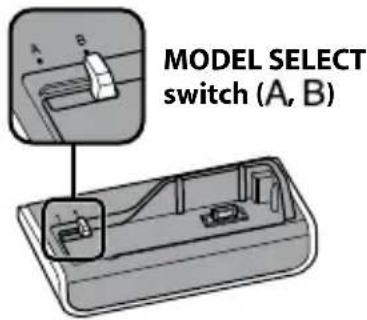
About the MODEL SELECT switch
The Cyber-shot Station allows you to attach your camera by setting the MODEL SELECT switch (A)B See page 11 for further details.
The MODEL SELECT switch is set to B when purchased.
- Be sure to set the MODEL SELECT switch to the designated position before use, or it may cause a malfunction of your camera or the Cyber-shot Station.
Do not use or keep the Cyber-shot Station in locations subject to the following conditions:
- Locations with extremes of temperature
- The temperature in closed automobiles during summer may be extremely hot, causing deformation or malfunction of the Cyber-shot Station.
- Locations under direct sunlight or near heaters
- This may cause deformation or a malfunction of the Cyber-shot Station.
- Locations subject to vibration
- Locations subject to strong magnetism
Precautions:
- Even if the CHARGE lamp is not lit, the unit is not disconnected from the AC power source (mains) as long as it is connected to the wall outlet (wall socket). If some trouble occurs while using the unit, immediately shut off the power by disconnecting the plug from the wall outlet (wall socket).
- Use the nearest wall outlet to get the AC Adaptor plugged in. If any malfunctions occur using the product, unplug the AC Adaptor to cut off the power source.
- The set is not disconnected from the AC power source (mains) as long as it is connected to the wall outlet, even if the set itself has been turned off.
- Do not use the AC Adaptor placed in a narrow space, such as between a wall and furniture.
- Do not use the Cyber-shot Station in locations that are subject to strong radio waves or radiation. Images may not be played back properly.
- Avoid other metallic objects to contact with the connecting parts of the Cyber-shot Station and the power cord. It may cause a short circuit.
- Recording contents cannot be compensated for if playback is not possible due to damaged "Memory Stick Duo", a malfunction of your camera or the Cyber-shot Station, etc.
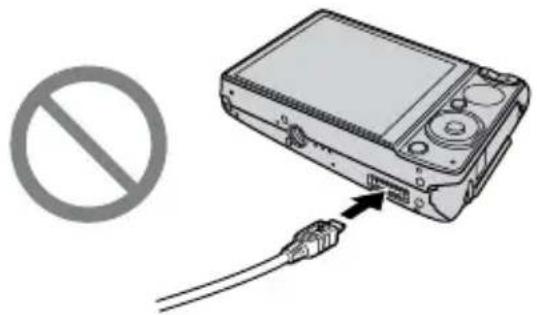
- Do not attempt to connect the supplied USB cable to the multi connector on the bottom of the camera. It may cause a malfunction due to the damage of the multi connector.
Features
The CSS-PC1 can be used with the DSC-T100, DSC-T25, DSC-T20, DSC-W200, DSC-W90, DSC-W85, and DSC-W80 digital still cameras. Not all digital still cameras are available in all countries. When you place a digital still camera (here in after referred to as the "camera") on the Cyber-shot Station, you can use the Cyber-shot Station in the following way.
- The Cyber-shot Station can charge the battery pack inside the camera faster than the battery charger supplied with the camera.
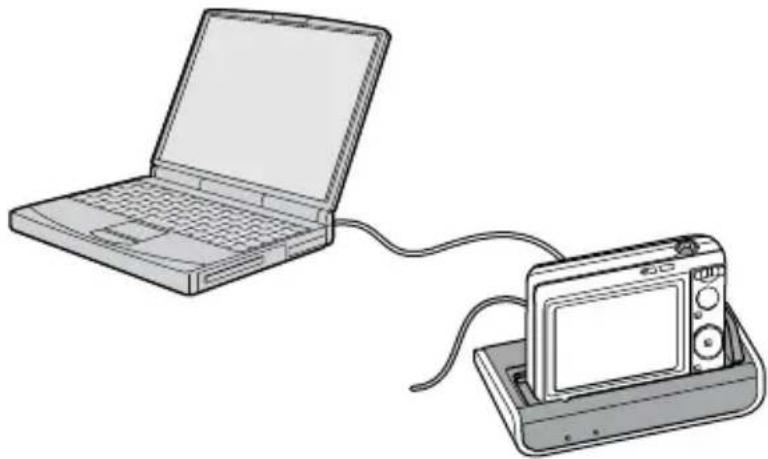
- You can connect the Cyber-shot Station to your computer by using the supplied USB cable and transfer image data.
Trademarks
- Cyber-shot and "Cyber-shot Station" are trademarks of Sony Corporation.
- "Memory Stick Duo" is a trademark of Sony Corporation.
- In addition, system and product names used in this manual are, in general, trademarks or registered trademarks of their respective developers or manufacturers. However, the t_M or 值 marks are not used in all cases in this manual.
Cyber-shot Station
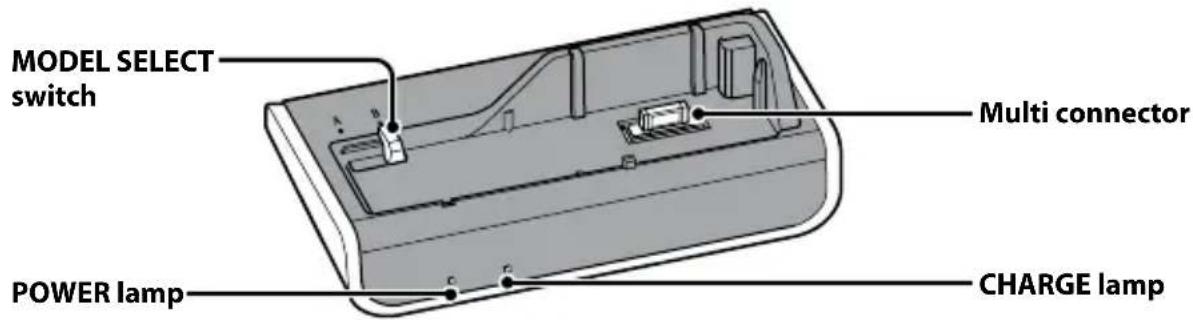
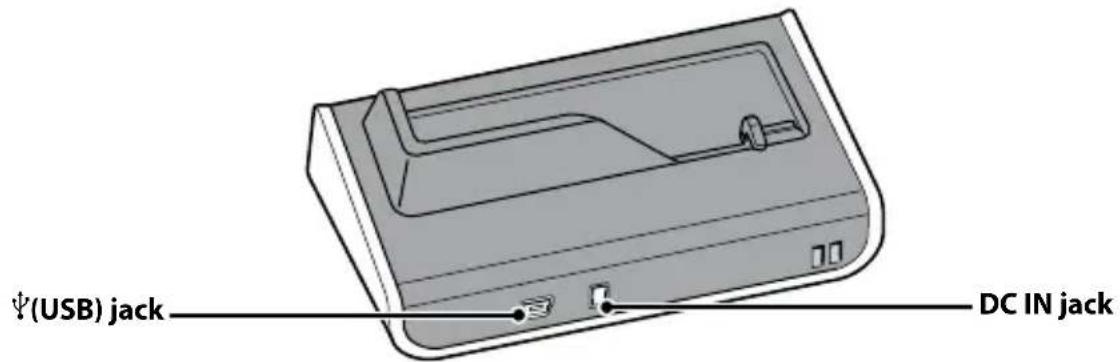
Setup
Preparing the Cyber-shot Station
1 Set the MODEL SELECT switch.
See the table below and set the MODEL SELECT switch to match with your camera.
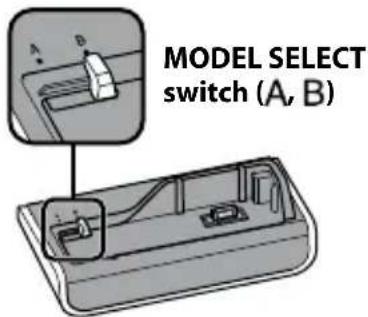
| DSC-W200, DSC-W90, DSC-W85, DSC-W80 | A |
| DSC-T100, DSC-T25, DSC-T20 | B |
2 Connect the AC Adaptor to the DC IN jack of the Cyber-shot Station.
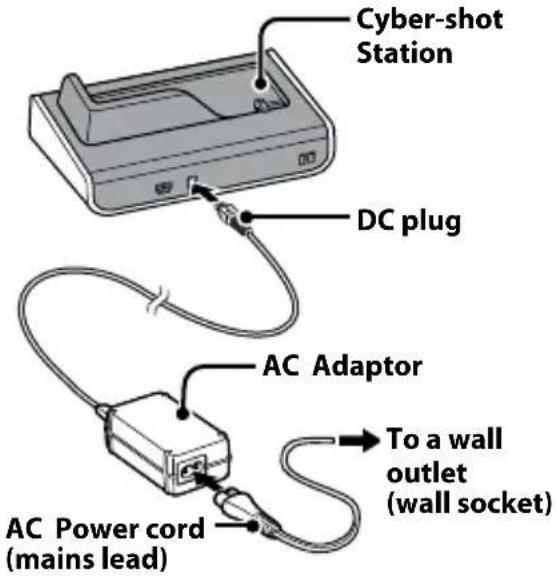
To use your Cyber-shot Station abroad - Power sources
You can use the Cyber-shot Station and the AC Adaptor (supplied) in any country or region where the power supply is within 100V to 240V AC 50 / 60Hz .
Use a commercially available AC plug adaptor, if necessary, depending on the design of the wall outlet (wall socket).
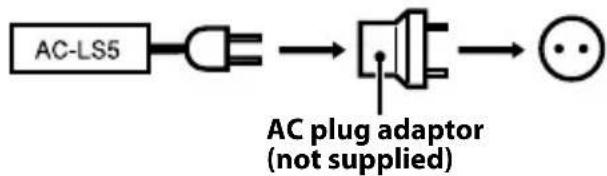
Do not use an electronic transformer (travel converter), as this may cause a malfunction.
Placing the camera on the Cyber-shot Station
Remove the Adaptor ring, the Conversion lens, etc. from the camera.
Attach the camera as shown below.
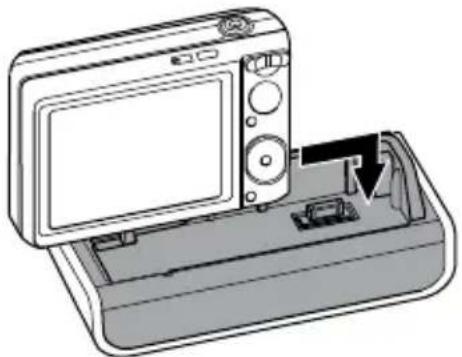
- Insert the "Memory Stick Duo" into the camera. When you use data in the internal memory, do not insert the "Memory Stick Duo" into the camera.
- Be sure to turn off the camera before placing it on or removing it from the Cyber-shot Station.
Qips
- You can attach the camera to the Cyber-shot Station smoothly by aligning the camera to the right corner of the Cyber-shot Station.
Make sure that the camera is securely attached to the Cyber-shot Station.
Removing the camera from the Cyber-shot Station
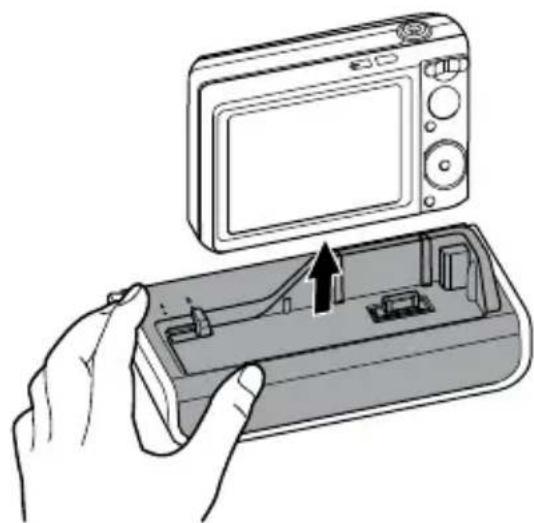
- Hold the Cyber-shot Station down when you remove the camera from the Cyber-shot Station.
Notes
- When removing the camera, make sure to lift the camera straight up. It may damage the camera or the Cyber-shot Station when some extra is added to the front or the sides.
Charging the battery pack
Place the camera with the battery pack inserted on the Cyber-shot Station.
Charging starts automatically. The CHARGE lamp of the Cyber-shot Station lights up.
- When the camera is turned on, the Cyber-shot Station stops charging the battery pack.
-
When the charging reaches to Normal charge*, the CHARGE lamp goes off.
-
Recording and playback time with Normal charge is approximately 90% of Full charge.
-
For the time of the full-charge for a completely discharged battery at the temperature of 25^ (77^) , see the table below.
DSC-T100, DSC-T25, DSC-T20, DSC-W200, DSC-W90, DSC-W85, DSC-W80
Approx. 230 minutes
- It may take longer to charge, depending on the charging condition and environment.
- If CHARGE lamp fails to light or blinks for more than 10 seconds, refer to "Troubleshooting".
Notes
After attaching the camera to the Cyber-shot Station, the CHARGE lamp may blink for 3 to 10 seconds. This indicates communication between the camera and the Cyber-shot Station, and it is not a malfunction.
Charging temperature
The temperature range for charging is 0^ to 40^ (32^ to 104^) . However, to provide maximum battery efficiency, the recommended temperature range when charging is 10^ to 30^ (50^ to 86^)
On battery life
The battery life is limited. Battery capacity decreases little by little as you use it more and more, and as time passes. If the battery operating time seems shortened considerably, a probable cause is that the battery pack has reached the end of its life. Buy a new battery pack.
The battery life varies according to how it is stored and the operating conditions and environment in which each battery pack is used.
Connecting the camera to your computer via the Cyber-shot Station
1 Connect the Cyber-shot Station to your computer by the USB cable supplied with the Cyber-shot Station.
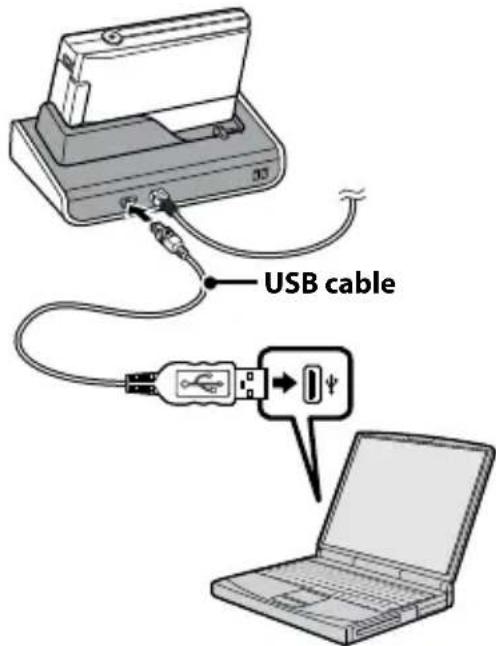
2 Turn on your camera.
The USB connection between the camera and your computer will be established. Then you can transfer image data to your computer. For further details, refer to the operating instructions supplied with the camera.
When the Cyber-shot Station is communicating with your computer using the USB cable, do not remove the camera from the Cyber-shot Station. Removing the camera may damage the image data.
To cancel the USB connection
Disconnect the USB cable or turn off the computer. For further details, refer to the operating instructions supplied with the camera.
Care and maintenance
Clean the Cyber-shot Station with a soft cloth slightly moistened with water, and wipe the surface with a dry cloth. Do not use any type of solvent such as thinner, alcohol or benzine as this may damage the surface.
Troubleshooting
If any problems occur with your products, refer to the following solutions.
If the problem persists, contact your Sony dealer.
Symptom Cause/Solution
Unable to charge the battery pack (when the CHARGE lamp fails to light)
The camera is turned on. Turn the camera off.
The AC Adaptor is disconnected. Connect the AC Adaptor properly.
The camera is not placed on the Cyber-shot Station correctly. Place the camera correctly.
The battery pack is not installed correctly. Install the battery pack correctly.
The battery pack is completely charged.
- The battery pack installed into the camera is inapplicable.
→ Install the battery pack compatible with your camera.
The CHARGE lamp blinks fast, or blinks for more than 10 seconds
- The battery pack installed into the camera is inapplicable. Install the battery pack compatible with your camera.
The connection is not correct.
Remove the camera from the Cyber-shot Station and reconnect the AC Adaptor. After the CHARGE lamp goes off, place the camera on the Cyber-shot Station.
Unable to turn on the camera, or it suddenly gets turned off
The camera is not placed on the Cyber-shot Station correctly. Place the camera correctly.
The AC Adaptor is disconnected.
Connect the AC Adaptor properly.
Your computer does not recognize the camera
The camera is turned off. Turn on the camera.
- You are not using the supplied USB cable. Use the supplied USB cable.
The USB cable is not connected firmly. Disconnect both ends of the USB cable and connect them again firmly. Make sure that the camera is set to "USB Mode".
The camera is not placed on the Cyber-shot Station correctly. Place the camera correctly.
- The USB jacks on your computer are connected to other devices besides the keyboard, the mouse, and the Cyber-shot Station.
Disconnect all devices except the keyboard, the mouse, and the Cyber-shot Station from the USB jacks.
Unable to attach the camera on the Cyber-shot Station
- The MODEL SELECT switch is not set to its designated position.
Set the MODEL SELECT switch to the designated position.
Specifications
Cyber-shot Station
Input/Output connectors
USB jack: mini-B
DC IN jack
Multi connector
General
Dimensions (Approx.):
124× 45× 65mm
(5× 113 / 16× 25 / 8 inches)
(w/h/d)
Operating temperature:
0^ to 40^
(32°F to 104°F)
Storage temperature:
-20^ to +60^
(-4^ to +140^)
AC Adaptor
Input rating: 100V to 240V , AC 50/60Hz , 11 W
Output rating: 4.2 V DC
See the label on the AC Adaptor
for other specifications.
Dimensions (Approx.):
48× 29× 81mm
(115 / 16 × 13 / 16 × 31 / 4 inches)
(w/h/d, excluding projecting
parts)
Mass (Approx.): 130g (5 oz)
excluding AC Power cord
Operating temperature:
0^ to 40^
(32°F to 104°F)
Storage temperature:
-20^ to +60^
(-4^ to +140^)
Included items
- Cyber-shot Station (CSS-PC1) (1)
- USB cable (1)
- AC Adaptor (AC-LS5) (1)
- AC Power cord (mains lead) (1)
- Set of printed documentation
Design and specifications are subject to change without notice.
François
Printed on 70% or more recycled paper using VOC (Volatile Organic Compound)-free vegetable oil based ink.

- English
- WARNING
- IMPORTANT SAFEGUARDS
- Use
- Power Sources
- Polarization
- Overloading
- Object and Liquid Entry
- Attachments
- Cleaning
- Installation
- Water and Moisture
- Power-Cord Protection
- Accessories
- Ventilation
- Lightning
- Service
- Damage Requiring Service
- Servicing
- Replacement parts
- Safety Check
- Regulatory Information
- Declaration of Conformity
- CAUTION
- Note:
- Notice on the supplied AC Adaptor for customers in the United Kingdom
- For Customers in Europe
- Notice
- Disposal of Old Electrical & Electronic Equipment (Applicable in the European Union and other European countries with separate collection systems)
- Table of contents
- Notes on using the Cyber-shot Station
- About the MODEL SELECT switch
- Precautions:
- Features
- Trademarks
- Cyber-shot Station
- Setup
- Preparing the Cyber-shot Station
- Set the MODEL SELECT switch.
- Connect the AC Adaptor to the DC IN jack of the Cyber-shot Station.
- To use your Cyber-shot Station abroad - Power sources
- Placing the camera on the Cyber-shot Station
- Qips
- Removing the camera from the Cyber-shot Station
- Notes
- Charging the battery pack
- Place the camera with the battery pack inserted on the Cyber-shot Station.
- Charging temperature
- On battery life
- Connecting the camera to your computer via the Cyber-shot Station
- Connect the Cyber-shot Station to your computer by the USB cable supplied with the Cyber-shot Station.
- Turn on your camera.
- To cancel the USB connection
- Care and maintenance
- Troubleshooting
- Symptom Cause/Solution
- Specifications
- Input/Output connectors
- General
- AC Adaptor
- Included items
- François
Brand : SONY
Model : CSSPC1
Category : Other camera accessories