HMNB 6182X5WDKN - Fridge HOOVER - Free user manual and instructions
Find the device manual for free HMNB 6182X5WDKN HOOVER in PDF.


User questions about HMNB 6182X5WDKN HOOVER
0 question about this device. Answer the ones you know or ask your own.
Ask a new question about this device
Download the instructions for your Fridge in PDF format for free! Find your manual HMNB 6182X5WDKN - HOOVER and take your electronic device back in hand. On this page are published all the documents necessary for the use of your device. HMNB 6182X5WDKN by HOOVER.
USER MANUAL HMNB 6182X5WDKN HOOVER
DISPLAY TOP FEATURED
INTERFACCIA UTENTE INTERNA
CARATTERISTICHE TECNICHE
HUMIDITY EQUALISER
- ad es. Bed and Breakfast (B&B),
text_image
Technical diagram of a refrigerator with numbered parts for identification and assembly reference.text_image
Technical diagram of a refrigerator with numbered parts for identification and assembly reference.text_image
Technical diagram of a four-panel refrigerator with numbered compartments and internal layout, including labeled parts 1 through 7.text_image
Technical diagram of a refrigerator interior with numbered components and labeled partstext_image
Technical diagram of a four-panel refrigerator with numbered compartments and internal layout, labeled with Chinese characters.natural_image
Illustration of a double door with internal compartments and ventilation slots (no text or symbols)text_image
Polymer expansion Epoctite a ← Phlg → Precor → Volume temperature as at Particle formation ← Function → OC → Release of anionicstext_image
Humidity EquipmentTips for keeping food perfect in the Fridge
Where to store your foods in the fridge
Storing Frozen Food
ENERGY SAVING
TAKE CARE
Defrosting
Cleaning and Care
CHANGING THE INTERNAL LIGHT
REVERSING THE DOOR SWING
TROUBLE SHOOTING
Thank you for purchasing this product.
Before using your refrigerator, please carefully read this instruction manual in order to maximize its performance. Store all documentation for subsequent use or for other owners. This product is intended solely for household use or similar applications such as:
- the kitchen area for personnel in shops, offices and other working environments
- on farms, by clientele of hotels, motels and other environments of a residential type
-at-bed and breakfasts (B & B) - for catering services and similar applications not for retail sale.
This appliance must be used only for purposes of storage of food, any other use is considered dangerous and the manufacturer will not be
responsible for any omissions. Also, it is recommended that you take note of the warranty conditions. Please, to obtain the best possible performance and trouble free operation from your appliance it is very important to carefully read these instructions. Failure to observe these instructions may invalidate your right to free service during the guarantee period.
SAFETY INFORMATION
This guide contains many important safety information. Please, we suggest you keep these instructions in a safe place for easy reference and a good experience with the appliance.
The refrigerator contains a refrigerant gas (R600a: isobutane) and insulating gas (cyclopentane), with high compatibility with the environment, that are, however, inflammable.

Caution: risk of fire
If the refrigerant circuit should be damaged:
- Avoid opening flames and sources of ignition. Thoroughly ventilate the room in which the appliance is situated
WARNING!
- Care must be taken
while cleaning/carrying the appliance to avoid touching the condenser metal wires at the back of the appliance, as you might injure your fingers and hands or damage your product.
- This appliance is not designed for stacking with any other appliance. Do not attempt to sit or stand on top of your appliance as it is not designed for such use. You could injure yourself or damage the appliance.
- Make sure that mains cable is not caught under the appliance during and after carrying/moving the appliance, to avoid the mains cable becoming cut or damaged.
- When positioning your appliance take care not to damage
your flooring, pipes, wall coverings etc. Do not move the appliance by pulling by the lid or handle. Do not allow children to play with the appliance or tamper with the controls. Our company declines to accept any liability should the instructions not be followed.
- Do not install the appliance in humid, oily or dusty places, nor expose it to direct sunlight and to water.
- Do not install the appliance near heaters or inflammable materials.
- If there is a power failure do not open the lid. Frozen food should not be affected if the failure lasts for less than 20 hours. If the failure is longer, then the food
should be checked and eaten immediately or cooked and then refrozen.
- If you find that the lid of the chest freezer is difficult to open just after you have closed it, don’t worry. This is due to the pressure difference which will equalize and allow the lid to be opened normally after a few minutes.
- Do not connect the appliance to the electricity supply until all packing and transit protectors have been removed.
- Leave to stand for at least 4 hours before switching on to allow compressor oil to settle if transported horizontally.
- This freezer must only be used for its intended purpose (i.e. storing and freezing of edible
foodstuff).
- Do not store medicine or research materials in the Wine Coolers. When the material that requires a strict control of storage temperatures is to be stored, it is possible that it will deteriorate or an uncontrolled reaction may occur that can cause risks.
- Before performing any operation, unplug the power cord from the power socket.
- On delivery, check to make sure that the product is not damaged and that all the parts and accessories are in perfect condition.
- If in the refrigeration system a leak is noted, do not touch the wall outlet and do not use open flames. Open the window and let air
into the room. Then call a service center to ask for repair.
- Do not use extension cords or adapters.
- Do not excessively pull or fold the power cord or touch the plug with wet hands.
- Do not damage the plug and/or the power cord; this could cause electrical shocks or fires.
- If the supply cord is damaged, it must be replaced by the manufacturer, its service agent or similarly qualified person in order to avoid a hazard.
- Do not place or store inflammable and highly volatile materials such as ether, petrol, LPG, propane gas, aerosol spray cans, adhesives, pure alcohol, etc. These materials may cause an explosion.
- Do not use or store inflammable sprays, such as spray paint, near the Wine Coolers. It could cause an explosion or fire.
- Do not place objects and/or containers filled with water on the top of the appliance.
• We do not recommend the use of extension leads and multi-way adapters.
- Do not dispose of the appliance on a fire. Take care not to damage, the cooling circuit/pipes of the appliance in transportation and in use. In case of damage do not expose the appliance to fire, potential ignition source and immediately ventilate the room where the appliance is situated.
- The refrigeration
system positioned behind and inside the Wine Coolers contains refrigerant. Therefore, avoid damaging the tubes.
- Do not use electrical appliances inside the food storage compartments of the appliance, unless they are of the type recommended by the manufacturer.
- Do not damage the refrigerant circuit.
- Do not use mechanical devices or other means to accelerate the defrosting process, other than those recommended by the manufacturer.
- Do not use electrical appliances inside the food storage compartments, unless they are of the type recommended by the manufacturer.
- Do not touch internal cooling elements,
especially with wet hands, to avoid cracks or injuries.
- Maintain the ventilation openings in the appliance enclosure or in the built-in structure, free of obstruction.
- Do not use pointed or sharp-edged objects such as knives or forks to remove the frost.
- Never use hairdryers, electrical heaters or other such electrical appliances for defrosting.
- Do not scrape with a knife or sharp object to remove frost or ice that occurs. With these, the refrigerant circuit can be damaged, the spill from which can cause a fire or damage your eyes.
- Do not use mechanical devices or other equipment to hasten the defrosting
process.
- Absolutely avoid the use of open flame or electrical equipment, such as heaters, steam cleaners, candles, oil lamps and the like in order to speed up the defrosting phase.
- Never use water wash the compressor position, wipe it with a dry cloth thoroughly after cleaning to prevent rust.
- It is recommended to keep the plug clean, any excessive dust residues on the plug can be the cause fire.
- The product is designed and built for domestic household use only.
- The guarantee will be void if the product is installed or used in commercial or non-residential domestic household premises.
- The product must be
correctly installed, located and operated in accordance with the instructions contained in the User Instructions Booklet provided.
- The guarantee is applicable only to new products and is not transferable if the product is resold.
- Our company disclaims any liability for incidental or consequential damages.
- The guarantee does not in any way diminish your statutory or legal rights.
- Do not perform repairs on this Wine Coolers. All interventions must be performed solely by qualified personnel.
- If you are discarding an old product with a lock or latch fitted to the door, ensure that
it is left in a safe condition to prevent the entrapment of children.
- This appliance can be used by children aged from 8 years and above and by persons with reduced physical, sensory or mental capabilities or with a lack of experience and knowledge; provided that they have been given adequate supervision or instruction concerning how to use the appliance in a safe way and understand the hazards involved.
- Children should not play with the appliance. Cleaning and user maintenance should not be made by children without supervision.
- Locks :If your Fridge/Freezer is
fitted with a lock, to prevent children being entrapped keep the key out of reach and not in the vicinity of the appliance. If disposing of an old Fridge/Freezer break off any old locks or latches as a safeguard.
- “FOR appliances without a 4-star compartment: this refrigerating appliance is not suitable for freezing foodstuffs”
- “FOR a free standing appliance: this refrigerating appliance is not intended to be used as a built-in appliance”
- “FOR Wine Coolers: this appliance is intended to be used exclusively for the storage of wine
COMBI REFRIGERATOR HOOVER Climate Class
The appliance is designed to operate at the limited range of ambient temperature, depending on climate zones. Do not use the appliance at the temperature out of the limit. Climate class of your appliance is indicated on the label with technical description inside the fridge compartment.
| Climate Class | Amb. T. (°C) | Amb. T. (°F) |
| SN | From 10 to 32 | From 50 to 90 |
| N | From 16 to 32 | From 61 to 90 |
| ST | From 16 to 38 | From 61 to 100 |
| T | From 16 to 43 | From 61 to 110 |
- extended temperate (SN): 'this refrigerating appliance is intended to be used at ambient temperatures ranging from 10 °C to 32 °C';
- temperate (N): 'this refrigerating appliance is intended to be used at ambient temperatures ranging from 16 °C to 32 °C';
- subtropical (ST): 'this refrigerating appliance is intended to be used at ambient temperatures ranging from 16 °C to 38 °C';
- tropical (T): 'this refrigerating appliance is intended to be used at ambient temperatures ranging from 16 °C to 43 °C';
TRANSPORTATION INSTRUCTIONS
The appliance should be transported only in a vertical upright position. The packing as supplied must be intact during transportation. If during the course of transport the product has been transported horizontally, it must only be laid on its left hand side (when facing the door front) and it must not be operated for at least 4 hours to allow the system to settle after the appliance is brought back to upright position.
-
Failure to comply with the above instructions could result in damage occurring to the appliance. The manufacturer will not be held responsible if these instructions are disregarded.
-
The appliance must be protected against rain, moisture and other atmospheric influences.
INSTALLATION INSTRUCTIONS
- If possible avoid placing the appliance near cookers, radiators or in direct sunlight as this will cause the compressor to run for long periods. If installed next to a source of heat or refrigerator, maintain the following minimum side clearances:
| From Cookers | 4" (100 mm) |
| From Radiators | 12" (300 mm) |
| From Fridges | 4" (100 mm) |
-
Make sure that sufficient room, with an average temperature of between 16^ C and 32^ C, is provided around the appliance to ensure free air circulation. Ideally, a space of no less than 9cm on the back and 2cm on the sides.
-
The appliance should be located on a smooth surface.
-
It is forbidden to use the refrigerator outdoors.
-
Protection from moisture. Do not locate the freezer in moist space to avoid the metal parts rusty. And do not spray water to the freezer, otherwise it will weaken the insulation and causes current leakage.
-
Refer to "Cleaning and Care" section to prepare your appliance for use.
-
If the freezer is installed in unheated areas, garages etc., in cold weather condensation may form on the outer surfaces. This is quite normal and is not a fault. Remove the condensation by wiping with a dry cloth.
-
Never place Refrigerator in a wall recessed or into fitted cabinets or furniture when it is working, the grille at the back may become hot and the sides warm. Do not drape the Refrigerator with any covering.
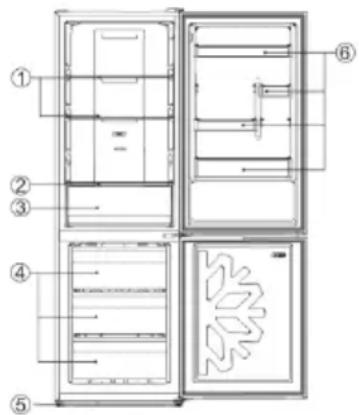
text_image
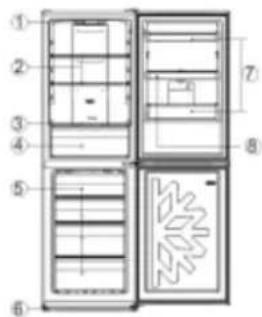
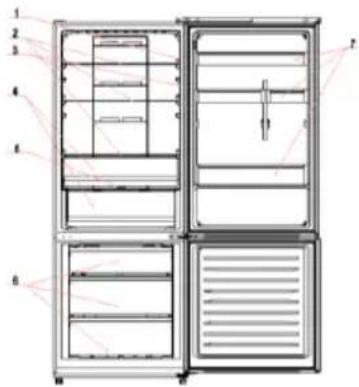
Technical diagram of a refrigerator with numbered components for identification| No | Description |
| 1 | Fridge shelves |
| 2 | Crisper Cover |
| 3 | Crisper |
| 4 | Freezer drawers |
| 5 | Adjustable Feet |
| 6 | Refrigerator door racks |
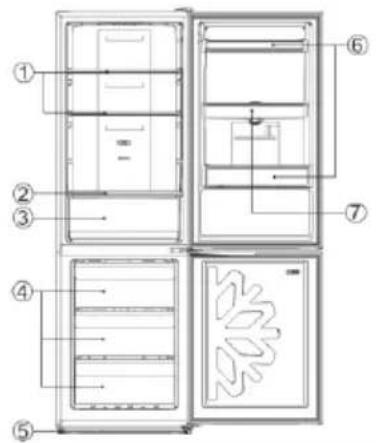
text_image
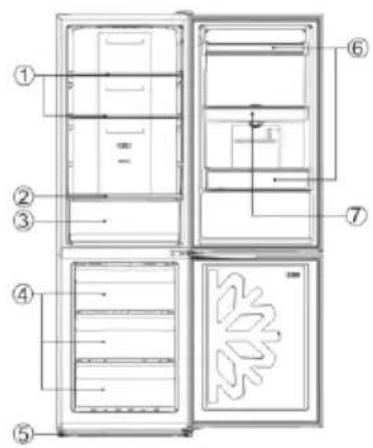
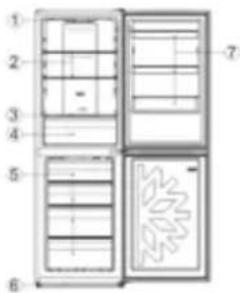
Technical diagram of a refrigerator with numbered parts for identification and assembly reference.| No | Description |
| 1 | Fridge shelves |
| 2 | Crisper Cover |
| 3 | Crisper |
| 4 | Freezer drawers |
| 5 | Adjustable Feet |
| 6 | Refrigerator door racks |
| 7 | Water tank assembly |
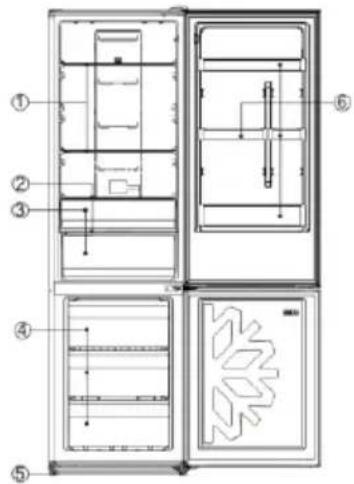
text_image
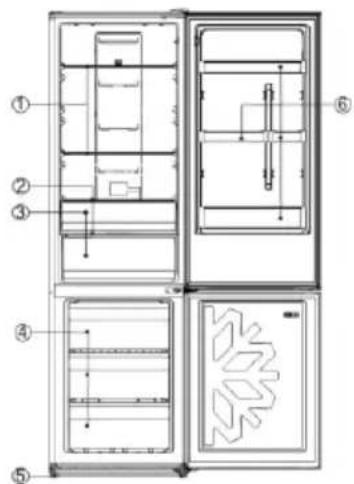
Technical diagram of a refrigerator interior with numbered components and labeled parts| No | Description |
| 1 | Fridge shelves |
| 2 | Crispercover |
| 3 | Vegetable and fruit crisper |
| 4 | Freezing drawers |
| 5 | Leveling feet |
| 6 | Door balcony |
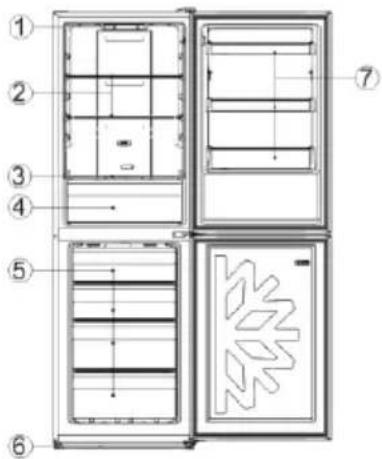
text_image
Technical diagram of a four-panel refrigerator with numbered compartments and internal layout, including a decorative pattern on the front panel.| No | Description |
| 1 | Control panel |
| 2 | Fridge shelves |
| 3 | Crisper Cover |
| 4 | Crisper |
| 5 | Freezer drawers |
| 6 | Adjustable Feet |
| 7 | Refrigerator door racks |
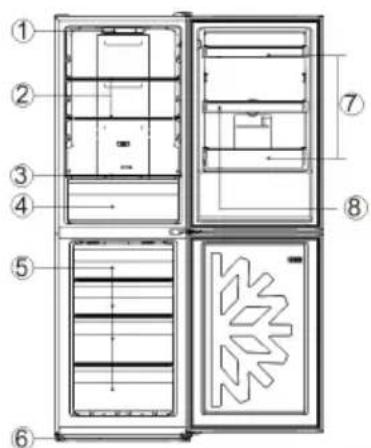
text_image
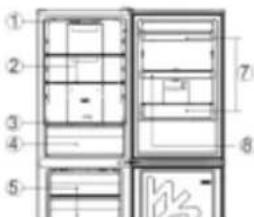
Technical diagram of a refrigerator with numbered compartments and internal layout, showing internal compartments and doorways.| No | Description |
| 1 | Control panel |
| 2 | Fridge shelves |
| 3 | Crisper Cover |
| 4 | Crisper |
| 5 | Freezer drawers |
| 6 | Adjustable Feet |
| 7 | Refrigerator door racks |
| 8 | Water tank assembly |
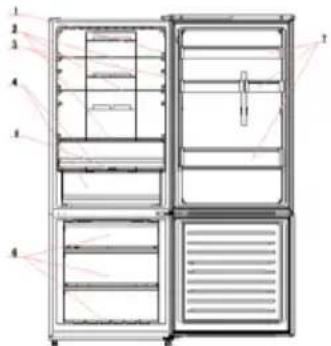
text_image
Technical diagram of an open refrigerator with numbered compartments and ventilation slots| No | Description |
| 1 | Light switch |
| 2 | Fridge shelves |
| 3 | Light |
| 4 | Crisper box |
| 5 | Crisper box cover |
| 6 | Freezer drawers |
| 7 | Door balcony |
The most energy-saving configuration requires drawers, food box and shelves to be positioned in the product, please refer to the above pictures.
STARTING TO USE
Before you starting to use the freezer, please check that:
-
The interior is dry and air can circulate freely at the rear.
-
Clean the interior as recommended under "TAKE CARE" section (electric parts of the refrigerator can only be wiped by dry cloth).
-
Do not switch on until 4 hours after moving the fridge/freezer. The coolant fluid needs time to settle. If the appliance is switched off at any time, wait 30 minutes before switching back on to allow the coolant fluid to settle.
-
Before connecting the Refrigerator to the mains supply position. The thermostat control dias is located inside the Fridge compartment.
-
Turn the thermostat knob to the "3" position and turn on the electricity. The compressor and the light inside the refrigerator will begin to work.
-
Before storing foods in your refrigerator, turn the refrigerator on and wait for 24 hours, to make sure it is working properly and to allow the Fridge/Freezer to fail to the correct temperature.
-
Open the door 30 minutes later, if the temperature in the refrigerator decreased obviously, it shows that the refrigerator system works well. When the refrigerator operates for a period of time, the temperature controller will automatically set the temperature within limits it opens.
COMBI OPERATION
Appliance connected to power at the first time:
When the appliance is connected to power at the first time, the display will be lit for 2 seconds before going normal and the appliance runs with intelligence function.
Display Control: When the refrigerator door is closed and there is no button operation in 3 minutes, the display light goes off.
When the display light is off, open the refrigerator door or click any button to light it up.
VERTICAL DISPLAY (Only on some models)
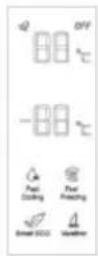
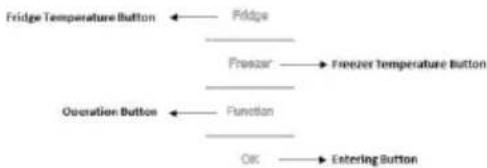
flowchart
graph TD
    A["Fridge Temperature Button"] --> B["Pridge"]
    B --> C["Prezur"]
    C --> D["Freezer Temperature Button"]
    E["Operation Button"] --> F["Function"]
    F --> G["Osc"]
    G --> H["Entering Button"]
TEMPERATURE SETTING: Click the "Fridge" or "Freezer" button and when it flickers in the symbol, temperatures can be set. Each time when the button is clicked, the temperature changes accordingly.
Temperatures cannot be set under functions of fast cooling, fast freezing, Smart ECO and vacation. Under temperature setting, if there is no button operation in 5 seconds, the button stops flickering and the set temperature comes into effect.
SMART ECO: Activate the Smart Eco button to set the temperatures of the fridge in max. energy efficiency conditions (+4°C for fridge temperature, -18°C for freezer temperature).
To enter Smart Eco: Click "option" until it flickers and then click "OK" to enter this function.
To deactivate Smart Eco: Click "option" until it goes to Smart ECO, click "OK" to quit this function and the light goes off.
FAST COOLING: Activate Fast Cooling mode to start an additional pulse for a fast freezing of the fridge compartment. The function is activated and confirmed by the switching on of the dedicated LED icon.
To enter Fast Cooling: Click "option" until it flickers in "Fast Cooling" and then click "OK" to enter this function.
To deactivate Fast Cooling: Click "option" until it goes to "fast cooling" and then click "OK" to deactivate this function.
FAST FREEZING: Activate Fast Freezing to rapidly freeze big quantities of food keeping intact nutritional food properties. When the light in Fast Freezing goes off and the freezer temperature goes
back to the value before fast freezing. When Fast Freezing time is up (26 hours), it deactivates automatically. When it goes to Vacation, Fast Freezing stops.
To enter Fast Freezing: Click "option" until it flickers in "Fast Freezing" and then click "OK" to enter this function.
To deactivate Fast Freezing: Click "option" until it goes to "fast freezing" and then click "OK" to quit this function.
VACATION: In case of long stops, the Vacation function can be used. This function deactivates the fridge compartment, while leaving the freezer on. Ensure that there is no food inside the fridge compartment before using this function. The function is activated and confirmed by the switching on of the dedicated LED icon. The light in Vacation goes off and the refrigerator temperature goes back to the value before Vacation.
Vacation quits under functions of Smart ECO and Fast Cooling.
To enter Vacation: Click "option" until it flickers in "Fast Freezing" and then click "OK" to enter this function.
To deactivate Vacation: Click "option" until it goes to "Vacation" and then click "OK" to quit this function.
POWER OFF MEMORY: Refrigerator can automatically keep all the setting in case of power off. When the unit is plugged in again, the refrigerator will run with the setting before power off.
POWER-ON DELAY: To prevent harm to the refrigerator in case of sudden power cut and power on, the unit does not start immediately if the power off time is less than 5 minutes.
FREEZER OVER-TEMPERATURE ALARM (only in case of power on): When the freezer temperature is higher than 10^ Cat the first time connected to power, the symbol light of the freezer chamber goes on and the number representing temperature flickers.
Press any button or wait for 5 seconds, flickering stops and it goes back to the temperature that was set.
REFRIGERATOR DOOR OPENING ALARM: When the refrigerator is open over 3 minutes, the buzzer will buzz. Close the door or press any button to stop the alarm, but for the latter, the alarm will go off again after 3 minutes.
SENSOR FAULT ALARM: When it shows "E0", "E1", "E2" or other abnormal symbols, it means sensor faults and the refrigerator needs repair.
TOP FEAUTRED VERTICAL DISPLAY (Only on some models)
text_image
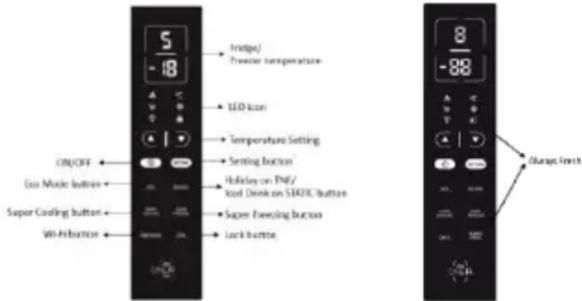
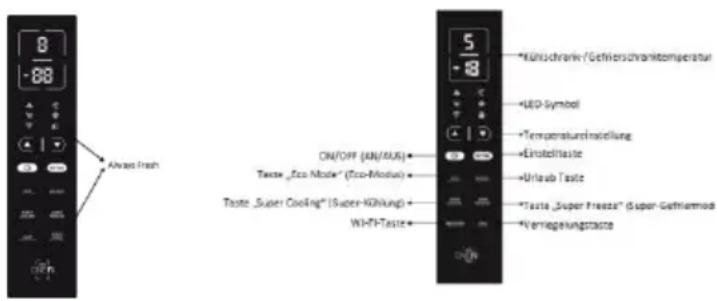
5 -18 LCD/ Freezer temperature LED Icon Temperature Setting Setting Button Holiday on WiFi/ Load Deck on SBOC Button Super Steering Button Lock Button ON/OFF Geo Mode Button Super Coating Button Wit Position 8 -88 Always FinishALWAYS FRESH Button: On models with Always Fresh Technology press the "Always Fresh" button to activate the function.
SETTING Button: Press "SETTING" to change the temperature.
When button is pressed for the first time: You can change refrigerator temperature with ▲ PLUS Button and ▼ MINUS Button.
When button is pressed for the second time: You can change refrigerator temperature with ▲ PLUS Button and ▼ MINUS Button.
On models with Always Fresh Technology press the "Setting" button for 3 seconds to lock and unlock the display.
ON/OFF Button: To turn on Refrigerator Press ON/OFF button for 3 seconds. To turn off Refrigerator: Press ON/Off button for 3 seconds.
Stand-by Mode: To save energy is possible to activate Stanby Mode. The refrigerator will work in normal state and all leds will turn OFF
To enter Stan-by Mode: Press ON/OFF button for 1 second.
To deactivate Stan-by Mode: Press ON/OFF button for 1 second. Fridge back to normal operation.
ECO MODE Button: Press Eco Mode button to set temperatures of the fridge in max. energy efficiency conditions (+5°C for fridge temperature, -18°C for freezer temperature). If you want to exit the ECO mode function, you need to press the Eco Mode button again and the refrigerator temperature turns back to normal operation.
HOLIDAY Button: In case of long stops, the Holiday function can be used. This function deactivates the fridge compartment, while leaving the freezer on. Ensure that there is no food inside the fridge compartment before using this function. The function is activated and confirmed by the switching on of the dedicated LED icon. If you want to exit the Holiday function, you will need to press the "Holiday" button again, the light in Holiday goes off and the refrigerator temperature goes back to the value before Holiday.
SUPER COOLING Button: Press Super Cooling button to start an additional pulse for a fast freezing of the fridge compartment. The function is activated and confirmed by the switching on of the dedicated LED icon.
If you want to exit the Super Cooling function, you need to press the Super Cooling button again and the refrigerator temperature turns back to normal operation.
SUPER FREEZING Button: Press Super Freezing
button to rapidly freeze big quantities of food keeping intact nutritional food properties. If you want to exit the Super Freezing function, you need to press the Super Freezing button again and the freezer temperature turns back to normal operation.
WI-FI Button: This appliance is equipped with OneFi+ technology that allows you to control it remotely via App. Press OneFi+ button to activate Wi-Fi function.
Machine Enrollment (on App): Download the Hoover Wizard App on your device. The Hoover Wizard App is available for devices running both Android and iOS, both for tablets and for smartphones. Get all the details of the One Fi+ functions by browsing the App in DEMO mode.
Open the App, create the user profile and enroll the appliance following the instructions on the device display or the "Quick Guide" attached on the machine. This operation is necessary just for the first installation. To finalize the enrollment following the instruction on the smartphone's screen.
Refrigerator usage from remote by App: When the enrollment is completed, there will be Wi-Fi LED switched on. From now on it will be possible to manage the product by using the buttons on the display or using the App: both of them will be aligned according to the last command given.
LOCK Button: Press Lock button to block display user interface (Lock icon enlights, "LO" appears on display and, after 2 seconds, the refrigerator and freezer temperature shows recovery). If you want to exit Lock function, press the "Lock" button again for 3 seconds, and the refrigerator will exit the Lock function.
INTERNAL USER INTERFACE (Only on some models)
SET Button: Press SET button for setting the temperature until you reach the level you want where level 1 is the warmest and level 4 is the

coldest. Under normal operating conditions, we recommend using an intermediate setting (level 2). Once the setting takes effect, it immediately enters the corresponding stall for operation control, and the stall indicator lights up 3s3min and then goes out. Factory default temperature is set to 2.
Long press "SET" key to exceed 3s and enter the hardware self-check program. The hardware self-check operation is effective within 10min, and the long button operation after 10min is invalid.
WI-FI Button: This appliance is equipped with OneFi+ technology that allows you to control it remotely via App. Press Wi-Fi icon for 3 seconds to activate Wi-Fi function and the icon light changes from white to blue.
Machine Enrollment (on App): Download the Wizard App on your device. The Hoover Wizard App is available for devices running both Android and iOS, both for tablets and for smartphones. Get all the details of the OneFi+ functions by browsing the App
in DEMO mode.
Open the App, create the user profile and enroll the appliance following the instructions on the device display or the "Quick Guide" attached on the machine. This operation is necessary just for the first installation. To finalize the enrollment following the instruction on the smartphone's screen.
Refrigerator usage from remote by App: When the enrollment is completed, there will be Wi-Fi LED switched on. From now on it will be possible to manage the product by using the buttons on the display or using the App: both of them will be aligned according to the last command given.
FAST COOL Button: when "FAST COOL" button is pressed, rapid cooling function is activated, according to the 21°C to refrigeration control gear.
Maximum running time is 3h, after this time temperature will be set to 1.
If the "SET" button is pressed in the process of speed cooling, the instant cooling function is immediately withdrawn and the default is entered into the next gear.
TECHNICAL FEATURES HUMIDITY EQUALISER (Only on some models)
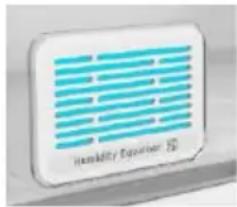
The exclusive Hoover Humidity Equaliser uses this humidity naturally generated by fruits and vegetables to keep always a level between 85% and 95%.
text_image
Humidity Equator 10ALWAYS FRESH TECHNOLOGY (Only on some models)
Is the innovative Hoover technology that allows you to preserve food better
text_image
PUSHand longer, both in the refrigerator and in the freezer. Always Fresh promotes the maintenance and preservation of foods by interacting with their enzymatic activity through the activation of water molecules, naturally present in them.
Preservation technology is activated by a suitable button on the display.
Always Fresh must be switched off during the energy consumption test.
WATER DISPENSER (Only on some models)
The water dispenser allows you to get chilled water without opening the fridge compartment door.
Before first use
Before using the water dispenser for the first time, remove and clean
the water tank located inside the fridge
compartment.
- Lift the water tank out of the fridge compartment.
- Open the water tank cover and then clean the water tank and cover
in warm soapy water. Rinse thoroughly.
- After cleaning, attach the cover to the water tank and then replace
the water tank back on the fridge door.
- Clean the dispenser pad outside the fridge door.
Filling the water tank with water
- Open the small cover.
- Fill the water tank with drinkable water up to the Max line.
- Close the small cover.
Dispensing
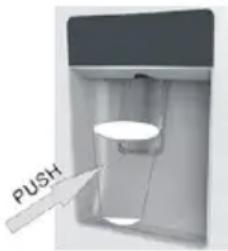
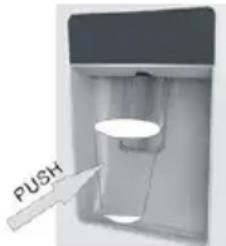
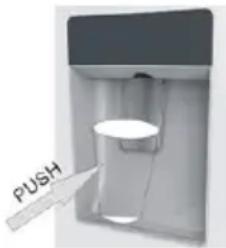
To dispense water, push the dispenser pad gently, using
a glass or container. To stop the flow of water, pull your glass away from the dispenser pad.
Tips for keeping food perfect in the Fridge
Take extra care with meat and fish: cooked meats should always be stored on a shelf above raw meats to avoid bacterial transfer. Keep raw meats on a plate which is large enough to collect juices and cover it with cling film or foil.
Leave space around food: this allows cold air to circulate around the Fridge, ensuring all parts of the Fridge are kept cool.
Wrap up food!: to prevent transfer of flavors and drying out, food should be separately packed or covered. Fruit and vegetables need not be wrapped.
Pre-cooked food should be cooled properly: allow pre-cooked food to cool down before placing in the Fridge. This will help to stop the internal temperature of the Fridge from rising.
Shut the door!: to prevent cold air escaping, try to limit the number of times you open the door. When retuning from shopping, sort foods to be kept in your Fridge before opening the door. Only open the door to put food in or take it out.
Where to store your foods in the fridge
Position different food in different compartments according to be below table
| Refrigerator compartment | Type of food |
| Door or balconies of fridge compartment | ·Foods with natural preservatives, such as jams, juices, drinks, condiments.·Do not store perishable foods |
| Crisper drawers (salad drawer) | ·Fruits, herbs and vegetables should be placed separately in the crisper bin |
| Do not store bananas, onions, potatoes, garlic in the refrigerator | |
| Fridge shelf – middle | Dairy products, eggs |
| Fridge shelf – top | Foods that do no need coocking, such as ready-to-eat foods, deli meats, leftovers. |
| Freezer drawer(s)/tray | Foods for long-term storageBottom drawer for raw meet, poultry, fishMiddle drawer for frozen vegetables, chips.Top tray for ice cream, frozen fruit, frozen baked goods. |
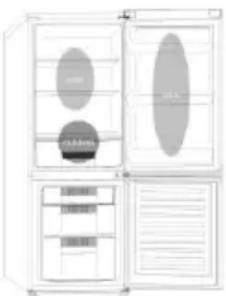
Cool area: this is where to store foods which will keep longer if they are kept cool. Milk, eggs, yogurt, fruit juices, hard cheeses eg. Cheddar. Opened jars and bottles of salad dressings, sauces and jams. Fats, eg. Butter, margarine, low-fat speads, cooking fats and lard.
Coldest area (0°C to 5°C): this is where foods which must be cold to keep them safe should be kept:
- Raw and uncooked foods should always be wrapped.
- Pre-cooked chilled foods, eg. Ready meals, meat pies, soft cheeses.
-Pre-cooked meats eg. Ham,
- Prepared salads(including pre-packed mixed green salads, rice, potato salad etc).
·Desserts, eg. Fromage frais, home-prepared food and leftovers or cream cakes.
natural_image
Illustration of a refrigerator with open doors and side compartments (no text or symbols)Crisper: this is the most humid part of the Fridge. Vegetables, fruit, fresh salad items eg. Unwashed whole lettuce, whole tomatoes, radishes etc can be stored here.
WE RECOMMEND THAT ALL PRODUCE KEPT IN THE SALAD BIN IS WRAPPED.
NOTE: Always wrap and store raw meat, poultry and fish on the lowest shelf at the bottom of the fridge. This will stop them dripping onto, or touching other foods. Do not store inflammable gasses or liquids in the fridge.
Electrical operation after 3h on the freezer, the temperature in the cabinet above -12°C, the alarm
light is lit, and buzzer sounds.
Storing Frozen Food
Prepackaged commercially frozen food should be stored in accordance with the frozen food manufacturer's instructions for a #ED free arm compartment.
To ensure that the high quality achieved by the frozen food manufacturer and the food retailer is maintained the following should be remembered:
-
Put packets in the freezer as quickly as possible after purchase.
-
Do not exceed "Use By", "Best Before" dates on the packaging.
| DO | DON'T |
| Defrost food from the freezer thoroughly in a fridge or in a microwave oven following defrosting and cooking instructions. | Use pointed sharp edged objects such as knives, forks to remove the ice. |
| Defrost/frozen meat completely before cooking. | Put hot food in the freezer. Let it cool down first. |
| Store commercially frozen food in accordance with the instructions given on the packets that you buy. | Put liquid-filled bottles or sealed cans containing carbonated liquids into the freezer as they may burst. |
| Check contents of the refrigerator at regular intervals. | Remove items from the freezer with wet hands. |
| Clean and defrost your refrigerator regularly. | Freeze fizzy drinks. |
| Prepare fresh food for freezing in small portions to ensure rapid freezing. | Consume ice-cream and water ices dined from freezer. It may cause "freezer bums" on lips. |
storage time in the fridge compartment is achieved with colder temperatures. Since some particular products (as fresh fruits and vegetables) may be damaged with colder temperatures, it is suggested to keep them in the crisper drawers, whenever present. If not present, maintain an average setting of the thermostat.
- For frozen food, refer to the storage time written on the food packaging. This storage time is achieved whenever the setting respects the reference temperatures of the compartment (one-star -6°C, two stars -12°C, three stars -18°C)
ENERGY SAVING
For better energy saving we suggest:
• Installing the appliance away from heat sources and not exposed to direct sunlight and in a well-ventilated room.
- Avoid putting hot food into the refrigerator to avoid increasing the internal temperature and therefore causing continuous functionalizing of the compressor.
• Do not excessively stufffoods so as to ensure proper air circulation.
- Defrost the appliance in case there is ice to facilitate the transfer of cold.
• In case of absence of electrical energy, it is advisable to keep the refrigerator door closed.
- Open or keep the doors of the appliance open as little as possible.
- Avoid adjusting the setting to temperatures too cold.
- Remove dust present on the rear of the appliance.
TAKE CARE
Defrosting
vacuumed using a soft brush attachment.
Do not use harsh cleaners, scouring pads or solvents to clean any part of the Fridge/Freezer.
CHANGING THE INTERNAL LIGHT
- Before carrying out the LED replacement always disconnect the mains supply.
- Hold and lift up the LED light cover.
- Remove the old LED by unscrewing it in an anti-clockwise direction.
- Replace with a new LED light by screwing it in a clockwise direction marking sure that it is secure in the light holder.
- Refit the light cover and re-connect your Fridge to the mains supply and switch on.
REVERSING THE DOOR SWING Dissemble the Refrigerator Door
- a. Use a tool to remove the screw off the hinge cover, and then remove the latter. Insert the communication line to the hole on the cabinet top.
b. Use a tool to remove the 4 screws off the upper hinge cover and then remove the latter. Pry up the door bush and small end cap cover on the door.
c. Insert the door bush and door communication line into the hole on the door and then put on the small end cap cover.
d. Use a tool to remove the 2 screws as shows in the below figure to remove the hole cover on the cabinet top and get the cabinet communication line out of the hole.
Pry up the small end cap cover on the door and get out the door bush and door communication line.
e. Insert the door bush into the round hole on the door and then put on the small end cap cover.
f. Move the refrigerator door upward over 500mm to remove the door.
- a. Use a tool to remove the 3 screws off the middle hinge cover and then remove the middle hinge.
b. move the freezer door upward over 500mm to remove the door.
c. Remove the adjustable front feet under the lower hinge; use a tool to remove the 4 screws from the lower hinge and then disassemble the lower hinge. Door disassembly is finished.
Assemble door, lower hinge accessories to the corresponding positions
- a. Use a tool to get the door bush out as shown in the below figure and assemble it to the corresponding position of the other side. b. Use a tool to remove the screws off the stopper ass as shown in the below figure and
then assemble them to the other side of the door.
c. Use a tool to remove the axle and two stoppers on the lower hinge and then assemble them to the position as shown in the below figure.
Assemble the refrigerator door and freezer door to the opposite side
- a. Remove the adjustable front foot as shown below by hand and then assemble the lower hinge to the other side of the cabinet and fix the screws by using a tool. b. Assemble the shorter adjustable front foot to the lower hinge side and adjust the height of the foot to make the refrigerator stay in level.
- Put on the freezer door and turn the middle hinge by 180 °C and then assemble it to the other side of the cabinet; use a tool to screw up the 3 screws to fix the middle hinge.
- Put on the refrigerator door and assemble the upper hinge to the other side of the cabinet; use a tool to screw up the 4 screws to fix the upper hinge.
- After that, connect the door communication line and the cabinet communication line and then put on the upper hinge cover and fix it using a screw.
Assemble the hole cover to the other side of the cabinet and use a tool to screw up the hole cover.
Door disassembly is finished here.
Double check that the door is aligned correctly and all the seals are closed on all sides. If necessary, re-adjust the levelling feet.
NOTE: If you want to have the door swing reversed, we recommend that your contact a qualified technician. You should only try to reverse the door yourself if you believe that you are qualified to do so. All parts removed must be saved to do the reinstallation of the door. You should rest the fridge freezer on something solid so that it will not slip during the door change process. Do not lay the fridge freezer flat as this may damage the coolant system. Ensure the fridge freezer is unplugged and empty. We recommend that 2 people handle the fridge freezer during assembly.
TROUBLE SHOOTING
- If the appliance does not operate when switched on, check.
- Power cut: If the internal temperature of the Fridge/Freezer compartment is -18^ C or less when the power returns, your food is safe. The food in your Fridge/Freezer will remain frozen for approx 16 hours with the door closed. Do not open the Fridge/Freezer door more than necessary.
-
The product is designed and built for domestic household use only.
-
The plug is inserted properly in the socket and that the power supply is on. (To check the power supply to the socket, plug in another appliance).
- The fuse has blown/circuit breaker has tripped/main distribution switch has been turned off.
- The temperature control has been set correctly.
- If the refrigerator is exceptionally cold, you may have accidentally adjusted the thermostat control dial to a higher position.
- If the refrigerator is exceptionally warm, the compressor may not be working. Turn the thermostat control dial to the maximum setting and wait a few minutes. If there is no humming noise, it is not working. Contact the local store where your purchase was made.
- If condensation appears outside of the Refrigerator, this may be due to a change in the room temperature. Wipe off any residue of moisture. If the problem continues contact the local store where your purchase was made.
- If the provided plug has been replaced make sure the new plug is properly connected. If the appliance is still not operating after the above checks, please contact Customers Service.
- To contact the technical assistance, visit our website: https://corporate.haier-europe.com/en/ Under the section “website”, choose the brand of your product and your country. You will be redirected to the specific website where you can find the telephone number and form to contact the technical assistance
SCRAPPING OLD APPLIANCES

This appliance is marked according to the European directive 2012/19/EU on Waste Electrical and Electronic Equipment (WEEE).
WEEE contains both polluting substances (which can cause negative consequences for the environment) and basic components (which can be re-used). It is important to have WEEE subjected to specific treatments, in order to remove and dispose properly all pollutants, and recover and recycle all materials. Individuals can play an important role in ensuring that WEEE does not become an environmental issue; it is essential to follow some basic rules: WEEE should not be treated as household waste.
WEEE should be handed over to the relevant collection points managed by the municipality or by registered companies. In many countries, for large WEEE, home collection could be present.
In many countries, when you buy a new appliance, the old one may be returned to the retailer who has
to collect it free of charge on a one-to-one basis, as long as the equipment is of equivalent type and has the same functions as the supplied equipment.
Conformity
By placing the € mark on this product, we are confirming compliance to all relevant European safety, health and environmental requirements which are applicable in legislation for this product.
GUARANTEE
Minimum guarantee is: 2 years for EU Countries, 3 years for Turkey, 1 year for UK, 1 year for Russia, 3 years for Sweden, 2 years for Serbia, 5 years for Norway, 1 year for Morocco, 6 months for Algeria, Tunisia no legal warranty required.
AVAILABILITY OF SPARE PARTS
“Thermostats, temperature sensors, printed circuit boards and light sources are available for a minimum period of seven years after placing the last unit of the model on the market. Door handles, door hinges, trays and baskets for a minimum period of seven years and door gaskets for a minimum period of 10 year, after placing the last unit of the model on the market”.
For further information about the product, please consult https://eprel.ec.europa.eu/ or scan the QR on the energy label supplied with the appliance
TABLE DES MATIÈRES
INFORMATIONS SUR LA SÉCURITÉ
COMBI HOOVER
Classe climatique
INSTRUCTIONS DE TRANSPORT
INSTRUCTIONS D'INSTALLATION
DÉMARRAGE
FONCTIONNEMENT COMBINÉ
UNITÉ D'AFFICHAGE VERTICALE
UNITÉ D'AFFICHAGE VERTICALE AVANCÉE
INTERFACE UTILISATEUR INTERNE
CARACTÉRISTIQUES TECHNIQUES
HUMIDITY EQUALISER
text_image
Technical diagram of a refrigerator interior with numbered components for identificationtext_image
Technical diagram of a refrigerator with numbered parts for identification and assembly reference.text_image
Technical diagram of a refrigerator with numbered components and labeled parts in Chinesetext_image
Technical diagram of a four-panel refrigerator with numbered compartments and internal layout, likely for assembly or labeling purposes.text_image
Technical diagram of a refrigerator interior with numbered compartments and labeled featurestext_image
Technical diagram of a refrigerator with numbered compartments and labeled partstext_image
W VH-40 1 2 3 4 SETtext_image
Humidity Equator85 % et 95 %.
text_image
PUSHDISTRIBUTEUR D'EAU (LE CAS ÉCHÉANT)
natural_image
Illustration of a multi-level refrigerator with open doors and internal compartments (no visible text or symbols)text_image
Technical diagram of a refrigerator with numbered parts for identification and assembly reference.text_image
Technical diagram of a refrigerator with labeled parts and internal layouttext_image
Technical diagram of a refrigerator with numbered compartments and labeled partstext_image
Technical diagram of a refrigerator with numbered compartments and internal layout, likely for assembly or labeling purposes.natural_image
Illustration of a double door with internal compartments and ventilation slots (no text or symbols)text_image
Figura Figure Cryser Figure Figure Figuretext_image
Wi-Fi 1 2 3 4 SETtext_image
Technical diagram of a refrigerator with numbered compartments and internal layout, showing labeled parts and structural details.text_image
Technical diagram of an open refrigerator with numbered compartments and labeled partsOBERES VERTIKALES DISPLAY (FALLS VORHANDEN
text_image
WiFi | WiFi | 1 | 2 | 3 | 4 | SETnatural_image
White rectangular electronic device with blue horizontal stripes and 'Humerty Easier' branding (no additional text or symbols visible)natural_image
Illustration of a multi-level refrigerator with open doors and internal compartments (no visible text or symbols)text_image
Technical diagram of a refrigerator with numbered components and labeled parts in Chinesetext_image
Technical diagram of a refrigerator with numbered parts for identification and assembly reference.text_image
Technical diagram of a refrigerator with numbered components and internal layouttext_image
Technical diagram of a four-panel refrigerator with numbered compartments and internal layout, including a decorative door-like pattern.text_image
Technical diagram of a four-panel refrigerator with numbered components and internal layout, likely for architectural or mechanical design reference.natural_image
Illustration of a double door with internal compartments and ventilation grilles (no text or symbols)text_image
Wi-Fi 1 2 3 4 SETtext_image
Harold by RecoverVERTICAAL DISPLAY MET FUNCTIONS
INTERNE GEBRUIKERSINTERFACE
- in bed and breakfasts (B & B)
text_image
Technical diagram of a multi-chamber refrigerator with numbered components and labeled partstext_image
Technical diagram of a refrigerator with numbered components and internal layouttext_image
Technical diagram of a four-panel refrigerator with numbered compartments and internal structure, labeled with numbers 1 through 7.text_image
Technical diagram of a four-panel refrigerator with numbered compartments and internal layout, showing internal compartments and ventilation system.| No | Omschrijving |
| 1 | Controlepaneel |
| 2 | Koelkast planken |
| 3 | Scherpere dekking |
| 4 | Groente en fruit crisper |
| 5 | Vriezer lades |
| 6 | Verstelbare poten |
| 7 | Deurrekken koelkast |
| 8 | Watertank montage |
text_image
Technical diagram of a four-panel refrigerator with labeled compartments and ventilation slotsVERTICAAL DISPLAY (INDIEN AANWEZIG)

text_image
M-H 1 2 3 4 SETALWAYS FRESH TECHNOLOGY (INDIEN AANWEZIG)
WATERDISPENSER (INDIEN AANWEZIG)
text_image
Technical diagram of a refrigerator with numbered components and labeled parts in Chinesetext_image
Technical diagram of a refrigerator with numbered parts for identification and assembly reference.text_image
Technical diagram of a refrigerator interior with numbered components and labeled partstext_image
Technical diagram of a four-panel refrigerator with numbered compartments and internal compartments, labeled with numbers 1 to 7.text_image
Technical diagram of a refrigerator with numbered compartments and internal layout, likely for assembly or labeling purposes.
natural_image
Illustration of a double-door refrigerator with open doors and internal compartments (no text or symbols)text_image
AW-PI 1 2 3 4 SETDET VERTIKALE DISPLAY
MEST ANVENDTE PÅ DET VERTIKALE DISPLAY
INTERN BRUGERGRÅENSEFLADE
TEKNISKE EGENSKABER
HUMIDITY EQUALISER
ANTIBAKTERIELT SYSTEM (hvis til stede)
VANDDISPENSER
text_image
Technical diagram of a multi-level storage or ventilation system with numbered components and internal layouttext_image
Technical diagram of a four-panel refrigerator with numbered compartments and labeled partstext_image
W VI-FI 1 2 3 4 SETSET-knap: Tryk på SET-knappen for at indstille
natural_image
Illustration of a double-door refrigerator with open doors and side compartments (no text or symbols visible)text_image
Technical diagram of a refrigerator with numbered components and labeled parts in Chinesetext_image
Technical diagram of a refrigerator with numbered compartments and internal layout annotationstext_image
Diagram of a refrigerator interior with numbered compartments and labeled partstext_image
Technical diagram of a door frame with numbered components and directional arrows indicating movement or flow.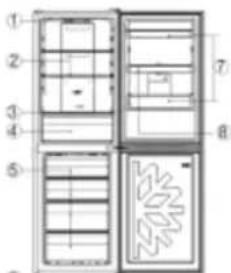
text_image
Technical diagram of a multi-chamber refrigerator with numbered compartments and internal layout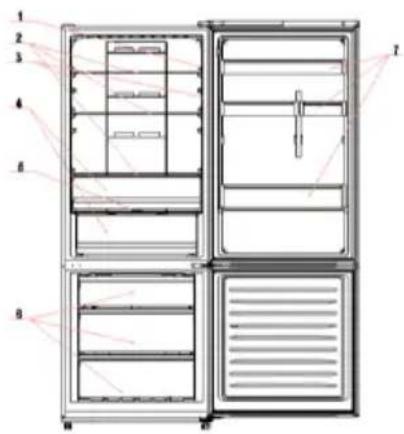
text_image
1 2 3 4 5 6 7| No | Beskrivning |
| 1 | Lampknapp |
| 2 | Kylhyllor |
| 3 | Ljus |
| 4 | Skarpare låda |
| 5 | Crisper box lock |
| 6 | Fryslådor |
| 7 | Dörr balkong |
text_image
Wi-Fi | Wi-Fi | 1 | 2 | 3 | 4 | SETtext_image
Harley by Eauisernatural_image
Illustration of a refrigerator with open doors and internal compartments (no text or symbols)SKROTNING AV GAMLA APPARATER
text_image
Technical diagram of a refrigerator with numbered parts for identification and assembly reference.text_image
Technical diagram of a refrigerator with numbered compartments and labeled partstext_image
WiFi | WiFi | 1 | 2 | 3 | 4 | SETtext_image
Humidity Equipmenttext_image
M-Fi 1 2 3 4 SETnatural_image
Illustration of a refrigerator with open doors and internal compartments (no text or symbols)text_image
Technical diagram of a refrigerator interior with numbered components for identification| No | Opis |
| 1 | Police za hladnjak |
| 2 | Povrće od povrća i voća oštrije |
| 3 | Hrskavi povrće i voće |
| 4 | Ladice za zamrzavanje |
| 5 | Podesive noge |
| 6 | Balkon na vratima |
text_image
Technical diagram of a refrigerator with numbered compartments and labeled parts| No | Opis |
| 1 | Police za hladnjak |
| 2 | Povrće od povrća i voća oštrije |
| 3 | Hrskavi povrće i voće |
| 4 | Ladice za zamrzavanje |
| 5 | Podesive noge |
| 6 | Stalci za vrata hladnjaka |
| 7 | Sklop spremnika za vodu |
text_image
Technical diagram of a refrigerator with numbered components and internal layout, likely for assembly or labeling.| No | Opis |
| 1 | Police za hladnjak |
| 2 | Povrće od povrća i voća oštrije |
| 3 | Hrskavi povrće i voće |
| 4 | Ladice za zamrzavanje |
| 5 | Podesive noge |
| 6 | Stalci za vrata hladnjaka |
text_image
Technical diagram of a refrigerator with numbered compartments and internal layout, labeled with numbers 1 to 7.| No | Opiš |
| 1 | Upravljačka ploča |
| 2 | Police za hladnjak |
| 3 | Povriće od povrća i voća ožtrije |
| 4 | Hrskaví povrće i voće |
| 5 | Ladice za zamrzavanje |
| 6 | Podesive noge |
| 7 | Stači za vrata hladnjaka |
text_image
Technical diagram of a refrigerator with numbered compartments and door frame annotations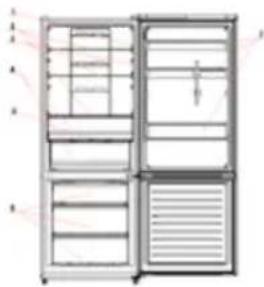
natural_image
Diagram of a cabinet with open door, showing internal compartments and ventilation ducts (no text or labels)text_image
Fridge Temperature Button ← Fridge Pressier → Freezer Temperature Button Operation Button ← Function OK → Entering ButtonPOSTAVKE TEMPERATURE: Pritisnite gumb „Fridge” ili „Freezer” i kada simbol zasvijetli, temperatura se može namjestiti. Temperatura se mijenja svakim pritiskom na gumb. Temperatura se ne može postaviti u okviru funkcija brzog hlađenja, brzog zamrzavanja, funkcije Smart ECO i funkcije godišnjeg odmora. Ako u okviru postavki temperature gumb nije u funkciji pet sekundi, prestaje svijetliti, a postavljena temperatura počinje se primjenjivati.
SMART ECO: Aktivirajte gumb „Smart Eco“ da biste namjestili temperature uređaja u uvjetima maksimalne energetske učinkovitosti (+4 °C za temperaturu hladnjaka, -18 °C za temperaturu zamrzivača).
Pokretanje funkcije Smart Eco: Držite gumb „Option” dok ne zasvijetli, a zatim pritisnite „OK” da biste pokrenuli ovu funkciju.
Prekid funkcije Smart Eco Držite gumb „Option” dok ne prijeđe u Smart ECO, pritisnite „OK” da biste prekinuli ovu funkciju i svjetlo će se ugasiti.
BRZO HLAĐENJE: Aktivirajte način brzog hlađenja da biste aktivirali dodatni puls za brzo zamrzavanje hladnjaka. Funkcija se aktivira i potvrđuje uključivanjem odgovarajuće LED ikonice.
Pokretanje funkcije brzog hlađenja: Držite gumb „Option“ dok ne zasvijetli na funkciji „Fast Cooling“, a zatim pritisnite „OK“ da biste pokrenuli ovu funkciju. Prekid funkcije brzog hlađenja Držite gumb „Option“ dok ne prijeđe u „Fast Cooling“, a zatim pritisnite „OK“ da biste prekinuli ovu funkciju.
Gumb ALWAYS FRESH: Na modelima s Always Fresh
Technology pritisnite gumb „Always Fresh“ kako biste aktivirali funkciju.
Gumb SETTING: Pritisnite „SETTING“ da biste promijenili temperaturu.
Kada se gumb pritisne prvi put, možete promijeniti temperaturu hladnjaka uz pomoć gumba PLUS ▲ i gumba MINUS ▼.
Kada se gumb pritisne drugi put, možete promijeniti temperaturu hladnjaka uz pomoć gumba PLUS ▲ i gumba MINUS ▼.
Na modelima s tehnologijom Always Fresh pritišćite gumb „Setting“ (Postavke) 3 sekunde za zaključavanje i otključavanje zaslona.
Gumb ON/OFF: Kako biste uključili hladnjak, pritisnite gumb ON/OFF i držite tri sekunde. Kako biste isključili hladnjak, pritisnite gumb „ON/OFF“ i držite tri sekunde.
Način rada pripravnosti Kako biste uštedeli energiju, moguće je aktivirati način rada pripravnosti. Hladnjak će normalno raditi, a sva LED svjetla će se isključiti. Pokretanje načina rada pripravnosti: Pritisnite gumb „ON/OFF“ i držite jednu sekundu.
Prekid načina rada pripravnosti Pritisnite gumb „ON/OFF“ i držite jednu sekundu. Hladnjak ponovno normalno radi.
Gumb ECO MODE: Pritisnite gumb Eco Mode da biste namjestili temperature uređaja u uvjetima maksimalne energetske učinkovitosti (+5 °C za temperaturu hladnjaka, -18 °C za temperaturu zamrzivača). Ako želite prekinuti funkciju ECO mode, ponovno pritisnite gumb Eco Mode; temperatura hladnjaka vraća se u normalno stanje.
text_image
Wi-Fi 1 2 3 4 SETGumb SET: Pritisnite gumb „SET“ da biste postavili temperaturu dok ne dođete do željene razine, pri čemu razina 1 predstavlja najvišu, a razina 4 najnižu temperaturu. U normalnim radnim uvjetima preporučujemo upotrebu srednje razine (razina 2). Kada postavka stupi na snagu, ona odmah pokreće odgovarajuće zaustavljanje za operativnu kontrolu, a pokazatelj zaustavljanja osvijetljen je 3 minuta i nakon toga se gasi. Standardna tvornička temperatura postavljena je na 2.
Pritisnite gumb „SET“ i držite dulje od tri sekunde da biste ušli u program samostalne provjere računalne opreme. Operacija samostalne provjere računalne opreme pokreće se u roku od 10 minuta, a dugo držanje gumba nije važeće nakon 10 minuta.
Gumb WI-FI: Uređaj je opremljen tehnologijom OneFi+ koja omogućava daljinsko upravljanje uređajem s pomoću aplikacije. Pritisnite i držite ikonu Wi-Fi tri sekunde da biste aktivirali funkciju Wi-Fi,
natural_image
Illustration of a multi-level cabinet with ovals and drawers, no visible text or symbolstext_image
5 -18 Temperature frolover/zenrovolts LED Iconics Posetianje temperature Dugme Setting Dugme Holiday Dugme Super Heating Dugme Lock ON/OFF + Dugme Ice Mode + Dugme Super Cooling + Dugme Wi-Fi + On 8 -88 A C B D C E D F G E G H E G I E G J E G K E G L E G M E G N E G O E G P Always FreshDugme ALWAYS FRESH: Na modelima sa Always Fresh Technology pritisnite "Always Fresh" dugme kako biste aktivirali funkciju.
Dugme SETTING: Pritisnite „SETTING“ da promenite temperaturu.
Kada se dugme pritisne prvi put: Možete promeniti temperaturu frižidera uz pomoć dugmeta PLUS ▲ i dugmeta MINUS ▼.
Kada se dugme pritisne drugi put: Možete promeniti temperaturu frižidera uz pomoć dugmeta PLUS ▲ i dugmeta MINUS ▼.
Na modelima sa tehnologijom Always Fresh pritisnite "Setting" (podešavanje) dugme 3 sekunde za zaključavanje i otključavanje ekrana.
Dugme ON/OFF: Kako biste uključili frižider pritisnite dugme ON/OFF i držite 3 sekunde. Kako biste isključili frižider : Pritisnite dugme ON/OFF i držite 3 sekunde.
text_image
Wi-Fi | 1 2 3 4 | SETDugme SET: Pritisnite dugme SET da biste podesili temperaturu dok ne dođete do željenog nivoa gde nivo 1 predstavlja najtopliju, a nivo 4 najhladniju temperaturu. U normalnim radnim uslovima preporučujemo upotrebu srednjeg nivoa (nivo 2). Kada postavka stupi na snagu, ona odmah pokreće odgovarajuće zaustavljanje za operativnu kontrolu, a pokazatelj zaustavljanja je osvetljen 3min i nakon toga se gasi. Standardna fabrička temperatura je postavljena na 2.
Pritisnite dugme „SET“ i držite duže od 3 sekunde da biste ušli u program samostalne provere hardvera. Operacija samostalne provere hardvera se pokreće u roku od 10 minuta, a dugo držanje dugmeta nije važeće nakon 10 minuta.
text_image
Harald by CoaumberTEHNOLOGIJA ALWAYS FRESH (ako postoji):
Inovativna Hoover tehnologija koja Vam omogućava da sačuvate hranu bolje i duže i u frižideru i u zamrzivaču. Always Fresh promoviše održavanje i čuvanje hrane kroz interakciju sa njihovim enzimskim aktivnostima preko
aktiviranja molekula vode koji se prirodno tu nalaze. Tehnologija čuvanje se aktivira odgovarajućim dugmetom na ekranu. Opcija „Always Fresh “ se mora isključiti
text_image
PUSHtokom provere potrošnje energije.
DISPENZER ZA VODU (ako postoji)
Dispenzer za vodu vam omogućava da dobijete hladnu vodu bez otvaranja vrata odeljka frižidera.
Pre prve upotrebe
Pre prve upotrebe dispenzera za vodu, uklonite i očistite posudu za vodu koja se nalazi unutar odeljka frižidera.
- Podignite i izvadite posudu za vodu iz odeljka frižidera.
- Otvorite poklopac posude za vodu, a zatim očistite posudu za vodu i poklopac u toploj sapunici.
Temeljno isperite. - Nakon čišćenja, stavite poklopac na posudu za vodu, a zatim vratite posudu za vodu na vrata frižidera.
- Očistite slavinu dispenzera izvan vrata frižidera.
natural_image
Line drawing of a cabinet with open doors and internal compartments (no text or symbols)Sveže namirnice: ovo je prostor u frižideru s najviše vlage. Ovde se može držati povrće, voće, namirnice za svežu salatu, npr. neoprana cela salata, celi paradajz, rotkvica itd.
SAVETUJEMO VAM DA SVE NAMIRNICE U POSUDI ZA SALATE BUDU UMOTANE.
text_image
Technical diagram of a refrigerator with numbered components for identificationtext_image
Technical diagram of a refrigerator with numbered parts for identification and assembly reference.text_image
Technical diagram of a refrigerator interior with numbered compartments and labeled partstext_image
Technical diagram of a refrigerator interior with numbered compartments and labeled featurestext_image
Technical diagram of a multi-chamber refrigerator with numbered compartments and internal structure annotationsnatural_image
Diagram of two rectangular storage compartments with internal compartments and a central door (no text or symbols)JAK ZAČÍT POUŽÍVAT
natural_image
Interior view of a refrigerator with open doors and side compartments (no visible text or symbols)text_image
Technical diagram of a refrigerator with numbered compartments and internal layout annotationstext_image
Diagram of a multi-panel refrigerator with numbered compartments and internal compartments, labeled 1 through 7.text_image
Technical diagram of a refrigerator with numbered compartments and door labels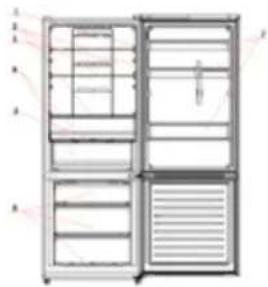
natural_image
Illustration of a double-door refrigerator with open door, drawers, and ventilation slots (no text or symbols)text_image
P-type transcription (KEK) →: Higgs ——— ——— P-type transcription and KET P-type gas distribution →: Fission ——— ——— P-type granulosetext_image
WiFi WiFi 1 2 3 4 SETnatural_image
White rectangular device with blue horizontal stripes and 'Healthy Equivalve' branding (no visible text beyond label)natural_image
Illustration of a cabinet with open doors and internal compartments (no text or symbols)text_image
Technical diagram of a refrigerator with numbered compartments and labeled partstext_image
Technical diagram of a multi-panel mechanical or electrical device with numbered components and internal structure annotationstext_image
Technical diagram of a refrigerator with numbered compartments and internal layouttext_image
5 -88 Temperature Monitoring/Amplifier VILLOP/IZVLOP Gumb Eco Mode Gumb Super Cooling Gumb WiFi Gumb LCD Gumb Ice Gumb Super Freezing Gumb Lock 8 -88 A C D E F G H I J K L M N O P Q R S T U V W X Y Z A X B X C X D X E X F X G X H X I X J X K X L X M X N X O X P X Q X R X S X T X U X V X W X X X Y X Z X A X B X C X D X E X F X G X H X I X J X K X L X M X N X O X P X Q X R X S X T X U X V X W X X Y X Z Always FreshGumb ALWAYS FRESH: Na modelih z Always Fresh Technology pritisnite "Always Fresh" tipko, da bi aktivirali funkcijo.
Gumb SETTING: Pritisnite gumb »SETTING«, da spremenite temperaturo.
Ko gumb pritisnete prvič: Temperaturo hladilnika lahko spremenite z ▲ gumbom PLUS in ▼ gumbom MINUS.
Ko gumb pritisnete drugič: Temperaturo hladilnika lahko spremenite z ▲ gumbom PLUS in ▼ gumbom MINUS.
Na modelih z tehnologijo Always Fresh pritisnite "Setting" (uravnavanje) tipko 3 sekunde za zaklepanje in odklepanje zaslona.
Gumb VKLOP/IZKLOP: Da bi vklopili hladilnik, pritisnite gumb VKLOP/IZKLOP za 3 sekunde. Za izklop hladilnika: Pritisnite gumb VKLOP/IZKLOP za 3 sekunde.
text_image
Ni-Fi 1 2 3 4 SETGumb SET: Pritiskajte gumb SET za nastavitev
text_image
Technical diagram of a refrigerator with numbered components and labeled parts in Chinesetext_image
Technical diagram of a refrigerator with numbered components for identificationtext_image
Diagram of a four-panel refrigerator with labeled compartments and internal compartments, showing front, back, side, and top views.text_image
Technical diagram of a multi-panel refrigerator with labeled parts and internal compartments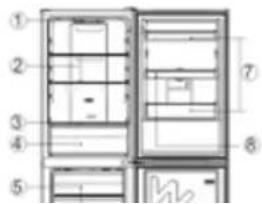
text_image
Technical diagram of a refrigerator with numbered compartments and labeled parts
natural_image
Illustration of a double-door refrigerator with open doors and internal compartments (no text or symbols)| No | Popis |
| 1 | Spinač svetiel |
| 2 | Poličky chladničky |
| 3 | Svetlo |
| 4 | Krehlká krabica |
| 5 | Kryt skrinky na ostrejšie |
| 6 | Zakuvley mrazničky |
| 7 | Dverný balkón |
ALARM NADMERNEJ TEPLOTY MRAZNIČKY (len v
text_image
Wi-Fi | 1 2 3 4 | SETnatural_image
White rectangular device with blue horizontal stripes and 'Humely Outliner 25' branding (no additional text or symbols visible)ALWAYS FRESH TECHNOLOGY (ak je k dispozícii)
text_image
Diagram of a refrigerator with labeled compartments and windows, showing room layouts and text annotationstext_image
Technical diagram of a refrigerator with numbered parts and labeled interior layouttext_image
Technical diagram of a refrigerator with numbered components for identificationtext_image
Technical diagram of a multi-panel refrigerator with numbered labels pointing to internal compartments and parts.text_image
Technical diagram of a refrigerator with numbered compartments and internal layout, likely for assembly or labeling purposes.text_image
Diagram of a refrigerator interior with numbered compartments and labeled parts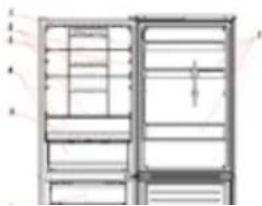
natural_image
Diagram of a refrigerator front view showing internal compartments and door frame (no text or labels)PORNIREA ÎN VEDEREA UTILIZĂRII
text_image
WiFi 1 2 3 4 SETtext_image
Humidity Equatorcommunication at consensus
text_image
Technical diagram of a refrigerator with numbered compartments and labeled partstext_image
Technical diagram of a multi-panel device with numbered components and internal layouttext_image
Technical diagram of a refrigerator with numbered parts for identification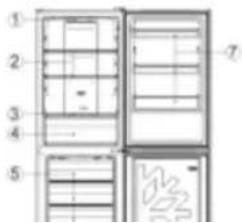
text_image
Diagram of a refrigerator interior with numbered compartments and labeled parts