X702DF - Browser ALPINE - Free user manual and instructions
Find the device manual for free X702DF ALPINE in PDF.



User questions about X702DF ALPINE
0 question about this device. Answer the ones you know or ask your own.
Ask a new question about this device
Download the instructions for your Browser in PDF format for free! Find your manual X702DF - ALPINE and take your electronic device back in hand. On this page are published all the documents necessary for the use of your device. X702DF by ALPINE.
USER MANUAL X702DF ALPINE
Digital Audio Broadcasting

Spotify®

(X902D/X802D-U/INE-W710D Only)
MP3 AAC

Contents
WARNING....2
CAUTION 3
Getting Started 4
Favourite Function....6
Registering Items 6
Android Auto (Optional)....7
Apple CarPlay (Optional)....7
Alpine Connect App (Optional) (X902D/X802D-U/INE-W710D only) ....7
Radio/RDS Operation 8
DAB/DAB+/DMB Operation 9
USB Flash drive Operation (Optional)....10
HDMI Device (DVD Player) Operation (Optional) 11
iPod/iPhone Operation (Optional)....12
Hands-Free Phone Control ....13
Map Functions (X902D/X802D-U/INE-W710D only)....14
Navigation Menu (X902D/X802D-U/INE-W710D only) 15
Setting a Destination (X902D/X802D-U/INE-W710D only) 16
Specifications ....17
IMPORTANT
Please record the serial number of your unit in the space provided below and keep it as a permanent record.
SERIAL NUMBER:
ISO SERIAL NUMBER: AL
INSTALLATION DATE:
INSTALLATION TECHNICIAN:
PLACE OF PURCHASE:
For details on all functions, refer to the Owner's Manual stored in the supplied CD-ROM. (As it is data CD, the CD cannot be used for playing back music and images on the player.) If required, an ALPINE dealer will readily provide you with a print out of the Owner's Manual contained in the CD-ROM.

WARNING
This symbol means important instructions. Failure to heed them can result in serious injury or death.
INSTALL THE PRODUCT CORRECTLY SO THAT THE DRIVER CANNOT WATCH TV/VIDEO UNLESS THE VEHICLE IS STOPPED AND THE EMERGENCY BRAKE IS APPLIED.
It is dangerous for the driver to watch TV/Video while driving a vehicle. Installing this product incorrectly enables the driver to watch TV/Video while driving. This may cause a distraction, preventing the driver from looking ahead, thus causing an accident. The driver or other people could be severely injured.
DO NOT WATCH VIDEO WHILE DRIVING.
Watching the video may distract the driver from looking ahead of the vehicle and cause an accident.
DO NOT OPERATE ANY FUNCTION THAT TAKES YOUR ATTENTION AWAY FROM SAFELY DRIVING YOUR VEHICLE.
Any function that requires your prolonged attention should only be performed after coming to a complete stop. Always stop the vehicle in a safe location before performing these functions. Failure to do so may result in an accident.
DO NOT FOLLOW ROUTE SUGGESTIONS IF THE NAVIGATION SYSTEM INSTRUCTS YOU TO PERFORM AN UNSAFE OR ILLEGAL MANEUVER, OR PLACES YOU IN AN UNSAFE SITUATION OR AREA.
This product is not a substitute for your personal judgement. Any route suggestions by this system should never supersede any local traffic regulations or your personal judgement or knowledge of safe driving practise.
KEEP THE VOLUME AT A LEVEL WHERE YOU CAN STILL HEAR OUTSIDE NOISES WHILE DRIVING.
Excessive volume levels that obscure sounds such as emergency vehicle sirens or road warning signals (train crossings, etc.) can be dangerous and may result in an accident. LISTENING AT LOUD VOLUME LEVELS IN A CAR MAY ALSO CAUSE HEARING DAMAGE.
MINIMIZE DISPLAY VIEWING WHILE DRIVING.
Viewing the display may distract the driver from looking ahead of the vehicle and cause an accident.
DO NOT DISASSEMBLE OR ALTER.
Doing so may result in an accident, fire or electric shock.
USE ONLY IN CARS WITH A 12 VOLT NEGATIVE GROUND.
(Check with your dealer if you are not sure.) Failure to do so may result in fire, etc.
KEEP SMALL OBJECTS SUCH AS SCREWS OUT OF THE REACH OF CHILDREN.
Swallowing them may result in serious injury. If swallowed, consult a physician immediately.
USE THE CORRECT AMPERE RATING WHEN REPLACING FUSES.
Failure to do so may result in fire or electric shock.
DO NOT BLOCK VENTS OR RADIATOR PANELS.
Doing so may cause heat to build up inside and may result in fire.
USE THIS PRODUCT FOR MOBILE 12V APPLICATIONS.
Use for other than its designed application may result in fire, electric shock or other injury.
MAKE THE CORRECT CONNECTIONS.
Failure to make the proper connections may result in fire or product damage.
BEFORE WIRING, DISCONNECT THE CABLE FROM THE NEGATIVE BATTERY TERMINAL.
Failure to do so may result in electric shock or injury due to electrical shorts.
DO NOT ALLOW CABLES TO BECOME ENTANGLED IN SURROUNDING OBJECTS.
Arrange wiring and cables in compliance with the manual to prevent obstructions when driving. Cables or wiring that obstruct or hang up on places such as the steering wheel, shift lever, brake pedals, etc. can be extremely hazardous.
DO NOT SPLICE INTO ELECTRICAL CABLES.
Never cut away cable insulation to supply power to other equipment. Doing so will exceed the current carrying capacity of the wire and result in fire or electric shock.
DO NOT DAMAGE PIPE OR WIRING WHEN DRILLING HOLES.
When drilling holes in the chassis for installation, take precautions so as not to contact, damage or obstruct pipes, fuel lines, tanks or electrical wiring. Failure to take such precautions may result in fire.
DO NOT USE BOLTS OR NUTS IN THE BRAKE OR STEERING SYSTEMS TO MAKE GROUND CONNECTIONS.
Bolts or nuts used for the brake or steering systems (or any other safety-related system), or tanks should NEVER be used for installations or ground connections. Using such parts could disable control of the vehicle and cause fire etc.
DO NOT INSTALL IN LOCATIONS WHICH MIGHT HINDER VEHICLE OPERATION, SUCH AS THE STEERING WHEEL OR SHIFT LEVER.
Doing so may obstruct forward vision or hamper movement etc. and results in serious accident.

CAUTION
This symbol means important instructions. Failure to heed them can result in injury or material property damage.
HALT USE IMMEDIATELY IF A PROBLEM APPEARS.
Failure to do so may cause personal injury or damage to the product. Return it to your authorized Alpine dealer or the nearest Alpine Service Centre for repairing.
HAVE THE WIRING AND INSTALLATION DONE BY EXPERTS.
The wiring and installation of this unit requires special technical skill and experience. To ensure safety, always contact the dealer where you purchased this product to have the work done.
USE SPECIFIED ACCESSORY PARTS AND INSTALL THEM SECURELY.
Be sure to use only the specified accessory parts. Use of other than designated parts may damage this unit internally or may not securely install the unit in place. This may cause parts to become loose resulting in hazards or product failure.
ARRANGE THE WIRING SO IT IS NOT CRIMPED OR PINCHED BY A SHARP METAL EDGE.
Route the cables and wiring away from moving parts (like the seat rails) or sharp or pointed edges. This will prevent crimping and damage to the wiring. If wiring passes through a hole in metal, use a rubber grommet to prevent the wire's insulation from being cut by the metal edge of the hole.
DO NOT INSTALL IN LOCATIONS WITH HIGH MOISTURE OR DUST.
Avoid installing the unit in locations with high incidence of moisture or dust. Moisture or dust that penetrates into this unit may result in product failure.
- The following screen examples of X902D/X802D-U/INE-W710D used in this manual are for reference only. They may differ from the actual screen displays.
Getting Started
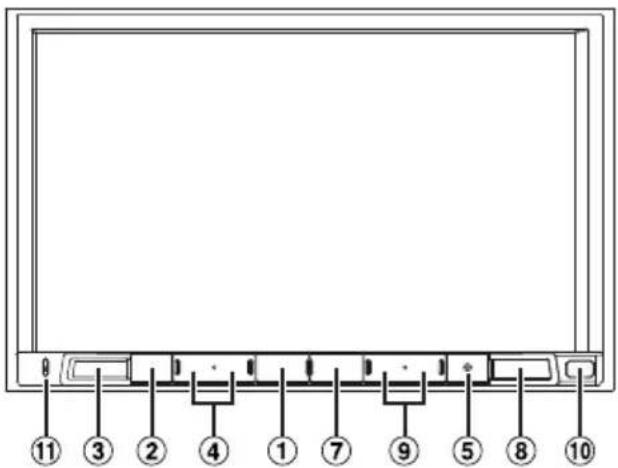
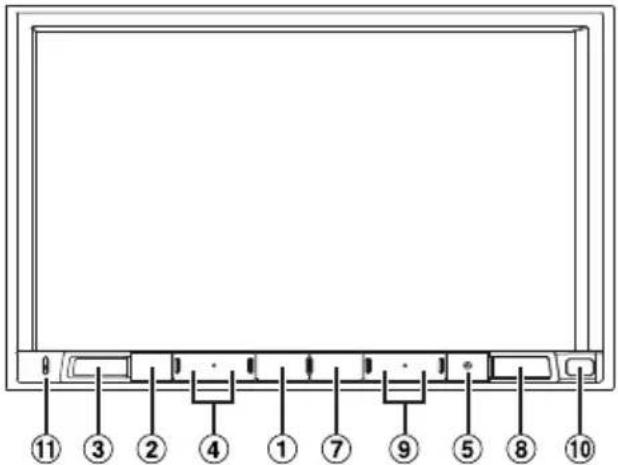
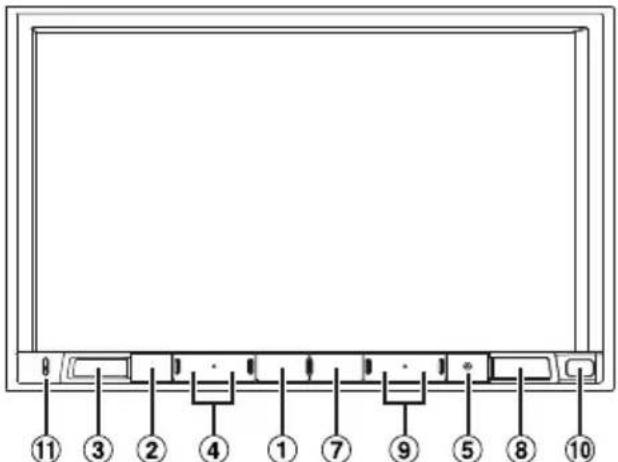
Location of Controls
The screen design used in the Owner's Manual may differ from the actual screen.
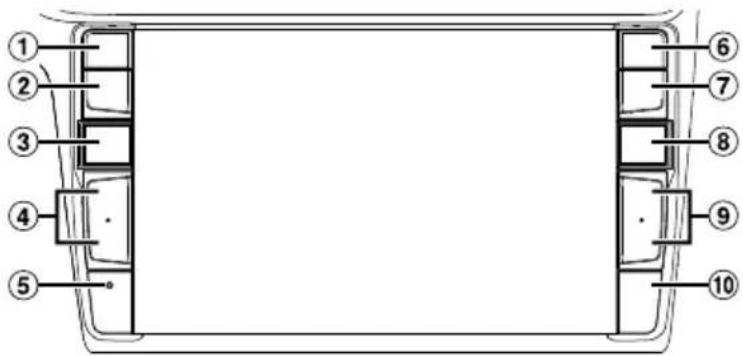
For X902D/i902D
For X802D-U/INE-W710D/iLX-702D
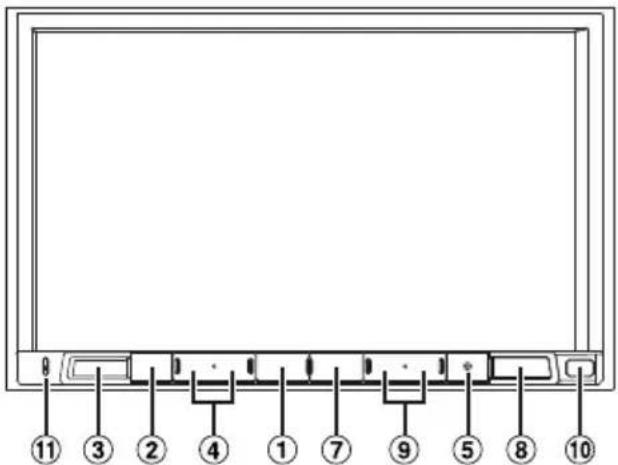
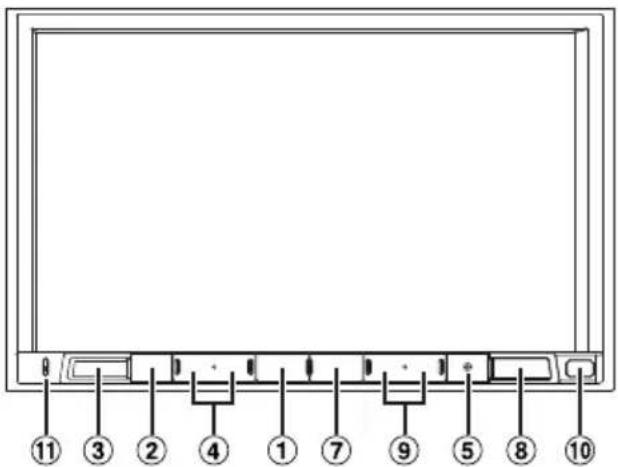
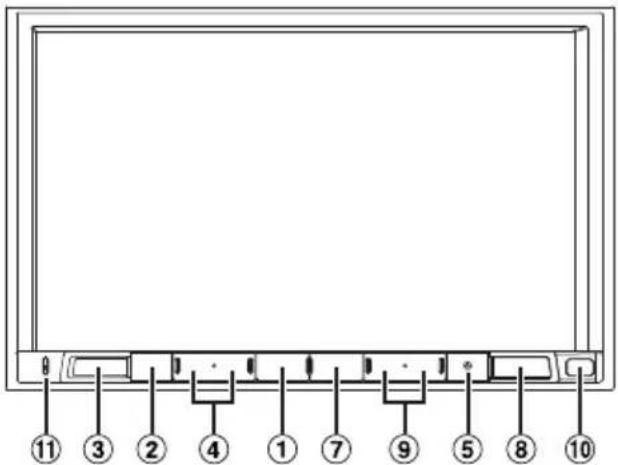
① or VOICE button
Depending on the connected smartphone, press to recall Siri function or voice recognition mode.
② (MOTE) button
Press to activate/deactivate the mute mode.
③ (AUDIO)/(Favourite) button
Displays the Audio/Visual screen. If the Audio/Visual screen is already displayed, changes the source. Press and hold for at least 2 seconds to recall the Favourite screen.
④ / or ÷(UP/DOWN) button
Press to adjust the volume.
⑤ RESET switch
The system of this unit is reset.
⑥ (PHONE) button (X902D/i902D only)
Recalls the Phone Menu screen. Press to start a conversation when a call is incoming.
⑦ MENU/ (Power Off) button
Recalls the Menu screen. Press and hold this button for at least 5 seconds to turn the power off.
⑧ (NAV) button
For X902D/X802D-U/INE-W710D:
Recalls the navigation map screen. Press again to switch to Navigation menu screen. Press and hold this button for at least 2 seconds to change to Go Home route screen. (If Home is not set yet, it will change to the Home setting screen.) For details of navigation operations, refer to "Navigation System OM" in the CD-ROM.
For i902D/iLX-702D:
Recalls the connected smartphone's map screen. Depending on the smartphone, this function may not available.
⑨ / ▶ button
Press to seek up/down a station in radio mode or up/down a track, chapter, etc., in other audio/visual sources.
⑩ Remote Sensor
Point the remote control transmitter towards the remote sensor within a range of 2 metres.
⑪ Microphone (X802D-U/INE-W710D/iLX702D only)
Used for Hands-free or Voice Control modes.
1 Turn the ignition key to the ACC or ON position.
The system is turned on.
2 Press and hold the MENU button for at least 5 seconds to turn the power off.
Switching the Audio Sources Screen to a Dedicated Screen
You can switch the Audio Sources screen to a dedicated screen by touching the icon on one of the four edges of the screen, or by swiping vertically or horizontally.
Shortcut Setup Screen
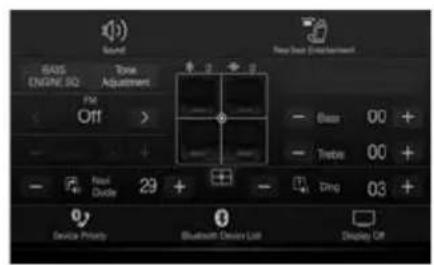
You can set the Sound Setup or Rear Seat Entertainment System.
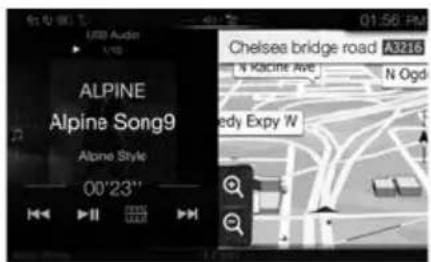
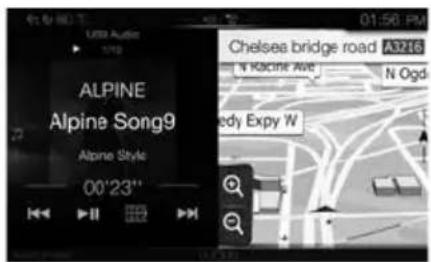
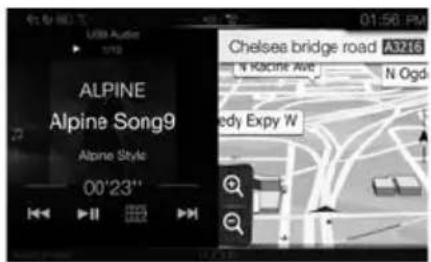
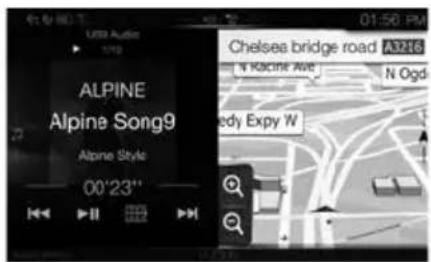
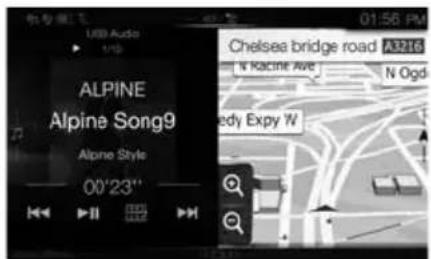
Dual Screen
(X902D/X802D-U/INE-W710D only)
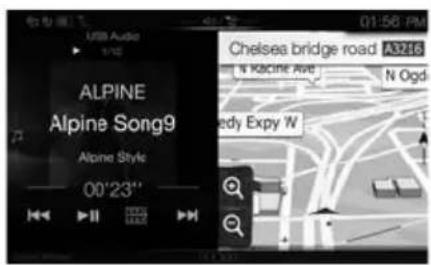
You can switch between the displayed screens on the Dual Screen.
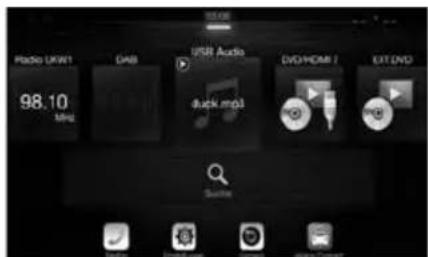
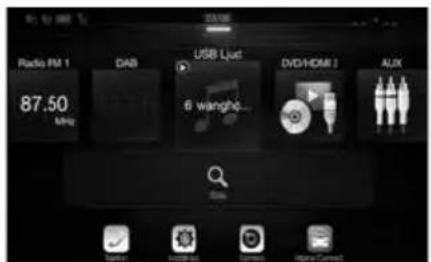
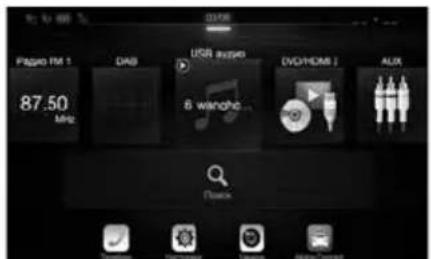
(USB Audio)
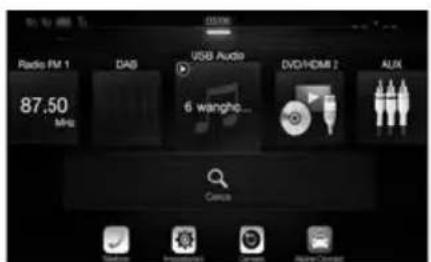
Audio Sources Screen
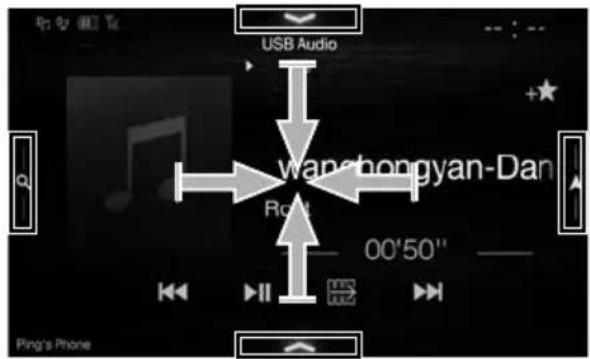

natural_image
Simple gray upward arrow graphic pointing upward (no text or symbols)
natural_image
Gray curved arrow pointing downward and to the right (no text or symbols)Preset button or Quick Search mode Screen*
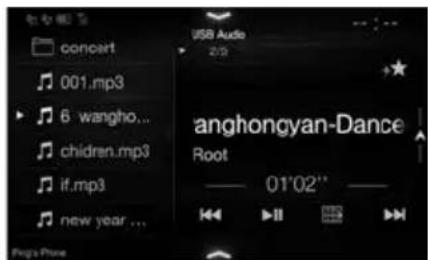

natural_image
Gray curved arrow pointing downward to the right (no text or symbols)Menu Screen
You can make settings on the Menu Screen.
* The Search mode differs depending on the audio source. For details, see the operating instructions of the audio source.
Favourite Function
This unit enables you to recall functions easily by registering frequently used items such as the Audio source, the navigation search function, etc. to the Favourite screen. You can recall any of these items easily.
1 Press and hold the /(Favourite) button for at least 2 seconds.
The Favourite screen is displayed.
■ Favourite screen example
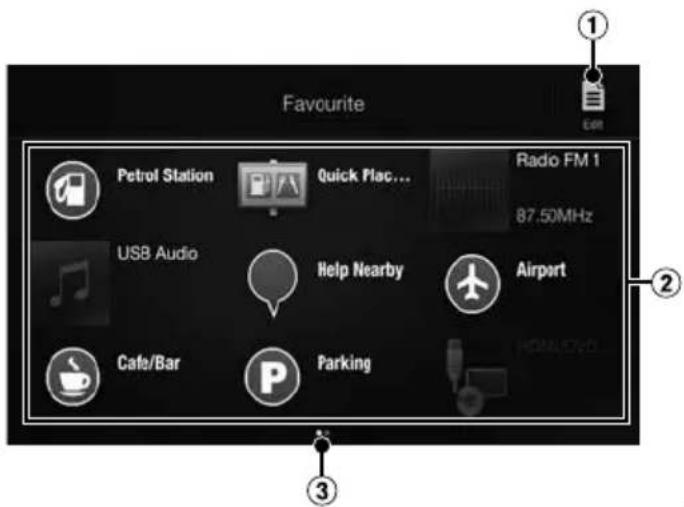
① Changes to the Edit screen used for registering items or changing names.
② Favourite registration item
③ Indicates the location of the currently displayed Favourite screen.
Swipe to the left and right to change the pages. You can add up to 6 pages.
Owner's manual Registering Items
Registering Items
1 Touch [ ] (Edit).
A checkbox is displayed on the upper left area of the registration icon and it changes to Edit mode.
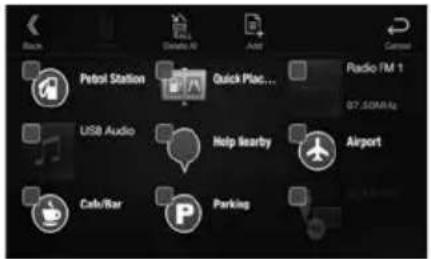
2 Touch [ ] (Add).
The items to be added (categories) are displayed.
3 Touch the desired item to be added (category).
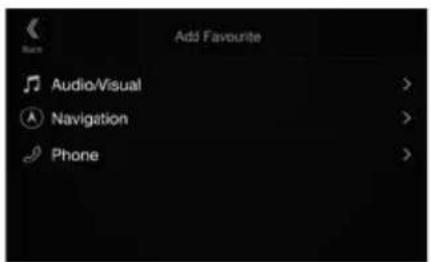
4 Choose the desired item to be added.
For details on the items to be added, refer to "Editing the Favourite Screen" in the Owner's Manual.
- You can add up to 54 items.
- You cannot register an item more than once.
5 After editing is complete, touch [ ] (Back).
6 After the caption for the confirmation is displayed, touch [OK].
7 Editing is complete and the screen switches to the Favourite screen.
- If you touch [ ] (Cancel) while editing, the screen switches to the previous Favourite Edit screen.
Android Auto (Optional)
Android Auto is designed to make it easier to use apps from your phone while you're on the road. Navigate with Google Maps, listen to playlists or podcasts from your favourite apps, and more.
Download the Android Auto App from the Google Play store before continuing.
Connect your Android compatible Phone to begin using Android Auto.
1 Press the MENU button.
The Menu screen is displayed.
2 Touch [Android Auto].
The Android Auto screen is displayed.
- For details operation of Android Auto, refer to "Android Auto" in the Owner's Manual (CD-ROM).
Owner's manual Apple CarPlay (Optional)
Apple CarPlay (Optional)
Apple CarPlay is a smarter, safer way to use your iPhone in the car. Apple CarPlay takes the things you want to do with your iPhone while driving and puts them right on this unit. You can get directions, make calls, send and receive messages, and listen to music, all in a way that allows you to stay focused on the road. Just plug in your iPhone to this unit and go.
For details, refer to Owner's Manual (CD-ROM).
Press for VOICE to activate Siri function of the iPhone.
You can make a call, play music, etc., by using Siri function of the iPhone.
You can also control Apple CarPlay on touchscreen.
Owner's manual Alpine Connect App (Optional) (X902D/X802D-U/INE-W710D only)
Alpine Connect App (Optional) (X902D/X802D-U/INE-W710D only)
Download an app that supports Alpine Connect to your smartphone, and you can operate it from the unit.
Alpine Connect App is downloadable from Apple's App Store; the Android user can download it from Google Play. For details, consult your Alpine dealer.
Before these operations, set Connectivity Setting or Alpine Connect to USB (iPhone) or Bluetooth (Android) depending on the connected Smartphone.
1 Launch Alpine Connect App.
2 Then connect the smartphone to this unit.
3 Press the MENU button.
The Menu screen is displayed.
4 Touch [Alpine Connect].
The Alpine Connect App select screen is displayed.
5 Select the desired App.
The selected App screen is displayed.
Spotify®
Spotify is a music streaming distribution service not affiliated with Alpine. More information is available at http://www.spotify.com.
The Spotify application is available for iPhone and Android phones, please visit https://support.spotify.com/ for the latest compatibility information.
To enjoy Spotify as you drive, first download the Spotify app to your iPhone or Android device. You can download it on the iTunes App Store or Google Play™. Choose a free account or a paid Premium account, either in the app or at spotify.com. A Premium account gives you more features, like offline listening.
- This product incorporates Spotify software which is subject to 3rd party licenses found here: www.spotify.com/connect/third-party-licenses.
- For information on the countries and regions where Spotify can be used, take a look at https://www.spotify.com/us/select-your-country/.
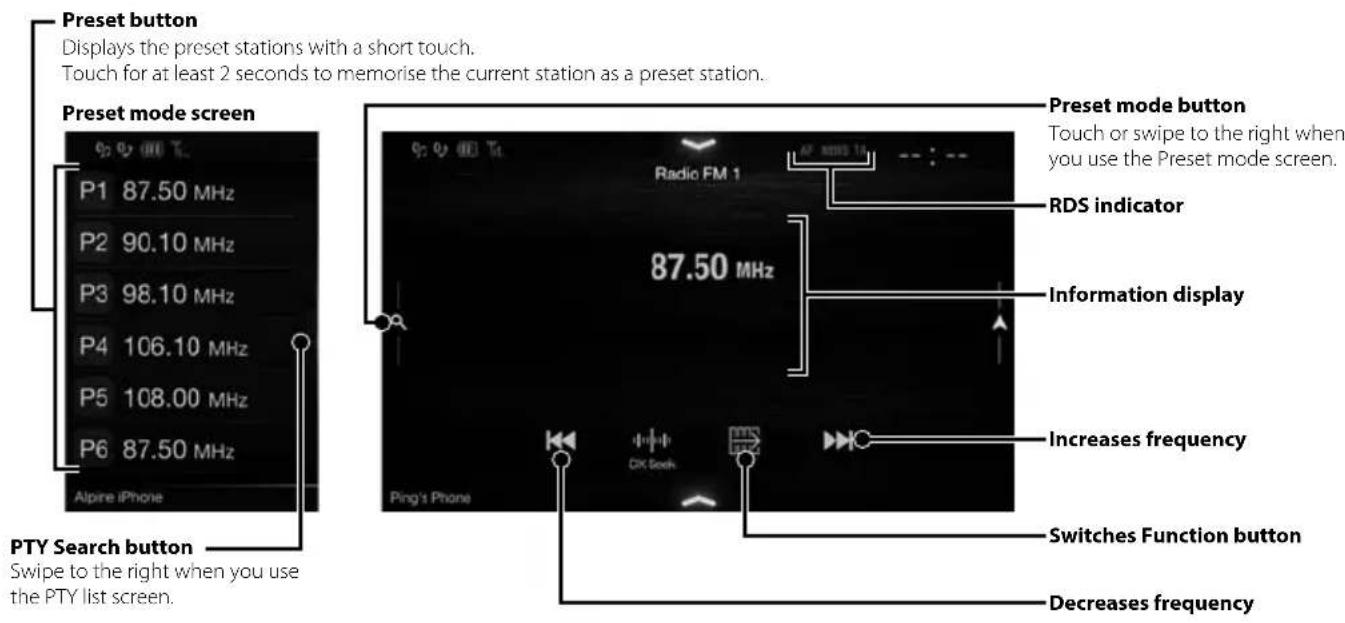
Owner's manual Radio/RDS
Radio/RDS Operation

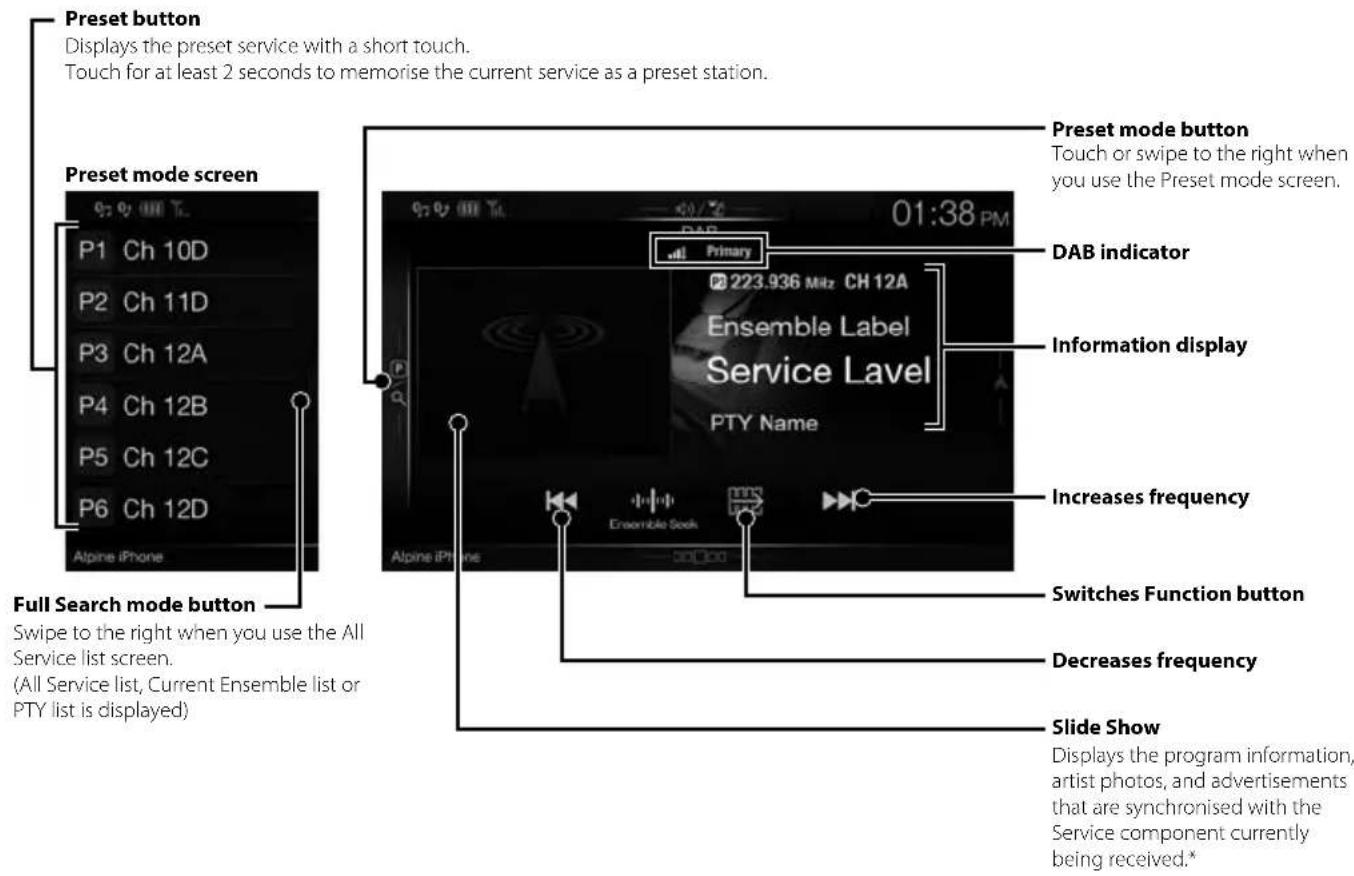
DAB/DAB+/DMB Operation
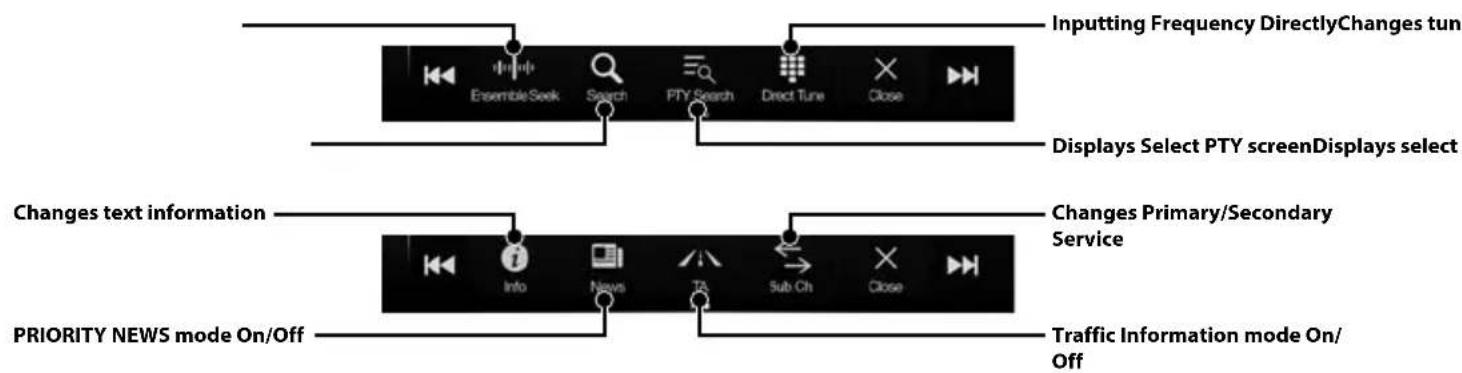
flowchart
graph TD
    A["Inputting Frequency DirectlyChanges tun"] --> B["EnsembleSeek"]
    A --> C["Search"]
    A --> D["PTY Search"]
    A --> E["Direct Tune"]
    A --> F["Close"]
    G["Displays Select PTY screenDisplays select"] --> H["Changes text information"]
    H --> I["Info"]
    H --> J["News"]
    H --> K["TA"]
    H --> L["Sub Ch"]
    H --> M["Close"]
    N["PRIORITY NEWS mode On/Off"] --> O["Traffic Information mode On/Off"]
* They may not be displayed, depending on the Service component currently being received.
USB Flash drive Operation (Optional)
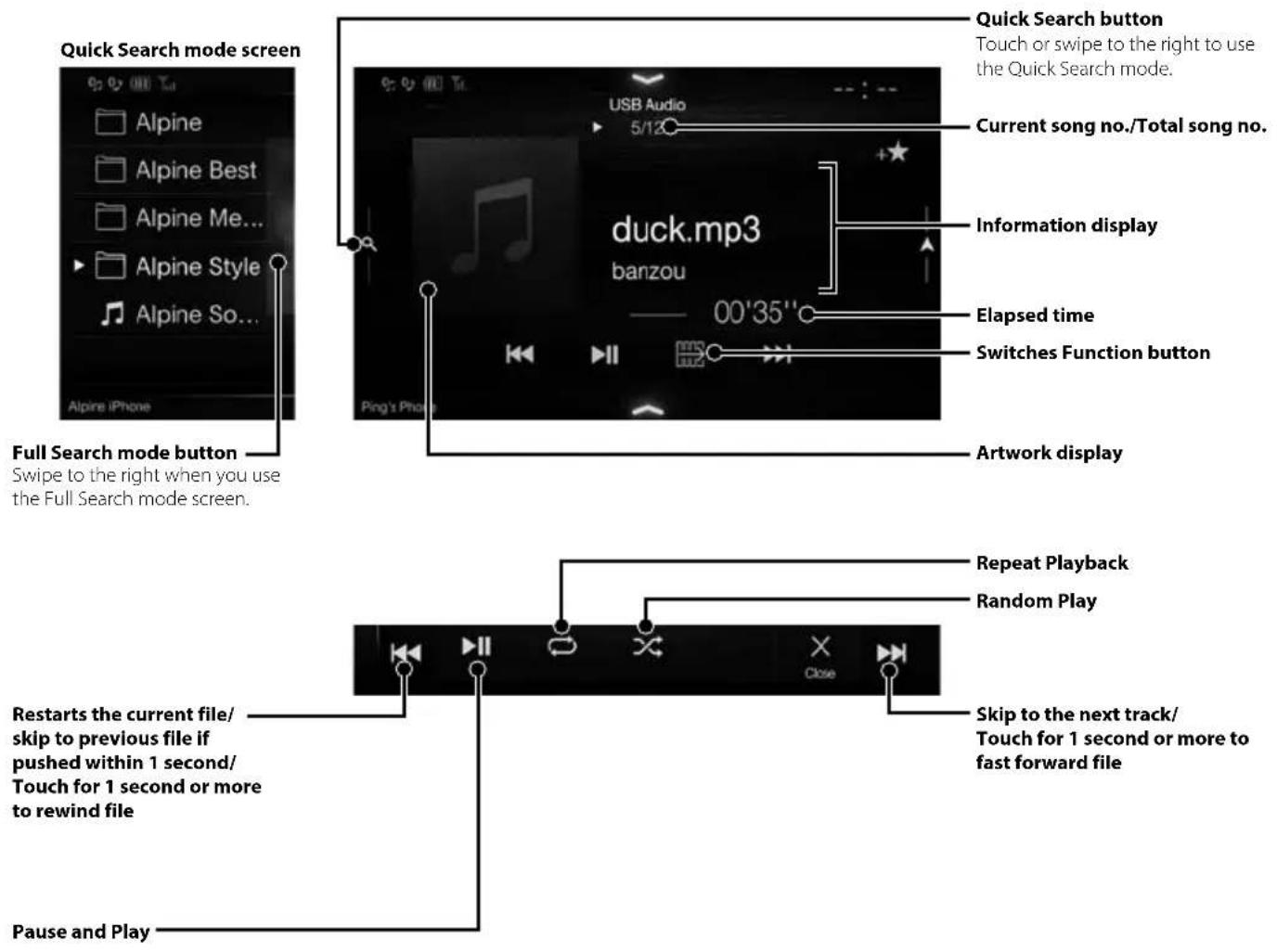
You can play back music files (MP3/WMA/AAC/FLAC) and video files (AVI/MKV/MP4) stored in a USB flash drive on the internal player of this system.
USB Audio main screen example
HDMI Device (DVD Player) Operation (Optional)
When you connect an optional DVE-5300 (DVD Player), you can operate it from the unit.
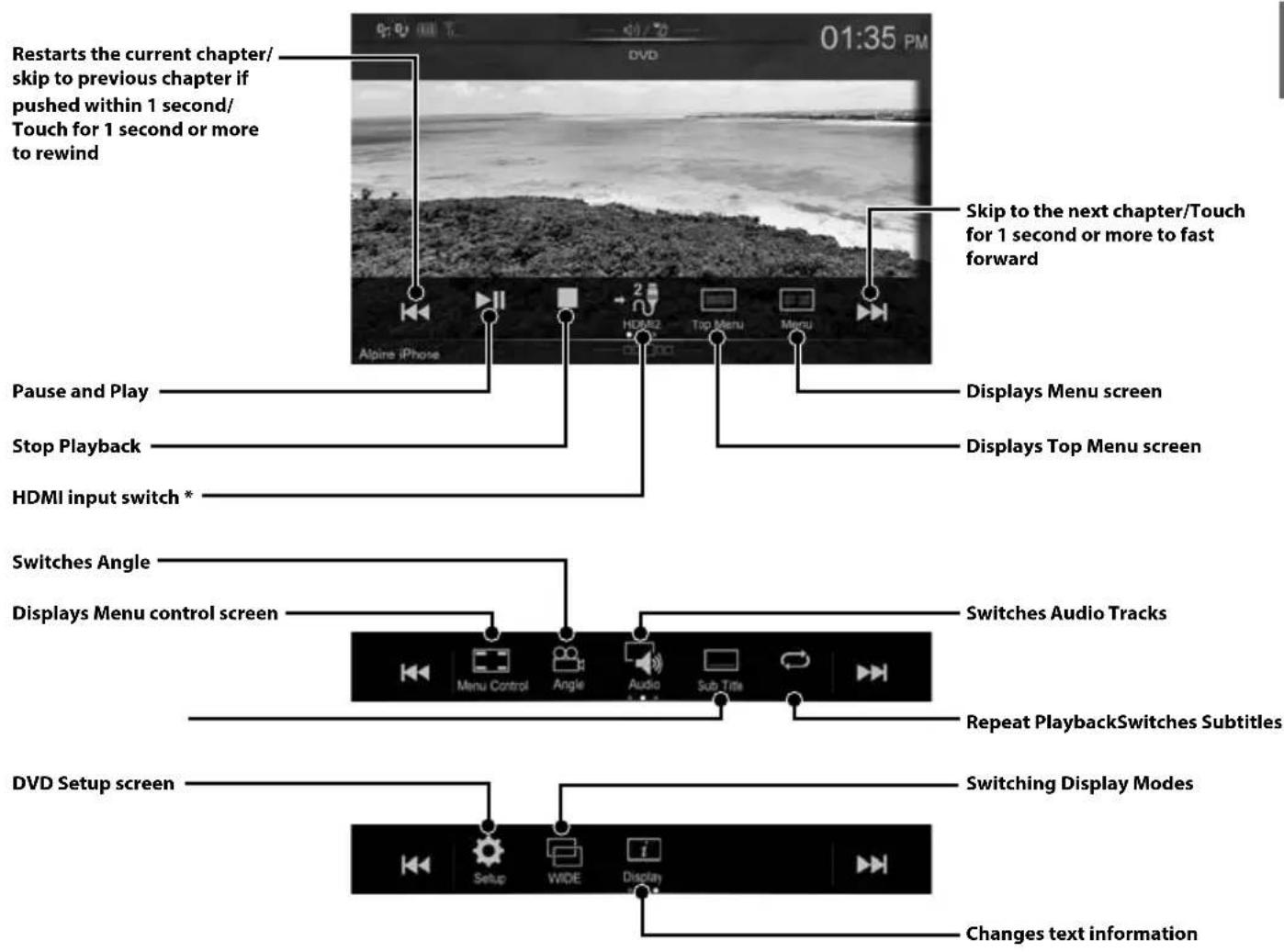
* If you connect an optional HDMI selector module, you can connect two HDMI devices. If the HDMI selector is set to "On" when two HDMI devices are connected, the HDMI input switch button is displayed. The displayed button differs depending on the settings and the HDMI input currently selected. For details, refer to "HDMI Setup" and "Setting the HDMI Selector On/Off" in the OWNER'S MANUAL (CD-ROM).
iPod/iPhone Operation (Optional)
A separately sold Lightning to USB cable (KCU-471i), etc., is required depending on the type of iPod/iPhone.
Audio mode
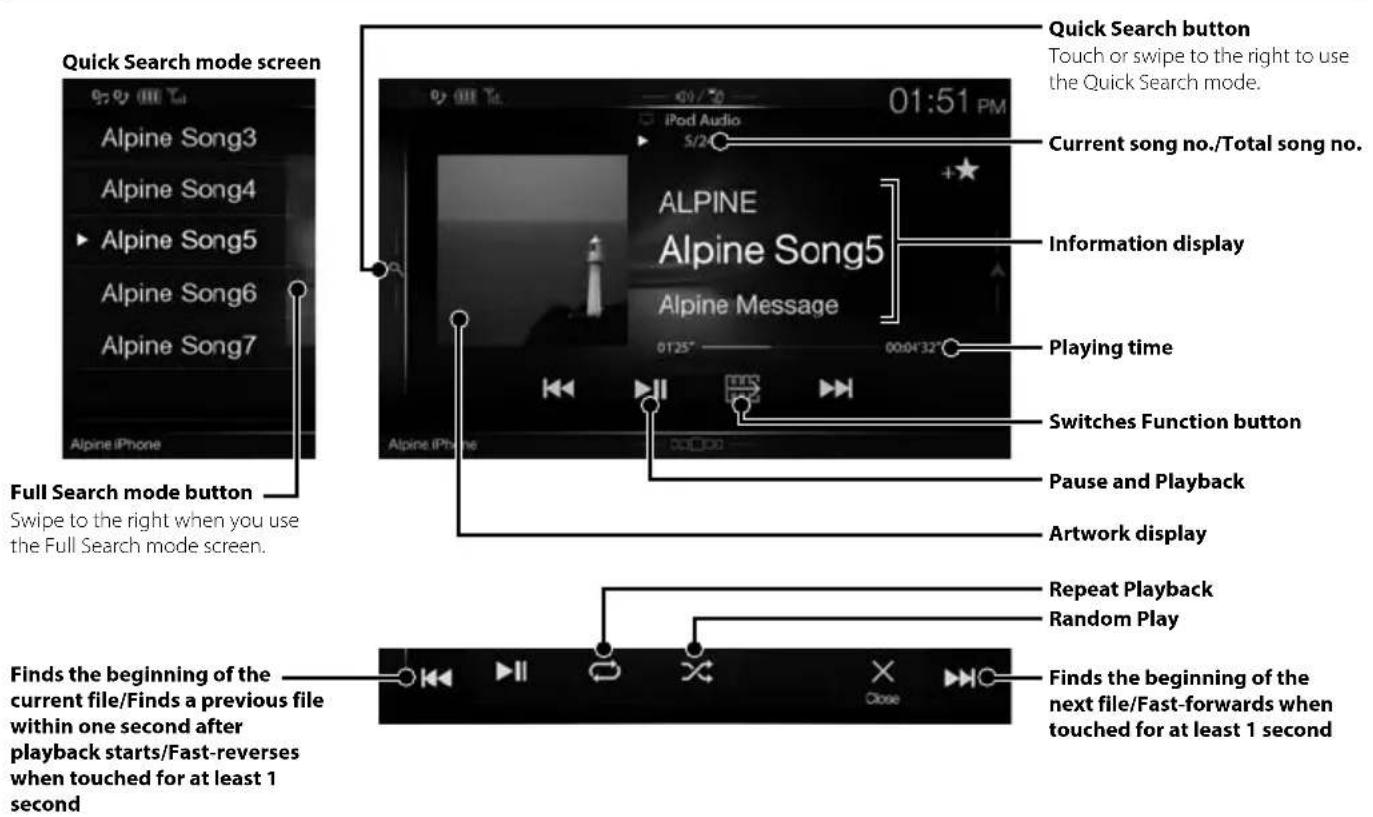
Searching for a Music File (Full Search Mode)
For example: Searching by Artist name
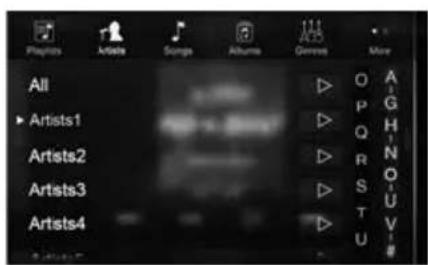
1 Touch [Artists] in the Full Search mode screen.
2 Touch the desired artist's name.
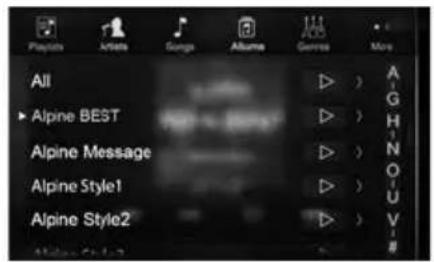
The Albums search screen of the selected artist is displayed.
Touching [▶] of the desired artist will play back all songs of the selected artist.
3 Touch the desired album's name.
All songs of the selected album are displayed.
Touching [▶] of the desired album will play back all songs of the selected album.
4 Touch the desired song's name.
The selected song is played back.
Hands-Free Phone Control
The unit can connect with up to two hands-free phones.
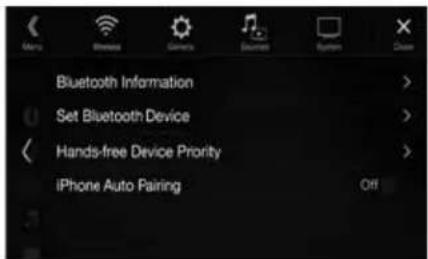
If you connect two hands-free phones to the unit, select "Hands-free Device Priority" in "Bluetooth Setup" to set the order of precedence. For details, refer to OWNER'S MANUAL in the AUDIO VISUAL SECTION (CD-ROM).
How to connect to a Bluetooth compatible device (Pairing)
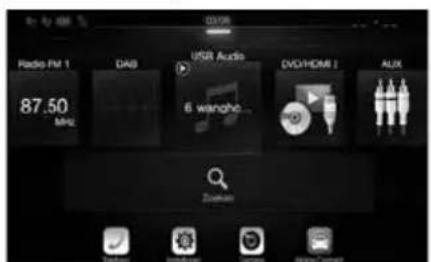
1 Touch [Setup] button on the Menu screen.
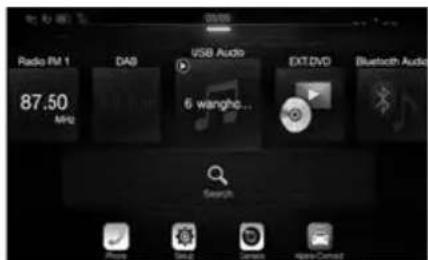
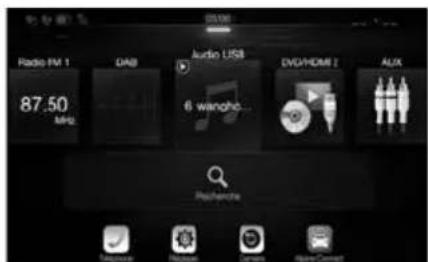
![Radio FM 1 DAS USB Audio 6 wanghe... EXT DVD Bluetooth Audio 87.50 Mio Search [Setup] button](/content/2026/03/507386/images/c763b7a8496e9802624ea378bb4c782edea84654e82fa8b1a1ed056d35d4bbdd.jpg)
2 Touch [Bluetooth].
- Make sure the "Bluetooth" setting is "On".
3 Touch [Set Bluetooth Device].
4 Touch [] to search for a new device.
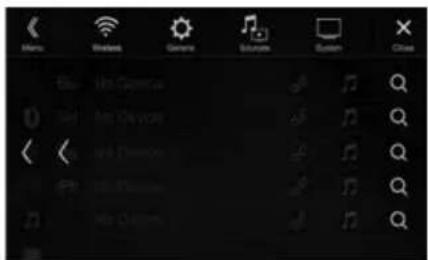
5 Touch [ ] (Audio), [ ] (Hands-free) or [ ] (Both) for the device you want to connect from the list.
Audio: Sets for use as an Audio device. Hands-free: Sets for use as a Hands Free Device. Both: Sets for use as both an Audio device and Hands Free Device.
6 When the device registration is complete, a message appears and the device returns to normal mode.
- You can register up to 5 Bluetooth compatible mobile phones.
- The Bluetooth registration process differs depending on the device version and SSP (Simple Secure Pairing). If a 4 or 6 character Passcode appears on this device, enter the Passcode using the Bluetooth compatible device. If a 6 character Passkey appears on this device, make sure the same passkey is displayed on the Bluetooth compatible device and touch "Yes."
Answering a Call
1 An incoming call triggers the ringtone and an incoming call display.
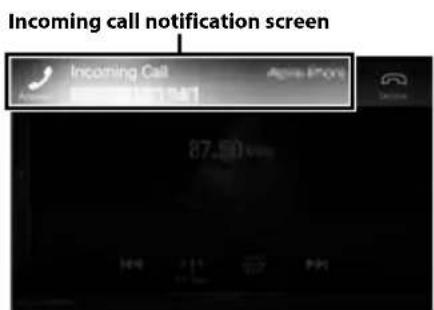
2 Touch incoming call notification screen.
The call starts.
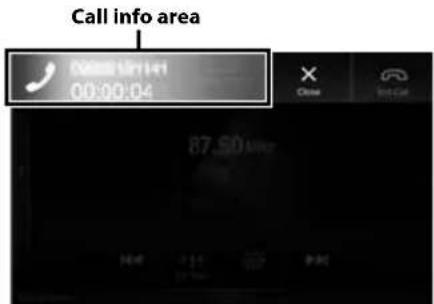
Touch the call info area during a call changes to the Phone Operation screen. Use this screen to adjust the speech volume, etc.
Hanging up the Telephone
1 Touch [ ] (End Call).
The call finishes.
Map Functions (X902D/X802D-U/INE-W710D only)
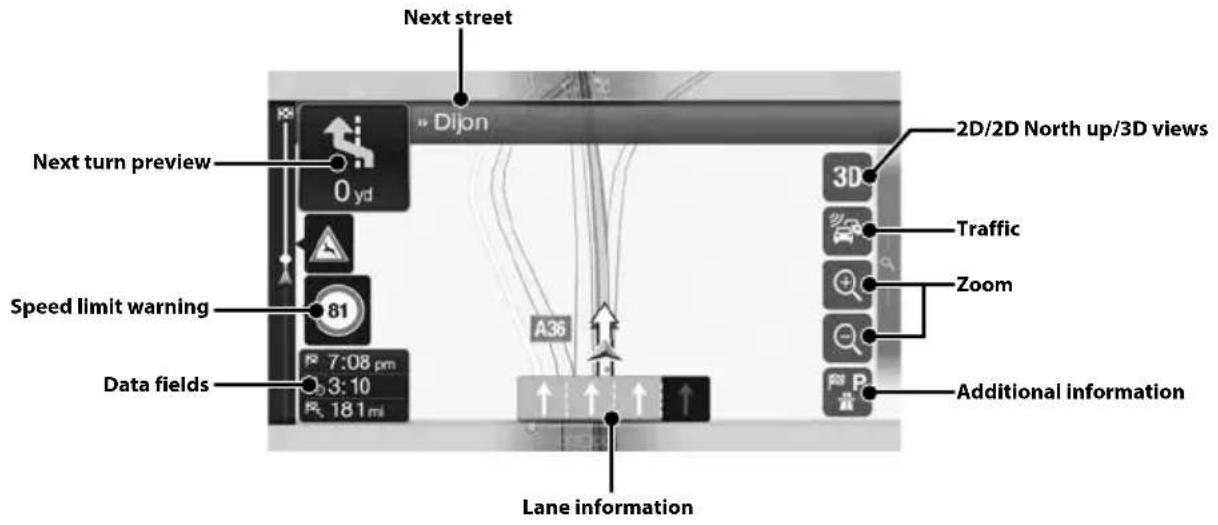
Below is an overview of different buttons and icons on the map display. For more detailed information about this screen, please see the Owner's Manual.
![Warning road sign 160 yd 81 4:01 pm 0:00 160 yd A31 E17 near Corgoloin Street name Motorway services Destination menu Access the menu Touch [O], or swipe to the left. Parking around destination Additional information](/content/2026/03/507386/images/3d8dc758020bc73e022f683c861067f581f17104df0083326e41c6709871f531.jpg)
Navigation Menu (X902D/X802D-U/INE-W710D only)
To access the Navigation Menu, touch [Q] on the right edge of the map screen or swipe to the left. Alternatively, press the Ⓐ button.
Multipoint Route
Build your route from one or more route points. You can also plan a route independently of your current GPS position by setting a new starting point.
New Rout
Select your destination by entering an address or its coordinate, or by selecting a Place, a Saved Location, or a Saved Route. You can also look up your recent destinations from the History. When Internet connection is available, the Online Search option can be a further help to find your destination.
Access the Map
Touch or swipe to the right.
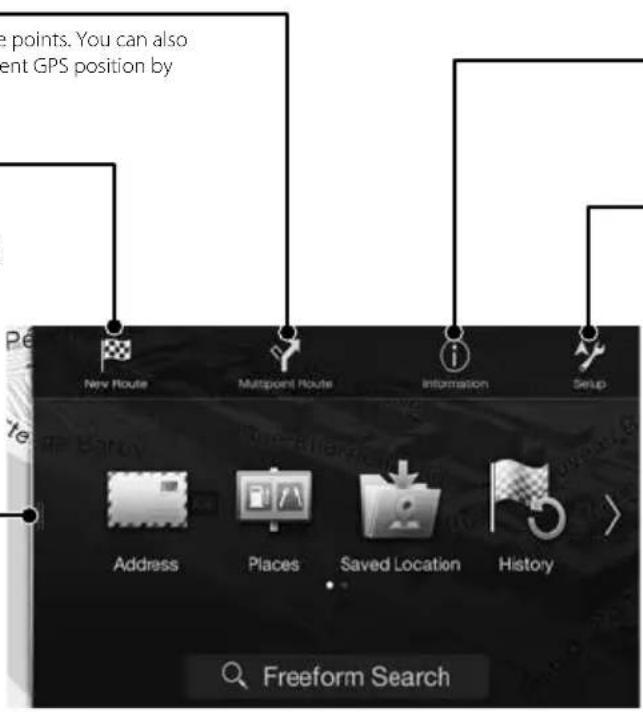
Information
Access additional options and check navigation-related information.
Setup
Customise the way the navigation software works.

Setting a Destination (X902D/X802D-U/INE-W710D only)
The following example describes how to search for a destination when choosing [Town/Postcode] from [Address].
- You can search and narrow down the Country/State by starting from [Country/State].
1 Touch [New Route] from the Navigation Menu.
2 Touch [Address].

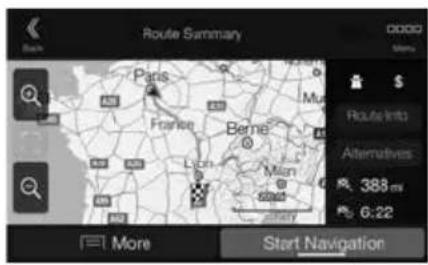
7 Touch [More] to modify the route parametres, or touch [Start Navigation] to start your journey.
3 Touch [Town/Postcode].
4 Enter the town name or postcode.
- Touch to display the candidate list.
5 Enter the desired street name.
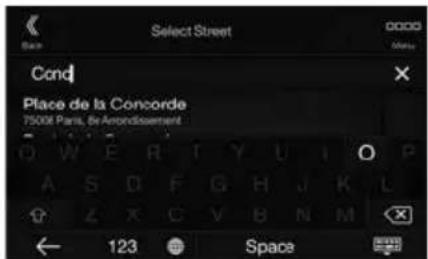
- Touch to display the candidate list.
6 Enter the house number or crossing street.
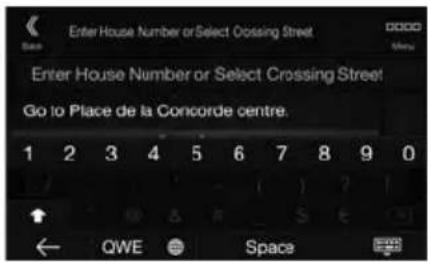
The route is calculated, and a map appears, showing the entire route. Here you can check route information and route alternatives.
Specifications
MONITOR SECTION
Screen Size 9" (X902D/i902D)
8" (X802D-U)
7" (INE-W710D/iLX-702D)
LCD Type Transparent type TN LCD
Operation System TFT active matrix
Number of Picture Elements 1,152,000 pcs.
(800×480×3(RGB))
Effective Number of Picture Elements
99% or more
Illumination System LED
FM TUNER SECTION
Tuning Range 87.5 - 108.0 MHz
Mono Usable Sensitivity 8.1 dBf (0.7 μV/75 ohms)
50 dB Quieting Sensitivity 12 dBf (1.1 μV/75 ohms)
Alternate Channel Selectivity 80 dB
Signal-to-Noise Ratio 65 dB
Stereo Separation 35 dB
Capture Ratio 2.0 dB
MW TUNER SECTION
Tuning Range 531 - 1,602 kHz
25.1 μV/28 dBf
Usable Sensitivity
LW TUNER SECTION
Tuning Range 153–281 kHz
31.6 μV/30 dBf
Sensitivity (IEC Standard)
DAB SECTION
Tuning Range BAND III
174.93 - 239.2 MHz
Tuning Range L-BAND
1,452.96 - 1,490.6 MHz
Usable Sensitivity
-103 dBm
Signal-to-Noise Ratio 95 dB
Stereo Separation 85 dB
USB SECTION
USB requirements USB 2.0
Max. Power Consumption
1,500 mA (CDP Support)
USB Class
USB (Mass Storage Class)
File System FAT16/32
Number of Channels
2-Channels (Stereo)
Frequency Response*1
5 - 20,000 Hz (±1 dB)
Total Harmonic Distortion
0.008% (at 1 kHz)
Dynamic Range
95 dB (at 1 kHz)
Signal-to-Noise Ratio 100 dB
Channel Separation 85 dB (at 1 kHz)
*1 Frequency response may differ depending on the encoder software/bit rate.
HDMI SECTION
Input Format
720p/480p/480i/VGA
Output Format
480p
GPS SECTION
GPS Reception frequency
1,575.42 ±1 MHz
GPS Reception sensitivity
-130 dB max.
Bluetooth SECTION
Bluetooth Specification
Frequency band
Output Power
Profile
Bluetooth v3.0
2,402 - 2,480 MHz
+4 dBm Max. (Power class 2)
HFP (Hands-Free Profile)
OPP (Object Push Profile)
PBAP (Phone Book Access Profile)
A2DP (Advanced Audio
Distribution Profile)
AVRCP (Audio/Video Remote
Control Profile)
SPP (Serial Port Profile)
GENERAL
Power Requirement
Operating temperature
Maximum Power Output
Audio output level
Preout (Front, Rear):
Preout (Subwoofer):
Weight
14.4 V DC
(11-16 V allowable)
-4°F to +140°F
(-20°C to +60°C)
50 W × 4
2V/10k ohms (max.)
2V/10k ohms (max.)
1.54 kg (3 lbs. 6 oz) (X802D-U) 1.41
kg (3 lbs. 2 oz) (INE-W710D/
iLX-702D)
CHASSIS SIZE
Width
198 mm (7-13/16") (X802D-U) 178
mm (7") (INE-W710D/iLX-702D) 125
Height
mm (4-15/16") (X802D-U) 100 mm
(3-15/16") (INE-W710D/iLX-702D)
147 mm (5-3/4")
Depth
NOSE SIZE
Width
191 mm (7-1/2") (X802D-U)
171 mm (6-3/4") (INE-W710D/
iLX-702D)
121 mm (4-3/4") (X802D-U)
Height
96 mm (3-3/4") (INE-W710D/
iLX-702D)
19 mm (3/4")
Depth
• X902D/i902D is sized exclusively for a certain car model.
- Due to continuous product improvement, specifications and design are subject to change without notice.
- The LCD panel is manufactured using an extremely high precision manufacturing technology. Its effective pixel ratio is over 99.99%. This means that there is a possibility that 0.01% of the pixels could be either always ON or OFF.
- Windows Media, and the Windows logo are trademarks, or registered trademarks of Microsoft Corporation in the United States and/or other countries.
- Apple, iPhone, iPod, and iPod touch are trademarks of Apple Inc., registered in the U.S. and other countries. Apple CarPlay is a trademark of Apple Inc.
- Use of the Apple CarPlay logo means that a vehicle user interface meets Apple performance standards. Apple is not responsible for the operation of this vehicle or its compliance with safety and regulatory standards. Please note that the use of this product with iPhone, or iPod may affect wireless performance.
- "Made for iPod," and "Made for iPhone," mean that an electronic accessory has been designed to connect specifically to iPod, or iPhone, respectively, and has been certified by the developer to meet Apple performance standards. Apple is not responsible for the operation of this device or its compliance with safety and regulatory standards. Please note that the use of this accessory with iPod, or iPhone may affect wireless performance.
• Android is a trademark of Google Inc. - The Android robot is reproduced or modified from work created and shared by Google and used according to terms described in the Creative Commons 3.0 Attribution Licence.
- SPOTIFY and the Spotify logo are among registered trademarks of Spotify AB.
- The Bluetooth® word mark and logos are registered trademarks owned by the Bluetooth SIG, Inc. and any use of such marks by Alpine Electronics, Inc. is under licence.
- The terms HDMI and HDMI High-Definition Multimedia Interface, and the HDMI Logo are trademarks or registered trademarks of HDMI Licensing, LLC in the United States and other countries.
- MPEG Layer-3 audio coding technology licensed from Fraunhofer IIS and Thomson. Supply of this product only conveys a licence for private,non-commercial use and does not convey a licence nor imply any right to use this product in any commercial (i.e. revenue-generation) real time broadcasting (terrestrial, satellite, cable and/or any other media), broadcasting/streaming via internet, intranets and/or other networks or in other electronic content distribution systems, such as pay-audio or audio-on-demand applications. An independent licence for such use is required. For details, please visit http://www.mp3licensing.com
- ©2006-2016 TomTom. All rights reserved. This material is proprietary and the subject of copyright protection, database right protection and other intellectual property rights owned by TomTom or its suppliers. The use of this material is subject to the terms of a license agreement. Any unauthorized copying or disclosure of this material will lead to criminal and civil liabilities.
About the Rules of Bluetooth Electromagnetic Radiation Regulation

Declaration of Conformity
Inhalt
WARNUNG 2
VORSICHT....3
Erste Schritte....4
Favoritenfunktion ....6
Alpine Connect App (Option) (nur X902D/X802D-U/INE-W710D) ....7
Radio/RDS-Betrieb 8
Für X802D-U/INE-W710D/iLX-702D
① Taste oder VOICE
natural_image
Gray curved arrow pointing left, isolated on white background (no text or symbols)
natural_image
Simple gray upward arrow graphic pointing right (no text or symbols)
natural_image
Gray curved arrow pointing downward and to the right (no text or symbols)natural_image
Gray curved arrow pointing downward to the right (no text or symbols)Menübildschirm
Alpine Connect App (Option) (nur X902D/X802D-U/INE-W710D)
7 Zoll (INE-W710D/iLX-702D)
LCD-Typ Transparentes TN LCD
PBAP (Phone Book Access Profile)
A2DP (Advanced Audio
Distribution Profile)
AVRCP (Audio/Video Remote
Control Profile)
SPP (Serial Port Profile)
ALLGEMEINES
1,41 kg (INE-W710D/iLX-702D)
GEHÄUSEGRÖSSE
Breite 198 mm (X802D-U)
178 mm (INE-W710D/iLX-702D)
Höhe 125 mm (X802D-U)
100 mm (INE-W710D/iLX-702D)
Tiefe 147 mm
VORSPRUNGGRÖSSE
Breite 191 mm (X802D-U)
171 mm (INE-W710D/iLX-702D)
Höhe 121 mm (X802D-U)
96 mm (INE-W710D/iLX-702D)
Tiefe 19 mm
- ©2006-2016 TomTom. All rights reserved. This material is proprietary and the subject of copyright protection, database right protection and other intellectual property rights owned by TomTom or its suppliers. The use of this material is subject to the terms of a license agreement. Any unauthorized copying or disclosure of this material will lead to criminal and civil liabilities.
About the Rules of Bluetooth Electromagnetic Radiation Regulation

Declaration of Conformity
Table des matières
AVERTISSEMENT 2
ATTENTION 3
Mise en route....4
Fonction Favoris 6
natural_image
Gray curved arrow pointing downward and to the right (no text or symbols)Écran double (X902D/X802D-U/INE-W710D uniquement)

natural_image
Simple gray upward arrow graphic pointing upward (no text or symbols)
natural_image
Gray curved arrow pointing downward (no text or symbols)natural_image
Gray curved arrow pointing downward and to the right (no text or symbols)Écran Menu
7" (INE-W710D/iLX-702D)
Type de LCD LCD TN de type transparent
1,41 kg (3 lbs. 2 oz) (INE-W710D/
iLX-702D)
DIMENSIONS DU CHÂSSIS
Largeur
198 mm (7 -13/16") (X802D-U)
178 mm (7") (INE-W710D/iLX-702D)
Hauteur
125 mm (4 - 15/16") (X802D-U)
100 mm (3 - 15/16") (INE-W710D/iLX-702D)
Profondeur
147 mm (5 -3/4")
DIMENSIONS DU NEZ
Largeur
191 mm (7 -1/2") (X802D-U)
171 mm (6 -3/4") (INE-W710D/iLX-702D)
Hauteur
121 mm (4 -3/4") (X802D-U)
96 mm (3 -3/4") (INE-W710D/iLX-702D)
Profondeur
19 mm (3/4")
- ©2006-2016 TomTom. All rights reserved. This material is proprietary and the subject of copyright protection, database right protection and other intellectual property rights owned by TomTom or its suppliers. The use of this material is subject to the terms of a license agreement. Any unauthorized copying or disclosure of this material will lead to criminal and civil liabilities.
About the Rules of Bluetooth Electromagnetic Radiation Regulation

Declaration of Conformity
Contenido
ADVERTENCIA....2
PRUDENCIA 3
Primeros pasos....4
Para X802D-U/INE-W710D/iLX-702D
① Botón o VOICE
Para X902D/X802D-U/INE-W710D:
natural_image
Gray curved arrow pointing downward and to the right (no text or symbols)Pantalla dual (X902D/X802D-U/INE-W710D solo)

natural_image
Gray upward-pointing arrow symbol on white background (no text or labels)
natural_image
Gray curved arrow pointing downward and to the right (no text or symbols)natural_image
Gray curved arrow pointing downward to the right (no text or symbols)Pantalla de menús
7" (INE-W710D/iLX-702D)
PBAP (Phone Book Access Profile)
A2DP (Advanced Audio
Distribution Profile)
AVRCP (Audio/Video Remote
Control Profile)
SPP (Serial Port Profile)
GENERAL
1,41 kg (INE-W710D/iLX-702D)
TAMAÑO DEL CHASIS
Anchura 198 mm (X802D-U)
178 mm (INE-W710D/iLX-702D)
Altura 125 mm (X802D-U)
100 mm (INE-W710D/iLX-702D)
Profundidad 147 mm
171 mm (INE-W710D/iLX-702D)
Altura 121 mm (X802D-U)
96 mm (INE-W710D/iLX-702D)
Profundidad 19 mm
- ©2006-2016 TomTom. All rights reserved. This material is proprietary and the subject of copyright protection, database right protection and other intellectual property rights owned by TomTom or its suppliers. The use of this material is subject to the terms of a license agreement. Any unauthorized copying or disclosure of this material will lead to criminal and civil liabilities.
About the Rules of Bluetooth Electromagnetic Radiation Regulation

Declaration of Conformity
Sommario
AVVERTENZA....2
ATTENZIONE 3
Per X802D-U/INE-W710D/iLX-702D
① Tasto o VOICE
Per X902D/X802D-U/INE-W710D:
natural_image
Gray curved arrow pointing left, no text or symbols presentSchermata doppia (solo X902D/X802D-U/INE-W710D)

natural_image
Gray upward-pointing arrow symbol on white background (no text or labels)
natural_image
Gray curved arrow pointing downward and to the right (no text or symbols)natural_image
Gray curved arrow pointing downward and to the right (no text or symbols)Schermata Menu
7" (INE-W710D/iLX-702D)
PBAP (Phone Book Access Profile)
A2DP (Advanced Audio
Distribution Profile)
AVRCP (Audio/Video Remote
Control Profile)
SPP (Serial Port Profile)
SPECIFICHE GENERALI
1,41 kg (INE-W710D/iLX-702D)
DIMENSIONI DEL TELAIO
Ampiezza
198 mm (X802D-U)
178 mm (INE-W710D/iLX-702D)
Altezza
125 mm (X802D-U)
100 mm (INE-W710D/iLX-702D)
Profondità
147 mm
171 mm (INE-W710D/iLX-702D)
Altezza
121 mm (X802D-U)
96 mm (INE-W710D/iLX-702D)
Profondità
19 mm
- ©2006-2016 TomTom. All rights reserved. This material is proprietary and the subject of copyright protection, database right protection and other intellectual property rights owned by TomTom or its suppliers. The use of this material is subject to the terms of a license agreement. Any unauthorized copying or disclosure of this material will lead to criminal and civil liabilities.
About the Rules of Bluetooth Electromagnetic Radiation Regulation

Declaration of Conformity
Innehåll
WARNING....2
FÖRSIKTIGT....3
Komma igång 4
INSTALLATIONSTEKNIKER:
INKÖPSSTÄLLE:
natural_image
Gray curved arrow pointing downward and to the right (no text or symbols)Dubbel skärmbild (endast X902D/X802D-U/INE-W710D)
natural_image
Simple gray upward arrow graphic pointing right (no text or symbols)
natural_image
Gray curved arrow pointing downward (no text or symbols)natural_image
Gray curved arrow pointing downward and to the right (no text or symbols)Menyskärm
7 tum (INE-W710D/iLX-702D)
LCD-typ Genomskinlig typ TN LCD
PBAP (Phone Book Access Profile)
A2DP (Advanced Audio
Distribution Profile)
AVRCP (Audio/Video Remote
Control Profile)
SPP (Serieport-Profil)
ALLMÄNT
1,41 kg (INE-W710D/iLX-702D)
CHASSISTORLEK
Bredd 198 mm (X802D-U)
178 mm (INE-W710D/iLX-702D)
100 mm (INE-W710D/iLX-702D)
Djup 147 mm
NOSSTORLEK
Bredd 191 mm (X802D-U)
171 mm (INE-W710D/iLX-702D)
96 mm (INE-W710D/iLX-702D)
Djup 19 mm
- ©2006-2016 TomTom. All rights reserved. This material is proprietary and the subject of copyright protection, database right protection and other intellectual property rights owned by TomTom or its suppliers. The use of this material is subject to the terms of a license agreement. Any unauthorized copying or disclosure of this material will lead to criminal and civil liabilities.
About the Rules of Bluetooth Electromagnetic Radiation Regulation

Declaration of Conformity
Inhoud
WAARSCHUWING....2
OPGELET....3
Aan de slag 4
Alpine Connect App (Optioneel) (alleen X902D/X802D-U/INE-W710D) ....7
Radio-/RDS-bediening 8
■ Voor X802D-U/INE-W710D/iLX-702D
① of VOICE-knop
④ +/ of //OMMOOG/OMLAAG)-knop
⑥ (PHONE) (alleen X902D/i902D)-knop
natural_image
Gray curved arrow pointing downward and to the right (no text or symbols)Dubbel scherm (alleen
X902D/X802D-U/INE-W710D)

natural_image
Simple gray upward arrow graphic pointing upward (no text or symbols)natural_image
Gray curved arrow pointing downward and to the right, isolated on white background (no text or symbols)Menuscherm
2 Raak [ ] (Toev.) aan.
Alpine Connect App (Optioneel) (alleen X902D/X802D-U/INE-W710D)
7" (INE-W710D/iLX-702D)
Type LCD Transparant type TN LCD
Bluetooth-specificatie Bluetooth v3,0
Frequentiebereik 2.402 - 2.480 MHz
PBAP (Phone Book Access Profile)
A2DP (Advanced Audio
Distribution Profile)
AVRCP (Audio/Video Remote
Control Profile)
SPP (Serial Port Profile)
ALGEMEEN
1,41 kg (INE-W710D/iLX-702D)
FRAMEFORMAAT
Breedte 198 mm (X802D-U)
178 mm (INE-W710D/iLX-702D)
100 mm (INE-W710D/iLX-702D)
Diepte 147 mm
NEUSFORMAAT
Breedte 191 mm (X802D-U)
171 mm (INE-W710D/iLX-702D)
96 mm (INE-W710D/iLX-702D)
Diepte 19 mm
• X902D/i902D is sized exclusively for a certain car model.
- ©2006-2016 TomTom. All rights reserved. This material is proprietary and the subject of copyright protection, database right protection and other intellectual property rights owned by TomTom or its suppliers. The use of this material is subject to the terms of a license agreement. Any unauthorized copying or disclosure of this material will lead to criminal and civil liabilities.
About the Rules of Bluetooth Electromagnetic Radiation Regulation

Declaration of Conformity
Содержание
ПРЕДУПРЕЖДЕНИЕ ...... 2
ВНИМАНИЕ....3
■ Модель X802D-U/INE-W710D/iLX-702D
natural_image
Gray curved arrow pointing downward and to the right (no text or symbols)natural_image
Simple gray upward arrow graphic pointing upward (no text or symbols)natural_image
Gray curved arrow pointing downward to the right (no text or symbols)Экран меню
7" (INE-W710D/iLX-702D)
178 mm (INE-W710D/iLX-702D)
Высота
125 mm (X802D-U)
100 mm (INE-W710D/iLX-702D)
Глубина
147 mm
171 mm (INE-W710D/iLX-702D)
Высота
121 mm (X802D-U)
96 mm (INE-W710D/iLX-702D)
Глубина
19 mm
- ©2006-2016 TomTom. All rights reserved. This material is proprietary and the subject of copyright protection, database right protection and other intellectual property rights owned by TomTom or its suppliers. The use of this material is subject to the terms of a license agreement. Any unauthorized copying or disclosure of this material will lead to criminal and civil liabilities.
About the Rules of Bluetooth Electromagnetic Radiation Regulation

Declaration of Conformity
Сделано в Японии

Spis treści
OSTRZEŻENIE....2
PRZESTROGA 3
Wprowadzenie 4
Funkcja Ulubione 6
Dla X802D-U/INE-W710D/iLX-702D
Dla X902D/X802D-U/INE-W710D:
natural_image
Gray curved arrow pointing downward and to the right (no text or symbols)
natural_image
Gray upward arrow symbol on white background (no text or labels)
natural_image
Gray curved arrow pointing downward (no text or symbols)natural_image
Gray curved arrow pointing downward to the right (no text or symbols)Ekran menu
7 cali (INE-W710D/iLX-702D)
1,41 kg (INE-W710D/iLX-702D)
WYMIARY KORPUSU
178 mm (INE-W710D/iLX-702D)
100 mm (INE-W710D/iLX-702D)
Głębokość 147 mm
WYMIARY PŁYTY CZOŁOWEJ
171 mm (INE-W710D/iLX-702D)
96 mm (INE-W710D/iLX-702D)
Głębokość 19 mm
- ©2006-2016 TomTom. All rights reserved. This material is proprietary and the subject of copyright protection, database right protection and other intellectual property rights owned by TomTom or its suppliers. The use of this material is subject to the terms of a license agreement. Any unauthorized copying or disclosure of this material will lead to criminal and civil liabilities.

WYŁĄCZNY DYSTRYBUTOR
HORN DISTRIBUTION S.A.
UL. KURANTÓW 34
02-873 WARSZAWA
TEL.: 0-22 331-55-55
FAX.: 0-22 331-55-00
WWW.ALPINE.COM.PL
Centralny Serwis:
About the Rules of Bluetooth Electromagnetic Radiation Regulation

Declaration of Conformity
ALPINE®
ALPINE ELECTRONICS MARKETING, INC.
1-7, Yukigaya-Otsukamachi, Ota-ku,
Tokyo 145-0067, JAPAN
Phone: 03-5499-4531
ALPINE ELECTRONICS OF AMERICA, INC.
19145 Gramercy Place, Torrance,
California 90501, U.S.A.
Phone 1-800-ALPINE-1 (1-800-257-4631)
ALPINE ELECTRONICS OF AUSTRALIA PTY. LTD.
161-165 Princes Highway,
Hallam Victoria 3803, Australia
Phone 03-8787-1200
ALPINE ELECTRONICS GmbH
Alpine House Fletchamstead Highway,
Coventry CV4 9TW, U.K.
www.alpine.co.uk
ALPINE ELECTRONICS France S.A.R.L.