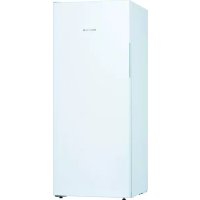
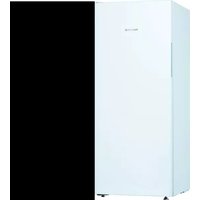
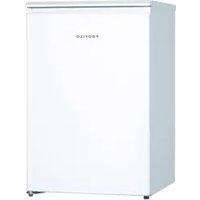
DF1029WEVV - Freezer Profilo - Free user manual and instructions
Find the device manual for free DF1029WEVV Profilo in PDF.


| Product Type | Freezer |
| Brand | Profilo |
| Model | DF1029WEVV |
| Energy Class | A+ |
| Net Capacity | 200 L |
| Dimensions (H x W x D) | 143 x 56 x 62 cm |
| Net Weight | 55 kg |
| Power Supply | 220-240 V ~ 50 Hz |
| Fast Freeze Function | Yes |
| Ice Making | Yes, built-in ice tray |
| Interior Lighting | LED, replaceable by a professional |
| Door Reversibility | Yes, possible with appropriate tools |
| Replaceable Door Gasket | Yes, procedure described in user manual |
| Available Spare Parts | Gasket, handle, hinges, shelves, bins, LED lighting |
| Noise Level | 42 dB |
| Annual Energy Consumption | 280 kWh |
| Operating Temperature | -18 °C to -24 °C |
| Defrosting | Manual (not automatic) |
| Cleaning and Maintenance | Clean with a soft cloth and soapy water; avoid abrasive cleaners |
| Safety Instructions | Consult the manual before any repair; unplug the appliance before intervention |
Frequently Asked Questions - DF1029WEVV Profilo
User questions about DF1029WEVV Profilo
0 question about this device. Answer the ones you know or ask your own.
Ask a new question about this device
Download the instructions for your Freezer in PDF format for free! Find your manual DF1029WEVV - Profilo and take your electronic device back in hand. On this page are published all the documents necessary for the use of your device. DF1029WEVV by Profilo.
USER MANUAL DF1029WEVV Profilo
natural_image
Diagram of hands connecting a cable to a rectangular panel with shelves, showing structural details (no text or symbols)natural_image
Illustration of hands holding a cable with a black arrow indicating direction (no text or symbols)
natural_image
Isometric line drawing of a wall-mounted shelf with an eye icon pointing to the top panel (no text or symbols)natural_image
Line drawing of a refrigerator with hand gestures indicating side placement (no text or symbols)
Ремонт
natural_image
Diagram of a hand interacting with a refrigerator drawer, showing shelves and drawers with arrows indicating movement (no text or symbols)
Easy opening handle e свалена.

Ремонт
-
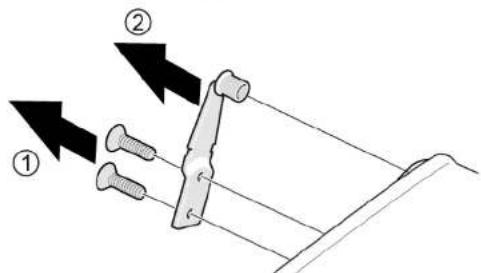
- Развийте двата винта (1).
-
Свалете горната панта (2).

Ремонт

natural_image
3D diagram of a rectangular box with a black arrow pointing upward on top, no text or symbols presentnatural_image
Illustration of hands holding a tablet with a curved arrow indicating rotation (no text or symbols)Рафтът е свален.
natural_image
Diagram of a vertical structure with a red rectangular component and an arrow pointing to it, no visible text or symbols.natural_image
Diagram of a screwdriver interacting with a red component, no text or symbols present
Ремонт

natural_image
Illustration of hands connecting a cable to a rectangular panel with shelves (no text or symbols)natural_image
Illustration of hands holding a cable with a black arrow indicating direction (no text or symbols)
natural_image
Isometric line drawing of a 3D wall-mounted device with multiple shelves and an eye icon (no text or symbols)natural_image
Line drawing of a refrigerator with hand gestures indicating side placement (no text or symbols)
Popravak
natural_image
Diagram of a hand interacting with a refrigerator drawer, showing shelves and drawers with arrows indicating movement (no text or symbols)
Brtva vrata je postavljena.

Popravak

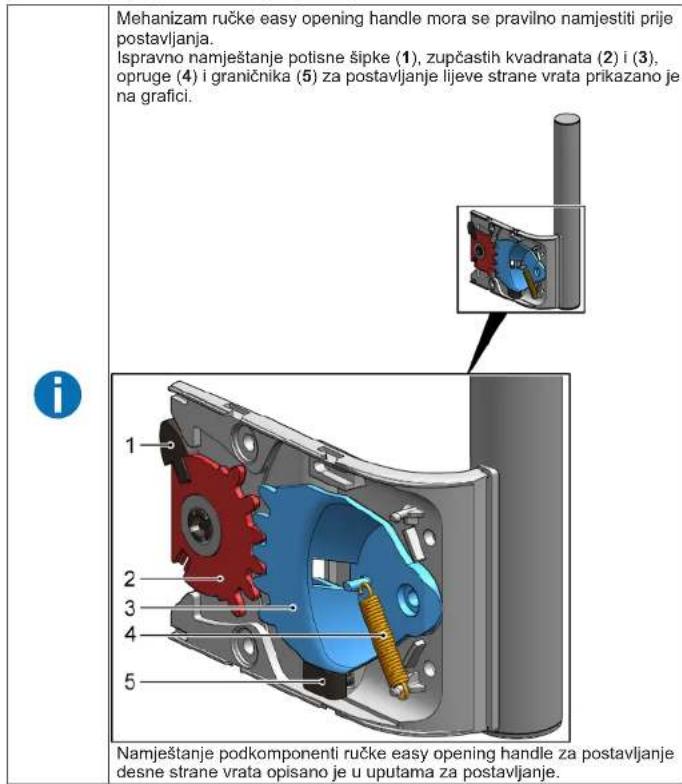
Ručka easy opening handle je uklonjena.
4.3.2 Postavljanje ručke easy opening handle
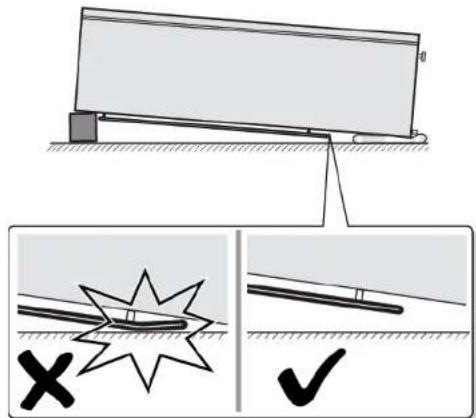
-
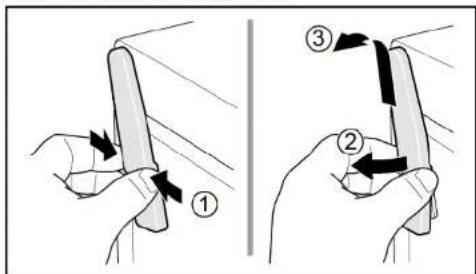
- Pritisnite poklopac gornjeg zgloba s obje strane (1).
-
Izvadite poklopac gornjeg zgloba (2).
-
Uklonite poklopac gornjeg zgloba (3).
Popravak
-
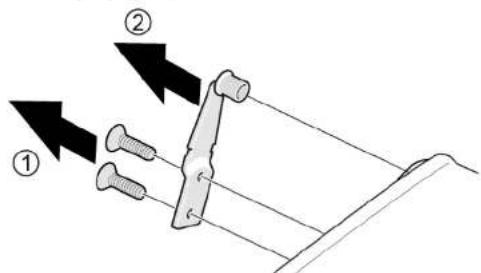
- Odvijte dva vijka (1).
-
Uklonite gornji zglob (2).
Gornji zglob vrata je uklonjen.
4.4.2 Postavljanje zgloba vrata
▶ Postavite obratnim redoslijedom.

Popravak

Popravak
-
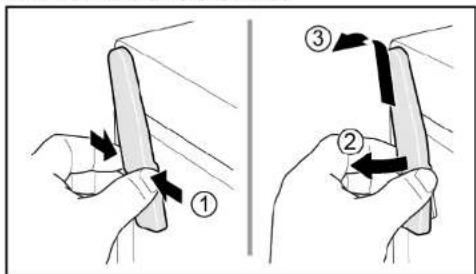
- Pritisnite poklopac gornjeg zgloba s obje strane (1).
-
Izvadite poklopac gornjeg zgloba (2).
- Uklonite poklopac gornjeg zgloba (3).
-
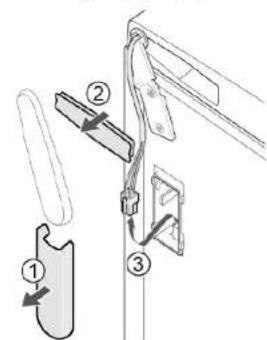
- Uklonite poklopac kutije za kabele (1).
-
Uklonite zaštitu kabela (2).
- Odvojite električni priključak (3).
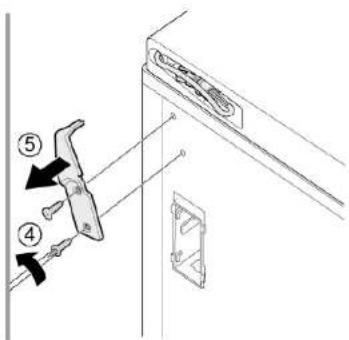
- Odvijte dva vijka (4).
- Uklonite gornji zglob (5).

Gornji zglob vrata je uklonjen.
4.5.2 Postavljanje zgloba vrata
▶ Postavite obratnim redoslijedom.

Popravak
4.6 Zamjena donjeg zgloba vrata
Specijalni alati:
Nastavak Torx TX20 6,3 mm (1/4") [00340865]

Teški, veliki uređaji!
natural_image
Simple 3D diagram of a rectangular box with a lid and an arrow indicating direction (no text or symbols)-
- Odvijte vijak (1).
-
Izvadite donji zglob (2).
- Uklonite donji zglob (3).
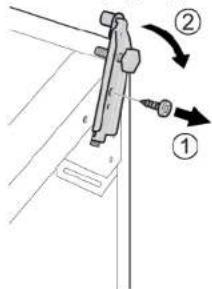
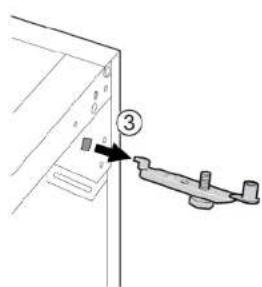
Donji je zglob uklonjen.
4.6.2 Postavljanje donjeg zgloba vrata
▶ Postavite obratnim redoslijedom.

Popravak
4.7 Zamjena police
Zahtjev:
Vrata su otvorena.
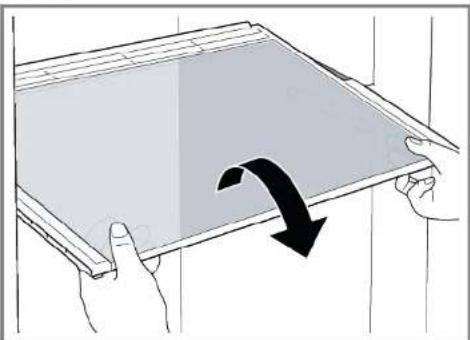
4.7.1 Uklanjanje police
- Izvucite policu.
natural_image
Illustration of hands holding a tablet with a curved arrow indicating rotation (no text or symbols)Spremnik za zamrznute namirnice je uklonjen.
4.8.2 Postavljanje spremnika za zamrznute namirnice
▶ Postavite obratnim redoslijedom.

Popravak
4.9 Zamjena ledomata
Zahtjev:
Vrata su otvorena.
4.9.1 Uklanjanje ledomata
- Izvucite policu spremnika za zamrznute namirnice s ledomatom (1).
- Otpustite kuke (2)
- Uklonite ledomat (3).
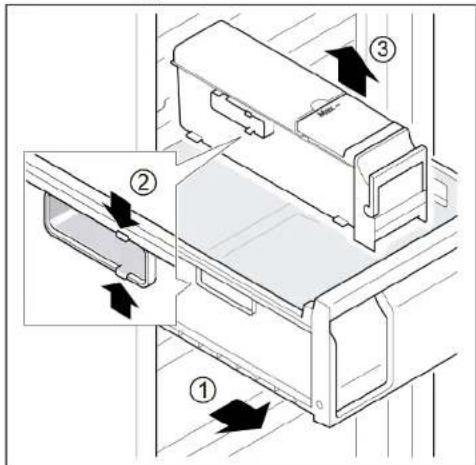
Ledomat je uklonjen.
4.9.2 Postavljanje ledomata
natural_image
Diagram of a mechanical or electrical component with a red arrow pointing to a component, no visible text or symbols.natural_image
Diagram of a screwdriver interacting with a red component, showing mechanical assembly (no text or symbols)
Popravak

natural_image
Illustration of hands connecting a cable to a rectangular panel with shelves (no text or symbols)natural_image
Illustration of hands holding a cable with a black arrow indicating direction (no text or symbols)
natural_image
Isometric line drawing of a wall-mounted shelf with an eye icon (no text or symbols)natural_image
Line drawing of a refrigerator with hand gestures indicating side placement (no text or symbols)
Oprava
natural_image
Diagram of a hand interacting with a refrigerator drawer, showing shelves and drawers with arrows indicating movement (no text or symbols)


Oprava

Oprava

natural_image
3D diagram of a rectangular box with a lid and an arrow indicating direction (no text or symbols)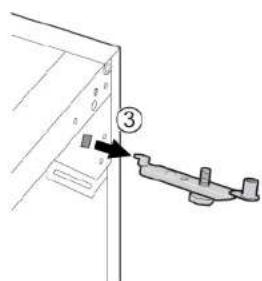
natural_image
Illustration of hands holding a tablet with a curved arrow indicating rotation (no text or symbols)natural_image
Pure electrical circuit lines without any symbolsnatural_image
Diagram of a tool interacting with a red rectangular object, possibly a component or device (no text or symbols visible)
Oprava

natural_image
Illustration of hands connecting a cable to a rectangular panel with shelves (no text or symbols)natural_image
Illustration of hands holding a cable with a black arrow indicating direction (no text or symbols)
natural_image
Isometric line drawing of a wall-mounted shelf with an eye icon pointing to the top panel (no text or symbols)natural_image
Line drawing of a door handle with hand gestures indicating left and right motion (no text or symbols)
Reparation
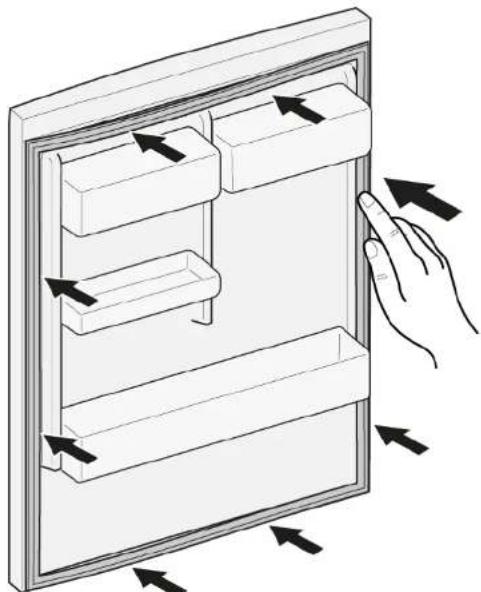
- Tryk hele pakningen trinvist i rillen.
natural_image
Diagram of a hand interacting with a refrigerator drawer, showing multiple compartments and directional arrows indicating movement (no text or symbols present)


Reparation

Reparation
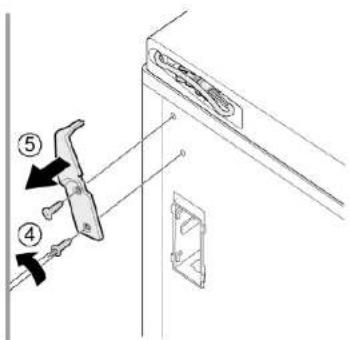

natural_image
Diagram of a mechanical device with an arrow indicating direction, no text or symbols presentnatural_image
Illustration of hands holding a tablet with a black curved arrow indicating rotation (no text or symbols)Hylden er fjernet.
natural_image
Diagram of a mechanical or electrical component with a red rectangular block and arrow indicating direction (no text or symbols)natural_image
Diagram of a screwdriver inserted into a red component, with no visible text or symbols
Reparation

natural_image
Illustration of hands connecting a cable to a rectangular panel with shelves (no text or symbols)natural_image
Illustration of hands holding a cable with a black arrow indicating direction (no text or symbols)
natural_image
Isometric line drawing of a wall-mounted shelf with an eye icon (no text or symbols)natural_image
Line drawing of a refrigerator with hand gestures indicating side placement (no text or symbols)
Reparatie
natural_image
Diagram of a hand interacting with a refrigerator drawer, showing multiple compartments and directional arrows indicating movement (no text or symbols present)
Apparaat is losgekoppeld is van de stroomvoorziening.
Deur is open.

Apparaat is losgekoppeld is van de stroomvoorziening.
Deur is open.
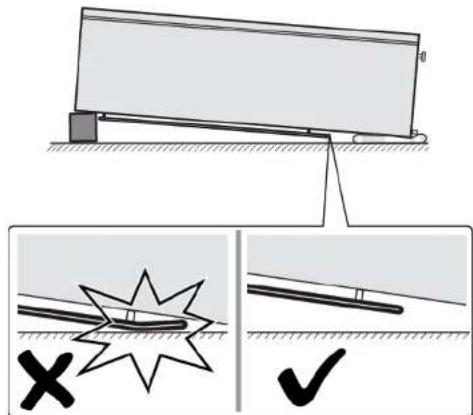

Reparatie
Reparatie
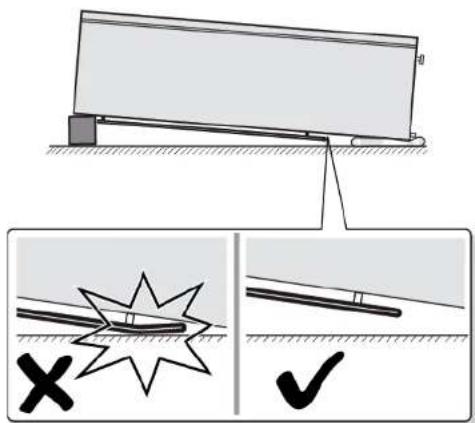
natural_image
Illustration of a white rectangular box with a black arrow pointing upward on top, placed on a flat base (no text or symbols)natural_image
Illustration of hands holding a tablet with a curved arrow indicating rotation (no text or symbols)natural_image
Diagram of a mechanical or electrical setup with a red component and wiring, no visible text or symbolsnatural_image
Diagram of a mechanical or electrical component with a tool inserted, showing no visible text or symbols.
Reparatie
natural_image
Diagram of a mechanical assembly with a red component and a black arrow indicating direction (no text or symbols)
Repair hints - Freezer
i Concerning this document.... 116
1.1 Important information.... 116
1.1.1 Purpose.... 116
1.2 Explanation of symbols 116
1.2.1 Danger levels.... 116
1.2.2 Hazard symbols 116
1.2.3 Structure of the warnings.... 117
1.2.4 General symbols.... 117
Safety.... 118
2.1 General Safety instructions 118
2.1.1 All domestic appliances 118
Tools and aids.... 119
Repair 120
4.5 Replacing door upper hinge (door with display) 128
4.10.1 Removing LED light.... 136
4.10.2 Installing top LED light 137
i Concerning this document
1.1 Important information
1.1.1 Purpose
These repair hints support consumer to repair appliances by himself according to the applicable eco-design regulation (as of 03/2021).
They contain information how to exchange defined spare parts including warnings and risks.
In case of questions, please contact our customer service. We will only be liable for damages if the repair hints have been followed properly.
1.2 Explanation of symbols
1.2.1 Danger levels
The warning levels consist of a symbol and a signal word. The signal word indicates the severity of the danger.
| Warning level Meaning | |
| Danger | Non-observance of the warning message will result in death or serious injuries. |
| Warning | Non-observance of the warning message could result in death or serious injuries. |
| Caution | Non-observance of the warning message could result in minor injuries. |
| Notice | Non-observance of the warning message could result in damage to property. |
Table 1: Danger levels
1.2.2 Hazard symbols
Hazard symbols are symbolic representations which give an indication of the kind of danger.
The following hazard symbols are used in this document:
| Hazard symbol Meaning | ||
 | General warning message | |
 | Danger from electrical voltage | |
 | Risk of explosion | |
 | Danger of cuts | |
 | Danger of crushing |
i Concerning this document
| Hazard symbol Meaning | ||
 | Danger from hot surfaces | |
 | Danger from strong magnetic field | |
 | Danger from non-ionizing radiation | |
Table 2: Hazard symbols
1.2.3 Structure of the warnings
Warnings in this document have a standardised appearance and a standardised structure.

Type and source of danger!
Possible consequences of ignoring the danger / warning.
▶ Measures and prohibitions for preventing the danger.
The following example shows a warning that warns against electric shock due to live parts. The measure for avoiding the danger is mentioned.

Risk of electric shock due to live parts!
Death by electrocution
- Disconnect appliances from electrical supply at least 60 seconds before starting repairs.
1.2.4 General symbols
The following general symbols are used in this document:
| Gen. symbol Meaning | |
| Identification of a special tip (text and/or graphic) | |
| Identification of a simple tip (only text) | |
| Identification of a link to a video tutorial |
| Gen. symbol Meaning | |
| Identification of required tools | |
| Identification of required preconditions | |
| Identification of a condition (if ..., then ...) | |
| Identification of a result | |
| [Start] Identification of a key or button | |
| [00123456] Identification of a material number | |
| Status Identification of displayed text / window(in the appliance's display) | |
Table 3: General symbols
Safety
2.1 General Safety instructions
2.1.1 All domestic appliances
Risk of electric shock due to live parts!
- Errors by repairs involving electrical components can lead to electrical shock!
■ Disconnect the appliance from the mains for at least 60 seconds before starting work.
■ After the repair have a safety test according VDE 0701 or country-specific regulations performed.
Risk of injury from sharp edges!
■ Wear protective gloves.
Risk of crushing during repair, maintenance, troubleshooting and service due to heavy and moving components
■ Wear protective shoes.
■ Secure heavy components from falling down.
■ Do not stick body parts into moving components.
Risk to the appliance's safety / function!
■ Only use original spare parts.
Risk of damage to electrostatically sensitive components (ESDs)!
- Do not touch the modules, including connections and conductor paths.

Tools and aids
| Designation Details Images | ||
| Protection cloth[00342013] | 60 cm x 50 cm | 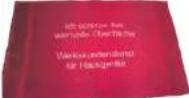 |
| Phillips screwdriverPH2 | ||
| Torx Bit TX20[00340865] | 6,3 mm (1/4") | 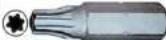 |
| Slotted screwdriver | Blade 2.4 mm x 0.4 mm x60 mm, in the kit [00341820] |  |

Repair
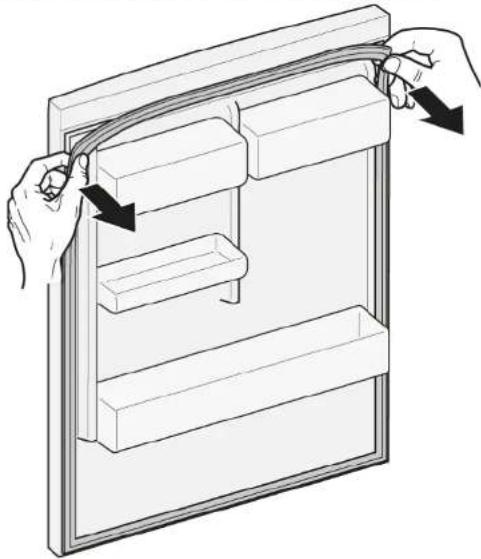
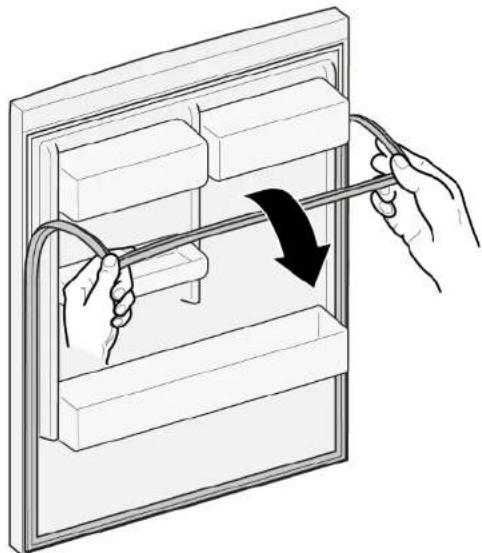
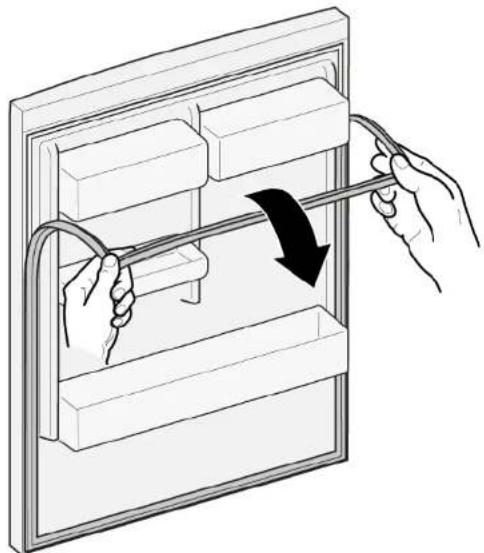
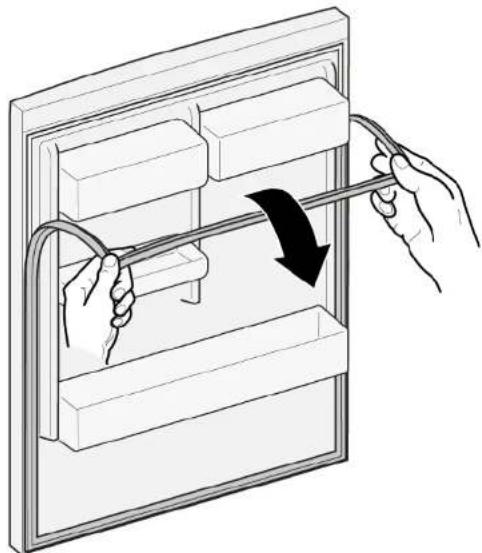
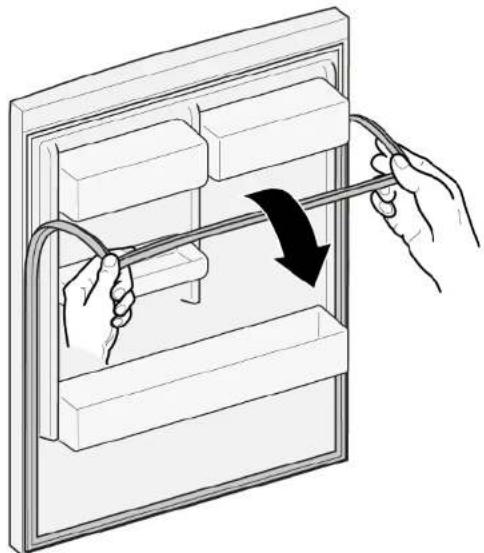
- Release door gasket from the groove on right and left corner.
natural_image
Illustration of hands connecting a cable to a rectangular panel with shelves (no text or symbols)- Pull out door gasket from groove.
natural_image
Illustration of hands holding a cable inside a rectangular appliance with a curved arrow indicating rotation (no text or symbols)
Door gasket is removed.
| Thickness of new door gasket may deviate slightly from thickness of old door gasket. This will not affect closing behavior and long-term function. | |
| If your appliance has adjustable hinges or hinge attachments, you can optimize the closing behavior subsequently. | |
| Small side holes in door gasket are functional (required for ventilation). These are not production faults. |

Repair
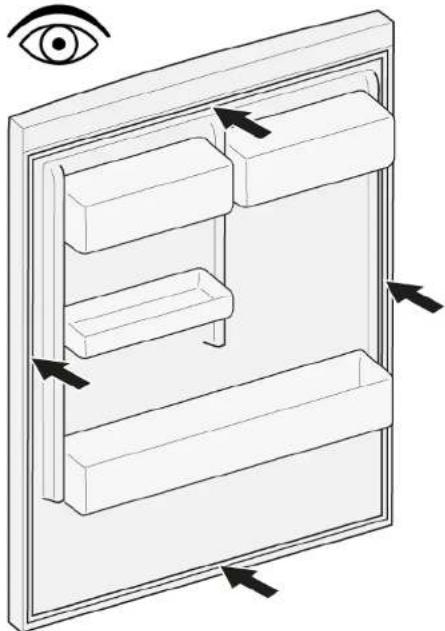
- Check groove for gasket for damage.
natural_image
Isometric line drawing of a wall-mounted shelf with an eye icon (no text or symbols)- if If groove for gasket is it is damaged.
Contact customer service.
3.

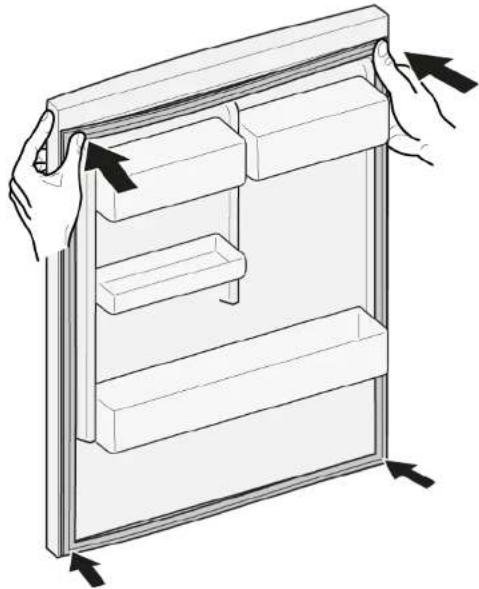
Slight deformation of door gasket is normal and does not affect its function. It is recommended to straighten door gasket before inserting it into appliance.
Heat door gasket with a hair dryer or hot water and manually reshape it.
- Push corners of gasket at the top and bottom to the groove.
natural_image
Line drawing of a refrigerator with hand gestures indicating side placement (no text or symbols)
Repair
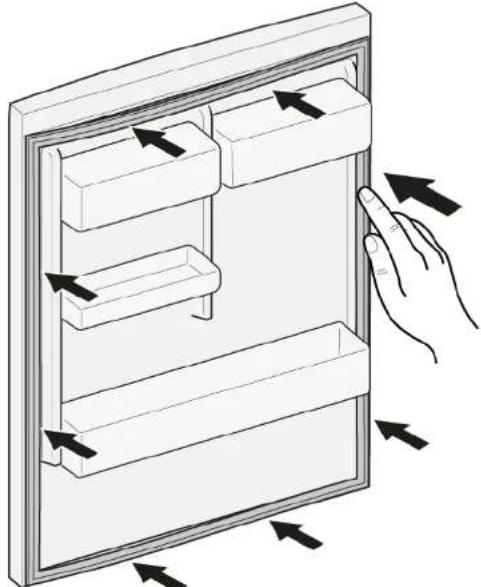
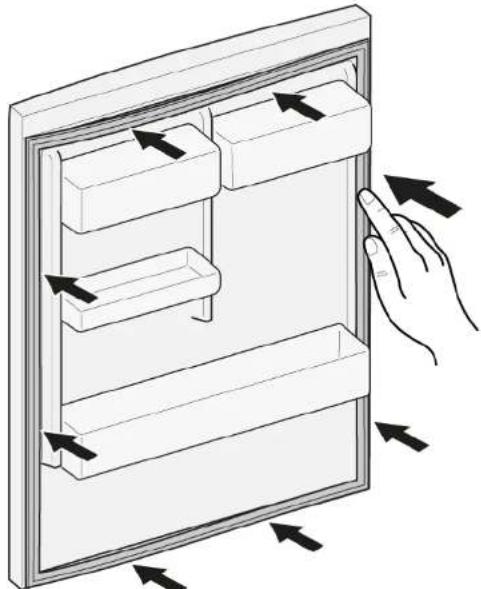
- Press whole gasket step by step into the groove.
natural_image
Diagram of a hand interacting with a refrigerator drawer, showing multiple compartments and directional arrows indicating movement (no text or symbols present)
Door gasket is installed.

Repair
4.2 Replacing door handle
Required tools:
Torx Bit TX20 6,3 mm (1/4") [00340865]
Slotted screwdriver Blade 10 mm x 1.6 mm x 200 mm
Prerequisite:
√ Appliance is disconnected from power supply.
√ Door is open.
4.2.1 Removing door handle
- Remove two screw caps (1).
- Unscrew two screws (2).
- Remove door handle (3).
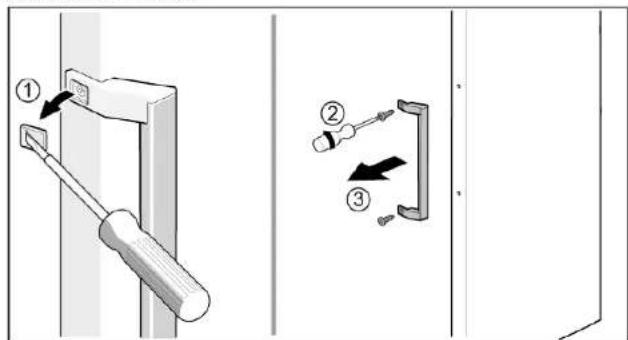

Door handle is removed.
▶ Install in reverse order.

Repair
4.3 Replacing easy opening handle
Required tools:
Phillips screwdriver PH2
Prerequisite:
√ Appliance is disconnected from power supply.
Door is open.
4.3.1 Removing easy opening handle
▶ 1. Remove easy opening handle cover (1).
- Unscrew two screws (2).
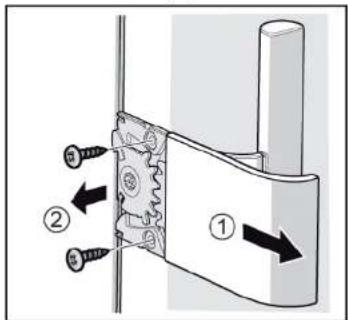
Easy opening handle is removed.
4.3.2 Installing easy opening handle
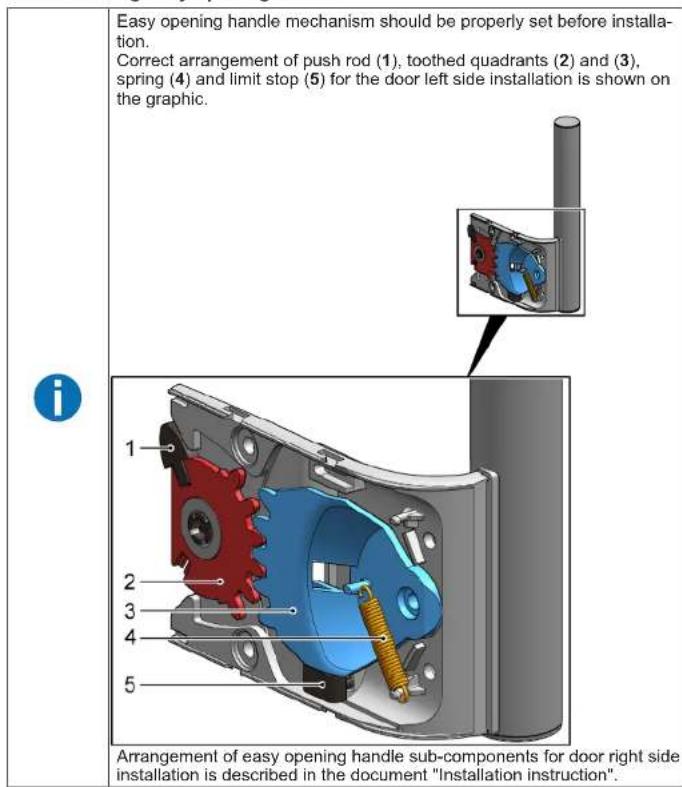
▶ Install in reverse order.

Repair
4.4 Replacing door upper hinge
Required tools:
Torx Bit TX20 6,3 mm (1/4") [00340865]

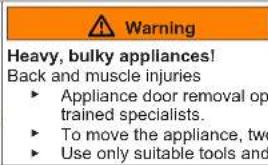
Warning
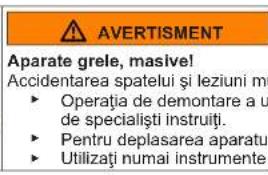
Heavy, bulky appliances!
Back and muscle injuries
▶ Appliance door removal operation should only be carried out by trained specialists.
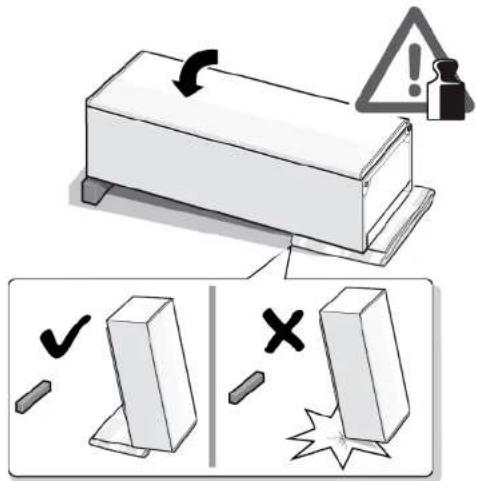
▶ To move the appliance, two people are required.
▶ Use only suitable tools and equipment.

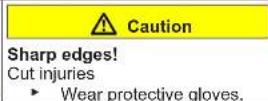
Caution
Sharp edges!
Cut injuries
▶ Wear protective gloves.

Warning
Slipping of tilted appliances!
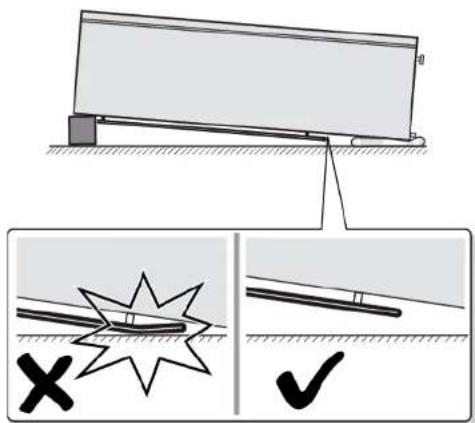
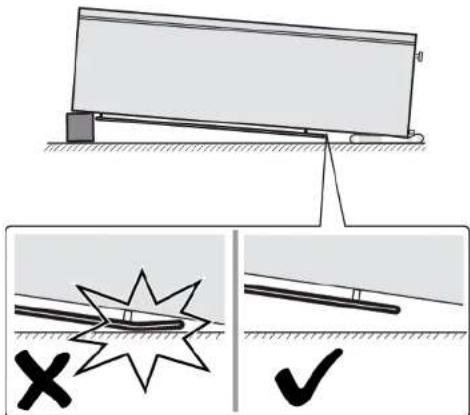
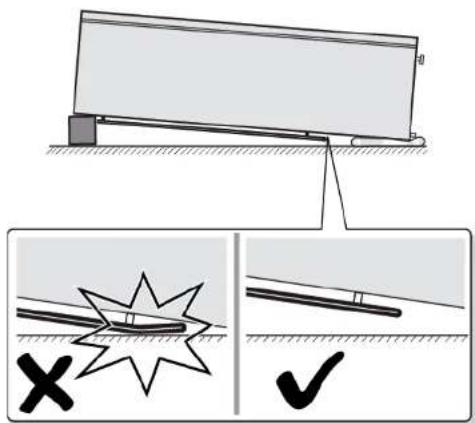
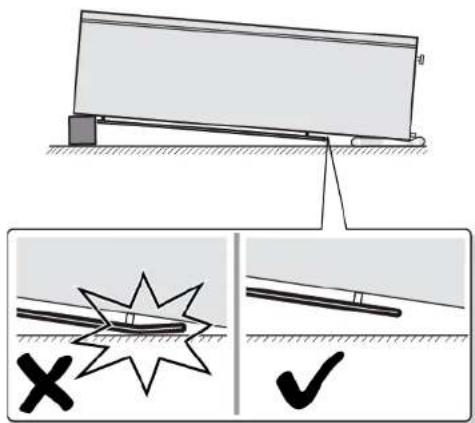
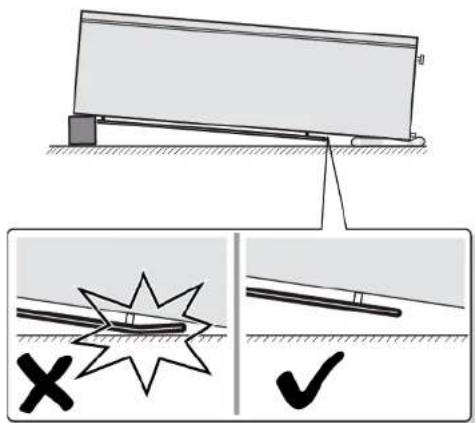
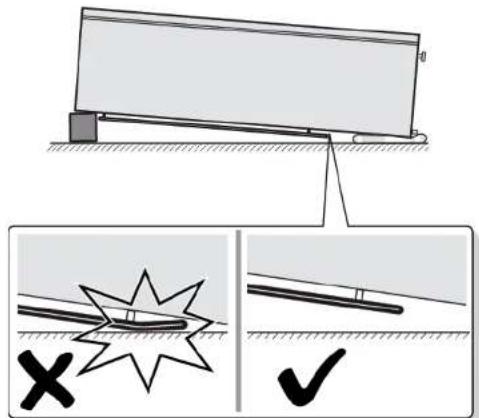
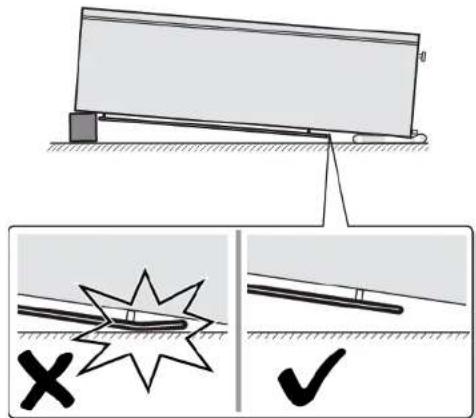
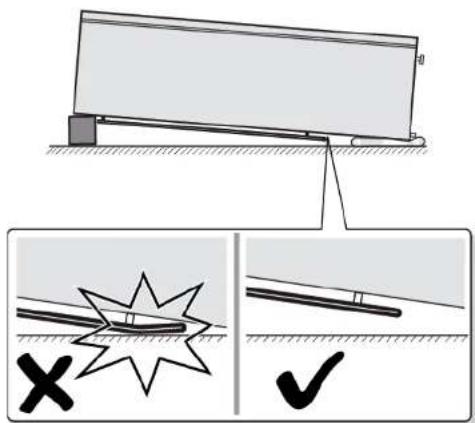
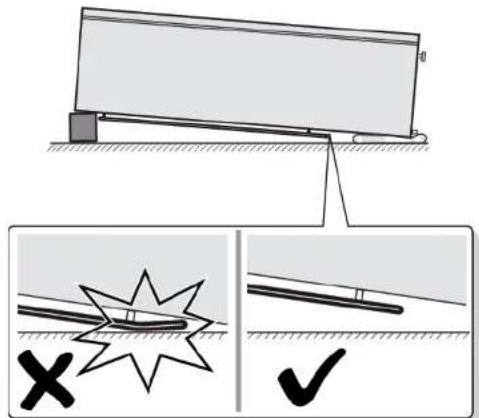
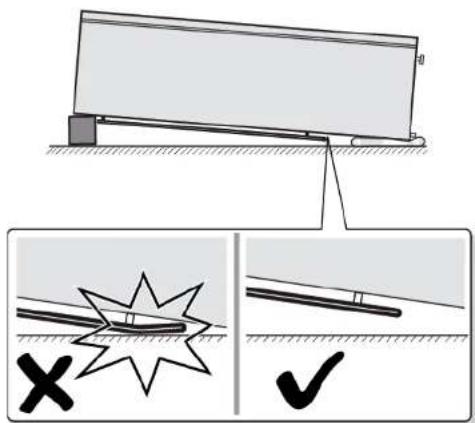
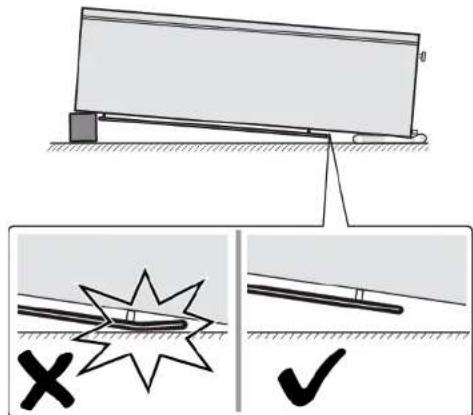
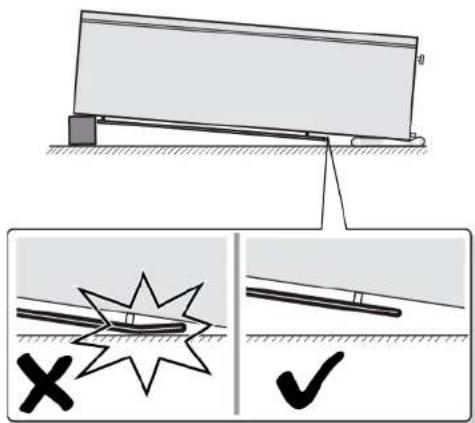
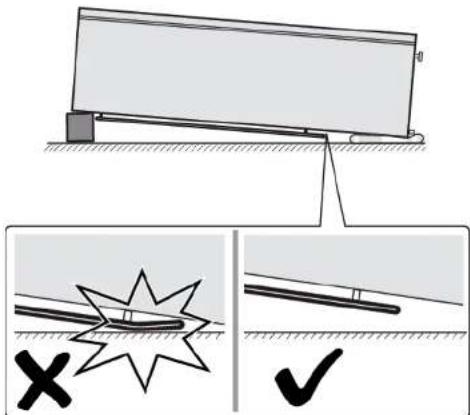
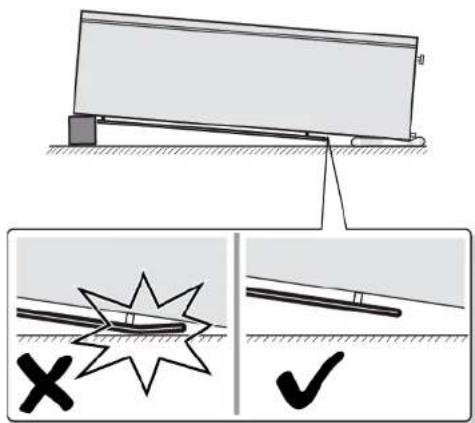
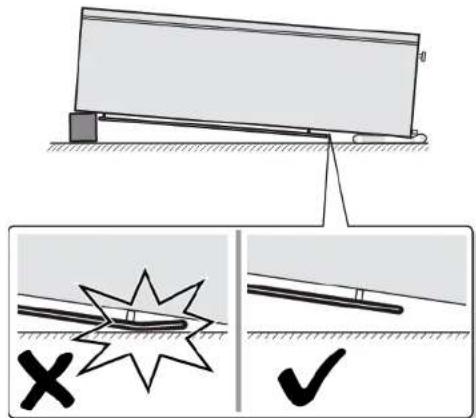
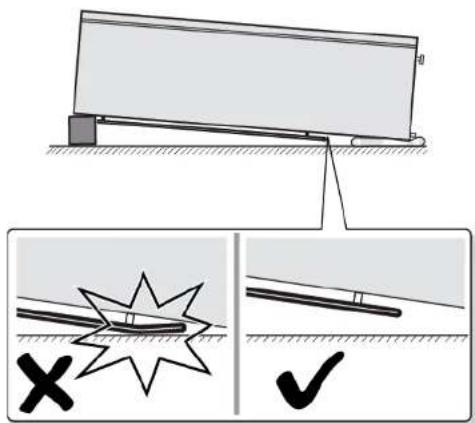
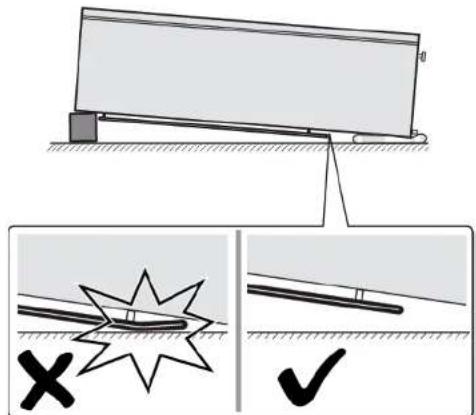
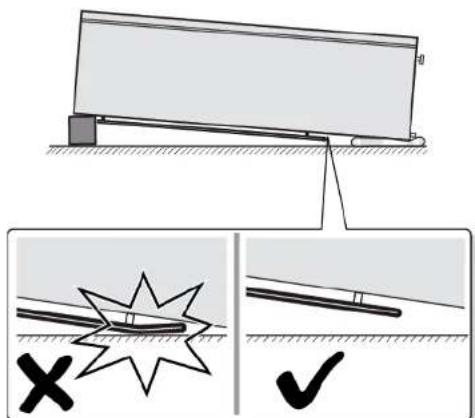
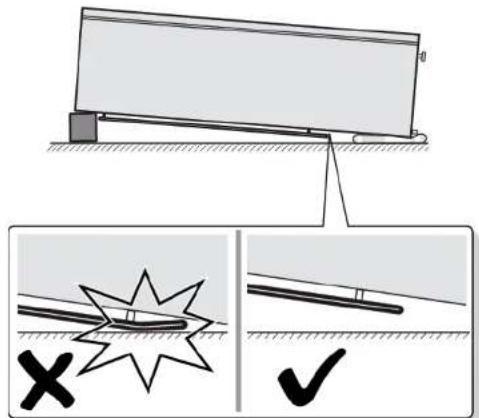
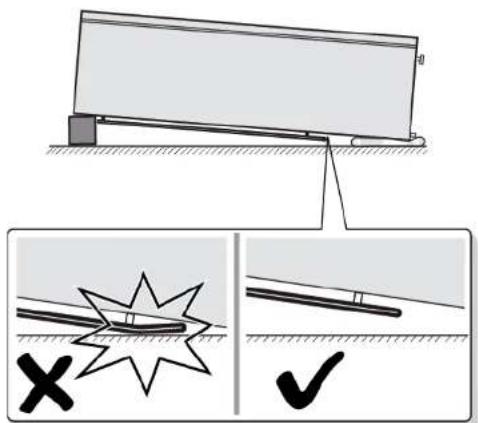
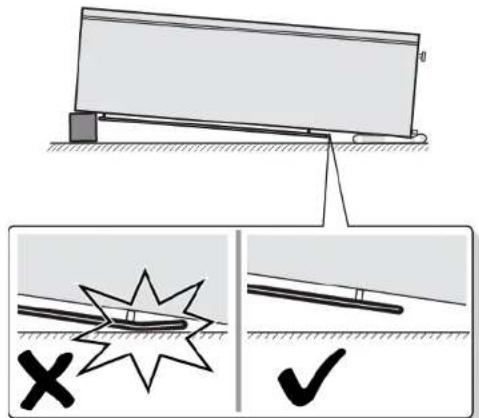
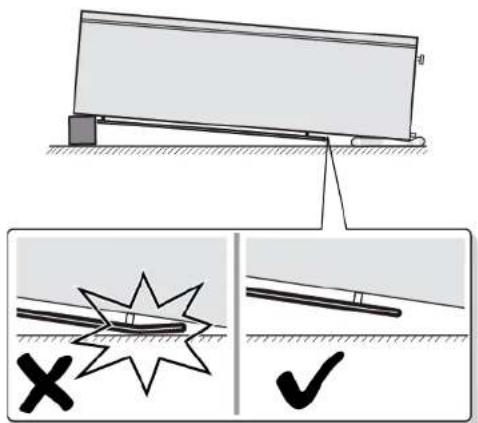
Bone fractures / crush injuries ▶ Secure appliances against slipping

Caution
Risk of falling parts due to released screws!
Injury because of falling parts.
- Secure component from falling down.

Notice
Risk of falling parts due to released screws!
Damage to other parts of the appliance or at customers home e.g. bottom.
- Secure component from falling down.
Prerequisite:
√ Appliance is disconnected from power supply.
√ Appliance interior fittings are removed.
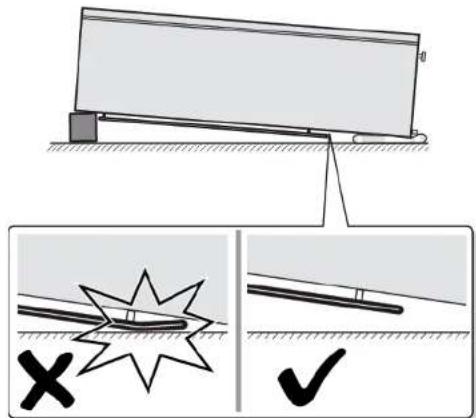
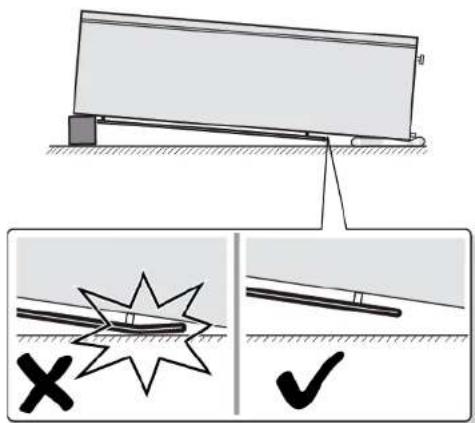
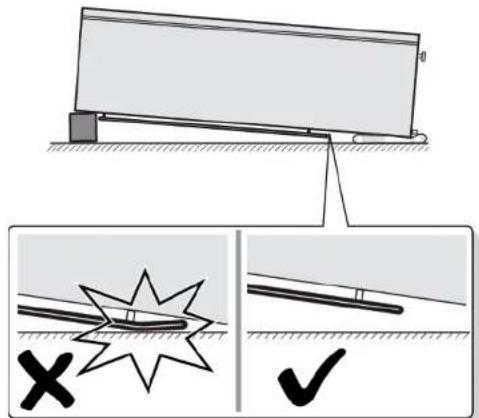
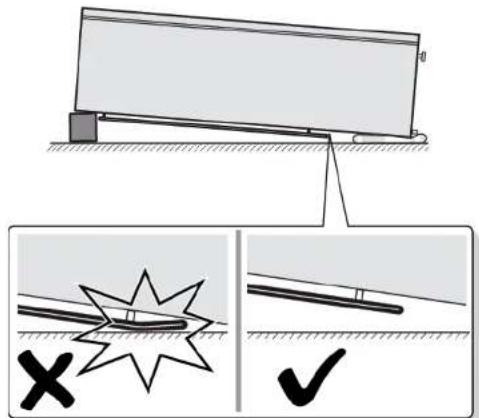
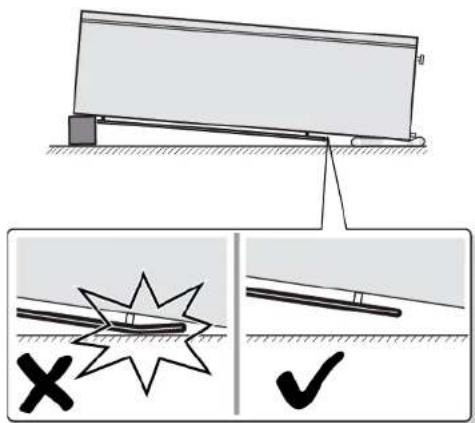
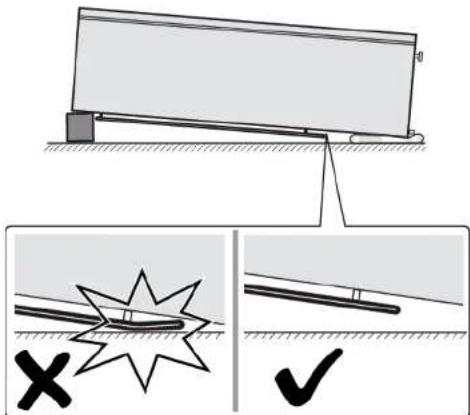
- Place appliance on the back side.
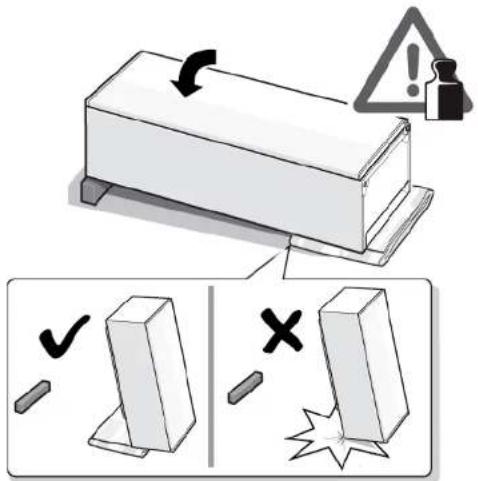
-
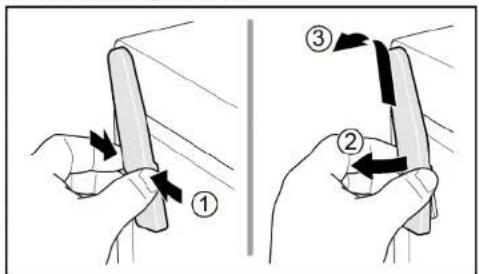
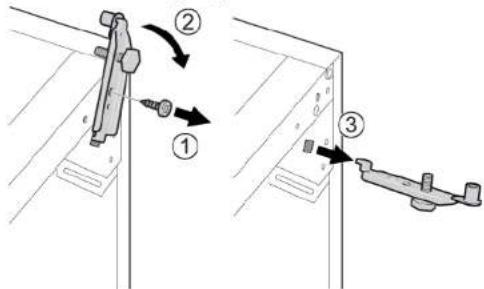
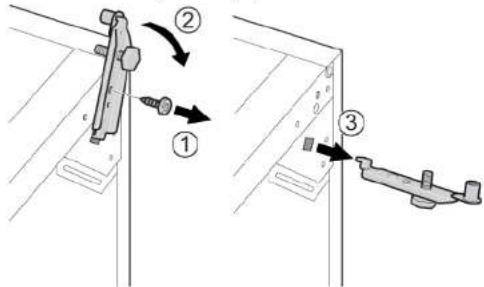
- Press upper hinge cover on both sides (1).
-
Move out upper hinge cover (2).
-
Remove upper hinge cover (3).

Repair
-
- Unscrew two screws (1).
- Remove upper hinge (2)
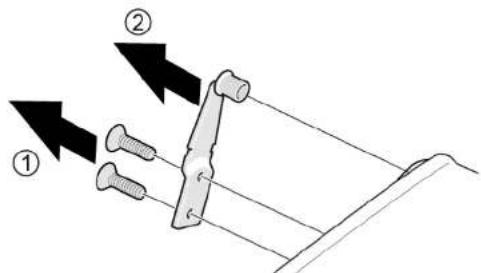
Door upper hinge is removed.
▶ Install in reverse order.
Repair
4.5 Replacing door upper hinge (door with display)
Required tools:
Torx Bit TX20 6,3 mm (1/4") [00340865]

Heavy, bulky appliances!
Back and muscle injuries
▶ Appliance door removal operation should only be carried out by
trained specialists.
To move the appliance, two people are required.
▶ Use only suitable tools and equipment.

Sharp edges!
Cut injuries
▶ Wear protective gloves.

Slipping of tilted appliances!
Bone fractures / crush injuries
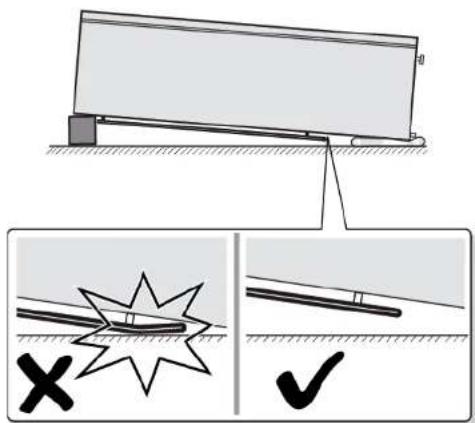
- Secure appliances against slipping.

Risk of falling parts due to released screws!
Injury because of falling parts.
- Secure component from falling down.


Risk of falling parts due to released screws!
Damage to other parts of the appliance or at customers home e.g. bot-
tom.
- Secure component from falling down.
Prerequisite:
√ Appliance is disconnected from power supply.
√ Appliance interior fittings are removed.

Repair
- Place appliance on the back side.

Repair
-
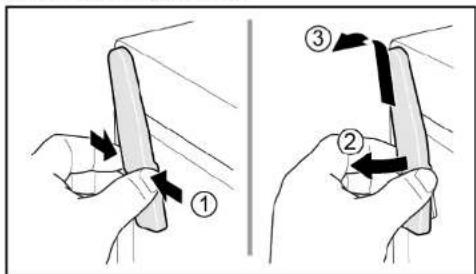
- Press upper hinge cover on both sides (1).
-
Move out upper hinge cover (2).
- Remove upper hinge cover (3).
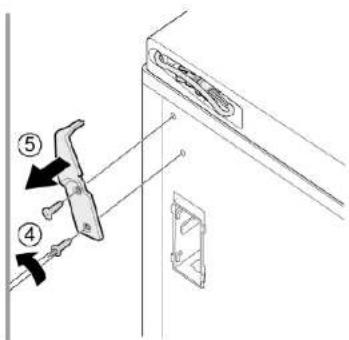
-
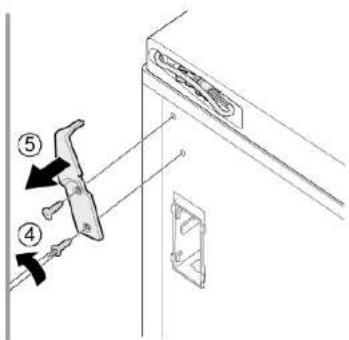
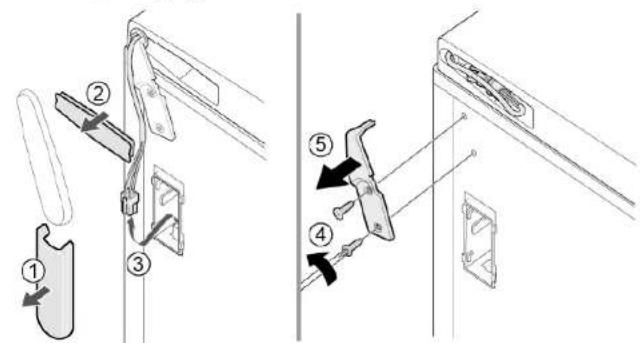
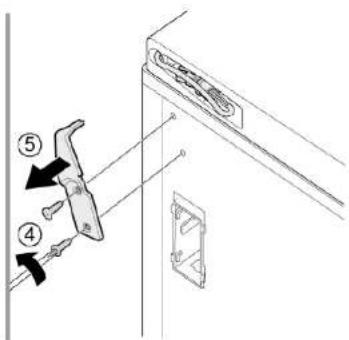
- Remove cable box cover (1).
-
Remove cable protection (2).
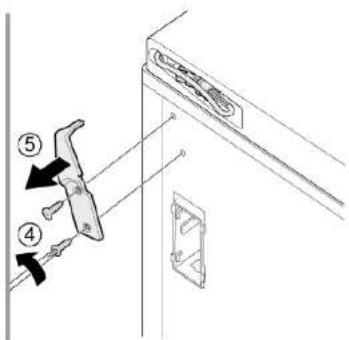
- Disconnect electrical connection (3).
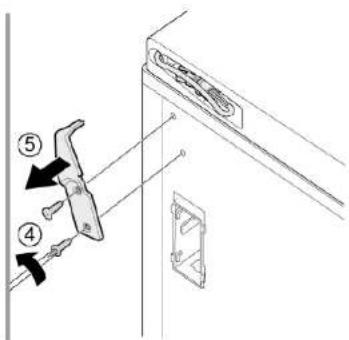
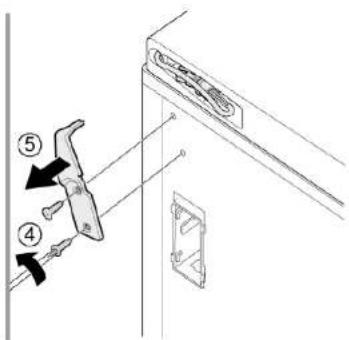
- Unscrew two screws (4).
- Remove upper hinge (5).

Door upper hinge is removed.
▶ Install in reverse order.

Repair
4.6 Replacing door lower hinge
Required tools:
Torx Bit TX20 6,3 mm (1/4") [00340865]
Prerequisite:
√ Appliance is disconnected from power supply.
√ Appliance interior fittings are removed.
√ Appliance is placed on the back side.
√ Upper hinge is removed.→ Page 128
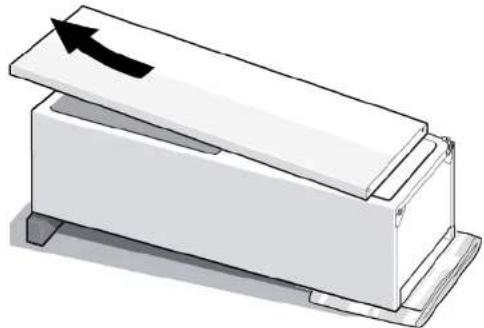
4.6.1 Replacing door lower hinge
- Remove door.
natural_image
Simple line drawing of a rectangular box with a lid and an arrow indicating upward motion (no text or symbols)-
- Unscrew the screw (1).
-
Turn lower hinge out (2).
- Remove lower hinge (3).
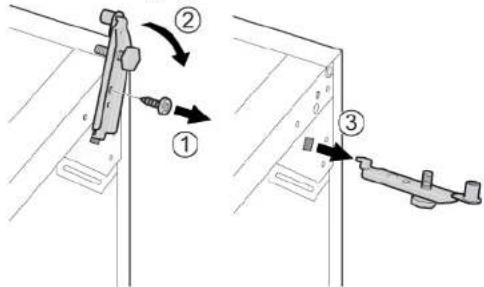
Lower hinge is removed.
Repair
▶ Install in reverse order.

Repair
4.7 Replacing shelf
Prerequisite:
Door is open.
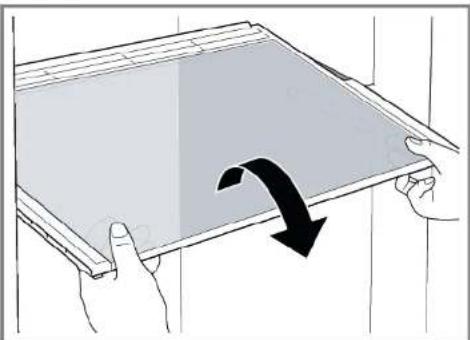
4.7.1 Removing shelf
▶ Pull out shelf.
natural_image
Illustration of hands holding a tablet with a black curved arrow indicating rotation (no text or symbols)Shelf is removed.
4.7.2 Installing shelf
▶ Install in reverse order.

Repair
4.8 Replacing frozen food container
Prerequisite:
√ Door is open.
4.8.1 Removing frozen food container
- Pull out frozen food container all the way (1).
- Remove frozen food container (2).
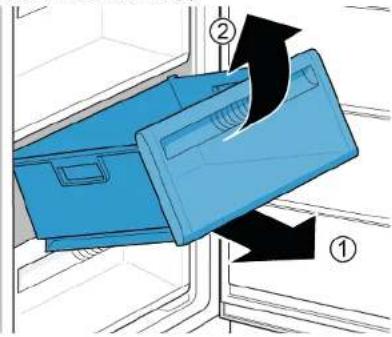
Frozen food container is removed.
4.8.2 Installing frozen food container
▶ Install in reverse order.

Repair
4.9 Replacing ice maker
Prerequisite:
√ Door is open.
4.9.1 Removing ice maker
▶ 1. Pull out shelf frozen food container with ice maker (1).
2. Release hooks (2).
3. Remove ice maker (3).
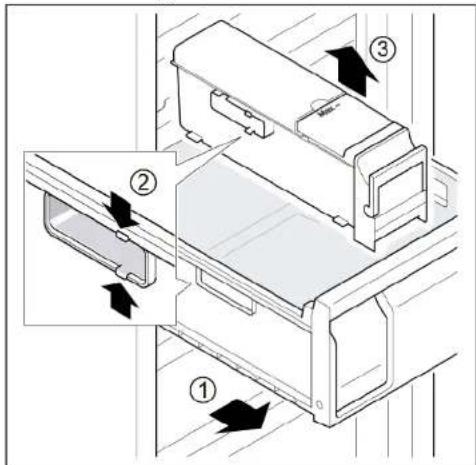
Ice maker is removed.
4.9.2 Installing ice maker
▶ Install in reverse order.

Repair
4.10 Replacing LED top light
Required tools:
Slotted screwdriver Blade 2.4 mm x 0.4 mm x 60 mm, in the kit [00341820]

Your appliance features a maintenance-free LED light.
These lights may be repaired by customer service or authorised technicians only!

Risk of electric shock due to live parts!
Danger to life through electric shock in case of improper repair
Electric parts should be repaired by a qualified electricians.
After the repair have a safety test according VDE 0701 or country-specific regulations performed.

Risk of electric shock due to live parts!
Death by electrocution
- Disconnect appliances from electrical supply at least 60 seconds before starting repairs.

Sharp edges!
Cut injuries
▶ Wear protective gloves.
Prerequisite:
√ Appliance is disconnected from power supply.
Door is open.
√ Upper interior fittings are removed.
4.10.1 Removing LED light
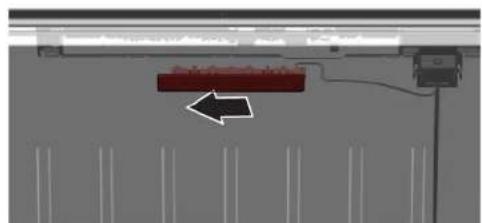
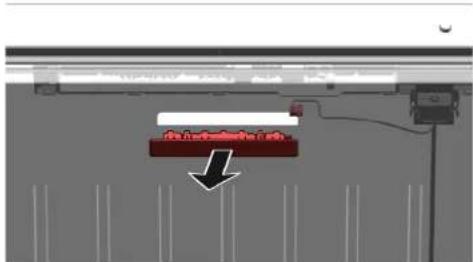
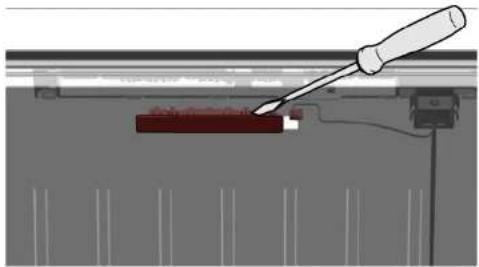
- Move the LED light to the left side.
natural_image
Diagram of a mechanical or electrical component with a red rectangular block and arrow indicating direction (no text or symbols)LED light electrical connection is disconnected.
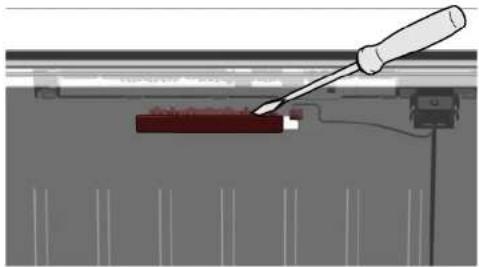
- Release LED light hooks.
natural_image
Diagram of a mechanical or electrical component with a tool inserted, showing a red block and vertical supports (no text or symbols visible)
Repair
- Remove LED light moving it forward.
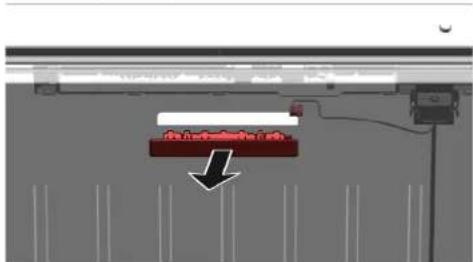

LED light is removed.
4.10.2 Installing top LED light
▶ Install in reverse order.
Remonditeave - Sügavkülmik
i Selle dokumendiga seoses 139
1.1 Tähtis teave 139
1.1.1 Eesmärk 139
1.2 Sümbolite selgitus 139
1.2.1 Ohutasemed.... 139
natural_image
Illustration of hands connecting a cable to a rectangular panel with shelves (no text or symbols)natural_image
Illustration of hands holding a cable with a black arrow indicating direction (no text or symbols)
natural_image
Isometric line drawing of a refrigerator with an eye icon above, showing shelves and doors (no text or symbols)natural_image
Line drawing of a refrigerator with hand gestures indicating side placement (no text or symbols)
Remont
- Vajutage terve tihend jupphaaval soonde.
natural_image
Diagram of a hand interacting with a refrigerator drawer, showing shelves and drawers with arrows indicating movement (no text or symbols)


Remont

Remont

natural_image
Diagram of a mechanical device with an arrow indicating direction, no text or symbols presentnatural_image
Illustration of hands holding a tablet with a black curved arrow indicating rotation (no text or symbols)
natural_image
Diagram of a mechanical or electrical setup with a red component and wiring, no visible text or symbols
natural_image
Diagram of a screwdriver inserted into a component with a red rectangular block, no text or symbols present
Remont
- Eemaldage LED-tuli, liigutades seda ettepoole.

natural_image
Diagram of hands connecting a cable to a rectangular panel with shelves, showing structural details (no text or symbols)natural_image
Illustration of hands holding a cable inside a rectangular frame with a curved arrow indicating rotation (no text or symbols)
natural_image
Isometric line drawing of a wall-mounted shelf with an eye icon above (no text or symbols)natural_image
Line drawing of a door handle with hand gestures indicating left and right motion (no text or symbols)
Korjaus
natural_image
Diagram of a hand interacting with a refrigerator drawer, showing multiple compartments and directional arrows indicating movement (no text or symbols present)

Easy opening handle -kahva on poistettu.

Korjaus
Korjaus
natural_image
Diagram of a mechanical device with an arrow indicating direction, no text or symbols present-
- Kierrä ruuvi auki (1).
-
Kierrä alasarana ulos (2).
- Poista alasarana (3).
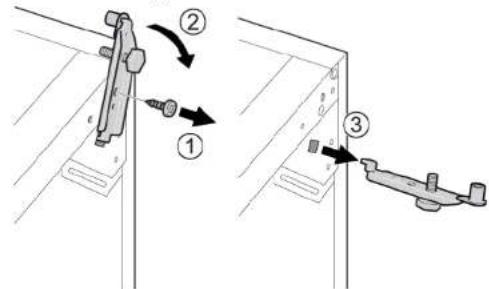
Alasarana on poistettu.
natural_image
Illustration of hands holding a tablet with a curved arrow indicating rotation (no text or symbols)Hylly on poistettu.
natural_image
Diagram of a mechanical or electrical component with a red arrow pointing to a component, no visible text or symbols.natural_image
Diagram of a screwdriver inserted into a component with a red block, showing mechanical assembly (no text or symbols)
Korjaus

natural_image
Diagram of hands connecting a cable to a door panel with shelves, showing structural components (no text or symbols)- Retirer le joint de porte de la rainure.
natural_image
Illustration of hands holding a cable inside a rectangular frame with a curved arrow indicating rotation (no text or symbols)
natural_image
Isometric line drawing of a wall-mounted shelf with an eye icon above (no text or symbols)natural_image
Line drawing of a door handle with hand gestures indicating left-hand placement (no text or symbols)
Réparation
natural_image
Diagram of a hand interacting with a refrigerator drawer, showing multiple compartments and directional arrows indicating movement (no text or symbols present)


Réparation

Réparation
natural_image
Diagram of a mechanical device with an arrow indicating direction, no text or symbols presentnatural_image
Illustration of hands holding a tablet with a black curved arrow indicating rotation (no text or symbols)natural_image
Diagram of a mechanical or electrical component with a red arrow pointing to a component, no visible text or symbols.natural_image
Diagram of a screwdriver interacting with a red component, showing mechanical assembly (no text or symbols)
Réparation

natural_image
Illustration of hands connecting a cable to a door frame with shelves (no text or symbols)natural_image
Illustration of hands holding a cable with a black arrow indicating direction (no text or symbols)
natural_image
Isometric line drawing of a wall-mounted shelf with an eye icon (no text or symbols)natural_image
Line drawing of a refrigerator with hand gestures indicating side placement (no text or symbols)
Instandsetzen
natural_image
Diagram of a hand interacting with a refrigerator drawer, showing shelves and drawers with arrows indicating movement (no text or symbols)

Instandsetzen

Instandsetzen

natural_image
3D diagram of a rectangular box with a lid and an arrow indicating direction (no text or symbols)natural_image
Illustration of hands holding a tablet with a black curved arrow indicating rotation (no text or symbols)natural_image
Diagram of a mechanical or electrical setup with a red component and wiring, no visible text or symbolsnatural_image
Diagram of a screwdriver inserted into a component with a red block, showing mechanical assembly (no text or symbols)
Instandsetzen
natural_image
Illustration of hands connecting a cable to a storage unit panel (no text or symbols)natural_image
Illustration of hands connecting a cable to a wall-mounted panel with a curved arrow indicating rotation (no text or symbols)
natural_image
Isometric line drawing of a wall-mounted shelf with an eye icon (no text or symbols)natural_image
Line drawing of a refrigerator with hand gestures indicating side placement (no text or symbols)
Επισκευή
natural_image
Diagram of a hand interacting with a refrigerator drawer, showing shelves and drawers with arrows indicating movement (no text or symbols)

Επισκευή

Επισκευή
natural_image
Illustration of a white rectangular device with a black arrow pointing to its lid (no text or symbols)natural_image
Illustration of hands holding a tablet with a curved arrow indicating rotation (no text or symbols)To páφι αφαιρέθηκε.
natural_image
Diagram of a mechanical or electrical component with a red arrow pointing to a central component (no text or symbols visible)natural_image
Diagram of a screwdriver inserted into a mechanical component with a red block and vertical supports (no text or symbols)
Επισκευή

natural_image
Illustration of hands connecting a cable to a rectangular panel with shelves (no text or symbols)natural_image
Illustration of hands holding a cable inside a rectangular frame with a curved arrow indicating rotation (no text or symbols)
natural_image
Isometric line drawing of a wall-mounted shelf with an eye icon above (no text or symbols)natural_image
Line drawing of a door handle with hand gestures indicating left and right motion (no text or symbols)
Javítás
natural_image
Diagram of a hand interacting with a refrigerator drawer, showing shelves and drawers with arrows indicating movement (no text or symbols)

Javítás

Javítás

natural_image
3D diagram of a rectangular box with a lid and an arrow indicating direction (no text or symbols)natural_image
Illustration of hands holding a tablet with a curved arrow indicating rotation (no text or symbols)natural_image
Diagram of a mechanical or electrical setup with a red component and connected components (no visible text or symbols)natural_image
Diagram of a screwdriver interacting with a red rectangular object on a mechanical assembly (no text or symbols visible)
Javítás
natural_image
Diagram of hands connecting a cable to a rectangular panel with shelves, showing structural details (no text or symbols)natural_image
Illustration of hands holding a cable inside a rectangular frame with a curved arrow indicating rotation (no text or symbols)natural_image
Isometric line drawing of a wall-mounted shelf with an eye icon (no text or symbols)natural_image
Line drawing of a refrigerator with hand gestures indicating side placement (no text or symbols)
Riparazione
natural_image
Diagram of a hand interacting with a refrigerator drawer, showing shelves and drawers with arrows indicating movement (no text or symbols)
Riparazione
Riparazione
natural_image
3D diagram of a rectangular box with a lid and an arrow indicating upward motion (no text or symbols)-
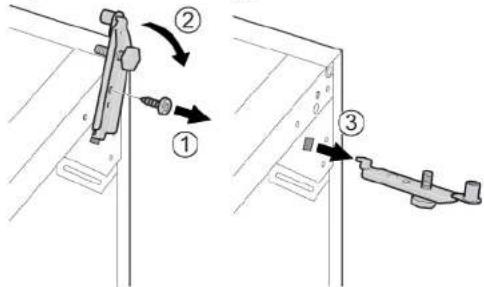
- Svitare la vite (1).
- Ruotare la cerniera inferiore verso l'esterno (2).
- Togliere la cerniera inferiore (3).
natural_image
Illustration of hands holding a tablet with a curved arrow indicating rotation (no text or symbols)natural_image
Diagram of a mechanical or electrical component with a red arrow pointing to a component, no visible text or symbols.natural_image
Diagram of a screwdriver inserted into a component, showing a red component and surrounding vertical lines (no text or symbols)Riparazione
natural_image
Illustration of hands connecting a cable to a rectangular panel with shelves (no text or symbols)natural_image
Illustration of hands holding a cable with a black arrow indicating direction (no text or symbols)
natural_image
Isometric line drawing of a wall-mounted shelf with an eye icon (no text or symbols)natural_image
Line drawing of a refrigerator with hand gestures indicating side placement (no text or symbols)
Remonts
natural_image
Diagram of a hand interacting with a refrigerator drawer, showing shelves and drawers with directional arrows (no text or symbols)

Durvju rokturis ir nonemts.
natural_image
3D mechanical assembly diagram showing internal components and a cylindrical shaft (no text or symbols)i

Remonts
Remonts
natural_image
Diagram of a mechanical device with an arrow indicating direction, no text or symbols presentnatural_image
Illustration of hands holding a tablet with a curved arrow indicating rotation (no text or symbols)Plaukts ir izņemts.
Ledus tvertne ir iznemta.
natural_image
Diagram of a mechanical or electrical component with a red rectangular block and an arrow pointing to it, no visible text or symbols.natural_image
Diagram of a screwdriver inserted into a component, showing a red block and mechanical assembly (no text or symbols)
Remonts
- Lai nonemtu LED gaismekli, virziet to uz priekšu.
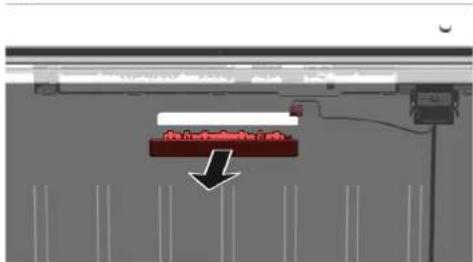
LED gaismeklis ir nonemts.
natural_image
Illustration of hands connecting a cable to a rectangular panel with shelves (no text or symbols)natural_image
Illustration of hands connecting a cable to a wall-mounted panel with a black arrow indicating direction (no text or symbols)
natural_image
Isometric line drawing of a wall-mounted shelf with an eye icon above (no text or symbols)natural_image
Line drawing of a door handle with hand gestures indicating left and right motion (no text or symbols)
Remontas
natural_image
Diagram of a hand interacting with a refrigerator drawer, showing shelves and drawers with arrows indicating movement (no text or symbols)

„Easy open handle" nuimta.

Remontas

Remontas
-
- Spustelékite viršutinio vyrio dangtelj abiejose pusése (1).
-
Atkelkite viršutinio vyrio dangtelj (2).
- Nuimkite viršutinio vyrio dangtelj (3).

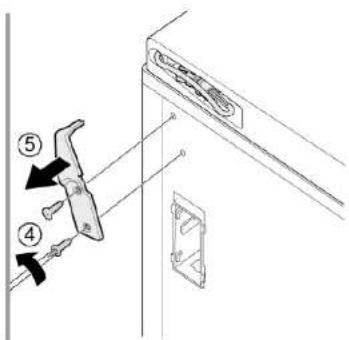

natural_image
Diagram of a mechanical device with an arrow indicating direction, no text or symbols presentnatural_image
Illustration of hands holding a tablet with a curved arrow indicating rotation (no text or symbols)Lentyna išimta.
natural_image
Diagram of a mechanical or electrical setup with a red component and wiring, no visible text or symbolsnatural_image
Diagram of a screwdriver inserted into a mechanical component with a red block and connecting rod (no text or symbols visible)
Remontas

LED lemputė išimta.
natural_image
Illustration of hands connecting a cable to a rectangular panel with shelves (no text or symbols)natural_image
Illustration of hands holding a cable inside a rectangular frame with a curved arrow indicating rotation (no text or symbols)
natural_image
Isometric line drawing of a wall-mounted shelf with an eye icon above (no text or symbols)natural_image
Line drawing of a door handle with hand gestures indicating left and right motion (no text or symbols)
Reparasjon
natural_image
Diagram of a hand interacting with a refrigerator drawer, showing shelves and drawers with arrows indicating movement (no text or symbols)

easy opening handle er demontert.
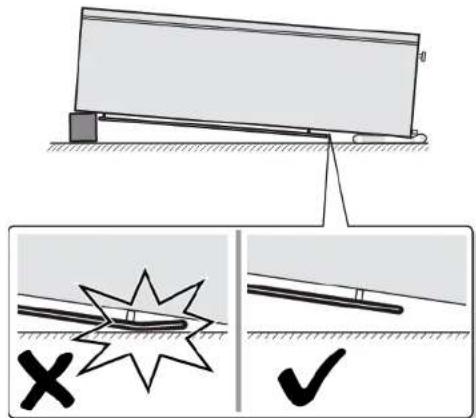
Reparasjon
-
- Skru ut to skruer (1).
-
Demonter øvre hengsel (2).
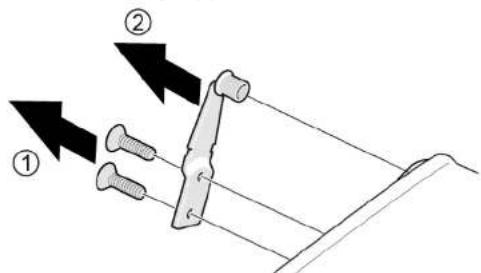
Reparasjon
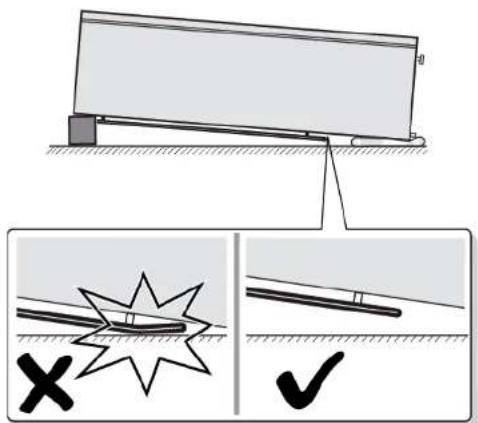
natural_image
Diagram of a mechanical device with an arrow indicating direction, no text or symbols present-
- Skru ut skruen (1).
-
Drei den nedre hengselen ut (2).
- Demonter nedre hengsel (3).
natural_image
Illustration of hands holding a tablet with a curved arrow indicating rotation (no text or symbols)→ Beholderen for frysevarer er demontert.
natural_image
Diagram of a mechanical or electrical setup with a red component and wiring, no visible text or symbolsLED-lampens elektriske tilkobling kobles fra.
- Løsne LED-lampens kroker.
natural_image
Diagram of a screwdriver inserted into a red component, with no visible text or symbols
Reparasjon

LED-lampen er demontert.
natural_image
Diagram of hands connecting a cable to a rectangular panel with shelves, showing structural details (no text or symbols)natural_image
Illustration of hands holding a cable inside a rectangular panel with a curved arrow indicating rotation (no text or symbols)
natural_image
Isometric line drawing of a wall-mounted shelf with an eye icon above (no text or symbols)natural_image
Line drawing of a door handle with hand gestures indicating left and right motion (no text or symbols)
Naprawy
natural_image
Diagram of a hand interacting with a refrigerator drawer, showing shelves and drawers with arrows indicating movement (no text or symbols)

Naprawy

Naprawy

natural_image
3D diagram of a rectangular box with a lid and an arrow indicating direction (no text or symbols)natural_image
Illustration of hands holding a tablet with a curved arrow indicating rotation (no text or symbols)Półka jest wyjęta.
4.7.2 Montaż półki
natural_image
Diagram of a mechanical or electrical component with a red rectangular block and black arrow indicating direction (no text or symbols present)
natural_image
Diagram of a screwdriver inserted into a mechanical component with a red block and vertical supports (no text or symbols visible)
Naprawy
natural_image
Illustration of hands connecting a cable to a rectangular panel with shelves (no text or symbols)natural_image
Illustration of hands holding a cable inside a rectangular frame, with an arrow indicating direction (no text or symbols)
natural_image
Isometric line drawing of a wall-mounted shelf with an eye icon (no text or symbols)natural_image
Line drawing of a refrigerator with hand gestures indicating side placement (no text or symbols)
Reparação
natural_image
Diagram of a hand interacting with a refrigerator drawer, showing shelves and drawers with arrows indicating movement (no text or symbols)


Reparação
-
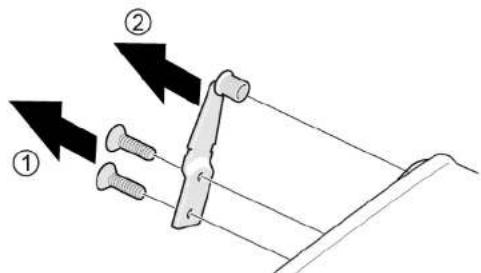
- Desaperte dois parafusos (1).
- Remova a dobradiça superior (2).

Reparação

natural_image
3D diagram of a rectangular box with a lid and an arrow indicating upward motion (no text or symbols)-
- Desaperte o parafuso (1).
-
Vire a dobradiça inferior para fora (2).
- Remova a dobradiça inferior (3).

natural_image
Illustration of hands holding a tablet with a black curved arrow indicating rotation (no text or symbols)natural_image
Diagram of a mechanical or electrical component with a red rectangular block and directional arrow, no visible text or symbols.
natural_image
Diagram of a screwdriver inserted into a mechanical component with a red rectangular block (no text or symbols visible)
Reparação
natural_image
Diagram of hands connecting a cable to a rectangular panel with shelves, showing structural components (no text or symbols)natural_image
Illustration of hands holding a cable inside a rectangular frame, with an arrow indicating direction (no text or symbols)
natural_image
Isometric line drawing of a wall-mounted shelf with an eye icon (no text or symbols)natural_image
Line drawing of a refrigerator with hand gestures indicating side placement (no text or symbols)
Repararea
natural_image
Diagram of a hand interacting with a refrigerator drawer, showing shelves and drawers with directional arrows (no text or symbols)
Cap torx TX20 6.3 mm (1/4") [00340865]


Repararea
Cap torx TX20 6.3 mm (1/4") [00340865]
Repararea
Cap torx TX20 6.3 mm (1/4") [00340865]
natural_image
Illustration of a white rectangular box with a black arrow pointing upward on top, placed on a base (no text or symbols)natural_image
Illustration of hands holding a tablet with a curved arrow indicating rotation (no text or symbols)natural_image
Diagram of a mechanical or electrical setup with a red component and wiring, no visible text or symbolsnatural_image
Diagram of a screwdriver inserted into a component, showing a red rectangular block and mechanical assembly (no text or symbols)
Repararea
natural_image
Illustration of hands connecting a cable to a rectangular panel with shelves (no text or symbols)- Vytiahnite tesnenie z drážky.
natural_image
Illustration of hands holding a cable inside a rectangular appliance with a curved arrow indicating rotation (no text or symbols)
natural_image
Isometric line drawing of a wall-mounted shelf with an eye icon above (no text or symbols)natural_image
Line drawing of a door handle with hand gestures indicating left and right motion (no text or symbols)
Oprava
natural_image
Diagram of a hand interacting with a refrigerator drawer, showing shelves and drawers with arrows indicating movement (no text or symbols)
Tesnenie dvierok je namontované.

Oprava

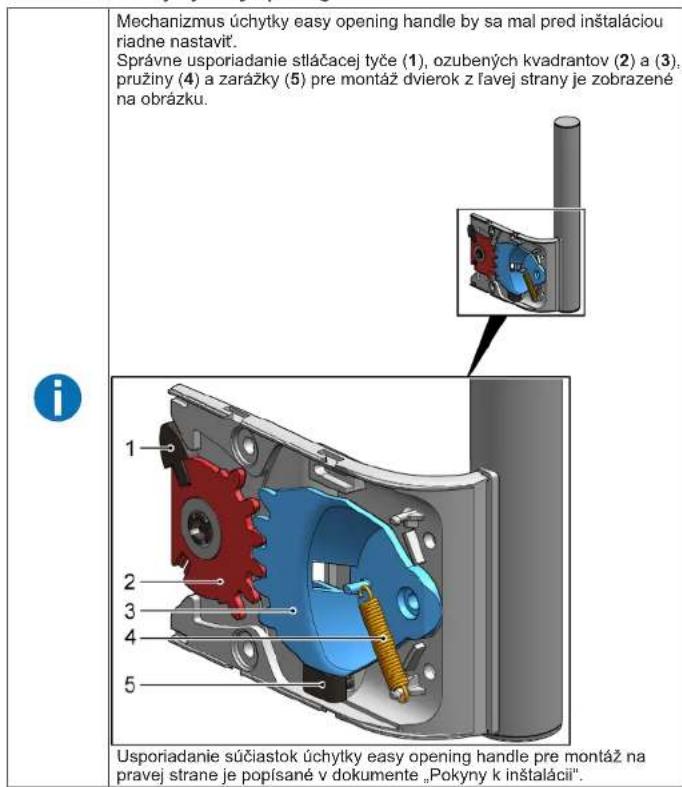
- Úchytka easy opening handle je odobratá.
4.3.2 Montáž úchytky easy opening handle

Oprava

Oprava

natural_image
3D diagram of a rectangular box with a black arrow pointing upward on top, no text or symbols presentnatural_image
Illustration of hands holding a tablet with a curved arrow indicating rotation (no text or symbols)natural_image
Diagram of a mechanical or electrical setup with a red component and connected components (no visible text or symbols)natural_image
Diagram of a mechanical assembly with a tool inserted into a component, no visible text or symbols
Oprava
natural_image
Diagram of a mechanical assembly with a red component and a black arrow indicating direction (no text or symbols)
LED svetlo je odobraté.
natural_image
Illustration of hands connecting a cable to a rectangular panel with shelves (no text or symbols)- Tesnilo vrat izvlecite iz utora.
natural_image
Illustration of hands holding a cable inside a rectangular frame with a curved arrow indicating rotation (no text or symbols)
natural_image
Isometric line drawing of a wall-mounted shelf with an eye icon (no text or symbols)natural_image
Line drawing of a refrigerator with hand gestures indicating side placement (no text or symbols)
Popravilo
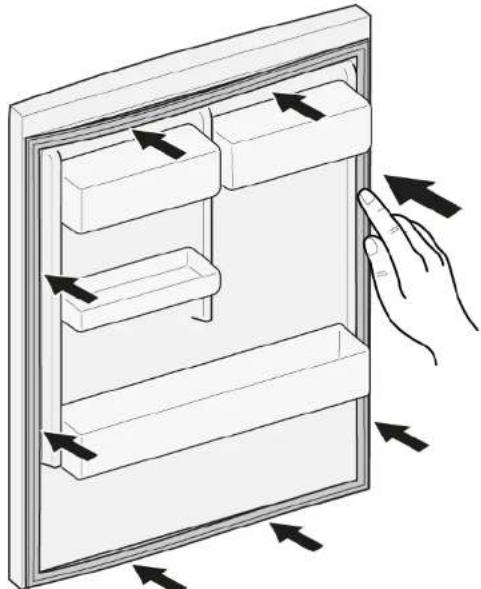
- Celotno tesnilo korak po koraku potisnite v utor.
natural_image
Diagram of a hand interacting with a refrigerator drawer, showing shelves and drawers with arrows indicating movement (no text or symbols)

Ročaj easy opening handle je odstranjen.


Popravilo
-
- Odvijte vijaka (1).
-
Odstranite zgornji tečaj (2).

Poškodbe hrbta in mišic

Popravilo

natural_image
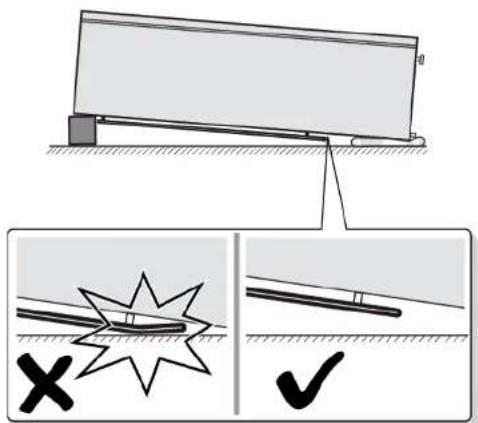
Diagram of a mechanical device with an arrow indicating direction, no text or symbols presentnatural_image
Illustration of hands holding a tablet with a black curved arrow indicating rotation (no text or symbols)Polica je odstranjena.
4.7.2 Namestitev police
- Namestite v obratnem vrstnem redu.

Popravilo
Ledomat je odstranjen.
4.9.2 Namestitev ledomata
▶ Namestite v obratnem vrstnem redu.

Popravilo
natural_image
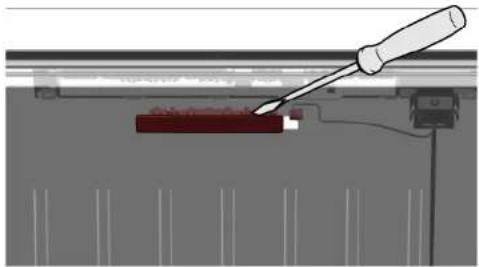
Diagram of a mechanical or electrical setup with a red component and wiring, no visible text or symbolsElektrični priključek lučke LED je odklopljen.
- Sprostite zatiče lučke LED.
natural_image
Diagram of a screwdriver interacting with a red rectangular object, no text or symbols present
Popravilo
- Lučko LED premaknite naprej in jo odstranite.
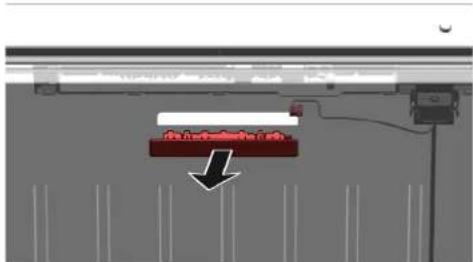

natural_image
Diagram of hands connecting a cable to a rectangular panel with shelves, showing structural details (no text or symbols)natural_image
Illustration of hands holding a cable inside a rectangular frame with a curved arrow indicating rotation (no text or symbols)natural_image
Isometric line drawing of a wall-mounted shelf with an eye icon above (no text or symbols)natural_image
Line drawing of a refrigerator with hand gestures indicating side placement (no text or symbols)
Reparación
natural_image
Diagram of a hand interacting with a refrigerator drawer, showing shelves and drawers with arrows indicating movement (no text or symbols)


Reparación
Reparación
natural_image
Simple line drawing of a rectangular box with a lid and an arrow indicating upward motion (no text or symbols)natural_image
Illustration of hands holding a tablet with a black curved arrow indicating rotation (no text or symbols)natural_image
Diagram of a mechanical or electrical setup with a red component and wiring, no visible text or symbolsnatural_image
Diagram of a screwdriver inserted into a component, showing a red block and mechanical assembly (no text or symbols)
Reparación
4.3 Byta Easy opening handle....509
4.3.1 Ta bort Easy opening handle 509
4.3.2 Montera Easy opening handle....509
natural_image
Illustration of hands connecting a cable to a rectangular panel with shelves (no text or symbols)natural_image
Illustration of hands holding a cable with a black arrow indicating direction (no text or symbols)
natural_image
Isometric line drawing of a wall-mounted shelf with an eye icon (no text or symbols)natural_image
Line drawing of a refrigerator with hand gestures indicating side placement (no text or symbols)
Reparation
natural_image
Diagram of a hand interacting with a refrigerator drawer, showing shelves and drawers with arrows indicating movement (no text or symbols)

4.3 Byta Easy opening handle
Nödvändiga verktyg:
Easy opening handle har tagits bort.
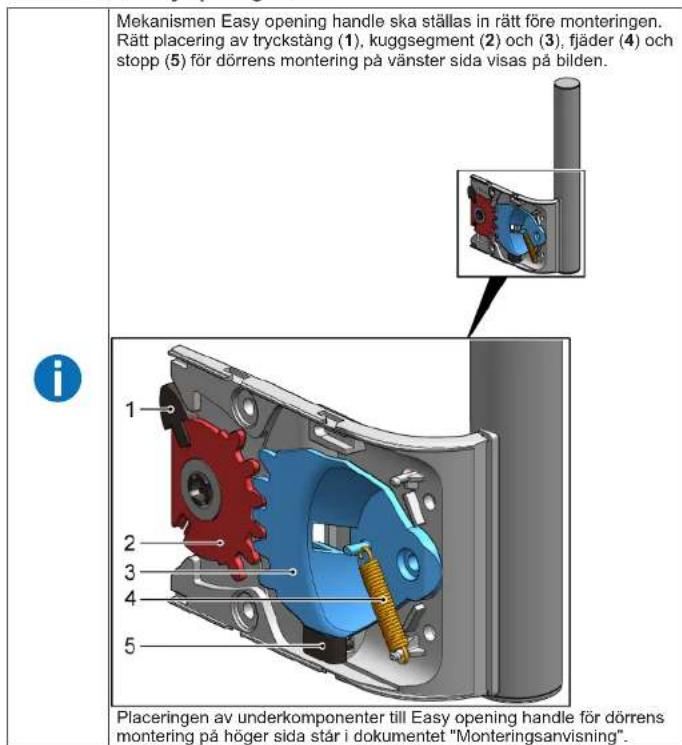
4.3.2 Montera Easy opening handle

Reparation

Reparation

natural_image
Diagram of a mechanical device with an arrow indicating direction, no text or symbols presentnatural_image
Illustration of hands holding a tablet with a black curved arrow indicating rotation (no text or symbols)natural_image
Diagram of a mechanical or electrical setup with a red component and wiring, no visible text or symbolsnatural_image
Diagram of a screwdriver interacting with a red component, showing mechanical assembly (no text or symbols)
Reparation

natural_image
Illustration of hands connecting a cable to a rectangular panel with shelves (no text or symbols)natural_image
Illustration of hands holding a cable with a black arrow indicating direction (no text or symbols)
natural_image
Isometric line drawing of a 3D wall-mounted device with multiple shelves and an eye icon (no text or symbols)natural_image
Line drawing of a refrigerator with hand gestures indicating side placement (no text or symbols)
Onarim
natural_image
Diagram of a hand interacting with a refrigerator drawer, showing shelves and drawers with arrows indicating movement (no text or symbols)


Onarim


Onarim
natural_image
Diagram of a mechanical device with an arrow indicating direction, no text or symbols presentnatural_image
Illustration of hands holding a tablet with a curved arrow indicating rotation (no text or symbols)natural_image
Diagram of a mechanical or electrical setup with a red component and connected components (no visible text or symbols)natural_image
Diagram of a screwdriver inserted into a mechanical component with a red component, no text or symbols present
Onarim
natural_image
Diagram of a mechanical assembly with a red component and a black arrow indicating direction (no text or symbols)
LED ışığı söküldü.

- Ремонт
- Popravak
- Postavljanje ručke easy opening handle
- Postavljanje zgloba vrata
- Postavljanje zgloba vrata
- Zamjena donjeg zgloba vrata
- Postavljanje donjeg zgloba vrata
- Zamjena police
- Uklanjanje police
- Postavljanje spremnika za zamrznute namirnice
- Zamjena ledomata
- Uklanjanje ledomata
- Postavljanje ledomata
- Oprava
- Reparation
- Reparatie
- Repair hints - Freezer
- i Concerning this document.... 116
- Safety.... 118
- Tools and aids.... 119
- Repair 120
- i Concerning this document
- Important information
- Purpose
- Explanation of symbols
- Danger levels
- Hazard symbols
- Structure of the warnings
- General symbols
- Safety
- General Safety instructions
- All domestic appliances
- Risk of electric shock due to live parts!
- Risk of injury from sharp edges!
- Risk to the appliance's safety / function!
- Risk of damage to electrostatically sensitive components (ESDs)!
- Tools and aids
- Repair
- Replacing door handle
- Removing door handle
- Replacing easy opening handle
- Installing easy opening handle
- Replacing door upper hinge
- Warning
- Caution
- Notice
- Prerequisite:
- Replacing door upper hinge (door with display)
- Replacing door lower hinge
- Replacing door lower hinge
- Replacing shelf
- Removing shelf
- Installing shelf
- Replacing frozen food container
- Removing frozen food container
- Installing frozen food container
- Replacing ice maker
- Removing ice maker
- Installing ice maker
- Replacing LED top light
- Removing LED light
- Installing top LED light
- Remonditeave - Sügavkülmik
- i Selle dokumendiga seoses 139
- Remont
- Korjaus
- Réparation
- Instandsetzen
- Επισκευή
- Javítás
- Riparazione
- Remonts
- Remontas
- Reparasjon
- Naprawy
- Montaż półki
- Reparação
- Repararea
- Montáž úchytky easy opening handle
- Popravilo
- Namestitev police
- Namestitev ledomata
- Reparación
- Byta Easy opening handle
- Montera Easy opening handle
- Onarim
Brand : Profilo
Model : DF1029WEVV
Category : Freezer