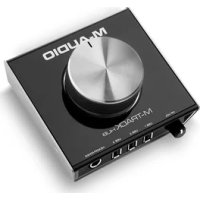
Track Hub - Voice recorder M-AUDIO - Free user manual and instructions
Find the device manual for free Track Hub M-AUDIO in PDF.



| Product Type | Voice Recorder / USB Audio Interface |
| Brand | M-Audio |
| Model | Track Hub |
| Connectivity | USB 2.0 (or later) |
| Power Supply | USB or included power adapter |
| Main Outputs | 2 x TRS 6.35 mm (1/4 inch) for powered monitors |
| Headphone Output | 1 x TRS 6.35 mm (1/4 inch) with volume control |
| USB Hub Ports | 3 USB ports for peripherals (estimated) |
| Monitor Button | Volume control for main outputs |
| Power Switch | Yes, power on/off |
| Windows Drivers | Installation required before first use |
| Mac Compatibility | Generally plug-and-play |
| Box Contents | M-Track Hub, power adapter, USB cable, user guide |
| Minimum Requirements | USB 2.0 port, compatible operating system (see m-audio.com) |
| Warranty | See information provided with product |
Frequently Asked Questions - Track Hub M-AUDIO
User questions about Track Hub M-AUDIO
0 question about this device. Answer the ones you know or ask your own.
Ask a new question about this device
Download the instructions for your Voice recorder in PDF format for free! Find your manual Track Hub - M-AUDIO and take your electronic device back in hand. On this page are published all the documents necessary for the use of your device. Track Hub by M-AUDIO.
USER MANUAL Track Hub M-AUDIO
User Guide (English)
Introduction
Box Contents
M-Track Hub
Power Adapter
USB Cable
User Guide
Safety & Warranty Manual
Support
For the latest information about this product (system requirements, compatibility information, etc.) and product registration, visit m-audio.com.
For additional product support, visit m-audio.com/support.
Quick Start
Windows users: Before connecting M-Track Hub to your computer, install the drivers:
- Go to m-audio.com/drivers and download the latest M-Track Hub driver for your operating system.
- Open the file you downloaded and double-click the driver installer file.
- Follow the on-screen instructions to install the drivers.
Items not listed under Introduction > Box Contents are sold separately.
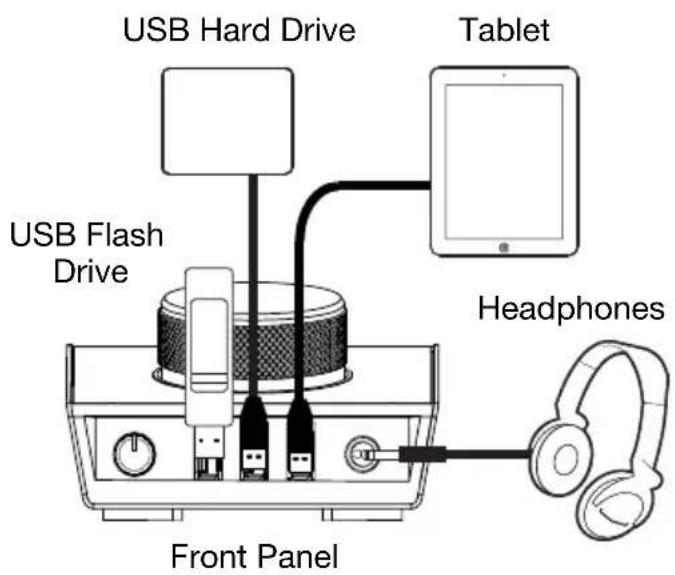
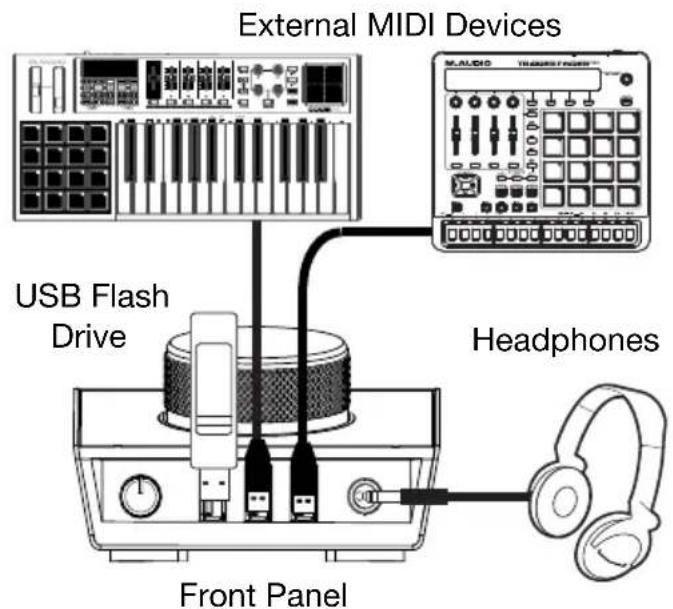
Example 1
Note: Remember to select M-Track Hub as your sound card in your Control Panel or System Preferences.

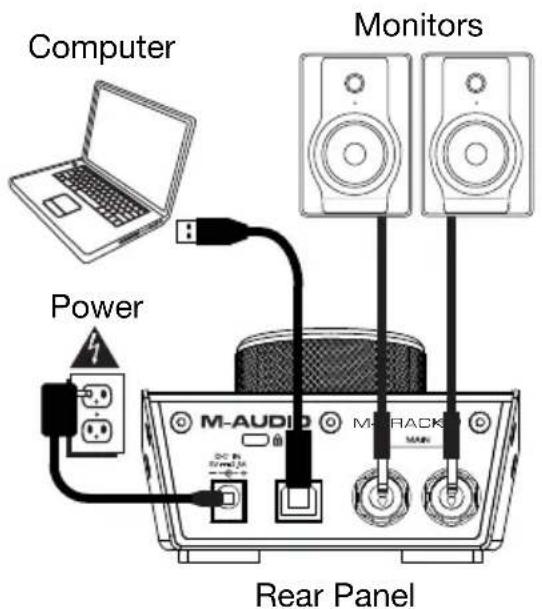
Example 2
Note: Remember to select M-Track Hub as your interface in the Preferences, Options, Device Setup, etc. in your digital audio workstation (DAW).
Features
Rear Panel
-
USB Port: This connection will allow you to send audio, MIDI, and other data to and from a computer. Use a USB cable to connect the M-Track Hub to a computer. The M-Track Hub requires a USB 2.0 connection (or higher).
-
Power Input: Connect the included power adapter (5 V, 2.5 A, center-positive) here, then connect the adapter to a power outlet.
-
Main Outputs: Use standard 1/4'' (6.35 mm) TRS cables to connect these outputs to your powered monitors, an amplifier system, etc. Use the Monitor Level knob to adjust their levels.

Front Panel
-
Headphone Output: Connect 1/4" (6.35 mm) TRS headphones to this output.
-
Headphone Volume: Adjusts output volume of the Headphone Output.
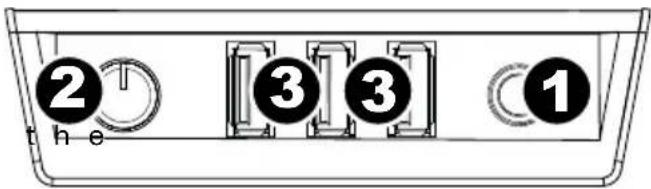
- USB Hub Outputs: You can connect additional USB devices (controllers, hard drives, etc.) to these powered USB ports. In addition to being an audio interface, these ports allow M-Track Hub to function as a powered USB hub. This can be useful if you run out of available USB ports on your computer.
Note: In order to use the USB hub outputs, M-Track Hub must be connected to the power adapter.
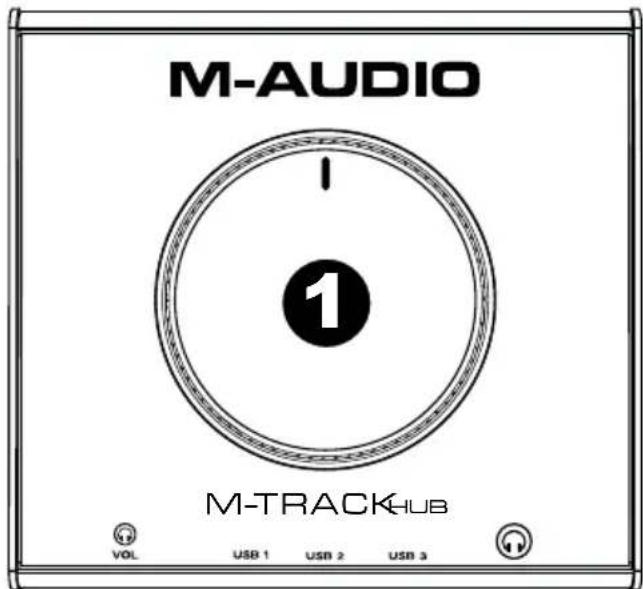
Top Panel
- Monitor Level: Adjusts the output volume of Main Outputs, which should be connected to your powered monitors or amplifier system.
Technical Specifications
| Inputs 3 USB ports | |
| Outputs | 3 1/4” (6.35 mm) TRS 1 USB port |
| Power | 5 V, 2.5 A, center-positive |
| Dimensions (width x depth x height) | 4.5” x 4.2” x 2.8” 113 mm x 107 mm x 70 mm |
| Weight | 0.75 lbs. 0.34 kg |
Specifications are subject to change without notice.
Trademarks and Licenses
M-Audio is a trademark of inMusic Brands, Inc., registered in the U.S. and other countries.
Windows is a registered trademark of Microsoft Corporation in the United States and other countries.
All other product or company names are trademarks or registered trademarks of their respective owners.
m-audio.com
Brand : M-AUDIO
Model : Track Hub
Category : Voice recorder