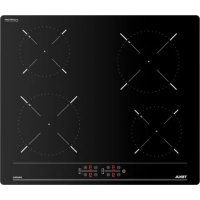
IBC 64000 TTC - Cooker TEKA - Free user manual and instructions
Find the device manual for free IBC 64000 TTC TEKA in PDF.



| Product type | Induction hob |
| Brand | Teka |
| Model | IBC 64000 TTC |
| Number of cooking zones | 4 |
| Control type | Touch |
| Power function (Boost) | Yes |
| Adjustable power management | Yes (from 2.5 kW to 6 kW or without limit) |
| Pan detection | Yes |
| Residual heat indicator | Yes (H symbol) |
| Automatic safety shut-off | Yes (depending on power level) |
| Surface material | Ceramic glass |
| Recommended cleaning | Gentle products, scraper for encrusted residues |
| Power supply | 220-240 V ~ 50/60 Hz (standard estimate) |
| Maximum total power | Up to 6 kW (adjustable) |
| Energy class | Tested according to EN 60350-2 (value on rating plate) |
Frequently Asked Questions - IBC 64000 TTC TEKA
User questions about IBC 64000 TTC TEKA
0 question about this device. Answer the ones you know or ask your own.
Ask a new question about this device
Download the instructions for your Cooker in PDF format for free! Find your manual IBC 64000 TTC - TEKA and take your electronic device back in hand. On this page are published all the documents necessary for the use of your device. IBC 64000 TTC by TEKA.
USER MANUAL IBC 64000 TTC TEKA
natural_image
Modern kitchen interior with black and wood panels, featuring a 'TEKA' logo on the top right (no other text or symbols visible)User Manual
ES FR SK
PT TR RO
EN PL IT
DE CS NL
ES INSTRUCCIONES PARA LA INSTALACIÓN Y RECOMENDACIONES DE USO Y MANTENIMIENTO ENCIMERAS VITROCERÁMICAS TOUCH CONTROL....6
PT INSTRUÇÕES DE INSTALAÇÃO E RECOMENDAÇÕES PARA A UTILIZAÇÃO E MANUTENÇÃO PLACAS DE COZINHA VITROCERÂMICAS TOUCH CONTROL....12
EN INSTALLATION INSTRUCTIONS AND RECOMMENDATIONS FOR USING AND MAINTAINING CERAMIC HOT PLATES TOUCH CONTROL....18
DE MONTAGEANLEITUNG UND EMPFEHLUNGEN ZUR VERWENDUNG UND WARTUNG GLASKERAMIK-KOCHFELDER MIT TOUCH CONTROL....24
FR INSTRUCTIONS POUR L'INSTALLATION ET CONSEILS D'UTILISATION ET D'ENTRETIEN PLAQUES DE CUISSON VITROCÉRAMQIUE TOUCH CONTROL....30
TR KULLANMA VE MUHAFAZA İÇİN KURULUM TALİMATLARI VE TAVSİYELERİ SERAMİK ISITMA PLAKALARI DOKUNMATİK KONTROL....36
PL INSTRUKCJA OBSŁUGI, MONTAŻU ORAZ WSKAZÓWKI DOTYCZĄCE PIEŁĘGNACJI CERAMICZNYCH PŁYT KUCHENNYCH TOUCH CONTROL....41
CS NÁVOD K INSTALACI A DOPORUČENÍ K PROVOZU A ÚDRŽBĚ SKLOKERAMICKÉ VARNÉ DESKY TOUCH CONTROL....47
SK NÁVOD NA INŠTALÁCIU A ODPORÚČANIA PRE POUŽÍVANIE A ÚDRŽBU KERAMICKÝCH VARNÝCH PLATNÍ DOTYKOVÉ OVLÁDANIE....52
RO INSTRUCTIUNI DE INSTALARE ŞI RECOMANDĂRI DE UTILIZARE ŞI ÎNTRETINERE
PLITE DE GĂTIT INCORPORABILE VITROCERAMICE TOUCH CONTROL....57
IT ISTRUZIONI PER L'INSTALLAZIONE E CONSIGLI PER L'USO E LA MANUTENZIONE
PIANI DI COTTURA IN VETROCERAMICA TOUCH CONTROL....63
NL AANWIJZINGEN VOOR DE INSTALLATIE EN RAADGEVINGEN VOOR GEBRUIK EN ONDERHOUD KERAMISCHE KOOKPLATEN TOUCH CONTROL....69
Presentación / Apresentação / Presentation / Präsentation / Présentation / Wprowadzenie/ Provedení / Predstavenie / Prezentare / Presentasjon / Presentazione / Presentatie
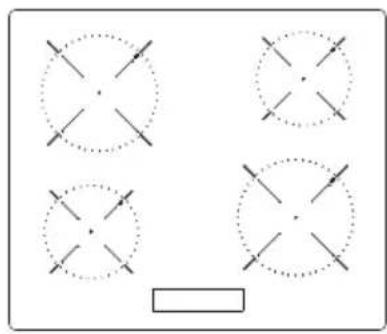
natural_image
Four circular diagrams with crosshairs, one solid and one dotted, arranged in a 2x2 grid (no text or symbols)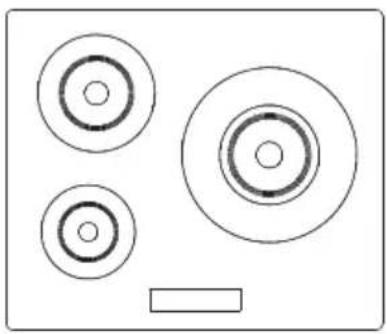
natural_image
Simple diagram of three concentric circles and a rectangle, no text or symbols present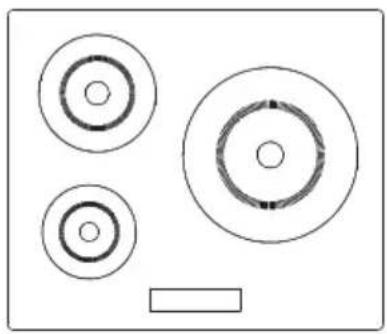
natural_image
Simple diagram with three concentric circles and a rectangular block, no text or symbols present.Instalación / Instalação / Installation / Montage / Installation / Kurulum / Montaz / Instalace / Inštalácia / Instalare / Installazione / Installatie
Distancias mínimas / Distâncias mínimas / Minimum distances / Mindestabstände / Distances minimales / Minimum mesafeler / Minimalne odległości / Minimální vzdálenosti / Minimálne vzdialenosti / Distanțe minime/ Distanze minime / Minimumafstanden /
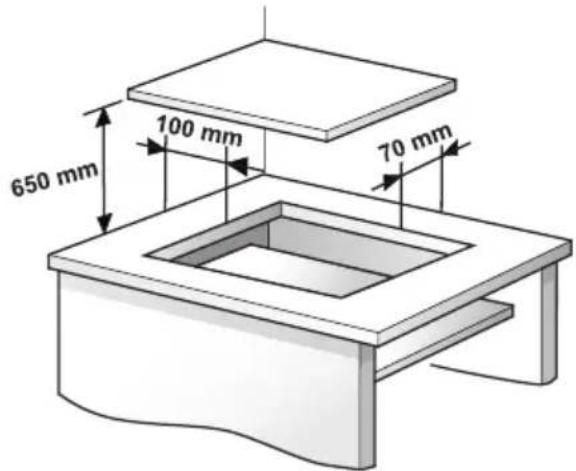
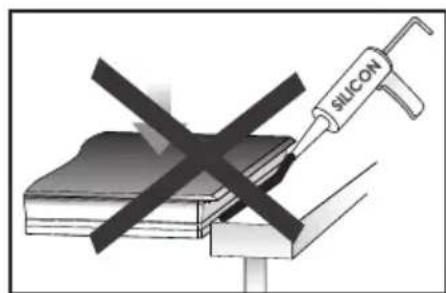
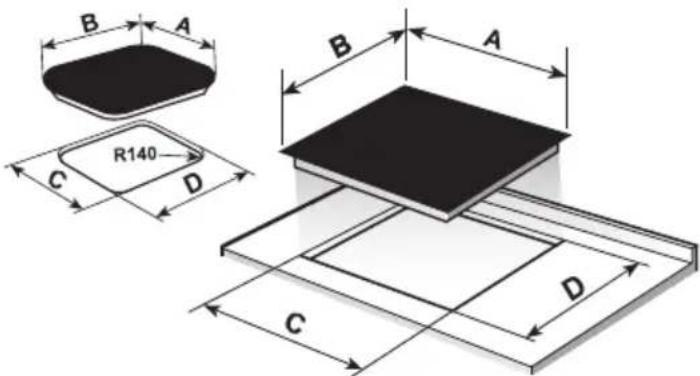
| ABCD | |||
| 60551 | 5560490 | ||
| 60051 | 0560490 | ||
| 60043 | 5580415 | ||
| 80040 | 0780380 | ||
| 59051 | 0570490 | ||
| 90040 | 0860380 | ||
| 80051 | 0750490 | ||
| 90051 | 0860490 | ||
Unidades en mm / Unidades em mm / Units in mm / Einheiten in mm / Unités en mm / mm cinsiden birimler / Wymiary w mm / / Jednotky v mm / Jednotky v mm / Unitāti în mm / / Unità in mm / Eenheden in mm /
Instalación / Instalação / Installation / Montage / Installation / Kurulum / Montaz / Instalace / Inštalácia / Instalare / Installazione / Installatie
Distancias mínimas / Distâncias mínimas / Minimum distances / Mindestabstände / Distances minimales / Minimum mesafeler / Minimalne odległości / Minimální vzdálenosti / Minimálne vzdialenosti / Distanțe minime/ Distanze minime / Minimumafstanden /
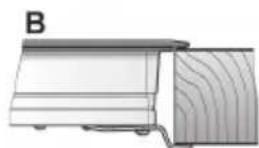
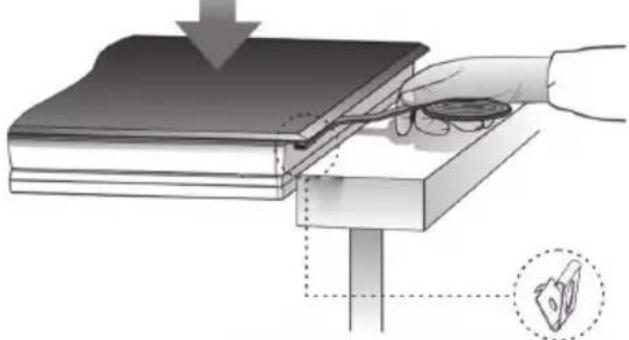
STANDARD INSTALLATION SYSTEM FAST-CLICK SYSTEM
≥20 mm
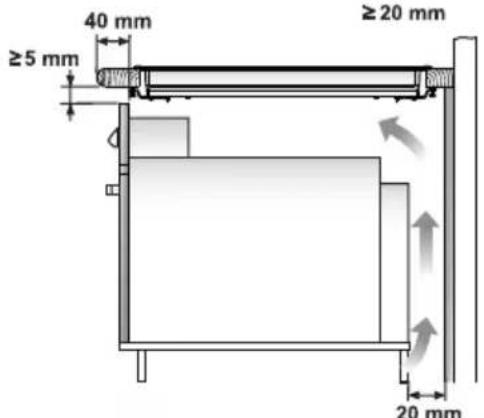
Horno Teka / Forno TEKA / TEKA Oven /TEKA-Herd / Four TEKA / TEKA /Piekamik TEKA / TEKA sütö / Trouba TEKA / Rúra na pečenie TEKA / TEKA Cuptor /TEKA Ugn / TEKA Ovn / TEKA-ovn / Teka-uuni /Forno Teka / TEKA Oven /
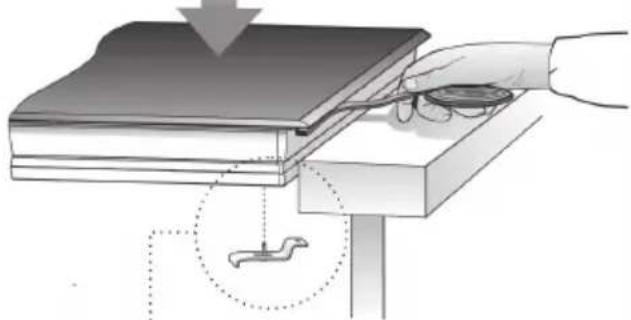
natural_image
Diagram showing a hand using a magnifying tool to inspect or install a layered electronic component, with no visible text or symbols.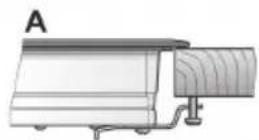
≥20 mm
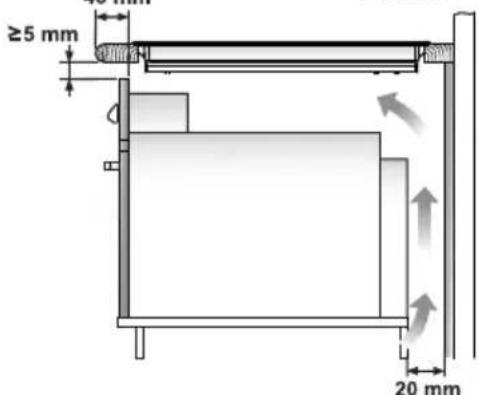
Horno Teka / Forno TEKA / TEKA Oven /TEKA-Herd / Four TEKA / TEKA /Piekamik TEKA / TEKA sütö / Trouba TEKA / Rúra na pečenie TEKA / TEKA Cuptor /TEKA Ugn / TEKA Ovn / TEKA-ovn / Teka-uuni /Forno Teka / TEKA Oven/
natural_image
Illustration of a hand using a tool to lift a stack of books, with a magnified inset showing the same object (no text or symbols present)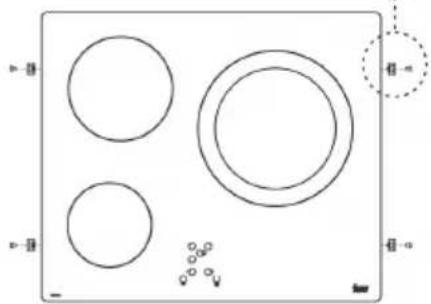
natural_image
Simple diagram with four circles and a dotted circle on a rectangle, no text or symbols present.
natural_image
Technical line drawing of a mechanical component or bracket (no text or symbols)
Unidades en mm / Unidades em mm / Units in mm / Einheiten in mm / Unités en mm / mm cinsiden birimler / Wymiary w mm / / Jednotky v mm / Jednotky v mm / Unitāti în mm / / Unità in mm / Eenheden in mm /
ES
⚠ Warning. If the ceramic glass breaks or cracks, immediately unplug the stovetop to avoid electric shocks.
⚠ This appliance is not designed to work with an external timer (not built into the appliance) or a separate remote control system.
⚠️ Do not steam clean this device.
⚠ Warning. The device and its accessible parts may heat up during operation. Avoid touching the heating elements. Children younger than 8 years old must stay away from the hob unless they are permanently supervised.
⚠ This device may solely be used by children 8 years old or older, people with impaired physical, sensory or mental abilities, or those who lack experience and knowledge, ONLY when supervised or if they have been given adequate instruction on the use of the device and understand the dangers its use involves. User cleaning and maintenance may not be done
by unsupervised children.
Children must not play with the device.
⚠ Warning. It is dangerous to cook with fat or oil without being present, as these may catch fire. NEVER try to extinguish a fire with water! In this event disconnect the device and cover the flames with a lid, a plate or a blanket.
⚠ Do not store any object on the cooking areas of the induction hob. Prevent possible fire hazards.
⚠ The induction generator complies with current EU legislation We however recommend that anyone fitted with a device such as a pacemaker should refer to their physician, or if in doubt abstain from using the induction areas.
⚠ Metal object such as knives, forks, spoons and lids may not be placed on the surface of the hob as they may overheat.
⚠️ After use always disconnect the hot plate, do not simply remove the pot or pan. Otherwise a malfunction may
occur if inadvertently another pot or pan is placed on it within the detection period. Prevent possible accidents!
⚠️ If the supply cord is damaged, it must be replaced by the manufacturer, its service agent or similarly qualified persons in order to avoid hazard.
⚠ WARNING: Use only stovetop protectors designed by appliance manufacturer or indicated by the manufacturer in the instructions for use as adequate or stovetop protectors incorporated into the device. The use of inadequate protectors can cause accidents.
⚠ It is necessary to allow the appliance disconnection after installation. Disconnection devices must be incorporated to the fixed electrical installation, according to the installation regulations.
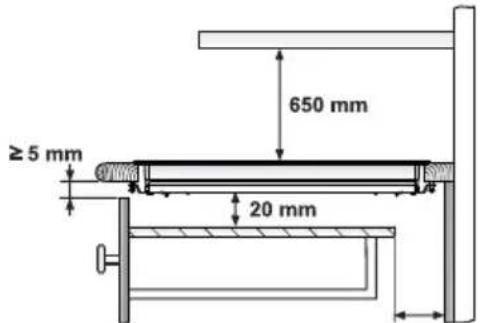
Installation
Installation with cutlery drawer
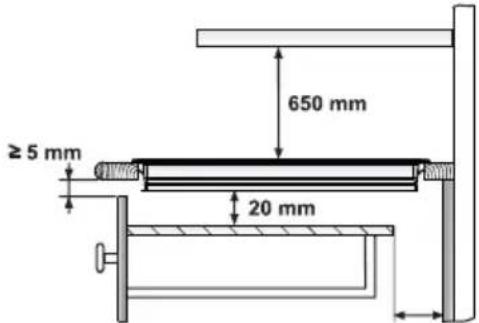
If you wish to install furniture or a cutlery drawer under the hob, a separation board must be fitted between the two. Accidental contact with the hot surface of the device's housing is thus prevented.
The board must be fitted 20 mm beneath the under part of the stovetop.
Electrical connection
Before you connect the stovetop to the mains, check that the voltage and frequency match those specified on the stovetop nameplate, which is underneath it, and on the Guarantee Sheet, or if applicable on the technical data sheet, which you must keep together with this manual throughout the product's service life.
Ensure that the inlet cable does not come into contact with the induction top housing or the oven housing, if it is installed in the same unit.
Warning:

The electrical connection must be properly grounded, following current legislation, otherwise the induction hob may malfunction.

Unusually high power surges can damage the control system (like with any electrical appliance).

It is advised to refrain from using the induction hob during the pyrolytic cleaning function in the
case of pyrolytic ovens, due to the high temperature that this type of device attains.

Only the TEKA official techni- service can handle or repair the ance, including replacement e power cable.

Before disconnecting the hobb the mains, we recommend hing off the cutoff switch and ing for approximately 25 nds before disconnecting from nains. This time is required to for the complete discharge of electronic circuitry and thus ude the possibility of electric k from the cable terminals.

Keep the Guarantee Certificate or the technical data sheet together with the instructions manual throughout the product's service life. These contain important technical information.
Use and
Maintenance
User instructions of the Touch Control
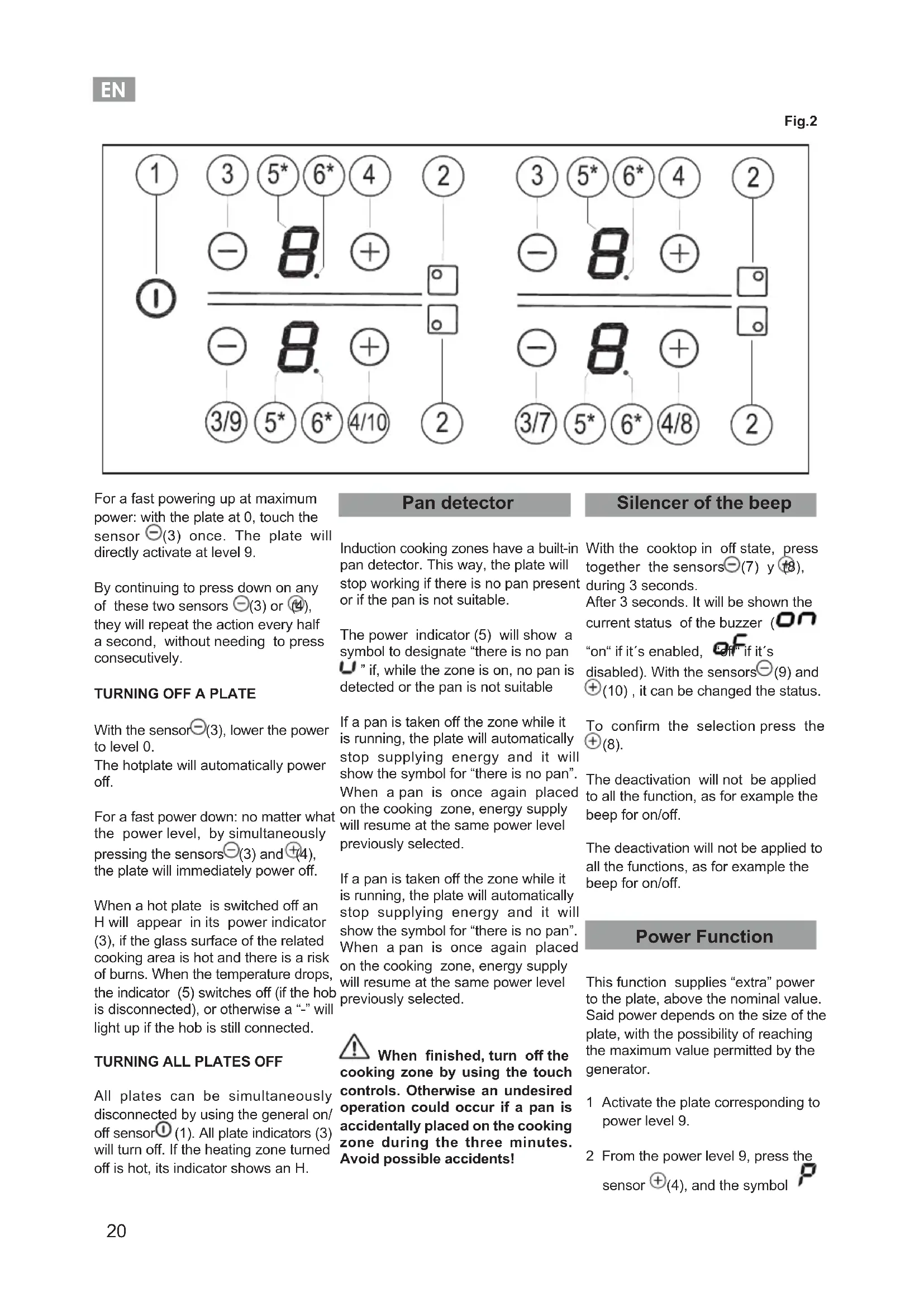
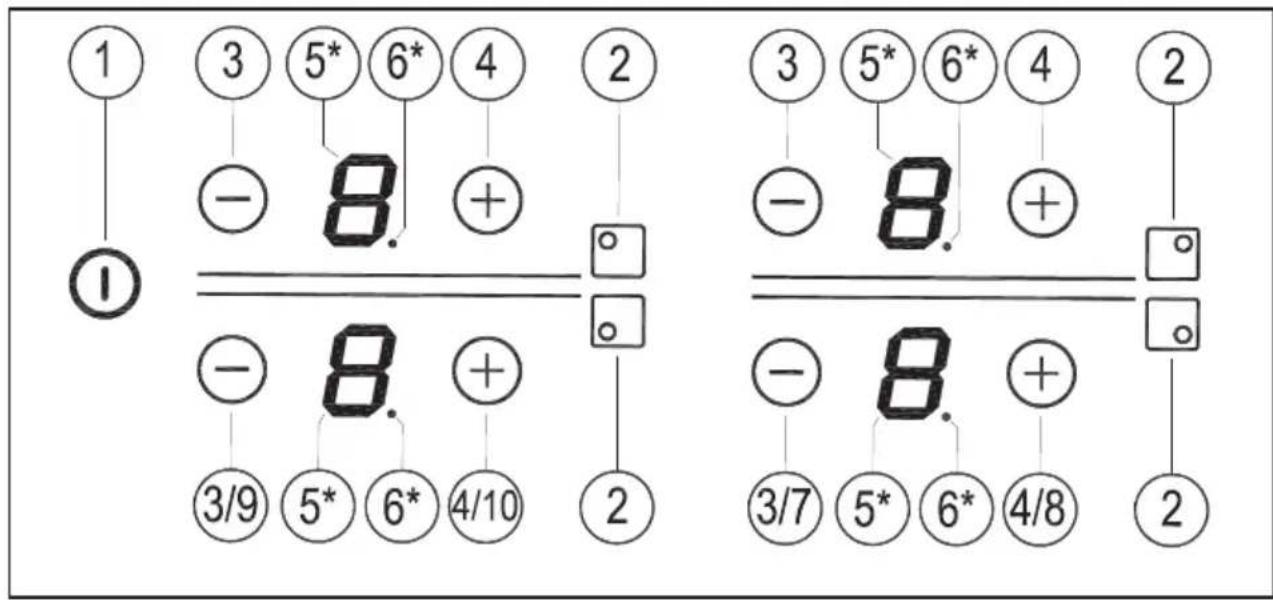
HANDLING ELEMENTS (fig. 2)

General on/off sensor.

Plate position indicator.

"Minus" power reduction sensor.

"Plus" power increase sensor.

Power and/or residual heat display.

Decimal dot of power and/of dual heat indicator.

only visible while running.
The manoeuvres are done by means of the touch keys. You do not need to exert force on the desired touch key, you only need to touch it with your fingertip to activate the required function
Each action is verified by a beep.
SWITCHING ON THE DEVICE
1 Touch the On touch key① (1) for at least one second. The touch control will become active, a beep will be heard and the indicators (5) will light up displaying a “-”. If any cooking area is hot, the related indicator will flash an H.
If you do not take any action in the next 10 seconds the touch control will switch off automatically.
When the touch control is activated, you can disconnect it at any time by touching the touch button ① (1). The touch button ① (1) always has priority to disconnect the touch control.
ACTIVATING PLATES
Once the Touch Control is activated with sensor Ⓐ (1), any plate can be turned on by following these steps:
Use the sensors ⊖(3) and ⏻ to select a power level. If you touch the sensor ⊕(4), the plate will switch to level 1 and for each additional touch, it will go up one level reaching the maximum value of power. Using the sensor ⊖(3), you can reduce the power level.
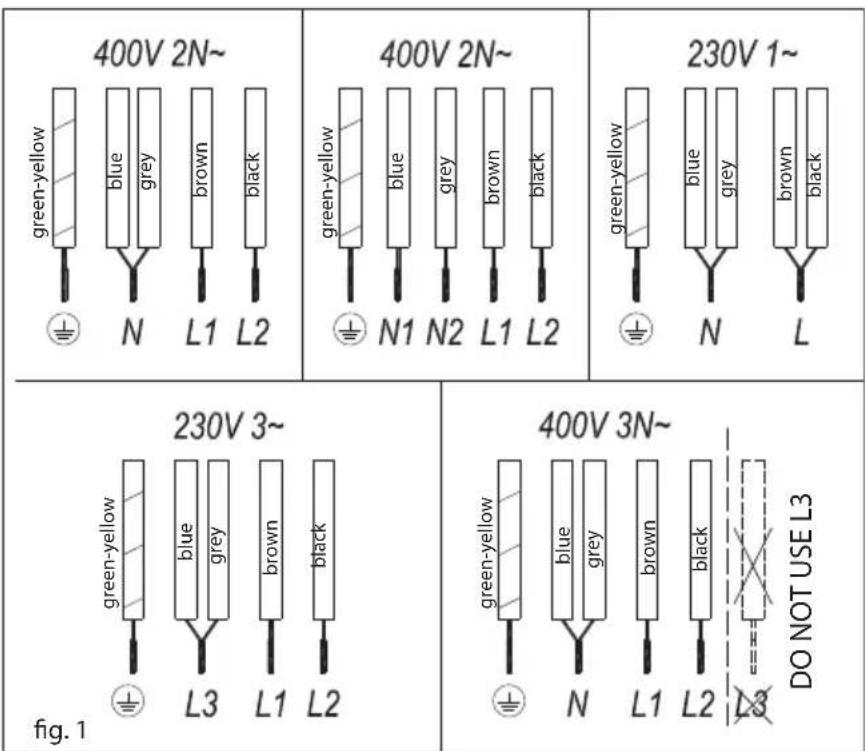
Fig.2
For a fast powering up at maximum power: with the plate at 0, touch the sensor ⊖(3) once. The plate will directly activate at level 9.
By continuing to press down on any of these two sensors -(3) or 4 , they will repeat the action every half a second, without needing to press consecutively.
TURNING OFF A PLATE
With the sensor (3) , lower the power to level 0.
The hotplate will automatically power off.
For a fast power down: no matter what the power level, by simultaneously pressing the sensors (3) and (4) , the plate will immediately power off.
When a hot plate is switched off an H will appear in its power indicator (3), if the glass surface of the related cooking area is hot and there is a risk of burns. When the temperature drops, the indicator (5) switches off (if the hob is disconnected), or otherwise a “-” will light up if the hob is still connected.
TURNING ALL PLATES OFF
All plates can be simultaneously disconnected by using the general on/off sensor① (1). All plate indicators (3) will turn off. If the heating zone turned off is hot, its indicator shows an H.
Pan detector
Induction cooking zones have a built-in pan detector. This way, the plate will stop working if there is no pan present or if the pan is not suitable.
The power indicator (5) will show a symbol to designate "there is no pan U" if, while the zone is on, no pan is detected or the pan is not suitable
If a pan is taken off the zone while it is running, the plate will automatically stop supplying energy and it will show the symbol for "there is no pan". When a pan is once again placed on the cooking zone, energy supply will resume at the same power level previously selected.
If a pan is taken off the zone while it is running, the plate will automatically stop supplying energy and it will show the symbol for "there is no pan". When a pan is once again placed on the cooking zone, energy supply will resume at the same power level previously selected.
When finished, turn off the cooking zone by using the touch controls. Otherwise an undesired operation could occur if a pan is accidentally placed on the cooking zone during the three minutes. Avoid possible accidents!
Silencer of the beep
With the cooktop in off state, press together the sensors (-)(7) y (18), during 3 seconds.
After 3 seconds. It will be shown the current status of the buzzer (on
“on” if it’s enabled, “off” if it’s disabled). With the sensors (9) and (10), it can be changed the status.
To confirm the selection press the (8).
The deactivation will not be applied to all the function, as for example the beep for on/off.
The deactivation will not be applied to all the functions, as for example the beep for on/off.
Power Function
This function supplies "extra" power to the plate, above the nominal value. Said power depends on the size of the plate, with the possibility of reaching the maximum value permitted by the generator.
1 Activate the plate corresponding to power level 9.
2 From the power level 9, press the sensor ⊕(4), and the symbol
“P” wil be displayed on the power indicator (5).
The power can be disconnected by pressing the sensor (3)⊖ or the sensors ⊖(3) y ⓣ4) together.
The Power function has a maximum duration specified in Table 2. After this time, the power level will automatically adjust to 9. A beep sounds.
On activating the Power function in one hotplate, it is possible that the performance of some of the others may be affected, reducing its power to a lower level, in which case this will be displayed on its indicator (3).
The power can be disconnected by pressing the sensor (3)⊖ or the sensors⊖ (3) y (+4) together.
Power Management function (depending on model)
Some models are equipped with a power limiting function (Power Management). This function allows the total power generated by the hob to be set to different values selected by the user. To do this, for the first minute after having connected the hob to the power supply, it is possible to access the power limiting menu.
1 With the cooktop in off state, press together the sensors (7) y (8) , during 3 seconds.
2 After 3 seconds it will be shown PL "PL" in the displays. To enter in the selection menu for power limitation, press button (+)(8).
3 With sensors (9) and 10 the limit power value can be selected.
4 Once the value has been selected (see Table 1), press the sensor ^① (8). The cooktop will be limited to the chosen value.
Table 1
| Value Power | |
| (nL), nL | no limit |
| 25 2,5 kW | |
| 30 3 kW | |
| 35 3,5 kW | |
| 40 4 kW | |
| 45 4,5 kW | |
| 50 5 kW | |
| 55 5,5 kW | |
| 60 6 kW |
If you want to change the value again, you must unplug the hob and plug it in again after a few seconds. Thus you will again be able to enter the power limiting menu.
Every time the power level of a hotplate is changed, the power limiter will calculate the total power the hob is generating. If you have reached the total power limit, the touch control will not allow you to increase the power level of that hotplate. The hob will beep and the power indicator (5) will blink at the level that cannot be exceeded. If you wish to exceed that value, you must lower the power of the other hotplates. Sometimes it will not be enough to lower another by a single level as this depends on the power of each hotplate and the level it is set at. It is possible that to raise the level of a large hotplate that of several smaller ones must be turned down.
If you use the quick switch-on at maximum power function and the said value is above the value set by the limit, the hotplate will be set to the maximum possible level. The hob will beep and the said power value will blink twice on the indicator (5).
Safety switch off function
If due to an error one or several heating zones do not switch off, the appliance will be automatically disconnected after a set amount of time (see table 2).
Table 2
| Selected power level | MAXIMUN OPERATING TIME (in hours) |
| 0 | 0 |
| 18 | |
| 2 | 8 |
| 3 | 5 |
| 4 | 4 |
| 5 | 4 |
| 6 | 3 |
| 7 | 2 |
| 8 | 2 |
| 9 | 1 |
| P | 10 or 5 minutes, readjusts to level 9 (depending on model) |
When the “safety switch off” function has been triggered, a 0is displayed if the glass surface temperature is not dangerous for the user or an H if there is a burn risk.
Keep the control panel of the heating areas clean and dry at all times.
In the event of operating problems or incidents not mentioned in this manual, disconnect the appliance and contact the TEKA technical service.
Suggestions and recommendations
* Use pots or pans with thick, completely flat bottoms.
* Do not slide pots and pans over the glass because they could scratch it.
* Although the glass can take knocks from large pots and pans without sharp edges, try not to knock it.
* To avoid damaging the ceramic glass surface, do not drag pots and pans over the glass and keep the undersides of them clean and in good condition.
* Recommended diameters of the pot bottom (see "Technical Data Sheet" supplied with the product).

Try not to spill sugar or pro- s containing sugar on the glass while the surface is hot these
EN
could damage it.
without affecting the product's essential features.
* Use small pots with small quantities of food.
Cleaning and maintenance
To keep the appliance in good condition, clean it using suitable products and implements once it has cooled down. This will make the job easier and avoid the build-up of dirt. Never use harsh cleaning products or tools that could scratch the surface, or steam-operated equipment.
Light dirt not stuck to the surface can be cleaned using a damp cloth and a gentle detergent or warm soapy water. However, for deeper stains or grease use a special cleaner for ceramic hot plates and follow the instructions on the bottle. Dirt that is firmly stuck due to being burned repeatedly can be removed using a scraper with a blade.
Slight tinges of colour are caused by pots and pans with dry grease residue underneath or due to grease between the glass and the pot during cooking. These can be removed using a nickel scourer with water or a special cleaner for ceramic hot plates. Plastic objects, sugar or food containing a lot of sugar that have melted onto the surface must be removed immediately using a scraper.
Metallic sheens are caused by dragging metal pots and pans over the glass. These can be removed by cleaning thoroughly using a special cleaner for ceramic glass hot plates, although you may need to repeat the cleaning process several times.
Warning:

A pot or pan may become
stuck to the glass due to a product having melted between them. Do not try to lift the pot while the heating zone is cold! This could break the glass.

Do not step on the glass or lean on it as it could break and cause injury. Do not use the glass as a surface for placing objects.
TEKA INDUSTRIAL S.A. reserves the right to make changes to its manuals that it deems necessary or useful,
Environmental considerations

The symbol ■ on the product or its packaging means that this product cannot be treated like ordinary household waste. This product must be taken to a recycling collection point for electrical and electronic appliances. By ensuring that this product is disposed of correctly, you will avoid harming the environment and public health, which could happen if this product is not handled properly. For more detailed information about recycling this product, please contact your local authority, household waste service or the store where you purchased the product.
The packaging materials used are environmentally friendly and can be recycled completely. Plastic components are marked >PE<, >LD<, EPS<, etc. Dispose of packaging materials, like household waste, in your local container.
Fulfillment with Energy Efficiency of the appliance: -Appliance has been tested according to standard EN 60350-2 and the obtained value, in Wh/Kg, is available in the appliance's rating plate.
Following advices will help you to save energy anytime you cook:
* Use the correct lid for each pot whenever is possible. Cooking without lid uses more energy.
* Use pans with flat bases and appropriate base diameters in order to match size of the cooking zone. Pan manufacturers usually provide top diameter of the pot that is always larger than base diameter.
* When water is used for cooking, use little quantities in order to preserve vitamins and minerals of vegetables and set the minimum power level that allows maintaining the cooking. High power level is unnecessary and a waste of energy.
If something does not work
Before calling the technical service, perform the verifications described below.
The appliance does not work:
Ensure that the power cable is plugged in.
The induction zones do not produce heat:
The container is not appropriate (it does not have a ferromagnetic bottom or is too small). Check that the bottom of the container attracts a magnet, or use a larger container.
A humming is heard when starting to cook in the induction zones:
With containers which are not very thick or not of one piece, the humming results from the transmission of energy directly to the bottom of the container. The humming is not a defect, but if you wish to avoid it anyway, reduce the power level slightly or use a container with a thicker bottom, and/or of one piece.
The touch control does not light up or, despite lighting, does not respond:
No heating zone has been selected. Be sure to select a heating zone before operating it.
There is humidity on the sensors, and/or your fingers are wet. Keep the touch control surface and/or your fingers clean and dry.
The sound of a fan is heard while cooking, which continues even after cooking has ended:
The induction zones have a fan to keep the electronics cool. This only operates when the electronic circuits get hot. It stops again when the circuits cool whether the hob is turned on or not.

The symbol will appear — on the power indicator of a hotplate:
The induction system does not find a pot or pan on a hotplate or it is of an unsuited type.
The hotplate will switch off and the
message C81 or C82 will appear on the indicators:
Excessive temperature in the electronics or on the glass. Wait for a while for the electronics to cool down or remove the pot or pan so that the glass can cool.
C85 appears on the indicator of one of the hotplates:
The pot or pan used is of an unsuited type. Switch off the hob, switch it on again and try with another pot or pan.
The appliance switches off and the message C90 appears on the power indicators (3):
The touch control detects on/off (1) sensor is covered and doesn't allow switching on the cooktop. Remove the possible objects or liquids keeping the touch control surface, clean and dry until the message disappears.
DE
ACCENSIONE DEL DISPOSITIVO
HET APPARAAT INSCHAKELEN
1
①
Country Subsidiary Address City Phone
| AustriaKüppersbusch Austria | Eitnergasse, 13 | 1231 Wien | +43 18 668 022 |
| BelgiumKüppersbusch Belgium S.P.R.L. | Doomveld Industrie, Asse 3, No. 11 - Boite 7 | 1731 Zellik | +32 24 668 740 |
| BulgariaTeka Bulgaria EOOD | Blvd. "Tsarigradsko Shosse" 135 | 1784 Sofia | +359 29 768 330 |
| ChileTeka Chile S.A. | Avd El Retiro Parque los Maitenes, 1237. Parque Enea | Pudahuel, Santiago de Chile | + 56 24 386 000 |
| ChinaTeka International Trading (Shanghai) Co. Ltd. | No.1506, Shengyuan Henghua Bldg. No.200 Wending Rd. | Xuhui, Dist. 200030 Shanghai | +86 2 153 076 996 |
| Czech RepublicTeka CZ S.R.O. | V Holesovickách, 593 | 182 00 Praha 8 - Liben | +420 284 691 940 |
| EcuadorTeka Ecuador S.A. | Parque Ind. California 2, Via a Daule Km 12 | Guayaquil | +593 42 100 311 |
| GreeceTeka Hellas A.E. | Thesi Roupaki - Aspropyrgos | 193 00 Athens | +30 2 109 760 283 |
| HungaryTeka Magyarország Zrt. | Terv u. 92 | 9200 Mosonmagyaróvár | +36 96 574 500 |
| IndonesiaPT Teka Buana | Jalan Menteng Raya, Kantor Taman A9 Unit A3 | 12950 Jakarta | +62 215 762 272 |
| MalaysiaTeka Küchentechnik (Malaysia) Sdn Bhd | 10 Jalan Kartunis U1/47, Temasya Park, Off Glenmarie | 40150 Shah Alam, Selangor Darul Ehsan | +60 376 201 600 |
| MexicoTeka Mexicana S.A. de C.V. | Blvd Manuel A. Camacho 126, Piso 3 Col. Chapultepec | 11000 Mexico D.F. | +52 5 551 330 493 |
| MoroccoTeka Maroc S.A. | 73, Bd. Slimane, Depôt 33, Route de Ain Sebaa | Casablanca | +212 22 674 462 |
| PeruTeka Küchentechnik Perú S.A. | Av. El Polo 670 local A 201, CC El polo, Surco | Lima | +51 14 363 078 |
| PolandTeka Polska Sp. ZO.O. | ul. 3-go Maja 8 / A2 | 05-800 Pruszkow | +48 227 383 270 |
| PortugalTeka Portugal S.A. | Estrada da Mota - Apdo 533 | 3834-909 Ilhavo, Aveiro | +35 1 234 329 500 |
| RomaniaS.C. Teka Küchentechnik Romania S.R.L. | Sevastopol str., no 24, 5th floor, of. 15 | 010992 Bucharest Sector 1 | +40 212 334 450 |
| Russia/PocciaTeka Rus LLC/OOO "Teka Pyc" | Neverovskogo 9, Office 417, 121170, Moscow, Russia | 121087 Россия, Москва | +7 4 956 450 064 |
| SingaporeTeka Singapore PTE Ltd | Clemenceau Avenue, 83, 01-33/34 UE Square | 239920 Singapore | +65 67 342 415 |
| SpainTeka Industrial, S.A. | C/ Cajo,17 | 39011 Santander | +34 942 355 050 |
| ThailandTeka (Thailand) Co. Ltd. | 364/8 Sri-Ayuttaya Road, Phayathai, Ratchatavee | 10400 Bangkok | +66 -26 424 888 |
| TurkeyTeka Teknik Mutfak Aletleri Sanayi Ve | Büyükdere Cad. 24/13 | 80290 Mecidiyeköy, Istanbul | +90 2 122 883 134 |
| UkraineTeka Ukraine LLC | 86-e, Bozhenko Str .2nd floor,4th entrance | 03150 Kyiv | +380 444 960 680 |
| United Arab EmiratesTeka Middle East Fze | Building LOB 16, Office 417 | P.O. Box 18251 Dubai | +971 48 872 912 |
| United Arab EmiratesTeka Küchentechnik U.A.E LLC | Bin Khedia Centre | P.O. Box 35142 Dubai | +971 42 833 047 |
| VenezuelaTeka Andina S.A. | Ctra. Petare-Santa Lucia, km 3 (El Limoncito) | 1070 Caracas | +58 2 122 912 821 |
| VietnamTEKA Vietnam Co., Ltd. | 803, FI 8th, Daiminh Convention Center, 77, Hoang Van | Thai, Tan Phu Ward, District 7, Ho Chi Minh | +84 854 160 646 |