TFVGS60X10A - Dishwasher TELEFUNKEN - Free user manual and instructions
Find the device manual for free TFVGS60X10A TELEFUNKEN in PDF.


| Product type | Built-in dishwasher |
| Brand | TELEFUNKEN |
| Model | TFVGS60X10A |
| Capacity | 12 place settings |
| Height | 820 mm - 870 mm (adjustable) |
| Width | 598 mm |
| Depth | 550 mm |
| Net weight | 38 kg |
| Power supply | 220-240 V ~ 50 Hz, 10 A |
| Total power | 1900 W |
| Heating power | 1800 W |
| Required water pressure | 0.03 MPa (0.3 bar) - 1 MPa (10 bar) |
| Energy efficiency class | A++ |
| Annual energy consumption | 258 kWh (over 280 cycles) |
| Annual water consumption | 3360 L (over 280 cycles) |
| Wash programs | 6 programs: Mini 18 min, Rapid 30 min 40°C, Eco, Express 50 min 65°C, Hygiene 60°C, Intensive 65°C |
| Options | Delay start (1-19 h), Half load, Tablets (3 in 1) |
| Noise level | 49 dB(A) |
| Tub material | Stainless steel |
| Drying type | Active drying (drying unit) |
| Water softener | Adjustable, 6 levels |
| Child safety | Yes (door lock) |
| Electrical connection | Earthed socket, fuse 10-16 A |
Frequently Asked Questions - TFVGS60X10A TELEFUNKEN
User questions about TFVGS60X10A TELEFUNKEN
0 question about this device. Answer the ones you know or ask your own.
Ask a new question about this device
Download the instructions for your Dishwasher in PDF format for free! Find your manual TFVGS60X10A - TELEFUNKEN and take your electronic device back in hand. On this page are published all the documents necessary for the use of your device. TFVGS60X10A by TELEFUNKEN.
USER MANUAL TFVGS60X10A TELEFUNKEN
natural_image
Simple line drawing of a rectangular container with a horizontal bar at the top (no text or symbols)R-Nummer:1017003900
S-Nummer:10280042
TFVGS60X10A++
INHALT
natural_image
Close-up of mechanical components with no visible text or symbolsnatural_image
Illustration of a hand holding a faucet with a valve, showing a curved arrow indicating rotation (no text or symbols)Der Zulaufschlauch
natural_image
Diagram showing two different pipe fittings: one with a handle and cap, the other with a valve and directional arrow (no text or symbols)natural_image
Mechanical assembly diagram showing a gear and bin with no visible text or symbolsnatural_image
Mechanical assembly diagram showing a clamping device with a labeled component (no text or symbols present)natural_image
Illustration of a coffee maker pouring milk from a cup into a container, with no visible text or symbols.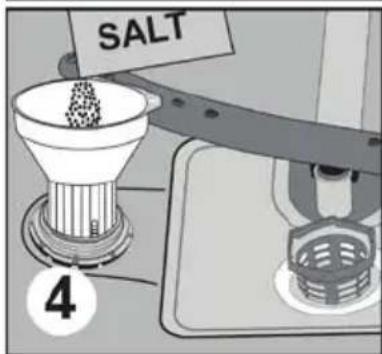
natural_image
Diagram of a device with a curved panel and a circular arrow indicating rotation (no text or symbols)natural_image
Hand turning a knob on a device, showing rotational motion (no text or symbols)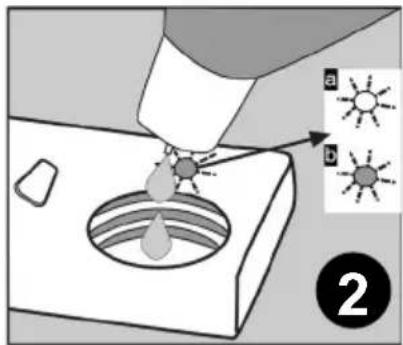
natural_image
3D wireframe diagram of a structural grid with red arrows indicating force or movement (no text or symbols)natural_image
Illustration of a hand holding a mechanical component within a wire cage (no text or symbols visible)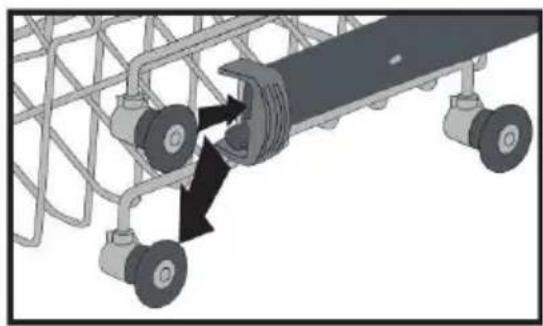
natural_image
Mechanical assembly diagram showing a vehicle chassis with wheels and a central component (no text or symbols)Unterer Korb
natural_image
3D wireframe model of a mechanical or structural assembly with multiple components and directional arrows (no text or symbols)KAPITEL-4: GESCHIRRSPÜLER BELADEN
natural_image
3D wireframe model of a mechanical assembly with internal components and directional arrows (no text or symbols)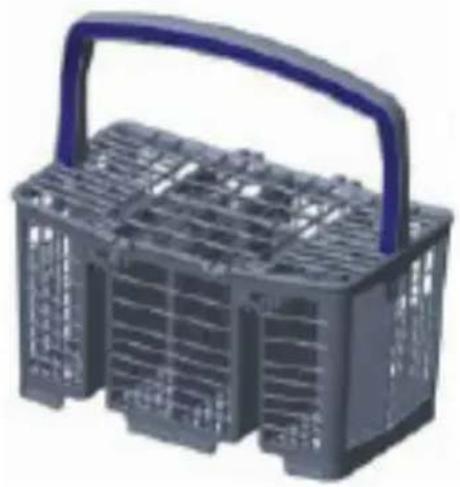
natural_image
3D model of a gray plastic basket with a blue handle and internal compartments (no text or symbols visible)Alternative Korbbeladungen
Unterkorb
natural_image
Two grayscale images showing a food basket with cutlery and cooking utensils, no text or symbols visible.Oberkorb
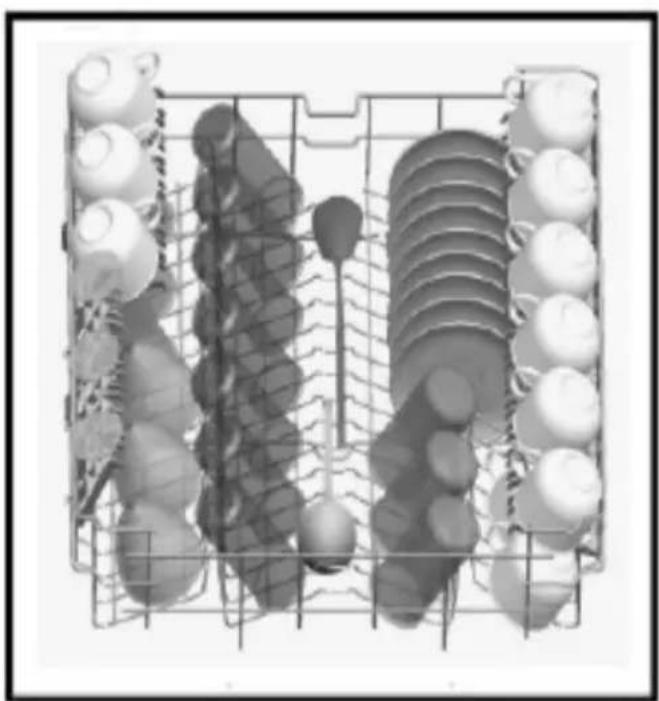
natural_image
Grid of various vegetables and fruits arranged in rows, no text or symbols visiblenatural_image
3D rendered image of a grid with a large 'X' symbol overlay, surrounded by scattered circular objects (no text or symbols present)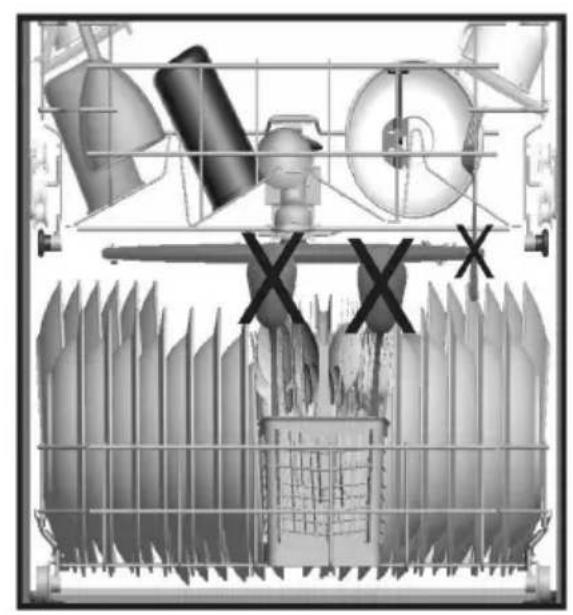
natural_image
Cross-sectional diagram of industrial equipment components including fans, pipes, and a machine (no text or labels)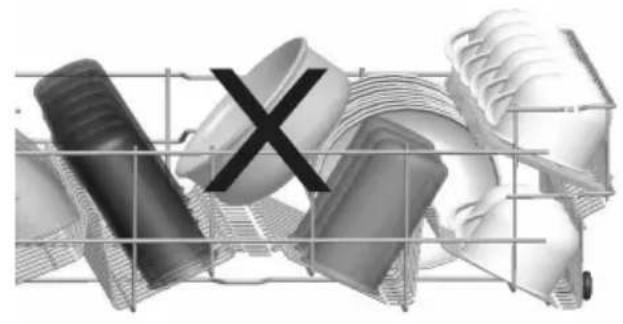
natural_image
Abstract 3D rendered mechanical parts with a black 'X' symbol overlay, no text or symbols present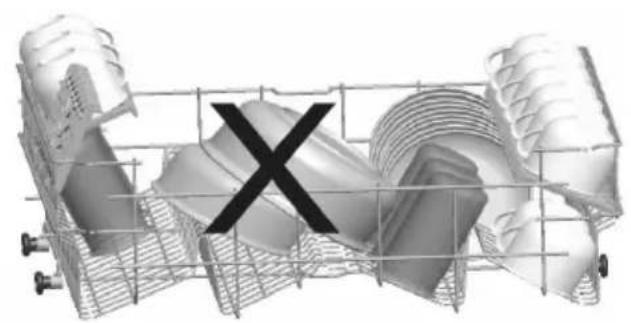
natural_image
3D rendered mechanical component with a central 'X' mark, no visible text or symbolsnatural_image
Close-up of a mechanical component with a circular dial and numbered label (1), no readable text or symbols present.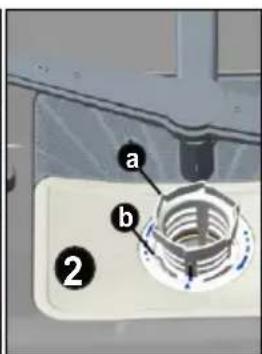
natural_image
Close-up of a white appliance control panel with labeled parts (3 and c), no readable text or symbols beyond labels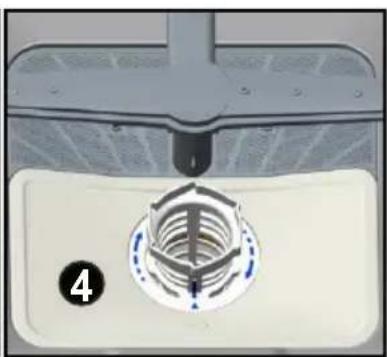
natural_image
Close-up of a mechanical component with a circular threaded feature and a numbered label (4), no readable text or symbols present.Sprüharme
natural_image
3D rendering of a stainless steel kitchen sink with a green piping fixture and a circular component (no text or symbols visible)PRODUKTDATENBLATT (Spect)
- Conformity with the standards and Test data .... 4
Safety information and Recommendations.... 5
- Recycling 5
- Safety information .... 5
- Recommendations 8
- Items not suitable for dishwashing 9
Installing the machine 9
- Positioning the machine 9
• Water connections ...... 9 - Water inlet hose 10
- Water outlet hose 10
- Electrical connection.... 12
- Prior to using the machine 13
Preparing the machine for use 13
• The importance of water decalcification ..... 13
- Filling with salt 13
- Testing strip.... 13
- Adjusting salt consumption.... 14
- Detergent usage ....15
- Filling the detergent compartment.... 16
- Combined detergent.... 16
- Filling with rinse aid and making the setting.... 17
Loading your dishwasher 18
• Alternative basket loads ..... 21
Programme descriptions 22
- Programme items 22
Switching on the machine and selecting a programme ..... 24
- Switching on the machine.... 26
- Programme follow-up 26
- Changing a programme 27
- Changing a programme with resetting 27
- Switching the machine off 27
Maintenance and Cleaning 30
- Filters 30
- Spray arms ...... 31
- Hose filter 31
Failure codes and what to do in case of failure 32
Practical and useful information.... 35
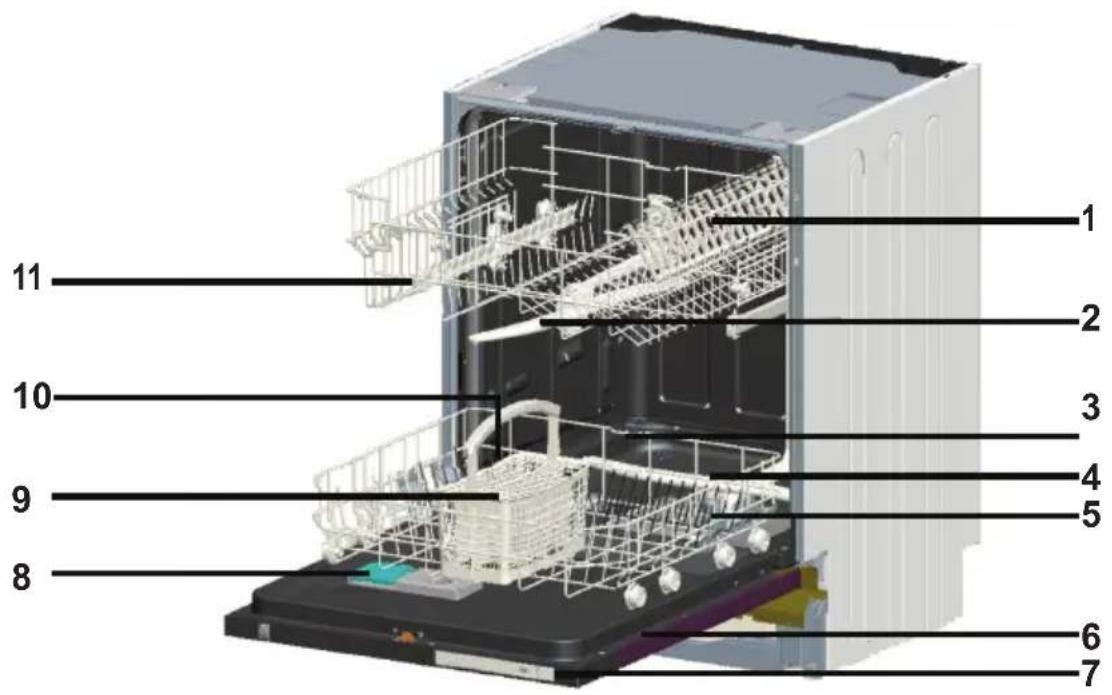
- Upper basket with racks
- Upper spray arm
- Lower basket
- Lower spray arm
- Filters
- Rating plate
- Control Panel
- Detergent and rinse-aid dispenser
- Cutlery basket
- Salt dispenser
- Upper basket track latch
natural_image
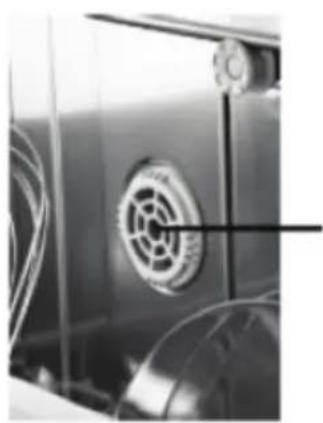
Close-up of a car's front panel with a circular emblem on the door (no visible text or symbols)12 Active Drying Unit: This system provides a better drying performance for the dishes.
Technical specifications
| Capacity 12 place settings | |
| Height 820 mm - 870 mm | |
| Width 598 mm | |
| Depth 550 mm | |
| Net Weight 38 kg | |
| Electricity input 220-240 V, 50 Hz | |
| Total Power 1900 W | |
| Heating Power 1800 W | |
| Pump Power 100 W | |
| Drain Pump Power 30 W | |
| Water supply pressure 0.03 MPa (0,3 bar)-1 MPa (10 bar) | |
| Current 10 A |
Conformity with the standards and Test data / EU Declaration of Conformity
This product meets the requirements of all applicable EU directives with the corresponding harmonised standards, which provide for CE marking.
Important Note for User : For a softcopy of this user manual, please contact the following address:
"dishwasher@standardtest.info". In your e-mail, please provide the model name and serial number (20 digits) which you can find on the appliance door.
SAFETY INFORMATION AND RECOMMENDATIONS Recycling
- Recyclable materials are used in certain components and packaging.
- Plastic parts are marked with international abbreviations: (>PE<, >PS<, >POM<, >PP<,)
- Cardboard parts have been produced from recycled paper which should be disposed of into waste paper collection containers for recycling.
- Such materials are not suitable for garbage bins. They should be delivered to recycling centres instead.
- Contact the relevant centre in order to obtain information on methods and points of disposal.
Safety Information
When you take delivery of your machine
- If you see any damage on your machine’s packaging, please notify your retailer.
- Unwrap the packaging materials as indicated and dispose of them in accordance with the rules.
Points to pay attention to during machine installation
- Choose a suitable, safe and level place to install your machine.
- Carry out the installation and connection of your machine by following the instructions.
• We recommend that the machine is installed by an authorised installer, and should only be serviced by an approved technician.
- Only original spare parts should be used with the machine.
- Before installing, be sure that the machine is unplugged.
- Check whether the indoor electrical fuse system is connected according to regulations.
- All electrical connections must match values on the rating
plate.
- Be sure that the machine does not stand on the electricity supply cable.
- Never use an extension cord or a multiple socket for making a connection. The plug should be comfortably accessible after installation.
• After installation, run it unloaded for the first time.
In daily use
- This machine is for household use; do not use it for any other purpose. Commercial usage of the dishwasher will void the guarantee.
- Do not use detergents and rinse aids that are not specifically designed for dishwashers. Improper of such items may invalidate the warranty.
- Due to risk of explosion, do not put into the machine's washing section any chemical dissolving agents such as solvents.
- Check whether plastic items are heat-resistant before washing.
- This appliance can be used by children aged from 8 years and above and persons with reduced physical, sensory or mental capabilities or lack of experience and knowledge if they have been given supervision or instruction concerning use of the appliance in a safe way and understand the hazards involved. Children should not play with the appliance.Cleaning and user maintenance shall not be made by children without supervision.
- Do not put unsuitable and heavy items above the basket capacity into your machine. Our company will not be responsible for any damage on the inner parts.
- Your dishwasher should not be opened whilst it is operating. A safety device will ensure that the machine stops if opened.
- Do not leave the door open to avoid accidents.
- Place knives and other sharp-ended objects in the cutlery basket in blade-down position.
- If the supply cord is damaged, it must be replaced by the manufacturer, its service agent or similarly qualified persons in order to avoid a hazard.
- This appliance is not intended for use by persons (including -children) with reduced physical, sensory or mental capabilities, or lack of experience and knowledge, unless they have been given supervision or instruction concerning use of the appliance by a person responsible for their safety.
- If EnergySave option is selected as “Yes”, The door will be opened at the end of the program. Do not force the door closed to avoid harm to the auto door mechanism for one minute. The door must be open for 30 minutes to get effective drying.(in models with auto door opening system)
Warning: Do not stand in front of the door after the auto-open signal sounds.
For your children's safety
- After removing the machine's packaging, make sure that the packaging material is out of reach of children.
- Do not allow children to play with or start the machine.
- Keep children away from detergents and rinse aids.
- Keep children away from the machine while it is open because there may still be residues of cleaning substances inside the machine.
- Be sure that your old machine does not pose any threat to your children. Children have been known to get themselves locked in old machines. To prevent such a situation, break your machine’s door lock and tear off the electrical cables.
In case of malfunctioning
- Any repairing performed by anyone other than authorized service personnel will invalidate your warranty.
- Prior to any repair work on the machine, be sure that the
machine is isolated from the mains. Switch off the fuse or unplug the machine.Do not pull by the cable when unplugging. Make sure to turn off the water tap.
Recommendations
- For energy and water saving, remove coarse residues on your dishes before placing the dishes into the machine. Start your machine after having fully loaded it.
- Use the pre-wash programme only when necessary.
- Place such hollow items as bowls, glasses and pots into the machine in such a way that they will face down.
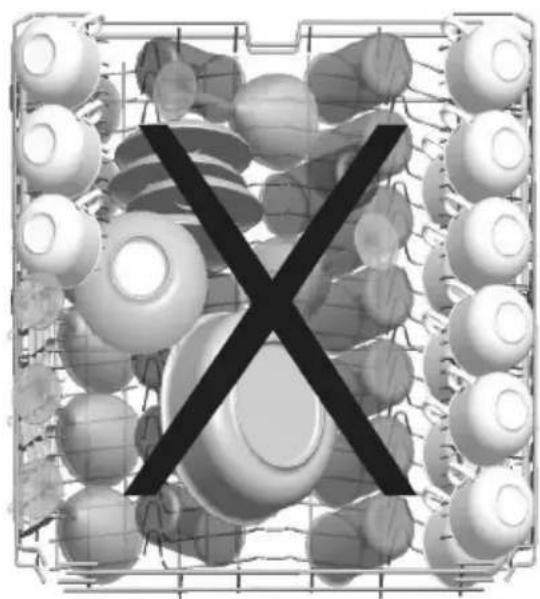
- You are not recommended to overload your machine or load it in a way other than that which is indicated.
Items not suitable for dishwashing:
- Cigarette ashes, candle leftovers, polish, paint, chemical substances, iron-alloy materials;
- Forks, spoons and knives with wooden or bone, or ivory or nacre-coated handles; glued items, items soiled with abrasive, acidic or base chemicals.
- Plastic items that are not heat-resistant, copper or tin-coated containers.
- Aluminium and silver objects (they may discolour, become dull).
- Certain delicate glass types, porcelains with ornamental printed patterns as they fade even after the first wash; certain crystal items as they lose their transparency over time, adhered cutlery that is not heat-resistant, lead crystal glasses, cutting boards, items manufactured with synthetic fibre;
- Absorbent items as sponges or kitchen rags are not suitable for dishwashing.
Warning: Take care to buy dishwasher-proof sets in your future purchases.
INSTALLING THE MACHINE
Positioning the machine
When determining the installation place, choose an accessible place for easy loading and unloading of the dishes.
Do not put your machine in any location where there is the probability for the room temperature to fall below 0^ C.
Before positioning, take the machine out of its packaging by following the warnings located on the package.
Position the machine close to a water tap or drain. You need to site your machine, taking into consideration that its connections will not be altered once they are made.
Do not grip the machine by its door or panel in order to move it.
Take care to leave a certain clearance from all sides of the machine for moving comfortably back and forth during cleaning.
Make sure that the water inlet and outlet hoses do not get squeezed while positioning the machine. Also, make sure that the machine does not stand on the electrical cable.
Adjust the machine's adjustable feet so that it can stand level and balanced. Proper positioning of the machine ensures problem-free opening and closing of the door.
If the door of machine does not close properly, check if the machine is stable on the floor; if not, adjust the feet and ensure its stable position.
Water connection
Indoor plumbing must be suitable for installing a dishwasher.
Also, we recommend that you fit a filter at the entrance of your place or apartment so as to avoid any damage to your machine because of any contamination (sand, clay, rust etc.) that might be occasionally carried in through the mains water supply or the indoor plumbing, and to prevent such complaints as yellowing and formation of deposits after washing.
natural_image
Illustration of a hand holding a faucet with a valve, showing a curved arrow indicating rotation (no text or symbols)Water inlet hose
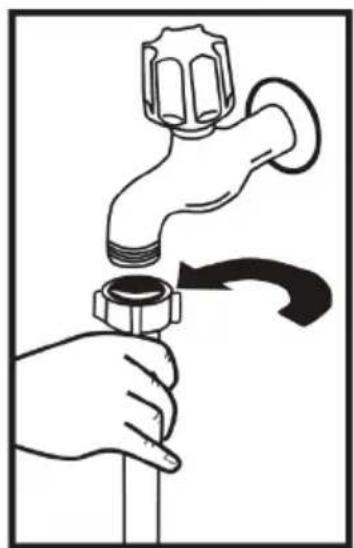
Do not use the water inlet hose of your old machine. Use the new one supplied with your machine instead. If you will connect a new or long - unused water inlet hose to your machine ,run water through it for a while before making the connection. Connect the water inlet hose directly to the water inlet tap. The pressure supplied by the tap should be at a minimum of 0.03 Mpa and and at a maximum of 1 Mpa.If the water pressure is above 1 Mpa,a pressure-relief valve should be fitted inbetween.
After making connections, the tap should be turned on fully and checked for water tightness. For the safety of machine, turn off the water inlet tap after finishing each wash programme.
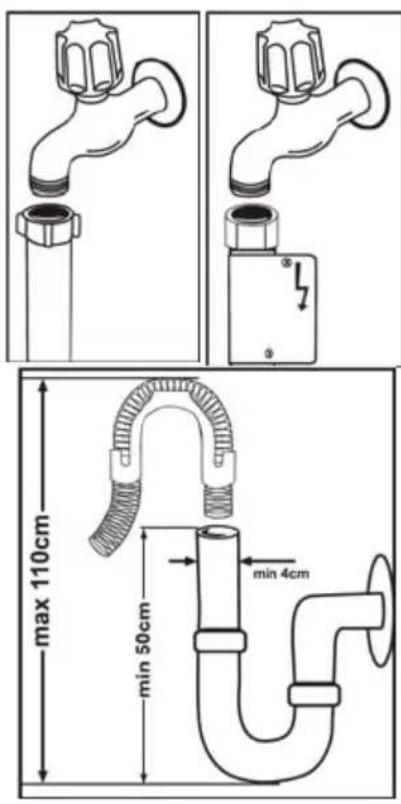
NOTE: Aquastop water etc. spout is used in some models. In case of using Aquastop, a dangerous tension exists. Do not cut the Aquastop water spout. Do not let it get folded or twisted.
Water outlet hose
The water drain hose can be connected either directly to the water drain hole or to the sink outlet spigot. Using a special bent pipe (if available), the water can be drained directly into the sink via hooking the bent pipe over the edge of the sink. This connection should be between 50 and 110 cm from the floor plane.
Warning: When a drain hose longer than 4 m is used, the dishes might remain dirty. In that case, our company will not accept responsibility.

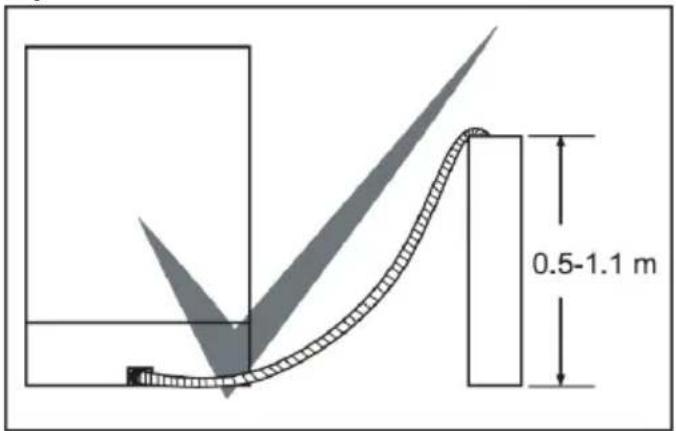
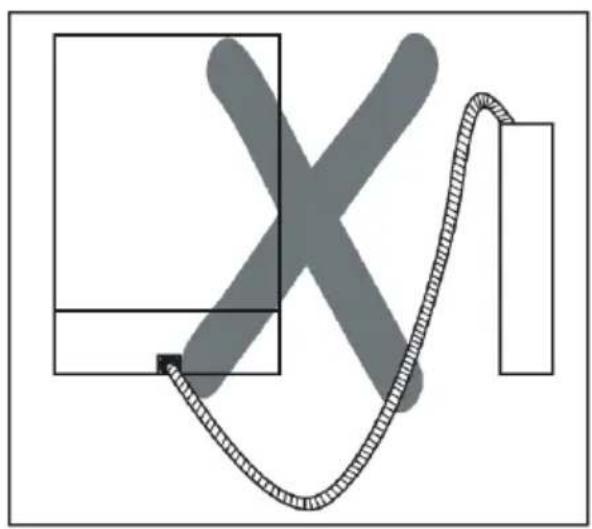
natural_image
Abstract diagram with a curved line and shaded X shape, no text or symbols presentElectrical connection
The earthed plug of your machine should be connected to an earthed outlet supplied by suitable voltage and current. If there is no earthing installation, have a competent electrician to carry out it. In case of usage without earthing installed, our company will not be responsible for any loss of usage that might occur.
The indoor fuse current value should be 10-16 A.
Your machine is set according to 220-240 V. If the mains voltage in your location is 110 V, connect a transformer of 110/220 V and 3000 W inbetween.
The machine should not be plugged in during positioning.
Always use the coated plug supplied with your machine.
Running in low voltage will cause a decline in washing quality. The machine's electrical cable should be replaced by an authorised service or an authorised electrician only. Failure to do so may lead to accidents.
For safety purposes, always make sure to disconnect the plug when a wash In order not to cause an electric shock, do not unplug when your hands are wet.
When disconnecting your machine from the mains supply, always pull from the plug. Never pull the cord itself.
Prior to using the machine for the first time
- Check whether the electricity and supply water specifications match the values indicated by the installation instructions for the machine.
- Remove all packaging materials inside the machine.
- Set the water softener.
- Add 1 kg salt into the salt compartment and fill with water up to a level at which it will almost overflow.
- Fill the rinse aid compartment.
PREPARING THE MACHINE FOR USE
The importance of water decalcification
For a good washing function, the dishwasher needs soft, i.e. less calcareous water. Otherwise, white lime residues will remain on the dishes and the interior equipment. This will negatively affect your machine's washing, drying and shining performance. For this reason, a softener is system used on dishwashers. The softener system has to be refreshed so that it operates with the same performance also during the next wash. For this purpose, dishwasher salt is used.
Filling with salt
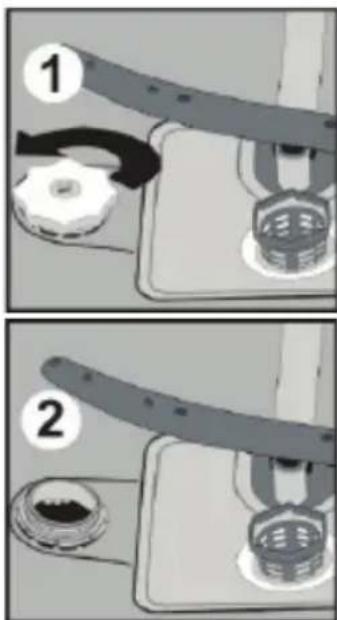
Use softener salt specifically produced for use in dishwashers. To put softener salt, first remove the lower basket and then open the salt compartment cap by turning it counter clockwise 1 2At first use fill the compartment with 1kg salt and water 3 at overflowing level If available, using the funnel 4 provided will make filling easier. refit the cap and close it After every 20th-30th wash, add salt into your machine until it
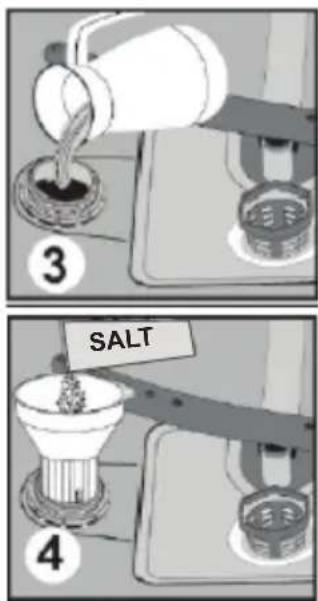
fills up (approx. 1kg) Fill the salt compartment with water at first use only. We recommend to use smallgrained or powder softener salt. Do not put table salt into your machine. Otherwise, the function of the softener compartment may decrease over time. When you start machine, the salt compartment gets filled with water. Therefore, put the softener salt prior to starting your machine. This way, overflowing salt gets immediately cleaned up through the wash operation. If you will not wash any dishes immediately after putting salt, then run
a short washing program with an empty machine in order to avoid corrosion on your machine due to the salt overflow while filling in the salt container. In order to understand whether or not the amount of softener salt in machine is sufficient, check the transparent section on the salt compartment cap. There is sufficient salt if the transparent section is green. Salt has to be added if it is not green.
Testing strip
The washing effectiveness of your machine depends on the softness of the tap water. For this reason, your machine is equipped with a system that reduces the hardness in mains water supply. The washing effectiveness will increase when the system is correctly set. To find out the water hardness level of water in your area, contact your local water board or determine water hardness level by using the test strip(if available).
| Open the testing strip | Run water through your tap for 1 min. | Keep the testing strip in water for 1.sec. | Shake the testing strip after taking it out of water | Water for 1 min. | Make your machine's water hardness setting according to the result obtained through the testing strip. | ||
| Level 1 | No Lime | ||||||
| Level 2 | 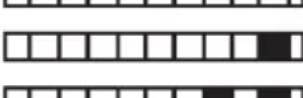 | Very low lime content | |||||
| Level 3 | Low lime content | ||||||
| Level 4 | Medium lime content | ||||||
| Level 5 | Lime content | ||||||
| Level 6 | High lime content | ||||||
Adjusting salt consumption
| Water hardness level | German hardness level dH | French hardness level dF | British hardness level dE | Hardness Level Indicator |
| 10-5 0-9 0-6 | L1 is seen | on display. | ||
| 2 | 6-11 | 10-20 | 7-14 | L2 is seen on display. |
| 3 | 12-17 | 21-30 | 15-21 | L3 is seen on display. |
| 4 | 18-22 | 31-40 | 22-28 | L4 is seen on display. |
| 5 | 23-31 | 41-55 | 29-39 | L5 is seen on display. |
| 6 | 32-50 | 56-90 | 40-63 | L6 is seen on display. |
If the hardness of the water is above 90 dF (French hardness) or if you are using well water; you are recommended to use filter and water refinement devices.
NOTE: Hardness level is adjusted to level 3 as a factory setting.
After resetting the machine, with the door open;
While touching the program button 3 turn on the machine with the power button 1.
Continue to touch the program button until "SL" appears on the display 2.
Release the program touch button when “SL” disappears from the display 2.
The current water hardness setting will appear on the display 2.
Press the program touch button 3 to select the desired level according to Table of Water Hardness Level Settings.
At any pressure on the program touch button 3 will increment the hardness level.
The level changes from Level 6 to Level 1 when the program button 3 is pressed.
To save the setting to memory, power off the machine 1.
NOTE: The first time the hardness level is set, the default setting is level 3.
Detergent usage
Use a detergent specifically designed for use in domestic dishwashers.
You can find powder, gel, and tablet detergents that have been designed for household dishwashers.
Detergent should be put into the compartment prior to starting the machine. Keep your detergents in cool, dry places out of reach of your children.
Do not fill detergent into the detergent compartment more than required; otherwise it may cause scratches on your glasses as well as lead to a poorly dissolved detergent.
Should you need more information concerning the detergent you will use, contact detergent manufacturers directly.
Filling the detergent compartment
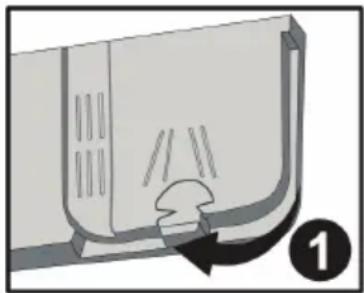
Push the latch to open the detergent container as shown in the image. 1 The detergent pod has level lines inside. The detergent pod can take totally 40 cm ^3 detergent. Open the dishwasher detergent and pour into the larger compartment b 25 cm ^3 if dishes are heavily soiled or less 15 cm ^3 .2 If dishes have been kept dirty for a very long time, dried food wastes on them or overly loaded the dishwasher, pour a 5cm ^3 detergent into the prewash compartment and start machine. You may have to add more detergent into your machine, depending on the degree of soil and on the water hardness level in your area.
natural_image
Diagram of a door handle with a curved arrow indicating rotation or movement (no text or symbols)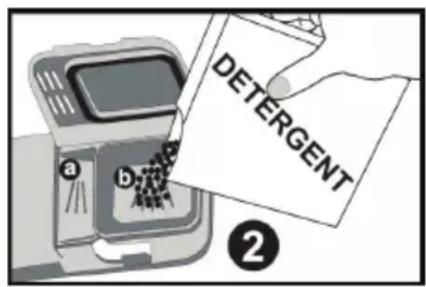
Combined detergents
Combined detergents may include various properties. Before using the detergent, read the instructions carefully. Generally combined detergents produce sufficient results under certain conditions only. Points to consider when using this type of products:
- Check the specifications of the product whether it is combined or not.
- Check if the detergent used is appropriate for the hardness of mains water.
- Observe the instructions of products on packagings.
- Always put the tablets into the detergent compartment in the detergent dispenser.
- You need to contact the manufacturers and find out about the suitable conditions of use.
- If you use appropriate products, they ensure savings in salt and/or rinse aid consumption.
- The scope of warranty for your machine does not cover any complaints caused by the use of these types of detergents.
Recommended usage: If you want to obtain better results while using combined detergents, add salt and rinse aid into your machine and adjust the water hardness setting and the rinse aid setting to the lowest position.

Solubility of the tablet detergents produced by different companies can vary depending on the temperature and time. Therefore, it is not recommended to use such detergents in short programs. It is more suitable to use powder detergents in such programs.
Warning: Should any problem, which you have not encountered before arise with the use of this type of detergents, contact the detergent manufacturers directly.
When you stop using combined detergents
- Fill the salt and rinse aid compartments.
- Adjust the water hardness setting to the highest position and run an empty-wash.
- Adjust the water hardness level.
• Make the suitable rinse aid setting.
Filling with rinse aid and making the setting
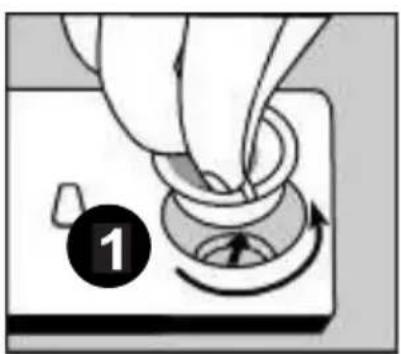
Adequate amount of rinse aid prevents white water drops, lime stains, white film stripshaped. It also increases drying performance. To put rinse aid, remove the rinse aid compartment cap by turning it(1). Fill the rinse aid compartment with rinse to add rinse aid level indicator becomes dark;(2) refit the cap and close it by turning it in a way that the nails, correspond to one another. By checking the rinse aid level indicator on the detergent dispenser, you can understand whether or not your machine needs rinse aid. A dark indicator b means that there is rinse aid in the compartment, while a light indicator a shows that you need to fill the compartment with rinse aid.
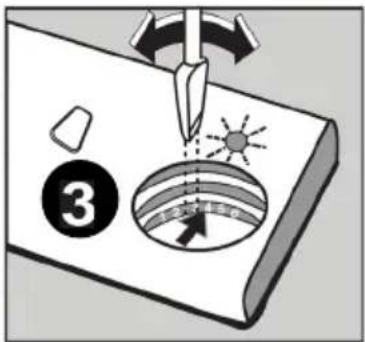
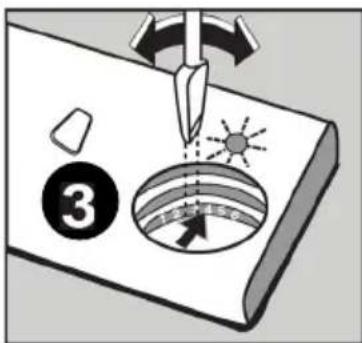
The rinse aid level adjuster can be set to a position between 1 and 6. Factory setting for rinse aid is the position (3).
natural_image
Hand turning a knob with a circular dial and arrow, no text or symbols visible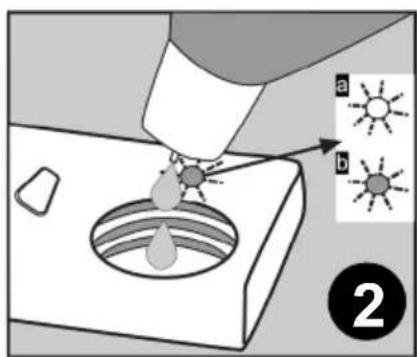
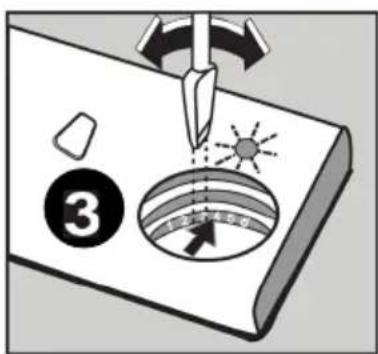
You need to increase the degree of the adjuster if water stains form on your dishes after a wash, whereas you need to decrease the degree if a blue stain is left when wiped by hand. 3
Warning: Use only those rinse aid materials which are allowed for use in the machine. As rinse aid residues left as a result of overflowing will create extremely high amounts of foam and thus reduce the washing performance, remove the excess amount of rinse aid by wiping it with a rag.
LOADING YOUR DISHWASHER
If you properly place your dishes into the machine, you will be using it in the best way in terms of energy consumption, washing and drying performance.
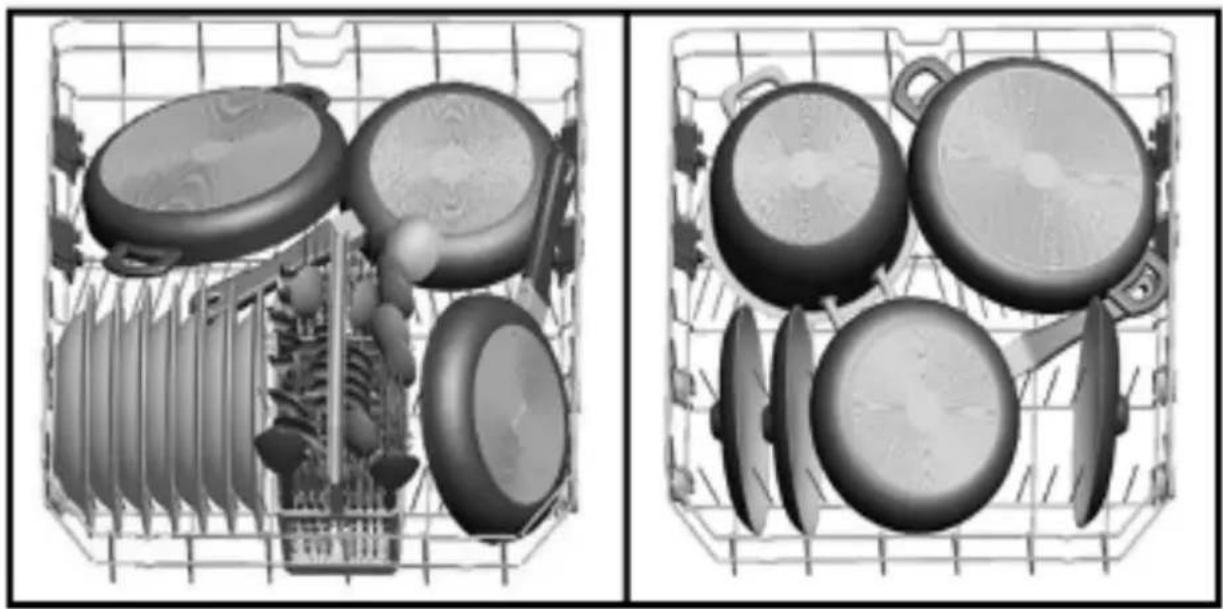
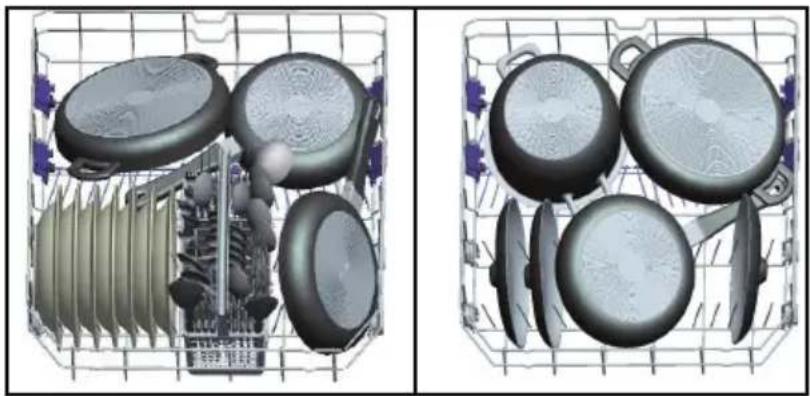
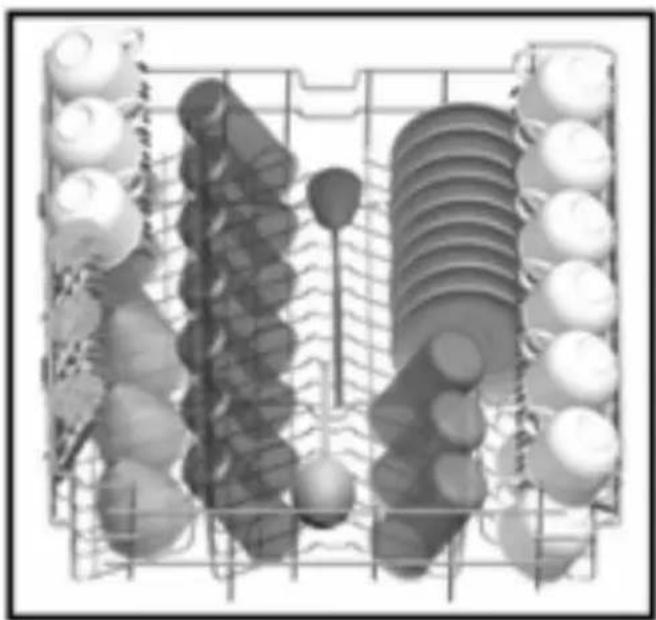
There are two separate baskets for you to load your dishes into your machine. You can load into the lower basket such round and deep items as pots with long handles, pot lids, plates, salad plates, cutlery sets.
The upper basket has been designed for tea plates, dessert plates, salad bowls, cups and glasses. When placing long-stem glasses and goblets, lean them against the basket edge, rack or glass supporter wire and not against other items. Do not lean long glasses against one another or they cannot remain steady and may receive damage.
It is more appropriate to locate the thin narrow parts into the middle sections of baskets.
You can place spoons among the other cutlery sets in order to prevent them from sticking to one another. You are recommended to use the cutlery grid in order to obtain the best result.
To avoid any possible injuries, always place such long-handle and sharp-pointed dishes as serving fork, bread knife etc. with their sharp points facing down or horizontally on the baskets.
Warning: Place your dishes into your machine in a way that they will not prevent the upper and lower spray arms from spinning.
Top basket
Height Adjustable Rack
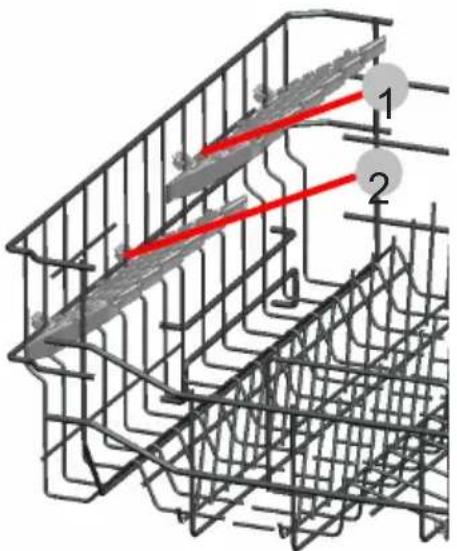
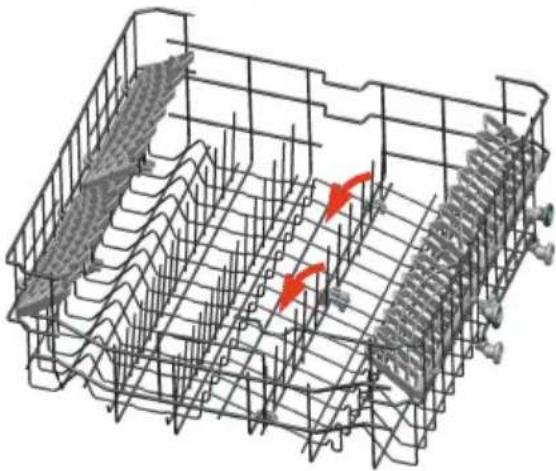
These racks are designed to increase the capacity of the top basket. You can place your glasses and cups on the racks. You can adjust the height of these racks. Thanks to this feature, you can place different sizes of glasses under these racks.
Thanks to height adjustment plastics mounted on the basket, you can use your racks in 2 different heights. In addition, you can place long forks, knives and spoons on these racks laterally, so that they do not block the revolution of propeller.
natural_image
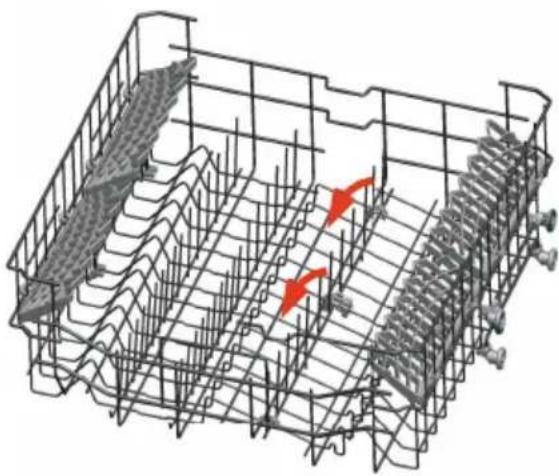
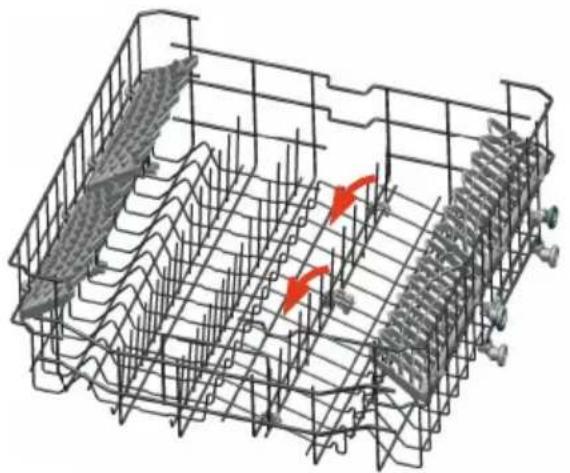
3D wireframe diagram of a structural grid with red arrows indicating force or movement (no text or symbols)Foldable racks on the upper basket are designed in order to let you place big items easier such as pots, pans, etc. If requested, each part can be folded separately, or all of them can be folded and larger spaces can be obtained. You can use foldable racks by raising them upwards, or by folding down.
Top basket height adjustment
Top basket of your machine is in upper position. When it is in this position, you can place big items such as pans, etc. on lower basket. When you take top basket to lower position, you can place and wash big sized plates on the top basket.
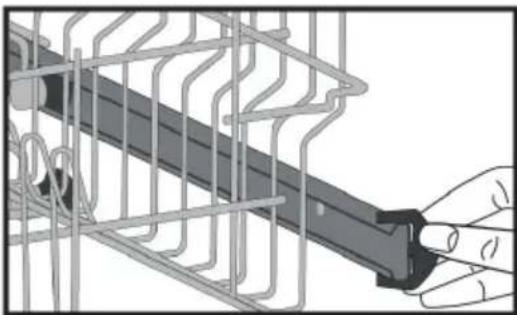
Use wheels in order to change the basket height. Open the basket retaining parts at the end of top basket rails by turning them to the sides, and take the basket out. Change the position of the wheels; reinstall the basket to the rail, and close basket retainer parts. In this way, you take the top basket to lower position.
natural_image
Illustration of a hand holding a mechanical component inside a wire cage (no text or symbols visible)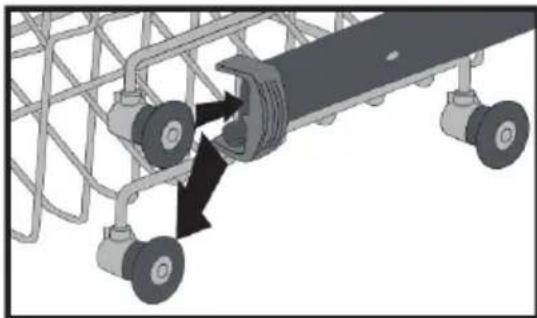
natural_image
Mechanical assembly diagram showing a conveyor belt system with wheels and a central rotating component (no text or symbols)Lower Basket
Folding Racks
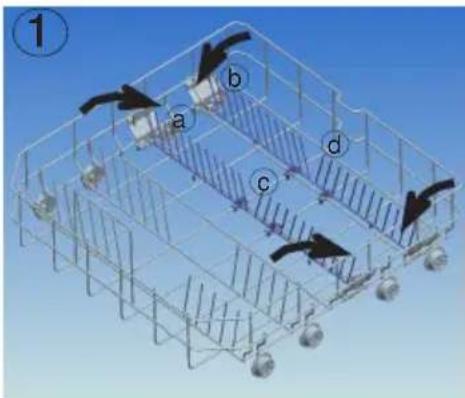
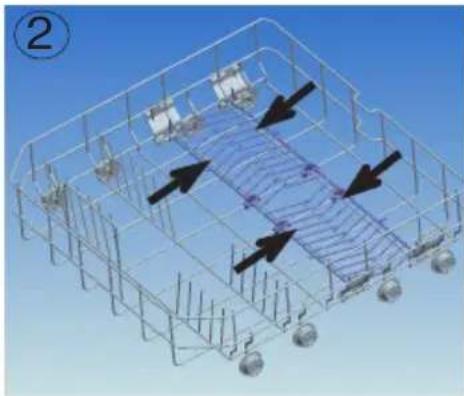
Folding racks consisting of four parts that are located on the lower basket of your machine are designed in order to let you place big items easier such as pots, pans, etc. If requested, each part can be folded separately, or all of them can be folded and larger spaces can be obtained. You can use folding racks by raising them upwards, or by folding.
natural_image
3D wireframe diagram of a grid structure with directional arrows, no visible text or symbolsCHAPTER-4: LOADING YOUR DISHWASHER
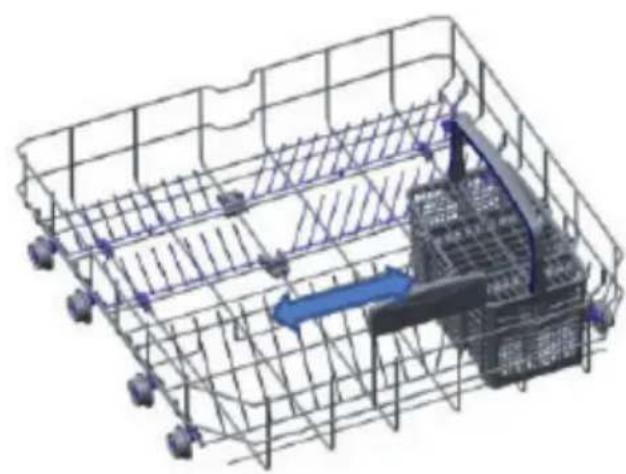
The movable cutlery basket can slide between the front and rear wires of the bottom basket.
natural_image
3D wireframe diagram of a warehouse or storage facility with internal components and directional arrows (no text or symbols)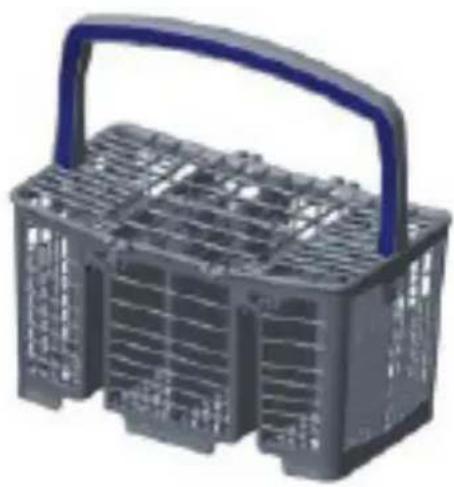
natural_image
3D rendered image of a gray plastic basket with a blue handle and grid pattern (no text or symbols)Alternative basket loads Lower Basket
natural_image
Two 3D renderings of kitchen utensils in a grid, showing various kitchenware and appliances (no text or symbols visible)Top basket
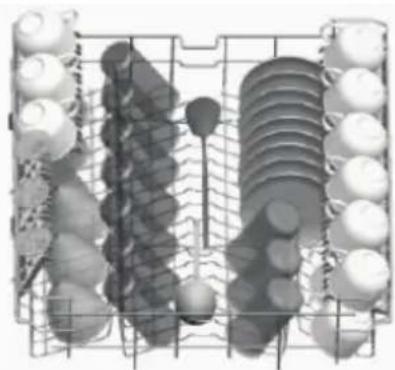
natural_image
Grid of circular objects arranged in rows and columns, no visible text or symbolsFaulty loads
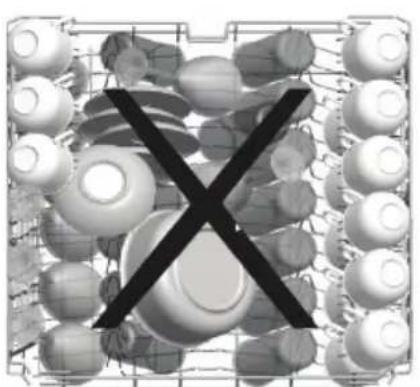
natural_image
Abstract 3D rendering of stacked spherical objects with a black X symbol overlay (no text or symbols present)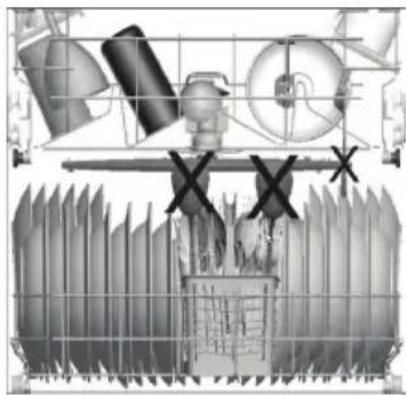
natural_image
Industrial equipment diagram showing workers, machinery, and a fence with no visible text or symbols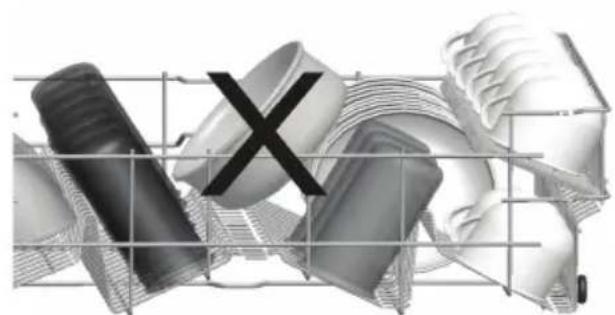
natural_image
Abstract 3D rendered image of mechanical parts and a cross symbol, no text or labels present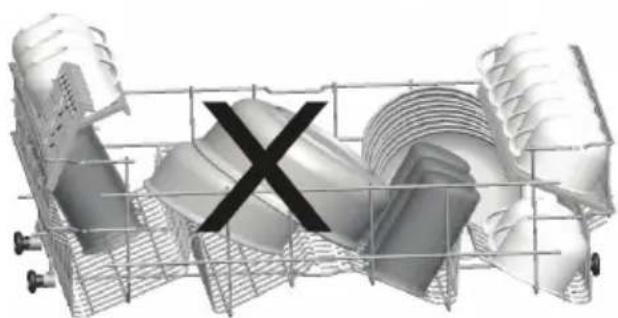
natural_image
3D rendered mechanical component with a black 'X' mark overlay, no visible text or symbolsImportant Note for Test Laboratories
For detailed information on performance tests, please contact following address: “dishwasher@standardtest.info”. In your email, please provide the model name and serial number (20 digits) which you can find on the appliance door.
Program items
| Programme No | |||
| Programme names and temperatures | Mini 18' - (P1) Quick 30'40°C(P2) | Eco(reference) (P3) | |
| Type of food waste | Pre-wash to rinse and loosen residue awaiting full load then select a programme | Coffee, milk, tea, cold meats, vegetables, not kept for long | Coffee, milk, tea, cold meats, vegetables, not kept for long |
| Level of soil light medium | |||
| Detergent amountB: 25 cm3/15 cm3A: 5 cm3 | A+B A+B | ||
| 30°C Wash 40°C | Wash 50°C Wash | ||
| Hot rinse Cold Rinse Cold Rinse | |||
| End Hot rinse Hot rinse | |||
| End Dry | |||
| End | |||
| Programme duration(min.) | 18 30 187 | ||
| Electricity consumption(kW hours) | 0,57 0,88 0,90 | ||
| Water consumption(liters) | 7,7 10,9 12,0 | ||
Warning: Short programs do not include a drying step. The values declared above are the values obtained under laboratory conditions according to relevant standards. These values can change depending on conditions of product's use and environment (network tension, water pressure, water input temperature and environment temperature).
Program items
| Programme No | |||
| Programme names and temperatures | Super 50'65°C (P4) | Hygiene 60°C (P5) | Intensive 65°C (P6) |
| Type of food waste | Soups, sauces, pasta, eggs, pilaf, potato and oven dishes, fried foods | Dishes with dense dirt waiting for a long time or requiring hygienic washing | Soups, sauces, pasta, eggs, pilaf, potato and oven dishes, fried foods |
| Level of soil medium | heavy medium | ||
| Detergent amountB: 25 cm3/15 cm3A: 5 cm3 | A+B A+B A+B | ||
| 65°C Wash 60°C Wash 45°C Wash | |||
| Warmish Rinse 65°C Wash 65°C Wash | |||
| Hot rinse Cold Rinse Cold Rinse | |||
| End 50°C Wash Hot rinse | |||
| Hot rinse Dry | |||
| Dry End | |||
| End | |||
| Programme duration (min.) | 50 154 117 | ||
| Electricity consumption (kW hours) | 1,29 1,75 1,55 | ||
| Water consumption (liters) | 10,7 18,5 17,2 | ||
SWITCHING ON THE MACHINE AND SELECTING A PROGRAMME
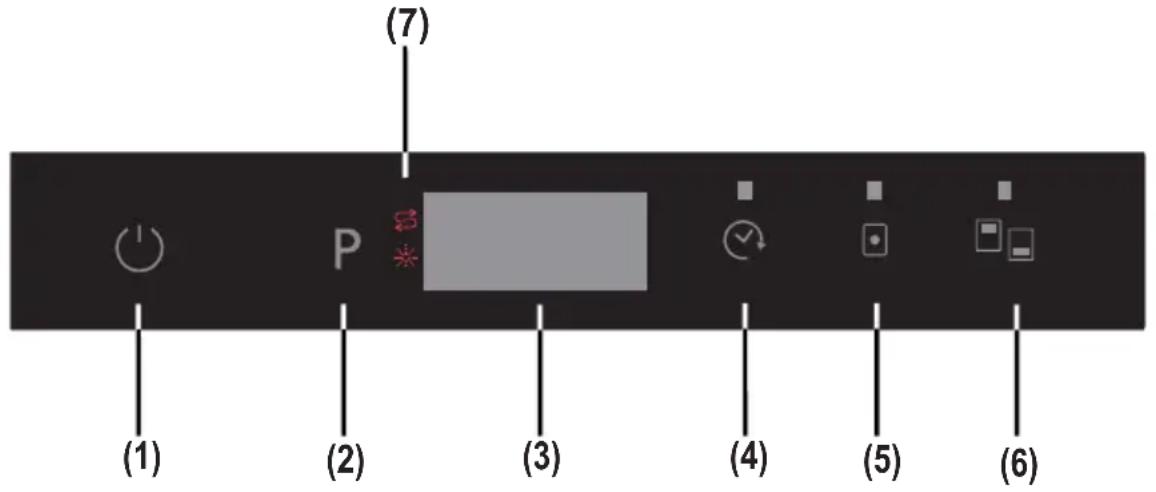
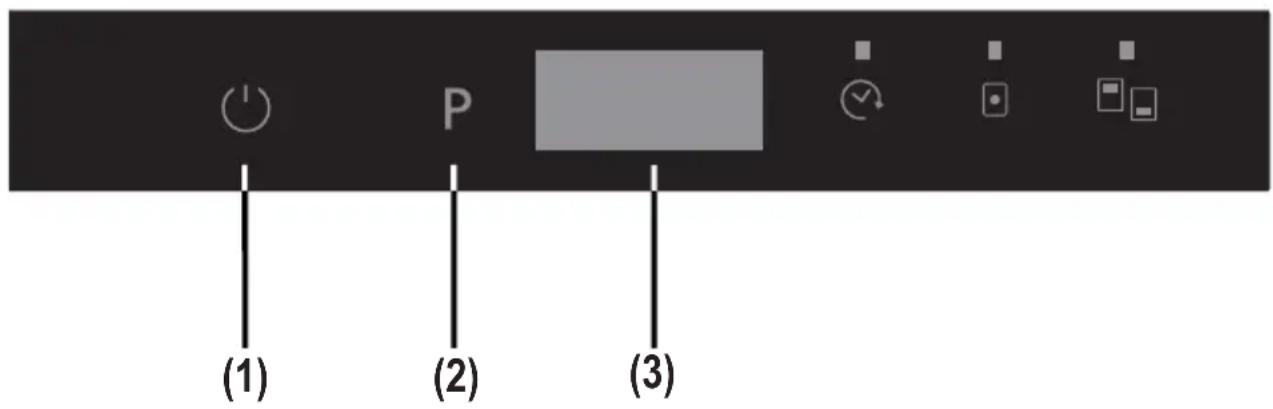
1.) Power On/Off Touch Button
After the Power On/Off touch is pressed, (--) two dashes appear in the program display, until touching any button. Touch the "On/Off touch button" with your fingertip for 1 sec to turn the machin on or off.
2.) Program Touch Button
Use the Program touch button to select a suitable program for your dishes.
3.) Program Display
Program display indicates the times of the programs and the remaining time during the program flow. You can also follow-up the selected programs by this display.
4.) Delayed Start Touch Button
You can delay the start time of a selected program from 1 to 19 hours by pressing the Delayed start touch button of the machine. When the Delayed start touch button is pressed, "1h" appears on the program display. If you continue pressing the delay timer touch button, the time will increment from 1 to 19 shown on the display. The delayed start can be activated by selecting the delay time and the desired washing program with the Program touch button. It is also possible to select the program first and the delayed start afterwards, depending on the last value entered. To cancel Delayed start, either select the delay timer as "0h", or hold the program touch button for 3 seconds. The display will inform you how many seconds you need to hold the button by "3-2-1.." to cancel the delay.
Note: If the delay touch button is pressed and held, the delay timer starts changing faster (the rate of change is proportional to the hold pressing time). When the Delayed start touch button is pressed for a long period of time, the counter stops at "h:00".
5.) Tablet Detergent Touch Button (3 in 1 button)
Press Tablet detergent touch button when you use combined detergents that include salt and rinse aid.
6.) Half Load Touch Button
By using the 'half load' feature of your dishwasher, you can reduce the duration of your selected programs, and decrease your power and water consumption by using less electricity and water.
7.) Salt Warning Indicator
To determine whether there is sufficient softening salt in the machine, check to see if the Salt warning light on the display is lit. When Salt warning light starts coming on, add salt to the salt compartment.
Rinse aid Warning Indicator
To determine if there is sufficient rinse aid in the machine check the rinse aid warning light on the display. When the rinse aid warning light starts coming on, add rinse aid to the rinse aid compartment.
End of Program
The machine makes a buzzer sound 5 times when the program is completed. When the door is opened after the selected washing program is completed, the buzzer activation will end and a '0' character is showed on display.
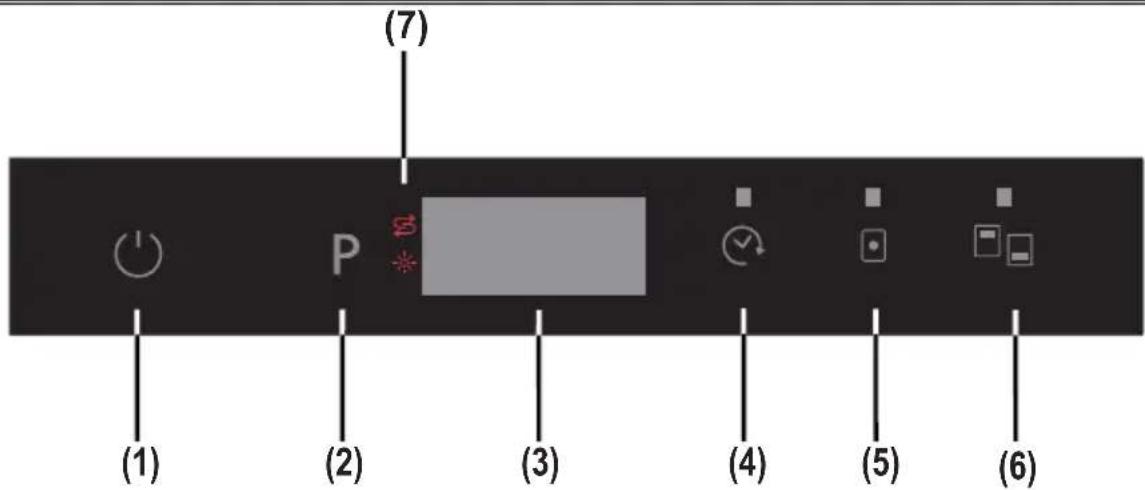
Switching on the machine
1- Touch the power On/Off key.
When the machine is powered on, when the On/Off touch button (1) is pressed, two dashes appear in the program display.
2- Select a program suitable for the dishes via the Program touch button (2). When selecting a program with the program touch button (2), the program selected (P1,P2,etc) appears on the program display (3), from (P1 to P6) and the duration of the program are displayed alternately for 3 sec. for the program and then 1 sec. for the duration time.
3- If desired, you can choose additional functions. (4-5-6)
4- Close door. The program starts automatically.
Note: If you decide not to start to machine after selecting the program, press the on/off touch button (1). The machine will be ready for the new program selection when you press on/off touch button (1) again. Select the new program by pressing the program touch button (2).
Program follow-up
- If you have a "InfoLED" function in your dishwasher model, you can follow the program via InfoLED. During machine is working you can see the light from InfoLED, when program is completed InfoLED turns off.
- When the door is opened after the selected washing program is completed, the buzzer activation will end and a '0' character is showed on display (3).
- If the door is opened during washing cycle, the remaining time of the selected program is shown on the display (3).
- The machine makes a buzzer sound 5 times when the program is completed.
Changing a program
To change the program while a wash program is going.
1- Open the door and select a new program by pressing the Program touch button (2).
2- After closing the door, the newly selected new program start from the point where the original program reached, but with the new parameters (temperature, cycles) of the new program.
Note: When opening the door of the machine in order to stop the washing program before it has completed, first carefully open the door slightly in order to avoid water spillage.
Cancelling and resetting a program
To cancel a program currently in progress or in a standby position
1- Open the door of the machine. The last selected program will appear on the display (3).
2- Press and hold the program touch button (2) for 3 seconds. The display (3) will count from "3 to 1" and then show "0:01" to indicate that cancelling is ready
3- After the door is closed, the discharge process starts. The machine will empty the water in it for about 30 seconds. When the program is cancelled, the machine will make a buzzer sound 5 times
Note: When the door of the machine is opened in order to stop the washing program before it has completed, first carefully open the door slightly in order to avoid water spillage.
Switching the machine off
After program is completed, you can switch your machine off by using the Power On/Off touch button (1).
Note: To improve the drying performance, after the buzzer sound indicating the end of the wash program stops, leave the door of the machine ajar in order to hasten the drying or select an energy save option before starting a program to speed up the drying performance.
Note: If the machine door is opened during washing or the power is cut off, the machine will restart the program when the door is closed or the power is restored.
Program & option compatibility
“-” Function cannot be selected “x” function can be selected.
Compatibility between options
| OPTIONS Delayed Start Half load | (modes) | Tablet | |
| Delayed Start | XX- | ||
| Half load (modes) | -XX | ||
| Tablet | X-X | ||
Buzzer sound up
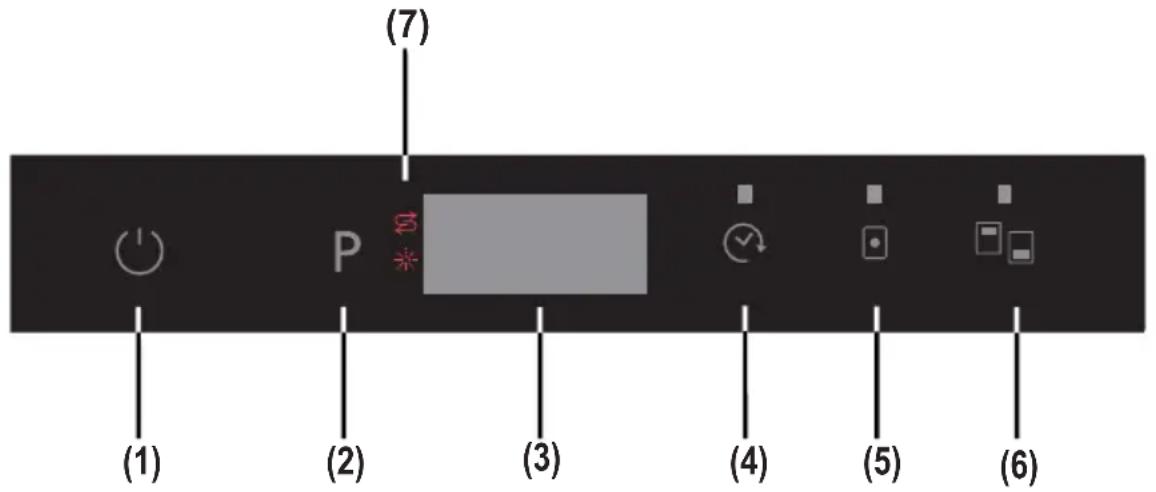
Voice set up can be adjusted arbitrarily.
First energize the machine via main switch (1) (if it is in OFF position).
Pressurize to “Tablet” (5) and “Half Load” (6) touch buttons for 3” at the same time to set the voice level.
While pressing “Tablet” (5) and “Half Load” (6) touch buttons (during 3sec.), display shows character of countdowning from 3 sec to 1 sec.
- If voice controlling is done at first time, at the end of 3 seconds, “S03” is shown in the display.
- If voice controlling is done before, At the end of 5 seconds, last setted level is shown on the display (from "S00" to "S03").
The user can increase or decrease the voice level with "Tablet" (5) and "Half Load"
(6)touch buttons. The characters must be as follow;
- By each pressing "Half Load"(6) touch button;
1) Display screen changes from "S00" to "S03".
2) Level of sound increases as stepped way;
- By each pressing "Tablet" (5) touch button;
1) Display screen changes from "S03" to "S00".
2) Level of sound decreases as stepped way.
"S00" level means that all voices are off.
To exit volume adjustment mode, switch off the machine.
The last volume level selected will be stored in memory.
Note: From level sound “3” to “1”, loudness level is reduced by stages depending on level sound.
MAINTENANCE AND CLEANING
Cleaning the machine in regular intervals prolongs the machine's service life.
Oil and lime may accumulate in the machine's washing section. In case of such accumulation;
-Fill the detergent compartment without loading any dishes into the machine, run the machine at high temperature. If this is not sufficient, use special cleansing materials.
Cleaning the seals in the machine door,
-Wipe the seals regularly by using a dampened cloth.
Cleaning machine,
Clean the filters and spray arms at least once a week.
Unplug your machine and turn off its tap before starting the cleaning Wipe with a fine cleaning material and a dampened cloth.
Filters
If any food wastes have remained on the coarse and fine filters, remove the filters and clean them thoroughly under the water tap.
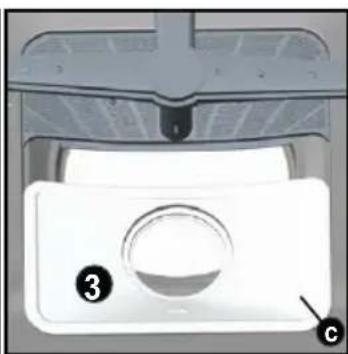
a. Micro Filter
b. Coarse Filter
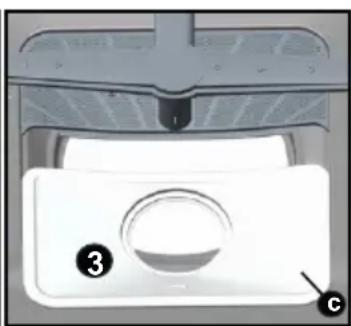
c. Metal/Plastic Filter
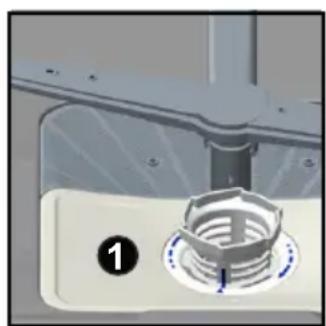
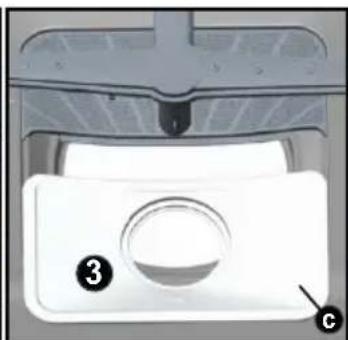
To remove and clean the filter combination, turn it counter clockwise and take it out by lifting upwards 1.
Pull and remove the metal/plastic filter 3. Then pull the coarse filter out of the micro filter 2. Rinse it with lots of water under the tap. Refit the metal/plastic filter. Insert the coarse filter into the micro filter in a way that the marks will correspond to one another. Attach micro filter into the metal/plastic filter and turn to the direction of arrow and it is locked when the arrow on micro filter can be seen from across 4.
- Never use your dishwasher without any filter.
- Incorrect fitting of the filter will reduce the washing effectiveness.
- Clean filters are very important in terms of the proper running of the machine.
natural_image
Close-up of a mechanical component with a circular knob and a numbered indicator (1), no visible text or symbols.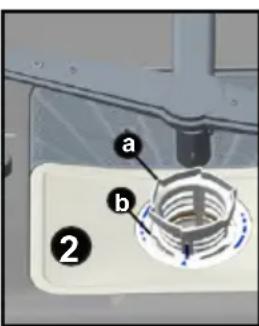
natural_image
Close-up of a white appliance control panel with labeled buttons (3 and c), no readable text or symbols beyond labels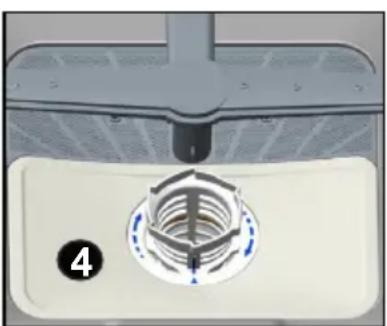
natural_image
Close-up of a mechanical component with a circular base and internal gear mechanism (no text or symbols visible)Spray arms
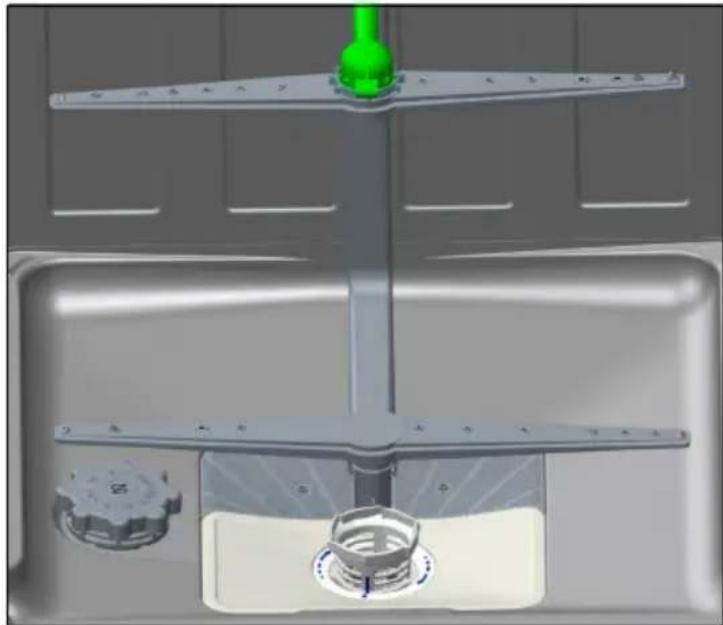
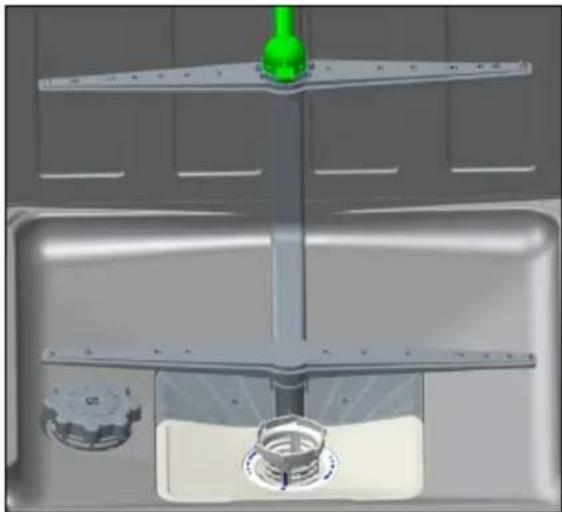
Check the holes for the upper and lower spray arms. If there is any clogging, remove the spray arms and clean them under water. You can remove the lower spray arm by pulling it upwards, while the upper spray arm nut can be removed by turning the nut to the left. Be sure that the nut is perfectly tightened when refitting the upper spray arm.
natural_image
3D rendering of a kitchen sink with a green bottle and mechanical components (no text or symbols visible)Hose filter
Check the filter and the hose from time to time and clean them to prevent yellowing and formation of deposits after washing. To clean the filter, first turn off your tap and then remove the hose. After removing the filter from the hose, clean it under the tap. Insert the cleaned filter back into its place inside the hose. Refit the hose.
FAILURE CODES AND WHAT TO DO IN CASE OF FAILURE
| ERROR CODE | ERROR DESCRIPTION | CONTROL |
| F5 | Inadequate water supply | Make sure the water input tap is totally open and that there is no water cut.Close the water input tap, separate the water input hose from the tap and clean the filter at the connection end of the hose.Restart your machine, contact the service if the error resumes. |
| F3 | Error of continuous water input | Close the tap.Contact the service company. |
| F2 | The waste water in the machine cannot be discharged. | Water discharge hose is clogged.The filters of your machine might be clogged.Power off-on your machine and activate the program cancellation command.If the error continues, contact the service. |
| F8 | Heater error • Contact the service company. | |
| F1 | Alarm is active against water overflow | Power off your machine and close the tap.Contact the service company. |
| FE | Faulty electronic card | Contact the service company. |
| F7 | Overheating error (temperature in the machine is too high) | Contact the service company. |
| F6 | Faulty heater sensor | Contact the service company. |
If one of program monitor lights is on and start/Pause light is on and off,
Your machine's door is open, shut the door.
If the programme won't start
- Check if the plug is connected.
- Check your indoor fuses.
- Be sure that the water inlet tap is turned on.
- Be sure that you have closed the machine door.
- Be sure that you switched off the machine by pressing the Power On / Off button.
- Be sure that the water inlet filter and the machine filters are not clogged.
If the control lamps won't go out after a wash operation
The Power On/Off button is released yet.
If detergent residues are left in the detergent compartment
Detergent has been added when the detergent compartment was wet.
If water is left inside the machine at the end of the programme
- The water drain hose is clogged or twisted.
- The filters are clogged.
• The programme is not finished yet.
If the machine stops during a wash operation
- Power failure.
- Water inlet failure.
- Program can be on standby mode.
If shaking and hitting noises are heard during a wash operation
- Dishes placed incorrectly.
- Spray arm hitting the dishes.
If there are partial food wastes left on the dishes
- Dishes placed incorrectly into the machine, sprayed water did not reach related places.
- Basket overly loaded.
- Dishes leaning against one another.
• Very small amount of detergent added. - An unsuitable, rather weak wash programme selected.
- Spray arm clogged with food wastes.
- Filters clogged.
- Filters incorrectly fitted.
• Water drain pump clogged.
If there are whitish stains on the dishes
- A very small amount of detergent is being used.
- Rinse aid dosage setting at a very low level.
- No special salt is being used despite the high degree of water hardness.
• Water softener system setting is at a very low level.
- Salt compartment cap not closed well.
If the dishes won't dry up
- A programme without a dry operation selected.
- Rinse aid dosage set too low
- Dishes unloaded too fast.
If there are rust stains on the dishes
- Stainless-steel quality of the dishes washed is insufficient.
• High rate of salt in the wash water. - Salt compartment cap not closed well.
- Too much salt spilt into the sides and into the machine while filling it with salt.
- Unhealthy mains grounding.
Call an authorised service if the problem still persists after the controls or in case of any malfunction not described above.
PRACTICAL AND USEFUL INFORMATION
- Whenever you will not be operating your machine
- Unplug the machine and then turn the water off.
- Leave the door slightly ajar in order to prevent the formation of unpleasant smells.
-
Keep the machine interior clean.
-
Eliminating water droplets
-
Wash the dishes with the intensive programme.
• Take all of the metal containers in the machine out. -
Do not add detergent.
-
If you properly place your dishes into the machine, you will be using it in the best way in terms
of energy consumption, washing and drying performance. - Clean all rough waste before you place dirty dishes to the machine.
- Operate the machine after it is completely full.
- Use pre-washing program only when necessary.
- Observe program information and average consumption values table when selecting a
program. - Since the machine will reach high temperatures, it should not be mounted near refrigerator.
- If the appliance is located in a place where the risk of freezing exists, you must completely drain the water that has remained in the machine. Turn off the water tap, disconnect the water inlet hose from the tap and allow the interior water to drain.
THE PRODUCT FICHE (Spect)
| Supplier's trade mark TELEFUNKEN | |
| Supplier's model TFVGS60X10A++ | |
| Capacity of dishwasher 12 | |
| The energy efficiency class A++ | |
| Annual energy consumption in kWh per year (AEc) (280 Cycle)* | 258 |
| Energy consumption (Et) (kWh per cycle) 0,90 | |
| Off-mode power consumption (W) (Po) 0,50 | |
| Left-on mode power consumption (W) (Pi) 1,00 | |
| Annual water consumption in litres per year (AWc) (280 Cycle)** | 3360 |
| Drying efficiency class*** A | |
| Standard programme name**** Eco | |
| Programme time for standard cycle (min) 187 | |
| Duration of the left-on mode (Ti) (min) | - |
| Airborne acoustical noise emissions (dB(A) re 1 pW) | 49 |
| Freestanding/Built-in Built-in |
* Energy consumption 258 kwh per year, based on 280 standard cleaning cycles using cold water fill and the consumption of low power modes. Actual energy consumption will depend on how the appliance is used.
** Water consumption 3360 liters per year based on 280 standard cleaning cycles. Actual water consumption will depend on how appliance is used.
*** Drying efficiency class A on a scale from G(least efficient) to A (most efficient).
**** The “Eco” is the standard cleaning cycle to which the information in the label and the fiche relates. This programme is suitable to clean normally soiled tableware and it is the most efficient programme in terms of combined energy and water consumption.
TABLE DES MATIERES
natural_image
Close-up of mechanical components including a metallic bracket and circular dial (no visible text or symbols)natural_image
Illustration of a hand holding a faucet with a valve, showing the process (no text or symbols)natural_image
Diagram showing two different pipe fittings: one with a handle and the other with a valve, both without any text or symbols.natural_image
Mechanical assembly diagram showing a lever mechanism with a gear and housing (no text or symbols)natural_image
Mechanical assembly diagram showing a clamping device with a circular component and a meshed base (no text or symbols)natural_image
Illustration of a coffee machine pouring milk into a container, with no visible text or symbolsnatural_image
Diagram of a door handle with a curved arrow indicating rotation (no text or symbols)natural_image
Hand turning a knob on a device, showing rotational motion (no text or symbols)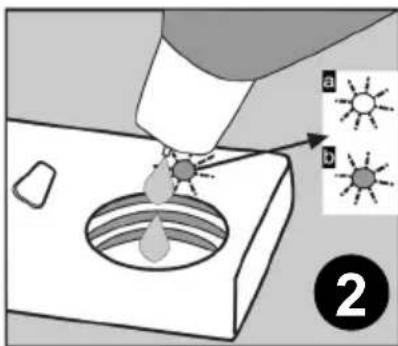
natural_image
3D wireframe diagram of a structural grid with red arrows indicating direction (no text or symbols)natural_image
Illustration of a hand holding a metal bracket with internal wiring (no text or symbols)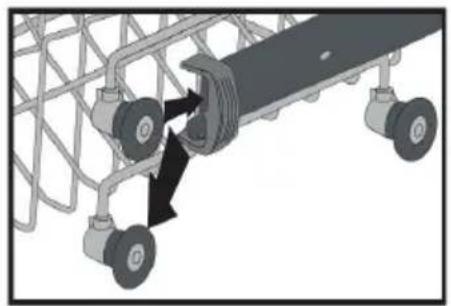
natural_image
Mechanical assembly diagram showing a conveyor belt system with two wheels and directional arrows indicating motion (no text or symbols)natural_image
3D wireframe model of a mechanical or electrical component with multiple ports and mounting holes, no visible text or symbolsCHAPITRE-4: CHARGEMENT DE VOTRE LAVE-VAISSELLE
natural_image
3D wireframe model of a mechanical assembly with internal components and a blue directional arrow (no text or symbols)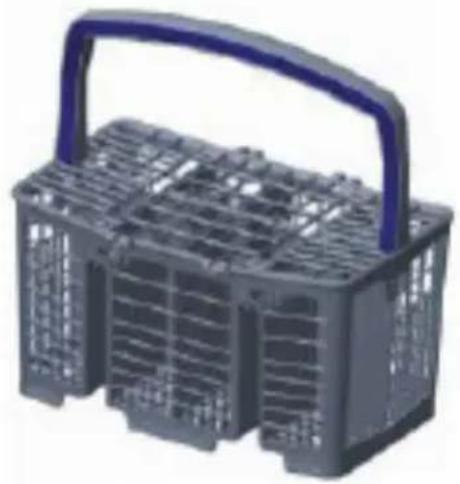
natural_image
3D model of a gray plastic basket with a blue handle and grid pattern (no text or symbols)natural_image
Two grayscale images showing a basket of kitchen utensils and cooking pots, no text or symbols visible.Panier supérieur
natural_image
Diagram of a multi-layered storage or rack system with circular components and a central rod (no text or labels)Mauvais chargements
natural_image
Abstract 3D rendering of stacked spherical objects with a large 'X' symbol overlay (no text or symbols present)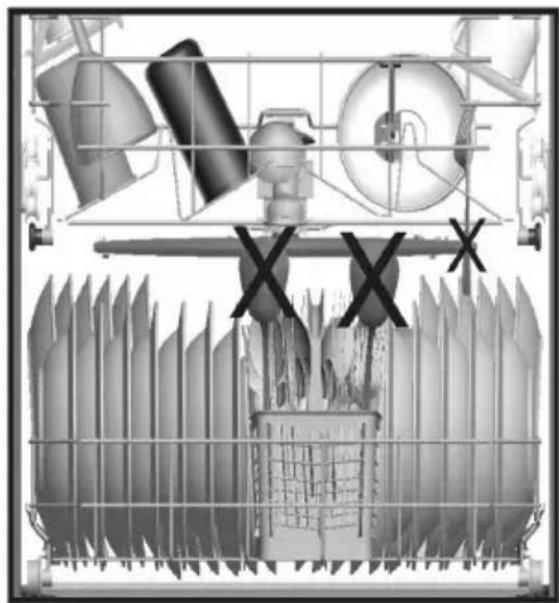
natural_image
Industrial machinery diagram showing components like tanks, pipes, and a rack with no visible text or symbols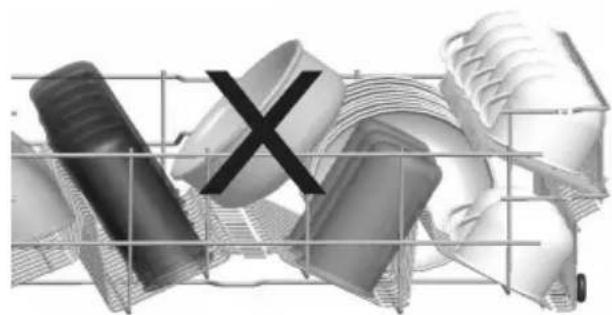
natural_image
Abstract 3D rendered collage of mechanical parts and a grid, no text or symbols present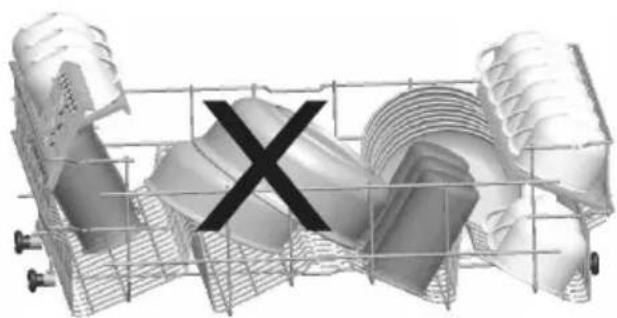
natural_image
3D rendered mechanical component with a central 'X' mark, no visible text or symbolsnatural_image
Close-up of a mechanical component with a hexagonal knob and numbered label (1), no readable text or symbols present.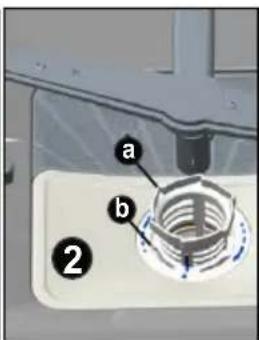
natural_image
Close-up of a white appliance control panel with labeled parts (3 and c), no readable text or symbols beyond labels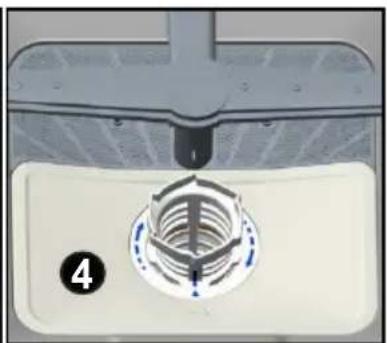
natural_image
Close-up of a mechanical component with a circular base and threaded shaft, labeled with number 4 (no text or symbols on the main subject)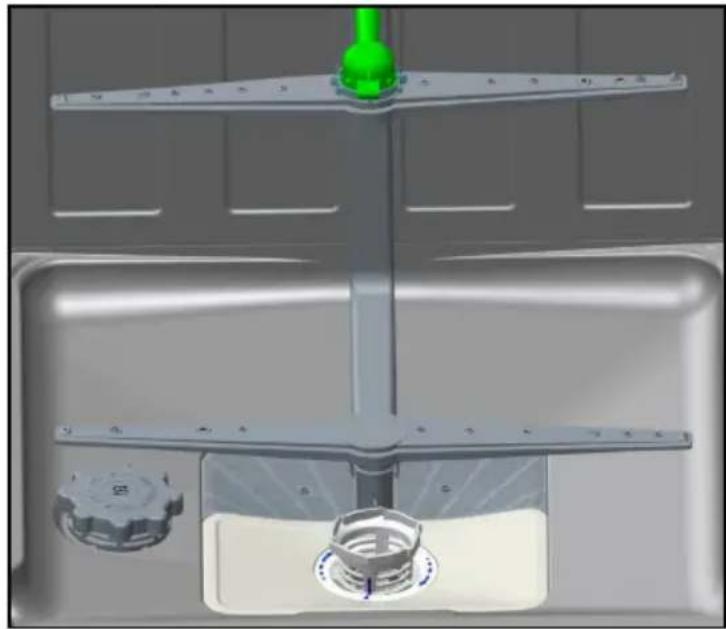
natural_image
3D rendering of a kitchen sink with a green handle and control knob (no text or symbols visible)Bras de lavage

- INHALT
- Der Zulaufschlauch
- Unterer Korb
- KAPITEL-4: GESCHIRRSPÜLER BELADEN
- Sprüharme
- Safety information and Recommendations.... 5
- Installing the machine 9
- Preparing the machine for use 13
- Loading your dishwasher 18
- Programme descriptions 22
- Switching on the machine and selecting a programme ..... 24
- Maintenance and Cleaning 30
- Failure codes and what to do in case of failure 32
- Practical and useful information.... 35
- Conformity with the standards and Test data / EU Declaration of Conformity
- SAFETY INFORMATION AND RECOMMENDATIONS Recycling
- Safety Information
- When you take delivery of your machine
- Points to pay attention to during machine installation
- plate.
- In daily use
- For your children's safety
- In case of malfunctioning
- Recommendations
- Items not suitable for dishwashing:
- INSTALLING THE MACHINE
- Positioning the machine
- Water connection
- Water inlet hose
- Water outlet hose
- Electrical connection
- Prior to using the machine for the first time
- PREPARING THE MACHINE FOR USE
- The importance of water decalcification
- Testing strip
- Detergent usage
- Filling the detergent compartment
- Combined detergents
- When you stop using combined detergents
- Filling with rinse aid and making the setting
- LOADING YOUR DISHWASHER
- Top basket
- Height Adjustable Rack
- Top basket height adjustment
- Lower Basket
- Folding Racks
- CHAPTER-4: LOADING YOUR DISHWASHER
- Alternative basket loads Lower Basket
- Faulty loads
- Important Note for Test Laboratories
- 1.) Power On/Off Touch Button
- 2.) Program Touch Button
- 3.) Program Display
- 4.) Delayed Start Touch Button
- 5.) Tablet Detergent Touch Button (3 in 1 button)
- 6.) Half Load Touch Button
- 7.) Salt Warning Indicator
- Rinse aid Warning Indicator
- End of Program
- Switching on the machine
- Program follow-up
- Changing a program
- Cancelling and resetting a program
- Switching the machine off
- MAINTENANCE AND CLEANING
- Filters
- Spray arms
- Hose filter
- If the programme won't start
- If the machine stops during a wash operation
- If shaking and hitting noises are heard during a wash operation
- If there are partial food wastes left on the dishes
- If there are whitish stains on the dishes
- If the dishes won't dry up
- If there are rust stains on the dishes
- PRACTICAL AND USEFUL INFORMATION
- TABLE DES MATIERES
- CHAPITRE-4: CHARGEMENT DE VOTRE LAVE-VAISSELLE
- Mauvais chargements
- Bras de lavage
Brand : TELEFUNKEN
Model : TFVGS60X10A
Category : Dishwasher