MA1201 - Humidifier AirCare - Free user manual and instructions
Find the device manual for free MA1201 AirCare in PDF.


| Product Type | Evaporative Humidifier |
| Brand | AirCare |
| Model | MA1201 |
| Tank Capacity | 3.5 gallons (13.2 L) |
| Humidification Output (24 h) | 12 gallons (45.4 L) |
| Coverage Area | Up to 3000 sq ft (tight construction) / 2500 sq ft (normal construction) |
| Fan Speeds | 4 (Ultra Quiet, Low, Medium, High) + auto mode |
| Replacement Filter | MAF1 (evaporative wick) |
| Automatic Humidistat | Yes (on power cord) |
| Fill Indicator | Yes (flashing 'F' display) |
| Controls | Digital with LED display |
| Casters | Yes (4) |
| Certification | ETL / CETL |
| Power Supply | 120 V, 60 Hz, 80 W |
| Dimensions (approx.) | 56 cm (H) x 38 cm (W) x 30 cm (D) |
| Weight (approx.) | 8 kg |
| Safety Features | Automatic shut-off by humidistat, auto dry mode, control lock |
| Recommended Maintenance | Clean every 2 weeks, descale with vinegar, disinfect with bleach |
| Available Replacement Parts | MAF1 filter, casters, tank, upper/lower housing, etc. |
| Customer Service | USA: 1-800-547-3888, Canada: 1-866-808-6500 |
Frequently Asked Questions - MA1201 AirCare
User questions about MA1201 AirCare
0 question about this device. Answer the ones you know or ask your own.
Ask a new question about this device
Download the instructions for your Humidifier in PDF format for free! Find your manual MA1201 - AirCare and take your electronic device back in hand. On this page are published all the documents necessary for the use of your device. MA1201 by AirCare.
USER MANUAL MA1201 AirCare
General Safety Instructions
READ BEFORE USING YOUR HUMIDIFIER
DANGER: means if the safety information is not followed someone will be seriously injured or killed.
WARNING: means if the safety information is not followed someone could be seriously injured or killed.
CAUTION: means if the safety information is not followed someone may be injured.
- To reduce the risk of fire or shock hazard, this humidifier has a polarized plug (one blade is wider than the other.) Plug humidifier directly into a 120V, A.C. electrical outlet. Do not use extension cords. If the plug does not fully fit into the outlet, reverse plug. If it still does not fit, contact a qualified electrician to install the proper outlet. Do not change the plug in any way.
- Keep the electric cord out of traffic areas. To reduce the risk of fire hazard, never put the electric cord under rugs, near heat registers, radiators, stoves or heaters.
- Always unplug the unit before moving, cleaning or removing the fan assembly section from the humidifier, or whenever it is not in service..
- Keep the humidifier clean. To reduce the risk of injury, fire or damage to humidifier, use only cleaners specifically recommended for humidifiers. Never use flammable, combustible or poisonous materials to clean your humidifier
- To reduce the risk of scalds and damage to humidifier, never put hot water in humidifier.
- Do not put foreign objects inside the humidifier.
- Do not allow unit to be used as a toy. Close attention is necessary when used by or near children.
- To reduce the risk of electrical hazard or damage to humidifier, do not tilt, jolt or tip humidifier while unit is running.
- To reduce the risk of accidental electrical shock, do not touch the cord or controls with wet hands.
- To reduce the risk of fire, do not use near an open flame such as a candle or other flame source.
WARNING: For your own safety, do not use humidifier if any parts are damaged or missing.
WARNING: To reduce risk of fire, electric shock, or injury always unplug before servicing or cleaning.
WARNING: To reduce the risk of fire or shock hazard, do not pour or spill water into control or motor area. If controls get wet, let them dry completely and have unit checked by authorized service personnel before plugging in.
INTRODUCTION
Your new humidifier adds invisible moisture to your home by moving dry inlet air through a saturated wick. As air moves through the wick, the water evaporates into the air, leaving behind any white dust, minerals, or dissolved and suspended solids. Because the water is evaporated, there is just clean and invisible moist air
As the evaporative wick traps accumulated minerals from the water, its ability to absorb and evaporate water decreases. We recommend changing the wick at the beginning of every season. In hard water areas, more frequent replacement may be necessary to maintain your humidifier's efficiency.
Use only AIRCARE® or MoistAir/Essick Air® brand replacement wicks and chemicals. To order parts, wicks and chemicals call 1-800-547-3888. The MA1201 humidifier uses wick # MAF1. Only the AIRCARE or MoistAir/Essick Air evaporative wick guarantees the certified output of your humidifier. Use of other brands of wicks voids the certification of output and may void your warranty.
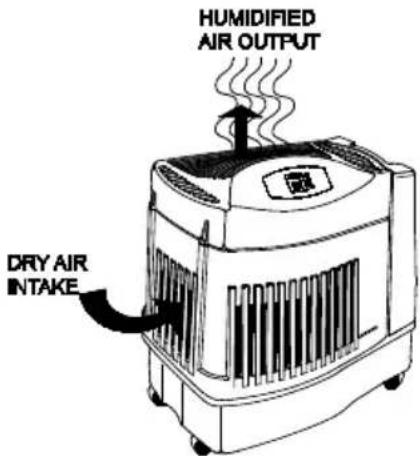
Dry air is drawn into the humidifier through the sides, then air is moisturized as it passes through the saturated evaporative wick in the reservoir.
The humidified air is then fanned out into the room through the top grille.
| Description | MA1201 |
| *Output per 24 hrs | 12 gallons |
| Water Capacity | 3.5 gallons |
| Sq. ft. coverage* | 3000+ (Tight Const) |
| 2500 (Avg. Const.) | |
| Fan Speeds | 4 |
| Replacement Wick | No. MAF1 |
| Automatic Humidistat | Yes |
| Refill Indication | Yes |
| Controls | Digital |
| Casters | Yes (4) |
| ETL/CETL Listed | Yes |
| Volts | 120 |
| Hertz | 60 |
| Watts | 80 |
KNOW YOUR HUMIDIFER
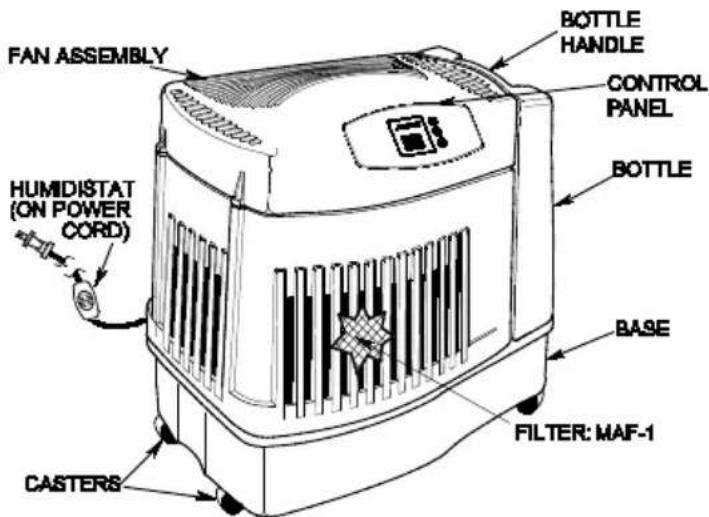
* Based on an area with average insulation and an 8' ceiling height ANSI/AHAM HU-1-1997. SEC. 8.1. Results may vary.
ASSEMBLY
- Unpack humidifier from carton. Remove manual.
- Remove all packaging materials. Remove casters, water bottle, housing assembly, and filter from the box
CASTERS
- Turn the emptied cabinet upside down. Insert each caster stem into one of the four caster holes manually Do not use tools. The casters should fit snugly and be inserted until the stem shoulder reaches the cabinet surface.
- Turn the cabinet right side up.
NOTES ON LOCATION:
In order to get the most effective use from your humidifier, it is important to position the unit where the most humidity is needed or where the moist air will be circulated throughout the house such as near a cold air return. If the unit is positioned close to a window, condensation may form on the window pane. If this occurs the unit should be repositioned in another location.
Place humidifier on a flat level surface. Do NOT position the unit directly in front of a hot air duct or radiator. Do NOT place on soft carpet. Due to release of cool, moist air from the humidifier, it is best to direct air away from thermostat and hot air registers. Position humidifier next to an inside wall on a level place at least 2 inches away from the wall or curtains.
Be sure that the humidistat, which is located on the power cord, is free from obstruction and away from any hot air source.
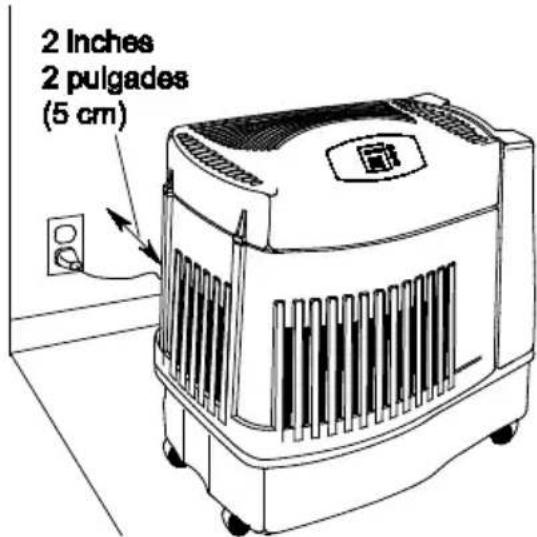
Locate nearest 120V A.C. wall socket in the location desired, preferably on inside wall. With the humidifier in the desired location, route the electrical cord safely so no one will trip or upset the humidifier. Plug unit in.
After the humidifier is positioned where it will be operating you are ready to fill the humidifier.
WATER FILL
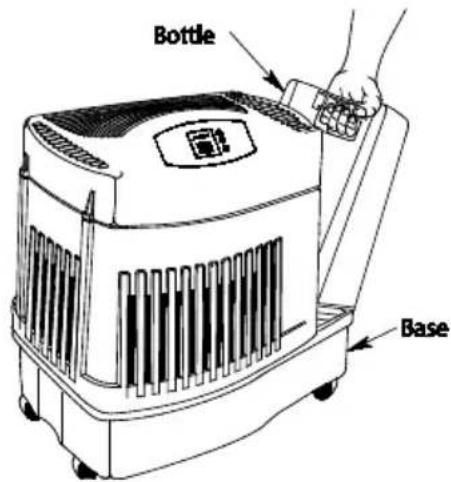
The bottle lifts straight up and away from the base. Take care not to bump or damage fill valve assembly on the bottom of the bottle.
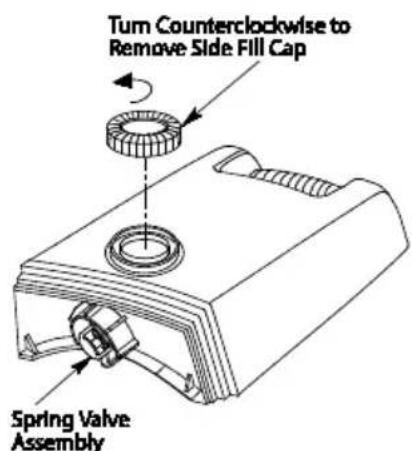
Remove the side fill cap and fill with water. Replace cap and twist by hand until secure. Hold the bottle upright over the sink. Press up on the valve plunger for one second to release a small amount of water. If you hear air bubbles or see leaks around the side fill cap or Spring Valve Assembly, retighten and recheck.
CAUTION: Use only EPA Registered Bacteriostat. Under no circumstances should you use water treatment products designed for Rotobelt or Ultrasonic humidifiers
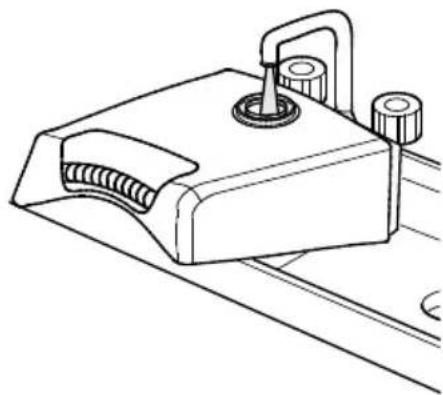
Place the water bottle back into the humidifier base. When positioned properly, the plunger will open and the water will flow into the base. The base will hold the entire contents of the water bottle. Once the bottle is empty, remove it and repeat the filling process. The humidifier is now filled to capacity. To benefit from less frequent filling let the humidifier exhaust both the water from the bottle and the base before filling.
OPERATION
This unit has a digital control panel that allows you to adjust fan speed and humidity level, as well as view information on the status of the unit
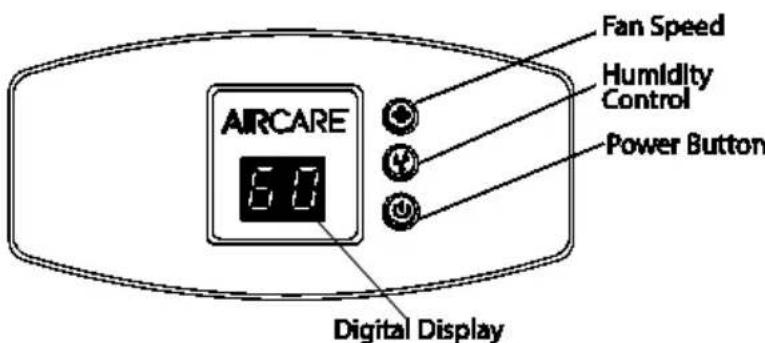
DIGITAL DISPLAY
Press the power button once to turn the unit on. Initially there is a slight delay while the electronics calibrate. Two bars (- - ) appear during this time. Once calibration is complete a ROOM humidity reading between 20% - 95% will be displayed. A flashing 20 display indicates that the room humidity is less than 20% .
NOTE: The default settings at initial startup are (Ultra Quiet) F1 fan speed and 65% SET humidity. After desired settings are selected by the user, they remain as long as the unit remains plugged in and there is no power interruption. If the unit is unplugged the original default settings are employed.
ABOUT HUMIDITY
Where you set your desired humidity levels depends on your personal comfort level, outside temperature and inside temperature. A starting set point of 30% - 40% ROOM humidity is recommended but there may be conditions that require a different setting.
NOTE: Recent CDC tests show that the chances of flu transmission are greatly reduced at levels of 43% humidity.
You may wish to purchase a hygrometer* to measure the humidity level in your home. The following is a chart of recommended humidity settings
| IMPORTANT: Water damage may result if condensation starts to form on windows or walls. Humidity SET point should be lowered until condensation no longer forms. We recommend room humidity levels do not exceed 50%. |
| When Outdoor Temperature is: °F °C | Recommended Indoor Relative Humidity (RH) is | |
| -20 | -30° | 15 - 20% |
| -10° | -24° | 20 - 25% |
| 2° | -18° | 25 - 30% |
| 10° | -12° | 30 - 35% |
| 20° | -6° | 35 - 40% |
| 30° | -1° | 40 - 45% |
*Model 1990 digital hygrometer is available for purchase by calling 1-800-547-3888.
NOTE: External hygrometer readings and humidistat readings may differ. Humidity levels can vary significantly even in one room.
HUMIDITY CONTROL


NOTE: Allow 10 to 15 minutes for the humidistat to adjust to the room when setting up the unit for the first time.
The MA1201 has an automatic humidistat located on the cord that measures the relative humidity in the room. When the selected humidity level drops 3% below
the relative humidity, the humidifier cycles on and off as required to maintain the selected setting allows you to adjust the humidity to suit your needs. The readout displays both actual (ROOM) and desired (SET) humidity percentage (\%) settings when humidity control button is pressed. The ROOM readout has a range of 20% to 95% . If the room humidity level is equal to or less than 20% the display will show a flashing 20.
The SET readout has a range of 25% to 65% and is adjusted in increments of 5% . Initially depressing the humidity button will display the current humidity setting. Each additional press of the button increases the setting by 5% . A SET point of 65% operates the humidifier continuously regardless of the ROOM reading.
SPEED CONTROL
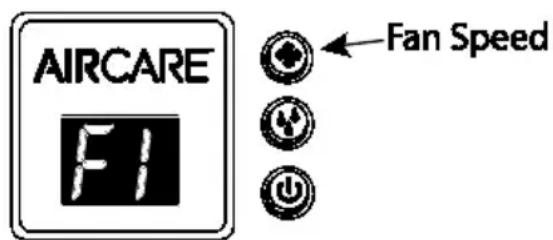
This humidifier is equipped with a 4-speed fan control.
Initially depressing the speed button will display the current speed setting. Each push of the speed button advances the mode through the settings of (HIGH) F4, (MEDIUM) F3, (LOW) F2, and (ULTRA QUIET) F1.
The letter "A" appears when the auto humidistat is selected. This setting allows the auto humidistat to select the fan speed necessary to maintain the desired humidity level.
The selected setting is displayed on the digital readout. The higher the setting, the faster water is evaporated and released into the air. F1 (Ultra Quiet) is the quietest setting and is provided for conditions that do not require a rapid evaporation rate.
- Humidifier fan should operate at initial start up. If it does not, refer to, "Fan not operating (digital display is illuminated)" in the "Trouble Shooting" section.
OTHER FEATURES / INDICATIONS
CHECK FILTER
The ability of any humidifier to efficiently supply humidity output relies heavily on the condition of the filter. As the filter loads with impurities it gradually loses its wicking capability. When this happens, moisture output is reduced and the humidifier has to work longer to satisfy the selected setting.
1) This humidifier has a check filter reminder timed to appear after 720 hours of operation. When the Check Filter (CF) message is displayed, disconnect the power cord and check the condition of the filter. If a build-up of deposits or severe discoloration is evident replace the filter to restore maximum efficiency.
The CF function is reset after plugging the unit back in.
2) When the unit is out of water, a flashing F will display on the display panel.

Check Filter Function Display

A Flashing F Indicates the unit needs to be filled.
AUTO DRYOUT
At this time the unit will automatically switch into AUTO DRY OUT MODE and continue to run on the lowest speed until the filter is completely dry. The fan will shut off leaving you with a dry humidifier that is less prone to mold and mildew.
During the AUTO DRYOUT mode the room humidity level will continue to be monitored and the humidifier will cycle the fan on and off until the filter is completely dry.
CONTROL LOCK FEATURE

Control Lock Display
To avoid unwanted tampering with the humidifier settings the controls can be locked.
ACTIVATION PROCEDURE
After the humidifier functions have been set up, hold the power button down for 5 seconds. The display will show "CL" for 2 seconds; release the power button and the
control will resume the display of the roomhumidity. The humidifier will continue to function with the locked in settings. If buttons are operated while "CL" is active, the "CL" is displayed and settings are unaffected.
DEACTIVATION PROCEDURE
To deactivate the "CL" function simply press and hold the power button for 5 seconds. "CL" will flash at the rate of 1 second on and 1 second off for a period of 2 seconds and then resume the display of room humidity.
FILTER REPLACEMENT AND CARE
Replace the evaporative wicking filter at least once perhumidification season or more depending on water conditions in your area. We also recommend using bacteriostat to maintain the filter and unit's effectiveness.
1) Unplug humidifier. Before removing the filter, we recommend moving the humidifier to an area where floor coverings are not susceptible to water damage. (i.e. kitchen or bath areas.)
2) Remove the water bottle and set aside. Be sure not to bump or damage the fill valve.
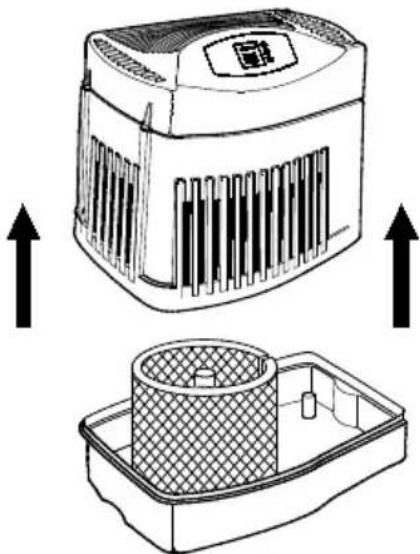
3) Grasp the housing assembly and lift straight up and away from the base and set aside. The filter is now accessible.
4) Take note of the filter position. Remove the filter. You may want to clean the base at this time. See the "Cleaning and Maintenance" section of this manual.
5) Install a new filter (MAF-1) into the base. Coil the filter and position it between the uprights in the bottom of the base. The start and finish of the coil should be captured at the center of the base (see illustration below) and the filter should be resting on the floor of the base.
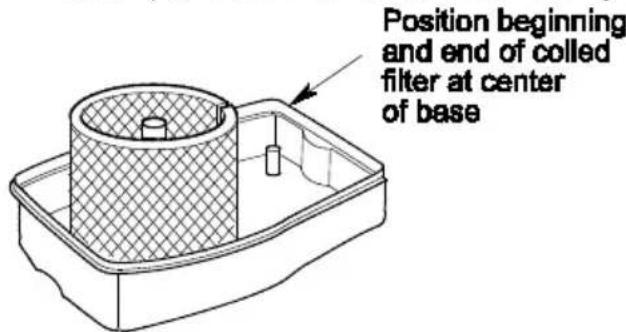
6) Return the housing assembly to the top of the base. Reposition the humidifier to its operating position. The humidifier is now ready to be filled for operation
CARE AND MAINTENANCE
Cleaning your humidifier regularly helps eliminate odors and bacterial and fungal growth. Ordinary household bleach is a good disinfectant and can be used to wipe out the humidifier base and bottle/reservoir after cleaning. We recommend cleaning your humidifier at least once every two weeks to maintain optimum environmental conditions for your home. We also recommend using AIRCARE® or Essick Air Bacteriostat Treatment each time you refill your humidifier to eliminate bacterial growth. Add bacteriostat according to the instructions on the bottle. Please call 1-800-547-3888 to order Bacteriostat Treatment, part number 1970.
1) Turn off unit completely and unplug from outlet.
2) Lift off the chassis.
3) Roll or carry the base to cleaning basin. Lift wick from the base allowing the water to drain into basin. Rinse wick under freshwater only. Do not use soap, detergent, or any other cleaners on the wick. Leave in sink to drain.
REMOVING SCALE
4) Pour out any remaining water from the base and water bottle. Fill base and bottle 12 full with water and add 8 oz. (1 cup) of undiluted white vinegar to each. Let stand 20 minutes. Then pour out solution.
5) Dampen a soft cloth with undiluted white vinegar and wipe out base to remove scale. Rinse the water bottle and base thoroughly with fresh water to remove scale and cleaning solution before disinfecting.
DISINFECTING UNIT
6) Fill the reservoir and bottle 12 full of water and add 1 teaspoon of bleach to each. Wipe all surfaces cabinet. Let solution stay for 20 minutes, then rinse with water until bleach smell is gone. Dry interior surfaces with clean cloth. Wipe down the outside if the unit with a soft cloth dampened with fresh water.
7) Refill unit and re-assemble per ASSEMBLY instructions.
SUMMER STORAGE
1) Clean unit as outlined in Care & Maintenance section.
2) Discard used wick and pour out any water in the base or bottle. Allow unit to dry thoroughly before storage. Do not store with water inside reservoir.
3) Do not store unit in an attic or other high-temperature area, as damage is probable.
4) Install new filter at beginning of season.
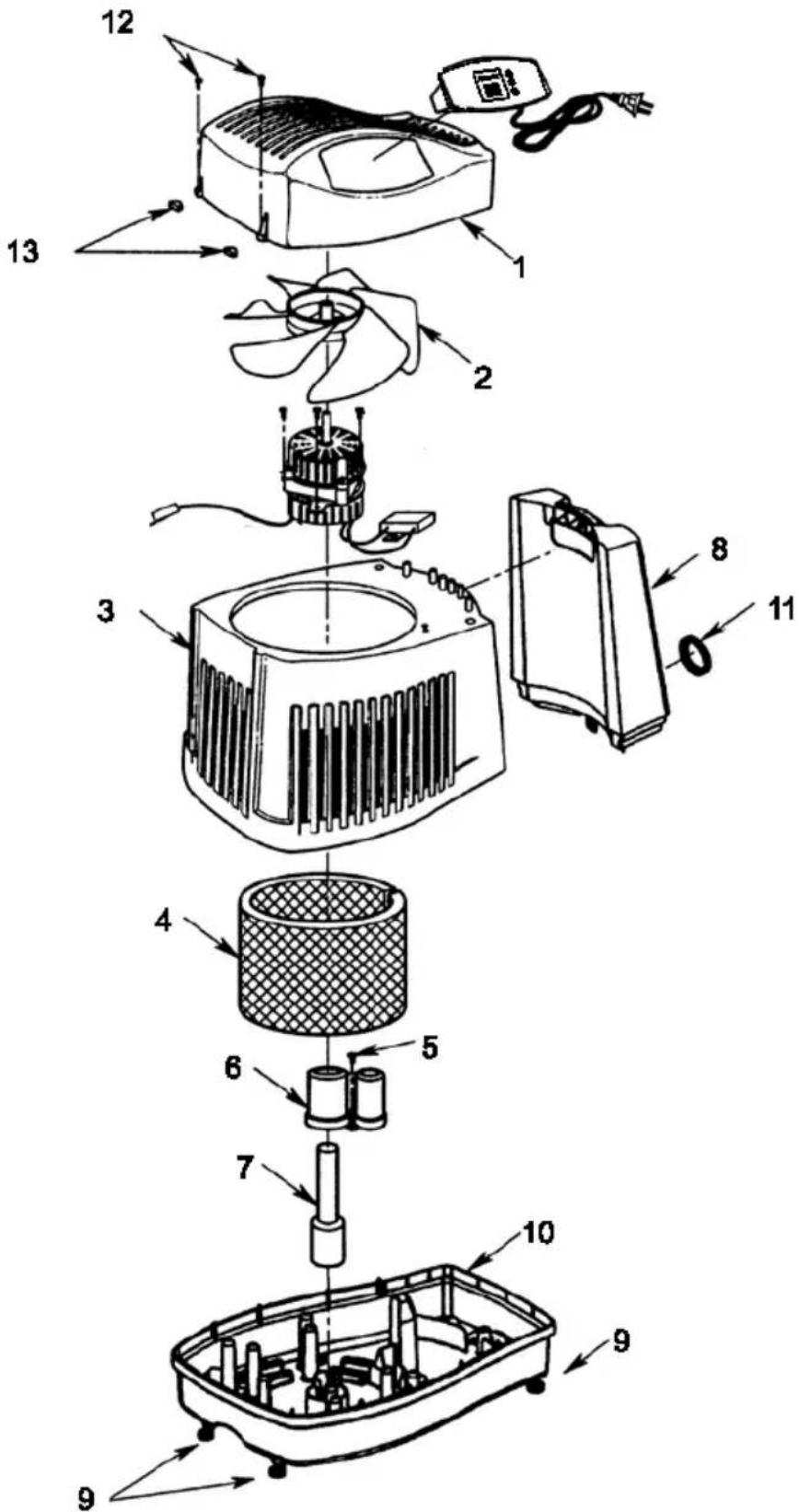
REPAIR PARTS LIST
| ITEM NO. | PART NO. DESCRIPTION | |
| 1 | 830488 | Housing, Upper |
| 2 | 829821 | • Blade, Fan |
| 3 | 830489-1 | Housing, Lower |
| 4 | MAF-1 | † Filter |
| 5 | 829815 | * Screw, Pan Hd. Ty. AB #6 x 1/2 SS |
| 6 | 830496-1 | Support, Float |
| 7 | 829816 | Float, Reservoir |
| 8 | 830537-1 | Bottle, Includes Key #11 |
| 9 | 829812 | Casters (Includes 4) |
| 10 | 830484-1 | Base |
| 11 | 824690-2 | Cap, Fill |
| 12 | 829805 | Screw, Pan Hd. Trx. Hi-Lo #6 x 3/4 |
| 13 | 830587 | Cap, Screw |
| 14 | 1B72677 | Owner's Manual (not shown) |
Stock item - Purchase at your local retail store.
-
Any attempt to repair the control assembly or motor may create a hazard unless repair is done by a qualified service technician.
-
Standard hardware item - May be purchased locally.
Please order by part number not by item number.
Please have complete model number.
To order parts, call: 1-800-547-3888, USA
1-866-808-6500, CANADA
FOR TECHNICAL HELP, CALL (800) 547-3888 USA,
or (888) 744-4687 CANADA
TROUBLESHOOTING GUIDE
| Trouble | Probable Cause | Remedy |
| Digital display not illuminated. | • No Power. • Power button has not been depressed. | • Check 120 volt power source. • Press power button once to turn on. |
| Fan not operating (digital display is illuminated). | • ROOM humidity level is not 3% or more below SET humidity level. | • Raise SET humidity level if desired. |
| Fan running continuously. • SET humidity level is 65%. • ROOM humidity level has not reached 1% or more above SET humidity level. | • A SET humidity percentage of 65% operates fan continuously. Adjust SET level between 25%-60%. • Continue to run until desired humidity level is achieved. This may take up to 48 hours initially. | |
| Poor evaporation of water. | • CF (Check Filter) message flashing. | • Change to a fresh new filter. NOTE: Local water varies from area to area and under certain conditions mineral will build up more rapidly in the filter. |
| Bottle empties completely. | • This is normal for initial filling. | • Refill bottle for maximum run time. |
| Bottle continues to empty after complete filling. | • Air is entering water bottle. | • Ensure fill cap is tight with no interfering debris. • Check for leak in water bottle. |
| Bottle not emptying | • Base full of water. | • The base will hold the contents of water bottle (1.9 gallons/7.2L). Continue to run humidifier to deplete water from base. |
| CF message does not appear even when filter is dirty or humidifier performance is clearly reduced. | • A loss of power has caused the CF (check filter) message to prematurely reset. | • Replace filter. |
| Fan operating slower than speed registered on digital display. | • Humidifier is in DRY OUT mode. | • Humidifier automatically switches fan speed to ULTRA QUIET when DRY OUT mode message is displayed. |
| Humidifier not shutting off during DRY OUT mode. | • Filter not dry. • During DRY OUT mode the humidifier will continue to run on ULTRA QUIET speed as required for a 2 hour period | |
| Controls are unresponsive or CL is displayed | CONTROL LOCK (CL) feature has been activated. | Hold power button down for 5 seconds. Control Lock function will deactivate. |
This page intentionally left blank
This page intentionally left blank