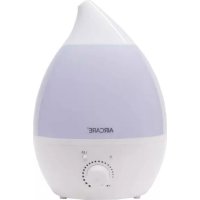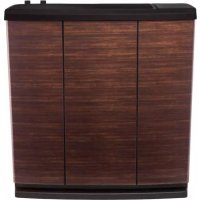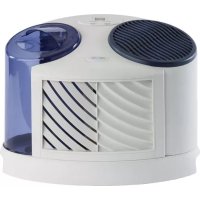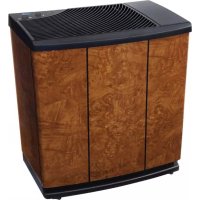
Pedestal EP9500 - Humidifier AirCare - Free user manual and instructions
Find the device manual for free Pedestal EP9500 AirCare in PDF.


| Product Type | Evaporative Humidifier |
| Brand | AirCare |
| Model | Pedestal EP9500 |
| Tank Capacity | 13.25 L |
| Coverage Area | Up to 223 m² (tight construction) |
| Fan Speeds | 9 variable speeds |
| Adjustable Humidistat | Yes |
| Control Type | Electronic (remote control optional for EP9R series) |
| Replacement Wick | No. 1043 (Super Wick) |
| Power Supply | 120 V, 60 Hz, 70 W |
| Certification | ETL |
| Operating Principle | Natural evaporation without white dust |
| Auto Dry Mode | Yes (low-speed ventilation for 2 h after low level) |
| Filter Check Reminder | Every 720 operating hours |
| Low Water Level Indicator | Flashing "F" display |
| Control Lock | Yes (displays "CL") |
| Maintenance and Cleaning | Regular vinegar cleaning and bleach disinfection recommended |
| Safety | Auto shut-off when water is low; polarized plug |
| Replacement Parts Available | Wick, float, casters, funnel, remote control (model 1999) |
| Warranty | 2 years (parts and labor), 30 days for wicks and filters |
Frequently Asked Questions - Pedestal EP9500 AirCare
User questions about Pedestal EP9500 AirCare
0 question about this device. Answer the ones you know or ask your own.
Ask a new question about this device
Download the instructions for your Humidifier in PDF format for free! Find your manual Pedestal EP9500 - AirCare and take your electronic device back in hand. On this page are published all the documents necessary for the use of your device. Pedestal EP9500 by AirCare.
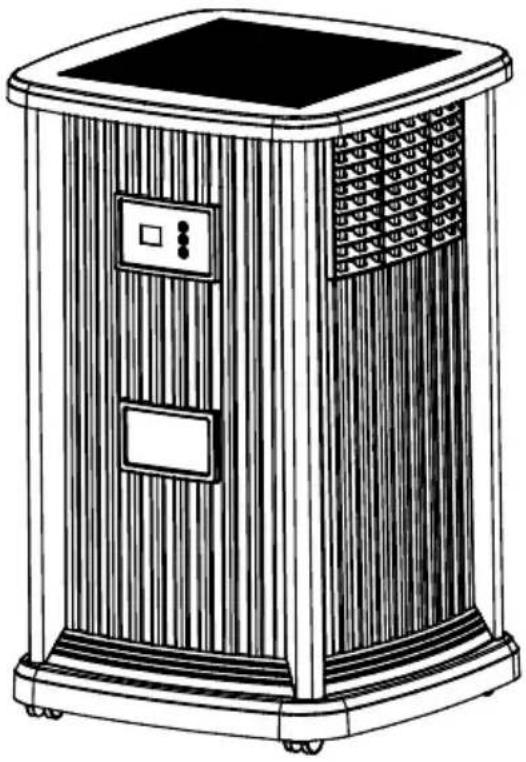
USER MANUAL Pedestal EP9500 AirCare
▶ Adjustable Humidistat
▶ Variable Speed Fan
▶ Easy Front Fill
natural_image
Line drawing of a portable air conditioner unit with control panel and display (no text or symbols)EP9(R) 800; EP9(R) 500
Français .....13
Español .....25

TO ORDER PARTS AND ACCESSORIES CALL 1.800.547.3888
COMFORT IS IN THE AIR
IMPORTANT SAFEGUARDS
GENERAL SAFETY INSTRUCTIONS
READ BEFORE USING YOUR HUMIDIFIER
DANGER: means if the safety information is not followed someone will be seriously injured or killed.
WARNING: means if the safety information is not followed someone could be seriously injured or killed.
CAUTION: means if the safety information is not followed someone may be injured.
- To reduce the risk of fire or shock hazard, this humidifier has a polarized plug (one blade is wider than the other.) Plug humidifier directly into a 120V, A.C. electrical outlet. Do not use extension cords. If the plug does not fully fit into the outlet, reverse plug. If it still does not fit, contact a qualified electrician to install the proper outlet. Do not change the plug in any way.
- Keep the electric cord out of traffic areas. To reduce the risk of fire hazard, never put the electric cord under rugs, near heat registers, radiators, stoves or heaters.
- Always unplug the unit before moving, cleaning or removing the fan assembly section from the humidifier, or whenever it is not in service..
- Keep the humidifier clean. To reduce the risk of injury, fire or damage to humidifier, use only cleaners specifically recommended for humidifiers. Never use flammable, combustible or poisonous materials to clean your humidifier
- To reduce the risk of scalds and damage to humidifier, never put hot water in humidifier.
- Do not put foreign objects inside the humidifier.
- Do not allow unit to be used as a toy. Close attention is necessary when used by or near children.
- To reduce the risk of electrical hazard or damage to humidifier, do not tilt, jolt or tip humidifier while unit is running.
- To reduce the risk of accidental electrical shock, do not touch the cord or controls with wet hands.
- To reduce the risk of fire, do not use near an open flame such as a candle or other flame source.
WARNING: For your own safety, do not use humidifier if any parts are damaged or missing.
WARNING: To reduce risk of fire, electric shock, or injury always unplug before servicing or cleaning.
WARNING: To reduce the risk of fire or shock hazard, do not pour or spill water into control or motor area. If controls get wet, let them dry completely and have unit checked by authorized service personnel before plugging in.
CAUTION: If a plant is placed on the pedestal, ensure unit is unplugged when watering the plant. Ensure no water is poured onto the control panel when watering the plant. If water enters the electronic control panel, damage may result. Ensure control panel is entirely dry before use.
INTRODUCTION
Your new humidifier adds invisible moisture to your home by moving dry inlet air through a saturated wick. As air moves through the wick, the water evaporates into the air, leaving behind any white dust, minerals, or dissolved and suspended solids in the wick. Because the water is evaporated, there is just clean and invisible moist air.
As the evaporative wick traps accumulated minerals from the water, its ability to absorb and evaporate water decreases. We recommend changing the wick at the beginning of every season and after every 30 to 60 days of operation to maintain optimum performance. In hard water areas, more frequent replacement may be necessary to maintain your humidifier's efficiency.
Use only AIRCARE ^ or Essick Air ^ brand replacement wicks and additives. To order parts, wicks and other products call 1-800-547-3888. The EP Series humidifiers use wick #1043. Only the AIRCARE ^ or Essick Air ^ evaporative wick guarantees the certified output of your humidifier. Use of other brands of wicks voids the certification of output and may void your warranty.
text_image
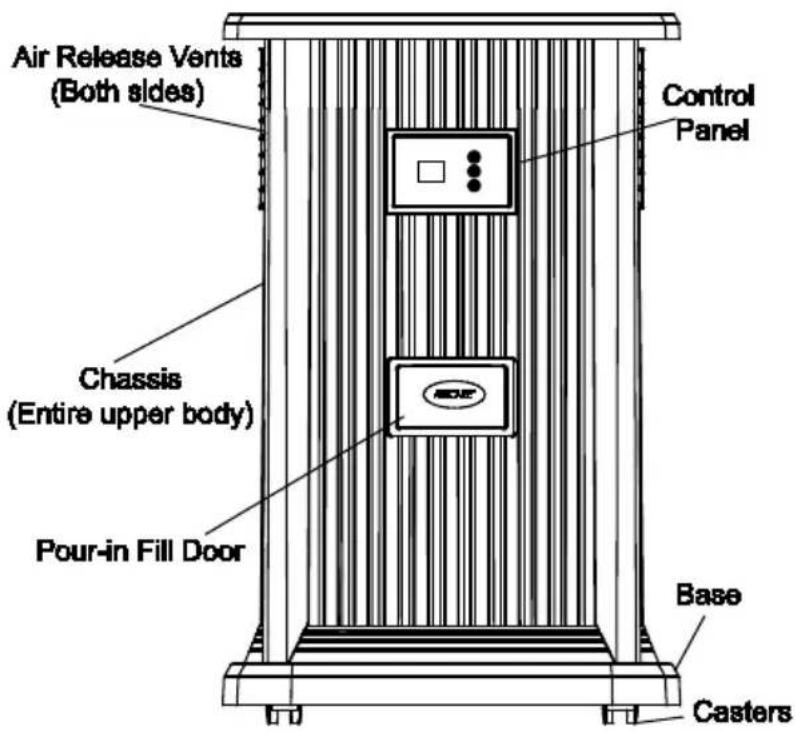
Air Release Vents (Both sides) Control Panel Chassis (Entire upper body) Pour-in Fill Door Base CastersKNOW YOUR HUMIDIFIER
| Description | EP9 Series / EP9R† |
| Capacity of Unit | 3.5 gallons |
| Sq. ft. coverage | Up to 2400 (tight construction) |
| Fan Speeds | Variable (9) |
| Replacement Wick | No. 1043 |
| Automatic Humidistat | Yes |
| Controls | Digital († w/ Remote) |
| ETL Listed | Yes |
| Volts | 120 |
| Hertz | 60 |
| Watts | 70 |
Once the wick becomes saturated, air is drawn in, passes through the wick and moisture is absorbed into the air.
All evaporation occurs in the humidifier so any residue remains in the wick. This natural process of evaporation creates no white dust like some other humidifiers.
Dry air is drawn into the humidifier though the back and moisturized as it passes through the evaporative wick. It is then fanned out into the room.
IMPORTANT:
Water damage may result if condensation starts to form on windows or walls. Humidity SET point should be lowered until condensation no longer forms. We recommend room humidity levels do not exceed 50%.
* Output based on 8' ceiling. Coverage may vary due to tight or average construction.
CAUTIONS ON ADDITIVES TO WATER:
- To maintain the wick's integrity and warranty, never add anything to the water except Essick Air bacteriostat for evaporative humidifiers. If you only have softened water available in your home, you can use it, but mineral buildup will occur more quickly. You can use distilled or purified water to help extend the life of the wick.
- Never add essential oils in the water. It can damage the plastic seals and cause leaks.
NOTES ON LOCATION:
In order to get the most effective use from your humidifier, it is important to position the unit where the most humidity is needed or where the moist air will be circulated throughout the house such as near a cold air return. If the unit is positioned close to a window, condensation may form on the window pane. If this occurs the unit should be repositioned in another location.
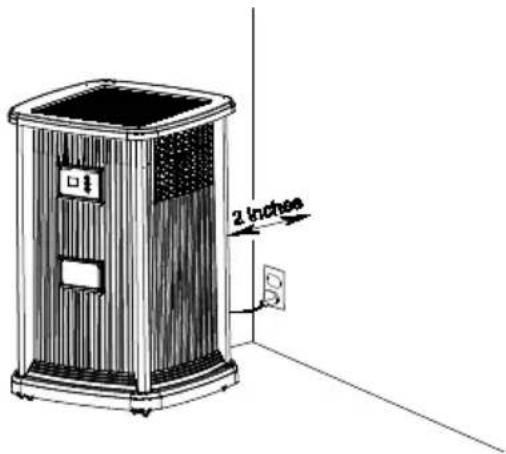
Place humidifier on a flat level surface. Do NOT position the unit directly in front of a hot air duct or radiator. Do NOT place on soft carpet. Due to release of cool, moist air from the humidifier, it is best to direct air away from thermostat and hot air registers. Position humidifier next to an inside wall on a level place at least 2 inches away from the wall or curtains.
text_image
2 inchesBe sure that the humidistat, which is located on the power cord, is free from obstruction and away from any hot air source.
ASSEMBLY
1) Unpack humidifier from carton. Remove all packaging materials.
CASTERS
2) Lift chassis off of base and set aside. Remove the parts bag, wick/ wick retainer and float from base.
3) Turn the empty base upside down. Insert each caster stem into a caster hole on each corner of the humidifier bottom. The casters should fit snugly and be inserted until the stem shoulder reaches the cabinet surface. Turn the base right side up.
FLOAT
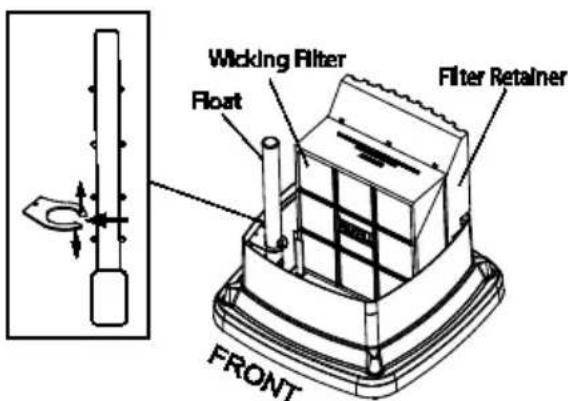
4) Install float by separating the two flexible halves of retainer clip, inserting the float into the clip and securing it into the base.
EVAPORATIVE WICK
5) Ensure the 1043 Superwick is installed in the two-part wick retainer base in the base of the humidifier
6) Position the chassis over the base frame and press it onto the base firmly until it is in place.
CAUTION: Ensure the chassis is placed on the base with the float facing forward to prevent damage to components.
text_image
Wicking Filter Float Filter Retainer FRONTWATER FILL
CAUTION: Before filling, ensure unit is turned OFF and unplugged
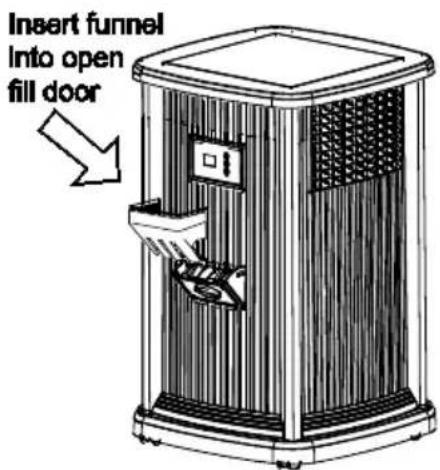
7) Open the fill door on the front of the unit. Insert funnel into the open fill door. Using a pitcher, carefully pour water to the MAX FILL level on the wick frame.
text_image
Insert funnel into open fill doorNOTE: On initial fill up, it will take approximately 20 minutes for the unit to become ready for operation, since the wick must become saturated. Subsequent fillings will take approximately 12 minutes, since the wick is already saturated.
NOTE: We recommend using Essick Air® Bacteriostat Treatment when you refill the water reservoir to eliminate bacterial growth. Add bacteriostat according to the instructions on the bottle.
8) After the filling process is complete, and the wick is saturated, the unit is ready for use.
ABOUT HUMIDITY
Where you set your desired humidity levels depends on your personal comfort level, the outside temperature and the inside temperature.
NOTE: Recent CDC tests show that only 14% of flu virus particles could infect people after 15 minutes at levels of 43% humidity.
You may wish to purchase a hygrometer to measure the humidity level in your home. The following is a chart of recommended humidity settings.
| IMPORTANT: Water damage may result if condensation starts to form on windows or walls. Humidity SET point should be lowered until condensation no longer forms. We recommend room humidity levels do not exceed 50%. |
| When Outdoor Temperature is: °F °C | Recommended Indoor Relative Humidity (RH) is | |
| -20 | -30° | 15 - 20% |
| -10° | -24° | 20 - 25% |
| 2° | -18° | 25 - 30% |
| 10° | -12° | 30 - 35% |
| 20° | -6° | 35 - 40% |
| 30° | -1° | 40 - 43% |
OPERATION
Plug cord into wall receptacle. Your humidifier is now ready for use. The humidifier should be placed at least TWO inches away from any walls and away from heat registers. Unrestricted airflow into the unit will result in the best efficiency and performance.
NOTE: This unit has an automatic humidistat located in the control that senses the humidity level around the immediate area of the humidifier. It turns the humidifier on when the relative humidity in your home is below the humidistat setting and will turn the humidifier off when the relative humidity reaches the humidistat setting.
CONTROL PANEL
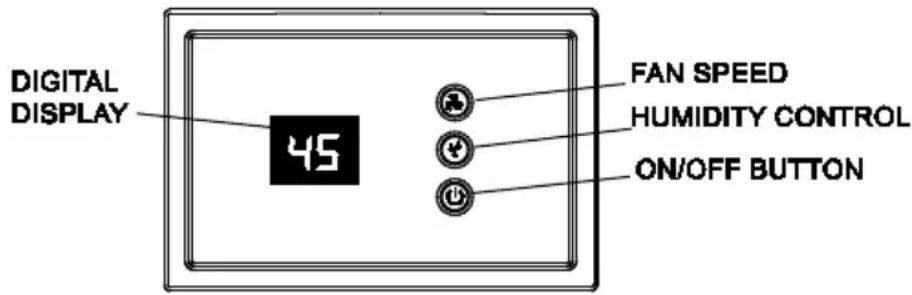
This unit has a digital control panel that allows you to adjust fan speed and humidity level, as well as view information on the status of the unit. The display will also indicate if the optional Remote Control is in use at the time. Remote is included with models EP9R 500 and EP9R 800, or can be purchased separately and used with any EP9 series unit. See parts list at back to order part number 1999.
CAUTION: If a plant is placed on the pedestal, ensure no water is poured onto the control panel when watering the plant. If water enters the electronic control panel, damage may result. If controls get wet, let them dry completely and have unit checked by authorized service personnel before plugging in.
1) The digital controller has a display that provides information on the status of the unit. Depending on which function is being accessed, it displays relative humidity, fan speed, set humidity and indicates when the unit is out of water.
text_image
DIGITAL DISPLAY 45 FAN SPEED HUMIDITY CONTROL ON/OFF BUTTONFAN SPEED
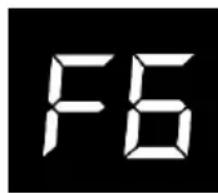
2) The Speed button controls the variable speed motor. Nine speeds provide precise fan control. Press the power button and select fan speed: F1 through F9 proceeding from low to high speed. The initial default setting is high (F9). Adjust as desired. The fan speed will display on the control panel as the speeds are stepped through.
text_image
F6NOTE: When excessive condensation exists, a lower fan speed setting is recommended.
HUMIDITY CONTROL
NOTE: Allow 10 to 15 minutes for the humidistat to adjust to the room when setting up the unit for the first time.
NOTE: The EP Series has an automatic humidistat located on the cord that measures the relative humidity in the room, the humidifier cycles on and off as required to maintain the selected setting.
text_image
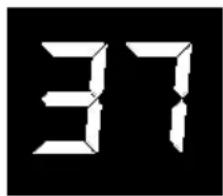
371) At initial startup the relative humidity of the room will be displayed. Each successive push of the Humidity Control Button will increase the setting in 5% increments. At 65% set point, the unit will operate continuously.
OTHER FEATURES / INDICATIONS
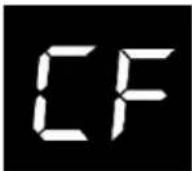
The filter's condition is critical to the humidifier's effectiveness. A check filter function (CF) will display every 720 hours of operation to remind the user to check the condition of the wick. Discoloration and the development of crusty mineral deposits indicate need for replacement of wick. Replacement may be required more often if hard water conditions exist.
1) This humidifier has a check filter reminder timed to appear after 720 hours of operation. When the Check Filter (CF) message is displayed, disconnect the power cord and check the condition of the filter. If a build-up of deposits or severe discoloration is evident replace the filter to restore maximum efficiency. The CF function is reset after plugging the unit back in.
2) When the unit is out of water, a flashing F will display on the display panel.
AUTO DRYOUT
At this time the unit will automatically switch into AUTO DRY OUT MODE and continue to run on the lowest speed until the filter is completely dry. The fan will shut off leaving you with a dry humidifier that is less prone to mold and mildew.
If AUTO DRY OUT MODE is not desired, refill the humidifier with water and the fan will return to the set speed.

WICK REPLACEMENT
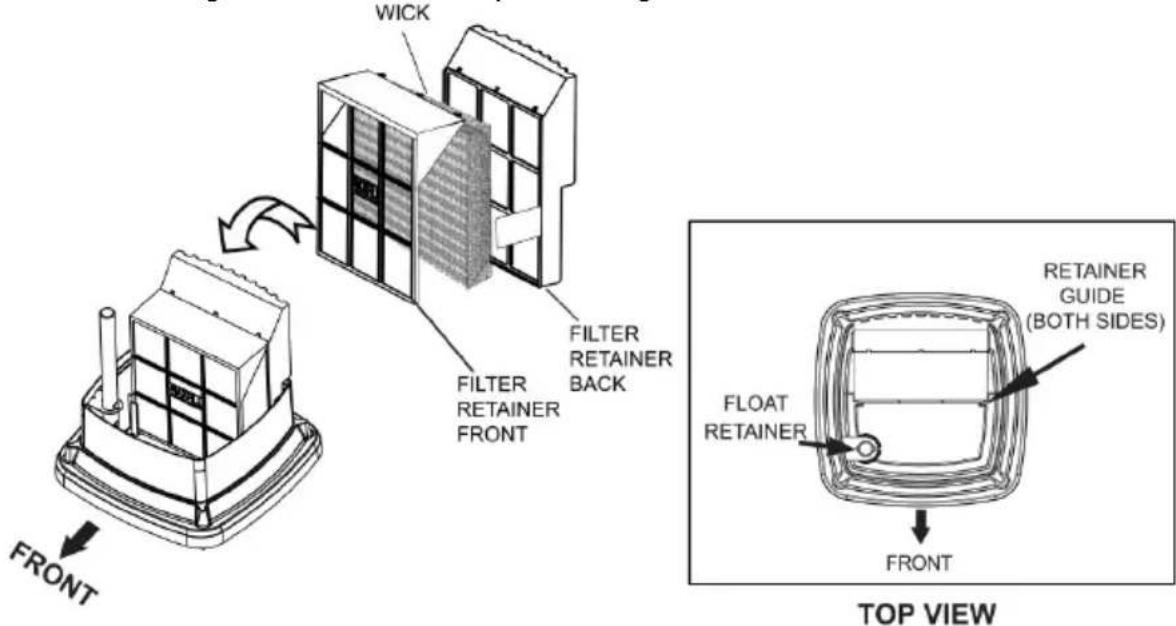
The EP9 / EP9R Series uses the 1043 Super Wick. Always use the original AIRCARE/ Essick brand wick to maintain your unit and maintain your warranty.
1) First, remove any items on top of the pedestal.
2) Lift chassis up off the base to reveal the wick, wick retainer and float.
3) Remove the wick and retainer assembly. Separate the two-part wick retainer.
4) Remove the old wick, drain excess water and discard. Do not dispose of retainer.
5) Place new 1043 wick into front side of the wick retainer and snap the larger, back section into place.
6) Then place the wick assembly into the base, aligning it with the built-in guides.
7) Replace the chassis on top of the base being careful to note the front of the unit and not damage the float when repositioning the chassis.
text_image
WICK FILTER RETAINER FRONT FILTER RETAINER BACK FRONT TOP VIEW FLOAT RETAINER RETAINER GUIDE (BOTH SIDES) FRONTRemote Control Instructions (EP9)
If your unit has the remote control, or if you have purchased the remote control, Model 1999, you have the option of controlling your humidifier functions from a distance.
To Turn the Remote on:
With display the humidifier and remote control OFF
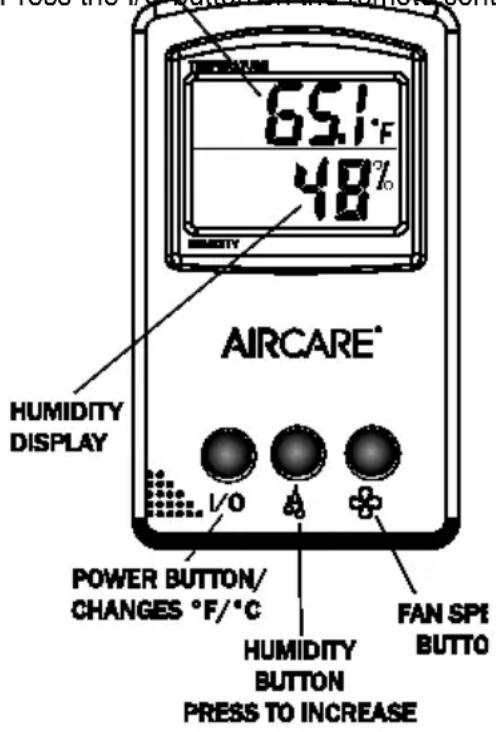
Press the I/O button on the remote control once.
text_image
651°F 48% AIRCARE® HUMIDITY DISPLAY I/O POWER BUTTON/ CHANGES °F/°C HUMIDITY BUTTON PRESS TO INCREASE FAN SPI BUTTOThis turns the humidifier ON and enables the remote control to operate all the functions of the humidifier.
(The humidifier control panel will display EC, for External Control)
Press the respective humidity and Fan Speed buttons to adjust the settings on the remote, just as you would the actual humidifier.
The default setting for temperature readout is Fahrenheit (F). If you prefer degrees Celsius (C), press the I/O button one more time to use that unit of measure.
Pressing the I/O button one more time will turn both the Remote Control and the Humidifier OFF.
If the Humidifier is already on and operating when the I/O button on the remote is pressed, command of the humidifier transfers to the Remote, and reverts to the settings last used with the remote. You can readjust the settings as desired.
If the controls on the humidifier are used while the Remote Control is in command, control will revert to the humidifier, and the settings will revert to those last used on the humidifier control panel. The remote control will remain on until turned off.
USING THE REMOTE CONTROL
When the remote is in control, the display on the humidifier will read EC (for External Control).
- The humidity and speed buttons operate the same way as their counterparts on the unit.
- The fan speed and humidity setting will display on the control panel as you adjust them.
- The default measure for temperature is Fahrenheit (°F), but pressing the I/O button a second time will change to Celsius (°C)
- Periodically the remote performs a frequency check and will be unresponsive to input. Wait 5 seconds and try your input again.
CARE AND MAINTENANCE
Cleaning your humidifier regularly helps eliminate odors and bacterial and fungal growth. Ordinary household bleach is a good disinfectant and can be used to wipe out the humidifier base and bottle/reservoir after cleaning We recommend cleaning your humidifier whenever changing the wicks. We also recommend using Essick Ai® Bacteriostat Treatment each time you refill your humidifier to eliminate bacterial growth. Add bacteriostat according to the instructions on the bottle. Please call 1-800-547-3888 to order Bacteriostat Treatment, part number 1970.
STANDARD CLEANING
1) Remove any items from the pedestal top. Turn off unit completely and unplug from outlet.
2) Lift off chassis and set aside.
3) Carry or roll base to cleaning basin. Remove and dispose of used wick. Do not dispose of retainer.
4) Pour out any remaining water from the reservoir. Fill reservoir with water and add 8 oz. (1 cup) of undiluted white vinegar. Let stand 20 minutes. Then pour out solution.
5) Dampen a soft cloth with undiluted white vinegar and wipe out reservoir to remove scale. Rinse the water bottle and reservoir thoroughly with fresh water to remove scale and cleaning solution before disinfecting.
DISINFECTING UNIT
6) Fill the reservoir full with water and add 1 teaspoon of bleach. Let solution stay for 20 minutes, then rinse with water until bleach smell is gone. Dry interior surfaces with clean cloth. Wipe down the outside of the unit with a soft cloth dampened with fresh water.
7) Refill unit and reassemble per ASSEMBLY instructions.
SUMMER STORAGE
1) Clean unit as outlined above.
2) Discard used wick and any water in the reservoir. Allow to dry thoroughly before storage. Do not store with water inside reservoir.
3) Do not store unit in an attic or other high-temperature area, as damage is probable.
4) Install new filter at beginning of season
REPAIR PARTS LIST
text_image
Technical diagram of a mechanical device with numbered components for identification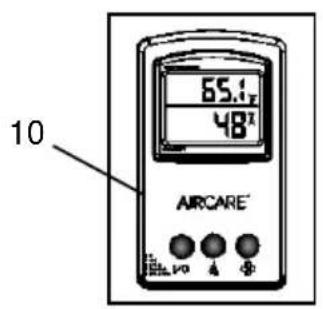
text_image
65.1 48 10 AIRCARE| Replacement Parts Available For Purchase | |||
| ITEM NO. | DESCRIPTION | Part Number | |
| EP9(R) 500 | EP9(R) 800 | ||
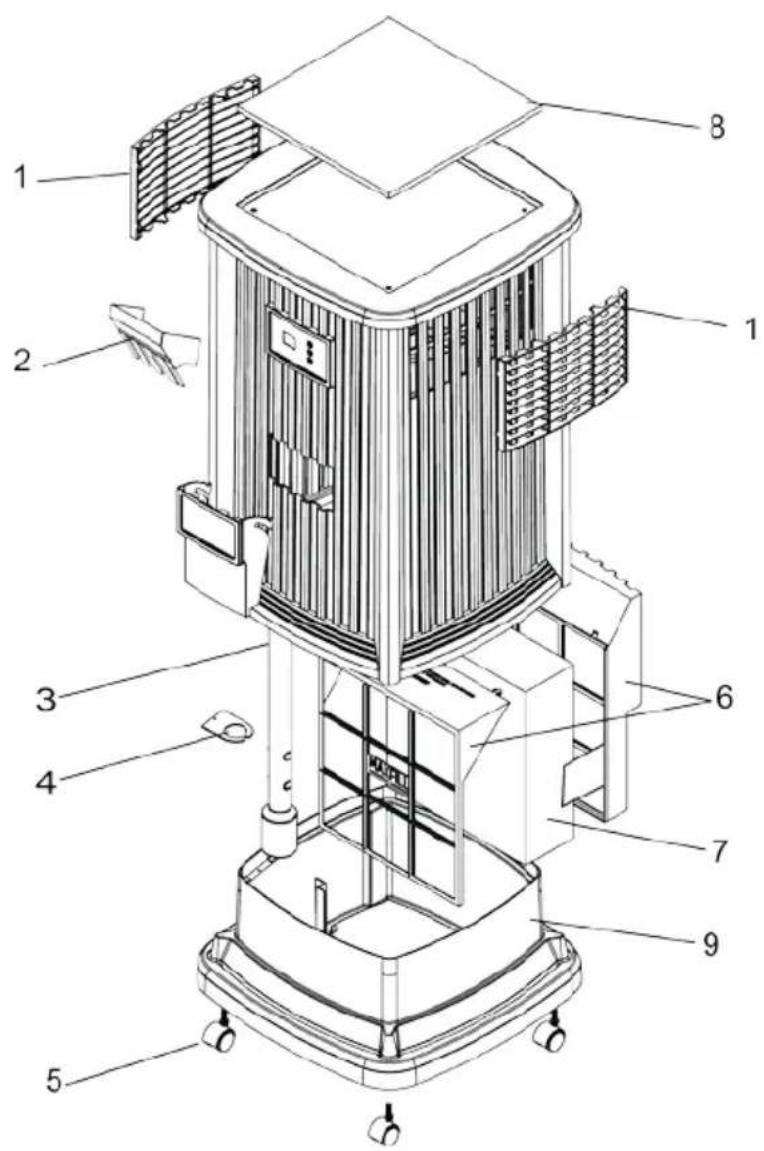
| 1 | Deflector/Vent | 1B71973 | 1B72714 |
| 2 | Funnel | 1B72282 | 1B72282 |
| 3 | Float | 1B71971 | 1B71971 |
| 4 | Float Retainer | 1B71972 | 1B72713 |
| 5 | Casters (4) | 1B5460070 | 1B5460070 |
| 6 | Wick support assy. | 1B72081 | 1B72081 |
| 7 | Wick | 1043 | 1043 |
| 8 | Insert | 1B72726 | 1B72726 |
| 9 | Remote Control † | 7V1999 | 7V1999 |
| -- | Owner's Manual(Not pictured) | 1B72891 | 1B72891 |
Parts and accessories may be ordered by calling 1-800-547-3888. Always order by part number, not item number. Please have model number of humidifier available when calling.
† Remote control is provided with the EP9R 500 and EP9R 800, but can be purchased separately and used on any model of the EP9 series.
| Trouble | Probable Cause | Remedy |
| Unit does not operate on any speed setting | No power to unit. | Ensure polarized plug is fully inserted in wall outlet. |
| Unit has run out of water – fan will not operate without water is present. | Refill reservoir. | |
| Refill switch operation/improper positioning of float assy. | Ensure float assembly is correctly positioned as described inWater Fill, page 5. | |
| Light remains on in chassis after unit has been turned off. | LED light stays on in cabinet whenever power is supplied. | This is normal. |
| Not enough humidity. | Wick is old and ineffective.Humidistat is not set high enough | Replace wick when clogged or hardened with minerals.Increase humidity setting on control panel. |
| Too much humidity.(condensation becomes heavy on fold surfaces in room) | Humidistat is set too high. | Reduce humidistat setting or increase room temperature. |
| Water leak | Cabinet may have been overfilled. There is a safety overflow hole in rear of cabinet. | DO NOT OVERFILL cabinet.Correct water level is indicated inside of cabinet side wall. |
| Odor | Bacteria may be present. | Clean and disinfect cabinet following Care and Maintenance instructions.Add EPA registered Bacteria Treatment according to instructions on the bottle.It may be necessary to replace the wick if odor persists. |
| Control panel does not respond to input.Display shows CL | Control lock feature has been turned on to prevent changes in settings. | Press Humidity and Speed buttons at same time for 5 seconds to deactivate feature. |
| Water leaking from unit | Bottle caps not properly tightened or situated | Check that fill cap is secure and bottle cap is correctly aligned in base. |
| Display flashes “20” | ROOM Humidity is lower than 20%. | Will read actual humidity when level comes up to 25%. |
| Display flashes”—“ | Unit initiating.Room humidity is over 90%. | Room humidity will display after initiation is complete.Will remain until humidity drops below 90%. |
HUMIDIFIER TWO YEAR LIMITED WARRANTY POLICY
SALES RECEIPT REQUIRED AS PROOF OF PURCHASE FOR ALL WARRANTY CLAIMS.
This warranty is extended only to the original purchaser of this humidifier when the unit is installed and used under normal conditions against defects in workmanship and materials as follows:
• Two (2) years from date of sale on the unit, and
- Thirty (30) days on wicks and filters, which are considered disposable components and should be replaced periodically.
The manufacturer will replace the defective part/product, at its discretion, with return freight paid by the manufacturer. It is agreed that such replacement is the exclusive remedy available from the manufacturer and that TO THE MAXIMUM EXTENT PERMITTED BY LAW, THE MANUFACTURER IS NOT RESPONSIBLE FOR DAMAGES OF ANY KIND, INCLUDING INCIDENTAL AND CONSEQUENTIAL DAMAGE OR LOSS OF PROFITS OR REVENUES.
Some states do not allow limitations on how long an implied warranty lasts, so the above limitations may not apply to you.
Exclusions from this warranty
We are not responsible for replacement of wicks and filters.
We are not responsible for any incidental or consequential damage from any malfunction, accident, misuse, alterations, unauthorized repairs, abuse, including failure to perform reasonable maintenance, normal wear and tear, nor where the connected voltage is more than 5% above the nameplate voltage.
Alterations include the substitution of name brand components including, but not limited to wicks and bacteria treatment.
We are not responsible for any damage from the use of water softeners or treatments, chemicals or descaling materials.
We are not responsible for the cost of service calls to diagnose the cause of trouble, or labor charge to repair and/or replace parts.
No employee, agent, dealer or other person is authorized to give any warranties or conditions on behalf of the manufacturer. The customer shall be responsible for all labor costs incurred.
This warranty will be null & void if purchaser attempts to repair or replace any parts which are mechanical or electrical.
Some states do not allow the exclusion or limitation of incidental or consequential damages, so the above limitations or exclusions may not apply to you.
How to obtain service under this warranty
Within the limitations of this warranty, purchaser with inoperative units should contact customer service at 800-547-3888 for instructions on how to obtain service within warranty as listed above.
This warranty gives the customer specific legal rights, and you may also have other rights which vary from province to province, or state to state.
Register your product at www.essickair.com or www.AIRCAREproducts.com.
AIRCARE®
PIÉDESTAL
HUMIDIFICATEUR
À ÉVAPORATION
SÉRIE EA12 MANUEL D'UTILISATION ET D'ENTRETIEN
natural_image
Line drawing of a portable air conditioner unit with vertical panel and control panel (no text or symbols)
EP9(R) 800; EP9(R) 500
Anglais ..... 1
Español ..... 25
POUR COMMANDER DES PIÈCES ET DES ACCESSOIRES
APPELEZ LE 1.800.547.3888
LE CONFORT EST DANS L'AIR
INSTRUCTIONS GÉNÉRALES DE SÉCURITÉ
REEMPLACEMENT DE MÈCHE
text_image
Technical diagram of an air conditioning unit with numbered components and an AISCARE digital display showing temperature reading.natural_image
Line drawing of a portable air conditioner unit with control panel and display (no text or symbols)EP9(R) 800; EP9(R) 500
Anglais .... 1
Français ...... 13

PARA ADQUIRIR PIEZAS Y ACCESORIOS LLAME AL 1.800.547.3888
LA COMODIDAD ESTÁ EN EL AIRE