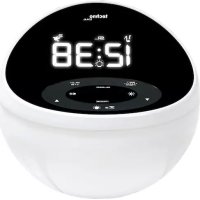
WT500 - Light therapy TECHNOLINE - Free user manual and instructions
Find the device manual for free WT500 TECHNOLINE in PDF.



| Product type | Radio alarm clock with light therapy |
| Brand | TECHNOLINE |
| Model | WT500 |
| Main power supply | AC/DC power adapter (not included) |
| Backup power supply | 3 AAA 1.5V batteries (not included) |
| Display | Backlit LCD screen with brightness adjustment (3 levels) |
| Alarm function | Two independent alarms (ALM1, ALM2) with source selection: buzzer, FM radio, nature sounds (4 sounds) |
| Light therapy | Progressive LED lighting before wake-up (15 or 30 minutes), adjustable brightness (0-15) and color (white, C1, C2) |
| FM radio | FM band 87.5-108 MHz, 10 presets, automatic search |
| Nature sounds | 4 sounds: birds, forest, beach, thunderstorm |
| Auxiliary input | 3.5mm AUX input for external playback (iPhone, iPod, MP3 player) |
| Sleep timer | Programmable from 5 to 120 minutes, automatic shutdown of light, radio or sounds |
| Nap function | Timer from 5 to 120 minutes with audible alert |
| Snooze alarm | Adjustable duration from 5 to 60 minutes, repeat for up to 1 hour |
| Volume | 15 levels, adjustable with ▲/▼ buttons |
| Time format | 12h or 24h display |
| Antenna | Wired FM antenna |
| Maintenance and cleaning | Clean with a soft, dry cloth. Do not use abrasive or liquid products. |
| Safety | Use only the supplied power adapter. Do not expose to moisture or liquids. |
| General information | Instructions available in multiple languages. Batteries and adapter not included. |
Frequently Asked Questions - WT500 TECHNOLINE
User questions about WT500 TECHNOLINE
0 question about this device. Answer the ones you know or ask your own.
Ask a new question about this device
Download the instructions for your Light therapy in PDF format for free! Find your manual WT500 - TECHNOLINE and take your electronic device back in hand. On this page are published all the documents necessary for the use of your device. WT500 by TECHNOLINE.
USER MANUAL WT500 TECHNOLINE
SCHUTZ IHRES PRODUKTES
Radio clock with wake-up-light
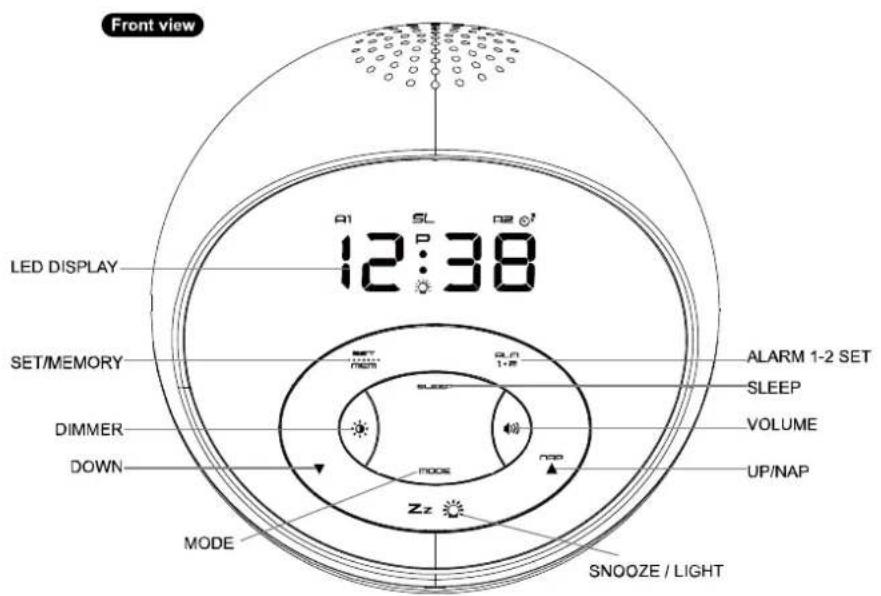
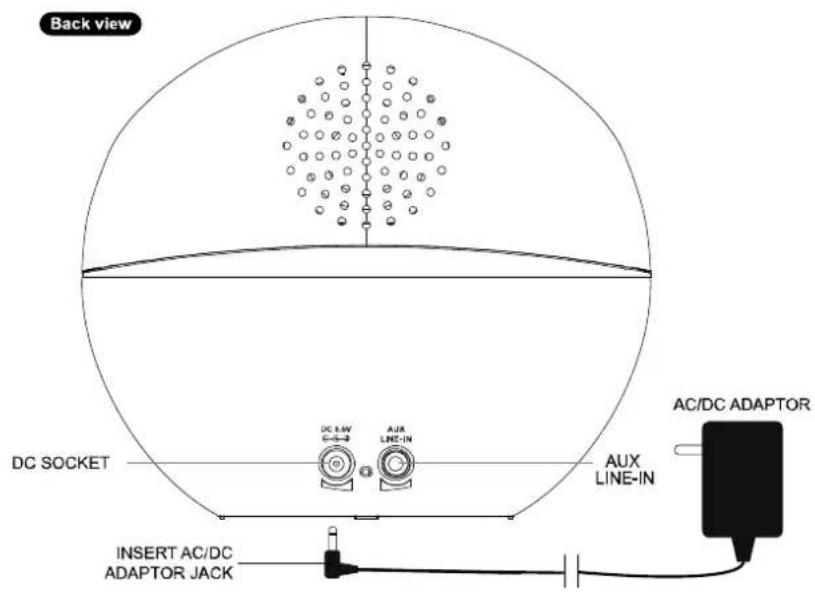
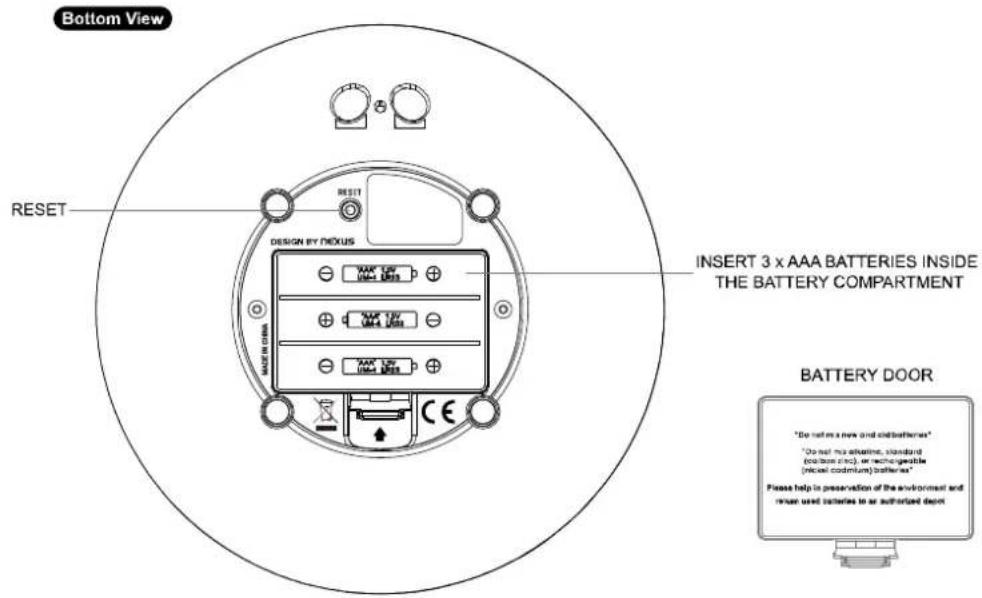
Words in the figure:
| Figure 1: ENGLISH OTHER LANGUAGE | ||
| Front View | —— | |
| L E D | D | |
| S E T | / | |
| D I M | M E | |
| D O W | N | |
| M O D | E | |
| S N O | O Z | |
| U P | / | |
| V O L | U M | |
| S L E | E P | |
| A L A | R M | |
| S L E | E P | |
| Back view | —— | |
| D C | S O | |
| I N S ADAPTOR JACK | E R | |
| A C / | D C | |
| A U X | L | |
| Bottom View | ||
| R E S | E T | |
| I N S THE BATTERY COMPARTMENT | E R | |
| B A T | T E | |
QUICK START
Plug the AC/DC adaptor to any household AC outlet, and then plug the DC jack to the back of your unit. The LCD shows the default time 0:00 and it is ready to work for you.
Extend the FM wire antenna fully and vary the direction for best FM reception. Do not strip, alter or attach to other antennas.
BACK-UP BATTERY INSTALLATION
In the event that the AC/DC adaptor power is disconnected or a power failure or other interruptions occur, the back-up batteries will maintain the time and alarm settings. The light functions do not work when batteries are only used to power your unit.
- Remove the battery cover at the back.
- Insert 3 × AAA batteries (not included & alkaline batteries preferred) by observing the ± polarity signs inside the battery compartment.
- Replace the battery cover, making sure the cover locks into place.
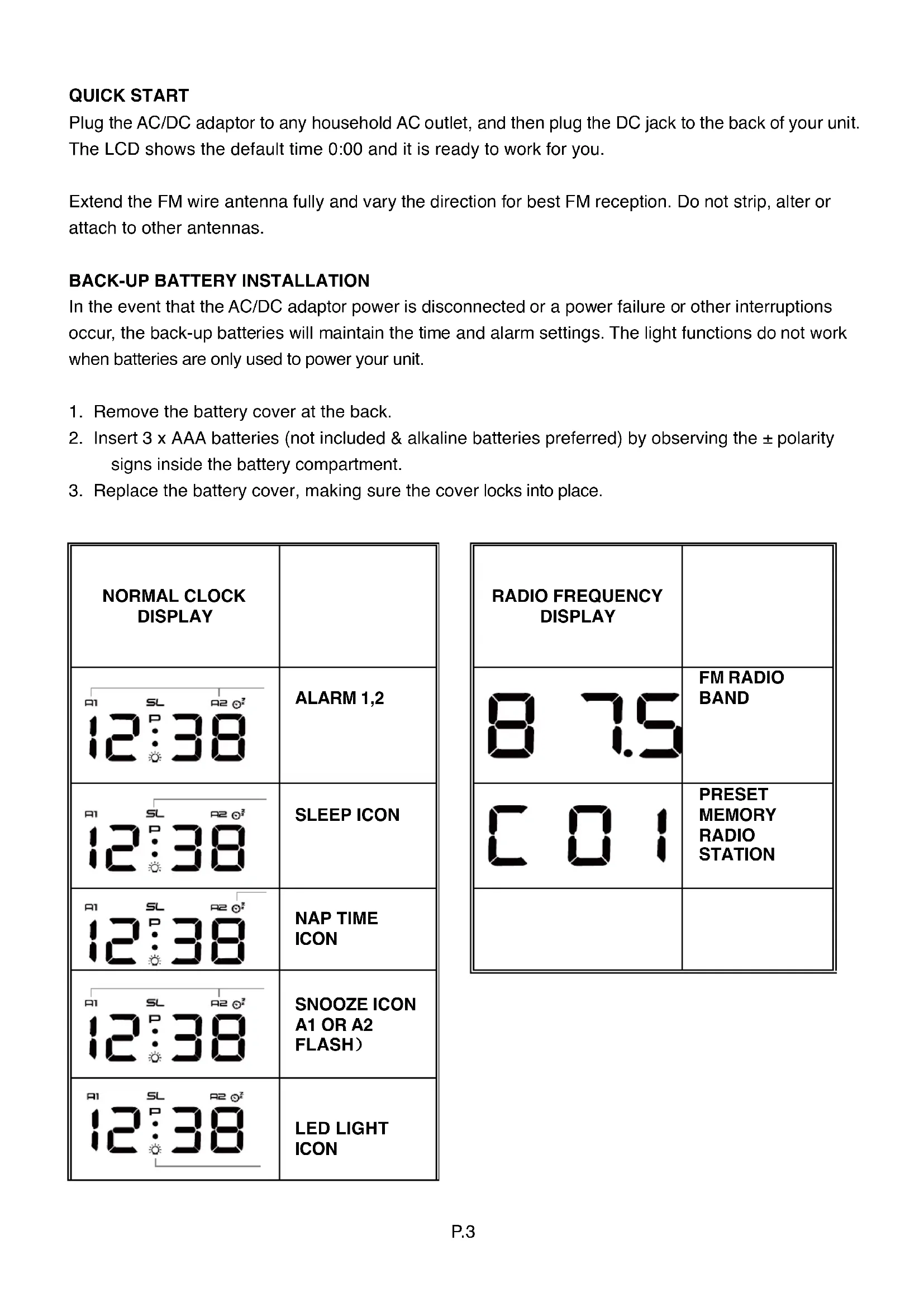
| NORMAL CLOCK DISPLAY | |
| 12:38 | ALARM 1,2 |
| 12:38 | SLEEP ICON |
| 12:38 | NAP TIME ICON |
| 12:38 | SNOOZE ICON A1 OR A2 FLASH) |
| 12:38 | LED LIGHT ICON |
- Press SET / MEM to enter time set mode, the time digits 0:00 flash. Press or to set the current time. Press and hold or will accelerate setting in faster speed.
- Press SET / MEM again, the clock display shows 24Hr and flashes. Then press or to select 12Hr or 24Hr. When 12Hr time format is selected, the F on will appear on the clock c to indicate the afternoon time.
- Then press SET / MEM again, the clock display shows a flashing 09. Press or to set your desired snooze duration from 5 to 60 minutes.
- Then press SET / MEM again, the clock display shows and OFF flashes. Then press or to set the wake-up-light mode:
15 : turns light on and brighter gently 15 minutes before your set alarm time
30: turns light on and brighter gently 30 minutes before your set alarm time
OFF: turn off the Wake-Up-Light feature
- Press SET / MEM again to return to normal time display (it will automatically return to normal time display, if no key is pressed within 8 seconds).
TO SET THE DAILY ALARM 1 & ALARM 2
- Press ALM 1.2 button once, the LCD display shows and 0:00 and flashes.
- Press or to set your desired alarm 1 time. Press and hold or will accelerate setting in faster speed.
- Press SET / MEM once, it will shows OFF, press SET / MEM once more to select which alarm type you would like to wake up with:
Wake-by-Buzzer (bu icon appears)
Wake-by-Radio (rd icon appears)
Wake-by-nature sounds (n 1, n2, n3 or n4 below the time digits)
1 Birds
记: Forest
N3: Beach / water front
4: Rain and storm
- Press ALM 1.2 again, the LCD display shows and 0:00 and flashes. You could do alarm 2 settings by repeating Step 2 to Step 4 above.
- Press SET / MEM again to return to normal time display (it will automatically return to normal time display, if no key is pressed within 8 seconds).
TO STOP AND RESET THE ALARM TO COME ON THE NEXT DAY
When the alarm is sounding, press ALM 1.2 to stop the alarm sound and automatically reset it to sound again on the following day.
TO USE THE SNOOZE ALARM
When alarm is sounding, touch Z z once, the alarm will be silenced and sound again after the set snooze duration (5-60 minutes).
To stop the alarm sound, press ALM 1.2 and automatically reset it to sound again on the following day.
AUTOMATIC SNOOZE ALARM
If Z z is not touched during the alarm is sounding, the alarm will sound for turns off automatically. The alarm will stop temporarily and sound again after the set snooze duration (5-60 minutes). This automatic snooze function will last for 1 hour.
To stop the alarm sound, press ALM 1.2 and automatically reset it to sound again on the following day.
TO USE THE WHITE LED LIGHT OR THE COLOR CHANGING MOOD LIGHT
- Simply tap on Zz to turn on the white LED light. The LCD display shows 10, which is the default brightness of the white LED light. You could press or to increase or reduce the brightness level from 0 (lowest) to 15 (highest).
- Touch Zz again to turn on the color changing mood light. The LCD shows [1.
- Touch Z z again to fix a color of your mood light. The LCD shows 2.
- Touch Z z again to turn off all the light functions.
Note: The LCD display will return to time display in 8 seconds if there is no further press of any button.
TO USE THE HI-LO DIMMER
Simply press once to select Hi-Lo brightness of the LCD display (3 levels).
TO USE THE MODE FUNCTION
Simply press MODE to change the mode as below:
Clock mode → Radio mode → Nature sounds mode (N1-N4) → Return to clock mode
TO LISTEN TO THE RADIO
- Press MODE once to turn on the radio, the clock display will show the radio frequency in FM MHz
- Then press or to tune into a desired radio station. To scan the stations, touch and hold or for a few seconds and release. The radio will search and stop on the next good receivable station.
- To stop the radio function, press MODE for 2 seconds.
- Press once, the LCD displays L07 (volume level 07), then press or to adjust to your desired volume level from level 1 to 15.
Note: For best reception of radio signal, keep your radio away from fluorescent lamps or mobile phone, which may cause interference to the radio.
TO LISTEN TO NATURE SOUNDS
Press MODE twice, the LCD shows 1, 2, 3 or 4 for our selected nature sound:
1 Birds
n2: Forest
BEACH/WATERFRONT
Rain and storm
TO USE THE AUX LINE-IN FUNCTION
You could play the music from your iphone, ipod or MP3 player by using the AUX function.
- Press the MODE to activate turn on the radio or nature sounds.
- Plug in the AUX cable to the AUX LINE-IN opening at the back, the LED display shows AU.
- Turn on your iphone, ipod or MP3 player to play music through your unit. Adjust the volume on your iPhone, ipod or MP3 player. Please note that you cannot adjust music volume on your unit.
- To stop playing music, unplug the AUX cable. Press and hold MODE to exit the mode function.
Note: When you plug in the AUX cable, it'll no function of other MODE function, volume of the unit can't be adjusted when it in AUX function.
You could stop playing the radio, the nature sound or your MP3 music anytime by pressing and holding MODE for 2 seconds.
TO USE THE NAP TIME
Simple press , then you can choose nap time in steps from 05 to 120 minutes. When nap time is alarming, simple press to turn off.
TO USE THE MEMORY SET (RADIO PRESET) FUNCTION
This clock radio features a total of 10 preset memory of FM station. This allows you to preset your favorite stations and access them quickly.
- Press MODE once to turn on the radio.
- Press or to select a radio station you like to preset memory.
- Then press and hold the SET / MEM for 2 seconds until C01 icon flashes and 01 is shown under the radio frequency digits.
- Press and hold SET /MEM for 2 second to store memory 01. C01 icon becomes static.
Topreset memory 2 and other FM station:
- Press or to select another radio station you want to preset.
- Press and hold SET / MEM for 2 seconds until C02 flashes and 02 appears at upper right of LCD.
- Single press SET / MEM to select 02, then press and hold SET/ MEM to store memory 02.
- Repeat above step 1-3 to preset up to ten FM stations.
To listen to a preset station at any time, turn on the radio first, single press the SET /MEM to select a preset station while the radio is on.
To edit a preset station, select another station and then repeat step 2-4. This overrides the original setting.
TO USE THE SLEEP TIMER
You could use Sleep Timer to control your light, radio, nature sound or music before you go to sleep.
- Press SLEEP once, the LCD display sldicon and 120 (120 minutes) and flashes. Press SLEEP once at a time to select in steps a 120 to 5 minutes sleep timer duration.
- The sleep timer display remains for few seconds and then returns to normal time display. The SL icon will appear, showing the timer is activated.
- The radio will play for the programmed sleep time and then shut off. To check how many sleep time is remaining, press SLEEP once.
- To turn off the radio before the sleep time has elapsed, press and hold MODE for 2 seconds.
Note: The SLEEP function could also control your white LED light, colored mood light, nature sounds or the AUX function in the same way.
TROUBLE SHOOTING
If your unit displays irrelevant time or does not function properly, which maybe caused by electro-static discharge or other interference, use a thin object to press the RESET button at the back of your unit. All the settings will be reset to default settings and you need to set your unit again.
CARE OF YOUR PRODUCT
- Place your clock radio on a stable surface, away from sources of direct sunlight or excessive heat or moisture.
- Protect your furniture when placing your units on a natural wood and lacquered finish by using a cloth or protective material between it and the furniture.
- Clean your unit with a soft cloth moistened only with mild soap and water. Stronger agents such as Benzine, thinner or similar materials can damage the surface of the unit. Make sure the unit is unplugged before cleaning.
- Do not mix old and new batteries. Do not mix alkaline, standard (carbon-zinc), or rechargeable (nickel-cadmium) batteries.
- If the unit is not to be used for a prolonged period, such as a month or longer, remove the batteries to prevent possible corrosion. Should the battery compartment become corroded or dirty, clean the compartment thoroughly and replace the batteries.
- Do not open the inner back case or tamper with any components of this unit.
- Do not plug in any other AC/DC adaptor with incorrect specifications or voltage.
GUIDE D'INSTRUCTIONS DU WT 500
Wake-by-Buzzer (appare I'icona bu)
Wake-by-Radio (appare I'icona rd)
ZASTAVENÍ A RESET ALARMU NA DALŠI DEN
Pri zneni alarmu stisknete ALM 1.2 k zastaveni zvuku alarmu a automatickemu resetovani k nastaveni na dalsi den.
POUZITI OPAKOVANEHO ALARMU
- SCHUTZ IHRES PRODUKTES
- Radio clock with wake-up-light
- QUICK START
- BACK-UP BATTERY INSTALLATION
- TO SET THE DAILY ALARM 1 & ALARM 2
- TO STOP AND RESET THE ALARM TO COME ON THE NEXT DAY
- TO USE THE SNOOZE ALARM
- AUTOMATIC SNOOZE ALARM
- TO USE THE WHITE LED LIGHT OR THE COLOR CHANGING MOOD LIGHT
- TO USE THE HI-LO DIMMER
- TO USE THE MODE FUNCTION
- TO LISTEN TO THE RADIO
- TO LISTEN TO NATURE SOUNDS
- TO USE THE AUX LINE-IN FUNCTION
- TO USE THE NAP TIME
- TO USE THE MEMORY SET (RADIO PRESET) FUNCTION
- TO USE THE SLEEP TIMER
- TROUBLE SHOOTING
- CARE OF YOUR PRODUCT
- GUIDE D'INSTRUCTIONS DU WT 500
- ZASTAVENÍ A RESET ALARMU NA DALŠI DEN
- POUZITI OPAKOVANEHO ALARMU
Brand : TECHNOLINE
Model : WT500
Category : Light therapy