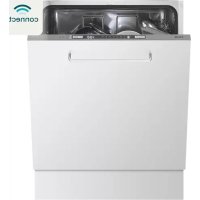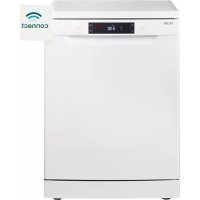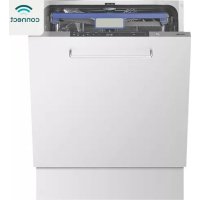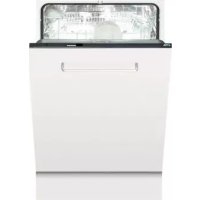
AFI8523ZT - Dishwasher ETNA - Free user manual and instructions
Find the device manual for free AFI8523ZT ETNA in PDF.



User questions about AFI8523ZT ETNA
0 question about this device. Answer the ones you know or ask your own.
Ask a new question about this device
Download the instructions for your Dishwasher in PDF format for free! Find your manual AFI8523ZT - ETNA and take your electronic device back in hand. On this page are published all the documents necessary for the use of your device. AFI8523ZT by ETNA.
USER MANUAL AFI8523ZT ETNA
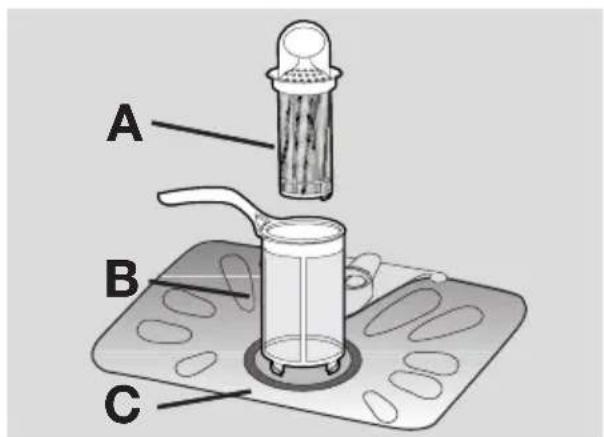
- grove filter (A)
- microfilter (B)
- platte filter (C)
Use of the appliance 57
Setting the water softener 57
Use of dishwasher salt 58
Use of rinse aid 59
Loading cutlery and dishes 60
Use of detergent 62
Setting and starting a washing programme
63
Washing programmes 64
Care and cleaning 65
What to do if... 66
Technical data 67
Installation 67
Water connection 68
Electrical connection 69
Environment concerns
69
C
Subject to change without notice

Safety information
i For your safety and correct operation of the appliance, read this manual carefully before installation and use. Always keep these instructions with the appliance even if you move or sell it. Users must fully know the operation and safety features of the appliance.
Correct use
- The appliance is designed exclusively for domestic use.
- Only use the appliance to clean household utensils that are applicable for dishwashers.
- Do not put solvents in the appliance. Risk of explosion.
- Put the knives and all items with sharp points in the cutlery basket with their points down. If not, put in a horizontal position in the upper basket.
- Use only branded products for dishwashers (detergent, salt, rinse aid).
- If you open the door while the appliance is in operation, hot steam can escape. Risk of skin burns.
- Do not remove dishes from the dishwasher before the end of the washing programme.
- When the washing programme is completed, disconnect the mains plug from the mains socket and close the water tap.
-
Only an authorised service engineer can repair this appliance. Use only original spare parts.
-
Do not do repairs yourself to prevent injury and damage to the appliance. Always contact your local Service Force Centre.
General safety
- Persons (including children) with reduced physical sensory, mental capabilities or lack of experience and knowledge must not use the appliance. They must have supervision or instruction for the operation of the appliance by a person responsible for their safety.
- Obey the safety instructions from the manufacturer of the dishwasher detergent to prevent burns to eyes, mouth and throat.
- Do not drink the water from the dishwasher. Detergent residues can stay in your appliance.
Always close the door when you do not use the appliance to prevent injury and not to stumble over the open door. - Do not sit or stand on the open door.
Child safety
- Only adults can use this appliance. Children must get supervision to make sure that they do not play with the appliance.
- Keep all the packaging away from children. There is a risk of suffocation.
- Keep all detergents in a safe area. Do not let children touch the detergents.
- Keep children away from the appliance when the door is open.
Installation
- Make sure that the appliance is not damaged because of transport. Do not connect a damaged appliance. If necessary, contact the supplier.
- Remove all packaging before first use.
- A qualified and competent person must do the electrical installation.
- A qualified and competent person must do the plumbing installation.
- Do not change the specifications or modify this product. Risk of injury and damage to the appliance.
-
Do not use the appliance:
-
if the mains cable or water hoses are damaged,
-
if the control panel, worktop or plinth area are damaged, that you can get access to the inner side of the appliance. Contact your local Service Force Centre.
-
Do not drill into the sides of the appliance to prevent damage to hydraulic and electrical components.

Warning! Carefully obey the instructions for electrical and water connections.
Product description
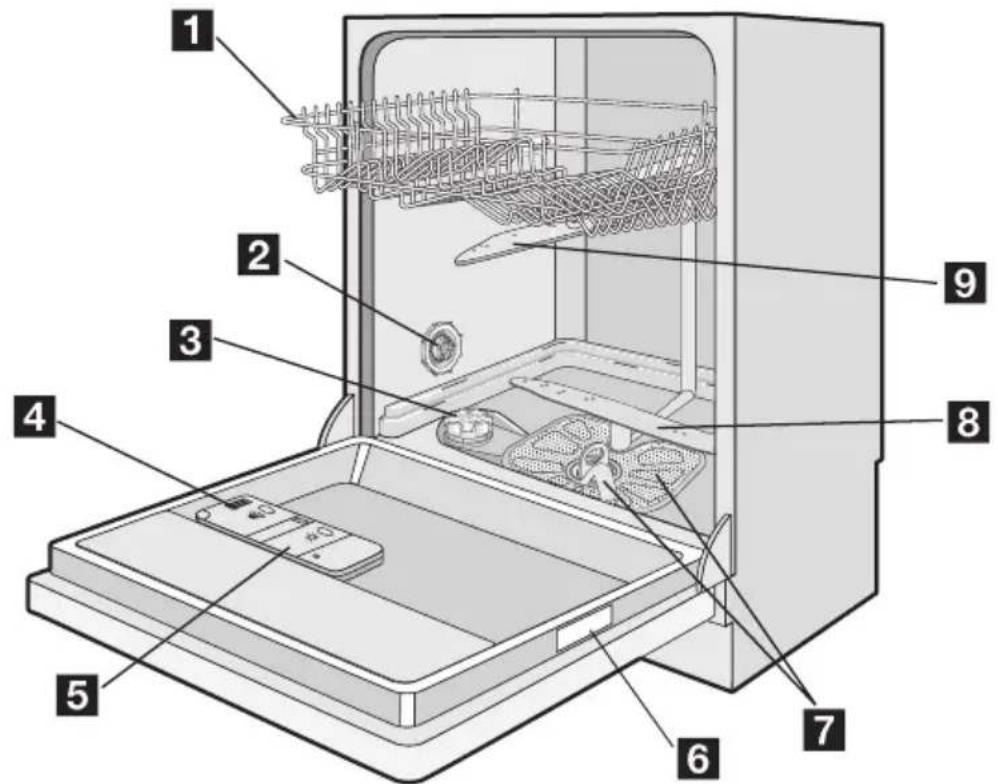
1 Upper basket
2 Water hardness dial
3 Salt container
4 Detergent dispenser
5Rinse aid dispenser
6 Rating plate
7 Filters
8 Lower spray arm
9 Upper spray arm
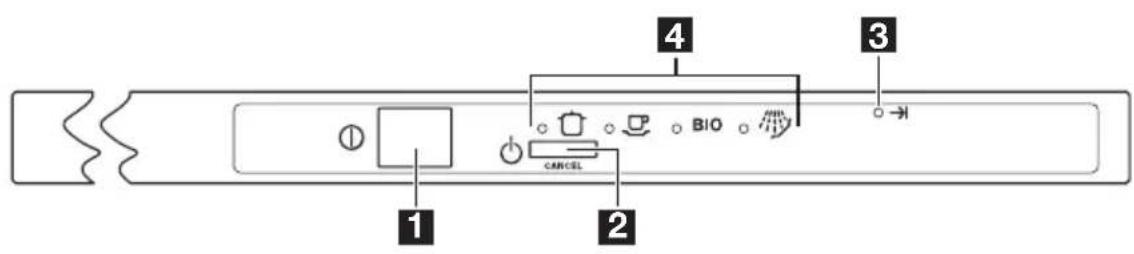
1 On/off button
2Programme selection/cancel button /(CANCEL)
Indicator light
4Programme indicator lights
| Indicator light | |
| →I | The indicator light comes on when the washing programme is completed. Auxiliary functions: · Level of the water softener. · Activation/deactivation of the audible signals. · An alarm if the appliance has a malfunction. |
Programme selection/cancel button
Use the programme selection/cancel button for these operations:
- To set the washing programme. Refer to the chapter 'Setting and starting a washing programme'.
- To set the water softener. Refer to the chapter 'Setting the water softener'.
To deactivate/activate the audible signals. Refer to the section 'Audible signals'. - To cancel a washing programme in progress. Refer to the chapter 'Setting and starting a washing programme'.
Setting mode
The appliance is in setting mode when all the programme indicator lights are off and the end indicator light flashes.
The appliance must be in setting mode for these operations:
- To set a washing programme.
-
To set the water softener level.
-
To deactivate/activate the audible signals. If a programme indicator light is on, cancel the programme to go back to the setting mode. Refer to the chapter "Setting and starting a washing programme".
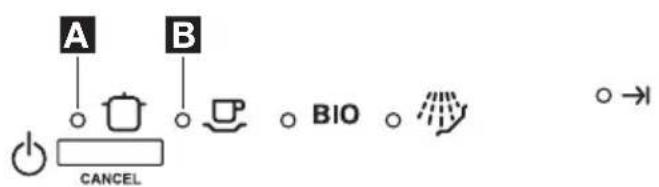
Programme indicator lights A and B
Apart the selection of the corresponding washing programme, these lights have an auxiliary functions:
- The adjustment of the water softener level.
- Deactivation/activation of the audible signals.
Audible signals
You can hear an audible signal:
- At the end of the washing programme.
- When the appliance has a malfunction.
The activation of the audible signals is set at the factory.
Do these steps to deactivate the audible signals:
-
Switch on the appliance.
-
Make sure that the appliance is in setting mode.
- Press and hold the programme selection/cancel button until programme indicator light A flashes and programme indicator light B comes on.
- Press the programme selection/cancel button again.
-Programme indicator light A comes on.
- Programme indicator light B starts to flash.
-
Wait until programme indicator light A goes off.
-
Programme indicator light B continues to flash.
Use of the appliance
Refer to the following instructions for each step of procedure:
- Make a check if the water softener level is correct for the water hardness in your area. If necessary set the water softener.
- Fill the salt container with dishwasher salt.
- Fill the rinse aid dispenser with rinse aid.
- Load cutlery and dishes into the dishwasher.
Setting the water softener
The water softener removes minerals and salts from the water supply. Minerals and salts can have bad effect on the operation of the appliance.
Water hardness is measured in equivalent scales:
-
German degrees (dH^)
-
The end indicator light comes on.
The audible signals are activated. -
Press the programme selection/cancel button again.
-
The end indicator light goes off.
The audible signals are deactivated. -
Switch off the appliance to save the operation.
Do these steps to activate the audible signals:
-
Do the above procedure until the end indicator light comes on.
-
Set the correct washing programme for the type of load and soil.
- Fill the detergent dispenser with the correct quantity of detergent.
- Start the washing programme.
i If you use detergent tablets, refer to the chapter 'Use of detergent'.
- French degrees (°TH).
- mmol/l (millimol per litre - international unit for the hardness of water).
- Clarke.
Adjust the water softener to the water hardness in your area. If necessary, contact your local water authority.
| Water hardness Water hardness setting | |||||
| °dH | °TH | mmol/l | Clarke | manually | electronically |
| 51 - 70 | 91 - 125 | 9,1 - 12,5 | 64 - 88 | 2 | 10 |
| 43 - 50 | 76 - 90 | 7,6 - 9,0 | 53 - 63 | 2 | 9 |
| 37 - 42 | 65 - 75 | 6,5 - 7,5 | 46 - 52 | 2 | 8 |
| 29 - 36 | 51 - 64 | 5,1 - 6,4 | 36 - 45 | 2 | 7 |
| 23 - 28 | 40 - 50 | 4,0 - 5,0 | 28 - 35 | 2 | 6 |
| 19 - 22 | 33 - 39 | 3,3 - 3,9 | 23 - 27 | 2 | 5 |
| 15 - 18 | 26 - 32 | 2,6 - 3,2 | 18 - 22 | 1 | 4 |
| 11 - 14 | 19 - 25 | 1,9 - 2,5 | 13 - 17 | 1 | 3 |
| 4 - 10 7 - 18 0,7 - 1,8 5 - 12 | 1 2 | ||||
| < 4 | < 7 | < 0,7 | < 5 | \(1^{1)}\) | \(1^{1)}\) |
1) No use of salt required.
You must set the water softener manually and electronically.
Manual adjustment
The appliance is set at the factory at position 2.
- Open the door.
- Remove the lower basket.
- Turn the water hardness dial to position 1 or 2 (refer to the chart).
- Install the lower basket.
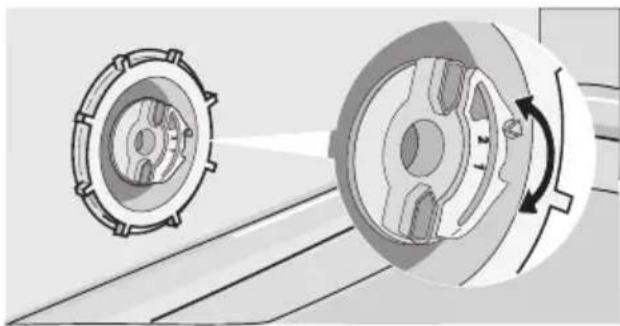
5. Close the door.
Electronic adjustment The water softener is set at the factory at level 5.
- Switch on the appliance.
- Make sure that the appliance is in setting mode.
Use of dishwasher salt
Caution! Only use dishwashers salt. Types of salt that are not applicable for dishwashers cause damage to the water softener.
- Press and hold the programme selection/cancel button.
- Release the programme selection/cancel button when programme indicator light A starts to flash and programme indicator light B comes on.
-
Wait until programme indicator light B goes off.
-
Programme indicator light A starts to flash.
-
The end indicator light starts to flash.
-
Press the programme selection/cancel button one time.
-
Programme indicator light A starts to flash.
- The setting function of the water softener is activated.
- The end indicator light flashes to show the level of the water softener.
Example: 5 flashes, pause, 5 flashes, pause, etc... = level 5.
- Press the programme selection/cancel button one time to increase the water softener level by one step.
- Press the on/off button to save the operation.
Caution! Grains of salt and salty water on the bottom of the appliance can cause corrosion. Fill the appliance with
salt before you start a washing programme to prevent corrosion.
Do these steps to fill the salt container:
- Turn the cap anticlockwise to open the salt container.
- Fill the salt container with 1 litre of water (only the first operation).
- Use the funnel to fill the salt container with salt.
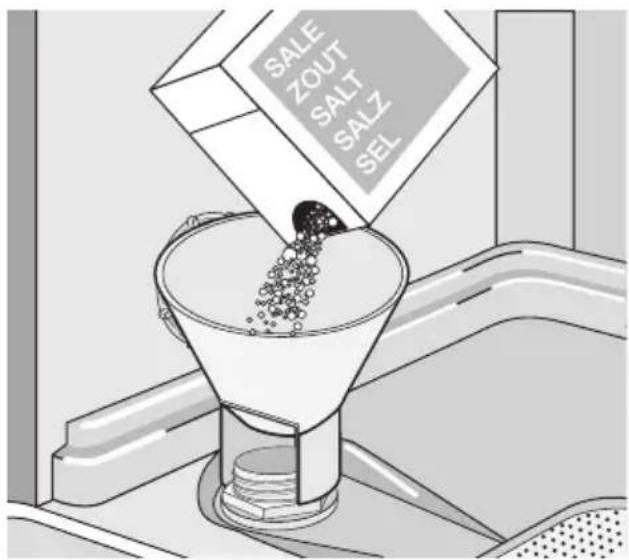
- Remove the salt around the opening of the salt container.
- Turn the cap clockwise to close the salt container.
It is normal that water overflows from the salt container when you fill it with salt.
Important! Fill the salt container from time to time.
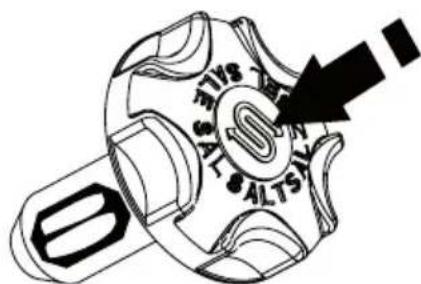
The salt cap has a refill indicator window in the center. A green float is easy to see when there is a salt inside the container. It almost goes out of view when the salt is gone.
Use of rinse aid
Caution! Only use branded rinse aid for dishwashers.
Do not fill the rinse aid dispenser with other products (e.g. dishwasher cleaning agent, liquid detergent). This can cause damage to the appliance.
i Rinse aid makes it possible to dry the dishes without streaks and stains. Rinse aid is automatically added during the last rinsing phase.
Do these steps to fill the rinse aid dispenser:
- Press the release button to open the rinse aid dispenser.
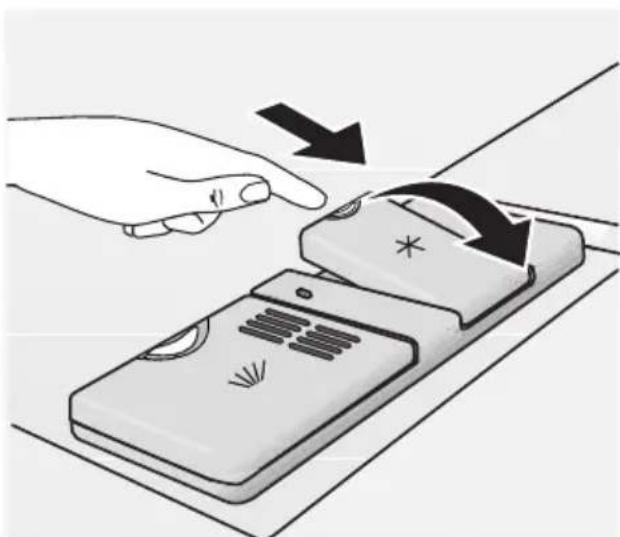
- Fill the rinse aid dispenser with rinse aid. The mark 'max.' shows the maximum level.
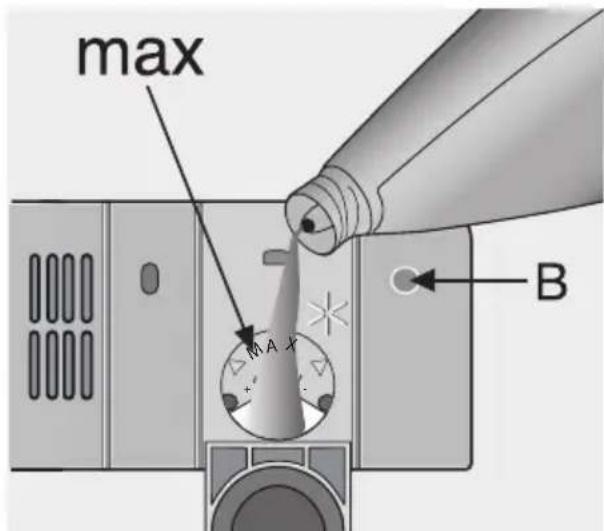
- Remove the spilled rinse aid with an absorbent cloth to prevent too much foam during the subsequent washing programme.
- Close the rinse aid dispenser.
Fill the rinse aid dispenser when the rinse aid indicator (B) becomes clear.
Adjusting the rinse aid dosage
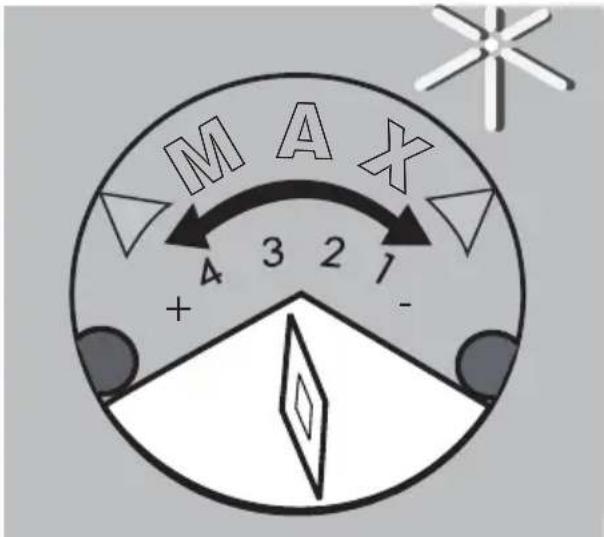
The rinse aid is set at the factory at position 3.
You can set the rinse aid dosage between position 1 (lowest dosage) and position 4 (highest dosage).
Loading cutlery and dishes
Helpful hints and tips

Caution! Only use the appliance for household utensils that are applicable for dishwashers.
Do not use the appliance to clean objects that can absorb water (sponges, household cloths, etc.).
-
Before you load cutlery and dishes, do these steps:
-
Remove all food remainings and debris.
-
Make burnt, remaining food in pans soft.
-
While you load cutlery and dishes, do these steps:
-
Load hollow items (e.g. cups, glasses and pans) with the opening down.
- Make sure that water does not collect in the container or in a deep base.
- Make sure that cutlery and dishes do not lie inside one another.
- Make sure that cutlery and dishes do not cover other cutlery and dishes.
-
Turn the rinse aid dial to increase or decrease the dosage.
-
Increase the dosage if there are water droplets or limescale on the dishes.
-
Decrease the dosage if there are streaks, whitish stains or bluish layers on the dishes.
-
Make sure that glasses do not touch other glasses.
-
Put small objects in the cutlery basket.
-
Plastic items and pans with non-stick coatings can keep water droplets. Plastic items do not dry as well as porcelain and steel items.
- Put light items in the upper basket. Make sure that the items do not move.

Caution! Make sure that the spray arms can move freely before you start a washing programme.

Warning! Always close the door after you load or unload the appliance. An open door can be dangerous.
Lower basket
Put saucepans, lids, plates, salad bowls and cutlery in the lower basket. Arrange service dishes and large lids around the edge of the basket.
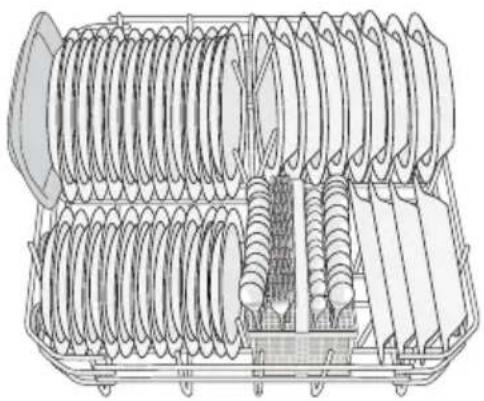
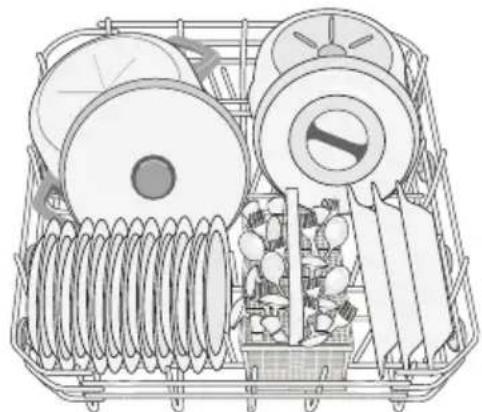
Cutlery basket
Warning! Do not put long-bladed knives in a vertical position. Arrange long and sharp cutlery horizontally in the upper basket. Be careful with sharp items.
Put forks and spoons with the handles down. Put knives with the handles up.
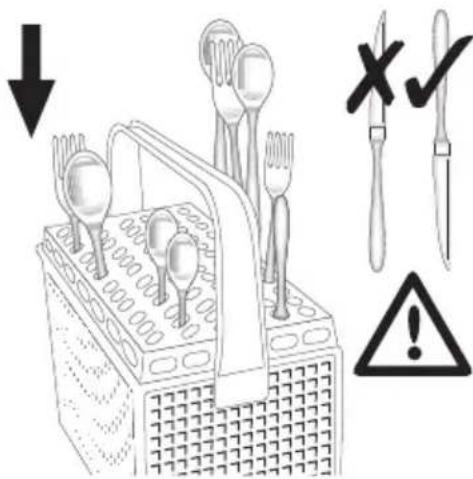
Mix spoons with other cutlery to prevent them to bond together.
Use the cutlery grid. If the dimensions of the cutlery prevent the use of the cutlery grid, you can remove it.
Upper basket
The upper basket is for plates (maximum 24 cm in diameter), saucers, salad bowls, cups, glasses, pots and lids. Arrange the items to let water touch all surfaces.
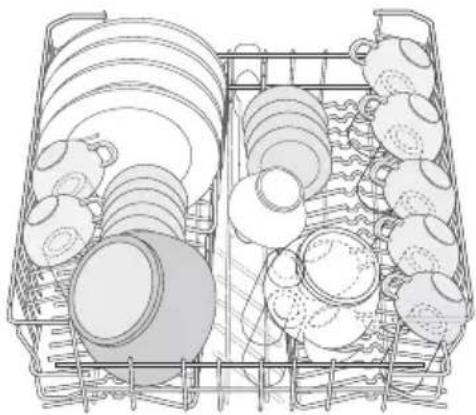
i Prevent to put plates in the first three sectors in the front part of the basket. Make sure the plates tilt forward.
Put glasses with long stems in the cup racks with the stems up. For longer items, fold the cup racks up.
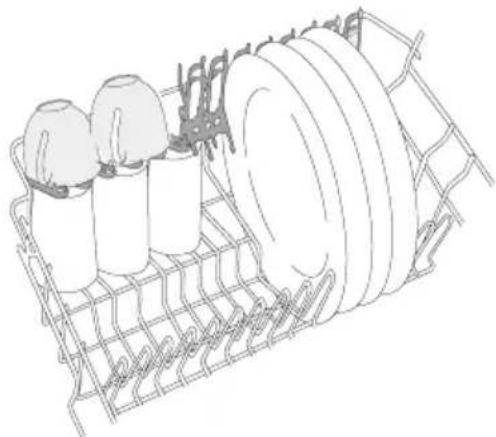
Adjustment of the height of the upper basket
If you put large plates in the lower basket, first move the upper basket to the upper position.
Caution! Adjust the height before you load the upper basket.
| Maximum height of the dishes | ||
| upper bas- | ket | lower basket |
| Upper position 20 cm 31 cm | ||
Maximum height of the dishes
Lower position 24 cm 27 cm
Do these steps to move the upper basket to the upper position:
- Move the front runner stops (A) out.
2.Pull the basket out.
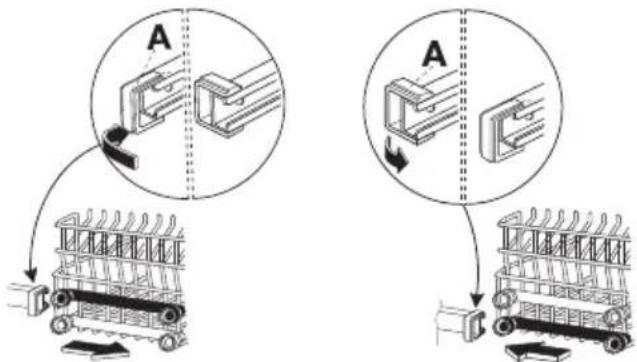
- Put the basket in the upper position.
- Put back the front runner stops (A) in their initial position.
Caution! If the basket is in the upper position, do not put cups on the cup racks.
Use of detergent
i Only use detergents (powder, liquid or tablet) that are applicable for dishwashers.
Follow the data on the packaging:
Dosage recommended by the manufacturer.
- Storage recommendations.
Do not use more than the correct quantity of detergent to save an environment.
Do these steps to fill the detergent dispenser:
- Open the lid of the detergent dispenser.

-
Fill the detergent dispenser (A) with detergent. The marking shows the dosage: 20 = approximately 20g of detergent 30 = approximately 30g of detergent.
-
If you use a washing programme with prewash phase, put more detergent in the prewash detergent compartment (B).
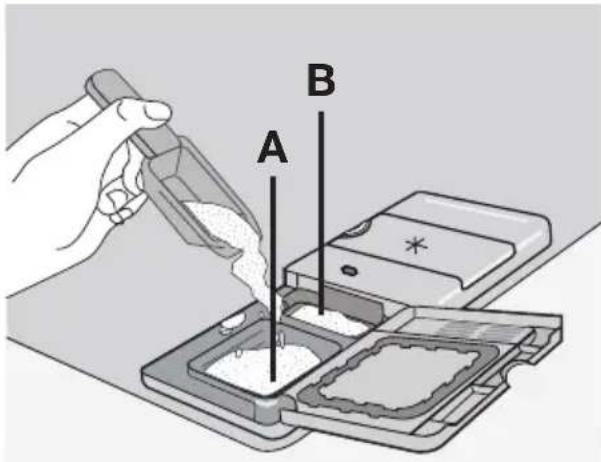
- If you use detergent tablets, put the detergent tablet in the detergent dispenser (A).
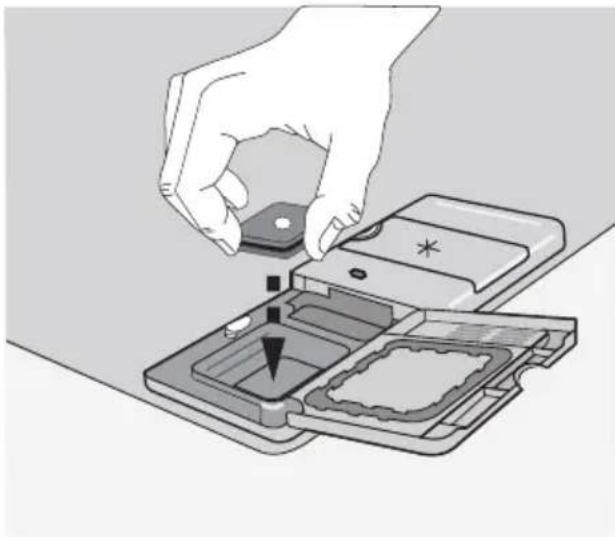
- Close the lid of the detergent dispenser. Press the lid until it locks into position.
Different brands of detergent dissolve in different times. Some detergent tablets do not have the best cleaning results during short washing programmes. Use long washing programmes when you use detergent tablets to fully remove the detergent.
Use of combi detergent tablets
These tablets contain agents such as detergent, rinse aid and dishwasher salt. Some types of tablets can contain other agents
When you use tablets, that contain special salt and rinse aid, it is not necessary to fill the salt and rinse aid containers. In this condition the rinse aid indicator light stays on when the appliance is switched on.
- Do a check if these tablets are applicable for the local water hardness. Refer to the instructions from the manufacturer.
- Select the lowest setting for the water hardness and rinse aid dosage.
Do these steps if the drying results are not satisfactory
- Fill the rinse aid dispenser with rinse aid.
- Set the rinse aid dosage to position 2.
To use normal detergent again
- Fill the salt container and rinse aid dispenser.
- Adjust the water hardness setting to the highest level.
- Do a washing programme without dishes.
- Adjust the water softener to the water hardness in your area.
- Adjust the rinse aid dosage.
Setting and starting a washing programme
i Set the washing programme with the door ajar. The washing programme only starts after you close the door. Until then it is possible to modify the settings.
Do these steps to set and start a washing programme:
-
Switch on the appliance.
-
Make sure that the appliance is in setting mode.
-
Press the programme selection/cancel button again and again to set the washing programme. Refer to the chapter 'Washing programmes'.
-
The programme indicator light comes on.
-
Close the door.
-
The washing programme starts automatically.
i When the washing programme operates, you cannot change the pro
gramme. Cancel the washing programme.
Warning! Only interrupt or cancel a washing programme if necessary.
Caution! Open the door carefully. Hot steam can come free.
Cancelling a washing programme
-
Press and hold the programme selection/cancel button for approximately 3 seconds.
-
The programme indicator light goes off.
-
The end indicator light starts to flash.
-
Release the programme selection/cancel button to cancel the washing programme.
At this time you can do these steps:
- Switch off the appliance.
- Set a new washing programme.
Fill the detergent dispenser with detergent before you set a new washing programme.
Interrupting a washing programme
Open the door.
The programme stops.
Close the door.
- The programme continues from the point of interruption.
End of the washing programme
Switch off the appliance in these conditions:
- The appliance stops automatically.
-
The audible signals for the end of the programme operate.
-
Open the door.
-
The end indicator light comes on.
-
The programme indicator light stays on.
-
Press the on/off button.
- For better drying results, keep the door ajar for some minutes before you remove the dishes.
Let the dishes cool down before you remove them from the appliance. Hot dishes are easily damaged.
Removing the load
- First remove items from the lower basket, then from the upper basket.
- There can be water on the sides and door of the appliance. Stainless steel becomes cool more quickly than the dishes.
Washing programmes
Washing programmes
| Programme | Degree of soil | Type of load Programme description | |
| Heavy soil | Crockery, cutlery, pots and pans | Prewash Main wash up to 70°C 2 intermediate rinses Final rinse Drying | |
| Normal soil | Crockery, cutlery, pots and pans | Prewash Main wash up to 65°C 2 intermediate rinses Final rinse Drying | |
| BIO 1) | Normal soil | Crockery and cutlery | Prewash Main wash up to 50°C 1 intermediate rinse Final rinse Drying |
| Any | Partial load (to be completed later in the day) | 1 cold rinse (to avoid food scraps from sticking). This programme does not require the use of detergent). | |
1) Test programme for test institutes. Please refer to separate leaflet supplied, for test data.
Consumption values
| Programme Programmec | Amme duration (in minutes) | Energy consumption (in kWh) | Water consumption (in litres) |
| ○ | 120-130 1,8-2,0 22-24 | ||
| ◎ | 105-115 1,5-1,7 23-25 | ||
| BIO | 130-140 1,0-1,2 14-16 | ||
| ☆ | 12 0,1 5 |
The pressure and temperature of the water, the variations of power supply
and the quantity of dishes can change these values.
Care and cleaning
Warning! Switch the appliance off before you clean the filters.
Cleaning the filters
Caution! Do not use the appliance without the filters. Make sure that the installation of the filters is correct. Incorrect installation will cause unsatisfactory washing results and damage to the appliance.
If necessary, clean the filters. Dirty filters decrease the washing results. The dishwasher has three filters:
- coarse filter (A)
- microfilter (B)
- flat filter (C)
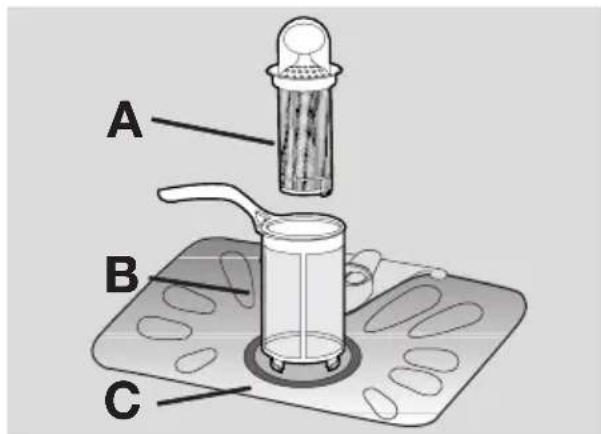
Do these steps to clean the filters:
- Open the door.
- Remove the lower basket.
- To unlock the filter system, turn the handle on the microfilter (B) approximately 1/4 anticlockwise.
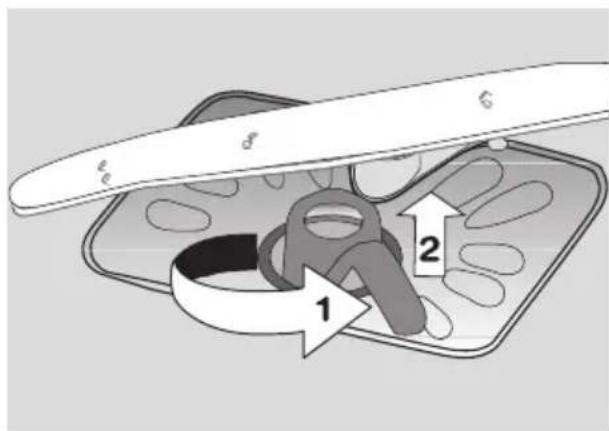
- Remove the filter system.
-
Hold the coarse filter (A) by the handle with the hole.
-
Remove the coarse filter (A) from the microfilter (B).
- Remove the flat filter (C) from the bottom of the appliance.
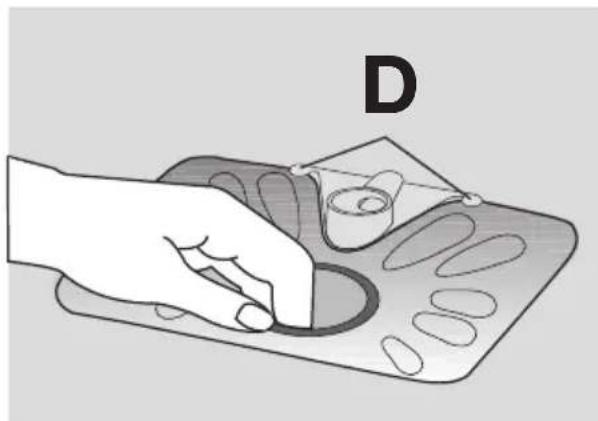
- Clean the filters below running water.
- Put the flat filter (C) in the bottom of the appliance. Install the flat filter correctly under the two guide (D).
- Put the coarse filter (A) in the microfilter (B) and push the filters together.
- Put the filter system in position.
- To lock the filter system, turn the handle on the microfilter (B) clockwise until it lock in position.
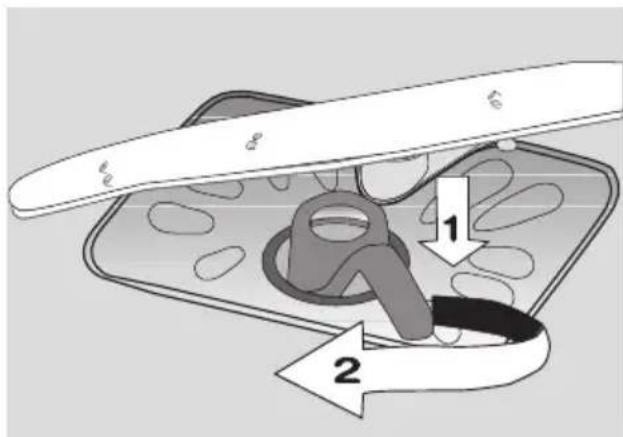
- Install the lower basket.
- Close the door.
i Do not remove the spray arms.
If the holes in the spray arms become clogged, remove remaining parts of soil with a cocktail stick.
External cleaning
Clean the external surfaces of the appliance and control panel with a damp soft cloth. Only use neutral detergents. Do not use
abrasive products, scouring pads or solvents (acetone, trichloroethylene etc...).
Frost precautions

Caution! Do not install the appliance where the temperature is below 0^ .
The manufacturer is not responsible for damage because of frost.
If not possible, empty the appliance and close the door. Disconnect the water inlet hose and remove water from the water inlet hose.
What to do if...
The appliance does not start or stops during operation.
If there is a fault, first try to find a solution to the problem yourself. If you cannot find a sol
ution to the problem yourself, contact the Service Force Centre.
| Fault code and malfunction Possible cause and solution | |
| ·continuous flash of the light of the running programme ·intermittent audible signal ·1 flash of the end indicator light The appliance does not fill with water. | ·The water tap is blocked or furred with limescale. Clean the water tap. ·The water tap is closed. Open the water tap. ·The filter in the water inlet hose is blocked. Clean the filter. ·The connection of the water inlet hose is not correct. The hose can be kinked or squashed. Make sure that the connection is correct. |
| ·continuous flash of the light of the running programme ·intermittent audible signal ·2 flashes of the end indicator light The appliance will not drain the water. | ·There is a blockage in the sink spigot. Clean the sink spigot. ·The connection of the water drain hose is not correct. The hose can be kinked or squashed. Make sure that the connection is correct. |
| ·continuous flash of the light of the running programme ·intermittent audible signal ·3 flashes of the end indicator light Anti-flood device operates | ·Close the water tap and contact your local Service Force Centre. |
| The programme does not start ·The appliance door is not closed. Close the door. ·Mains plug is not connected in. Put in the mains. ·The fuse has blown out in the household fuse box. Replace the fuse. | |
After the check, switch on the appliance. The programme continues from the point of interruption. If the malfunction shows again, contact your Service Force Centre.
These data are necessary to help you quickly and correctly:
- Model (Mod.)
Product number (PNC)
- Serial number (S.N.)
For these data, refer to the rating plate.
Write the necessary data here:
Model description : ....
Product number : ....
Serial number : ....
| The cleaning results are not satisfactory | |
| The dishes are not clean • The selected washing programme is not applicable for the type of load and soil. • The baskets are loaded incorrectly so that water cannot reach all surfaces. • Spray arms do not turn freely because of incorrect arrangement of the load. • The filters are dirty or not correctly installed. • The quantity of detergent is too little or missing. | |
| Limescales particles on the dishes | • The salt container is empty. • The water softener is adjusted on a wrong level. • The salt container cap is not closed correctly. |
| The dishes are wet and dull • No rinse aid has been used. • The rinse aid dispenser is empty. | |
| There are streaks, milky spots or a bluish coating on glasses and dishes | • Decrease the rinse aid dosage. |
| Dry water drop signs on glasses and dishes | • Increase rinse aid dosage. • The detergent can be the cause. |
Technical data
| Dimensions Width cm 59,6 | ||
| Height cm 81,8-87,8 | ||
| Depth cm 55,5 | ||
| Electrical connection - Voltage - Overall power - Fuse | Information on the electrical connection is given on the rating plate on the inner edge of the dishwasher door. | |
| Water supply pressure Minimum 0,5 bar (0,05 MPa) | ||
| Maximum 8 bar (0,8 MPa) | ||
| Capacity Place settings 12 | ||
Installation
Warning! Make sure that mains plug is disconnected from the mains socket during installation.
Important! Obey the instructions in the enclosed template to:
- Build-in the appliance.
Install the furniture panel. - Connect to the water supply and drain.
Install the appliance under a counter (kitchen worktop or sink).
If a repair is necessary, the appliance must be easily accessible for the engineer.
Put the appliance adjacent to a water tap and a drain.
For the venting of the dishwasher only water fill, water drain and power supply cable openings are necessary.
The dishwasher has adjustable feet to allow the adjustment of the height.
Make sure that the water inlet hose, the drain hose and the supply cable are not kinked or squashed, when you insert the machine.
Attaching the appliance to the adjacent units
Make sure that the counter below which you attach the appliance is a safe structure (adjacent kitchen units, cabinets, wall).
Adjusting the level of the appliance
Make sure that the appliance is level to close and seal the door correctly. If the level of the
appliance is correct, the door does not catch on the sides of the cabinet. If the door does
not close correctly, loosen or tighten the adjustable feet until the appliance is level.
Water connection
Water inlet hose
Connected the appliance to a hot (max. 60^ ) or cold water supply.
If the hot water comes from alternative sources of energy that are more environmentally friendly (e.g. solar or photovoltaic panels and aeolian), use a hot water supply to decrease energy consumption.
Connect the inlet hose to a water tap with an external thread of 3/4" .

Caution! Do not use connection hoses from an old appliance.
The water pressure must be in the limits (refer to 'Technical data'). Make sure that the local water authority gives you the average mains pressure in your area.
Make sure that there are no kinks in the water inlet hose and that the water inlet hose is not squashed or entangled.
Fit the locknut correctly to prevent water leaks.

Caution! Do not connect the appliance to new pipes or pipes that are not used for a long time. Let the water run for some minutes, then connect the inlet hose.
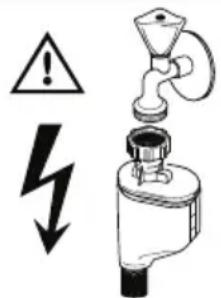
The water inlet hose is double-walled and has an inner mains cable and a safety valve. The water inlet hose is under pressure only while the water is running. If there is a leak in the water inlet hose, the safety valve interrupts the running water.
Be careful when you connect the water inlet hose:
- Do not put the water inlet hose or the safety valve in water.
- If the water inlet hose or the safety valve is damaged, immediately disconnect the mains plug from the mains socket.
- Only let the Service Force Centre replace the water inlet hose with safety valve.

Warning! Dangerous voltage
Water drain hose
- Connect the water drain hose to the sink spigot and attach it under the work surface. This prevents that the waste water from the sink goes back into the appliance.
- Connect the water drain hose to a stand pipe with vent-hole (minimum internal diameter 4 cm).
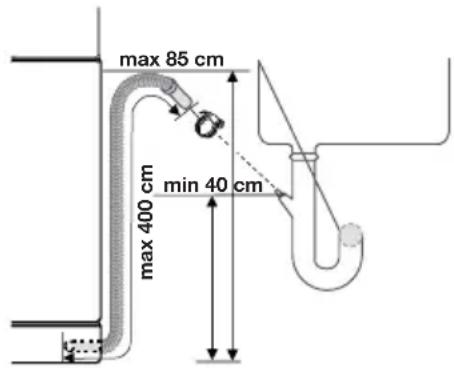
Make sure that the drain hose is not bent or squashed to prevent that the water drains does not drain correctly.
Remove the sink plug when the appliance drains the water to prevent that the water goes back into the appliance.
A drain hose extension must not be longer than 2m . The internal diameter must not be smaller than the diameter of the hose.
If you connect the water drain hose to a trap spigot under the sink, remove the plastic membrane (A). If you do not remove the membrane, remaining food can cause a blockage in the drain hose spigot

The appliance has a security feature to prevent that dirty water goes back into the appliance. If, the spigot of the sink has a 'non-return valve', this valve can cause the appliance to drain incorrectly. Remove the non-return valve.
Caution! Make sure that the water couplings are tight to prevent water leakage.
Electrical connection
Warning! The manufacturer is not responsible if you do not follow these safety precautions.
Ground the appliance according to safety precautions.
Make sure that the rated voltage and type of power on the rating plate agree with the voltage and the power of the local power supply.
Always use a correctly installed shockproof socket.
Do not use multi-way plugs, connectors and extension cables. There is a risk of fire.
Do not replace the mains cable yourself. Contact the Service Force Centre.
Make sure that the mains plug is accessible after installation.
Do not pull the mains cable to disconnect the appliance. Always pull the mains plug.
Environment concerns
The symbol on the product or on its packaging indicates that this product may not be treated as household waste. Instead it should be taken to the appropriate collection point for the recycling of electrical and electronic equipment. By ensuring this product is disposed of correctly, you will help prevent potential negative consequences for the environment and human health, which could otherwise be caused by inappropriate waste handling of this product. For more detailed information about recycling of this product, please contact your local council, your household waste disposal service or the shop where you purchased the product.
The packaging materials are environmentally friendly and can be recycled. The plastic
components are identified by markings, e.g. >PE< , >PS< , etc. Discard the packaging materials in the applicable container at the community waste disposal facilities.
Warning! To discard the appliance, follow the procedure:
- Pull the mains plug out of the socket.
- Cut off the mains cable and mains plug and discard them.
- Discard the door catch. This prevents the children to close themselves inside the appliance and endanger their lives.